
Quick answer
A Google Business Profile, formerly Google My Business, is the free listing that shows your business on Google Search and Maps. Google Business Profile optimization starts with claiming and verifying it and using your real business name. Then pick the most specific category, complete hours, services, photos and description, ask every customer for a review, and check it monthly.
Key takeaways
- Google says local results are mainly based on relevance, distance and popularity; its help page then calls the third factor prominence. It also says there's no way to pay for a better local ranking.
- Use your real-world business name. Adding keywords or your city to the name breaks Google's guidelines, and Google says it could get your profile suspended.
- Google's built-in chat ended on July 31, 2024. The Q&A section stopped appearing on many profiles in late 2025, so ignore guides that still build a plan around them.
- Google bans review incentives and asking only happy customers for reviews, which is stricter than the FTC's own rule on reviews.
Google Business Profile optimization means making your profile complete, accurate and active, so Google can match it to more local searches. This guide is for owners of small US businesses who want to show up when people nearby search for what they sell. It follows Google's own help pages step by step and points out the advice that's out of date. It ends with what to do when a profile gets suspended.
What is a Google Business Profile (formerly Google My Business)?
A Google Business Profile is the box that appears when someone searches for your business or for a service near them. On Google Search it sits on the right side; in Google Maps it sits at the bottom of the screen. It shows your name, rating, hours, phone number, photos and a button for directions.
Google renamed Google My Business to Google Business Profile in November 2021. You now edit it straight from Search or Maps, or in Business Profile Manager. For a full course, see our Google Business Profile guide.
It costs nothing. Google says "creating a Business Profile and listing your business on Google is free". That's also why your competitors have one, and why the details matter.
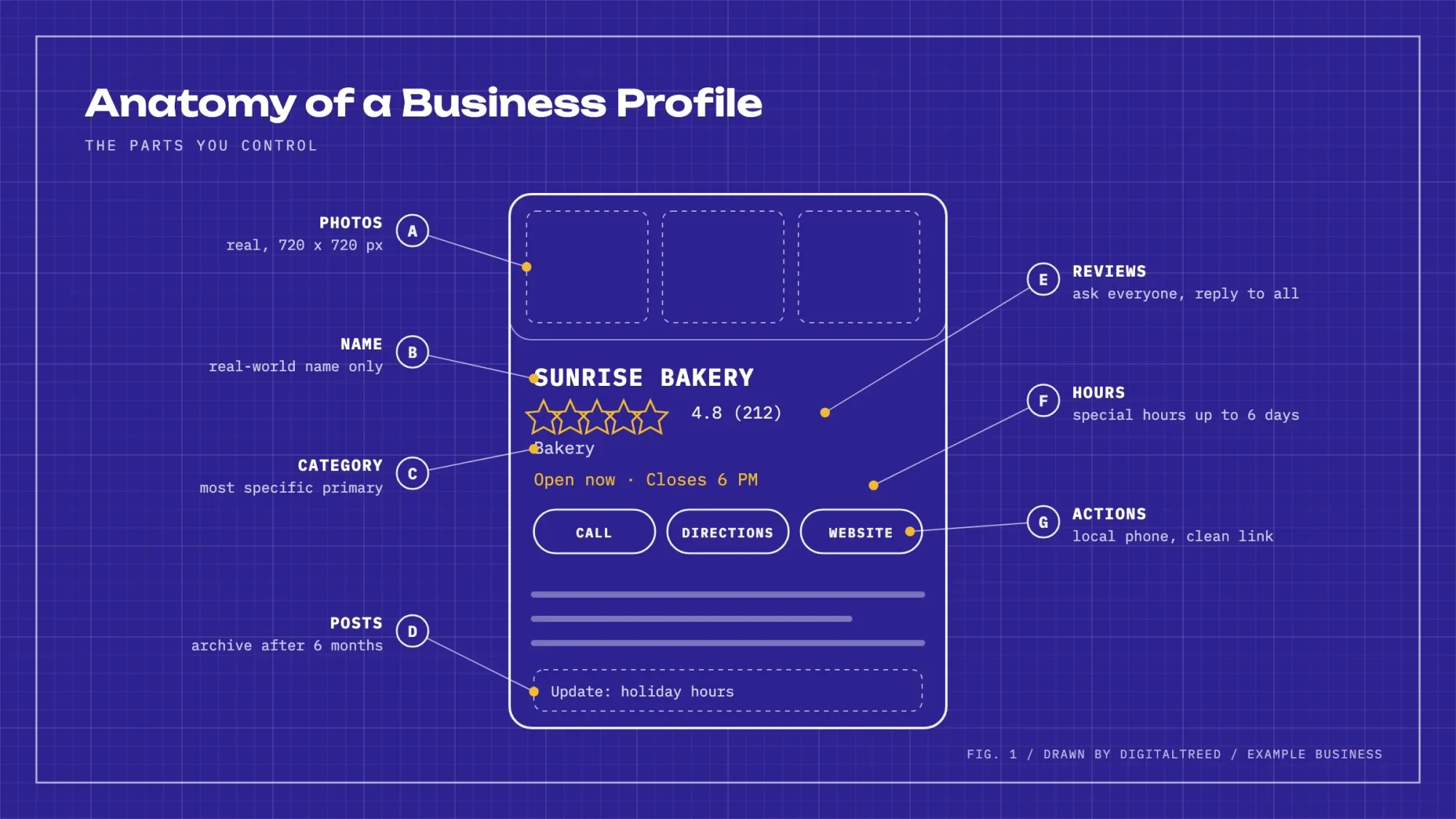 Illustration: the parts of a Business Profile you control. The business is made up.
Key facts about Google Business Profile
- Verification reviews take up to 5 business days after you submit, Google says (as of October 2026).
- Your business description can be up to 750 characters, per Google's editing page (as of October 2026).
- Google's built-in chat and call history ended on July 31, 2024.
- The FTC's rule against fake reviews and testimonials took effect on October 21, 2024.
- In BrightLocal's 2026 survey of 1,002 US adults, 71% read reviews on Google, down from 83% a year earlier (vendor survey).
How to improve your Google Business Profile ranking
To improve your Google Business Profile ranking, verify the profile, keep every detail complete and accurate, and earn reviews. Google says verified profiles are more likely to show up in search results. Businesses with complete and accurate info are too.
On this, Google is unusually open. Its help page on local ranking says "Local results are mainly based on relevance, distance, and popularity", and it explains the three parts:
- Relevance is "how well a Business Profile matches what someone is searching for." Complete categories, services and descriptions help here.
- Distance is "how far each business is from the customer who's searching." You can't change where your customers stand.
- Prominence means "how well-known a business is", based on things "like how many websites link to your business and how many reviews you have". Links from other sites are called backlinks; our guide explains how to get backlinks.
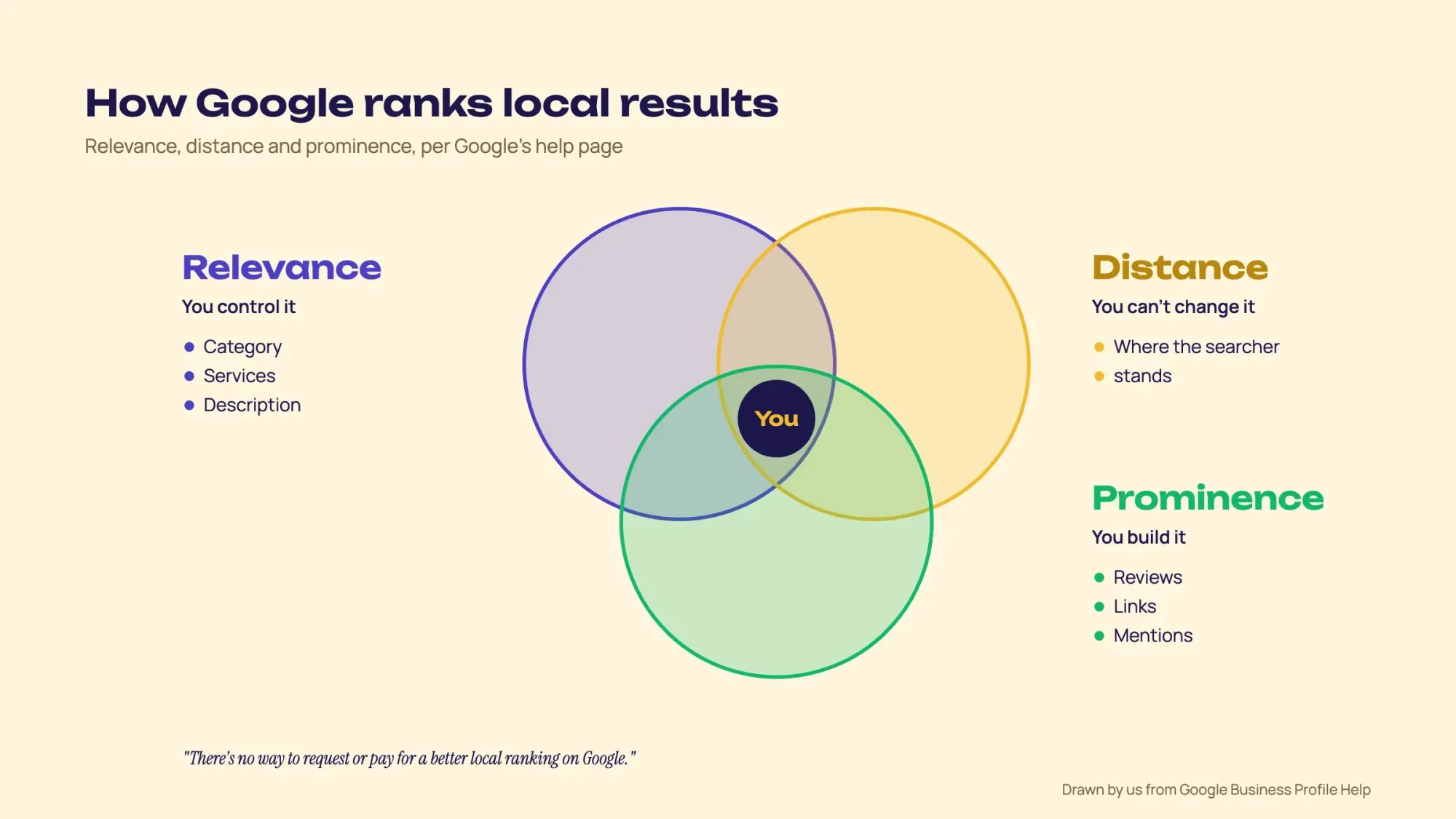 Illustration: Google's three local ranking factors and what you control in each, drawn from Google's help page.
From the same page, 2 more lines are worth keeping in mind. Google says more reviews and positive ratings "can help your business's local ranking". It also says "There's no way to request or pay for a better local ranking on Google". So if someone sells you a guaranteed spot in the map pack, they're selling something Google says doesn't exist.
SEO practitioners agree that the profile itself carries the most weight. Whitespark's 2026 survey of 47 local SEO experts ranks what they believe drives map pack rankings. Business Profile signals and review signals together made up just over half. It's a survey of opinions, not measured data, but it lines up with what Google says.
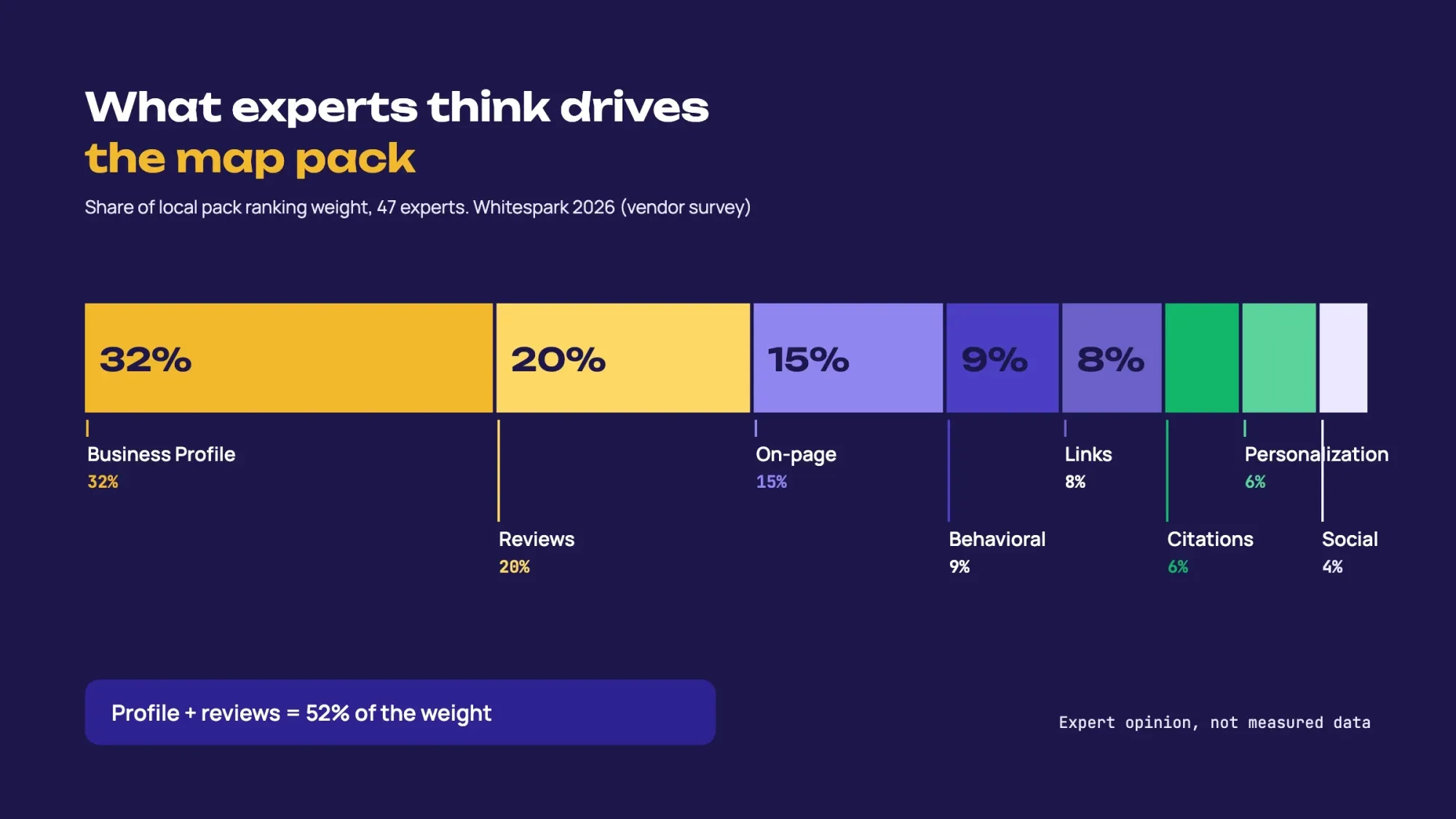 What 47 local SEO experts believe drives map pack rankings (vendor survey). Personalization 6% and social 4% not shown. Source: Whitespark Local Search Ranking Factors 2026, November 2025.
How to set up or claim your Google Business Profile
Before you create anything, check whether a profile already exists. Customers and Google itself create profiles for businesses all the time. A second one breaks Google's rule that "there should only be one profile per business".
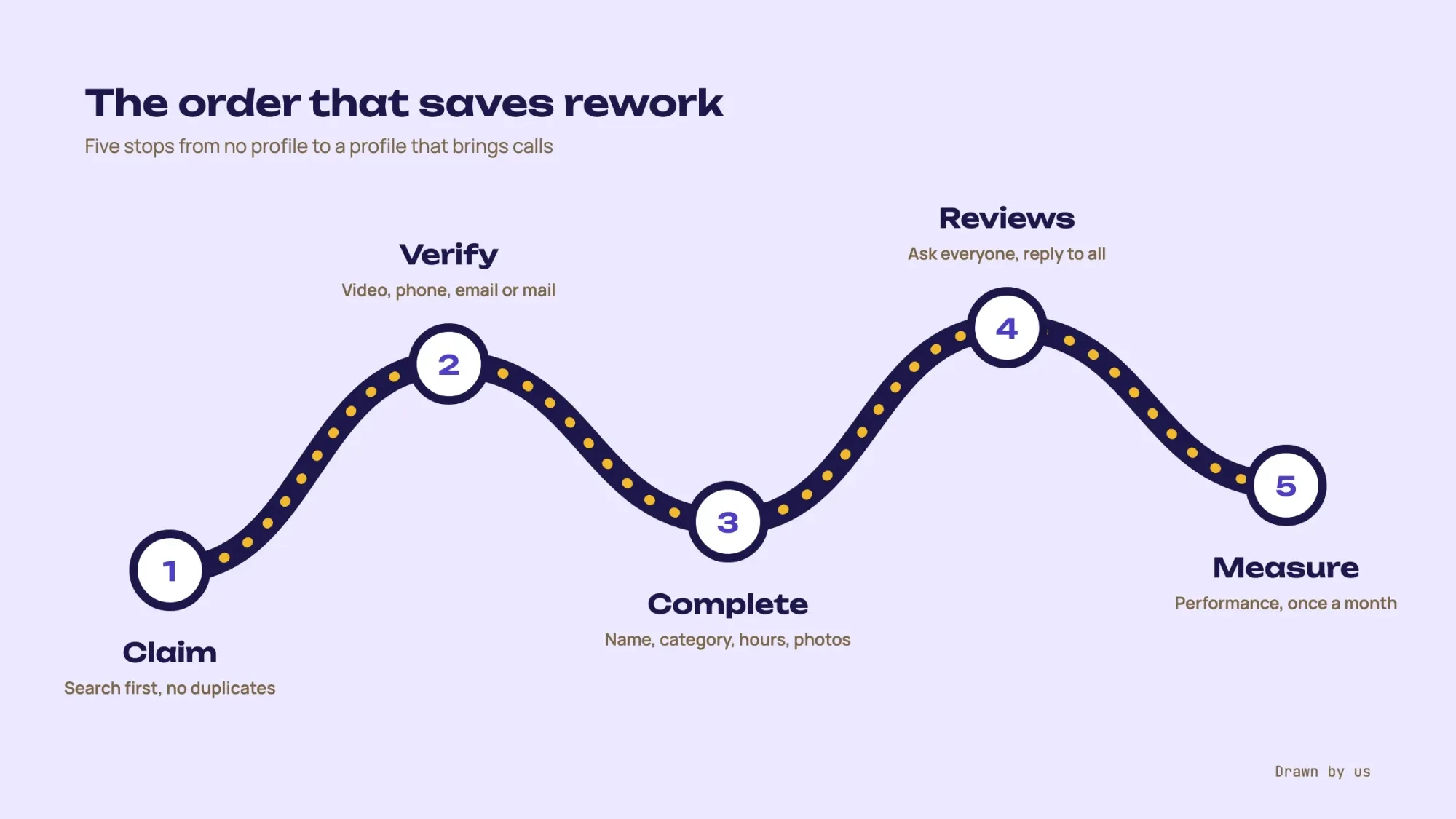 Illustration: the order that saves the most rework.
Add or claim your Business Profile
- Search first Go to business.google.com/add and type your business name. If it appears, select it and claim it instead of creating a new one.
- Add it if it's missing Click "Add your business to Google", enter your real business name and choose your primary category.
- Decide on your address If customers visit you, add your address. If you only go to customers, like a plumber or a mobile groomer, leave the address hidden and set a service area instead.
- Add contact details Use a local phone number and your website's homepage or a relevant landing page.
- Choose a verification option Google shows the options it offers your business. Pick one and follow the on-screen steps (more on this below).
Note
Someone else already manages your profile? Google's request ownership page walks you through a Request access form. A service-area business with no shop or office contacts Google support instead and asks to "Transfer ownership of listing". The current owner "has 3 days to respond" (as of October 2026). If they don't, you may get an option to claim it yourself, though Google says that "isn't always available". This often happens when a former employee or an old agency set up the profile, so ask them first.
How to verify your Google Business Profile
To verify, pick a method Google offers you: a phone or text code, email, a video, a live video call or a postcard. You can't edit your business info or interact with customers until your profile is verified. Google says "the verification options available to you depend on your business type, public info, region, or business hours". So you may not see every method below.
| Method | How it works | Good to know |
|---|---|---|
| Phone or text | Google sends a code by call or SMS | Automated phone menus can't receive the code |
| Google emails you steps to follow | You must be able to use the address shown on the verification screen | |
| Video recording | You film your business on your phone and upload it | At least 30 seconds, live and unedited |
| Live video call | You show your business to a Google rep on a call | Only offered during your business hours |
| Postcard | A code arrives by mail | Most codes arrive within 14 days; they expire after 30 |
Video verification trips up the most people. Google's video rules ask for one continuous clip: "an unedited, unique, and complete recording with no breaks". It must be filmed live and "recorded and uploaded from a mobile device".
A storefront should show its name "clearly printed on a permanent fixture, like a signboard, wall, or window". It should also "record things only an employee can access", like opening the cash register or the storage room. A service business should show its tools or work vehicle.
Tip
Plan the clip before you press record. Start with the street sign or storefront outside, then your sign, then the door, then something only staff can open. About 30 to 60 seconds of steady walking is plenty.
Google Business Profile optimization: a 12-step checklist
Work through these in order. Most take a few minutes; the photos and reviews never really finish.
Once your profile is verified, Google's Profile Strength tool helps too. It points out missing info, such as your description, hours and contact details, and prompts you to add photos, videos and posts. Open your profile and select Profile Strength to start.
1. Use your real business name, nothing more
Google's guidelines for representing your business say "your name should reflect your business's real-world name". They add that "including unnecessary information in your business name isn't permitted". So "Sunrise Bakery" is fine; "Sunrise Bakery | Best Kolaches Austin TX" isn't.
Some experts still rank a keyword in the name as a strong factor. Our take: skip it. Competitors report these names, and Google warns that extra information in a name "could result in the suspension of your Business Profile."
2. Get the address and service area right
Use a real street address where you meet customers. Google says "P.O. boxes or mailboxes located at remote locations aren't acceptable", and a virtual office "isn't eligible". A business that shows its address "should maintain permanent fixed signage" there.
If you go to your customers, "you should hide your business address". Your service area "shouldn't extend farther than about 2 hours of driving time" from your base (as of October 2026).
3. Pick the most specific primary category
Your categories affect your local ranking, Google says, and Whitespark's experts rank the primary category as the top map pack factor. Google's own example on its category page: "instead of "Salon," choose "Nail salon.""
Add a few additional categories only for real parts of your business, and "do not select a category for every product or service". Changing categories can trigger a new verification, so get it right early.
4. Add a local phone number, a clean website link and booking links
For contact details, Google asks for "a local phone number instead of a central call center helpline number whenever possible". It also bans numbers or URLs that redirect people to other landing pages. Add UTM tags to your website link to see how many visits your profile sends. The link still points to your own page, and Google Analytics will show the traffic separately.
Some categories can also add action links for booking an appointment, making a reservation or placing an order. Google allows up to 10 links per category (as of October 2026). If you have more than one, you can mark one as "Business preferred". Booking partners' links can also appear on their own; a provider must remove its link within 5 days of your request.
Where Google offers it, you can also add one social media link per platform: Facebook, Instagram, LinkedIn, Pinterest, TikTok, X or YouTube. Google says it doesn't give click data for these links.
5. Set regular, holiday and special hours
Hours matter for ranking too: Whitespark's experts put "Business is Open at Time of Search" at number 5 of all map pack factors. Google's special hours are for changes of up to 6 days in a row, such as Thanksgiving or July 4 (as of October 2026). If you're closed for 7 days or more, mark the business temporarily closed instead.
6. Write a plain, useful description
You get 750 characters, as of October 2026. Google's editing page says not to include URLs or HTML. It also asks you to "focus primarily on details about your business instead of details about promotions, prices, or sales". Say what you do, who you serve, where, and what makes you different, in the words your customers use.
7. Add the attributes that apply
Attributes are the small facts that help people decide: outdoor seating, wheelchair accessible entrance, women-owned, online appointments. You can edit factual ones like outdoor seating; subjective ones come from customer feedback.
8. Upload real photos and short videos
Show your storefront from the street so people recognize it, the inside, your team at work and your best products. Skip stock photos. Google's photo and video specs:
| Item | Format | Size |
|---|---|---|
| Photos | JPG or PNG | 10 KB to 5 MB; 720 x 720 px recommended, 250 x 250 px minimum |
| Videos | Up to 30 seconds | Up to 75 MB, 720p or higher |
9. List your products and services
Add each main service with a short description and, if you're comfortable, a price or price range. This is free relevance. A roofer who lists "roof repair", "gutter installation" and "storm damage inspection" gives Google 3 clear matches for 3 different searches.
10. Post updates, offers and events
Google's posts come in 3 types: Updates, Offers and Events. "Posts older than 6 months are archived unless a date range is set" (as of October 2026). A short post every week or two keeps the profile looking alive. A seasonal menu, a new service area or a holiday schedule all work.
11. Ask every customer for a review, and reply to all of them
The easiest way, Google suggests, is asking customers "to visit a Google link or scan a QR code". Ask everyone, including the customers who looked unhappy. Put the link in your receipts, follow-up emails and a small card at the counter.
Reply to every review, good or bad, in a sentence or two that sounds like a person wrote it.
Negative reviews need more care. Google's reply tips keep it simple. Stay polite, never share the reviewer's private details, apologize when it fits and offer to sort it out by phone or email. Skip the copy-paste "thank you" and share a helpful detail instead.
Before a reply goes live, Google checks it against its content policies. That usually takes up to 10 minutes, but sometimes up to 30 days (as of October 2026). To send review requests on autopilot, our guide to automating customer reviews covers what Google and federal rules allow.
12. Check "Google updates" so nobody rewrites your profile
Your profile can change without you: Google edits profiles using "user reports and licensed content". When a user suggests an edit that needs your review, Google notifies you. Then "you have 4 days to accept or reject the suggestion" (as of October 2026); if you don't respond, Google may publish it.
Info changed by Google shows in blue in the profile editor. A wrong phone number or closing time can sit there for weeks if nobody looks. So check after any edit and once a month.
Google Business Profile limits and deadlines at a glance
Google's key limits are 750 characters for your description and up to 5 business days for a verification review. Posts are archived after 6 months, and a service area should stay within about 2 hours' drive. This free reference table lists each limit with the Google help page it comes from, so you can check it or cite it.
| What | Google's limit or deadline | Source |
|---|---|---|
| Business description | Up to 750 characters | Edit your Business Profile |
| Verification review and postcard | Review takes up to 5 business days after you submit; most postcards arrive within 14 days, and codes expire after 30 days | Verify your business |
| Video verification | At least 30 seconds, one unedited recording | Verify with a video recording |
| Ownership request | The current owner has 3 days to respond | Request ownership |
| Suggested edits from users | 4 days to accept or reject | Google updates on your profile |
| Special hours | Up to 6 days in a row; 7 or more days, mark the business temporarily closed | Special hours |
| Service area | No farther than about 2 hours' drive from your base | Guidelines for representing your business |
| Posts | Archived after 6 months unless a date range is set | Create and manage posts |
| Photos and videos | Photos: JPG or PNG, 10 KB to 5 MB, 720 x 720 px recommended. Videos: up to 30 seconds and 75 MB, 720p or higher | Photos and videos |
| Booking and order links | Up to 10 links per category; a third-party provider must remove its link within 5 days of your request | Manage your local business links |
| Social media links | 1 link per platform, 7 platforms; select regions only | Manage your social media links |
| Review replies | Google usually reviews a reply within 10 minutes; sometimes up to 30 days | Manage customer reviews |
Features that are gone (ignore guides that still mention them)
Plenty of guides ranking today still tell you to use these. Don't waste time looking for them:
| Feature | What happened | What to do instead |
|---|---|---|
| Chat (messaging) | Google says that "as of July 31, 2024, the chat and call history features are no longer available" | Make sure your phone number and website contact form work; where Google offers it, add a text or WhatsApp chat option |
| Questions and answers | Stopped appearing on many profiles in late 2025; in the Google Maps app, many profiles now show an "Ask a question" box with AI answers drawn from sources such as reviews and your profile details. Google's edit page says it is now piloting an enhanced Q&A for verified US merchants | Put common answers (parking, payment, booking) into your description, services and attributes |
| Business Profile websites | The free business.site websites were turned off in March 2024 | Link your profile to your own website |
Reviews: Google's rules are stricter than the FTC's
US businesses now deal with 2 sets of review rules. Google's own Maps policy is stricter than the FTC's rule on fake reviews and testimonials, which "went into effect on October 21, 2024". Here is how they compare:
| Practice | Google's Maps policy | FTC rule |
|---|---|---|
| Fake reviews or buying reviews | Not allowed | Not allowed |
| Offering a discount or gift for a review | Not allowed, even with no condition on what the review says | Allowed only if it isn't tied to a positive or negative review |
| Asking only happy customers (review gating) | Not allowed: "selectively solicit positive reviews" | No specific ban in the rule, though it may still break the FTC Act |
| Staff writing or requesting quotas of reviews | Not allowed | Undisclosed insider reviews not allowed |
For the exact wording, the FTC rule is 16 CFR Part 465, the Rule on the Use of Consumer Reviews and Testimonials. This is general information, not legal advice; check with an attorney for your situation.
Warning
What Google can do if it finds fake reviews. Its restrictions page says a profile may be blocked from receiving new reviews or have its existing reviews unpublished for a period. Google may also "display a warning to let consumers know that fake reviews were removed". That warning sits on your profile where every customer sees it.
Where people read reviews is shifting, too. In BrightLocal's 2026 survey of 1,002 US adults, Google was still the top place to read reviews. But fewer people used it than a year before: 71%, down from 83%. Apple Maps nearly doubled to 27%. The share using ChatGPT and other AI tools for local recommendations jumped from 6% to 45%. And 89% said they expect business owners to respond to reviews.
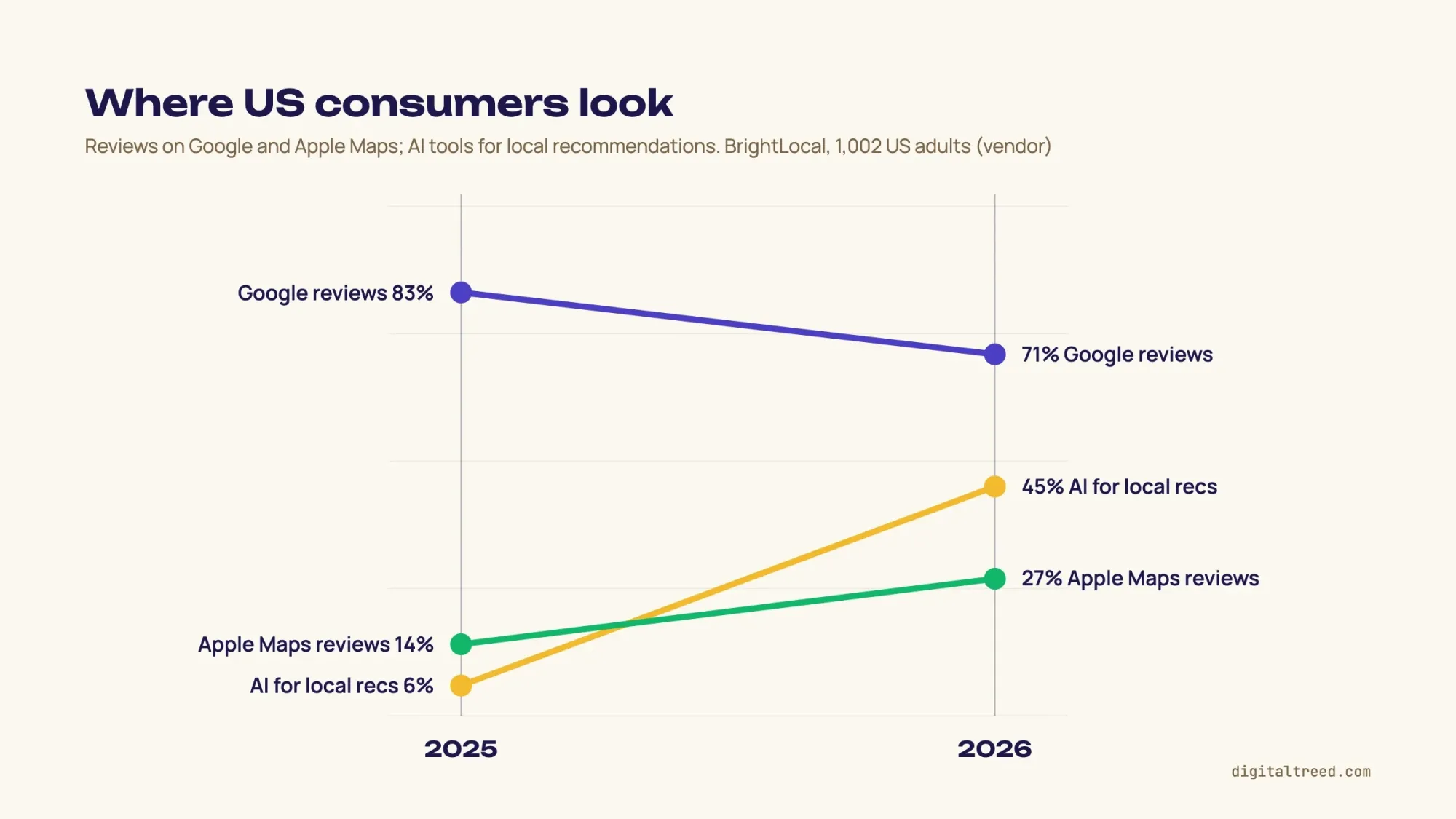 Where US consumers read reviews or get local recommendations, 2025 vs 2026 (the AI tools figure is for recommendations; vendor survey of 1,002 US adults). Source: BrightLocal Local Consumer Review Survey 2026, February 2026.
Why Google Business Profiles get suspended, and how to appeal
Google says it "may suspend or disable Business Profiles that don't follow our guidelines". The causes listed most often, by Google and by Whitespark's expert survey, are:
- A P.O. box, mailbox store or virtual office used as the address
- Keywords or a city added to the business name
- Showing an address for a business that only serves customers at their location
- Duplicate profiles for the same business or the same phone number
- A website link that redirects to another domain
- Fake reviews, review gating or a sudden burst of reviews
- A service area much larger than about 2 hours' drive
If it happens, don't panic and don't start over. Google is clear: "Do not create a new Business Profile for the same business". Use Google's Business Profile appeals tool instead; it shows the reason and the policy.
"Appeals can only be submitted once." If it's denied, Google may allow 1 additional review with new evidence. So prepare first: business registration, license, tax certificate or a utility bill.
Also check "that the business name and address match the profile you want to make an appeal for." Google's list doesn't include photos. Volunteer Product Experts on its help forum suggest adding photos of your permanent signage.
If you'd rather not do this work yourself, our search engine optimization service includes local SEO. It comes with a fixed written price and a plain monthly report. (DigitalTreed sells this service.)
How to track your profile's performance
Track your profile in the Performance report. It shows views, searches, calls, direction requests and website clicks. Older guides call it Insights, a name Google now uses for a separate recommendations panel. The numbers that matter for a small business, as Google defines them:
- Views: how many people viewed your profile on Search and Maps
- Searches: the search terms people used to find you (updated at the start of each month)
- Calls: clicks on the call button
- Directions: requests for directions to your business
- Website clicks: clicks on your website link
For views, Google counts a person only once a day, so that number can run lower than you expect. Look at the numbers once a month, not every morning. If your business is seasonal, compare the same month year over year.
The search terms list is the most useful part. It tells you which words customers actually use, and those words belong in your services and description.
Website clicks stop at the click. To see what those visitors do on your site, tag the link with our free UTM builder and read the visits in Google Analytics.
Note
New in 2026. Google's help center now describes managing a profile through the Gemini web app. You can update hours and contact info, draft review replies and get performance insights. You must be 18 or over and use a personal Google account. You must also own or manage only 1 verified profile; it isn't offered to people with access to more than one.
Don't stop at Google: Apple Business and Bing Places
Not every customer uses Google. In the same BrightLocal survey, 27% of US consumers said they read reviews on Apple Maps, up from 14% a year earlier. Apple Business Connect, Apple's free tool for Maps listings, was folded into the new Apple Business platform in April 2026.
Microsoft's Bing Places for Business is also free. Microsoft says it has made "major improvements to how business owners import listings from Google". Claim both, and keep your name, address, phone number and hours identical everywhere.
Frequently asked
Is Google Business Profile free?
Yes. Google says creating a Business Profile and listing your business on Google is free. Ads that appear in local results are a separate, paid product.
What's the difference between Google My Business and Google Business Profile?
They're the same product. Google renamed Google My Business to Google Business Profile in November 2021 and moved most editing into Google Search and Maps.
How long does verification take?
Google says verification reviews take up to 5 business days after you submit. A postcard usually arrives within 14 days, and its code expires after 30 days.
Can I have a Google Business Profile without a storefront?
Yes, if you serve customers in person at their location. Hide your address and set a service area of up to about 2 hours' drive. Online-only businesses with no in-person contact aren't eligible.
Can I have more than one Google Business Profile?
Only one per location. Google's guidelines say not to create more than one profile for each location, in one account or several. A chain gives every location its own profile, with the same name and category. Separate departments, and individual practitioners such as doctors or lawyers, may have their own profiles.
Do I need a website for my Google Business Profile?
No, the website link is optional, but it helps. Google turned off its free Business Profile websites in March 2024, so link your own site. Google's edit page asks for the full URL, with http:// or https://, and says to make sure Googlebot isn't blocked on your site.
Can I add keywords to my business name?
No. Google's guidelines say the name should be your real-world name and that extra information isn't permitted. Google says extra information in a name could get your profile suspended.
Why isn't my business showing up on Google Maps?
The most common reasons are an unverified profile, a suspended profile, incomplete or inaccurate business info, or simply distance. Google weighs how far you are from the person searching. Check your profile status first, then your category and service area.
How do I improve my Google Business Profile ranking?
Verify your profile, fill in every field accurately, pick the most specific primary category and earn reviews from real customers. Google says verified profiles and profiles with complete and accurate info are more likely to show up in local results. It also says you can't pay for a better local ranking.
How often should I update my profile?
Check it monthly, after any change to hours or services, and before holidays. Posts archive after 6 months, so a short post every week or two keeps it current.
Your next step: open your profile this week and work through the 12-step checklist, starting with the name and the primary category. If you want help with the setup or the monthly upkeep, see our search engine optimization service.
How we made this guide: it is built from Google's Business Profile help pages and its Maps policy. It also uses the Federal Trade Commission's Q&A on its reviews rule. We also used Whitespark's Local Search Ranking Factors 2026 and BrightLocal's Local Consumer Review Survey 2026. Each source is linked inline next to the claim it supports. We checked every number against the source named next to it on October 22, 2026. The Whitespark factor shares are read from the chart in its report. First published July 2020. Rewritten October 2026: Google's current setup, verification and review rules, the features Google removed, the federal review rule and 2026 survey data. Updated October 23, 2026: added a key facts list and a reference table of Google's limits and deadlines. We also added booking and social links, the Profile Strength tool, tips for replying to negative reviews and 3 FAQs. We checked the new parts against Google's help pages on October 23, 2026.
Sources
- Google Business Profile Help: Tips to improve your local ranking on Google
- Google Business Profile Help: Guidelines for representing your business on Google
- Google Business Profile Help: Add or claim your Business Profile
- Google Business Profile Help: Request ownership of a Business Profile
- Google Business Profile Help: Verify your business on Google
- Google Business Profile Help: Verify your business with a video recording
- Google Business Profile Help: Manage your business category
- Google Business Profile Help: Edit your Business Profile
- Google Business Profile Help: Special hours
- Google Business Profile Help: Photos and videos
- Google Business Profile Help: Create and manage posts
- Google Business Profile Help: Understand Google updates on your Business Profile
- Google Business Profile Help: Changes to chat and call history
- Google Business Profile Help: Tips to get more reviews
- Google Maps policy: Fake engagement
- Google Business Profile Help: Restrictions for policy violations
- Google Business Profile Help: Fix suspended or disabled profiles
- Google Business Profile Help: Performance and insights
- Google Business Profile Help: Manage your profile with the Gemini web app
- FTC: The Consumer Reviews and Testimonials Rule, questions and answers
- 16 CFR Part 465: Rule on the Use of Consumer Reviews and Testimonials (Cornell LII)
- Whitespark: Local Search Ranking Factors 2026 (vendor survey, November 6, 2025)
- BrightLocal: Local Consumer Review Survey 2026 (vendor survey, February 11, 2026)
- Whitespark: With Google Q&A gone (January 26, 2026)
- Search Engine Journal: Websites created with Business Profiles to shut down
- Search Engine Land: Google My Business is now Google Business Profile (November 2021)
- Bing Blog: The new Bing Places for Business (October 3, 2025)
- MacRumors: Apple Business guide (updated September 24, 2026)
- Google Business Profile Help: Manage your Profile Strength (checked October 23, 2026)
- Google Business Profile Help: Manage your local business links (checked October 23, 2026)
- Google Business Profile Help: Manage your social media links (checked October 23, 2026)
- Google Business Profile Help: Manage customer reviews (checked October 23, 2026)

Comments
No comments yet. Start the conversation below.