
Quick answer
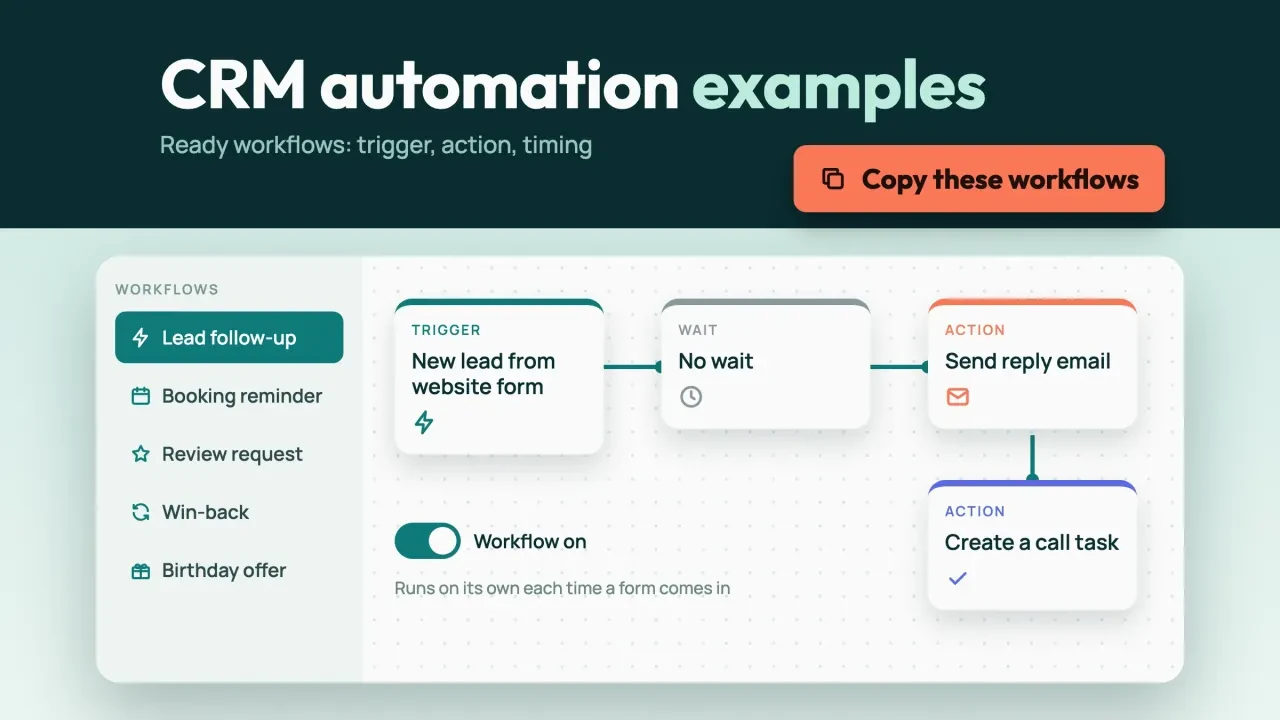
These 12 CRM automation examples cover the jobs a small business repeats every week. They reply to new leads, chase quotes, remind people about appointments, ask for reviews and win back quiet customers. Each one has a trigger, an action, a wait and a way out. Build three first, not all twelve.
The way out matters more than you'd think.
When we simulated all 12 together on a made-up list of 200 contacts, workflows that never stopped sent 149 messages nobody needed. If you haven't set up your CRM yet, start with our guide to setting up a CRM in your first 30 days, then come back here.
Key takeaways
- Every workflow needs a trigger, a wait and an exit rule.
- Without exit rules, our simulation sent 149 messages nobody needed.
- Send review requests to every customer, never only the happy ones.
- The FTC gives you 10 business days to honor an email opt-out.
- Start with three: instant reply, booking reminders and opt-out sync.
Every workflow here has a trigger, a wait and a way out
A CRM workflow is a rule that runs by itself: when this happens, wait this long, then do that.
Vendors don't agree on the words. HubSpot calls the start an "enrollment trigger." Its example is that you can enroll all contacts that have submitted a specific form, then email them and assign them to a user. Pipedrive says its automations are made up of two parts: "a trigger event and an action event". Zoho calls them workflow rules.
Whatever your tool calls them, each example below gives you four things:
- the trigger that starts it (a form, a stage change, a date);
- the actions it takes (an email, a text, a task for a person);
- the timing between steps;
- the exit, meaning what stops it early.
We'll follow one made-up business the whole way.
Example: Prairie Pine Heating & Air is a made-up three-truck HVAC company in Salina, Kansas. It's got one office manager on the phones and a CRM nobody has had time to automate. Swap "service call" for "haircut" or "consult" and the timing still works.
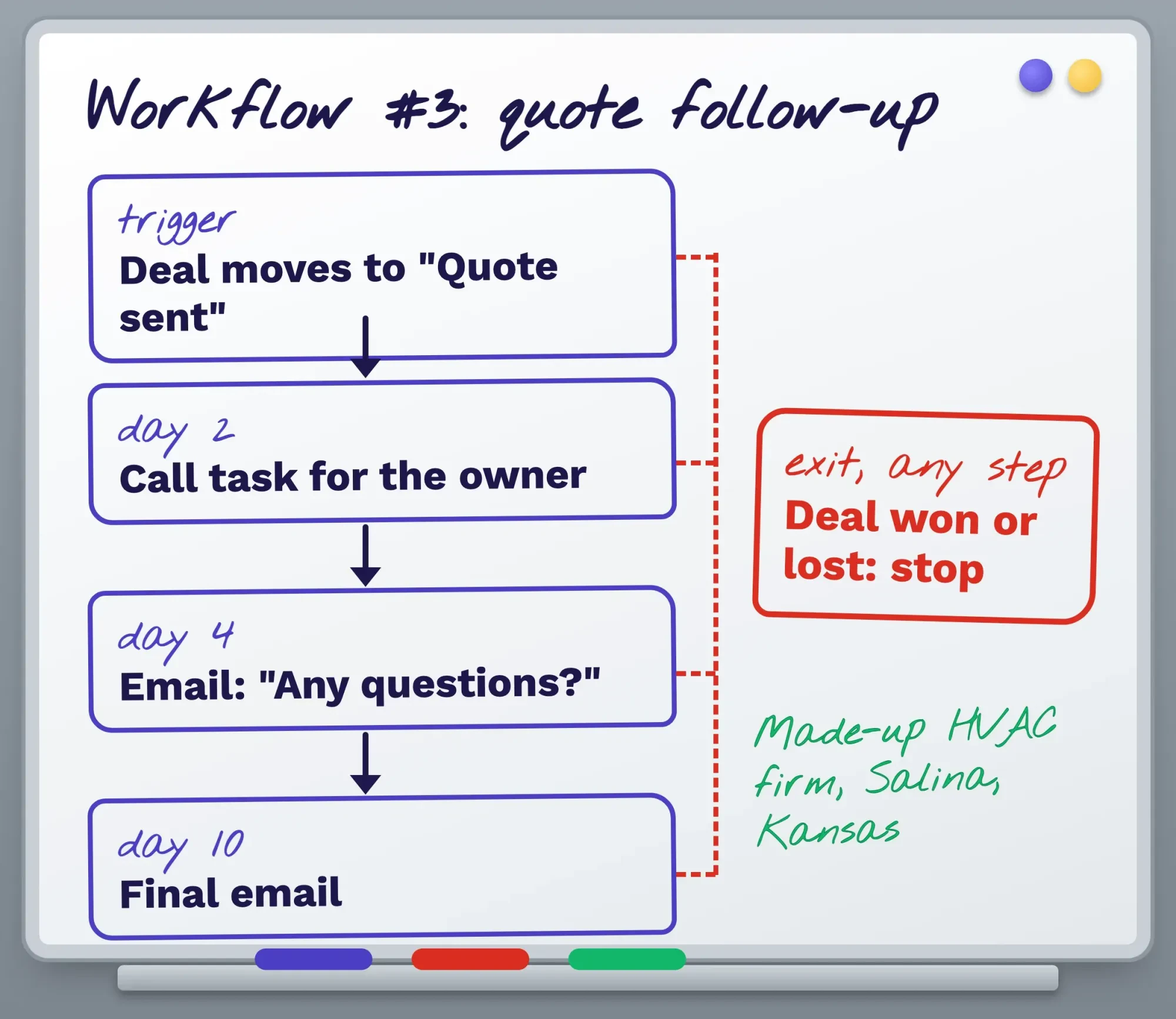 Diagram by DigitalTreed: workflow #3 drawn out. Timings are our suggestion, not a vendor rule.
Check your plan before you build anything.
Most vendors keep workflows on paid tiers, and we've listed which ones further down.
Catch new leads before they go cold
Lead workflows come first, because a slow reply loses the job before anything else gets a chance.
1. Instant reply to a website lead
Trigger: someone submits your web form.
The CRM sends a short confirmation email at once, assigns the lead to a person and creates a call task due within the hour. It sends a text too, but only if the form had its own box for text consent. If your form doesn't feed the CRM yet, our post on building an HTML contact form covers that side.
Wiring the form, the CRM and a texting app together is the fiddliest step here, and it's often left half-done. Hooking a form up to a CRM is part of the web development work we do for clients; we build sites for a living, so weigh that as our interest.
2. A gentle nudge when a lead goes quiet
Trigger: the lead's still marked "New" two days later, with no reply logged.
Send an email on day 2 ("Still need a hand with that furnace?") and another on day 5. On day 14, move the lead to "Cold."
It'll stop the moment they reply, book or get a quote.
Prairie Pine adds a call task on day 2 as well. Plenty of people who fill in a form would rather talk.
3. Quote follow-up
Trigger: a deal moves to "Quote sent."
There's a call task on day 2, an email on day 4 asking if they've got questions, and a final email on day 10. The deal being marked won or lost ends it.
Skip that exit and you'll ask "Any questions about your quote?" of someone whose new unit you installed last Tuesday.
4. Stale deal alert for your own team
This one doesn't talk to customers. When a deal sits in one stage for 14 days with no activity, the deal owner gets a task and an email alert. Any new activity clears it.
No consent rules apply, so it's the easiest win on the list.
Keep booked jobs on the calendar
Once a lead books, the job changes: make sure they actually show up.
5. Booking confirmation and reminders
Trigger: an appointment date gets set.
A confirmation goes out right away by email (and by text, with consent), then a reminder 1 day before. Cancelling or moving the visit should stop it and restart the clock. Pipedrive's date triggers fire on the date or a given number of days before or after it, up to 180 days either side. HubSpot can delay until a date property or until a set time of day.
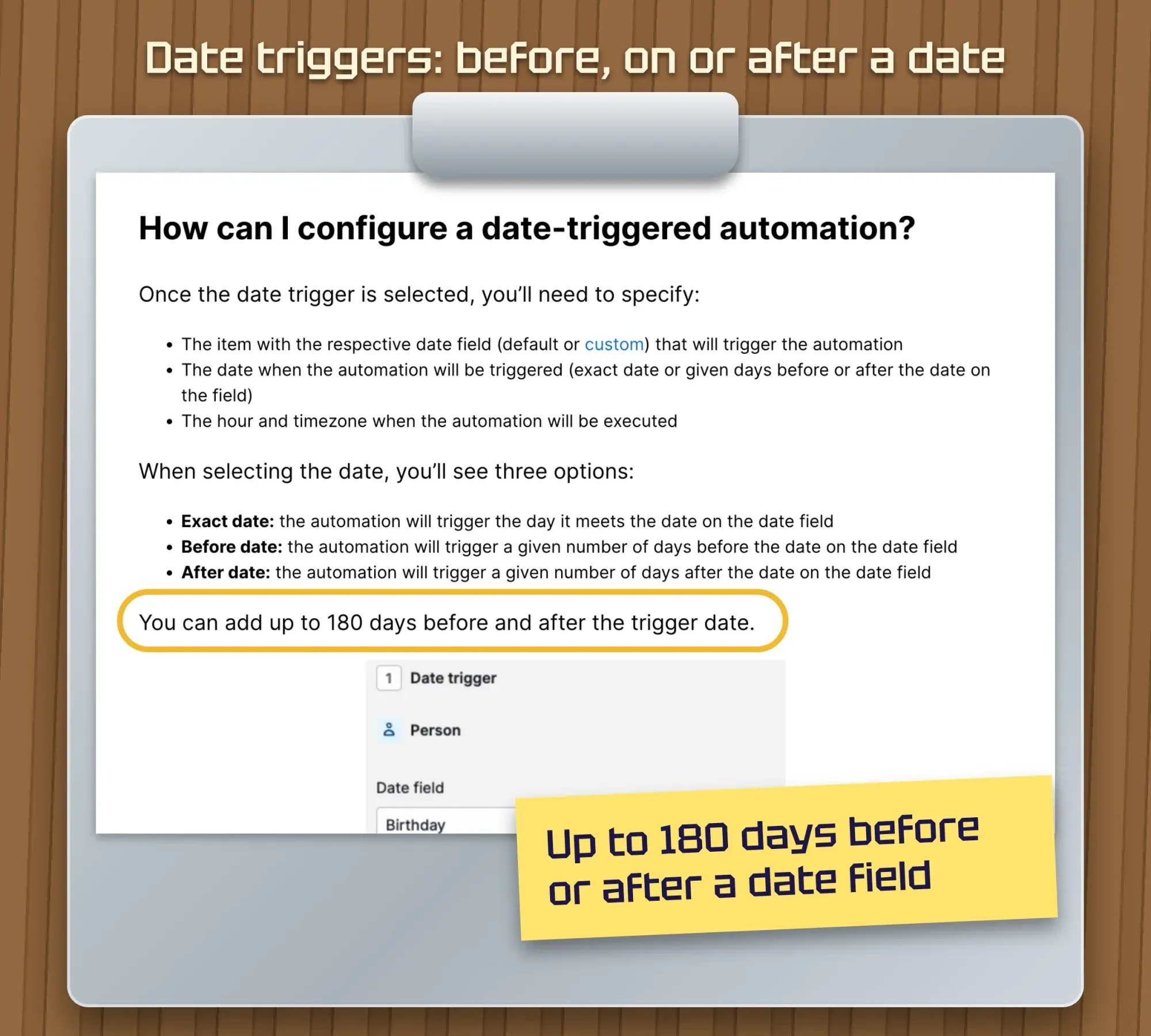 Screenshot: Pipedrive Knowledge Base, "Automations: date triggers", public page, October 26, 2026. Sticky note added by us.
Keep the sales pitch out of it. An email that only confirms a booking can count as transactional under CAN-SPAM, which lightens the rules (more on that below).
6. No-show rebook
Trigger: the visit's marked "No-show."
Send a same-day email or text with a rebooking link, and give someone a call task for the next morning. A new booking ends it.
Keep the tone kind. Lots of no-shows are a sick kid, not a lost customer.
Turn a finished job into a review and a repeat visit
Right after the job is the cheapest moment to earn the next one. They still remember you.
7. Thank-you and review request
Trigger: the job's marked complete.
The next day, send a thank-you email with a direct review link. If the link isn't clicked, send one reminder 5 days later, then stop. A Google review link tool on our site builds that link for free.
Send it to everyone, happy or not. Google says businesses mustn't selectively solicit positive reviews from customers, and it calls offering incentives for reviews "strictly prohibited". For the FTC side and template wording, read our review request automation guide.
8. Welcome series for new customers
Trigger: a contact becomes a customer for the first time.
Day 1 brings a welcome email saying what happens next. Three days later, a short tip on looking after the new system. It ends only if they unsubscribe. For what to actually write, see our email marketing examples.
Prairie Pine folds the welcome into the review email when both land on the same day.
9. Service due reminder
Trigger: a "Next service due" date, set 180 days after an install or tune-up.
Email 14 days before, text 3 days before (with consent), and create a call task if nothing's booked by the due date. A booking stops it.
That 180-day gap fits Pipedrive's limit. Zoho's date rules count a set number of days, weeks or months from a date field instead.
Bring quiet customers back
Both of these are marketing emails, so the full CAN-SPAM list further down applies to them.
10. Birthday or customer anniversary
Trigger: a birthday or a "customer since" date. Send one email, with a small thank-you if you've got one, and skip it when a visit's booked within a week. Pipedrive even names sending emails on your clients’ birthdays as a date trigger use. To turn this into a real rewards plan, see our loyalty program ideas.
11. Win-back after 180 days
Trigger: no job or purchase in 180 days.
Email on day 0 and again on day 10, then tag the contact "inactive" on day 30. A booking, a reply or an unsubscribe ends it. Run each link through our UTM builder first, and your analytics will show which email brought people back.
Don't send a third. Two polite emails is a reminder; five is a reason to leave.
One workflow keeps the other eleven legal
The last example sends nothing. It listens.
12. Opt-out sync
Trigger: an unsubscribe click, a spam complaint or a reply that says "stop."
It marks the contact's email or text status as opted out, pulls them from every marketing workflow and passes the change to your email and texting apps if they're separate. The FTC's deadline for honoring an email opt-out is 10 business days. The FCC says people can opt out of robotexts at any time and in any reasonable manner.
It never switches off.
It matters most when your CRM, email tool and texting app are three products joined by a connector; our post on third-party integrations explains where those links break.
All 12 at a glance
Here's the full set. The timings are our suggestions for a service business, not rules from any vendor.
| 1 | Instant reply | Form submitted | Now; call task due in 1 hour | Runs once |
| 2 | Quiet lead nudge | Still "New" after 2 days | Day 2, day 5, cold on day 14 | Reply, booking or quote |
| 3 | Quote follow-up | Stage "Quote sent" | Task day 2, email day 4 and day 10 | Won or lost |
| 4 | Stale deal alert | 14 days, no activity | Once, to your team | New activity |
| 5 | Confirm and remind | Appointment date set | Now, then 1 day before | Cancelled or moved |
| 6 | No-show rebook | Marked no-show | Same day; call next morning | New booking |
| 7 | Review request | Job complete | Next day; reminder 5 days later | Click or reply |
| 8 | Welcome series | First purchase | Day 1, then 3 days later | Unsubscribe |
| 9 | Service due | "Next service" date | 14 days before, text 3 days before | Booking |
| 10 | Birthday | Birthday date | On the day | Visit within 7 days |
| 11 | Win-back | 180 days, no job | Day 0, day 10, inactive day 30 | Booking, reply, unsubscribe |
| 12 | Opt-out sync | Unsubscribe or "stop" | At once | Never |
We ran all 12 at once on 200 made-up contacts
Each workflow looks harmless alone. Together, they can bury someone.
So we wrote a short simulation that runs the customer-facing workflows above, with the timings in the table, across 200 invented contacts for a year. Leads, quotes, wins, no-shows and birthdays came from made-up rates, so it's a simulation on made-up contacts, not client data. With no exit rules, those 200 people got 1,390 emails and texts. Fifty-three of them got 5 or more inside some 7-day stretch, and the busiest got 9 in one week, including a quote follow-up sent 8 days after they'd booked.
Then we added four house rules and ran it again:
- exit rules: the nudge stops when a quote goes out, and quote follow-ups stop when the customer decides;
- the welcome and review emails merge when they fall on the same day;
- no birthday or win-back email within 7 days of a visit;
- at most 2 non-appointment messages in any 7 days; extras wait for a free day.
The total fell to 1,177, so that's 213 fewer.
Exit rules did most of that: 149 messages, made up of 56 nudges and 93 quote chasers. Merging saved 64. The weekly cap only delayed 39 messages and dropped none, which tells you it barely bites once the exits are right.
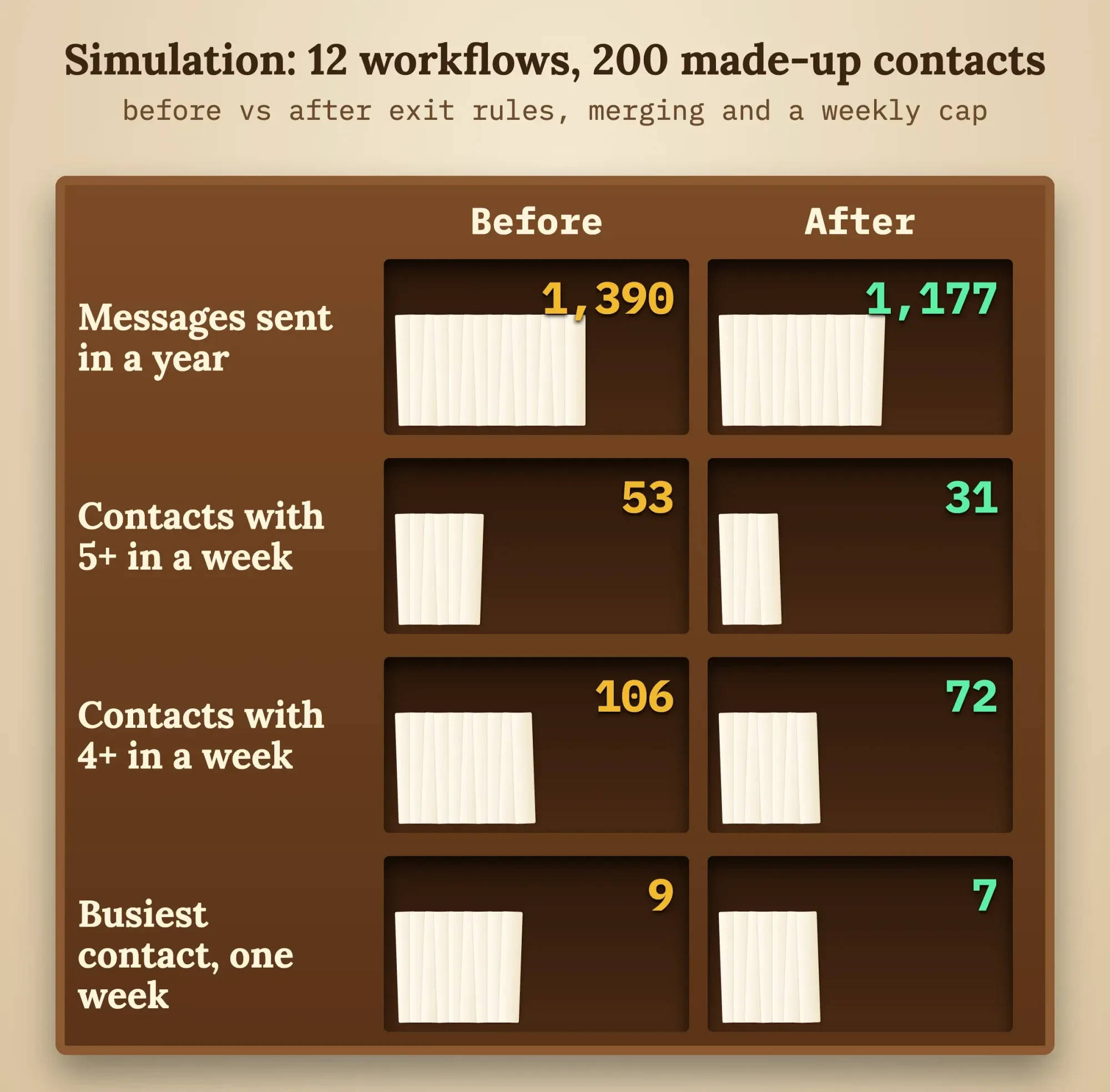 Diagram by DigitalTreed: our simulation, 200 made-up contacts over 365 days, October 26, 2026.
Contacts with 5+ messages in a week dropped from 53 to 31, and those with 4+ from 106 to 72. The busiest still got 7: four reminders, two no-show rebooks and one review request. People want the first six, so we didn't cap them.
Our take: write the exit rule before you write the email.
What CAN-SPAM and the FCC say, word for word
Those rules decide which workflows need the most care. The FTC's CAN-SPAM compliance guide says each email that breaks the law can cost "up to $53,088," and that "The law makes no exception for business-to-business email."
For a marketing email, the guide says (quoted exactly):
- "The subject line must accurately reflect the content of the message."
- "you must disclose clearly and conspicuously that your message is an advertisement."
- "Your message must include your valid physical postal address."
- "Any opt-out mechanism you offer must be able to process opt-out requests for at least 30 days after you send your message."
The From, To, Reply-To and routing details "must be accurate and identify the person or business who initiated the message". Sending from your own domain makes that easy, and we explain the setup in our business email address post.
Transactional email doesn't carry the full load.
A message that only "Facilitates, completes, or confirms a commercial transaction that the recipient already has agreed to" is transactional. But the FTC adds: "Keep in mind that the law views these categories narrowly". In our list, workflows 5 and 6 have the best case for transactional, if they stick to the booking. We'd treat 2, 3, 7, 8, 9, 10 and 11 as marketing.
Texts are the FCC's area. Its consumer guide to robocalls and robotexts says: "FCC rules ban text messages sent to a mobile phone using an autodialer unless the phone owner previously gave consent to receive the message or the message is sent for emergency purposes. Commercial texts require written consent; for informational texts, your consent may be oral."
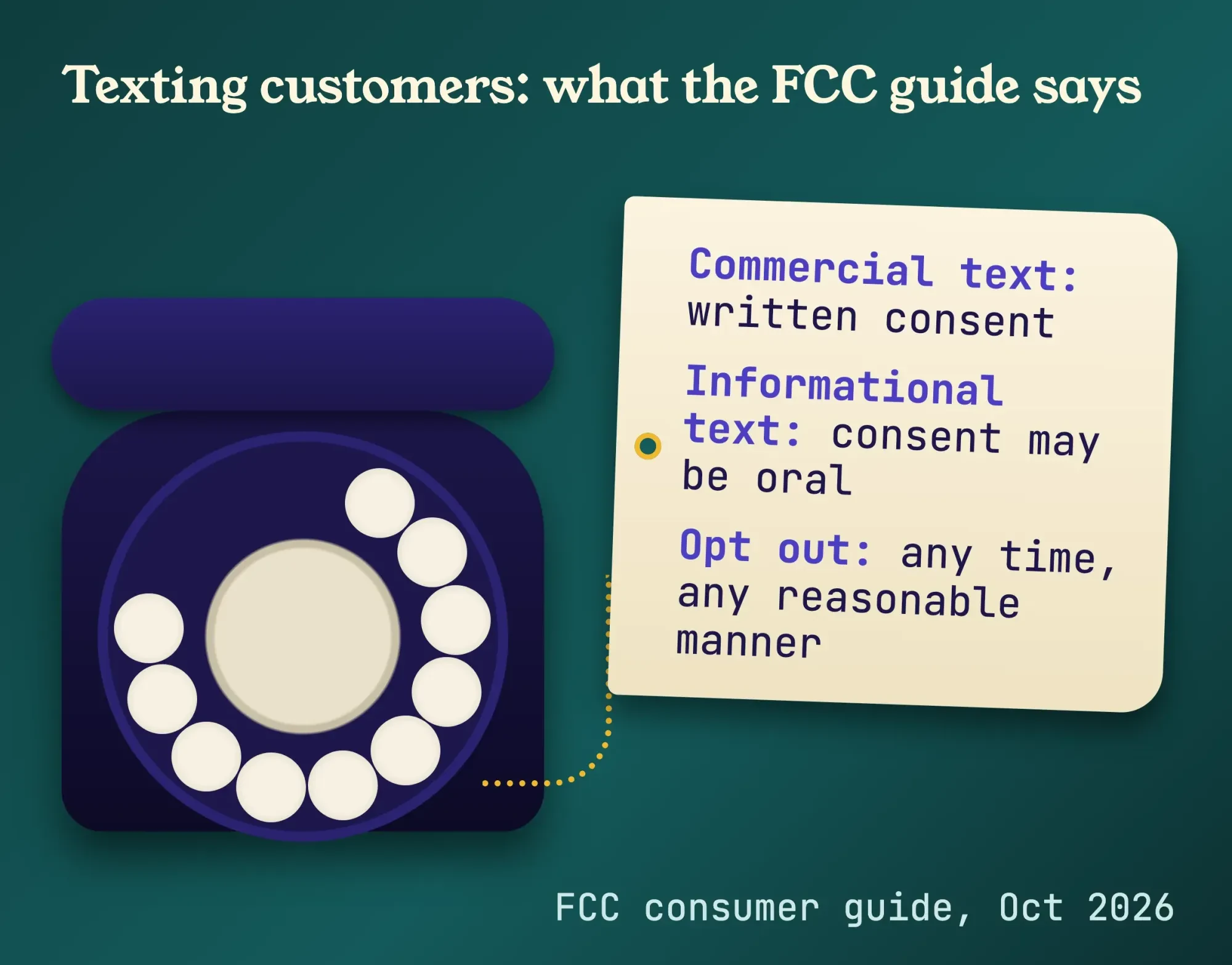 Source: FCC, "Stop Unwanted Robocalls and Texts," October 2026. Drawn by us.
That page also says "Telemarketing calls to your home are prohibited before 8 a.m. and after 9 p.m." It's about calls, but we keep automated texts inside that window too, in the customer's time zone.
One more rule comes from Gmail, not the law. Senders of more than 5,000 messages per day to Gmail accounts must support one-click unsubscribe in marketing mail. You probably won't hit that, but a clear unsubscribe link costs nothing. Our email campaign checklist covers the rest of a send.
We've quoted the FTC and FCC pages as they read on October 26, 2026, and that's not legal advice. If you text customers in volume or work in a regulated field, have a lawyer read your consent wording, and check your state's rules as well.
Which CRM plans include workflows?
Not every plan runs these. Here's what each vendor's help pages said as of October 2026:
- HubSpot: the workflows page lists Marketing, Sales, Service, Data, Smart CRM and Revenue Hub, each at Professional, Enterprise. Free and Starter aren't on that list.
- Pipedrive: "This feature is only available on Growth and higher plans," and date triggers are part of the same feature.
- Zoho CRM: the pricing page lists "Workflow automation" in the Free edition, "Free forever for 3 users". Its help page caps email notifications on Free and Starter at (No. of Users * 50) or 5000, whichever is lower per day.
We haven't quoted prices, because they change by region and billing cycle. Check each pricing page the day you buy, and if you're still choosing, our CRM software comparison walks through the main options.
One catch from Pipedrive: imports "won’t trigger any event-triggered automations," except when they update or delete leads. Uploading an old customer list won't start the welcome series by itself. Date-trigger automations, like the birthday email, can still fire from an import, the same page adds.
Frequently asked
Can a contact go through the same CRM workflow twice?
Not by default in HubSpot. Its create workflows help page says records enroll only the first time they meet the triggers. You can switch on Re-enroll in the workflow's Settings tab and pick which triggers count. That suits a service reminder that should run after every tune-up.
Can one CRM workflow send different messages to different customers?
Yes. Pipedrive's workflow automation page says you can add wait-for conditions or if/else conditions to split an automation into two or more paths. A quote chaser could send one email to new customers and another to past ones.
Can HubSpot workflows send text messages?
Only with an extra purchase. As of October 2026, HubSpot's workflow actions page marks the Send SMS message action as Marketing SMS Add-On only. Without it, a workflow can create a task for a person to text instead.
Can a Zoho CRM workflow repeat every year on a date?
Yes. Zoho's workflow rules help page says a date-based rule can recur every month or year on a selected date. As of October 2026, it runs at most 5000 records every 10 minutes, and the rest wait for the next 10 minutes.
Build three this week, not twelve
Twelve at once is a lost weekend and a tangle.
Start with workflow 1 (instant reply), workflow 5 (confirmations and reminders) and workflow 12 (opt-out sync). The first wins jobs, the second protects them, and the third keeps the rest legal. Add the review request in week two. After that, add one a week, and write each exit rule first.
Every time you switch one on, open a real contact's timeline and count what they got that week.
Want help mapping these to your business? Request a quote and tell us which CRM you use.
How we made this guide: we read the vendor and government pages linked here on October 26, 2026, and copied the FTC and FCC lines from their own pages. The Zoho help page wouldn't display for us that day, so we checked its lines against a copy we'd saved earlier. We ran a simulation of the workflows together on 200 made-up contacts, and took the Pipedrive screenshot from its public help page while signed out. We didn't log in to any CRM, so the editors you see may differ a little from the help pages. Sources are linked where each fact appears.
First published August 2020. Rewritten October 26, 2026: the old post defined CRM automation in general terms. This version gives 12 workflows with triggers, timing and exit rules. It adds the plan each vendor puts workflows on, the CAN-SPAM and FCC text rules in their own words, and our simulation of all 12 running together.
Sources
- HubSpot Knowledge Base: Create workflows (last updated October 23, 2026)
- HubSpot Knowledge Base: Choose your workflow actions
- Pipedrive Knowledge Base: Workflow automation (last updated September 3, 2026)
- Pipedrive Knowledge Base: Automations: date triggers
- Zoho CRM Help: Configuring workflow rules
- Zoho CRM: Pricing and editions
- Google Business Profile Help: Tips to get more reviews
- Google Maps User Generated Content Policy: Prohibited and restricted content
- Gmail Help: Email sender guidelines
- Federal Trade Commission: CAN-SPAM Act: A Compliance Guide for Business
- Federal Communications Commission: Stop Unwanted Robocalls and Texts
Comments
No comments yet. Start the conversation below.