

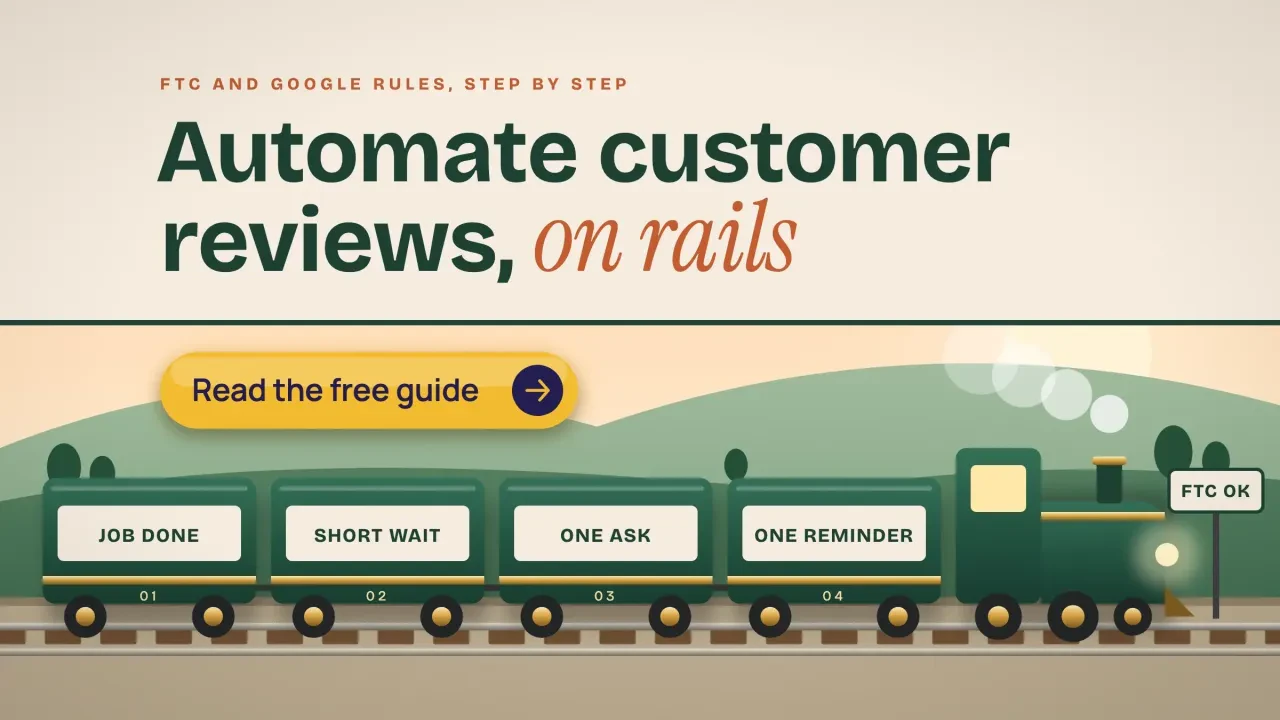
Quick answer
To automate customer reviews, connect one trigger (job done, invoice paid or order delivered) to one message with your Google review link. Send it to every customer, after a short delay, with one reminder at most. Never filter out unhappy customers, never reward reviews on Google, and get consent before texting.
Automating customer reviews saves you from asking by hand, but the rules got stricter. The FTC's Consumer Reviews and Testimonials Rule has been in force since October 21, 2024. Google and Yelp add their own, stricter rules on top.
This guide sets up a review request system a small US business can run for little or nothing. We also ran our own free link generator on October 22, 2026, and show what it builds.
Key takeaways
- One trigger, such as invoice paid, sends one message with your Google review link.
- Send the same request to every customer and never filter out unhappy ones.
- Google bans any payment, discount or free item offered for a review.
- As of October 2026, one FTC rule violation can cost up to $53,088.
- Text only customers who gave consent, and honor stop requests within 10 business days.
What does it mean to automate customer reviews?
Customer review automation is a setup where software you already use sends each review request for you. A trigger starts it, such as "invoice paid" or "job marked complete". After a delay, the customer gets one email or text with a link that opens your Google review box.
Reviews feed your local rankings and your map listing. Reviews are one part of off-page SEO; our off-page SEO checklist covers links, listings and mentions too. Our guide to what local SEO is explains how they fit with the rest of your Google presence.
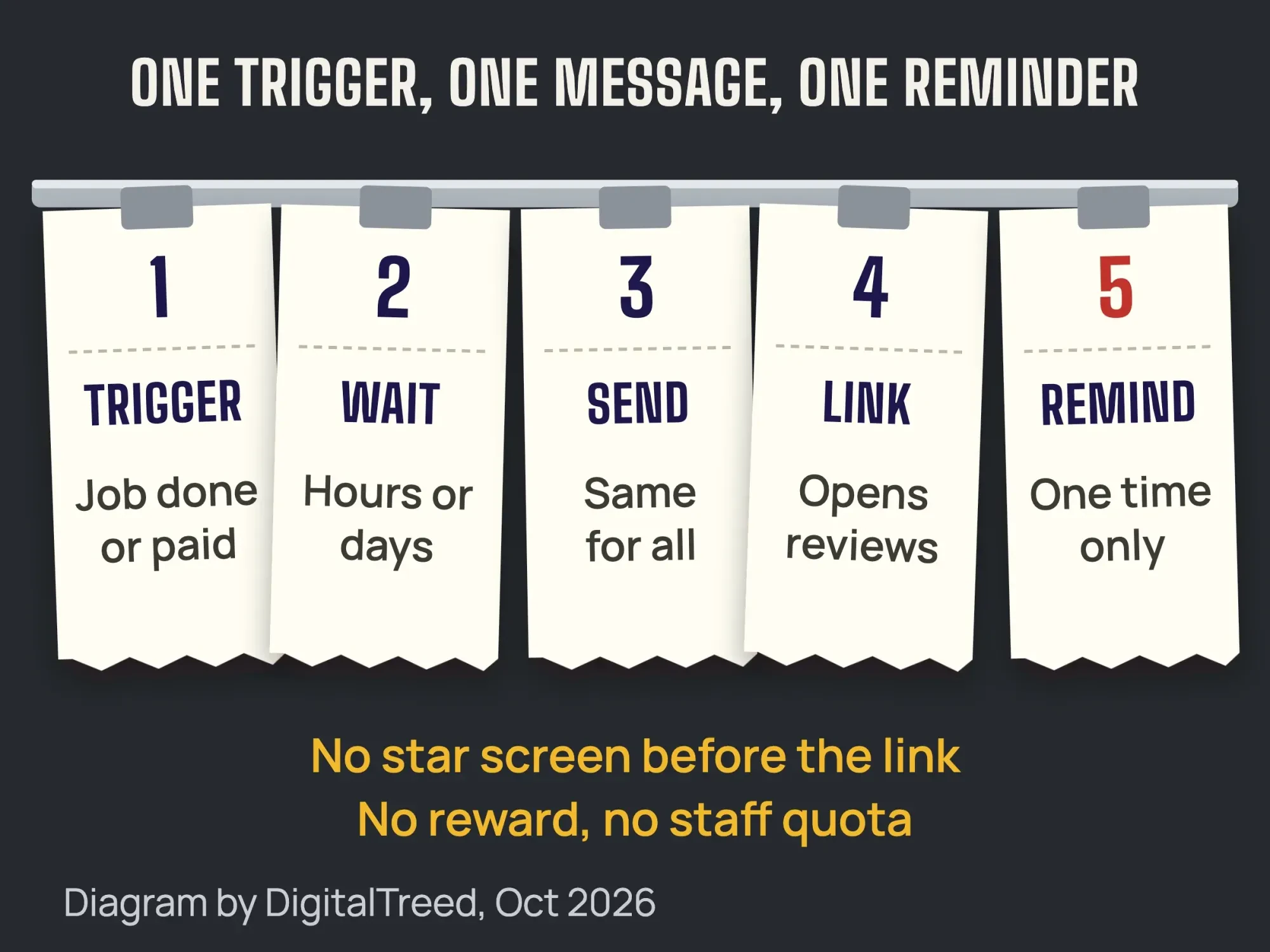 Diagram by DigitalTreed, based on Google Business Profile Help and the FTC rule, October 2026.
Key facts on automated review requests
- The FTC's Consumer Reviews and Testimonials Rule, 16 CFR Part 465, took effect on October 21, 2024. That date is on the FTC questions and answers page.
- As of October 2026, one violation of the rule can cost up to $53,088, per 16 CFR 1.98.
- In 2022, Fashion Nova agreed to pay $4.2 million after its review tool held back reviews under 4 stars from its own website.
- Under CAN-SPAM, you must honor an email opt-out request within 10 business days, per the FTC CAN-SPAM guide.
- Under 47 CFR 64.1200, a text reply such as "stop" revokes consent, and you have 10 business days to honor it.
- Google's Place ID documentation advises refreshing Place IDs older than 12 months, so don't assume an old review link still works.
Which rules apply to automated review requests?
Four sets of rules apply to automated review requests: the FTC rule and guides, Google's policy, Yelp's policy, and the email and text laws. The FTC Consumer Review Rule, 16 CFR Part 465 bans fake reviews, including AI-written ones, and insider reviews without disclosure.
Its incentive rule, section 465.4, bans rewards tied to a review that expresses "a particular sentiment, whether positive or negative". For how this plays out with closing gifts, see our review rules for real estate agents. Asking all buyers is fine, and the rule's fake-review and insider sections exempt "generalized solicitations to purchasers".
The rule does not ban review gating by name. But the FTC's own questions and answers page says asking only happy customers "could violate the FTC Act". It points to the FTC Endorsement Guides.
Example 11 in the Endorsement Guides, 16 CFR 255.2 describes gating exactly. A business invites customers with "very positive feedback" to post on review sites. Unhappy customers are "simply thanked". The FTC says that may be unfair or deceptive if it makes the posted reviews substantially more positive.
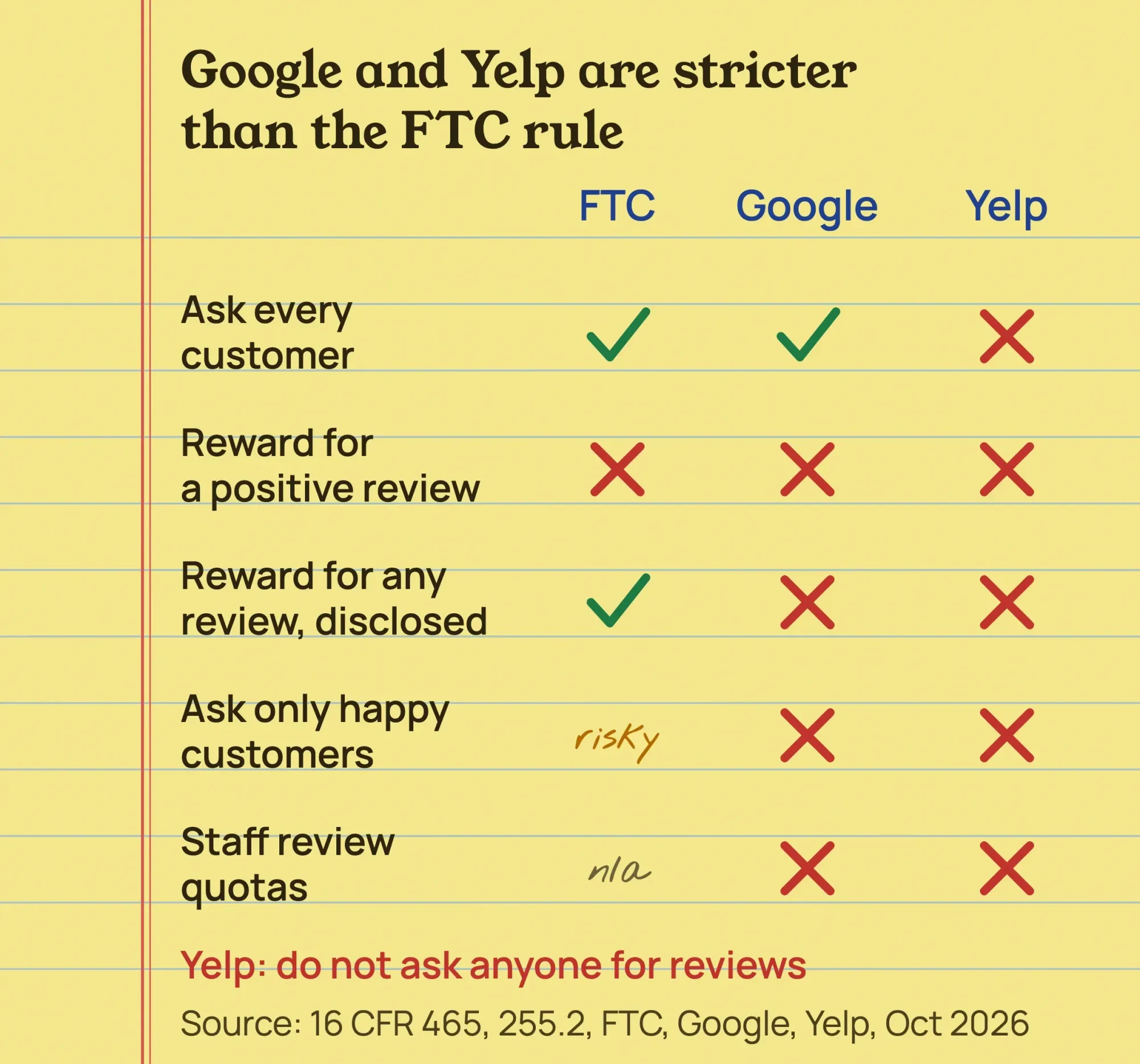 Source: FTC, eCFR, Google Maps content policy and Yelp support, read October 2026.
Penalties are real money. As of October 2026, a violation can cost up to $53,088, per 16 CFR 1.98. A Federal Register notice from September 2026 says the FTC keeps its 2025 penalty levels for 2026.
On December 22, 2025, FTC staff sent warning letters to 10 companies about possible violations of the rule. The FTC says the letters are not formal findings.
Automation settings can cause trouble too. In 2022, Fashion Nova agreed to pay $4.2 million after its review tool held back reviews under 4 stars on its own website. That was suppression on its own site, not gating, but a tool setting caused it.
The rule now covers this directly. Section 465.7(b) covers reviews shown on your own site. A business may not claim or imply those reviews are most or all of them while hiding some for their rating or negative sentiment.
You may still hold back reviews on grounds you apply to every review, whatever its rating. The rule lists examples such as abusive content, reviews you reasonably believe are fake and reviews wholly unrelated to what you sell.
This is general information, not legal advice; check with an attorney for your situation.
What does Google allow when you ask for reviews?
Google's Maps content policy lets you ask for reviews of real experiences. It forbids merchants to "selectively solicit positive reviews" or offer "payment, discounts, free goods" for a review.
The same policy says merchants should not pressure customers to review "while on the premises". It also bans asking staff to collect a set number of reviews or to get reviews that name a staff member.
Breaking these rules can cost you reviews. Google's profile restrictions page lists a pause on new reviews, hidden existing reviews and a public warning on your profile. Our Google Business Profile optimization guide covers the rest of the profile.
Can you ask for Yelp reviews?
No. Yelp's Don't Ask for Reviews page says, "Don't ask anyone to review your business". Its software may not recommend reviews that seem prompted by the business, so keep Yelp out of every automated message.
Which email and text laws apply?
For email, the FTC's CAN-SPAM compliance guide requires honest headers and subject lines, your postal address and a clear opt-out. Opt-outs must be honored within 10 business days.
A plain review request may not count as a commercial email, but one with a coupon or a "book again" offer likely does. Our take: build every review email as if those email rules apply. Our email marketing strategy guide covers list basics.
Texts fall under the FCC rule in 47 CFR 64.1200, which requires prior express written consent for autodialed marketing texts. Words like "stop," "cancel" or "unsubscribe" revoke consent, and you have 10 business days to honor it.
Under the TCPA, 47 U.S.C. 227, a person can sue for $500 per violation, as of October 2026. A court can triple it if the violation was willful or knowing. Some states add their own rules, such as Florida statute 501.059, which covers text messages.
We found no FCC rule or ruling that says whether a pure review request text counts as telemarketing or an advertisement. So the safe path is consent at booking, a "Reply STOP" line and no texts before 8 a.m. or after 9 p.m. This is general information, not legal advice; check with an attorney for your situation.
How to automate Google review requests
Here is the setup we recommend. It uses an email, booking or invoicing tool you already pay for.
- Get your review link. Copy it from your Business Profile on a computer, or build it with a free generator. Details are below.
- Test the link signed out. Open it in a private window. Google asks people to sign in to a Google Account before they can post.
- Pick one trigger. Use an event in a system you already have: invoice paid, job complete, appointment checked out or order delivered.
- Set the delay. Wait long enough for the customer to use what they bought. See the timing table below.
- Choose the channel. Email everyone who gave you an email. Text only customers who ticked a box agreeing to texts.
- Send the same message to everyone. No star-rating screen in front of the link. If you want private feedback too, add a "reply to this email" line for everyone.
- Send one reminder, then stop. A few days later, remind the people who did not click. Do it once.
- Reply to reviews and check monthly. Answer every review and test the link, opt-outs and wording once a month.
How to connect the trigger without code
Your booking or invoicing tool may have no review step of its own. Then a no-code tool such as Zapier can link it to your email or text app. The flow is the same: trigger, delay, then send.
Zapier's help page on delays lists the Delay step on every plan, including Free, as of October 2026. It says delays do not count toward task usage. The shortest delay is 1 minute, and the longest hold is 30 days.
One catch from the same page: if you add, delete or swap steps while runs are waiting, those runs will not continue. Edit it when no requests are queued, then send a test to yourself.
Use filters only for facts such as "invoice paid" or "has an email address". Never filter on a star rating or survey score before the review link, because that is the flow in FTC Example 11.
Get your Google review link
Google's review link help page gives the steps: go to your Business Profile and select Read reviews, then Get more reviews. QR codes can only be made on a computer, not on a phone.
You can also build the link without signing in. Paste your Maps link or Place ID into our free Google review link generator. It gives you the review link, a QR code and a counter card.
We tested the build on our test server on October 22, 2026, with Google's own sample Place ID. It built a search.google.com "writereview" link. Then we typed a message offering a discount for a 5-star review, and it flagged the wording.
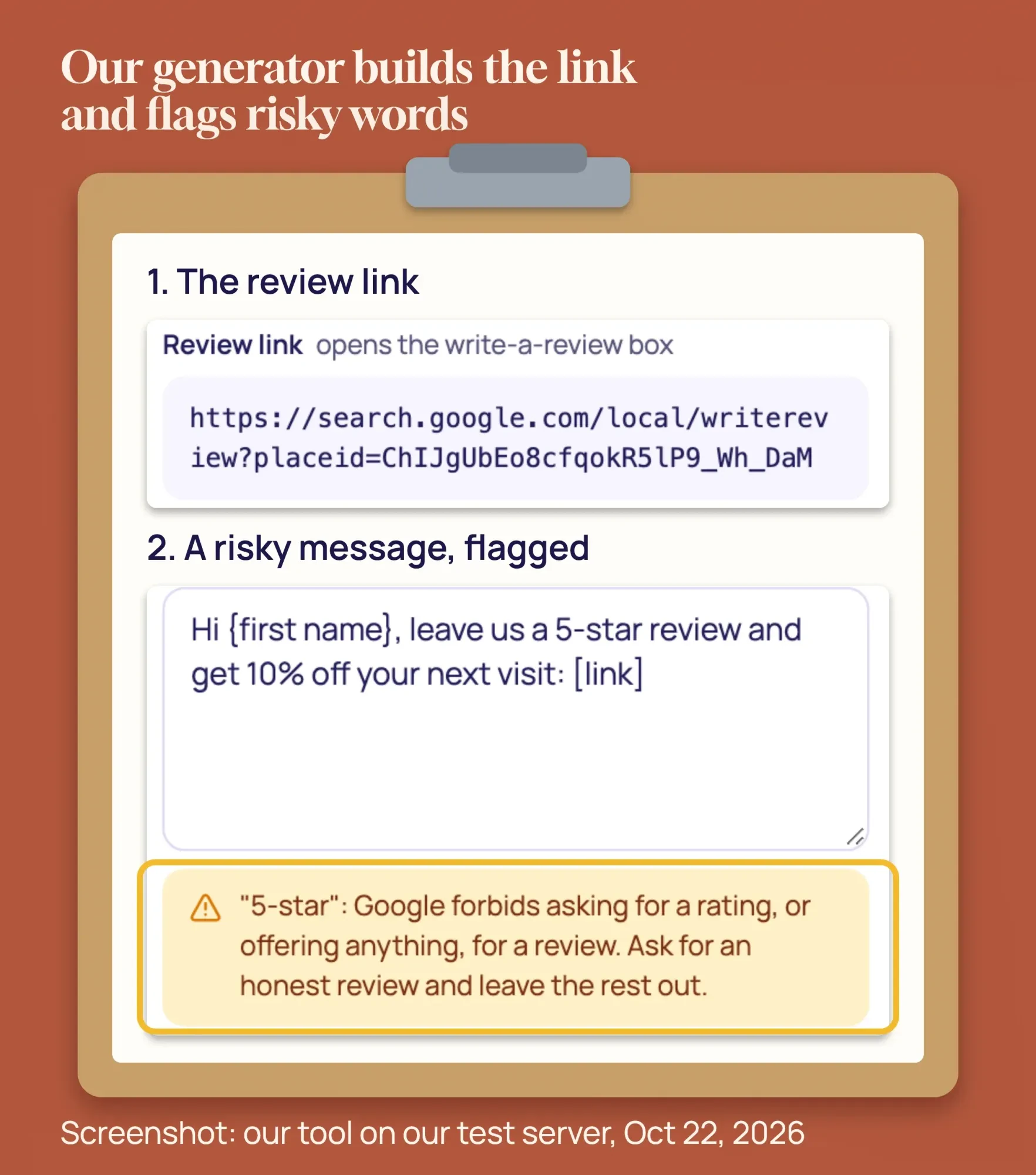 Screenshot: DigitalTreed Google Review Link Generator on our test server, October 22, 2026.
Keep testing the link. Google's Place ID documentation says "Place IDs may change over time" and advises refreshing IDs older than 12 months. A link that breaks silently stops your reviews without any error.
When should the request go out?
No primary study sets the best delay. Our take is in the table below. One rule helps: the FTC lists as a red flag reviews that come "so quickly after purchase" that they can't reflect real use.
| Business | Trigger | First ask | Reminder |
|---|---|---|---|
| Restaurant, salon, barber | Payment | 2 to 4 hours later, before 9 p.m. | None, or 1 the next day |
| Plumber, HVAC, cleaning | Job marked complete | 1 to 3 hours later | After 3 days |
| Dentist, clinic, law office | Visit checked out | Same or next day, email only | After 3 to 5 days |
| Online store | Delivery confirmed | 5 to 10 days after delivery | After 5 to 7 days |
| B2B or agency | Milestone or invoice paid | 1 to 3 days later | After 7 days |
Health and legal practices should leave visit details out of the message. We have not researched HIPAA or bar rules here, so ask your compliance advisor. Our guides to law firm SEO and dermatology clinic marketing cover those fields.
The hardest parts are the consent checkbox, the trigger and keeping the flow free of gating. Rather not wire it up yourself? Our local SEO and Google Business Profile service can set it up and check it monthly. (DigitalTreed sells this service.)
Free review request templates that follow the rules
Use the same words for every customer. Leave out star counts, rewards and staff names. These are our drafts; change the names and keep the structure.
- Text (only to customers who agreed to texts): "Hi {first name}, thanks for choosing {Business} today. Would you share your experience on Google? {link} Reply STOP to opt out."
- Email subject: "How was your visit to {Business}?"
- Email body: "Thanks for choosing us. Would you share your experience on Google? Good or bad, it helps other customers and helps us improve."
- Below that message: the link as a button, a "just reply if something went wrong" line, your postal address and an unsubscribe link.
- Reminder, sent once: "Just a reminder in case it got buried: {link}. No worries if you'd rather not."
- Counter card: "Tell others about your visit. Scan to review us on Google."
For the counter card, a QR code works well. Our free QR code generator makes one in your colors. Display the card, but don't hand customers a tablet and wait.
Watch for hidden sentiment. The FTC's examples include "Tell us how much you loved your visit to John's Steakhouse and get a $5 coupon". Avoid "5-star," "if you loved us," "for a discount" and "enter to win."
What does review automation cost?
Automating review requests can cost almost nothing. Google's link and QR code are free, and most email tools you already pay for can add a delay step. Texts cost cents: as of October 2026, Twilio lists $0.0083 per 160-character text segment, plus a carrier fee of $0.0035 to $0.005 per segment.
Texting from a Twilio number takes one more step. Twilio's help center says you must register for A2P 10DLC to send texts to US numbers from a standard 10-digit number. As of October 2026, it says campaign reviews take about 7 business days, or up to 10 when volumes are high.
| Option | Price shown, as of October 2026 | Notes |
|---|---|---|
| Google link and QR code | $0 | Business Profile on a computer |
| Our review link generator | $0 | No sign-up |
| Your email tool plus a delay | $0 extra | If your plan has automations |
| Twilio texts | $0.0083 per segment plus carrier fee | Number registration fees extra |
| NiceJob Starter / Pro | $75 / $125 a month | Includes a staff leaderboard |
| GatherUp | $99 a month, 1 location | 20% off on annual billing |
| Podium Core / Pro | $399 / $599 a month | Plus a $5 a month texting fee |
Prices are vendor data from the NiceJob pricing page, GatherUp pricing page and Podium pricing page, as of October 2026. Check them before you buy.
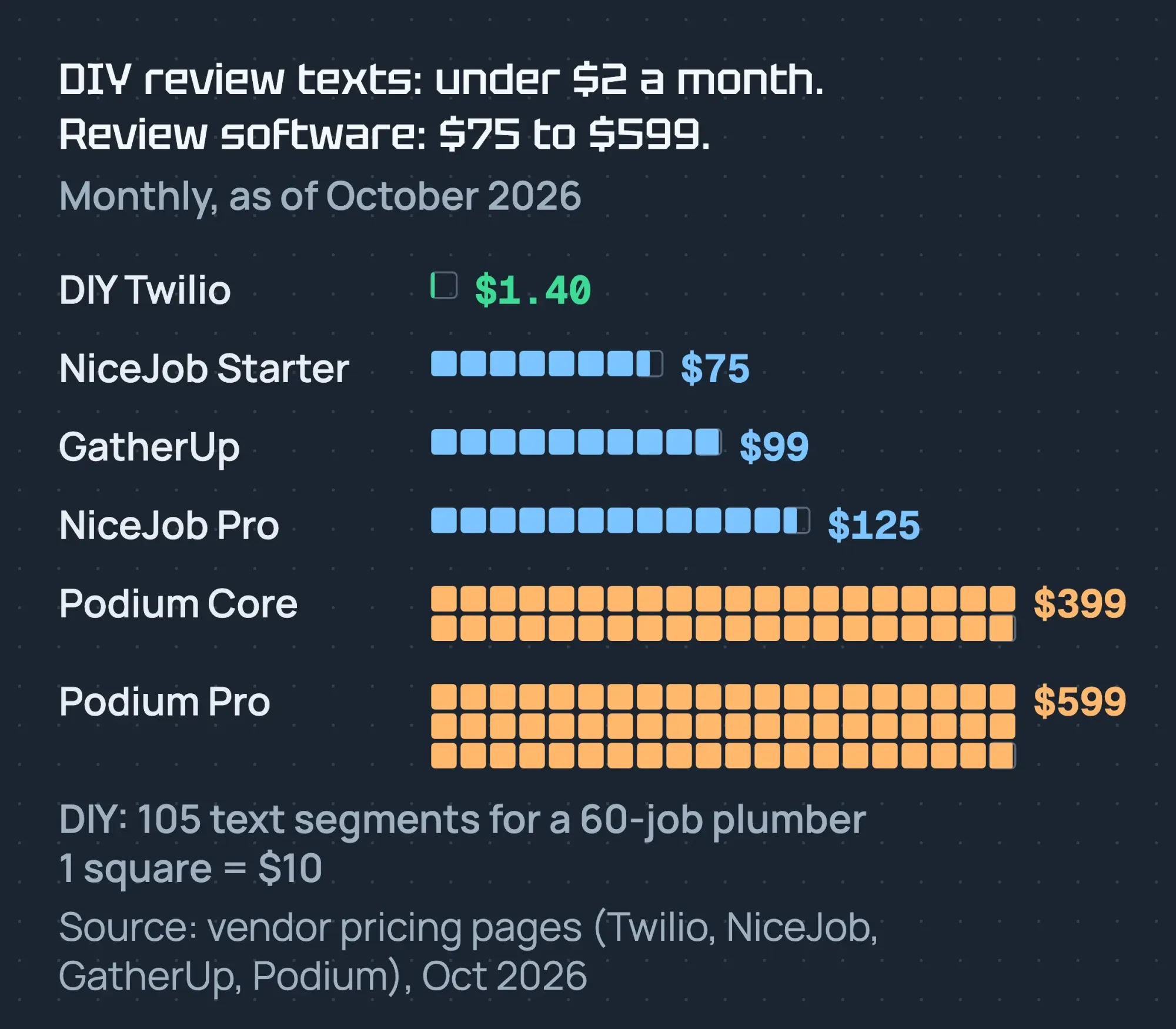 Source: Twilio, NiceJob, GatherUp and Podium pricing pages, October 2026 (vendor data).
Our take: a suite is worth it when you have several locations or a team answering reviews. For one location, a link plus your current email tool is enough. A staff leaderboard conflicts with Google's rule against staff review quotas, so leave it off.
Example: a plumber in Tampa
Example: Harbor Plumbing is a made-up 3-truck plumber in Tampa, Florida, with 60 jobs a month. Today the techs say, "If you're happy, leave us 5 stars." That ask hints at a rating and puts customers on the spot.
The new setup: "job complete" in their field-service app sends an email 2 hours later to all 60 customers. About 40 ticked "text me about my appointment" at booking, so they also get a text. One reminder goes out after 3 days.
Cost check: with the full review link, each first text runs about 198 characters, so it bills as 2 segments. That is 80 segments plus 25 one-segment reminders, or 105. A segment costs $0.0118 to $0.0133 with carrier fees on Twilio's US price list, as of October 2026. That is about $1.24 to $1.40 a month. Email adds nothing on their plan.
How many reviews this brings depends on the customers. Harbor should count new reviews each month and compare.
Common mistakes that get reviews removed
- A "How did we do?" star screen that sends only 4 and 5 stars to Google, the flow in FTC Example 11.
- "$10 off for a review," even for any review. The FTC may allow it with disclosure; Google does not.
- Asking at the counter while the customer waits, or on a shop tablet.
- Staff contests, quotas or "please mention my name."
- Asking for Yelp reviews in the same message.
- Texting without consent, or ignoring "stop" and "cancel."
- Review emails with no unsubscribe link or postal address.
- Employees or family reviewing without saying how they know you.
- AI-written reviews, or drafting a review for a customer to paste.
- Never re-testing the link after a move or rebrand.
Family can review if they disclose it. The FTC's questions and answers page answers "Yes, but ask them to clearly and conspicuously disclose their relationship". Google treats family and staff reviews as a conflict of interest, so skip them there. Insider reviews fall under section 465.5 of the FTC rule.
How should you reply to reviews?
Reply to every Google review, and don't leave the bad ones for later. Google's tips to get more reviews say "Be conversational, not promotional". For a bad review, the same page suggests asking the reviewer to contact you by phone or email.
AI can draft replies if a person reads and edits each one. If you use AI to draft review requests too, our guide to AI in digital marketing lists what else to check by hand. After a bad review, you may contact the customer to fix the problem. The FTC guide for marketers also says to learn each platform's rules first. Our Google Business Profile guide covers replies in more depth.
Can you automate review replies?
Partly. Google's Business Profile API has a method that posts a reply to a review. It only works for verified locations.
Google then checks each reply against its content policies. Its help page on managing reviews says this usually takes up to 10 minutes but can take up to 30 days. The reviewer is notified and can still change the review.
Our take: let software draft or send short thank-you replies to positive reviews. Have a person write or approve every reply to a negative review, and keep customer details out of all of them.
How to check your setup every month
- Open your review link in a private window. It should still open your review box.
- Read the last month's opt-outs and confirm none of those people got another message.
- Read your templates for rating words, rewards and staff names.
- Confirm no one on your team runs a review contest.
For a wider view, our free website audit has a local SEO section that checks your site's local signals in one run.
Frequently asked
Is review gating illegal?
The FTC rule does not ban it by name, but the FTC says it "could violate the FTC Act." Google forbids it. Ask every customer the same way.
Can I offer a discount for a Google review?
No. Google bans every reward for a review. Under FTC rules, a reward is only allowed if it never depends on a positive review, and the FTC expects the reward to be disclosed.
Is it against Google's rules to automate review requests?
We found no Google rule against sending requests automatically. Google's policy is about what you send: no rewards and no asking only happy customers. Ask everyone the same way.
How many reminders should I send?
One. More than that starts to feel like pressure, and each extra message is another chance to break an opt-out.
Do I need consent to text customers for a review?
Get written consent at booking or checkout. It is the safe path under the TCPA and state laws, which are strict about automated texts.
What if I get a bad review?
Reply politely and offer to fix it offline. The FTC says its rule allows contacting the reviewer to resolve the problem.
Your next step
Today, get your review link and send it to your last 10 customers, all with the same message. Then pick the one trigger that will send it from now on.
Want it set up and checked for you? Our local SEO service covers your Google Business Profile and review requests, with a fixed quote first.
How we made this guide: it's built from the FTC rule and guides on eCFR, FTC business guidance and FCC rules. We also used Google Business Profile Help and Yelp support. We checked the penalty amount on the Federal Register and eCFR on October 22, 2026. We ran our review link generator on our test server the same day and took the screenshot. Prices come from vendor pricing pages read that day.
First published April 2026. Rewritten October 22, 2026: the FTC review rule and gating, Google and Yelp rules, email and text laws, a step-by-step setup, templates and dated costs. Updated October 23, 2026: added a no-code setup, texting registration and automated replies. We also added the FTC rule on hiding reviews and a FAQ. Updated October 25, 2026: we listed six sourced facts, put direct answers under the question headings and labeled the free templates.
Sources
- eCFR: 16 CFR Part 465, Use of Consumer Reviews and Testimonials
- eCFR: 16 CFR 255.2, Endorsement Guides, consumer reviews
- eCFR: 16 CFR 1.98, civil penalty amounts
- Federal Register 2026-18853: FTC Civil Penalty Inflation Adjustments, September 15, 2026
- FTC press release: final rule banning fake reviews, August 14, 2024
- FTC: The Consumer Reviews and Testimonials Rule, Questions and Answers
- FTC: Soliciting and Paying for Online Reviews, A Guide for Marketers
- FTC press release: FTC warns 10 companies, December 22, 2025
- FTC press release: Fashion Nova will pay $4.2 million, January 25, 2022
- FTC: CAN-SPAM Act, A Compliance Guide for Business
- eCFR: 47 CFR 64.1200, delivery restrictions
- Cornell LII: 47 U.S.C. 227
- Florida Statutes 501.059, telephone solicitation
- Google: Maps user contributed content policy, fake and misleading content
- Google Business Profile Help: Tips to get more reviews
- Google Business Profile Help: Create a Google link or QR code to request reviews
- Google Business Profile Help: restrictions for policy violations
- Google Maps Platform: Place IDs
- Yelp support: Don't Ask for Reviews
- eCFR: 16 CFR 465.7, review suppression
- Google Business Profile Help: Manage customer reviews
- Google Business Profile APIs: accounts.locations.reviews.updateReply
- Zapier Help: Add delays to Zap workflows (vendor)
- Twilio Help Center: US A2P 10DLC (vendor)
- Twilio: SMS pricing for the United States (vendor)
- NiceJob pricing (vendor)
- GatherUp pricing (vendor)
- Podium pricing (vendor)
Comments
No comments yet. Start the conversation below.