
Quick answer
A small business uses AI automation by adding one AI step, such as sorting or summarizing, to a no-code workflow. On Zapier, that step needs the Professional plan, from $19.99 a month billed annually for 750 tasks, as of October 28, 2026. Zapier's Free plan has 100 tasks and no AI step. Start with email triage, then add a human check.
Picture Jo, who runs the office at a six-person plumbing company and opens the shared inbox every morning. AI automation for small business is a no-code workflow in which one step reads, sorts or writes text while the others move data. You can build it in Zapier, Make or n8n, and we'd start with Jo's inbox.
First comes what an AI step does that plain automation can't, then 10 workflows worth handing one. Next we compare how Zapier, Make and n8n bill for an AI step, what 420 emails a month costs, and why our keyword filter sorted only half our test emails. We end with the customer data to keep out of a prompt and your first build.
Key takeaways
- Our keyword filter sorted only 10 of 20 made-up customer emails correctly.
- Zapier's Free plan has no AI by Zapier step.
- n8n counts one execution per run, however many steps it has.
- A strict reply check sent 5 of our 6 hand-written replies to a person.
- Keep sensitive customer data out of prompts, as the SBA advises.
An AI step reads, sorts or writes, and plain automation does the rest
Most of a workflow isn't AI at all. A trigger starts it, like a new email or a file in a folder, and action steps then copy data somewhere, such as a sheet row or a team message. Only one step in the middle has to understand the messy part: the words a customer actually typed. That step used to be a keyword filter, and it's fine when customers use your words. Ours didn't. In the test further down, three of four urgent emails slipped past a list that included "leak," "burst" and "emergency." One said zero water pressure, one said sewage was backing up, and one mentioned a gas smell. None of them used a word we'd listed.
An AI step is meant to read for meaning rather than match exact words. We didn't run one on these emails, so we can't say it would have caught them. Zapier's AI by Zapier app page lists an Analyze and Return Data action that can summarize, classify or extract data. Make's AI Toolkit page lists modules such as Categorize text and Summarize text. On the n8n side, its advanced AI docs say you can connect providers such as OpenAI, Anthropic and Google.
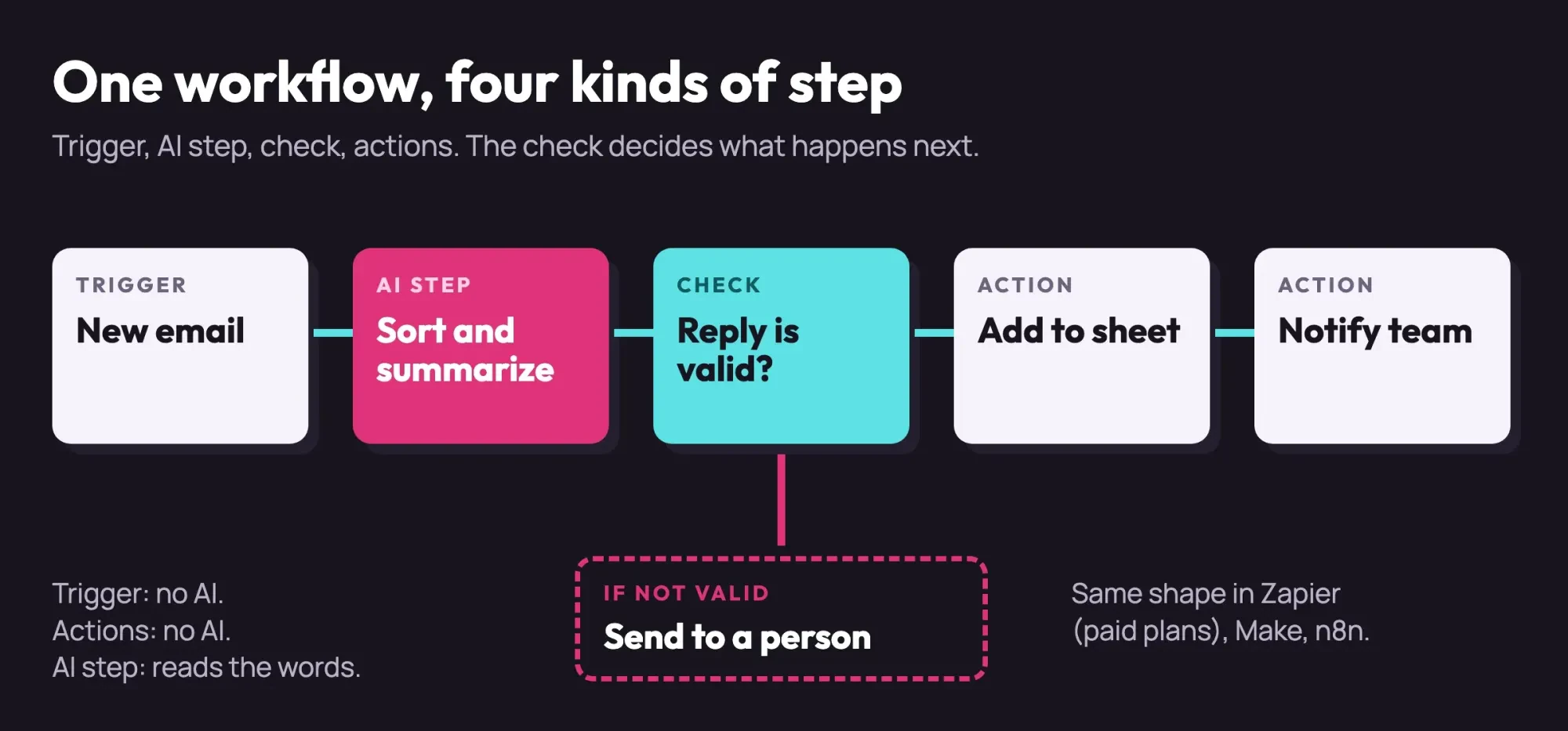 Diagram by DigitalTreed. The shape every workflow in this guide follows, drawn October 28, 2026.
The AI step can also be wrong with total confidence. Our plain-English guide to large language models explains why that happens.
So every workflow below gets a fourth part, a check that runs before anything reaches a customer or your books.
10 workflows to hand an AI step first
We chose 10 office jobs that fit those four parts and grouped them by where the work lands: the inbox, paperwork, sales and the team. Each one gives the AI step a reading job and adds a check that stops a wrong guess.
Inbox and customers
Email triage comes first, because every business has an inbox. A new email starts the workflow, the AI step names a category and writes a one-line summary, and then the action posts the urgent ones to your team chat. Complaint flagging is a close cousin: Make's sentiment module can mark an angry email, and a person still writes the reply, since that reply is yours to get right.
Review replies follow the same pattern. The AI step drafts a short thank-you or apology. Then Zapier's Human in the Loop app can "ask someone to approve or change data before continuing the Zap." For the asking side, see how to automate review requests. The fourth inbox job is translation. Make lists Identify language and Translate text modules, so a message written in Spanish can arrive in your inbox with a plain English summary sitting right beside it.
Paperwork
Invoices and receipts are where Jo loses the most evenings. Zapier says its Extract Content From URL action pulls text from PDFs and images. A second AI step can then lift the vendor, date and amount into a new sheet row. Receipts work the same way, from a photo someone emails in. Contract dates are the third paperwork job: the step finds a renewal date in a PDF, and the action adds a calendar reminder. Here the check is arithmetic. Line totals should add up to the invoice total, and someone should compare a few rows with the paper each week. If you send invoices too, our free invoice generator makes clean PDFs with the same fields every time.
Sales and team
For sales, a web form can trigger a lead score. You write the rules in plain words, like service area, job size and timeline, and the AI step returns a 1, 2 or 3 with a short reason. A second workflow turns a long quote request into a five-line note for whoever writes estimates. Once a lead's in your CRM, our CRM automation examples cover the follow-up.
The tenth job is meeting notes. When your meeting tool saves a transcript, an AI step can turn it into decisions and a task list, then post both to the team's chat channel. The person who ran the meeting should read it first, since it's easy for a summary to drop the one thing that mattered.
Here's the whole set, with our check for each:
| Workflow | Trigger | AI step | Action | Check before it goes out |
| Email triage | New email | Category + one-line summary | Row in sheet, alert for urgent | Reply format check; unsure goes to a person |
| Complaint flag | New email | Sentiment | Alert to the owner | A person writes the reply |
| Review reply draft | New review alert | Draft reply | Approval request | Approve or edit every reply |
| Translation | New message | Language + translation | Summary beside the original | Original kept with the summary |
| Invoice reading | New PDF in a folder | Vendor, date, amount | Row in sheet | Totals add up; weekly spot check |
| Receipt capture | Photo emailed in | Merchant, date, amount | Row in bookkeeping sheet | Bookkeeper reviews monthly |
| Contract dates | New contract PDF | Renewal or end date | Calendar reminder | Date matches the page |
| Lead score | Web form entry | Score 1-3 + reason | Tag the lead | Sample 5 scores a week |
| Quote request note | Web form entry | Five-line summary | Message to estimator | Full form linked |
| Meeting notes | New transcript file | Decisions + task list | Post to team | Meeting owner reads first |
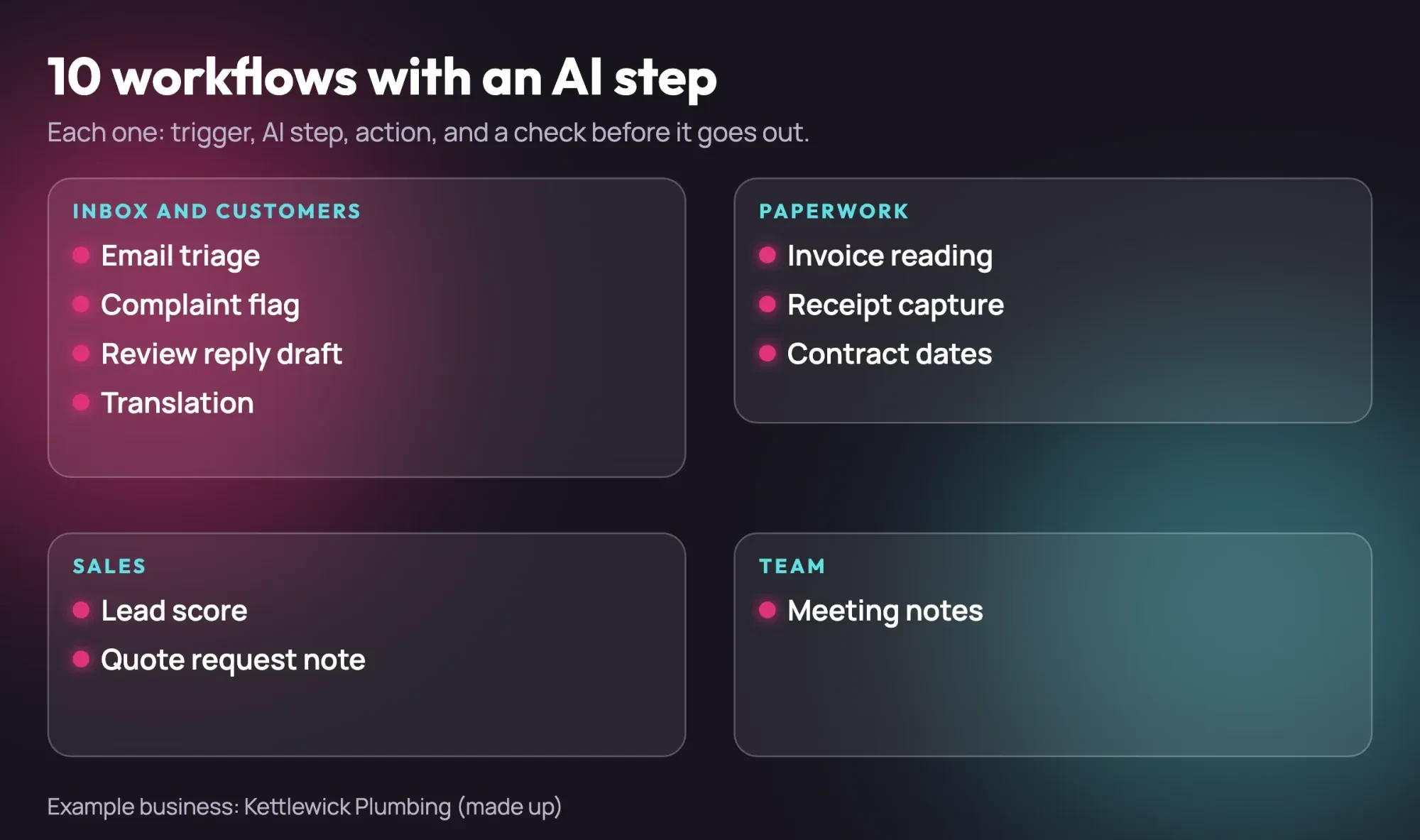 Drawn by us. The 10 workflows from this guide, with Kettlewick Plumbing as a made-up business.
Don't build all 10 at once.
Pick the one that eats the most of your week and run it for a month with its check switched on. A chatbot that answers visitors is a different job, and our website chatbot comparison covers it.
Zapier, Make or n8n: which one fits your shop?
Once you've picked a workflow, the tool decides the bill. All three offer AI steps, though Zapier's come only on paid plans, and they don't count usage the same way, so one job can cost differently in each. Zapier counts tasks. Its task usage help article says "a task is any successful action that runs in Zapier," and "Zap triggers never use tasks."
The plan matters too. As of October 28, 2026, Zapier's pricing page puts AI by Zapier and multi-step Zaps on Professional, not Free. Professional starts at $19.99 a month billed annually, or $29.99 billed monthly, for 750 tasks, and Team starts at $69 a month billed annually for 2,000. Zapier also says AI by Zapier works "without your own API key," so there's no separate account with a model provider to open, fund or keep an eye on.
Make bills in credits. Its pricing page says most actions use 1 credit, while some advanced features using Make's AI Provider may use more. Make's Free plan comes with 1,000 credits a month. We couldn't see plan prices in dollars on that page, so we've left them out rather than guess. Since each action costs credits, a long workflow with many small steps burns through more of them each month than a short workflow handling the same number of emails. On Core, Pro and Teams, the page says Make can buy 10,000 more credits automatically before yours run out.
The third tool counts executions. The n8n pricing page says "an execution is a single run of your entire workflow," no matter how many steps it has. Its cloud prices showed only in euros, so we don't quote them. The n8n hosting docs add that without a license key, the software "runs as the free Community edition" on infrastructure you run yourself.
Which unit suits you depends on how you'll run it. Zapier lists USD prices and needs no server of yours, and Make's free 1,000 credits let you try a small workflow first. The per-run count at n8n fits long workflows when someone on the team will look after the server.
What 420 emails a month costs in tasks, credits and runs
Those units are easier to judge with a real inbox, so here's one example. It isn't a measurement. Say Jo's shop gets 20 emails a business day across 21 business days, which makes 20 x 21 = 420 emails a month.
Our example workflow has a trigger and three steps after it: the AI step, a sheet row and a team alert. The table shows what 420 runs would use, from each vendor's page read October 28, 2026:
| Tool (example) | Unit | Per email | 420 emails | Plan line on the vendor page |
| Zapier | Task | 3, if your AI model tier counts 1 task | 420 x 3 = 1,260 tasks | Professional: 750 tasks from $19.99/mo billed annually; Team: 2,000 tasks from $69/mo |
| Make | Credit | 3 or more (AI Provider steps may use more) | 420 x 3 = 1,260 credits or more | Free: 1,000 credits a month |
| n8n | Execution | 1 | 420 x 1 = 420 executions | Starter: 2.5K executions (priced in euros only) |
At this volume, Zapier's 750-task Professional tier runs short, so you'd need a bigger tier or fewer steps. Zapier's help article says AI steps use tasks by model tier, which is why our table says "if." Without pay-per-task, it says new Zap runs are held until your billing cycle resets. You don't want to learn that during a week of leak emails, so check the usage page after the first few days and again before the month's last week.
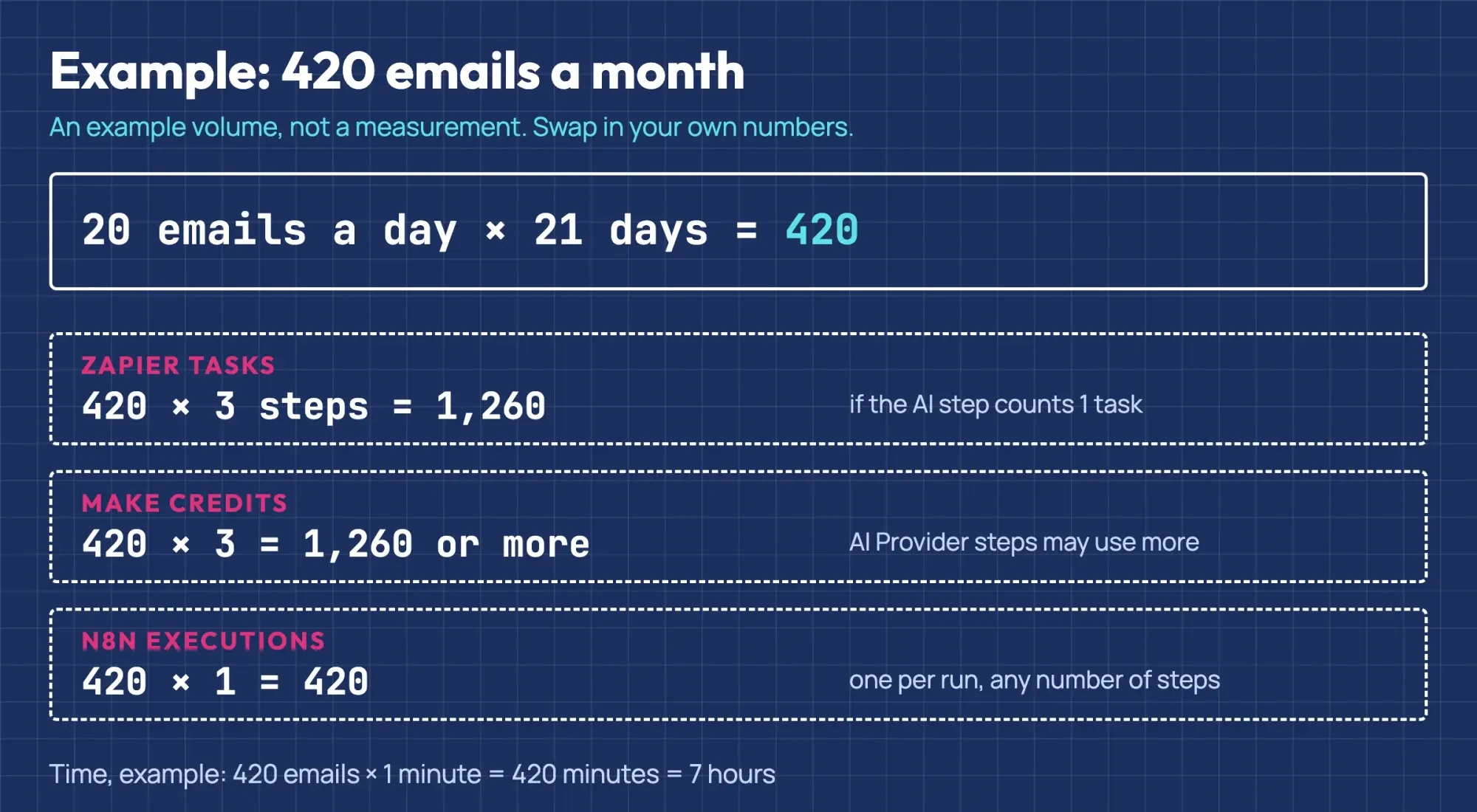 Diagram by DigitalTreed. Example volume, not a measurement; units from Zapier, Make and n8n pricing pages, October 28, 2026.
Time saved works best as an example too. If sorting one email by hand takes 1 minute, 420 emails x 1 minute = 420 minutes, or 7 hours a month. Swap in your own minute before you set it against a plan price.
Our keyword filter sorted only half of the test emails
That 1-minute guess only matters if the sorting is right, so we tested the old way first. Our keyword sorter got 10 of 20 made-up emails right. Seven matched no rule at all, and three matched the wrong rule.
The three wrong matches came from words that overlap. A sales pitch and a supplier's catalog both landed in quotes, because each one said "price." A complaint about a $620 bill went to billing, because our billing rule runs first and the email says "bill." Per category, billing got 3 of 3, scheduling 2 of 3, quote 2 of 4, complaint 1 of 3, other 1 of 3 and urgent 1 of 4. The urgent misses are the ones a plumber can't afford: the zero-pressure, sewage and gas-smell emails all landed in "other."
Then we tested the safety net that sits after an AI step. Our checker wants pure JSON, a category from our list and a summary of 25 words or fewer. One of six hand-written replies passed. Five went to a person. Their faults were chatty text before the JSON, a code fence around it, an invented "warranty" category, a 30-word summary and a missing summary. Two of those five held a correct answer, so a strict check costs a few extra reviews. We'd still keep it strict. It can't spot a wrong category inside clean JSON, though, so someone should scan the sheet each week.
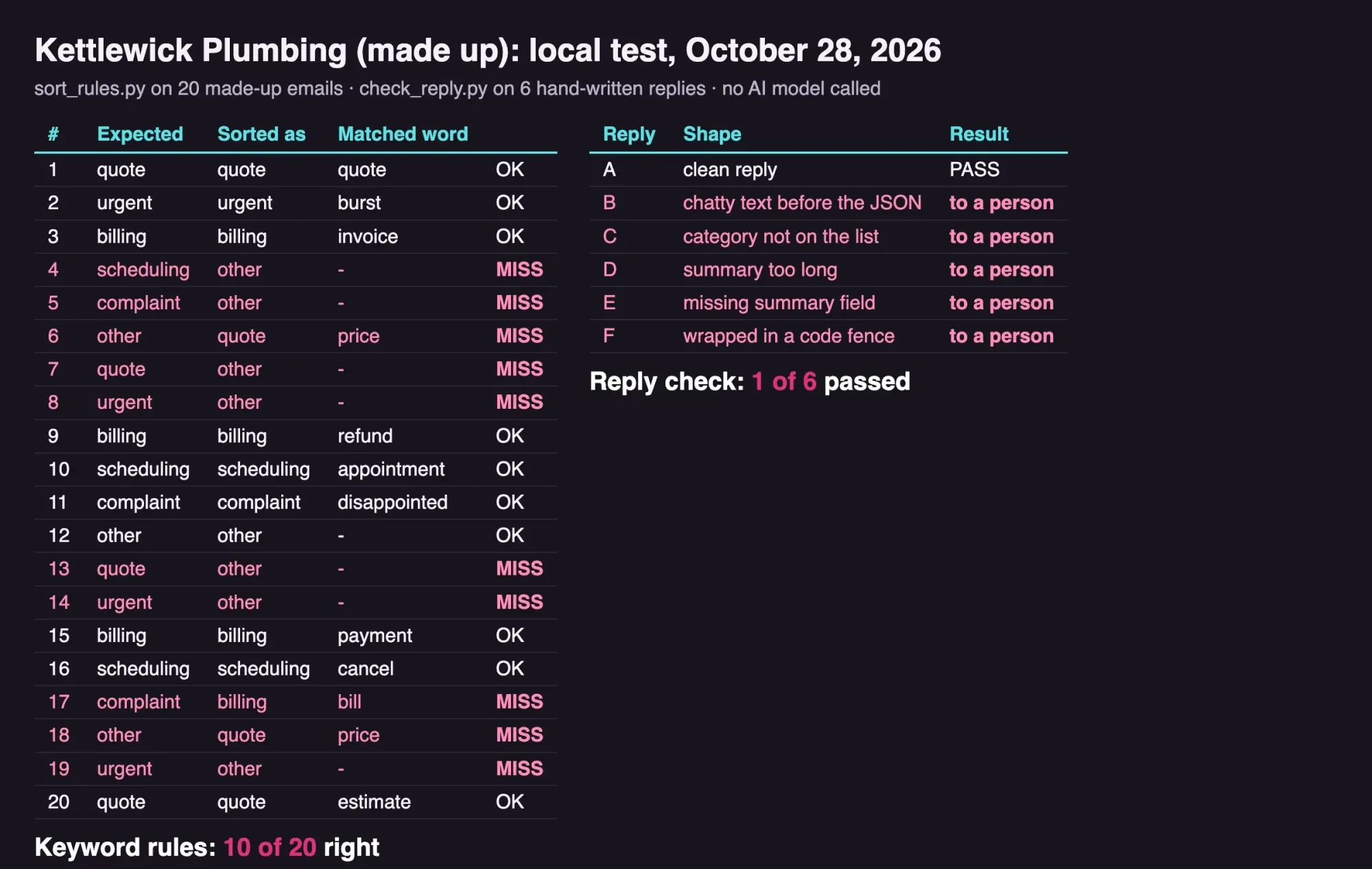 Screenshot: our test results page on 127.0.0.1, October 28, 2026. All emails and replies are made up.
What we tested
Two Python scripts ran offline on a Mac. We wrote the sorter's rules first, then 20 emails to Kettlewick Plumbing, a made-up company. The six replies were written by hand to copy common failure shapes. We didn't call any AI model, so we can't say how one would sort these emails.
python3 sort_rules.py    # right: 10 of 20
python3 check_reply.py   # passed: 1 of 6
Customer data stays out of the prompt unless you'd email it
That checker guards quality, but privacy is a separate question. Every word you pass to an AI step leaves your own systems and goes to a model provider, so treat that step like an email to an outside company. The SBA's guide to AI for small businesses advises against feeding sensitive or proprietary data into AI tools. It also tells owners to have a person review what AI produces.
In practice, that means trimming what the step sees. Send the email body rather than a whole thread with a card number buried in it, and pass the invoice's amount line, not the customer's bank details. If you handle patient records, Social Security numbers or other data a law protects, talk to your lawyer before any of it goes near an automation.
Your automation tool is a service provider holding customer data too. The FTC's guide to protecting personal information tells businesses to "put your security expectations in writing in contracts with service providers." Its first two principles, Take stock and Scale down, translate neatly here: know exactly what each step sends to which company, then cut it to the fields the step needs.
Human review is built into two of the three tools. Zapier has its approval app, and n8n's human-in-the-loop docs say you can require approval before an AI agent runs a specific tool.
Put one on review replies and anything else a customer will read. Triage and invoice rows can wait for the weekly scan.
Your first build: email triage in six steps
Email triage is the build we'd start with once the data rule is settled. It only sorts and summarizes, so a wrong guess delays an email rather than reaching a customer. The steps follow the diagram near the top:
- Make a sheet with columns for date, sender, category, summary and status.
- Connect a trigger for new email in the shared inbox, not a personal one.
- Add the AI step and paste the prompt below, with your own categories.
- Add a check: if the reply isn't one of your categories, route it to a person.
- Add the sheet row, then a team alert for urgent emails only.
- Run it alongside your usual routine for two weeks and compare the two.
We wrote this prompt into our test files for a plumbing shop, but we never sent it to a model. Try it on a week of your own emails, with your own categories:
You sort customer emails for a plumbing company.
Read the email below. Reply with JSON only, no other text:
{"category": "quote" | "urgent" | "billing" | "scheduling" | "complaint" | "other",
 "summary": "one sentence, 25 words or fewer"}
If you are not sure, use "other".
Our take: the check after the AI step decides whether you can trust the workflow, so build it before you switch anything on. Start with one build and keep a person on anything a customer sees. Add a second only when the first has run for a month with nothing wrong reaching a customer. Keep the weekly sheet scan going after that, because new kinds of email will turn up that your categories don't cover yet. For the tools around it, see our small business tech stack and our explainer on third-party integrations. If it's ads and content you're after, our AI marketing guide picks up where this one stops.
Want the wiring done for you? DigitalTreed builds automations like these for clients, and that's paid work for us, so we gain when you hire it out. You can do the triage build above yourself. For the rest, our project quote estimator gives a range in USD.
Questions about AI automation for small business
Frequently asked
Is Zapier AI free?
Not inside a Zap. Zapier's plan table marks AI by Zapier for Professional and up; Free gets "basic access to AI products (Agents, Chatbots, MCP)."
Is n8n free to use?
The self-hosted Community edition has no license fee, but you run the server. The hosting page says the npm route "requires managing Node.js versions and dependencies yourself."
What happens when I run out of Zapier tasks?
With pay-per-task on, Zapier's task usage article says "you'll be charged separately for any extra tasks." Filter and Paths steps never use tasks.
Which Make modules can read or sort text?
Make's AI Toolkit listing names nine, including Chunk text, Standardize text and Simple Text Prompt.
How we made this guide: Our test used two offline Python scripts, 20 invented emails and six hand-written replies. Plan and feature lines come from 12 vendor and government pages, each linked at its fact. Facts checked by the DigitalTreed team on October 28, 2026.
First published October 2025 as an overview of AI enablement platforms. Rewritten October 28, 2026: now a how-to with 10 workflows, USD plan limits, example cost math and a local test.
Sources
- Zapier: Plans and pricing
- Zapier Help: How is task usage measured in Zapier
- Zapier: AI by Zapier integrations
- Zapier: Human in the Loop integrations
- Make: Pricing
- Make: AI Toolkit integration
- n8n: Plans and pricing
- n8n Docs: Hosting n8n
- n8n Docs: Advanced AI
- n8n Docs: Human-in-the-loop for tools
- U.S. Small Business Administration: AI for small business
- FTC: Protecting Personal Information, a guide for business

Comments
No comments yet. Start the conversation below.