
Quick answer
To finish the FuboTV LG TV connect, install Fubo from the LG Content Store and choose Sign In With A Code. Then enter that code at fubo.tv/connect within five minutes. As of November 2026, Fubo's help center supports 2018 and newer LG TVs with webOS 4.0 or higher, so older sets need another device. Check your model year first.
The FuboTV LG TV connect step is a short code sign-in. The TV shows a code, you enter it at fubo.tv/connect on a phone or computer, and you never type a password with the remote. The Fubo app runs on LG's webOS system, so the TV's age matters before anything else.
Most trouble comes before the code. The set may be older than 2018, or LG may have renamed the store tile to Apps. The TV's LG Services Country may not match where you live. Its software may also need an update.
Key takeaways
- Fubo supports LG TVs from 2018 onward with webOS 4.0 or higher.
- Fubo's model-year table stops at 2024, so check webOS on newer sets.
- Each fubo.tv/connect code expires after five minutes.
- Reinstalling the app is how LG clears an app's cache.
- Fubo and Hulu + Live TV stayed separate after the October 29, 2025 closing.
Which LG TVs can run the Fubo app?
Fubo's device requirements page sets both limits: "Fubo is currently available on 2018 and newer models of LG Smart TVs with webOS 4.0 or higher." LG's own webOS TV platform table lines up with that cutoff. It lists webOS TV 4.x for 2018 and 2019 sets. The 2016 and 2017 sets ran webOS 3.x, which is below Fubo's minimum. Fubo lists its current LG app as v12.53.0. The same page puts Samsung's cutoff at 2017 and Vizio SmartCast's at 2016, so a household with mixed TVs can find that LG is the strictest of the three.
To read the year, find the model number on the label on the back of the TV, or on screen under General and About this TV. Fubo says one character in it marks the year. On an LED, NANO or QNED set it's the letter after the U, so the R in 65UR9000PUA means 2023. On an OLED it's the digit after the series letter, so the 3 in OLED65C3PUA also means 2023. Fubo's table runs from K (2018) to UT (2024) for LED and QNED sets, with no year skipped, and NANO sets are read the same way as QNED. For OLEDs it runs from 8 (2018) to 4 (2024).
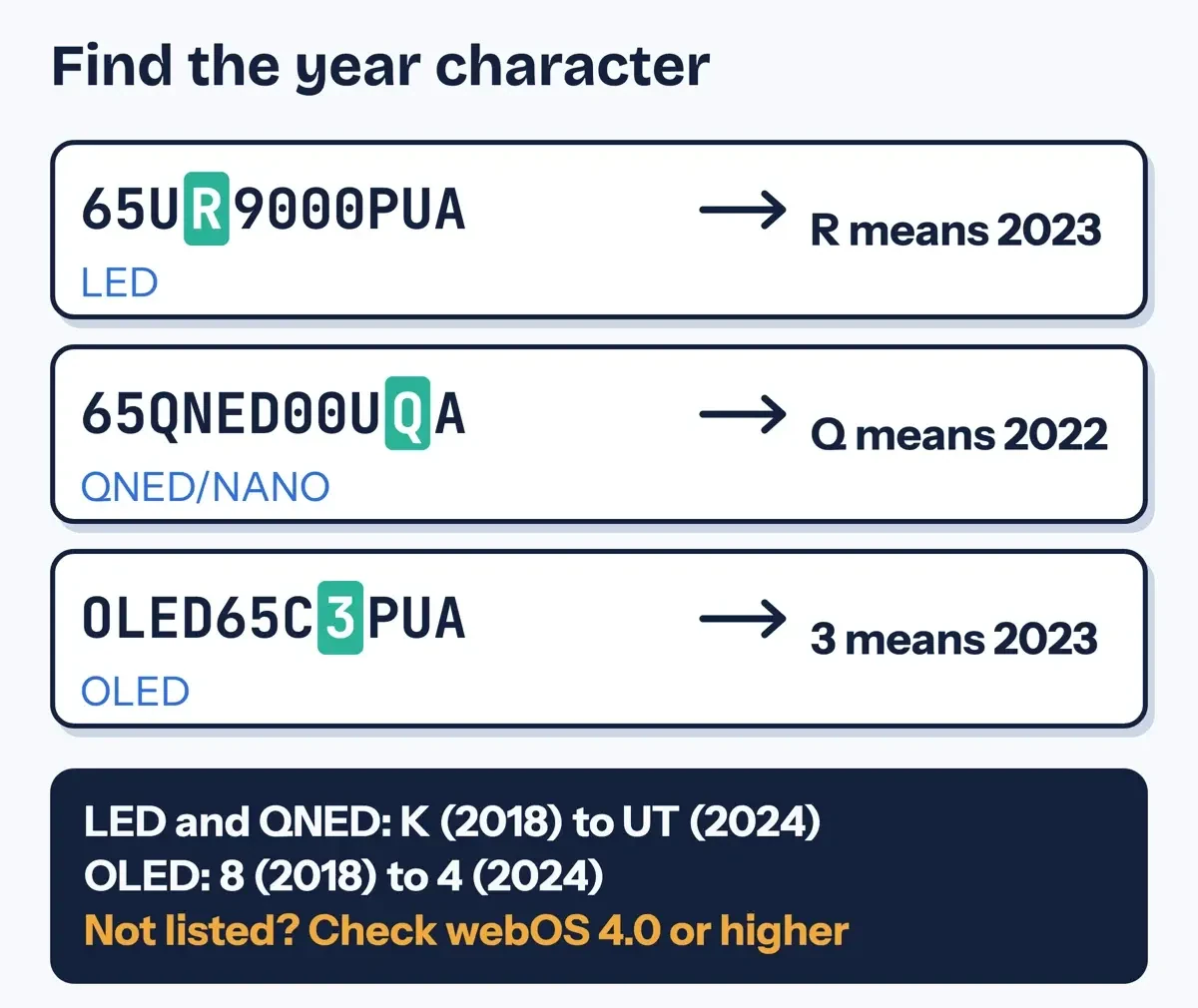 Diagram by DigitalTreed, from the example model numbers on Fubo's device requirements page, read November 5, 2026.
The table has a gap after 2024. LG's platform page already lists webOS TV 25 for 2025 and webOS TV 26 for 2026, each running a newer Chromium web engine than the 2024 version. Fubo's Multiview article for LG says Multiview now works on select LG TVs, including 2024, 2025 and newer 4K and 8K models. So the app runs on at least some 2025 sets. On a 2025 or 2026 TV, skip the letter and read the webOS version, since any version from 4.0 up meets Fubo's stated minimum. LG's software update guide gives a shortcut: "Press the Settings or Mute button on your remote control three times."
We ran eight made-up model numbers through Fubo's table. Zeros replace real series numbers, so none is a real LG TV.
| Made-up model | Type | Year code | Year in Fubo table | webOS (made up) | Result |
|---|---|---|---|---|---|
| 55UK0000PUA | LED | K | 2018 | 4.0 | Supported (listed) |
| 43UM0000PUA | LED | M | 2019 | 4.5 | Supported (listed) |
| 65QNED00UQA | QNED/NANO | Q | 2022 | 22 | Supported (listed) |
| 50UT0000PUA | LED | UT | 2024 | 24 | Supported (listed) |
| OLED48Z1PUA | OLED | 1 | 2021 | 6.0 | Supported (listed) |
| OLED77Z5PUA | OLED | 5 | Not listed | 25 | Check webOS: meets 4.0 |
| 70UA0000PUA | LED | A | Not listed | 25 | Check webOS: meets 4.0 |
| 49UJ0000PUA | LED | J | Not listed | 3.5 | Below webOS 4.0 |
Five of the eight decoded to a listed year. The 2025-style OLED and the LED with an A code aren't in the table at all. For those two, the script switched to the made-up webOS version, 25 in both cases, which meets Fubo's 4.0 minimum. The made-up J model fails both ways. It has no listed year and only webOS 3.5. A TV like that needs a streaming stick or box, and our guide on the difference between an OTT box and a smart TV weighs that choice.
What we tested
On November 5, 2026 we checked every page in Sources. Fubo's help pages block automated checkers, so its 19 articles were checked in a browser, and the LG and Disney pages were read with plain requests. A Python script went through our saved text copies, looked for 16 steps and rules from this guide word for word, and found all 16. It read Fubo's model-year table and produced the made-up model results above. The script also wrote those results into a small checker page, which we served on 127.0.0.1.
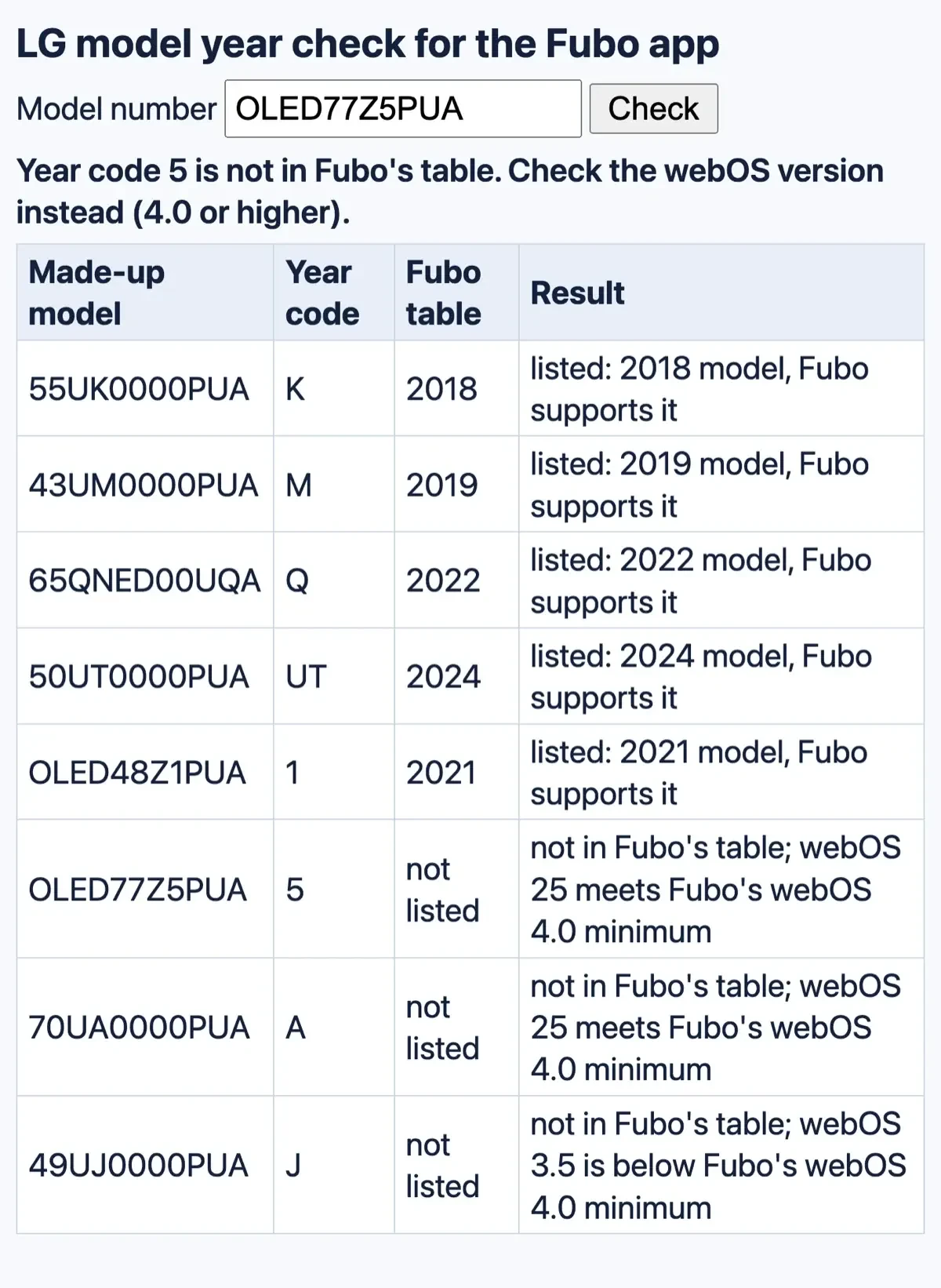 Screenshot: our LG model-year checker on 127.0.0.1, November 5, 2026. Model numbers are made up.
Install the Fubo app from the LG store
The install runs through LG's own app store. It opens from Home and needs the TV online and signed in to LG. LG's webOS app ecosystem page lists the store's past and present names as "LG Smart World/LG Content Store/Content Store/Apps" over the years. LG's install or delete apps guide shows a 2020 webOS 5.0 path through LG Content Store and a 2022 webOS 22 path through a tile called Apps. Fubo's LG Smart TV guide still says LG Content Store, with a shopping bag icon, and its install guide admits the steps "can vary depending on the model." Whatever the tile is called, the steps after it match:
- Press Home on the LG remote.
- Open LG Content Store, or Apps on newer TVs.
- Select the search icon in the top corner and type Fubo.
- Select Fubo in the results, then Install.
- When the download finishes, select Launch.
If Install does nothing, check that the TV is signed in to LG. LG's Content Store guide starts with "Ensure you are signed in to your LG account."
Sign in with the fubo.tv/connect code
With the app open, you link it to your account from a phone, tablet or computer, using the same email and password you signed up with. Fubo's code sign-in article lists the order:
- On the TV, open Fubo, select Sign In, then Sign In With A Code.
- On a phone, tablet or computer, go to fubo.tv/connect.
- Sign in there with your Fubo email and password.
- Enter the code shown on the TV and select Submit.
- A success message appears in the browser, and the TV opens the Fubo home screen.
Fubo's code article and its LG guide both say a code is good for five minutes, so have the phone signed in before you read the code off the TV. If a code is rejected, the TV shows a fresh one every five minutes; read the new code and refresh the page. Fubo's smart TV sign-up article also says to "ensure the URL begins with https://www.fubo.tv/" before you type anything.
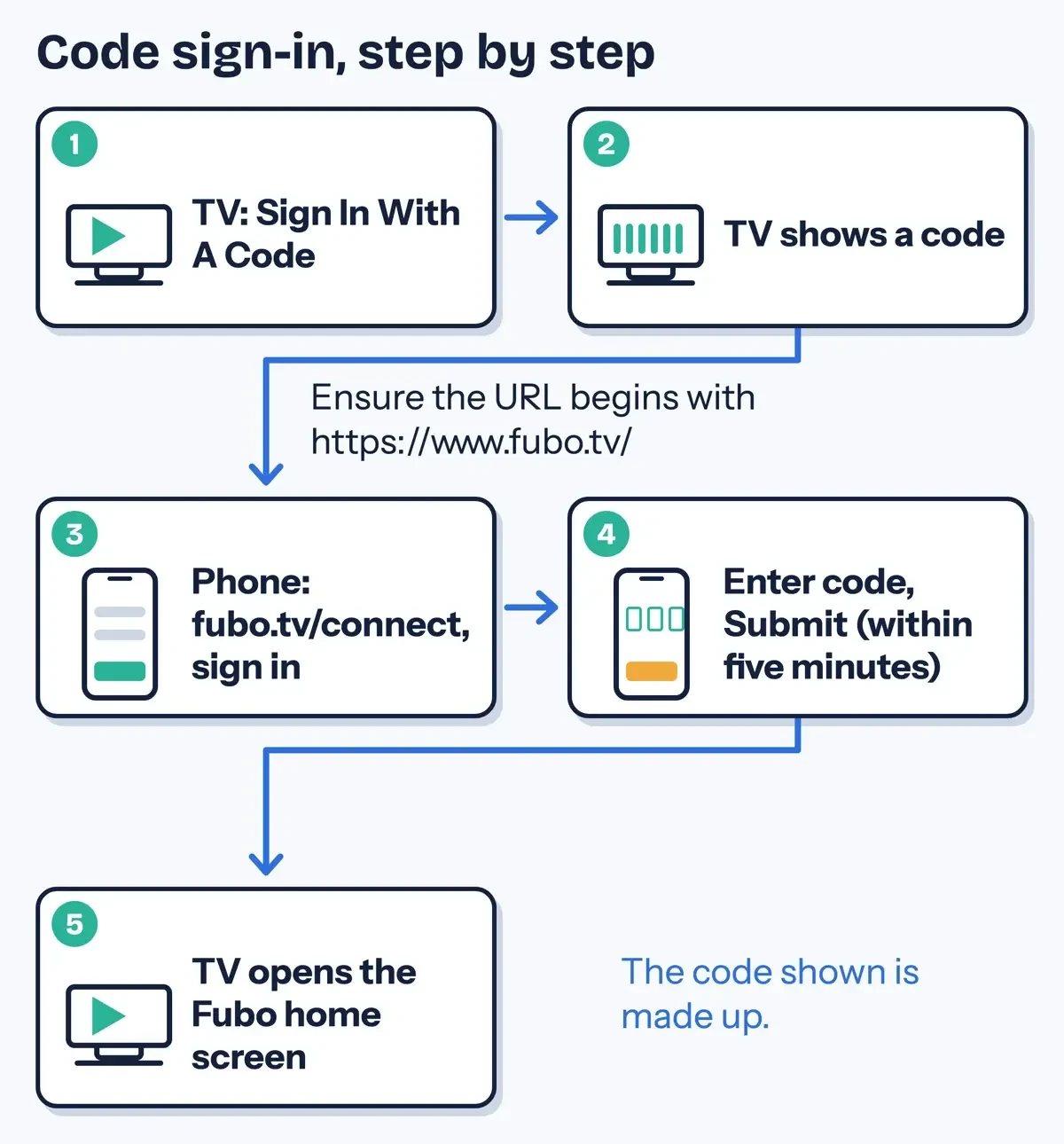 Diagram by DigitalTreed, from Fubo's code sign-in and LG Smart TV help articles, read November 5, 2026. The code shown is made up.
New subscribers take a longer route. They select Sign Up on the TV and scan the QR code or type the link shown. They create the account on the phone and enter the TV's code at the end. If the sign-up flow never asks for the code, Fubo's sign-up article says to open fubo.tv/connect, sign in with the new account and type the TV's code there. When codes keep failing, pick Sign In With Email. You then type your login with the remote. For the code route, Fubo notes "You must have an active Fubo account to sign in with a code". Our yt.be/activate sign-in guide covers YouTube's similar phone-code step.
When the Fubo app is missing or will not load
If a search for Fubo in the store comes up empty, suspect the TV first. LG's guide to finding store apps warns: "Depending on the TV model, the app may not be supported."
LG's low memory troubleshooting page adds that sets made before webOS 3.5 in 2017 may fail to run apps once a memory warning appears. Its fix is deleting apps you no longer use.
The store region is the next suspect. LG's location settings guide says "Available apps and services may vary depending on the region selected in the location settings." LG says the setting should match the country where you use the TV. On 2021 and later sets it's under All Settings, General, System, Location, LG Services Country.
Your own location counts too. Fubo's away-from-home article says "Fubo is available in the United States and its territories." Its common troubleshooting steps add that "Fubo can't be accessed using a Virtual Private Network (VPN)."
An app that installs but won't load needs fixes in order, cheapest first. The table combines Fubo's troubleshooting steps with LG's frozen streaming app guide and its apps that crash or won't load guide.
| Step | What to do | Source |
|---|---|---|
| 1 | Check Fubo's status page for an outage, then switch channels and back | Fubo |
| 2 | Close Fubo fully and reopen it; sign out and back in | Fubo |
| 3 | Unplug the router (Fubo says for a minute or so, LG says five seconds), plug it back in and wait one to two minutes | Fubo and LG |
| 4 | Connect the TV to your phone's hotspot; if Fubo works there, the problem is your home network | LG |
| 5 | Unplug the TV and turn off Quick Start+ to clear a temporary system error | LG |
| 6 | Delete Fubo, reinstall it from the store, and update the TV software | Fubo and LG |
| 7 | Reset the TV to initial settings only as a last step; it deletes every app and account | LG |
Step 6 doubles as the cache fix. Fubo's cache article says "LG recommends uninstalling and reinstalling apps to remove cached files and data." To delete the app, press Home. Hold the wheel or OK button on the Fubo tile, and pick the trash or X icon.
A wrong clock or another city's local channels is a separate fault. Fubo's wrong time article says LG owners can set Preferred time zone under Settings and Preferences in the app.
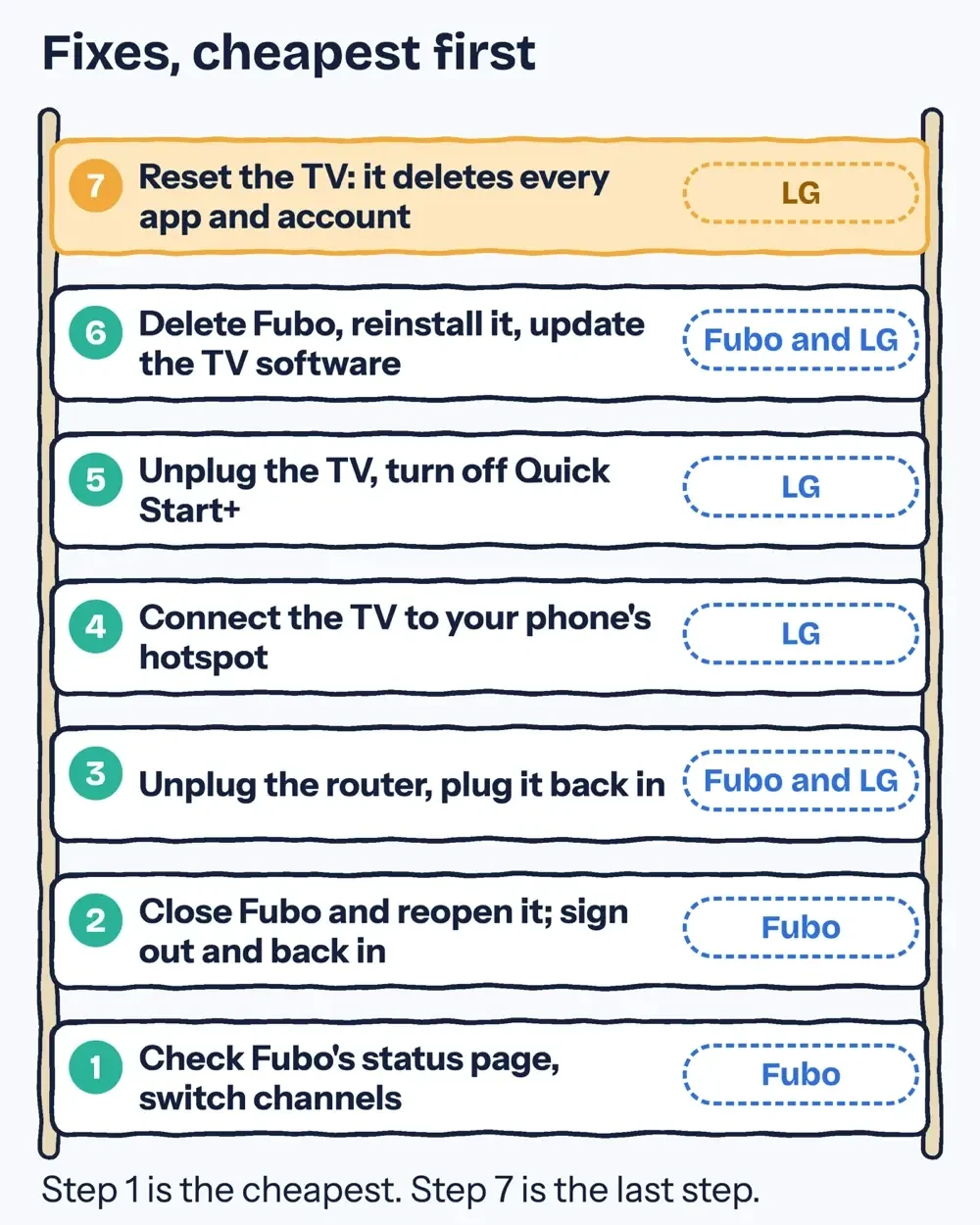 Drawn by us from Fubo's troubleshooting steps and LG's guides on frozen and crashing apps, read November 5, 2026.
A hotspot test that works points at your home line. Our broadband connection types guide compares cable, fiber and fixed wireless, and our YouTube error 503 fix for TVs runs through the same router checks for another app.
Keep the app and the TV updated
LG's frozen app guide lists a TV software update as the step right after the reinstall. For the app, Fubo's LG guide points to LG Content Store, Apps, then Updates, or My Apps on some models. It adds: "LG TVs often auto-update apps in the background."
TV software uses a different menu path by year. LG's update guide puts 2020 and later TVs (webOS 5.0 and later) under All Settings, Support, Software Update, Check for Updates. Sets from 2019 and earlier use All Settings, General, About This TV, then Check for Updates. Fubo's own app update article gives only that older path. On a 2020 or newer LG, look under Support instead, and turn on Auto Update in that same menu so later fixes arrive without a manual check. Keep the TV plugged in during an update. LG warns that unplugging "may cause a system error."
Fubo prices for existing subscribers, as of June 15, 2026
On an LG TV you pay for the Fubo plan, and Fubo's plans and add-ons article says add-ons are "charged in addition to the cost of your base plan."
We couldn't read sign-up prices: fubo.tv sent our checker, which runs outside the US, to Fubo's corporate site. The table comes from Fubo's price change article for current subscribers, updated June 15, 2026: new prices for people who had already subscribed, not sign-up prices. That article followed Fubo's June 10, 2026 announcement of the NBCUniversal channel launch. For Fubo TV plans it says "Your subscription price will increase by $15/month" and "Your new base plan price will be:"
| Fubo plan | New base plan price for existing subscribers (June 15, 2026) |
|---|---|
| Pro | $88.99/month |
| Elite | $98.99/month |
| Ultimate | $113.99/month |
| Deluxe | $118.99/month |
| Fubo Sports service (Sports + News), an increase of $9/month | $64.99/month |
For quarterly Fubo TV plans, the same article says "the new prices shown above will be your effective monthly rate, billed every three months." Fubo adds that the start date "will vary depending on when NBCUniversal channels become available in your area".
New customers may see other numbers. Fubo's billing changes article says that after a promotional first billing period, the subscription goes back to standard pricing on its own. Its free trial article says a trial needs "a credit or debit card" and is only for new customers.
Taxes and regional sports fees can also change with your ZIP code. Check the price on the sign-up screen and note when any promotion ends. Fubo says service-wide price changes are always sent by email in advance, but the end of a promotion triggers no separate notice.
Fubo and Hulu + Live TV: what the Disney deal changed
Fubo's website also offers Hulu + Live TV because of a deal with Disney. Disney's January 6, 2025 press release announced a "definitive agreement for Disney to combine its Hulu + Live TV business with Fubo."
Disney's October 29, 2025 release says the companies "closed the previously announced transaction" and that, as of the closing, "Disney holds an approximately 70% interest in the newly combined company."
On your LG TV, though, nothing merged. Hulu + Live TV still streams in the Hulu app. The closing release says the two "will continue to be available to consumers as separate and distinct services." It adds that "Fubo will continue to serve viewers in the Fubo app." Fubo's combination FAQ repeats that "Both services are still separate."
Picking Hulu + Live TV on Fubo's website moves you to Hulu, and from then on account changes, including cancellation, sit with Hulu rather than Fubo. Fubo's Hulu + Live TV sign-up article says that account is "managed through the Hulu website directly." Our Hulu cancellation guide covers leaving that plan, and our legal US sports streaming options list other legal ways to watch live games.
FuboTV on LG TV questions
Frequently asked
Can I watch Fubo on two LG TVs at once?
Yes, at home. Fubo's device limits article allows "up to 10 devices simultaneously when connected to your Home Network" on current US plans.
Does Fubo Multiview work on LG TVs?
On select 2024, 2025 and newer 4K and 8K LG models, Fubo says it shows "up to two live channels on a single screen".
How do I close the Fubo app on an LG TV?
Press Back until the LG home screen, or press Home. Fubo's LG guide says an Exit button closes it "immediately."
Why does Fubo say too many locations?
Fubo's away-from-home article says smart TVs stream from one location at a time. Stop the other home's stream first.
How we made this guide: Every quote and menu path here was checked on November 5, 2026 against the 31 Fubo, LG and Disney pages in Sources. Fubo's 19 help pages block automated checkers, so they were checked in a browser. The model-year check ran on 127.0.0.1. We have no Fubo account and entered no activation code. Facts checked by the DigitalTreed team on November 5, 2026.
First published February 2025 with claims we could not source. Rewritten November 5, 2026 from Fubo's help center, LG's support pages and Disney's press releases.
Sources
- Fubo Help Center: How do I watch Fubo on my LG Smart TV?
- Fubo Help Center: What devices can I watch Fubo on?
- Fubo Help Center: How do I sign in on my TV using a code?
- Fubo Help Center: How do I sign up from the Fubo app on my Smart TV or connected device?
- Fubo Help Center: How do I install the Fubo app?
- Fubo Help Center: How do I update my Fubo app?
- Fubo Help Center: How do I clear the cache in the Fubo app?
- Fubo Help Center: Common Troubleshooting Steps
- Fubo Help Center: Can I Watch Fubo While Away From Home?
- Fubo Help Center: How do I fix the wrong time on my Smart TV in Fubo?
- Fubo Help Center: Can I use Multiview on my LG TV?
- Fubo Help Center: How Many Devices Can I Stream Fubo From at the Same Time?
- Fubo Help Center: I'm a Fubo Subscriber; Is My Price Changing?
- Fubo Help Center: When Will NBCUniversal Channels Launch on Fubo?
- Fubo Help Center: What Plans and Add-ons does Fubo Have?
- Fubo Help Center: Why Did My Price for Fubo Change?
- Fubo Help Center: How does the free trial work?
- Fubo Help Center: Does the Fubo-Hulu + Live TV Business Combination Change Anything for Me?
- Fubo Help Center: How do I sign up for Hulu + Live TV through the Fubo website?
- LG US Support: How to Update Your LG TV Software and Turn On Automatic Updates
- LG US Support: How to Install or Delete Apps
- LG US Support: How to Use the LG Content Store with webOS
- LG US Support: How to Find LG Content Store Apps
- LG US Support: How to fix apps that keep freezing, crashing, or won't load
- LG US Support: How to Fix a Streaming App That Freezes on Your LG TV
- LG US Support: Troubleshooting Low Memory Notifications and Apps Not Working
- LG US Support: How to Change Location Settings and Set LG Services Country
- LG webOS TV Developer: Web API and Web Engine (platform versions by year)
- LG webOS TV Developer: App Ecosystem
- The Walt Disney Company: Fubo and Disney’s Hulu + Live TV Virtual MVPD Businesses to Combine (January 6, 2025)
- The Walt Disney Company: Fubo, Disney’s Hulu + Live TV Complete Business Combination (October 29, 2025)
Comments
No comments yet. Start the conversation below.