
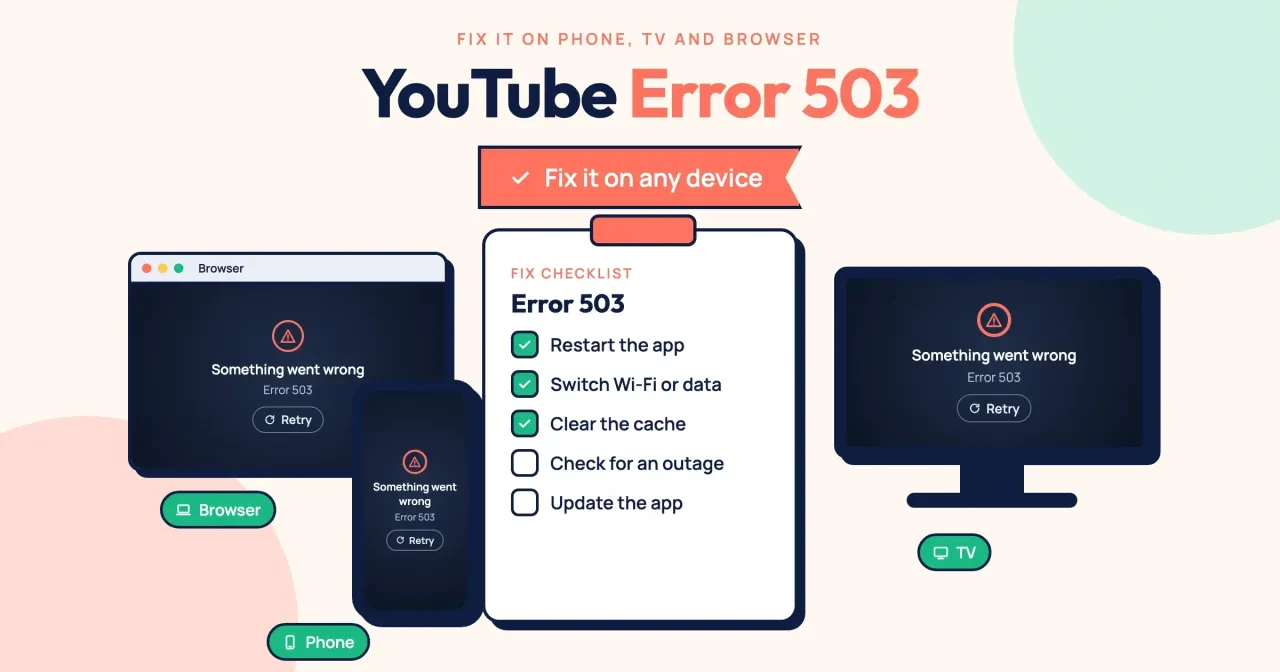
Quick answer
YouTube error 503 means a YouTube server couldn't handle your request right then, and the web standard (RFC 9110, as of October 2026) blames temporary overload or maintenance. If the same video fails on both Wi-Fi and cellular data, it's YouTube's side and waiting is the fix. If only one device or network fails, the fix is yours. Start with the 60-second check.
Maybe the lobby TV stopped mid-playlist with a 503, then your phone did the same. Error 503 is the web's standard code for "Service Unavailable," sent when a server is too busy or down for work. You want to know whether to restart the router or just wait.
We start with what YouTube error 503 means and a check for whether it's YouTube or your network. Then come fixes for a phone, a smart TV and a browser, and our test of tapping Retry every second. It ends with what to do while YouTube recovers, and what to do when your own website shows a 503.
Key takeaways
- Tapping Retry every second sent 11 requests in our test; waiting sent 2.
- A failure on both Wi-Fi and cellular data points to YouTube, not you.
- YouTube calls unplugging a TV for 30+ seconds often the most effective fix.
- Refused, timed-out and DNS failures return no 503 code at all.
- YouTube recommends 5 Mbps sustained for 1080p and 20 Mbps for 4K.
What YouTube error 503 means
The number comes from the rules every web server follows. RFC 9110, the HTTP standard, says a 503 means the server is "currently unable to handle the request due to a temporary overload or scheduled maintenance." It adds that this "will likely be alleviated after some delay," so the code is really a server asking you to come back a little later.
It isn't a verdict on your phone, your account or the video.
Mozilla's developer docs agree. MDN says the common causes are that "a server is down for maintenance or overloaded." A server that wants to slow down one specific user should send a 429 instead, MDN notes. That's handy to know, because a real 503 tends to hit lots of people at once, not just you.
Here's the catch: people often call it the YouTube 503 network error, but YouTube doesn't print a 503 wording anywhere we could find. Its Troubleshoot YouTube video errors page lists messages such as "Something went wrong. Tap to retry." and "Connection to server lost." It shows no numeric codes at all. So we can't tell you the exact words your screen will show. We can't see inside the app either, so we can't promise every 503 it shows is a true server 503. That's why the next check beats rereading the message.
Two neighbors look alike but they aren't the same problem. A YouTube error 400 means YouTube rejected what your device sent, so the fix sits on your device. If your own upload says "Video unavailable," our YouTube video unavailable fixes for creators cover the Studio side.
Is it YouTube or your network?
Before you clear or reinstall anything, spend one minute finding where the problem lives. It decides which of the sections below you need at all. Change a single thing per try and watch whether the same video plays. Use that one video every time, because a different video can fail or play for reasons that have nothing to do with the 503.
- Turn Wi-Fi off on your phone and play the video on cellular data.
- Play it on a second device that's on the same Wi-Fi.
- Try a third screen, like a laptop, on Wi-Fi.
The pattern of failures tells you whose problem it is, so jot down what happened on each screen.
Now read the results. Each pattern has one owner. If the video fails on cellular data and on every device on Wi-Fi, two separate networks can't reach YouTube, so the problem is almost certainly YouTube's. If it plays on cellular but fails on every Wi-Fi device, your home or office network is the weak link. And if only one device fails while the others play, the fix belongs to that device.
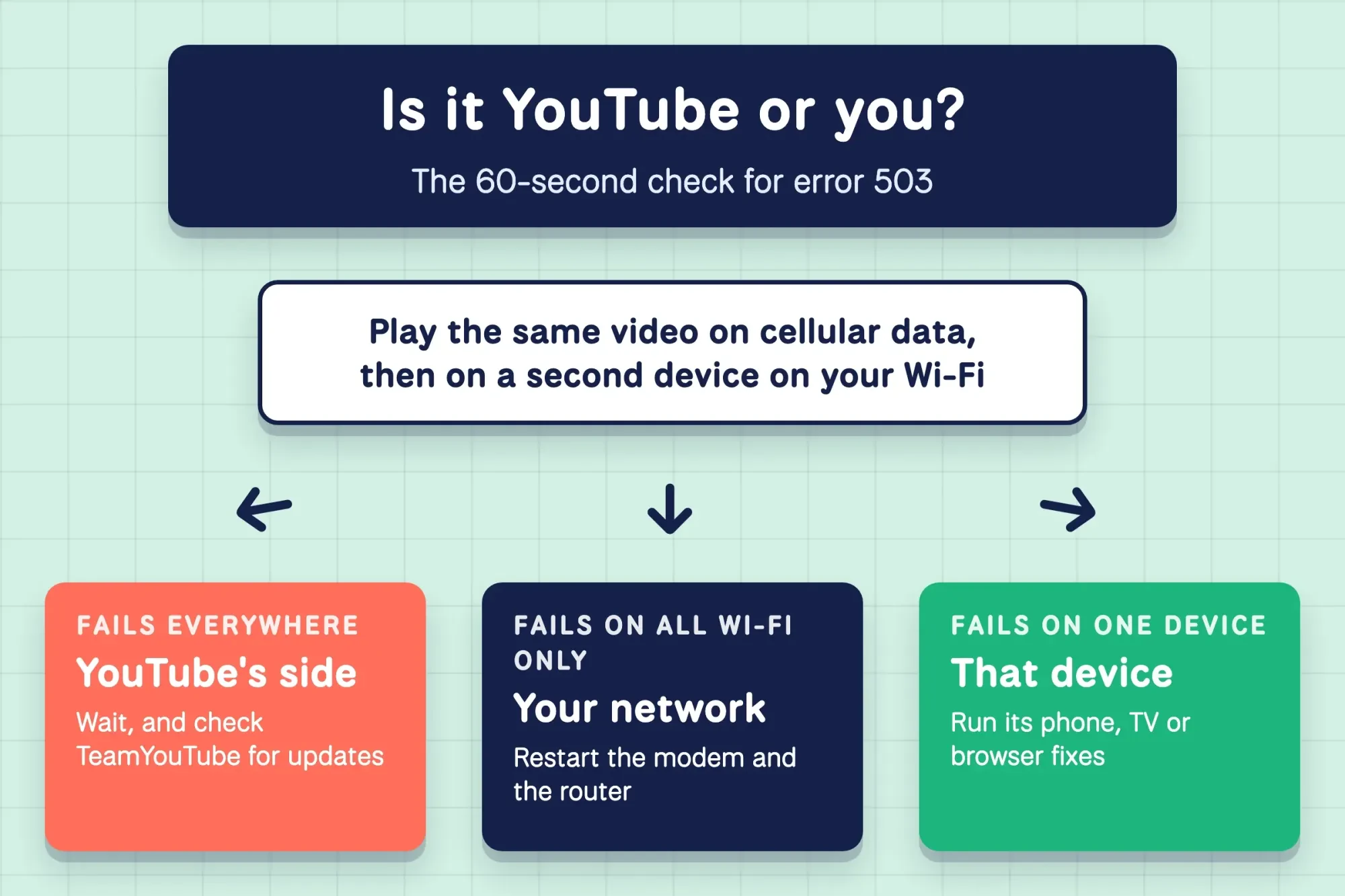 Diagram by DigitalTreed: our own 60-second check, with YouTube Help's "Restart your internet connection" step, October 2026.
Think it's YouTube? Its TeamYouTube account on X is where the team posts updates and answers, so look there before you touch your router. Only your Wi-Fi fails? Then YouTube's own first network step is plain: "Restart your internet connection." Unplug the modem and router, wait a moment, and plug them back in. A browser that can't find any site at all has a different fault, covered in our NXDOMAIN DNS error fixes.
On a phone, restart the app, then switch networks
Do these phone fixes in order, and replay the same video after each one.
Once you know it's one phone, start small. Pick the step that changes nothing in your settings. YouTube's help page says to try "closing the YouTube app or rebooting your device," so swipe the app away in the app switcher and open it again. No luck? Switch from Wi-Fi to cellular data, or the other way round, and replay the same video. If it plays on cellular but still fails on Wi-Fi, the Wi-Fi link between your phone and the router is now the main suspect.
On an iPhone, Apple's forget a Wi-Fi network steps are Settings > Wi-Fi > Edit, then More Info > Forget This Network. Have the Wi-Fi password ready before you tap Forget, since you'll need to type it again to rejoin, and Apple notes this also helps after router settings change.
Next, clear what the app has stored, and here Android and iPhone part ways. On Android, Google says you can "usually clear an app's cache and data" in Settings, though menus vary by maker. Its free up storage help page spells out the difference: Clear cache "deletes temporary data," while Clear storage "permanently deletes all app data." Pick Clear cache for YouTube first. It's the gentle option.
On an iPhone, Apple's iPhone storage page shows no Clear cache button for apps; it offers Offload App instead. Offloading "frees up storage used by the app, but keeps its documents and data," and you reinstall from the same screen.
Last on a phone, update the app. Google's update steps for Android go Play Store > profile picture > Manage apps & device > Updates available. On an iPhone, pending updates sit under your profile picture in the App Store, as YouTube's iPhone update steps show. An update keeps your settings, so try it before a full uninstall.
On a smart TV, pull the plug at the outlet first
TVs get one fix that beats the rest, according to YouTube itself. The TV section of its troubleshooting page calls a power cycle "often the most effective way to resolve playback issues on your TV." Pull the TV or streaming box's plug from the outlet and wait at least 30 seconds, then plug it back in and open the same video.
Use the outlet, not the remote's power button.
Still showing 503 after that? Check for an app update. You probably won't find one. YouTube says most smart TVs and streaming devices "update apps automatically." On an Apple TV, open the App Store, search for YouTube and select it; no Update option means it's current. On an Android TV, the Play Store auto-updates apps by default, so you'd only act if someone switched that off.
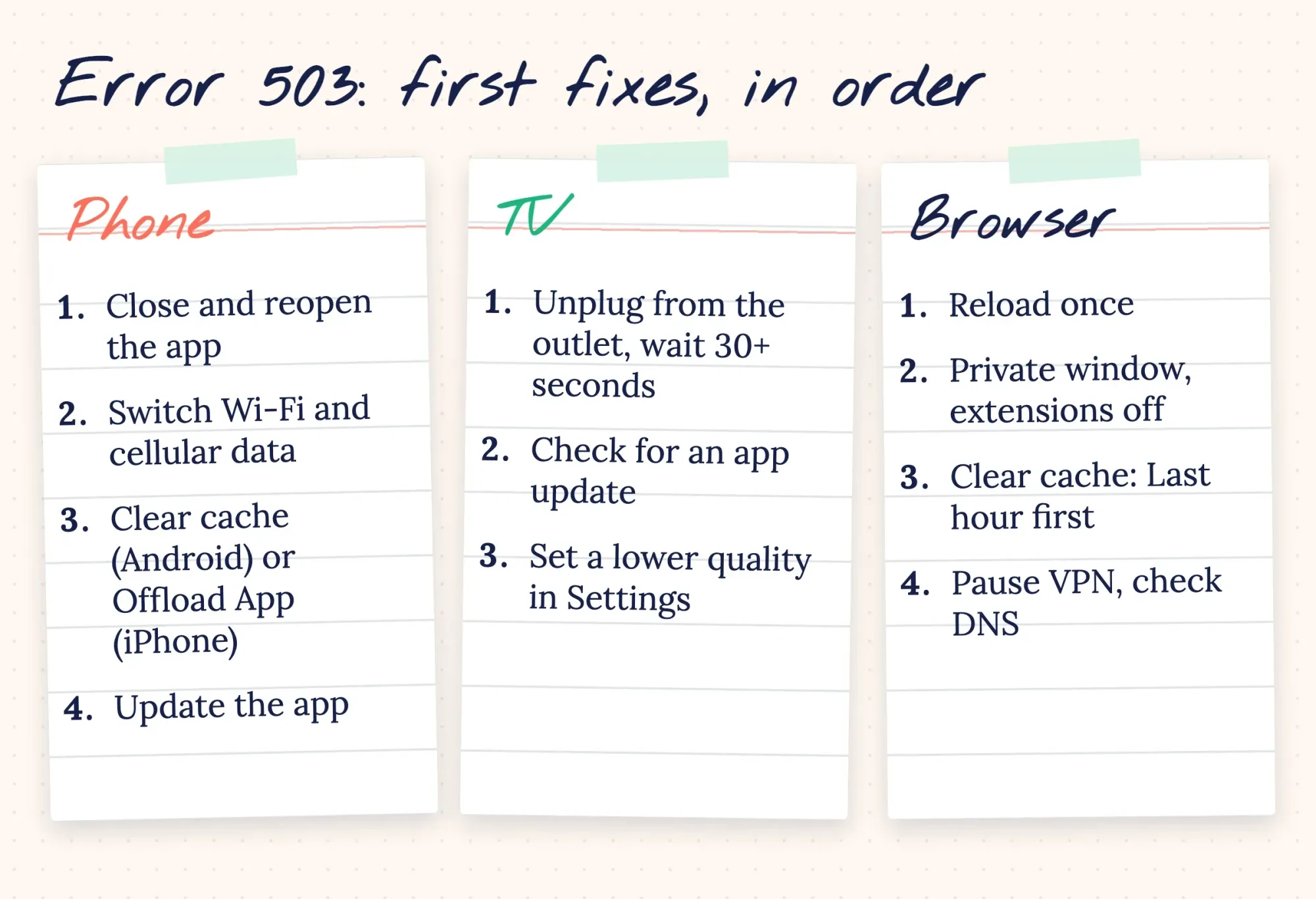 Drawn by us: first fixes per device, from YouTube, Google and Apple help pages read October 28, 2026.
Example (a made-up business): Spoke and Kettle Cycles in Keokuk, Iowa, loops its own repair videos on a lobby TV. One Saturday the TV shows a 503, and a minute later the owner's phone shows one too while it's still connected to the shop's Wi-Fi network. On cellular data, though, the phone plays the video. That rules out YouTube, so the owner restarts the router first and the TV second, and both play again. If your shop loops its own videos too, start from a YouTube channel set up for business, with playlists ready to loop.
In a browser, reload once, then clear the cache
A browser gives you more tools than a TV, so work through them in order and stop as soon as the video plays. Reload the page once and give it a few seconds. YouTube says it may load a stripped-down watch page during "rare service interruptions," and its advice there is to reload and, failing that, "Try again later."
One reload didn't help? Open YouTube in a private window with your extensions off. YouTube's video errors page suggests exactly that test, because ad blockers and other add-ons can break playback, and a private window starts without them or any stored YouTube data. If the video plays in the private window, clear the browser's stored data. In Chrome, YouTube's clear cache and cookies steps are More > Delete browsing data, then pick a time range, select Cookies and other site data, and select Delete data. Try Last hour first, and go to All time only if that fails.
Expect to sign in again afterward, since YouTube warns that "if you were signed in, you'll need to sign in again."
One more browser check takes a minute. For its "Something went wrong" message, YouTube asks you to confirm "that no third-party applications have modified" your DNS settings. If you run a VPN or a security app that sets its own DNS, pause it. Then reload the same video before you blame YouTube. Still stuck? Right-click the player and choose Copy debug info, then paste it when you report the problem. YouTube's debug info page says that text and the "Stats for nerds" panel help its team troubleshoot.
Tapping Retry every second mostly adds load
Everyone's first instinct is to hammer Retry. Rather than guess what that does to a busy server, we built a small test server on a laptop and watched every request it got. It answered two questions: what does a device see when something breaks, and does retrying fast help when a server says it's busy? The first half separated real 503s from everything else. Only a server that actually answered produced a status code: 200 when healthy, 503 when we told it to say "busy." A closed port, a server too slow to answer within 2 seconds and a name that doesn't exist all failed with no code at all.
So a genuine 503 is good news of a sort: your device reached a server.
The second half copied an overloaded server. It returned 503 for its first 10 seconds, with a Retry-After header of 10. RFC 9110 says that header tells clients how long the service is expected to be unavailable.
One client retried every second, like a thumb on the Retry button. It sent 11 requests and got the video at 10.0 seconds. The other waited the 10 seconds the server asked for, sent 2 requests, and got the video at 10.0 seconds too.
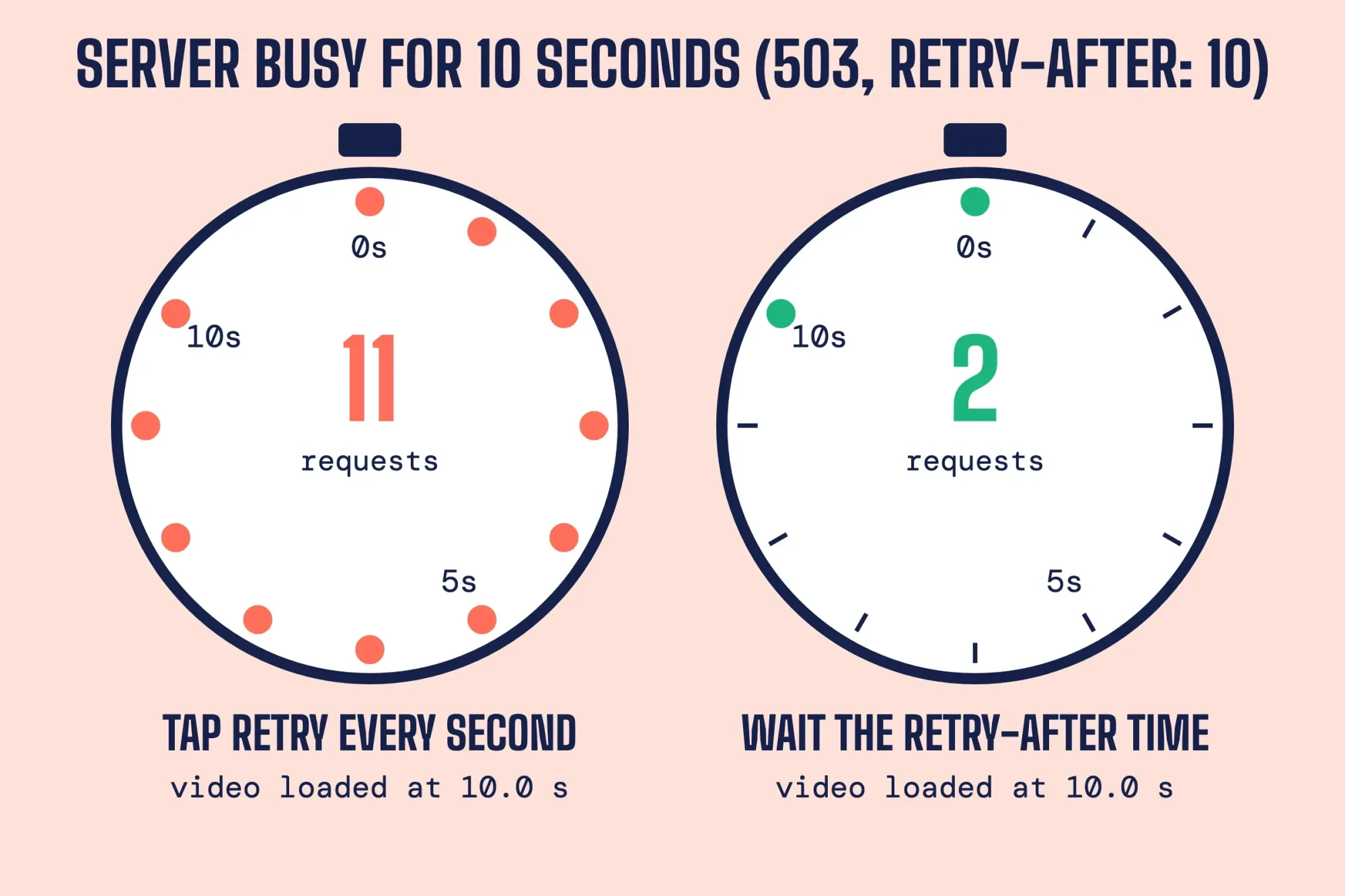 Diagram by DigitalTreed: request counts from our local test on 127.0.0.1, October 28, 2026.
Same wait, 9 extra requests (11 minus 2). That tie was built into our test. Our server came back exactly when its Retry-After said. A server that recovers before its Retry-After time would let a fast retrier in earlier, by up to that wait, but only at the cost of many more requests. Multiply that by millions of viewers and fast retries mostly pile load onto a server that's already overloaded. The YouTube app doesn't show you a Retry-After time, so we'd leave a minute or two between tries.
What we tested
A Python test server on 127.0.0.1, run October 28, 2026, with no public site involved. The DNS case used a .invalid name, which RFC 6761 reserves so lookups fail.
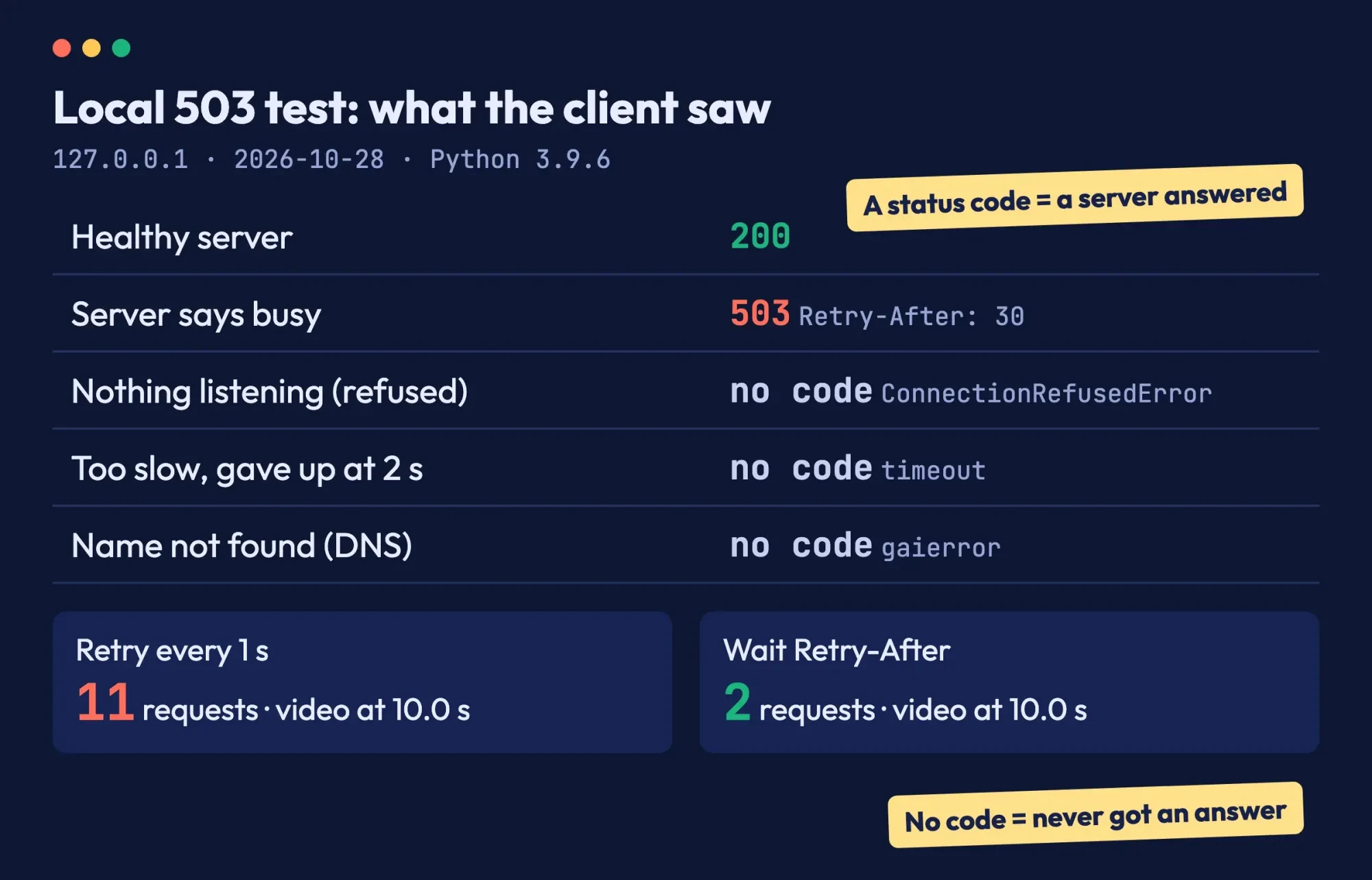 Screenshot: the report page we built from our local test output, October 28, 2026, with two labels added.
While YouTube recovers, lower the quality and check your speed
So the check pointed at YouTube, or you've worked through every fix for your device and the same video still shows a 503. Waiting is now the real fix. While you wait, make sure your own connection isn't adding a second problem. YouTube adjusts video quality "based on your viewing conditions," and you can set it yourself under Settings > Quality. Here's how much sustained speed YouTube recommends for each quality:
| Video quality | Recommended sustained speed |
| 4K | 20 Mbps |
| HD 1080p | 5 Mbps |
| HD 720p | 2.5 Mbps |
| SD 480p | 1.1 Mbps |
| SD 360p | 0.7 Mbps |
Going from 1080p to 720p halves the recommended speed, from 5 Mbps to 2.5 Mbps.
Those figures come from YouTube's video errors page, which also warns that several devices on one network share its speed. Google's internet speed test shows what you're getting in about 30 seconds, using about 9.4 MB of data on a typical US test. Do the math before you blame YouTube. A 4K stream needs 20 Mbps on its own, so a 15 Mbps line is already 5 Mbps short (20 minus 15).
You'll know it's fixed when the same video plays on the same screen after you restart the app. Test that exact video, not a new one, and test it on the screen that failed rather than the one that was working all along.
If the 503 comes back daily at the same hour, write down the time and the network you were on. A pattern like that points at a busy network, not at YouTube, and it's exactly the detail your internet provider will ask for. Once the videos play again, our YouTube SEO walkthrough and audience retention guide are the next read.
Seeing a 503 on your own website instead
Business owners sometimes land here because their own site, not YouTube, shows "503 Service Unavailable," and it's the same code with a different owner of the problem. Your server or host is overloaded or in maintenance. Only they can clear it. Our HTTP status checker shows the exact code your page returns, which helps when you talk to your host.
Check the code before anything else, because a 500, a 502 and a 503 each point to a different fix.
What comes next depends on the server, and it's your host's call. Our walkthroughs of the 502 bad gateway in WordPress and the HTTP 500 error in WordPress cover the nearby codes. A website uptime monitoring setup warns you about the next outage before a customer does.
And if you'd rather someone else kept the site up, DigitalTreed's web development services cover hosting fixes and maintenance.
Frequently asked
How long does YouTube error 503 last?
YouTube doesn't publish a typical length. A server's Retry-After value, per RFC 9110, can be "an HTTP-date or a number of seconds," but the app doesn't show it.
Is error 503 the same as error 429?
No. MDN says a server limiting requests from specific clients should answer 429 Too Many Requests, while 503 covers a server that's overloaded or down for maintenance.
Which DNS servers should I use if YouTube keeps failing?
Usually the ones your internet provider set, unless an app changed them. If you set DNS by hand, Google Public DNS offers 8.8.8.8 and 8.8.4.4 for IPv4.
Will clearing Chrome cookies sign me out of YouTube?
On Android, not if you're signed in to Chrome itself. YouTube's Android cache help says you'll "stay signed in on Google's websites, like google.com and youtube.com."
How we made this guide: We read the HTTP standard and YouTube, Google and Apple help pages on October 28, 2026, and quoted their wording for each step. The retry test ran on a local server. Facts checked by the DigitalTreed team on October 28, 2026. Each fact carries its link inline.
First published July 2020. Rewritten October 28, 2026: the post now separates YouTube outages from your own network, gives fixes per device, and adds a local retry test.
Sources
- RFC 9110: HTTP Semantics, section 15.6.4, 503 Service Unavailable
- RFC 9110: HTTP Semantics, section 10.2.3, Retry-After
- MDN Web Docs: 503 Service Unavailable
- YouTube Help: Troubleshoot YouTube video errors
- YouTube Help: Clear cache & cookies
- YouTube Help: Update the YouTube and YouTube Studio app (Android)
- YouTube Help: Update the YouTube and YouTube Studio app (iPhone & iPad)
- YouTube Help: Send YouTube debug info
- YouTube Help: Change the quality of your video
- Android Help: Free up storage on your Android device
- Apple Support: How to check the storage on your iPhone and iPad
- Apple Support: Forget a Wi-Fi network
- Google Search Help: Test your internet speed
- TeamYouTube on X
- Google for Developers: Google Public DNS, Get started
- YouTube Help: Clear cache & cookies (Android)
- RFC 6761: Special-Use Domain Names, section 6.4
Comments
No comments yet. Start the conversation below.