
Quick answer
Event-driven architecture with Kafka means your apps announce what happened, like "order placed", by writing events to a shared log that other apps read at their own pace. Kafka keeps those events for 7 days by default, so a slow reader can catch up. Most small businesses don't need it, though. A webhook or a simple queue covers one-to-one jobs.
If a developer or vendor just told you to "use Kafka", start with a picture from a diner.
Picture the ticket rail in a busy diner. The server clips an order to the rail and walks off. The grill cook reads it, the drinks station reads it, and the cashier reads it later to ring up the bill. Nobody shouts across the kitchen, and nobody waits for anyone else. If the dessert cook arrives late, the ticket is still hanging there.
That's the whole idea behind event-driven architecture, and Kafka is a very large, very durable ticket rail.
The parts are simple once you meet them in order: events, topics, partitions, consumer groups, how long Kafka keeps data and what it promises about delivery. Then comes the question most pages skip, whether your business needs it at all.
Key takeaways
- Kafka keeps order only inside one partition, not across a whole topic.
- One consumer group can't keep more consumers busy than the topic has partitions.
- In our test, going from 6 to 8 partitions moved 74.3% of keys.
- Kafka delivers at least once by default, so plan for duplicate events.
- Kafka 4 runs on KRaft, and ZooKeeper mode has been removed.
Event-driven architecture means software reacts to things that already happened
Event-driven architecture is a way of building software where one part announces that something happened and other parts react on their own. Kafka's introduction puts it simply: an event "records the fact that 'something happened' in the world or in your business". An order was placed. A payment cleared. A package left the warehouse.
Compare that with the usual way apps talk, a direct request. Your checkout calls the inventory system, waits for an answer, then calls the email system and waits again. If the email system is down, checkout stalls. In an event-driven setup, checkout writes one "order placed" event and moves on. Inventory, email and reporting each pick it up when they're ready.
The term gets stretched, though. Martin Fowler's 2017 article What do you mean by Event-Driven? found four different things hiding under it. Event notification just says "this changed". Event-carried state transfer ships the changed data along with it. Event sourcing stores every change as the record of truth, and CQRS splits reading from writing. Most small systems only need the first one.
Fowler also names the catch. Event notification "is nice because it implies a low level of coupling, and is pretty simple to set up," he writes, but a chain of events can be "hard to see" because it isn't written down in any one program.
Keep that warning in mind, because it comes back later.
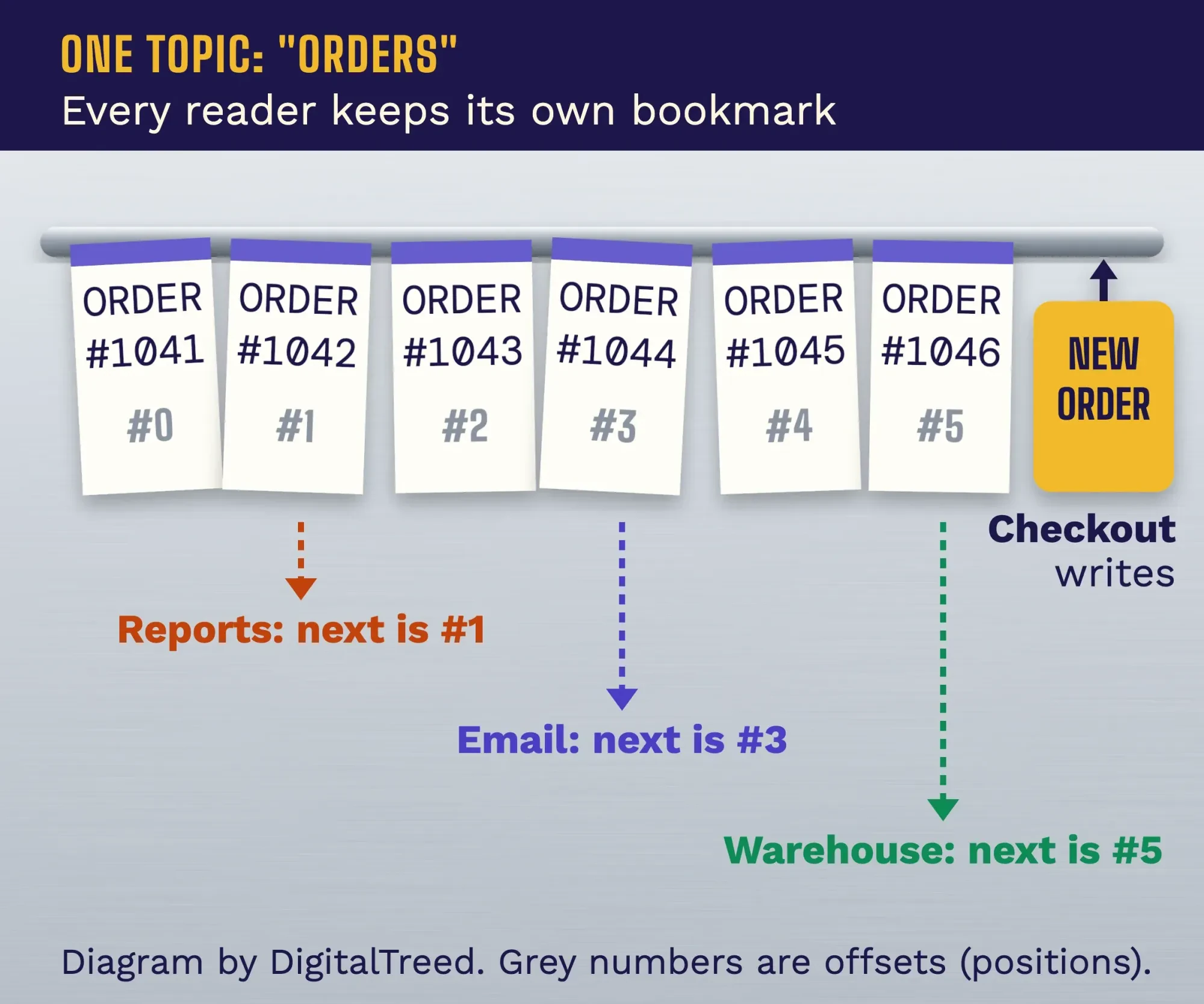 Diagram by DigitalTreed: one topic, three readers, each with its own bookmark.
Kafka is a shared log that many apps read at their own pace
Apache Kafka is free, open-source software that stores events in order and lets any number of apps write and read them. The current release is 4.3.1, released June 25, 2026, according to the Kafka downloads page. Its own use-case page lists messaging, website activity tracking, metrics, log aggregation, stream processing, event sourcing and a commit log.
Four words do most of the work. Producers are the apps that write events. Consumers are the apps that read them. Events live in topics, and Kafka's intro says "a topic is similar to a folder in a filesystem, and the events are the files in that folder". The servers that store topics are called brokers. Each event has a key, a value and a timestamp; the intro gives its own example, the key "Alice" with the value "Made a payment of $200 to Bob".
Here's the part that makes Kafka different from an inbox. The same introduction says "producers never need to wait for consumers," and events "are not deleted after consumption". Reading an event doesn't use it up. A new app you build next year can read the same orders your warehouse app read today, as long as they're still kept.
Kafka also copies each topic across brokers, so one dead server isn't a disaster. "A common production setting is a replication factor of 3," the intro says, which means three copies. The operations guide spells out what that buys you: with 3 copies, "up to 2 servers can fail before you will lose access to your data". If you're weighing Kafka against other connections between your tools, our guide to third-party integrations covers the simpler routes first.
Partitions, keys and consumer groups decide order and speed
That shared log isn't one long line. Each topic is split into partitions, and that split is what lets Kafka spread work across many servers and many readers at once.
When a producer sends an event with a key, such as a customer ID, Kafka hashes the key to pick a partition. The producer settings page describes the default: "If no partition is specified but a key is present, choose a partition based on a hash of the key". So every event for one customer lands in the same partition. Inside a partition, Kafka's introduction promises that a consumer reads events "in exactly the same order as they were written."
Kafka doesn't promise order across the whole topic, only inside one partition.
That's usually fine, because you care that one customer's "order placed" comes before their "order refunded", not how two strangers' orders interleave.
Consumers read as a team called a consumer group. Kafka's design docs say each partition is "consumed by exactly one consumer within each subscribing consumer group at any given time". Two different groups, say Warehouse and Reports, each get every event. Within one group, the partitions are shared out.
That's a hard ceiling. A topic with 6 partitions can keep at most 6 consumers in one group busy, and a seventh just waits. The operations guide says it directly: "the partition count impacts the maximum parallelism of your consumers". This is the kind of sizing call a full-stack developer should make with you before launch, not after.
Our test: adding two partitions moved 74% of customers
Picking the partition count sounds like a detail, and it isn't. We wanted to see what happens if you guess low and fix it later.
There's no Java or Docker on the Mac we wrote this on, and we don't install software for articles, so we didn't start a Kafka server. Instead, on the evening of Saturday, October 24, we wrote a short Python script that copies Kafka 4.3's default rule for turning a key into a partition. It's one line in the BuiltInPartitioner source: a murmur2 hash of the key, made positive, modulo the partition count. Before trusting it, we checked it against the six known answers in Kafka's own murmur2 unit test. All six matched.
Then we made 10,000 customer keys, customer-00001 to customer-10000, and sent them to a 6-partition topic. The spread was even: every partition got between 1,613 and 1,698 keys.
So far, so good.
Next we changed the same topic to 8 partitions, and 7,434 of the 10,000 keys, or 74.3%, now hashed to a different partition.
In a real cluster, old events stay where they were written. New events for those customers start landing somewhere else, and a consumer can read a customer's new event before an older one still waiting in the old partition. Kafka's operations guide warns about the same thing: after you add partitions, "messages with the same key may be routed to different partitions". In our test that was three in four customers, so their per-customer order can quietly break while older events are still unread.
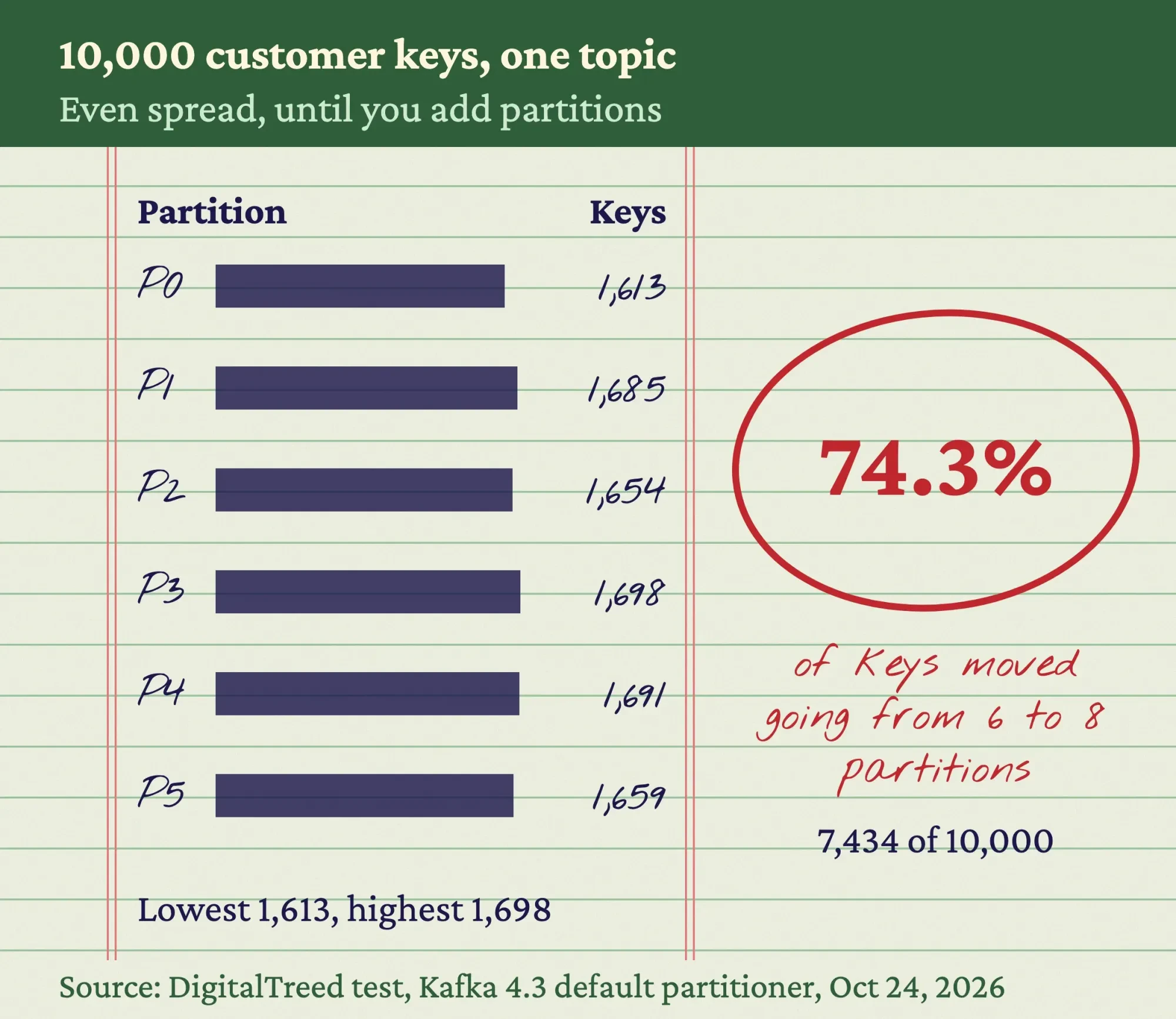 Source: DigitalTreed test of Kafka 4.3's default partitioner (Python re-implementation, 6 of 6 test vectors passed), October 24, 2026.
The lesson is cheap to apply. For topics where order matters per customer, pick a partition count with room to grow on day one. Topics without keys don't have this problem.
Kafka keeps events for 7 days, then deletes them
Kafka doesn't keep events forever by default. The topic configuration docs set retention.ms to 604800000 milliseconds, which the page labels "7 days," and call it "an SLA on how soon consumers must read their data". Set it to -1 and there's no time limit, which means paying for the disk.
Retention is also what makes replay work. If your reporting app has a bug for two days, you fix it and point it back to an earlier position, and it reads those events again.
Try that with an email inbox.
There's a second mode for data where only the latest value matters, like a customer's current address. With compaction, Kafka "will always retain at least the last known value for each message key," per the design docs. Old addresses go; the newest one stays.
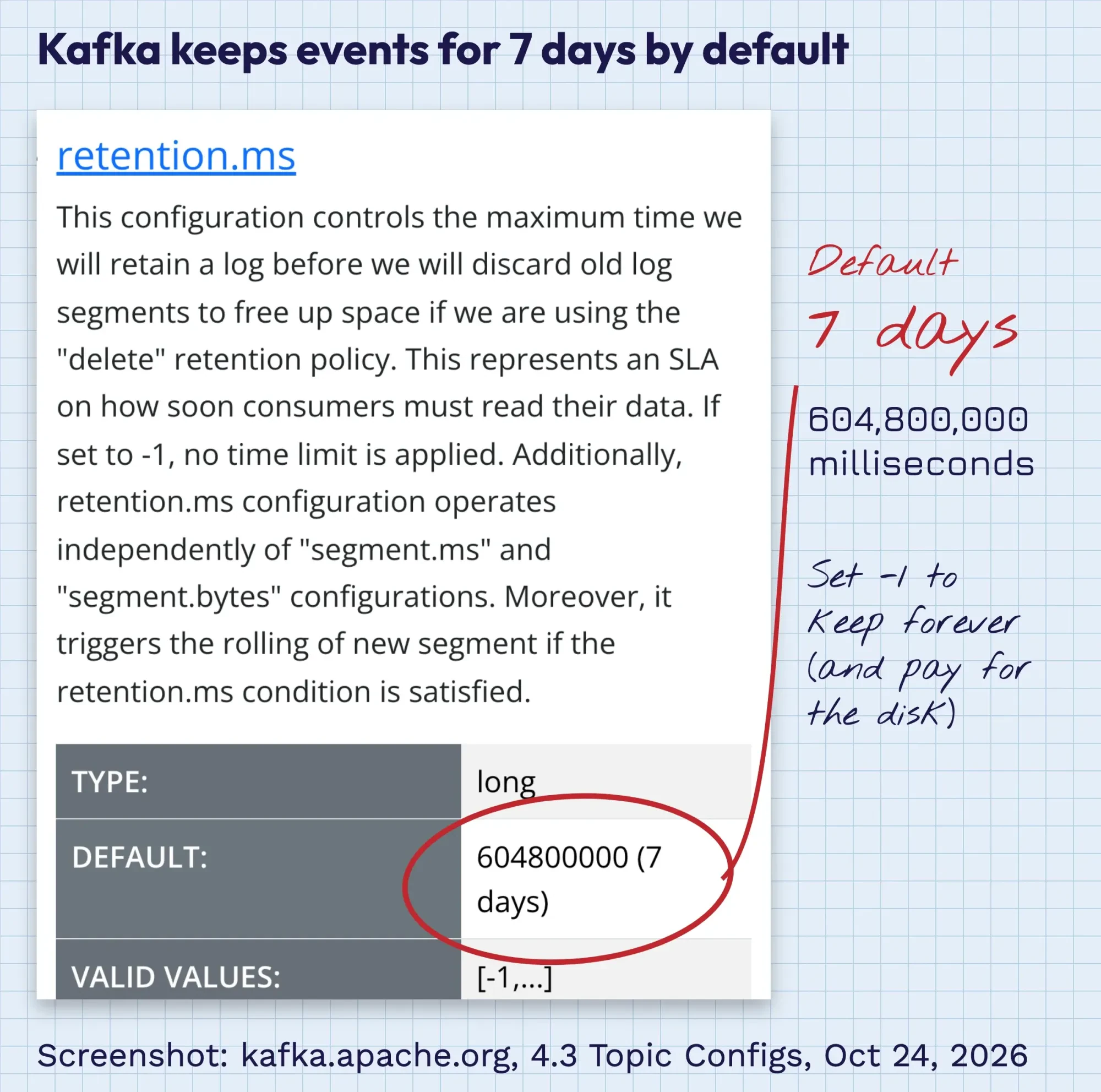 Screenshot: Apache Kafka 4.3 docs, Topic Configs, retention.ms entry, taken October 24, 2026.
Kafka promises at-least-once delivery, so plan for duplicates
Kafka's default delivery promise is at-least-once: an event won't be lost, but it can arrive twice. The design docs on delivery semantics list three levels. At most once means "Messages may be lost but are never redelivered". At least once means "Messages are never lost but may be redelivered". Exactly once means "Each message is processed once and only once."
Then they say which one you get: "Kafka guarantees at-least-once delivery by default". The old version of this page claimed "no events are lost" with no conditions. That's not how the docs put it.
The producer side has strong defaults in 4.3. The producer settings set acks to all by default, which "guarantees that the record will not be lost as long as at least one in-sync replica remains alive". With idempotence on, "the producer will ensure that exactly one copy of each message is written in the stream."
Writing once isn't the same as acting once.
A consumer can crash after sending a confirmation email but before recording that it did, and then it'll send it again on restart. Kafka's exactly-once support covers reading from Kafka and writing back to Kafka. It can't un-send an email. The docs' own fix is plain: when "messages have a primary key," the update can be idempotent, and receiving it twice "just overwrites a record with another copy of itself". Track each order ID you've handled, and watch how far behind each consumer group is (its lag). Our application monitoring guide covers the alerting side.
ZooKeeper is gone: Kafka 4 runs on KRaft
An older tutorial that tells you to install ZooKeeper first is out of date, so skip that step.
The Kafka 4.0 release announcement of March 18, 2025 called it "the first major release to operate entirely without Apache ZooKeeper". The 4.3 upgrade notes are blunter: "ZooKeeper mode has been removed."
Kafka now keeps its own cluster records with a built-in system called KRaft. Some servers act as controllers that hold that metadata, and the KRaft docs say "a Kafka admin will typically select 3 or 5 servers for this role". One machine can be broker and controller at once, which the docs call "simpler to operate for small use cases like a development environment," but "not recommended in critical deployment environments."
So you're looking at several servers before a production cluster stores a single order. It also needs Java: per the Java version page, "Java 17, Java 21, and Java 25 are fully supported."
Do you need Kafka, or is a webhook or queue enough?
Most small businesses don't need Kafka.
If one system needs to tell one other system that something happened, a webhook does it. If work needs to be done once in the background, a queue does it. Kafka earns its keep when many systems need the same events, in order, with the option to read them again.
| Need | Webhook | Queue (SQS, RabbitMQ, a job queue) | Kafka |
|---|---|---|---|
| Who gets each event | One URL you registered | One worker, then it's gone | Every consumer group |
| Read it again later | No | No, once it's acknowledged | Yes, until retention ends |
| Order | Not promised | Best-effort, or strict per message group on FIFO queues | Per key, inside a partition |
| Duplicates possible | Yes | Yes, on standard queues | Yes, at-least-once by default |
| What you run | An HTTPS endpoint | A managed service or a library | A cluster or a managed service |
Webhooks are the lightest option, and you're probably using them already. Stripe's webhook docs show the trade-offs. Stripe retries "for up to three days with an exponential backoff," endpoints "might occasionally receive the same event more than once," and Stripe "doesn’t guarantee the delivery of events in the order that they’re generated". That's fine for "payment succeeded, mark the order paid". Our payment gateway integration guide walks through that setup. Before you register an endpoint, run it through our HTTP status checker to confirm the URL is live and doesn't redirect somewhere else.
Queues sit in the middle, and they're cheap to start. Amazon SQS gives every customer "1 million Amazon SQS requests for free each month," per its pricing page as of October 2026, and a small store may never pass that. AWS's queue types guide says standard queues give "at-least-once delivery" and "best-effort ordering", while FIFO queues keep order "within each message group".
People often frame this choice as Kafka vs RabbitMQ. RabbitMQ's own comparison page has a section called "The line that used to divide them", because each now does some of what the other does. Kafka's 4.2 release in February 2026, for example, made share groups, a queue-style way to read, "production-ready". If a no-code tool already moves your data, our no-code vs custom development comparison may save you the whole project.
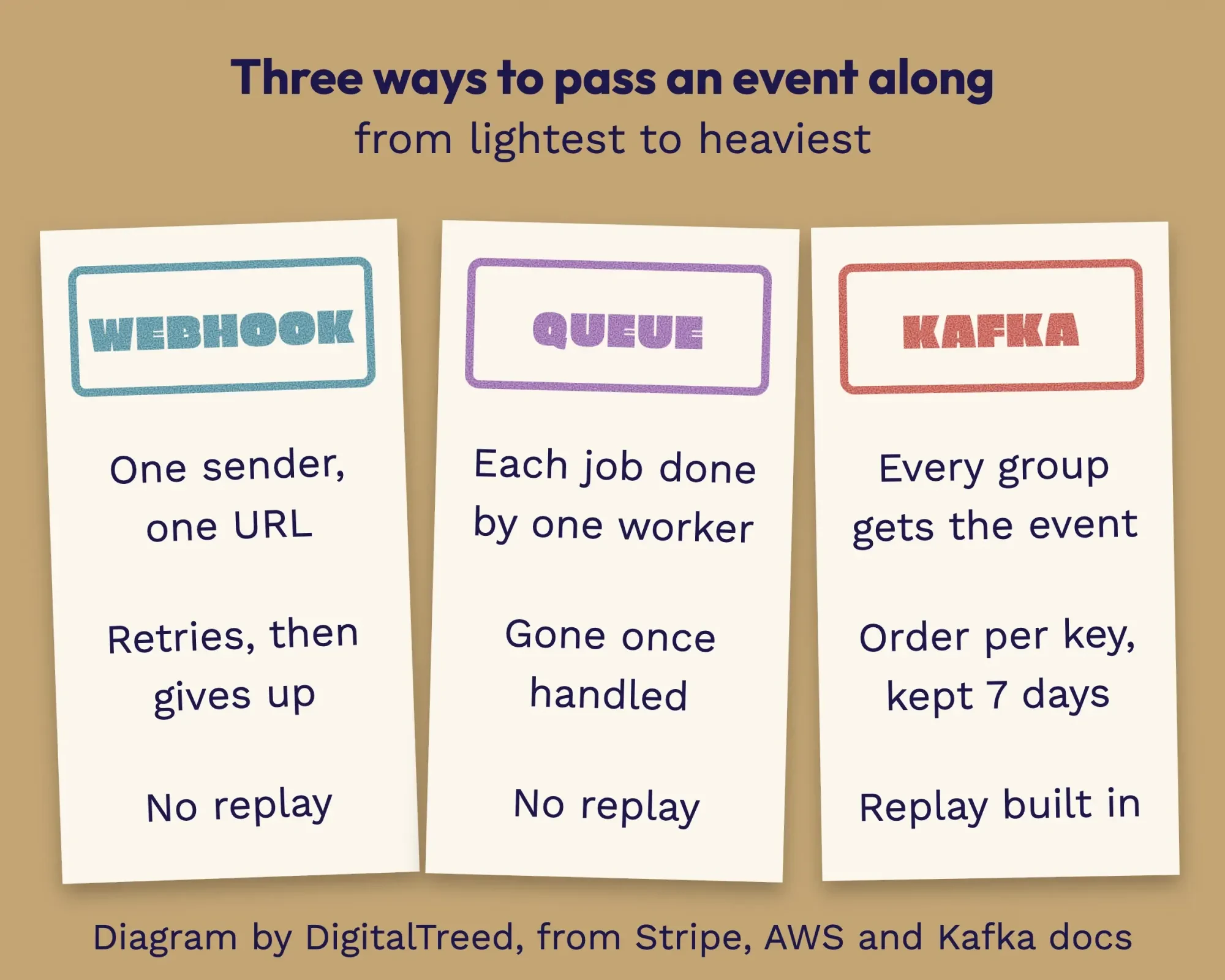 Diagram by DigitalTreed: three ways to pass an event along, from lightest to heaviest.
Here's where Kafka gets serious: cost. Amazon MSK's pricing page works through its own example as of October 2026: three kafka.m7g.large brokers in US East at $0.204 an hour each, plus about 1.5 TB of storage at $0.10 per GB-month, total $606.94 for a 31-day month, before data transfer. Google Cloud offers a Managed Service for Apache Kafka, and Azure Event Hubs provides "an Apache Kafka endpoint," per Microsoft’s docs. Managed or not, someone on your side still designs the topics and watches the lag.
Still unsure which of the three fits? That's a normal place to be. We set up webhooks, queues and event pipelines for small businesses through the web development service we offer. (We get paid for that work, and it's fair you know that first.)
Myths that make Kafka sound simpler than it is
Those costs are the easy part to see. The harder part is a handful of beliefs that show up in sales pitches and old blog posts, this one included before we rewrote it.
"Kafka never loses or repeats an event"
It can repeat one by default, as the delivery section showed. And a short retention setting will delete events a slow consumer never read. Both are settings and design choices, not magic.
"More consumers make it faster"
Only up to the partition count; past that, extra consumers in the same group don't get any work.
"Kafka can replace our database"
Kafka deletes old events on a timer unless you tell it not to, and it isn't built to answer "show me every order from Texas last spring". Most teams keep a normal database and feed it from Kafka.
"Events make the system easier to follow"
Fowler's warning from the start applies here. A flow that hops across five event handlers lives in no single file, so you'll need logs and tracing to follow it. Plan that in your development life cycle, and build in small steps the way an agile team would.
Frequently asked
What is the largest message Kafka accepts?
The broker setting message.max.bytes defaults to 1,048,588 bytes, about 1 MB, per the Kafka 4.3 broker configs as of October 2026. The limit applies to a record batch after compression. You can change it for one topic with max.message.bytes.
How do I get data from my database into Kafka?
Kafka ships a tool for this called Kafka Connect. The Kafka Connect overview says it can ingest entire databases into topics. It runs in a standalone mode for small setups and has a REST API for managing connectors.
What is Kafka Streams?
Kafka Streams is a client library for apps whose input and output data both live in Kafka. The Kafka Streams introduction says it runs inside standard Java and Scala applications. You don't need a separate processing cluster to use it.
First steps before anyone installs a broker
So start with a list, not a server.
Example: Bramble Home Goods is a made-up online store in Lincoln, Nebraska, selling about 300 orders a week. The owner writes down every "something happened" moment: order placed, payment cleared, item shipped, item returned. Payments already arrive by Stripe webhook. Shipping labels and emails can run from a queue. Nothing needs replay, and only two systems care about each event.
Bramble doesn't need Kafka.
A webhook and a queue cover it. Even at several queue requests per order, about 1,300 orders a month sits far inside that free SQS allowance.
Now imagine Bramble grows into five warehouses, a mobile app and a data team that wants every click and order. Several systems need the same events, in order, and some need last week's again. That's when the list starts pointing at Kafka, and when a managed service is the sensible first try.
Junior developers who just want to see it run can follow the Kafka Docker guide, which starts a single local broker with one command, docker run -p 9092:9092 apache/kafka:4.3.1. That's a single server for learning on your own machine, not a setup to run a business on.
Our take: write your events down first and pick the lightest tool that handles them. Kafka is excellent when you need a shared, replayable log.
Most businesses don't, yet.
Want a second opinion on your list? Send it through our quote form and we'll tell you which option we'd use. We do charge for building it, so we've tried to make this guide useful even if you never call.
How we made this guide: We rewrote this page on Saturday, October 24, 2026, and checked every version number, default and quote that day against the Apache Kafka 4.3 docs, the Kafka release announcements and the Kafka source on GitHub. Prices came from the AWS pricing pages, read in a browser on the same day. We didn't run a Kafka broker, because this Mac has no Java or Docker. Our partition test is a Python copy of Kafka's default partitioner, checked against Kafka's own six test answers, run on a Mac in India. Each source sits in the text next to the fact it supports.
First published February 2022. Rewritten October 24, 2026: the generic benefits list is gone. In its place are plain explanations of topics, partitions, consumer groups, retention and delivery, the move to KRaft, a webhook vs queue vs Kafka table with dated costs, and our own partition test.
Sources
- Apache Kafka: Introduction
- Apache Kafka: Use cases
- Apache Kafka: Downloads (4.3.1, June 25, 2026)
- Apache Kafka 4.3 docs: Design
- Apache Kafka 4.3 docs: Topic configs
- Apache Kafka 4.3 docs: Producer configs
- Apache Kafka 4.3 docs: Basic Kafka operations
- Apache Kafka 4.3 docs: KRaft
- Apache Kafka 4.3 docs: Upgrading
- Apache Kafka 4.3 docs: Java version
- Apache Kafka 4.3 docs: Docker
- Apache Kafka 4.0.0 release announcement (March 18, 2025)
- Apache Kafka 4.2.0 release announcement (February 17, 2026)
- Apache Kafka source, branch 4.3: BuiltInPartitioner.java
- Apache Kafka source, branch 4.3: UtilsTest.java (murmur2 test vectors)
- Martin Fowler: What do you mean by "Event-Driven"? (2017)
- Stripe Docs: Receive Stripe events in your webhook endpoint
- AWS: Amazon SQS pricing (October 2026)
- AWS: Amazon SQS queue types
- AWS: Amazon MSK pricing (October 2026)
- Google Cloud: Managed Service for Apache Kafka overview
- Microsoft Learn: Apache Kafka protocol support in Azure Event Hubs
- RabbitMQ: RabbitMQ vs. Apache Kafka (vendor comparison)

Comments
No comments yet. Start the conversation below.