
Quick answer
Payment gateway integration costs nothing up front with Stripe, PayPal, Square or Braintree as of October 2026. You pay per sale instead: $3.18 to $3.98 on a $100 card order across the six providers we priced. Developer time is the real swing, from $0 for a payment link to a project for a custom checkout.
A payment gateway is the service that takes a card number from your checkout, encrypts it and passes it on for approval. The processor moves the money between the banks, and a merchant account is where it lands before it reaches yours.
Most small businesses never deal with those three as separate companies. Stripe, PayPal and Square bundle all of them into one account, which is why "is Stripe a gateway or a processor?" has the honest answer: both.
Here's the short version of a card payment. Your customer types the card into a form the provider controls. The provider asks the card's bank to approve it, tells your site yes or no, and pays you a few days later, minus its fee.
So the real question isn't how to wire up a gateway.
It's what you'll pay, every month, for the way you wire it up.
Four things decide what you pay
Four costs make up your payment bill: the fee on each sale, the way your checkout is built, the developer hours that build takes, and the security paperwork that comes with it. The first one never stops.
You make the other three choices once, and you can change them later.
The fee on every sale
Online card fees are a percentage plus a fixed amount per transaction. Stripe’s US pricing says "2.9% + 30¢ per successful transaction for domestic cards," with "No setup fees, monthly fees, or hidden fees," as of October 2026. Small orders feel the fixed part more.
On a $10 sale, that 30¢ alone is 3% of the price.
How the checkout is built
There are three ways to build it. The cheapest is no code at all: a payment link, a pay button, or the checkout that comes with Shopify, Square Online or WooCommerce. Stripe's online payments guide lists "No code Shareable payment links" as its first option.
In the middle sits a prebuilt checkout page that you redirect to or embed, such as Stripe Checkout or Authorize.net's Accept Hosted form. A developer adds a small server step and a webhook. Stripe recommends this route, saying "We recommend the Checkout Sessions API for most integrations."
Go custom and you get a card form styled to match your site, built with Stripe Elements or Square's Web Payments SDK. It's the most work. Stripe warns that if you build on PaymentIntents, "you must manually build equivalent features in your code, including discount logic, tax calculation and currency conversion."
Developer time
Developer time is the line that varies most, and nobody publishes a fair price for it.
Federal wage data from the BLS Occupational Outlook Handbook puts median pay for web developers and digital designers at $47.85 an hour in 2025. Software developers, QA analysts and testers earned a median $64.44 an hour. Those are employee wages; freelancers and agencies charge more because the rate covers their overhead.
Agency guides quote whole projects instead. Zentric Solutions, an agency, lists "Basic Integration ($500 - $5,000)" and custom work at "$15,000 - $25,000+" (2026). It publishes no method, so treat it as one vendor's view.
A payment link costs you no developer time. Building a whole store is a bigger job, and our ecommerce website guide walks through it from platform to launch.
The security paperwork
Most small businesses that take cards fill in a yearly PCI questionnaire.
How long it is depends on how close card data gets to your site, and we'll get to that below.
What a $25, $100 and $500 sale costs on six providers
Those are the cost drivers. Here's the one that shows up on every sale, worked out for three order sizes. Each rate is the standard US online card rate from the provider's own pricing page, read on October 24, 2026. We did the math and rounded to the cent.
| Provider (plan) | Online card rate | Monthly fee | $25 sale | $100 sale | $500 sale |
|---|---|---|---|---|---|
| Stripe | 2.9% + 30¢ | None | $1.03 | $3.20 | $14.80 |
| PayPal Checkout (PayPal button) | 3.49% + 49¢ | None | $1.36 | $3.98 | $17.94 |
| Square (Free plan) | 3.3% + 30¢ | $0 | $1.13 | $3.60 | $16.80 |
| Authorize.net (All-in-one) | 2.9% + 30¢ | $25 | $1.03 | $3.20 | $14.80 |
| Shopify Payments (Basic) | 2.9% + 30¢ | $29 billed yearly ($39 monthly) | $1.03 | $3.20 | $14.80 |
| Braintree | 2.89% + 29¢ | None listed | $1.01 | $3.18 | $14.74 |
Sources, as of October 2026: PayPal, Square, Authorize.net, Shopify and Braintree, plus Stripe above. Card payments through the PayPal button cost the same 3.49% + 49¢ even as a guest. PayPal's separate card products cost less: 2.99% + 49¢ for Standard Credit and Debit Card Payments and 2.89% + 29¢ for Advanced Credit and Debit Card Payments.
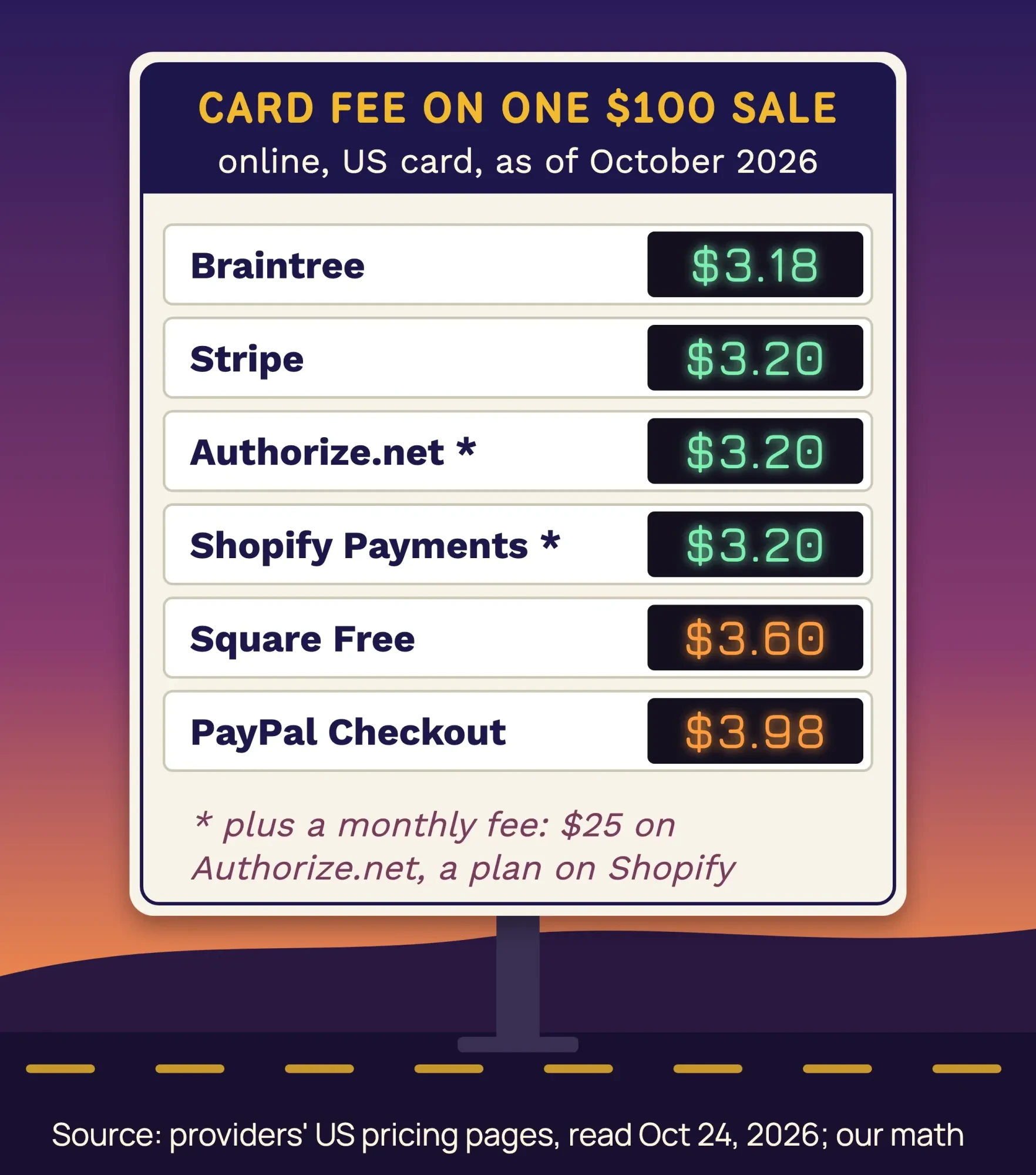 Diagram by DigitalTreed. Source: Stripe, PayPal, Square, Authorize.net, Shopify and Braintree US pricing pages, October 2026. Our math.
The rates look close. Over a month, they aren't.
Example: Prairie Thread Quilt Shop is a made-up fabric shop in Lawrence, Kansas, selling 150 orders a month at $32 each on a WordPress site. On Stripe, each order costs $1.228 in fees, so the month comes to $184.20. If every buyer used the PayPal button instead, it's $1.6068 an order and $241.02 a month. That's $56.82 more a month, or $681.84 a year, for the same $4,800 in sales, as of October 2026. Square's Free plan lands in between at $203.40. To try your own numbers, use our free PayPal fee calculator.
Most shops don't pick one, though. They offer cards plus a PayPal button, because buyers abandon checkouts that lack their payment method; our post on ecommerce checkout trends has the Baymard numbers. Watch the add-ons too. Stripe adds 1.5% for international cards and PayPal adds 1.50%. Shopify adds a 2% third-party fee on the Basic plan if you use another provider, which our WordPress vs Shopify comparison works through.
Disputes are the fee nobody quotes
The per-sale fee is the one you plan for. The dispute fee is the one that surprises people, because it only shows up when a customer tells their bank a charge was wrong.
Stripe charges a "$15.00 for each dispute you receive," per its pricing page as of October 2026. Answer it manually and that's another $15, though Stripe gives that second fee back if you win. PayPal's fee page charges a $20 chargeback fee on card payments that don't go through a buyer's PayPal account or guest checkout. When the payment did go through a buyer's PayPal account or a PayPal checkout, it "may charge a Dispute Fee" instead: $15 standard, or $30 at the high-volume rate in its User Agreement. Braintree lists a $15 chargeback fee.
Shopify Payments charges $15 in the US, and its chargeback guide says that "If you win the chargeback, then the fee is returned to you." Square doesn't charge for dispute help at all. Authorize.net's gateway fee list shows $0.00 for card chargebacks and $25 for eCheck chargebacks, as of October 2026.
Time matters as much as money. Stripe's dispute guide says cardholders can usually dispute "within 120 days of the original payment," and you get "usually 7-21 days" to answer.
Miss that window and you lose by default.
Refunds are cheaper than disputes.
If a customer's unhappy, refund them before they call their bank.
PCI paperwork depends on where the card form lives
That brings us to the paperwork. Using Stripe or PayPal doesn't take you out of PCI DSS, the card industry's security standard. The PCI Security Standards Council's FAQ answers "Yes" to whether it applies when you outsource everything, and says merchants still validate, "typically through a Self-Assessment Questionnaire (such as SAQ A)."
Which questionnaire you get comes down to one thing: how close card numbers get to your website.
A pay link or a redirect to the provider's page usually means SAQ A, the shortest form. For 2025, the Council changed SAQ A. It dropped two payment-page requirements and added a new check that your site isn't "susceptible to attacks from scripts" that could hit your checkout. Its FAQ 1588 explainer then said that criterion "only applies" to pages with an embedded payment form, such as an iframe. It "does not apply" to sites that redirect buyers or send them a payment link.
That's the nuance most guides miss.
An embedded form keeps you on SAQ A, but you must protect the page from script attacks or get confirmation from your provider that its form does. If your own page's code builds or posts the card form, you're usually on SAQ A-EP, which covers sites that "partially outsource" payments. If card numbers ever touch your server, it's SAQ D, the full standard.
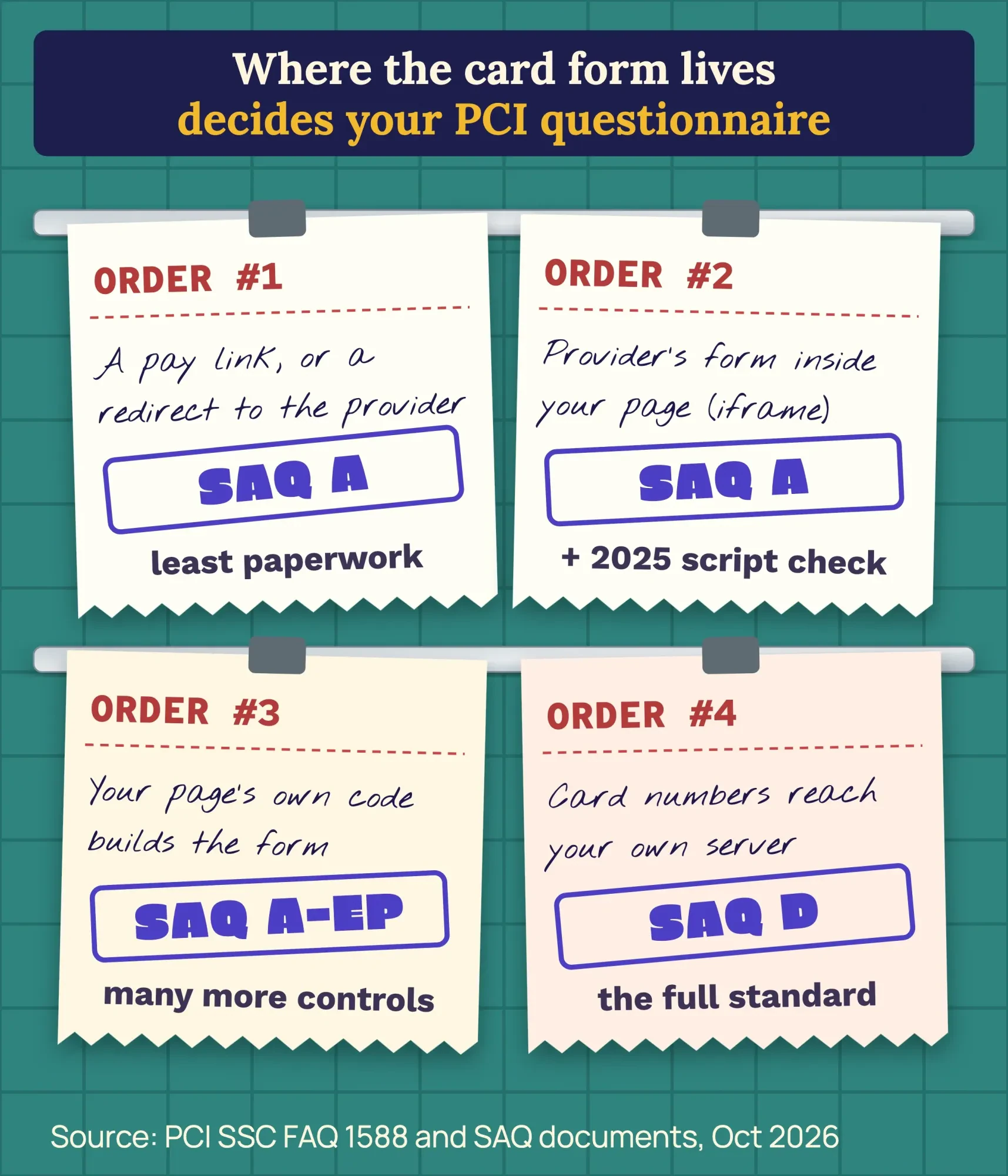 Diagram by DigitalTreed, based on the PCI Security Standards Council FAQ 1588 explainer and SAQ documents, read October 2026.
You'll find every current form in the PCI document library. One more thing: PCI DSS is a card industry standard, not a federal law. Your payment processor or its bank decides which questionnaire you file, so ask them before you build. Our post on third-party integrations explains the script rules behind requirements 6.4.3 and 11.6.1.
Payment scripts cost page speed, and we measured how much
Paperwork aside, a checkout has one more hidden cost: the JavaScript your page loads to show it. We wanted a number for that, without touching a real checkout.
Shortly after midnight on October 24, 2026, India time, we built a fictional product page on our own Mac and served it locally. It had a heading, three paragraphs and one image. We made three copies. One added the PayPal JS SDK with client-id=sb, the shortcut PayPal documents for sandbox testing, and rendered its buttons. One added Stripe.js with the async tag from Stripe’s stripe-js readme, with no key and nothing mounted. The third added both. We didn't enter a card number anywhere, created no account, clicked no button and submitted no checkout.
Then we ran Lighthouse 13.5.0 five times per page, on simulated mobile, and took the median.
The speed score stayed at 100 on all four pages.
Our main image showed up in 1.2 to 1.4 seconds in every run, and blocking time never passed 72 milliseconds. What changed was weight. The plain page loaded 81 KiB. PayPal's buttons took it to 472 KiB, Stripe.js to 371 KiB, and both together to 761 KiB, with 16 requests to 6 other domains.
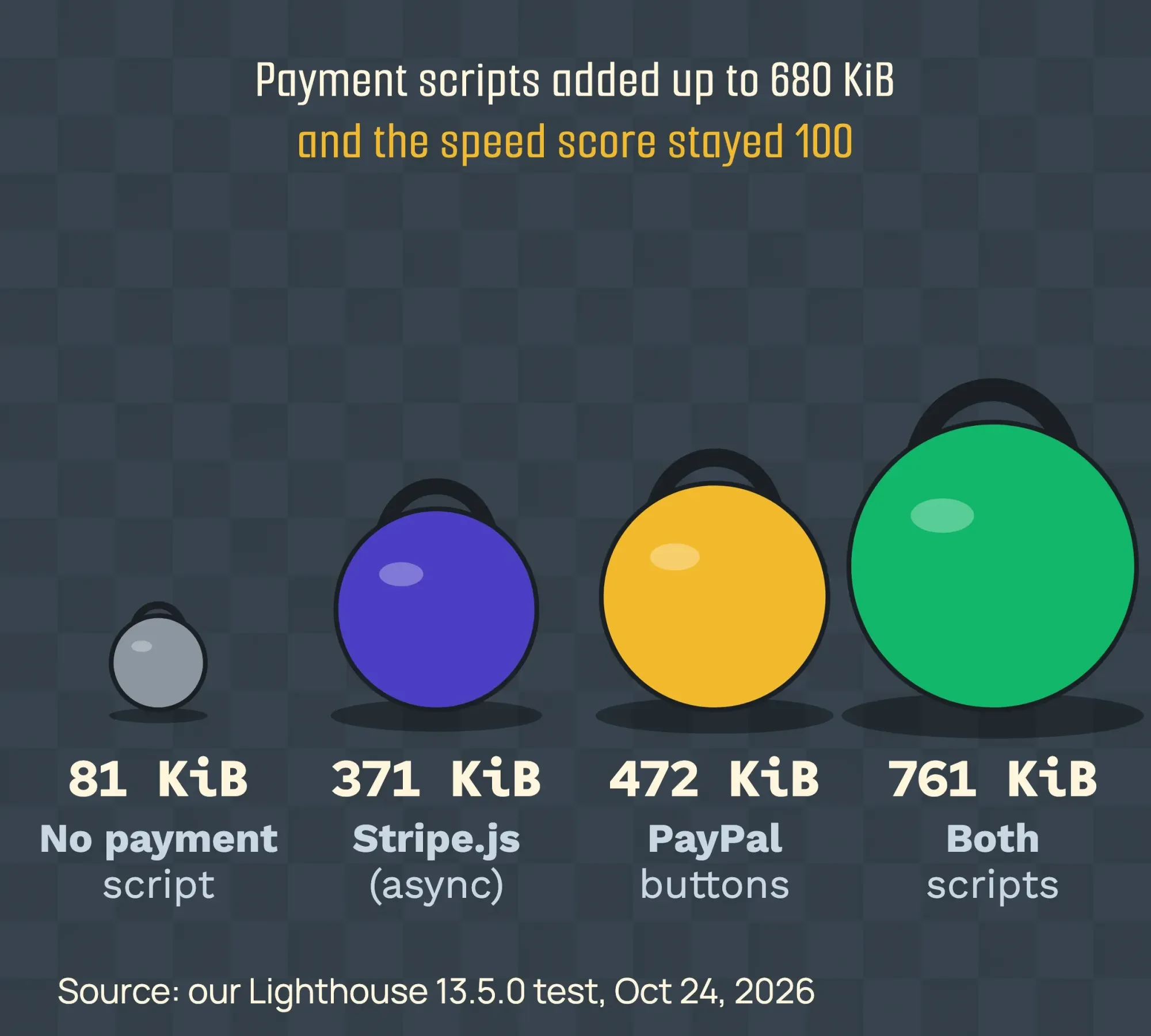 Chart by DigitalTreed. Source: our Lighthouse 13.5.0 test on a fictional local page, mobile, median of 5 runs, October 24, 2026.
So the weight is real, but placement decides whether it slows the page. In our earlier test, an older Stripe.js tag placed in the head without async pushed the main image from 1.4 to 3.1 seconds. Here, the async tag and PayPal's buttons placed after the content left it alone.
There's a trade-off. Stripe's readme asks you to load Stripe.js "on every page, not just your checkout page," so its fraud checks can see how visitors browse. PayPal's performance guide suggests loading its SDK early on a page before checkout so it's cached. In our test, neither slowed the page once the tag was async or placed after the content. Test your own pages with our website speed test, and read the numbers with help from our guide to PageSpeed Insights.
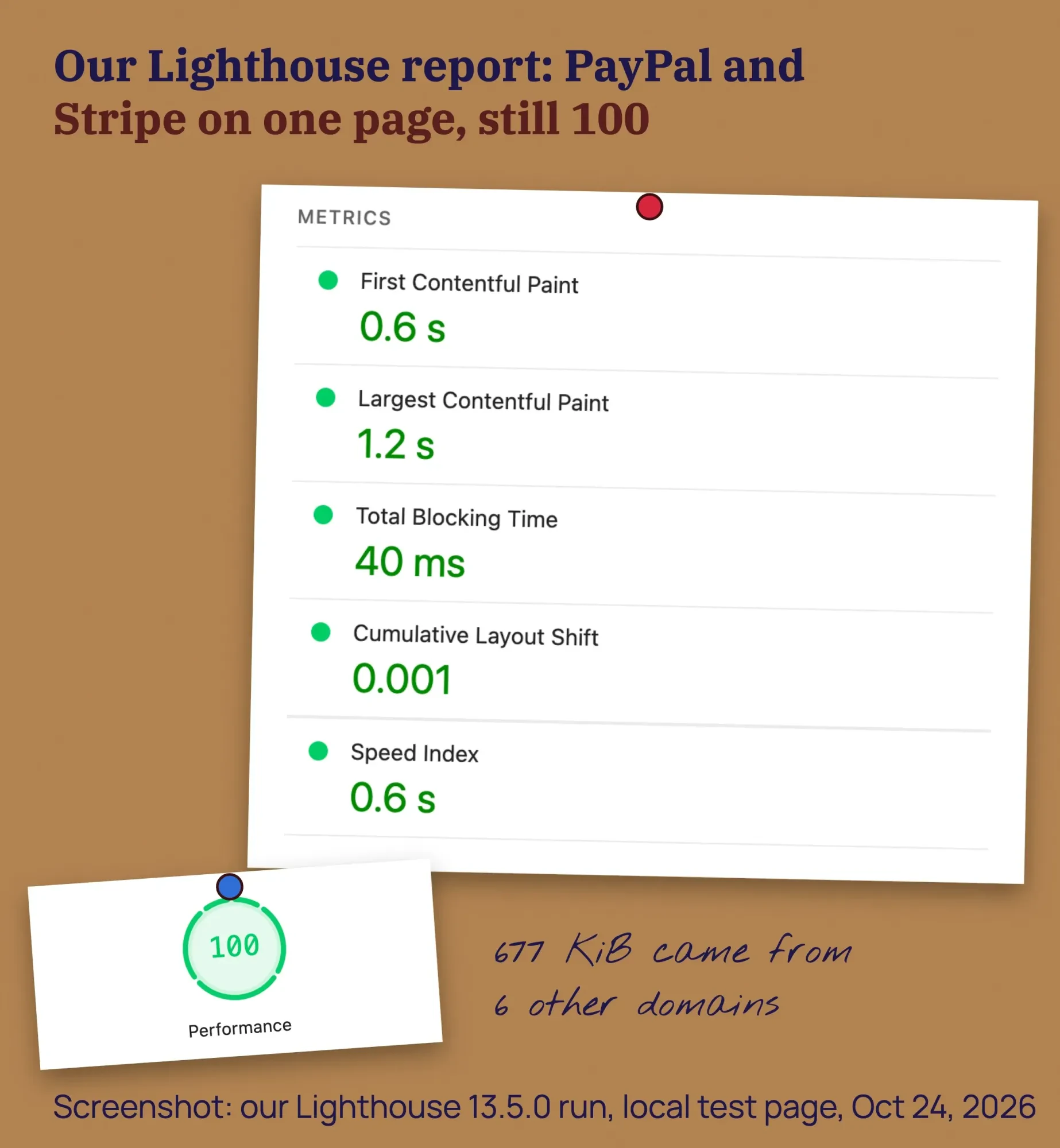 Screenshot: our Lighthouse 13.5.0 report, run 1 of 5 for the page with both scripts, October 24, 2026.
Will you get a 1099-K for card sales?
Yes, and at far lower sales than many owners expect. When customers "pay you directly by credit, debit or gift card," your card processor sends a 1099-K. The IRS says on its Form 1099-K page that this happens "no matter how many payments you got or how much they were for."
Expect it by January 31.
Payment apps and marketplaces work differently. Since the One Big Beautiful Bill, the IRS says they don't have to file until you pass $20,000 and 200 transactions in a year, as of October 2026. They may still send one for less.
Either way, the IRS says you must report all of that income, form or no form.
Keep your provider's monthly statements, because the IRS says the 1099-K's gross payment amount isn't adjusted for fees, refunds or discounts. We're describing the IRS pages as they read on October 24, 2026, not giving tax advice; a tax professional can tell you how this applies to your business.
How to add payments without overpaying
Now for the part you control. Here's the order we'd follow on a small business site:
- Pick the simplest path that works: a payment link or your platform's checkout before any custom form.
- Price your average order on each provider using the table above, and add any monthly fee.
- Open the provider account yourself, in the business's name, so you own it and the payouts.
- Build and test in test mode with the provider's test keys and test cards, never a real card.
- Mark orders paid only when a signed webhook from the provider confirms it.
- Serve every page over HTTPS and check the certificate with our SSL checker.
- Ask your processor which PCI questionnaire you file, then file it every year.
- Run one small live order with your own card, refund it, and check the payout and receipt email.
Step 4 isn't a nicety.
Stripe's testing docs say "Don't use real card details," and that its agreement "prohibits testing in live mode using real payment method details." PayPal's sandbox works the same way with its own test accounts.
Step 5 matters because a buyer can close the tab before the redirect back to your site. Stripe's security guide also says "You must also verify webhook signatures," and payment pages need TLS 1.2 or above.
To cut the fees themselves, start with order size, using rates as of October 2026. Shops with small orders feel the fixed fee most, so compare the 29¢ to 49¢ part, not only the percentage. Stripe’s ACH Direct Debit is 0.8% capped at $5.00, which beats card fees on large invoices. On Shopify, use Shopify Payments or account for the third-party fee. Square’s Plus plan drops online cards to 2.9% + 30¢, but at $49 a month per location it only pays off on about $12,250 or more in monthly online sales.
On WordPress, WooCommerce plugins for Stripe, PayPal and Square do most of the work; our WordPress setup guide covers the site itself.
Questions to ask a developer, and the red flags
If you're paying someone to set this up, a few questions sort the careful developers from the rest:
- Which checkout type will you build: link, hosted, embedded or custom, and why?
- Which PCI questionnaire will that leave me with?
- How do orders get marked paid, and do you verify webhook signatures?
- Whose account holds the API keys, and how do I rotate them if you leave?
- What will you test in test mode before we go live?
Some answers should worry you. A form that emails card numbers or stores them in a plugin's database puts you on SAQ D, and that's a mess you don't want.
So does a developer who wants your provider login instead of a restricted key.
And "works with any payment gateway" usually means nobody's picked the right one yet.
Who owns the code and the accounts belongs in the contract too, and our guide to hiring a web designer lists the terms to ask for.
Our take: start with a hosted checkout or a payment link from the provider that's cheapest for your average order, and pay for custom work only when you can name what the hosted page can't do.
If you're there and want a second opinion on a quote, ask us for one. Building websites is what we sell, so read our advice knowing that.
How we made this guide: Our web team checked every fee, quote and rule here on October 24, 2026. We used the providers' own US pricing pages and docs, the PCI Security Standards Council, the IRS and the BLS wage handbook. We worked out every fee in the table ourselves. The speed numbers come from our own Lighthouse test of a fictional page on a Mac in India; it only loaded the PayPal and Stripe scripts, with no card entered, no account and no checkout. You'll find each source linked in the sentence that uses it.
First published August 2020. Rewritten October 24, 2026: the copied gateway text and the Java sample are gone. In their place are dated fees for six providers, worked costs for three order sizes, dispute fees, PCI questionnaires by checkout type, our script-weight test, Form 1099-K and a developer checklist.
Sources
- Stripe: US pricing (October 2026)
- PayPal: Merchant fees, US (October 2026)
- Square: Pricing, US (October 2026)
- Authorize.net: Pricing (October 2026)
- Shopify: Pricing (October 2026)
- PayPal Braintree: Pricing (October 2026)
- Stripe Docs: Online payments
- Stripe Docs: Integration security guide
- Stripe Docs: Testing
- Stripe Docs: How disputes work
- Stripe: stripe-js readme on GitHub
- PayPal Developer: JavaScript SDK configuration
- PayPal Developer: JavaScript SDK performance optimization
- PayPal Developer: Sandbox testing
- Square Developer: Web Payments SDK overview
- Authorize.net Developer: Accept Hosted
- Shopify Help Center: Third-party payment providers
- Shopify Help Center: Chargeback process
- Square Support: Payment disputes walkthrough
- PCI SSC FAQ: Does PCI DSS apply to merchants who outsource all payment processing?
- PCI SSC blog: Important updates for merchants validating to SAQ A
- PCI SSC blog: FAQ clarifies new SAQ A eligibility criteria
- PCI SSC: Document library, SAQs
- PCI SSC: PCI DSS standard
- IRS: Understanding your Form 1099-K
- IRS: FAQs on the Form 1099-K threshold, IR-2025-107
- U.S. Bureau of Labor Statistics: Web Developers and Digital Designers
- U.S. Bureau of Labor Statistics: Software Developers
- Zentric Solutions: Payment gateway integration cost (vendor)


Comments
No comments yet. Start the conversation below.