
Quick answer
For most US small businesses, a no-code builder is the better first website. An entry-level paid plan runs $15 to $29 a month on yearly billing as of October 2026, and builder sites passed Google's Core Web Vitals more often than WordPress sites in September 2026 Chrome data. Go custom when the builder starts costing you sales.
No code vs custom development comes down to who writes the code. With no-code, you build a site or app from visual tools and templates, and the platform writes and runs the code for you. With custom development, often called traditional development, a developer writes it, and you or your developer host it. Low-code sits in between: it's mostly visual, with room for your own code where the template runs out.
That's the textbook version. Your real choice is narrower.
You're picking between a hosted builder such as Wix, Squarespace or Webflow, an app builder such as Bubble, Shopify if you sell products, WordPress on your own hosting, or code written for you. We compared them on five things that decide most small-business builds: cost, speed, who owns what, accessibility and room to grow.
Prices below come from the pricing pages of Squarespace, Webflow, Bubble and Shopify, read on October 24, 2026. The pass rates are from our own pull of public Chrome data, explained in the speed section.
| Route | Paid plan from (as of October 2026) | Can you take the site with you? | Who patches it | US mobile Core Web Vitals pass, Sept 2026 |
|---|---|---|---|---|
| Wix | Not listed: Wix showed us non-US prices | No, it runs only on Wix | Wix | 88.7% |
| Squarespace | $19/mo billed yearly ($25 monthly) | Partly, as a WordPress-format .xml file | Squarespace | 82.9% |
| Webflow | $15/mo billed yearly (Basic site plan) | Yes, on a paid workspace; forms stop working | Webflow | 80.2% |
| Bubble | $32/mo billed yearly (Starter, web) | Your data, not the app | Bubble | 19.6% (only 214 sites) |
| Shopify | $29/mo billed yearly ($39 monthly) | Products as CSV, without images | Shopify | 85.5% |
| WordPress, self-hosted | Hosting plus a domain | Yes, files and database | You or your host | 62.0% |
| Custom code | Developer time plus hosting | Yes, if your contract assigns the code | You or your developer | No single figure (Next.js sites: 51.6%) |
Key takeaways
- Webflow's Basic site plan costs $540 over three years on yearly billing.
- Builder sites passed Google's Core Web Vitals more often in our September 2026 pull.
- A Wix site can't be moved; it must stay on Wix's servers.
- With custom code, ownership depends on the written agreement with the builder.
- Buy your domain at a separate registrar, whatever route you pick.
Builders cost less for the first three years
Start with money, because that's where the gap is widest. A builder charges a fixed monthly fee and carries the hosting, security patches and backups for you. Custom work flips that: a big bill up front, then upkeep that never quite stops.
Here's the 36-month math on yearly billing, as of October 2026. Webflow's Basic site plan is $15 a month, so $540 over three years, plus a domain. Squarespace Core is $29 a month, or $1,044, and the domain is free for the first year only. Shopify Basic is also $29 a month on a yearly plan, so $1,044 before Shopify Payments' standard online card rate of 2.9% + 30¢ per sale. Bubble's Starter plan for web apps is $32 a month, or $1,152, before any usage overages.
Custom code has no price list, so we used the one floor we can source. The Bureau of Labor Statistics puts median pay for web developers and digital designers at $47.85 an hour in 2025. Forty hours of that is $1,914 in wages alone. App-style work costs more: software developers earned a median $64.44 an hour, so the same 40 hours is $2,577.60. Those are employee wages. Freelancers and agencies charge more, because the rate also pays for their overhead.
And that's before anyone's maintained a thing.
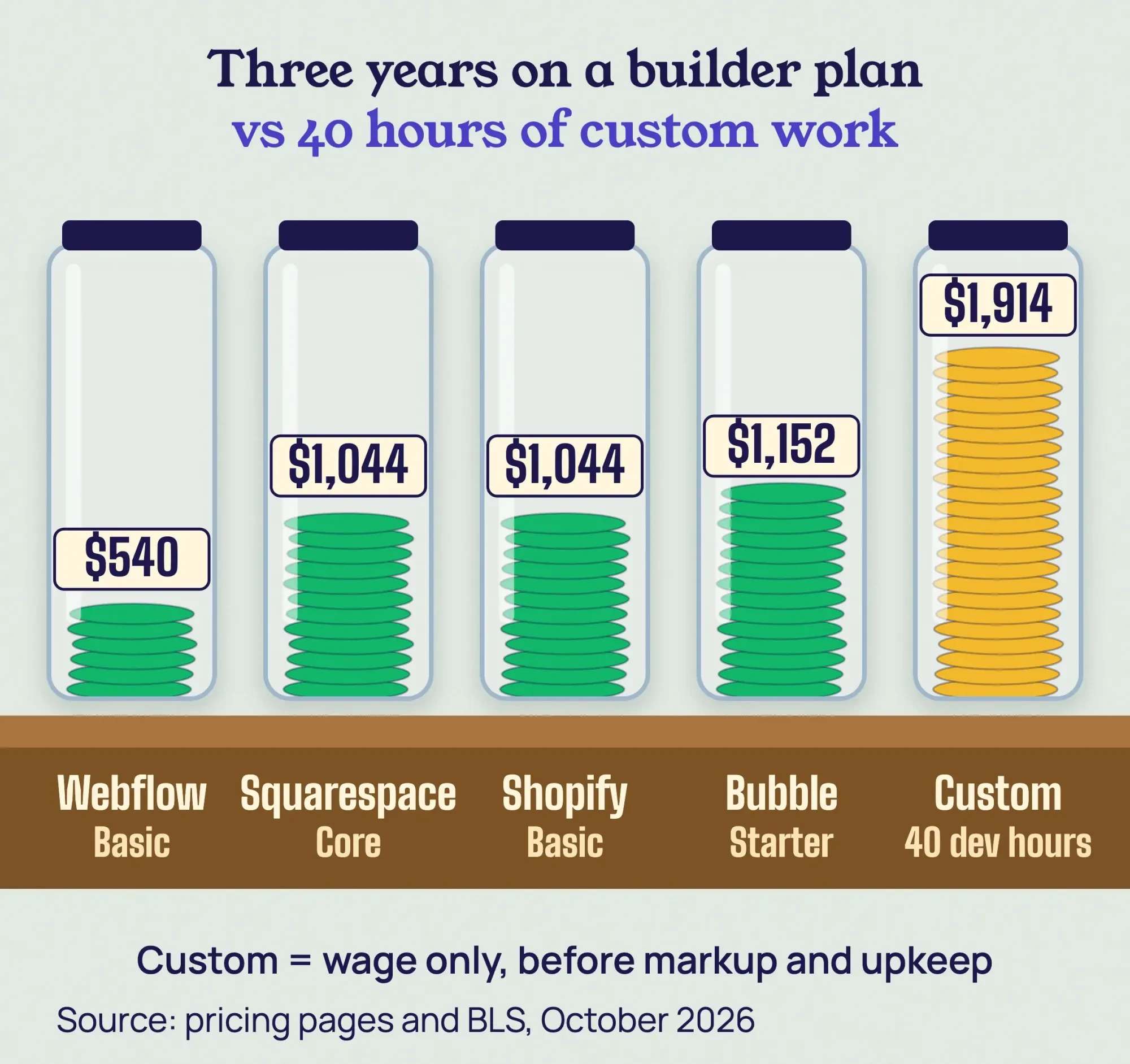 Source: Webflow, Squarespace, Shopify and Bubble pricing pages and BLS, October 2026. Yearly billing, 36 months; our math.
WordPress is the odd one out. It's cheap in cash and costs you time instead. Our WordPress setup guide works through the first two years of a do-it-yourself site, so we won't repeat those numbers here. Selling products? The WordPress vs Shopify comparison breaks down store fees per sale.
The cost people forget is upkeep. WordPress's own hardening guide is a long list of security jobs, and on a self-hosted or custom site every one of them is yours. Somebody also has to notice when the site goes down, which our guide to uptime monitoring covers. On a builder, those jobs belong to the platform. Custom code also needs a supported framework: see what happened to apps built on AngularJS after its end of life.
So if your site's job is to explain what you do and take inquiries, the builder fee is the cheapest route you'll find.
Are no-code sites slower than custom-coded sites?
Cheap would mean little if the builder site were slow. It usually isn't, at least in the public Chrome data we pulled.
Google's Core Web Vitals are three speed and stability checks. A page passes when its largest content loads within 2.5 seconds, it responds to taps in 200 milliseconds or less, and its layout shift stays at 0.1 or less, all measured at the 75th percentile of real visits.
On October 24, 2026, we pulled the September 2026 numbers from HTTP Archive's Core Web Vitals Technology Report, which matches Chrome's real-user data to the technology each website runs. We kept US websites only and counted the share that passed all three checks on mobile. Among the platforms in this post, Wix led at 88.7% of 37,229 sites, then Shopify at 85.5%, Squarespace at 82.9% and Webflow at 80.2%. WordPress sites passed 62.0% of the time. Next.js, a framework many custom sites are built on, came in at 51.6%. You can rerun it yourself through the public API by changing the technology name.
Bubble was the outlier.
Only 42 of its 214 US sites passed, which is 19.6% (Bubble's API figures). That sample is small, so read it as a warning sign for app builders, not a final verdict.
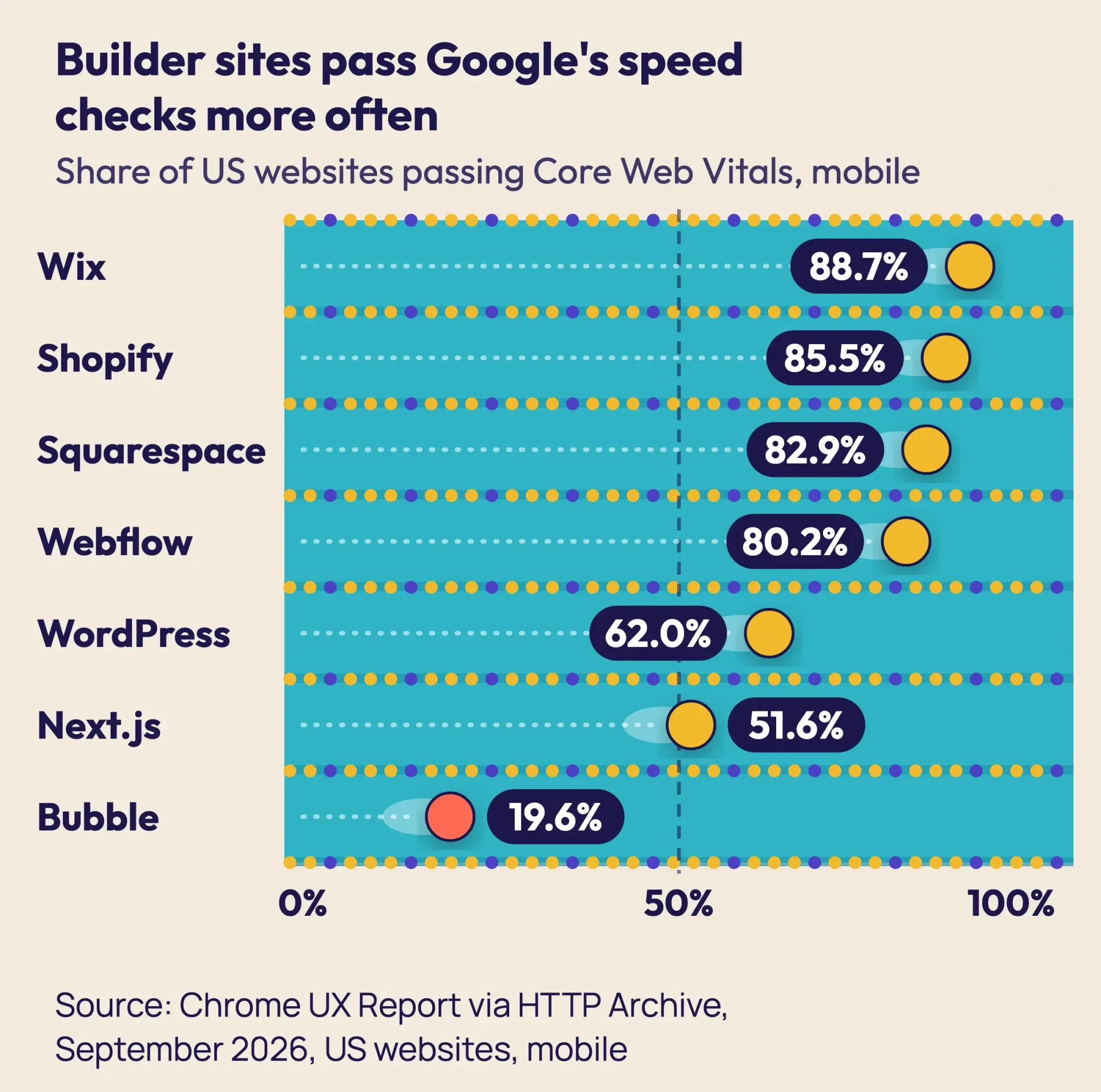 Source: Chrome UX Report via HTTP Archive Core Web Vitals Technology Report, September 2026, US websites, mobile. Pulled October 24, 2026.
Now the honest limits. This is a comparison across many sites, not a controlled test. Builder sites tend to be small brochure sites, which helps them pass, and "custom code" isn't one technology. A careful developer can build a custom site that beats every number here. If custom wins, our guide to hiring a full stack developer shows what it costs and how to test the person. The difference is that a builder gives you a good result by default, while custom code gives you whatever your developer delivers.
How much does it matter for Google? Its page experience guidance says Core Web Vitals "are used by our ranking systems," but also that Search "always seeks to show the most relevant content, even if the page experience is sub-par." Speed helps. It won't rescue thin pages, and custom code earns no bonus for being custom.
One more twist: lab scores and real visits can disagree. Squarespace's median mobile Lighthouse performance score in the same report was only 0.30 out of 1, yet 82.9% of its sites passed with real users. Our guide to PageSpeed Insights explains why, and the Core Web Vitals report in Google Search Console shows your own field data. To compare a template demo with your current page before you commit, run both through the free DigitalTreed speed test. It's the quickest way to see whether a template's fast before you've paid for it.
Launch speed goes the same way. A builder already has hosting, forms and checkout in place, so your hours go into words and photos. A custom build has to make each of those pieces first.
Custom code wins on ownership, if your contract says so
Price and speed favor builders. Ownership is where they give ground. On every platform here you own your content, but owning your words isn't the same as being able to pick up the site and leave.
Wix is the clearest case. Its help page on exporting says your site "needs to be hosted and operated on Wix's servers." You can't move it.
The Wix Terms of Use give you the intellectual property in your own content, while the templates and the platform's code stay with Wix.
Squarespace lets you export certain content into an .xml file built for WordPress. Its list of what doesn't come along includes store pages, more than one blog page, style settings and custom CSS. Images can break later, too: if you import the file into a self-hosted WordPress site, Squarespace warns that "the image links stop working after you cancel your Squarespace site."
Webflow goes furthest. "You can export your site and host it anywhere you like with any of our paid Workspace plans," its pricing FAQ says. The Core workspace that includes code export costs $19 a month on a yearly plan, as of October 2026. The catch sits in the next line: CMS content exports one collection at a time "and forms will stop working."
Bubble is the opposite. Its export help page is blunt about it: there's "currently no way of exporting your application as code." That's the app itself. You can take your data as CSV files, and Bubble will hand over a JSON dump of the app's logic and design to speed up a rebuild elsewhere. A rebuild is still a rebuild.
Shopify's terms of service say, "We do not take ownership of the Materials that you provide to Shopify," though Shopify does take a license to them. Its product export gives you a CSV file, but the product images aren't in it. The same exit question applies to business software, as our guide to cloud ERP exit terms and pricing shows. Our WordPress vs Shopify post covers what a move off Shopify involves.
With custom code, ownership depends on the written agreement with whoever builds it. Our guide to hiring a web designer lists the contract terms to ask for before any work starts. We've described the platform terms as they read on October 24, 2026. That isn't legal advice, and a business lawyer in your state can tell you what your own contract means.
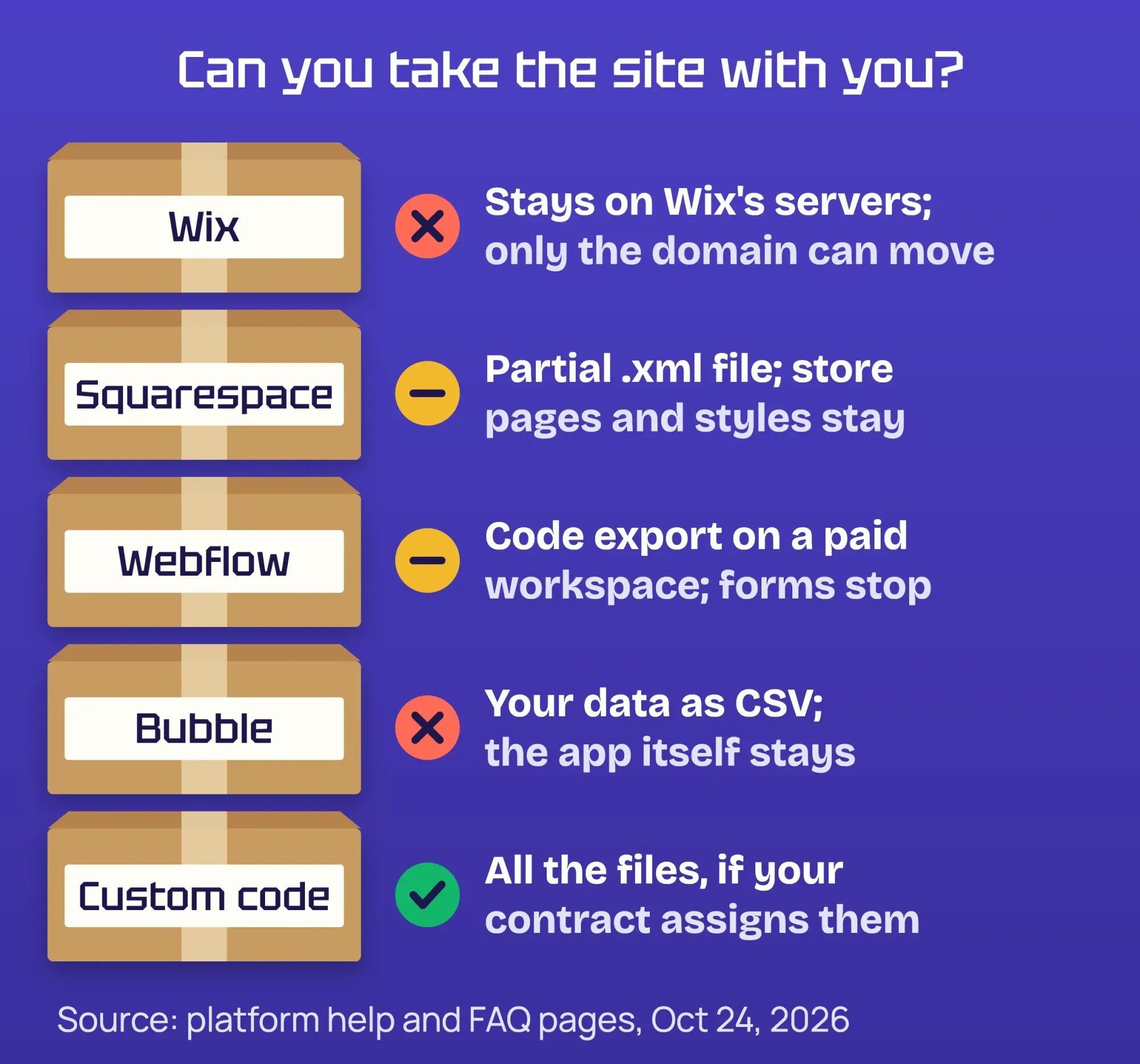 Source: Wix, Squarespace and Bubble help pages and Webflow pricing FAQ, read October 24, 2026.
Whatever you pick, buy the domain at a separate registrar. Even Wix says you can "purchase and manage the domain with another provider," and the address is the one thing every route lets you keep.
Neither route makes you ADA compliant on its own
That domain is yours either way. Accessibility is also yours either way, and it's the factor most comparisons skip.
The Justice Department's web accessibility guidance says the ADA covers "businesses that are open to the public (Title III)." That's true however the site is built.
There's no detailed federal rulebook, though. The department says it "does not have a regulation setting out detailed standards," so businesses "can currently choose how they will ensure" their sites are accessible. In practice, most teams measure against WCAG 2.2, the W3C standard that became a Recommendation on October 5, 2023 and was last updated December 12, 2024.
A builder template gives you a decent starting structure. You still add the alt text, pick readable colors, caption your videos and label your forms. The DOJ lists poor color contrast as a common barrier, and no template stops you from putting light gray text on white.
HTTP Archive's report also runs Lighthouse's automated accessibility check on home pages. For US sites in September 2026, the median mobile scores were 0.945 for Squarespace, 0.935 for Wix, 0.93 for Next.js, 0.91 for Webflow and 0.89 for WordPress. Bubble trailed at 0.74.
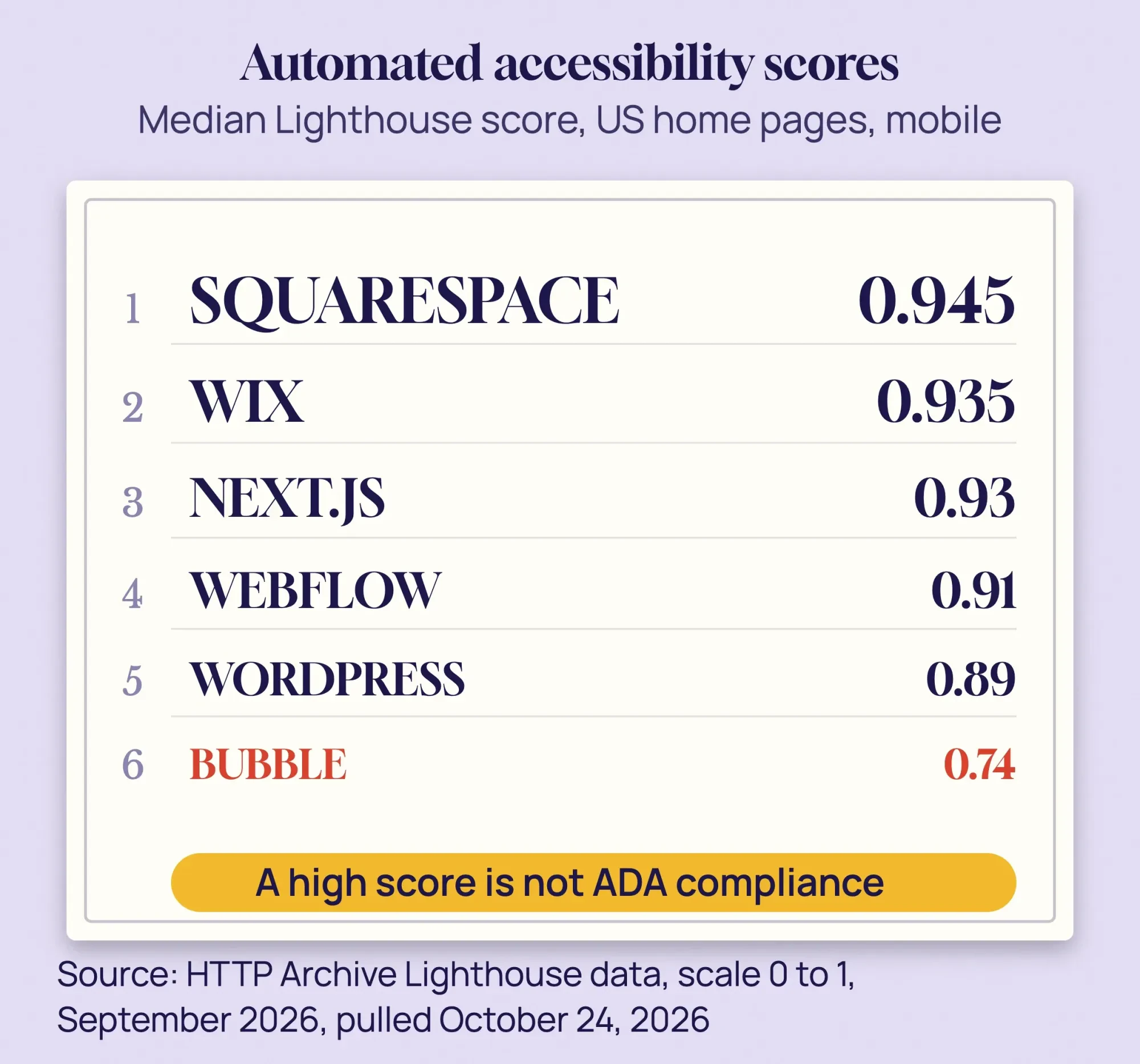 Source: HTTP Archive Lighthouse data, US websites, mobile, September 2026. Pulled October 24, 2026.
Don't read too much into a high score. The DOJ warns that a clean report from an automated checker or overlay "does not necessarily mean" your site is accessible. Automated tools catch missing labels and low contrast. They can't tell whether a person using a screen reader can actually book an appointment. Test that with a real visitor before you trust any score.
A good score isn't a legal shield, and it shouldn't feel like one.
Custom code wins once the builder caps your growth
Accessibility is a floor. Growth is where custom code finally earns its price.
Every builder has a ceiling, and most of them print it on the pricing page. Webflow's free Starter site allows "2 static pages" and "50 form submissions." That's a test site, not a business site.
Bubble meters usage in workload units, with 175,000 a month on Starter, and past that you "pay for overages as you go." These limits are fine for a small site. They start to bite when the site becomes the business.
Here are the signs it's time to look at custom work:
- You need a feature no plan or app can add, such as your own pricing logic or a customer portal.
- You're paying overages or app fees every month that add up to more than a build would cost over three years.
- Search Console shows mobile Core Web Vitals failing for months, and the template is the cause.
- You need data or code you can move, and the platform can't export it.
- Two systems have to share data in real time, and no plugin or connector does it reliably.
You rarely have to go all in. Many owners keep the marketing pages on a builder and build only the part that needs code, connected through an API. Our explainer on third-party integrations covers what each connection costs in speed and data.
What about AI site builders and "vibe coding" tools? They make the first draft faster on both routes. They don't change who hosts the site, who patches it or who owns it. Developers aren't going away either: the BLS expects web developer and digital designer jobs to grow 5% from 2025 to 2035, faster than average.
Example: Needle & Hem Alterations is a made-up three-person tailor shop in Knoxville, Tennessee. It launches on Squarespace Core at $29 a month on a yearly plan (as of October 2026), so $1,044 over three years, with six pages and a booking link. In year two, customers keep calling to ask if their suit is ready. The owner wants an order tracker with fitting dates, which no template does. So the shop keeps Squarespace for the public site and gets a quote for a small custom tracker, instead of rebuilding everything.
If you do move a whole site, plan the redirects. Google's site move guide says permanent redirects "don't cause a loss in PageRank," and it tells you to keep them "generally at least 1 year." Once they're live, test a sample of old URLs with our redirect checker.
Frequently asked
Is there a free no-code website builder plan?
Some builders have free tiers, but Squarespace doesn't. As of October 2026, its pricing page says every site starts with a 14-day free trial instead, with no credit card required. Use the trial to build your home page before you pay.
Do no-code builders take a fee on online sales?
Some entry plans do. As of October 2026, Squarespace's pricing page lists a 2% online store transaction fee on its Basic plan and says upgrading removes it. Count that fee when you compare a builder with Shopify or a custom checkout.
Do no-code websites come with an SSL certificate?
Squarespace does. As of October 2026, its pricing page says it creates and sets up free SSL certificates for all its sites, including ones on custom domains. On a custom build, check that your host includes a certificate and renews it.
Choose no-code if the site sells your service, custom if the site is the service
So the line falls at what the site has to do. Choose no-code if:
- Your site explains your business, shows your work and takes inquiries or bookings.
- You want to edit pages yourself without calling anyone.
- Your budget is a few hundred dollars a year, not a few thousand up front.
- You sell products: start with Shopify or WordPress and read our WordPress vs Shopify comparison first.
Choose custom if:
- The site runs logic no builder offers, like quotes, portals or your own pricing rules.
- You must own and move the code, or connect systems no plugin supports.
- A builder's limits or fees already cost more than a build would over three years.
Our take: start on a builder, register your domain somewhere else, and pay for custom work only when you can name the feature or the cost the builder is blocking. Whichever route you pick, the website development process runs through the same seven stages.
It keeps you from paying for code you don't need, and from staying on a plan that holds you back.
Already at that point? Tell us what your builder can't do and get a quote for the custom part. Building websites is what we sell, so weigh our view with that in mind.
How we made this guide: Our web team checked every price, quote and rule in this post against its source on October 24, 2026. That meant the platforms' own pricing, help and terms pages, the Bureau of Labor Statistics, the Justice Department, the W3C and Google's docs. The speed and accessibility figures are our own pull from HTTP Archive's public Core Web Vitals and Lighthouse data for September 2026, filtered to US websites. That filter uses each site's country, not ours. The pricing pages showed us US dollars, except Wix, which showed local prices, so its plans are left out. Each link sits beside the fact it backs up, so you can check us.
First published July 2023. Rewritten October 24, 2026: the generic software-development overview is gone. In its place are dated US prices, a three-year cost sketch, each platform's export rules, our Chrome speed data by platform, the ADA, and when to switch.
Sources
- Squarespace: Pricing (October 2026)
- Webflow: Pricing and FAQ (October 2026)
- Bubble: Pricing (October 2026)
- Shopify: Pricing (October 2026)
- U.S. Bureau of Labor Statistics: Web Developers and Digital Designers
- U.S. Bureau of Labor Statistics: Software Developers
- Wix Help Center: Exporting or embedding your Wix site elsewhere
- Wix: Terms of Use
- Squarespace Help Center: Exporting your site
- Bubble Support: Can I export my data from the Bubble platform?
- Shopify: Terms of Service
- Shopify Help Center: Exporting products
- HTTP Archive: Core Web Vitals Technology Report
- HTTP Archive: Technology Report API (cwv and lighthouse endpoints)
- web.dev: Web Vitals
- Google Search Central: Understanding page experience
- Google Search Central: Site moves with URL changes
- U.S. Department of Justice: Guidance on Web Accessibility and the ADA
- W3C: Web Content Accessibility Guidelines (WCAG) 2.2
- WordPress Developer Resources: Hardening WordPress

Comments
No comments yet. Start the conversation below.