
Quick answer
As of October 30, 2026, you can't download Netflix on Mac computers: Netflix's download list names 4 device types, all phones, tablets or Chromebooks. A Mac can still stream in Safari, at up to Ultra HD on the Premium plan. For offline viewing, download on an iPhone or iPad first, within your plan's limit.
Maybe you've got a flight tomorrow, a MacBook in your bag and no Download button anywhere on netflix.com. A Netflix download is a copy that expires after a while and plays only in the Netflix app on the device that saved it.
First, can you download Netflix on a Mac at all, and which devices can download? Then come watching on your Mac in a browser, downloading on an iPhone or iPad, how many downloads your plan allows, and why downloads expire. Last, why Boot Camp, screen recorders and downloader apps don't fit.
Key takeaways
- Netflix's download list names 4 device types, none a Mac or Windows PC.
- Apple's US App Store lists Netflix for iPhone, iPad and Apple TV only.
- Safari on a Mac streams up to Ultra HD on Premium, with no download.
- Standard with ads allows 2 devices x 15 downloads, or 30 a month.
- Under 17 U.S.C. 1201, no one may circumvent access controls on a copyrighted work.
Can you download Netflix on a Mac?
No, and the reason sits on Netflix's own help pages. Its page on downloading titles to watch offline says you need "one of these devices with the latest version of the Netflix app installed." The list that follows has four entries: an Android phone or tablet, an iPhone or iPad, an Amazon Fire tablet, and a Google Chromebook with the Google Play Store. A separate Netflix page on titles you can't download repeats the same set of apps. There's no Mac version hiding somewhere.
Apple's side settles the iPad-app shortcut. Can the iPad version run on an Apple silicon Mac?
On Apple's US App Store listing for Netflix, the Compatibility section names three devices: iPhone, iPad and Apple TV. There's no Mac line. That matters because Macs with Apple silicon can run many iPad apps, and older guides, this post's first version included, told people to grab the iPad version instead. Apple's developer guide on running iOS apps in macOS explains why that route isn't always open. Apple tells developers they "can choose not to run your app in macOS," and once Mac availability is removed, "the Mac App Store stops offering your app for sale." So the short answer holds: a Mac can stream Netflix, but it can't store it.
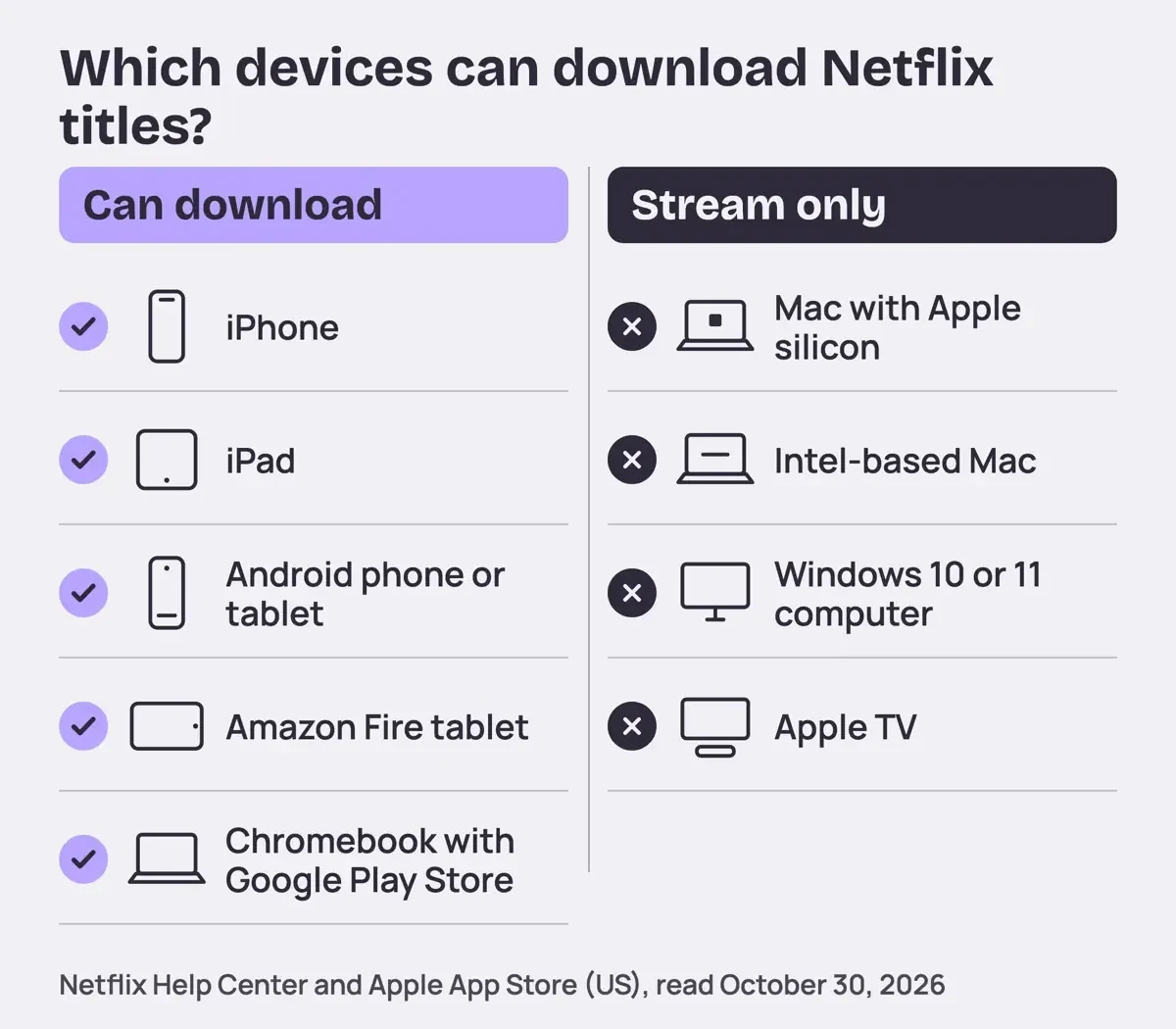 Diagram by DigitalTreed, from Netflix Help Center and Apple App Store pages read October 30, 2026.
Apple TV lands in the stream-only group even though it runs the Netflix app, because Netflix's download list doesn't name it.
The devices that can download, checked
Before trusting a yes or no, we wanted every row tied to a page you can open yourself. Here's how the nine devices people ask about line up, each backed by two matching quotes from Netflix or Apple:
| Device | Downloads Netflix titles? | How, or what to do instead |
| iPhone | Yes | Netflix app, Downloads |
| iPad | Yes | Netflix app, Downloads |
| Android phone or tablet | Yes | Netflix app, Downloads |
| Amazon Fire tablet | Yes | Netflix app, Downloads |
| Chromebook with Google Play Store | Yes | Netflix app, Downloads > Find More to Download |
| Mac with Apple silicon | No | Stream in Safari, up to Ultra HD |
| Intel-based Mac | No | Stream in Safari; Boot Camp runs Windows, which is off the list |
| Windows 10 or 11 computer | No | Netflix app for Windows or a browser, streaming only |
| Apple TV | No | Netflix app, streaming only |
Five of the nine can download, because we split iPhone and iPad into two rows while Netflix's own download page lists them together as a single entry. Every Mac and Windows computer in the table is a no, so the Chromebook is the only laptop that downloads.
We also turned the data into a lookup page served from 127.0.0.1 on a test laptop.
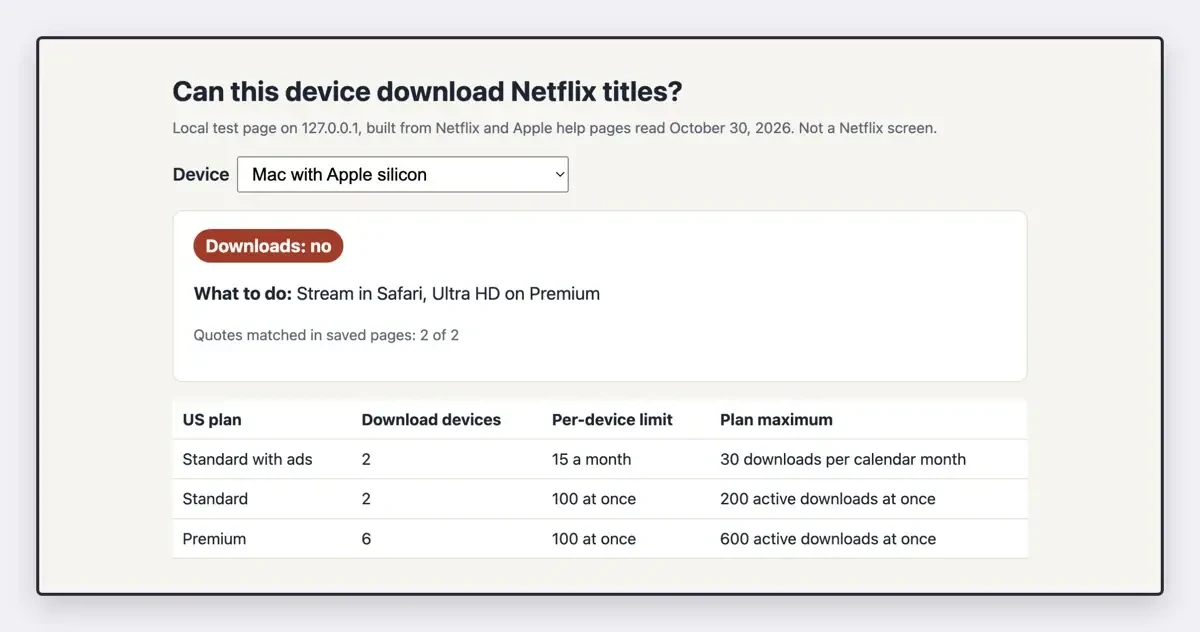 Screenshot: the device finder we ran on 127.0.0.1 on October 30, 2026, with Mac with Apple silicon picked. Not a Netflix screen.
What we tested
On October 30, 2026, we saved the text of nine Netflix help pages, the regional copy of the Netflix terms our checker received and four Apple pages, without signing in. A script matched each table row to two quotes and read the App Store's Compatibility block.
python3 check.py
Netflix US download list: 4 device types; Mac or Windows named: False
App Store (US) Netflix compatibility: iPhone, iPad, Apple TV; Mac listed: False
devices checked 9; device quotes found 18/18
Watch on your Mac in a browser instead
If you'll have Wi-Fi where you're going, the Mac still works for streaming. Netflix's app download page puts it plainly: "To watch Netflix without the app, go to netflix.com using a supported web browser." Its supported browsers page adds that your Mac needs macOS 10.15.5 or later. Ultra HD asks more. Netflix's Mac help page wants an Apple processor or T2 chip with a built-in UHD-capable display, 15 megabits per second, and "A Netflix plan that supports streaming in UHD." In the US, only Premium lists 4K, while both Standard plans list 1080p.
The browser you pick changes the picture more than people expect. On a Mac, Netflix lists Safari 14 or later at up to Ultra HD (2160p). Chrome 117, Firefox 129 and Opera 92 or later top out at Full HD (1080p), and Edge 118 or later stops lower, at HD (720p), on a Mac. Ultra HD also needs macOS 11 or later, and a Mac still on macOS 10.15 plays in up to Full HD. If a show looks soft in Edge, switching to Safari is the first fix we'd try.
A hotel or airline connection won't always hold a stream, though. For a long flight, download on another device before you go. If you also watch on a big screen at home, our guide to streaming boxes and smart TV apps covers which one suits that setup.
Download on an iPhone or iPad before you leave
That other device is usually the iPhone or iPad already in your bag. With the latest Netflix app installed, Netflix's download steps for iPhone and iPad run like this:
- Open the Netflix app and tap Downloads, then See What You Can Download.
- Pick a movie and select Download, or pick a show and use Download Season.
- Stay on Wi-Fi while it downloads, which Netflix suggests to save data.
- To watch, open the app, tap Downloads, find the title and select Play.
Two details catch people at the airport. Netflix's US page says "You need to stay signed in to your Netflix account to access the downloads offline." So don't sign out to tidy up before the trip. Downloads also stay on the device that saved them, which is why a movie you saved on an iPad won't show up on your Mac or your TV later.
Quality is a setting too. Netflix's download quality page says the Standard option plays in standard definition (SD). High or Higher plays "in up to 1080p or high definition (HD) video quality," but takes more time and storage. Set it before you start a whole season.
How many downloads does your plan allow?
Once downloads work, your plan sets the ceiling. Netflix's US plans and pricing page gives each plan's price and number of download devices, and its US downloads page gives the per-device cap. We multiplied the two:
| US plan | Price (October 30, 2026) | Download devices | Per-device limit | Plan maximum |
| Standard with ads | $8.99 a month | 2 | 15 a calendar month | 2 x 15 = 30 a month |
| Standard | $19.99 a month | 2 | 100 active at once | 2 x 100 = 200 active |
| Premium | $26.99 a month | 6 | 100 active at once | 6 x 100 = 600 active |
The ad-supported row is the one to plan around. Netflix's wording is "Ad-supported plans are limited to 15 total downloads per device per calendar month." The ad-free plans count downloads active at one time instead, so the two limits work differently. Example: a family on Standard with ads, loading a phone and a tablet for a two-week trip, gets 2 x 15 = 30 downloads in that calendar month across both. Netflix also says its plans are billed monthly with no annual option, and the Basic plan has been discontinued. Prices change often enough that guides go stale, so check Netflix's own US page on the day you switch plans rather than trusting a number you read here.
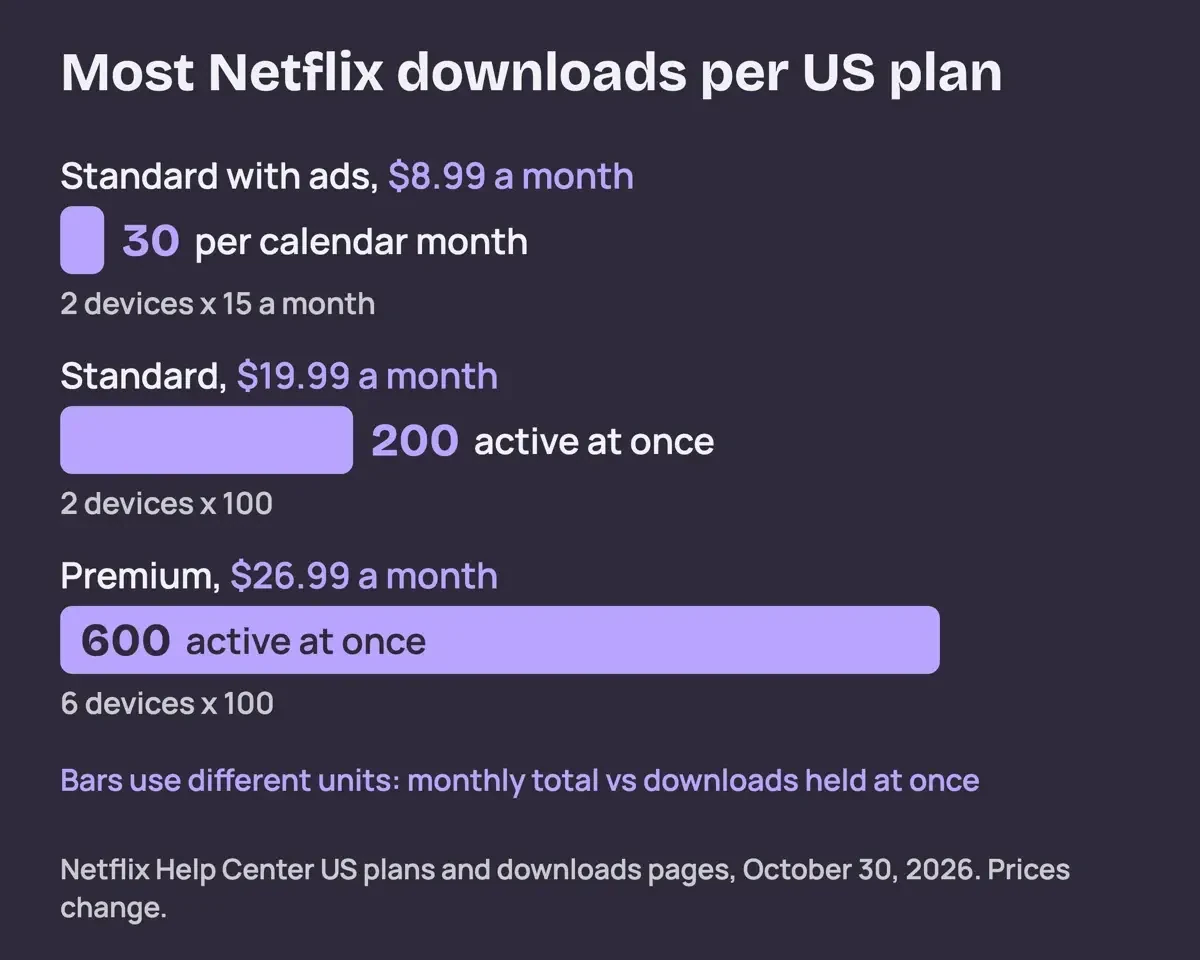 Diagram by DigitalTreed, from Netflix US plan and download pages, October 30, 2026.
The device count comes from the plan. The US plans page lists "Download on 2 supported devices at a time" for both Standard plans and 6 for Premium.
Why downloads expire or disappear
Even inside the limits, a download isn't yours to keep. Netflix's expired downloads page says downloads "will expire after a certain amount of time." Until then, "You can watch a download as many times as you'd like before it expires." Some titles also cap downloads or renewals "due to studio and license agreements," and once that's used up, you watch online. Nothing on these pages gives a fixed number of days, so open the Downloads tab before you leave and look for any title marked Expired.
Some titles never offer a Download icon at all. Netflix's download availability page gives reasons such as "The content rights are currently exclusive to another company." Its troubleshooting page says a missing icon "means the title can't be downloaded." No setting changes that.
Canceling ends everything at once. Netflix's US downloads page says "If you cancel your account, downloads on your device will be deleted."
Rejoining doesn't bring them back: "If you restart your membership, you'll need to download them again." So cancel after the trip, not before. Our guide to canceling Hulu by billing party covers Hulu.
Why Boot Camp, screen recorders and downloader apps don't fit
That leaves the workarounds older guides suggested, the earlier text of this post among them. We've dropped all of them, and the reasons come from Apple, Netflix and US law.
Boot Camp first. Apple's Boot Camp Assistant page says it "requires one of these Mac models, which have an Intel processor." Its MacBook Pro entry, for example, covers models from 2012 through 2020 but excludes the 13-inch M1 MacBook Pro from 2020. Apple's Apple silicon page says the move to Apple silicon began with models from late 2020. Even on an Intel Mac running Windows, you'd gain nothing, because the Netflix Windows page only covers watching and Windows isn't on Netflix's download list either.
Recorders and downloader apps are a different matter. None of the Netflix help pages we read offers either one as a way to keep a title. The only download route they describe is the Download button inside the Netflix app. Netflix's Terms of Use set the rules for the service, but the copy our checker received was a regional version for outside the US. So we don't quote it here; open the terms from your Netflix account to read the US wording.
US copyright law is where downloader apps run into trouble. Under section 1201 of the US Copyright Act, "No person shall circumvent a technological measure that effectively controls access to a work protected under this title." The section 1201 text on govinfo.gov says circumventing includes "to decrypt an encrypted work." Separately, section 106 of the same title gives the copyright owner the right "to reproduce the copyrighted work in copies or phonorecords." The Copyright Office reviews 1201 exemptions every three years. This guide isn't legal advice for any specific case.
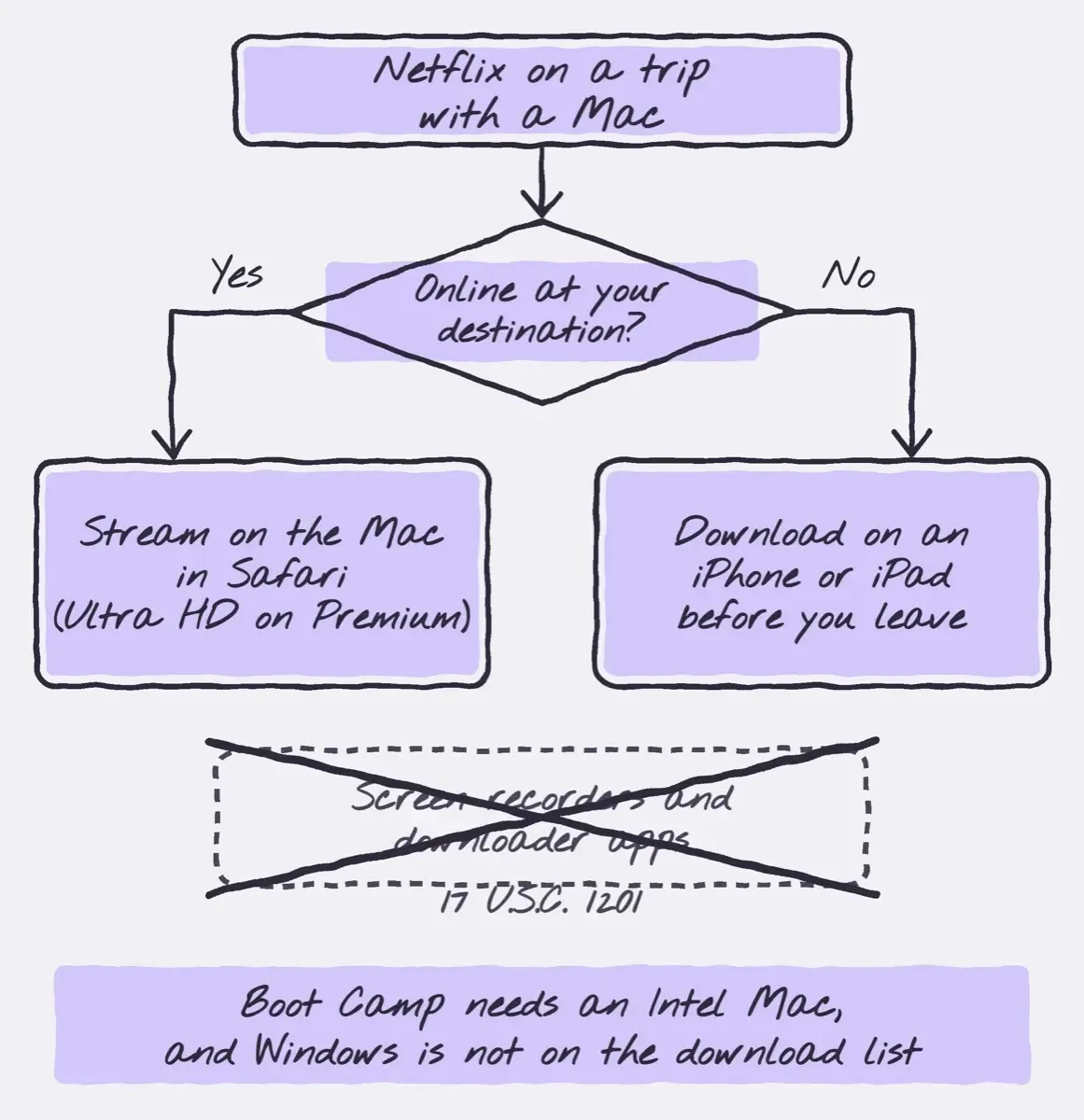 Drawn by us, from Netflix Help Center pages and 17 U.S.C. 1201, October 30, 2026.
Our take: stream on the Mac whenever you're online, and treat an iPhone or iPad as the offline device you load up the night before a trip. Curious how the same rules look from a creator's side? Our US guide to protecting website content from copying covers copyright basics. For music, the YouTube songs download guide sets out what YouTube allows offline.
Netflix on Mac questions
Frequently asked
Do Netflix downloads play when I travel abroad?
Not always. Netflix's page on using Netflix outside your home says downloaded titles "may not be available while in a different country."
Can I download Netflix on a Windows laptop instead?
No. Windows 10 or later gets the Netflix app from the Microsoft Store, per Netflix's app page, but it streams only.
Why does Netflix look blurry in Edge on my Mac?
Netflix's browser page caps Edge at HD (720p) on a Mac, while Safari goes up to Ultra HD.
Can I watch my iPad downloads on Apple TV?
No. Netflix's downloads page keeps downloads on the device that saved them.
How we made this guide: Nothing was downloaded, recorded or signed into. We read Netflix's US help pages, Apple's pages and the US Code, and a script matched every table quote. The Netflix terms we could load were a regional copy from outside the US, so we left their wording out. Facts checked by the DigitalTreed team on October 30, 2026.
First published November 2023 with third-party download and recording methods. Rewritten October 30, 2026: now covers only the routes Netflix and Apple support, with a checked device table, US plan limits and the terms and law behind the change. If YouTube is the app acting up on your TV instead, see our YouTube error 503 fixes or the yt.be/activate TV sign-in steps.
Sources
- Netflix Help Center: How to download titles to watch offline (US)
- Netflix Help Center: Why isn't a movie or TV show available for download? (US)
- Netflix Help Center: Plans and Pricing (US)
- Netflix Help Center: Downloaded title says 'Expired'
- Netflix Help Center: Can't download a TV show or movie
- Netflix Help Center: Netflix supported browsers and system requirements
- Netflix Help Center: How to download the Netflix app
- Netflix Help Center: How to use Netflix on your Windows computer or tablet
- Netflix Help Center: How to change the video quality of a download
- Netflix Terms of Use (open from your account for the US text)
- Netflix Help Center: Using Netflix outside of your home (US)
- Netflix Help Center: How to use Netflix on your Mac computer (US)
- Apple App Store (US): Netflix
- Apple Developer: Running your iOS apps in macOS
- Apple Support: Install Windows 10 on your Mac with Boot Camp Assistant
- Apple Support: Mac computers with Apple silicon
- U.S. Copyright Office: Title 17, Chapter 12 (section 1201)
- govinfo.gov: 17 U.S.C. 1201
- U.S. Copyright Office: Title 17, Chapter 1 (section 106)
- U.S. Copyright Office: Rulemaking proceedings under section 1201


Comments
No comments yet. Start the conversation below.