
Quick answer
You download songs from YouTube with YouTube Music Premium or YouTube Premium, inside the YouTube Music app on your phone, as of October 30, 2026. Downloads keep playing if you reconnect at least once every 30 days, but Premium Lite and free YouTube don't download songs. Tap the song's Menu, then Download.
You're boarding a flight or riding a subway with no signal, and the playlist has to be on the phone first. YouTube Music Premium is a paid membership that adds ad-free music, background play and music downloads, per YouTube Music Help. Alone or inside YouTube Premium, it's the only way YouTube itself lets you download songs from its music catalog, so that's where most of this guide stays.
First: is there a free route, which YouTube plan downloads songs, and the YouTube Music app steps. Then music videos in the main YouTube app, how long songs play offline, songs you already own and music for your videos, and the route we'd pick.
Key takeaways
- Song downloads need YouTube Music Premium, or YouTube Premium, which includes it.
- Premium Lite downloads most videos but never music content.
- Reconnect at least once every 30 days, or music downloads stop playing.
- The YouTube app never gives you an MP3 file.
- Songs you own can be uploaded and played offline without Premium.
Can you download songs from YouTube for free?
Not songs, if you stay inside YouTube's own apps. The offline videos FAQ is blunt: "It's not possible to download audio, music, or MP3 files from the YouTube app."
Free YouTube Music doesn't fill the gap. Its download help page says "You can download podcasts regardless of your membership status," while songs sit on the paid list.
So a free account gets you podcasts for the road, and nothing else to keep. The YouTube Terms of Service let you "view or listen to Content for your personal, non-commercial use." Downloading is barred unless the Service expressly authorizes it or YouTube, and any rights holders, give written permission. The Download buttons covered below are YouTube's own route. Converter sites raise their own questions, which our MP4Juice safety and copyright guide answers.
Which YouTube plan downloads songs?
Two paid memberships download songs. One hides inside a bigger plan. YouTube Music Premium covers music on its own. YouTube Premium bundles it in, since the membership help page lists "Get a subscription to YouTube Music Premium at no monetary cost" among Premium's benefits. The Premium benefits page adds that members can "download songs to listen to offline using the YouTube Music app."
Premium Lite is the plan that catches people out, because it's cheaper and it does download. Lite's own help page lists downloads "for most videos," then says "These features are not available on Shorts or on music content." It also says "Premium Lite does not include YouTube Music Premium."
So Lite's out for songs. Our script lined up all seven routes and tied each row to a YouTube Help or YouTube Music Help sentence:
| Route | Keep songs offline? | Where the download lives | Offline window |
| YouTube Premium | Yes, in the YouTube Music app | Inside the app, encrypted | 30 days (music), 29 days (videos) |
| YouTube Music Premium | Yes | Inside the YouTube Music app | 30 days |
| Premium Lite | No (not on music content) | Most non-music videos only | Not stated on the Lite page |
| Free YouTube Music (with ads) | No (most podcasts only) | Podcasts inside the app | Not stated |
| Free YouTube app | No | No audio or MP3 files | None |
| Your own uploads (FLAC, M4A, MP3, OGG, WMA) | Yes, without Premium | Your private YouTube Music library | Not stated |
| YouTube Audio Library (creators) | MP3 file for your videos | Downloaded from YouTube Studio | None |
Three of the seven routes keep songs on your phone: the two paid memberships and music you upload yourself. Only the uploads skip the fee.
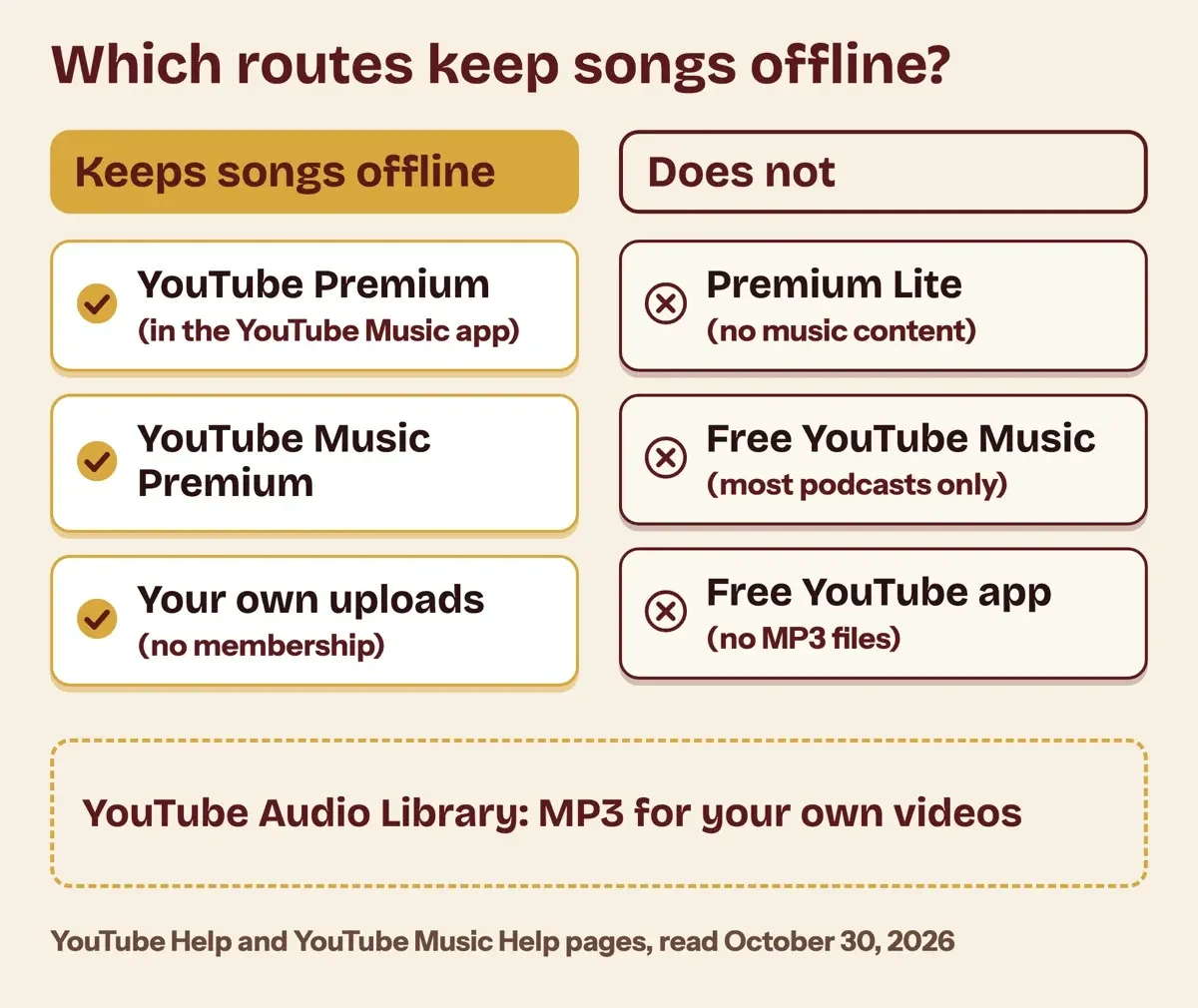 Diagram by DigitalTreed, from YouTube Help and YouTube Music Help pages read October 30, 2026.
Plan type changes who can use the downloads and for how long. The Join YouTube Premium page says "The Family plan provides membership benefits for up to 6 people," and a Two-person plan covers 2.
Student plans are "valid for up to 4 years," and the student plan page adds "You'll be required to re-verify your eligibility every year." Prepaid plans "do not automatically renew," and you can't hold more than 24 months of prepaid access.
We'd normally print US monthly prices here. When we requested youtube.com/premium and youtube.com/musicpremium on October 30, 2026, both came back set to India. They showed rupee prices only. We quote prices only from a vendor's own US page, so this guide has no dollar figures. Open those two pages from the US to see today's price and billing term.
Download songs in the YouTube Music app
Once the membership is active, downloading happens in the YouTube Music app, not the main YouTube app. The YouTube Music download page lets members save "songs, videos, and podcasts to your mobile device." These steps follow that page:
- Open the YouTube Music app, signed in to the Google Account that holds the membership.
- For one song, tap Menu next to it, then tap Download.
- For an album or playlist, tap Menu (More on iPhone) and select Download, or tap the download arrow on its details page.
- To let the app pick, tap your profile photo, then Settings, then Downloads & storage, and turn on Smart downloads.
Smart downloads earns its place before a trip, because it fills the phone from what you've already played without you picking a single song. That same page says it can "download up to 200 of your recently played songs." The iPhone and iPad version adds that the selection is refreshed every 24 hours on Wi-Fi.
Downloaded playlists refresh daily on Wi-Fi too, so a song you add to a saved playlist at home is on the phone by the time you leave.
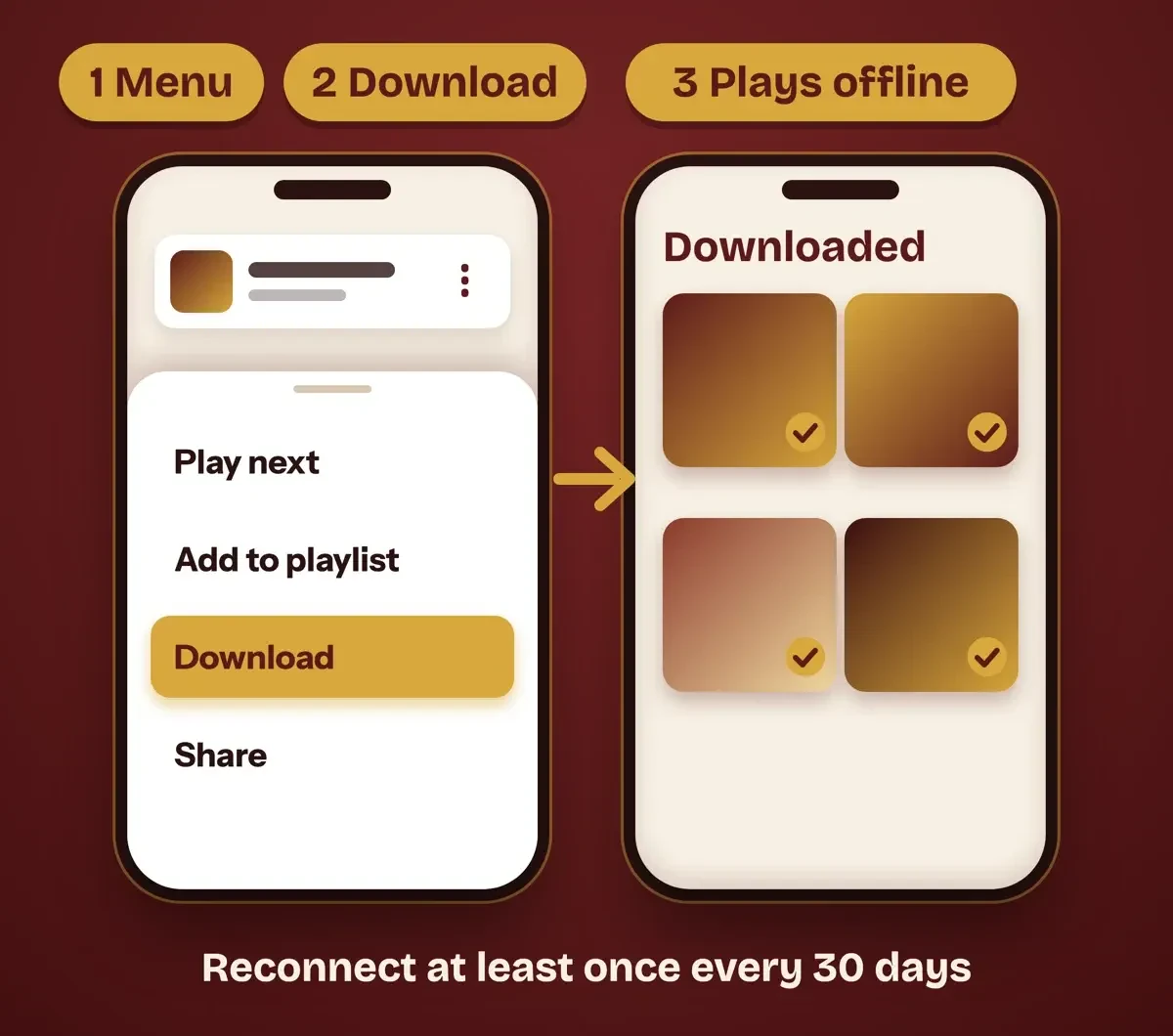 Drawn by us from the YouTube Music Help download steps, October 2026. Not a real app screen.
Storage and data are the next limits you'll hit, since YouTube ties the number of songs to free space and each file's length and quality. You can limit downloads to Wi-Fi in Settings. Some Android carriers add a "Wi-Fi and unrestricted mobile data" option, and YouTube Music Help says "This is currently available on Verizon and AT&T in the United States." Android phones with a memory card get one more choice, since the SD card help page says "You can download songs from the YouTube Music app to an SD card." Switch on Use SD card under Settings, then Downloads. Saved songs can't be moved across; YouTube says to delete them, switch the location and download again.
Music videos in the main YouTube app
Beyond plain tracks, some songs only exist as a music video or a live set, and those you save in the main YouTube app. The Android download steps are short. Sign in to your Premium account, open the video's Watch page and tap Download below the video. Later, tap your profile picture and pick the Downloaded filter in your Library.
A computer works as well, and it's handy before a long flight. The desktop offline page says "You can also download videos from your computer using Chrome, Edge, Firefox & Opera browsers." On youtube.com, signed in to Premium, you click Download below the video, and the icon turns black once the copy is saved. Your saved videos then sit under Downloads in the left menu. You won't get a file to drag into another player, though. The offline FAQ says "The videos are stored encrypted on the device and can only be watched in the YouTube app."
How long downloaded songs play offline
Those downloads aren't permanent, and the two apps don't word the limit the same way. YouTube Music Help says "You'll need to reconnect to the internet at least once every 30 days to maintain your downloads." For videos, the YouTube offline page says "Downloaded videos can be played offline for up to 29 days."
When a trip mixes music and videos, we'd plan around 29, because it's the shorter of the two windows and a missed day means downloads that won't play.
Some places get less. The same YouTube page says "In some countries/regions, content can be played for up to 48 hours without an internet connection." Reconnecting lets the app check each item, and a video that's "no longer available for offline playback" is removed during the next sync. If a track vanishes that way, the upload may be gone; our post on why a YouTube video shows as unavailable covers the creator's side.
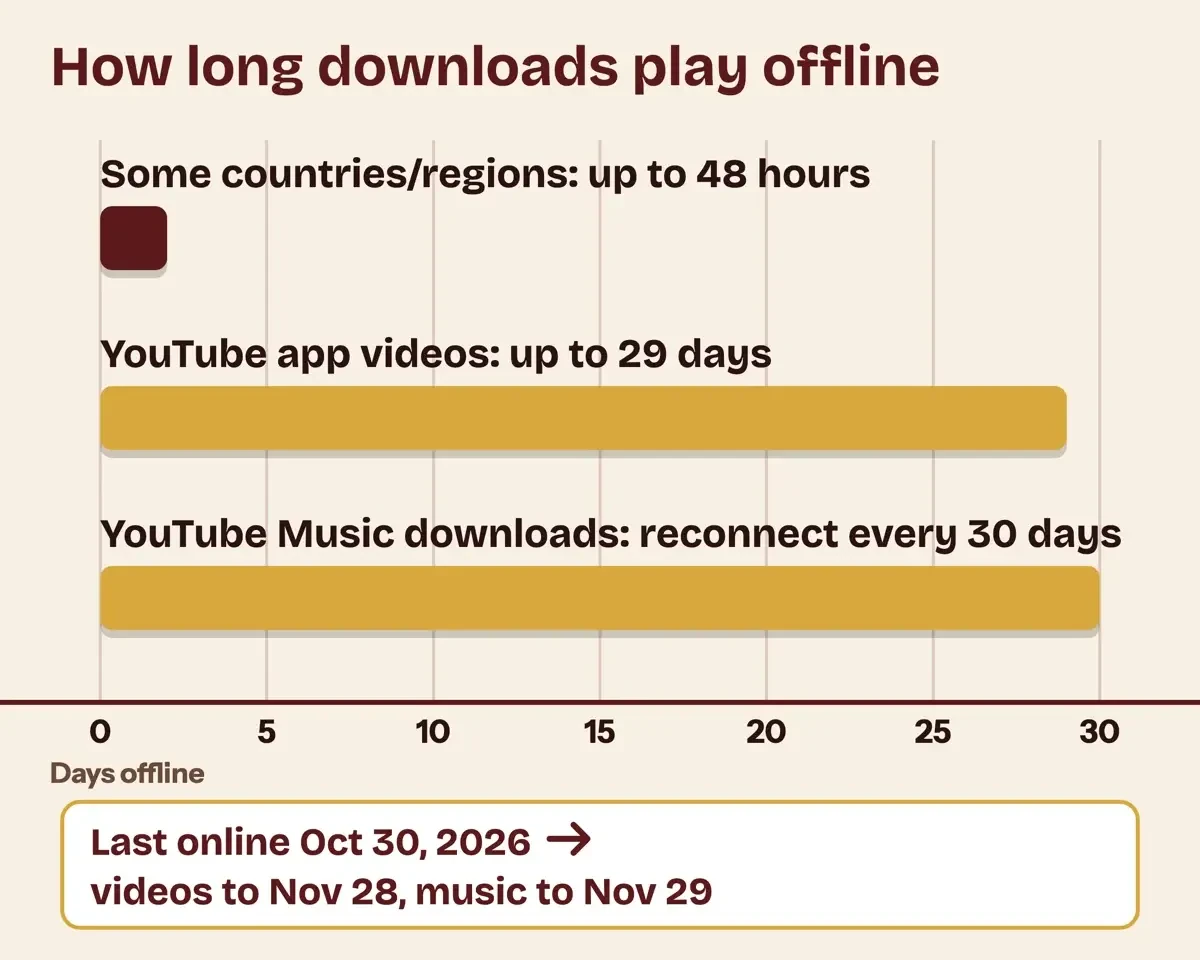 Diagram by DigitalTreed, from YouTube Help and YouTube Music Help pages, October 30, 2026.
Travel adds rules. YouTube's locations and travel page says "Your music downloads will also remain available to you for 30 days without an internet connection" in countries without the service. The page is just as clear about VPNs. "If you misrepresent your location (e.g., use VPN), or attempt to circumvent access and availability restrictions, your subscription may be subject to cancellation."
Family plans add a home check: "Every 30 days, an electronic check-in will confirm this requirement" that members share one address.
What we tested
On October 30, 2026, a local script found all 44 quotes in 21 saved pages, built the route table and worked out example dates. A phone last online October 30 stops playing videos on November 28, 2026 and music on November 29, 2026.
Then it read the country field on both Premium pages. Each said IN, with rupee prices only.
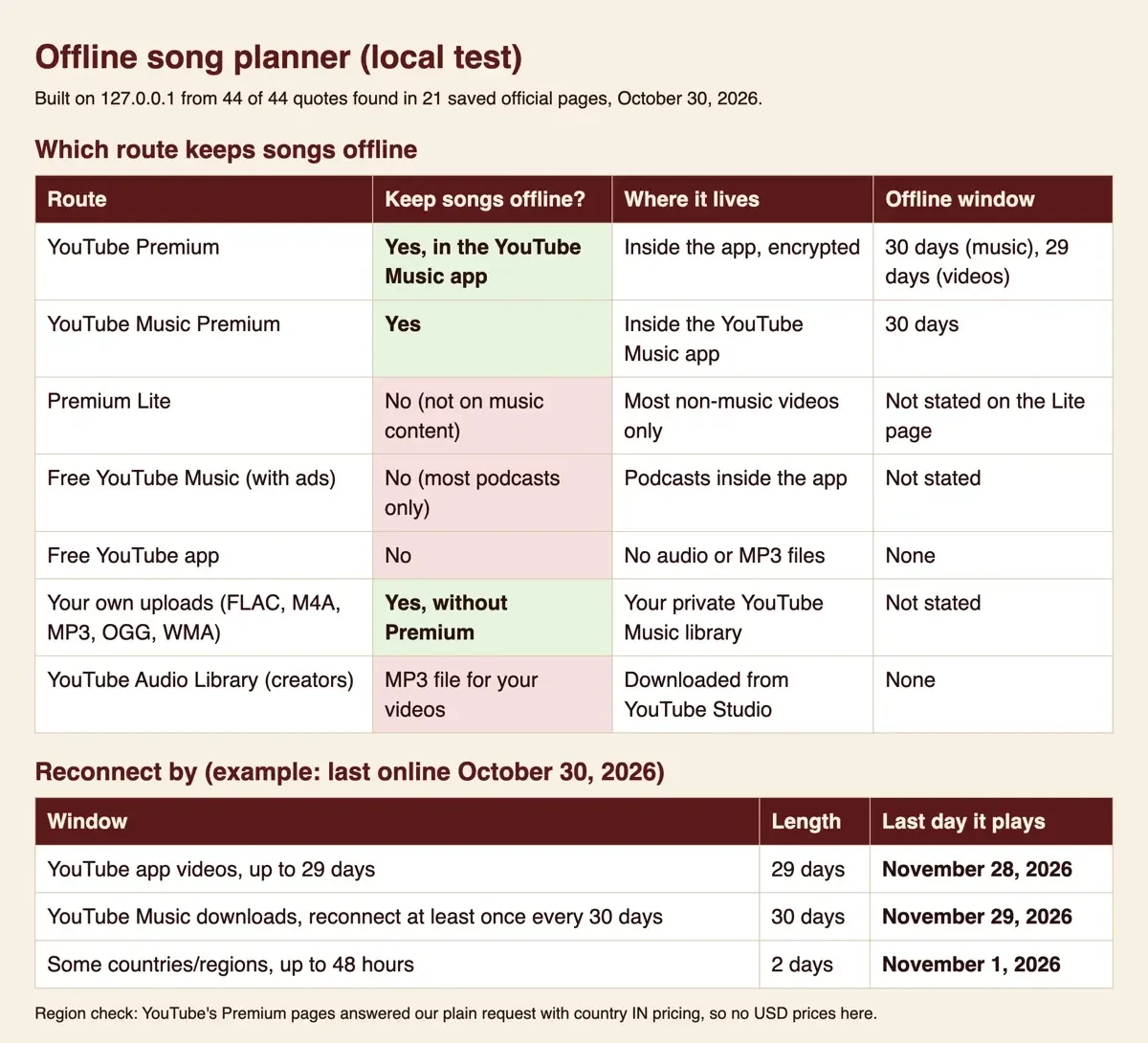 Screenshot: our offline song planner on 127.0.0.1, October 30, 2026.
Songs you already own, and music for your videos
Even without a membership, songs you already own can go offline, whether they're MP3s bought years ago or your band's recordings. The YouTube Music upload page says "You can play uploaded songs in the background, ad-free and offline." That works "even if you are not currently a YouTube Music Premium subscriber."
It takes FLAC, M4A, MP3, OGG and WMA files, up to 100,000 songs per library.
Uploading needs a computer, and it's the one step you can't do on a phone. YouTube says "Music uploads cannot be completed in the YouTube Music mobile app," so drag the files onto music.youtube.com or use Upload music under your profile picture.
Uploads stay private. "You are the only one who can play the music you have uploaded," YouTube says, and that holds inside a family plan.
Creators who need a soundtrack, not a playlist, use a different shelf. YouTube's Audio Library page says "The Audio Library is found exclusively in YouTube Studio," and each track downloads as an MP3. "New releases are added to the Audio Library twice a month," and its copyright-safe tracks "won't be claimed by a rights holder through the Content ID system." It also says that if you're in the YouTube Partner Program, "you can monetize videos with music and sound effects from the Audio Library." The Studio side starts once you set up a business channel on YouTube. Getting those videos found is a separate job, covered in ranking videos on YouTube and Google.
The route we'd pick
That leaves the choice. If you already pay for YouTube Premium, we'd download in the YouTube Music app, because the music membership is part of it. If you only want music, YouTube Music Premium is the smaller membership that still downloads songs. We'd skip Premium Lite here, since its own page rules out music content.
Before a trip, turn on Smart downloads and set downloads to Wi-Fi only. Then open the app on hotel or airport Wi-Fi inside the 30-day window. A trip that also needs a film runs on other rules, set out in Netflix downloads on a Mac, including why a Mac can't save them. Paying one channel directly is a different product, explained in YouTube channel memberships.
YouTube song download questions
Frequently asked
Can I download songs from YouTube Music on my computer?
Not songs. YouTube Music Help saves song downloads "to your mobile device," and the supported devices page limits offline play to mobile apps.
Does a YouTube family plan share my downloads?
Members "Use their own Google account to access a shared membership," so each one downloads separately. The family plan page allows "up to 5 family members who live within the same residential address."
Do YouTube Smart downloads work for videos too?
Yes, for Premium members. The Smart downloads page says "New videos will be downloaded every seven days."
How we made this guide: Our checker saved 21 YouTube, YouTube Music, Terms and US Code pages, and a local script matched every quote. No account was opened and no song was downloaded. Facts checked by the DigitalTreed team on October 30, 2026.
First published November 2025 with third-party downloader steps and Brazil prices. Rewritten October 30, 2026: the official YouTube Music Premium route, offline limits from YouTube Help and the legal free options, with no downloader or converter steps.
Sources
- YouTube Music Help: Download music & podcasts to listen offline
- YouTube Music Help: What is YouTube Music?
- YouTube Help: Sign up for YouTube Premium or YouTube Music Premium memberships
- YouTube Help: YouTube Premium benefits
- YouTube Help: Get a Premium Lite membership on YouTube
- YouTube Help: Join YouTube Premium
- YouTube Help: Get a student discount
- YouTube Help: Sign up for & manage a YouTube family plan
- YouTube Help: Premium memberships available locations & travel policies
- YouTube Help: Watch videos offline with YouTube Premium
- YouTube Help: YouTube videos offline FAQs
- YouTube Help: Use Smart Downloads with YouTube Premium
- YouTube Help: YouTube Premium & YouTube Music Premium supported devices
- YouTube Music Help: Download music to an SD card
- YouTube Music Help: Upload music to your YouTube Music library
- YouTube Help: Use music and sound effects from the Audio Library
- YouTube Terms of Service


Comments
No comments yet. Start the conversation below.