

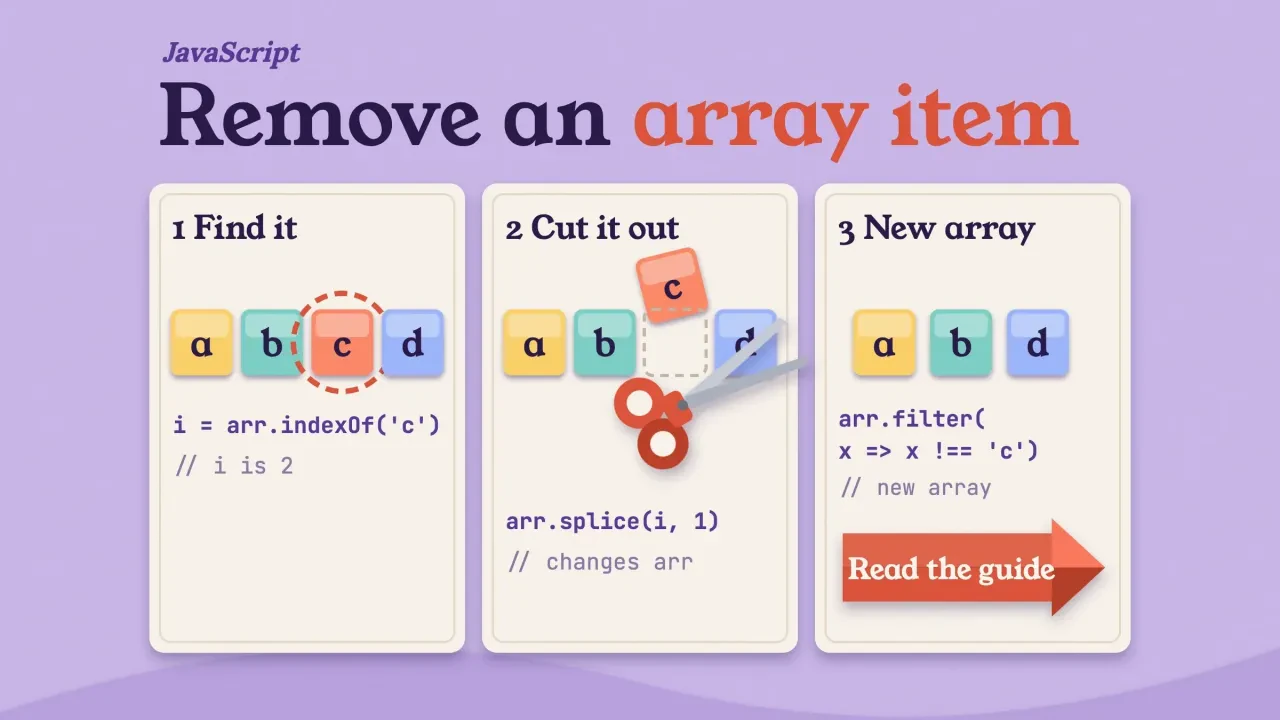
Quick answer
To remove an item from an array in JavaScript, use splice(index, 1) when you know the position; it changes the array. To remove by value, filter() returns a new array without it. toSpliced(index, 1) is the copying version of splice, standard since ECMAScript 2023.
One warning before you copy anything.
If you find the position with indexOf(), check that it isn't -1 first. Skip that check and splice quietly deletes the last item instead, the kind of bug that passes every test with good data and only shows up when someone asks to remove something that isn't there.
We've run every sample here in Node.js v26.10.0 (test date: October 24, 2026), and the comments show what it printed.
Key takeaways
- Check that indexOf didn't return -1 before you call splice.
- splice changes the array, while filter and toSpliced return a new one.
- A forward splice loop skips items, so loop backward or use filter.
- At 100,000 matches, a backward splice loop was 400 to 1,300 times slower.
- Skip delete, because it leaves an empty slot and keeps the length.
Pick the method by what you know and whether the array may change
That check aside, the right method depends on two things: whether you know the index or the value, and whether the original array is allowed to change.
Mutating means the method edits the array you've already got, so every variable pointing at it sees the change.
The copying methods don't touch it. They hand you a new array instead, and MDN keeps a list of both kinds, with the non-mutating partner for each one.
| What you know | Change the array | Get a new array |
|---|---|---|
| The index | arr.splice(i, 1) | arr.toSpliced(i, 1) |
| The value, first match | indexOf, check -1, then splice | indexOf, check -1, then toSpliced |
| The value, every match | A backward loop with splice | arr.filter(x => x !== value) |
| An object's id or property | findIndex, check -1, then splice | arr.filter(o => o.id !== id) |
| It's the first or last item | shift() or pop() | slice(1) or slice(0, -1) |
If arrays are new to you, our JavaScript tutorial for beginners covers them first.
By index, splice() edits the array in place
So start with the index, the case that's easiest to get right.
splice(start, deleteCount) removes deleteCount items starting at start. It changes the array in place and returns the removed items as a new array, as both MDN and the ECMAScript 2023 spec describe.
const colors = ["Red", "Green", "Blue", "Yellow", "Orange"];
const removed = colors.splice(2, 1);
console.log(removed); // [ 'Blue' ]
console.log(colors);  // [ 'Red', 'Green', 'Yellow', 'Orange' ]
That return value's handy: you'll get the item you took out, so you can log it or put it back.
Change the second number to remove more than one. Leave it out and splice removes everything from that index to the end:
const people = ["Alice", "John", "Peter", "Clark", "Harry"];
people.splice(2, 2);
console.log(people); // [ 'Alice', 'John', 'Harry' ]

const fruits = ["Apple", "Banana", "Mango", "Orange", "Papaya"];
fruits.splice(2);
console.log(fruits); // [ 'Apple', 'Banana' ]
A negative start counts from the end, so splice(-1, 1) removes the last item.
Keep that line in mind. It's the reason the next section exists.
By value, check indexOf before you splice
But most of the time you've got the value, not the index.
To remove a value, find its index with indexOf() and splice that index. Here's the catch: indexOf returns -1 when the value isn't there, per MDN, and splice reads -1 as "the last item".
We ran exactly that mistake, and here's what came back.
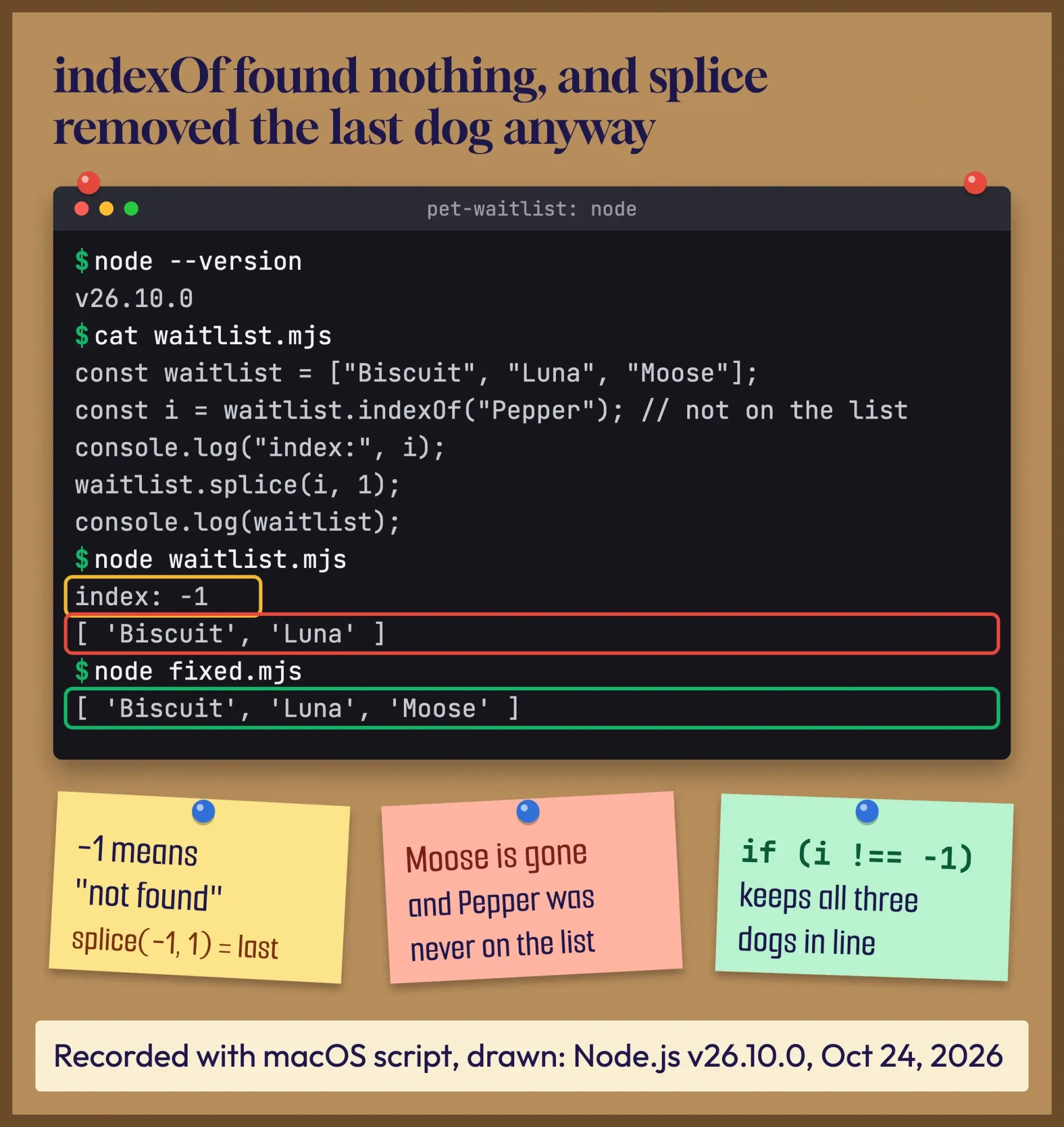 Drawn by us from our terminal session running waitlist.mjs and fixed.mjs in Node.js v26.10.0, recorded with macOS script on October 24, 2026, line for line.
Example: a pet sitter in Little Rock, Arkansas, keeps a waitlist array on her booking page. A client cancels for "Pepper", a dog who was never on the list. The code looks up Pepper, gets -1, and splices. Moose, the last dog in line, disappears from the waitlist, and nobody notices until his owner calls on Saturday morning to ask where the booking went.
The fix is one if statement:
const waitlist = ["Biscuit", "Luna", "Moose"];
const i = waitlist.indexOf("Pepper");
if (i !== -1) waitlist.splice(i, 1);
console.log(waitlist); // [ 'Biscuit', 'Luna', 'Moose' ]
This removes the first match only. A list with the value twice keeps the second copy:
const numbers = [10, 20, 30, 20, 40, 50];
const k = numbers.indexOf(20);
if (k !== -1) numbers.splice(k, 1);
console.log(numbers); // [ 10, 30, 20, 40, 50 ]
Need the last match instead? findLastIndex() searches from the end, and it also returns -1 when nothing matches, so the same check applies.
Two quirks catch people. indexOf uses strict equality, so the string "2" won't match the number 2. And indexOf(NaN) is always -1; use findIndex(Number.isNaN), which found it at index 1 in our run.
Small built-in calls with surprising side effects are a theme in JavaScript. Our guide to location.reload(true) covers another one.
How do you remove an object from an array by id or property?
But indexOf only works well for strings, numbers and other simple values.
Arrays of objects need a test function, not a value. In our run, indexOf({ id: 2 }) returned -1, even though an object with id 2 was right there in the array.
That's because objects compare by reference. A new object literal isn't the same object as the one in the array, even when the fields match.
Describe the item instead. findIndex() returns the index of the first element your function accepts, or -1:
const users = [
  { id: 1, name: "Ana" },
  { id: 2, name: "Ben" },
  { id: 3, name: "Cal" },
];
const idx = users.findIndex(u => u.id === 2);
if (idx !== -1) users.splice(idx, 1);
console.log(users);
// [ { id: 1, name: 'Ana' }, { id: 3, name: 'Cal' } ]
Or keep everything except that id, as a new array:
const remaining = users.filter(u => u.id !== 2);The value-vs-reference idea isn't unique to JavaScript. Our Python string comparison guide walks through the same split between == and is.
And if your objects come from a database through a Node.js API, as in our Laravel vs Node.js comparison, the id is the safest key to remove by. Names and emails change.
To remove every match, filter beats a splice loop
Once there's more than one match, the first-match approach above won't do.
filter() keeps the elements your test accepts and returns them as a new array. It removes every match in one pass, and the original stays as it was:
const numbers = [10, 20, 30, 20, 40, 50];
const without20 = numbers.filter(n => n !== 20);
console.log(without20); // [ 10, 30, 40, 50 ]
console.log(numbers);   // [ 10, 20, 30, 20, 40, 50 ]
Note the new variable.
A bare numbers.filter(...) on its own line doesn't change anything, and that's one of the most common "it didn't work" moments.
Some people loop forward and splice instead. That'll skip items.
After a splice, the next element slides into the index you've just checked, and the loop moves past it. From [20, 20, 30], our forward loop left [20, 30]. Looping backward avoids it, because the shifting happens behind you:
const list = [20, 20, 30];
for (let j = list.length - 1; j >= 0; j--) {
  if (list[j] === 20) list.splice(j, 1);
}
console.log(list); // [ 30 ]
To drop several values at once, put them in a Set and filter against it:
const drop = new Set(["b", "d"]);
console.log(["a", "b", "c", "d"].filter(x => !drop.has(x))); // [ 'a', 'c' ]
Our take: use filter for "remove every match" unless some other code holds a reference to the same array and must see the change. Then use the backward loop, or the faster write loop in the next section.
That rule fits Node.js back ends too, whichever of the Node.js frameworks you use.
What our timing test showed
How much faster is each one? For a 20-item list, it doesn't matter. At 100,000 items it does, and the gap's bigger than most guides suggest.
We timed each method in Node.js v26.10.0 on an Apple M4 Mac, took the median of 15 runs, and then ran the whole test again.
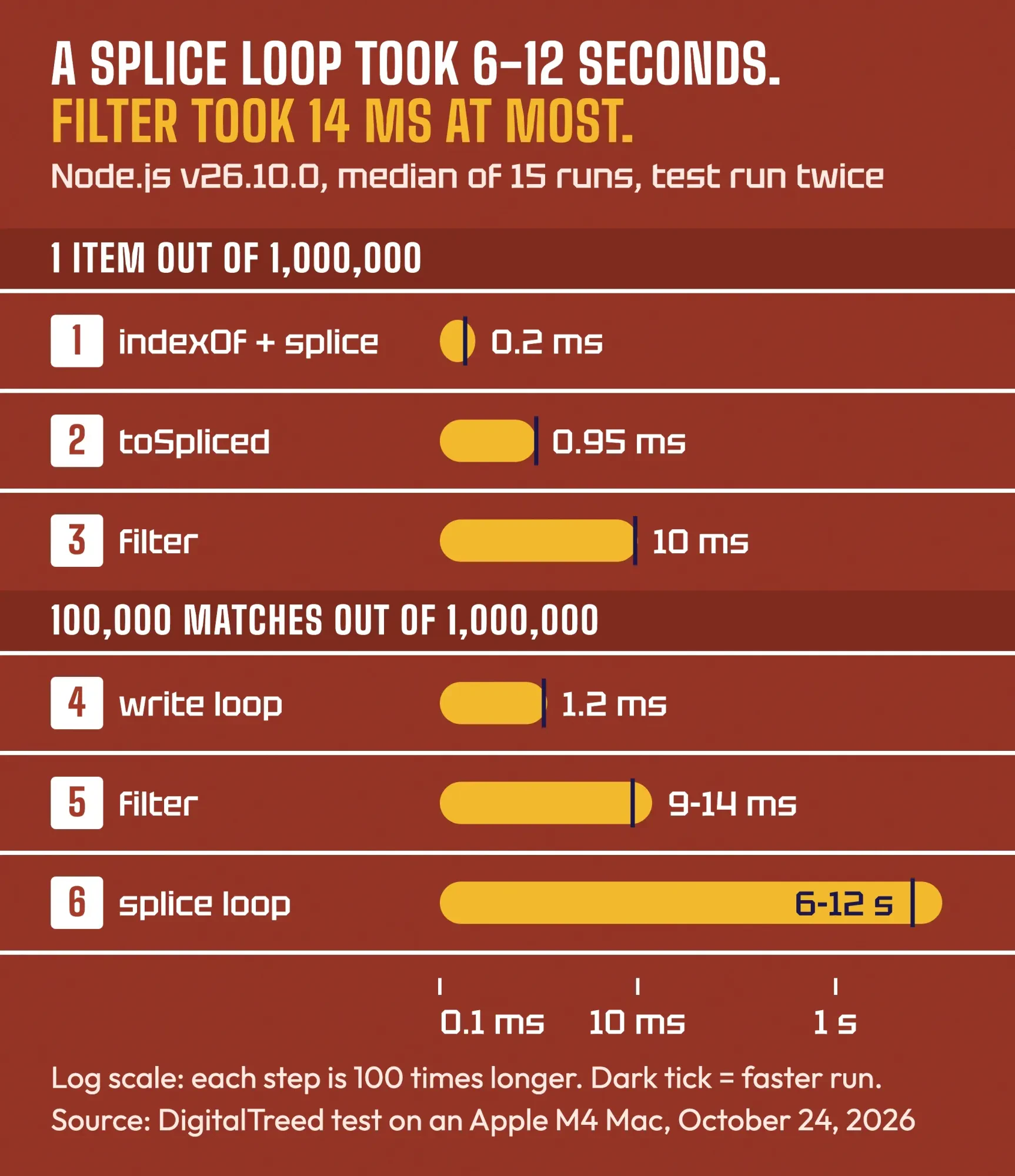 Diagram by DigitalTreed from our test: Node.js v26.10.0, Apple M4, median of 15 runs, October 24, 2026.
For one item from 1,000,000 numbers, indexOf plus splice took 0.18 to 0.23 ms. The filter version took 9.5 to 10 ms, because it walks the whole array and copies all 999,999 other numbers into a brand-new array, though only one had to go. toSpliced landed in between, at about 0.95 ms.
For 100,000 matches, the order flips hard.
Same data, same output, and a very different wait, which none of the top guides we read show.
filter took 9 to 14 ms. The backward splice loop took about 6 seconds in the first run and 12 in the second, since every splice shifts all the elements after it. That's roughly 400 to 1,300 times slower.
The fastest was a plain loop that copies the keepers forward and then cuts the length:
let w = 0;
for (let r = 0; r < arr.length; r++) {
  if (arr[r] !== value) arr[w++] = arr[r];
}
arr.length = w; // same array, matches gone
It took 1.1 to 1.2 ms and keeps the same array object. These are one machine's numbers; the ratios are the part to trust.
A slow click is a JavaScript problem, but if the page holding that list also loads slowly, check its server time and page weight with the DigitalTreed website speed test. And if that list is the page's main content, such as a product grid, Google has to render the JavaScript to see it, which our chapter on rendering and JavaScript SEO explains.
toSpliced() removes by index and leaves the original alone
Now back to single items, this time without changing the original.
toSpliced() takes the same arguments as splice but returns a new array, and the original doesn't change. It came in ECMAScript 2023 through the TC39 Change Array by Copy proposal, now at Stage 4, along with toSorted(), toReversed() and with().
const colors = ["Red", "Green", "Blue", "Yellow"];
const copy = colors.toSpliced(2, 1);
console.log(copy);   // [ 'Red', 'Green', 'Yellow' ]
console.log(colors); // [ 'Red', 'Green', 'Blue', 'Yellow' ]
There's one difference: toSpliced returns the new array, not the removed items. If you'll need the removed item too, read it first with colors[2].
Support isn't a worry for most sites anymore. MDN's compatibility data lists Chrome and Edge 110, Firefox 115, Safari 16 and Node.js 20, and the Baseline data marks it widely available since January 4, 2026. The ECMAScript 2023 spec defines it in section 23.1.3.35.
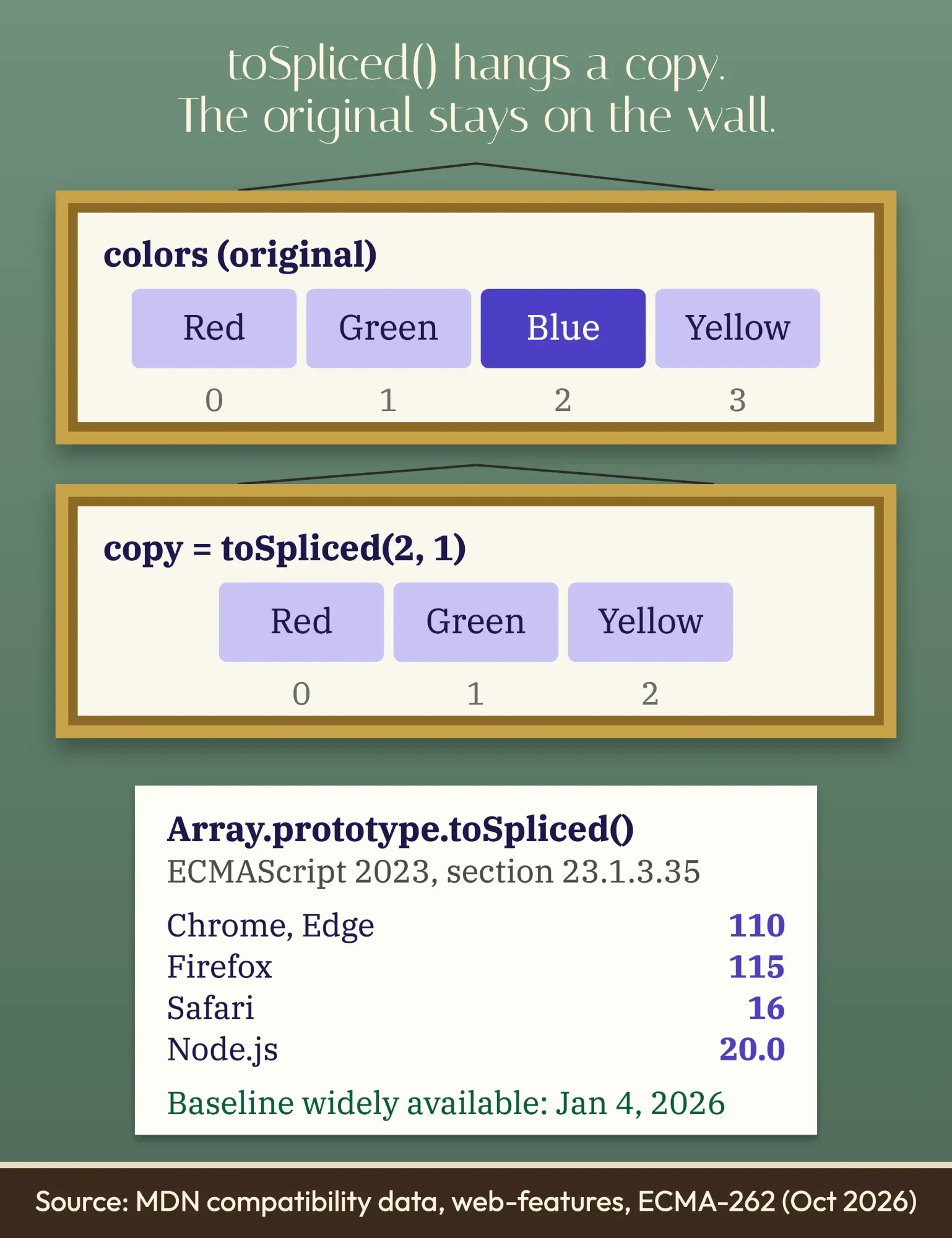 Diagram by DigitalTreed, based on MDN browser compatibility data and the ECMAScript 2023 spec, October 2026.
For an old browser you must support, [...arr.slice(0, i), ...arr.slice(i + 1)] does the same job with slice(). It gave us the same three colors.
React developers get this rule from the React docs, which say to "treat arrays in React state as read-only" and list splice under "avoid". Pass React filter() or toSpliced(), never splice(). Choosing between React and other stacks? See our Flutter vs React Native comparison.
For the first or last item, pop and shift are enough
Then there's the simplest case of all.
pop() removes the last item and shift() removes the first. Both return what they removed, and both change the array.
const fruits = ["Apple", "Banana", "Mango"];
console.log(fruits.pop());   // Mango
console.log(fruits.shift()); // Apple
console.log(fruits);         // [ 'Banana' ]
On an empty array, both return undefined. They don't throw an error.
So check the length first if undefined could be a real value in your list.
Want a new array instead? slice(1) drops the first item and slice(0, -1) drops the last, and the original stays whole. To empty an array completely, arr.length = 0 works, and it also empties it for every variable that points to it.
delete leaves a hole, so leave it out
Still, one more method shows up in old answers, and it's the one to skip.
The delete operator removes a property, not an array slot. MDN says it plainly: "When you delete an array element, the array length is not affected."
const d = ["a", "b", "c"];
delete d[1];
console.log(d.length); // 3
console.log(d);        // [ 'a', <1 empty item>, 'c' ]
Three slots, two values.
What's left is a sparse array with an empty slot. In our run, forEach skipped that slot entirely and visited only indexes 0 and 2, while JSON.stringify printed it as null.
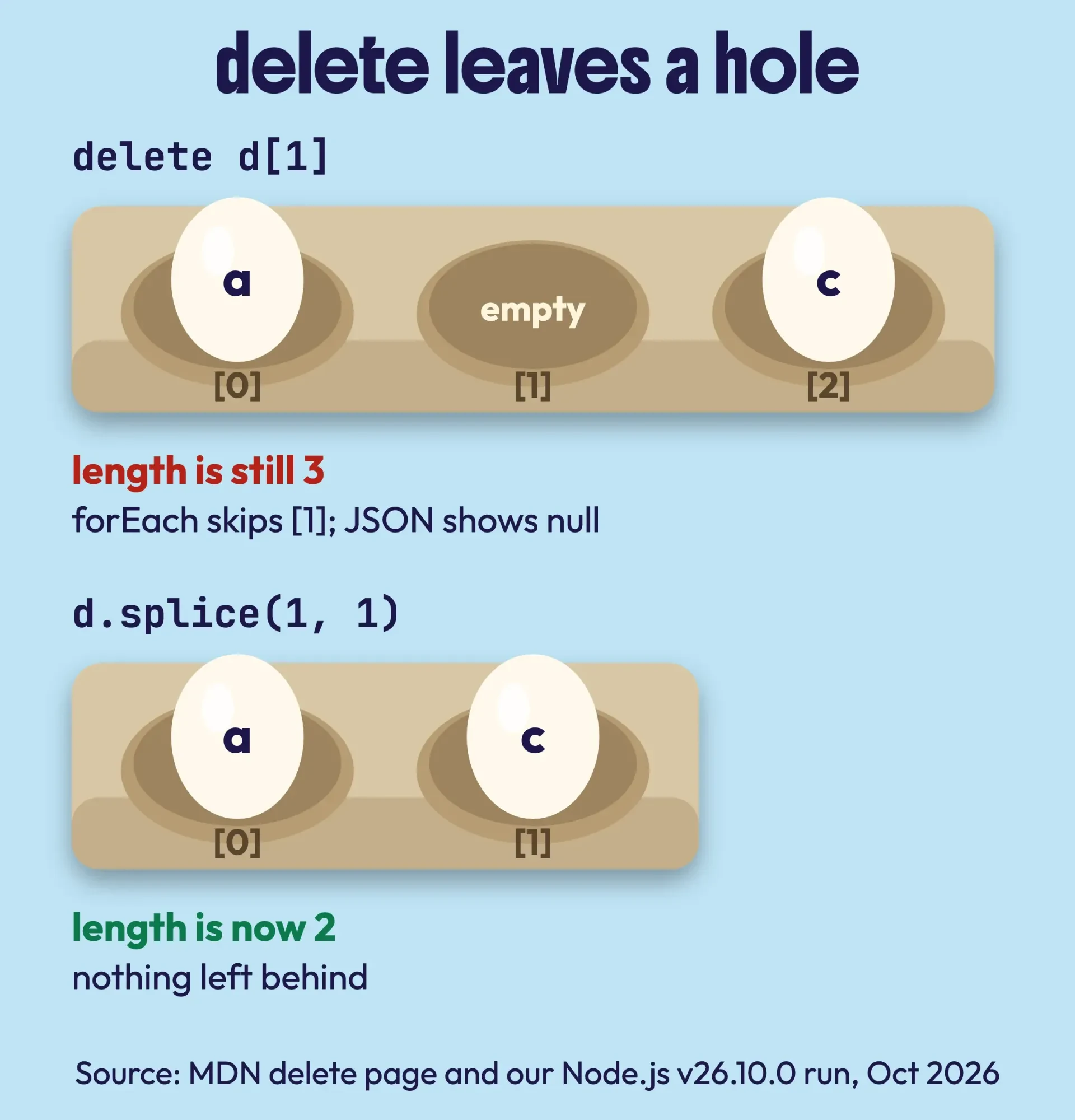 Diagram by DigitalTreed, based on MDN's delete operator page and our Node.js v26.10.0 run, October 24, 2026.
Those mixed results are why delete causes bugs later, far from the line that caused them.
Use splice or filter instead. They're built for this.
When the list lives in a bigger app
So most removals are one line. A shared array is a different story.
If a cart, a booking list and a dashboard all read the same array, switching from splice to filter can break the parts that relied on the change. Moving that code to copies takes a plan, and our guide on when a full-stack developer makes sense helps you size it. If Node refuses to run a sample once you split it into files that use import, start with our import statement error guide.
We build and maintain JavaScript sites and apps for small businesses, so we've got an interest here.
If a list bug keeps coming back, our web development service can trace where the array is shared before anyone rewrites it.
Frequently asked
Can I remove items inside forEach?
You can, but don't. forEach visits indexes in order, so a splice inside it skips the next item, like a forward loop. MDN says changing an array while you iterate it is generally to be avoided. Use filter, or a backward for loop.
Does const stop splice from changing an array?
No. const only blocks reassigning the variable. In our run, splice(0, 1) on a const array [1, 2, 3] left [2, 3]. To block changes, use Object.freeze(), which makes splice throw a TypeError.
How do I remove duplicates from an array?
That's a different job: [...new Set(arr)] keeps one copy of each value and drops the rest. It works for strings and numbers; for objects, filter by an id you've already seen.
Right now: pick the row in the table that matches what you know, and copy that line.
For a bigger cleanup across an app, request a quote.
How we made this guide: The DigitalTreed team ran every sample on this page in Node.js v26.10.0 on an Apple M4 Mac. That run is dated October 24, 2026, and the comments hold its printed output, copied as is. The timing test used arrays of 1,000,000 numbers, the median of 15 runs, and the whole test ran twice. We didn't test in a browser; support facts come from MDN's compatibility data, the Baseline data and the ECMAScript 2023 spec, each linked where it's used.
First published August 2021. Rewritten October 24, 2026: the old samples were correct and stay. New: the indexOf -1 bug, objects by id, removing every match safely, toSpliced() with support dates, delete's empty slot and our own timing test. The emoji and the "Removing Duplicates" heading, which didn't remove duplicates, are gone.
Sources
- MDN: Array.prototype.splice()
- MDN: Array.prototype.toSpliced()
- MDN: Array.prototype.filter()
- MDN: Array.prototype.indexOf()
- MDN: Array.prototype.findIndex()
- MDN: Array.prototype.findLastIndex()
- MDN: Array.prototype.pop()
- MDN: Array.prototype.shift()
- MDN: Array.prototype.slice()
- MDN: delete operator
- MDN: Array, copying methods and mutating methods
- MDN: Indexed collections, sparse arrays
- MDN: Set
- ECMA-262, ECMAScript 2023: 23.1.3.31 Array.prototype.splice
- ECMA-262, ECMAScript 2023: 23.1.3.35 Array.prototype.toSpliced
- TC39: Change Array by Copy proposal (Stage 4)
- web-features: array-by-copy Baseline status
- React docs: Updating Arrays in State


Comments
No comments yet. Start the conversation below.