
Quick answer
"Cannot use import statement outside a module" means a file with an import line was run as CommonJS or as a classic script, not as an ES module. In Node.js, add "type": "module" to package.json or rename the file to .mjs. In a browser, load it with <script type="module">. Jest and TypeScript each need one setting changed.
Here's what 8 of the 9 top pages we read leave out.
On a current Node.js, a plain .js file with an import line and no "type" field just runs. So if you're seeing this error in 2026, something is telling the runtime "this file is CommonJS". Find that thing, and you've found your fix.
We broke a small project on purpose, one case at a time, on a Mac in Node.js, Jest, TypeScript and Chrome, and each message below is copied word for word from that October 24, 2026 run.
Key takeaways
- An import line is only legal inside an ES module.
- Node.js 22.7.0 and 20.19.0 detect ES module syntax in .js files by default.
- In Node.js, set "type": "module" in package.json or rename the file to .mjs.
- The old --experimental-modules flag does nothing for this error today.
- Jest needs Babel or the --experimental-vm-modules flag to run import lines.
Something told the runtime your file is CommonJS
JavaScript has two module systems. An ES module is a file that shares code with import and export, the standard every browser uses. CommonJS is Node's older system, built on require() and module.exports.
An import line is only legal inside an ES module. That's the whole rule.
New to the language? Our JavaScript tutorial for beginners covers the basics first.
Node.js used to treat every .js file as CommonJS unless told otherwise. That changed with syntax detection, which Node.js turned on by default in versions 22.7.0 and 20.19.0. Now, when a .js file has no "type" field above it, Node.js tries CommonJS first, sees the import line, and reruns the file as an ES module.
We checked this on Node.js v26.10.0 with the same two small files each time. With no package.json at all, the import ran and printed 5. With a package.json that had no "type" field, it still ran, after a warning that it was "Reparsing as ES module".
Only "type": "commonjs" brought the error back.
That's why the error, when it shows up now, usually comes from one of these:
- A package.json with
"type": "commonjs", often added by a starter template - A file named .cjs or .cts, which is always CommonJS
- Code passed with
node -eand the flag--input-type=commonjs - Jest, which runs your tests as CommonJS unless you configure it
- TypeScript output with import lines, sitting in a CommonJS package
- An old Node.js. Version 20 reached end of life on April 30, 2026, per the Node.js release schedule
- A browser page that loads the file without type="module"
MDN's page on this error adds one more: running TypeScript source by accident instead of the compiled file.
Match your exact message to the fix
That list covers the causes. The quickest way to tell which one is yours is the text around the error, because each runtime words it a little differently.
Here's what each setup printed in our run, and the change that fixed it.
| Message we saw | Where | What caused it | Fix |
|---|---|---|---|
| SyntaxError: Cannot use import statement outside a module | Node.js | "type": "commonjs", a .cjs file or --input-type=commonjs | "type": "module", or rename to .mjs |
| Warning: Module type of file ... is not specified | Node.js | No "type" field; Node.js reparsed the file | Add "type": "module" to remove the warning |
| ReferenceError: require is not defined in ES module scope | Node.js | require() left in a file that is now an ES module | Use import, createRequire, or rename to .cjs |
| Error [ERR_MODULE_NOT_FOUND] ... Did you mean to import "./sum.js"? | Node.js | Import path without the .js extension | Write the full file name |
| Must use import to load ES Module | Jest 30 | Test file or package is ESM, Jest runs CommonJS | Babel preset-env, or --experimental-vm-modules |
| Jest encountered an unexpected token ... Cannot use import statement outside a module | Jest 30 | Same, with "type": "commonjs" | Same as above |
| error TS6046: Argument for '--module' option must be: ... | tsc 7.0.2 | A module value that doesn't exist, such as es20215 | Use nodenext, esnext or commonjs |
| error TS2835: Relative import paths need explicit file extensions | tsc 7.0.2 | nodenext with an import missing .js | Import './sum.js' |
| Uncaught SyntaxError: Cannot use import statement outside a module | Chrome 155 | <script> without type="module" | Add type="module" |
| Access to script at 'file:///...' has been blocked by CORS policy | Chrome 155 | Page opened from your disk | Serve it over http:// |
| Failed to resolve module specifier "mathlib" | Chrome 155 | Bare package name in the browser | Import map or a bundler |
Most of these rows are Node.js, the runtime behind every framework in our Node.js frameworks roundup. So that's where we start.
How do you switch a Node.js file or package to ES modules?
Now for the fix itself. Node.js picks a module system per file, and the rules are short: .mjs files are ES modules, .cjs files are CommonJS, and a .js file follows the "type" field in the nearest package.json above it.
So you've got two options:
- Open the package.json closest to the failing file and set
"type": "module". If it says "commonjs", change it. - Or, to switch one file only, rename it from .js to .mjs and update the paths that import it. Once your .mjs files run, array code works the same in both systems, as our guide on removing an item from a JavaScript array shows.
- Run the same command again.
{
"name": "booking-widget",
"version": "1.0.0",
"type": "module"
}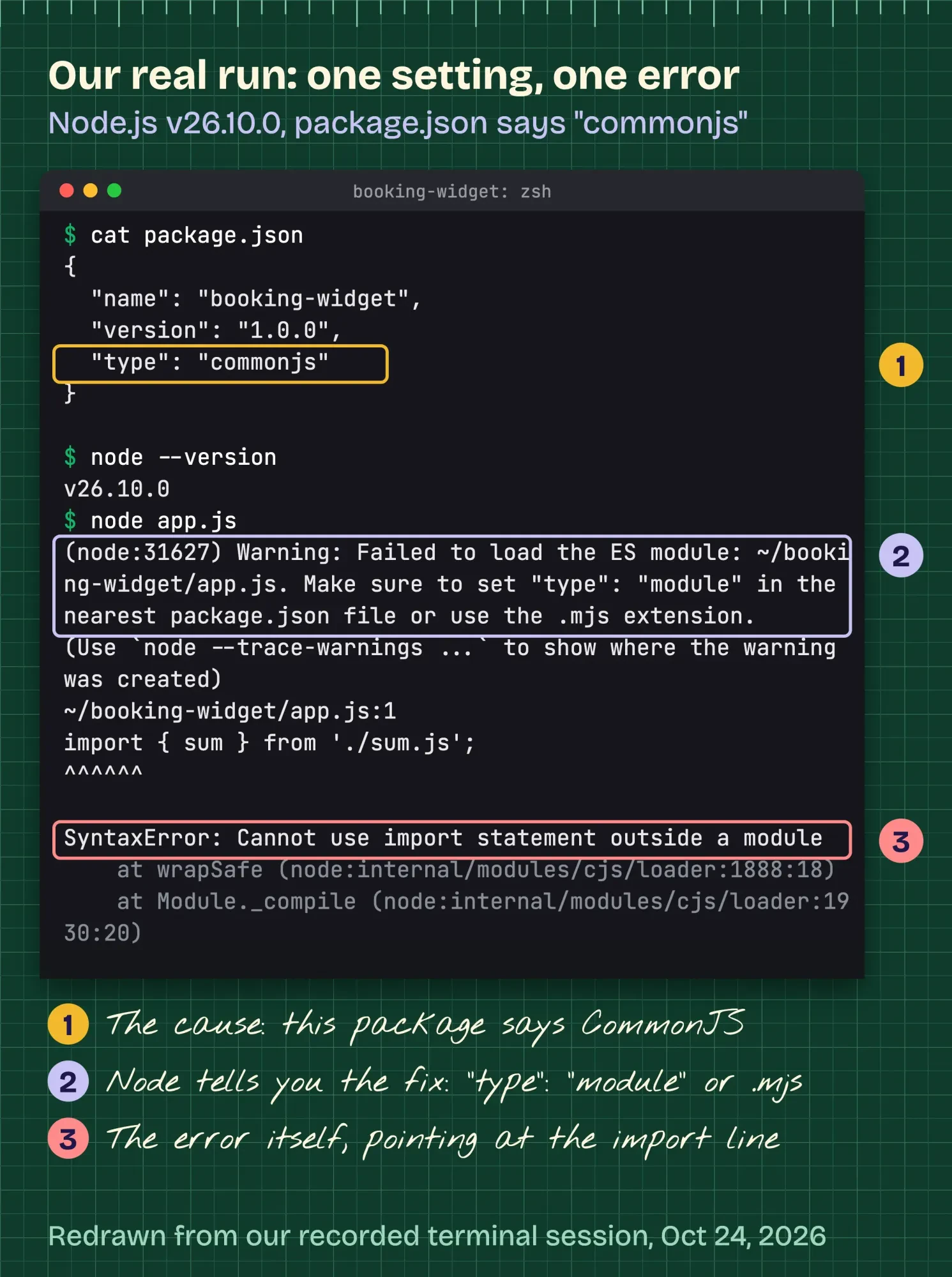 Drawn by us from our terminal session running node app.js with "type": "commonjs", Node.js v26.10.0 on macOS, October 24, 2026, redrawn line for line from the recorded session (folder path shortened, stack trace cropped).
Don't bother with --experimental-modules, the flag older posts suggest. It won't help.
Our run proved it. Node.js accepted the flag without a word and printed the same SyntaxError.
Switching the package to ES modules has two side effects, and we hit both.
First, any old file that still calls require() breaks. Node.js said: "ReferenceError: require is not defined in ES module scope, you can use import instead". You can change it to import, rename that file to .cjs, or build a require with module.createRequire(), as the ES module docs suggest.
Second, import paths need the file extension. Our import { sum } from './sum' failed with ERR_MODULE_NOT_FOUND, plus a helpful "Did you mean to import "./sum.js"?".
That isn't a bug. The Node.js docs say a file extension "must be provided".
Can't move the whole project yet? You don't have to.
A CommonJS file can load an ES module with dynamic import(). Since Node.js 22.12.0 and 20.19.0, plain require() can too, without a flag, per the modules docs. Both printed 5 in our test.
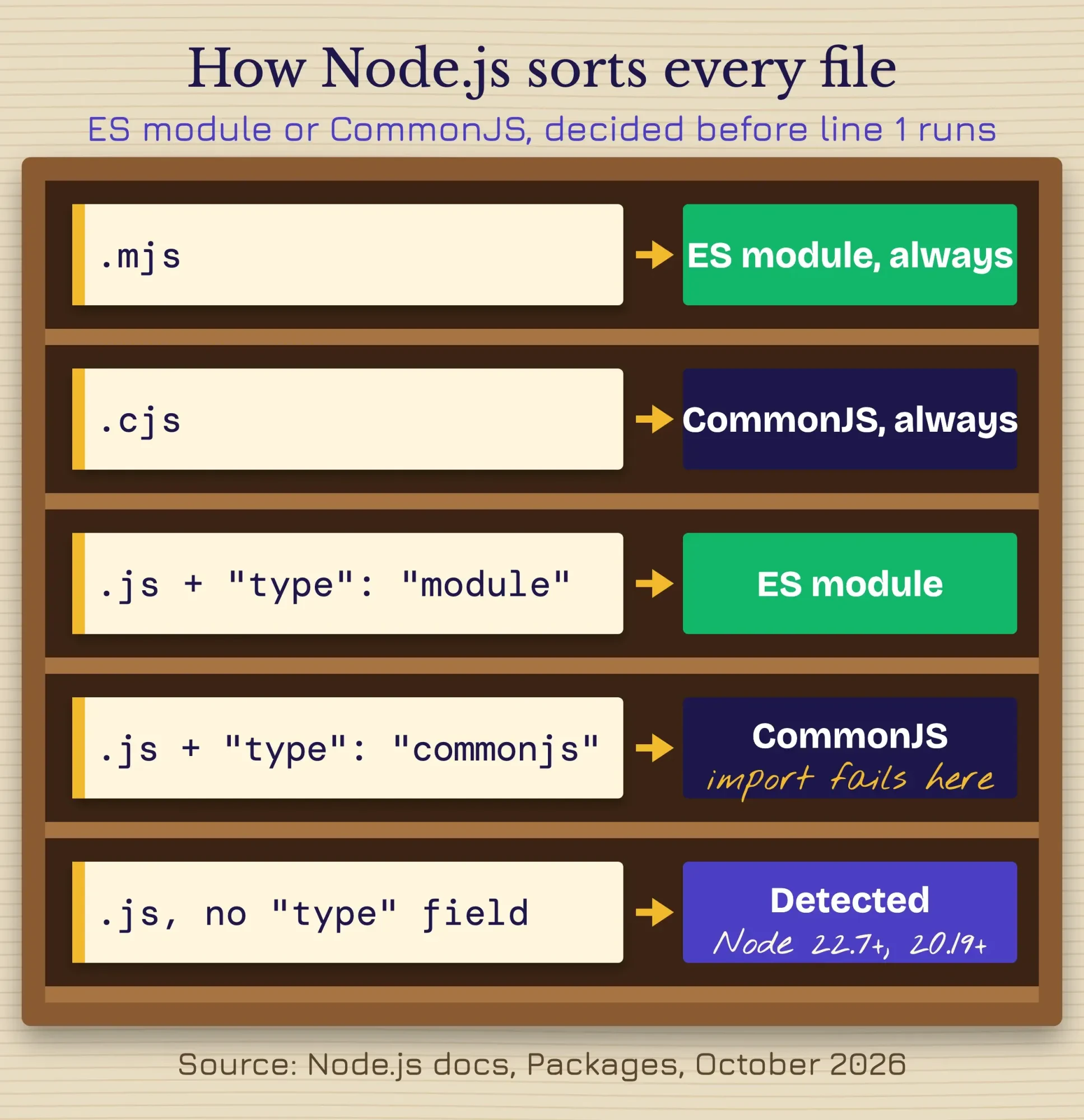 Diagram by DigitalTreed, based on the Node.js packages documentation, October 2026.
Code passed with node -e is detected too, and ours ran. Add --input-type=commonjs, though, and it fails, which matches the CLI docs.
Picking a backend stack? Our Laravel vs Node.js comparison covers the bigger picture. And if you're following an older tutorial like our Sequelize models guide, it's CommonJS throughout, so don't mix its require() lines into an ES module file.
Jest runs tests as CommonJS until you change that
But your app can run fine while Jest still fails on the same import line. That gap is why Jest is the first tool Google's autocomplete pairs with this error.
Jest loads test files through its own module system, not through Node's. And that system is CommonJS.
On Jest 30.5.2, the wording depends on your package.json. With no "type" field, or with "type": "module", Jest printed "Must use import to load ES Module" and three suggested fixes. With "type": "commonjs", it printed the older box: "Jest encountered an unexpected token", then "SyntaxError: Cannot use import statement outside a module".
Same cause, two messages.
And you've got two ways out, depending on whether you want Jest to convert your code or to run it as it is.
Route A is Babel, which converts your imports to CommonJS before Jest runs them. Jest's getting started page installs babel-jest, @babel/core and @babel/preset-env, then sets the preset in babel.config.js:
// babel.config.js
module.exports = {
  presets: [['@babel/preset-env', { targets: { node: 'current' } }]],
};
We didn't run this route. It's the recipe from Jest's docs.
One trap we did check, though: a babel.config.js with an empty presets list didn't change anything, because without preset-env there's nothing in Babel that rewrites import lines.
Route B is native ES modules, with no Babel at all. Jest's ESM page says to run Node with --experimental-vm-modules and to turn off transforms with transform: {}:
NODE_OPTIONS=--experimental-vm-modules npx jestThat one we tested, and it's the route we'd pick for a new project.
With the flag, the same test passed, both with "type": "module" and with no "type" field. Jest printed an ExperimentalWarning, which you can expect: Jest still calls its ESM support experimental.
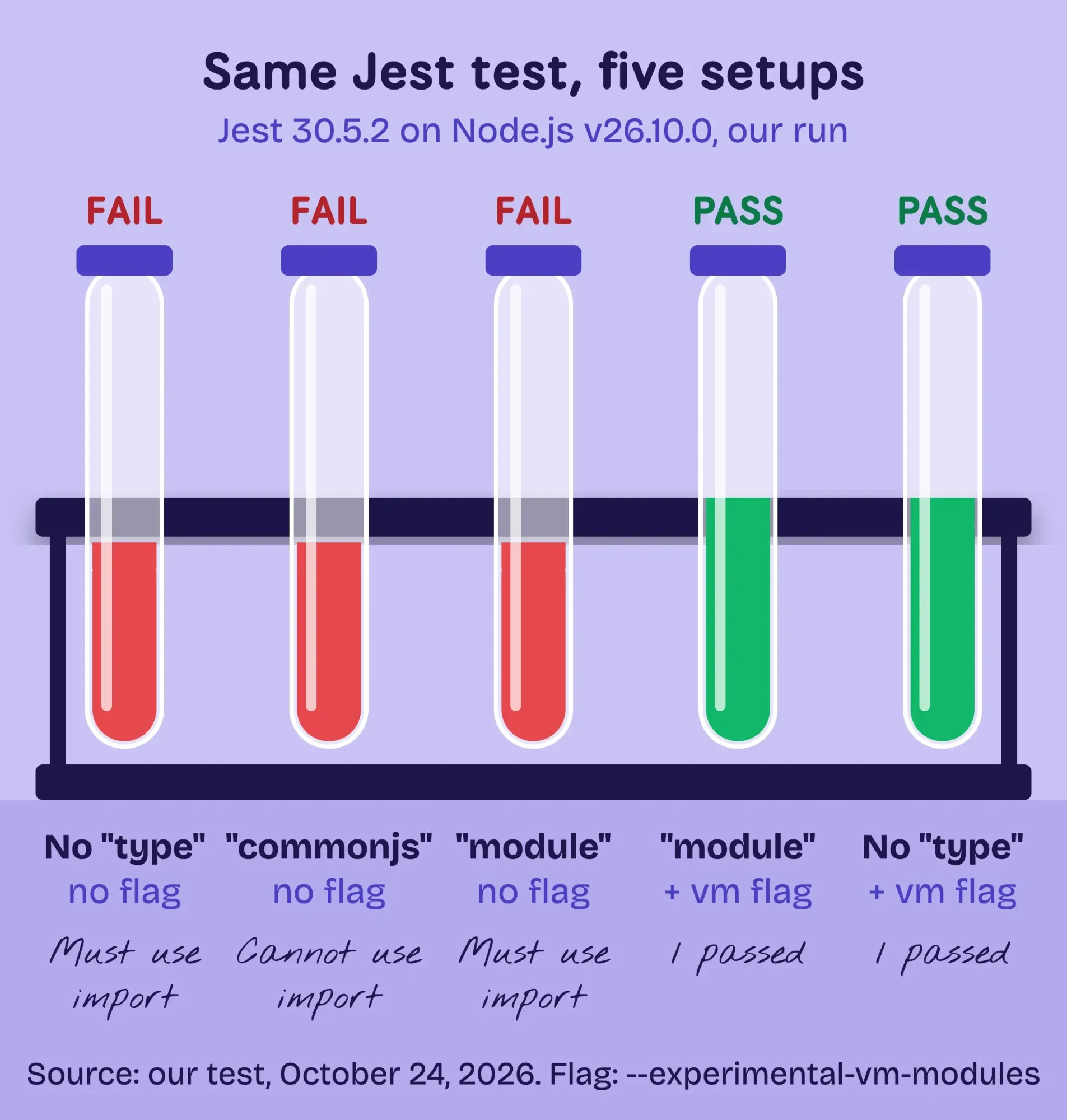 Diagram by DigitalTreed from our test: Jest 30.5.2 on Node.js v26.10.0, October 24, 2026.
Sometimes the failing file isn't yours at all. It sits in node_modules, which Jest doesn't transform by default, through transformIgnorePatterns.
So a package that ships only ES modules fails. We built one with "type": "module" in its own package.json, and a CommonJS test that required it hit the same "Must use import" line. With the vm-modules flag, it passed. With Babel, you'd instead take that package out of transformIgnorePatterns so it gets converted.
TypeScript tests need a TypeScript-aware transform too, such as ts-jest or Babel's TypeScript preset, per Jest's TypeScript notes.
Example: a freelance developer is building the booking widget for a tutoring center in Ann Arbor, Michigan. The widget works in the browser. Then her first Jest test fails with "Must use import to load ES Module". Her project is already all ES modules, so she adds the vm-modules flag to the test script in package.json, and the suite goes green.
Our take: pick one route per project and write it into package.json.
Mixing them causes trouble. A team where half the tests use Babel and half use native ESM ends up debugging Jest config instead of the app.
TypeScript must emit what your package type expects
That covers plain JavaScript. TypeScript rarely throws this error itself; Node.js does, when it runs the JavaScript that tsc wrote.
Start with the config the old version of this post gave.
It set module and target to "es20215", which doesn't exist. TypeScript 7.0.2 refused it with "error TS6046: Argument for '--module' option must be:", followed by the valid values. Its sample also called add() after importing sum(), and tsc answered "Cannot find name 'add'".
Here's the newer catch.
TypeScript 6.0 made esnext the default module, which means a tsconfig with no module line at all now emits import statements, even in a project that was CommonJS last year. We compiled our two files that way, and the output kept its import line. Drop that output into a package with "type": "commonjs", and Node.js stops with our error.
The TypeScript docs say "You very likely want "nodenext" for modern Node.js projects". Their guide to choosing options adds: "Remember to set "type": "module" or use .mts files if you intend to emit ES modules."
{
  "compilerOptions": {
    "module": "nodenext",
    "target": "es2022",
    "outDir": "dist",
    "rootDir": "src"
  }
}
With nodenext and "type": "module", tsc wants real file extensions. Our import from './sum' got "error TS2835: Relative import paths need explicit file extensions". Changing it to './sum.js' fixed it, even though the source file is sum.ts.
Must the project stay CommonJS? Keep nodenext and leave "type" as commonjs. Then tsc emits require() calls, and our output ran.
Two more errors show up on upgrades. Since TypeScript 5.9, tsc --init turns on verbatimModuleSyntax. In a CommonJS package, that gave TS1295: "ECMAScript imports and exports cannot be written in a CommonJS file".
And an old "moduleResolution": "node" line gave TS5108: "Option 'moduleResolution=node10' has been removed". TypeScript 7 shipped on July 8, 2026, so upgrades are bringing both to the surface.
Running .ts files straight through Node.js works too, thanks to type stripping. The module rules don't change, though: Node.js treats .ts like .js, per its TypeScript page. Our main.ts ran with "type": "module" and failed with "type": "commonjs".
In the browser, the script tag decides
Unlike Node.js, browsers don't read package.json. A script is an ES module only when its script tag says so, as MDN's modules guide explains.
<script type="module" src="app.js"></script>In Chrome 155, our page without type="module" logged "Uncaught SyntaxError: Cannot use import statement outside a module". Adding the attribute fixed it. Firefox words it as "import declarations may only appear at top level of a module", and Safari as "Unexpected identifier", according to MDN.
Module scripts are also deferred automatically, which means the browser waits for the HTML to finish before running them, so a defer attribute on that tag isn't needed.
Two more traps showed up in Chrome.
Opening the page from your disk fails.
Chrome blocked our file:// page: "Access to script at 'file:///...' from origin 'null' has been blocked by CORS policy". Serve the folder instead, for example with python3 -m http.server, and open http://localhost. Working in Python too? Our guide on how to compare strings in Python covers the == versus is trap.
Bare package names fail too.
An import from 'mathlib' gave "Failed to resolve module specifier "mathlib"". Browsers only follow full URLs or paths that start with /, ./ or ../, unless an import map maps the name. Ours fixed it in one line:
<script type="importmap">{ "imports": { "mathlib": "./sum.js" } }</script>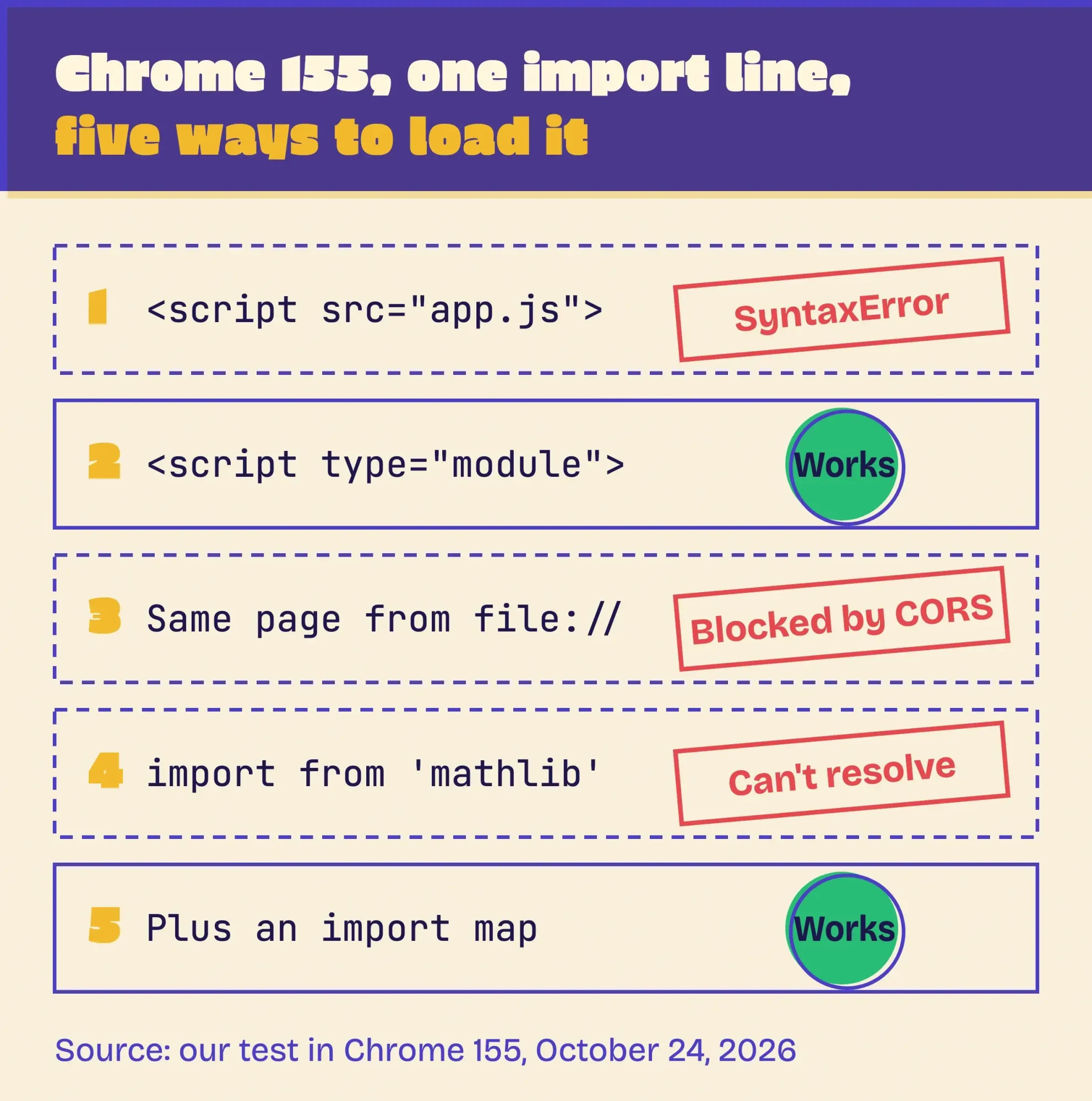 Diagram by DigitalTreed from our test in Chrome 155, October 24, 2026.
On a real site with dozens of npm packages, you won't write that map by hand: a bundler such as Vite or webpack resolves those names for you and outputs files every browser can load.
Chrome extensions are their own case.
Its service worker can use import only if the manifest's background entry has "type": "module", per Chrome’s extension docs.
Does the failing script build part of a live page? Then the content it draws is missing for Google too, so check the page. Our rendered HTML checker shows a page before and after JavaScript runs. Google's rendering is covered in our advanced SEO chapter on JavaScript.
How to know the fix worked
A fix isn't done until a clean run proves it. Check these in order:
- Run the same command or reload the same page that failed.
- Look for warnings, not just errors. MODULE_TYPELESS_PACKAGE_JSON means "type" is still missing.
- Run the whole test suite, not one file, so every import path gets loaded.
- Run tsc until it reports no errors, then run the compiled file with node.
- In the browser, open DevTools, hard-reload the page so the browser skips its cache and keep the Console clean.
After it's deployed, uptime monitoring tells you if a later update brings the error back while nobody's watching.
Bigger than one setting? Bring in a developer
Still stuck?
Most cases end with one line in package.json or tsconfig.json, but some don't.
A codebase that mixes require and import across hundreds of files can take days to move. So can a test suite tied to Babel, or an old AngularJS app on its own build system.
That's a planned job, not a quick fix.
Our guide on when a full-stack developer makes sense helps you size it.
We build and maintain JavaScript sites and apps for small businesses, so we have an interest here.
If your project is stuck between two module systems, our JavaScript and web development service can map the change before anyone edits a file.
Frequently asked
Can I use require and import in the same file?
Not as static lines. In an ES module, require is not defined; build one with module.createRequire(). In CommonJS, use import(), or plain require() on Node.js 22.12+ and 20.19+, unless the module uses top-level await (then Node.js throws ERR_REQUIRE_ASYNC_MODULE).
Do I still need .mjs files?
No. With "type": "module" in package.json, .js files are ES modules. Use .mjs for a single ES module inside a CommonJS package, and .cjs for the reverse.
Does "type": "module" change how my dependencies load?
No. Node.js reads the nearest package.json above each file, and every package in node_modules has its own. Your setting only covers your files.
Right now: find what says CommonJS, then change that one thing.
If it keeps spreading through the codebase, request a quote for the move.
How we made this guide: The DigitalTreed team rebuilt every case in a throwaway folder on a Mac, dated October 24, 2026. We used Node.js v26.10.0, npm 11.19.1, Jest 30.5.2, TypeScript 7.0.2, and Chrome 155 driven through its DevTools protocol, and each message above is copied from that run. We didn't run Babel, ts-jest, webpack, Firefox or Safari, and say so where they come up. Every fix was checked against the Node.js, MDN, Jest and TypeScript docs, linked inline.
First published January 2024. Rewritten October 24, 2026: the old tsconfig used "es20215", which TypeScript rejects, and its sample called a function it never imported. The --experimental-modules advice is gone too, since it does nothing today. New: our tested messages for Node.js, Jest, TypeScript and Chrome, the syntax detection change, and a fix table.
Sources
- Node.js docs: Packages, syntax detection
- Node.js docs: Determining module system
- Node.js docs: ECMAScript modules, mandatory file extensions
- Node.js docs: No require, exports, or module.exports
- Node.js docs: Loading ECMAScript modules using require()
- Node.js docs: --input-type
- Node.js docs: Modules, TypeScript
- Node.js Release working group: release schedule
- MDN: SyntaxError: import declarations may only appear at top level of a module
- MDN: JavaScript modules guide
- MDN: script type="importmap"
- MDN: import() (dynamic import)
- Jest 30.5 docs: ECMAScript Modules
- Jest 30.5 docs: Getting started, using Babel
- Jest 30.5 docs: transformIgnorePatterns
- TypeScript: tsconfig module option
- TypeScript handbook: Choosing compiler options
- TypeScript: verbatimModuleSyntax
- Microsoft TypeScript blog: Announcing TypeScript 6.0
- Microsoft TypeScript blog: Announcing TypeScript 7.0 (July 8, 2026)
- Chrome for Developers: Extension service worker basics, importing scripts


Comments
No comments yet. Start the conversation below.