

Crawling at scale: crawl budget, the 2MB limit and log files
0:001:44
Starts with · 0:00Why Google picks the wrong page
Advanced SEO (2026): Why Google Indexes the Wrong Page, and What's Underneath
This is guide 3 of 5 in our SEO learning path. It picks up where Guide 2, "Intermediate SEO", stopped: your keywords, content, links and measurement are in place. Now the questions move underneath the pages. How does Googlebot spend its time on your server, what does it see after JavaScript runs, which URL does it pick as canonical, and what happens when you move a site or a spam update lands?
It's written for technical SEOs, developers who look after a site's search health, and marketers at larger sites: marketplaces with filter pages, publishers posting every day, shops with thousands of products in Hindi and English. On a small WordPress site, crawl budget and log files can wait; the chapters on speed, indexing controls and the audit apply to you straight away.
There are eleven chapters, a little over two hours in all. Each one opens with a quick answer, and chapter 11 pulls everything into an audit you can repeat, so read straight through or jump to the problem you have. Keep Search Console and a crawler open, and try each how-to on one template of your own site. Every fact links to its source. The stories from our own work are few and marked: a perfume brand's slow store and what the students I taught found hardest.
Quick answer
Crawl budget is how many URLs Google can and wants to crawl on your site. Google says it matters for big or fast-changing sites (roughly 1M+ pages changing weekly, or 10k+ changing daily) and for sites with many "Discovered - currently not indexed" URLs. Fix it by cutting junk URLs, fixing errors and redirect chains, and reading your logs.
Guide 1 explained crawl, index and serve in plain words. This chapter is the version for people who own a big site's search health: a marketplace with filter pages, a news publisher posting 200 stories a day, a shop with 40,000 products in Hindi and English. At that size, how Googlebot spends its time on your server decides how fast new pages get found and how quickly changes show up in results.
Gary Illyes put it well when Google explained its crawling setup in 2026:
Crawling isn't magic; it's a highly orchestrated, scaled exchange of bytes.[2]
How crawling works now
That same post, from 31 March 2026, described Googlebot as one client of a shared crawling platform. Shopping, AdSense and other Google products fetch pages through the same infrastructure under their own crawler names.[2] In practice this is why your logs show more than one Google user agent, and why Google moved its crawler documentation to a separate site, developers.google.com/crawling, in late 2025.[3]
The post also made one point about rendering that matters for JavaScript sites. The Web Rendering Service is stateless: it clears local storage and session data between requests.[2] If your page only shows its content after reading something it saved in the browser on an earlier visit, Google won't see that content. Chapter 2 picks this up.
The 2MB limit
Here's the number most developers haven't heard. In Illyes's words, "Googlebot currently fetches up to 2MB for any individual URL (excluding PDFs)."[2] The other limits from the same post:
2MB
per URL for Googlebot (HTML and each CSS or JS file counted separately)[2]
64MB
for PDFs
15MB
default for Google's other crawlers that have no set limit
Googlebot doesn't reject a bigger page. It stops the fetch at 2MB, and the limit includes the HTTP headers. The first 2MB goes to indexing and rendering as if it were the whole file; anything after it isn't fetched, rendered or indexed. Each CSS and JavaScript file the page loads has its own 2MB counter, so a big bundle doesn't eat into the HTML's allowance, but a bundle over 2MB gets cut too.[2]
Google says that for the vast majority of the web, 2MB of HTML is massive and you'll never hit it. The risks it names are inline base64 images, huge blocks of inline CSS or JavaScript, and pages that start with megabytes of menus.[2] Two more patterns are worth checking on large sites. One is category pages that print hundreds of products with all their variants inline. The other is JavaScript framework pages that embed a large JSON state object near the end of the HTML, with the JSON-LD and footer links after it.
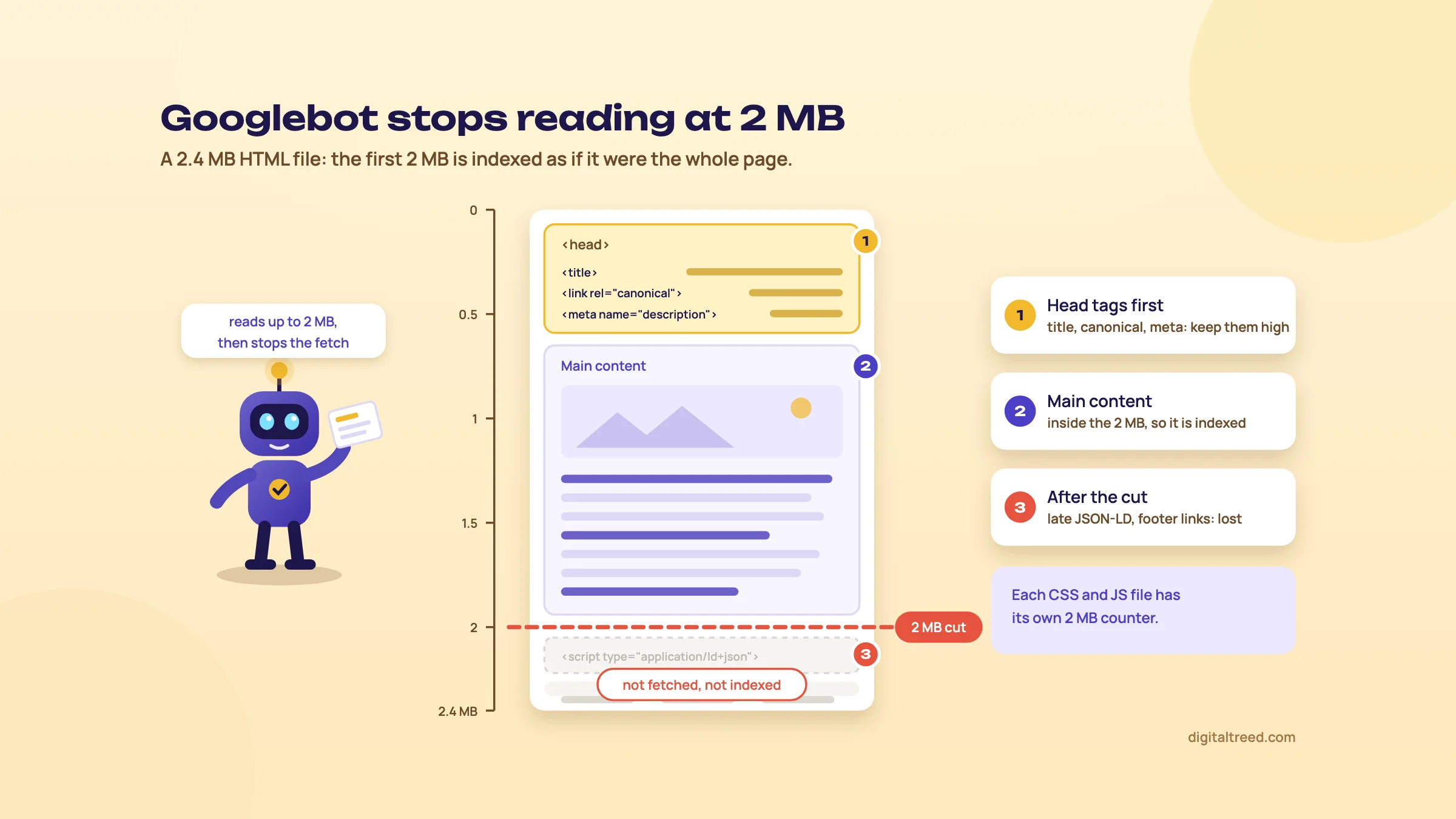 Googlebot fetches the first 2 MB of HTML; anything after the cut is lost.
What to do about it:
- Keep meta tags, the title, link elements (canonical, hreflang) and essential structured data high in the HTML. That's Google's own advice in the post.[2]
- Move heavy CSS and JavaScript into external files, which are fetched separately with their own limit.
- Check the HTML size of your heaviest templates, not your home page. The limit counts uncompressed bytes,[4] so in Chrome DevTools turn on "Big request rows" in the Network tab and read the second (resource) size, not the transferred size.
- Paginate very long product grids instead of printing everything in one response.
Who needs to care about crawl budget
Google's crawl budget guide is unusually direct about its audience. It's written for three kinds of site:[5]
- large sites with 1 million or more unique pages whose content changes about once a week
- medium or larger sites with 10,000 or more unique pages that change daily
- sites with a large share of URLs listed as "Discovered - currently not indexed" in Search Console
Google calls these numbers a rough estimate, not exact thresholds. If you run a 300-page WordPress site for a clinic, crawl budget isn't your problem; if pages aren't indexed, look at quality and internal links first (Guide 2). If you run a classifieds site in five cities with filters for price, locality and BHK, it almost certainly is.
Crawl budget has two halves.[5]
- Crawl capacity limit is how much crawling your server can take. It goes up when your site responds quickly and consistently, and down when it slows, returns 5xx errors or sends rate-limiting signals such as HTTP 429.
- Crawl demand is how much Google wants to crawl. It depends on perceived inventory (every URL Google knows about, including duplicates you don't want crawled), popularity (popular URLs get recrawled more) and staleness. Site-wide events such as a site move can raise it for a while.
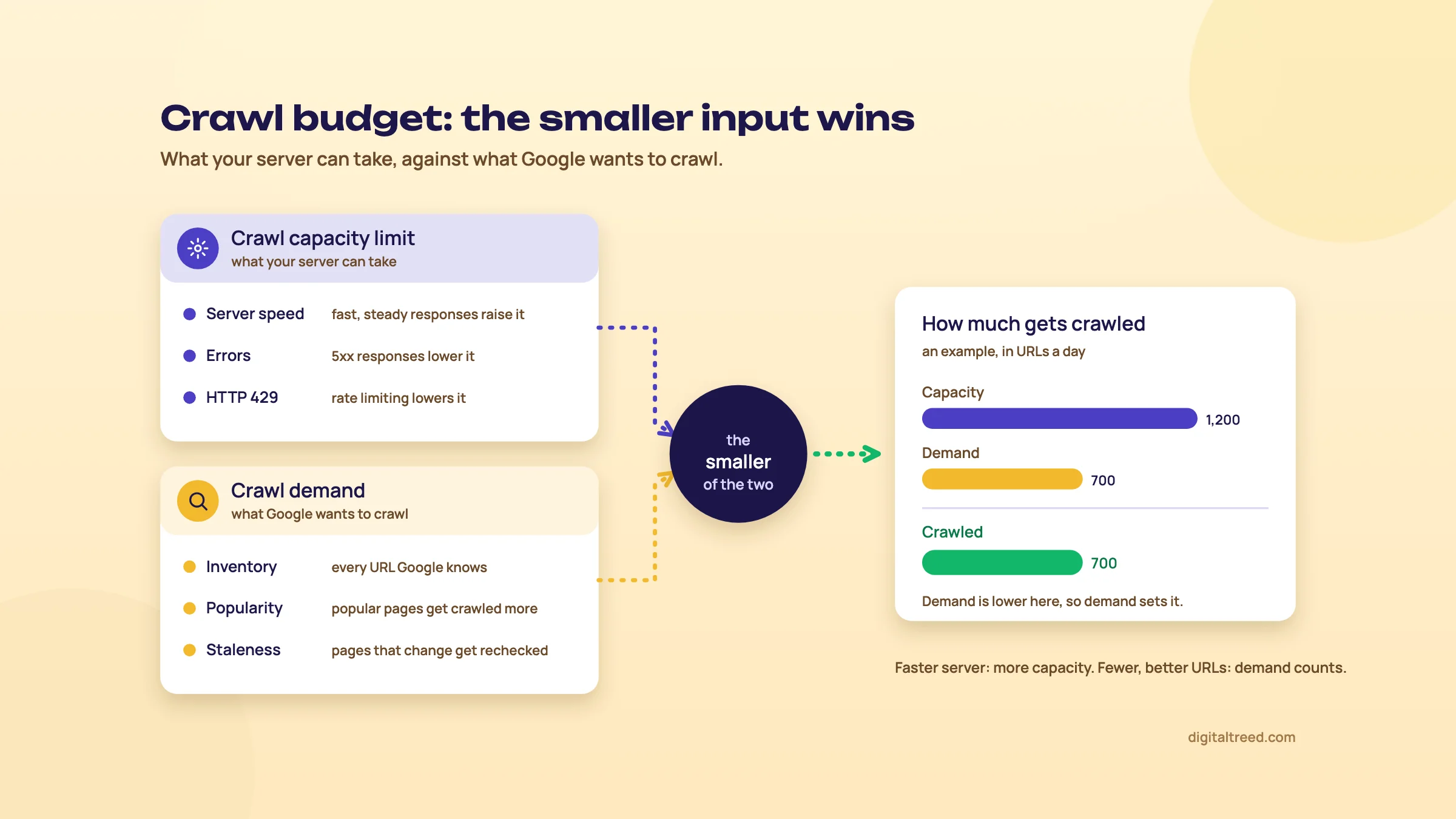 Crawl budget is the smaller of crawl capacity and crawl demand. An example we drew.
The useful way to think about it: you can raise capacity by making the server faster, and you can make demand count by giving Google fewer, better URLs. Most of the work is on the second half.
Note
From our work: a perfume brand's online store. The client's WordPress site was slow, and that was hurting how well its pages got crawled and indexed. Working with their developer, we moved to a lighter theme, added a caching plugin and optimised the images. With the speed fixed, we published blog posts on topics their competitors were covering and synced the products to Google Merchant Center. Results started in 5 to 6 weeks, including organic orders. The lesson: on a slow site, fix the server side first, because new content can't help pages Google struggles to fetch.
What wastes crawl
Google's guide lists the fixes, and each one maps to a common waste:[5]
| Waste | Typical source | Google's advice |
|---|---|---|
| Parameter and faceted URLs | Filters (colour, size, price), sort orders, session IDs, tracking parameters | Block unimportant URLs in robots.txt; consolidate duplicates |
| Removed pages still crawled | Old products returning 200 with an empty template, or blocked instead of removed | Return 404 or 410 for permanently removed pages |
| Soft 404s | "No results" or "out of stock" pages with thin content and a 200 status | Eliminate them; Google keeps crawling them |
| Redirect chains | Years of migrations stacked on each other: http to https to www to a new slug | Avoid long chains |
| Refetching unchanged pages | Servers that never answer conditional requests | Support 304 (Not Modified) |
| Slow responses | Shared hosting, no page cache, heavy database queries | Improve load speed and server response time |
Two of Google's points go against what many SEOs still do. Don't use noindex to save crawl budget: Google still has to request the page to see the tag, then drops it. And don't use robots.txt to shift budget around for a few weeks; use it for URLs you never want crawled.[5]
Do not
- Add noindex to filter pages hoping Google crawls them less
- Leave discontinued products returning 200 with "no longer available"
- Chain three redirects because each migration added one
- Toggle robots.txt rules on and off to steer crawling for a sale
Do
- Block filter and sort combinations you never want in search in robots.txt
- Return 404 or 410 for products that are gone for good
- Point every old URL straight at its final URL in one hop
- Answer If-Modified-Since requests with 304 when nothing changed
- Keep sitemaps current, with accurate lastmod dates
Chapter 5 covers faceted navigation properly, including which filter combinations deserve to be indexed. Chapter 4 covers status codes and redirects.
robots.txt edge cases that catch experienced people
Everyone knows the basics of robots.txt. The edge cases below come straight from Google's robots.txt specification, last updated 31 August 2026.[6]
| What Google gets for /robots.txt | What Google does |
|---|---|
| 2xx | Uses the file as served |
| 3xx | Follows at least five redirect hops, then stops and treats it as a 404 |
| 4xx (except 429) | Acts as if no robots.txt exists, so no crawl restrictions |
| 5xx, timeouts, DNS errors | Stops crawling for 12 hours, then uses the last good copy for up to 30 days (or no restrictions if it has none). After 30 days, crawls as if there's no file if the site is generally reachable; stops if the site has wider availability problems |
More details from the same page:
- The size limit is 500 KiB. Rules after that point are ignored.
- Google generally caches the file for up to 24 hours, longer if it can't refresh it. A fix you push now may take a day to apply.
- Google supports four fields: user-agent, allow, disallow and sitemap. Other fields such as
crawl-delayaren't supported. - Don't return 401 or 403 to slow Google down. Codes in the 4xx range other than 429 don't affect crawl rate.
The 4xx row is the one to test. If a security plugin or a firewall rule answers robots.txt with a 403, Google reads that as "no rules at all" and may crawl every faceted URL you thought you'd blocked.
Warning
robots.txt doesn't keep a page out of Google. In Google's words, "it is not a mechanism for keeping a web page out of Google".[7] A disallowed URL can still be indexed, without a snippet, if other pages link to it. Use noindex (on a crawlable page) or a password for anything that must stay out.
Test rules per user agent before you deploy them. Our Robots.txt Tester checks whether a given URL is allowed for the user agent you choose (Googlebot, Bingbot or an AI crawler), and tells you if the file is missing (a 404). It doesn't show the exact status code for other errors, so check a suspected 403 or 5xx with our HTTP Status Checker or curl -I on the robots.txt URL.
Sitemaps at scale
For big sites the sitemap is your list of URLs that matter. Google's rules:[8]
- A single sitemap can hold 50,000 URLs or 50MB uncompressed, whichever comes first. Above that, split it and list the files in a sitemap index.
- Google uses
lastmodonly if it's "consistently and verifiably accurate". It should show the last significant change, not today's date on every URL. - Google ignores
priorityandchangefreq. - Use absolute URLs and UTF-8. Submitting a sitemap is a hint, not a guarantee.
Split sitemaps by type or section (products, categories, articles, Hindi pages, English pages). Then the Sitemaps and Page indexing reports in Search Console tell you which section has the indexing problem, not just that one exists. Only list canonical URLs that return 200. A sitemap full of redirects and noindexed pages trains Google to trust it less, and the lastmod rule above says as much.
<?xml version="1.0" encoding="UTF-8"?>
<sitemapindex xmlns="http://www.sitemaps.org/schemas/sitemap/0.9">
  <sitemap>
    <loc>https://example.in/sitemaps/products-1.xml</loc>
    <lastmod>2026-10-14</lastmod>
  </sitemap>
  <sitemap>
    <loc>https://example.in/sitemaps/articles-hi.xml</loc>
    <lastmod>2026-10-15</lastmod>
  </sitemap>
</sitemapindex>
We don't have an XML sitemap validator yet. Until we do, Search Console's Sitemaps report shows parse errors after you submit, and Screaming Frog can crawl a sitemap file in list mode to check the status code of every URL in it.
The Crawl stats report in Search Console
Before you touch log files, open Google's own view. The Crawl stats report sits under Settings in Search Console, and only for root-level properties (a Domain property or a root-level URL-prefix property). Google says it's aimed at advanced users and that sites with fewer than a thousand pages generally don't need it.[9]
What it shows:[9]
- Totals over time: total crawl requests (including failed and repeated ones), total download size and average response time.
- By response: the share of 200, 301, 304, 404, 5xx and other responses Google got.
- By file type: HTML, image, JavaScript, CSS and others.
- By purpose: Discovery (URLs Google hadn't crawled before) or Refresh (recrawls of known URLs).
- By Googlebot type: Smartphone, Desktop, Image, Video, Page resource load, AdsBot, StoreBot and Other.
- Host status: robots.txt fetching, DNS resolution and server connectivity over the last 90 days, shown green, amber (problems more than a week ago) or red (problems in the last week).
Click any row to see example URLs. Google says the examples aren't complete, and that some requests may not be counted, so the totals can differ from your server logs.[9] Use it for trends; use logs for the full picture.
Three patterns to look for. A rise in average response time with a drop in total requests means your server is setting the limit. A high Refresh share with a low Discovery share on a site that publishes daily means new URLs aren't being found fast enough (check your sitemaps and internal links). A large share of 404s or 301s means Google is spending its visits on URLs you've already moved or removed.
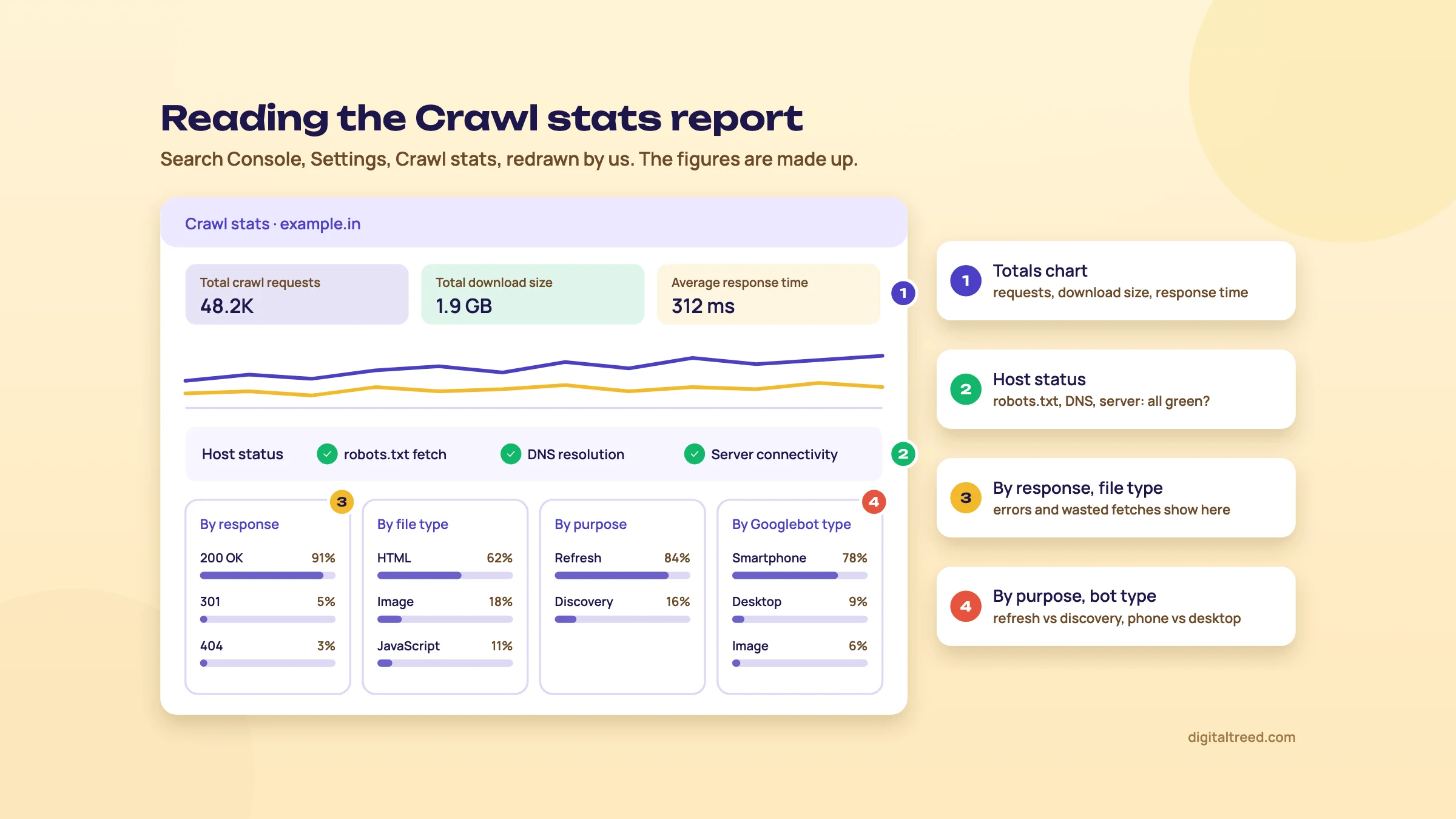 The Crawl stats report, redrawn by us with made-up figures.
Log file analysis, step by step
Server access logs are the only complete record of what crawlers did on your site: every request, with the URL, status code, bytes, time and user agent. Search Console samples; logs don't. On shared hosting you'll usually find raw access logs in cPanel. On a VPS they're in your web server's log folder. Behind Cloudflare or another CDN, many requests never reach your server, so you need the CDN's logs too. Cloudflare's Logpush now works on every plan, Free included, with 25 GB of exports a month before usage charges start;[10] other CDNs differ, so check yours.
We didn't find a published, step-by-step log analysis method from Google, so the steps below are how we'd do it. The tool steps follow what Screaming Frog's Log File Analyser does.
Analyse your server logs for Googlebot
- Collect at least 30 days of logs Get raw access logs from your host or CDN for every hostname (www, non-www, subdomains). A week is too short to see how often deep pages get crawled.
- Filter verified Googlebot Anyone can fake the Googlebot user agent. Keep only requests whose IP passes Google's check: a reverse DNS lookup that ends in googlebot.com, google.com or googleusercontent.com, then a forward lookup that returns the same IP. Or match IPs against Google's published range files, such as common-crawlers.json.
- Group hits by folder and status code Count requests per section (/product/, /category/, /blog/, /search/, ?filter=) and per status code. This shows where Googlebot spends its time.
- Import your URL lists Add your sitemap URLs and a full crawl of the site, so each URL has three facts: crawled by Google or not, in the sitemap or not, linked internally or not.
- Find the gaps Important URLs in the sitemap that Googlebot never requested; URLs Googlebot requests that aren't in your crawl (orphans, old URLs, staging hosts); and sections crawled far more than their value.
- Check errors and speed List the 5xx and 404 responses Googlebot got, and the slowest and heaviest URLs it fetched.
- Fix, then compare Apply the fixes from the waste table above, then rerun the same report a month later.
Google's own crawler post says to keep an eye on server response times in your logs, because its crawlers back off when a server struggles.[2] Step 2 is not optional. Google documents both verification methods, and the IP range files now live under developers.google.com/static/crawling/ipranges/.[11] A scraper calling itself Googlebot can make your crawl numbers look twice as large as they are. You can run the DNS check by hand on a Mac or Linux terminal. The IP below is one of the examples on Google's page:[11]
host 66.249.66.1
# the name returned must end in googlebot.com, google.com or googleusercontent.com
host <that name>
# must return 66.249.66.1 again
If both lookups agree, the request came from Google.
Which tool, and when:
| Tool | Good for | Cost |
|---|---|---|
| Search Console Crawl stats and Page indexing | Google's own summary; first stop, no setup | Free |
| Screaming Frog Log File Analyser | Verifying bots, crawl counts by URL and folder, matching logs to a URL list to find orphans | Free up to 1,000 log events and 1 project; £99 a year for unlimited[12] |
| Screaming Frog SEO Spider or Sitebulb | Crawling the site to compare with logs | Screaming Frog free up to 500 URLs, £199 a year paid[13]; Sitebulb 14-day trial[14] |
| A spreadsheet or command line | Small sites and one-off checks | Free |
| Bing Webmaster Tools | Bing's crawl view and IndexNow | Free |
A thousand log events is a few hours of Googlebot on a busy shop, so the free version is for learning the tool, not for a real audit. We're building a free log file analyzer and a DNS lookup tool; until then, use the Screaming Frog tool and Google's Admin Toolbox Dig for reverse DNS.
IndexNow: faster discovery on Bing and others
IndexNow is an open protocol for telling search engines that a URL was added, changed or deleted. It's supported by Microsoft Bing, Naver, Seznam.cz, Yandex and Yep. Google isn't listed.[15] You host a key file and ping an endpoint, or POST up to 10,000 URLs in one JSON request, and the engines share what you submit with each other.[15] Bing's own guidelines prefer sending changes as they happen over big batches.[16]
https://www.bing.com/indexnow?url=https://example.in/product/oud-50ml&key=YOUR_KEYFor a shop whose prices and stock change daily, it's free and takes an hour to set up, often through an SEO plugin or the CDN. It doesn't help with Google, so it doesn't replace anything in this chapter. It matters more than it used to, because Bing's webmaster guidelines now cover Copilot answers too, and say IndexNow helps keep them current (chapter 8 and Guide 5).[16]
Next, rendering: what happens after Googlebot has your HTML, and why JavaScript sites still lose content on the way to the index.
Rendering and JavaScript SEO
Quick answer
Google crawls the HTML, queues pages that return 200 for rendering in an evergreen Chromium, then indexes the rendered result. JavaScript sites can rank, but links must be real <a href> tags, noindex and canonical must be right in the original HTML, and server-side rendering is still the safest choice, not least for other bots.
Google has rendered JavaScript for years, and it does it well. The common problems on JavaScript sites today are rarely "Google can't run my React". They're smaller and more specific: a canonical that changes after hydration, a noindex the app removes too late, filters that only work through click handlers, an error page that returns 200. Each one is easy to fix once you can see what Google saw.
Crawl, render, index
Google processes JavaScript pages in three phases: crawling, rendering and indexing.[17] Googlebot fetches the URL and reads the raw HTML. It queues every page that returns HTTP 200 for rendering. A headless Chromium then runs the JavaScript, and Google indexes the rendered HTML and follows the links it finds there.
Two details on Google's JavaScript page matter more than the rest:[17]
- If the status code isn't 200, rendering might be skipped. Google clarified this in December 2025.[3] A 404 page that loads its "related products" by JavaScript won't pass those links on.
- A page may sit in the render queue for a few seconds, but it can take longer.
How much longer? The best public data comes from Vercel and MERJ, who matched over 37,000 Googlebot renders on nextjs.org in April 2024 with the original crawl. The median delay between crawl and render was 10 seconds and the 75th percentile 26 seconds. The 90th percentile was about 3 hours and the 99th about 18 hours. Across more than 100,000 Googlebot fetches in the same study, every HTML page that returned 200 and was indexable got a full render.[18] That's one well-built Next.js site, not the whole web, but it puts the old "Google renders weeks later" fear to rest for sites like it.
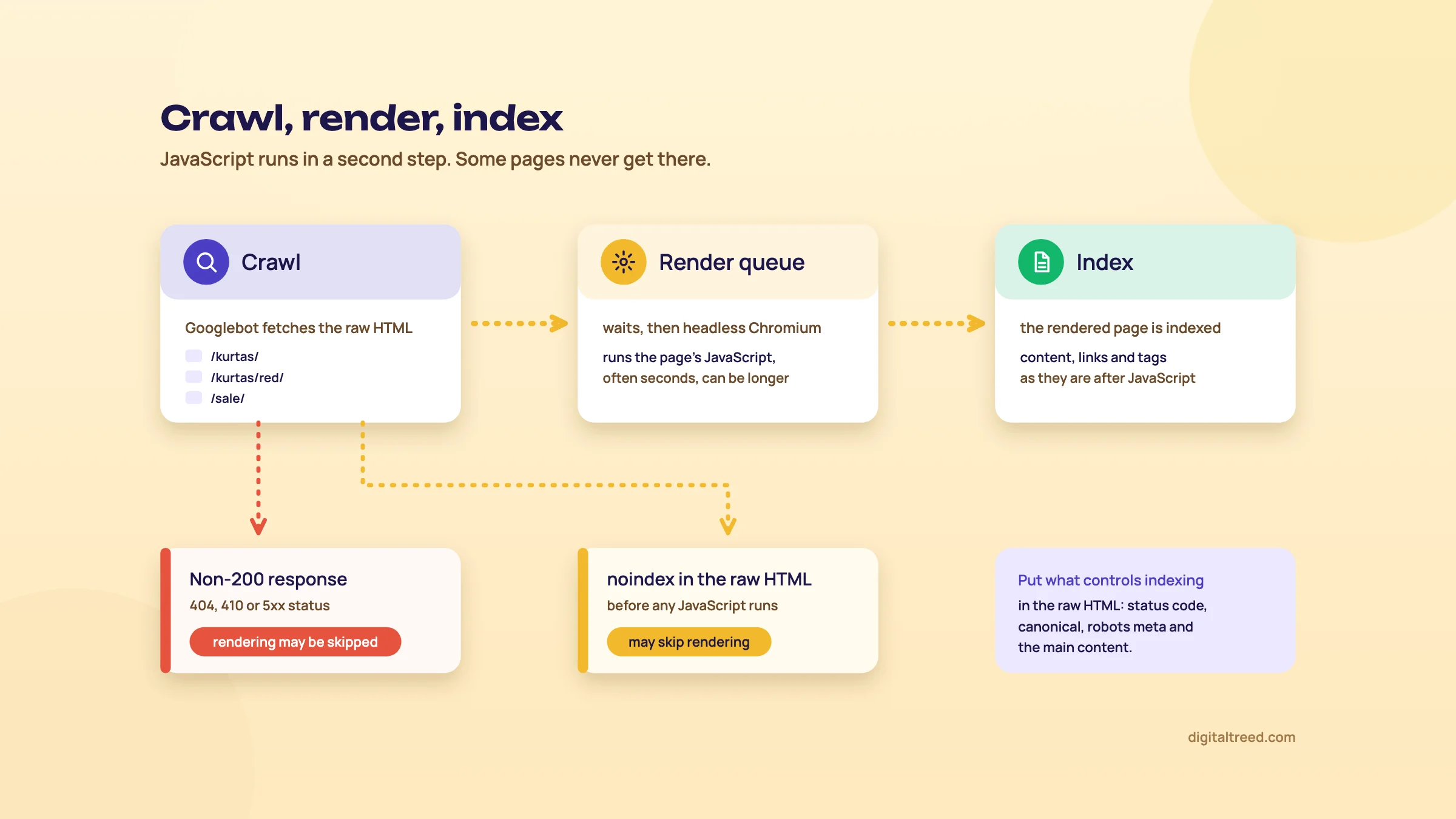 JavaScript runs in a second step, and some pages never reach it.
Evergreen Googlebot, with a stateless renderer
Googlebot now runs the latest Chromium rendering engine[19]
That was 7 May 2019, when Googlebot became "evergreen" and started tracking current Chrome.[19] Modern JavaScript features work. What's different from a user's browser is the setup around the engine:
- The Web Rendering Service is stateless, as chapter 1 said: it clears local storage and session data between requests.[2] Content that depends on a saved preference, a consent cookie or a previous visit isn't there for Google.
- The renderer may ignore caching headers, so it can use an old copy of your JS or CSS after a deploy. Google's fix is content fingerprinting: put a hash of the file's content in the filename, such as
main.2a846fa6.js.[17] - The 2MB fetch limit from chapter 1 applies to each JavaScript and CSS file separately.[2] A 3MB bundle is cut off, and code past the cut never runs.
Google also dropped an old line from its docs in March 2026. Its changelog says using JavaScript to load content isn't "making it harder for Google Search".[3] So the question isn't whether to use JavaScript. It's whether the things that control indexing are right before it runs.
The December 2025 rules: noindex and canonical in the original HTML
Two clarifications from December 2025 catch out single-page apps and headless builds.[3]
noindex. When Google finds a noindex in the original HTML, it may skip rendering and JavaScript entirely. So an app that ships noindex by default and removes it once data loads can stay out of the index for good. Google's words: if you do want the page indexed, "don't use a noindex tag in the original page code."[17]
Warning
Never ship noindex in the server HTML and rely on JavaScript to remove it. Google may never run that JavaScript. The reverse is fine: adding noindex with JavaScript to an error page is one of the two methods Google suggests for soft 404s in single-page apps.
Canonical. Google says HTML is the best place to set the canonical. If JavaScript changes it, Google picks up the injected value when it renders, so the canonical in the original HTML should be the same URL as the one after rendering.[17] Its canonicalisation guide adds the other option: leave the canonical out of the original HTML and set it only with JavaScript.[20] What you must avoid is two different values.
Original HTML:  <link rel="canonical" href="https://example.in/sarees/">
After render:   <link rel="canonical" href="https://example.in/sarees/?sort=new">   (conflict)
Watch for this on headless stores and any theme where a client-side router rewrites the head when a filter or sort changes. Check your category templates with a filter applied.
Chapter 4 covers canonicals properly. Here, the rule is narrow: whatever controls indexing (status code, robots meta, canonical, hreflang) should be correct in the raw HTML, and JavaScript shouldn't change it.
Links and routing
Google can only discover links that are <a> elements with an href. It doesn't use fragments to load different content, so routing should use the History API.[17]
Found:      <a href="/kurtas/cotton/">Cotton kurtas</a>
Not found:  <span onclick="go('/kurtas/cotton/')">Cotton kurtas</span>
Not found:  <a href="#/kurtas/cotton">Cotton kurtas</a>
The usual culprits are "Load more" buttons with no paginated URL behind them, mega menus built from buttons, and product cards where only the image has a click handler. If a page is reachable only through one of these, Google may find it only through your sitemap, and it gets no internal link signals. Chapter 5 covers pagination.
Single-page apps also need real error handling. A router that shows "Page not found" with a 200 status creates soft 404s. Google gives two fixes: redirect with JavaScript to a URL that returns a real 404 (such as /not-found), or add a noindex robots meta tag to the error view with JavaScript.[17]
Choosing a rendering approach
Google's page still says server-side rendering or pre-rendering is "a great idea", and gives the reason: not all bots can run JavaScript.[17] We agree, and for most content and commerce sites we'd go further: don't build a client-side-only site if search traffic matters.
| Approach | What the crawler gets | SEO risk | Effort |
|---|---|---|---|
| Client-side rendering only | An almost empty HTML shell; content appears only after JavaScript runs | High: depends on rendering, and other bots may see nothing | Low at first, costly to fix later |
| Server-side rendering with hydration | Full HTML on every request, then JavaScript makes it interactive | Low, if the hydrated page doesn't change indexing tags | Medium; built into Next.js, Nuxt and similar frameworks |
| Static rendering (pre-built pages) | Full HTML built ahead of time | Lowest, for content that doesn't change by the minute | Low for blogs and docs; harder for big, fast-changing catalogues |
| Dynamic rendering | Pre-rendered HTML for bots, client-side app for users | Medium: two versions to keep in sync | High, and Google advises against it |
On dynamic rendering, Google is blunt: "Dynamic rendering is a workaround and not a recommended solution".[21] If you have it running, it isn't a crisis, but plan the move to server-side or static rendering at your next rebuild.
Most Indian business sites never face this choice. WordPress and standard Shopify themes send full HTML from the server. The risk there is smaller: a slider, tab or "read more" block that loads its text by JavaScript after a click. If the text matters for ranking, put it in the HTML and use CSS to hide or show it.
Other search engines and AI crawlers
Google renders. You can't assume the same of every other bot, and Google's own docs say not all bots can run JavaScript.[17] The best public measurement, Vercel's from December 2024, found that none of the AI crawlers it tracked, including OpenAI's crawlers, Anthropic's ClaudeBot and PerplexityBot, executed JavaScript. OpenAI's and Anthropic's crawlers even fetched JavaScript files, then didn't run them. Chapter 8 has the figures.[22]
Crawlers change faster than documentation. OpenAI's crawler page names its bots and what each is for, but says nothing about JavaScript rendering.[23] In a DEV Community post, one developer (hisashispace) shared server logs showing OAI-SearchBot and GPTBot running JavaScript on their Next.js sites from 25 September 2026.[24] OpenAI hasn't confirmed it: it hasn't announced or documented any change, so treat it as one sighting.
So treat AI crawler rendering as unknown and changing. If your product details or article text only appear after JavaScript runs, assume AI assistants that read pages without rendering won't see them. Chapter 8 covers controlling AI crawlers by purpose; Guide 5 covers what to do for AI answers.
How to test what Google sees
Use three views: the raw HTML, the rendered HTML, and Google's own render.
- Search Console URL Inspection is Google's render of your page. Run a live test and view the tested page to see the rendered HTML and a screenshot. One URL at a time, and only for sites you own.
- Rich Results Test also shows the rendered HTML, works on any public URL, and needs no Search Console access.
- A crawler with JavaScript rendering on (Screaming Frog or Sitebulb) compares raw and rendered HTML across the whole site. Screaming Frog's free version stops at 500 URLs.[13]
- Chrome DevTools with JavaScript disabled gives a quick look at what a non-rendering bot gets.
Compare raw and rendered HTML for one template
- Pick one URL per template A product, a category with a filter applied, an article and a 404 URL. Templates break, not single pages.
- Save the raw HTML Open view-source: on the URL, or run
curl -s URL. Note the status code, title, robots meta, canonical, hreflang, main text and internal links. - Get Google's render Run the URL through URL Inspection (live test) or the Rich Results Test, and copy the rendered HTML.
- Compare the indexing tags Robots meta and canonical should be identical in both. Any difference is a bug to fix first.
- Compare content and links Search the rendered HTML for a sentence from the main text and for your key internal links. If they're only in the rendered version, Google depends on rendering for them, and non-rendering bots won't see them.
We don't have a raw-versus-rendered checker yet. Until we do, URL Inspection and the Rich Results Test are the free options. For the raw side, our Noindex Tag Checker, Canonical Tag Checker and Meta Tag Analyzer read the tags from the HTML your server sends, without running JavaScript. That's the version that has to be right under the December 2025 rules.
Next, chapter 3: what happens after the page is indexed and a real person on a phone tries to use it.
Core Web Vitals, page experience and mobile-first indexing
Quick answer
Core Web Vitals are three real-user metrics Google's ranking systems use: LCP (good at 2.5 s or less), INP (200 ms or less) and CLS (0.1 or less), judged at the 75th percentile of page loads. They're one signal among many. Fix them for users and conversions first, and don't chase a 100 Lighthouse score.
Speed is the technical problem that comes up most on small business sites running WordPress on shared hosting, and it's also the one most often oversold. Both are true at once. A slow product page loses buyers on a ₹10,000 phone over patchy 4G whatever Google does with the numbers. But a site that passes Core Web Vitals won't outrank a more relevant page because of it. This chapter covers what the metrics measure, how much they matter for ranking, and how to fix each one in the right order.
The three metrics and their thresholds
Each Core Web Vital covers one part of the experience: loading (Largest Contentful Paint), responsiveness (Interaction to Next Paint) and visual stability (Cumulative Layout Shift). The thresholds below are from Google's PageSpeed Insights documentation.[25]
| Metric | Good | Needs improvement | Poor |
|---|---|---|---|
| LCP: when the largest image or text block appears | 2.5 s or less | 2.5 to 4.0 s | Over 4.0 s |
| INP: delay from a tap or click to the next screen update | 200 ms or less | 200 to 500 ms | Over 500 ms |
| CLS: how much the layout jumps while loading and in use | 0.1 or less | 0.1 to 0.25 | Over 0.25 |
| FCP (not a Core Web Vital) | 1.8 s or less | 1.8 to 3.0 s | Over 3.0 s |
| TTFB (experimental) | 0.8 s or less | 0.8 to 1.8 s | Over 1.8 s |
A page passes when the 75th percentile of LCP, INP and CLS are all good. If there isn't enough INP data, LCP and CLS decide on their own.[25] The 75th percentile means three out of four visits must be at least that fast, measured separately for mobile and desktop.[26] Google says stable Core Web Vitals metrics won't change more than once a year.[26] The last change was INP replacing First Input Delay (FID),[27] on 12 March 2024.[28] If an old audit still reports FID, it's out of date.
FCP and TTFB aren't Core Web Vitals, but they're useful when you diagnose. A slow TTFB eats into LCP before the browser has anything to draw.
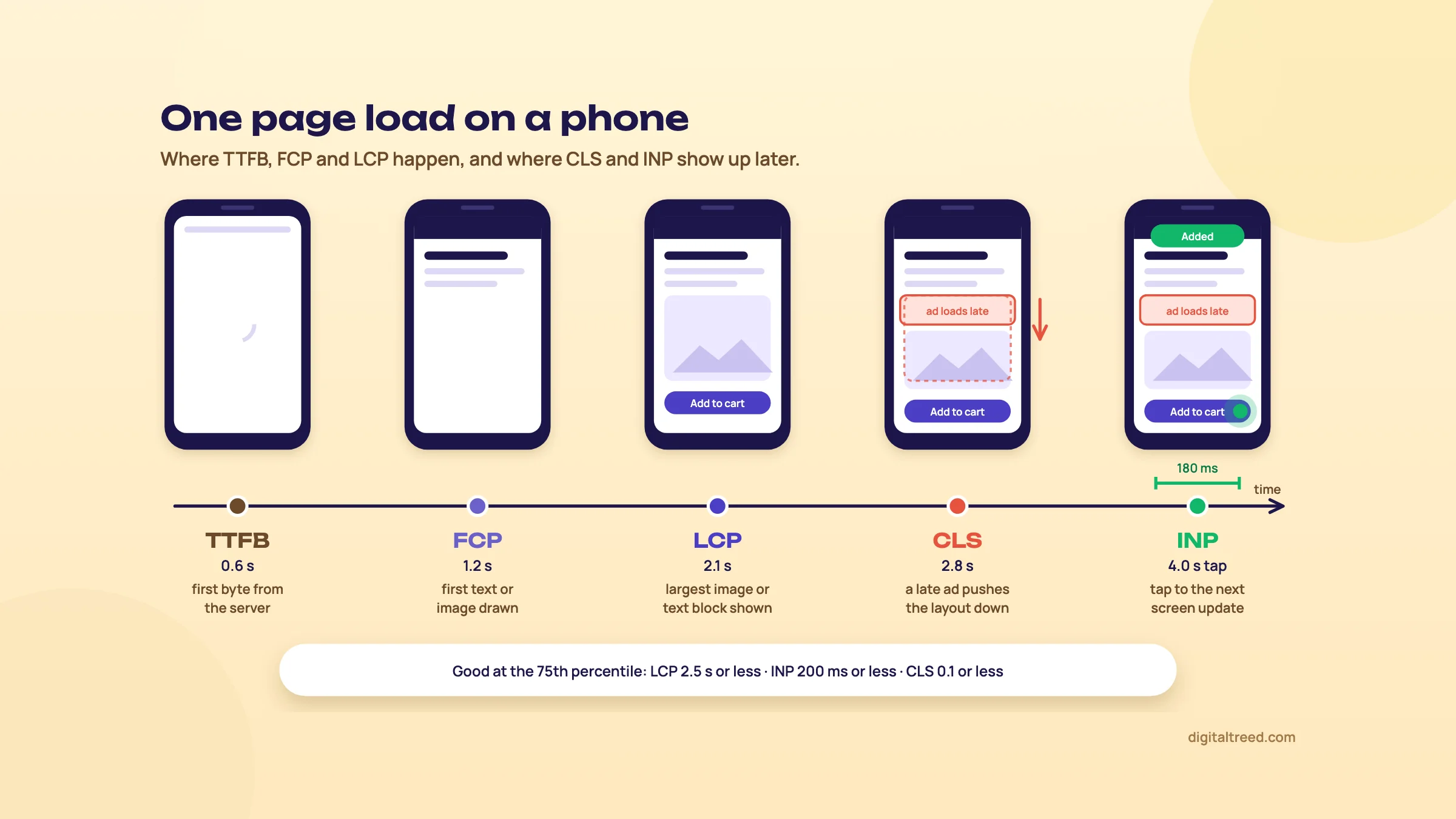 Where each speed metric happens during one page load. An example we drew.
Field data versus lab data
This distinction is behind most of the confusion about speed.
- Field data comes from the Chrome User Experience Report (CrUX): real Chrome users over the last 28 days, at the 75th percentile.[25] Search Console's Core Web Vitals report is built on it, "based on real world usage data".[29]
- Lab data is a Lighthouse run: one simulated load on a mid-tier phone over a mobile network, or on a wired desktop.[25] It produces the 0 to 100 performance score.
Lab data is for debugging. It's repeatable, it shows you why a page is slow, and you can run it before launch. Field data is the result: what your visitors actually got. Google's Core Web Vitals page sends you to the Search Console report to see how your pages perform,[30] and that report uses field data only. A Lighthouse score of 98 with failing field data means your real visitors have a worse time than the simulation. The usual causes are slower phones, worse networks or third-party scripts that load after the test ends.
The Search Console report groups URLs that give a similar experience and gives each group the status of its slowest metric. A group with good LCP and poor CLS is poor. URLs without enough data fall back to the whole origin's data, and groups without enough LCP and CLS data are left out.[29]
How much Core Web Vitals matter for ranking
Google's page experience guide is clear on both sides. "Core Web Vitals are used by our ranking systems," it says, and Google recommends good scores. But "There is no single signal", and other page experience aspects "don't directly help your website rank higher". It also says Google will show the most relevant content "even if the page experience is sub-par".[31]
Outside data points the same way. Backlinko's study of 11.8 million Google results found no correlation between site load speed and first-page rankings, though it used Alexa's domain-wide speed figures, not each page's own speed.[32] That doesn't prove speed does nothing; it says speed isn't what separates position 3 from position 7 across the web.
Our view: the ranking effect is modest and mostly shows up between pages that are otherwise close. The user effect is real and immediate. Fix speed because slow pages lose enquiries and orders, and treat any ranking gain as a bonus. On a global sports platform we worked with, speed and technical SEO were already good; the gap was elsewhere, in links and authority (Guide 2 tells that story).
Where sites fail
The HTTP Archive's Web Almanac 2025 measured how many websites pass all three Core Web Vitals, using CrUX data from July 2025.[33] Pass rates have risen every year since 2022 but are still below half on mobile.
On desktop the pass rate went from 41% in 2021 to 56% in 2025. Broken down by metric, LCP is the one most sites fail on mobile:
62%
of websites have good LCP on mobile (74% on desktop)[33]
77%
have good INP on mobile (97% on desktop)
81%
have good CLS on mobile (72% on desktop)
The Almanac picture matches what I saw when I taught SEO: on the WordPress and shared hosting sites my students worked on, speed was the most common technical issue (chapter 11 tells that story). Chapter 1 tells the story of a perfume store where a slow WordPress site was holding back crawling and indexing.
Fixing LCP
web.dev splits LCP into four parts and suggests roughly how the time should divide on a well-tuned page:[34]
- Time to first byte: about 40%
- Resource load delay (before the LCP image starts downloading): under 10%
- Resource load duration (downloading it): about 40%
- Element render delay (after it arrives, before it's drawn): under 10%
Measure which part is too big before you fix anything. The fixes web.dev gives, by part:[34]
- Load delay. Make the LCP image findable in the HTML, not injected by JavaScript or hidden in CSS. Add
fetchpriority="high"to it, and to no more than one or two images. "Never lazy-load your LCP image", so check that your theme or lazy-load plugin leaves the hero image out. - Render delay. Cut render-blocking CSS and JavaScript; avoid synchronous scripts in the
<head>. Server-side rendering helps here too (chapter 2). - Load duration. Smaller images in modern formats at the right size, served from a CDN.
- TTFB. Fewer redirects, page caching that actually works, a CDN in front of the server.
<img src="/img/hero-kurta-800.webp" width="800" height="1000"
     fetchpriority="high" alt="Blue cotton kurta">
On WordPress and shared hosting the usual order is: a page cache (plugin or host-level), then image compression and WebP, then the hero image's lazy-load setting, then the theme. A heavy page-builder theme can set a floor you can't get under without replacing it. Our free Image Compressor converts a page's images to WebP or AVIF in your browser, or paste the page's address and it lists every image with its weight.
Fixing INP
Every interaction has three phases, and web.dev gives fixes for each:[35]
- Input delay, before your event handler starts. Usually the main thread is busy with other scripts. Load and evaluate less JavaScript during page load.
- Processing duration, while your handlers run. Break long work into smaller tasks and yield to the main thread, update the screen first and push the rest (saving, tracking) to a later task, and avoid reading layout right after changing styles.
- Presentation delay, until the next frame is painted. Keep the DOM small, use CSS
content-visibilityfor off-screen sections, and be careful rendering large chunks of HTML with JavaScript.
Any task over 50 milliseconds is a long task.[36] On a mid-range Android phone, a page carrying analytics, a chat widget, a heatmap tool and two ad pixels through Google Tag Manager is likely to have plenty of them. Our advice: audit your Tag Manager container before you touch your own code. Removing a tag nobody reads is the cheapest INP fix there is.
Fixing CLS
web.dev's CLS guide covers these six causes, each with a fix:[37]
- Images and video without size: always set
widthandheight, or reserve the space in CSS. - Ads, embeds and iframes: reserve space with
min-heightoraspect-ratio, and keep it even when no ad fills. - Content injected late: banners, cookie notices and "you may also like" blocks pushed in near the top. Put them lower, use a placeholder, or overlay them.
- Web fonts: the fallback font draws first, then the web font swaps in. Use
font-display: optional, a close fallback and thesize-adjustoverrides, and preload key fonts. - Animations that change layout properties such as
topandleft: animatetransforminstead. - Back and forward navigation: keep pages eligible for the back/forward cache.
Publishers running display ads are where we'd look first. An ad slot that collapses when no ad loads, or grows when a tall one does, moves the article text under the reader's thumb. That's the experience the metric was built to catch.
Mobile-first indexing
Google finished moving to mobile-first indexing on 31 October 2023: "the trek to Mobile First Indexing is now complete." A small set of sites that don't work on mobile is still crawled with the desktop crawler.[38] Google uses the mobile version of a site's content, crawled with the smartphone agent, for indexing and ranking.[39]
So whatever isn't on your mobile pages effectively doesn't exist for Google. Google's documentation asks for the same content, structured data, titles, meta descriptions and robots meta tags on mobile and desktop.[39] Typical breaks to look for: a mobile template that drops the product description or the reviews "to keep it light", a separate m. site with fewer internal links, and structured data added only to the desktop theme.
In India this isn't an edge case. StatCounter put mobile at between 64% and 78% of Indian web traffic each month from October 2025 to September 2026.[40]
Tip
Test on the phone your customers use, not yours. A mid-range Android on a 4G connection, ideally away from office Wi-Fi, shows you what most Indian visitors get. Then check the field data to see whether the numbers agree.
The rest of page experience
Google's page experience self-assessment also asks whether pages are served over HTTPS and display well on mobile. It asks whether they avoid an excessive number of ads that get in the way, avoid intrusive interstitials, and make the main content easy to tell apart from everything else.[31] Google says these don't directly help ranking, but they do make a site more satisfying to use.
On Indian sites, watch for full-screen app-install and newsletter pop-ups on mobile, and pages so heavy with ads that the article starts below the second screen. Our SSL Checker confirms the certificate and the HTTPS setup.
Check Core Web Vitals for a page and a site

0:004:26
Starts with · 0:0098 in the lab, poor in the field
How to Improve Core Web Vitals: PageSpeed Insights and Search Console, Step by Step (2026)
All 14 chapters
- 0:0098 in the lab, poor in the field
- 0:10The three metrics
- 0:29The 75th percentile
- 0:47Field versus lab
- 1:04Step 1: test a template
- 1:21Step 2: field data first
- 1:49Step 3: mobile versus desktop
- 2:02Step 4: diagnostics, not the score
- 2:20Fixing LCP
- 2:36Fixing INP and CLS
- 2:54Step 5: the Search Console report
- 3:10Step 6: fix and Start tracking
- 3:28Keep it in proportion
- 3:49Done when
Check Core Web Vitals for a URL, the origin and the whole site
- Run the URL in PageSpeed Insights Use your slowest important template, such as a category page, not the home page.
- Read the field data first The top section shows real-user LCP, INP and CLS for that URL, or for the whole origin if the URL has too little traffic. Note which one fails.
- Switch between mobile and desktop They're measured separately; mobile is usually worse.
- Use the lab section to find the cause The diagnostics below the score point at the LCP element, render-blocking files and long tasks. Ignore the score itself.
- Open Search Console's Core Web Vitals report It groups URLs by similar experience, so you can see which template is failing across the site.
- Fix the worst group first, then validate After deploying a fix, click Start tracking. Search Console watches for 28 days and marks the issue fixed if no URLs show it in that time.[29]
Do not
- Chase a 100 Lighthouse score
- Judge speed by one test from your office connection
- Lazy-load the hero image
- Load every marketing tag on every page
Do
- Fix the slowest template with the most traffic first
- Decide pass or fail from field data at the 75th percentile
- Set width and height on every image and ad slot
- Remove tags nobody uses before rewriting your own code
- Keep mobile content the same as desktop
Start with our Website Speed Test on your heaviest template. It's a lab-style measurement from our server (timings, page weight and requests) with no field data, so confirm the result with the field data in PageSpeed Insights or Search Console. Our Free Website Audit uses Google's PageSpeed data, which includes field data where Google has it. Chapter 4 moves from how pages load to which pages Google indexes: status codes, canonicals and redirects.
Indexing controls: status codes, canonicals, redirects, noindex and cannibalisation
Quick answer
Google groups duplicate URLs and picks one canonical. You steer that pick with redirects and rel="canonical" (strong signals) and sitemaps (a weak one), all naming the same URL. Use 301 or 308 for permanent moves, redirect in one hop, use noindex in HTML or the X-Robots-Tag header to keep pages out, and give each intent one page.
Chapter 1 was about getting Googlebot to the right URLs. This chapter is about what happens once it gets there: which status code it receives, which URL it treats as the real one, and which pages it's told to leave out. Indexing bugs usually come from these controls disagreeing with each other. A 302 where a 301 belongs, a canonical pointing one way and the menu links pointing the other, a noindex that Google can't read because robots.txt blocks the page.
Guide 2 (chapter 2) showed how to spot two pages competing for one keyword in Search Console. Here we go a level down: the signals underneath, and how to find and fix cannibalisation on a site with thousands of URLs.
Status codes that matter, and what Google does with each
The status code is the first thing Google reads, before any HTML. Its documentation on HTTP errors is short and worth reading in full.[41] The parts that change decisions:
| Code | What Google does | Use it when |
|---|---|---|
| 200 | Passes the content on to indexing. Indexing still isn't guaranteed. | The page exists and should be crawled. |
| 301, 308 | Follows the redirect; a strong signal that the target is the canonical. 308 is treated like 301. | The move is permanent. |
| 302, 303, 307 | Follows the redirect; a weak canonical signal, so the old URL can stay in results. 307 is treated like 302. | The move is genuinely temporary (a short campaign, a maintenance page). |
| 304 | Tells Google the content hasn't changed since the last crawl. No effect on indexing. | Your server supports conditional requests (If-Modified-Since). |
| 404, 410 | Treated the same. An indexed URL is dropped and crawled less and less often. | The page is gone with no close replacement. |
| 429 | Treated as server overload, like a 5xx. | Only for real overload. Don't use it, 401 or 403 to slow Google down. |
| 5xx | Crawling slows. Indexed URLs are kept at first, then dropped if the errors persist. | Never on purpose. Fix the server. |
| Soft 404 | A 200 whose page looks like an error or is empty. Flagged in Search Console. | Never. Return a real 404, or add real content. |
Two things in that table surprise people. First, 404 and 410 get the same treatment from Google.[41] Our advice is still to return 410 for pages you remove on purpose, because it documents the decision for the next developer. Just don't expect it to drop pages faster. Second, the crawl budget guide asks large sites to support 304 responses,[5] which saves bytes on both sides even though it doesn't change what gets indexed.
Soft 404s: the error that returns 200
A soft 404 is a page that says "not found" or shows nothing useful while the server reports 200 OK. Search Console lists these under Soft 404 in the Page indexing report. Google's advice is to return a real 404 for pages that are truly gone, and to add more information to pages that are real but look empty.[42]
On Indian shops the usual culprits are category pages with zero products ("No products found" on a 200) and internal search pages for terms with no results. On headless JavaScript sites it's the single-page app that serves 200 for every path and draws an error message in the browser. Chapter 2 covers that pattern; the fix is a server route that knows which paths exist.
Soft 404s look harmless on a dashboard. They aren't. Search Engine Land published a case where a domain move lost about 90% of a news site's traffic: redirects that weren't fully in place came first, then soft 404s and an indexing backlog kept it down.[43] Chapter 6 has the details.
Redirects: permanent, temporary and the ones to avoid
Google splits redirects into two groups.[44] With a permanent redirect, the target becomes the canonical. With a temporary one, the source can stay in results.
- Permanent: 301, 308, a meta refresh or HTTP refresh set to 0 seconds, a JavaScript location change, and a "crypto redirect" (a plain link saying the page has moved).
- Temporary: 302, 303, 307, and a meta refresh or HTTP refresh with a delay above 0 seconds.
Server-side redirects are the most reliable. Google says to use JavaScript redirects only if you can't do a server-side or meta refresh redirect, because rendering can fail and the redirect may never be seen. It also says not to rely on crypto redirects unless you have no other choice.[44] On shared WordPress hosting the server-side option is almost always there, in .htaccess:
# Apache (.htaccess): one permanent redirect
Redirect permanent "/old-kurta-collection" "https://example.in/women/kurtas"

# NGINX
location = /old-kurta-collection {
    return 301 https://example.in/women/kurtas;
}

# PHP, before any output
header('HTTP/1.1 301 Moved Permanently');
header('Location: https://example.in/women/kurtas');
How long should a redirect stay? The redirects page itself gives no time. Google's site move guide does: keep them for as long as possible, generally at least one year, and from your users' point of view consider keeping them indefinitely.[45] Our advice: keep them indefinitely (chapter 6 covers the migration side). If a site has thousands of rules, move them into the application or the CDN instead of deleting them.
Redirect chains and loops
A chain is one redirect leading to another. The classic one on Indian sites comes from years of small changes, each done correctly on its own:
http://example.in/kurtas
  301 → https://example.in/kurtas
  301 → https://www.example.in/kurtas
  301 → https://www.example.in/kurtas/
Googlebot generally follows up to 10 redirect hops.[41] That isn't a target. The site move guide says to redirect straight to the final URL, and where a chain can't be avoided, keep it to ideally no more than 3 hops and fewer than 5.[45] The crawl budget guide also asks you to avoid long chains,[5] and every hop adds latency for real visitors on a slow mobile connection. For robots.txt files the rule is separate: Google follows at least five hops, then treats the file as a 404 (chapter 1).[6]
When a chain goes wrong, Search Console reports a Redirect error. The causes it lists are a chain that was too long, a loop, a redirect URL that eventually exceeded the maximum URL length, and a bad or empty URL in the chain.[42] Loops usually come from two rules fighting: a plugin forcing a trailing slash while the server strips it, or a CDN forcing HTTPS while the origin forces HTTP. Our free Redirect Checker follows up to 10 hops as Googlebot does and names the cause: the extra hop, the loop, the 302, the landing on an error page.
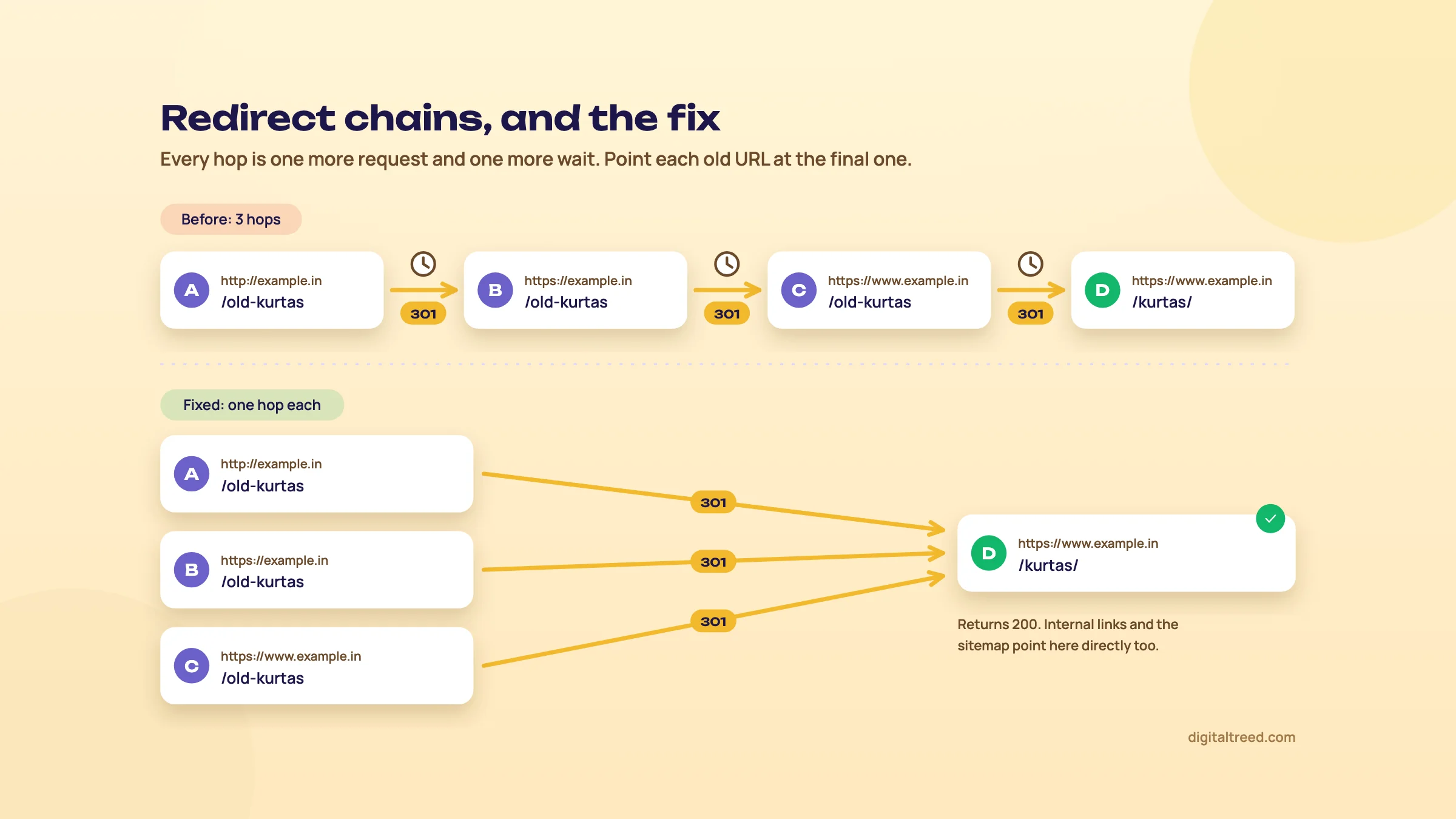 Point every old URL straight at the final one. An example we drew.
The fix has two parts. Rewrite each old rule so it points at the final URL in one hop. Then change your internal links, canonicals, hreflang and sitemaps to the final URL, so Google and your visitors stop hitting redirects at all. Our HTTP Status Checker takes up to 10 URLs at a time and shows every hop and the response headers. Note that Google's own inspection tools don't follow redirects,[41] so URL Inspection on the old URL shows the redirect, not the destination.
Canonicalisation: how Google picks the URL it shows
When Google finds several URLs with the same or very similar content, it groups them into a cluster and picks one as canonical, the version that may be shown in results.[46] You don't choose the canonical. You send signals, and Google weighs them.
| Signal | Google's wording | Notes |
|---|---|---|
| Redirect | "A strong signal" | The old URL leaves the cluster for good. |
| rel="canonical" (HTML or HTTP header) | "A strong signal" | Absolute URL, inside the <head>. |
| Sitemap inclusion | "A weak signal" | List only canonical URLs. |
| HTTPS | Generally preferred over HTTP | Unless the certificate is invalid or HTTPS redirects to HTTP. |
| hreflang | URLs in reciprocal hreflang clusters are preferred | See chapter 9. |
All of that comes from one Google page, which also says the methods can stack.[20] Its rules are worth copying straight into a developer ticket:
- Put a self-referencing canonical on the canonical page itself.
- Use absolute URLs. The link element only counts inside the <head>.
- Don't name different URLs as canonical for the same page through different methods (say, the HTML tag says one thing and the sitemap another).
- Don't use robots.txt, the URL removal tool or noindex to choose a canonical within one site.
A canonical is a hint, not a rule. When Google overrides yours, look first at whether the rest of the site contradicts it: the tag says /kurtas/ but the menu, breadcrumbs and sitemap all link /kurtas. Google's canonical page says the same about internal links: link to the canonical URL, because consistent linking "helps Google understand your preference".[20] Make every one of them name the same URL.
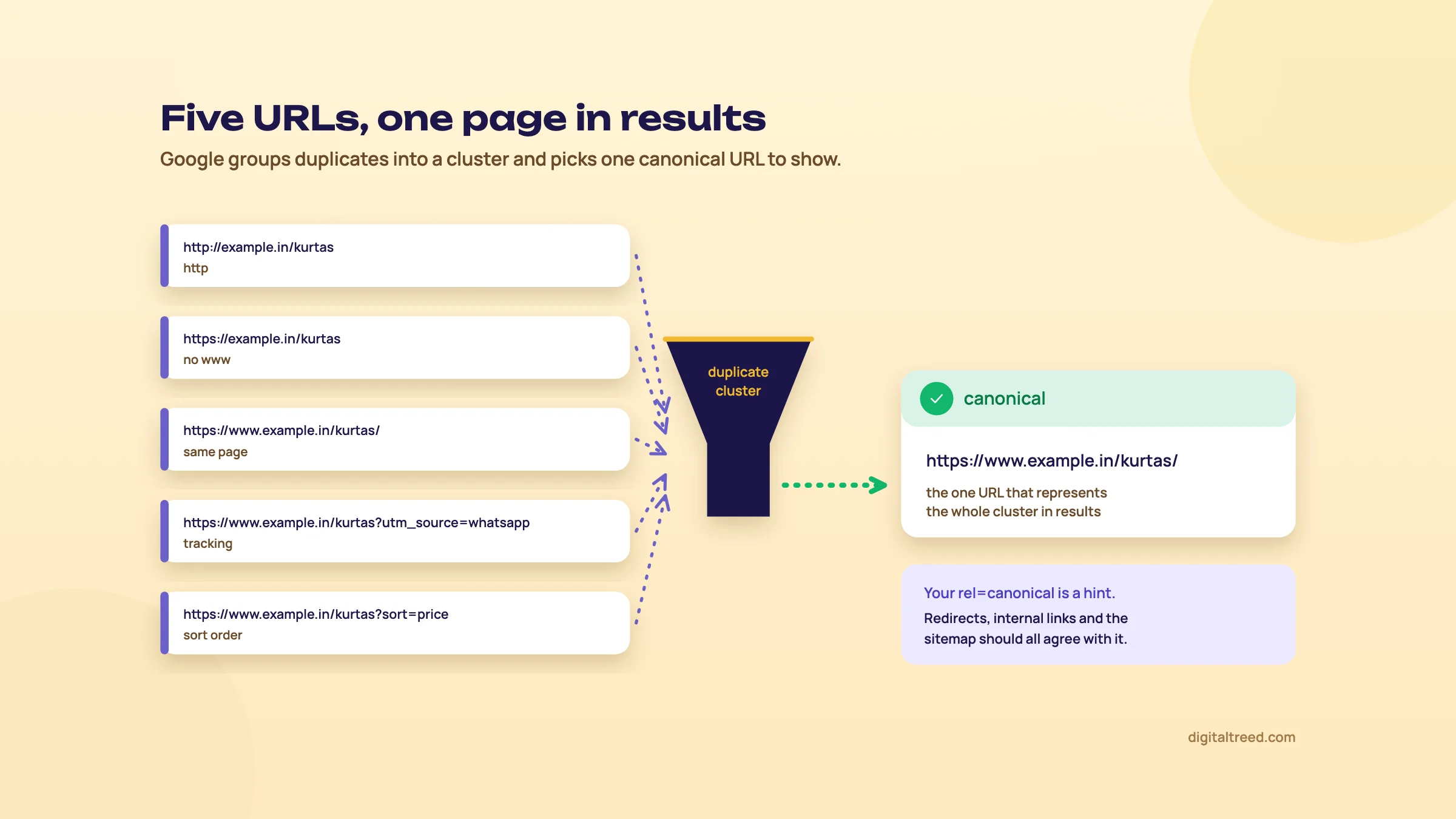 Google picks one canonical URL to represent a cluster of duplicates. An example we drew.
JavaScript adds one more rule, covered in chapter 2: the canonical in the original HTML should match the one after rendering, or be left out of the original HTML altogether.[17]
To see what Google decided, use URL Inspection on any indexed URL: it shows the user-declared canonical and the Google-selected canonical side by side (the live test can't show Google's pick). In the Page indexing report, "Duplicate, Google chose different canonical than user" means Google thinks another URL in the cluster makes a better canonical than the one you declared.[42] Open a sample, compare the two pages, and find which of your signals points the other way. "Alternate page with proper canonical tag" is the opposite: it means the setup works and there's nothing to do.
Duplicate content, on its own, isn't spam. Google's SEO Starter Guide says content available under several URLs is "inefficient, but it's not something that will cause a manual action."[47] The cost is diluted signals and wasted crawling, not a penalty.
noindex, robots.txt and passwords: which one keeps a page out
These three get mixed up more than anything else in technical SEO. They do different jobs.
- noindex keeps a page out of Google's index. Google has to crawl the page to see it.
- robots.txt disallow stops crawling, and nothing more. As chapter 1 showed, a blocked URL can still be indexed, without a snippet, if other pages link to it.[7]
- A password (or login) keeps out both people and crawlers. It's the only one of the three that protects private content.
Warning
Don't combine noindex with a robots.txt disallow on the same URL. Google's noindex page says the page "must not" be blocked by robots.txt, or Googlebot never sees the rule and the page can still appear in results.[48] If Search Console shows "Indexed, though blocked by robots.txt", remove the block first, add noindex, and wait for the recrawl.
noindex works in two places, and Google says they have the same effect.[48] In the HTML:
<meta name="robots" content="noindex">
<meta name="googlebot" content="noindex">   <!-- Google only -->
Or as an HTTP response header, the X-Robots-Tag, which is the only option for files that have no HTML head: PDFs, images, videos, Word files.[49] These examples are from Google's documentation:
# Apache: all PDFs
<Files ~ "\.pdf$">
Header set X-Robots-Tag "noindex, nofollow"
</Files>

# NGINX: all PDFs
location ~* \.pdf$ {
add_header X-Robots-Tag "noindex, nofollow";
}

# Different rules for different crawlers
X-Robots-Tag: googlebot: nofollow
X-Robots-Tag: otherbot: noindex, nofollow
A few details from the same spec matter in practice.[49] Rule names and values are case-insensitive. You can send several X-Robots-Tag headers or one with a comma-separated list. A rule with no user agent applies to all crawlers. When rules conflict, the more restrictive one wins, so nosnippet beats max-snippet:50. And if robots.txt blocks the URL, none of these rules are read at all.
Besides noindex, the rules worth knowing:
| Rule | What it does | Typical use |
|---|---|---|
| nofollow | Don't follow links on this page | Rarely; almost never site-wide |
| none | Same as noindex, nofollow | Thank-you and account pages |
| nosnippet | No text snippet or video preview | Paywalled or legal text |
| max-snippet:[n] | Snippet length limit in characters; 0 means none, -1 lets Google choose | Publishers controlling previews |
| max-image-preview:[none|standard|large] | Image preview size | Set large if you want big image previews |
| unavailable_after:[date] | Stop showing the page after a date | Sale pages, event pages, job listings |
| noimageindex | Don't index images on the page | Licensed photo galleries |
Two timing warnings. Removal happens only after Google recrawls the page, and Google says that for less important pages it can take months for Googlebot to come back.[48] The same page warns that some other search engines might interpret noindex differently. And on JavaScript sites, chapter 2's rule applies: never ship noindex in the original HTML of a page you want indexed.[17]
Other HTTP headers that affect indexing
Most SEOs only look at the HTML. The response headers can carry the same signals, and they're invisible in a normal browser view, which is exactly why they cause bugs nobody can find.
- Link: rel="canonical" for non-HTML files. Google's example points a .docx at the PDF version:
Link: <https://www.example.com/downloads/white-paper.pdf>; rel="canonical".[20] - Link: rel="alternate" hreflang is one of Google's three supported hreflang methods, with HTML tags and sitemaps. Pick one method.[50]
- X-Robots-Tag, above. A staging rule left in a server config is a classic: the HTML looks clean and the header says noindex on every page.
- Last-Modified / ETag, which make 304 responses possible.
To see headers, run curl -I https://example.in/page, open the Network tab in Chrome DevTools, or paste the URL into our HTTP Status Checker, which shows every hop and the headers of the final response.
Redirect, canonical or noindex: choosing a fix for duplicates
| 301 redirect | rel="canonical" | noindex | |
|---|---|---|---|
| Old URL still works for visitors | No, they land on the new one | Yes | Yes |
| Signals consolidated | Yes, strong signal | Usually; strong signal, but a hint | No; the page simply drops out |
| Google still crawls the duplicate | Less over time | Yes | Yes, it must, to see the rule |
| Use when | The duplicate has no reason to exist | Both URLs must stay live: tracking parameters, sort orders, print views, syndicated copies | The page should exist for users but never in search: internal search results, cart, login |
Our default order: redirect if you can, canonical if you can't, noindex only when the page isn't a duplicate of anything but still shouldn't be found in search. Google itself recommends rel="canonical" over noindex for choosing between duplicates.[20]
Keyword cannibalisation at scale
Guide 2 defined cannibalisation (two of your pages competing for one search, neither ranking as well as one strong page would) and showed how to check one query at a time in Search Console. That works for a 40-page site. On a shop with 3,000 category and blog URLs, or a publisher with 20,000 posts, you need a list, not a hunch.
First, rule out the things that look like cannibalisation and aren't:
- Duplication. If the two URLs are the same content (a filtered category and its parent, http and https), it's a canonical problem. Fix it with the tools above.
- Two good results. Google's site diversity system generally shows no more than two results from the same site in the top results.[51] If you hold two of the top three, leave them.
- Different intent. A "kurti designs" gallery and a "buy kurtis online" category can share impressions on broad queries and still deserve to exist.
What follows is our own method, not Google's. It needs query and page data together, which the Search Console interface doesn't export as pairs. Pull it through the Search Console API or the Data Studio connector (Data Studio was called Looker Studio until recently) instead.
Find cannibalising pages across a large site
- Pull query and page pairs Export the last 3 months of query, page, clicks, impressions and position from the Search Console API or Data Studio into a sheet. Exclude branded queries.
- Group by query Keep only queries where two or more of your URLs have impressions.
- Cut the noise Our rule of thumb: keep a query when the second URL has at least 20% of its impressions and neither URL averages a top-3 position. Sort what's left by total impressions.
- Check the canonical first Run URL Inspection on both URLs. If Google groups them as duplicates, it's a canonical job, not a content one.
- Read the results page Search the query on google.co.in in an incognito window. Does the intent match one page better? Does Google show guides, categories or products?
- Decide and log it Pick a fix from the table below, note the date as a Search Console annotation,[52] and compare the query's clicks and position over the same length of time before and after.
| What you find | Fix |
|---|---|
| Two pages, same intent, both thin | Merge the best of both into one URL and 301 the other |
| Two pages, same intent, one clearly stronger | 301 the weaker one, or re-target it to a different intent |
| Category and blog post both chasing a buying query | Re-target the post to an informational angle and link it to the category with the category's main anchor |
| Many near-identical location or product-variant pages | Consolidate; check chapter 9 and the scaled content abuse policy |
| Overlap caused by internal links (menu points at A, body links at B) | Change the links so every anchor for that topic points at one URL |
After any merge, check that the old URL returns one 301 hop to a 200, that the winner has a self-referencing canonical, and that the old URL is gone from your sitemap. That's three tools from this chapter in five minutes.
Note
Case study: fixing indexing problems together. Search Engine Land published Merkle's account of an electronics manufacturer after a badly run replatform: link errors, thin and near-duplicate pages and hreflang errors. Fixing them together took page-one keywords to 30% above pre-migration levels (Search Engine Land, 2019).[53] The lesson isn't the number. These problems feed each other, and fixing one at a time hides the effect of the others.
Do not
- Use 302 for a permanent move because "it's safer"
- Leave redirect chains in place and add another hop on each redesign
- Block a page in robots.txt and expect noindex to work
- Canonical every paginated page to page 1 (chapter 5)
- Use noindex to pick between duplicates
- Serve 200 on empty category or search pages
Do
- Use 301 or 308, straight to the final URL
- Update internal links, canonicals, hreflang and sitemaps after every redirect
- Use X-Robots-Tag for PDFs and other non-HTML files
- Keep the same canonical in raw and rendered HTML
- Check Google-selected canonicals in URL Inspection
- Give each search intent one page, and link to it consistently
If you want one pass over all of this for a site, start with our Free Website Audit, then take the URLs it flags into the HTTP Status Checker and Canonical Tag Checker. Next, chapter 5 looks at the structure that decides which URLs exist in the first place: click depth, internal links, pagination and filters.
Site architecture: depth, internal links, pagination and faceted navigation
Quick answer
Good architecture lets people and crawlers reach every important page in a few clicks through real <a href> links, groups related pages by topic, and stops filters and sort options from creating thousands of near-duplicate URLs. Paginated pages need their own URLs and crawlable links; faceted filters need a rule for which combinations get indexed.
Architecture decides which URLs exist and how they connect. Get it right and most of chapter 4's canonical and noindex work never needs doing. Get it wrong on a shop with ten filters and no setting in Search Console will save your crawl budget.
Depth, hubs and folders
Google's rules here are short. It reliably follows only normal <a href> links, and every page you want indexed needs at least one internal link pointing to it.[54] Everything else is judgement.
Ours: keep every page that earns money or traffic within three clicks of the home page. Google publishes no click-depth number, so treat three as our rule of thumb, not a ranking factor. The reason is practical. Depth is a decent proxy for how much internal link weight a page gets and how soon a crawler finds it after it's published. A product five clicks deep, reachable only through page 9 of a category, gets found late and recrawled rarely.
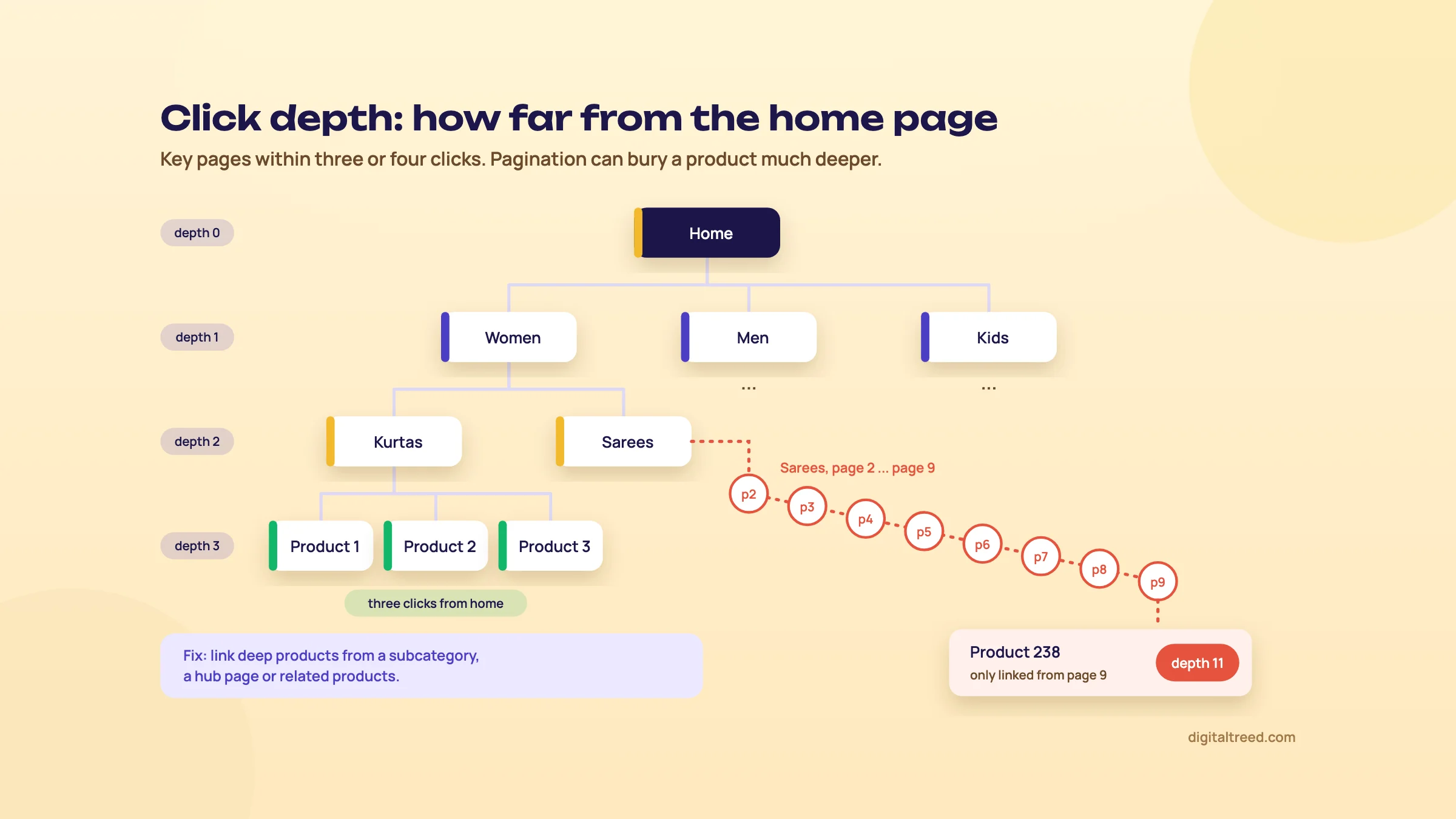 Pagination can bury a product eleven clicks deep. An example we drew.
A flat site isn't the goal either. Putting 4,000 links on the home page makes everything "one click deep" and tells Google nothing about what matters. The structure that works for most shops and publishers is hub and spoke: a hub page per topic or category, spokes for the detail, links running both ways, and sideways links only where a reader would want them. Guide 2 (chapters 2 and 8) covers clusters and the linking pattern; here the question is how the tree is laid out.
Folders help on bigger sites. Google's SEO Starter Guide says that on sites with more than a few thousand URLs, grouping similar topics in directories can help Google learn how often each directory changes, and crawl them at different frequencies.[47] A news site with /cricket/ updated hourly and /explainers/ updated monthly is the textbook case.
How many internal links a page needs
Guide 2 (chapter 8) covers the data: Cyrus Shepard's Zyppy study of 23 million internal links, where clicks rose with the number of internal links pointing to a page, up to about 45 to 50, and then fell off.[55] It's a correlation, but the architecture lesson is clear. The pages you care about shouldn't sit at the bottom of the link count, and pointing hundreds of sitewide links at one page doesn't help either. Give each important page one main descriptive anchor and use it consistently (Guide 2 explains why).
Topical maps as a site plan
Koray Tuğberk Gübür's topical map method (Guide 2, chapter 2) is usually discussed as a content plan. It's an architecture plan too. He maps every connected subtopic and question, then links the pages by context, so each link sits in a sentence about the page it points to.[56] Turn the map into URLs before anyone writes a word: each top-level topic becomes a hub URL, each subtopic a spoke in that hub's folder, and the map's connections become your planned internal links. Doing it in that order avoids the most common architecture failure on content sites: a flat /blog/ folder with 800 posts, linked only by date.
Orphan pages at scale
An orphan is a page with no internal links. Guide 2 showed the small-site check: crawl, then compare with the sitemap; our free XML Sitemap Generator does that comparison for sites up to 500 pages, and our free Internal Link Checker adds the click depth and the links in and out of every page, with the pages to add a link from. On a large site, use four lists, because each one catches orphans the others miss:
- A crawl from the home page: every URL reachable by links.
- Your XML sitemaps: every URL you say matters.
- Search Console: pages with impressions, and the Page indexing report's lists.
- Server logs: URLs Googlebot requests (chapter 1).
Anything in lists 2 to 4 and missing from list 1 is an orphan. Pages that only appear in the logs are often the most interesting: old URLs Google still remembers, which need either a link or a redirect. Screaming Frog's paid version (£199 a year) does this comparison: add your sitemaps, connect the Search Console and Analytics APIs, run Crawl Analysis, and read the Orphan URLs filters.[57] The free version stops at 500 URLs and can't connect the APIs.[13] Sitebulb's crawl maps are a clear way to show a site owner or developer what the structure actually looks like, and it has a 14-day free trial.[14] We don't have an internal link checker of our own yet; meanwhile, use either crawler or the Links report in Search Console.
Pagination
Google's pagination guide sits in its ecommerce documentation, and it's short enough to follow to the letter.[58]
- Give each page its own URL, for example with a
?page=2parameter. - Link each page to the next one with normal
<a href>links. - Don't use the first page as the canonical for the whole sequence. Each page gets its own canonical.
- Don't put page numbers in a URL fragment (
#page=2); Google ignores fragments. - rel="next" and rel="prev": Google no longer uses them, though other search engines may.
- Block unwanted filter and sort variations of the list with noindex or robots.txt.
<!-- On https://example.in/women/kurtas?page=2 -->
<link rel="canonical" href="https://example.in/women/kurtas?page=2">
...
<a href="/women/kurtas">1</a>
<a href="/women/kurtas?page=3">3</a>
<a href="/women/kurtas?page=3">Next</a>
"Load more" buttons and infinite scroll need care. They're usually built with JavaScript, and Google's crawlers generally don't click buttons or trigger scripts that need a user action.[58] Keep the paginated URLs underneath and make sure each one is reachable through an <a href> link; a sitemap listing every item helps as a backup.
Faceted navigation: where crawl budget goes to die
Faceted navigation is the set of filters on a listing page: colour, size, fabric, price, brand. Each filter writes its choice into the URL. Google's faceted navigation guide names the two costs: crawlers usually request a very large number of facet URLs before working out that they're useless, and that leaves less time for new, useful URLs.[59]
The numbers grow faster than people expect. Three filters with 10 values each give 1,000 URLs when all three are set, before you count pairs, single filters, sort orders, filter order (?color=red&size=m versus ?size=m&color=red) and pagination on each.
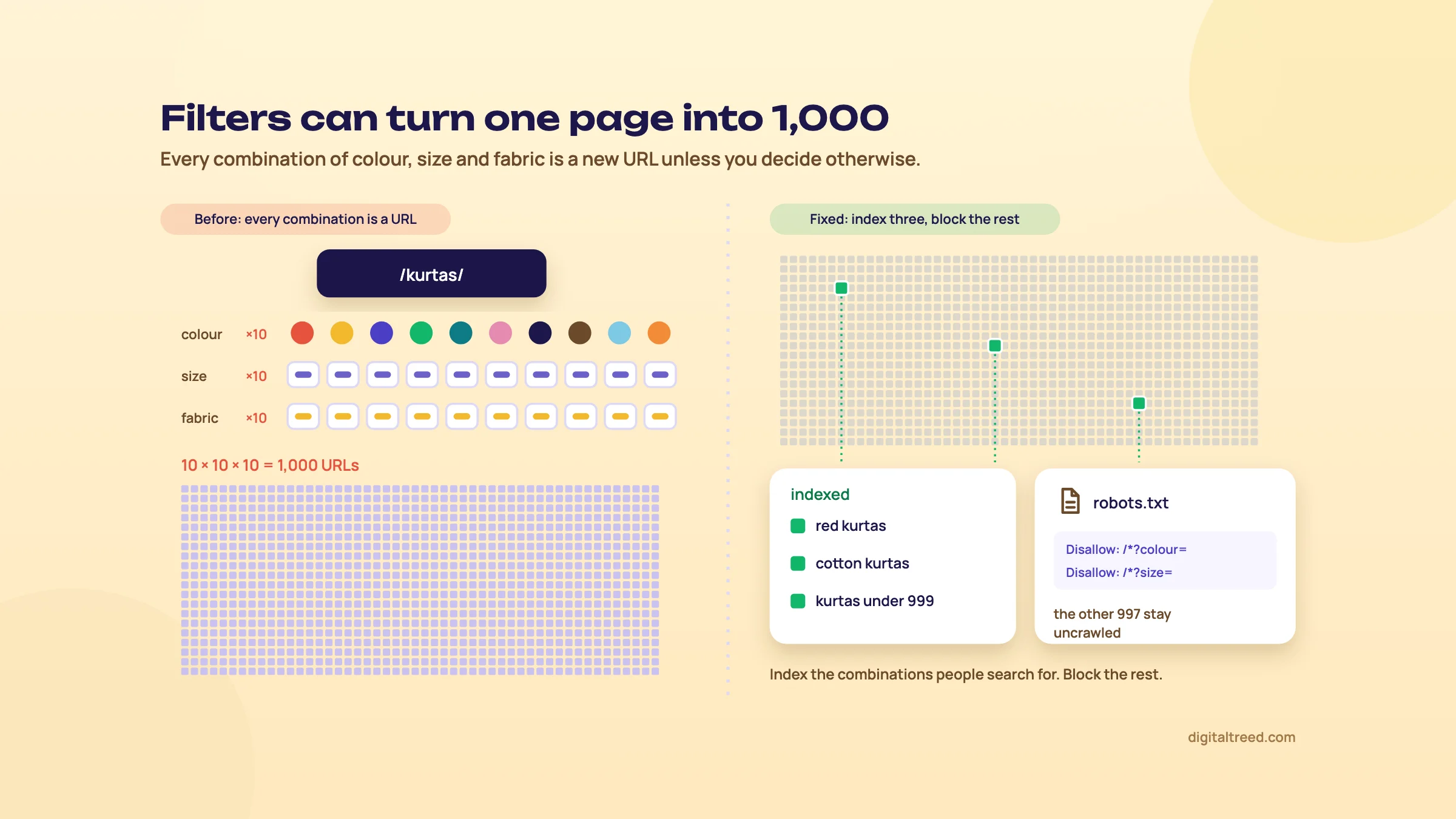 Index the filter combinations people search for and block the rest. An example we drew.
The fix starts with a decision, not a tag: which combinations deserve to be landing pages? Then pick a method for the rest.
| Method | Crawl cost | Index control | Use when |
|---|---|---|---|
| robots.txt disallow on facet parameters | Lowest; Google calls it more effective long term than canonical or nofollow | Not crawled; a blocked URL can still be indexed without a snippet if linked | You don't need those facet URLs in search |
| Filters in a URL fragment or applied without changing the URL | None; Google generally ignores fragments | Nothing to index | Building or rebuilding filters |
| rel="canonical" to the unfiltered page | Falls only gradually | Usually consolidates; still a hint | Facets already indexed and linked from outside |
| rel="nofollow" on filter links | Only helps if every link to the URL carries it | None | Rarely worth it on its own |
| noindex on filtered pages | Google still crawls them to see the rule | Out of the index | Small sites, or as a step before robots.txt |
| Index selected facets as real pages | Normal | Full; static URL, own title and copy | The combination has search demand |
The table follows Google's guide on robots.txt, fragments, canonical and nofollow.[59] One thing to know about noindex: Google's crawl budget guide says not to use noindex to save crawl budget, because the page still has to be crawled.[5] The pagination guide accepts noindex or robots.txt for filter and sort variations;[58] on a large catalogue, robots.txt is the one that actually saves crawling. Don't apply both to the same URLs (chapter 4 explains why). Google's own example rules:
user-agent: Googlebot
disallow: /*?*products=
disallow: /*?*color=
disallow: /*?*size=
allow: /*?products=all$
Tip
Index a facet only when people search that exact combination. "red kurta for women" and "cotton kurta under 500" are real searches, so give them static URLs like /women/kurtas/red/ with their own title, a short intro and links from the category page. "red, size M, rayon, sorted by newest" isn't a search anyone types, so keep it out of the crawl.
If you do let Google crawl facet URLs, follow Google's rules for them:[59] use the standard & separator (not commas, semicolons or brackets), and keep filters in the same logical order every time. Return a 404 for combinations with no results, duplicate filters, nonsense combinations and page numbers past the end. Serve that 404 at the URL itself; don't redirect to a common "not found" page. Filter plugins don't always get this right, so test a few empty combinations with our HTTP Status Checker.
Breadcrumbs
Breadcrumbs (Home › Women › Kurtas) do two jobs: they give every page a link to each level above it, and they tell Google where the page sits. Breadcrumb structured data is one of Google's supported rich result features. Its documentation recommends that breadcrumbs show a typical user path to the page rather than mirror the URL structure, and the markup needs a BreadcrumbList with at least two ListItems.[60] Google's page currently describes the feature as available on desktop.
<script type="application/ld+json">
{
  "@context": "https://schema.org",
  "@type": "BreadcrumbList",
  "itemListElement": [
    {"@type": "ListItem", "position": 1, "name": "Women", "item": "https://example.in/women/"},
    {"@type": "ListItem", "position": 2, "name": "Kurtas", "item": "https://example.in/women/kurtas/"},
    {"@type": "ListItem", "position": 3, "name": "Cotton A-line kurta"}
  ]
}
</script>
The last item can leave out item; Google then uses the URL of the page itself.[60] SEO plugins such as Yoast and Rank Math can output it, and many themes do, so check the page source before adding a second copy. Chapter 7 covers structured data across templates.
Subfolders or subdomains
Short answer: it matters less than the forum threads suggest. Google's SEO Starter Guide lists it under things not to focus on and says: "From a business point of view, do whatever makes sense for your business."[47] Our preference is subfolders (example.in/blog/ over blog.example.in), because one host is simpler to run: one robots.txt, one set of redirect rules, one CMS to keep fast. When a part of the site runs on a different platform, a subdomain is often the practical choice, and that's fine.
Do not
- Link products only through deep pagination
- Canonical every paginated page to page 1
- Let every filter and sort order create a crawlable URL
- Redirect empty filter combinations to a generic error page
- Rely on "load more" buttons with no <a href> links underneath
- Add both noindex and a robots.txt block to the same facet URLs
Do
- Keep money pages within about three clicks of the home page
- Give each paginated page its own URL and canonical
- Decide which facets have search demand and make those real pages
- Block the rest of the facet parameters in robots.txt
- Add breadcrumbs with markup
- Compare crawl, sitemap, Search Console and logs to find orphans
Run our Free Website Audit on a category page and a product page to catch the basics, then a crawler for depth and orphans. Chapter 6 puts all of this under the most pressure it will ever face: a site migration, where every URL in this structure may change at once.
Site migrations step by step
Quick answer
A migration is any change of domain, URL structure, platform or protocol that changes how search engines see your pages. Plan it like a launch: crawl and benchmark the old site, map every old URL to its best new URL with a 301, test on a protected staging site, launch, then check logs and Search Console daily for weeks. Keep redirects at least a year.
Most SEO mistakes cost you slowly. A migration can cost you in a day. Every signal from chapters 1 to 5 (crawl paths, status codes, canonicals, internal links, structure) gets rebuilt at once, usually by a developer whose deadline is the launch date, not your traffic. This chapter is the plan we'd want in front of any team before a domain change, an HTTPS move, a WordPress-to-Shopify or WordPress-to-headless rebuild, or a redesign that touches URLs.
The backbone is Google's own site move guide, last updated in August 2026.[45] Read it once in full; what follows adds the checks and order of work around it.
Types of migration and how risky each one is
| Type | URLs change? | Change of Address tool? | Risk |
|---|---|---|---|
| Domain move (example.co.in to example.in) | All | Yes | High |
| Subdomain move (shop.example.in to example.in/shop/) | Some | Probably: the old subdomain is a domain-level property and the tool accepts a folder as the target, but Google's help doesn't cover a folder on the same domain | Medium to high |
| HTTP to HTTPS | Protocol only | No | Low, if done in one hop |
| www to non-www (or back) | Host only | No | Low |
| URL restructure (new folders, new slugs) | Many | No | Medium to high |
| Replatform (WordPress to Shopify, PHP to a JavaScript framework) | Often many; templates and rendering always change | Only if the domain changes | High |
| Redesign on the same URLs | None | No | Medium: content, links and speed change |
| Merging two sites | All on one side | Yes, for the retired domain | High |
The Change of Address column comes from Google's help page: use it for moves between domains or subdomains, not for HTTP to HTTPS, www to non-www on the same domain, or path changes.[61] Replatforms deserve their "high". The URLs may stay the same while the templates, internal links, rendering (chapter 2) and page speed (chapter 3) all change underneath.
Google's general advice before you plan anything:[45] split a large move into smaller steps where that's practical, pick a low-traffic period, and expect rankings to fluctuate for a while. Small and medium sites should move everything at once. Large sites can move section by section, which makes problems easier to spot, and can test first with a section that doesn't change often.
Google's guide also says to change one thing at a time: move the domain first, then change the CMS or the layout.[45] We agree, for a practical reason: when traffic drops, you want to know which change caused it.
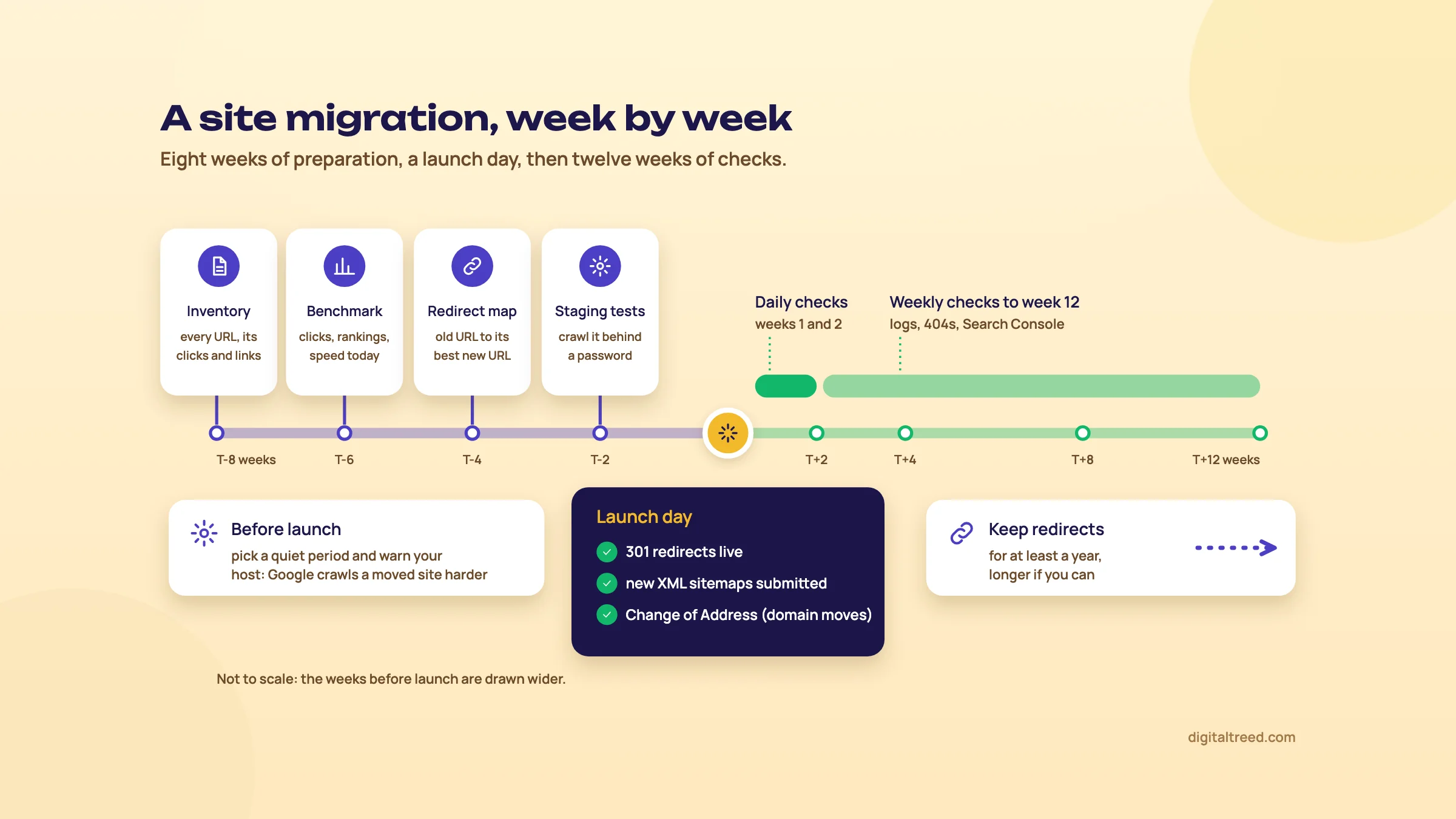 A site migration plan, from eight weeks before launch to twelve weeks after. The week spans are our own planning convention, not Google's.
Site migration plan in 14 steps
- Inventory the old site Crawl it, export every URL from the sitemaps, and pull the pages with clicks from Search Console, landing pages from analytics, pages with external links, and URLs Googlebot requests in the logs.
- Benchmark Save clicks, impressions and positions per page and per query from Search Console, organic sessions and conversions, Core Web Vitals per template, and indexed page counts.
- Build the redirect map One row per old URL: new URL, status code (301 or 410), and a column for the test result.
- Protect staging Put the new site behind a password. A robots.txt block on its own isn't enough.
- Check the new site on staging Titles, canonicals, hreflang, structured data, internal links and rendered content on every template.
- Prepare live configuration The robots.txt and meta robots you will use at launch, HTTPS certificates, Search Console verification for old and new, and server capacity.
- Test the redirects on staging Run the whole old URL list against staging and confirm each one returns one 301 to a 200. Paste the map into our free Redirect Checker and it passes or fails each row with the reason.
- Launch and switch on redirects Remove the staging password and any noindex, and turn the redirects on.
- Check canonicals and robots rules live Every new URL should carry a self-referencing canonical and no stray noindex.
- Submit new sitemaps In Search Console and Bing Webmaster Tools.
- Use Change of Address For a domain or subdomain move, for every verified variant of the old domain.
- Crawl the old URL list In list mode, the same day, and fix every miss.
- Monitor daily, then weekly Search Console Page indexing and Sitemaps reports, logs, analytics and rankings on both sites.
- Keep the redirects and the old domain At least a year for redirects, and keep the old domain registered.
Before launch: inventory and benchmarks
The redirect map is only as good as your list of old URLs. Google's guide suggests starting with the important ones from sitemaps, server logs and analytics.[45] Add these as well, because each one finds URLs the others miss:
- Search Console Performance, Pages tab, for every URL with clicks or impressions over the longest date range it offers.
- Pages with links from other sites, from Ahrefs, Semrush or the Links report in Search Console. Ahrefs Free gives verified sites their own backlink data at no cost.[62] A URL with a dozen links from news sites is worth more than one with traffic, because those links are hard to earn twice.
- The crawl itself. Screaming Frog's free version handles 500 URLs; past that you need the paid licence (£199 a year) or Sitebulb.[13]
- Old PDFs, images and campaign URLs that sit in logs but in no sitemap.
Save the benchmarks somewhere that won't change when the new site goes live. Search Console data for the old domain stays in its property, but analytics settings, rank trackers and dashboards often get reconfigured at launch, and then you have nothing to compare against.
The redirect map
This is the document the whole migration hangs on. A sample:
| Old URL | New URL | Status | Checked |
|---|---|---|---|
| /product-category/kurtis/ | /women/kurtas/ | 301 | 200 in 1 hop |
| /product/blue-anarkali-kurti/ | /women/kurtas/blue-anarkali-kurta/ | 301 | 200 in 1 hop |
| /2019/05/navratri-sale/ | (removed, no equivalent) | 410 | 410 |
| /blog/how-to-wash-silk-saree/ | /guides/silk-saree-care/ | 301 | Chain: 3 hops, fix |
The rules:
- One to one wherever possible. Each old URL goes to the new page that answers the same need.
- Closest equivalent when there's no exact match: a discontinued product goes to its category, not the home page.
- Don't redirect many old pages to one irrelevant page. Google's guide warns against it.[45]
- Pages removed for good return 404 or 410. Google's guide lists that as part of preparing the new site.
- Use server-side permanent redirects (301 or 308). Client-side redirects are a last resort.[45]
- Redirect straight to the final URL. No chains.
For large sites, write rules by pattern (all /product-category/ to /women/ or /men/ by a lookup) and keep a one-to-one sheet for the exceptions. A redirect map template comes with this guide's checklist PDF. We don't have a redirect map builder yet; meanwhile, a Google Sheet with VLOOKUP or XLOOKUP against the new site's crawl does the job.
Staging, robots rules and the launch-day trap
Staging sites leak into Google all the time. robots.txt alone doesn't stop that: as chapter 1 showed, a blocked URL can still be indexed if something links to it.[7] Put staging behind a password (HTTP authentication is enough), and you can then skip the robots.txt block entirely.
Google's guide asks for two preparations here.[45] If you block all crawling during development, prepare the robots.txt you will use once the move starts. If you use noindex during development, list the URLs where you'll remove it at launch.
Warning
Never launch with the staging robots.txt (Disallow: /) or a site-wide noindex copied to the live site. On WordPress, check Settings, Reading, "Discourage search engines from indexing this site" on the live install. On any platform, also check the server config for an X-Robots-Tag header left over from staging (chapter 4). It is the most expensive checkbox in SEO.
Two more pre-launch items from Google's list. Check the new domain's history, because a domain with past spam problems carries them with it; Search Console's Manual actions report on the new property is the first place to look. And make sure the server can take the load: after a migration Google "will temporarily crawl your new site more heavily than usual", so large sites should warn their host in advance.[45] On shared hosting in India that warning matters. A plan that copes with normal traffic may not cope with a crawl spike on top of launch-day visitors.
Launch day
In this order: switch on the redirects, remove the staging password, and test straight away. Then work through the signals that point at URLs. Google's guide lists them:[45]
- Each new URL carries a self-referencing
rel="canonical", and none points back at an old URL. - hreflang annotations use the new URLs (chapter 9).
- Internal links point straight at the new URLs. Don't leave the menu, footer and body links going through redirects.
- External links you control (social profiles, Google Business Profile, ad campaigns, directory listings) are updated too.
- A new sitemap with only new URLs is submitted.
For a domain or subdomain move, open the Change of Address tool in the old property. You must own both properties, with the same Google account, and the old home page must already 301 to the new one.[61] Since June 2026 Google's site move guide says to submit it for all verified variants of the old domain, www and non-www included, even ones you don't actively use.[3] The tool's effects last 180 days.[61]
For HTTPS moves, check the certificate on every host variant before you switch, since Google generally prefers HTTPS URLs as canonical unless the certificate is invalid.[20] Our SSL Checker does that in seconds.
In Bing Webmaster Tools, verify the new site and submit its sitemap. Bing's old Site Move tool (launched in 2013)[63] isn't in the current console; Microsoft told users in 2021 it had been removed,[64] so the 301s and the new sitemap do the work.
After launch: what to check, and for how long
Day one, crawl the full old URL list in list mode (Screaming Frog's standard check for this) and confirm each URL returns exactly one 301 to a 200. For spot checks of up to 10 URLs at a time, our HTTP Status Checker shows every hop. Anything returning 404, 302, a chain, or a redirect to the home page goes back to the developer the same day.
Then watch the places Google names:[45]
- Sitemaps report: indexed URLs in the new sitemap should rise while the old sitemap's count falls.
- Page indexing report: watch Soft 404, Redirect error, Server error (5xx), and "Duplicate, Google chose different canonical than user" on the new property.
- Server logs: Googlebot crawling the new URLs, unexpected errors, and normal user traffic.
- Analytics: traffic falling on the old site and rising on the new one.
How long it takes: Google says that for medium-sized sites it can take a few weeks or more before Google gradually starts showing the new URLs, and larger sites take longer. Rankings fluctuate during the move and settle over time.[45] Our advice: check daily for the first two weeks, then weekly until the numbers are back at the benchmark.
How long to keep redirects: Google's site move guide says "for as long as possible, generally at least 1 year", and from the user's point of view, consider keeping them indefinitely.[45] The Change of Address help page adds that redirects should stay at least 180 days, and that you should keep paying for the old domain for at least a year so nobody else buys it for spam.[61] Our advice: keep both for good. A domain renewal is cheap next to the links that still point at the old address.
And one thing Google states plainly on the Change of Address page: it does not erase the old site from the index. Redirects and canonicals reduce how many old URLs show up, over time.[61] Seeing old URLs in a site: search a month after launch is normal.
What goes wrong, from published cases
We don't have a migration story of our own to tell here, so these are other people's, credited and with their caveats.
Note
Case study: soft 404s behind a 90% drop. Search Engine Land reported on a Brazilian crypto news site that moved domains in January 2022 and saw sessions and pageviews fall by about 90% year on year. The article puts it down to redirects that weren't fully in place, then thousands of soft 404s and thin auto-generated pages that slowed indexing across the site.[43] The lesson: after a move, read the Page indexing report on the new property as well as running your redirect test.
The opposite outcome is possible too. In the Merkle case from chapter 4, an electronics manufacturer's botched replatform was turned around by fixing its problems together.[53]
A third case, told in chapter 10, is worth reading before any migration: a forgotten DNS record for a retired hostname got a whole site deindexed.[65] Migrations retire hosts and services all the time. Add every hostname to Search Console, and clean up DNS records when you switch something off.
When a migration has already gone wrong, Aleyda Solis's first checks, from her Crawling Mondays episode on recovering traffic after a migration, are the right place to start: collect the old top-performing URLs, check that each one 301s to the right new URL, and check that the destination pages are properly optimised.[66] She also publishes a validation checklist for migrations.[67] For replatforms, Sitebulb's recorded webinar with Kristina Azarenko, "CMS Migration for SEOs", walks through her RAINBOW framework.[68]
Do not
- Redirect every old URL to the home page
- Use 302s "until we're sure"
- Rely on robots.txt to hide staging
- Leave internal links going through redirects
- Change domain, URLs and design in one launch if you can split them
- Remove redirects or let the old domain lapse after a few months
Do
- Build the old URL list from crawl, sitemaps, Search Console, backlinks and logs
- Map one to one, closest equivalent otherwise, 410 for real removals
- Password-protect staging and test redirects there
- Submit Change of Address for every variant of the old domain
- Crawl the old URL list on launch day
- Keep redirects at least a year, and the old domain registered
Run our Free Website Audit on the old site before you start and on the new one the day it launches; the difference between the two reports is your first fix list. If you'd rather have someone run the redirect map and the launch checks with you, that's part of our SEO service, and you can get a quote. Chapter 7 moves from URLs to meaning: structured data across templates, and how Google connects your site to an entity.
Structured data at scale and entity SEO
Quick answer
Structured data describes a page in schema.org vocabulary. Google's search gallery lists 25 features it can make a page eligible for, FAQ rich results stopped showing on 7 May 2026, and none of it lifts rankings. At scale, generate one linked JSON-LD graph per template from your CMS data, keep it matching the page, and use it to state who you are.
Guide 2 covered the basics: what JSON-LD is, which types a small business needs, and how to test one page. This chapter is about the other problem. You have 40,000 product pages, 3,000 articles and a dozen templates, and the markup has to stay correct on all of them while prices, authors and stock change every day. Then there's the part most guides skip: using the same markup to describe your business as an entity, so Google and other systems don't confuse it with someone else.
What Google still shows in 2026
Google's search gallery listed 25 structured data features when we checked in October 2026.[69] One of them is a trap: Dataset is still listed, but since November 2025 Dataset markup is used only by Dataset Search, not Google Search.[3] Grouped by the kind of site that needs them:
| Site type | Features that apply |
|---|---|
| Every site | Organization, Breadcrumb, Image metadata, Video |
| Shops and D2C brands | Product (merchant listings, product snippets, variants), Review snippet, Local business |
| Publishers and blogs | Article, Profile page, Subscription and paywalled content, Speakable, Carousel |
| Forums and communities | Discussion forum, Q&A |
| Education | Course list, Education Q&A, Math solver |
| Jobs | Job posting, Employer aggregate rating |
| Niche | Event, Recipe, Movie, Software app, Vacation rental, Dataset (Dataset Search only) |
The changelog also shows where Google is still adding detail, which tells you where it expects to use the data. In 2026 it added more properties for Discussion Forum and QA Page markup (24 March). Later came a category property for merchant listings and a section on sale price dates (7 July), a guideline against fake and undisclosed incentivised reviews (24 July), and a creator property for VideoObject (24 September).[3] Merchant shipping policy markup arrived in November 2025. Shops and forums get the attention; almost everything else has been trimmed.
What's gone, and what to do with the old markup
Guide 2 has the full removal timeline. The short version for a technical audit is below. The question for each row isn't "is it still valid schema.org?" (it usually is), but "is anyone still paying to maintain it?"
| Feature | Status | What we'd do |
|---|---|---|
| FAQ | Limited to well-known government and health sites from August 2023;[70] no longer shown in Google Search from 7 May 2026, docs removed 15 June 2026[3] | Keep FAQPage only where the page really has a FAQ and the markup is generated for free. Don't build anything new for it. |
| HowTo | Desktop only from August 2023, then removed from desktop on 13 September 2023[70] | Same as FAQ. |
| Course info, Estimated salary, Learning video, Special announcement, Vehicle listing | Phased out in June 2025; docs and Search Console reporting removed in September 2025[3] | Remove from templates when you next touch them. They add HTML weight and nothing else in Google. |
| ClaimReview (fact check) | Being phased out of Google Search since June 2025; still used by Google's Fact Check Explorer[3] | Keep it if you publish fact checks; otherwise remove it. |
| Practice problem | Deprecated November 2025, docs removed January 2026[3] | Remove. |
| Book actions | Announced for phase-out in June 2025, then kept because it's still used[3] | Keep if you're a book retailer or publisher. |
When Google announced the 2025 phase-out it said: "This update won't affect how pages are ranked."[71] So losing a rich result costs you the extra space in the results, not position. Whether Google still reads FAQPage markup for any other purpose, it hasn't said.
Note
Our own guide pages output Article, HowTo, FAQPage and DefinedTermSet markup. We keep FAQPage because it describes the content accurately and the CMS writes it at no cost. We don't expect a FAQ rich result from it.
Does it help rankings or AI answers?
No to the first, and not directly to the second. Backlinko's study of 11.8 million results found no correlation between schema and position, though 72.6% of page-one results used it.[32] Google says there's no special schema.org markup you need for AI Overviews or AI Mode,[72] and its 2026 guide to generative AI search lists over-focusing on structured data among the things you can ignore.[1]
Our position: structured data is hygiene and eligibility. It makes the rich results that still exist possible, and it states facts in a form machines don't have to guess at. It isn't a GEO lever, and anyone selling it as one is selling you a plugin setting. Guide 5 covers what does move AI visibility.
One graph per template, linked with @id
The common failure on large sites isn't missing markup. It's five plugins and a theme each printing their own disconnected blocks: an Organization from the SEO plugin, a second Organization with a different logo from the theme, a Product from the shop plugin with no link to either. Google can read multiple items on a page, nested or listed separately, and it suggests @id to tie related items together.[73] Use that to build one graph per page type:
- Site-wide nodes with fixed IDs: Organization (
https://example.in/#org) and WebSite (https://example.in/#website). Defined once, referenced everywhere. - Page nodes: WebPage and BreadcrumbList for every URL.
- Main entity per template: Product, Article, LocalBusiness, JobPosting. It points back to the Organization as brand, publisher or hiring organisation.
- People: a Person node per author with its own ID, reused on every article they wrote and on their profile page.
A trimmed product template for a Jaipur block-print brand looks like this:
<script type="application/ld+json">
{
  "@context": "https://schema.org",
  "@graph": [
    {
      "@type": "Organization",
      "@id": "https://example.in/#org",
      "name": "Neel Prints",
      "url": "https://example.in/",
      "logo": "https://example.in/logo-512.png",
      "sameAs": ["https://www.instagram.com/neelprints"]
    },
    {
      "@type": "BreadcrumbList",
      "@id": "https://example.in/kurtas/indigo-cotton-kurta/#breadcrumb",
      "itemListElement": [
        {"@type": "ListItem", "position": 1, "name": "Kurtas", "item": "https://example.in/kurtas/"},
        {"@type": "ListItem", "position": 2, "name": "Indigo cotton kurta"}
      ]
    },
    {
      "@type": "Product",
      "@id": "https://example.in/kurtas/indigo-cotton-kurta/#product",
      "name": "Indigo cotton kurta",
      "sku": "NP-KU-0142",
      "image": "https://example.in/img/indigo-cotton-kurta.jpg",
      "brand": {"@type": "Brand", "name": "Neel Prints"},
      "offers": {
        "@type": "Offer",
        "price": "1499",
        "priceCurrency": "INR",
        "availability": "https://schema.org/InStock",
        "seller": {"@id": "https://example.in/#org"}
      }
    }
  ]
}
</script>
Every value comes from a database field. The Organization block is identical on every page, so a change to the logo happens in one place. Google's merchant listings want brand as a Brand with a name, so the Organization is linked as the offer's seller instead. This block passes the Rich Results Test (product snippets, merchant listings, breadcrumbs) and validator.schema.org with no errors; the test only lists optional fields a real shop would add, such as description, shipping and returns.
Generate it from data, never by hand
Hand-typed JSON-LD works for one page and rots on a thousand. Price changes, a product goes out of stock, an author leaves, and the markup says something the page doesn't. That's a guideline problem: Google's rules say not to mark up content readers can't see and not to mislead with markup.[73] So the markup has to read from the same fields the page renders from.
Where you output it matters too:
- Server-side is the safe default. Google can process structured data that's in the DOM after rendering, so JavaScript injection and Google Tag Manager do work.[74] But Google also warns that dynamically generated markup can make Shopping crawls less frequent and less reliable, which hurts most for price and availability. For a shop, render Product markup on the server.
- In Tag Manager, read values from the page. Google says hardcoding values in GTM increases the risk of a mismatch; use variables that pull from the page instead.[74]
- Keep it high in the HTML. Chapter 1's 2MB limit applies: a JSON-LD block printed after 1.9MB of inline scripts and a mega menu may never be read.[2] Put it in the
<head>. - Same markup on duplicates. Google recommends putting the same structured data on all duplicates of a page, the canonical and the rest.[73] Colour and size variants that canonicalise to one URL should all carry it.
Roll out structured data across one template
- List the templates Crawl the site and group URLs by template (product, category, article, location, author). Note what each currently outputs; Screaming Frog can extract and validate structured data in a crawl.[13]
- Design the graph Pick the main entity type, the site-wide nodes it references by
@id, and map every property to a CMS field. If no field exists, leave the property out. - Remove the duplicates Switch off overlapping output from themes and plugins so each type appears once. In WordPress, let one SEO plugin own the graph.
- Test three real URLs One normal, one edge case (out of stock, no reviews, no author), one long page. Run each through the Rich Results Test by URL, not pasted code,[74] and through a schema.org validator for types Google doesn't support.
- Ship and recrawl Deploy to the template, then crawl a sample of a few hundred URLs and confirm every page outputs valid markup.
- Watch the reports Check Search Console's rich result reports for that type over the next few weeks; they flag errors across the whole site.
Our Schema Markup Validator handles step 4 for a single URL or pasted code. Our free Schema Markup Generator writes the starting block for step 2: the main type, the Organization and the Breadcrumb in one @graph linked by @id, or a block prefilled from a live URL.
Monitoring when something breaks
Template markup breaks quietly. A developer renames a field, the price node starts printing empty, and nobody looks at the page source. Three checks catch most of it:
- Search Console rich result reports. A jump in invalid items on a date means a deploy broke something. Annotate deploy dates so you can match them.
- A monthly crawl with structured data validation, compared with last month's item counts per template.
- The Manual actions report. A structured data manual action removes a page's eligibility for rich results; Google says it doesn't change web ranking.[73] If you mark up reviews, the July 2026 rule on fake and undisclosed incentivised reviews applies to you.
Do not
- Hand-type JSON-LD into page builders on hundreds of pages
- Mark up reviews, ratings or prices visitors can't see
- Add reviews you wrote, or rewarded reviews without saying so
- Let three plugins each print an Organization
- Inject Product markup with JavaScript on a shop with daily price changes
Do
- Generate markup from the same fields the page renders
- Link nodes with stable
@idvalues - Test edge cases as well as the perfect page
- Keep the JSON-LD in the head, well inside 2MB
Entities and the knowledge graph
An entity is a thing, not a string: your company, your founder, a product line, a place. Search engines keep graphs of entities and the facts that connect them. Google's knowledge panels are the visible part. Its help page describes them as information boxes that appear when you search for entities, and says they "are automatically generated". The information, it says, "comes from various sources across the web", plus data partners for topics such as films and music.[75]
Three things follow from Google's own documentation, and they're worth saying plainly because agencies sell knowledge panels as if they were a product:
- You can't create one. Google's verification page explains how to claim an existing panel; it describes no way to request a new one.[76]
- You can claim one that exists. Search for your business or name, click "Claim this knowledge panel" and verify by signing in to an official site or profile, such as your Search Console property or YouTube channel. Not every panel can be claimed.[76]
- A local business needs a Business Profile, not a panel. Google points businesses that serve customers at a location to Business Profile instead (Guide 2 covers it).[76]
What you control is the evidence. Google's Organization markup docs say the data helps Google understand your organisation's administrative details and tell it apart from others; some properties work behind the scenes for disambiguation, and logo can affect the knowledge panel.[77] Put it on your home page or one About page, not every page. Google suggests starting with name, alternateName, address, telephone, url and logo (at least 112 by 112 pixels), plus sameAs links to your official profiles.[77] Shops can add store-wide return and shipping policies there too.
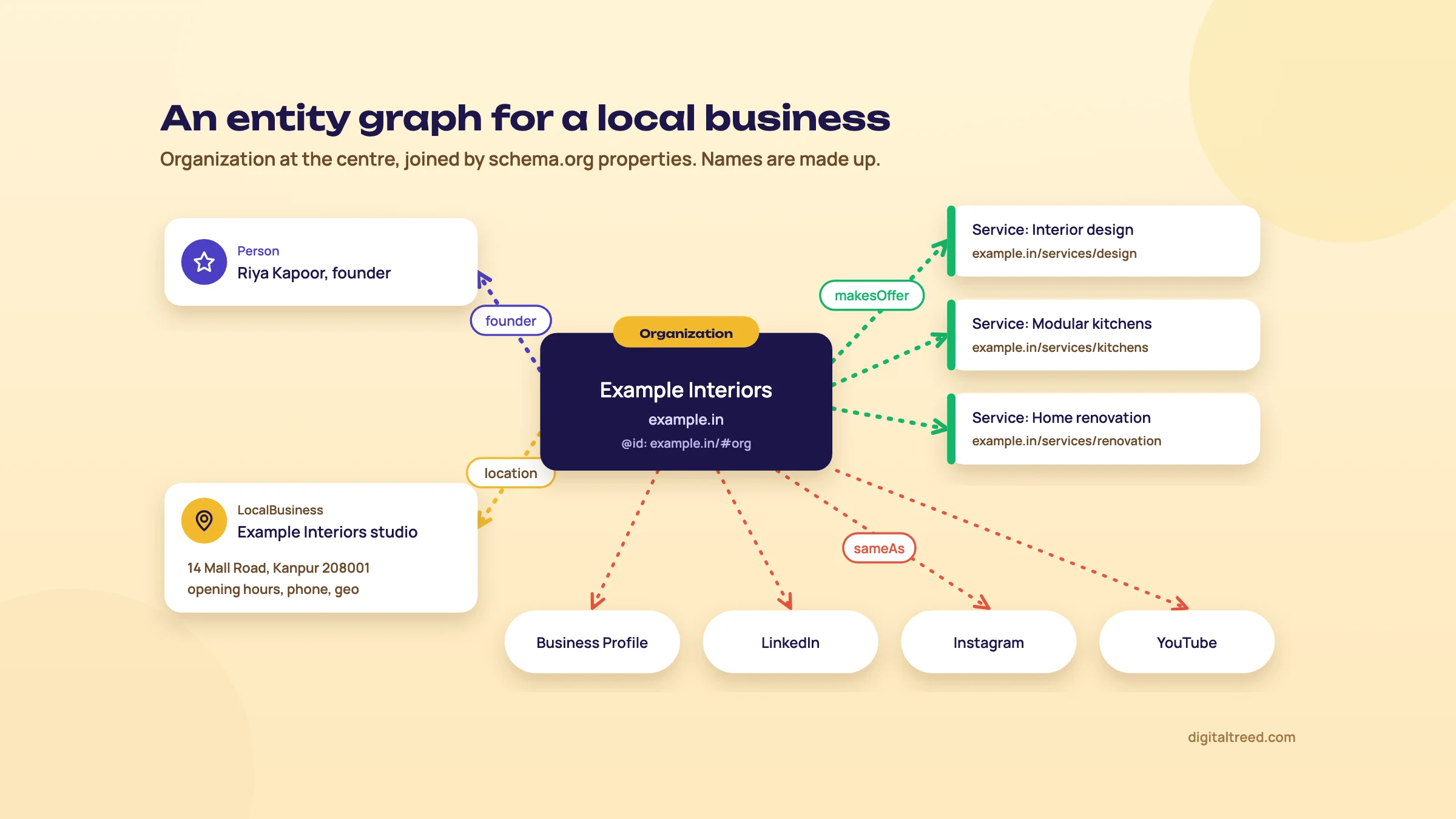 An entity graph joined by schema.org properties. An example we drew; the names are made up.
Markup is only one witness. The graph is built from many sources, so the facts have to agree everywhere: the same legal name, address, phone, founder and prices on your site, your Business Profile, directories, marketplaces and social profiles. Disagreement is worse than silence.
Making three contradictory prices machine-readable gives the agent a better-documented problem.[78]
His point is about AI agents that check offers on a user's behalf: structured data and feeds help only when they describe the same offer, availability and total price as the page. Markup on top of inconsistent data just makes the inconsistency easier to find. Fix the source of truth first, then mark it up.
A panel can follow real-world reputation work. Marie Haynes describes a YMYL online store that improved its navigation, checkout, About page and PR, did well in Google's December 2025 core update and gained a knowledge panel.[79] She gives no traffic figures, and the panel was one result of several changes, not a target in itself (chapter 10 and Guide 2 cover her other cases). That matches our view: you earn an entity by being a clearly described, consistently cited business, not by markup alone.
If you want to see whether Google treats your brand as a known entity, the Knowledge Graph Search API returns matching entities with schema.org types. Google says it's read-only, not suitable for production-critical use, and is moving to Cloud Enterprise Knowledge Graph,[80] so treat it as a quick check, not a monitoring tool.
Tip
For shops in Merchant Center: AI-generated product images need IPTC DigitalSourceType TrainedAlgorithmicMedia metadata, and AI-generated titles and descriptions must be labelled.[81] Check this before you bulk-generate product copy for a feed.
Next, a short chapter on AI crawlers: which bots to let in, which you can block, and what each choice changes. Start by running your key templates through our validator.
AI search for technical SEOs: crawlers and access
Quick answer
AI companies run separate bots for training, for search and for fetches a user asks for. Blocking training bots doesn't remove you from AI answers; blocking search bots (OAI-SearchBot, PerplexityBot, Claude-SearchBot, Googlebot, Bingbot) does. Google-Extended is not an AI Overviews switch. Most AI crawlers don't run JavaScript, so key content belongs in the raw HTML.
This chapter is only about access: which bots reach your server, what robots.txt does to each, and what they can read once they arrive. What to do about AI answers beyond that, from content to measuring citations and llms.txt, is in Guide 5.
Three kinds of AI bot
Every major vendor now splits its crawlers by purpose, and the purpose decides what blocking costs you.
| Purpose | Tokens | What blocking does |
|---|---|---|
| Training | GPTBot (OpenAI), ClaudeBot (Anthropic), Google-Extended (Google), CCBot (Common Crawl) | Opts future content out of model training. You can still appear in AI answers. |
| Search | OAI-SearchBot (OpenAI), Claude-SearchBot (Anthropic), PerplexityBot (Perplexity), plus Googlebot and Bingbot | Removes you from that product's search answers. |
| User-triggered | ChatGPT-User, Claude-User, Perplexity-User | Varies: some vendors say robots.txt may not apply. |
The vendor wording is specific. OpenAI says disallowing GPTBot means content shouldn't be used to train its foundation models, while sites opted out of OAI-SearchBot "will not be shown in ChatGPT search answers", apart from navigational links.[23] Perplexity says PerplexityBot surfaces and links sites in its results and "is not used to crawl content for AI foundation models."[82] Anthropic says blocking ClaudeBot excludes future material from training, and blocking Claude-SearchBot stops it indexing your content for search.[83] Guide 5 chapter 6 has the full table with every vendor.
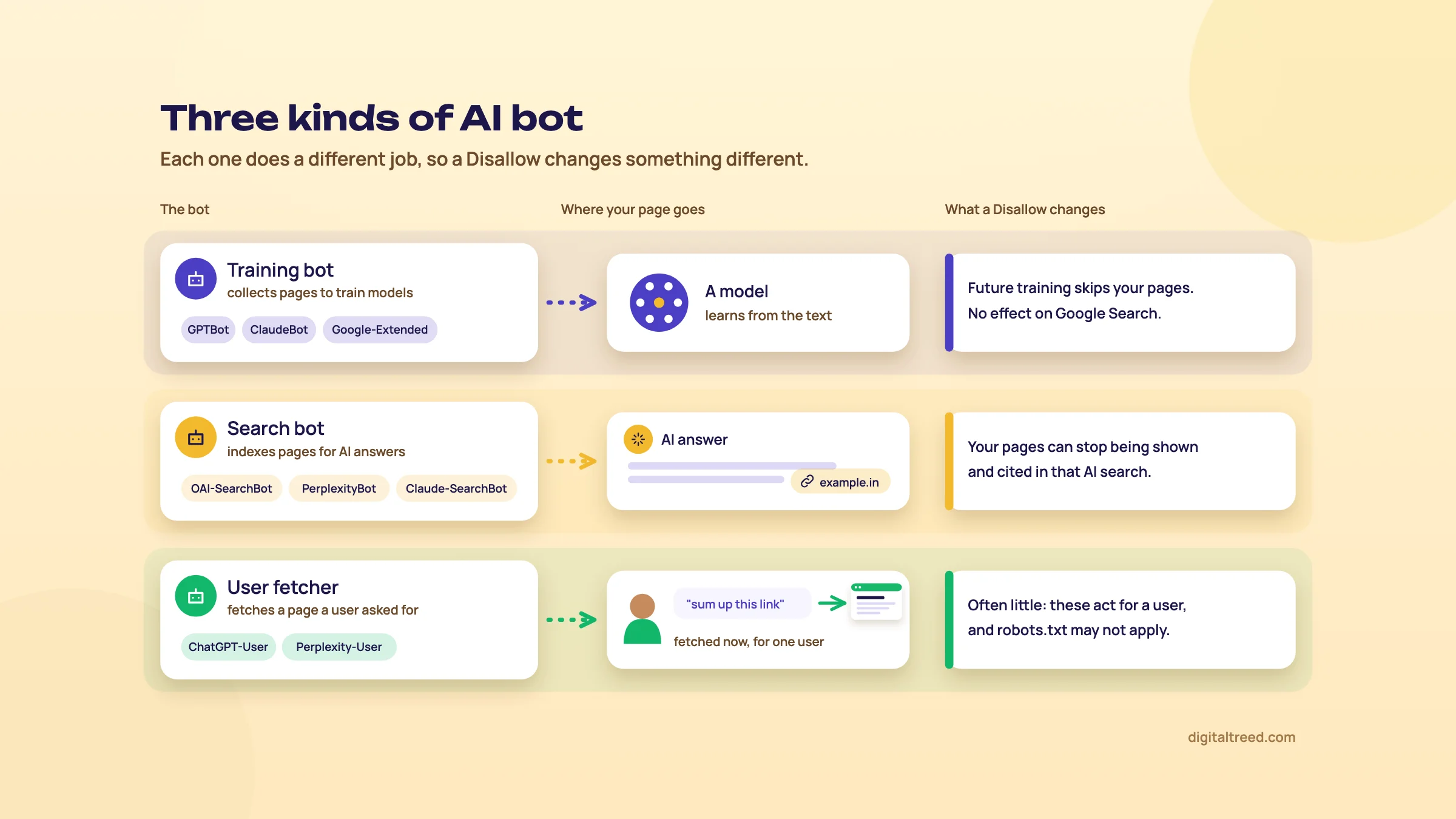 Training bots, search bots and user fetchers, and what blocking each one changes.
robots.txt by purpose
Decide per purpose, then write one group per token. This example blocks two training bots and explicitly allows two search bots:
User-agent: GPTBot
Disallow: /

User-agent: Google-Extended
Disallow: /

User-agent: OAI-SearchBot
Allow: /

User-agent: PerplexityBot
Allow: /
Add ClaudeBot or CCBot groups the same way if you want them out of training too. Anthropic asks you to repeat the rule on every subdomain you want opted out, and it's the one vendor here that says it supports the non-standard Crawl-delay.[83] Google doesn't support crawl-delay at all.[6]
Chapter 1's robots.txt rules still apply: Google reads only the first 500 KiB, caches the file for up to 24 hours, and a 5xx on robots.txt stops its crawling for 12 hours.[6] The AI vendors have their own lag: OpenAI says search changes take about 24 hours to show,[23] and Perplexity says up to 24 hours.[82]
Our opinion for most Indian business sites: allow every search bot, and treat training as a business decision, not an SEO one. A publisher that licenses its archive has a reason to block GPTBot; a clinic in Pune gains little either way.
User-triggered fetchers and fake bots
When someone pastes your URL into ChatGPT or asks Perplexity about your page, a different agent fetches it. OpenAI says that for ChatGPT-User, "robots.txt rules may not apply" because a user started the action, and that it isn't used to decide what appears in search.[23] Perplexity says Perplexity-User "generally ignores robots.txt rules."[82] Anthropic is the exception: it says its bots honour robots.txt, and that disabling Claude-User stops it retrieving your content for a user's query.[83] To keep a page from these fetchers, use authentication.
User-agent strings are easy to fake, so verify by IP, not by name. Each vendor publishes its ranges: openai.com/searchbot.json, gptbot.json and chatgpt-user.json for OpenAI;[23] perplexitybot.json and perplexity-user.json for Perplexity;[82] and claude.com/crawling/bots.json for Anthropic, which also warns that blocking its IPs may not work reliably as an opt-out.[83] We don't have an IP lookup tool yet; Google's Admin Toolbox Dig does the reverse DNS check for Googlebot meanwhile.
Google's and Bing's controls
Warning
Google-Extended does not opt you out of AI Overviews or AI Mode. It controls whether Google uses your content to train Gemini models and for grounding in Gemini Apps and Vertex AI. Google says it "does not impact a site's inclusion in Google Search nor is it used as a ranking signal".[84] There's no Google-Extended crawler either: crawling is done by the normal Google user agents, and the token only acts as a control.
AI Overviews and AI Mode follow Googlebot's robots.txt rules and the normal snippet controls: nosnippet, data-nosnippet, max-snippet and noindex.[72] So the only way to stay out of Google's AI features is to limit your snippets or your indexing in Search too. That's a real trade-off, and for most businesses the answer is to accept it.
Microsoft Copilot answers draw on the Bing index. Bing's Webmaster Guidelines, rewritten in February 2026,[85] say NOARCHIVE keeps content out of Copilot responses and grounding results, and NOCACHE limits Copilot to the URL, title and snippet.[16] Bing advises against NOCACHE on content you want cited properly.
Do AI crawlers run JavaScript?
Mostly no. The best public data is from Vercel and MERJ (December 2024), measured on Vercel's network: GPTBot, OAI-SearchBot, ChatGPT-User, ClaudeBot, PerplexityBot, Meta-ExternalAgent and Bytespider didn't render JavaScript. ChatGPT's crawler fetched JavaScript files in 11.50% of requests and Claude's in 23.84%, but didn't execute them. Gemini renders because it uses Googlebot's infrastructure, and AppleBot renders too.[22] None of the vendors' own bot pages say anything about rendering.[23]
So a client-rendered React or Vue shop that ranks fine in Google can be close to empty for ChatGPT and Perplexity. The fix is the one from chapter 2: server-side rendering or static generation for main content, links and metadata. Aleyda Solis's AI search optimisation checklist (updated September 2026) makes the same point: step 4 of its 12 asks whether search and AI systems can "reach, render and isolate" your content, and says to put critical facts and links in the raw HTML.[86]
To see what a non-rendering bot gets, view the page source (not the inspector) or fetch the URL with curl. We don't have a raw-vs-rendered checker yet; Search Console's URL Inspection shows Google's rendered view to compare against.
Crawl load, and what your logs say
79%
of AI crawling was for training in July 2025, 17% for search, 3.2% for user actions[87]
38,066
Anthropic crawls per referred visit in July 2025 (OpenAI about 1,091, Perplexity about 195, Google about 5.4)
Those are Cloudflare's figures across its network. A training bot can take a lot of bandwidth and send almost nobody back, which matters on shared hosting.
A quieter risk than crawl load is a firewall or CDN "block AI bots" toggle, or a bot-fight mode, that also challenges OAI-SearchBot, PerplexityBot or even Bingbot. robots.txt says allow, the edge says 403, and nobody notices. Check both.
Tip
When you run the chapter 1 log analysis, filter for the AI tokens too: GPTBot, OAI-SearchBot, ChatGPT-User, ClaudeBot, Claude-SearchBot, Claude-User, PerplexityBot, Perplexity-User. Look at status codes per bot. A search bot getting 403s or challenge pages is a block you didn't decide on. Screaming Frog's Log File Analyser handles this until our own log tool is ready.
Note
GEO itself, how AI answers pick sources, llms.txt and measuring AI visibility are in Guide 5, with a video walkthrough of these crawler settings in its chapter 6.
Run your robots.txt through our AI Crawler Checker now to see which of these bots it allows, then test the exact tokens in the Robots.txt Tester, which lets you pick the user agent. The HTTP Status Checker confirms your key pages return a 200, but it sends its own user agent, so it won't catch a firewall rule that only challenges AI bots. For that, set the user agent in Screaming Frog or use curl -A, and remember that a CDN which verifies bots by IP may still treat your test differently from the real crawler.
Programmatic and international SEO
Quick answer
Programmatic SEO builds many pages from a database and templates. It works when each page answers a real search with data people can't get elsewhere; it becomes scaled content abuse when pages exist mainly to rank. International SEO serves the right language or country version through hreflang with return links, not bulk machine translation.
Both topics are about multiplying pages. A marketplace makes one page per city and category; a publisher makes an English and a Hindi version of every article. Done well, that's how big sites reach long-tail demand. Done carelessly, it's how they get hit by a spam update. This chapter covers where the line sits and how to build on the right side of it.
Where programmatic SEO turns into spam
Programmatic SEO means generating pages from structured data with a template: "flats for rent in Andheri West", "IFSC code for a bank branch", "train timings from Lucknow to Varanasi". Nothing in Google's rules bans the method. The rules are about purpose and value.
Two of Google's spam policies define the line.[88] Scaled content abuse is making many pages mainly to manipulate rankings, "no matter how it's created". Its examples include AI-generated pages with no added value, scraped feeds or results (including content that's been synonymised, translated or obfuscated), stitched-together content, and pages stuffed with keywords that make little sense to a reader. Doorway abuse is many pages or sites aimed at similar queries that funnel users to one less useful destination. Google's 2026 guide to generative AI search adds one more: making separate pages for every variation of a query to manipulate AI answers is also scaled content abuse.[1]
A simple test: remove the city or product name from the page. Is anything left that differs from the next page? Real prices, stock, timetables, local addresses, reviews, photos, availability: that's a page. A paragraph with the city swapped in is a doorway with good manners.
Pros
- Reaches thousands of long-tail searches no editor would write for
- Cheap per page once the data and template exist
- Pages update themselves when the data changes
- Works well where the data is the answer: prices, specs, schedules, listings
Cons
- One weak template multiplies into thousands of weak pages
- Spam updates can hit the whole domain, not just the section
- Crawl budget goes to near-empty combinations
- Easy to copy, so it's rarely a moat on its own
What happens when it goes wrong
Two recent sets of cases show the risk, with the usual caveat that each is one analyst's reading of third-party data.
Glenn Gabe published four blinded cases from Google's August 2026 spam update, which ran from 18 to 21 August.[89] An ultra-YMYL site that scaled programmatic pages across several countries, with AI-generated sections on top, lost rankings for more than 200,000 queries. A thin Amazon affiliate site, built programmatically from Amazon data, lost more than 14,000. The one that matters most here had over 1.5 million indexed URLs, about 85% of them in a programmatic section that offered little beyond a photo and commonly available information. The drop hit the whole site, not just that section. His recovery advice: Google needs to see a clean site over an extended period, which usually means months.
Lily Ray tracked more than 220 sites named publicly as customers of AI content platforms, using Ahrefs estimates checked against Sistrix, as of May 2026.[90]
54%
of the 220+ sites lost 30% or more of their peak organic traffic[90]
39%
lost 50% or more
22%
lost 75% or more
She says plainly that this is correlation, based on estimates, and doesn't prove any tool caused a drop. Her summary of the pattern is "it works, until it doesn't." Programmatic pages filled out with AI text are the same bet with more pages.
Warning
Google's generative AI guidance says generating many pages without adding value may violate the scaled content abuse policy. It also says it's "critical to manually factcheck and review all AI-generated content" before publishing, titles, meta descriptions and structured data included.[81] On a 20,000-page template, that means reviewing the template and a real sample of the output, not trusting the generator.
Quality gates before a template goes live
These are the rules we'd set before any programmatic section is indexed. None of them is a Google number; they're our method, and the thresholds are yours to tune.
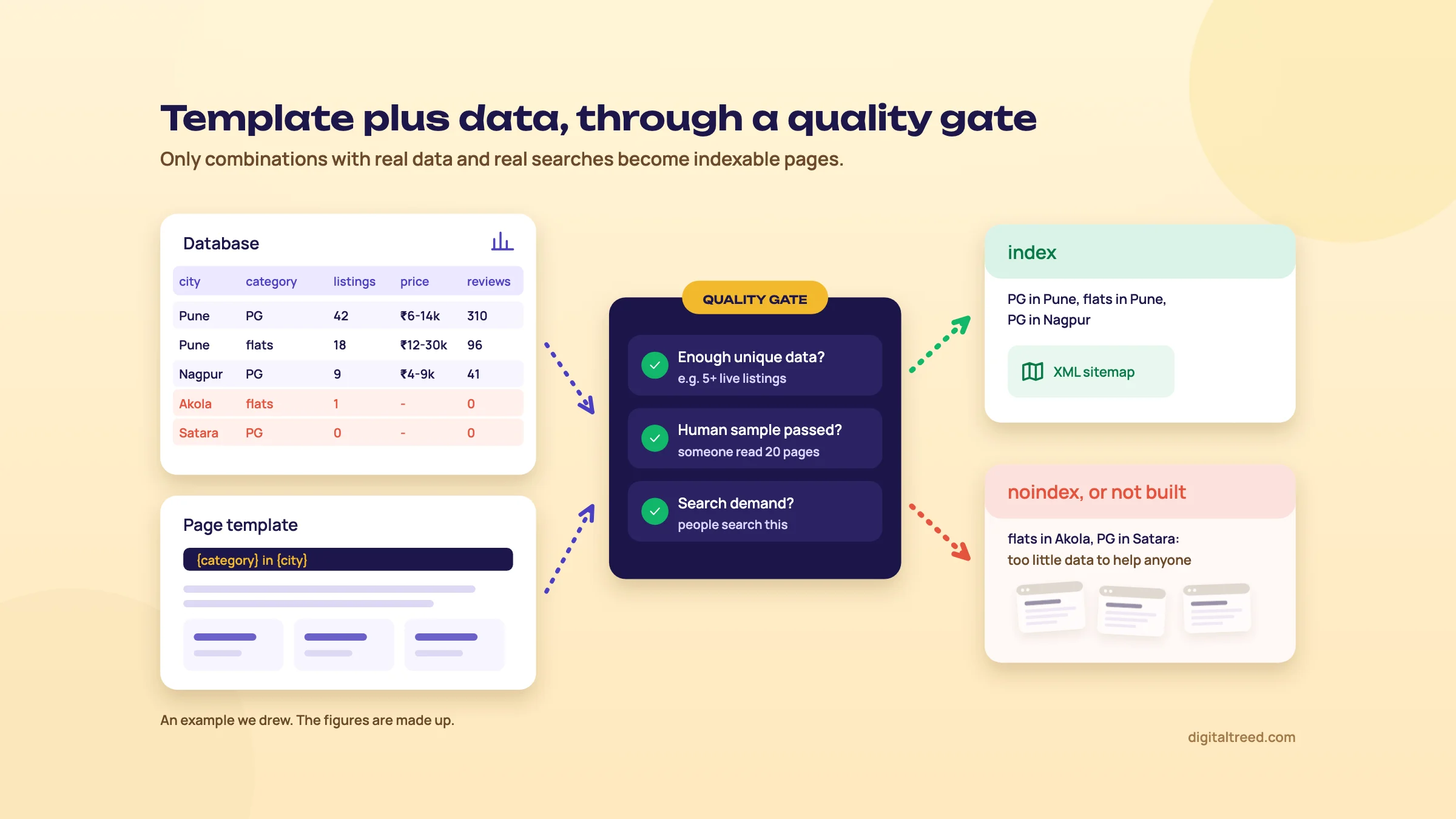 Only combinations with real data and real demand become indexable pages. An example we drew.
- Unique data threshold. Define the minimum per page: for a city and category page, perhaps at least five live listings and a real price range. Below it, the page is noindexed or not generated.
- Demand check. Only build combinations people search for. Keyword tools and Search Console queries tell you whether "PG in Koramangala for girls" is a search; "PG in Koramangala for left-handed students" isn't.
- Human review sample. Read 30 to 50 random pages before launch, including the thinnest. If you'd be embarrassed to send one to a customer, fix the template.
- Noindex the thin combinations, or don't generate them. Keep them out of internal links and sitemaps too. Noindex on its own doesn't save crawling (chapter 1).
- One sitemap per segment. Separate sitemaps for each template or city group let you read the indexing ratio per segment in Search Console.
- Watch the ratio. If Google indexes only a small share of a segment's submitted URLs, it's telling you something about those pages. Improve them or prune them before adding more.
Do not
- Generate every city by service combination because the database allows it
- Fill empty pages with AI paragraphs about the city
- Launch 50,000 pages on a new domain in one week
- Copy manufacturer or marketplace descriptions across thousands of pages
Do
- Start with the combinations that have both data and demand
- Add data nobody else has: your own prices, stock, reviews, photos
- Roll out in batches and watch indexing per batch
- Delete or noindex what Google doesn't index after a fair wait
Our Noindex Tag Checker confirms the thin combinations really carry noindex, and the Canonical Tag Checker catches templates that canonicalise every page to the category root by mistake.
Choosing a URL structure for other countries
Once you sell outside India, or target Indians abroad, you need to decide where the other versions live. Google's multi-regional guide lays out the options:[91]
| Structure | Example | For | Against |
|---|---|---|---|
| Country domain (ccTLD) | example.ae | Clear geotargeting; server location doesn't matter; sites easy to separate | Expensive, more infrastructure, sometimes strict registration rules, one country only |
| Subdomain | ae.example.com | Easy to set up; different server locations possible | Users may not know if "ae" means a language or a country |
| Subfolder | example.com/ae/ | Easy to set up; low maintenance on one host | Single server location; harder to separate later |
| URL parameter | example.com?loc=ae | None worth having | Google: not recommended; segmentation is hard |
For most Indian businesses going abroad we'd pick subfolders: one domain, one set of links and authority, one CMS. A ccTLD makes sense when you have a real local entity, team and budget in that country. Google's SEO Starter Guide says it doesn't care which TLD you use unless you're targeting a country.[47]
Two more rules from the same guide. Google says to avoid automatically redirecting users between language versions and not to use IP analysis to adapt content. And Googlebot usually crawls from the USA, so an IP redirect can hide your Indian version from it entirely.[91] Show a banner suggesting the right version instead.
Search Console's old International Targeting report and its country-targeting setting are gone. Google's help page says the report has been deprecated, country targeting "is no longer supported", and Google will keep using hreflang.[92] Older tutorials that tell you to set a target country there are out of date.
hreflang rules that trip people up
hreflang tells Google which URLs are language or regional versions of each other, so it can show the right one. Google's documentation sets the rules:[50]
- Three methods, equivalent to Google: link tags in the HTML head, HTTP Link headers (useful for PDFs) or the XML sitemap. Pick one and stick to it.
- Self and return links. Each version must list itself and every other version. If two pages don't both point to each other, Google ignores the tags.
- Fully qualified URLs, with https://. Relative paths aren't valid.
- Codes: an ISO 639-1 language, optionally followed by an ISO 3166-1 Alpha 2 region. A region on its own isn't valid. Values are case-insensitive. Codes outside these standards, such as
es-419, aren't supported, and reserved codes such asUKandEUare ignored. - x-default is the fallback "when no other language/region matches the user's browser setting", typically a language selector page.
- Language detection. Google doesn't use hreflang or the lang attribute to work out a page's language; it reads the content.
| Wrong | Right | Why |
|---|---|---|
en-UK | en-GB | UK is a reserved code; Google ignores it |
IN for India | en-IN or hi-IN | A region alone isn't valid; a language comes first |
hi-HI | hi-IN | The region is the country code, and India's is IN |
href="/hi/page" | href="https://example.in/hi/page" | URLs must be fully qualified |
| English page lists Hindi; Hindi page lists nothing | Both list both, plus themselves | Missing return links make Google ignore the pair |
One more conflict to check: hreflang and canonicals. Each language version should canonicalise to itself. If your Hindi pages carry a canonical pointing at the English page, you've told Google the Hindi version is a duplicate, and it may never show it. Google treats localised versions as duplicates only when the main content is left untranslated.[50] Our Canonical Tag Checker shows the canonical of each version side by side.
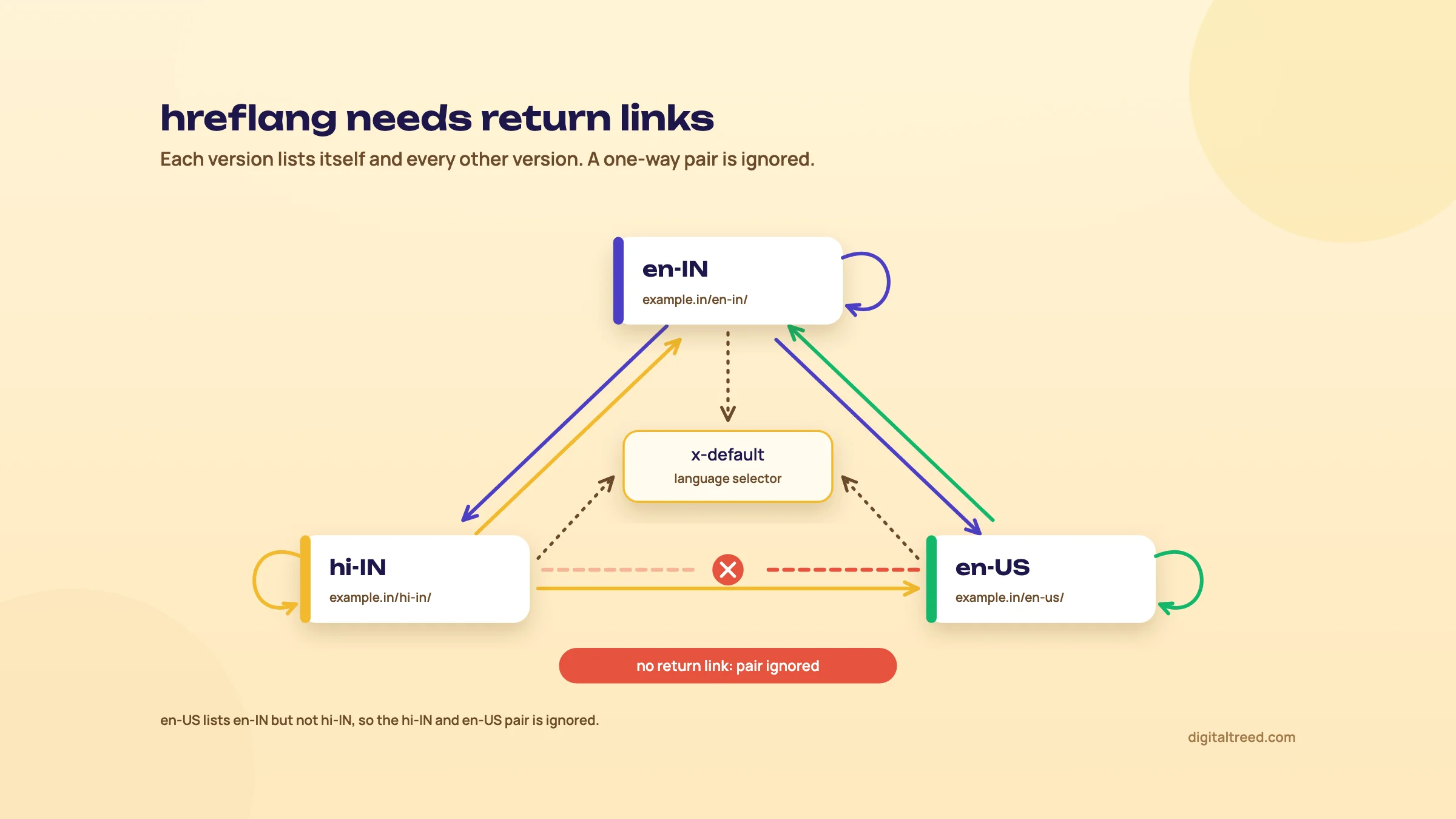 Every hreflang pair needs links both ways. An example we drew.
Add hreflang to an English and Hindi site
- Map the pairs In a sheet, list every English URL and its Hindi equivalent. Pages with no translation get no hreflang.
- Choose the codes
en-INandhi-INif both target India, or plainenandhiif they serve speakers anywhere. Addx-defaultpointing at the English page or a language selector. - Pick one method For a WordPress site with a multilingual plugin, use its hreflang output. For a large site, use the sitemap so templates stay light.
- Write the tags Every version lists all versions, itself included, with full URLs (example below).
- Check canonicals Each version's canonical points to itself, not to the other language.
- Test a sample Crawl with Screaming Frog, whose hreflang checks flag missing return links and non-200 targets,[13] or use Merkle's free hreflang testing tool at technicalseo.com until ours is ready.
<link rel="alternate" hreflang="en-IN" href="https://example.in/home-loan-emi/" />
<link rel="alternate" hreflang="hi-IN" href="https://example.in/hi/home-loan-emi/" />
<link rel="alternate" hreflang="x-default" href="https://example.in/home-loan-emi/" />
The same three lines go on both the English and the Hindi page.
English and Hindi versions in India
Guide 2 (chapter 3) covers when a Hindi-script page pays off, how to research Hindi and Hinglish keywords, and Google's push into Indian languages. Its example is an agency's Hindi pages for a home loan provider. Separate Hindi pages like those, alongside English ones, are where hreflang comes in. Hinglish queries are the exception: they're typed in Latin script, and a good English page usually serves them. Don't build hreflang sets for Hinglish.
Machine translation at scale
Translation is the fastest way to multiply a site, and that's exactly why it sits in the scaled content abuse examples: content that's scraped and translated without adding value.[88] Running 5,000 English pages through a translation API and publishing them under /hi/ is a programmatic build with all the risks above, plus pages your Hindi readers will find stiff and sometimes wrong.
Our advice: translate only the pages where you've proven demand, have a fluent editor rewrite each one, and add the local details (prices, examples, phone support in that language). Then add hreflang. A small, good Hindi section beats a large, mechanical one.
Other search engines abroad
If you target certain countries, Google isn't the only engine to set up. According to StatCounter (September 2026), Yandex has about 70% of search in Russia,[93] Naver about 43% in South Korea,[94] Baidu about 47% in China[95] and Seznam about 15% in the Czech Republic.[96] Each has its own webmaster tool, and hosting in mainland China involves an ICP filing. Guide 1's chapter on search engines covers each one.
Before you build anything, run the Free Website Audit on a sample of your programmatic or translated pages. Thin templates and broken tags show up fast. Then chapter 10 covers what happens when a site crosses the spam line, and how recovery works.
Spam policies, manual actions, algorithm updates and recovery
Quick answer
A manual action is a penalty a Google reviewer applies, and you'll see it in Search Console. Fix the cause everywhere, then file a reconsideration request. An algorithmic drop after a core or spam update comes with no notice and no request to file. Wait a full week after the update ends, compare with the week before, find what fell, and improve quality broadly. Recovery often takes months.
When traffic falls off a cliff, the first question is "were we penalised?" Usually not, at least not the way people mean. Google has manual actions applied by reviewers, spam updates that run automatically, and core updates that re-rank everything without accusing anyone. Treat a core update like a penalty and you'll waste months. Treat a manual action like a core update and you'll wait forever for something only you can fix. Link building risks are in Guide 2; this chapter starts where something has already gone wrong.
Manual action or algorithm? Know which one you have
Google defines a manual action as the result of "a human reviewer at Google" deciding that pages on a site don't comply with its spam policies.[97] It shows in the Manual actions report, in the Search Console message centre and in an email to owners. Spam and core updates get an entry on the Google Search Status Dashboard,[98] and that's all.
| Manual action | Spam update (algorithmic) | Core update | |
|---|---|---|---|
| Who decides | A Google reviewer | Automated systems such as SpamBrain | Google's core ranking systems |
| Notice | Search Console report, message and email | Dashboard entry only | Dashboard entry only (smaller core updates aren't announced) |
| Means you broke a rule? | Yes | Usually, yes | No |
| Request to file | Reconsideration request | None | None |
| Typical timeline | Reviews take "several days or weeks", link cases longer | Months of clean behaviour | A few days to several months, sometimes the next core update |
| What fixes it | Fixing every affected page, then the request | Removing the spam and staying clean | Making the site more helpful and trusted, broadly |
Timelines are from Google's manual actions page and core updates guide.[99] For spam updates, Glenn Gabe sums it up (chapter 9 has his cases): Google needs to see a clean site over an extended period, usually months.[89]
Google's 16 spam policies in one table
Google's spam policies page lists 16 policies, plus a short list of other practices that can lead to demotion or removal. The page was last updated on 28 August 2026.[88] Its warning is plain: sites that break the policies "may rank lower in results or not appear in results at all."
| Policy | What it means, in one line |
|---|---|
| Cloaking | Showing search engines different content from what users see, to manipulate rankings |
| Doorway abuse | Many pages or sites aimed at similar searches that funnel people to one less useful destination |
| Expired domain abuse | Buying a lapsed domain and riding its old reputation with low-value content |
| Hacked content | Content placed on your site without permission through a security hole |
| Hidden text and link abuse | Text or links visible to search engines but hidden from people |
| Keyword stuffing | Filling a page with keywords or numbers out of context |
| Link spam | Creating links to or from a site mainly to manipulate rankings |
| Machine-generated traffic | Sending automated queries to Google without permission, such as scraping results for rank checks |
| Malicious practices | A gap between what users expect and what happens: malware, unwanted software, and since 2026 back button hijacking |
| Misleading functionality | Pages that pretend to offer a service or content they don't deliver |
| Scaled content abuse | Many pages made mainly to manipulate rankings, however they're produced |
| Scraping | Republishing other sites' content with little or no added value |
| Site reputation abuse | Third-party content published on a host site mainly to ride the host's ranking signals |
| Sneaky redirects | Sending users somewhere different from what search engines were shown |
| Thin affiliation | Affiliate pages that copy merchant descriptions and add nothing |
| User-generated spam | Spam that users add through comments, forums and profiles |
The "other practices" are legal removals, personal information removals, policy circumvention, and scam and fraud.[88] The live page now heads one section "Site reputation policy"; most people still call it site reputation abuse.
For Indian sites, three policies are the ones most likely to bite. Scaled content abuse catches city-page and "best X in Y" templates where only the place name changes (chapter 9). Site reputation abuse catches news and education domains that rent out sections for coupons, casinos or loans. And hacked content catches old WordPress installs on shared hosting that nobody has updated in years. The quick test: would this page exist if search engines didn't?
What changed in 2026
The spam rules moved more in 2026 than in any year since 2024. In date order, all from Google's documentation changelog and Search Central blog:[3]
- 13 April: back button hijacking added under malicious practices: interfering with browser navigation so back doesn't return people to where they came from. Enforced from 15 June 2026 by manual actions or automated demotions.[100]
- 14 and 23 April: Google may now use spam reports to take manual action.
- 15 May: spam now covers "attempting to manipulate generative AI responses in Google Search".[88]
- 30 August: site reputation abuse manual actions affect only results shown outside the European Economic Area. Inside the EEA the section may be separated so it ranks independently from the rest of the site. Google cites discussion with the European Commission, and eligible sites can go to mediation after a reconsideration request.[101]
Warning
Back button hijacking may not be your own code. Google says some cases "may originate from the site's included libraries or advertising platform", and asks owners to remove or disable whatever causes it.[100] If you run ad networks, pop-under scripts or "recommended content" widgets, open your pages on a phone, follow a link in, and press back. If you don't land where you came from, find the script before Google does.
For context, scaled content abuse, expired domain abuse and site reputation abuse were all announced on 5 March 2024, with the March 2024 core update; site reputation abuse was enforced from 5 May 2024.[102]
Manual actions: where to look and what they cover
Open Search Console, then Security & Manual Actions, then Manual actions. "No issues detected" is what you want to see. If there's an action, it names the issue and the affected URL patterns. Google's list of types includes unnatural links to and from your site, thin content with little or no added value, cloaking and sneaky redirects, user-generated spam, site abused with third-party spam, structured data issues, hidden text and keyword stuffing, "major spam problems", back button hijacking and the site reputation policy.[97]
Actions can hit part of a site or all of it, and not every page matching a pattern is necessarily affected. Fixing only some pages earns nothing: "Fixing the issue on just some pages will not earn you a partial return to search results."
Check every property you own, including the ones nobody looks at. Glenn Gabe's April 2026 case shows why.[65] A client emailed him to say they weren't in Google's index. A site: search confirmed it, and the main Search Console property showed no manual action and no security issue. The www property, which nobody watched, told the story: the www homepage was getting close to 12,000 clicks a day for gambling searches. The www DNS record still pointed at a decommissioned Azure web app. Once Azure released the name, someone else claimed it and aimed it at a spam site.
~1 hour
for the client to clean up the hack after the alert[65]
Next day
a site-wide "Major spam problems" manual action arrived, after the deindexing was noticed
2 to 3 days
from the first email to the reconsideration request being approved
One hacked hostname got a whole site flagged. Gabe's lessons: verify a Domain property and every hostname, monitor all of them, remove DNS records when you retire a service, and remember the action can arrive after the damage shows. We'd add one: when a client changes developers, ask for the DNS zone file. Forgotten staging and campaign subdomains are where this hole lives.
File a reconsideration request
- Read the action Note the issue type and URL patterns, and read the linked policy.
- Fix every affected page Not a sample. Partial fixes don't earn a partial return.[97]
- Make the pages reachable Google must be able to fetch them: no login, no paywall, no robots.txt block, no noindex. Test a few with URL Inspection.
- For link actions, remove first Ask owners to remove the links or mark them nofollow or sponsored. Disavow only what you couldn't get removed, and log who you contacted.
- Write the request Google says a good request explains the exact quality issue, describes the steps you took to fix it, and documents the outcome. Link to a shared sheet of the fixed URLs or removed links.
- Submit once Click Request Review. You'll get emails when it's received and when it's decided. Don't resubmit while it's pending.
Disavow: when it makes sense, and when it doesn't
The disavow tool tells Google to ignore specific links to your site. Google's own help page is cautious about it. "In most cases, Google can assess which links to trust without additional guidance, so most sites will not need to use this tool."[103] It calls disavow an advanced feature and warns that, used wrongly, it can harm your site's performance in Search.
Google says to disavow only when both are true: you have a considerable number of spammy, artificial or low-quality links pointing at you, and those links have caused a manual action or likely will. The manual actions page adds that "Blindly adding all backlinks to the disavow file is not considered a good-faith effort".[97]
Why so cautious? Since Penguin 4.0 in 2016, Google says Penguin "devalues spam by adjusting ranking based on spam signals, rather than affecting ranking of the whole site."[104] Since December 2022 SpamBrain also neutralises unnatural links.[105] Bad links mostly count for nothing, and disavowing from a tool's "toxic score" tends to throw away good links too. Our advice: no link manual action and no history of buying links means no disavow file.
If you do need one, the format rules are strict:[103]
- A .txt file in UTF-8 or 7-bit ASCII, one URL or domain per line
- Prefix whole domains with
domain:; you can't disavow a subpath such as example.com/en/ - Lines starting with # are comments
- At most 100,000 lines (blank and comment lines count) and 2MB; URLs up to 2,048 characters
- A new upload replaces the old list for that property; it can take a few weeks to take effect
- The tool doesn't support Domain properties, so upload it to a URL-prefix property; http and https need separate lists
# Paid links from a 2023 "DA 50+" package. Removal asked 2026-09-02, no reply.
domain:cheap-backlinks-example.xyz
domain:guestpost-network-example.in
# Single pages where the owner refused to remove the link
https://blog.example.org/2023/best-sarees-list.html
We don't have a disavow file generator yet; write the file by hand to this format.
Core updates, spam updates and retired systems
A core update is a broad change to Google's main ranking systems. Nothing in it targets specific pages or sites, as Danny Sullivan wrote in 2019: "There's nothing wrong with pages that may perform less well in a core update."[106] Pages that drop haven't broken a rule; other pages were judged more useful. A spam update improves Google's automated spam detection and does mean the system thinks you broke a policy.
Google's ranking systems guide lists the retired systems too: Panda (2011, into core in 2015), Penguin (2012, into core in 2016), Hummingbird (2013) and the helpful content system, which joined core in March 2024.[51] A site "hit by HCU" in 2026 was hit by a core update. The diagnosis is the same.
Since December 2025 the core updates guide also mentions "smaller core updates" that aren't announced.[99] So improvement can show without waiting for the next named update.
A dated update history, 2011 to 2026
Milestones only, not every update. Dates from November 2021 come from the Search Status Dashboard;[98] earlier ones from Google's posts. Names such as "Medic" were made up by the industry.
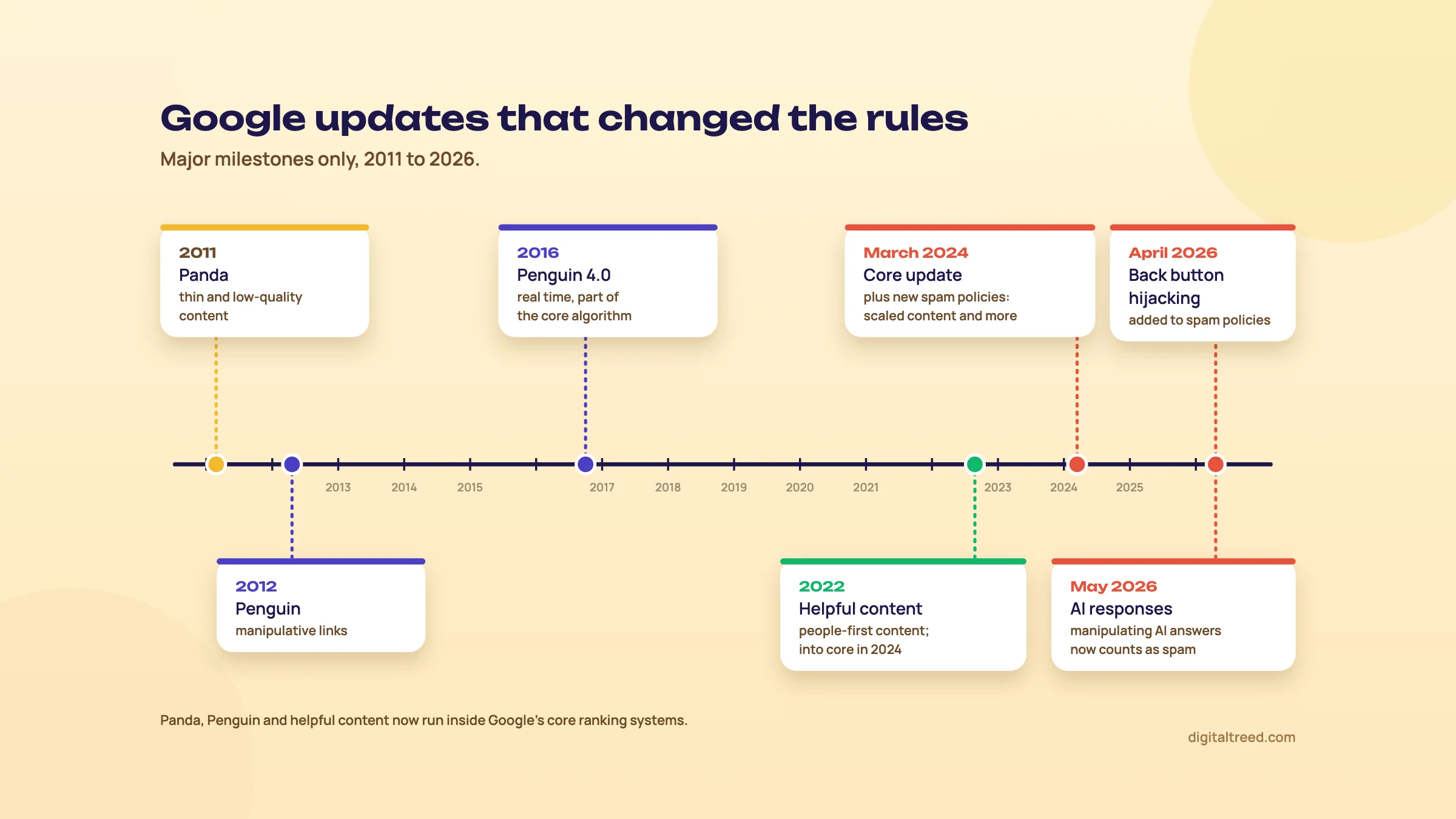 The major Google updates and spam policy changes, 2011 to 2026.
| Date | Update | What it did |
|---|---|---|
| 24 Feb 2011 | Panda | Lowered low-quality and copied content; Google said it noticeably affected 11.8% of queries (US)[107] |
| 24 Apr 2012 | Penguin | Targeted webspam and link schemes[108] |
| 23 Sep 2016 | Penguin 4.0 | Penguin became part of core, real-time and more granular[104] |
| 1 Aug 2018 | Broad core update ("Medic") | Large core update; so many health sites moved that Barry Schwartz nicknamed it "Medic", though plenty of other sites moved too[109] |
| 25 Aug 2022 | Helpful content update | A site-wide classifier against search-engine-first content[110] |
| 14 Dec 2022 | Link spam update | SpamBrain used to neutralise unnatural links[105] |
| 5 Mar 2024 | March 2024 core and spam updates | Helpful content folded into core; three new spam policies; the core update took 45 days. Google later said results showed "45% less low-quality, unoriginal content"[111] |
| 19 Nov 2024 | Site reputation abuse clarified | First-party involvement or oversight doesn't make third-party abuse acceptable[112] |
| 11 Dec 2025 | December 2025 core update | About 18 days; the core updates guide now mentions smaller, unannounced core updates |
| 5 Feb 2026 | Discover core update | The first core update for Discover only |
| 27 Mar 2026 | March 2026 core update | About 12 days, three days after a spam update that ran under a day |
| 21 May 2026 | May 2026 core update | About 12 days |
| 15 Jun 2026 | Back button hijacking enforced | New malicious practices rule[100] |
| 24 Sep 2026 | September 2026 spam update | About 14 days, the third spam update since June |
2026 has had fewer announced core updates and more spam updates, with smaller core updates unannounced in between. Annotate every Dashboard entry in Search Console (chapter 11 shows how).
Reading a traffic drop the way Google suggests
Google's core updates guide is more careful than most agency advice. Wait "at least a full week after a core update completes", then compare that week with a week before the update started.[99] Its examples: a fall from position 2 to 4 is small and needs no drastic action; 4 to 29 calls for a deeper look.
Some changes take effect in a few days, others take several months, sometimes not until the next core update, and nothing is guaranteed. On the usual panic move: "Deleting content is a last resort".
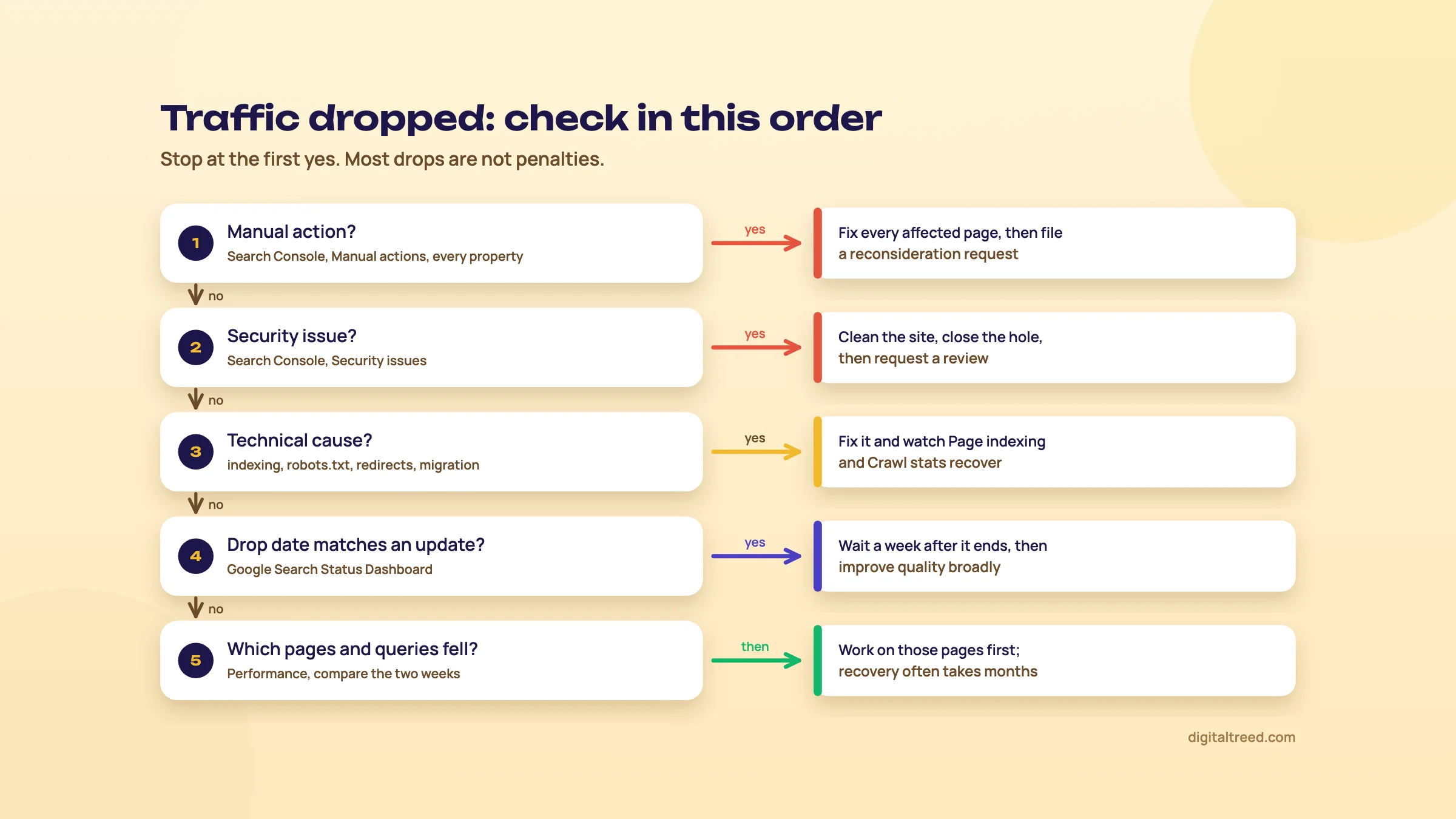 Diagnose a traffic drop in this order and stop at the first yes.
Diagnose a traffic drop in Search Console
- Check Manual actions In every property: www, non-www and subdomains.
- Check Security issues Hacked content and malware show here, not in Manual actions.
- Rule out technical causes A jump in not-indexed pages, robots.txt changes, noindex on templates, redirects after a release. Run our Free Website Audit on key templates.
- Match the date Compare the first day of the drop with the Dashboard. A drop the day after a deploy is your deploy.
- Wait for the rollout to finish Then wait one more full week.
- Compare two weeks In Performance, compare the week after with the week before. Export Pages and Queries.
- Group the losses By template and folder. A whole folder falling points to a section problem; scattered queries to relevance shifts.
- Search the queries yourself See who now ranks and what they offer that you don't. That's your brief.
For step 3, also use the HTTP Status Checker, Noindex Tag Checker, Robots.txt Tester and SSL Checker. On a hacked site, the Meta Tag Analyzer often shows injected spam in titles first. For old keyword-heavy pages, try the Word Counter & Keyword Density Checker.
How practitioners recover
Glenn Gabe's delta report. Gabe compares impressions, clicks or rankings before and after "any event impacting Search", by landing page and by query, to find the biggest drops and gains.[113] He pulls the data through the Search Console API because the interface "limits exports to just one thousand rows". Chapter 11 shows how to automate it. Then comes what he calls a "kitchen sink" approach to remediation: surface every potential problem affecting the site and fix as many as you can, not one fix you hope is the right one.[114]
Again, it works until it doesn't…[115]
Marie Haynes's four sites. Guide 2 (chapter 5) describes the four sites Haynes saw do well in the December 2025 core update: credentialed authors, products actually bought and tested, better navigation, checkout and customer service, and one city guide that only partly recovered.[79] Her timing is the part to remember: it "generally takes a year or more of hard work and even then, recovery is not guaranteed."
HouseFresh. The independent air purifier review site wrote in May 2024 that its Google visitors fell from 4,000 a day in October 2023 to 200, and that the March 2024 core update alone cost it 91% of its search traffic.[116] A useful site can still lose, and not every site comes back.
ShoutMeLoud, closer to home. Guide 1 (chapter 3) tells how Harsh Agrawal's blog lost much of its organic traffic to Panda in 2012 and came back after he spent about eight months learning SEO properly.[117]
Cyrus Shepard of Zyppy compared more than 400 sites that won or lost Google traffic over 12 months (April 2026). The winners were more likely to sell a product or service, let users complete a task, or own something hard to copy, such as data or tools.[118] It's a correlation, but it fits Haynes's cases.
What not to do after a drop
Do not
- Delete hundreds of posts in the first week. Google calls deletion a last resort.
- Change publish dates without real changes. Google's helpful content guidance warns against it.[119]
- Buy links to "recover". You'd be trading an algorithmic problem for a link spam one.
- File a reconsideration request without a manual action. There's nothing to reconsider.
- Disavow everything a tool marks "toxic".
Do
- Check manual actions and security issues in every property first.
- Rule out technical causes before blaming the update.
- Wait a full week after the rollout, then compare weeks.
- Group losses by template and folder, and read the pages that replaced you.
- Fix trust signals: authors, contact details, reviews, customer service.
Not sure whether you're looking at a technical problem or an update? Start with the Free Website Audit to rule out the technical causes, and if you'd like a second pair of eyes on the drop, our SEO service covers update diagnosis. Chapter 11 turns all of this into a full audit you can repeat every quarter.
A full SEO audit step by step, and automating at scale
Quick answer
A full SEO audit checks, in order: access and indexing, crawl health, rendering, page experience, on-page and content, structured data, international and programmatic pages, links, AI visibility and spam risk. Start with our Free Website Audit and Search Console, crawl the site, then rank every finding by impact and effort. The output is a fix list with owners, not a 90-page PDF.
Most audits fail after they're delivered. The crawler finds 4,000 "issues", someone exports them into a long report, and six months later nothing has changed because nobody knew which ten mattered. A good audit is boring at the end: a short list of fixes, grouped by template, each with an owner and a date.
This chapter gives you the order we'd follow, the tools for each step (free first), how to prioritise, and how to automate the parts that repeat. Every step points back to the chapter of this guide that explains the detail.
Note
From our work: teaching technical SEO. When I taught SEO from A to Z at a training institute, my students were already doing client work. They saw results in two to three weeks. What they found hardest was technical SEO, because the local business sites they worked on mostly ran WordPress on shared hosting, and the problem that came up most often was site speed. The lesson: on a typical Indian small-business site, expect the audit's biggest technical finding to be speed, and check the hosting before you blame the theme.
Before you start: scope and a baseline
Write down three things before you open a crawler: what the site sells or publishes, which pages make money (the templates you'll test first), and what changed recently (a redesign, a new plugin, a migration, a drop). Then get access: owner or full user in Search Console for every property, GA4, the CMS, and ideally the hosting panel or CDN.
Export the Search Console Performance data for the full 16 months it keeps, by page and by query, so you have a baseline that won't roll off. Then add annotations to the performance chart (Guide 2, chapter 11 shows how).[52] Add every core and spam update from the Search Status Dashboard and every release you know of. When you read the charts later, causes sit next to effects.
Finally, check Google's three technical requirements on your key templates: Googlebot isn't blocked, the page returns HTTP 200, and the page has indexable content.[120] If any of those fails, stop the audit and fix it. Nothing else matters until it does.
The audit, in 14 steps
Run a full SEO audit
- Scope and baseline Goals, access, 16 months of Search Console data exported, update dates annotated.
- Quick health check Run our Free Website Audit on the home page, then the SSL Checker, Robots.txt Tester and AI Crawler Checker.
- Indexing Search Console Page indexing report, URL Inspection on one URL per key template, Sitemaps report. Check every property and hostname (chapters 1 and 4).
- Crawl Crawl the site with Screaming Frog or Sitebulb. Look at status codes, redirect chains, canonicals, noindex, orphan pages and click depth (chapters 1, 4 and 5).
- Rendering Compare raw and rendered HTML for each template: content, links, canonical and robots tags (chapter 2).
- Page experience Search Console Core Web Vitals report for field data, PageSpeed Insights per template, our Website Speed Test (chapter 3).
- On-page and content Titles and descriptions (Meta Tag Analyzer), thin and duplicate pages, cannibalisation (chapter 4), content decay (Guide 2).
- Structured data Schema Markup Validator, Rich Results Test, the rich result reports in Search Console (chapter 7).
- International and programmatic hreflang return links and codes, indexed share per template (chapter 9).
- Links Search Console Links report, Ahrefs Free for your own site. Review spam links only if there's a manual action or a history of buying them (chapter 10).
- AI visibility AI crawler access by purpose (chapter 8); the generative AI report in Search Console and AI Performance in Bing Webmaster Tools (Guide 5).
- Spam and security risk Manual actions and Security issues in every property, back button behaviour of ad scripts, UGC spam, third-party sections against site reputation abuse (chapter 10).
- Prioritise Score impact and effort, group by template, write the fix list with an owner and a due date.
- Re-audit A light check every month, a full crawl every quarter, and a delta report after every big release or update.
Step 2: what our Free Website Audit does, and what it doesn't
We built the audit as the first five minutes of this process. It scores ten areas: security, on-page SEO, speed, AI visibility, off-page, lead readiness, email delivery, local SEO, social and schema, and accessibility and trust. It checks the home page in depth. It also crawls up to 25 pages from the same host, sitemap first, while respecting robots.txt, to catch broken links, duplicate titles, missing descriptions and H1s, and images without alt text. Speed comes from Google's PageSpeed data, so LCP, INP and CLS are field-based where Google has field data.
The most useful part is the action plan. Each failed check is listed with how many points it adds to the overall score. It's also marked as a quick job (a tag, a DNS record, a link), a medium one or a big one (speed, authority, reviews). That's an impact and effort score before you've opened a spreadsheet.
What it doesn't do: crawl the whole site, render JavaScript page by page, read your Search Console data or logs, or check hreflang. Those are steps 3 to 9. Think of it as triage, not the audit.
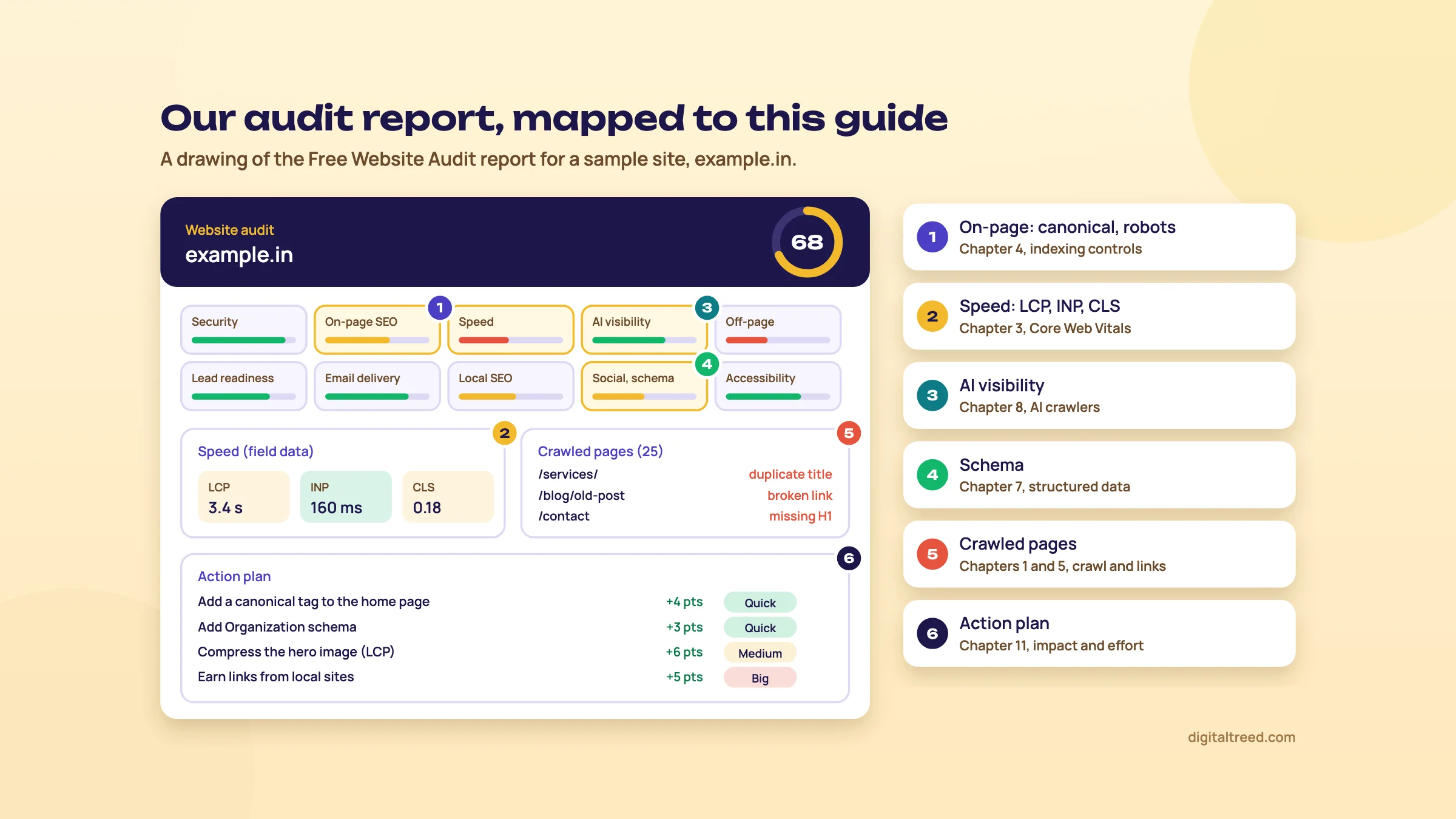 Each part of our audit report and the chapter that explains it. An example we drew for a sample site.
Steps 3 to 6: indexing, crawl, rendering, speed
Indexing first, crawl second. Search Console tells you what Google actually did; a crawler tells you what's possible. Start with the Page indexing report and sort the reasons by count. "Crawled - currently not indexed" on product pages and "Duplicate, Google chose different canonical than user" on filter URLs are usually where the money is. Then inspect one URL per template. Check every hostname as a property, as Glenn Gabe's April 2026 case in chapter 10 showed: the problem was on a www property the client wasn't watching.[65]
Configure the crawl before you run it. Crawl as a smartphone user agent, and respect robots.txt on the first run (do a second run ignoring it if you suspect blocked resources). Connect the Search Console and GA4 APIs so orphan pages show up, and set a sensible speed limit on shared hosting so you don't take the site down. For WordPress shops, exclude the obvious traps (?add-to-cart=, ?orderby=, /feed/) or you'll crawl 50,000 URLs to learn about 800 products.
Rendering by template, not by URL. Pick one URL per template and compare view-source with the rendered DOM in URL Inspection's live test. You're looking for anything that exists only after JavaScript: main content, internal links, the canonical, a noindex that gets removed. On a headless React or Next.js storefront, this step often finds the biggest problem in the audit.
Speed from field data. The Core Web Vitals report and the field section of PageSpeed Insights use real Chrome users over the last 28 days at the 75th percentile.[25] The Lighthouse score underneath is a lab test. Use it to find causes, not to report progress. Our Website Speed Test gives a quick lab-style reading per URL (timings, page weight, requests), with no field data.
The free checks for these steps: HTTP Status Checker (status codes, every redirect hop and response headers for up to 10 URLs at once), Canonical Tag Checker, Noindex Tag Checker and Robots.txt Tester. Our free XML Sitemap Validator checks the sitemap and a sample of its URLs. We don't have our own broken link, internal link, hreflang or log file tools yet; until we do, use a crawler for links, Search Console's Sitemaps report, and Screaming Frog's Log File Analyser for logs.
Steps 7 to 12: content, schema, links, AI and spam
For content, export titles, word counts and the Search Console clicks per URL into one sheet. Pages with zero clicks in 16 months and fewer than a few hundred words are your thin-content list. Two URLs taking turns for one query are your cannibalisation list. Run the top templates through the Meta Tag Analyzer and, where old pages look keyword-heavy, the Word Counter & Keyword Density Checker.
For structured data, use our Schema Markup Validator for schema.org validity and Google's Rich Results Test for what Google will actually show. Then look at Search Console's rich result reports, which show errors across every page of a template, not just the one you tested.
Links get a short step. Look at the Search Console Links report and Ahrefs Free, which is free for verified sites with 5,000 crawl credits per project a month and up to 1,000 backlinks visible at once.[62] You're checking that the right pages get links and that nothing odd is pointing at you. Skip the "toxic links" export unless chapter 10's conditions for a disavow apply. For the links on your own pages, our free Broken Link Checker lists every dead one and every one that redirects, with the page, the anchor text and a redirect sheet; our free Internal Link Checker shows the links in and out of every page, the orphans against the sitemap and the click depth.
For AI visibility, run the AI Crawler Checker and read robots.txt by purpose: search bots such as OAI-SearchBot allowed, training bots by your own choice (chapter 8). Search Console's generative AI report shows impressions, not clicks, and has been available to all sites since 31 August 2026.[121] Bing Webmaster Tools has shown AI citations in its AI Performance report since February 2026.[122] Guide 5 covers what to do with those numbers.
The spam step is a checklist: Manual actions and Security issues in every property; a phone test of the back button on pages with ads; UGC areas for spam profiles and comment links; and any section written or sold by a third party, checked against site reputation abuse. The SSL Checker belongs here too, since an expired certificate on a forgotten subdomain is how some hacks start.
Choosing a crawler: Screaming Frog, Sitebulb or your suite
You'll need a crawler for any site bigger than our audit's 25 pages. Here's how the main options compare. Prices were checked on vendor pages on 16 October 2026, exclude tax, and change often. We have no affiliate deal with any of them.
| Screaming Frog SEO Spider | Sitebulb | Ahrefs Free Site Audit | Semrush Site Audit | |
|---|---|---|---|---|
| Price | Free to 500 URLs; £199 per licence a year[13] | 14-day free trial; Lite £12.50 and Pro £30 a month (one user), Cloud from £95 a month[14] | Free for verified sites | Inside paid plans from $139 a month; free plan very limited[123] |
| Crawl size | Unlimited on a licence (memory-bound) | Lite 10,000 URLs per audit; Pro 500,000[14] | 5,000 crawl credits per project a month | 20,000 pages per audit and 100,000 a month on the $139 plan; 100 pages a month free[124] |
| Runs on | Windows, macOS, Linux desktop | Desktop or cloud | Cloud | Cloud |
| Strength | Raw data, custom extraction, JavaScript rendering, command line and scheduling | Prioritised hints, crawl maps, client-ready reports | Zero cost for your own sites | One bill with keyword and competitor data |
| Weak spot | Steep learning curve; you do the prioritising | Less raw flexibility | Own sites only, crawl cap | Expensive if you only need audits |
Pros
- Screaming Frog: our pick for hands-on technical SEOs and developers, and for anything you want to automate
- Sitebulb: the better pick if you audit for clients and need explained, ranked findings
- Ahrefs Free and Bing Webmaster Tools' Site Scan: good free second opinions on your own sites
Cons
- Any crawler: shows what's possible to crawl, not what Google did; pair it with Search Console
- Suite audits: issue counts and health scores that look precise and often aren't
- All of them: will flag hundreds of low-value "issues" you should ignore
If you're starting out, run the free Screaming Frog crawl and a Sitebulb trial on the same site; you'll soon see which one suits you. Bing Webmaster Tools' Site Scan is free and worth adding as a second opinion from another search engine.[125] Aleyda Solis also offers a free SEO auditing bundle of checklists to SEOFOMO newsletter subscribers.[126]
Step 13: prioritise by impact and effort
Every finding gets two scores, 1 to 3. Impact: how many indexable pages or how much revenue it touches, and how directly it blocks crawling, indexing or ranking. Effort: developer hours, sign-offs, risk. Then group by template. "Product pages have no canonical" is one fix on one template, even if the crawler lists it 3,000 times.
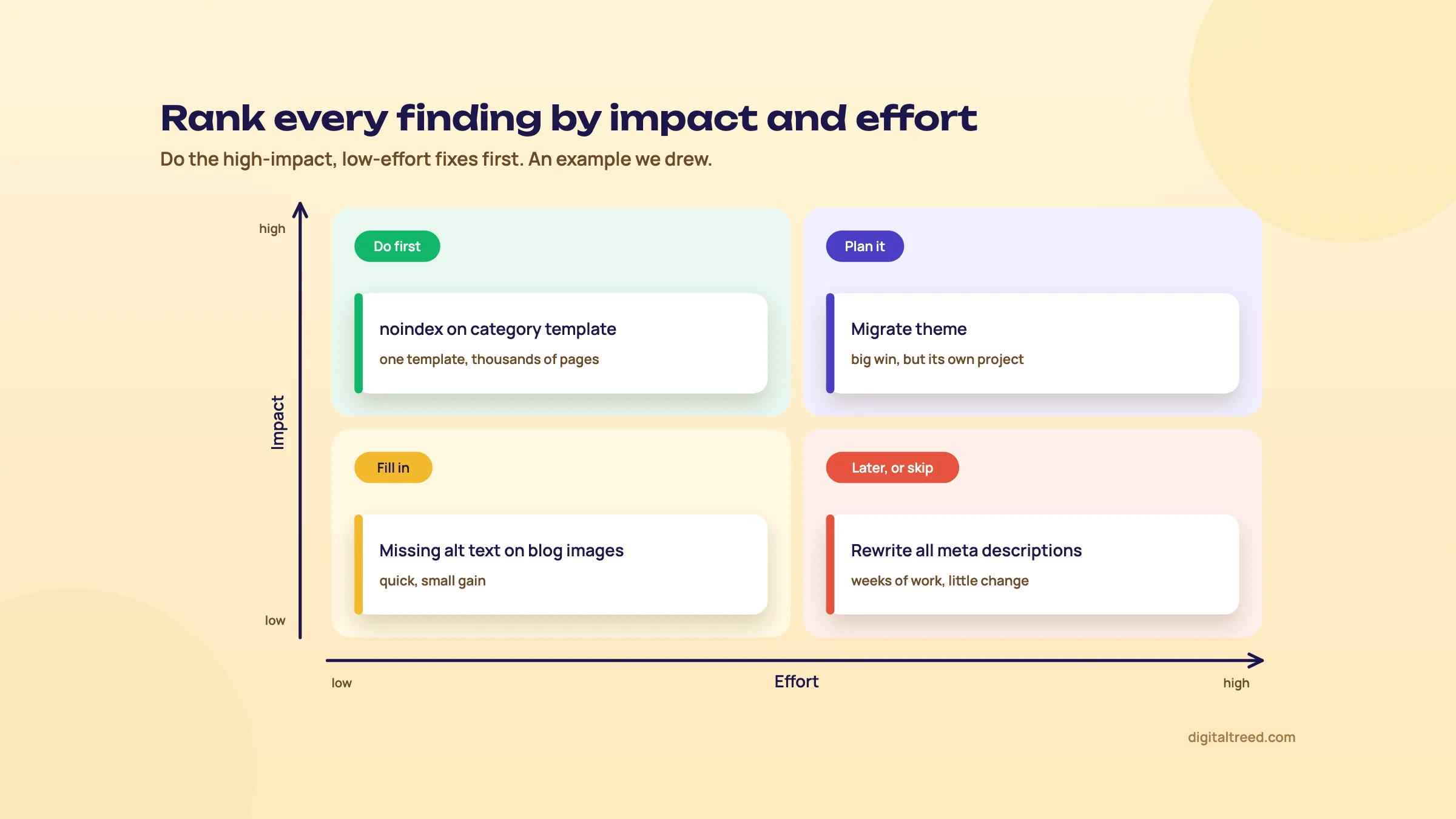 Do the high-impact, low-effort fixes first.
| Finding | Template | Pages | Impact | Effort | Owner | Due |
|---|---|---|---|---|---|---|
| Filter URLs indexable, canonical points to self | Category | 12,400 | 3 | 1 | Developer | Week 1 |
| LCP 4.1 s on mobile (hero image 900 KB) | Product | 820 | 3 | 2 | Developer | Week 2 |
| Redirect chains of 3 hops from old URLs | All | 1,150 | 2 | 1 | Developer | Week 1 |
| Two guides competing for one query | Blog | 2 | 2 | 1 | Editor | Week 1 |
| Product schema missing price on variants | Product | 820 | 2 | 2 | Developer | Week 3 |
| Thin tag pages, zero clicks in 16 months | Tag | 640 | 1 | 1 | Editor | Week 4 |
That's a sample with made-up figures, to show the shape. Sort by impact minus effort, do the 3-and-1s first, and put the big projects (a new theme, a migration) on their own plan. Our Free Website Audit's quick, medium and big labels map straight onto the effort column.
Automating at scale
On a 300-page site you can do all of this by hand. On a marketplace with two million URLs in Hindi and English, you can't. Five things are worth automating first.
1. Search Console data through the API. The interface shows and exports 1,000 rows. The Search Analytics API returns up to 25,000 rows per request (the default is 1,000), and you page through the rest with startRow.[127] A request for one month of pages and queries looks like this:
POST https://www.googleapis.com/webmasters/v3/sites/sc-domain%3Aexample.in/searchAnalytics/query
{
  "startDate": "2026-09-01",
  "endDate": "2026-09-30",
  "dimensions": ["page", "query"],
  "type": "web",
  "rowLimit": 25000,
  "startRow": 0
}
Glenn Gabe's delta report from chapter 10 is built this way: he pulls page data for two periods through the API (with the Analytics Edge add-in for Excel), and keeps the difference columns for clicks, impressions, CTR and position. Then he sorts by clicks and splits the result into sheets for folders such as /category/, /products/ and /blog/.[113] In August 2026 he described the next step: export all queries through the API, put them in a spreadsheet, and ask an AI assistant to flag the ones that look like AI Mode prompts, then review the list by hand.[128]
2. Scheduled crawls. Screaming Frog can schedule crawls inside the app and run headless from the command line, saving the crawl and exporting the tabs you choose.[129] A weekly crawl that exports 4xx errors and canonical mismatches catches most release mistakes within days:
ScreamingFrogSEOSpiderCli.exe --crawl https://www.example.in --headless --save-crawl --output-folder "D:\audits\weekly" --export-tabs "Internal:All,Response Codes:Client Error (4xx)"3. Lighthouse CI in the deploy pipeline. Lighthouse CI runs Lighthouse on every build and can fail the build when a page gets slower than the budget you set.[130] Lab numbers aren't Core Web Vitals, but a CI check stops a 2MB hero image or a new tag manager container from reaching production unnoticed.
4. Reporting in Data Studio. Connect Search Console and GA4 to Data Studio (formerly Looker Studio) once, as Guide 2 shows, and the monthly audit summary updates itself.[131]
5. IndexNow on publish. As chapter 1 explained, IndexNow tells Bing, Naver, Seznam, Yandex and Yep that a URL was added, changed or deleted, up to 10,000 URLs in one request. Google doesn't use it.[15] Rank Math and several CDNs can send pings for you, which matters for sites where prices and stock change daily.
AI assistants are good at the glue: regex for Search Console filters, spreadsheet formulas, a first draft of JSON-LD, sorting a query export into themes. They aren't a data source. Don't ask one for search volumes or keyword difficulty. And whatever an assistant writes for publication, Google's guidance from chapter 9 applies: review and fact-check it by hand before publishing, titles, meta descriptions, structured data and image alt text included.[81] If your automation writes meta descriptions at scale, a person reviews them before they go live.
Which tool when
| Audit area | Our free tool | Google or Bing tool | Crawler or paid suite |
|---|---|---|---|
| Quick health check | Free Website Audit, SSL Checker | Search Console overview | Ahrefs Free Site Audit |
| Crawl access | Robots.txt Tester | robots.txt report, URL Inspection | Screaming Frog, Sitebulb |
| Indexing | Noindex Tag Checker, Canonical Tag Checker | Page indexing, Sitemaps | Screaming Frog with the Search Console API |
| Status codes and redirects | HTTP Status Checker | URL Inspection | Screaming Frog, Sitebulb |
| Rendering | (not yet) | URL Inspection live test, Rich Results Test | Screaming Frog or Sitebulb with JavaScript rendering |
| Speed | Website Speed Test | Core Web Vitals report, PageSpeed Insights | Lighthouse CI |
| On-page | Meta Tag Analyzer, Word Counter & Keyword Density Checker | Performance report | Screaming Frog, Semrush Site Audit |
| Structured data | Schema Markup Validator | Rich Results Test, rich result reports | Screaming Frog structured data validation |
| Links | Hyperlink Generator (for fixing link markup) | Links report, Bing backlinks | Ahrefs, Semrush |
| AI visibility | AI Crawler Checker | Generative AI report, Bing AI Performance | Guide 5 covers paid trackers |
| Spam and security | Free Website Audit (security area) | Manual actions, Security issues | (none needed) |
| Logs | (not yet) | Crawl stats report | Screaming Frog Log File Analyser |
Not every row needs a paid tool, and on most small business sites none do. Paid suites earn their cost when you audit many sites, need competitor data, or crawl beyond what the free tiers allow.
Step 14: re-audit on a schedule
Once a month, run the Free Website Audit, look at Search Console's Page indexing and Core Web Vitals reports, and read the manual actions and security pages in every property. Once a quarter, run the full crawl and the 14 steps again, and compare the fix list with last quarter's. After every big release, migration or Google update, run a delta report. The Advanced SEO checklist PDF for this guide covers the same ground for the quarterly run.
That's the guide. If you'd rather hand the audit and the fixes to us, see our SEO service and our content marketing service, or get a quote. Then take the 10-question quiz below to check what stuck.
Test yourself
Ten questions on the whole guide. Pick an answer, check it, and see your score at the end.
You got 0 of 10 right.
Frequently asked questions
Frequently asked
What is technical SEO?
Technical SEO is the work that lets search engines crawl, render, index and serve your pages without trouble: robots.txt and sitemaps, status codes and redirects, canonicals, JavaScript rendering, speed and Core Web Vitals, mobile versions and structured data. Google's minimum is simple: Googlebot isn't blocked, the page returns HTTP 200, and it has indexable content. Everything else in technical SEO builds on those three.
Should I block GPTBot?
It's your choice, and it does less than people think. Blocking GPTBot tells OpenAI not to use your content to train its models. It doesn't remove you from ChatGPT search, which uses a separate crawler, OAI-SearchBot. OpenAI treats the two settings independently, so you can block GPTBot and still allow OAI-SearchBot.
How long does recovery take after a core update?
Usually months. Google's core updates guide says some changes take effect in a few days but it could take several months, and sometimes not until the next core update, with no guarantee. Google also runs smaller, unannounced core updates between the big ones, so improvements can show earlier. Marie Haynes, who works on recoveries, says it generally takes a year or more of hard work.
What are the Core Web Vitals thresholds in 2026?
Largest Contentful Paint (LCP) of 2.5 seconds or less, Interaction to Next Paint (INP) of 200 milliseconds or less, and Cumulative Layout Shift (CLS) of 0.1 or less. Each is measured on real users at the 75th percentile of page loads, separately for mobile and desktop. A page passes when all three are good.
Do Core Web Vitals affect rankings?
Yes, as one signal among many. Google says Core Web Vitals are used by its ranking systems and that there's no single page experience signal. It also says it always seeks to show the most relevant content, even when the page experience is sub-par. A fast page with weak content won't outrank a slow page that answers the search better. Fix them because they help users and conversions, and treat any ranking gain as a bonus.
How long should I keep 301 redirects after a migration?
As long as possible, and generally at least a year, says Google's site move guide. That gives Google time to recrawl and pass signals, including links on other sites, to the new URLs. For users, Google suggests keeping redirects indefinitely. Meanwhile, update your own internal links and your most important external links to the new URLs, because redirects slow people down.
Does structured data help rankings or AI Overviews?
Not directly. Structured data helps Google understand a page and makes it eligible for rich results, if the markup matches what's visible on the page. Google's guide to its generative AI features says you don't need any special schema.org markup to appear in AI Overviews or AI Mode. Add it for the rich results it still earns, such as products, reviews and breadcrumbs.
Is programmatic SEO spam?
Not by itself. Generating pages from a database is fine when each page has unique, useful data a visitor wants, such as real prices, stock, timetables or specifications. It becomes scaled content abuse when the pages exist mainly to rank and add little value, for example thousands of city pages where only the name changes. Google applies that policy however the pages are produced.
How do I know if I have a Google penalty?
Open Search Console and check Manual actions, and Security issues, in every property you own, including www, non-www and subdomains. A manual action is listed there and also sent by email. If there's nothing listed, any drop is algorithmic or technical: check indexing and recent releases first, then compare the dates with Google's Search Status Dashboard.
How do I do a technical SEO audit?
Follow a fixed order: baseline and access, a quick health check with our Free Website Audit, indexing in Search Console, a full crawl, rendering, page experience, on-page, structured data, international and programmatic pages, links, AI crawler access and spam risk. Then score each finding by impact and effort, group fixes by template, and give each one an owner and a date. Repeat the crawl every quarter.
Sources
References
- Optimizing your website for generative AI features on Google Search, Google Search Central, 15 May 2026, updated 10 Jul 2026, accessed 16 Oct 2026
- Inside Googlebot: demystifying crawling, fetching, and the bytes we process, Google Search Central blog, Gary Illyes, 31 Mar 2026, accessed 16 Oct 2026
- Latest Google Search documentation updates, Google Search Central, accessed 16 Oct 2026
- Googlebot, Google Search Central, updated 3 Feb 2026, accessed 16 Oct 2026
- Crawl budget management for large sites, Google Crawling Infrastructure docs, updated 22 Jul 2026, accessed 16 Oct 2026
- How Google interprets the robots.txt specification, Google Crawling Infrastructure docs, updated 31 Aug 2026, accessed 16 Oct 2026
- Introduction to robots.txt, Google Search Central, updated 10 Dec 2025, accessed 16 Oct 2026
- Build and submit a sitemap, Google Search Central, updated 8 Jul 2026, accessed 16 Oct 2026
- Crawl Stats report, Search Console Help, accessed 16 Oct 2026
- Logpush pricing, Cloudflare Docs, updated 12 Oct 2026, accessed 16 Oct 2026
- Verifying requests from Google's crawlers and fetchers, Google Crawling Infrastructure docs, updated 20 Mar 2026, accessed 16 Oct 2026
- SEO Log File Analyser, Screaming Frog, accessed 16 Oct 2026
- SEO Spider pricing, Screaming Frog, accessed 16 Oct 2026
- Sitebulb pricing, Sitebulb, accessed 16 Oct 2026
- IndexNow documentation, IndexNow.org, accessed 16 Oct 2026
- Bing Webmaster Guidelines, Microsoft Bing, accessed 16 Oct 2026 (read in a browser), accessed 16 Oct 2026
- Understand JavaScript SEO basics, Google Search Central, updated 4 Mar 2026, accessed 16 Oct 2026
- How Google handles JavaScript throughout the indexing process, Vercel and MERJ, Giacomo Zecchini, Alice Alexandra Moore, Ryan Siddle, Malte Ubl, 31 Jul 2024, accessed 16 Oct 2026
- The new evergreen Googlebot, Google Search Central blog, Martin Splitt, 7 May 2019, accessed 16 Oct 2026
- How to specify a canonical URL with rel="canonical" and other methods, Google Search Central, updated 10 Jul 2026, accessed 16 Oct 2026
- Dynamic rendering as a workaround, Google Search Central, accessed 16 Oct 2026
- The rise of the AI crawler, Vercel, Giacomo Zecchini, Alice Alexandra Moore, Malte Ubl, Ryan Siddle, 17 Dec 2024, accessed 16 Oct 2026
- Overview of OpenAI crawlers, OpenAI, accessed 16 Oct 2026
- Traffic from ChatGPT jumped! Is it because its crawlers now run JavaScript?, DEV Community, hisashispace, late September 2026 (one developer's logs; not confirmed by OpenAI), accessed 16 Oct 2026
- About PageSpeed Insights, Google for Developers, accessed 16 Oct 2026
- Web Vitals, web.dev, updated 31 Oct 2024, accessed 16 Oct 2026
- Introducing INP to Core Web Vitals, Google Search Central blog, Martin Splitt, 10 May 2023, accessed 16 Oct 2026
- Interaction to Next Paint is officially a Core Web Vital, web.dev blog, 12 Mar 2024, accessed 16 Oct 2026
- Core Web Vitals report, Search Console Help, accessed 16 Oct 2026
- Understanding Core Web Vitals and Google search results, Google Search Central, updated 10 Dec 2025, accessed 16 Oct 2026
- Understanding page experience in Google Search results, Google Search Central, updated 22 Sep 2026, accessed 16 Oct 2026
- We analyzed 11.8 million Google search results, Backlinko, updated 14 Apr 2025, accessed 16 Oct 2026
- Web Almanac 2025: Performance, HTTP Archive, 15 Jan 2026 (updated 5 May 2026), accessed 16 Oct 2026
- Optimize Largest Contentful Paint, web.dev, Philip Walton and Barry Pollard, updated 31 Mar 2025, accessed 16 Oct 2026
- Optimize Interaction to Next Paint, web.dev, Jeremy Wagner, Philip Walton and Barry Pollard, updated 2 Sep 2025, accessed 16 Oct 2026
- Optimize long tasks, web.dev, Jeremy Wagner and Brendan Kenny, updated 19 Dec 2024, accessed 16 Oct 2026
- Optimize Cumulative Layout Shift, web.dev, Addy Osmani and Barry Pollard, updated 7 Feb 2025, accessed 16 Oct 2026
- Mobile-first indexing has landed, Google Search Central blog, John Mueller and Nir Kalush, 31 Oct 2023, accessed 16 Oct 2026
- Mobile site and mobile-first indexing best practices, Google Search Central, updated 10 Dec 2025, accessed 16 Oct 2026
- Desktop vs Mobile vs Tablet Market Share India, StatCounter Global Stats, Jul to Sep 2026, accessed 16 Oct 2026
- How HTTP status codes affect Google's crawlers, Google Crawling Infrastructure docs, updated 4 Feb 2026, accessed 16 Oct 2026
- Page indexing report, Search Console Help, accessed 16 Oct 2026
- How soft 404s and indexing issues caused a 90% traffic collapse, Search Engine Land, Mikael Araújo, 12 May 2026 (read via the Wayback Machine), accessed 16 Oct 2026
- Redirects and Google Search, Google Search Central, updated 14 Apr 2026, accessed 16 Oct 2026
- Site moves with URL changes, Google Search Central, updated 20 Aug 2026, accessed 16 Oct 2026
- In-depth guide to how Google Search works, Google Search Central, updated 18 Dec 2025, accessed 16 Oct 2026
- SEO Starter Guide, Google Search Central, updated 10 Dec 2025, accessed 16 Oct 2026
- Block Search indexing with noindex, Google Search Central, updated 10 Dec 2025, accessed 16 Oct 2026
- Robots meta tag, data-nosnippet, and X-Robots-Tag specifications, Google Search Central, updated 24 Mar 2026, accessed 16 Oct 2026
- Tell Google about localized versions of your page, Google Search Central, accessed 16 Oct 2026
- A guide to Google Search ranking systems, Google Search Central, accessed 16 Oct 2026
- Adding context to your Search Console data with custom annotations, Google Search Central blog, Daniel Waisberg and Tsahi Edri, 17 Nov 2025, accessed 16 Oct 2026
- How to spin a bad site migration into higher traffic and conversions, Search Engine Land (Merkle), 26 Jun 2019 (read via the Wayback Machine), accessed 16 Oct 2026
- Link best practices for Google, Google Search Central, updated 10 Dec 2025, accessed 16 Oct 2026
- SEO study: internal links, Zyppy, Cyrus Shepard, updated 23 Feb 2026, accessed 16 Oct 2026
- Topical Authority (research study), Koray Tuğberk Gübür, 11 Feb 2021, updated 24 Nov 2022, accessed 16 Oct 2026
- How to find orphan pages, Screaming Frog, accessed 16 Oct 2026
- Pagination, incremental page loading, and their impact on Google Search, Google Search Central, updated 10 Dec 2025, accessed 16 Oct 2026
- Managing crawling of faceted navigation URLs, Google Crawling Infrastructure docs, updated 18 Dec 2025, accessed 16 Oct 2026
- Breadcrumb (BreadcrumbList) structured data, Google Search Central, updated 8 Sep 2026, accessed 16 Oct 2026
- Change of Address tool, Search Console Help, accessed 16 Oct 2026
- Ahrefs Free (formerly Ahrefs Webmaster Tools), Ahrefs, accessed 16 Oct 2026
- Bing WMT launches Site Move tool, Bing Webmaster Blog, 15 Mar 2013 (Wayback Machine copy; the live page is gone), accessed 16 Oct 2026
- Domain move tool (Microsoft Tech Community discussion), Microsoft Tech Community, Feb 2021, accessed 16 Oct 2026
- Deindexed, Delayed, and Down: Investigating a site's removal from Google before a delayed manual action arrived [Case Study], GSQi, Glenn Gabe, 14 Apr 2026, accessed 16 Oct 2026
- Recovering your organic traffic after a web migration gone wrong (Crawling Mondays, episode 6), Aleyda Solis, 5 Feb 2019, accessed 16 Oct 2026
- SEO for web migrations, Aleyda Solis, 2 Apr 2021, accessed 16 Oct 2026
- CMS Migration for SEOs (webinar with Kristina Azarenko), Sitebulb (Wayback Machine copy, 12 Nov 2025), accessed 16 Oct 2026
- Structured data markup that Google Search supports (search gallery), Google Search Central, updated 15 Jun 2026, accessed 16 Oct 2026
- Changes to HowTo and FAQ rich results, Google Search Central blog, John Mueller, 8 Aug 2023, accessed 16 Oct 2026
- Simplifying the search results page, Google Search Central blog, 12 Jun 2025, accessed 16 Oct 2026
- AI features and your website, Google Search Central, updated 10 Dec 2025, accessed 16 Oct 2026
- General structured data guidelines, Google Search Central, updated 10 Jul 2026, accessed 16 Oct 2026
- Generate structured data with JavaScript, Google Search Central, accessed 16 Oct 2026
- About knowledge panels, Google Search Help, accessed 16 Oct 2026
- Get verified on Google (claim a knowledge panel), Google Search Help, accessed 16 Oct 2026
- Organization structured data, Google Search Central, updated 8 Sep 2026, accessed 16 Oct 2026
- From query to condition, Jono Alderson, 27 Sep 2026, accessed 16 Oct 2026
- The December 2025 core update: observations on 4 sites that did well, Marie Haynes, 20 Feb 2026, accessed 16 Oct 2026
- Knowledge Graph Search API, Google for Developers, updated 26 Apr 2024, accessed 16 Oct 2026
- Using generative AI content, Google Search Central, updated 1 Oct 2026, accessed 16 Oct 2026
- Perplexity crawlers, Perplexity, accessed 16 Oct 2026
- Does Anthropic crawl data from the web, and how can site owners block the crawler?, Anthropic Help Center, 7 Apr 2026, accessed 16 Oct 2026
- Google's common crawlers (Google-Extended), Google Crawling Infrastructure docs, updated 15 Oct 2026, accessed 16 Oct 2026
- Bing adds GEO to official guidelines, expands AI abuse definitions, Search Engine Journal, Matt G. Southern, 27 Feb 2026, accessed 16 Oct 2026
- The AI Search Optimization Framework & Checklist, With Worksheet, Aleyda Solis, updated 26 Sep 2026, accessed 16 Oct 2026
- The crawl-to-click gap: Cloudflare data on AI bots, training, and referrals, Cloudflare blog, João Tomé, 29 Aug 2025, accessed 16 Oct 2026
- Spam policies for Google web search, Google Search Central, updated 28 Aug 2026, accessed 16 Oct 2026
- August 2026 Google spam update case studies, GSQi, Glenn Gabe, 31 Aug 2026, accessed 16 Oct 2026
- It works, until it doesn't (AI content risks), Lily Ray, SEO & AI Search (Substack), 13 May 2026, accessed 16 Oct 2026
- Managing multi-regional and multilingual sites, Google Search Central, updated 10 Dec 2025, accessed 16 Oct 2026
- The International Targeting report is deprecated, Search Console Help, accessed 16 Oct 2026
- Search engine market share in Russian Federation, StatCounter Global Stats, September 2026, accessed 16 Oct 2026
- Search engine market share in South Korea, StatCounter Global Stats, September 2026, accessed 16 Oct 2026
- Search engine market share in China, StatCounter Global Stats, September 2026, accessed 16 Oct 2026
- Search engine market share in Czech Republic, StatCounter Global Stats, September 2026, accessed 16 Oct 2026
- Manual Actions report, Search Console Help, Google, accessed 16 Oct 2026
- Google Search Status Dashboard: ranking incident history, Google, accessed 16 Oct 2026
- Google Search's core updates and your website, Google Search Central, last updated 10 Dec 2025, accessed 16 Oct 2026
- Introducing a new spam policy for back button hijacking, Google Search Central Blog, Chris Nelson, 13 Apr 2026, accessed 16 Oct 2026
- An update to how we enforce our site reputation policy, Google Search Central Blog, 28 Aug 2026, accessed 16 Oct 2026
- What web creators should know about our March 2024 core update and new spam policies, Google Search Central Blog, 5 Mar 2024, accessed 16 Oct 2026
- Disavow links to your site, Search Console Help, Google, accessed 16 Oct 2026
- Penguin is now part of our core algorithm, Google Search Central Blog, Gary Illyes, 23 Sep 2016, accessed 16 Oct 2026
- December 2022 link spam update, Google Search Central Blog, 14 Dec 2022, accessed 16 Oct 2026
- What site owners should know about Google's August 2019 core update, Google Search Central Blog, Danny Sullivan, 1 Aug 2019, accessed 16 Oct 2026
- Finding more high-quality sites in search, Official Google Blog, 24 Feb 2011, accessed 16 Oct 2026
- Another step to reward high-quality sites, Google Search Central Blog, 24 Apr 2012, accessed 16 Oct 2026
- The August 1, 2018 Google Algorithm Update: Analysis and Findings From The Medic Update, GSQi, Glenn Gabe, August 2018 (read via the Wayback Machine), accessed 16 Oct 2026
- What creators should know about Google's August 2022 helpful content update, Google Search Central Blog, 18 Aug 2022, accessed 16 Oct 2026
- New ways we're tackling spammy, low-quality content on Search, Google, Elizabeth Tucker, 5 Mar 2024, updated 26 Apr 2024, accessed 16 Oct 2026
- Updating our site reputation abuse policy, Google Search Central Blog, 19 Nov 2024, accessed 16 Oct 2026
- How to automate a delta report via the GSC API and Analytics Edge, GSQi, Glenn Gabe, 12 Apr 2021, accessed 16 Oct 2026
- December 2020 Google core algorithm update, part two: case studies, GSQi, Glenn Gabe, 13 Jan 2021, accessed 16 Oct 2026
- Core roars back: interesting cases and findings from Google's May 2026 broad core update, GSQi, Glenn Gabe, 10 Jun 2026, accessed 16 Oct 2026
- How Google decimated HouseFresh, HouseFresh, Gisele Navarro, published 1 May 2024, updated 11 May 2026, accessed 16 Oct 2026
- ShoutMeLoud case study, Kinsta, no date shown, accessed 16 Oct 2026
- 5 Data-Backed Features of Websites Winning Google in 2026, Zyppy Signal, Cyrus Shepard, 9 Apr 2026, accessed 16 Oct 2026
- Creating helpful, reliable, people-first content, Google Search Central, last updated 5 Oct 2026, accessed 16 Oct 2026
- Google Search technical requirements, Google Search Central, last updated 18 Dec 2025, accessed 16 Oct 2026
- Introducing Search generative AI performance reports in Search Console, Google Search Central Blog, 3 Jun 2026, accessed 16 Oct 2026
- Introducing AI Performance in Bing Webmaster Tools (public preview), Bing Webmaster Blog, 10 Feb 2026, accessed 16 Oct 2026
- Semrush plans and pricing, Semrush, prices accessed 16 Oct 2026
- How does Site Audit work? (crawl limits), Semrush Knowledge Base, accessed 16 Oct 2026
- Start using Bing Webmaster Tools to improve your site visibility, Bing Webmaster Blog, June 2025, accessed 16 Oct 2026
- The SEOFOMO free SEO auditing bundle, SEOFOMO, Aleyda Solis, accessed 16 Oct 2026
- Search Analytics: query (Search Console API), Google for Developers, accessed 16 Oct 2026
- How to find and organize AI Mode queries via the Search Analytics API, Analytics Edge, and Claude Cowork, GSQi, Glenn Gabe, 13 Aug 2026, accessed 16 Oct 2026
- SEO Spider user guide: general (scheduling and command line), Screaming Frog, accessed 16 Oct 2026
- Lighthouse CI, GoogleChrome on GitHub, accessed 16 Oct 2026
- Connect to Search Console | Data Studio, Google Cloud documentation, accessed 16 Oct 2026
Get the free checklist
Every step of this guide on one page, to print or tick off. We email you the PDF link.