

Quick answer
location.reload(true) reloads the page exactly like location.reload() in Chrome and Safari, because the true isn't part of the web standard and both browsers ignore it. Only Firefox still reads it. To get fresh files, fix the cache instead: versioned file URLs, a Cache-Control header, or fetch() with cache: 'reload'.
We checked this on Saturday, October 24, 2026, in Chrome 155 and Safari 27, with a tiny server that logged every request. The reload with true sent the same headers as the reload without it.
So if that line "isn't working" in Chrome or Safari, that's why.
The real fix sits in your cache settings, not in that argument.
Key takeaways
- Chrome and Safari ignore the true and reload the page as usual.
- Only Firefox still reads the true as a flag to skip the cache.
- On a normal reload, Chrome rechecks the page but reuses cached scripts.
- Put a version or hash in file URLs so browsers fetch the new copy.
- Send Cache-Control: no-cache on pages that change every day.
The true argument is ignored outside Firefox
That true has a history. The location.reload() method itself reloads the current URL, like pressing the browser's Refresh button, as MDN’s reference page puts it.
The true was meant to be a flag called forceGet: skip the cache and fetch the page from the server again.
It never made it into the standard.
The HTML Living Standard defines reload() with no arguments at all.
Chromium’s definition file declares it the same way, and so does WebKit’s, the engine behind Safari.
JavaScript doesn't complain about an extra argument. It just drops it.
Firefox is the exception. Its definition file still accepts an optional forceget flag, right below a developer's note that says "there is no forceget argument in the spec!"
When the flag is true, Firefox's reload code adds a bypass-cache load flag.
A Mozilla bug titled "Figure out whether we can get rid of the forceGet argument to location.reload" has been open since July 2014.
So is location.reload(true) deprecated?
Strictly, it was never standard, so there was nothing to deprecate.
MDN marks the argument non-standard and says it's "Only supported in Firefox."
Typed code catches it sooner. TypeScript’s DOM types declare reload() with no parameters, so TypeScript flags passing true as an error.
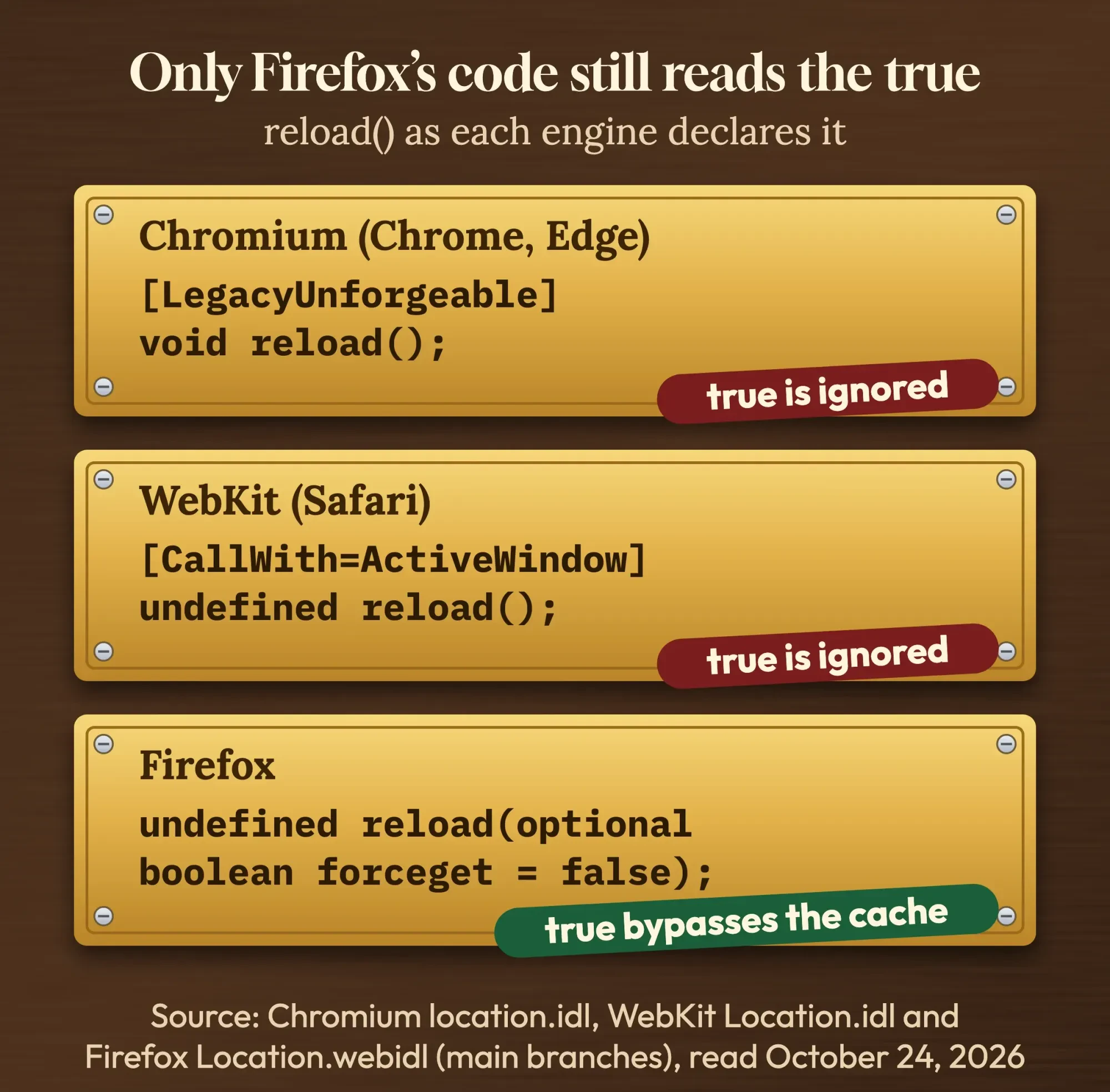 Diagram by DigitalTreed, quoting the Chromium, WebKit and Firefox source files read on October 24, 2026.
What about the javascript: in front, as in javascript:location.reload(true)? That's a javascript: URL, the kind found in bookmarklets and old link attributes.
MDN says using them is "discouraged", and a content security policy can block them. In a script file, you'd just write location.reload().
If the location object is new to you, our JavaScript tutorial for beginners covers it first.
What does each reload send to the server?
So much for the source code. Docs and old answers still disagree on what browsers do, so we tested it ourselves.
We served a small page and one script file from a local Python server on a Mac. Both files carried Cache-Control: max-age=600, so a browser could keep them for 10 minutes. The server wrote down the cache headers of every request it got. Then the page called location.reload(), location.reload(true) and location.reload(false), one after another, first in Chrome 155.0.8059.85 and then in Safari 27.0.1.
The three calls were identical in both browsers.
| What ran | Chrome 155: page | Chrome 155: script | Safari 27: page | Safari 27: script |
|---|---|---|---|---|
| location.reload() | max-age=0 + date check, 304 | not requested | max-age=0, 200 | max-age=0 + checks, 304 |
| location.reload(true) | max-age=0 + date check, 304 | not requested | max-age=0, 200 | max-age=0 + checks, 304 |
| location.reload(false) | max-age=0 + date check, 304 | not requested | max-age=0, 200 | max-age=0 + checks, 304 |
| Hard reload (DevTools protocol, ignoreCache) | no-cache + Pragma, 200 | no-cache + Pragma, 200 | not tested | not tested |
| fetch(..., {cache: 'reload'}) | no-cache + Pragma, 200 | no-cache + Pragma, 200 | ||
| fetch(...?v=2) | plain request, 200 | plain request, 200 |
In Chrome, each reload asked about the page with Cache-Control: max-age=0 and an If-Modified-Since date. Our server answered 304 Not Modified.
Chrome never asked for the script. It reused its cached copy.
That's by design. In 2017 the Chromium Blog announced "a simplified reload behavior to only validate the main resource and continue with a regular page load."
Safari also sent max-age=0 for the page. Then it rechecked the script with both validators and got a 304.
Neither browser treated true any differently. Not once.
Of the reloads, only a hard reload changed the picture. We sent Chrome's through its DevTools protocol with the ignoreCache option, and both files went out with Cache-Control: no-cache and Pragma: no-cache, so the server had to send them in full.
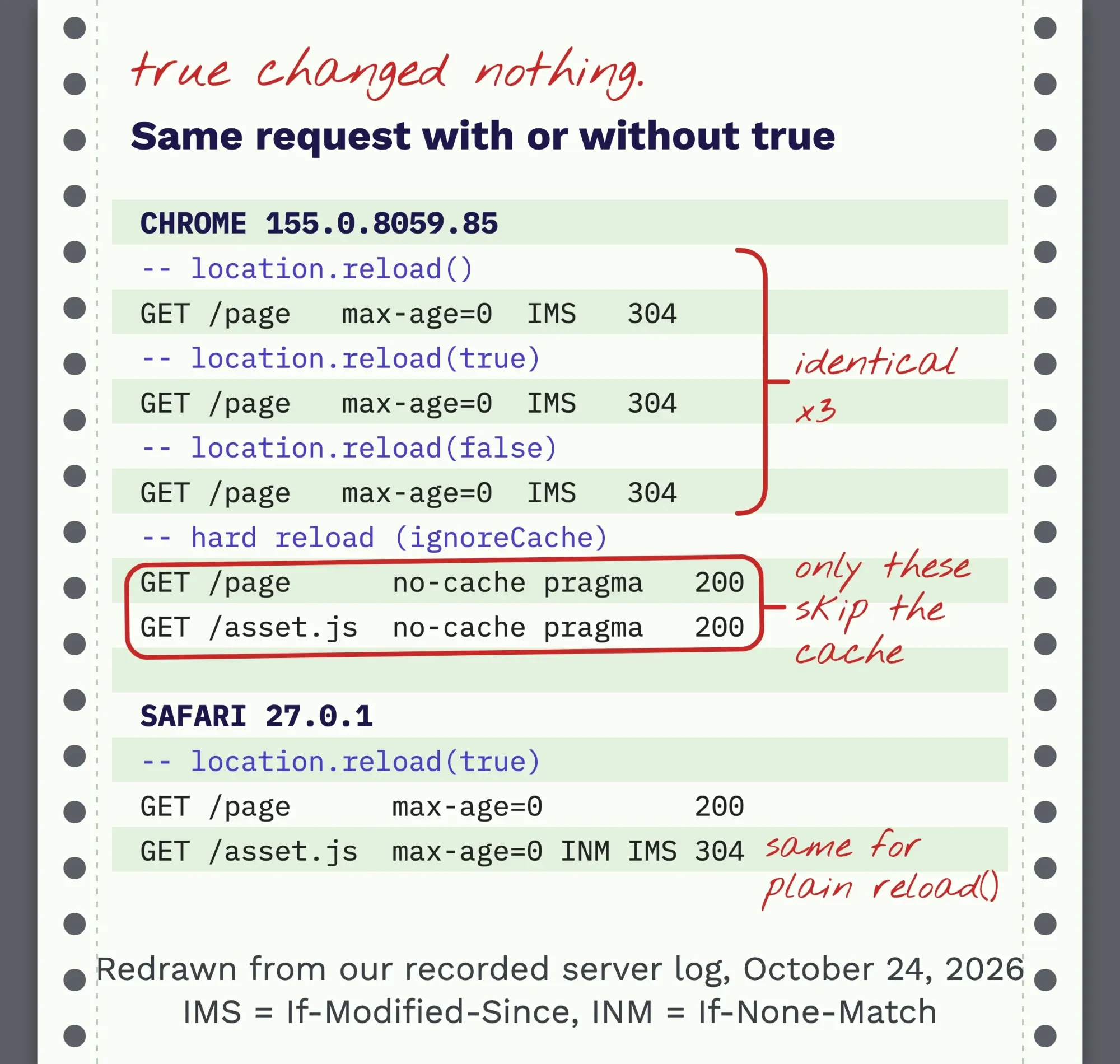 Diagram by DigitalTreed, redrawn from our recorded server log (Chrome 155 and Safari 27 on macOS, October 24, 2026); log lines shortened, values unchanged.
Two things follow from that log.
First, a plain reload already checks the page with your server.
And when visitors still see old content, the stale copy is usually a file the page loads, such as a stylesheet or a script, which Chrome doesn't recheck on a normal reload at all.
We didn't test Firefox. It isn't installed on our test Mac.
Old CSS or JavaScript after a deploy? Change the file's URL
That stale file is the usual reason people reach for reload(true).
The fix lives on your server, not in the visitor's browser.
Give every version of a file a new URL.
Browsers can't reuse a cached copy of an address they've never seen.
MDN calls this the cache-busting pattern: put a version number or a hash in the file's URL and serve it with a long max-age. Add immutable, and browsers won't even recheck the file on reload.
<link rel="stylesheet" href="/css/site.css?v=42">
<script src="/js/app.3f9a1c.js"></script>

# response header for versioned files
Cache-Control: max-age=31536000, immutable
Most build tools add the hash for you.
WordPress does it with a version number. The $ver value of wp_enqueue_style() "is added to the URL as a query string for cache busting purposes", so bump it after you edit the stylesheet.
We saw the effect in the same run: fetch('/asset.js?v=2') went straight to the server with no cache headers at all, because to the browser it was a brand-new file.
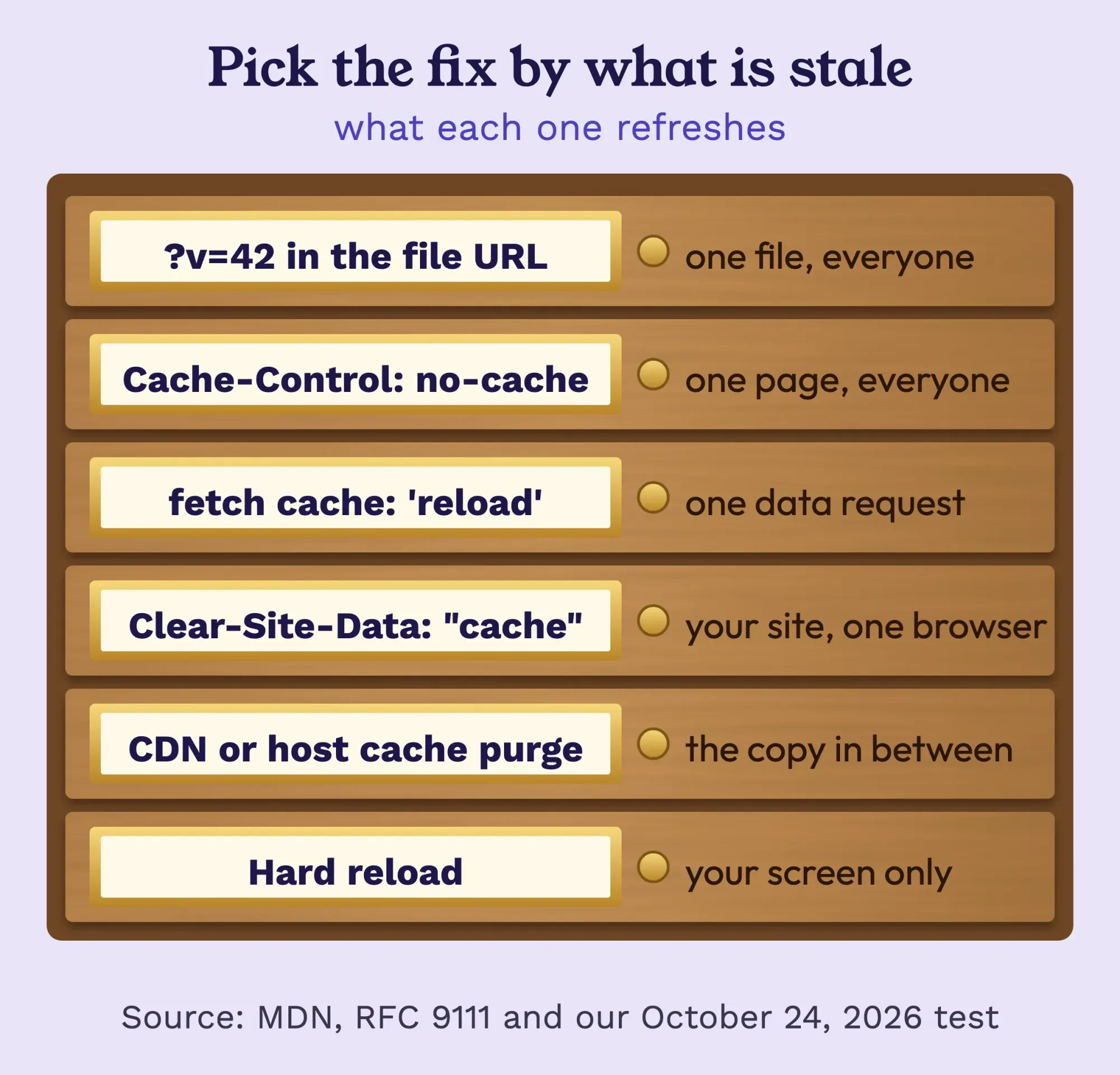 Diagram by DigitalTreed, from MDN, RFC 9111 and our October 24, 2026 test.
Pages that must stay fresh need a Cache-Control header
But versioned URLs only work for files. The HTML page keeps its address, so it needs a header instead.
Cache-Control: no-cache on a response doesn't mean "don't cache". Under RFC 9111, the HTTP caching standard, it means a cache "MUST NOT" reuse the copy without checking with the server first.
That's what you want on a page that changes every day.
no-store goes further: nothing is kept at all. Save it for private screens such as account pages and checkout steps, because with no-store every single visit downloads the whole page again from your server.
Example: a food truck in Billings, Montana, posts each day's menu on one page. The owner updates it at 10 a.m., yet regulars still see yesterday's specials until they refresh. The page goes out with a long max-age. The fix is Cache-Control: no-cache on that one page, with photos kept on versioned URLs.
No reload button needed.
Not sure what your pages send? Paste a URL into our free HTTP header checker. It shows the Cache-Control line and whether the server answers 304.
Two more layers can hold old copies.
A CDN or your host's page cache sits between the server and the browser.
A hard reload doesn't empty it, so purge it in the CDN dashboard or the cache plugin.
To wipe a visitor's browser cache for your site, a server can send Clear-Site-Data: "cache". MDN lists the header from Chrome 61, Firefox 63 and Safari 17, but the cache value only partly works in Chrome and returned to Firefox in version 138.
Its caching guide adds that the header has no effect on caches in between, such as a CDN.
Caching also feeds speed scores, which our guide to reading PageSpeed Insights walks through. It's one line in a full technical SEO audit, too, covered in depth in our advanced SEO guide.
Fresh data without a reload: fetch with cache: 'reload'
Still, you often don't need a new page at all. You need new data on the page you've already got. For a list, remove the item from your data with splice or filter and redraw just that list.
fetch() takes a cache option. Per MDN’s Request.cache page, three values matter here:
- 'reload' skips the cache, then stores the new response
- 'no-store' skips the cache and stores nothing
- 'no-cache' uses a cached copy only after the server confirms it's current
Our log matched the Fetch standard in both browsers. The reload and no-store modes sent Cache-Control: no-cache plus Pragma: no-cache and got a full 200, while the no-cache mode sent max-age=0 with the validators and got a 304.
A plain fetch() sent nothing. The copy was still fresh.
const res = await fetch('/menu.json', { cache: 'reload' });
const menu = await res.json();
renderMenu(menu); // update only that part of the page
That's lighter than a full reload, and the visitor keeps their scroll position, any half-typed form and whatever else they were doing on the page.
Reloading the whole page fresh from your script
Sometimes a full reload really is the right call, say after someone switches the site's language. Then plain location.reload() is fine.
As our log shows, it rechecks the page.
If you must force a fresh copy of the page itself, load a new URL. Build it with the URL API, so existing query parameters and the #hash survive:
const url = new URL(location.href);
url.searchParams.set('_', Date.now());
location.replace(url);
location.replace() keeps the extra address out of the Back button, since the current page "will not be saved in session History", per MDN.
The new query string only refreshes the HTML, though.
Files the page loads still follow their own cache rules.
Avoid the popular one-liner location.href.split('?')[0] + '?_=' + Date.now(). It throws away every existing parameter and the hash.
And navigation.reload(), from the newer Navigation API, isn't a cache switch either. Its options are state and info, with no cache setting.
Service workers can keep serving the old site
Now the one cache none of this reaches.
If your site works offline or installs like an app, a service worker may answer requests before the HTTP cache is even asked. Until that worker updates, no header and no reload(true) will help.
You can ask for an update from the page with registration.update(). MDN says it fetches the worker's script and installs it only if it isn't "byte-by-byte identical" to the current one.
Even then, Google's service worker lifecycle guide says the new worker waits "until the existing worker is controlling zero clients". The guide adds that refreshing the page isn't enough, because the old and new page overlap during a reload, so every tab on the old worker has to close first.
Calling self.skipWaiting() in the new worker removes that wait.
For testing, a force reload (shift-reload) skips the worker entirely. The same guide says the page is then "uncontrolled".
Caching, versioned builds and service workers get set up once and forgotten, until a deploy goes wrong. We build and maintain sites for small businesses, so we have an interest here. Our web development service can set them up and test them in each browser.
Hard reload by hand: Cmd+Shift+R in Chrome on a Mac
Once the server side is right, you still need a clean view on your own screen. A hard reload is the keyboard version of what reload(true) promised.
- Chrome on a Mac: Command+Shift+R, per Chrome’s keyboard shortcuts page.
- Chrome on Windows and Linux: Ctrl+Shift+R or Shift+F5.
- Chrome with DevTools open: press and hold Reload, then choose Empty Cache And Hard Reload. Chrome’s DevTools docs say it "forces the browser to go to the network for all resources".
- Safari: Reload Page From Origin. We found that command in Safari 27's own menu file; Apple's shortcuts page doesn't list a key for it.
While you work, tick Disable cache in the DevTools Network panel. The Network panel reference says it emulates a first-time visitor.
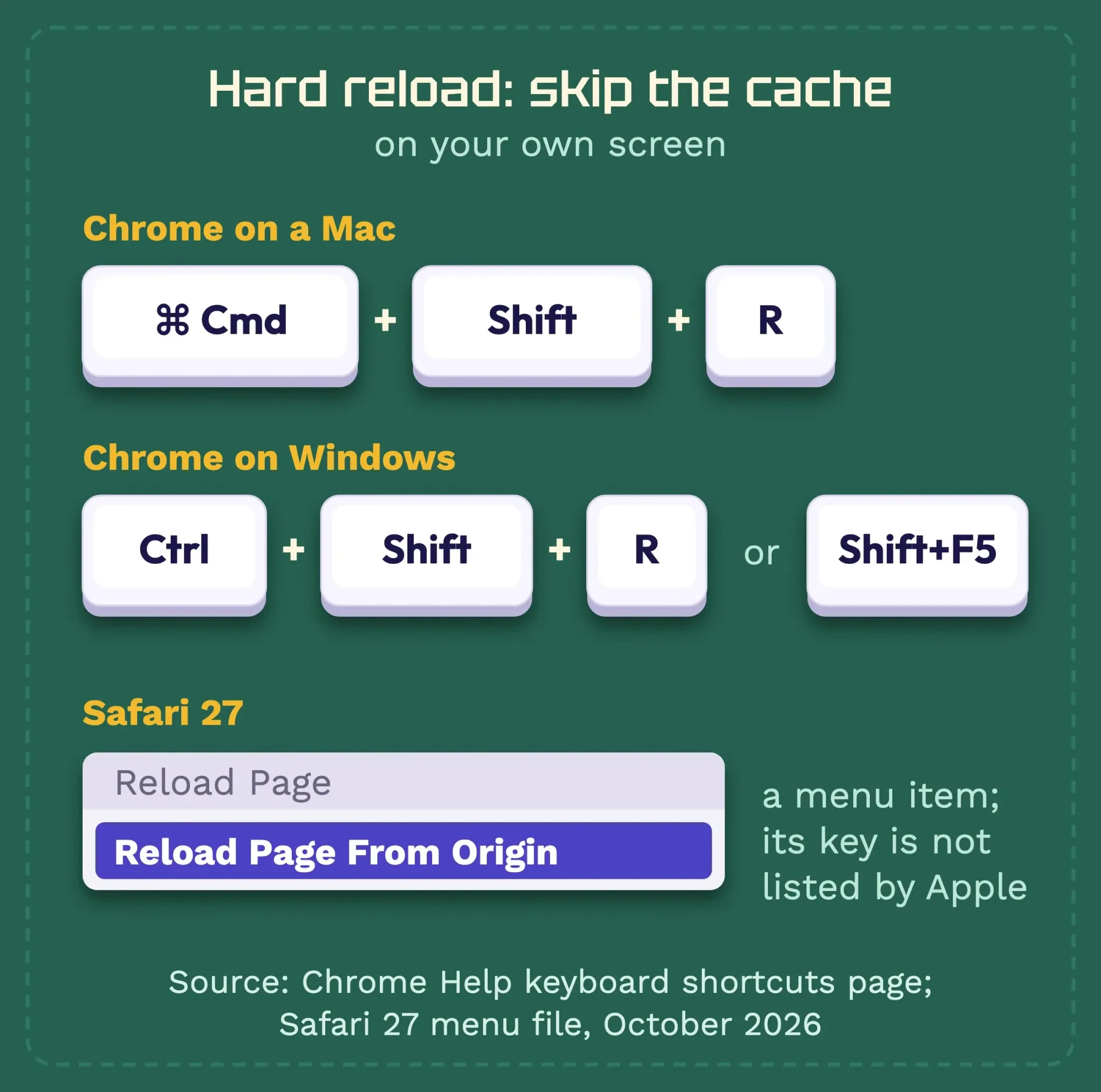 Diagram by DigitalTreed, from Chrome Help and the Safari 27 menu, October 2026.
Keep in mind that a hard reload fixes your screen, not your visitors' screens, because their browsers still hold the old copies until your headers or URLs tell them otherwise.
Only you see the fresh page.
It's also the last check after any front-end fix, such as the module errors in our guide to Cannot use import statement outside a module.
When a reload makes things worse
Before you ship a reload call, know where it backfires.
A page that came back from a form POST is risky to reload, because the reload can try to send the form again.
Answer the POST with a redirect instead. MDN says a 303 See Other is "often sent back as a result of PUT or POST methods", and then a reload just reloads the confirmation page.
A reload inside a load handler with no guard reloads forever.
Set a flag in sessionStorage first, the way our test page stepped through its runs.
And don't fix one stale file by putting no-store on everything.
Every repeat visit then downloads every file again. Check a page with our free speed test for websites before and after any cache change.
New to how pages load their files at all? Our HTML tutorial for beginners starts with the tags that do it.
Frequently asked
Does location.reload(true) still work in Firefox?
Firefox's source code still reads the flag: when it's true, the reload skips both the browser cache and any proxy, and MDN lists the argument as Firefox only. We couldn't test it ourselves: Firefox isn't installed on our test Mac.
Can location.reload() throw an error?
Yes. The HTML standard throws a SecurityError when a script from another origin calls reload() on a page's location, for example from inside a cross-origin frame.
Right now: delete the true, then fix the cache that's really serving the old file.
If old pages keep reaching customers after every update, request a quote and we'll look at your caching setup.
How we made this guide: On Saturday, October 24, 2026, we pointed Chrome 155.0.8059.85 and Safari 27.0.1 at a small server on a Mac that wrote down every request header, then ran each reload. The hard reload went through Chrome's DevTools protocol. We didn't press the shortcuts by hand, and we didn't test Firefox, service workers or Clear-Site-Data. Every claim traces to the HTML or Fetch standard, RFC 9111, MDN or a browser's own source file, and the link sits right next to it.
First published August 2024. Rewritten October 24, 2026. The old version said true reloads from the server and a plain reload uses the cache; our test showed neither holds in Chrome or Safari. New: the logged test, what each engine's code declares, and tested ways to get fresh files, data and pages.
Sources
- WHATWG HTML Living Standard: the Location interface, reload()
- MDN: Location reload() method
- Chromium source: location.idl
- WebKit source: Location.idl
- Firefox source: Location.webidl
- Firefox source: Location.cpp
- Mozilla Bugzilla 1037721: get rid of the forceGet argument
- TypeScript DOM lib generator: dom.generated.d.ts
- Chromium Blog: Reload, reloaded (January 26, 2017)
- MDN: HTTP caching guide
- MDN: Cache-Control
- IETF RFC 9111: HTTP Caching
- MDN: Clear-Site-Data
- MDN: Request.cache
- WHATWG Fetch Standard: HTTP-network-or-cache fetch
- MDN: Location replace()
- MDN: Navigation reload()
- MDN: ServiceWorkerRegistration update()
- web.dev: The service worker lifecycle
- MDN: javascript: URLs
- WordPress Developer Resources: wp_enqueue_style()
- Google Chrome Help: keyboard shortcuts
- Chrome for Developers: Inspect network activity
- Chrome for Developers: Network features reference
- MDN: 303 See Other


Comments
No comments yet. Start the conversation below.