

Quick answer
To restore old photos with AI for free, scan at 600 ppi, keep that scan untouched, and upload a copy to CodeFormer's free Hugging Face demo (as of October 2026). If the demo's busy, the same model costs about $0.0054 a run on Replicate, and scratched prints need Microsoft's scratch model first. Start with the scan settings below.
Say a customer just set a shoebox of faded family prints on your counter and asked you to "fix them with AI." AI photo restoration is a process where a trained model guesses the detail a damaged scan has lost. That guess is the whole job, so what you do before and after it matters as much as the tool.
We'll start with how to scan the print, then show what classic fixes can and can't do on a print we made. Next we match each kind of damage to a free AI restore tool, then cover how to run CodeFormer and set its fidelity weight. After that comes checking the faces a model may invent. Last come who owns a restored photo and how to save and share the copy.
Key takeaways
- Restore a copy and keep the 600 ppi master scan untouched.
- A half-inch face scanned at 300 ppi is only 150 pixels wide.
- Classic filters removed dust in our test but couldn't bring back lost color.
- Set CodeFormer's fidelity weight near 1 when faces must stay recognizable.
- Owning a print doesn't give you the copyright in that photo.
Scan the print before any AI touches it
Every AI restore tool works from pixels. The scan sets the ceiling. The federal FADGI digitizing guidelines (third edition, 2023) grade prints and photographs at four levels. They ask for 200 ppi at 1-star, 250 at 2-star, 400 at 3-star and 600 at 4-star. The 4-star level also wants 16-bit files, saved as TIFF or JPEG 2000. If the scan is soft, every model after it works from mush, and no setting you pick later will put back detail the scanner never caught. A flatbed is fine. FADGI allows one for photographs, though it warns that dust on the scanner glass ends up in the file.
Small prints are where this bites. A face in a group shot might be half an inch wide on a 4x6 print.
Resolution is just inches times ppi, so that face gets 150 pixels at 300 ppi and 300 pixels at 600 ppi. We ran the numbers for common print sizes with a short script. It uses pixels = inches x ppi, and 6 bytes per pixel for an uncompressed 16-bit RGB file:
| Scan ppi | Pixels | Megapixels | Uncompressed TIFF | |
|---|---|---|---|---|
| Wallet, 2.5x3.5 in | 600 | 1,500 x 2,100 | 3.1 MP | 18.9 MB at 16-bit |
| 4x6 in | 300 | 1,200 x 1,800 | 2.2 MP | 13.0 MB at 16-bit |
| 4x6 in | 600 | 2,400 x 3,600 | 8.6 MP | 51.8 MB at 16-bit |
| 5x7 in | 600 | 3,000 x 4,200 | 12.6 MP | 75.6 MB at 16-bit |
| 8x10 in | 400 | 3,200 x 4,000 | 12.8 MP | 76.8 MB at 16-bit |
So a shoebox of 200 4x6 prints at 600 ppi and 16-bit comes to about 10.4 GB (200 x 51.8 MB). That's a lot, but drives are cheap and rescanning a crumbling print isn't.
We'd scan small prints at 600 ppi and 8x10s at 400, which keeps every face big enough to work with and still fits a whole shoebox on one drive.
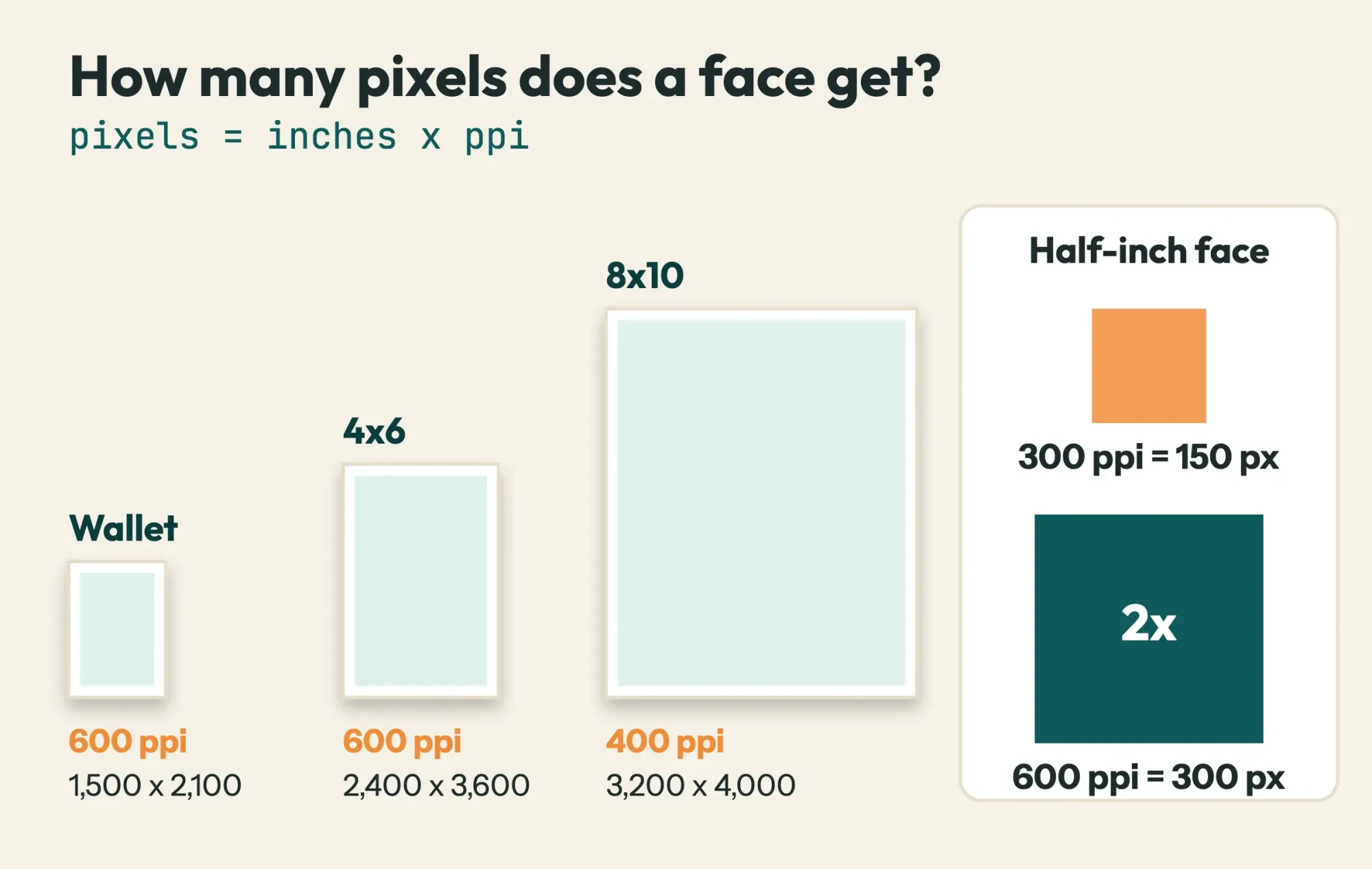 Diagram by DigitalTreed: scan sizes from our scan-math script, ppi levels from FADGI third edition section 3.8
The same FADGI section has the rule that shapes the whole job. It says "Color, tone enhancement or restoration is not allowed on master images." Fixes go on access copies instead, "noted as such in embedded metadata and file naming." The National Archives digitizing page says the same thing from the family side: keep your originals after you digitize them. Once the master TIFF is saved and backed up twice, you're free to experiment on a copy, because nothing a model does to that copy can touch the original. In practice that's two files per print from day one: a master nobody edits, and a working copy that's allowed to get things wrong.
What classic fixes can and can't do
Before any AI, it's worth knowing what plain filters can fix on their own. They're built into most editors. They don't guess, and they never change a face. We wanted numbers rather than impressions, so we built a small test.
Our test print was a 480 x 320 street scene we drew ourselves, with buildings, a car and a made-up "MAIN ST" sign. To age it, we blurred it, cut its contrast to 55%, tinted it yellow-brown, added grain, and dropped in five scratches and 160 dust specks. We then ran three classic fixes one after another and scored the image after each, with the clean print as the answer key. None of the three steps uses AI.
The score is PSNR, short for peak signal-to-noise ratio. It's 10 x log10(255² / MSE), where MSE is the average squared error per color channel. Higher is closer to the original:
| Step | What it did | PSNR vs clean print |
|---|---|---|
| Aged print | Our damage, before any fix | 14.25 dB |
| 1. Dust and scratch filter | 5x5 median, only where a pixel stood out by 40+ levels; 1,376 pixels replaced | 14.50 dB |
| 2. Levels stretch | Each color channel stretched, 0.5% clipped at each end | 16.81 dB |
| 3. Sharpen | Unsharp mask, amount 0.8 | 15.21 dB |
The dust specks were gone after step 1. The long hairline scratches only faded to faint lines. Counting pixel by pixel, 1,399 of the 2,103 damaged pixels were far off in the aged print, and 228 still were after all three steps. Levels brought back the dark road and the car's contrast. The sky didn't recover. It came back a dull gray-green instead of blue, because the fade and the cast had wiped that color out of the pixels. Sharpening made the grain louder and cost 1.60 dB (16.81 minus 15.21), so we'd leave sharpening off for grainy scans.
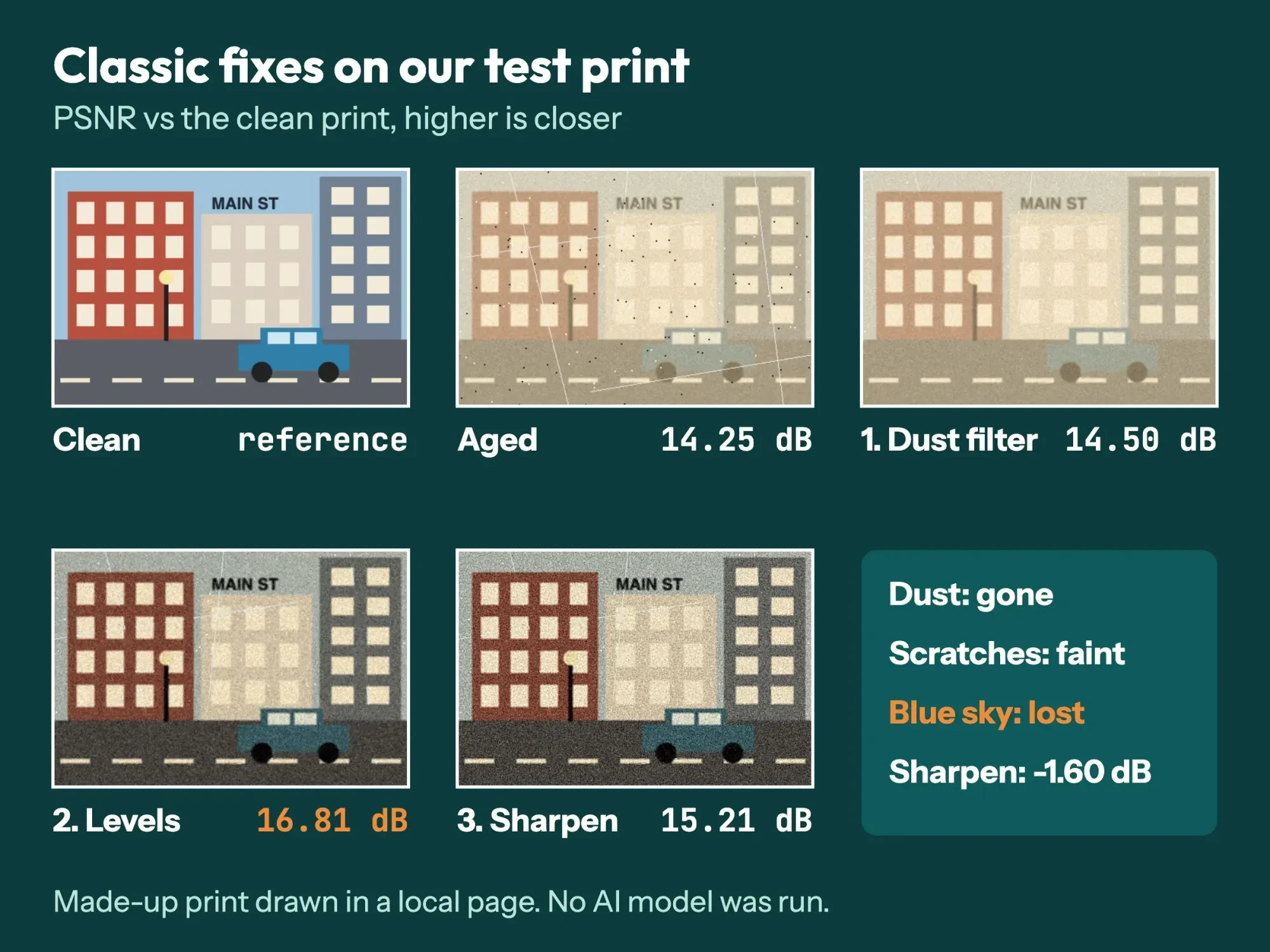 Screenshot: our local restore test in headless Chrome, October 28, 2026; top row clean, aged and dust filter, bottom row levels and sharpen
So classic tools handle dust and contrast, but they can't put back what's gone, and that's the gap AI models fill by guessing.
What we tested
We ran this on October 28, 2026, in a local web page on this Mac, in headless Chrome with no network. We didn't run CodeFormer, GFPGAN, Microsoft's model, Real-ESRGAN or any web service, and we used no real photo or face. The test page, its output and the scan script are saved with this guide.
Which free AI restore tool fits which damage?
Once you know what filters can't fix, the model you pick depends on whether the print is scratched, the faces are soft or the whole scan is too small. The well-known free options are open-source research projects, each built for a different problem. This table pulls each license and hardware note from the project's own GitHub page, read October 28, 2026:
| Tool | What it fixes best | License | Runs without an Nvidia GPU? |
|---|---|---|---|
| Bringing Old Photos Back to Life (Microsoft) | Scratches, fading, then faces | MIT | Yes (--GPU -1 runs on CPU) |
| CodeFormer | Blurry or damaged faces; whole photos, with Real-ESRGAN optional for backgrounds | S-Lab License 1.0, non-commercial | Lists CUDA 10.1 or later; free web demos |
| GFPGAN | Faces | Apache 2.0 | Yes, its README lists an Nvidia GPU as optional |
| Real-ESRGAN | Upscaling and general cleanup | BSD-3-Clause | Yes, portable builds need no CUDA |
For a scratched print, start with Microsoft Bringing Old Photos Back to Life, a CVPR 2020 project that finds scratches first, then restores the whole photo and its faces. Its README says to add --with_scratch for scratched images. For faces, CodeFormer and GFPGAN are the usual pair. Real-ESRGAN enlarges the whole photo, and its portable builds say "No CUDA or PyTorch environment is needed."
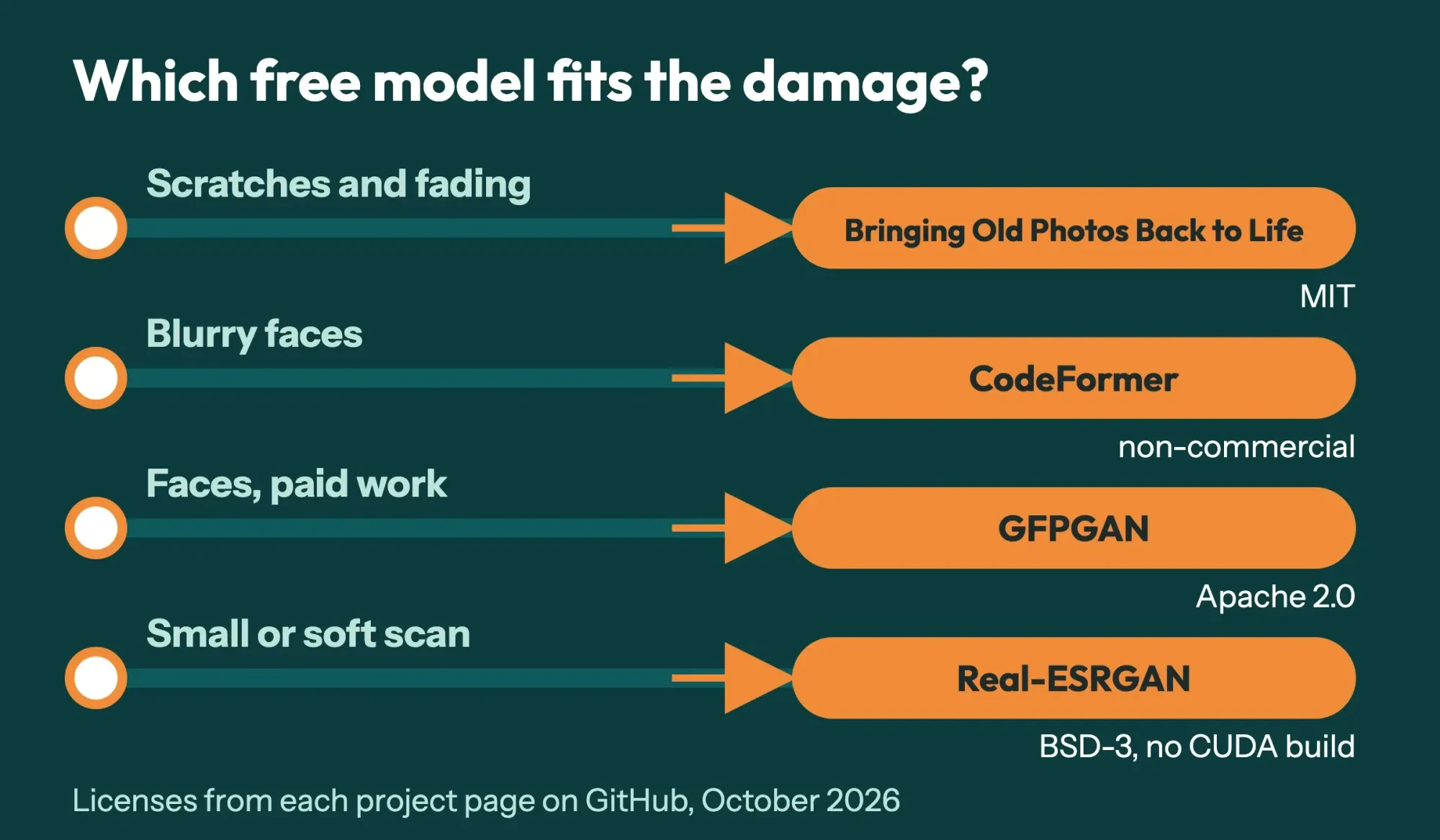 Diagram by DigitalTreed: which free model fits which damage, from each project page on GitHub, October 2026
A shop that charges for restores is doing commercial work, even when the photo is a family snapshot, so check the license column before a paid job. CodeFormer's S-Lab license covers use "for non-commercial purpose" and tells commercial users to contact the authors. MIT, Apache 2.0 and BSD-3 don't carry that limit. If you only need to drop a background, our background remover handles that job, and our free photo editors test covers everyday retouching.
Pick a way to run CodeFormer and set the fidelity weight
No code is needed to try CodeFormer. The CodeFormer README names three demos the authors maintain, on Hugging Face, Replicate and OpenXLab. It warns that other sites and apps "use our models without any license or authorization." Running it yourself means Python, PyTorch 1.7.1 or later and CUDA 10.1 or later, which points to a computer with an Nvidia graphics card, since CUDA is Nvidia's platform. That's why a demo is the easier start for a shop without that card.
The Replicate model page says it costs "approximately $0.0054 to run on Replicate, or 185 runs per $1," as of October 2026, though it "varies depending on your inputs." At that rate, our 200-print shoebox costs about $1.08 (200 x $0.0054) for one run each. Trying three settings per face makes it $3.24.
So the money isn't the real cost. Checking 600 results by eye is.
The one setting worth learning is the fidelity weight, called w. The README says w "lays in [0, 1]" and that "smaller w tends to produce a higher-quality result," while a larger w stays closer to the input. The CodeFormer paper calls this "a flexible trade-off between fidelity and quality." Read plainly, a low w lets the model favor a clean-looking face over what the scan shows, and a high w keeps it nearer the scan. We haven't run it. That's the documented trade-off, not a measurement. Since the point of a restore is a recognizable relative, we'd start near the top of the range.
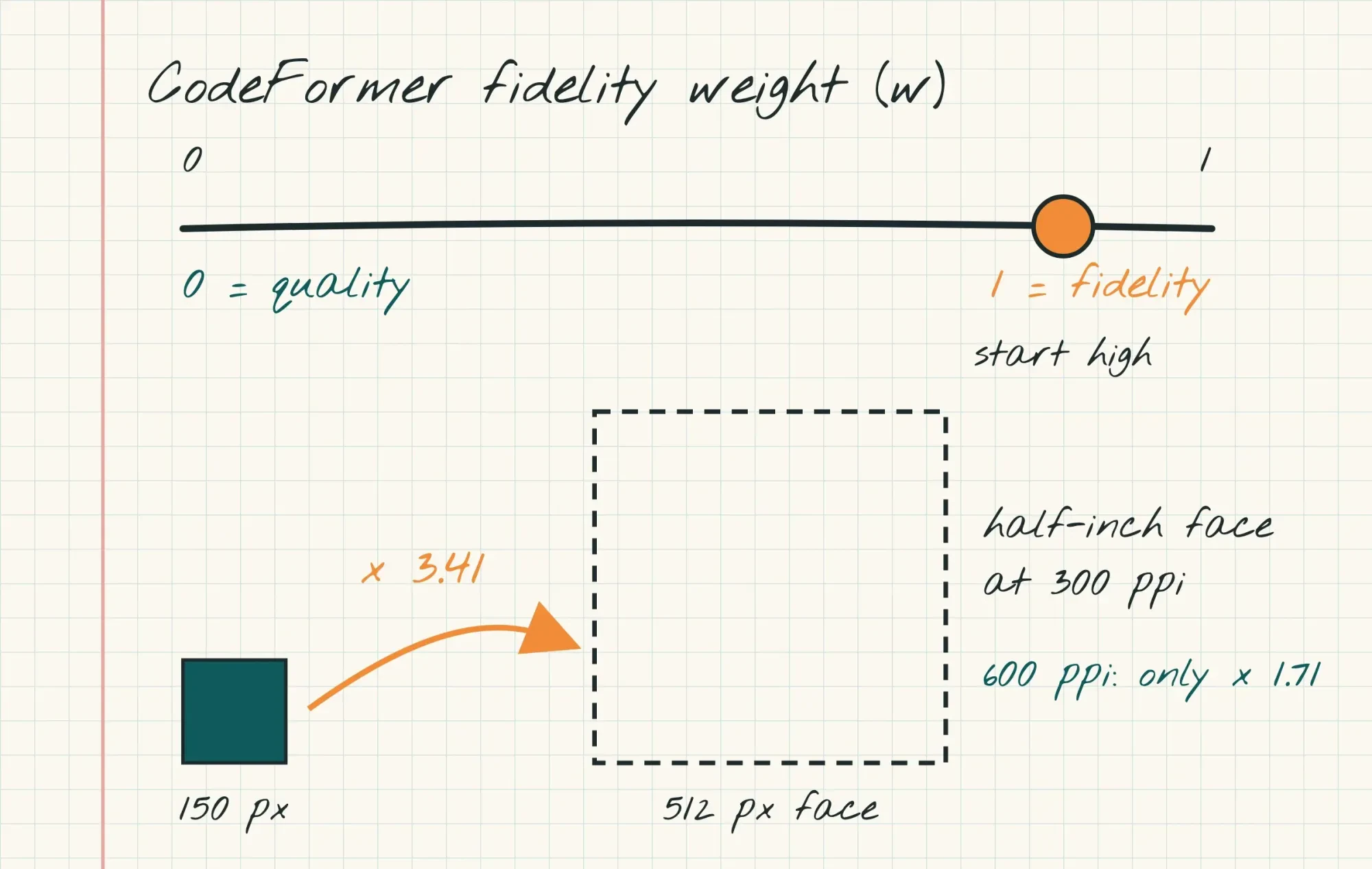 Drawn by us: CodeFormer fidelity weight from its README, face sizes from our scan-math script
Scan size feeds straight into this. The README's face restoration, colorization and inpainting modes all take cropped, aligned faces of 512 x 512 pixels. Our half-inch face at 300 ppi gets stretched 3.41 times (512 / 150) to fit, while a 600 ppi scan needs only 1.71 times (512 / 300).
Less stretch leaves the model less to invent, and that's the real case for scanning small prints at 600 ppi.
Check the faces and the details it invented
Because a model fills gaps with likely detail, every restored face is partly a guess. Even the makers say so: the GFPGAN README lists "a slight change on identity" among the weak points of its V1.3 model. Check every one. Open the master and the restored copy side by side at 100% zoom, and go through the face in this order:
- Eyes: compare shape, spacing and catchlights with the scan
- Teeth and smile lines: a closed mouth in the scan should stay closed
- Ears, hairline and glasses frames: thin edges with little detail left in the scan, so compare them closely
- Any lettering: compare signs, uniforms and storefronts letter by letter against the scan
- The edge of the face and hair: the CodeFormer README notes its face-and-background blending "may damage hair texture on the boundary"
If a face drifts from the scan, the README's trade-off points to a rerun at a higher fidelity weight. You can also keep the model's background and blend the original face back in with a soft brush in any editor with layers, so only the damage changes. Show the customer the master and the restored copy together before anything is printed, and mark which parts were restored so nobody mistakes a guess for the original.
Do this check at full size on a monitor, since a phone screen hides small changes.
A restore should fix damage only. Editing tools go much further, as our DragGAN AI explainer and ChatGPT image generation guide show.
Who owns a restored old photo?
Settle this before you scan a customer's print. The US Copyright Office FAQ says copyright belongs to the author or the author's heirs or assignees. It's "not of the one who only owns or possesses the physical work itself." So a studio portrait in a family album may still belong to the studio or its heirs.
The print is the family's, but the copyright may not be, and the copyright is what decides who may copy it, adapt it or sell prints of it.
Restoring it doesn't automatically create a new copyright either. The Copyright Office's Circular 14 on derivative works says a derivative work must "add new original copyrightable authorship." It also says "Only the owner of copyright in a work has the right to prepare, or to authorize someone else to create, an adaptation of that work."
Uploads raise a privacy question too. Read a service's data page before a customer's photo leaves your computer. Replicate's data retention page says API predictions are "automatically removed after an hour, by default." But "Data for predictions created through the web interface is kept indefinitely," unless you delete the prediction from your dashboard.
For a paid job, we'd get written permission from whoever holds the copyright. That may be a studio, not the customer. We'd also keep private photos off web demos and pick a tool whose license allows paid work. Our content copying guide covers protecting your own images.
We aren't lawyers, though, and a specific job deserves a lawyer's read.
Save and share the restored copy
Once the faces pass, save the result under a name that can't be confused with the master. The National Archives page suggests hyphens instead of spaces in file names. Its 3-2-1 rule means "Three copies, stored on two different media, and one copy located off-site." A made-up example pair is 1962-main-st-master.tif and 1962-main-st-restored-codeformer-w08.jpg, which records the tool and the weight. Put the scan date and the ppi in the file's description field too, so whoever opens it years from now knows what they're looking at.
A 4x6 master at 600 ppi and 16-bit is 51.8 MB, far too heavy to email or post. Make a JPEG or WebP share copy and shrink it with our image compressor, and keep the TIFF and the restored copy as they are.
Our take: freeze a 600 ppi master, restore a labeled copy at a high fidelity weight, and never hand over an AI face without a side-by-side check.
The DigitalTreed graphics and video team restores and retouches photos for clients, so we have a stake in this work. You don't need us for any step above, and every tool named here is free.
Frequently asked
Is CodeFormer free for commercial use?
Not by default. Its S-Lab License 1.0 doesn't define "non-commercial," so contact the authors before a paid job.
Can Real-ESRGAN fix faces too?
Its Python script has a --face_enhance option that calls GFPGAN, and it's off by default, per the Real-ESRGAN README.
Should I clean an old print before scanning it?
Gently. The Library of Congress care guide says to "Use a blower, such as an air bulb, (not canned air)" and to keep tape and sticky notes off prints.
Does Microsoft's old photo model work on large scans?
Not ideally. Its README says the face step was "pretrained with 256*256 images" and "may not work ideally for arbitrary resolution." A separate --HR option covers high-resolution scratched scans.
How we made this guide: Our team read each project's GitHub page and Replicate's model and data pages on October 28, 2026. We also read FADGI, the National Archives, the Library of Congress and two Copyright Office pages that day. Our test used a print we drew, with no model download and no upload. Facts checked by the DigitalTreed team on October 28, 2026.
First published August 2024. Rewritten October 28, 2026: we replaced a guide to building a video editor, which CodeFormer isn't, with the restore job itself.
Sources
- CodeFormer on GitHub (sczhou)
- CodeFormer LICENSE (S-Lab License 1.0)
- Zhou, Chan, Li and Loy: CodeFormer paper, arXiv 2206.11253 (NeurIPS 2022)
- Replicate: sczhou/codeformer
- Replicate docs: Data retention
- Microsoft: Bringing Old Photos Back to Life
- TencentARC: GFPGAN
- Real-ESRGAN on GitHub
- FADGI Technical Guidelines for Digitizing Cultural Heritage Materials, third edition (2023)
- National Archives: Digitizing family papers and photographs
- Library of Congress: Care, handling and storage of photographs
- US Copyright Office FAQ: Who can register?
- US Copyright Office Circular 14: Copyright in derivative works and compilations


Comments
No comments yet. Start the conversation below.