
Quick answer
DragGAN AI is a 2023 research method that lets you click a point on an image, pick where it should go, and have an AI model redraw the picture to match. Its code is public, but the license allows research or evaluation use only. If a website sells you a "DragGAN app," it isn't the official one.
Picture a product photo of a desk lamp. You like everything about it, except you wish the arm pointed a little higher. DragGAN AI promised that kind of edit: drag a dot from here to there, and the lamp bends while the model redraws the joints and shadows to fit. The official project page shows lions turning their heads and cars changing shape the same way.
We read the paper, the code and its license, and we checked the official demos on October 25, 2026. Here's what it does, what you can't do with it, and what to use instead.
Key takeaways
- DragGAN is a SIGGRAPH 2023 research method, not an app you sign up for.
- The only official sources are the project page and the GitHub repository.
- Its license allows research or evaluation use only, so no paid work.
- It edits images its own GAN made; real photos need a separate conversion step.
- For real product photos, use Puppet Warp, the GIMP Cage tool or Google Photos.
DragGAN AI is a 2023 research method, not an app
DragGAN AI is an image-editing method from SIGGRAPH 2023, the big computer graphics conference. The paper's full title is Drag Your GAN: Interactive Point-based Manipulation on the Generative Image Manifold.
It isn't a product you sign up for.
The six authors came from the Max Planck Institute for Informatics, the Saarbrücken Research Center for Visual Computing, Interaction and AI, MIT, the University of Pennsylvania and Google AR/VR, per the project page. The first author, Xingang Pan, was a postdoc at the Max Planck Institute when the institute announced the work in 2023. The news spread fast because the demo videos looked like magic. Plenty of the coverage that followed skipped the fine print about licenses, hardware and the kinds of images it can edit.
Only two places are official. One is the project page, and the other is the GitHub repository. Everything else is someone else's copy, tutorial or sales page.
You pick a point, pick a target, and the model redraws the picture
So how does a dot move a lamp? You click a handle point on the thing you want to move, then a target point where it should end up. You can also paint a mask over the part that's allowed to change, so the rest stays put.
Then the model runs a loop. The paper names its two halves. "Motion supervision" nudges the handle point a small step toward the target. "Point tracking" then finds where that point actually landed in the new image, so the next nudge starts from the right spot. It repeats until every handle point sits within 1 or 2 pixels of its target, and in the paper's tests a run stopped after 300 steps at most. You watch it happen live. That's why the demos felt so smooth.
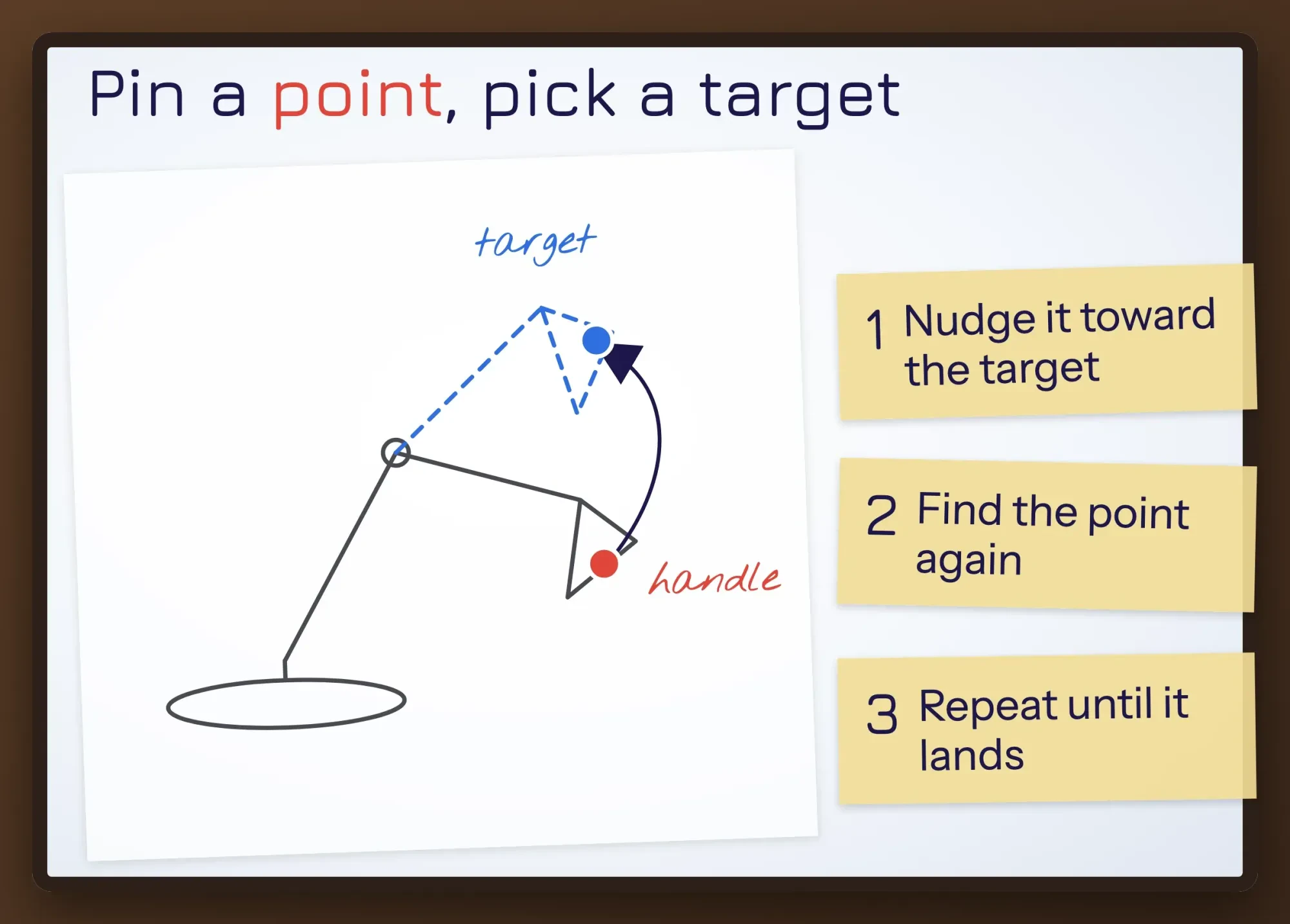 Diagram by DigitalTreed, drawn from the method in the DragGAN paper (SIGGRAPH 2023). Not output from DragGAN.
The "GAN" part explains why the result looks real instead of smeared. A generative adversarial network trains two models against each other. One makes images and the other tries to spot fakes, as the Max Planck news release puts it.
DragGAN doesn't push pixels around.
It adjusts the hidden code the model draws from, called the latent code, until the picture has your point in the new spot. That's why it can invent what wasn't visible before, like the far side of a turned head. The paper's examples change the pose, shape, expression and layout of animals, cars, people and landscapes.
There's no official DragGAN AI website, just code and two old demos
That loop runs in code you install, not on a website. The official DragGAN AI tool is the GitHub repository, with a desktop GUI and a browser demo you run yourself. There's no official site where you upload a photo, whatever the old copy of this page said.
Here's what we found when we checked the repository and its demos on October 25, 2026, using public pages and the public GitHub and Hugging Face APIs. The last code push was May 18, 2024. The README links two web demos. The main one, a Hugging Face Space, reported a runtime error for a missing module, last changed December 4, 2024. The second link, on OpenXLab, sent us to that site's home page, not an app. We didn't create accounts or install anything.
So the main demo the README links to doesn't run today, and the second link didn't open an app for us.
Running it yourself takes real hardware. The paper says an edit takes "a few seconds on a single RTX 3090 GPU in most cases." That's a high-end NVIDIA graphics card. The README also gives a route for Apple Silicon Macs or a plain CPU, which we didn't test, because this check ruled out installing software or renting a graphics card. Its Docker image "takes about 25GB of disk space."
Be wary of any site with "DragGAN" in its address that asks you to upload photos, pay or log in. The research team's official links don't include any such site, and you don't know where your images go.
Is DragGAN free to use for business?
Even if you get it running, the license decides what you can do with it. DragGAN is free to download. Using it in paid work isn't. The README says the DragGAN parts are under CC BY-NC, and most of the project is under the NVIDIA Source Code License.
Both licenses are non-commercial.
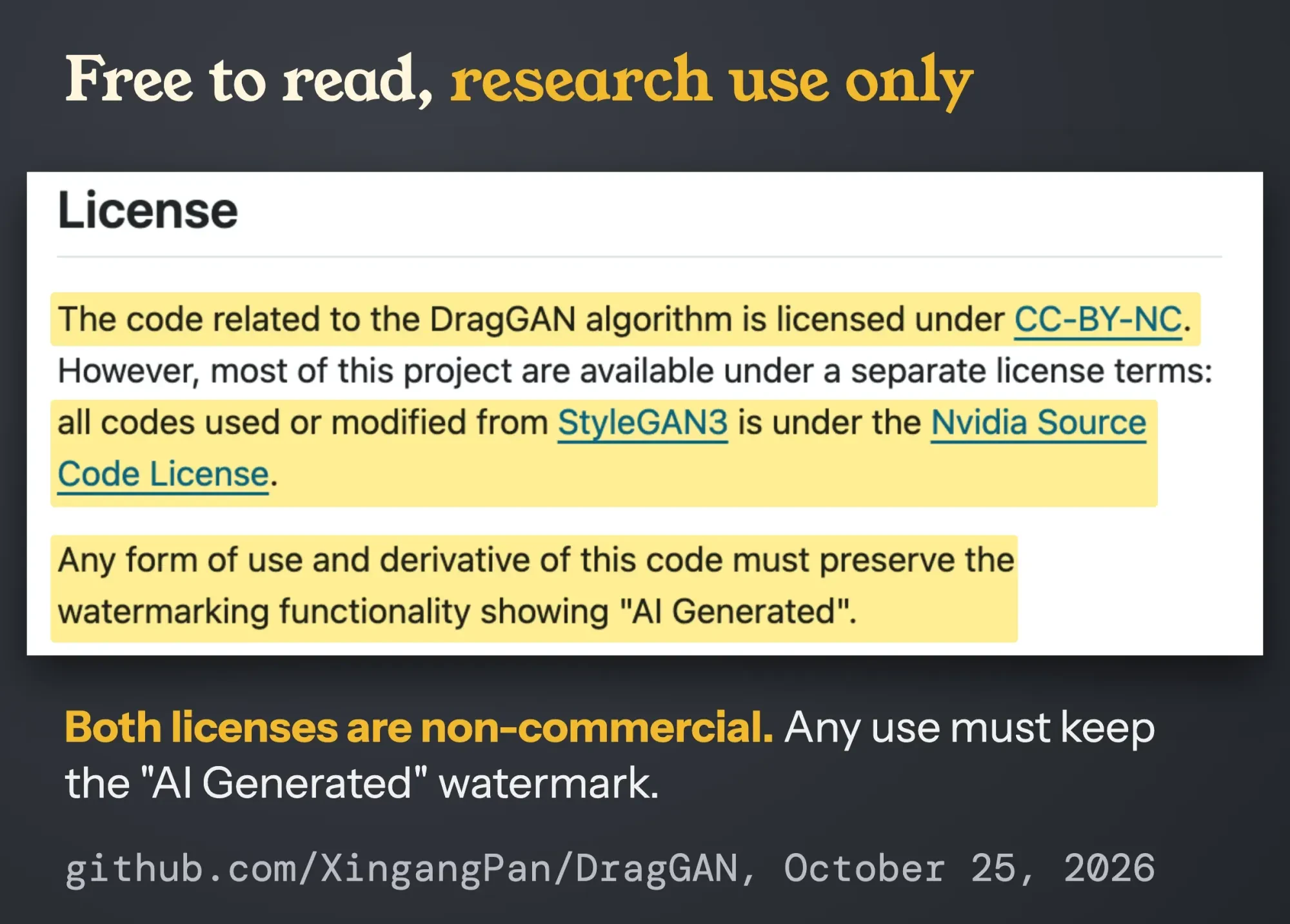 Screenshot: the License section of the official DragGAN README on github.com, October 25, 2026. Highlights added by DigitalTreed.
The NVIDIA terms in LICENSE.txt are blunt. Clause 3.3 allows use "non-commercially" and defines that as "for research or evaluation purposes only." We compared that file with the StyleGAN3 license byte for byte. They're identical. The CC BY-NC deed adds that commercial means "primarily intended for commercial advantage or monetary compensation."
There's one more rule. The README says any use "must preserve the watermarking functionality showing 'AI Generated'." A function in viz/renderer.py stamps those words in see-through white, bottom right.
That means a product photo, a client mockup or an ad made with DragGAN falls outside what the license allows. Testing it to learn how it works is what it's for. That's a fine reason to try it if you've got the hardware, a free weekend and no plan to sell what comes out.
Unsure about your case? Ask a lawyer.
Real photos are where it struggles
But there's a bigger catch than the license: DragGAN edits images that its own GAN made, not the photo on your phone. The README says the GUI "supports editing GAN-generated images." For a real photo, you first turn it into a latent code and tuned model weights with a separate tool such as PTI, a step called GAN inversion. The team said in the 2023 release that "most results are achieved on GAN-generated synthetic images."
On its own images, it's accurate.
In the paper's face test, dragged points ended up 2.44 pixels from their targets on average. The older method it was compared with missed by 11.64, barely better than not editing at all.
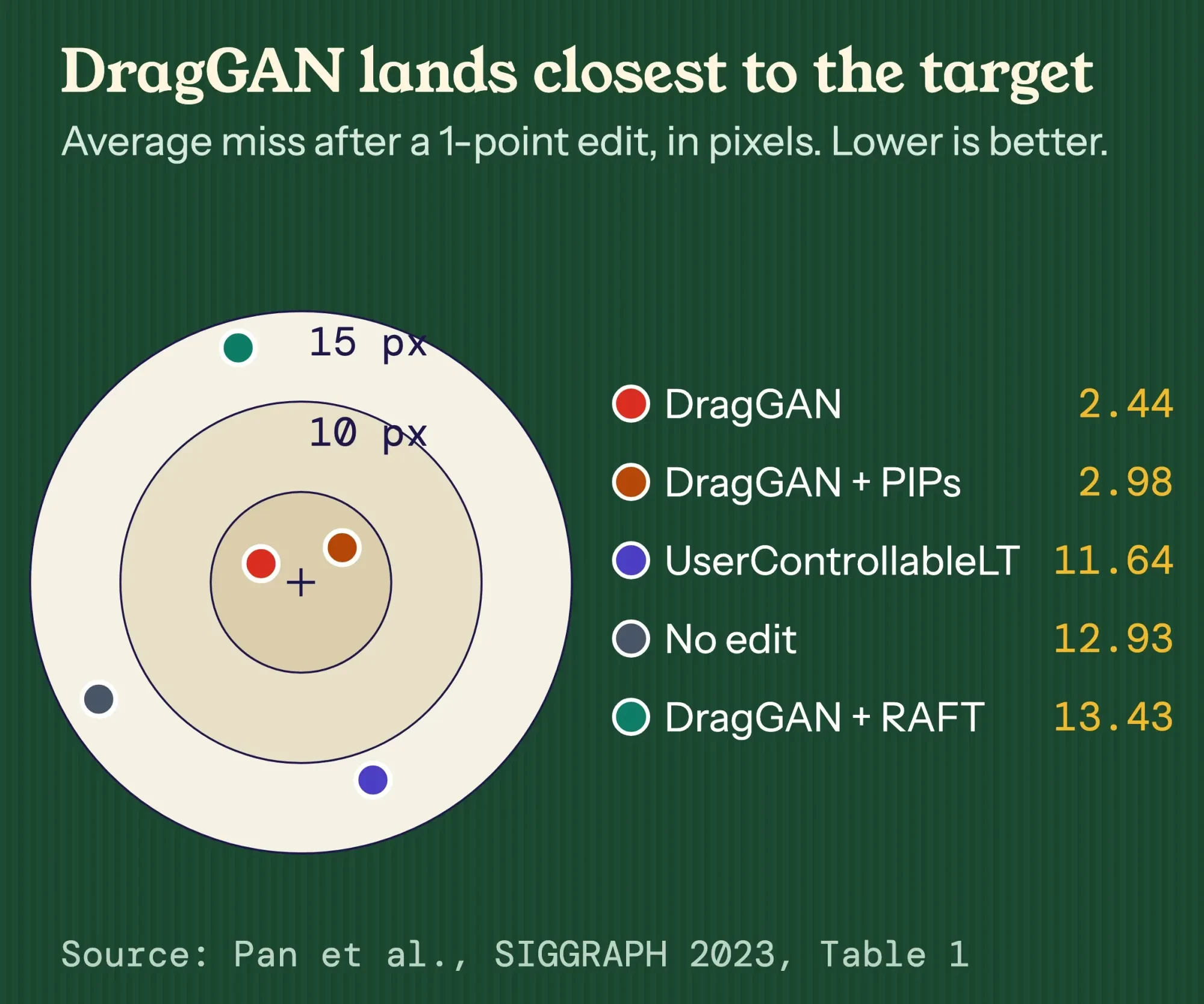 Source: Pan et al., Drag Your GAN, SIGGRAPH 2023, Table 1 (face keypoints, 1 point). Chart by DigitalTreed.
That was one dataset of faces, so read it as "precise in the lab." The same table gives DragGAN 2.0 seconds per edit against 0.03 for the older method. The paper's also open about where it breaks. Quality "is still affected by the diversity of training data." A body model trained on fashion photos, where arms mostly hang down, distorted legs and hands when pushed into odd poses. And points on smooth, plain areas tend to drift, so the authors suggest picking spots with texture.
For a lamp on a white backdrop, that last one hurts.
Drag-style editing you can use today lives in normal photo editors
So what do you use for a real product photo? Tools whose makers document a drag-style feature. They're pin-and-warp tools or AI fills, not the DragGAN method. Unlike DragGAN, they work on the photos you already have, straight from your camera or phone, with no conversion step. Our guide to free photo editors compares the editors themselves.
| Tool | What you drag | Price |
|---|---|---|
| Adobe Photoshop, Puppet Warp | Pins on a mesh over a layer | Paid Photoshop plan |
| GIMP, Cage tool | Anchor points of a cage around an area | Free, no account |
| Google Photos, Move | A selected object, then pinch to resize | In the Google Photos app |
Adobe says Puppet Warp handles "subtle edits, such as shaping hair, or major changes, like repositioning arms or legs." You add pins to anchor some areas and drag others to warp the mesh. The GIMP Cage tool does a similar job for free. Click anchor points around an area, then drag them.
Google Photos is the closest to the DragGAN demos. Its help page says to circle or brush an object, then "To move your selection, tap Move." Photos changed with Google's generative AI may carry AI info and a SynthID watermark.
None of these is DragGAN, and for a shop that's fine.
Most small-business photo jobs are simpler than any of this. If you just need a product on a clean background, our free background remover does it in the browser.
Can you use a drag-edited photo in an ad?
Once the photo's edited, yes, you can use it in an ad, as long as the edit doesn't change what the buyer gets. The FTC's small-business advertising guide says ads "must be truthful and non-deceptive." It also says the agency reads an ad in context: "words, phrases, and pictures." That comes from Section 5 of the FTC Act.
The tool isn't the problem; a picture that misstates the product is.
Example: Wrenfield Lamp Co. is a made-up two-person lamp maker in Dubuque, Iowa. They'd like a longer arm on their best seller in a Google Shopping photo, because it looks better. The real arm is 18 inches. Stretching it shows a lamp they don't sell. It's out. Removing a dust speck, straightening the shot or fixing the color is fine, because none of those changes what a customer would find in the box. Google Merchant Center also wants the photo to reflect "the exact color, pattern, finish, and material."
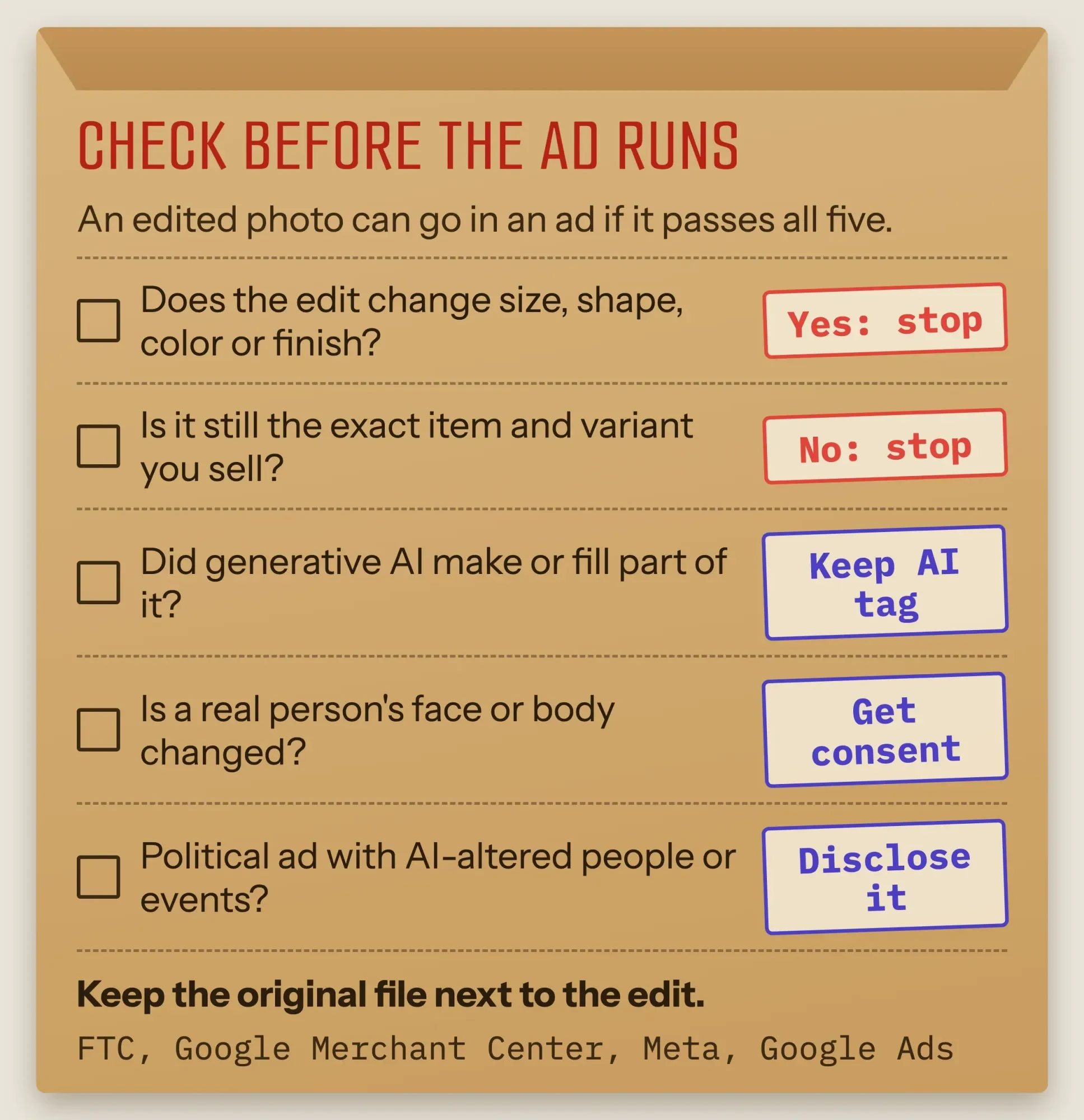 Drawn by us, based on the FTC small-business advertising guide, Google Merchant Center image rules, Meta's AI ad labels and the Google Ads political content policy, October 2026.
Platforms add their own rules for AI edits. Merchant Center says images "created using generative AI must contain meta data" marking them as AI-made, and it says not to strip that. Meta labels ads made or significantly edited with its own AI features "AI info." In a June 1, 2026 update, Meta said it's starting to detect ads edited with third-party AI tools, too. Per Meta help, resizing or color correction usually won't get a label.
Political ads are stricter. Google wants a disclosure on election ads that show synthetic or altered realistic people or events, and Meta asks the same for ads about social issues, elections or politics. And don't reshape a real person's face or body without their consent. The DragGAN authors warn their method "could be misused to create images of a real person with a fake pose, expression, or shape." Our post on AI in digital marketing covers when an AI ad needs a label.
We're describing federal rules and platform policies here, not giving legal advice on your ads. If a campaign rides on a heavily edited image, have a lawyer look at it.
Frequently asked
Does DragGAN run on a Mac or a Windows PC?
It can, with some setup. As of October 2026, the official DragGAN README gives a separate install route for Apple Silicon M1 or M2 Macs, or CPU only, without the NVIDIA packages. It also says its Gradio browser demo works on both Windows and Linux.
Is there a version of DragGAN that edits real photos?
The closest is DragDiffusion, a separate research project. Its paper on arXiv moves the same point-based editing onto diffusion models, so it works on both real and AI-generated images. It also introduced DragBench, the first benchmark for this kind of editing. Check its own license before any business use.
Why can't I find the Move tool in Google Photos?
Your phone may not meet the requirements. As of October 2026, Google Photos Help says most editing features need at least 3 GB of RAM and Android 8.0 or later. Some need 4 GB or 6 GB of RAM, some work only on Pixel phones, and some aren't supported on 32-bit devices.
What to do first
So start with the job, not the tool. Curious how DragGAN works? Read the paper and watch the official video. Got an NVIDIA card and a research project? The code's there for exactly that.
Need a better product photo? Use Puppet Warp, GIMP or Google Photos, keep the original file, and run the five checks above before you publish. Our free image compressor then shrinks the final file for your site or listing. Our graphic design tips cover using photos you own, while the post on protecting your content explains who owns the images on your site. The FTC says its Endorsement Guides apply to social media too, and our social media optimization guide covers what that means for your profiles.
Our take: DragGAN is a great paper and a poor business tool. Its own license keeps it in the lab, and the warp tools you can buy, or get free, cover most real jobs. If the edit has to be perfect, a designer may cost less than you think; our designer cost guide has 2026 rates.
Want someone else to handle the photos? We edit product shots and ad images as part of the graphics service we sell, and you'll see the price up front. We have an interest here, of course.
How we made this guide: on October 25, 2026, we checked every claim against the source linked next to it. That day we read the DragGAN paper, the official README, LICENSE.txt and watermark code, compared the license file with StyleGAN3's, and checked both web demos through public pages and APIs, with no accounts or downloads. No image here shows a real person's face; the diagrams are our drawings, and the chart uses the paper's Table 1. Eram N., the author, reads and approves it before publication.
First published May 2025. Rewritten October 25, 2026: the old post described an online tool and features DragGAN never had. This rewrite explains the real method, the license and watermark, the state of the demos, the limits, tools to use instead and the ad rules for edited photos.
Sources
- Pan et al., Drag Your GAN: Interactive Point-based Manipulation on the Generative Image Manifold, arXiv 2305.10973 (SIGGRAPH 2023)
- Max Planck Institute for Informatics: DragGAN project page
- Max Planck Institute for Informatics: AI method DragGAN news release, June 23, 2023
- GitHub: XingangPan/DragGAN, official code
- GitHub: DragGAN LICENSE.txt (NVIDIA Source Code License)
- GitHub: DragGAN viz/renderer.py (watermark function)
- Hugging Face: DragGan Space (demo linked from the README)
- GitHub: PTI repository (Roich et al.), used for GAN inversion
- GitHub: NVlabs/stylegan3
- Creative Commons: Attribution-NonCommercial 4.0 deed
- Adobe: Distort specific image areas with Puppet Warp (vendor)
- GIMP 2.10 manual: The Cage Tool
- Google Photos Help: Edit your photos, Android (vendor)
- Google Photos Help: AI info (vendor)
- FTC: Advertising FAQ's, A Guide for Small Business
- 15 U.S.C. 45, FTC Act Section 5 (Cornell LII)
- Google Merchant Center Help: Image link [image_link] requirements
- Meta Help: How AI-generated images in ads are identified and labeled
- Meta: Expanding GenAI transparency for Meta's ads products (updated June 1, 2026)
- Google Ads Help: Political content policy

Comments
No comments yet. Start the conversation below.