
Quick answer
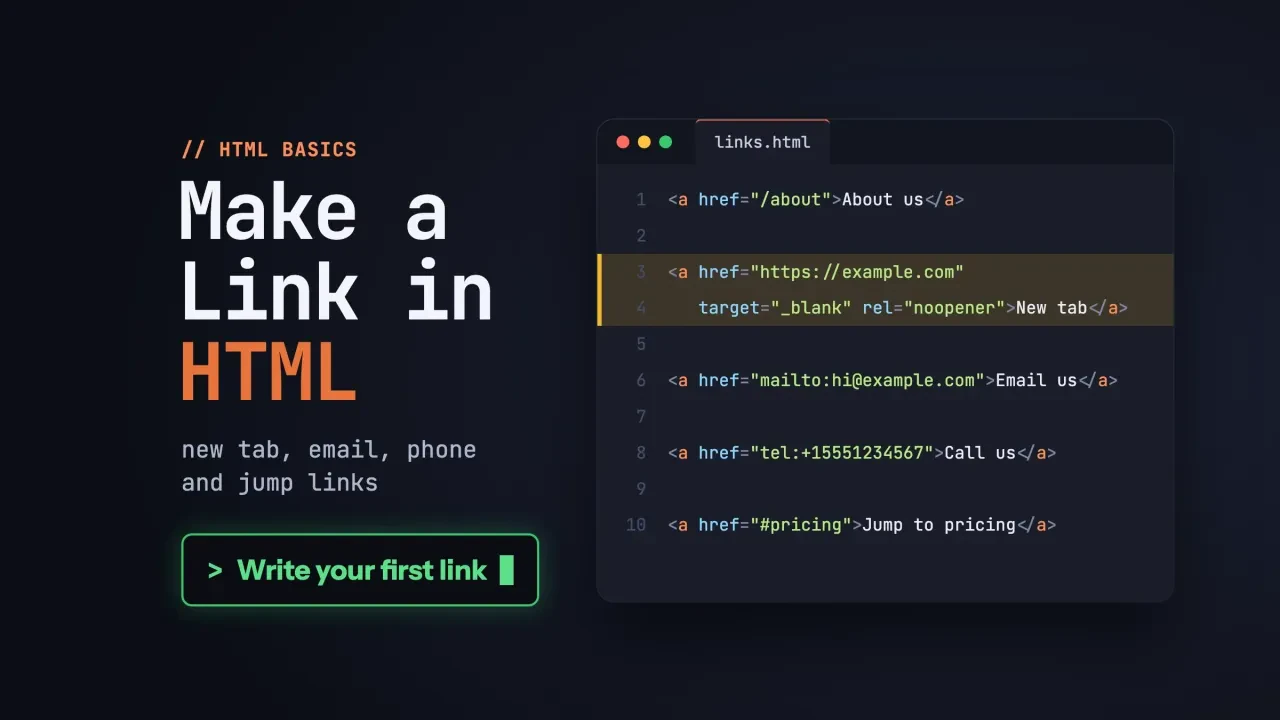
To make a link in HTML, wrap the words people click in an <a> element and put the address in its href attribute: <a href="https://example.com/">Example</a>. The same tag makes new-tab, email, phone, jump and download links. Only the address or one extra attribute changes, so test each link before you publish.
Below is how to make a link in HTML for each job a small-business page has, with code you can copy.
We ran every snippet in Google Chrome 155 on October 26, 2026. We'll tell you what happened, including the two places where it didn't go the way the usual tutorials say.
Key takeaways
- Every HTML link is an a element with the address in its href attribute.
- Use full https:// URLs for other sites and root paths like /contact.html for yours.
- Browsers now treat target="_blank" as rel="noopener", but still warn readers about new tabs.
- The download attribute is ignored for files on another domain.
- Link text should say where the link goes, never just "here".
A link is an a element with an href
The HTML link code is an <a> element with an href attribute. MDN says the anchor element "creates a hyperlink to web pages, files, email addresses, locations in the same page, or anything else a URL can address" (MDN, the a element).
<a href="https://ashuelotsaddle.example/services/">See our repair services</a>Four parts make the link. <a opens it, href holds the address, the words between the tags are what people see and click, and </a> closes it.
Our examples use Ashuelot Saddle Repair, a made-up saddle shop. Its .example addresses won't reach a real business.
Leave out the href and it isn't a link at all.
The HTML standard says an a with no href only "represents a placeholder for where a link might otherwise have been placed," so it does nothing.
Google won't follow it either: its guide says Google "can only crawl your link if it's an <a> HTML element" with an href (Google Search Central).
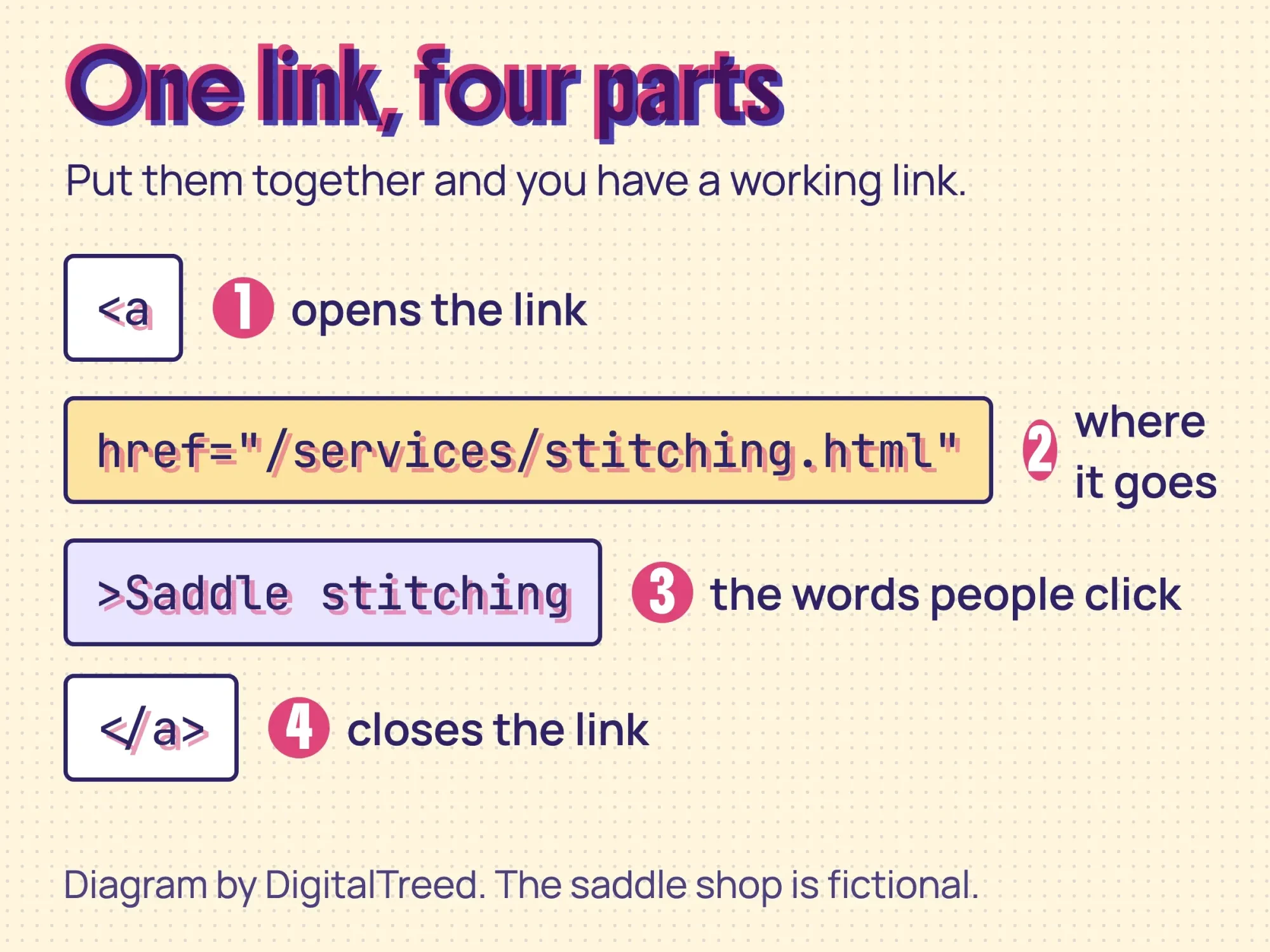 Diagram by DigitalTreed: the parts of one HTML link, using our fictional saddle shop.
If tags and attributes are new to you, start with our HTML tutorial for beginners. Then our short list of 5 basic HTML codes shows where links sit among the other tags.
Any plain text editor will do. Our list of free HTML editors has a few that color the code, so a missing quote mark stands out.
Use a full URL for other sites and a short path for your own
That href can hold two kinds of address.
A link to another website needs the full URL, starting with https://, while a link to your own page can use a short path, called a relative URL.
MDN: "When specifying an external link, you always have to include the full URL as the path" (MDN, Creating links).
Here are the four kinds you'll write most, on a page that sits in a services folder:
<!-- This page lives at /services/stitching.html -->
<a href="https://ashuelotsaddle.example/contact.html">Contact us</a>
<a href="/contact.html">Contact us</a>
<a href="tack-cleaning.html">Tack cleaning</a>
<a href="../price-list.pdf">Price list (PDF)</a>
We loaded that page in Chrome and followed each one. /contact.html went to the site's root folder. tack-cleaning.html stayed in the same folder and became /services/tack-cleaning.html. ../price-list.pdf climbed up one folder to /price-list.pdf.
All three opened.
The slash at the start is what changes things. With it, the browser starts at the root. It keeps "the same protocol and the same domain name as the one used to load the document hosting that URL" (MDN, What is a URL). Without it, the path starts from wherever the current page is.
Our rule for small sites: use root paths like /contact.html for your own pages.
They keep working when you move the page that holds them. Paths with ../ don't.
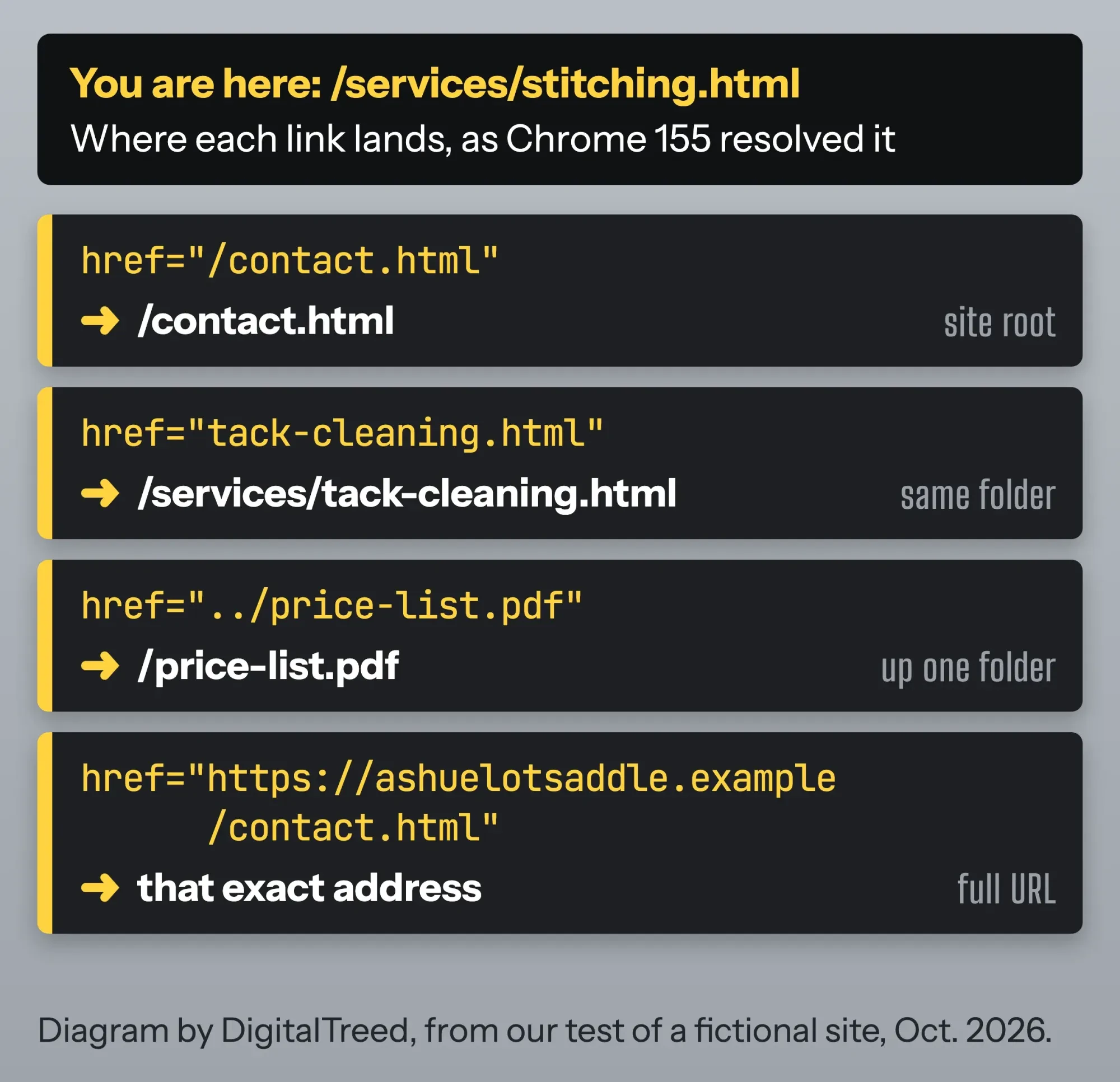 Diagram by DigitalTreed: where each kind of path lands, from our Chrome test of a fictional site.
Open a link in a new tab only when it helps
So far every link opens in the same tab. To open a link in a new tab instead, add target="_blank", and say so in the link text.
<a href="https://www.example.com/leather-care" target="_blank" rel="noopener">Leather care guide (opens in new tab)</a>What about rel="noopener"? Older advice says you must always add it, because without it the new page could reach back to yours through window.opener.
Browsers closed that gap years ago.
MDN: "Setting target="_blank" on <a> elements implicitly provides the same rel behavior as setting rel="noopener" which does not set window.opener" (MDN, the a element). The HTML standard writes that rule into the steps every browser follows.
MDN's compatibility table dates it: Safari 12.1 in March 2019, Firefox 79 in July 2020, Chrome 88 in January 2021 (MDN, a element browser compatibility).
Internet Explorer never got it.
We checked anyway. In Chrome 155, a new tab opened with target="_blank" and no rel had window.opener set to null. With rel="noopener" it was null too. Only rel="opener" gave the new tab a way back to our page.
So keep rel="noopener"; it's free and it covers old browsers.
But it isn't the part that still needs your attention.
The warning is. W3C's technique G201 asks sites to "provide advanced warning for links and buttons that open a new window or tab" (W3C, G201). "(opens in new tab)" in the text does that.
MDN makes a fair point, too: people "can still choose to open them in a new tab" themselves (MDN, Creating links). We'd only force a new tab when leaving would cost the visitor something, like a half-filled form.
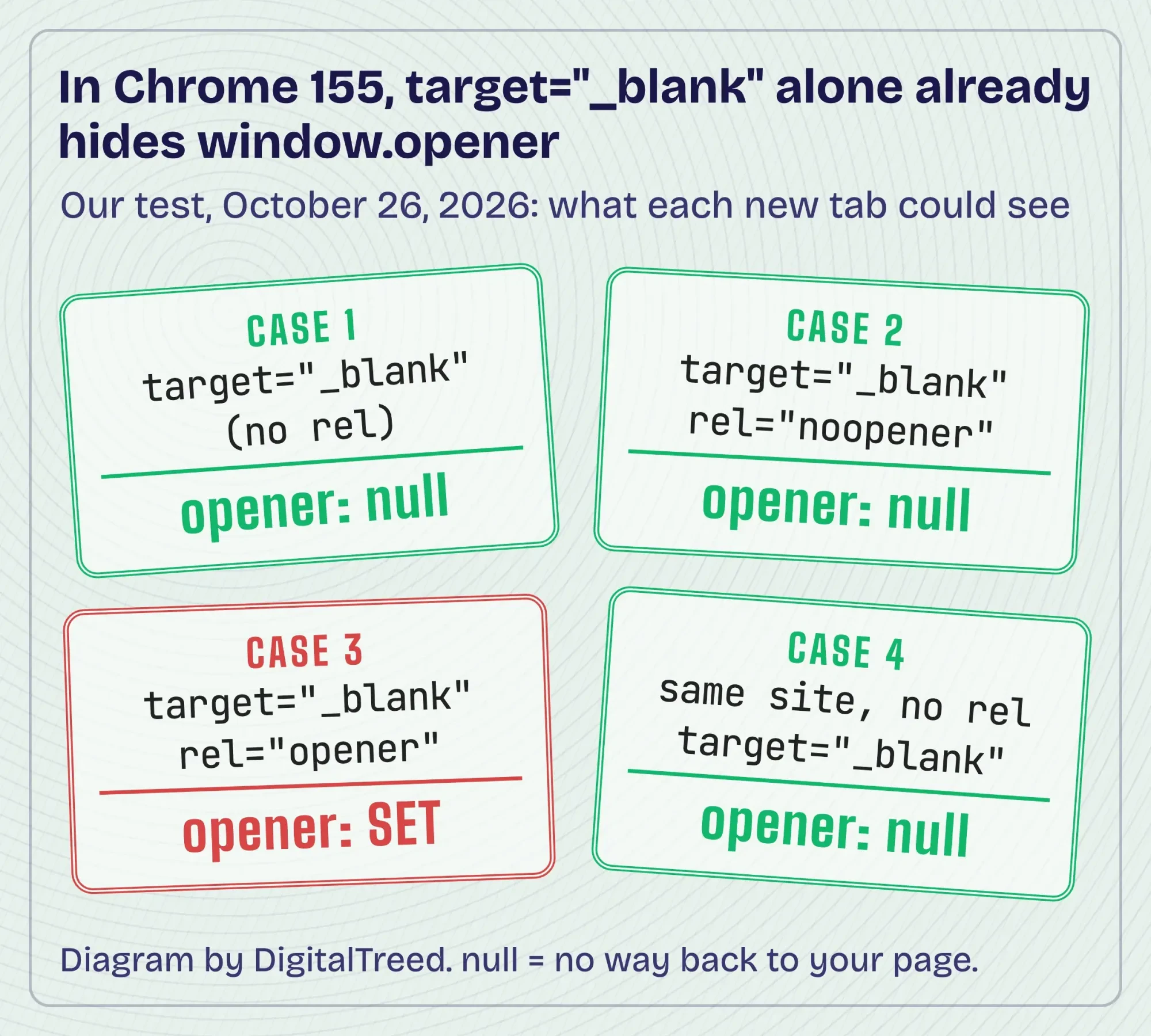 Diagram by DigitalTreed: our Chrome 155 test of window.opener, October 26, 2026.
The other targets rarely matter. _self is the default, and _parent and _top only do something inside frames.
Got a long list of URLs to turn into tags? Our free hyperlink generator writes them with the target and rel you pick.
Email links use mailto: and can fill in the subject
Links don't have to open a page. An email link puts mailto: and the address in the href. MDN says it opens "the user's email program to let them send a new message" (MDN, the a element).
<a href="mailto:[email protected]?subject=Saddle%20repair%20quote&body=Saddle%20brand%20and%20model%3A">Email [email protected]</a>The part after ? fills in the message. MDN lists "subject", "cc", and "body" as the common fields, and each value "must be URL-encoded" (MDN, Creating links). That's why the spaces are %20 and the colon is %3A.
In our test, Chrome read the subject back as "Saddle repair quote" and the body as "Saddle brand and model:".
Put an & between fields, as between the subject and body above.
Here's the catch: a mailto link does nothing useful for someone who hasn't set up a mail app. If you can't afford to miss a message, add a contact form that sends email as well.
Phone links need the full number after tel:
Phone links work the same way, with tel: in place of mailto:, and on a phone a tap offers to call.
<a href="tel:+16035550142">Call (603) 555-0142</a>You'll want the full number in the href, with +1 for the US and no spaces.
The visible text can look however people read it best. MDN notes that "tel: link behavior varies with device capabilities" (MDN, the a element), so a desktop may open a calling app, or nothing.
This number is made up, like the shop.
Jump links need an id on the spot you're jumping to
The next link type doesn't leave the page at all. Give the target an id, then link to # plus that id.
<nav>
  <a href="#hours">Hours</a>
  <a href="#faq">FAQ</a>
</nav>

<h2 id="hours">Shop hours</h2>
<p>Tuesday to Saturday.</p>

<h2 id="faq">Questions we get</h2>
<p><a href="#top">Back to top</a></p>
MDN: "Elements with an id attribute in the document automatically create a document fragment that can be linked to" (MDN, Creating links).
Each id has to be unique, and its "value must not contain ASCII whitespace characters" (MDN, id).
#top is the exception. It scrolled to the top in our test even though nothing on the page had that id, which is what MDN's page on the a element describes.
To jump to a section of another page, put the path first:
<a href="/#hours">See our shop hours</a>Here's where we hit a snag.
Our test page had an 80-pixel header that stays put while you scroll. Clicking "Hours" put the heading at 0 pixels, right under that header, so you couldn't see it.
One line of CSS fixed it. The scroll-margin-top property leaves room above whatever you jump to:
[id] { scroll-margin-top: 80px; }With it, the heading landed at 80 pixels, just below the header.
Use your own header's height.
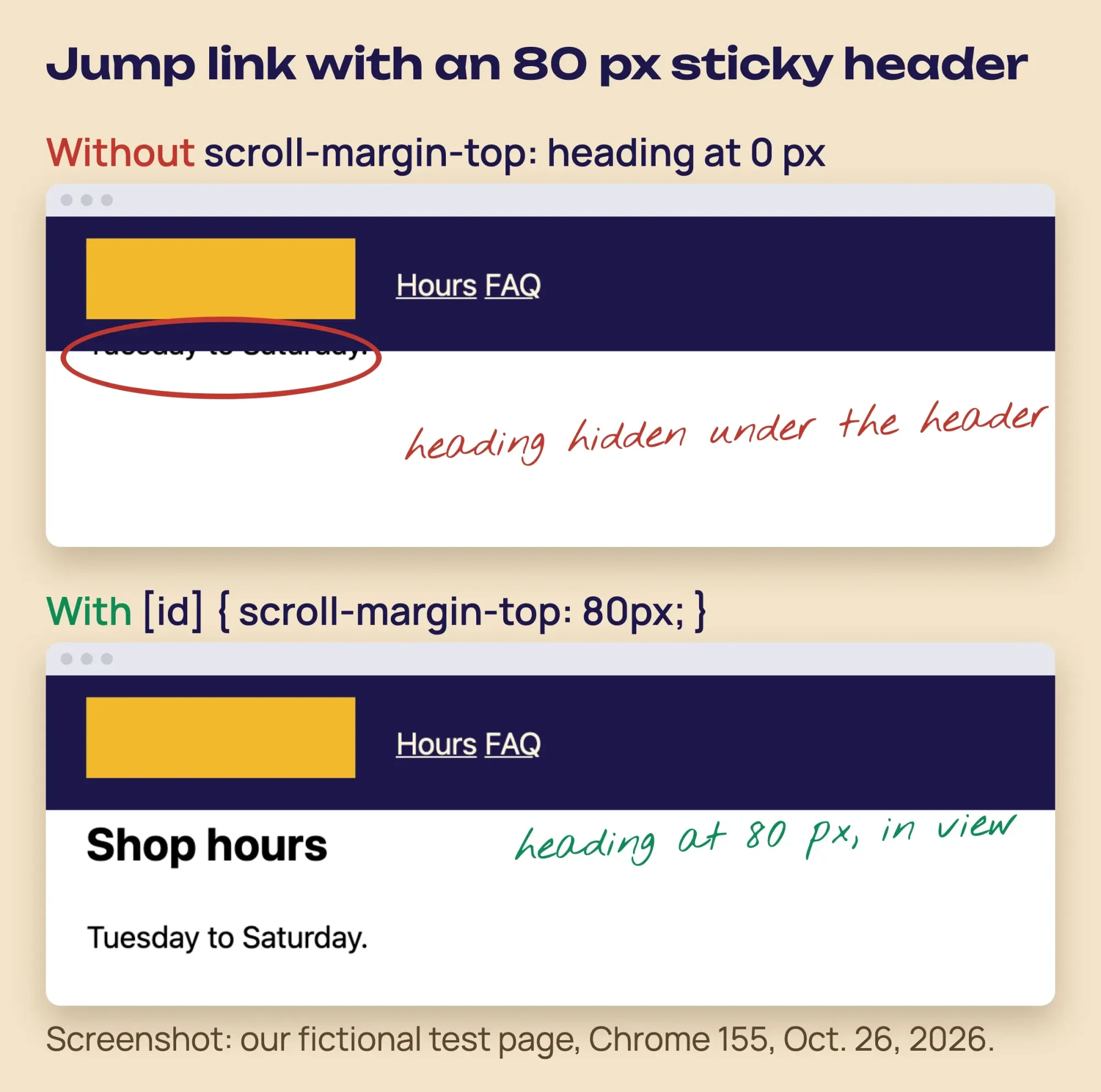 Screenshot: our fictional test page in Google Chrome 155, October 26, 2026, with our notes.
Jump links make good skip links, too. W3C's technique G1 puts "a link to the beginning of the main content" first on the page (W3C, G1).
The download attribute works only on your own files
Files are the last link type. Add download to a link and the browser saves the file instead of opening it; the value suggests a file name.
<a href="/price-list.pdf" download="ashuelot-price-list.pdf">Price list (PDF, 1 page)</a>There's a limit most tutorials skip. MDN: "download only works for same-origin URLs, same-origin blob:, and data: schemes. For other URLs, the download attribute is ignored" (MDN, the a element).
We saw both sides. From our own test server, Chrome saved the file as ashuelot-price-list.pdf. The same link pointed at a second local server just opened the PDF in the tab.
So if your files live on a storage service with its own domain, the attribute won't do anything.
Either way, it's worth putting the file type and size in the link text.
Write link text that makes sense on its own
That last tip is about link text, and it's worth a section. MDN: "The content inside a link should indicate where the link goes, even out of context" (MDN, the a element).
<!-- Weak -->
<p>Our prices are <a href="/price-list.pdf">here</a>.</p>
<!-- Better -->
<p>See our <a href="/price-list.pdf">saddle repair prices (PDF)</a>.</p>
Vague text fails people who use screen readers. W3C's failure F84 says many of them "call up a dialog box that has a list of links from the page" (W3C, F84).
A list of ten links that all say "here" tells them nothing.
WCAG 2.2 success criterion 2.4.4, a Level A rule, asks that each link's purpose be clear from its text or its context (W3C, Understanding 2.4.4). W3C's writing tips add the file type and size, as in "Proposal Documents (RTF, 20MB)" (W3C WAI, writing tips).
An image link takes its name from the image's alt text, and Chrome read this one as "Ashuelot Saddle Repair home page".
<a href="/"><img src="/logo.png" alt="Ashuelot Saddle Repair home page" width="160" height="48"></a>Don't remove the underline from links inside paragraphs. W3C's failure F73 says color alone doesn't show that something is a link (W3C, F73). Our guide to linking CSS to HTML shows where your link styles go.
Links go places. Buttons do things.
Don't use href="#" to fake a button, and don't put a <button> inside a link, because the HTML standard allows "no interactive content descendant" in an a. Our post on HTML buttons that link shows what to do instead.
Clear text helps search, too. Google says good anchor text is "descriptive, reasonably concise, and relevant to the page that it's on" (Google Search Central).
Which link do you need?
Every link above is the same element with a different href or one extra attribute. Here's the short version.
| You want to | Code | Use it when | Mistake to avoid |
|---|---|---|---|
| Link to another site | <a href="https://..."> | Citing a source or a partner | Leaving off https:// |
| Link to your own page | <a href="/contact.html"> | Menus and in-text links | Folder paths that break when a page moves |
| Open a new tab | target="_blank" rel="noopener" | The visitor is mid-form | No "(opens in new tab)" in the text |
| Start an email | href="mailto:you@...?subject=..." | People prefer their own mail app | Spaces not written as %20 |
| Start a call | href="tel:+1..." | Mobile visitors who want to talk | Missing +1, or spaces in the href |
| Jump within a page | href="#hours" + id="hours" | Long pages, FAQs, skip links | Heading hidden under a sticky header |
| Offer a file | download="name.pdf" | Price lists, forms, menus | Expecting it to work on another domain |
One contact section with every link type
Now put them together. Example: Ashuelot Saddle Repair is a made-up one-person shop in Keene, New Hampshire. The owner wants one block on the home page that gets people to call, email or check prices before they drive in.
<section id="contact">
  <h2>Get a repair quote</h2>
  <p>Call <a href="tel:+16035550142">(603) 555-0142</a>
     or email <a href="mailto:[email protected]?subject=Saddle%20repair%20quote">[email protected]</a>.</p>
  <p>Check the <a href="/price-list.pdf" download="ashuelot-price-list.pdf">price list (PDF, 1 page)</a>
     before you bring your saddle in.</p>
  <p>Not sure your saddle is worth fixing? Read the
     <a href="https://www.example.com/leather-care" target="_blank" rel="noopener">leather care guide (opens in new tab)</a>.</p>
  <p><a href="#top">Back to top</a></p>
</section>
That's a phone link and an email link with the subject filled in. Then come a download with the size in the text, one new-tab link with a warning and a jump back up.
We loaded it in Chrome, and all five links showed up with the names you'd expect.
The price list saved as ashuelot-price-list.pdf.
The .example domain is a reserved test name, so none of these addresses reach a real business.
All 12 test links worked in Chrome 155
Those results came from one afternoon's test. On October 26, 2026, we built the saddle shop page on this Mac, served it from two local web servers and drove Google Chrome 155 with a script. It clicked every link, pressed Tab four times to check the focus order, opened four new tabs and read what each one could see. It tried the download link on its own server and on the second one. All 12 links on the main page went where they should, and the console showed no errors once we added a small icon file the browser kept asking for.
Then we ran a rule check we'd written ourselves. It looks for things the HTML standard forbids, like a button inside a link or a target with no href, and for jumps to ids that don't exist. All three test pages passed, and it caught all 6 mistakes we planted in a broken copy.
We couldn't test real phones, real mail apps, Safari, Firefox or screen readers. The browser versions above come from MDN, not from us.
Our take: stop worrying about noopener and fix your link text. That gap closed in every current major browser by 2021. Vague "here" links and surprise tabs still trip people up on plenty of small-business sites.
Check your links before and after you publish
That's every link type. Before you publish, click each link, press Tab to reach it with the keyboard, and open the page on your phone to try the tel: link.
Links break later, as pages move. Our free broken link checker crawls your site and lists every dead link with the page and the link text it sits in.
Want a map of which pages link to which? We wrote up five free ways to find internal links.
Everything above works without us.
Short on time? We build and repair small-business sites through our web development work. That's paid work, so weigh this suggestion knowing we'd gain from it.
Frequently asked
Does the part after # reach my server?
No. MDN says the fragment identifier "is never sent to the server with the request" (MDN). Your server logs show the page, not the section someone jumped to.
What do target="_parent" and target="_top" do?
They open the link in the frame around the current one, or in the whole window. MDN says both act like _self when there's no parent frame (MDN), so on a normal page you won't see a difference.
How we made this guide: we rebuilt Eram N.'s 2020 post from MDN Web Docs, the WHATWG HTML Living Standard, W3C's WCAG 2.2 and WAI pages, and Google Search Central. We read all of them on October 26, 2026. That day we ran every code snippet on a made-up local site in headless Google Chrome 155.0.8059.85, plus a rule check we wrote for the HTML. We didn't run the W3C validator, real phones or other browsers. You don't have to hunt for sources: each quote's link sits in the sentence that uses it.
First published July 2020. Rewritten October 26, 2026: new text and tested code for basic, new-tab, email, phone, jump and download links, path types, link text, accessibility and a link-type table.
Sources
- MDN Web Docs: <a>, the Anchor element
- MDN Web Docs: Creating links
- MDN Web Docs: What is a URL?
- MDN Web Docs: id
- MDN Web Docs: rel="noopener"
- MDN Web Docs: scroll-margin-top
- MDN browser compatibility data: html.elements.a
- WHATWG HTML Living Standard: the a element
- WHATWG HTML Living Standard: Links, link type noopener
- W3C: Understanding WCAG 2.2 Success Criterion 2.4.4 Link Purpose (In Context)
- W3C: Technique G201, giving users advanced warning when opening a new window
- W3C: Failure F84, non-specific link text
- W3C: Failure F73, links not visually evident without color vision
- W3C: Technique G1, a link at the top of each page to the main content
- W3C WAI: Writing for web accessibility
- Google Search Central: Link best practices for Google

Comments
No comments yet. Start the conversation below.