
Quick answer
To find internal links, crawl your site with a free link checker, or open the Links report in Google Search Console. On WordPress, a link counter in Yoast or Rank Math also works. To find linking opportunities, search Google for site:yourdomain.com plus your topic. Then add links from pages that mention it.
An internal link is a link from one page on your site to another page on the same site. Google's rule of thumb is simple. Its link best practices say "Every page you care about should have a link from at least one other page on your site."
This guide shows how to find internal links with 5 free or cheap methods, then how to read the numbers. We ran a crawl test with our own checker on October 22, 2026, and it taught us 2 traps that most guides skip.
Key takeaways
- A free site crawl shows the links into and out of every page. Search Console shows Google's view, but only a sample.
- A crawl that hits its page or time limit leaves pages unvisited. Unvisited is not the same as orphaned.
- Most links on a page come from the menu, footer and sidebars. Count the links inside the article text.
- To find linking opportunities, search site:yourdomain.com with your topic, then link from pages that mention it.
- Use anchor text that says what the page is about. Google and screen-reader users both rely on it.
What counts as an internal link?
An internal link is an HTML <a> tag with an href that points to another URL on your domain, like a menu item. Google's link guidance says it "can only crawl your link if it's an <a> HTML element" with an href attribute. Buttons that work only through JavaScript may not count.
Links come from 2 places. Template links sit in the menu, footer and sidebar, and repeat on every page. Body links sit inside the text of one page, written for that page.
Why find them at all? A page with no links pointing to it is harder for Google and for visitors to reach. Google's link guide says "Google uses links as a signal when determining the relevancy of pages and to find new pages to crawl." Orphan pages are one of 11 checks in our technical SEO audit for small sites.
Internal links are different from backlinks, which come from other websites and are often called inbound links. Our guide to what a backlink is covers those.
Key facts about internal links
- Search Console's Links report tables are "limited to 1,000 rows," per Google's Links report help.
- Screaming Frog's free version crawls up to 500 URLs; a license costs $279 a year as of October 2026, per its SEO Spider pricing page.
- Ahrefs Free gives 5,000 crawl credits per verified project per month as of October 2026, per the Ahrefs Free page.
- A Zyppy study of 23 million internal links found traffic peaked when a page had about 45 to 50 internal links pointing to it.
- WCAG 2.2 success criterion 2.4.4, Link Purpose (In Context), is a Level A rule.
How do you find internal links to a page for free?
To find internal links to a page for free, crawl your site with a free link checker and filter for that page. You can also open the Links report in Google Search Console, or use the Yoast or Rank Math counter on WordPress.
Below are 5 practical methods. The first 2 cost nothing and work on any site you own. The others depend on your platform and size.
Only Method 3 is tied to WordPress. The crawlers, Search Console and the manual check also work on Shopify, Wix, Squarespace or a hand-coded site.
Method 1: crawl your site with a free link checker
A crawler starts at your home page and follows every link, like Google does. Run your domain through our free internal link checker. It reads up to 500 pages and lists the links in and out of each one, with the anchor text.
It also compares the pages it reached with your XML sitemap, shows click depth and suggests where to add links. To see the links into one page, crawl the site, then type that page's address in the filter.
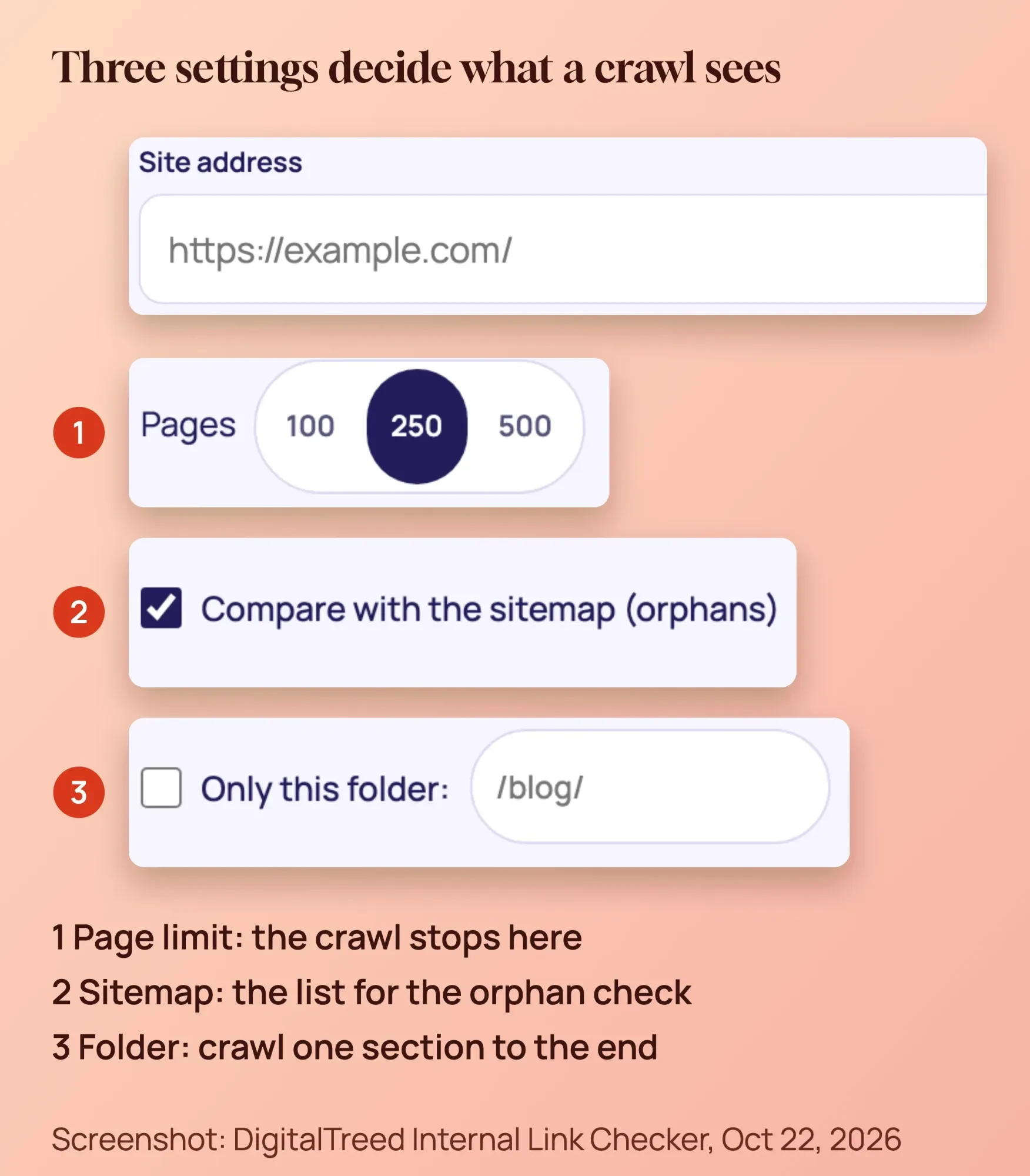 Screenshot: DigitalTreed Internal Link Checker, October 22, 2026, with our notes.
Pick the page limit with care. On a big site, start with one folder, such as /blog/, so the crawl can finish.
Method 2: the Links report in Google Search Console
Search Console is free and shows links as Google sees them. Go to Links, then Internal links, then Top linked pages. Click MORE and pick a URL to see the pages linking to it, as Google's Links report help describes.
That help page also lists the limits. It is a sample: it "isn't a comprehensive list of every link on your site," says Google. Its tables are "limited to 1,000 rows," and it doesn't flag nofollow links.
Its link text table "Covers only links from outside your property," so you get no anchor text for internal links.
Our Search Console guide walks through the Links report screen by screen.
Method 3: a link counter in WordPress
If you run WordPress, you may already have one. Yoast's text link counter adds 2 columns to your Posts list: links in each post, and links to each post. Sort by the second column to find posts with 0 links pointing at them.
Yoast SEO shows "10+ million" active installs on its WordPress.org plugin page as of October 2026. Rank Math, with "4+ million" installs per its plugin listing, has a similar counter.
Rank Math's Link Counter shows Internal, External and Incoming links in Posts and Pages. For older posts, Yoast's help page says to run "SEO data optimization" under Tools first. Our Yoast SEO guide covers that screen.
One catch: these counters read the post content. Links in menus, widgets or some page-builder layouts may not show up.
Method 4: Screaming Frog or Ahrefs Free for larger sites
Screaming Frog SEO Spider is a desktop crawler. Click any URL, then the Inlinks tab, to see every page linking to it. Its pricing page says the free version crawls up to 500 URLs; a license is $279 per year, as of October 2026.
Ahrefs Free is another option for sites you can verify. Its Ahrefs Free page lists 5,000 crawl credits per verified project per month, as of October 2026. Our Screaming Frog guide has the step-by-step crawl and the orphan check.
Method 5: check one page by hand
To see the links going out of one page, open it, right-click and choose View Page Source. Press Ctrl+F (Cmd+F on a Mac) and search for href=" plus your domain.
This shows the links on one page, not who links to it. For that, use one of the first 4 methods.
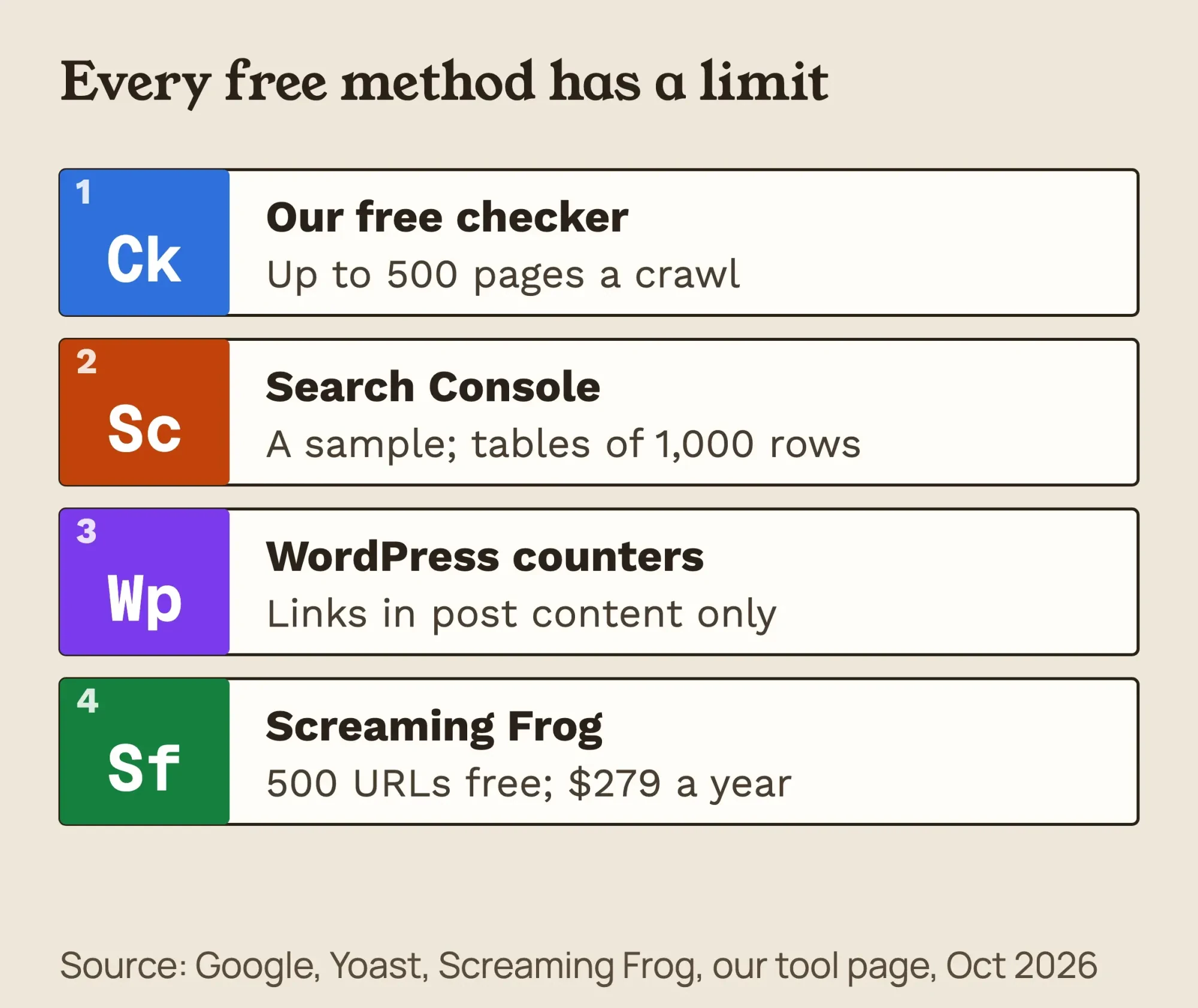 Diagram by DigitalTreed. Sources: Google, Screaming Frog, Yoast and our tool page, October 2026.
Which method should you use?
The best method depends on your site's size: a free crawl lists every link on a small or mid-size site, with anchor text. Search Console shows a sample of the links Google found, and Screaming Frog or Ahrefs Free suits larger sites.
This table sums up the 5 methods, with prices and limits as of October 2026.
| Method | Cost | What it shows | Main limit | Best for |
|---|---|---|---|---|
| Our Internal Link Checker | Free | Links into and out of each page, with anchor text | Up to 500 pages a run | Small and mid-size sites |
| Search Console Links report | Free | Pages linking to a page, as Google sees them | A sample; 1,000 rows per table; no internal anchor text | A quick check on any site you have verified |
| Yoast or Rank Math counter | Free plugins | A count of links in and to each post | Reads post content; may miss menus and widgets | Finding WordPress posts with 0 links in |
| Screaming Frog | Free to 500 URLs; $279 a year license | Every page linking to a URL (Inlinks tab) | Orphan sources need the license | Larger sites and full audits |
| Ahrefs Free | Free for verified sites | A site crawl in Site Audit | 5,000 crawl credits per project a month | Sites you can verify |
| By hand (View Source) | Free | The links going out of one page | One page at a time | Checking a single page |
Our take: if you only try one, start with a free crawl. Then use Search Console to see which of those links Google has found.
How do you export internal links to Excel or Google Sheets?
You can export internal links from both Google Search Console and Screaming Frog, then filter the rows in Excel or Google Sheets. In Search Console, single-table pages have a download button that exports "the entire table (up to 1,000 rows)," per Google's Links report help. The same page says "You can export your link data as a CSV file or a Google Sheet."
In Screaming Frog, use Bulk Export, then Links, then All Inlinks. Its user guide says that export holds "every link to all the URLs," including images and canonicals, not just a href links. Filter the rows down to normal links before you count.
In the sheet, sort or filter by the destination URL. The rows for one URL are the pages that link to it.
Our crawl test: 247 pages, 44,132 links and 2 traps
On October 22, 2026, we ran our Internal Link Checker's crawl code (commit 0a6f7834) against our own site, digitaltreed.com, in read-only mode. We set a 250-page limit. The run read 247 pages and found 44,132 links.
It hit that 250-page limit, and its 4-minute time budget ran out while it checked the rest. 889 more URLs were still waiting in the queue. Every crawl tool has a limit like this, in pages, time or both.
Our sitemap listed 1,591 URLs. When the crawl stopped, 791 of them had not been found yet. A quick reading says "791 orphan pages." That reading is wrong.
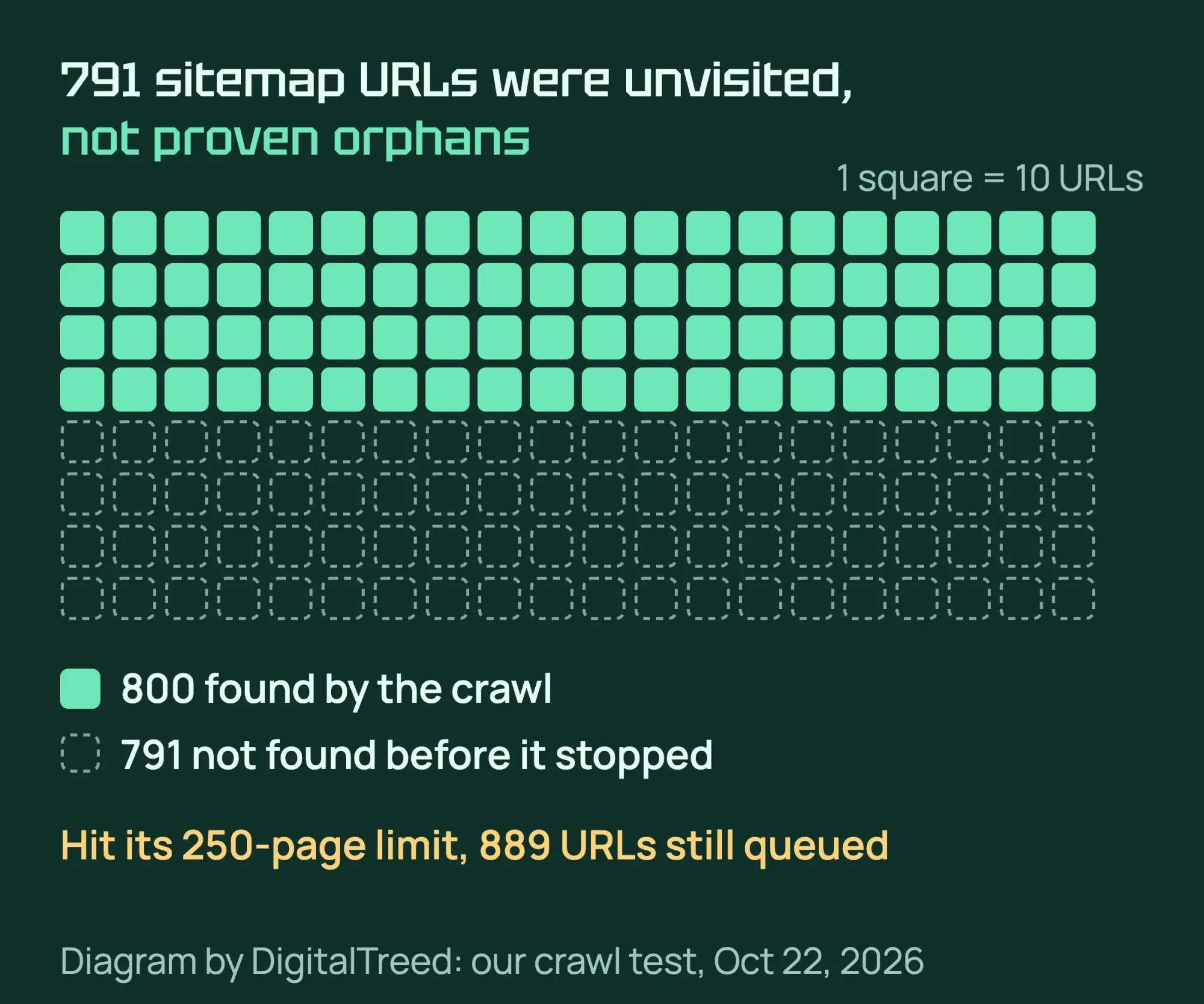 Diagram by DigitalTreed, from our crawl test, October 22, 2026.
Those 791 pages were unvisited, not orphaned. A true orphan is a page that no link reaches even when the crawl finishes. You can only call a page an orphan after a complete crawl, so crawl one folder at a time if your site is big.
A second lesson was about counting. Before this rewrite, our Broken Link Checker counted 189 links on this page on October 22, 2026. Only 2 sat in the old article text; the rest came from the menu, footer, share buttons and related-post cards.
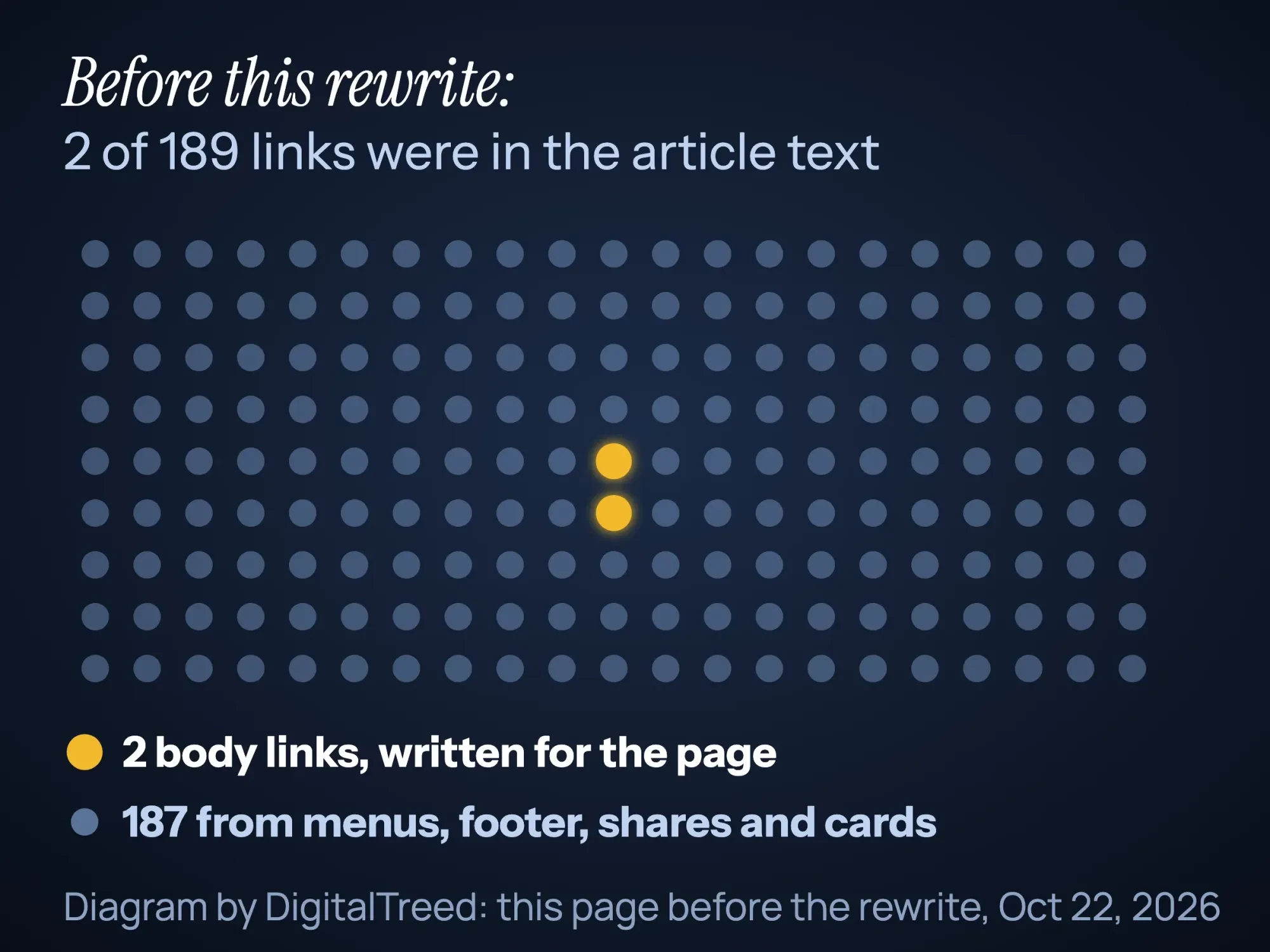 Diagram by DigitalTreed: this page before the rewrite, from our one-page link check, October 22, 2026.
Across the 247 pages our crawl read, the median page carried 178 links. So a "links to this page" total of 200 can mean a page linked from the footer and nothing else. Look at body links first.
How do you find orphan pages?
An orphan page is a page that no other page on your site links to, so nobody can reach it by clicking. To find one, compare 2 lists: the pages a full crawl reaches from your home page, and the pages in your XML sitemap. Anything in the sitemap that the crawl never reached is a possible orphan.
Orphans are usually accidents. Ahrefs' orphan pages guide (a vendor) names site migrations, menu changes, redesigns and out-of-stock products as common causes. Some are on purpose, such as ad landing pages.
Google can still find an orphan through your sitemap or a link from another site. A sitemap helps, but it does not replace links. Google's sitemap guide warns that on large sites "it's more difficult to make sure that every page is linked by at least one other page."
Screaming Frog's orphan pages tutorial says "an SEO Spider licence is required" to pull in the sitemap, Google Analytics and Search Console sources. It also says "A small number of orphan pages is common and not generally a big issue."
You need a sitemap for this. Most CMSs make one for you; if yours doesn't, our free XML sitemap generator builds one.
Our free checker runs the same sitemap comparison. Check the crawl's stop reason first. If it says the page or time limit stopped it, re-run on one folder before trusting the orphan list.
Decide one of 3 things for each real orphan:
- Keep it and link to it from 1 to 3 related pages.
- Merge it into a stronger page, then redirect the old URL with a 301.
- Leave it alone if it is a landing page for ads or email that should stay out of your menus.
Orphans, deep pages and messy menus are site-structure work. This is the hardest step in this guide. Our advanced SEO guide on site architecture explains depth and structure. If you'd rather hand it off, our SEO team can map and fix your internal links. (DigitalTreed sells this service.)
How do you find internal linking opportunities?
To find internal linking opportunities, search Google for site:yourdomain.com followed by your topic in quotes, then link from pages that mention it. Google's site: operator page gives the example site:https://example.com/ lemon, which "Shows which URLs on the site can show up for the term."
Each result that mentions your topic but does not link to your main page on it is an opportunity. Open it, find the sentence that mentions the topic, and link those words to the main page.
Two limits apply, from the same Google page. Results are "not always exhaustive," and site:https://www.example.com does not return the same results as site:https://example.com/. Try both versions of your domain.
Tools can do this matching for you. Our checker suggests pages to link from. Ahrefs' Link opportunities report in Site Audit looks for mentions of each page's keywords on your other crawled pages. It uses "the top 10 keywords (by traffic) for each crawled page." Read each suggestion before you add the link.
Write anchor text that names the page. Google says "Good anchor text is descriptive, reasonably concise, and relevant," per its anchor text advice. Words like "here" or "this page" tell nobody anything.
Clear link text also helps people who use screen readers. The WCAG 2.2 Link Purpose rule asks that a link's purpose be clear from its text or its context, at Level A.
The Justice Department's web accessibility guidance says the ADA covers businesses open to the public, including their websites. This is general information, not legal advice; check with an attorney for your situation.
To see the wider picture, read our intermediate SEO guide on internal linking on how links pass context between pages.
What should you fix once you have the list?
Fix your money pages first: give each service or quote page body links from related pages, with anchors that name the page. Then clear broken links, redirect hops and nofollow tags on links between your own pages, using the checklist below.
- Every service, booking or quote page has links from the text of 3 or more related pages. The 3 is our checker's threshold, not a Google rule.
- No important page is linked only from the menu or footer.
- Anchors describe the target page, such as "emergency AC repair in Phoenix."
- One phrase points to one page, so readers and Google aren't confused.
- Links point to the final URL, not to a URL that redirects.
- Links between your own pages are not marked nofollow. Google's advice on nofollow is about sources you don't trust.
- Broken internal links are fixed or removed.
To fix broken links, run our free broken link checker on the whole site or one page. It lists each dead link with the page it sits on and where it is: content, menu or footer.
On WordPress, the Broken Link Checker plugin by WPMU DEV also finds dead links. It shows 500,000+ active installs as of October 2026.
Internal links per page: there is no set number
Google's link best practices say "There's no magical ideal number of links a given page should contain," so don't chase one. In one Zyppy correlation study of 23 million internal links, traffic peaked when a URL had about 45 to 50 links pointing to it. That counts links into a page, not links on it. Correlation is not proof, so treat that as a soft ceiling.
Example: a Phoenix HVAC company adds 7 links
Example: a made-up heating and cooling company in Phoenix, Arizona, runs a 60-page WordPress site. It has 8 service pages, 40 blog posts and 12 other pages. The owner wants more summer quote requests for AC repair.
A crawl with the internal link checker shows the AC repair page gets body links from only 2 pages. A ductless mini-split page sits in the sitemap, but the full crawl never reaches it.
Next, the owner searches site:example.com "ac repair", with the real domain in place of example.com. The search finds 9 blog posts that mention AC repair, and 7 of them don't link to the service page.
So the owner adds 1 link in each of the 7 posts. The anchors vary, from "AC repair in Phoenix" to "same-day AC repair" in other posts. The mini-split page gets links from a heat-pump post and the services page. A second crawl confirms both pages now have body links.
Local businesses like this one use internal links to support the service pages that local searches land on. Our guide to what local SEO is covers the rest of that work.
A 30-minute monthly routine
- 10 minutes: run the link checker, on one folder if your site is large.
- 10 minutes: use site: searches to add links to your 2 or 3 weakest money pages.
- 5 minutes: fix broken links and links that point to redirects.
- 5 minutes: review possible orphans and decide to link, merge or leave each one.
For links that redirect, our free redirect checker shows each hop, so you can point the link at the final URL. If the hops never end, the page is stuck in a loop, and our WordPress too many redirects fix walks through the usual causes. Then re-check after any redesign or menu change. If you are new to all of this, our guide to running your first SEO audit puts internal links in context.
Frequently asked
What is the easiest free way to see internal links to a page?
Use the Links report in Google Search Console, or run a free crawl with a link checker and filter for the page. Search Console shows only a sample, so a crawl is more complete for small sites.
How many internal links should a page have?
Google says there is no ideal number. Every page you care about needs at least 1 link from another page. Links inside related articles help readers more than menu links do.
Does Search Console show anchor text for internal links?
No. Google's help page says the link text table covers only links from outside your property. Use a crawler to see your internal anchor text.
Is Screaming Frog free?
Yes, up to 500 URLs per crawl. A license for bigger crawls and the orphan page sources costs $279 per year, as of October 2026, per its pricing page.
Do menu and footer links count as internal links?
Yes. Google can crawl any normal <a href> link, wherever it sits. But menu and footer links repeat on every page, so they say little about one page. Count the links inside the article text when you judge a page.
Should I use a plugin that adds internal links automatically?
Use suggestions, but review each link by hand. Google warns against cramming every related keyword into anchor text, and automatic linking can do exactly that.
Your next step
Run one crawl of your site today and write down your 3 most important pages. Check how many body links each one gets, then add links from 2 related pages to each.
If your site is large or the crawl shows structure problems, our SEO services can fix your internal links. You get a fixed quote first.
How we made this guide: it's built from Google Search Central's documentation, Search Console Help, WCAG 2.2, Justice Department guidance and tool makers' own pages. We ran the crawl and the one-page link test with our own checker code on October 22, 2026. That day, we checked every number and quote against the source linked next to it. The Search Console help page blocked our checker that day. We read it through a reader service and confirmed each quote against the live page. Updated October 23, 2026: added why internal links matter, a method table and exporting links to Excel or Google Sheets. We also added why orphan pages happen, how Google finds them, Ahrefs' Link opportunities report and a FAQ on menu and footer links.
Updated October 25, 2026: added 5 sourced facts near the top and short direct answers under the question headings. We also named the crawl code version and added a heading on links per page.
First published February 11, 2025. Rewritten October 22, 2026: new text, 5 methods with their limits, our own crawl test, orphan and opportunity steps, a checklist and a worked example.
Sources
- Google Search Central: Link best practices for Google
- Google Search Central: SEO Starter Guide
- Google Search Central: site: search operator
- Search Console Help: Links report
- W3C: Understanding WCAG 2.2 Link Purpose (In Context)
- U.S. Department of Justice: Guidance on Web Accessibility and the ADA
- Screaming Frog: SEO Spider pricing (vendor)
- Screaming Frog: How to find orphan pages (vendor)
- Ahrefs: Ahrefs Free (vendor)
- Yoast: How to use the text link counter (vendor)
- Yoast help: internal link counts (vendor)
- Rank Math: Link Counter (vendor)
- WordPress.org: Yoast SEO plugin
- WordPress.org: Rank Math SEO plugin
- WordPress.org: Broken Link Checker plugin
- Zyppy: 23 Million Internal Links SEO Case Study
- Google Search Central: Learn about sitemaps
- Screaming Frog: SEO Spider user guide (vendor)
- Ahrefs Academy: Link opportunities (vendor)
- Ahrefs: Orphan pages (vendor)


Comments
No comments yet. Start the conversation below.