
Quick answer
For most beginners, the best free HTML editor in 2026 is Visual Studio Code: free for business use, on Windows, Mac and Linux, with Emmet shortcuts and a preview. On Windows, Notepad++ is lighter. Want nothing installed? Phoenix Code's web version showed a live preview with no account when we tested it.
A free HTML editor is a program for writing a web page's code, usually with colors, shortcuts and a preview a plain notepad doesn't have. You don't need to pay for one. You do need to pick one that's still alive.
That's the problem with most lists. Three editors they still name have been shut down, and a few "free" picks now come with a paid tier, a trial or a login. So we checked every editor below on its own website on October 26, 2026, and tested the two online ones ourselves.
Key takeaways
- VS Code is free for private or commercial use on Windows, Mac and Linux.
- Phoenix Code shows a live preview, and its Pro plan costs $11 a month.
- Notepad++ runs only on Windows and has no built-in preview.
- On a Mac, set TextEdit to plain text before you write HTML in it.
- Skip Brackets, Atom, BlueGriffon and Visual Studio for Mac, because they are retired.
How we picked, and what we actually tested
We started from MDN, the web reference most developers use. It tells beginners to ask which system you're on, and whether the editor has "Syntax highlighting", "Code completion" and "Code snippets" (MDN, What text editors are available?). MDN adds the comforting part: "There's a big chance you'll find a suitable text editor for free."
Every pick had to pass six checks:
- free to use with no time limit for the editor itself
- runs on Windows, Mac or in a browser
- colors HTML and helps you type it (completion or Emmet)
- shows a preview, or is honest that it doesn't
- had a release or an active project page in 2026
- needs no account to start
Paid editors such as Sublime Text and Dreamweaver are out on the first check.
Every price, version and platform below comes from the editor's own site or release page, read that day. We didn't download or install any desktop editor. Our hands-on test covers only vscode.dev and Phoenix Code's web app, which open in a browser without an account.
| Editor | Kind | Runs on | Cost (as of October 2026) | Newest version we saw | Best for |
|---|---|---|---|---|---|
| Visual Studio Code | Code editor | Windows, Mac, Linux, browser | Free | 1.143.1 | Most beginners |
| Phoenix Code | Code editor with live preview | Windows, Mac, Linux, browser | Free; Pro $11/month | 5.2.4 | Seeing changes as you type |
| Notepad++ | Code editor | Windows | Free (GPL) | 8.9.8.1, Sep 24, 2026 | Light Windows editing |
| Bluefish | Code editor | Windows, Mac, Linux, BSD | Free, open source | 2.4.2, Jul 17, 2026 | Older PCs and Linux |
| BBEdit | Text and HTML editor | Mac (macOS 14+) | Free mode after a 30-day trial | 16 | Mac users who want a preview |
| CotEditor | Plain-text editor | Mac (macOS 26+) | Free, open source | 7.1.2 | Quick Mac edits |
| Zed | Code editor | Mac, Windows, Linux | Free; Pro $10/month for AI | 1.25.3, Oct 23, 2026 | Programmers |
| TextEdit | Built-in text editor | Mac | Comes with macOS | Part of macOS | One small fix |
| JSFiddle | Online playground | Browser | Free with ads; paid PRO | Web app | Sharing a snippet |
One word on "kind", because it decides more than the brand does.
A code editor shows you the HTML and helps you write it. A WYSIWYG ("what you see is what you get") editor shows the finished page and writes the HTML for you. Every pick in the table is a code editor; we come back to WYSIWYG further down.
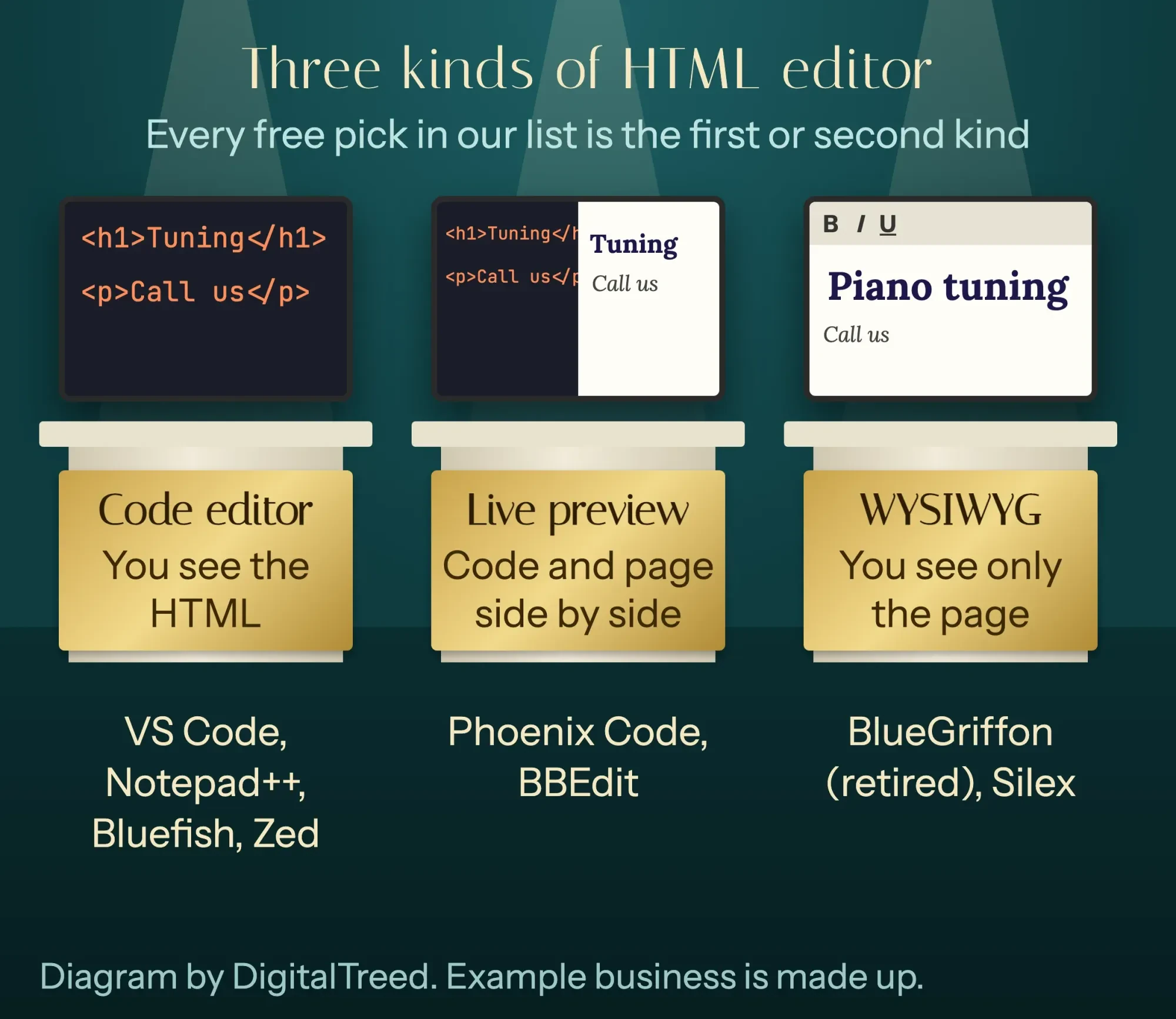 Diagram by DigitalTreed: the three kinds of HTML editor, using our made-up piano tuner's page.
Visual Studio Code is the safe default
That checklist puts Visual Studio Code first. VS Code is Microsoft's free code editor, and its FAQ is blunt: "Yes, VS Code is free for private or commercial use" (VS Code FAQ). The product ships under a Microsoft license, built from source code that's MIT-licensed.
It runs on Windows, Mac and Linux. The newest release on its notes page was 1.143, with 1.143.1 downloads, as of October 26, 2026 (VS Code release notes). On a Mac it supports the macOS versions Apple still patches (VS Code requirements).
For HTML you get "syntax highlighting, smart completions with IntelliSense, and customizable formatting," plus Emmet, which turns short abbreviations into full code (VS Code HTML docs). The desktop app can also open the page in its Integrated Browser and update it "in real time" as you type.
There's also vscode.dev, the same editor in a browser tab. Microsoft says it works in the latest Chrome, Edge, Firefox and Safari, but only Chrome and Edge can open a whole folder from your computer (VS Code for the Web).
We tried it in Chrome 155 on October 26, 2026. No sign-in was asked for. We made a new file, set it to HTML, typed one exclamation mark and pressed Tab. Emmet wrote an 11-line HTML5 page: doctype, language, character set, viewport and title. When we typed an opening h1 tag, the closing tag appeared by itself.
Then we looked for a preview. A search of the command list for "preview" found 7 commands, and none of them shows the page.
In the browser version, with no extensions added, we couldn't see our page at all.
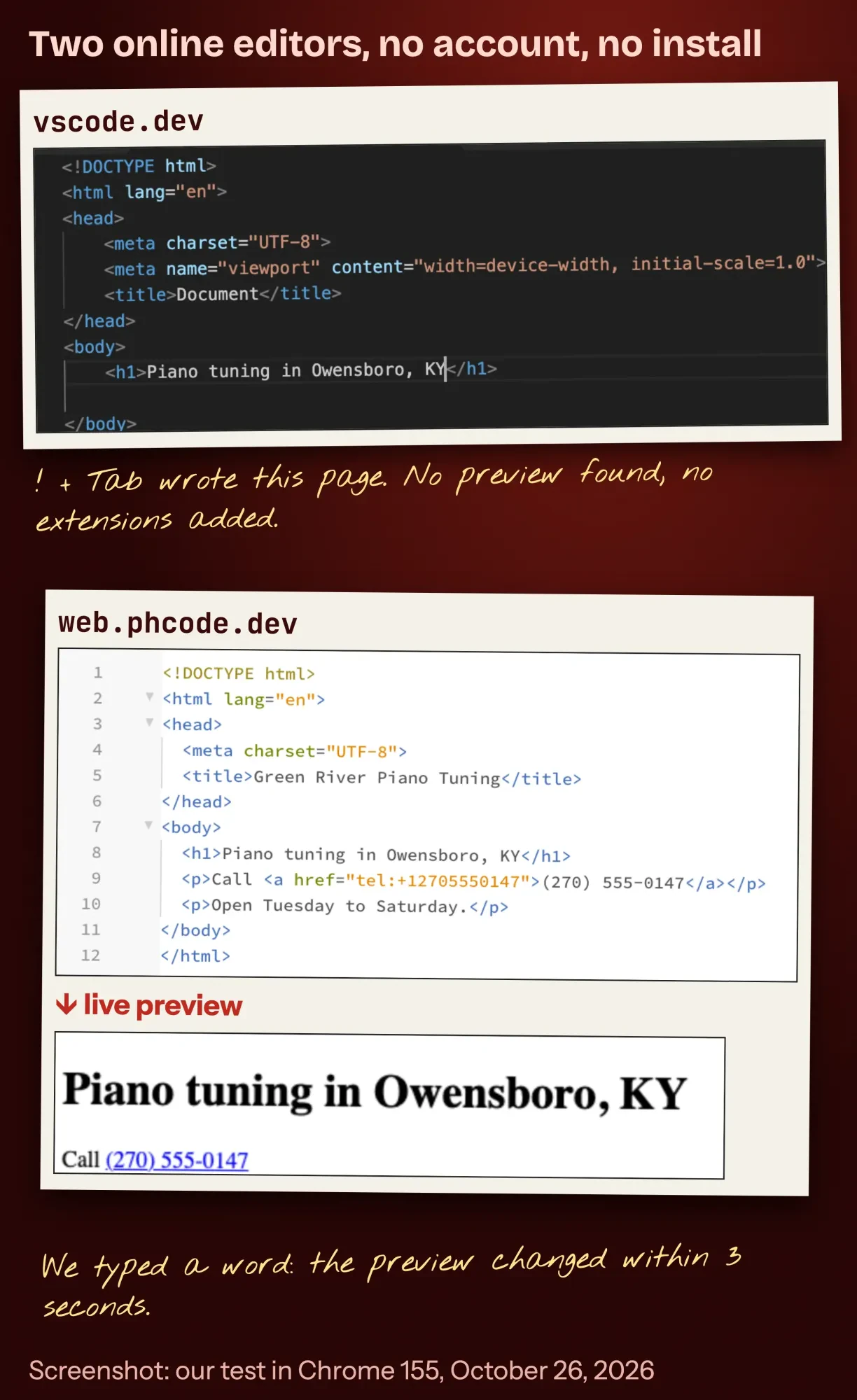 Screenshot: vscode.dev and web.phcode.dev in Chrome 155, October 26, 2026, with our notes. The business is made up.
One catch: Emmet's page title is the word "Document". Change it, or every tab and search result says Document. Once the page is live, our free meta tag analyzer shows the title and description search engines will read.
Our take: install VS Code if you'll edit HTML more than once. It's free, it's current, and nearly every tutorial you'll read uses it.
Phoenix Code shows your page as you type
But if you want to watch the page while you type, Phoenix Code is the better pick. It's the free, open-source successor to Brackets, built on Brackets' code. Its site says you can "watch your website update in real time as you type" (Phoenix Code). It runs on Windows, Mac, Linux and in a browser, and its GitHub page listed 5.2.4 as the newest stable release (Phoenix Code releases).
This was the better online test. web.phcode.dev was ready within the 20 seconds we gave it to load, asked for no account and opened a sample project with a preview pane on the right. We pasted in a 12-line page for Green River Piano Tuning, a made-up tuner in Owensboro, Kentucky.
The heading was in the preview when we checked 6 seconds later. Then we typed a word into the heading without saving. The preview changed within 3 seconds.
The catch is the upsell. The web app said we'd "been upgraded to Phoenix Pro" for 15 days (the desktop app's trial is 7 days, per its pricing page) and ran a 4-step tour. Pro's main extra, editing text right inside the preview, costs $11 a month, or $108 a year billed annually, as of October 2026 (Phoenix Code pricing). When the trial ends, the Community Edition, "Free for all uses - commercial and personal," keeps the code editor and live preview.
Best for: beginners who learn faster when they see each change. It's the closest free thing to a WYSIWYG editor that still keeps you in the code.
Notepad++ is the light pick for Windows
Now for Windows. Notepad++ calls itself "a free (as in “free speech” and also as in “free beer”) source code editor and Notepad replacement" (Notepad++). It's licensed under the GNU General Public License.
It runs only on Windows.
It's also busy. Version 8.9.8.1 came out on September 24, 2026, with a long list of security fixes (Notepad++ 8.9.8.1 release). It colors HTML, and its word and function completion can pop up after you type a letter or two (Notepad++ user manual).
What it doesn't have is a built-in preview. You save the file and open it in your browser yourself, which is fine for small fixes.
Best for: an older Windows laptop, or anyone who wants a tool that opens instantly. If you're writing your first page, our HTML tutorial for beginners walks through every tag you'll type in it.
Bluefish runs on almost anything
Still on an old PC, or on Linux? Bluefish is a volunteer-run, open-source editor, and its site says it "runs on most desktop operating systems including Linux, Mac OSX, Windows, FreeBSD and OpenBSD" (Bluefish). Version 2.4.2 came out on July 17, 2026.
It supports Emmet, which its site still calls by the old name, Zencoding. It also opens fast, which helps on an old PC.
The look is plainer than VS Code's, and you'll find fewer tutorials for it.
Best for: Linux users and older machines.
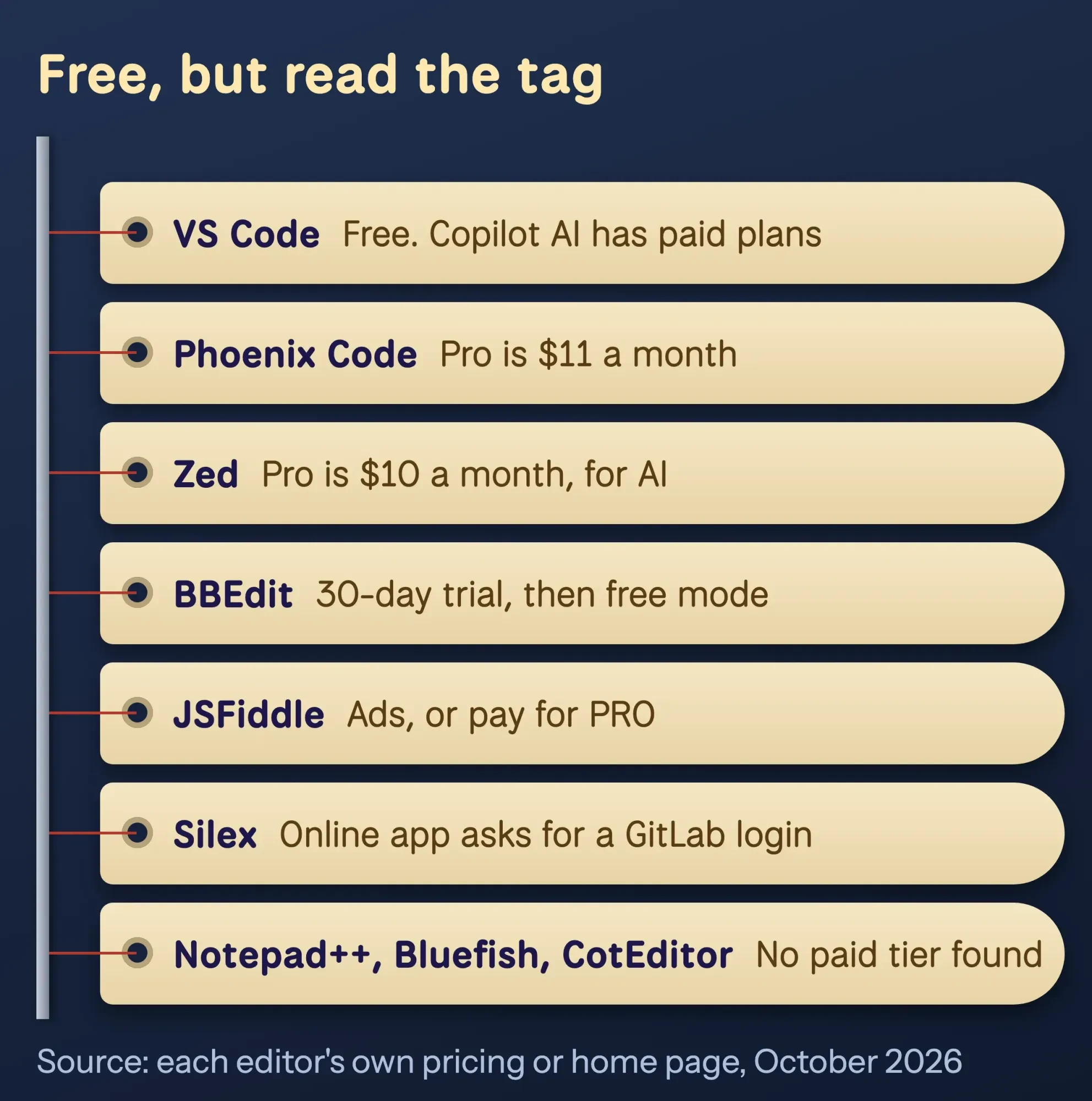 Diagram by DigitalTreed: what "free" means for each editor, from each one's own pricing or home page, October 26, 2026.
On a Mac, BBEdit and CotEditor cover most needs
Then there's the Mac. If you want a free HTML editor for Mac that isn't VS Code, BBEdit is the long-running Mac choice. It "offers a 30-day evaluation period," and after that "you can still use BBEdit... for free, forever," just without the paid features (BBEdit). Version 16 needs macOS 14 or later (BBEdit 16 release notes).
The useful part for HTML: Bare Bones' own comparison lists "Live in-app preview of HTML and Markdown documents" among the free-mode features (BBEdit feature comparison).
CotEditor is smaller. It's free, open source, "just for macOS," and colors more than 60 languages, HTML included (CotEditor). The newest release, 7.1.2, needs macOS 26 or later (CotEditor releases), so an older Mac won't run it.
Neither one runs on Windows.
Zed is fast, but it's built for programmers
Next is Zed, an open-source editor for Mac, Windows and Linux. Version 1.25.3 came out on October 23, 2026 (Zed download page). Its pricing page says "$0 forever" for the editor; the $10-a-month Pro plan is for its AI features (Zed pricing).
HTML works through an extension that "is automatically installed" (Zed HTML docs).
It's a strong tool.
But its home page talks about AI agents and Rust code, not web pages, and a beginner will find far fewer HTML how-tos for it than for VS Code.
You already have TextEdit, and it works with one setting
Before you install anything, check what you already have: every Mac comes with TextEdit. Apple's steps: choose File > New, then Format > Make Plain Text, type your code, and save with a name ending in .html (Apple TextEdit User Guide).
Skip the plain-text step and you'll hit Apple's own warning. When you edit HTML as formatted text, "curly quotes and em dashes replace straight quotes and hyphens."
Curly quotes around an attribute quietly break it.
It's fine for one small fix. For a whole page, the colors and completion in a real editor catch mistakes TextEdit won't. Our list of 5 basic HTML codes is a good first file to try.
Do you need a WYSIWYG HTML editor?
So far every pick shows you code. And you probably don't need a WYSIWYG editor, which is lucky, because free WYSIWYG desktop editors are nearly gone. BlueGriffon, the one most old lists recommend, has shut down. Its site now says "After 14 years of existence, it's time to wave goodbye to BlueGriffon" (BlueGriffon).
Silex is a free, open-source "visual builder for static sites" (Silex). We didn't test it: on October 26, 2026, its online app asked us to log in with GitLab.com before we could start.
If you'd rather never see code, a website builder or WordPress fits better than an HTML editor. Our guides on how to build a website with AI and how to make a WordPress website cover both, with real costs.
And if you want to see the page while you write the code, Phoenix Code's live preview is the middle path.
Skip these, even if a list recommends them
Those retired names keep turning up, so here are the ones to avoid, with the date their makers gave.
- Brackets: "On September 1, 2021, Adobe will end support for Brackets" (Adobe on GitHub). Its site, now run by the community, points to Phoenix Code (brackets.io).
- Atom: GitHub archived it for "an official sunset on December 15, 2022" (GitHub blog).
- BlueGriffon: its maker said goodbye, with no date on the page (bluegriffon.org).
- Visual Studio for Mac: "retired on August 31, 2024" (Microsoft).
- Komodo Edit: its official page, komodoide.com/komodo-edit, returned a 404 error when we checked on October 26, 2026, so we couldn't confirm its status.
Old installers still float around download sites. They get no security fixes, and that's reason enough to skip them.
Visual Studio Community, on the old version of this list, isn't retired on Windows. It's a full IDE for building apps, which is a lot of program for a three-page site. Its license also limits use inside companies: "up to five users" in a non-enterprise organization (Visual Studio Community).
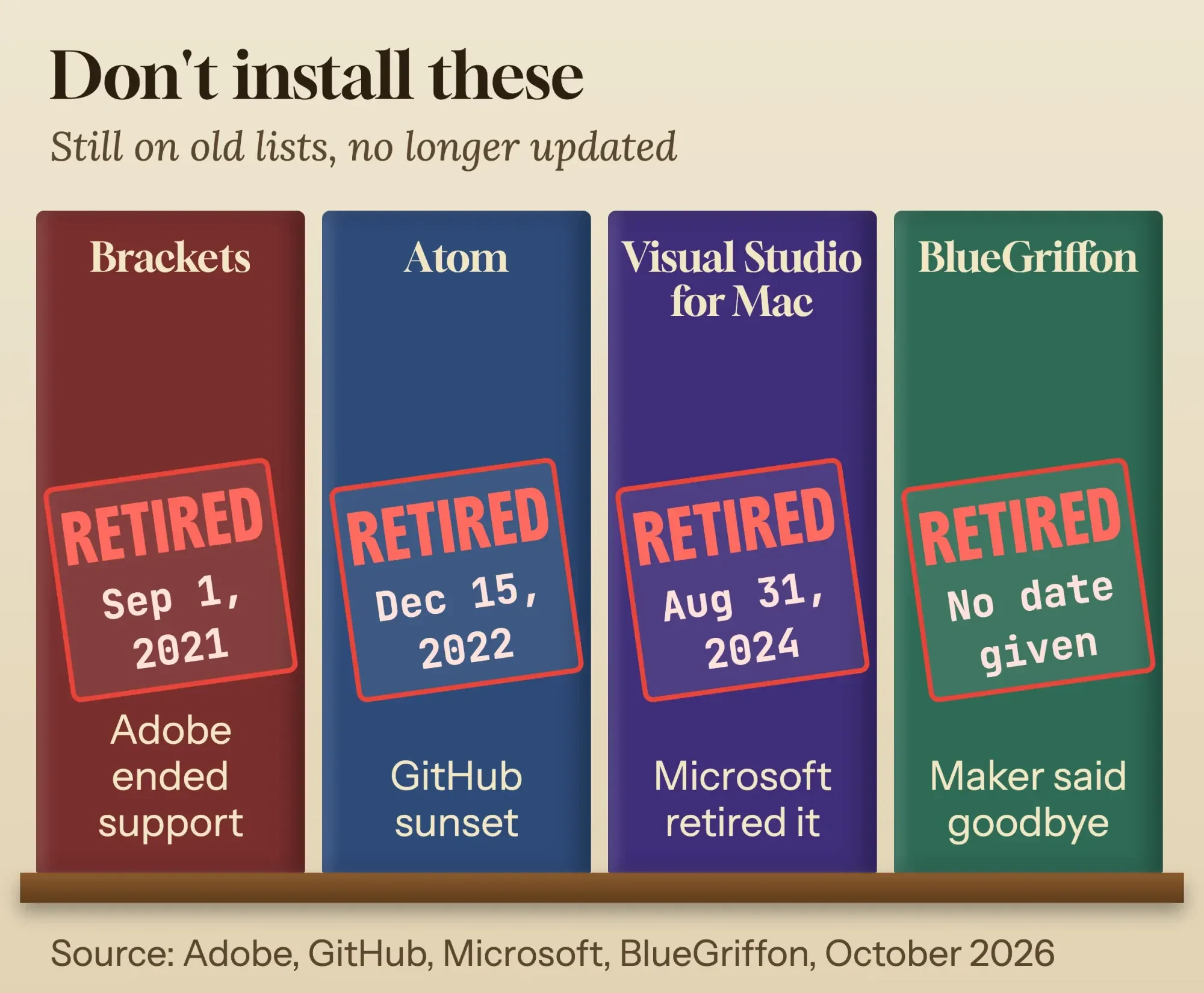 Diagram by DigitalTreed: retired HTML editors and the dates from Adobe, GitHub, Microsoft and BlueGriffon's own pages, read October 26, 2026.
Pick by what you're doing this week
Now put those picks to work for one small business.
Example: Green River Piano Tuning, a made-up one-person shop in Owensboro, Kentucky, wants a one-page site with its hours and a phone number. The owner has a Windows laptop and an iPad.
On the laptop, VS Code is the pick. It'll write the page skeleton from one keystroke, and its preview shows the result. For a five-minute fix on the iPad, a browser editor is the only option, and vscode.dev lists Safari support. We didn't test an iPad, though.
The short version:
- Learning HTML on any computer: VS Code.
- Want to watch the page change as you type: Phoenix Code.
- Windows, and you want something tiny: Notepad++.
- Mac, and you want a preview without VS Code: BBEdit in free mode.
- Nothing installed, today: web.phcode.dev, or JSFiddle to share a snippet (ad-supported, with a paid PRO plan, per JSFiddle).
We left CodePen out because its site blocked our check on October 26, 2026.
Once you've picked one, the next jobs are the same in any editor. Make links in HTML and a button that links to a page, then link a CSS file to your HTML for the styling. A contact form that actually sends email needs more than HTML. When you want a page that reacts to clicks, our first lesson in JavaScript comes next.
When the page is live, check how fast it loads on a phone with the speed test tool we built.
If the one-page site turns into a real project, we build sites like this. We get paid for web development, so read this as our pitch: if a free editor and an afternoon will do, we'll say so.
Frequently asked
Is VS Code free for business use?
Yes. Microsoft's FAQ says it's "free for private or commercial use" (VS Code FAQ). The optional GitHub Copilot AI has its own free and paid plans.
Is Notepad++ available for Mac?
No. Its site says it runs "in the MS Windows environment" (Notepad++). On a Mac, try BBEdit, CotEditor or VS Code.
Can I edit HTML on a Chromebook?
Yes, in a browser editor. Microsoft says vscode.dev runs in the latest Chrome, and Chrome can open local folders through the File System API (VS Code for the Web). We tested it in desktop Chrome, not on a Chromebook.
Do online HTML editors need an account?
Not the two we tested. vscode.dev and web.phcode.dev both opened and let us edit with no sign-in on October 26, 2026. Silex's online app did ask for a GitLab.com login.
How we made this guide: we started over from Eram N.'s 2020 list and checked every editor on its own site, release page or license page. We read those and MDN's guide to choosing a text editor on October 26, 2026. Nothing was downloaded or installed. The same day we tested vscode.dev and web.phcode.dev in Google Chrome 155.0.8059.85 with a made-up business page and logged what each did. Each claim carries its source link right in the sentence.
First published July 2020. Rewritten October 26, 2026: a new list checked against each editor's own site, a summary table, our online editor test, a WYSIWYG section and the retired editors to avoid.
Sources
- MDN Web Docs: What text editors are available?
- Visual Studio Code: FAQ
- Visual Studio Code: release notes (1.143)
- Visual Studio Code: HTML in Visual Studio Code
- Visual Studio Code: VS Code for the Web
- Phoenix Code: pricing
- Phoenix Code: GitHub releases
- Notepad++: home page
- Notepad++: v8.9.8.1 release
- Bluefish: home page
- Bare Bones Software: BBEdit
- Bare Bones Software: BBEdit feature comparison
- CotEditor: home page
- Zed: pricing
- Apple: Work with HTML documents in TextEdit on Mac
- Adobe: Brackets repository on GitHub
- GitHub blog: Sunsetting Atom
- Microsoft: Visual Studio for Mac retirement announcement
- BlueGriffon: Goodbye friends
- Microsoft: Visual Studio Community

Comments
No comments yet. Start the conversation below.