

Quick answer
Pikdo is not working as of November 11, 2026. In our check, pikdo.net sent an empty reply to every request, and pikdo.com returned a 114-byte page, with its name servers at a domain marketplace. Public Instagram profiles can still be seen through Instagram itself, embeds and search results, while private accounts stay limited to approved followers. Start with the official routes below.
If you used Pikdo to glance at a competitor's public Instagram page without signing in, you've likely found it gone. Pikdo is a name our 2023 post described as a website for browsing public Instagram profiles without an account, though that post cited no sources.
We checked whether Pikdo is still working at four web addresses and who holds those names now. Instagram's robots.txt and Terms explain why viewer sites keep disappearing, and its help pages set out what a public profile shows to whom. That leaves five legal ways to view one, the risks of any Pikdo replacement, and four steps if you used a viewer site already. Our view: use Instagram's own routes, and keep your password off every other site.
Key takeaways
- Never type your Instagram password into a viewer or downloader site.
- pikdo.net gave an empty reply to every request on November 11, 2026.
- Instagram's robots.txt blocks every unnamed bot from profile pages.
- Private accounts show posts only to followers the owner approves.
- Story owners see who viewed each story for up to 48 hours.
Is Pikdo still working, and who holds its names?
We checked every obvious Pikdo address on November 11, 2026, without opening any of its pages. Because our old post never named a web address, our script tried pikdo.net, pikdo.com, pikdo.org and pikdo.io with DNS lookups, header-only requests and the public registry records.
The .net name still points to a server, but that server sent an empty reply to header requests over https, plain http and the www name alike. The Verisign registry record for pikdo.net shows a July 21, 2021 registration through Dynadot Inc. Its name servers belong to ParkLogic, a company whose own site sells domain monetization. The Wayback Machine index lists 53 monthly captures of the name going back to January 2011, so someone held it before this 2021 registration.
The .com name did answer. It returned HTTP 200 and a page of just 114 bytes, far too small to hold a working viewer. We read only its headers, not the page itself. Its Verisign registry record for pikdo.com shows a June 12, 2021 registration and a last change on August 23, 2026. The name servers sit at Afternic, which calls itself a domain marketplace. The archive index holds 50 monthly captures back to February 2011. This name changed hands too.
| Name | How we checked | Result (November 11, 2026) |
|---|---|---|
| pikdo.net (https, http, www) | Header-only request | Empty reply, no page |
| pikdo.net registry record | RDAP lookup | Registered July 21, 2021; name servers at ParkLogic |
| pikdo.com | Header-only request | HTTP 200, a 114-byte page |
| pikdo.com registry record | RDAP lookup | Registered June 12, 2021; name servers at Afternic |
| pikdo.org | Header request and RDAP | Registered February 11, 2025; not opened |
| pikdo.io | DNS lookup | No address record |
A third name, pikdo.org, answers requests, and its headers point to a WordPress site. The registry record for pikdo.org shows a February 11, 2025 registration through NameSilo, years after the other two. We didn't open it. The record names no owner, so nothing we found links it to the old Pikdo.
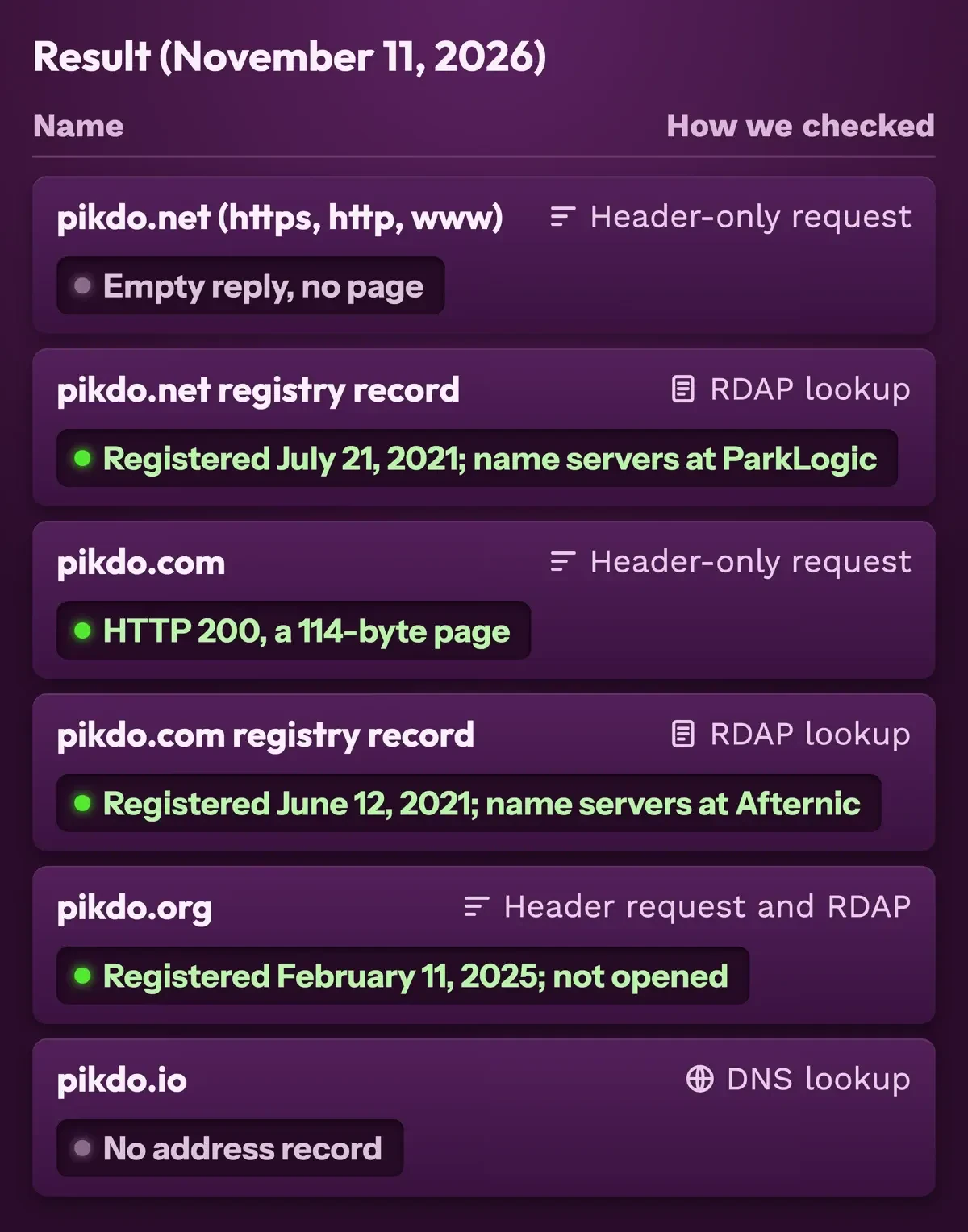 Diagram by DigitalTreed, from our DNS, header and registry checks on November 11, 2026.
What we tested
We ran two small scripts on November 11, 2026, each naming us in the user agent. One looked up the four Pikdo names, with no page opened. The other parsed a saved copy of Instagram's robots.txt for 12 user agents and 5 page types: a profile, a post, a reel, a story and a hashtag page.
Why Instagram viewer sites keep disappearing
We can't see why pikdo.net went quiet. But a viewer fetches profiles from Instagram for every visitor, which is the automated collection Instagram's own files forbid without permission.
The first lines of Instagram's robots.txt file state that "Collection of data on Instagram through automated means is prohibited unless you have express written permission from Instagram." The file lists 37 user-agent groups. No viewer site is among them. Its catch-all group for unnamed bots reads "Disallow: /", which means no page at all. Our parser test showed who that leaves out, agent by agent. Six search and link-preview crawlers, including Googlebot and Bingbot, could reach all 5 page types. AI crawlers, the Scrapy framework, our own checker and a made-up viewer bot were blocked from all 5. Any unnamed viewer bot lands in that group.
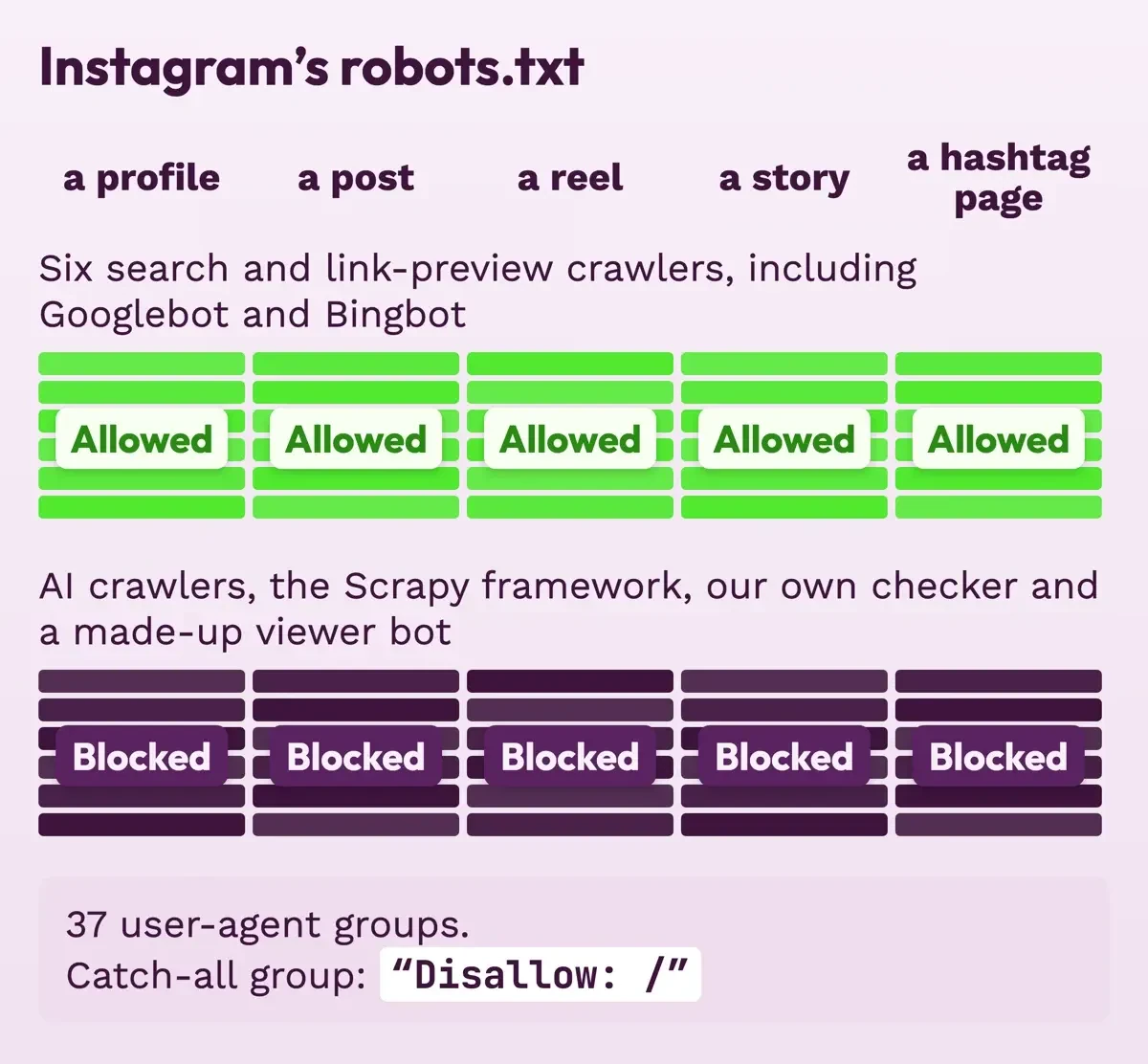 Diagram by DigitalTreed, from our parse of Instagram's robots.txt saved November 11, 2026.
The Instagram Terms of Use say the same thing in contract form. You can't access or collect information in unauthorized ways, and that covers automated collection without Instagram's express permission, whether or not the tool is signed in.
Meta's April 2021 post on scraping targets the method, not the data: "Using automation to get data from Facebook without our permission is a violation of our terms."
Meta enforces the rule with technical limits first. In that post on how it combats scraping, Meta also writes that "Scrapers may not access or collect data from our products using automated means without our prior permission." Its rate limits "cap the number of times anyone can interact with our products in a given amount of time." A site that fetches profiles for every visitor reaches that cap far sooner than one person browsing. Data limits, per the same post, keep people from getting more data than normal use would need. When limits aren't enough, the listed actions include "sending cease and desist letters, disabling accounts" and lawsuits.
Meta's October 2020 post on legal action against data scraping reports how one scraping lawsuit ended: a settlement with BrandTotal and Unimania. Per Meta, the two companies accepted "a permanent injunction banning them from using and scraping Facebook and Instagram" and agreed to pay "a significant financial sum." We're describing Instagram's rules, not giving legal advice, and a business planning bulk collection of Instagram data needs a lawyer's review first.
What a public Instagram profile shows, and to whom
Instagram's help page on the differences between public and private accounts sets out who sees what, in a table summarized below.
| What | Public account | Private account |
|---|---|---|
| Photos and videos on the profile | Anyone on Instagram | Followers the owner approved |
| Profile photo, name, username and bio | Anyone, on or off Instagram | Anyone, on or off Instagram |
| Links to posts in search engine results | Can appear | Do not appear |
| Embeds on other websites | Allowed | Not allowed |
So a private account still shows its name, photo and bio to anyone, but its posts stay with approved followers. Meta's Instagram oEmbed documentation backs this from the developer side: "Posts on private, inactive, and age-restricted Instagram accounts are not supported." So a site that promises a private account's posts is promising access that only approved followers get.
Two groups sit at opposite ends of that table. Business profiles can't be private at all. That makes a competitor's business account public by design. Teens get the opposite default. Meta's Instagram Teen Accounts announcement says default private accounts apply "to all teens under 16" and to teens under 18 when they sign up.
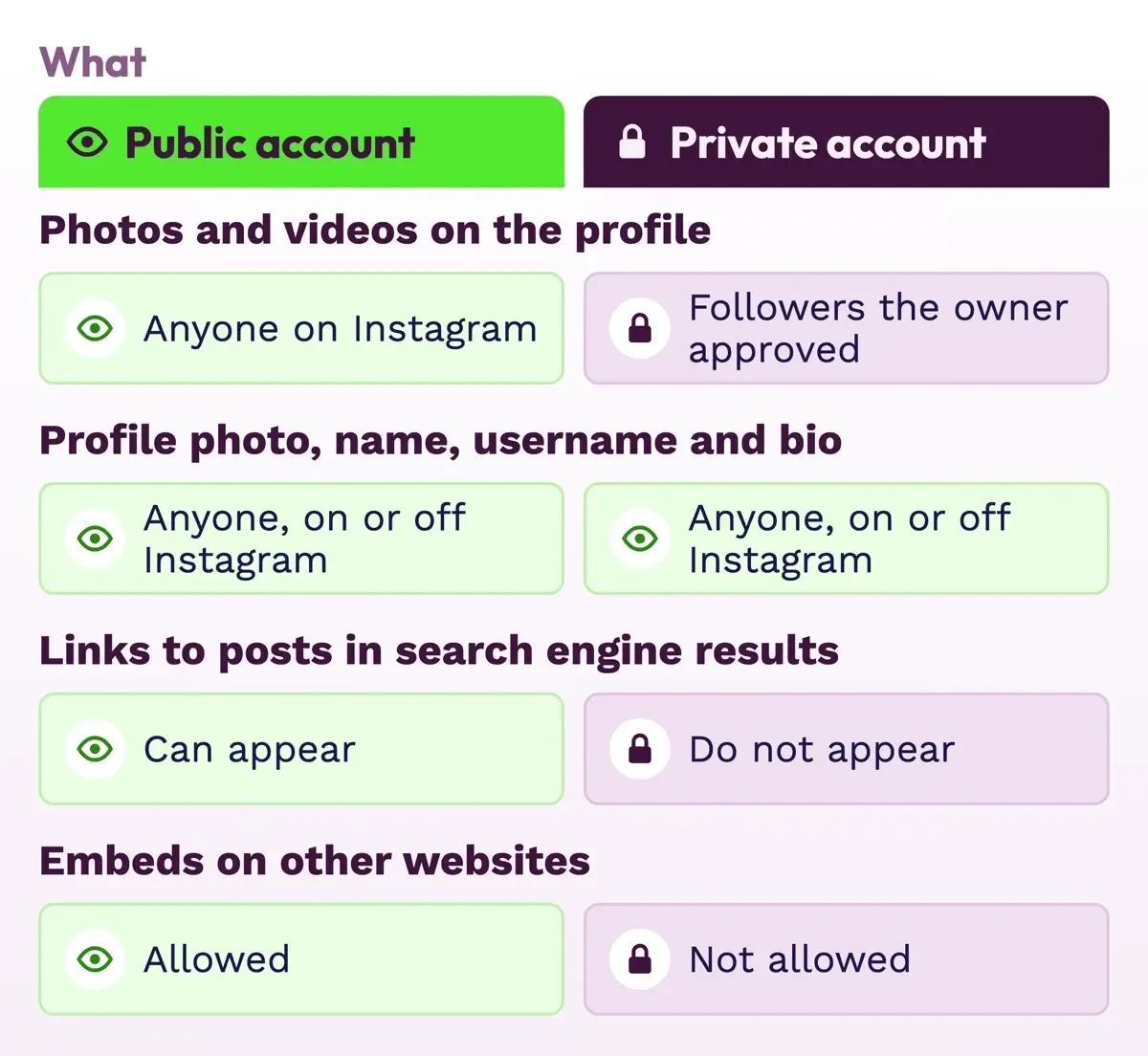 Diagram by DigitalTreed, from Instagram Help and Meta developer pages read November 11, 2026.
Legal ways to view a public Instagram profile
Five routes stay inside Instagram's rules. The first and last run through your own Instagram account. The middle three rely on what a public account shows outside the app: profile details, embeds and search links.
- Sign in with your own Instagram account and follow the profile. A private account has to approve you first.
- Open instagram.com followed by the username in a browser. The profile photo, name, username and bio show to anyone.
- Read posts embedded on news sites and blogs. Embeds work only for public accounts that haven't turned embeds off.
- Search for the account in a search engine. Links to a public account's posts can appear in the results.
- For business research, use Meta's Business Discovery API from your own Business or Creator account.
The oEmbed page leaves out accounts that turned embeds off and says "Stories are not supported." So an embed shows single posts, never a profile's full grid.
Stories are where anonymity ends for anyone who watches while signed in. Instagram's Stories feature page says the owner sees "the number and the Instagram usernames of the people who have viewed each photo or video." Replays count in the view number, so watching twice adds to it. That list stays open to the owner for up to 48 hours, and Instagram's help page on who can tell you saw a story confirms it. For the owner's side, see our guide on hiding Instagram stories from anonymous viewers. Likes work differently, as our guide on seeing liked posts on Instagram explains.
Business Discovery is the route for marketers who used Pikdo to watch competitors. Meta's Business Discovery reference says it "Returns data about another Instagram Business or Creator IG User", as of November 2026. It needs a Facebook User access token with three permissions, including instagram_basic, so it runs through Meta's developer tools, not the Instagram app.
Risks of using a Pikdo replacement
Even so, any site sold as a Pikdo alternative can ask for two things that official pages warn about: your login and an install. Instagram's page on how to secure your Instagram account warns that an app holding your login details can gain complete access to your account. The Terms also bar collecting other users' logins. Our report on how free follower sites get Instagram logins traces how that plays out.
The FTC's malware guide says "Don't use unfamiliar websites to download free stuff like music, movies, shows, or games." The guide adds: "Scammers place bogus ads for software on social media sites and on search engines." Meta's 2020 lawsuit post shows what a careless install costs. Two browser extensions there scraped users' names, user IDs, birth dates and locations once people installed them. Per Meta, the extensions sent that data to a server shared by the two companies. The FTC also lists signs of an infected device, including a browser that redirects you to sites you didn't intend to visit.
Social media is also where many US fraud losses begin. The FTC's October 2023 data spotlight found that "One in four people who reported losing money to fraud since 2021 said it started on social media." Reported losses on social media reached $2.7 billion over that period.
Each sign below traces to an Instagram, FTC or CISA page.
- It asks for your Instagram username and password.
- It promises posts or stories from private accounts.
- It wants you to install an app or browser extension.
- It floods you with pop-ups or redirects to other sites.
- It sends you through shortened or misspelled links.
If a site shows even one of these signs, close the tab. CISA's phishing guide lists "Untrusted shortened URLs" among the common signs of a phishing attempt. Our lookalike website check shows how to compare an address letter by letter. Story-viewer versions of these sites are covered by our guide to anonymous Instagram story viewers.
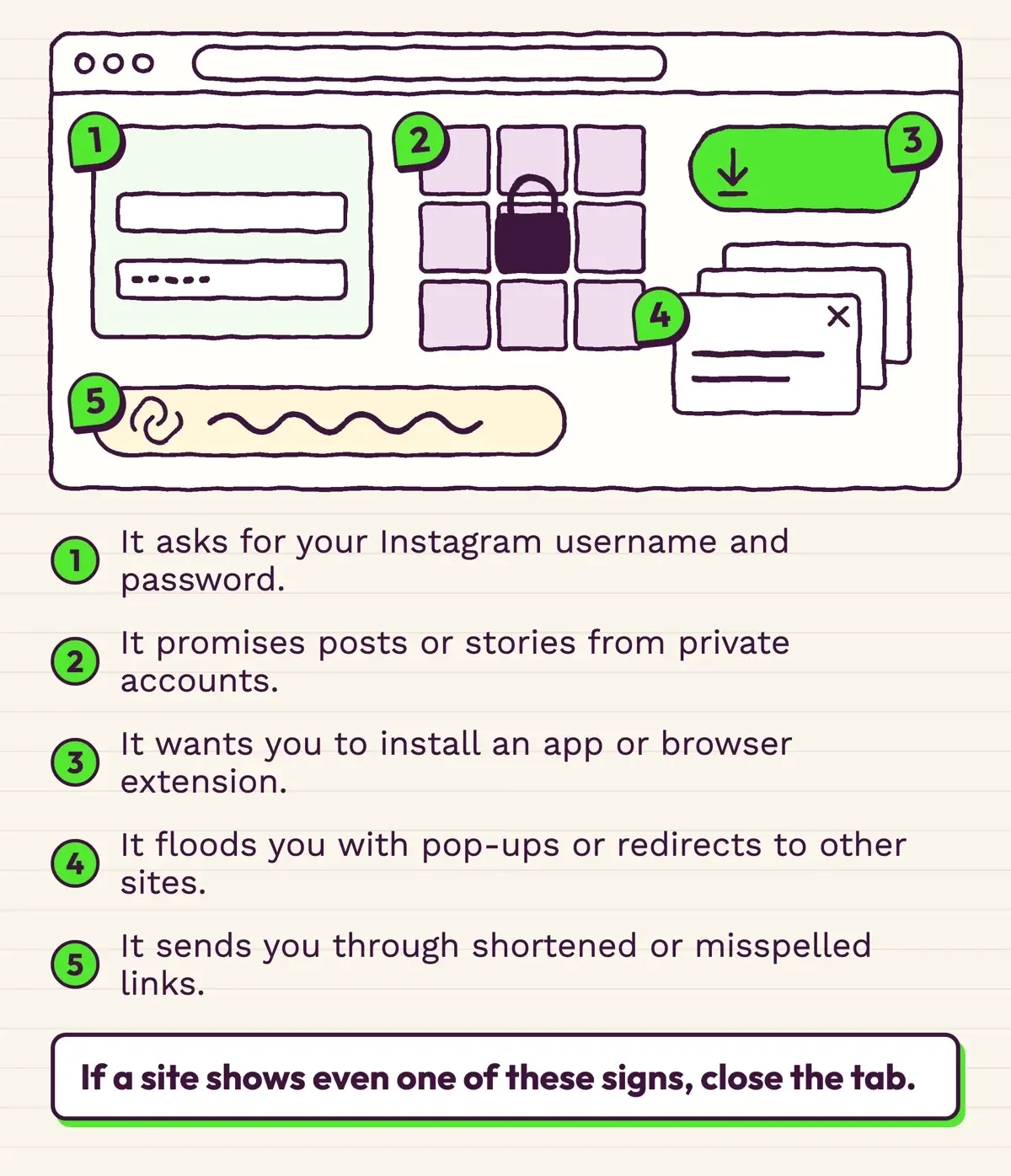 Drawn by us from FTC, CISA and Instagram Help guidance read November 11, 2026.
Used a viewer site already? Do these four things
If you've already typed your Instagram login into a viewer, or installed something it offered, act today. These steps follow the FTC's guide to recovering a hacked social media account and Instagram's help page on accounts restricted for data scraping.
- Change your Instagram password and any other password that matched it, then sign out of all devices so any other session ends.
- Turn on two-factor authentication so a password alone can't open the account.
- Check your recent login activity and remove third-party apps you don't recognize.
- If you installed anything, update your security software and run a full scan.
If you clicked a strange link on a viewer site, our guide on what happens after you click a phishing link covers PC, Mac and phone. For everyday habits, see our phishing prevention tips.
Frequently asked
Can any viewer site show a private Instagram account?
No. Instagram keeps a private account's posts for approved followers, and Meta's oEmbed page says private posts aren't supported.
Can strangers see a teen's Instagram posts?
Not by default. Meta's Teen Accounts post says teens under 16 need a parent's permission to make the built-in protections less strict.
Is pikdo.org the same site as the old Pikdo?
We couldn't confirm it. The registry record doesn't name an owner, and you can look up any domain on ICANN Lookup.
Where do I report a fake Instagram login page?
Per the FTC, report it at ReportFraud.ftc.gov. Instagram's phishing help page takes emails at [email protected].
How we made this guide: Header and registry checks on four Pikdo names, a robots.txt parse, and the pages in Sources saved as text. Facts checked by the DigitalTreed team on November 11, 2026. Not legal advice.
First published November 17, 2023. Rewritten November 11, 2026.
Sources
- Verisign RDAP: pikdo.net registration record
- Verisign RDAP: pikdo.com registration record
- Public Interest Registry RDAP: pikdo.org registration record
- ICANN Lookup
- Instagram: robots.txt
- Instagram Help Center: Terms of Use
- Meta: How We Combat Scraping
- Meta: Taking Legal Action Against Data Scraping
- Instagram Help Center: Differences between public and private accounts
- Meta: Introducing Instagram Teen Accounts
- Meta for Developers: Embed an Instagram Post (oEmbed)
- About Instagram: Stories
- Instagram Help Center: Who can tell that you have seen their story
- Meta for Developers: IG User Business Discovery
- Instagram Help Center: Secure your Instagram account
- Instagram Help Center: Account restricted for data scraping
- FTC: Malware, How To Protect Against, Detect, and Remove It
- FTC Data Spotlight: Social media, a golden goose for scammers
- CISA: Recognize and Report Phishing
- FTC: How To Recognize and Avoid Phishing Scams
- FTC: How To Recover Your Hacked Email or Social Media Account
- Instagram Help Center: Protect yourself from phishing
- FTC: ReportFraud.ftc.gov
Comments
No comments yet. Start the conversation below.