
Quick answer
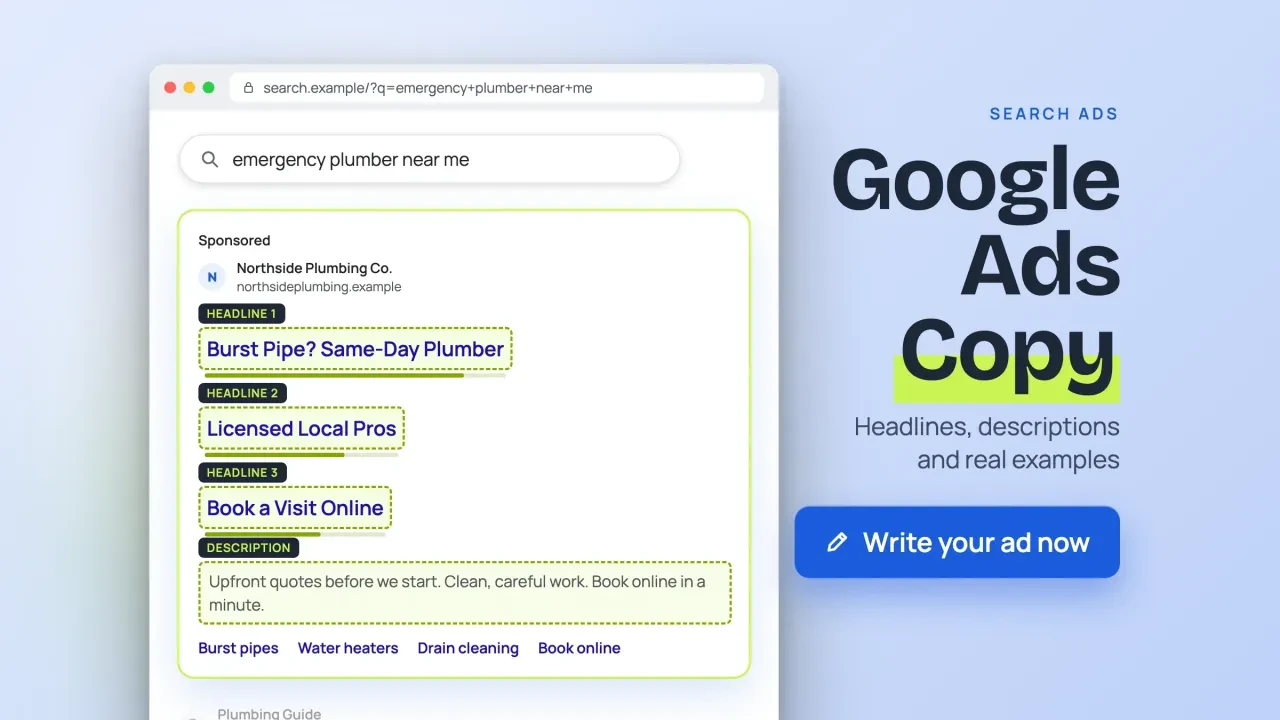
Google Ads copy is now written as a responsive search ad: up to 15 headlines of 30 characters, 4 descriptions of 90 and two 15-character paths, as of October 2026. Google mixes those parts, so every line has to make sense on its own. Keep keywords whole, pin rarely, and stay inside the editorial rules.
That last part is where most first drafts fail.
We wrote a typical first draft for a made-up plumber and ran it through a checker built from Google's own help pages. It broke 21 rules before a single dollar was spent. This guide covers the writing itself; for budgets, bidding and setup, our PPC marketing guide has you covered.
Key takeaways
- Headlines take 30 characters, descriptions 90, and each path 15.
- Write every headline so it makes sense in any order.
- Pin only lines that must always show, and pin two or three variants.
- Ad Strength rates your parts, and a Poor rating doesn't stop the ad.
- Every claim in the ad has to be true on the landing page.
Google builds your ad from parts you write
A responsive search ad is a Google search ad you write as a set of parts, not as one fixed ad. You enter several headlines and descriptions, and Google's help page on responsive search ads says it "tests different combinations and learns which combinations perform best."
So you aren't writing one ad. You're writing a kit.
Any headline can sit next to any other. Google's own tip on that page is blunt: "Assets can be shown in any order, so make sure they make sense individually or in combinations," it says. A searcher might see your headlines 1, 7 and 12 together, or only one of them. It adds that the second and third headlines and the second description "aren't guaranteed to appear in your ads."
That changes how you write. A headline like "And We Answer Fast" is fine in a printed flyer, where it follows the line above it. In a kit, it can show up first and mean nothing.
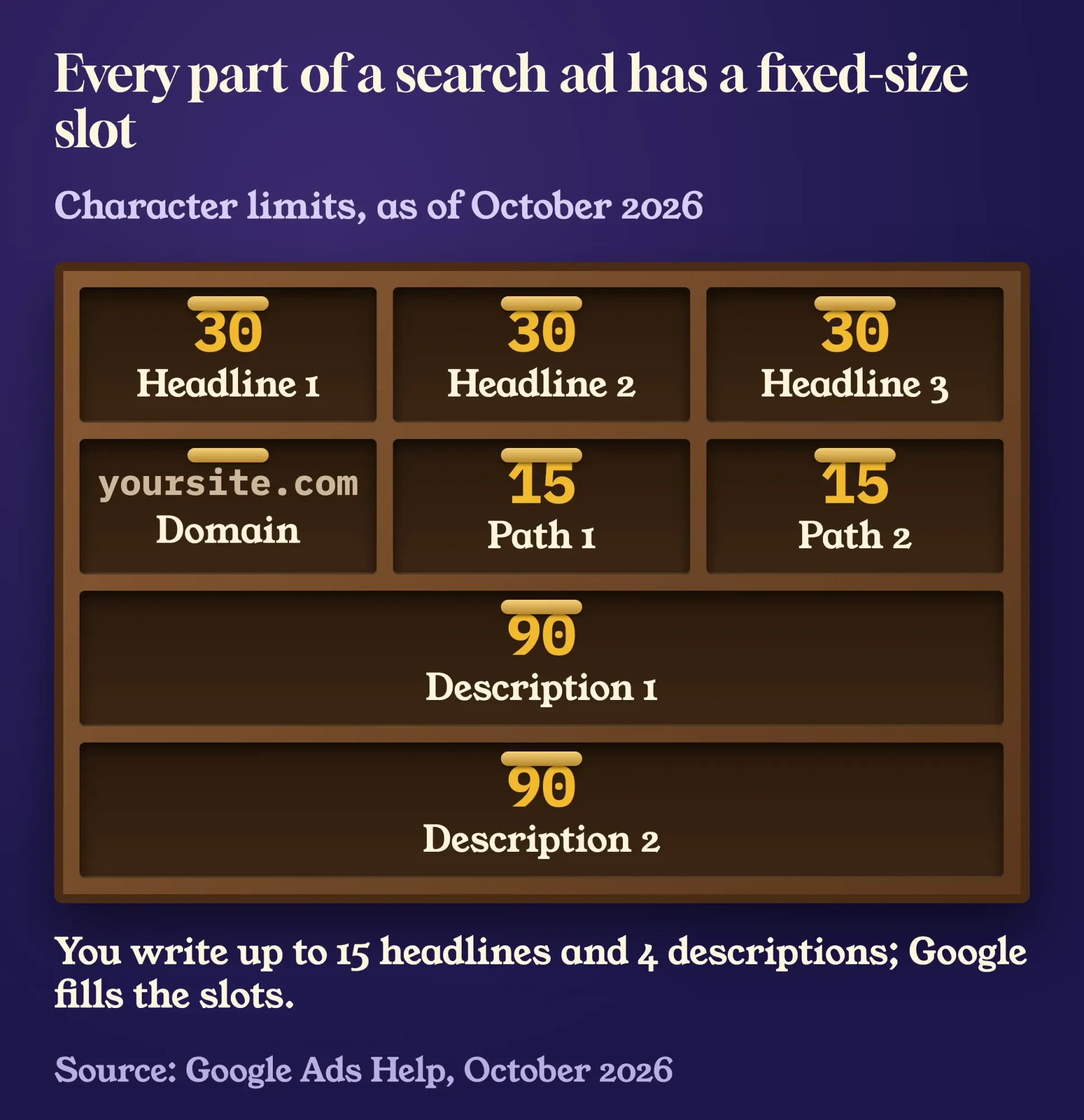 Diagram by DigitalTreed, October 2026, based on Google Ads Help: About responsive search ads.
The limits, in Google's words
Those parts come with hard limits. The responsive search ads page puts them in one paragraph: "The headline fields for responsive search ads support up to 30 characters. The description fields support up to 90 characters each, and the path fields support up to 15 each."
| Field (as of October 2026) | Limit | How many |
|---|---|---|
| Headline | 30 characters | 3 required, up to 15 |
| Description | 90 characters | 2 required, up to 4 |
| Path (display URL) | 15 characters | Up to 2, optional |
| Sitelink text | 25 characters | Google suggests 6 or more |
| Callout | 25 characters | Up to 10 can show |
The paths are the two folders after your domain in the display URL. Google's help page on paths says your path text "doesn't have to match the exact text of your final URL," so your paths can point to any page that fits. For Pine Hollow Plumbing, the made-up plumber in our example below, they could read pinehollow.example/Emergency/Burst-Pipes. Paths are optional, and they aren't guaranteed to show.
Two smaller notes from the same page are worth knowing. Chinese, Japanese and Korean characters count double. And wide letters take more room: Google warns that text heavy on letters like "m" can be wider than the space on some screens.
Draft in a spreadsheet so the counts show as you type. In Google Sheets, the LEN function "counts all characters, even spaces," so a stray space at the end shows up before the ad editor rejects it.
=LEN(A2)
=IF(LEN(A2)>30,"Too long by "&(LEN(A2)-30),"OK")
=IF(LEN(B2)>90,"Too long by "&(LEN(B2)-90),"OK")
Put headlines in column A and descriptions in column B, then copy the formulas down.
It's a two-minute setup that saves a lot of retyping inside the ad editor.
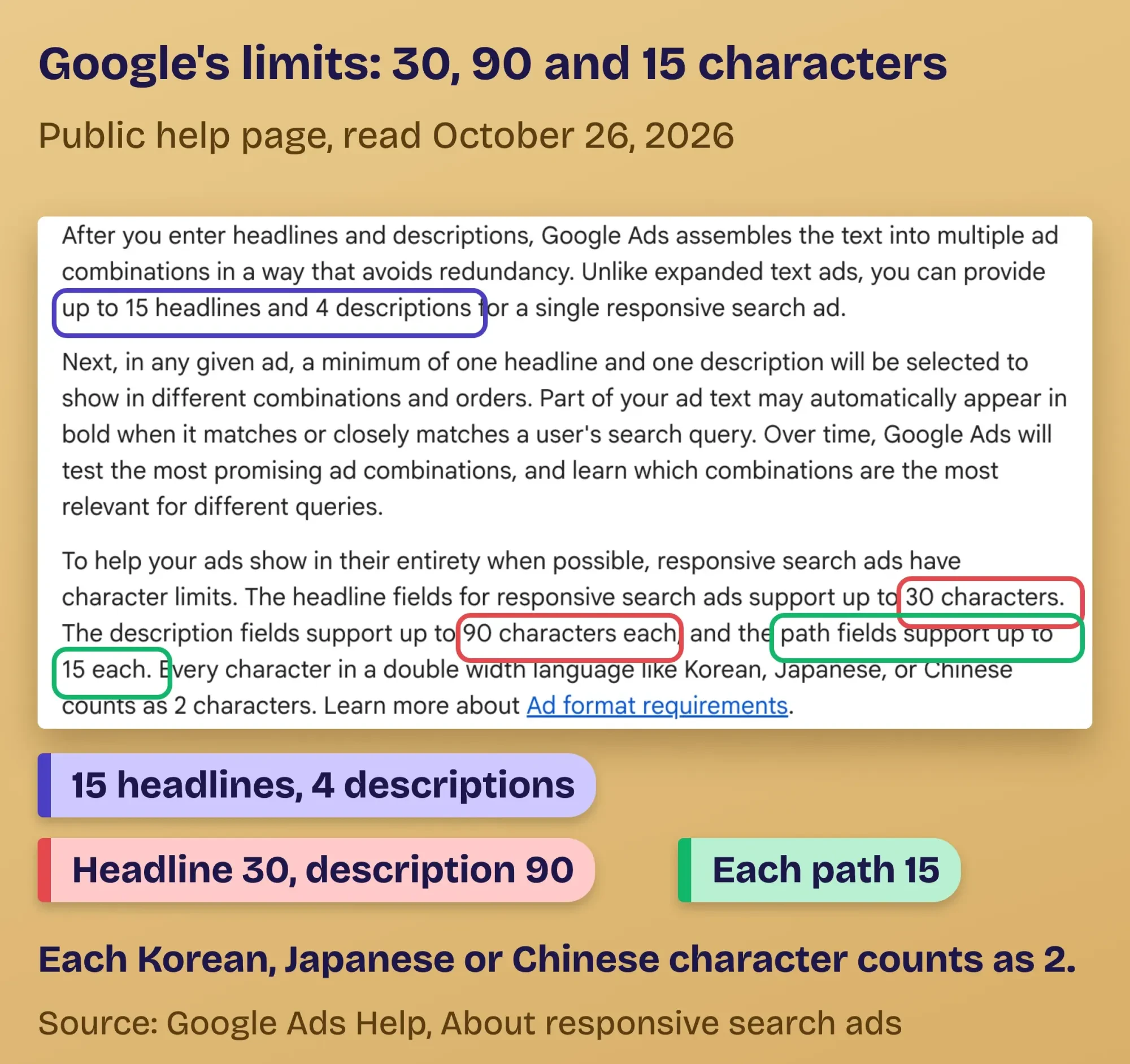 Screenshot: Google Ads Help, About responsive search ads, read October 26, 2026 (public page, signed out).
Write 15 headlines that work in any order
With the limits set, start with the three headlines a searcher is most likely to see together. Google's advice on its responsive search ads page is to "Try writing the first 3 headlines as if they'll appear together in your ad." Then write 12 more that can each stand alone.
Here's the mix we aim for, roughly two or three of each:
- The keyword, said plainly ("Emergency Plumber Kenosha")
- The place you serve, if you're local
- The offer or price promise ("Upfront Price Before We Start")
- Proof you can back up (licensed, years in business, warranty)
- A problem the searcher has, as a short question ("Frozen Pipe? We Thaw & Fix")
- A specific next step ("Book Online in 2 Minutes")
Keywords matter more than they look.
Google's Ad Strength page says "A keyword must be contained entirely within a single headline to improve Ad Strength. It can't be split across two headlines." If a keyword won't fit in 30 characters, Google suggests a description instead.
Not sure how people word the search? Our free keyword suggestions tool shows what Google's autocomplete offers for a seed phrase, and our Google Keyword Planner guide covers the volumes.
Vary the lengths, too. Google's best-practice page lists "Try headlines of varying lengths" as a tip, and a short 18-character headline leaves room when Google pairs it with a long one.
Keyword and location insertion, used carefully
Google can drop words into your headline for you. With keyword insertion, a headline written as Buy {KeyWord:Chocolate} shows one of your ad group keywords, and falls back to "Chocolate" when the keyword won't fit. Note that it "Shows the keyword in the creative, not the search term."
Location insertion does this with a city, state or country, using a code like {LOCATION(City)}. Google says you'll need "at least 3 headlines without location insertion, or you can use default text." Both are handy. Both can produce an awkward line if your keyword list is messy, so read the preview.
Descriptions carry the proof and the next step
Headlines get the click; descriptions earn the trust. With 90 characters each and up to four of them, they're where the details go: what's included, what it costs, what happens next.
Give each description one job. One states the main benefit. One gives proof. One spells out the next step. One covers terms, such as a warranty or service area. Google's best-practice page asks for specific calls to action because "Generic calls to action often show decreased engagement with ads."
Then check the page the ad points to.
Google's advice is to "Match your ad to your landing page," and Google's Misrepresentation policy (below) is stricter still. If the ad says "written price before any work starts," the landing page should say it too, near the top.
A slow page wastes good copy. Test its load time with our free page speed checker before launch, especially on mobile.
No ad budget yet? The same writing habits work in free listings. Our list of free ways to advertise a small business covers where to use them.
Pin only what must always show
Pinning locks a headline or description into one slot, and Google doesn't recommend it for most ads. Its pinning instructions say "pinning isn't recommended for most advertisers and can affect ad strength," because it cuts the number of combinations Google can test.
There's one good reason to pin, though: a line that has to appear every time.
Only three slots guarantee that a pinned line shows. Google's words: "Headlines or descriptions pinned to Headline position 1, Headline position 2, or Description position 1 will always show." Headline 3 and Description 2 aren't guaranteed. So a required disclaimer, a license line in a regulated trade, or a legal condition goes in one of those three. If you run a law firm, our Google Ads for lawyers post covers that trade's rules.
When you do pin, pin two or three different headlines to the same slot, so Google still has something to rotate. The Ad Strength page calls this the "hybrid approach": "Pin only 1 or 2 essential headlines, and leave the rest unpinned to rotate freely."
One mistake undoes everything. If you pin something to every headline position, Google says "unpinned headlines and/or descriptions won't show," and your other 12 headlines sit unused.
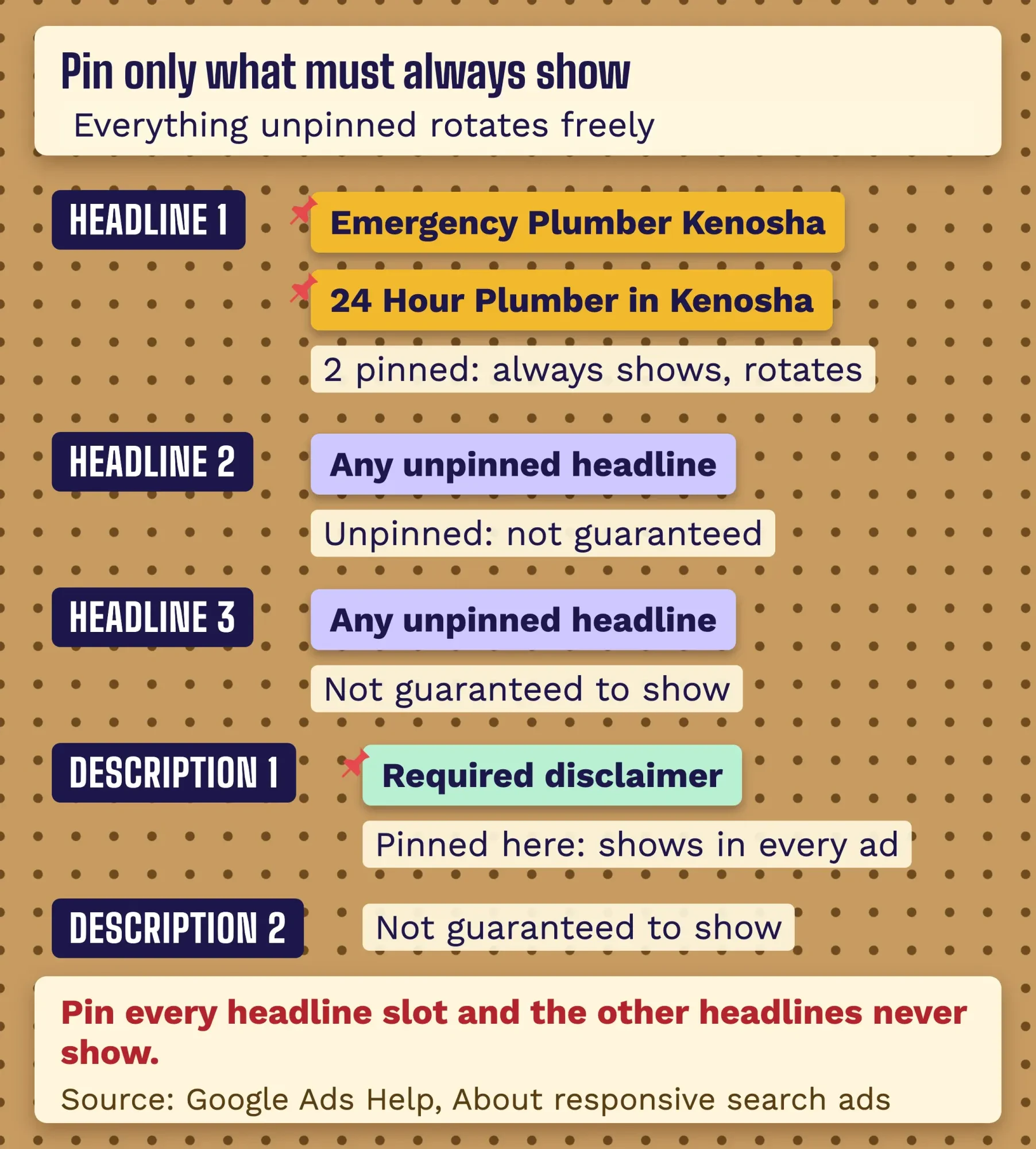 Diagram by DigitalTreed, October 2026, based on Google Ads Help: About responsive search ads and About Ad Strength.
What does Ad Strength actually measure?
Ad Strength measures how many useful, different parts you've given Google and how well they match your keywords. It doesn't judge whether the ad will win. Google's Ad Strength page rates ads as "Incomplete, Poor, Average, Good, and Excellent," and says plainly that it "isn't used to calculate Ad Rank, Quality Score, or auction wins."
So a "Poor" rating doesn't stop an ad from running.
What raises it? The same page names keyword relevance, the number of headlines and descriptions, how different they are, and sitelinks. "Having 6 or more sitelinks at the account, campaign, or ad group level improves your score," it says. Heavy pinning can lower it.
Google does claim a payoff. It cites its own data from August 15-20, 2025. The same help page says advertisers who moved their ads and sitelinks from "Poor" to "Excellent" saw "15% more conversions on average" afterward. That's Google grading its own tool, so read it as a hint, not a promise.
One more wrinkle. If you've switched on text customization (formerly "Automatically created assets"), Ad Strength counts "advertiser-provided and Google-generated text equally," per the same page. A high score may partly reflect lines you didn't write, so check which lines Google added before you trust the score.
Our take: aim for "Good" and stop chasing the meter. Write 15 distinct, true headlines and add six sitelinks, and the score follows. A rating of "Excellent" built on filler lines helps nobody.
The editorial and misrepresentation rules that get ads disapproved
Good Ad Strength won't save an ad that breaks policy. Google's Editorial policy says it "only allows ads, assets, and destinations that are clear, easy to interact with, and relevant to users," and each sub-policy lists examples. These are the five our test draft hit (more on that below):
| Trap (as of October 2026) | Google's own example | Fix |
|---|---|---|
| Capitalization | "FLOWERS", "FlOwErS" | Normal case; "ASAP" and coupon codes are allowed |
| Punctuation and symbols | "flowers!!", "fl@wers", emoji | One mark; an asterisk only for legal conditions or star ratings |
| Phone number in ad text | "Call 1-800-123-4567" | Use a call asset or a call-only ad |
| Repetition | Repeating the advertiser or product name | Say each thing once |
| Style and spelling | Bullet points, numbered lists, a generic call to action | Plain sentences, a specific next step |
These editorial issues get a warning first.
Google says "A warning will be issued at least 7 days prior to any suspension of your account." Once you fix and save the ad, the same sub-policy pages say the re-review "typically takes 24-48 hours."
Misrepresentation is the serious one.
The Misrepresentation policy bans claims that promise "an improbable result (even if this result is possible) as the likely outcome a user can expect," to start with. It also bans hiding "the payment model or full expense" of a purchase. And it bans offers in the ad "that are unavailable or aren't easily found from the destination" page. For the worst cases, which Google calls unacceptable business practices, suspension happens "upon detection and without prior warning."
US law points the same way. The FTC's advertising guide for small business says "Advertising must be truthful and non-deceptive." It adds: "The law requires that advertisers have proof before the ad runs." So "Best Plumber in Kenosha" needs proof you can show, or it needs to go.
This section explains Google's rules and the FTC’s published guidance for marketers. It isn't legal advice about your own claims; for that, talk to a lawyer licensed in your state.
Assets add room: sitelinks, callouts and snippets
Policy covers the ad text; assets give you extra lines under it. Sitelinks are extra links, limited to 25 characters, and Google suggests "at least 6 sitelinks with descriptions" for busy ad groups. That's the same six that lift Ad Strength.
Callouts are short, unlinked facts such as "Nights & Weekends." The limit is 25 characters, and Google says "you can show up to 10 callouts" depending on the screen. Structured snippets pair a header like "Services" with a list of values. Google says "a mismatch is the most likely reason your snippets will be disapproved," and suggests "at least 4 values per header."
Remember the phone rule? This is where your number goes. A call asset shows a call button, and a location asset can pull your address from a Google Business Profile listing.
We ran a typical first draft through a policy check: 21 problems
To see how often a normal draft trips these rules, we wrote a quick checker. It's a short Python script that tests an ad against the limits above and against the examples in Google's editorial and misrepresentation pages. It flags claims like "best" and "guaranteed" as needing proof, too.
Then we wrote the kind of first draft we see all the time, for an example business: Pine Hollow Plumbing, a made-up plumber in Kenosha, Wisconsin. Eight headlines, two descriptions, one pinned headline in each of the three slots, two sitelinks. We ran both drafts on October 26, 2026, on our own machine. The checker is ours and approximate; Google's review in the account makes the real call.
The first draft failed 21 checks.
- 3 over the limit, including "Emergency Plumber Kenosha WI 24/7" at 33 characters and an 18-character path
- 8 editorial hits: "BEST PLUMBERS IN TOWN!!", a phone number in a headline, "Visit Our Website", a duplicate headline and repeated words
- 3 claims needing proof: "best" twice and "Guaranteed 15-minute arrival"
- 3 Ad Strength gaps: two keywords not in any headline, and 2 sitelinks instead of 6
- 4 pinning problems: every headline slot pinned with one headline each, so no slot could rotate and the other headlines could never show
Here are the rewrite's 15 headlines, all 30 characters or fewer:
- Emergency Plumber Kenosha
- 24 Hour Plumber in Kenosha
- Burst Pipe Repair Today
- Pine Hollow Plumbing
- Licensed Wisconsin Plumbers
- Upfront Price Before We Start
- No Extra Charge for Weekends
- Book Online in 2 Minutes
- Frozen Pipe? We Thaw & Fix
- Water Heater Out? Call Us
- Drain Backed Up? Book Now
- Serving Kenosha Since 2009
- Free Estimate on Repipes
- Clean, Careful, On Time
- Text Updates When We're Close
And its four descriptions, between 81 and 87 characters:
- Burst pipe or no hot water? A licensed plumber can be at your Kenosha door today.
- You get a written price before any work starts. No extra charge for nights or weekends.
- Book a 2-hour arrival window online, or phone and talk to a plumber, not a call center.
- Repairs carry a 1-year labor warranty. Read the terms on our site before you book.
The rewrite still failed two checks on its first pass. Two descriptions repeated a word ("call" twice in one, "warranty" twice in another). Google may not object to that, but it read clumsily, so we fixed both. The second pass came back clean: 0 issues, with no pins, paths of 9 and 11 characters, six sitelinks and four callouts.
Every claim in that ad has to be true on the landing page, of course.
Since Pine Hollow is made up, the license, the warranty and "Since 2009" are placeholders for your own facts.
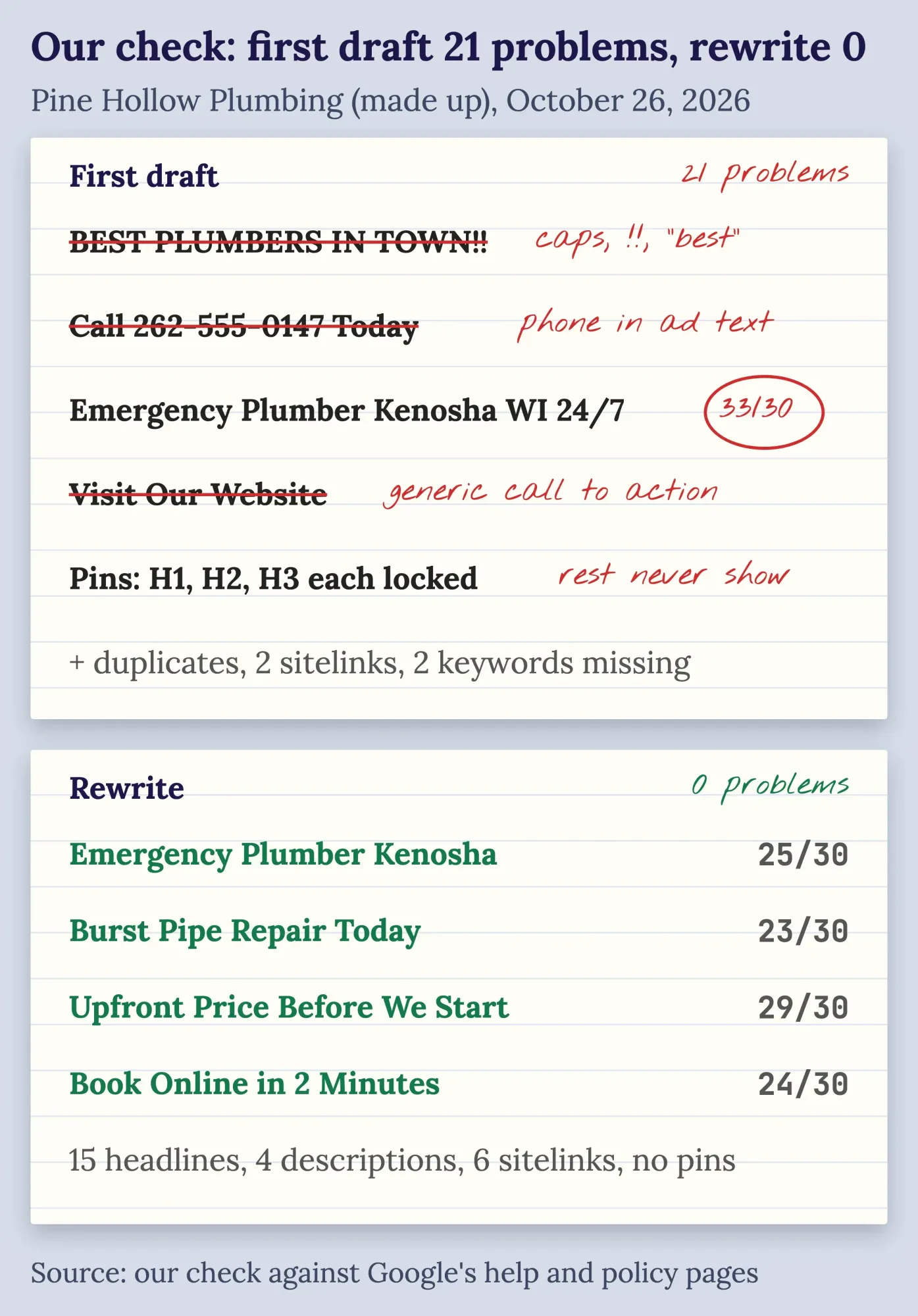 Diagram by DigitalTreed: our check of a made-up first draft and its rewrite, October 26, 2026. Rules from Google Ads Help and Advertising Policies Help.
Read the asset report, then replace the weak lines
Once the ad runs, the data tells you which lines to cut.
Open the asset details under any responsive search ad to see each headline's impressions, clicks and conversions, as Google's asset report page describes.
One change trips up older guides here.
The old performance grades are gone. Google says "The 'Performance label' column has been deprecated as full performance statistics for each asset are now available," with full stats from June 5, 2025. So judge each line on clicks and conversions, and Google suggests replacing assets "that receive zero impressions after several weeks."
Run at least two ads per ad group, as Google's best-practice page recommends, and change a few lines at a time. Count leads properly in Google Analytics 4, and if most of your customers phone, set up call tracking so the calls count too.
People who clicked and left are still worth reaching. Our guide to retargeting ads picks up from there.
Want someone to write and test the ads for you, inside your own account? That's the search ads service we sell. We earn money if you hire us, so compare us with at least one other agency first.
How we made this guide: Eram N.'s rewrite was fact-checked against Google's own pages on October 26, 2026. We read the Google Ads Help and Advertising Policies Help pages listed in Sources, signed out, and quoted every limit from them word for word. The FTC's small-business advertising guide was read the same day. Our hands-on part is the before-and-after check described above, run on a made-up business with a script we wrote; the screenshot is of a public help page. Every fact is linked inline where it's used.
We didn't log in to a Google Ads account or run a live ad for this guide, so on-screen labels may differ a little from Google's written steps. Eram N., whose byline this is, reads and approves each change before publication.
First published April 2020. Rewritten October 26, 2026: the old post was a general "what is SEM" explainer that predates responsive search ads. This version is about writing the ad itself: limits, headlines, descriptions, pinning, Ad Strength, Google's editorial and misrepresentation rules, assets, a tested before-and-after example, and the asset report.
Frequently asked
Can I use a competitor's brand name in my Google Ads copy?
Bidding on it is one thing, writing it is another. As of October 2026, Google's trademarks policy says it won't restrict trademarks used as keywords. If the owner complains, it can restrict the name in ad text from a direct competitor. The check applies to the ad itself, not only the landing page.
Do old expanded text ads still run?
Yes, but you can't build new ones. Google's page on expanded text ads says that since June 30, 2022, you can't create or edit them. Existing ones keep serving, and you can still pause, resume or remove them, as of October 2026. Any new copy goes into a responsive search ad.
How many responsive search ads should each ad group have?
Google suggests at least 2 with Good or Excellent Ad Strength. Google's responsive search ads page cites its own data, read in October 2026. Adding a second ad brought 6.6% more conversions on average, and a third brought another 3.7%. Both came at a similar cost per conversion.
Sources
- Google Ads Help: About responsive search ads
- Google Ads Help: About Ad Strength for responsive search ads
- Google Ads Help: Best practices for creating effective responsive search ads
- Google Ads Help: Path
- Google Ads Help: About callout assets
- Google Ads Help: About sitelink assets
- Google Ads Help: About structured snippet assets
- Google Ads Help: About keyword insertion for your ad text
- Google Ads Help: About location insertion for responsive search ads
- Google Ads Help: About the ad-level asset report for responsive search ads
- Advertising Policies Help: Editorial
- Advertising Policies Help: Capitalization
- Advertising Policies Help: Punctuation and symbols
- Advertising Policies Help: Phone number in ad text
- Advertising Policies Help: Repetition
- Advertising Policies Help: Style and spelling
- Advertising Policies Help: Misrepresentation
- FTC: Advertising FAQ's: A Guide for Small Business
- Google Docs Editors Help: LEN


Comments
No comments yet. Start the conversation below.