
Quick answer
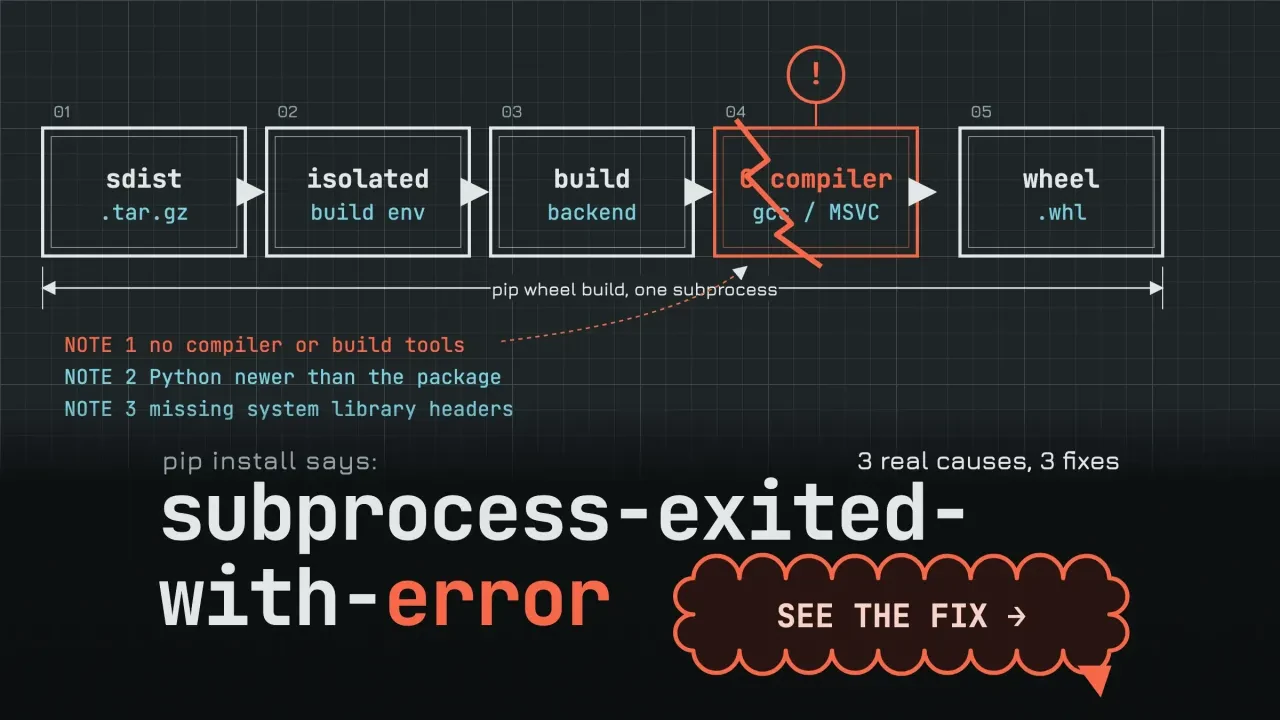
"error: subprocess-exited-with-error" means pip started a build step for a package that had no ready-made wheel for your machine, and that step crashed. The real cause is printed inside the box above the message. Most fixes come down to a version that has a wheel, a missing system library you install, or pinned build tools.
Don't start by reinstalling Python. You probably won't need to.
We reproduced the common cases on a Mac, with Python 3.9.6 and three versions of pip, and copied every message word for word.
Find the line that matches yours. The fix that worked for us sits right under it.
Key takeaways
- The error means a pip build step for a source package crashed.
- The real cause sits inside the box, not in the last lines.
- Run --only-binary :all: to see which versions have a wheel for you.
- Upgrading setuptools in your environment doesn't reach pip's isolated build.
- Pin build tools with --build-constraint, which pip 25.3 added.
Pip ran a build step, and that step failed
A wheel is a package that's already built, so pip can unzip it straight into your environment. When pip can't find one that fits your Python version and your computer, it falls back on the source code. The Python Packaging User Guide puts it plainly: pip will fall back on "downloading a source distribution, compiling a wheel from it, and installing the wheel."
That compile happens in a separate process. If that process exits with an error, pip prints subprocess-exited-with-error.
Since pip 25.3, every source build that pip runs, old setup.py projects included, goes through the same PEP 517 steps, per pip's build system docs. There are three, and the line that starts with × tells you which one broke:
- "Getting requirements to build wheel" runs the project's setup code for the first time.
- "Preparing metadata" works out the name, version and dependencies.
- "Building wheel for X" compiles the code, often C or C++.
A failure in the first two usually means something's missing or the project is too old.
A failure in the third usually means you're missing a compiler or a library.
If you're newer to Python, our guides to comparing strings in Python and trimming whitespace cover the basics; this error isn't about your code at all.
The real error is inside the box, not under it
The last lines are the least useful part. They look almost the same in every failure.
On pip 24 and 26, the box is followed by the same note: "This error originates from a subprocess, and is likely not a problem with pip." The cause sits higher up, between "[N lines of output]" and "[end of output]". That block is the package's own output.
It's where the package tells you what it needs.
Here's our psycopg2 run, the PostgreSQL driver for Python. Pip printed 34 lines inside the box. The first 13 were a setuptools warning about license classifiers, which is noise.
The line that mattered was "Error: pg_config executable not found."
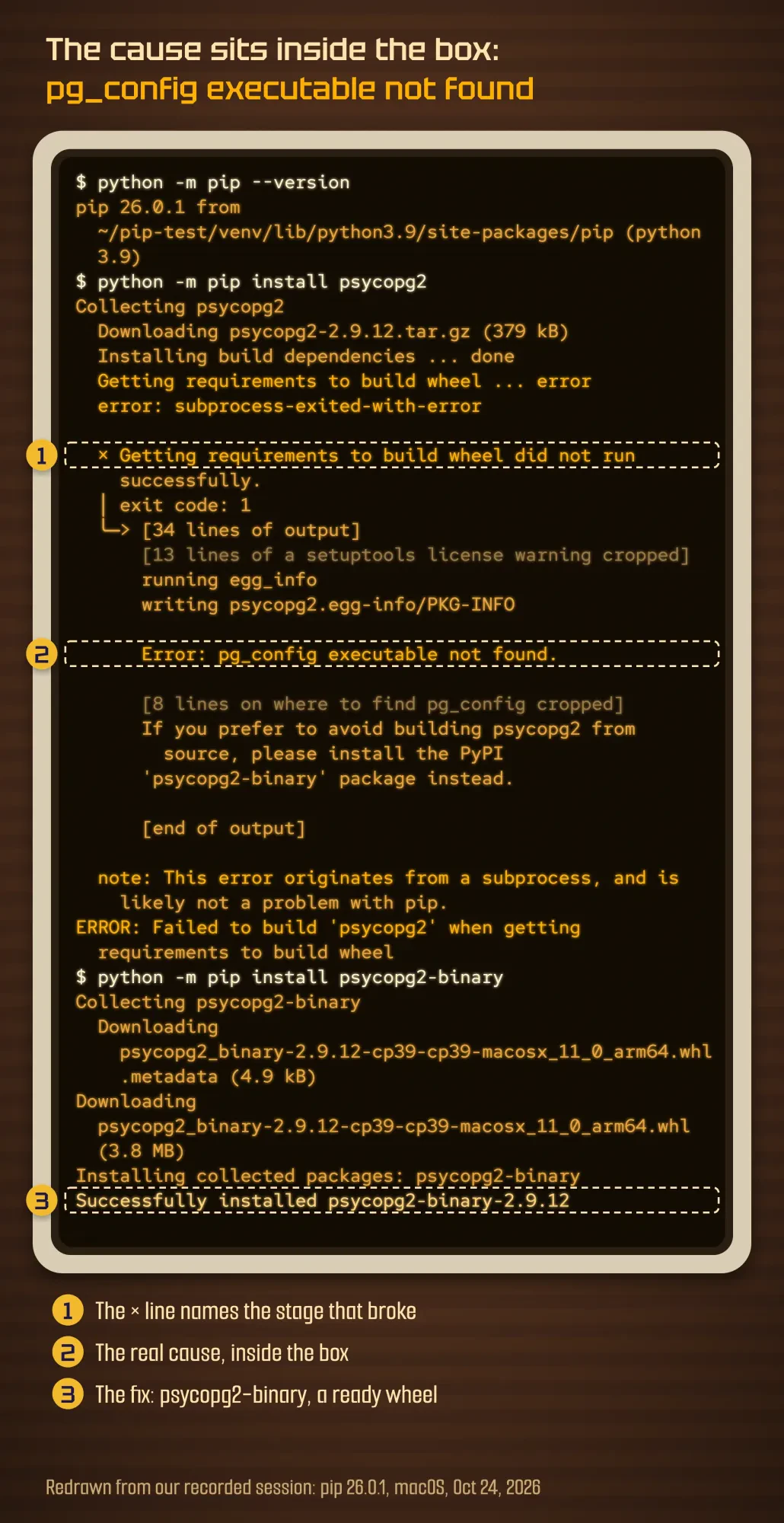 Screenshot: our terminal session on macOS, October 24, 2026, redrawn line for line from the recorded session (pip 26.0.1, Python 3.9.6); folder path shortened, spinner and progress-bar frames tidied, a setuptools warning and a block of help text cropped and marked.
So read the box from the bottom up, and stop at the first line that says what's missing or what failed: a program, a file, a module or a Python version.
Still can't see it? Run the same command with -v, and pip prints more of each step. Search for that one line plus the package name.
Skip the generic advice until you've found that line.
The same failure looks different in each pip version
Older answers online quote messages you may never see. We found that out with one package.
The sklearn package on PyPI is a deliberate dead end: its maintainers made it fail on purpose, so people install scikit-learn instead. Its README says that, "Starting 2023 December 1st," installing it "raises an error," per the sklearn-pypi-package repository. We installed it in fresh environments with three versions of pip. Pip 26.0.1 stopped with subprocess-exited-with-error and "ERROR: Failed to build 'sklearn' when getting requirements to build wheel". Pip 24.0, with the wheel package installed and the older sklearn 0.0.post1 pinned, failed at "Preparing metadata (setup.py)" and printed "error: metadata-generation-failed". Pip 21.2.4 was the surprise. It threw away 8 versions with a warning each, then installed the old empty placeholder and said "Successfully installed".
Same package, same day, three different stories.
That's why matching a forum answer word for word can mislead you.
The old behavior is gone for a reason. Pip 22.0 changed it to "Stop backtracking on build failures," and the build system notes record that pip 23.1 and 25.3 removed the old setup.py install and build paths. That's why the "Running setup.py install for X" lines in older posts look nothing like yours.
| Line you see | Stage that failed | What it usually means | Seen in our test |
|---|---|---|---|
| × Getting requirements to build wheel did not run successfully | 1, setup code | Project refuses to install, a build tool is missing, or setuptools is too new for it | sklearn, psycopg2, an old setup.py (pip 26.0.1) |
| × Preparing metadata (pyproject.toml) did not run successfully | 2, metadata | Build tools are missing or broken in the build environment | --no-build-isolation without wheel installed |
| error: metadata-generation-failed | 2, metadata | Final summary when stage 2 fails | sklearn (pip 24.0), bad --no-build-isolation (pip 26.0.1) |
| × Building wheel for X (pyproject.toml) did not run successfully | 3, compile | Compiler, header file or library missing, or code too old for your Python | numpy 1.19.5, psutil with no compiler |
| ERROR: Failed building wheel for X / error: failed-wheel-build-for-install | 3, compile | Final summary when stage 3 fails | numpy 1.19.5, psutil |
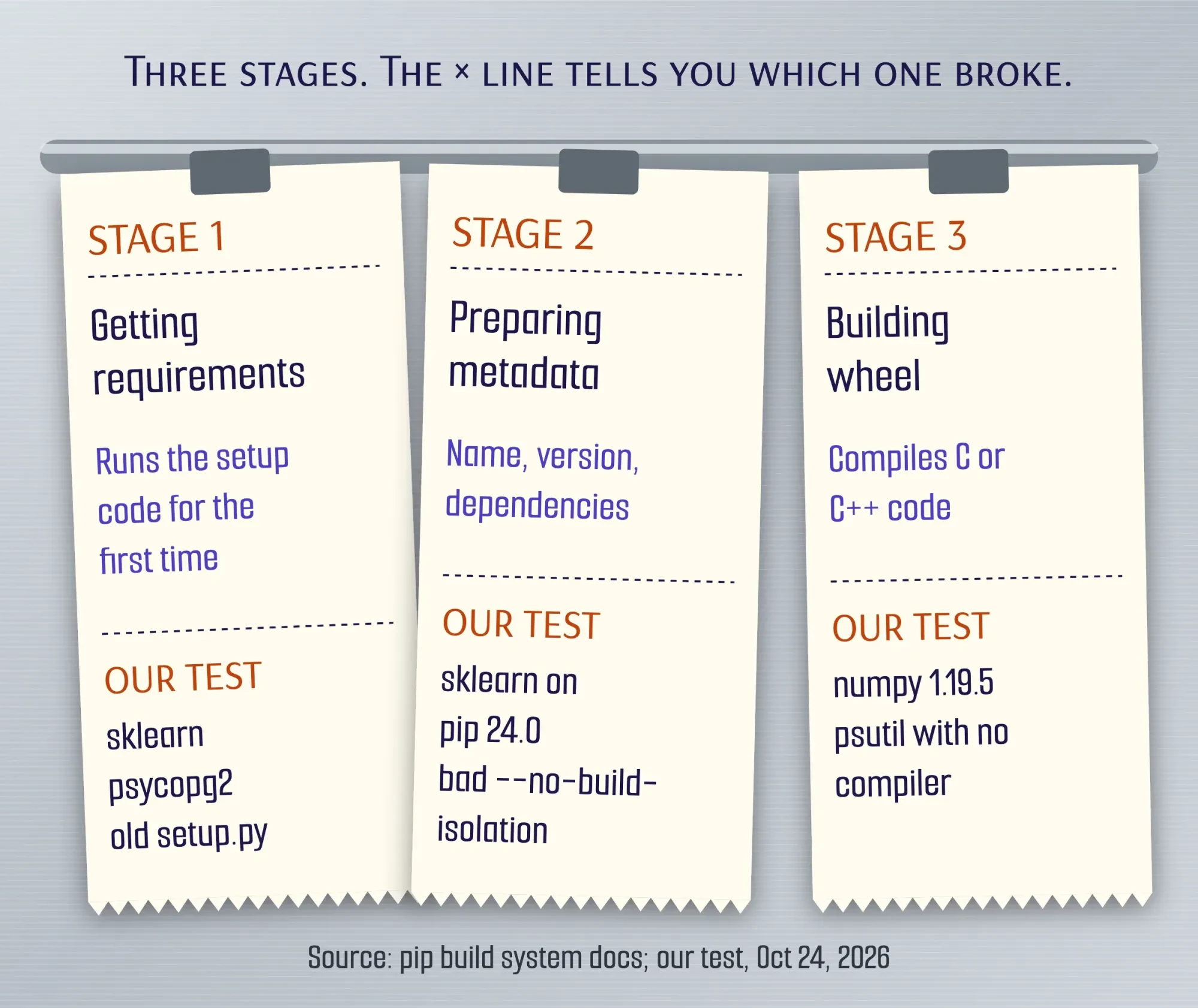 Diagram by DigitalTreed from pip's build system docs and our tests with pip 24.0 and 26.0.1, October 24, 2026.
Our take: don't downgrade pip to make the error go away.
Some guides still suggest it.
In our test, the old pip didn't fix anything. It hid the failure and installed sklearn 0.0, a deprecated placeholder that only pulls in scikit-learn.
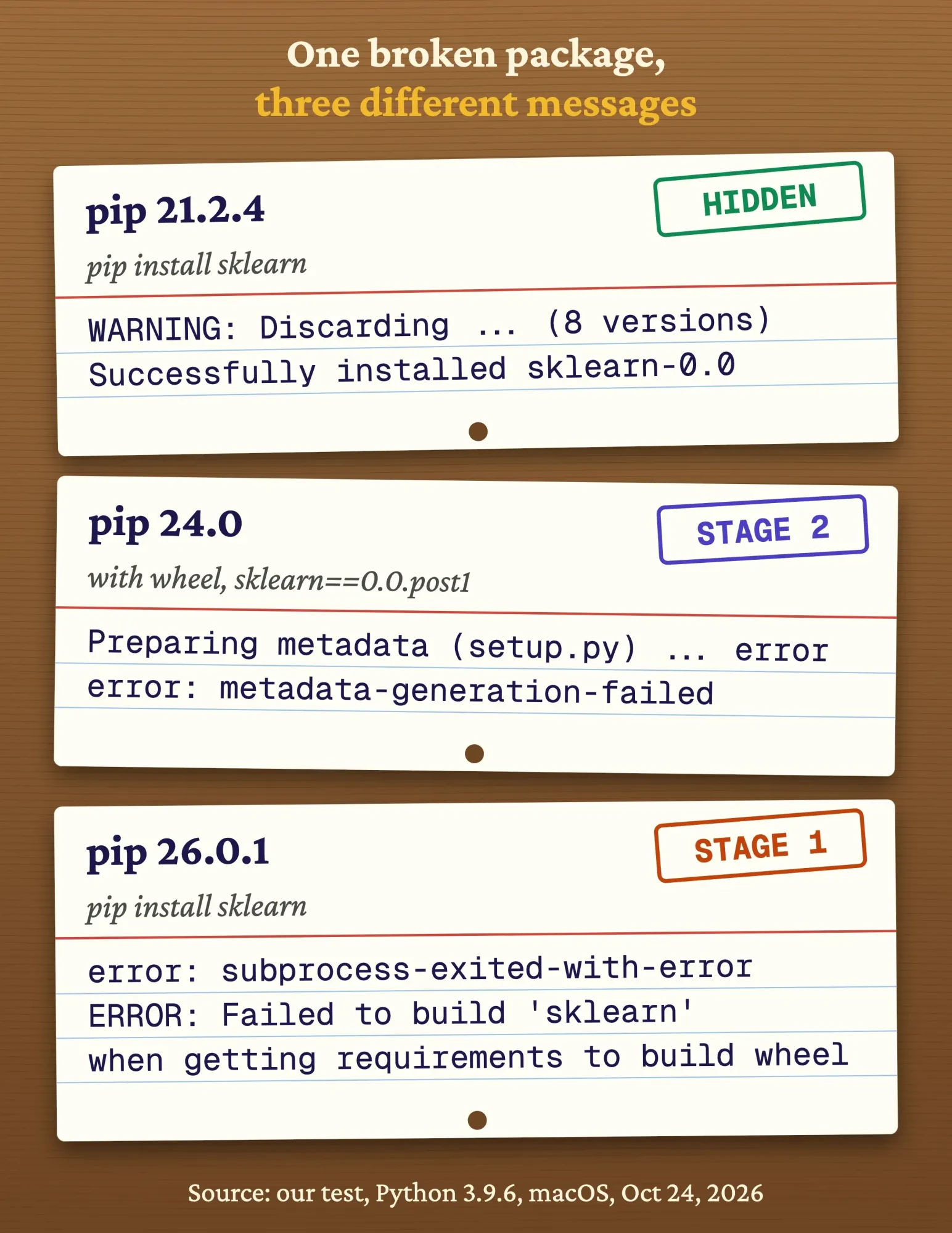 Diagram by DigitalTreed from our test: pip install sklearn on Python 3.9.6, October 24, 2026.
Got a JavaScript project failing too? The cannot use import statement outside a module fix works the same way: match the message, then fix the one thing it names.
Why does an old version pin make pip compile from source?
Now the causes, starting with the one that's easiest to miss when you're moving an older project to a new laptop or server: a pinned version that's too old for your machine.
A requirements file from 2021 might say numpy==1.19.5. On our Apple Silicon Mac with Python 3.9, PyPI has no Apple Silicon wheel for that version, so only the source zip fits, as its file list shows. So pip downloaded the 7.3 MB source and tried to compile it.
It failed after about 29 seconds and 1,076 lines of output. Inside were 48 copies of "clang: error: the clang compiler does not support 'faltivec'", an old PowerPC flag that clang rejects. The summary read "ERROR: Failed building wheel for numpy".
You can check for a wheel before you wait for a compile:
python -m pip install --only-binary :all: numpy==1.19.5Pip's --only-binary option tells it not to use source packages. Ours answered at once: "Could not find a version that satisfies the requirement numpy==1.19.5 (from versions: 1.21.0, ...". That list is the useful part.
It shows every version that's got a wheel for your Python and your machine.
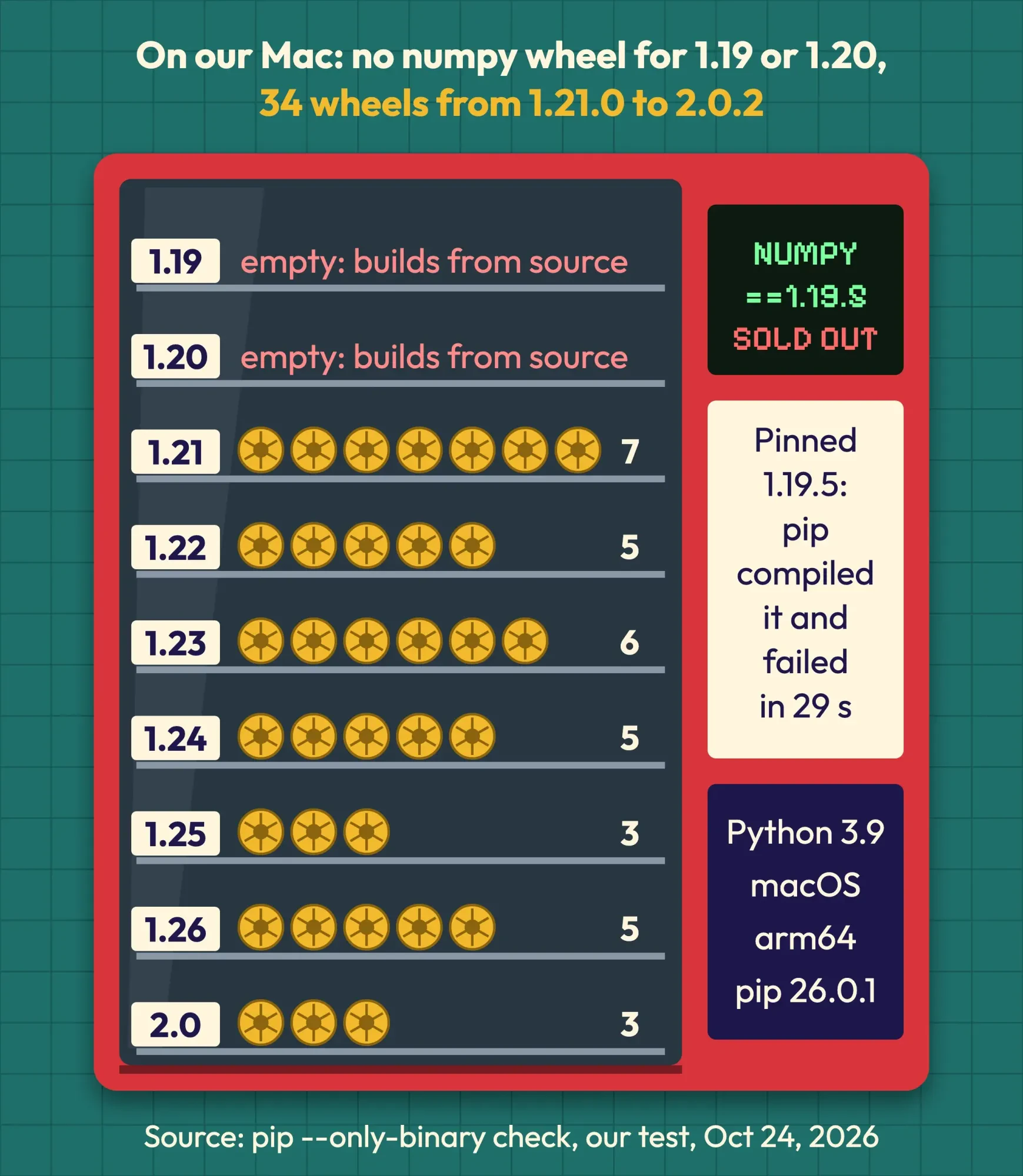 Diagram by DigitalTreed from our pip 26.0.1 check on Python 3.9.6, macOS arm64, October 24, 2026.
The fix is one of these:
- Move the pin to a version from that list, then rerun your tests.
- Use a Python version the package supports, in its own virtual environment.
- Drop the pin and let pip pick; unpinned, our install took numpy 2.0.2 as a wheel.
Python versions matter here because packages stop shipping wheels for old ones. According to the Python release status page, 3.9 reached end of life on October 31, 2025, and 3.10 on October 1, 2026. Python 3.15 came out on October 9, 2026, so a brand-new Python can hit the same wall until packages catch up.
A missing system library: pg_config, Python.h and friends
Some packages are thin Python wrappers around a C library that has to be on your computer already.
Pip can't install that library for you.
Psycopg2 is the classic case. Its install docs list what a source build needs: a C compiler, the Python header files, the libpq header files and the pg_config program. Each one has its own tell. "Python.h: No such file or directory" means missing Python headers, and "libpq-fe.h" means missing PostgreSQL headers.
Our Mac had no PostgreSQL, so we got "Error: pg_config executable not found." The package's own message offered a way out, the psycopg2-binary package. It installed as a 3.8 MB wheel, no compiler needed.
There's a catch, though.
Psycopg's docs say the binary package "is meant for beginners to start playing with Python and PostgreSQL" and that "For production use you are advised to use the source distribution." So use the binary to get moving.
Then install the PostgreSQL client library before you deploy.
Example: a two-person bookkeeping firm in Sioux Falls, South Dakota, moves its invoice script to a new laptop. The install stops on psycopg2 with the pg_config line. Its developer switches to psycopg2-binary on the laptop. The office server keeps psycopg2, built against PostgreSQL's own libpq.
The same pattern fits any package whose error names a missing .h file or a "-config" program: find the system package that ships it, or a binary twin on PyPI.
No compiler on the machine
If the failing line mentions a compiler, a build tool or "command ... failed", you're missing the compiler itself.
Our Mac already had one, so we simulated a missing compiler. We pointed pip at a path that doesn't exist and forced a source build of psutil. The log said "error: command '/usr/local/bin/no-such-cc' failed: No such file or directory", then "ERROR: Failed building wheel for psutil". Without those two overrides, pip took psutil's ready-made wheel.
If you're on Windows, the error says "Microsoft Visual C++ 14.0 or greater is required". Install Microsoft C++ Build Tools.
If you're on a Mac, you'll see a failed clang or cc command ("command ... failed"). Install Apple's Command Line Tools with xcode-select --install.
If you're on Debian or Ubuntu, it's a failed gcc command, or "Python.h: No such file or directory". Install build-essential and python3-dev.
The Windows wording comes straight from setuptools' compiler code, which links to Microsoft C++ Build Tools. On a Mac, Apple's Command Line Tools page shows the xcode-select --install command. On Debian and Ubuntu, the build-essential package pulls in the compiler. We didn't run the Windows or Linux steps.
Before you install a full set of build tools, run the --only-binary check from above. A newer version with a wheel often skips the compile entirely.
Upgrading setuptools won't reach the build, but a build constraint will
That brings us to the fix most guides list first: "pip install --upgrade pip setuptools wheel". Upgrading pip is fine. The setuptools part does far less than it sounds.
Pip builds each package in a temporary, isolated environment. Its docs say pip "will install build-time Python dependencies in a temporary directory." The packaging standards behind it, PEP 518 and PEP 517, ask for exactly that by default.
So the setuptools in your own environment isn't the one doing the build.
It never was. Isolation is the whole point.
We tested it. Our venv had setuptools 58.0.4, but the traceback showed the build running setuptools 82.0.1 from pip's temporary build folder. Then we upgraded the venv to setuptools 82.0.1 and wheel 0.48.0.
The install failed again, with the same error.
And in 2026, the newest setuptools is often the cause. Version 81.0.0 (February 6, 2026) removed setup.py's dry-run support. Version 82.0.0 (February 8, 2026) removed pkg_resources, an old module many setup.py files still import. Both are in the setuptools changelog.
We wrote a four-line test project whose setup.py imports pkg_resources, like many older projects do. It failed with "ModuleNotFoundError: No module named 'pkg_resources'". An old llvmlite release (0.34.0) hit the other removal: "TypeError: spawn() got an unexpected keyword argument 'dry_run'".
The fix is to pin the build tools, not your environment. Pip 25.3 added --build-constraint for exactly this:
echo "setuptools<82" > build-constraints.txt
python -m pip install --build-constraint build-constraints.txt your-package
That installed our test project. No other change was needed.
One more change to know: since pip 26.2, an ordinary constraints file no longer reaches build environments, per the pip changelog. If your CI used PIP_CONSTRAINT to pin setuptools, it now needs PIP_BUILD_CONSTRAINT.
You can also turn isolation off with --no-build-isolation, but then the build tools are your job. Pip's docs say you're responsible for "ensuring that all required build-time dependencies are installed." We skipped that step once, with setuptools 58.0.4 and no wheel package, and got "error: invalid command 'bdist_wheel'" plus "error: metadata-generation-failed". After installing "setuptools
Builds also run in deploy pipelines and on serverless platforms, where a fresh setuptools can break a deploy that worked last month. Pin the build tools there too.
Prove the fix in a clean virtual environment
Don't stop at one green install.
One working install on a messy machine doesn't prove much. Rerun it where nothing else can interfere, in a fresh venv, as the packaging guide recommends:
- Create a new virtual environment and activate it.
- Upgrade pip inside it (python -m pip install --upgrade pip).
- Install your requirements file in one go.
- Run your app or your tests, not just the import.
- Save the working versions with python -m pip freeze, so the next install gets the same wheels.
A virtual environment also avoids a different error, "externally-managed-environment". Some Python installs that an operating system manages print it when you install outside a venv, as PEP 668 allows. It looks alarming.
But it's a guard rail, not a build failure.
Once the app is live, application monitoring tells you when a later update takes it down.
When the failing build is your company's app
Most of these fixes take minutes. Some don't, and that's fine.
An app pinned to Python 3.9-era versions, a server that compiles on every deploy, or a package that's got no wheels left can mean a planned upgrade.
That isn't a quick fix. It's a project.
If you're weighing outside help, our guides to choosing a Python development company and when full-stack development makes sense cover what to ask. For context on where Python fits, see our programming languages roundup.
We build and maintain Python and web apps for small businesses, so we have an interest here.
If your install keeps breaking across machines, our Python and web development service can map the upgrade before anyone changes a pin.
Frequently asked
What does exit code 137 mean during pip install?
Something killed the process with signal 9 (SIGKILL). You'll see 137 when a shell, CI job or Docker build reports pip's exit; inside pip's own box, a killed build step shows "exit code: -9", as Python's subprocess docs explain. The Bash manual says a process killed by signal N exits with 128+N, and our test printed exactly 137. On Linux, the out-of-memory killer usually ends processes with SIGKILL, so a big compile on a small server or container is the usual suspect. Use a wheel, or give the build more memory.
Why do I get subprocess-exited-with-error in Google Colab?
For the same reasons as on your laptop, most often an old pin with no wheel for Colab's Python. Check the version with !python --version, then use the --only-binary check above. We didn't test Colab itself.
Is subprocess-exited-with-error a bug in pip?
Almost never. Pip says the error "is likely not a problem with pip", and in every case we ran, the cause was the package, a missing tool or a version mismatch.
Does pip install --upgrade pip fix it?
Only if your pip is very old. A newer pip shows the error more clearly but can't create a missing wheel, compiler or library.
Right now: scroll up, find the first line inside the box that names something, and match it to a section above.
Builds still breaking after that? Tell us about the app and we'll price the upgrade.
How we made this guide: The DigitalTreed team rebuilt each case in throwaway virtual environments on an Apple Silicon Mac (macOS 27.0.1, Apple's Python 3.9.6) in a run dated October 24, 2026, then deleted them. We used pip 21.2.4, 24.0 and 26.0.1, with setuptools 82.0.1 in pip's build environments unless we pinned it lower. Every quoted message comes from those logs. The missing compiler was simulated, and we didn't run Windows, Linux, Colab or pip 26.2. We checked the facts against the pip, setuptools, PEP and psycopg docs the day we ran the tests (October 24, 2026), and linked each one inline.
First published January 2024. Rewritten October 24, 2026: the old logs showed "Running setup.py install", which current pip no longer runs, and its main fix (upgrading setuptools) doesn't reach pip's isolated builds. New: our tested messages by pip version, the stage table, the 2026 setuptools removals with the --build-constraint fix, and the --only-binary check.
Sources
- pip docs: Build System Interface (isolation, fallback, historical notes)
- pip changelog (22.0, 25.3, 26.1, 26.2)
- pip docs: pip install options (--only-binary, --build-constraint, --no-build-isolation)
- PEP 517: A build-system independent format for source trees
- PEP 518: Specifying minimum build system requirements
- PEP 668: Marking Python base environments as externally managed
- Python Packaging User Guide: Package formats
- Python Packaging User Guide: Installing packages using pip and virtual environments
- Python docs: venv
- Python Developer's Guide: Status of Python versions
- setuptools changelog (v81.0.0, v82.0.0)
- setuptools source: MSVC compiler message
- Microsoft C++ Build Tools
- Apple: Installing the command-line tools
- Debian: build-essential package
- Psycopg 2 docs: Installation
- scikit-learn: sklearn-pypi-package README
- PyPI: numpy 1.19.5 files
- GNU Bash manual: Exit Status
- Mel Gorman, Understanding the Linux Virtual Memory Manager: Out of Memory Management


Comments
No comments yet. Start the conversation below.