
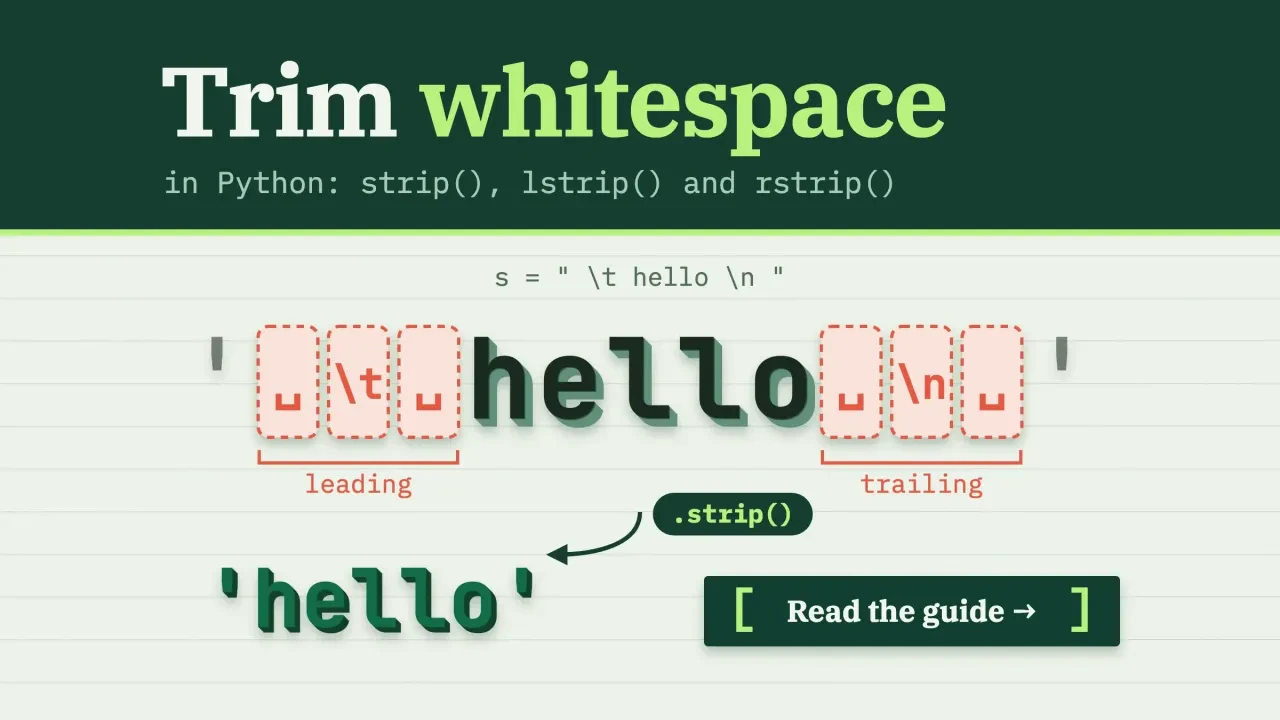
Quick answer
To trim whitespace in Python, call strip() to remove spaces, tabs and newlines from both ends of a string, lstrip() for the left end only, or rstrip() for the right. Nothing in the middle changes. To squeeze inner spaces, use " ".join(s.split()). Watch out: strip(".csv") removes letters, not a suffix.
Every output below is from our own run, pasted exactly as Python printed it.
We used the Python that ships with macOS, version 3.9.6, on October 25, 2026. That release is past its end of life (October 31, 2025), but these string methods behave the same today, and where a newer version differs, we say so and link the current docs.
Key takeaways
- strip() returns a new string, so store the result or nothing changes.
- The chars argument is a set of characters, not a word.
- Use removesuffix() for an exact ending; rstrip(".csv") turned "cvs.csv" into an empty string.
- Use rstrip("\r\n") for Windows line endings when only the newline should go.
- A zero-width space survives strip(), so remove it with translate().
strip() trims both ends and leaves the middle alone
Three methods do the trimming. strip() removes leading and trailing whitespace, lstrip() removes it from the left, and rstrip() from the right.
s = "   Blue Mug  \n"

print(repr(s.strip()))    # 'Blue Mug'
print(repr(s.lstrip()))   # 'Blue Mug  \n'
print(repr(s.rstrip()))   # '   Blue Mug'
We print with repr() on purpose.
A plain print hides trailing spaces and newlines, and those are exactly what you're trying to see.
Here's the bug behind most "strip() didn't work" posts.
Strings can't be changed in place, so strip() hands back a new string. The str.strip docs put it plainly: it returns "a copy of the string with the leading and trailing characters removed." If you don't store that copy, nothing happens:
name = "  Ana  "
name.strip()
print(repr(name))   # '  Ana  '  (unchanged)

name = name.strip()
print(repr(name))   # 'Ana'
Whitespace in the middle stays put, too.
"Jane Doe" keeps all four spaces after strip(). We'll fix that two sections down.
Trimming usually happens right before a comparison, such as matching a typed email against your list. Our guide to comparing strings in Python picks up from there, with case and accents.
The chars argument is a set of characters, not a word
So far strip() has used its default. Pass it a string, and Python removes any of those characters from the ends until it hits one that isn't in the set.
Order doesn't matter, and neither does how many times a character appears.
That's handy for prices, padded IDs and decorated titles:
print(repr("  $19.99  ".strip(" $")))      # '19.99'
print(repr("0042".lstrip("0")))            # '42'
print(repr("---Title---".strip("-")))      # 'Title'
print(repr(" \t x \t ".strip(" ")))        # '\t x \t'
Look at the last line. Once you pass your own characters, the default whitespace rule is gone, so " " only removes spaces and leaves the tabs.
Now the trap.
People write rstrip(".csv") to drop a file extension. On "report.csv" it seems to work and returns "report". Then a file called "cvs.csv" comes along, and every letter is in the set {".", "c", "s", "v"}.
It's the kind of bug that passes every test until one unlucky filename shows up, so we typed both versions into a Python prompt on our test Mac. The rstrip call returned an empty string. removesuffix returned "cvs", which is what we meant. We also checked a zero-width space in the same session; more on that below.
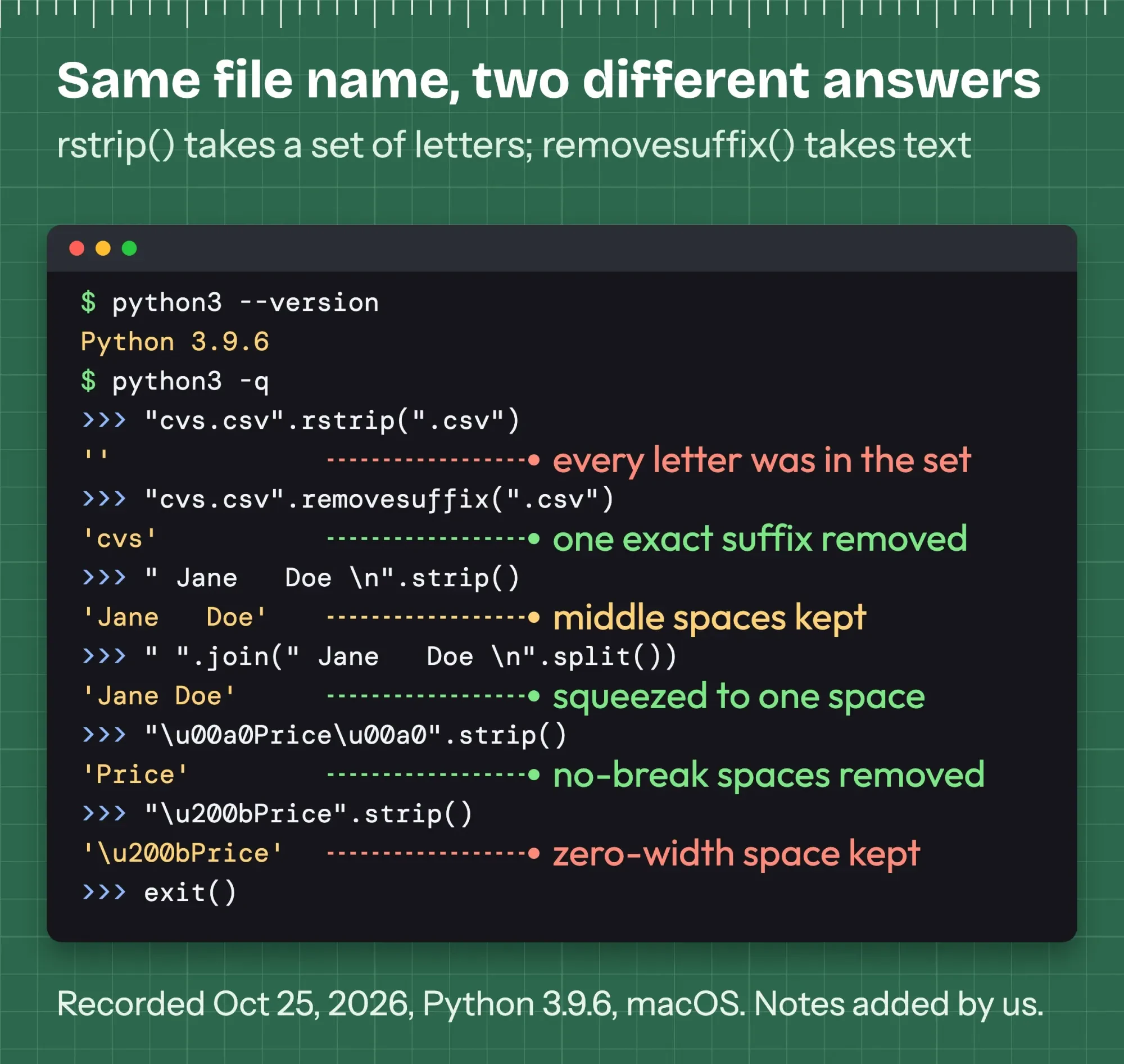 Drawn by us: our recorded terminal session, redrawn line for line (Python 3.9.6 on macOS, October 25, 2026). The version line is from a separate run a moment later; the window frame and notes are ours.
removeprefix() and removesuffix() remove one exact string, once, if it's there. They arrived in Python 3.9. The proposal behind them, PEP 616, says users were "surprised that the parameter for lstrip is interpreted as a set of characters, not a substring."
print(repr("cvs.csv".removesuffix(".csv")))              # 'cvs'
print(repr("ID-ID-42".removeprefix("ID-")))               # 'ID-42'
print(repr("https://example.com".removeprefix("https://")))  # 'example.com'
print(repr("hello".removeprefix("xyz")))                  # 'hello'
Use strip() for a set of characters and removeprefix() or removesuffix() for a fixed piece of text.
If you use the Ruff linter, its rule B005 flags strip() calls whose argument repeats a character, such as strip("foo"). It won't flag rstrip(".csv"), because those four characters are all different.
12 trimming jobs and the call that fits each
Those two families cover most cases. Here's every trimming job we tested, with the result from our run, so you can jump to the line you need.
| Job | Use | Our result on Python 3.9.6 |
|---|---|---|
| Both ends | s.strip() | " Blue Mug \n" became "Blue Mug" |
| Left end only | s.lstrip() | trailing " \n" kept |
| Right end only | s.rstrip() | leading spaces kept |
| Only the newline | s.rstrip("\n") | "SPRING25\n" became "SPRING25" |
| Windows line ending | s.rstrip("\r\n") | "row\r\n" became "row" |
| Exact prefix or suffix | s.removeprefix(p), s.removesuffix(x) | "cvs.csv" kept "cvs" (rstrip gave "") |
| Squeeze inner spaces | " ".join(s.split()) | " Jane Doe \t Smith \n" became "Jane Doe Smith" |
| Same with a regex | re.sub(r"\s+", " ", s).strip() | same result, slower in our timing |
| Remove all whitespace | "".join(s.split()) | "JaneDoeSmith" |
| Zero-width space or BOM | s.translate(table) | U+200B and U+FEFF removed; strip() kept them |
| Every item in a list | [x.strip() for x in items] | add "if x.strip()" to drop blanks |
| Every CSV cell | [c.strip() for c in row] | 9 of 12 cells changed in our Example file |
The rest of this guide takes those rows in order, starting with the gaps between words.
How do you remove whitespace between words in Python?
To remove extra whitespace between words in Python, split the string with no argument and join the pieces with one space. The str.split docs explain why it works: with no separator, "runs of consecutive whitespace are regarded as a single separator."
t = "  Jane    Doe \t Smith \n"

print(repr(t.strip()))             # 'Jane    Doe \t Smith'
print(repr(" ".join(t.split())))   # 'Jane Doe Smith'
print(repr("".join(t.split())))    # 'JaneDoeSmith'
That one line trims both ends too, and it treats tabs and newlines as gaps.
Join with an empty string instead, and every bit of whitespace disappears.
Two lookalikes behave differently. t.split(" ") splits on single spaces only, so our test string came back with empty strings plus a "\t" and a "\n" in the list. And t.replace(" ", "") glued the words together while keeping the tab and newline: "JaneDoe\tSmith\n".
The regex route gives the same answer. In Python regular expressions, \s matches any Unicode whitespace, and \s+ matches a run of it:
import re

t = "  Jane    Doe \t Smith \n"
print(repr(re.sub(r"\s+", " ", t).strip()))   # 'Jane Doe Smith'
print(repr(re.sub(r" {2,}", " ", t)))          # ' Jane Doe \t Smith \n'
The second pattern squeezes only repeated spaces and leaves tabs and newlines alone. That's useful when line breaks carry meaning, and it's easy to miss.
One version note. Since Python 3.13, the re.sub docs say passing count and flags as positional arguments is deprecated, so write count=1 or flags=re.ASCII by name.
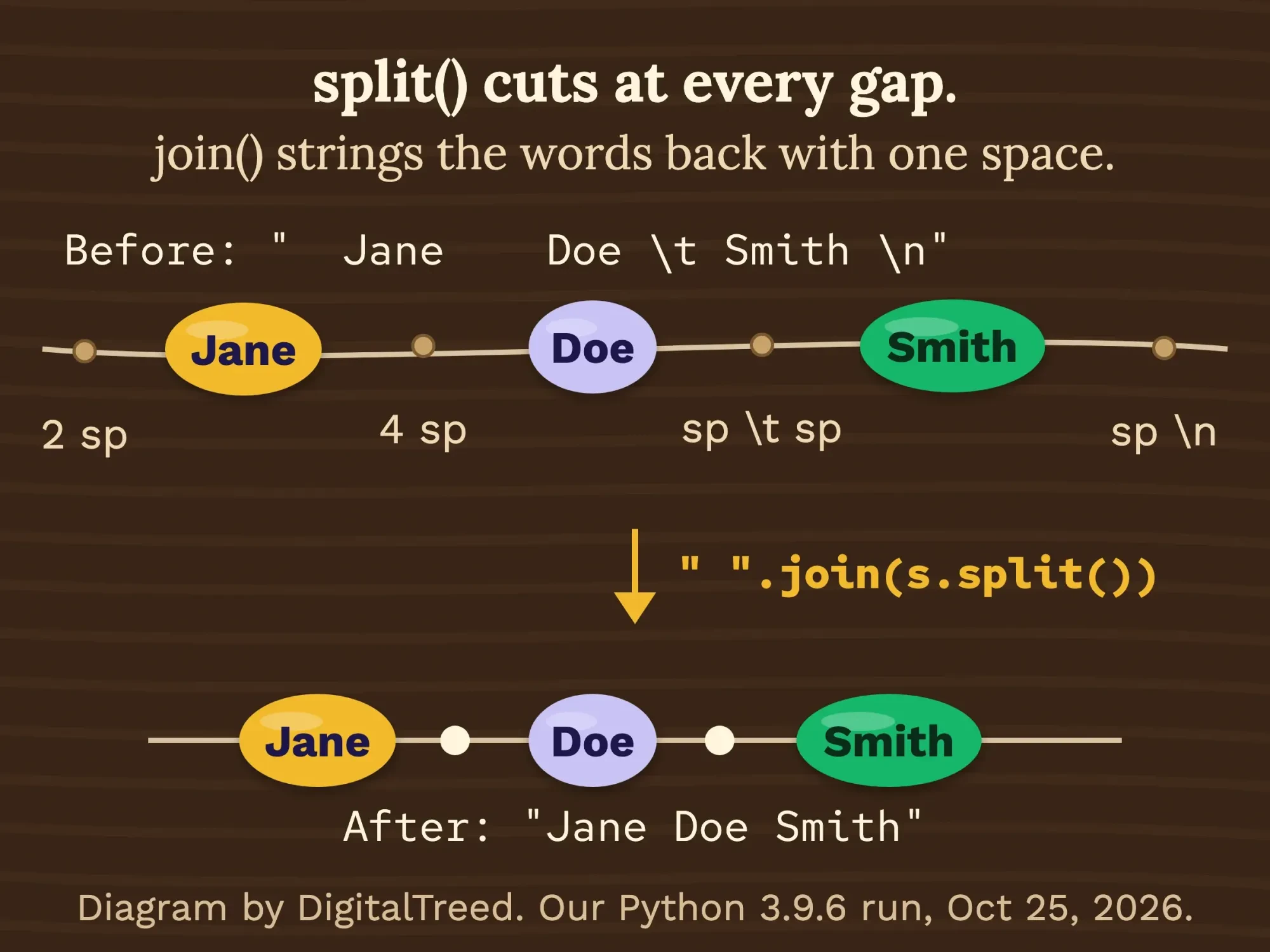 Diagram by DigitalTreed from our split and join test on Python 3.9.6, October 25, 2026.
Is the regex slower? In one rough timing run, 200,000 calls on a 104-character string took 0.011 seconds with strip(), 0.09 with split and join, and 0.379 with a precompiled re.sub plus strip.
That's one run on one Mac, so treat it as a rough guide. For a few thousand rows, any of them is fine.
Newlines need rstrip("\n"), not always strip()
That handles spaces and tabs. Text read from a file also keeps its line endings, and the Python tutorial says readline() leaves "a newline character (\n)" at the end of each line, so "SPRING25\n" won't equal "SPRING25".
strip() fixes that, but it also removes spaces you might want to keep, such as the indentation in a config file or the padding in a fixed-width report from an old system.
If only the line ending should go, name it:
print(repr("SPRING25\n".rstrip("\n")))       # 'SPRING25'
print(repr("row\r\n".rstrip("\r\n")))         # 'row'
print(repr("row\r\n".removesuffix("\n")))     # 'row\r'
print("one\ntwo\r\nthree".splitlines())      # ['one', 'two', 'three']
Files saved on Windows often end lines with "\r\n".
removesuffix("\n") left the "\r" behind in our test, while rstrip("\r\n") took both. That's the one you'll want for mixed files.
For a whole block of text, splitlines() breaks it into lines without the endings and handles \n, \r\n and several rarer separators. strip() never touches a newline in the middle of a string.
A no-break space goes, a zero-width space stays
So far we've trimmed plain spaces, tabs and newlines. But whitespace in Python means whatever str.isspace() says it means.
That's a wider set than you'd guess, and it's got one big gap.
The str.isspace docs define a whitespace character by its Unicode properties: general category Zs ("Separator, space"), or bidirectional class WS, B or S. We checked every code point on our Python 3.9.6.
Our scan found 29.
The Unicode Standard's own White_Space list has 25, and Python's 29 include all of them. The extra 4 are old control codes U+001C to U+001F, the file, group, record and unit separators. UAX #44 describes White_Space as characters "which should be treated by programming languages as "white space" for the purpose of parsing elements."
- Removed by strip(): space, tab, newline and carriage return, plus the no-break space (U+00A0), em space (U+2003) and ideographic space (U+3000).
- Also removed, though not on the Unicode list: U+001C to U+001F.
- Left in place: the zero-width space (U+200B), the byte order mark or BOM (U+FEFF) and the word joiner (U+2060). isspace() returns False for all three.
So the no-break space you get when you copy text from a web page is handled.
"\u00a0Price\u00a0".strip() returned "Price" in our run.
The zero-width space isn't.
It's invisible, it isn't whitespace to Python, and it slips into text pasted from chat apps, PDFs and web editors. You'll need translate() to remove it:
ZW = dict.fromkeys(map(ord, "\u200b\u200c\u200d\u2060\ufeff"))

s = "\u200bhel\u200blo\ufeff"
print(repr(s.strip()))            # '\u200bhel\u200blo\ufeff'
print(repr(s.translate(ZW)))      # 'hello'
str.translate() maps each listed character to None, which deletes it anywhere in the string.
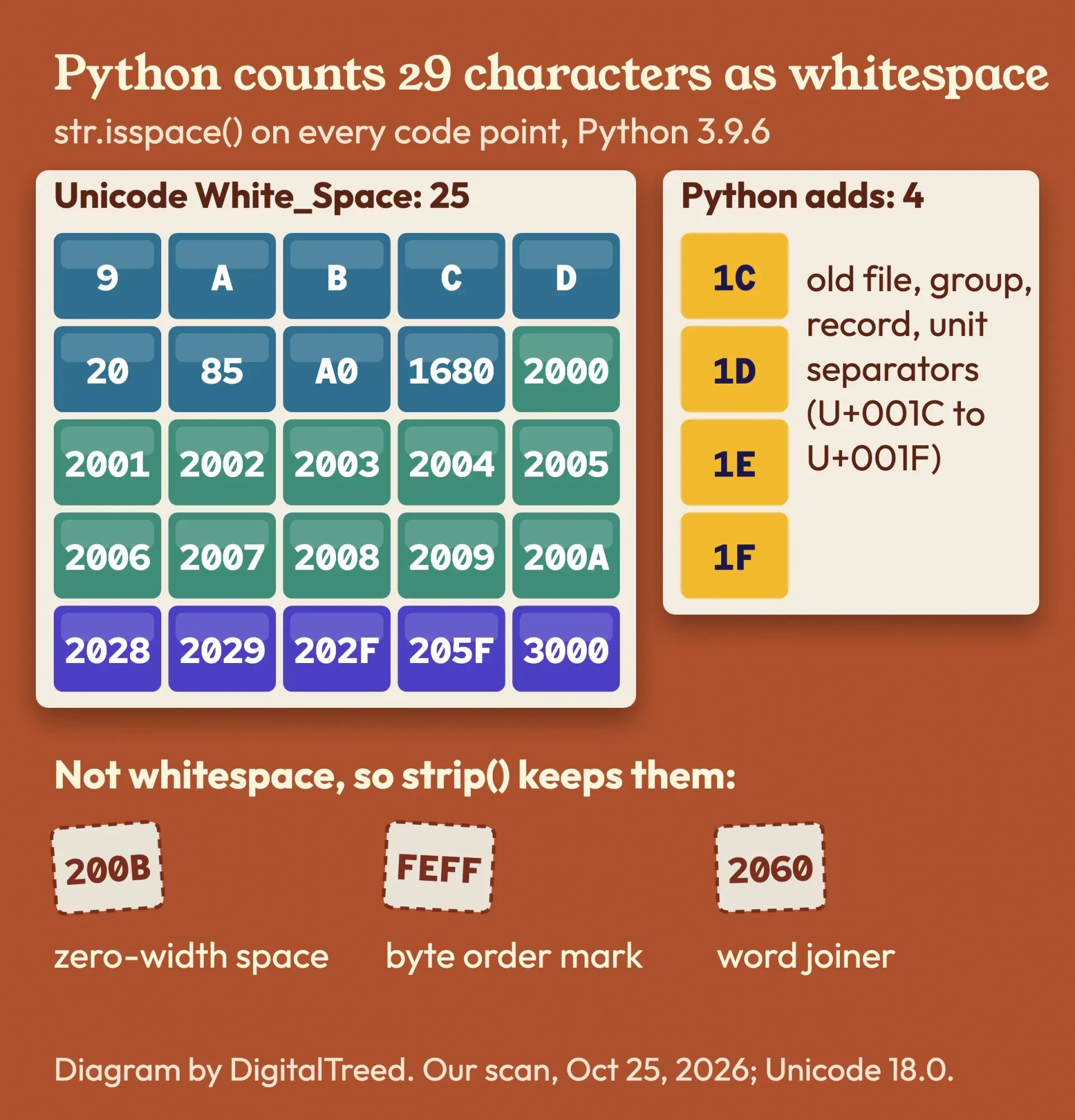 Diagram by DigitalTreed from our scan of all code points with str.isspace() on Python 3.9.6, October 25, 2026, and Unicode PropList 18.0.0.
Three places the rule changes
Some tools use a narrower idea of whitespace, and they miss the no-break space:
string.whitespaceholds only 6 ASCII characters, so strip(string.whitespace) left "\xa0" in place.- With the
re.ASCIIflag,\smatched nothing in "a\u00a0b". Without it, the match worked. - Bytes are ASCII-only too. b"\xc2\xa0x".strip() came back unchanged, so decode to text first.
One more option: unicodedata.normalize("NFKC", s) turns a no-break space into a plain space. Python 3.15 uses Unicode 17.0 data, while our 3.9.6 uses 13.0. Even so, our older scan found all 25 characters of the current Unicode 18.0 list.
Trim every item in a list, a file or a URL list
Those were single strings, the easy part. Real data arrives as lists, files and spreadsheets.
A list comprehension handles the first two.
items = ["  apple ", "banana\n", "\tcherry", "   "]

print([x.strip() for x in items])
# ['apple', 'banana', 'cherry', '']
print([x.strip() for x in items if x.strip()])
# ['apple', 'banana', 'cherry']

d = {" name ": " Ana ", "city ": " Austin"}
print({k.strip(): v.strip() for k, v in d.items()})
# {'name': 'Ana', 'city': 'Austin'}
The "if x.strip()" part drops items that were only whitespace.
list(map(str.strip, items)) gives the same list as the first line, if you'd rather use it.
Files work the same way, one line at a time:
with open("notes.txt") as f:
    lines = [line.strip() for line in f if line.strip()]
On our 5-line test file, that kept 3 lines and dropped the empty one and the one with only spaces.
URL lists deserve extra care.
A trailing space, newline or no-break space from a spreadsheet becomes part of the address. When we passed "https://example.com/menu\u00a0" through urllib.parse.quote() with safe=":/" (so the colon stays as it's typed), it came out as "https://example.com/menu%C2%A0", a different URL that will likely return a 404. A stray newline became %0A.
Strip each URL first, then paste the list into DigitalTreed's HTTP status checker, which costs nothing, to see what every address really returns.
Status codes are one step in our site-wide technical check, if you're auditing more than a handful of links. Any link that answers 404 or redirects gets its fix in the status codes and redirects chapter of our SEO guides.
Clean CSV columns before you import them
That brings us to CSV files, where messy whitespace costs real time.
Python's csv module keeps every space it finds, so " Austin " stays " Austin " unless you strip it.
There's a reader option for this, but it's narrower than it sounds. The skipinitialspace docs say "spaces immediately following the delimiter are ignored." Only those. In our test it left trailing spaces ("Austin ") and a leading no-break space.
Example: a plant nursery in Cheyenne, Wyoming, exports its customer list to load into an email tool. One name was pasted from a web form with a no-break space. Others have stray spaces, there's a blank line, and one email carries an invisible zero-width space. The file also starts with a BOM.
We built that file and cleaned it with this script:
import csv

ZW = dict.fromkeys(map(ord, "\u200b\u200c\u200d\u2060\ufeff"))

def clean(cell):
    return " ".join(cell.translate(ZW).split())

with open("customers.csv", encoding="utf-8-sig", newline="") as f:
    rows = [[clean(c) for c in row] for row in csv.reader(f) if row]

with open("customers_clean.csv", "w", encoding="utf-8", newline="") as f:
    csv.writer(f).writerows(rows)
Our script changed 9 of the 12 cells. " Rosa Diaz " became "Rosa Diaz", "Tom\xa0Baker" became "Tom Baker", " Lena Park\t" became "Lena Park", and the email with the zero-width space now matches the clean address.
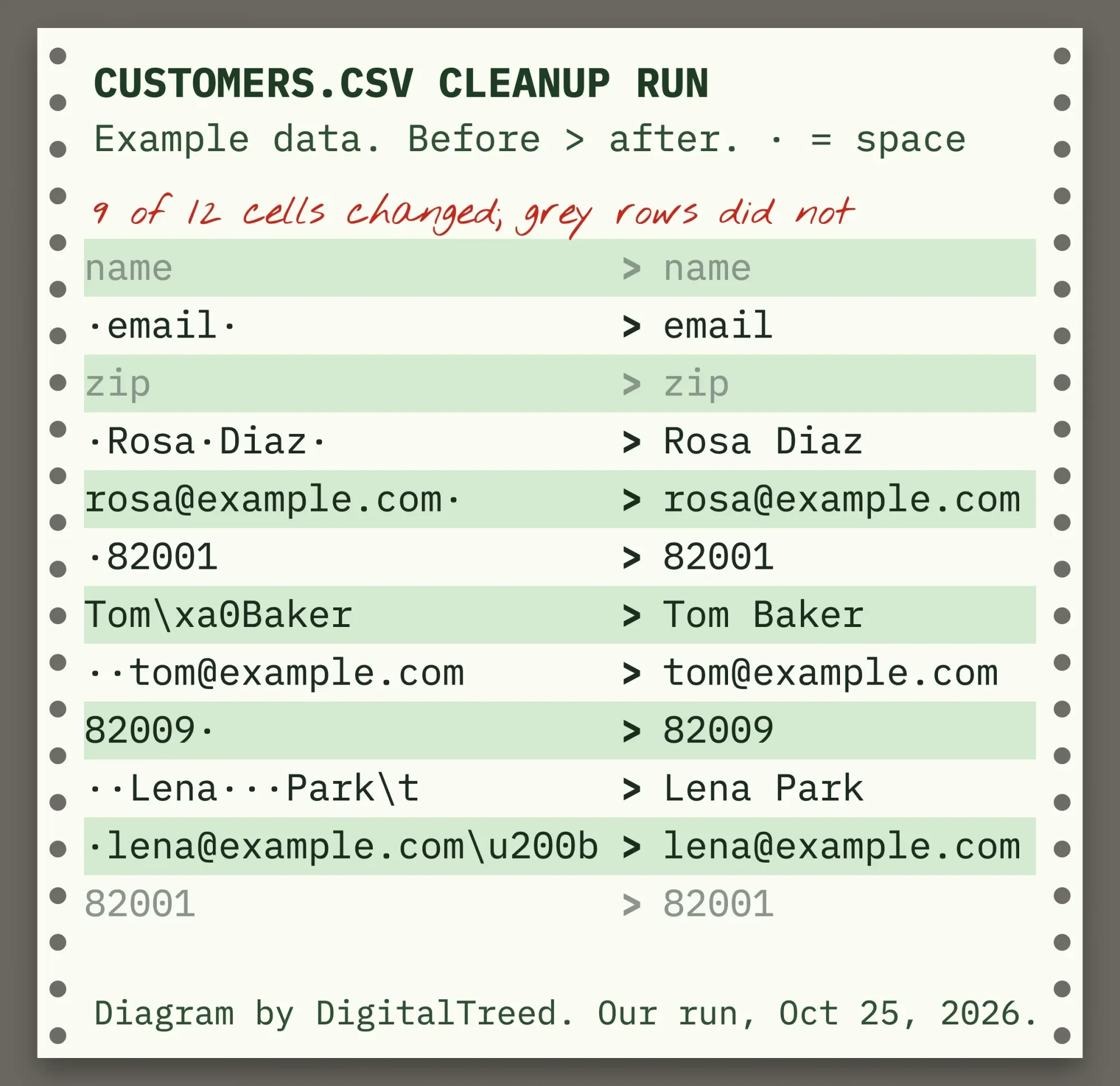 Diagram by DigitalTreed from our cleanup run on Python 3.9.6, October 25, 2026. Example data, not a real customer list.
Two details made the difference. Opening the file with "utf-8-sig" dropped the BOM; with plain "utf-8", our first header came back as "\ufeffname". The codecs docs say utf-8-sig "will skip those three bytes" at the start. And newline="" is what the csv docs ask for when you open the file.
With csv.DictReader, strip the keys as well as the values. A header like " email " becomes a key with spaces, and you won't spot it in a printout.
If you work in pandas, its Series.str.strip() trims a whole column at once. We didn't run it here, since pandas isn't part of the standard library. If installing it fails, the fix for pip's subprocess-exited-with-error message covers the usual causes.
And clean isn't the same as valid.
A trimmed address can still bounce, which is a separate check covered in our email verification tools comparison.
Merged exports need rules before they need code
A strip() call cleans one column.
Merging a point-of-sale export, a web form and an old spreadsheet into one customer list is a different job.
Once you're trimming, deduplicating and fixing hidden characters across thousands of rows from three different systems, someone has to decide the rules before anyone writes the code that applies them. If two rows share an email but not a ZIP code, which one stays? Where do the rows that won't parse go?
Before you hire anyone for it, our guide to choosing a Python development company lists the questions to ask. Just starting with the language? It's on our list of programming languages worth learning.
Import scripts like this are part of the web work we sell to small businesses, so we've got an interest here.
If messy exports are slowing your team down, the web development team here can take on the cleanup and the import.
Frequently asked
How do I check if a string is only whitespace in Python?
Call isspace(). " ".isspace() returned True in our run, but "".isspace() returned False, because an empty string has no characters at all. If empty should count as blank too, use not s.strip().
Can I use removeprefix() on Python 3.8?
No. It was added in Python 3.9. On older versions, check with startswith() and slice: s[len(p):] if p and s.startswith(p) else s. That returned "ID-42" for "ID-ID-42" in our test, the same as removeprefix().
Why do I get AttributeError when I call strip()?
The value is probably None, not a string, which happens with empty form fields and missing CSV columns. None.strip() raised "'NoneType' object has no attribute 'strip'" for us. (val or "").strip() returns an empty string instead.
For most files, strip() and removesuffix() are all you'll need. For a bigger import, send us the details for a quote.
How we made this guide: On October 25, 2026, the DigitalTreed team ran every sample on a Mac with macOS 27.0.1 and its built-in Python 3.9.6, then pasted the outputs in unchanged. The first image redraws a prompt session we recorded through a pseudo-terminal, character for character. Changes in newer Python, such as the re.sub argument deprecation in 3.13, were checked against the Python 3.15.1 documentation instead of run. We didn't test pandas or any third-party package. Each fact links to its source where it appears.
First published January 2024. Rewritten October 25, 2026: the old version's samples were untested, and one output didn't match its code. New: tested outputs, the chars-set trap, removeprefix and removesuffix, whitespace between words, newlines, Unicode spaces, lists, files, URLs and CSV columns.
Sources
- Python docs: str.strip()
- Python docs: str.lstrip()
- Python docs: str.rstrip()
- Python docs: str.removeprefix() and str.removesuffix()
- Python docs: str.isspace()
- Python docs: str.split()
- Python docs: str.splitlines()
- Python docs: str.translate()
- What's New in Python 3.9: new string methods
- PEP 616: String methods to remove prefixes and suffixes
- Python docs: re, regular expression syntax
- Python docs: re.sub()
- Python docs: unicodedata
- Python docs: csv, Dialect.skipinitialspace
- Python docs: codecs, utf-8-sig
- Python tutorial: methods of file objects
- Python docs: urllib.parse.quote()
- Unicode Character Database: PropList.txt (White_Space)
- Unicode Standard Annex #44: Unicode Character Database
- Ruff docs: rule B005, strip-with-multi-characters
- Python Developer's Guide: Status of Python versions
- pandas docs: Series.str.strip() (not tested)


Comments
No comments yet. Start the conversation below.