

Quick answer
A technical SEO audit checks that Google can crawl, index and render your important pages. You test robots.txt, status codes, canonicals, redirects, the sitemap, links, speed and structured data. On a small site, crawl every page first, fix what blocks Google, clean up redirects and sitemap errors next, and polish speed last.
A technical SEO audit starts with Google's 3 minimum requirements: Googlebot isn't blocked, the page returns a 200 status code, and it has indexable content. Everything else in this guide checks those 3 things, page by page.
New to audits? Start with our first SEO audit for small business, which covers Search Console setup, titles and rank tracking. This guide is the technical part that comes after.
We also built a small fictional website with 8 planted problems and audited it on October 22, 2026. Lighthouse, run on 4 of its pages, caught 1 of them. That result shapes the order below.
Key takeaways
- Crawl the whole site before you look at page scores. Our Lighthouse test flagged only 1 of 8 planted problems.
- robots.txt does not keep a page out of Google. A noindex tag behind a robots.txt block is never seen.
- Point old URLs straight to the final page with one 301 redirect. Google follows up to 10 hops, but each hop adds risk.
- Your sitemap should list only final, working, indexable URLs.
- FAQ rich results stopped showing in Google on May 7, 2026. Keep FAQs for readers, not for stars or dropdowns.
What is a technical SEO audit?
A technical SEO audit is a check of how Google and other search engines reach, read and store the pages on your site. It asks 4 questions: can Google crawl the page, index it, render it, and pick the right URL for it?
On-page SEO is different. It covers what the page says: titles, headings and copy. A page can have great copy and still never show up, because one line in robots.txt blocks it.
Key facts for a technical SEO audit
- Googlebot crawls the first 2MB of a supported file, per Google's Googlebot page.
- Google's crawlers follow up to 10 redirect hops, per its HTTP status code page.
- Good Core Web Vitals scores are an LCP within 2.5 seconds, an INP under 200 milliseconds and a CLS under 0.1.
- FAQ rich results stopped showing in Google Search on May 7, 2026, per Google's documentation updates.
- Search Console validation typically takes up to about two weeks, per the Page indexing report help.
What did our test on a fictional repair shop site find?
Our test on October 22, 2026 showed that page scores alone can't replace a site-wide technical SEO audit. On an 8-URL fictional site with 8 planted problems, our test script found all 8, while Lighthouse 12.8.2, run on 4 pages, flagged just 1.
We built an 8-URL test site for a made-up business, Riverbend Auto Repair in Tulsa, Oklahoma. Its footer says it is fictional. It ran only on our own computer, and no real site was touched.
We planted 8 problems that we often see after a redesign:
- robots.txt blocks the /services/ folder, so the brake repair page is blocked.
- An old specials page has a noindex tag, but robots.txt blocks it too.
- The brake page's canonical tag points to a staging host.
- The old /brakes URL takes 2 redirect hops: a 301, then a 302.
- The sitemap lists a deleted page that returns 404.
- A Coupons page says "Sorry, page not found" but returns 200, a soft 404.
- The home page's JSON-LD has trailing commas, so it doesn't parse.
- The Coupons menu item is a JavaScript click, not a real link.
Then we checked the site 2 ways. The first was a short Python script we wrote for this test. It reads robots.txt and the sitemap, follows each redirect and looks at each page's HTML. It isn't a product, just a quick demo, and we wrote its checks knowing what we had planted.
So it found all 8, which is no surprise. The second check was Lighthouse 12.8.2, Google's free page tester, run from the command line. We ran its SEO category, in mobile mode, on 4 pages.
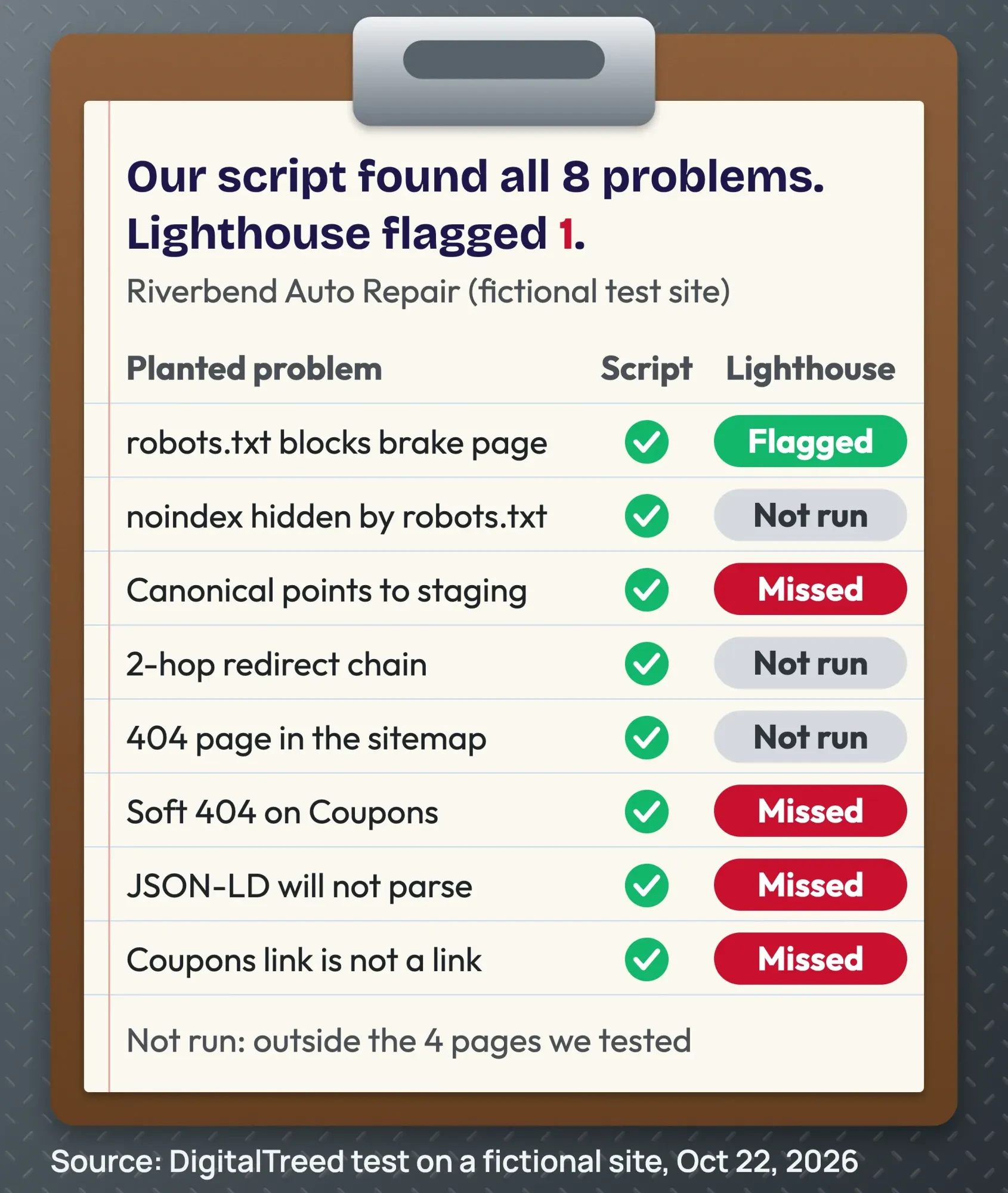 Source: DigitalTreed test on a fictional site, Lighthouse 12.8.2, October 22, 2026.
Lighthouse scored the home page 92, the Reviews page 91 and the broken Coupons page 91. The brake repair page scored 58. Across the 4 pages, it flagged 1 of our 8 problems: the robots.txt block on the brake page.
It also flagged missing meta descriptions, which we hadn't planted. We didn't run it on the other 3 sitemap URLs: /brakes, the old specials page and the deleted page.
Why did Lighthouse flag only 1 of the 8?
Lighthouse tests one page as it loads in a browser. It doesn't read your sitemap, and it scores only the page it lands on. So a redirect chain and a 404 in the sitemap sit outside its test.
Its canonical check looks for one valid, absolute URL, and fails only a few known mistakes, such as pointing every page to the home page. The Lighthouse 12.8.2 source code doesn't compare the host, so a canonical pointing to a staging site passed.
Structured data is a "manual" item, as the Lighthouse structured data page explains. It isn't scored, so the broken JSON-LD went unflagged. The soft 404 returned 200 and scored 91, and the Coupons click isn't an <a> tag, so the link check never saw it.
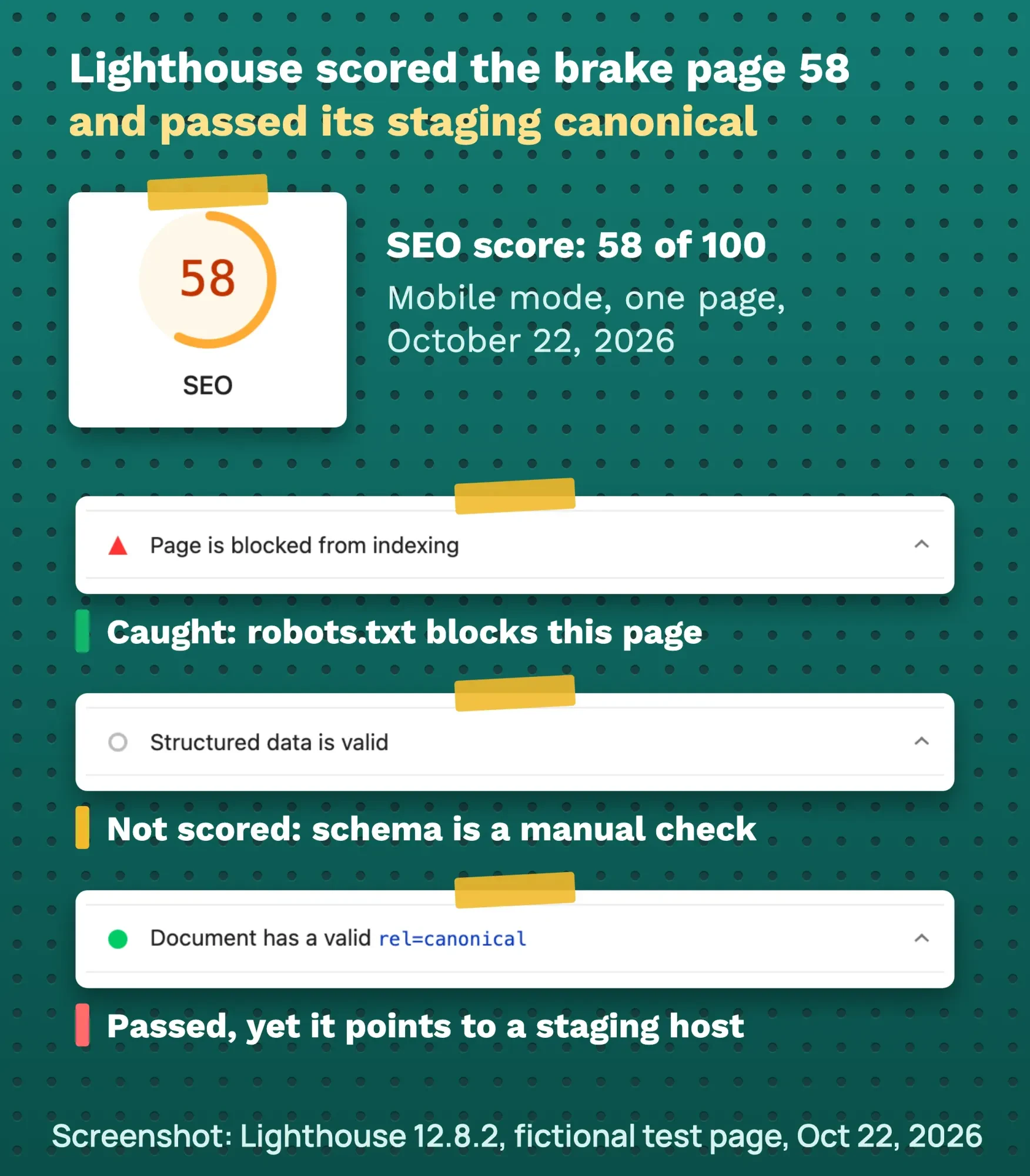 Screenshot: Lighthouse 12.8.2 SEO report for our fictional test page, October 22, 2026, annotated by DigitalTreed.
Lighthouse isn't wrong here. It is a page test, and it doesn't claim to be a site audit. Our take: use a crawl to find site-wide problems, and use page scores later for speed.
How to do a technical SEO audit, in order
Work through these steps in one or two sittings. Each one has its own section below with Google's rule and a tool.
- Crawl the whole site. Run a site-wide scan or a crawler to list status codes, canonicals, noindex tags and broken links.
- Check robots.txt and noindex. Make sure no page you want found is blocked or tagged noindex.
- Check status codes. Important pages return 200. Missing pages return a real 404 or 410, not a 200 error page.
- Check canonicals. Each page names its own full URL, on your live domain, in the head of the page.
- Fix redirects. Use one server-side 301 from each old URL to the final page.
- Clean the sitemap. List only final, 200, indexable, canonical URLs.
- Check rendering and links. Compare the raw HTML with what Google renders in URL Inspection. Links must be real link tags.
- Check speed and mobile. Read field data first, then use lab tests to find the cause.
- Validate structured data. Fix parse errors and missing required properties.
Technical SEO checklist: 11 checks, what passes and where to check
Use this table as your checklist. Each row is a pass or fail check, and the last column names a free place to run it.
| Check | Passes when | Where to check |
|---|---|---|
| Crawl | Every important URL is found, with no surprise 4xx or 5xx codes | A crawler, such as our website audit or Screaming Frog |
| robots.txt | No Disallow line covers a page you want found | Your /robots.txt file and URL Inspection |
| noindex | Only pages you want hidden carry a noindex tag or header | A crawler and URL Inspection |
| Status codes | Key pages return 200; removed pages return 404 or 410 | HTTP status checker and the Page indexing report |
| Canonicals | A full URL on your live domain, in the head, and Google picked the same one | URL Inspection (Google-selected canonical) |
| Redirects | One server-side 301 from each old URL to the final page | Redirect checker |
| Sitemap | Lists only final, 200, indexable, canonical URLs | Sitemaps report in Search Console |
| HTTPS | Every page loads on https:// with a valid certificate | HTTPS report in Search Console |
| Rendering and links | Key text shows in the rendered HTML, and links use a real link tag | URL Inspection live test |
| Speed | LCP within 2.5 s, INP under 200 ms, CLS under 0.1 | Core Web Vitals report and PageSpeed Insights |
| Structured data | The JSON-LD parses and has the required properties | Rich Results Test |
You don't need a paid tool for a small site. Search Console's help page calls it a free service offered by Google, and Lighthouse is an open-source, automated tool. If you do weigh a paid suite later, our guide to choosing SEO analysis tools compares prices and free options by job.
Step 1: crawl the whole site first
Start with a list of every URL and its problems. Scan up to 25 pages of a public site with our free website audit tool. DigitalTreed makes this tool, which checks canonicals, indexability, broken links and speed.
It only reads public pages, so it can't scan a site on your own computer. That is why we used a script for our test.
For a bigger site, use a desktop crawler. Screaming Frog's pricing page lists the crawler as free up to 500 URLs and $279 per license per year above that, as of October 2026. Our Screaming Frog guide shows the setup.
Then open Search Console's Page indexing report. Google's Page indexing report help says "You should not expect all URLs on your site to be indexed". If you haven't set it up yet, our Google Search Console guide walks you through it.
Can Google crawl and index each page?
Google can crawl and index a page only if robots.txt doesn't block it, it has no noindex tag, and it returns a 200 status code. Check all 3 on every page you want found, because one stray line can hide a whole folder.
robots.txt controls crawling, not indexing. Google's robots.txt guide says it "is not a mechanism for keeping a web page out of Google". A blocked URL can still show in results, just without a description.
To keep a page out, use a noindex tag. But the page must stay crawlable. Google's noindex page warns that if robots.txt blocks it, "the crawler will never see the noindex rule". The same rules decide whether Google sees links to you from other sites, as our backlink indexing test shows. That was problem 2 on our test site.
A noindex rule can also sit in the server's response, not the page code. Google's noindex page says an X-Robots-Tag HTTP header does the same job, even for "PDFs, video files, and image files" without page code. A crawler shows this header, but viewing the page source won't.
Next, check status codes. Paste your key URLs into our free HTTP status checker and look for anything other than 200 on pages you want found.
Google's status code page says 4xx URLs are not indexed and indexed ones are removed. A page that says "not found" but returns 200 shows as a soft 404 in Search Console. Our Coupons page was one.
Server errors work differently. Google says a 5xx server error makes its crawlers "temporarily slow down," and indexed pages are kept at first but "eventually dropped" from Search. Our take: a 5xx on a key page is a Fix now job. To hear about a 5xx when it starts, not weeks later, set up free website uptime monitoring.
Is Google choosing the right URL?
Google is most likely to pick your preferred URL when your canonical tag, redirects and sitemap all point to that one URL. Confirm its choice in URL Inspection in Search Console, where the Google-selected canonical field shows the URL Google actually indexed.
A canonical tag tells Google which URL is the main one. Google's duplicate URL guide calls redirects and canonical tags "a strong signal," and sitemap listing "a weak signal". All 3 should point to the same URL.
Check 3 things on each important page:
- The canonical uses a full URL, such as https://www.example.com/page, not a relative path.
- It sits in the
<head>. Google ignores a canonical in the body. - It points to your live domain, never to a staging or http:// copy.
Then check which URL Google picked. Open URL Inspection's indexed result and read the Google-selected canonical field. Google says it "might choose another URL that it considers a better canonical," and the live test "cannot predict" that choice.
After you fix a canonical, be patient. The canonical troubleshooting guide says Google "might hold pages in a duplicate cluster for up to two weeks."
Redirects need the same care. Google's HTTP status code page, updated February 4, 2026, says its crawlers "follow up to 10 redirect hops". It also says Google's inspection tools don't follow redirects at all.
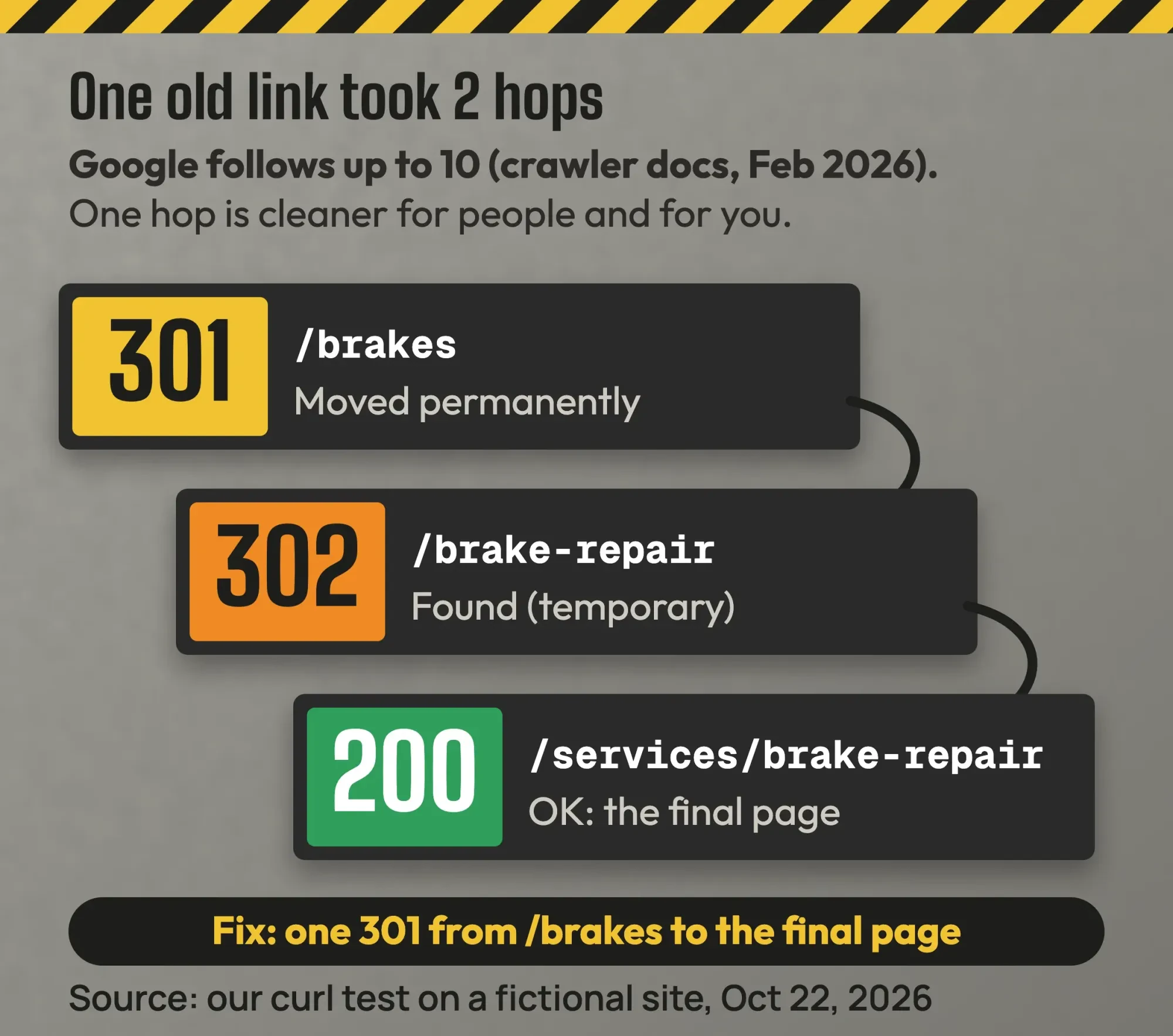 Diagram by DigitalTreed from our curl test on a fictional site, October 22, 2026.
So 2 hops won't break Google, but each hop is one more thing to maintain and one more delay for people. Our take: one hop, server-side. Google's redirect guide recommends "a permanent server-side redirect" when a URL changes for good.
Check any old URL with our free redirect checker. It lists every hop and its status code. If a WordPress site loops instead, see our guide to the too many redirects error.
Is your sitemap clean?
A clean sitemap lists only the final URLs you want found: pages that return 200, carry no noindex tag and are canonical. Anything else, like a deleted page or an old redirected URL, sends Google mixed signals and wastes a crawl.
A sitemap lists the URLs you want Google to find. The sitemap overview says it "doesn't guarantee" those pages get crawled and indexed.
It also says a site of "about 500 pages or fewer" that links its pages well might not need one. WordPress, Wix and Blogger make one for you anyway.
Our test sitemap broke all 4 of those rules. Google's build guide also says to use full URLs and that it ignores priority and changefreq.
Can Google see your content and links?
Google can see most page content, including text added by JavaScript, but it only finds links built as real link tags. Google's JavaScript SEO basics say it can "only discover your links if they are <a> HTML elements with an href attribute". Our Coupons click had no link tag, so Google can't follow it.
Text added by JavaScript, like our Reviews page, is usually fine if the script isn't blocked. To check, open URL Inspection in Search Console, run a live test and view the tested page's HTML and screenshot.
Page weight matters too. Google's Googlebot page, updated February 3, 2026, says Googlebot "crawls the first 2MB" of a supported file, counted uncompressed. That is rare on a small site, but a bloated page builder can hit it.
Every page also needs a way in. Google wants a link to "every page you care about" from "at least one other page on your site," per its link best practices. A page with no links to it is called an orphan page.
Menus and footers drive most internal links. Our guide on how to find internal links shows how to list them and spot orphan pages.
Steps 4 to 7 are the hardest part for most owners, because the fixes live in server settings and templates. If you'd rather have them done, our SEO team can audit and fix them, with read-only access first. (DigitalTreed sells this service.)
What matters for speed and mobile?
For speed and mobile, two things matter most: Core Web Vitals from real users, and a phone version with the same content as desktop. Field data shows how real visitors load your pages. Lab tests, like Lighthouse, then help you find the cause.
Google's Core Web Vitals page sets good scores at an LCP within 2.5 seconds, an INP under 200 milliseconds and a CLS under 0.1. INP replaced FID on March 12, 2024, per the web.dev launch post.
Keep speed in proportion. The page experience page says Core Web Vitals "are used by our ranking systems". It also says a perfect score "just for SEO reasons may not be the best use of your time."
Small sites often have no field data. PageSpeed Insights then shows lab data, which helps you find causes. Our PageSpeed Insights guide explains each number.
For mobile, there is one test that counts. Google said in June 2024 that from July 5, 2024, it would crawl sites "with only Googlebot Smartphone". Make sure your phone layout shows the same content and links as desktop.
Does every page load on HTTPS?
The page experience page asks, "Are your pages served in a secure fashion?" as one of its self-checks. Search Console's HTTPS report shows how many of your indexed URLs use HTTP and how many use HTTPS.
Fix any row it lists, such as "HTTPS has invalid certificate" or "HTTPS has redirect," which means the HTTPS page sends people back to HTTP. An invalid certificate usually affects the whole site, so it goes in the Fix now row.
Google's canonical guide says it "prefers HTTPS pages over equivalent HTTP pages as canonical" unless something conflicts. The exceptions include an invalid certificate, insecure files (other than images) on the page, or a redirect back to HTTP.
Our take: 301 redirect http:// and the www or non-www copy you don't use to one https:// address. Then all 4 versions of your home page end at the same URL.
Does structured data still pay off?
Yes, structured data still pays off for a local business, because it helps Google read facts like your name, address and hours. The structured data intro says a page must include all required properties to be "eligible" for rich results. Eligible doesn't mean shown.
Some old checklists still push FAQ schema. Google's search documentation updates, May 2026, say the FAQ rich result "will no longer appear in Google Search starting May 7, 2026". Keep your FAQs for readers.
For a local business, the LocalBusiness guide lists 2 required properties: name and address. Mark up only what visitors can see. The structured data guidelines forbid marking up "fake reviews."
Paste your JSON-LD into our free schema markup validator to catch parse errors like our trailing commas. Then confirm in Google's Rich Results Test.
What order should you fix things in?
Fix what stops Google from indexing your key pages first, such as robots.txt blocks, stray noindex tags and 4xx or 5xx errors. Then fix what wastes its time, like redirect chains and sitemap junk, and polish speed and schema last. This is our take, built on Google's documentation.
| Priority | Problems | Why |
|---|---|---|
| Fix now | Key pages blocked in robots.txt, noindex by mistake, 4xx or 5xx on key pages, canonical to the wrong host | The page can't be indexed, or Google is told to use another URL |
| Fix this month | Redirect chains, junk in the sitemap, soft 404s, links without a link tag | Mixed signals and wasted crawls |
| Improve | Core Web Vitals in "needs improvement", invalid schema | One signal among many, or rich result eligibility only |
| Skip on small sites | Crawl budget, log files, llms.txt | Google's crawl budget guide is for big sites, and Google Search ignores llms.txt. Log files are our take. |
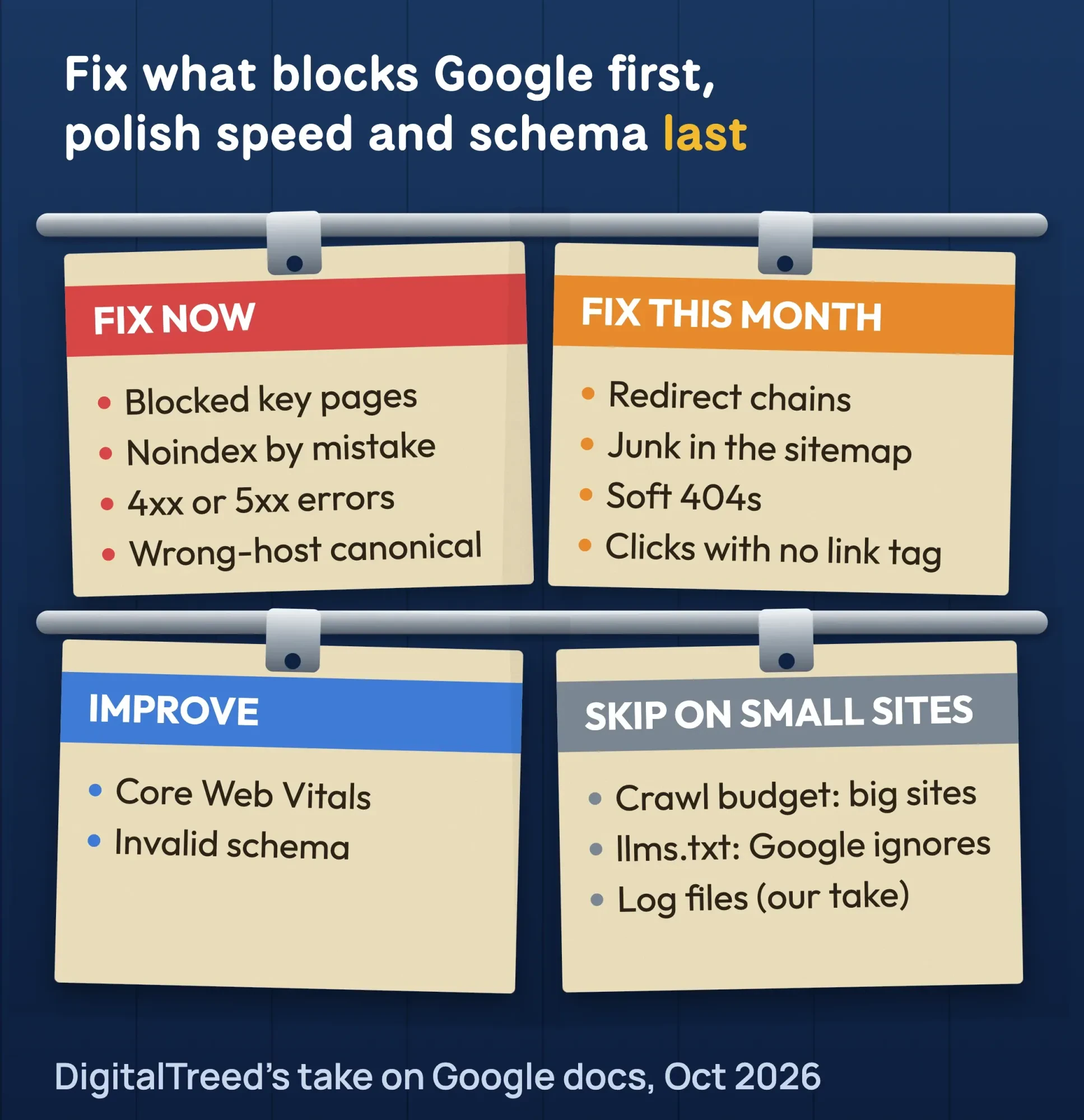 Diagram by DigitalTreed, our take based on Google Search Central documentation, October 2026.
After each fix, click Validate fix in Search Console. The Page indexing help says validation "typically takes up to about two weeks."
Example: the Riverbend Auto Repair fix plan
Example (fictional): Riverbend Auto Repair is our made-up 2-bay shop in Tulsa. A freelancer redesigned its site and moved /brakes to /services/brake-repair. The staging robots.txt and canonical tags went live with it.
Day 1, the owner removes the "Disallow: /services/" line and points the brake page's canonical to its live URL. They also unblock the old specials page so Google can see its noindex tag.
Day 2, they replace the 301-then-302 chain with one 301 from /brakes to the final page. They remove the deleted page from the sitemap and make the Coupons page return a real 404.
Later, they turn the Coupons click into a real link and fix the JSON-LD commas. Then they validate each fix in Search Console and wait up to about two weeks.
What can a small site skip?
A small site can usually skip 3 big-site jobs: crawl budget work, log file analysis and writing an llms.txt file. Google's docs say the crawl budget guide is for large or fast-changing sites, and that Google Search doesn't use llms.txt.
Crawl budget is the big one. Google's crawl budget guide is written mainly for sites with 1 million+ pages that change weekly, or 10,000+ pages that change daily. If your pages get crawled the day you publish them, "you don't need to read this guide."
Log file analysis is a big-site job too, in our view. A 30-page site learns more from the Page indexing report.
You also don't need an llms.txt file for Google, on any size of site. Its AI features guide says Google Search "doesn't use them". To show in AI Overviews, a page must first be indexed and eligible for a snippet.
Some checklists also add a Google-Extended line to robots.txt. That token controls use of your content for Gemini models, and Google's crawler list says it "does not impact a site's inclusion in Google Search."
Our advanced SEO guide covers migrations and large sites.
Should you do it yourself or hire someone?
For a small site, you can usually run the audit yourself with free tools like Search Console, Lighthouse and a free crawler. Google's Do you need an SEO? page says a small local business "can probably do much of the work yourself". If your customers find you on Google Maps, start with our guide to local SEO. Server and template fixes may still need a developer.
If you hire, Google gives 3 tips worth following:
- Give the auditor read access to Search Console only, not write access, at the audit stage.
- Ask whether they cite official Google documentation for each recommendation.
- Walk away from anyone who guarantees a #1 ranking. Google says no one can.
Treat any tool's report with care, ours included. Google's third-party tools guidance says these tools "don't have access to our internal ranking data". Confirm each finding in Search Console.
We don't print audit prices here, because we found no reliable US price survey. Ask for a written quote that lists the scope, access and deliverables. To compare candidates, use our SEO freelancer interview scorecard. This is general information, not legal advice; check with an attorney for your situation.
Frequently asked
How is a technical SEO audit different from an on-page audit?
A technical audit checks whether Google can reach, render and index your pages. An on-page audit checks what the pages say, such as titles, headings and copy. Most sites need both.
How much does a technical SEO audit cost?
You can run one free with Search Console, PageSpeed Insights and free crawlers. Paid audit prices depend on site size and scope, and we found no reliable US survey. Ask for a written quote with a clear list of deliverables.
How long do fixes take to show in Google?
Google says Search Console validation usually takes up to about two weeks, and canonical changes can take about as long. Big sites can take longer.
How long does a technical SEO audit take?
Our take: one or two sessions for a site under 500 pages, if you follow the 9 steps above. Fixes that need a developer take longer, and Google's validation typically takes up to about two weeks for each one.
Is there a free technical SEO audit tool?
Yes. Search Console is free, and Lighthouse is open source. Our website audit scans up to 25 pages of a public site for free, and Screaming Frog is free up to 500 URLs, as of October 2026. DigitalTreed makes the website audit.
How often should I run a technical SEO audit?
Our take: after every redesign, platform change, domain move or sudden traffic drop. In between, look at the Page indexing report once a month.
Is a perfect Lighthouse SEO score enough?
No. In our test, a soft 404 page scored 91, a home page with broken schema scored 92, and a staging canonical passed. Lighthouse checks one page; a crawl checks the site.
Your next step
Today, run a crawl of your site and sort what it finds into the 4 priority tiers above. Fix the "Fix now" row first.
If the fixes need a developer, or you want a second pair of eyes, ask us for a free quote. You get a written scope before any work starts.
How we made this guide: Aijaz Alam wrote it from Google Search Central documentation, Search Console Help, web.dev and the Lighthouse source code. We built the fictional Riverbend Auto Repair site, ran our test script and Lighthouse 12.8.2 on it, and took the screenshots on October 22, 2026. We checked every number against the source linked next to it the same day. Updated October 23, 2026: added a checklist table and an HTTPS section. We also added notes on 5xx errors, the X-Robots-Tag header, the Google-selected canonical, orphan pages and Google-Extended. Updated October 25, 2026: we added short sourced facts, direct answers under the question headings and a plain list of the 9 audit steps.
First published February 2026. Rewritten October 2026: fully new text, a step-by-step technical audit, our test on a fictional site and hiring tips. It adds Google's FAQ, 2MB and 10-hop rules and drops the old unsourced case-study numbers.
Sources
- Google Search Central: Google Search technical requirements
- Google Search Central: Introduction to robots.txt
- Google Search Central: Block Search indexing with noindex
- Google Search Central: How to specify a canonical URL
- Google Search Central: Canonicalization troubleshooting
- Google Crawling Infrastructure: HTTP status codes and network errors (updated February 4, 2026)
- Google Search Central: Redirects and Google Search
- Google Search Central: What is a sitemap
- Google Search Central: Build and submit a sitemap
- Google Search Central: Googlebot (updated February 3, 2026)
- Google Search Central: JavaScript SEO basics
- Search Console Help: URL Inspection tool
- Search Console Help: Page indexing report
- Google Search Central: Core Web Vitals
- Google Search Central: Page experience
- PageSpeed Insights: About
- web.dev: Interaction to Next Paint becomes a Core Web Vital (March 12, 2024)
- Google Search Central Blog: Mobile-first indexing has landed (June 2024)
- Google Search Central: Introduction to structured data
- Google Search Central: General structured data guidelines
- Google Search Central: Local business structured data
- Google Search Central: Search documentation updates, May 2026 (FAQ rich result)
- Google Rich Results Test
- Google Crawling Infrastructure: Crawl budget management
- Google Search Central: AI features and your website
- Google Search Central: Do you need an SEO?
- Google Search Central: Third-party SEO tools
- Lighthouse 12.8.2 source: canonical audit (GitHub)
- Chrome for Developers: Lighthouse structured data audit
- Screaming Frog: SEO Spider pricing (vendor)
- Search Console Help: HTTPS report
- Google Search Central: Link best practices for Google
- Google Crawling Infrastructure: Google common crawlers (Google-Extended)
- Search Console Help: About Search Console
- Chrome for Developers: Introduction to Lighthouse


Comments
No comments yet. Start the conversation below.