

Quick answer
Yes, SEO and blogging still work for a beginner, but each search sends fewer clicks than it used to. In Pew's March 2025 data on 900 US adults, a result was clicked on 8% of visits with an AI summary, 15% without. Google's starter guide says changes can take a few hours to several months, so judge after ten posts, not two.
SEO and blogging for a beginner usually start the same way: you publish a few posts, search for them, and find nothing. Then you notice an AI answer sitting above the links, sometimes summing up the very question you wrote about, and wonder if a new blog can still be found. SEO is the work of helping search engines understand your posts and helping searchers decide to click. That's close to how Google's own starter guide to Search Engine Optimization defines it.
We'd still start a blog today, working from Google's own pages rather than a plugin's checklist. Google's page on AI answers says they need no special optimization. The starter guide's advice for bloggers fits on one page, so we turned it into an order for your first 10 posts. When we ran a checker over this post's 2019 version, one phrase came up 12 times. Further down are the paid shortcuts Google's spam policies name, and the claims we could and couldn't verify.
Key takeaways
- Google says AI Overviews need no special optimization beyond normal SEO.
- Pew, March 2025, 900 US adults: result clicks on 8% of AI-summary visits.
- Google ignores the keywords meta tag, so leave that plugin field empty.
- Blogs of about 500 pages or fewer may not need a sitemap.
- Our 2019 post repeated one phrase 12 times and had no images.
What Google means by SEO for a new blog
Google's starter guide is blunt about what it can't offer. It promises "no secrets here that'll automatically rank your site first in Google (sorry!)." What it describes instead is plumbing. Google's How Search works page splits it into three stages: crawling, indexing and serving search results. It adds that "not all pages make it through each stage." So a post can stall in three places. If Google never finds the URL, nothing you wrote matters, and if it's found but left out of the index, it won't show for any search. Only an indexed post competes on how well it answers the question someone typed.
No submission form is needed, either. The starter guide says "the vast majority of sites listed in our results are found and added automatically as we crawl the web." Its section on links explains how, noting that "the vast majority of the new pages Google finds every day are through links." On the How Search works page, crawlers download "text, images, and videos from pages it found on the internet." A post that no other page links to gives them nothing to follow. On a blog with three posts and no outside mentions, the links between your own posts do most of that work.
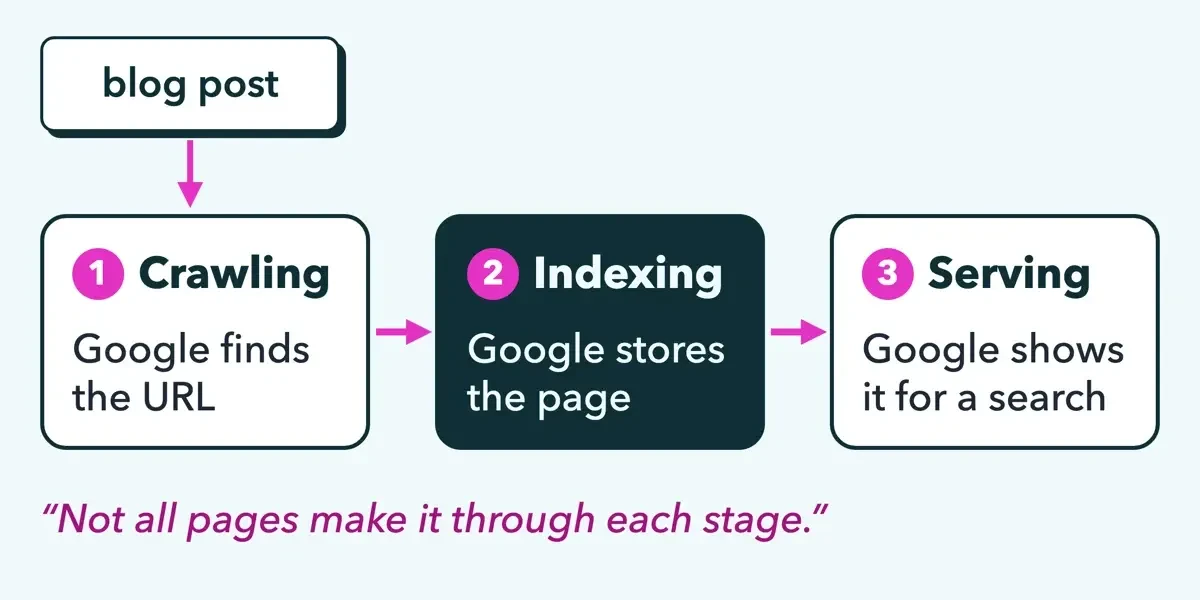 Diagram by DigitalTreed, from the How Search works page read November 20, 2026.
Nobody can sell you a faster lane through those stages. Google's Search Essentials say "It doesn't cost any money to appear in Google Search results, no matter what anyone tries to tell you."
The How Search works page adds that "Google doesn't accept payment to crawl a site more frequently, or rank it higher." Some emails offer to submit your new blog to Google for a fee. Google does that for free.
Will SEO still work for a beginner after AI answers?
Still, a free listing doesn't mean the clicks are what they were in 2019, when this post first ran. The Pew Research Center tracked the browsing of 900 US adults in March 2025 and published the results on July 22, 2025. When an AI summary appeared, those adults clicked a traditional result on 8% of visits. Without a summary, it was 15%. Just 1% of visits to a page with a summary ended in a click on a link inside it.
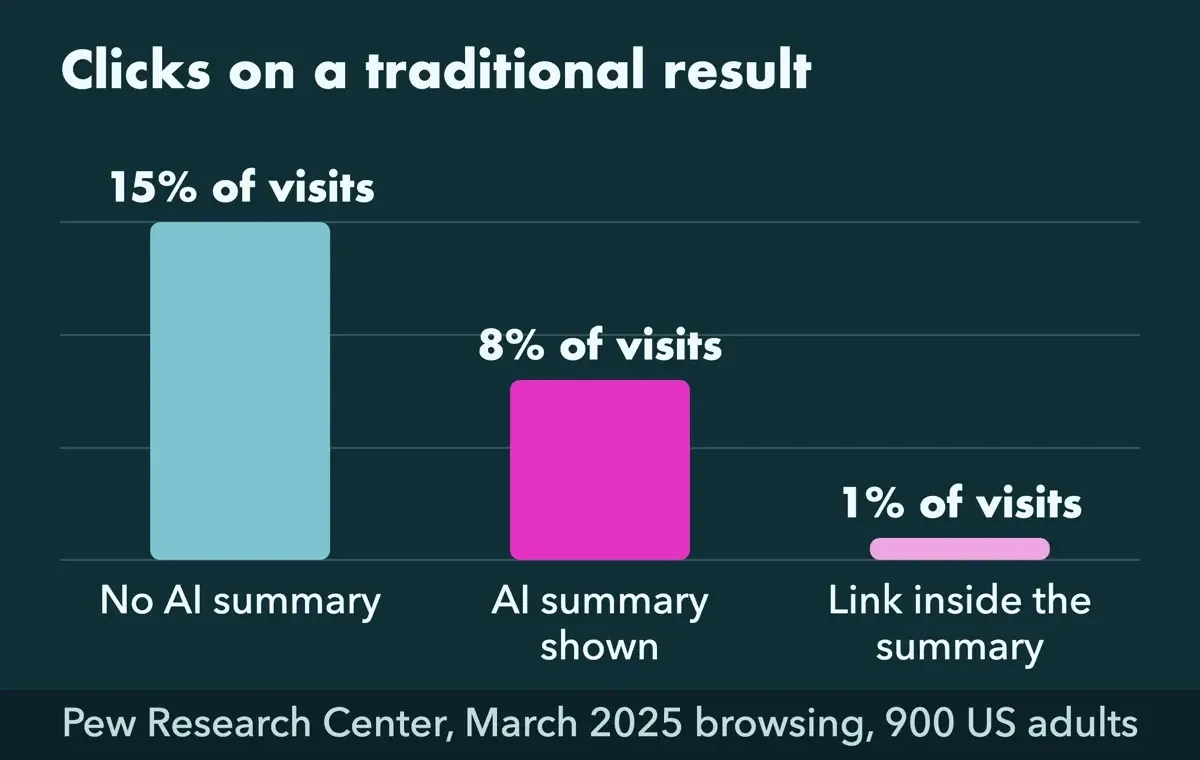 Source: Pew Research Center, July 22, 2025, read November 20, 2026. Drawn by us.
On Google's side, the page on AI features and your website says "There are no additional requirements to appear in AI Overviews or AI Mode, nor other special optimizations necessary." Both features may run what Google calls query fan-out, "issuing multiple related searches across subtopics and data sources." That's how a post can be cited for a question it never targeted word for word. Clicks from those features show up in Search Console's Performance report, under the Web search type, counted together with ordinary results.
The quieter change came in March 2024. Google's ranking systems guide says the helpful content system, announced in 2022, "evolved and became part of our core ranking systems" that month. Google's March 5, 2024 blog post said the update would show "less content that feels like it was made to attract clicks." The same post added three spam policies that day: expired domain abuse, scaled content abuse and site reputation abuse.
SEO tips for bloggers from the starter guide
The starter guide's SEO tips for bloggers begin with the words your readers actually type. Its example is a cheese plate. Someone who knows the topic searches for charcuterie, while a newer cook types cheese board.
If you write about home espresso, a beginner might search why their espresso tastes sour long before learning the word extraction. Free keyword research tools on our list show where to find phrases like that without paying for data.
Using your readers' words doesn't mean repeating them. Google's spam policies define keyword stuffing as "filling a web page with keywords or numbers in an attempt to manipulate rankings in Google Search results." The starter guide adds that repeating the same words "over and over (even in variations) is tiring for users." Neither page sets a number. There's no safe density to aim for, whatever a plugin's traffic light says. Write each phrase where a person would naturally say it, read the post aloud once before publishing, and cut any sentence that exists only to fit the phrase in again.
The guide also asks for content that's unique and current. It says "don't copy others' content in part or in its entirety" and suggests you update old posts "as needed, or even delete it if it's not relevant anymore." We'd put a reminder on the calendar six months after each post goes live, and sooner for posts about prices, plugin settings or anything else that changes often.
Inside your own blog, Google's link guide sets a simple rule: "Every page you care about should have a link from at least one other page on your site."
Google can generally crawl a link only when it's an HTML a element with an href attribute. A button built with scripts can hide a post. Write anchor text that names the page, the way a table of contents would, and use how to find internal links to spot posts nothing links to yet.
For images, the starter guide calls alt text "a short, but descriptive piece of text that explains the relationship between the image and your content."
The Google Images guide asks for descriptive filenames and titles as well. For your sour espresso photo, an alt like pale, thin espresso pulled too fast beats a string of keywords.
The starter guide says three common habits do little or nothing for ranking.
| Old habit | What the starter guide says | What to do instead |
|---|---|---|
| The keywords meta tag | Google Search doesn't use it | Leave the plugin field empty |
| Keywords in the domain or URL | Hardly any effect beyond breadcrumbs | Pick a name readers remember |
| A target word count | No magical minimum or maximum | Stop when the question is answered |
For title links, meta descriptions and AI drafts, see our post on SEO writing tips from Google's own checklist. Our Google ranking factors post, checked against Google's pages, sorts popular claims into confirmed, myth or unproven.
Your first 10 posts: a plan for a new blog
Before post 1 goes live, add your site to Google Search Console, which Google calls "a free service offered by Google." Its getting started guide says the performance report "shows how much traffic you're getting from Google Search, including breakdowns by queries, pages, and countries." Posts 7 to 9 in the plan come from those queries. A sitemap can wait. Google's sitemaps overview calls a site small at "about 500 pages or fewer" and says a small, well-linked site may not need one.
To see whether Google's found you at all, run a site: search for your domain, which the starter guide suggests doing first, before any other fix.
The plan below is ours, not Google's, though each row leans on a page above.
| Posts | What to write | The SEO step that goes with it |
|---|---|---|
| 1-3 | The three questions readers ask you most | One question per post, answered on the first screen |
| 4 | A how-to you have done yourself | Your own photos, each with alt text |
| 5 | A comparison from your own use | Disclose any affiliate link next to it |
| 6 | A starting page for the topic | Link posts 1-5 with anchors that name each post |
| 7-9 | Questions from your Search Console queries | Wait a few weeks of data before choosing |
| 10 | An update of post 1 | Fix what changed, add what readers asked |
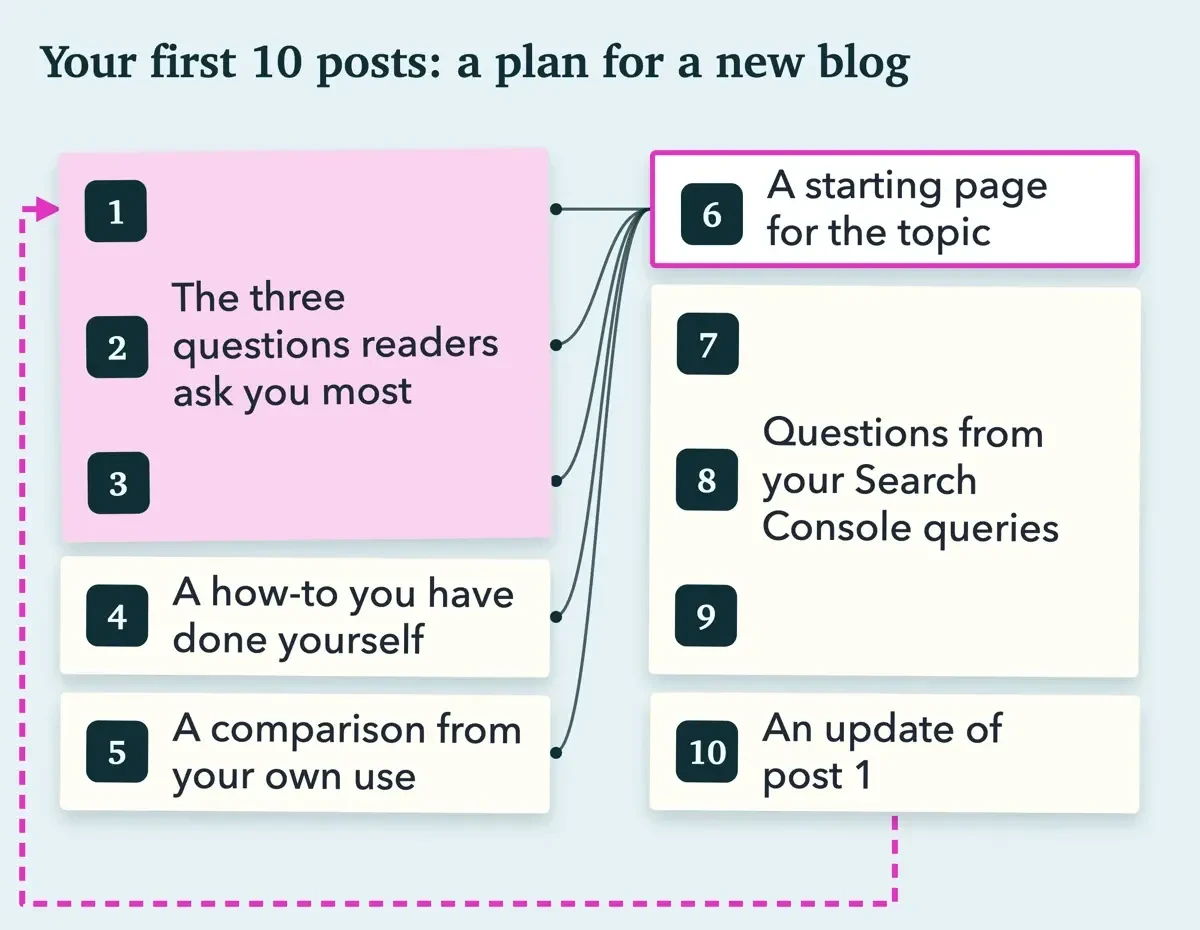 Drawn by us: our plan, built on the Google Search Central pages read November 20, 2026.
Posts 1 to 3 come first because, per the starter guide, compelling content "will likely influence your website's presence in search results more than any of the other suggestions." Post 6 links to posts 1 to 5, giving each a link from at least one other post, which is exactly what the link guide asks for. Posts 7 to 9 wait for real queries, since guessing before you've got data means writing for searches that may not exist. Post 10 goes back to post 1, because the guide asks you to keep content current rather than publish and forget.
After post 10, give the plan time. The starter guide says "Some changes might take effect in a few hours, others could take several months." It suggests you "wait a few weeks to assess" a change before judging it.
If post 5 carries affiliate links, the FTC's endorsement FAQ applies to bloggers too. Our scope of blogging post covers that disclosure and the money side, and how to start a blog covers setup.
This post's first version, run through a checker
We also pointed a checker at the 2019 post this rewrite replaces. We saved the live page on November 20, 2026 and ran a small Python script over its article body, skipping the menus, sidebar and comments around it.
The script counts the starter guide and link guide items that code can detect. Repeated phrases get a count, not a pass mark, because Google doesn't publish a threshold for them on any page we read.
| Check | 2019 post | This rewrite (local draft) |
|---|---|---|
| Words in the article body | 969 | 3,013 |
| Most repeated 3-word phrase | 12 (search engine optimization) | 19 (google search central) |
| Images in the body | 0 | 4 |
| Internal / external links in the body | 1 / 1 | 8 / 38 |
| Link prompts with no link or a vague anchor | 2 | 0 |
| Keywords meta tag | No | No |
| Byline linked to an author page | Yes | Yes |
The old post repeated search engine optimization 12 times in 969 words, about 12.4 times per 1,000 words, a rate Google sets no limit for. It had no images, one internal link and one external link. Twice it told readers to click for more on on-page and off-page SEO, with no link to click. Reading it by hand, we also found it calling external links inbound links, which is backwards. In the rewrite, the most repeated phrase is google search central, 19 times, and 16 of those uses are page names in the Sources list.
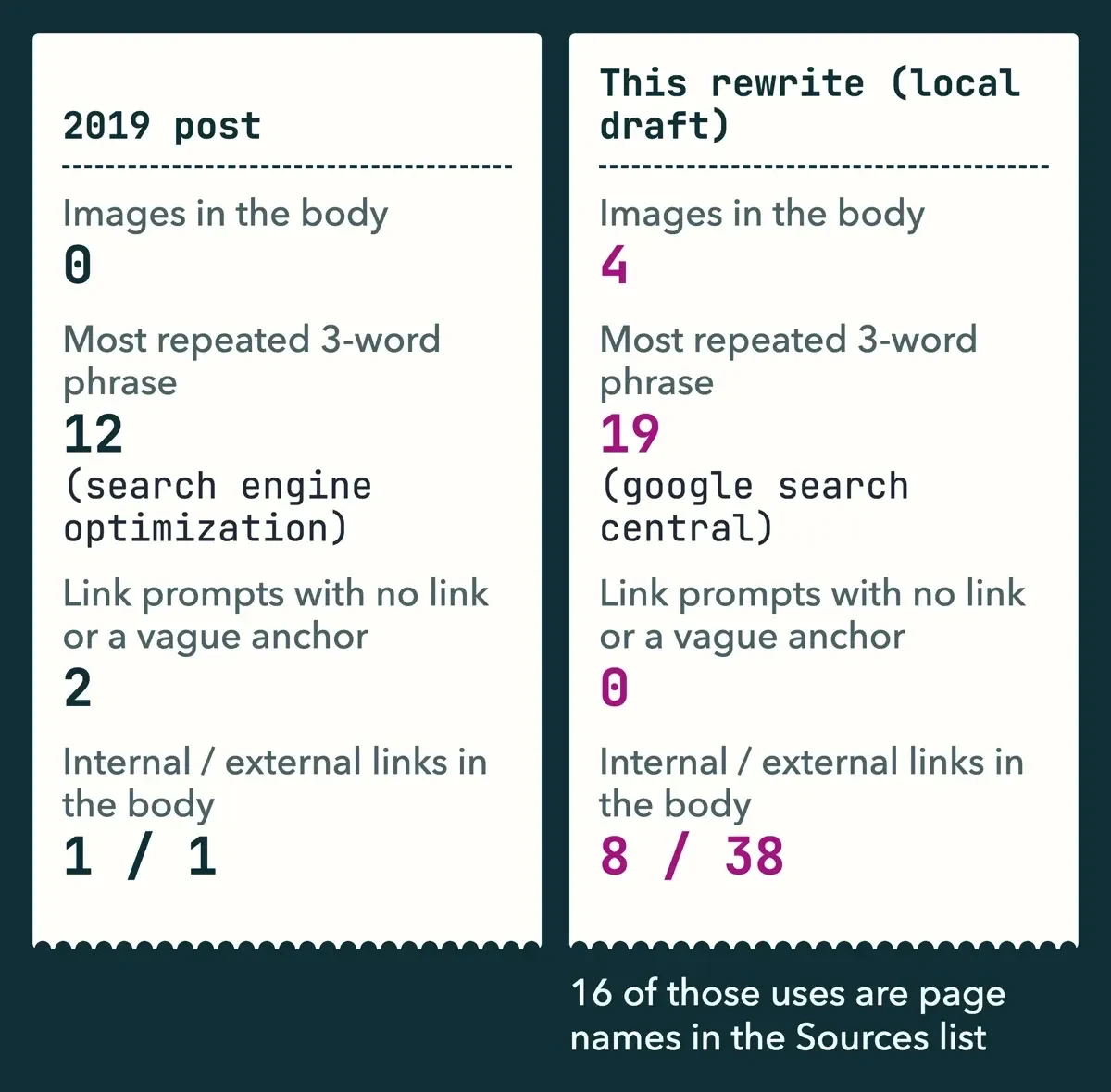 Drawn by us: results from our local on-page checker, November 20, 2026.
What we tested
Our script, onpage_check.py, read two pages served on 127.0.0.1: the saved first version and this rewrite rendered as a local draft. It logged all ten checks in report.json, flagged or not. The checks the table leaves out came back the same on both pages: one H1, no skipped heading levels and no image missing alt text. Each check names its Google source inside the script. For a live site, the DigitalTreed website audit tool is free to run.
Shortcuts that cost a new blog more than they save
New bloggers get a steady stream of emails offering faster rankings for a fee, and several of those offers break a rule Google has written into its spam policies. Those policies name "Exchanging money for links, or posts that contain links" as link spam.
The same list includes "Sending someone a product in exchange for them writing about it and including a link." A free sample offered on condition of a review with a link fits that line, and so does a paid guest post. What a backlink is covers ways to earn links instead.
Buying an old domain for its history is the next trap. The same page defines expired domain abuse as a domain "purchased and repurposed primarily to manipulate search rankings by hosting content that provides little to no value to users." Google's own illustrations include "Affiliate content on a site previously used by a government agency." Another is "Commercial medical products being sold on a site previously used by a non-profit medical charity." Mass-produced posts fall under what Google's policy calls scaled content abuse. One listed example is "Using generative AI tools or other similar tools to generate many pages without adding value for users." Google's guidance on AI content repeats that warning.
Then there's the person promising page one. Google's guide for site owners weighing an SEO hire says "If they guarantee you that their changes will give you first place in search results, find someone else." Rankings also move several times a year with Google's core updates, so nobody can honestly promise a new blog a fixed spot, and you shouldn't pay anyone who does.
What we could verify on November 20, 2026
Each claim in this guide comes from a page we saved on November 20, 2026, using plain requests with no sign-in and no forms. A few held up on two pages, most on one, and two we couldn't check.
- Two Google pages agree: appearing in Search is free, and Google takes no payment to rank a site.
- Two Google pages agree: the helpful content system joined the core ranking systems in March 2024.
- One page each: the starter guide's timing line, the AI features wording and the 500-page sitemap line.
- One study only: Pew's 8% and 15% click rates, from 900 US adults in March 2025.
- Not confirmed: Bing's webmaster guidelines, which reached our plain request as an empty script page.
- Not checked: your own queries, which need a signed-in Search Console account.
Two checks are yours to run. Type site: followed by your domain into Google today. After a few weeks of posts, the Performance report shows which questions people really typed.
Frequently asked
Does a new blog need a sitemap?
Sometimes. Google's sitemaps overview lists "Your site is new and has few external links to it" among the reasons you might need one, since crawlers find pages by following links.
Is Google Search Console free for bloggers?
Yes, and it's optional for being found. Search Console Help says "You don't have to sign up for Search Console to be included in Google Search results." You'll see your own queries only after you verify the site.
Can I keep my blog posts out of AI Overviews?
Partly. Google's AI features page points to nosnippet, data-nosnippet, max-snippet and noindex as the controls that limit what's shown from your pages. Noindex takes the post out of Search entirely, not just out of AI answers.
Is E-E-A-T a ranking factor?
No. The starter guide lists that belief among its myths. Google's helpful content page still asks "Do pages carry a byline, where one might be expected?" so put a real name on your posts.
How we made this guide: We saved each Google page and the Pew study as text, checked each quote against that text by script, and tested two local pages. Facts checked by the DigitalTreed team on November 20, 2026.
First published December 6, 2019. Rewritten November 20, 2026 for US readers, with every tip traced to a Google page.
Sources
- Google Search Central: Search Engine Optimization (SEO) Starter Guide
- Google Search Central: In-depth guide to how Google Search works
- Google Search Central: Google Search Essentials
- Google Search Central: AI features and your website
- Pew Research Center: Google users are less likely to click on links when an AI summary appears in the results (July 22, 2025)
- Google Search Central: A guide to Google Search ranking systems
- Google Search Central Blog: March 2024 core update and new spam policies
- Google Search Central: Link best practices for Google
- Google Search Central: Google Images SEO best practices
- Google Search Central: Learn about sitemaps
- Search Console Help: About Search Console
- Google Search Central: Get started with Search Console
- Google Search Central: site: search operator
- Google Search Central: Spam policies for Google web search
- Google Search Central: Google Search's guidance on using generative AI content
- Google Search Central: Do you need an SEO?
- Google Search Central: Google Search's core updates and your website
- Google Search Central: Creating helpful, reliable, people-first content
- FTC: FTC's Endorsement Guides, What People Are Asking

1 comment
Aijaz Alam
You Know? About Search Engine Optimization Blogging Beginner in Digital Marketing
Reply