
Quick answer
When you cannot send audio messages on an iPhone, Apple's help pages (as of October 28, 2026) lead to two quick checks. One is the data connection, and the other is the bubble color. A green bubble means the chat runs through your carrier, not iMessage. The voice note itself is small: a one-minute note came to about 180 KB to 490 KB in our test.
You recorded a voice note for a customer or a coworker, tapped send, and it sat there with a red mark. An audio message is a voice recording you send in a Messages chat instead of typing. It goes out the same way as everything else in that chat. So we'd look at how the chat is sending before touching any setting, and we'd leave the reset that clears your Wi-Fi passwords for last.
This guide starts with what the alert means and why a green bubble changes things. Then it gets Messages back online and checks microphone access for the app you record in. Our own test shows how big a voice note is. It ends with storage and the Keep button, and with when to reset network settings or call your carrier.
Key takeaways
- Tap the red exclamation point, then Try Again, before changing any setting.
- A green bubble means the carrier, not iMessage, carries your message.
- Group SMS chats carry no attachments at all, per Apple.
- A one-minute voice note measured about 180-490 KB in our test.
- Reset Network Settings erases saved Wi-Fi networks, so try it last.
What the alert on your voice note is telling you
Start with the exact words on your screen, because they point to different fixes. This page was first written around the alert "Cannot send audio messages at this time." None of the Apple pages we read uses that wording. What Apple's page on messages that won't send does describe is a red exclamation point with the alert Not Delivered. Its steps are short. Check your network connection, tap the red mark, then tap Try Again. If that fails, the same menu offers Send as Text Message, which resends it as a green-bubble text, and Apple warns that messaging rates may apply.
Activation alerts are a separate case. This table matches what you see to where we'd start:
| What you see | What Apple ties it to | First thing to try |
| Red exclamation point, Not Delivered | No usable network connection, or iMessage not getting through | Tap the mark, then Try Again |
| Your earlier texts in the chat are green | The chat uses SMS, MMS or RCS through your carrier | Turn on iMessage, or ask how the other person texts |
| Waiting for activation in Settings | iMessage is not active on your number | Check data, iOS version and time zone |
| No orange dot while you record in an app | The app may not have microphone permission | Settings, Privacy & Security, Microphone |
| Storage Almost Full banner | The phone is short on space | Settings, General, iPhone Storage |
The first row costs nothing, so tap Try Again once before you open Settings for any of the others.
Why does a voice note fail when the bubble turns green?
That bubble color is the quickest clue you have. Apple's guide to iMessage, RCS and SMS/MMS explains that iMessage, in blue bubbles, goes to other Apple devices over Wi-Fi or cellular data. RCS, SMS and MMS show up in green bubbles instead, and because they're carrier services, they only work with a text-messaging plan from your carrier. You can tell which one a chat uses from your own sent bubbles, since iMessages show blue and every RCS, SMS or MMS message shows green.
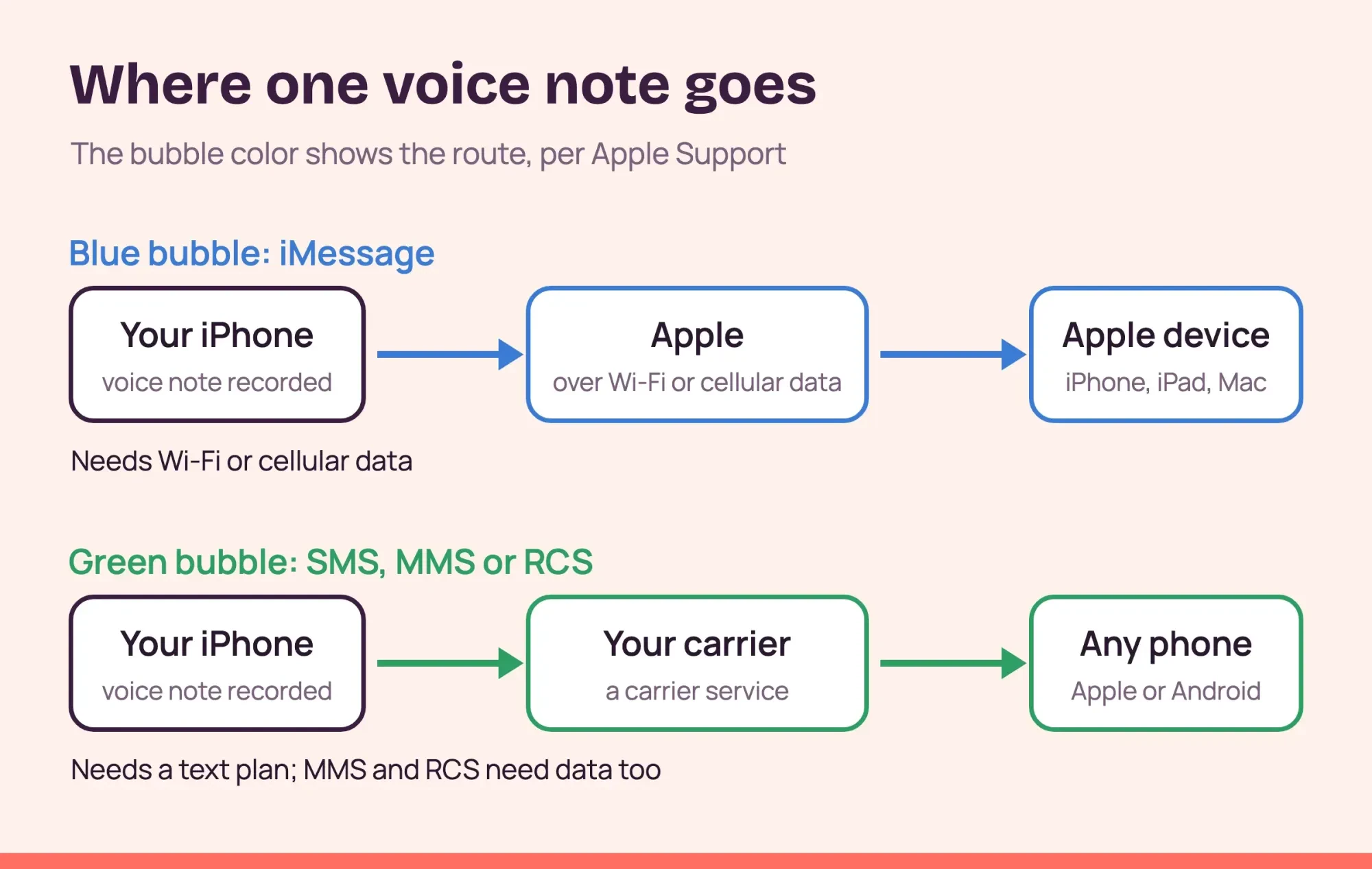 Diagram by DigitalTreed. Routes as described on Apple Support pages for iMessage, RCS and SMS/MMS, read October 28, 2026.
Group chats show the difference most clearly. On Apple's group text message page, everyone in a group iMessage can send and receive audio messages. The group MMS list names photos and videos, not audio. Group SMS messages "don't support multimedia attachments" at all, so a voice note has nothing to ride on there. And if any person in the group doesn't use iMessage, Apple says the message goes as MMS or SMS, or as RCS on iOS 18 and later. One friend with an Android phone is enough to turn a whole group green. Group RCS on iOS 18 lets everyone send texts, high resolution photos, videos, links "and more", a list that doesn't name audio messages.
Apple lists four reasons a message goes green on its page about green messages. The other person may not have an Apple device. iMessage may be off on either phone, or temporarily unavailable. Or your settings may need updating after you set up a new phone. That case has its own steps, which our guide to moving messages to a new iPhone walks through.
To turn iMessage back on, open Settings, tap Apps, tap Messages and switch on iMessage, as Apple's Messages setup guide shows. If Settings then says Waiting for activation, Apple's activation help page asks for a working data connection, the latest iOS and the right time zone. It also notes that an iPhone needs SMS to activate your number, and your carrier might charge for that text. While you're there, tap Send & Receive and check that your number is selected. Once iMessage shows as active, send the note again. If the bubble still turns green, the other phone is a likely reason, so ask the person how they text.
Sometimes the fault isn't yours: Apple's System Status page lists iMessage as its own service, so a quick look there can save you a reset.
If the person you're messaging is on Android, the chat can't use iMessage, and their phone's own settings matter too. Our guide to stopping apps running in the background on Android covers how Pixel and Samsung phones limit apps. Send them a short text first: if it arrives and the voice note doesn't, the problem is the data route for attachments, not the number.
Get Messages back online
Once you know the route, check the connection it needs. Apple's support page is plain about it: "To send a message as iMessage, RCS, or MMS, you need a cellular data or Wi-Fi connection." SMS is different. It needs only cellular service, which is why short texts can still go out while a voice note fails.
There's also one switch people forget. Apple's cellular data guide lets you turn cellular data off for single apps, under Settings, then Cellular, then the list of apps. When an app's switch is off, "iPhone uses only Wi-Fi for that service." So if Messages is switched off in that list, your voice notes will go out fine on your home Wi-Fi and then fail as soon as you leave it. Turn it back on, and check the main Cellular Data switch on that screen too. Apple notes that Messages can use your data plan, so check whether you or someone else turned it off to save data.
With good Wi-Fi and poor coverage indoors, Wi-Fi Calling lets SMS go over Wi-Fi, per Apple's message help, which helps plain texts get out.
Then check for a carrier update. Apple's carrier settings page says these updates improve cellular connectivity, and installing one "takes less than one minute." Go to Settings, General, About, and a prompt appears if one is waiting. Install it. If nothing has helped yet, restart the phone. Apple's force restart steps are volume up, volume down, then hold the side button until the Apple logo shows.
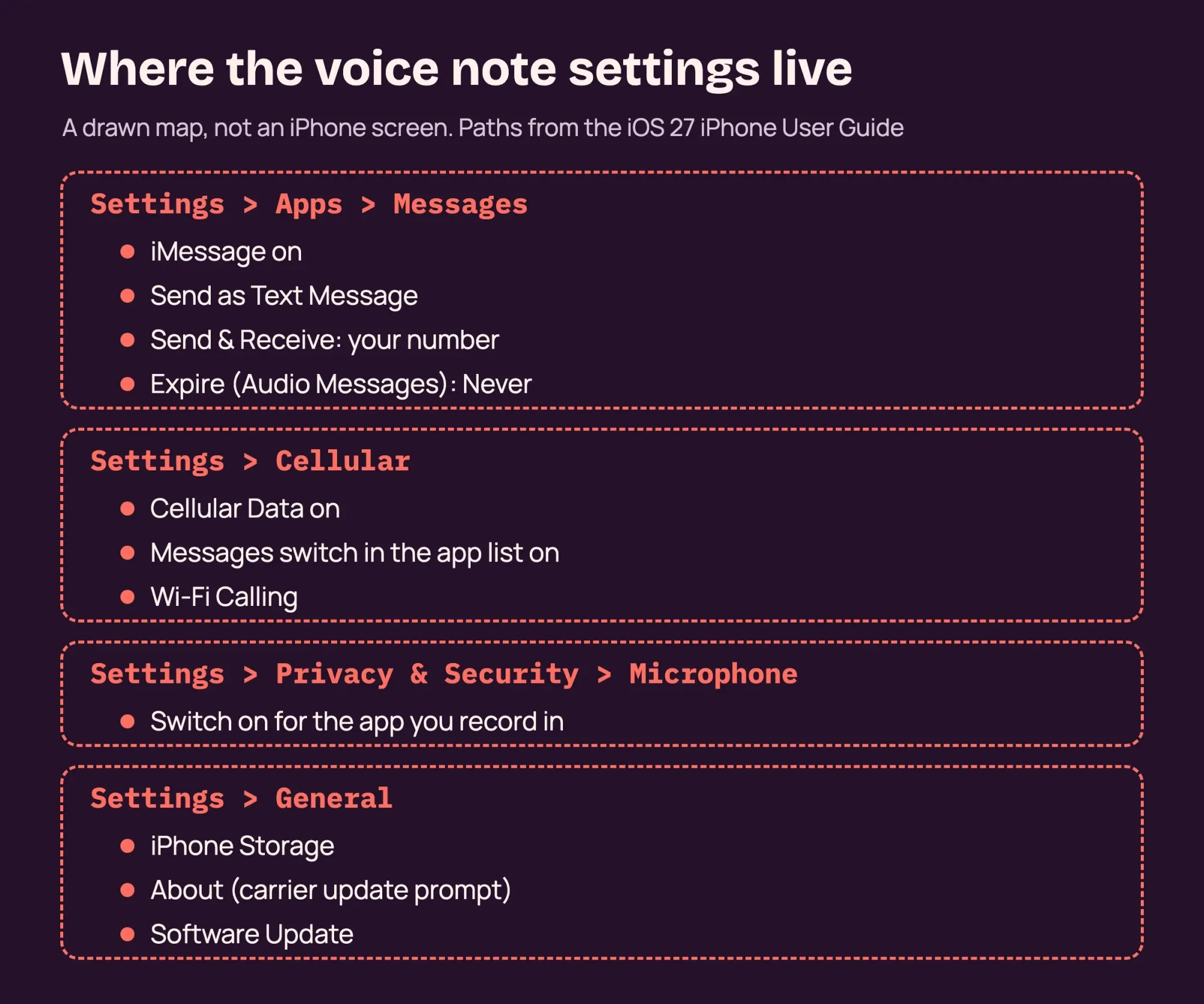 Drawn by us, not a real iPhone screen. Setting paths from the iOS 27 iPhone User Guide, read October 28, 2026.
Microphone access and the app you record in
With the connection sorted, look at the microphone. Apple's hardware access guide says apps must ask for permission before they use it. You can review those answers under Settings, Privacy & Security, Microphone. The list shows only apps that asked. So check the app you're actually recording in, like WhatsApp or a team chat app.
An orange dot on screen is your quick test. Apple says it appears whenever an app uses the microphone without the camera. If you tap record and no orange dot shows up anywhere on the screen, the app isn't hearing you, and that permission switch is the first place to look.
An app that closes the moment you tap record has crashed instead. Our guide for when Instagram keeps stopping walks through those crash fixes for one app.
On a phone someone else set up, Apple's Screen Time guide shows that Content & Privacy Restrictions can block built-in features. If you forgot your Screen Time passcode, sort that out first.
How big is a voice note?
That leaves the file itself. Apple's support page notes that carriers may set size limits for attachments sent by SMS or MMS, but it gives no numbers for audio. It also doesn't say which format Messages uses for audio messages. So we measured what a spoken note weighs in three speech formats, using the afconvert and afinfo tools that come with macOS on a single Mac. Opus is an audio codec defined by the IETF. Its RFC 6716 specification runs from 6 kbit/s narrowband speech up to 510 kbit/s. The table gives each file's size in kilobytes.
| Length of note | Opus 24 kbps | AAC 32 kbps | AAC 64 kbps | Uncompressed WAV |
| 30 seconds | 92.1 KB | 129.0 KB | 246.3 KB | 960.0 KB |
| 1 minute | 179.8 KB | 254.2 KB | 490.5 KB | 1,920.0 KB |
| 2 minutes | 359.2 KB | 501.0 KB | 973.2 KB | 3,840.0 KB |
| 5 minutes | 894.1 KB | 1,244.5 KB | 2,427.9 KB | 9,600.0 KB |
Each size tracks a simple formula. Bitrate times seconds, divided by 8, gives the bytes. For one minute at 32 kbps, that's 32,000 x 60 / 8 = 240,000 bytes. We measured 254,164 bytes, about 6% more than the formula. A one-minute note came to 179.8 KB, 254.2 KB or 490.5 KB, depending on the format. Even five minutes at the highest setting stayed under 2.5 MB. Uncompressed audio is the outlier, at 1,920 KB a minute, about 4 to 11 times the size of the encoded files.
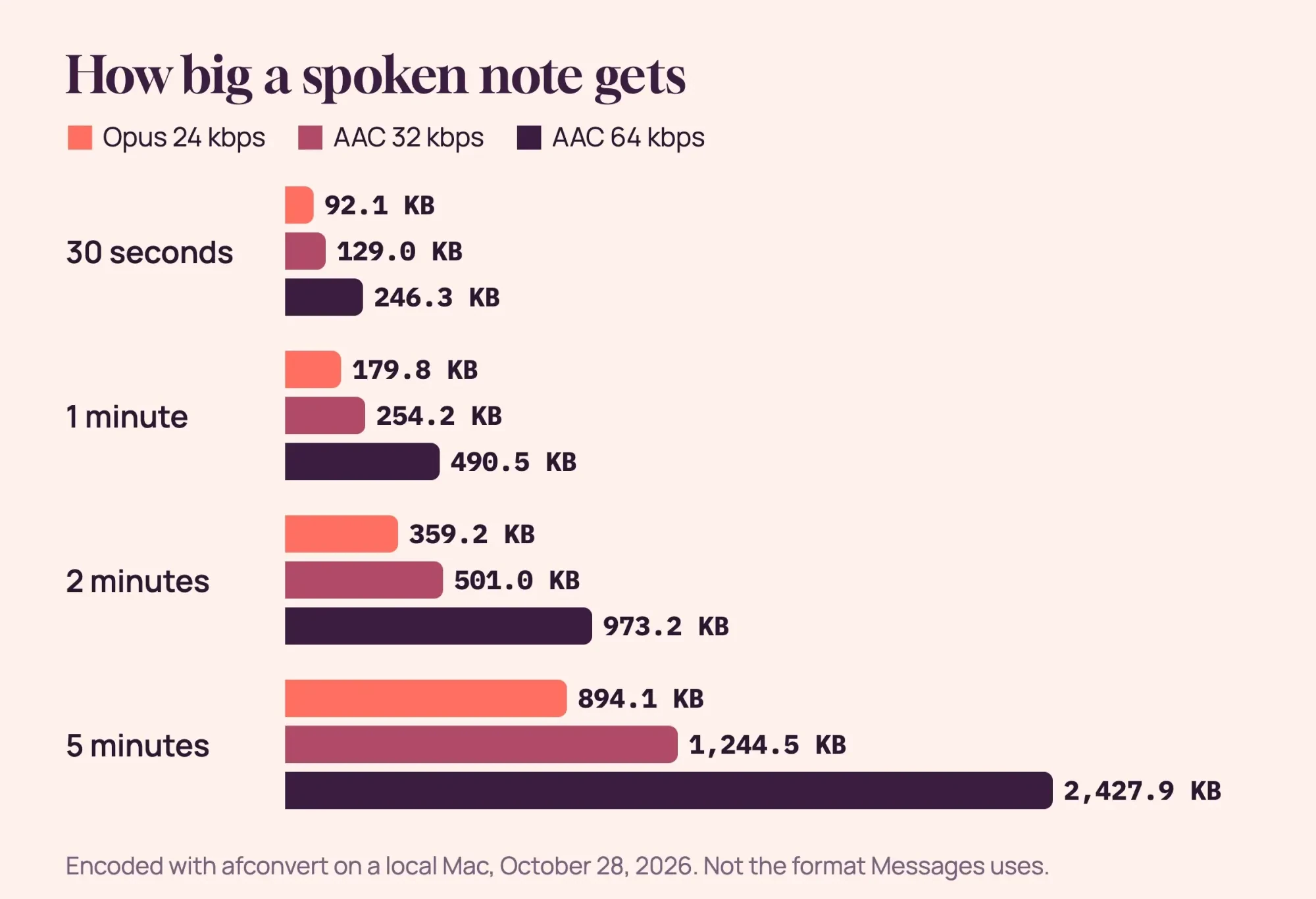 Diagram by DigitalTreed. Sizes from our own test files, encoded on a local Mac on October 28, 2026; not the format Messages uses.
What the test can't tell you is the size of a real Messages audio note or your carrier's limit. It does show that a spoken minute of audio is small, so we'd check the route, the connection and the settings above before blaming the file.
A note that sends but sounds muddy is a recording problem, not a sending one. Record away from fans and traffic, and see our tips to improve audio quality in business videos for the room itself.
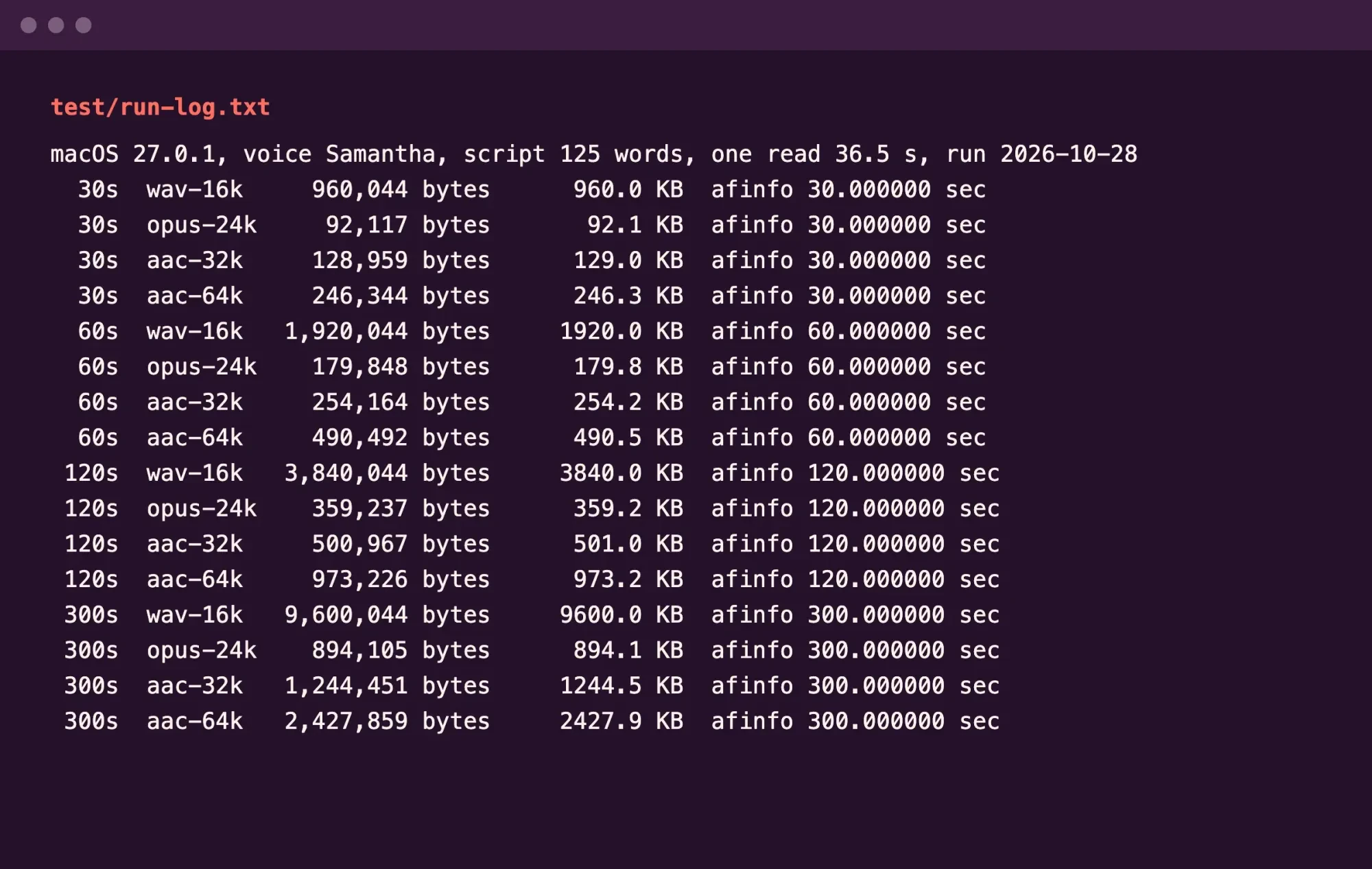 Screenshot: our run log from test/run-log.txt, shown on 127.0.0.1 on October 28, 2026.
What we tested
We used a Mac, not an iPhone. Its built-in voice read a 125-word delivery update (36.5 seconds), looped and trimmed to four lengths. Apple's afconvert encoded each length three ways, and afinfo confirmed all 16 durations. Nothing was uploaded. The one-minute rows:
  60s  wav-16k   1,920,044 bytes     1920.0 KB  afinfo 60.000000 sec
  60s  opus-24k    179,848 bytes      179.8 KB  afinfo 60.000000 sec
  60s  aac-32k     254,164 bytes      254.2 KB  afinfo 60.000000 sec
  60s  aac-64k     490,492 bytes      490.5 KB  afinfo 60.000000 sec
Storage, the Keep button and the 2-minute expiry
Small files still need room to land, which is where storage comes in. Apple's audio messages guide says a recording is deleted from the conversation, on your iPhone only, 2 minutes after you send or listen to it. Tapping Keep saves it. To keep every note, go to Settings, Apps, Messages, then Expire under Audio Messages, and choose Never. Here's what Never can add up to, as an example. Say you keep 200 one-minute notes, each the size of our AAC 32 kbps file. That's 200 x 254,164 bytes, or about 50.8 MB. Your iPhone's own format may differ, so treat that as a rough scale, not a measurement.
To see what's really using space, open Settings, General, iPhone Storage. Apple's storage guide says the Messages category holds messages and their attachments, and a Storage Almost Full alert means it's time to remove something. Check that category first.
Before you delete old video threads to make room, save any you need, for example to one of the cloud storage options for small business we compared. There's one catch. Apple's delete messages guide says deleted messages and attachments stay in Recently Deleted for up to 30 days. You can clear them from that folder sooner. Apple also says the phone frees space on its own when storage runs low, by removing items you can download again, like unused apps and temporary files.
Reset network settings only after the simple fixes
If the note still won't go, two bigger steps are left. First, update iOS under Settings, General, Software Update. Apple's update guide says your data and settings stay unchanged. Then try the note again.
The second step is a network reset, and it costs you more. Apple's reset settings guide lists what Reset Network Settings removes: all network settings, the Wi-Fi networks you've used, and VPN settings you added yourself. It also renames the phone to "iPhone". Apple's list doesn't include your messages or photos, but you'll be typing every saved Wi-Fi password again, at home, at work and anywhere else you connect. If you set up a VPN yourself, note its details first, since you'll add it again; our explainer on how VPN server networks work covers what that app does. That's why the reset comes after everything above.
When green-bubble messages still fail after that, Apple says to contact your carrier, and its US carrier list covers AT&T, T-Mobile USA, Verizon Wireless and others.
Our take: to get the voice note through, tap Try Again, then check the bubble color and the Messages switch under Cellular before anything else. Those checks are free and erase nothing. If your team keeps losing notes in one building with weak signal, turn on Wi-Fi Calling there so plain texts still get through. For a team that talks in voice notes all day, a call over good Wi-Fi can be quicker. Our roundup of video call apps for small business compares the options. If blue iMessages are the ones failing, Apple's advice is to contact Apple Support instead.
Questions about iPhone audio messages
Frequently asked
Can I send an audio message to an Android phone?
Not through iMessage, which reaches only Apple devices, so the note goes through your carrier as a green-bubble message. Apple's message types guide says RCS on iPhone needs iOS 18 and a carrier that supports it.
Can the person I send a voice note to keep it?
Yes. Per Apple's audio messages guide, recipients keep it by tapping Keep within 2 minutes after listening.
Can I save a voice note to Voice Memos?
Yes. Apple's guide says to touch and hold the audio message, then tap Save to Voice Memos.
Do audio messages come with a transcript?
Yes, in select languages. Apple's audio messages page says they're transcribed in the sender's language.
How we made this guide: We read 20 Apple and IETF pages, each linked inline. We didn't test on an iPhone. On a Mac we encoded one spoken note at four lengths in three formats and logged every file size. Facts checked by the DigitalTreed team on October 28, 2026.
First published November 2023 as a general list of causes. Rewritten October 28, 2026: now ordered by what you see on screen, with Apple's iOS 27 steps and a local voice note size test.
Sources
- Apple Support: If you can't send or receive messages on your iPhone or iPad
- Apple Support: If your iPhone messages are green
- Apple Support: What is the difference between iMessage, RCS, and SMS/MMS?
- Apple Support: Send a group text message on your iPhone or iPad
- Apple Support: If you can't turn on or sign in to iMessage or FaceTime
- Apple Support: Manually update carrier settings
- Apple Support: How to check the storage on your iPhone and iPad
- Apple Support: Make a call with Wi-Fi Calling
- Apple Support: Wireless carrier support and features for iPhone in the United States and Canada
- Apple: System Status
- iPhone User Guide: Send and receive audio messages
- iPhone User Guide: Control access to hardware features
- iPhone User Guide: View or change cellular data settings
- iPhone User Guide: Set up Messages
- iPhone User Guide: Force restart iPhone
- iPhone User Guide: Block features or content with Screen Time
- iPhone User Guide: Delete messages and attachments
- iPhone User Guide: Update iOS
- iPhone User Guide: Reset iPhone settings
- IETF RFC 6716: Definition of the Opus Audio Codec


Comments
No comments yet. Start the conversation below.