
Quick answer
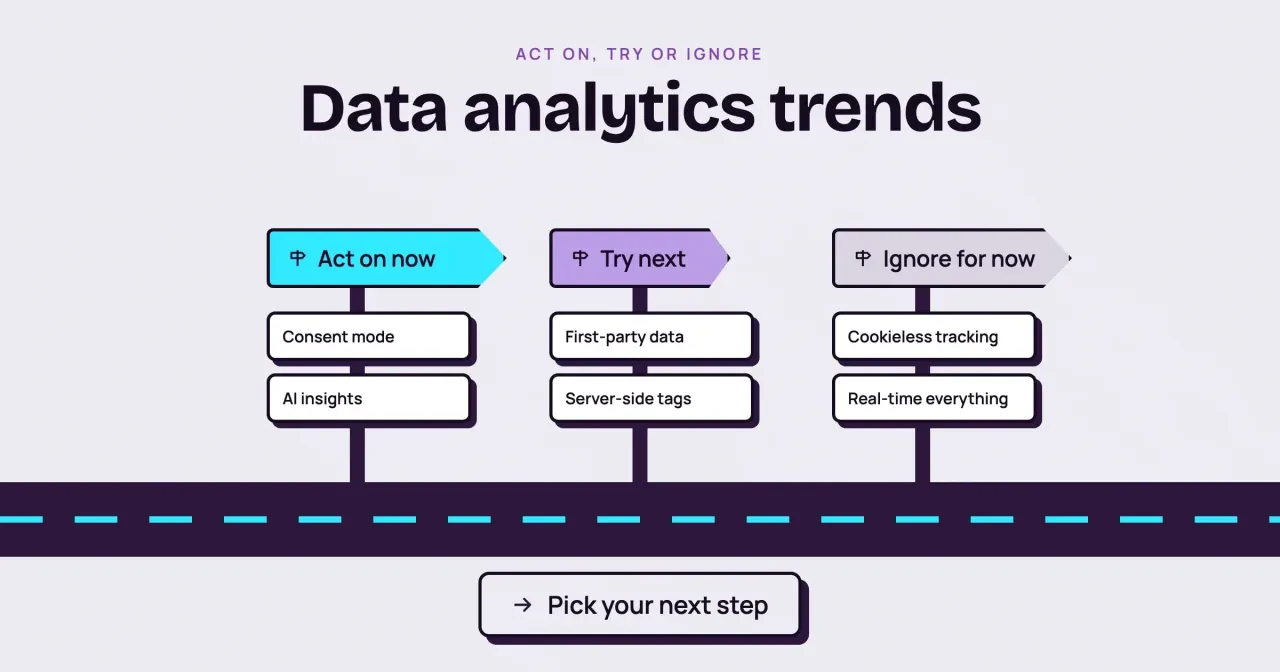
As of October 28, 2026, a small business should act on two of six data analytics trends: Google's consent mode and the AI insights inside GA4. First-party data and server-side tagging deserve a trial, though two tagging servers cost about $90 a month (example: 2 x $45). Cookieless rebuilds and real-time dashboards can wait.
Say you own a small US business with GA4 and a modest Google Ads budget, and you keep reading that cookies are dying. Data analytics trends are the changes in how websites collect, store and read visitor data. This rewrite of a 2020 enterprise list sorts six of them for a business without a data team.
We start with the sorting table, then the two to act on now, consent mode and GA4's AI insights, and the two to try, first-party data and server-side tagging. Then we answer whether Chrome is getting rid of third-party cookies, and end with real-time dashboards and when to re-sort the list.
Key takeaways
- Check that your banner sends Google all four consent types this week.
- Create a GA4 custom insight that emails you when active users drop 20%.
- Chrome still offers third-party cookie choice, so skip any cookieless rebuild.
- One GA4 help page still says cookies are going away; Chrome's statement disagrees.
- Example: 2 tagging servers x $45 = about $90 a month (Google, October 2026).
Six trends sorted by what a small site can use
Each trend faced two questions: does it change what you measure this quarter, and can a small team set it up alone? We answered both from the vendors' own pages.
| Consent mode | Act on now | Check that your banner sends all four consent types | Setup time in your banner tool or Tag Manager | No Google tags on your site at all |
| AI insights in GA4 | Act on now | Create two custom insights with email alerts | Setup time; it comes with your GA4 property | 1,000 returning buyers and 1,000 non-buyers in a week makes predictive metrics possible |
| First-party data | Try next | List every form where people give an email or phone number | Developer time and a linked Google Ads account | Google moves user-provided data out of beta |
| Server-side tags | Try next | Write down the one problem it would fix | About $45 per server a month, 2 servers recommended (Google estimate as of October 28, 2026) | You need to control what each vendor receives |
| Cookieless tracking | Ignore for now | Keep your first-party cookies and tagged links as they are | Nothing new | Google publishes a new Chrome cookie statement |
| Real-time everything | Ignore for now | Open Realtime only on launch days | Nothing new | You sell in short drops where the next hour decides the day |
Both act-on rows cost setup time, not a new bill, so they come first, and the try-next rows need a developer, an Ads link or a cloud account. The ignore rows don't need anything from you, which frees those hours for the first four. The last column names the event that should move a trend to a different row, and the last section of this guide comes back to those events. If you only have one afternoon, spend it on the consent check, because it affects every Google tag on the site.
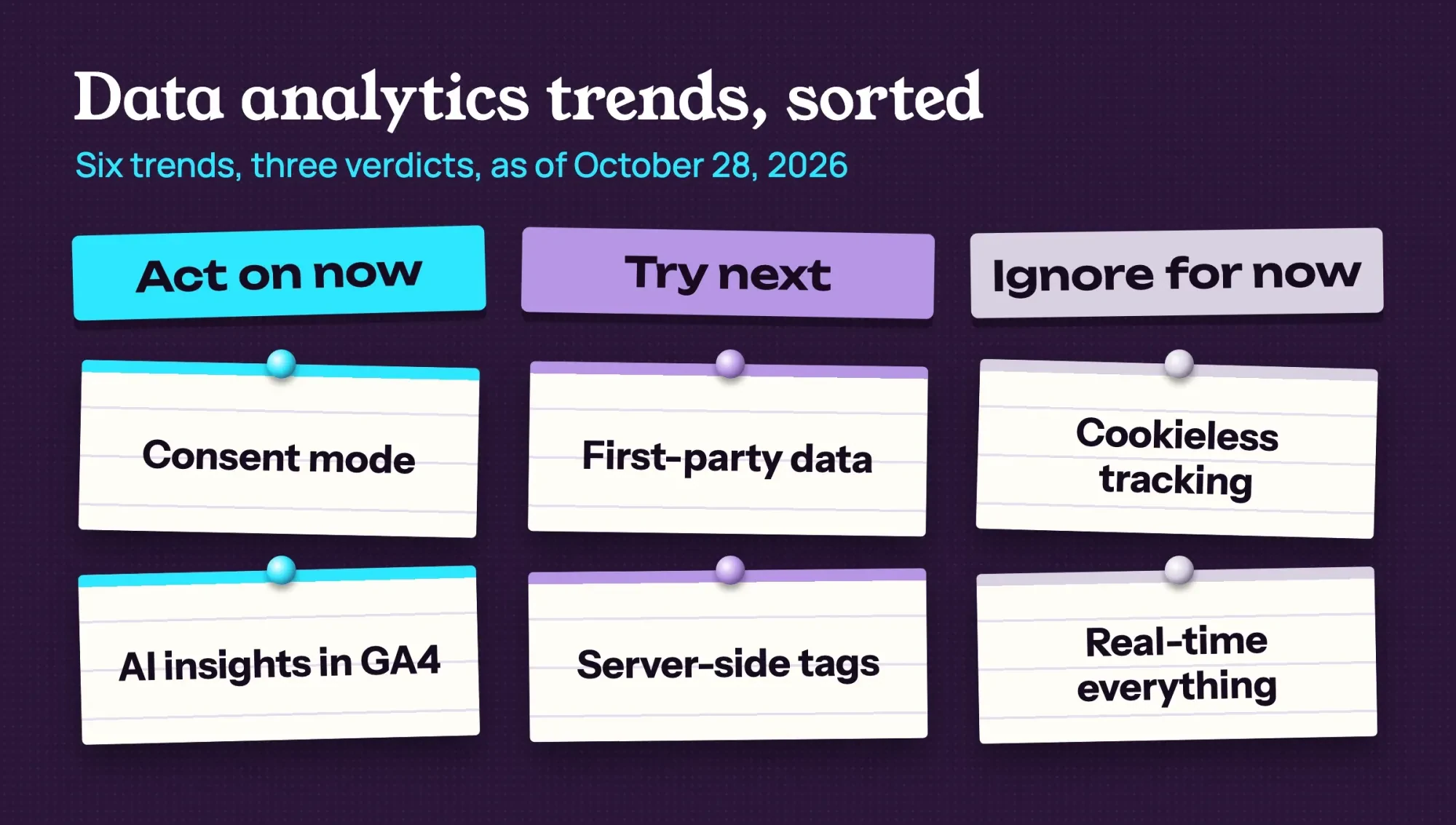 Diagram by DigitalTreed: the six trends sorted as of October 28, 2026
Consent mode: act on it now if you run Google Ads
Consent mode tops the list because it decides what Google can measure when a visitor says no. Google's developer docs say it lets site owners control how Google tags behave "based on users' consent choices for data storage and use." It doesn't draw the banner, though. Google's Analytics help on consent mode says it "does not provide a consent banner or widget" and works alongside the one you already run. The same docs list seven consent types, though only four of them touch ads and analytics. There are two ways to run it, and Google says the advanced one earns an advertiser-specific model for missing conversions, where basic gets a general one.
In basic mode, a visitor's no sends Google nothing. In advanced mode, tags load at once and, while consent is denied, "send measurements without cookies."
For a US business, the firm rule is Google's EU user consent policy. It requires consent from "end users in the European Economic Area, the UK and Switzerland."
Google says it "may limit or suspend" products when a site doesn't comply. If your site gets visitors from London or Berlin, the policy covers those visits, even if every client you bill lives in Ohio. The consent type to check first is ad_user_data. Google's consent mode reference says it "is required for measurement use cases, such as enhanced conversions and tag-based conversion tracking." The same page treats a type that's "not set" like one that's denied. So a banner that only sends the two older storage types can limit the conversion data your Google Ads account gets from visitors in those three regions.
Your step this week is a check. Open your banner tool's Google settings and confirm it sends ad_storage, analytics_storage, ad_user_data and ad_personalization. Then pick basic or advanced on purpose, and note why beside your banner settings so it's clear later. In Google Tag Manager, a tag without built-in consent checks gets them under Advanced Settings, then Consent Settings.
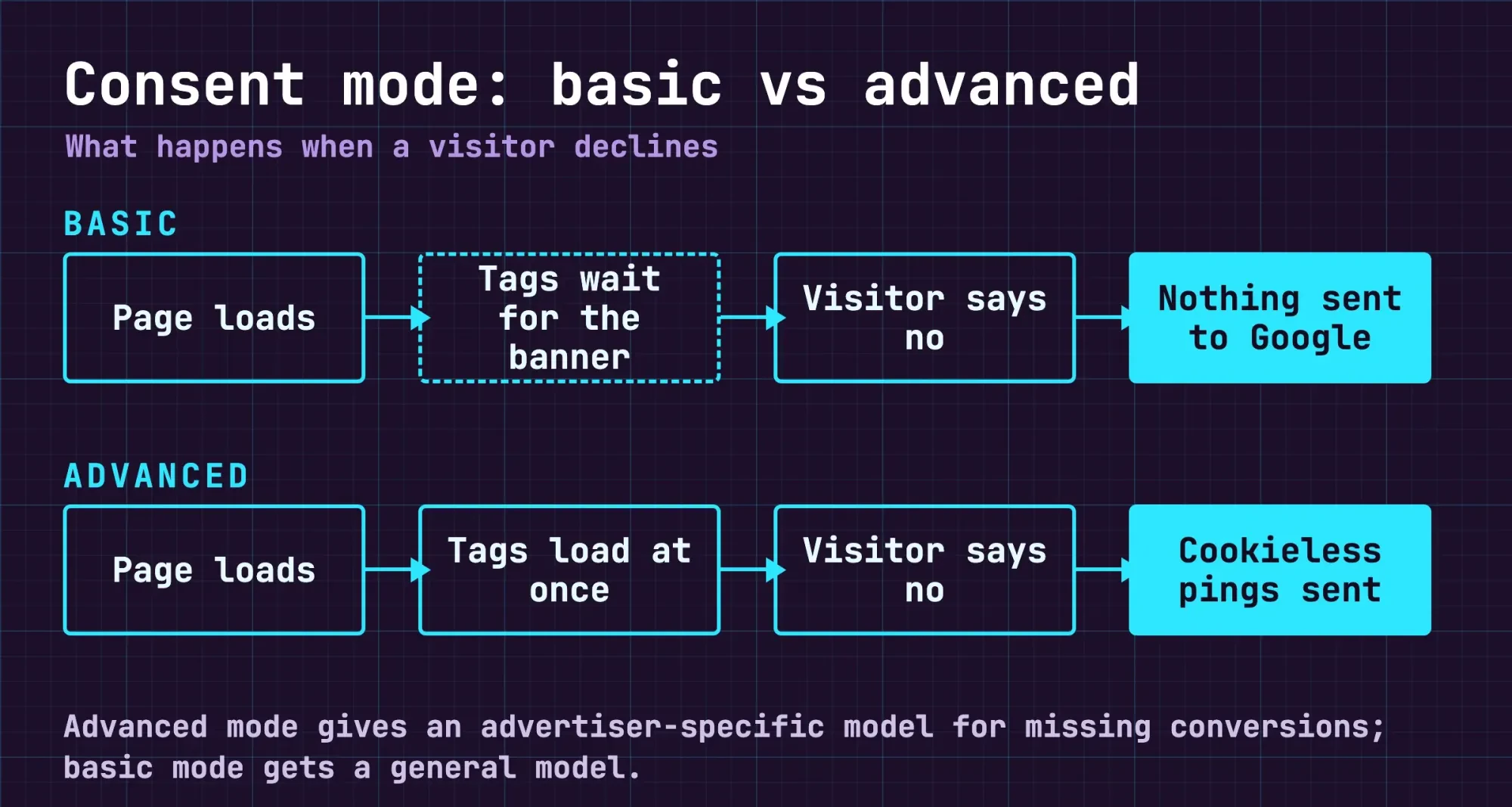 Diagram by DigitalTreed, drawn from Google's consent mode overview (October 2026)
GA4's AI insights: act on the built-in ones this week
Once consent is sorted, the AI features already inside GA4 need a few settings and no new account or bill. Google's Analytics Intelligence "uses machine learning and conditions you configure" to flag unusual changes. If an alert later points at a problem you can't trace, our GA4 guide covers the key events these insights read from.
The Home page adds AI overviews, described as "a concise, AI-generated overview of the most critical changes to your data since your last visit." The custom insight is the part you build yourself. GA4 lets you create up to 50 per property and check them hourly, daily, weekly or monthly, and alerts can go by email to the people you list. Google's own example condition is 30-day active users falling by more than 20%. Two alerts are enough to start. We'd set that one, plus a weekly drop in the key event that means a new lead, such as a sent quote form. You'll need the Editor or Administrator role to create insights, so check your access first.
Predictive metrics are where small sites stall. GA4 only trains them when at least 1,000 returning users meet the condition and 1,000 don't, all within one seven-day period, says Google's predictive metrics page. That period sits inside the last 28 days, and the condition is a purchase or churn. Example: a shop with 200 orders a week has at most 200 buyers in seven days, and that's under the 1,000 needed. Churn probability uses the same rule, counting returning users who churned and those who didn't. Purchase predictions also need the purchase event sent with value and currency parameters. A lead-gen site with no online checkout won't get purchase predictions at all, whatever its traffic.
First-party data: try it next, starting with forms you already have
First-party data is what people hand you directly, such as an email in a quote form. It takes more setup than anything above.
GA4's version is called user-provided data collection. It hashes fields like email and phone number with SHA256, then matches them with other Google data to make measurement more accurate. Google calls it "part of an open beta and is subject to change," and it needs your GA4 property linked to a Google Ads account first. And it isn't available to properties in the "Health" industry category, so a property filed under that category should skip this part. Its data retention follows the property's own setting, which Google says "can be set to 2 or 14 months."
Google Ads has a related feature, enhanced conversions, which sends "hashed first party conversion data" from site tags or imported offline events. For a business that closes deals by phone, the leads version is the interesting one. It matches a lead form on your site with the sale you import later, so the ad that started it gets the credit. The data comes from what a customer types when they convert, and Google lists an email address, name, home address or phone number. Your tags hash it and send it to Google "in its hashed form," so the plain email address isn't what leaves your site.
Two cautions keep this in the try column. Google says model improvements "may take up to one month to appear," so a two-week trial tells you little. And per the consent reference above, user-provided data isn't used for advertising when a visitor's ad_user_data consent is denied or was never set by your banner.
So start smaller than the beta. List every form where people give you an email or phone number, then tag every link you share in email or social so those leads arrive with a source. Our UTM builder fills in the tags for each link, and the result is campaign data you own outright.
Server-side tagging: try it once you can name what it fixes
Server-side tagging moves your tags off the visitor's browser and onto a machine you run. In Google's words, a server container "doesn't run in the user's browser or on their phone. Instead, it runs on a server that you control." It uses the same tags, triggers and variables as a web container, and our Google Tag Manager guide covers them.
The appeal is control over what each vendor receives before data leaves your server. The catch is the bill. Google's Cloud Run setup guide says each server "costs approximately $45 /month (USD)" and recommends "a minimum of 2 instances" to limit data loss in an outage. Example: 2 servers x $45 = about $90 a month, before logging charges or extra instances in a traffic spike. Over 12 months, the example comes to about $1,080. That's Google's own estimate as read on October 28, 2026, not a quote, and your real bill depends on traffic, logging and how many instances you allow. You also need a Google Cloud billing account, so this is never a no-cost add-on.
We'd only try it with a named problem. A bloated tag stack counts, and so does a vendor that should get less data.
Google expects 2 to 10 autoscaling servers to handle 35 to 350 requests per second, so plan around the problem, not traffic. Two running costs are easy to miss. By default, the same guide says, "information about every single request" is logged. Above about 1 million requests a month, Google warns, "those log messages may incur significant logging charges," and its fix is to turn request logging off. Google also recommends updating the tagging server "for each major version release," so someone's got to own it after launch. The same page suggests a billing alert "to avoid unexpected costs," so it's worth setting on day one.
Is Chrome getting rid of third-party cookies?
No, not as of October 28, 2026. In April 2025, Google said Chrome would maintain its current approach "to offering users third-party cookie choice in Chrome," and it ruled out "a new standalone prompt" for cookies. Its October 17, 2025 update repeated that position in its first sentence, then gave most of its length to which Privacy Sandbox tools Chrome would keep or retire. The same post retired Topics, Protected Audience, Attribution Reporting and other Privacy Sandbox APIs "in light of their low levels of adoption." The retired list also names IP Protection, On-Device Personalization and Related Website Sets. That October post is signed by Anthony Chavez, Google's VP for Privacy Sandbox.
That's why cookieless tracking sits under ignore for now. Safari moved first. WebKit wrote in March 2020 that Safari blocks cookies for cross-site resources "by default across the board." Mozilla began rolling out Firefox's Total Cookie Protection by default to more users in June 2022.
If your numbers held up through the Safari and Firefox changes, Chrome keeping its current approach adds no new work for an owner-run site like yours this year. One Google page hasn't caught up. GA4's user-provided data help page still says third-party cookies "are going away." We'd trust the Chrome team's dated, signed statement over one line on the help page of a feature that Google itself still calls a beta. To check later, Google's Privacy Sandbox feature status page, updated August 14, 2026, lists which Chrome features stay and which go. On that page, Topics and Protected Audience sit under "Deprecate and remove," while CHIPS and FedCM sit under "Continue to support." IP Protection sits under "Discontinue."
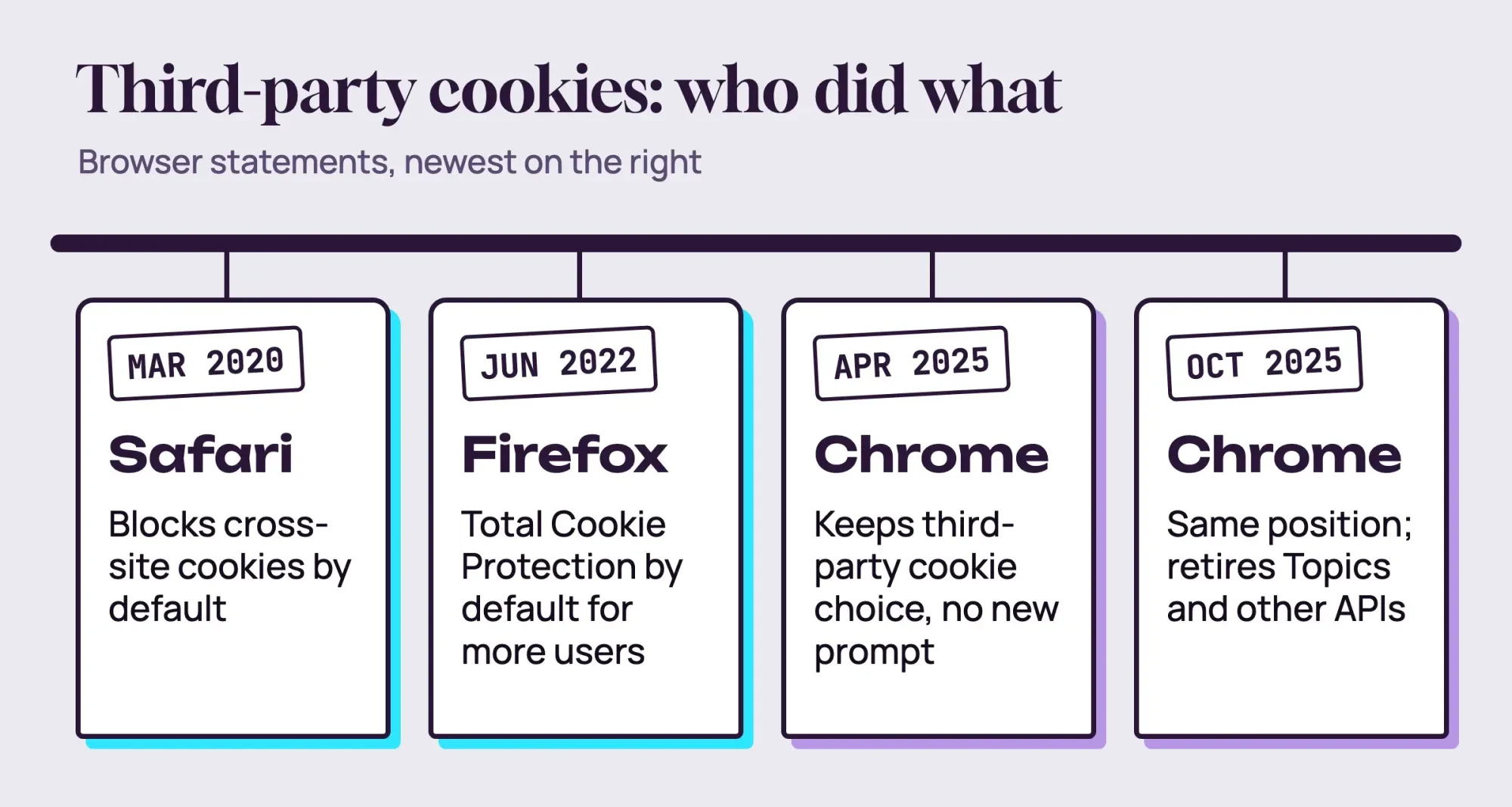 Drawn by us from the WebKit, Mozilla and Privacy Sandbox posts linked here
What we tested
This check needed two small web servers on one Mac, run on October 28, 2026, to see what blocked cookies change. A page on 127.0.0.1 framed a site on localhost that set a cookie, b_third, and a second frame checked if it came back. The page set its own cookie, a_first. Headless Chrome 156 ran three times with fresh profiles:
- Default settings: b_third came back, and so did a_first.
- The --incognito switch: b_third came back, and so did a_first.
- The --test-third-party-cookie-phaseout flag from Google's testing guide: b_third didn't come back, but a_first did.
Run 2 doesn't match Google's April 2025 line that Incognito "already blocks third-party cookies by default." We tested a headless browser with a switch, not a normal Incognito window, so we read it as a headless result only. Runs 1 and 3 differ by one flag, and only the cross-site cookie went missing.
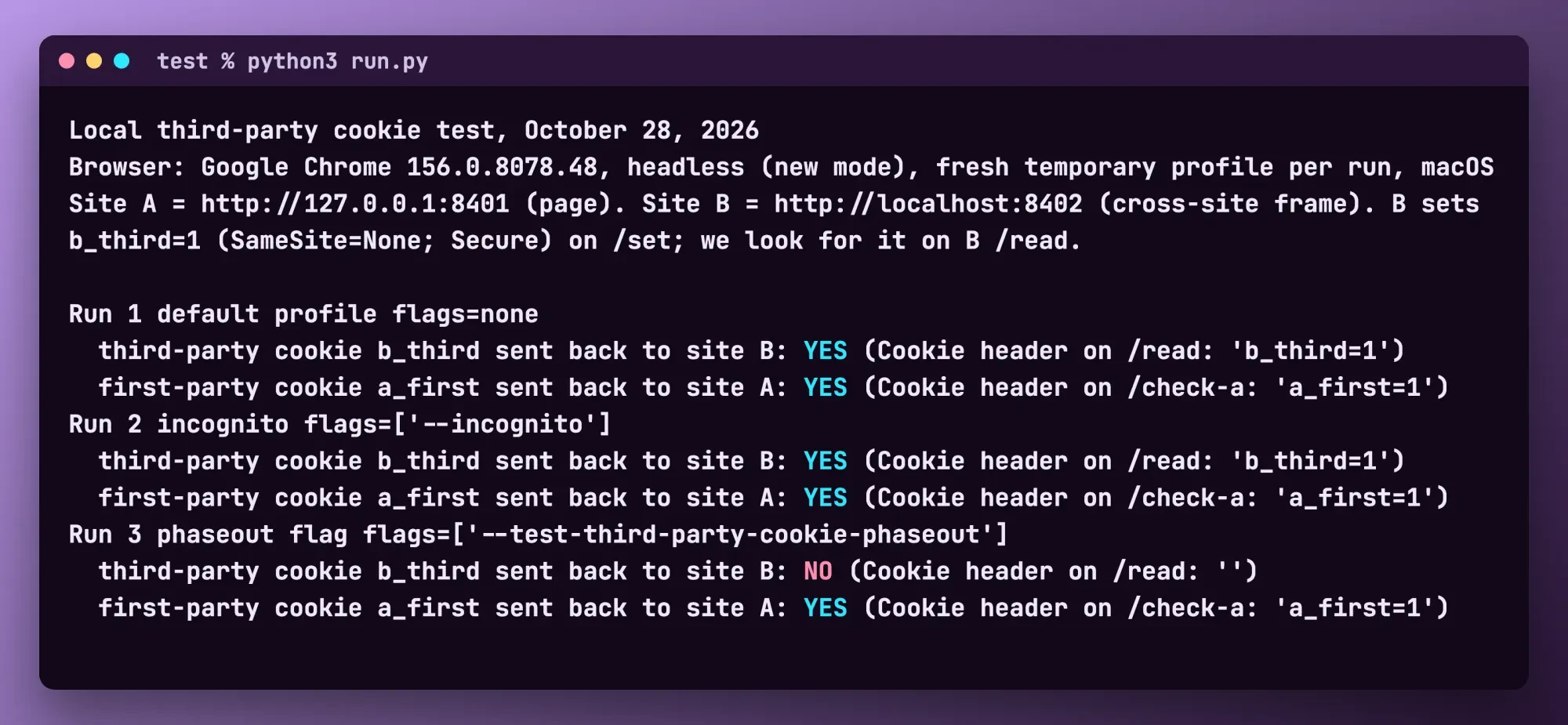 Drawn by us from test/output.txt: our local cookie test output, October 28, 2026
Real-time everything: ignore dashboards that refresh by the minute
Real-time everything is the last trend we'd ignore. GA4's Realtime report shows active users in the last 5 and 30 minutes, which helps on launch days.
Google calls Realtime "a best effort service" that "operates without a formal Service Level Objective (SLO)." The rest of your data isn't real time at all. Google's data freshness page says "Data processing can take 24-48 hours," and report numbers may change in that window. So a dashboard that refreshes every minute shows figures that may still move over the next two days, and decisions made from them inherit that wobble. Attribution is thinner there too. Google says Realtime "performs limited attribution analysis" and points you to the Acquisition reports for the most accurate attribution. For decisions, we'd rather read a weekly report, and our Looker Studio dashboard guide sets one up and emails it every Monday.
When to re-sort the list
This sorting holds as of October 28, 2026. The table's last column names what would change each call, and two of those signals sit with Google: a new Chrome cookie statement, and user-provided data leaving beta.
The rest sit with you, and the clearest is volume. Passing 1,000 returning buyers and 1,000 non-buyers in a week makes predictive metrics worth planning for, and GA4 won't train them below that line. Check the Privacy Sandbox status page once a quarter, since it shows its last-updated date at the top. Our take: spend this week on the two act-on items, which cost setup time rather than money. Give a first-party data trial one quarter, and leave the rest alone until a signal shows up. For the marketing side, see our digital marketing trends list, and for picking the tools themselves, our website analytics tools guide sorts them by the job each one does.
Tag and consent work is part of what DigitalTreed's web development service sells, so these verdicts come from a firm that's paid when owners hire help. An independent developer can quote the same consent check.
Frequently asked
What does consent mode do before a visitor chooses?
Google Ads Help's consent mode comparison splits it by version. Basic mode tag loading is "Blocked until user interaction with a consent banner," and advanced mode "Loads with defaults set to denied, unless configured otherwise."
How long does GA4 keep its insights?
One year. Google's Analytics Insights help says "Insights are retained for one year after they are generated."
How do I test my site without third-party cookies?
Run Chrome twice, once normally and once with the --test-third-party-cookie-phaseout flag. Google's breakage testing page calls failures in only the second run "good candidates to investigate."
What do I need before setting up a tagging server?
A Google Cloud billing account, plus the Project Creator and Billing Account User roles, per Google's Cloud Run guide.
How we made this guide: Our cookie check pointed headless Chrome 156 at a stand-in site and a cross-site tag, both served from one Mac. The verdicts rest on Google, WebKit and Mozilla pages, each linked where used. Facts checked by the DigitalTreed team on October 28, 2026.
First published April 2020. Rewritten October 28, 2026 as six analytics trends sorted into act on now, try next and ignore for now, with a local cookie test.
Sources
- Privacy Sandbox: Next steps for Privacy Sandbox and tracking protections in Chrome (April 22, 2025)
- Privacy Sandbox: Update on plans for Privacy Sandbox technologies (October 17, 2025)
- Privacy Sandbox: Feature status (updated August 14, 2026)
- Privacy Sandbox: Test for breakage
- WebKit: Full Third-Party Cookie Blocking and More (March 24, 2020)
- Mozilla: Firefox rolls out Total Cookie Protection by default (June 14, 2022)
- Google Tag Platform: Consent mode overview
- Analytics Help: Consent mode on websites and mobile apps
- Analytics Help: Consent mode reference
- Google Ads Help: About consent mode
- Google: EU user consent policy
- Analytics Help: Analytics Insights
- Analytics Help: AI overviews
- Analytics Help: Predictive metrics
- Analytics Help: User-provided data collection
- Google Ads Help: About enhanced conversions
- Google Tag Manager: An introduction to server-side tagging
- Google Tag Manager: Cloud Run setup guide
- Analytics Help: Realtime report
- Analytics Help: Data freshness


Comments
No comments yet. Start the conversation below.