
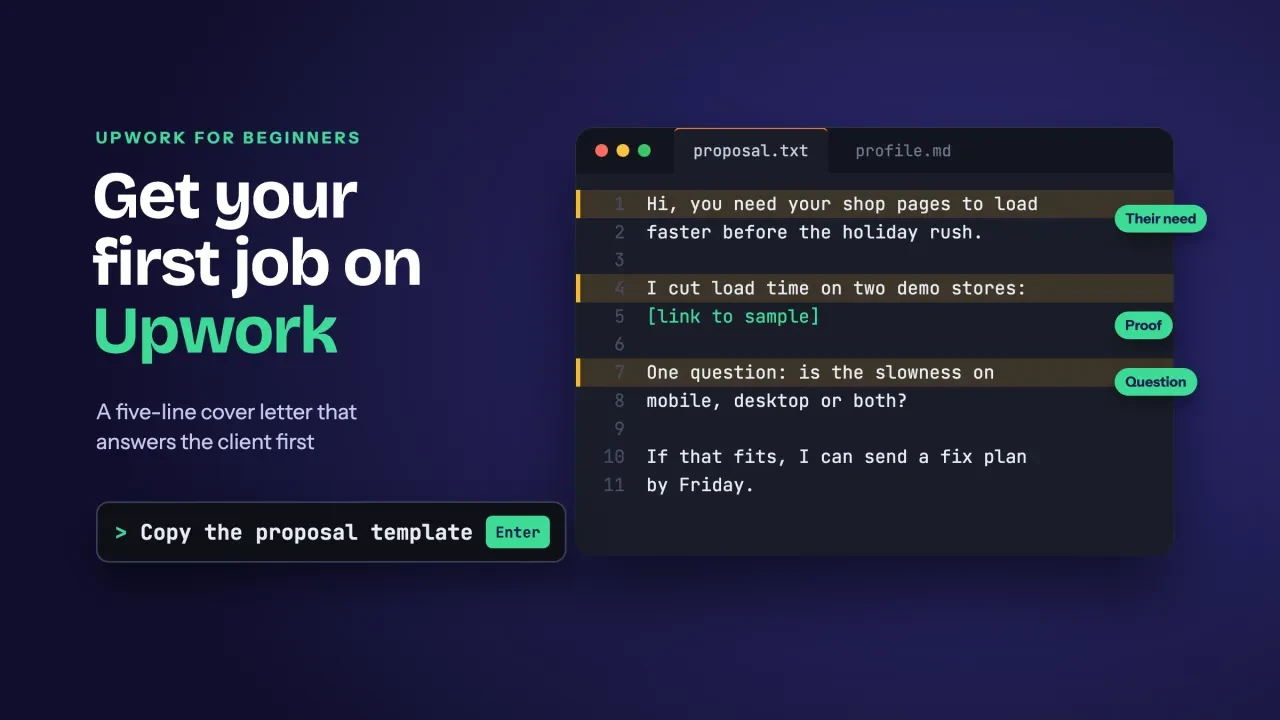
Quick answer
To get your first job on Upwork, finish a profile that passes Upwork's review, then spend Connects only on jobs you can win. Each Connect costs $0.15 as of October 2026. Send short proposals that answer the client and price around the fee. In our view, a few well-chosen bids beat a pile of rushed ones.
Key takeaways
- Upwork must approve your profile before you can bid.
- Connects cost $0.15 each, and rejected bids aren't refunded.
- US-only jobs need the 35-Connect identity badge.
- You see your fee before you bid, so price around it.
- Hourly pay usually becomes available 10 days after the week ends.
If you want to know how to get your first job on Upwork, start with how the site makes money. You buy tokens called Connects, spend them on proposals, and Upwork takes a fee from what you earn.
That changes how you should play your first month.
Every proposal costs real money before anyone reads it, so a beginner who sprays bids at every post can spend a month's budget and hear nothing back at all.
We wrote it for US freelancers on the bidding side, in the order you'll meet each step: profile, Connects, proposals, the fee and payday.
Brand new to freelancing? Read how to start freelancing first for offers, prices and taxes. Hiring instead? The comparison of where to hire freelancers covers the client side.
Example: Halfmoon Web is a made-up, one-person web developer in Ellensburg, Washington. It fixes slow small-business sites, and its first target is a made-up gift shop that wants faster product pages before the holidays. We'll follow it through every step.
Your profile is the first thing Upwork approves
Before you spend a cent, Upwork has to say yes to you. Its freelancer sign-up page says that "Once your profile is approved, you can search for projects".
So the profile isn't decoration. It's the gate.
One small rule trips people up early. The title and introduction "can't contain URLs or website addresses, including domain-style text such as example.com."
Put your links in the portfolio instead. Easy fix.
Completeness matters too. Upwork's profile guide says a complete profile "increases your chances of being hired." It gives no number for that. The same page also ties the Connects program to a complete profile, so a half-built one can't bid at all.
What does complete look like for a beginner? A title that names one service and an intro that says who you help. Add a real photo, an hourly rate and two or three portfolio pieces.
Skip the life story. Really.
A client scanning twenty profiles on a phone reads your title, your rate and maybe one line of the intro, so put the result you deliver in that first line.
Halfmoon Web has no Upwork history, so its portfolio has to do the talking. It adds two before-and-after load times from its own demo sites, measured with the DigitalTreed website speed test. A number like that beats "I'm passionate about performance" every time.
Keep the title boring and specific. "Page speed fixes for WordPress and Shopify stores" gets found. "Creative digital problem-solver" doesn't.
What do Connects cost, and how many will you need?
Once the profile's approved, every proposal costs Connects. Upwork's Connects help page says "Connects cost $0.15 (USD) each and are sold in bundles" as of October 2026. You need a verified billing method to buy them.
Here's the part beginners miss. The Connects a proposal takes "varies per job and can change during the time the job is posted."
Upwork shows the number on each job post. It doesn't publish a typical one. Check before you write.
Refunds are narrow. Very narrow.
You get Connects back only if the client cancels the post before hiring anyone, or Upwork removes it for breaking the rules. They're not returned when the client rejects you, hires someone else, lets the job expire or when you withdraw.
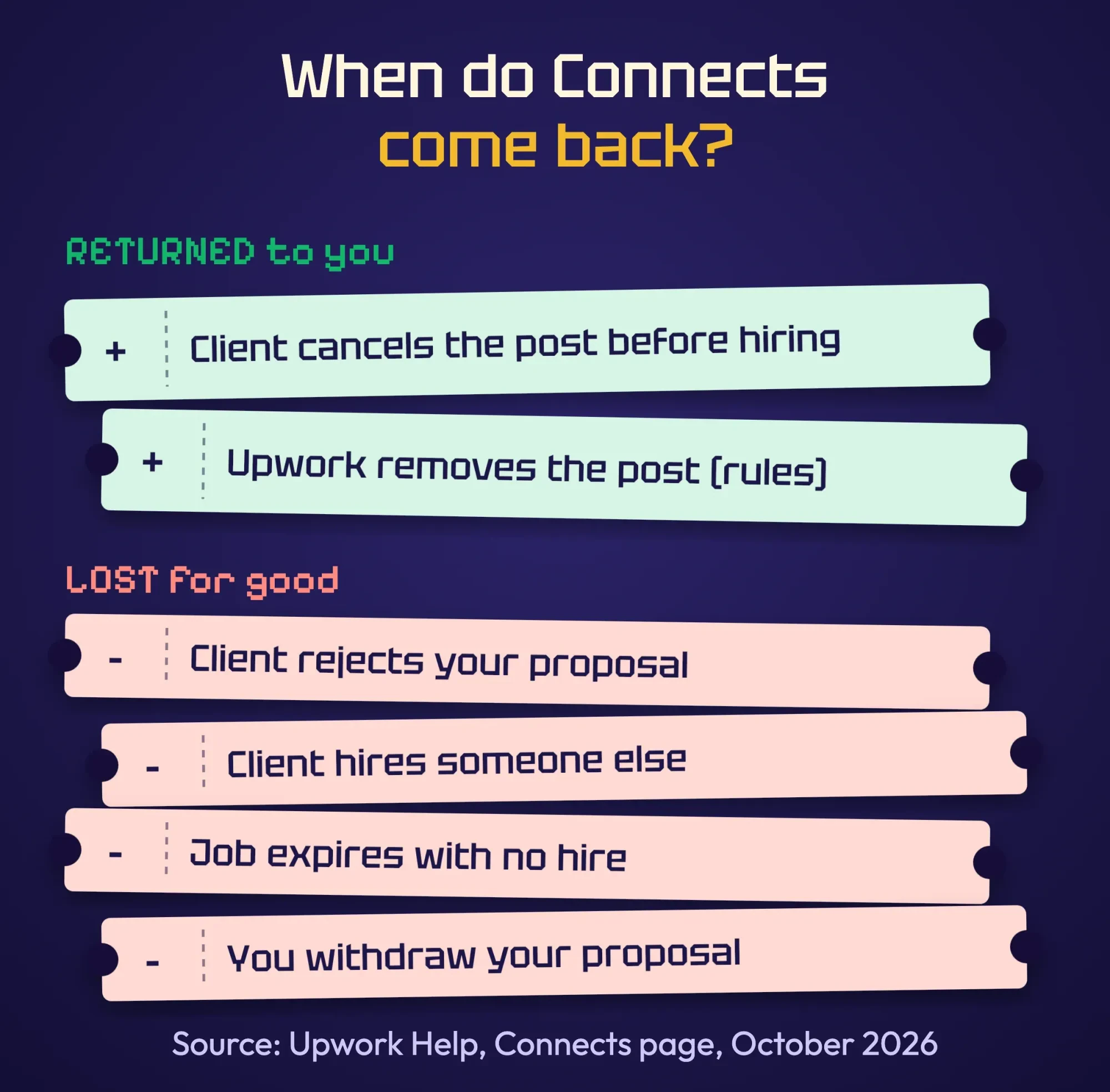 Source: Upwork Help, Understanding and using Connects, October 2026. Drawn by us
Want US-only jobs? Then you'll need the identity badge. The identity verification page says you can't send proposals for "U.S.-only jobs without purchasing it," and the badge costs 35 Connects. It's valid for three years, and you have seven days after spending the Connects to finish the check.
We read 20 of Upwork's help pages signed out on October 27, 2026, the way a new freelancer would before joining. Two things stayed hidden. The Freelancer Plus price only appears after you sign in and open Change Plan. The Upwork fee for PayPal withdrawals sits in signed-in settings too. Even our attempt to screenshot the Connects page with a headless browser hit a security check. For those details, you'll have to look once you're inside.
What we can work out is the Connects math. Freelancer Plus includes 100 Connects a month. At $0.15 each, that's $15.00 of Connects. If the plan price you see is above $15, the rest pays for its other features. One is a 0% freelancer fee on Direct Contracts with clients you bring to Upwork.
| Example: Halfmoon Web, first month | Connects | Cost at $0.15 |
|---|---|---|
| Identity badge (for US-only jobs) | 35 | $5.25 |
| 20 proposals, assuming 15 Connects each | 300 | $45.00 |
| Total | 335 | $50.25 |
The 15 Connects a proposal is our assumption, not Upwork's number. Bundles may also round up what you actually pay. Still, it puts a first month of serious bidding at around $50, which is a fair price for learning what works.
Spend Connects only on jobs you can win
Since most lost bids don't refund, choosing jobs is where you save money. Upwork's tips say to check whether the client has already hired and to read their history.
Also look at how busy the post is.
We'd add one more filter: can you name a sample that matches this exact job? If not, skip it.
Watch for scams, too. Upwork's red flags page warns that requests for free work "violate Upwork's policies and could be a scam attempt". Treat any push to talk or get paid off Upwork as a warning sign too.
Halfmoon Web skips crowded posts and clients with no payment history. It also skips anything that asks for a free "test" fix on the live store. It bids on the gift shop because the post names a problem it has solved before: slow product pages.
Fewer bids, better matches.
That's the whole strategy, and it's also why a first week with only three or four careful proposals can beat a week of twenty rushed ones on the same budget.
A proposal that answers the client in five lines
Picking the job well is half the work. The proposal is the other half, and shorter usually wins.
Upwork's proposal guide lists the parts. You set a rate or fixed bid and a time estimate, then write a cover letter, answer screening questions and attach samples from Profile highlights.
Upwork calls the written part your cover letter. Here's the template we'd start from:
Hi [name], you need [the client's goal, in their words] before [their deadline].

I did [the same kind of work] for [a similar business]: [one sample from Profile highlights].

One question: [the detail that changes the plan]?

If that fits, I can [first concrete step] by [day].
[Your first name]
Line one repeats the client's goal, so they know you read the post. Line two is proof, with one sample that matches. The question shows you've thought about their job, and it gives them a reason to reply. No greeting paragraph, no list of every skill you have.
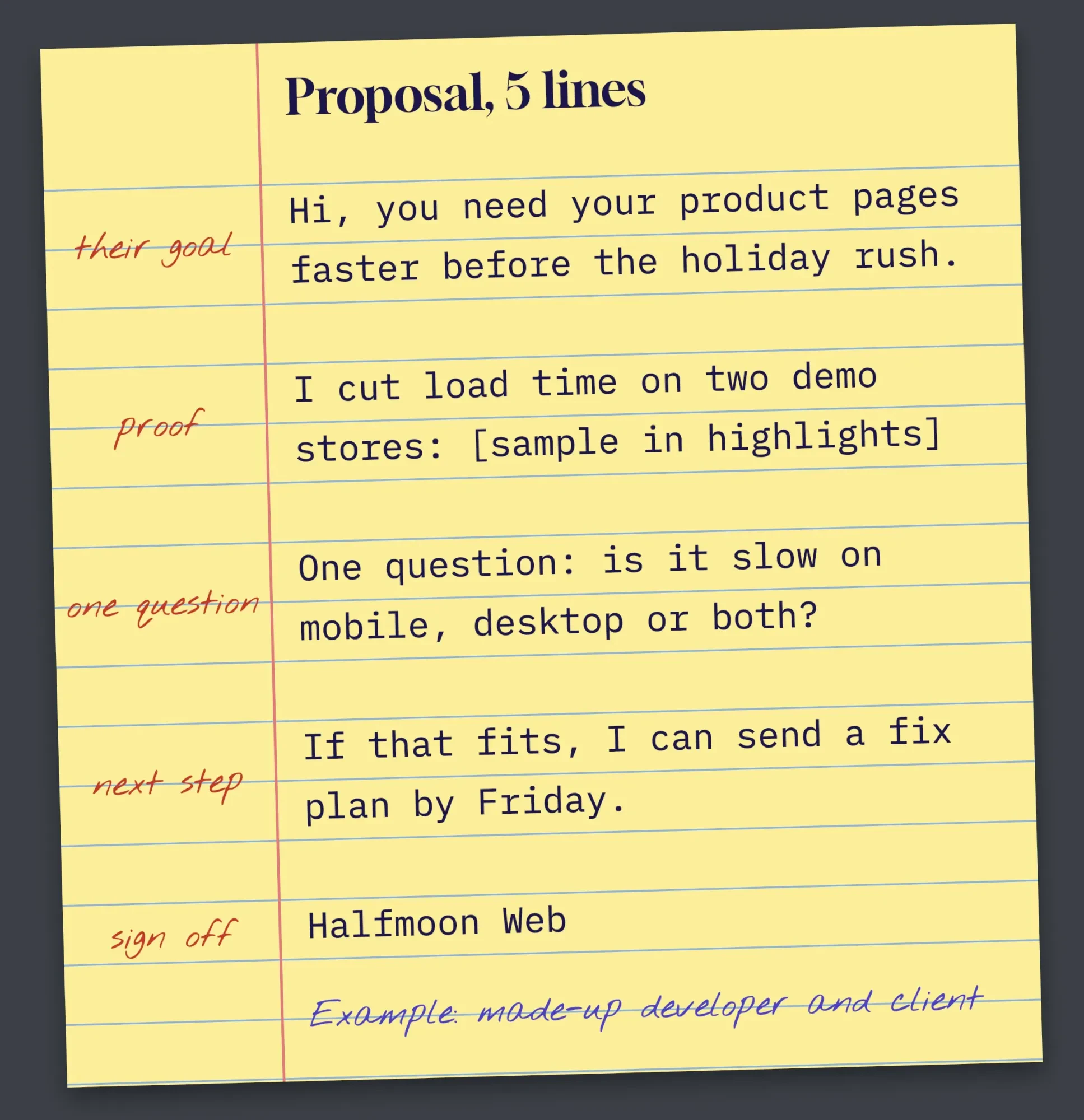 Diagram by DigitalTreed: our five-line proposal for the made-up Halfmoon Web and its made-up gift shop client
Two rules from the same page help. You can edit most of a proposal "up to six hours after submitting it, or until the client has viewed it."
And some job posts may require a video interview with Uma, Upwork says on the same page. Read the post before you write. All of it.
Boosting is an auction, so set a ceiling
Sometimes Upwork lets you pay extra Connects to move your proposal up. Its boosted proposals page says the highest bidders get the "top four slots." The auction closes "after seven days or upon first hire."
You pay your bid if you finish in the top four, or if the client interacts with your proposal while you're boosted. Pushed out of the top four before the client touches your proposal? Then you aren't charged.
Our take: don't boost in your first month unless the job is a near-perfect match and the post is fresh.
A boost buys attention, not a better proposal.
If the client opens a boosted proposal that doesn't match the job, you've paid extra Connects to be skipped faster, which is the worst trade on the whole site.
If you've never boosted, Upwork gives 10 Connects back after your first successful boost, according to its Connects page. That's a small cushion, not a reason to bid.
Price so the fee comes out of your bid
Even a perfect proposal can lose money if the price ignores the fee. The good news is that you aren't guessing. Upwork's Freelancer Service Fee page says you'll see the fee percentage when a client sends an offer or when you submit a proposal.
Once you send the proposal, the fee is "locked in" for that contract. If you later refund the client, Upwork returns the fee on that amount.
And there's no standing discount.
That's fair. Plan for it.
So work backward from what you want to keep.
Divide your take-home target by one minus the fee shown on the proposal screen, then round the result up to a clean number the client won't stumble over.
Halfmoon Web wants $450 for the gift shop fix. If the proposal screen shows a 10% fee, it bids $500, the fee is $50, and $450 lands. If the screen shows 15%, $450 divided by 0.85 is $529.41, so it bids $530 and keeps $450.50.
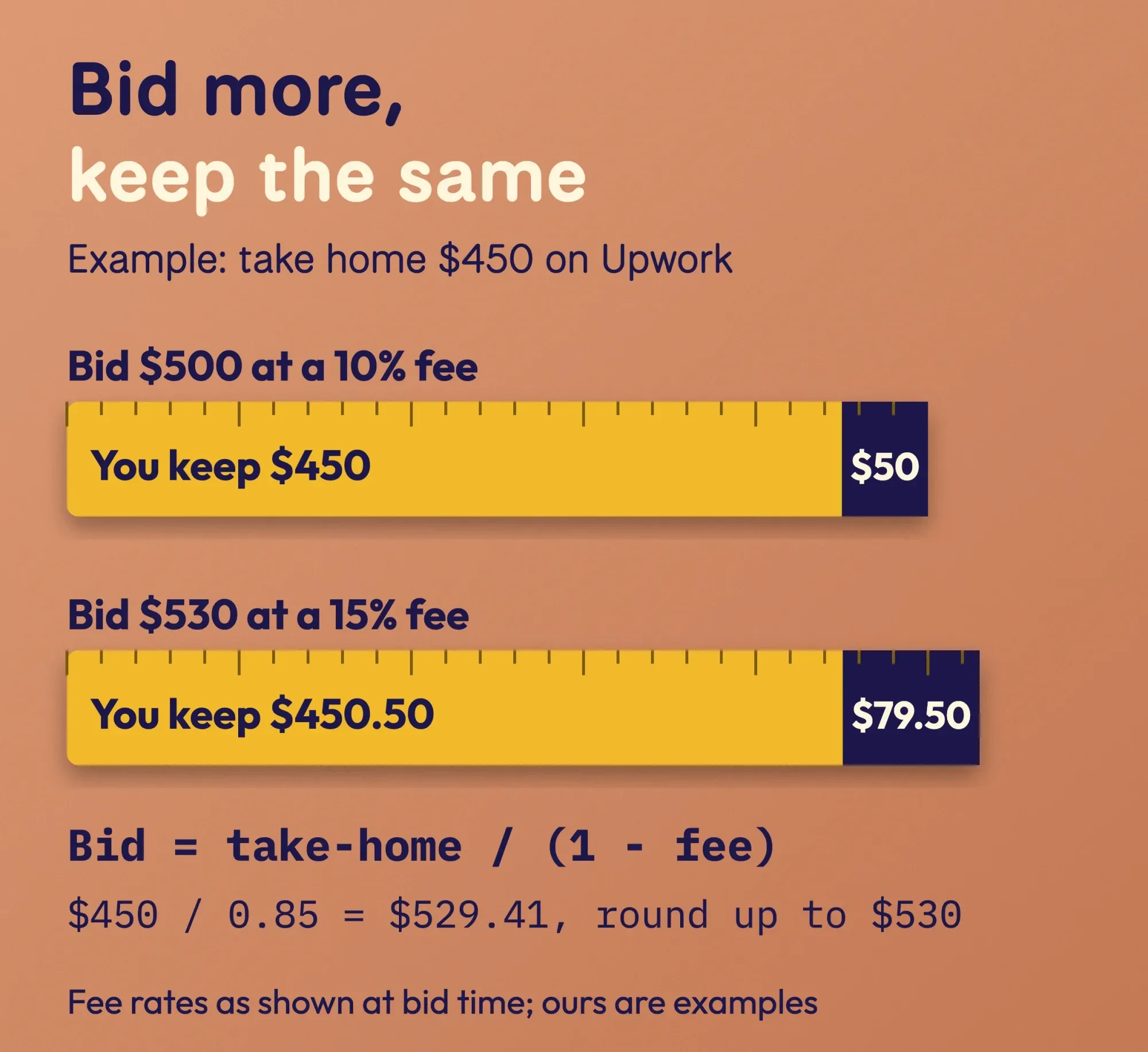 Diagram by DigitalTreed: our gross-up math for the made-up Halfmoon Web, using fee rates as shown at bid time
Upwork does the same thing hourly. Its example: to net $20 at a 10% fee, charge $22.22. If you're an SEO freelancer still choosing a base rate, the freelance SEO rate calculator helps you set the take-home number first.
How do you get paid on Upwork in the US?
After the work comes the wait. For hourly contracts, Upwork's hourly payments page says you're paid "10 days after the weekly billing period ends each Sunday" in most cases, all in UTC.
Here's what that looks like on a real calendar. Say Halfmoon Web logs hours from Monday, November 2, to Sunday, November 8, 2026. The client is invoiced Monday, November 9, and has until Friday, November 13, to review. The money becomes available Wednesday, November 18.
Then it has to reach the bank. Direct to U.S. Bank is free with a US tax address and takes "two to five business days". That puts the cash in Halfmoon Web's account between Friday, November 20, and Wednesday, November 25.
Thanksgiving is Thursday, November 26, per the OPM federal holiday list. One slow bank could push the money past the holiday.
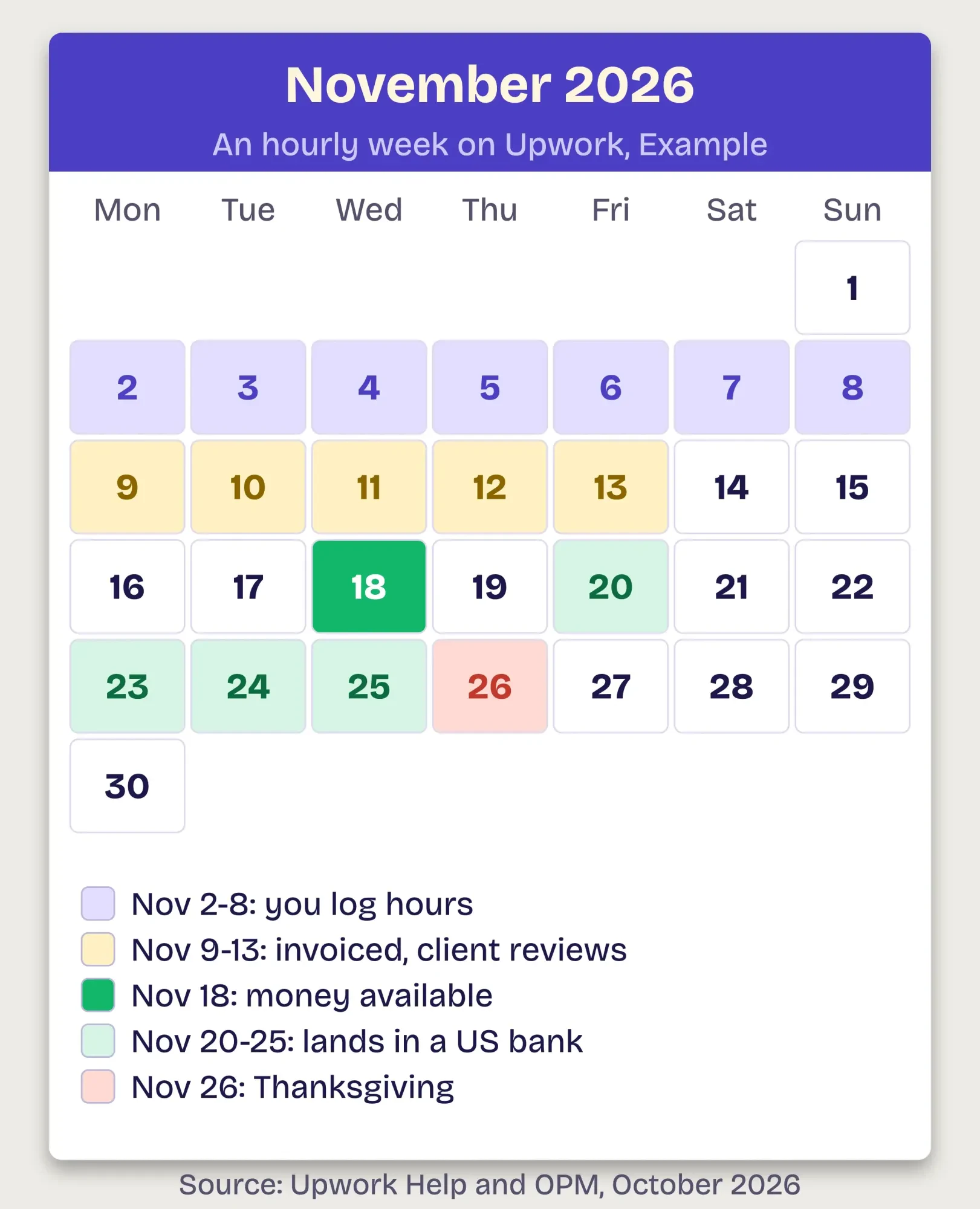 Diagram by DigitalTreed: an Example hourly week, dated from Upwork Help and the OPM holiday list, October 2026
Hourly pay is only protected if you track it the right way. The Hourly Payment Protection page requires hours logged "with the time tracker in the Upwork Desktop App," with memos, inside the weekly limit. Manually added time doesn't qualify.
Fixed-price work runs on milestones instead, and they're how a first client who has never worked with you can show the money is there before you start.
Upwork's milestones page is blunt: "Only begin work when a milestone is funded." Then deliver with the Submit work button, not just a message.
PayPal is the other common route. Upwork's PayPal withdrawal page says a new PayPal account can't receive withdrawals "until three days after you add it," so set it up before you bid. PayPal may add its own fees, and our PayPal fee calculator shows what a payment costs on that side.
Keep the first contract on Upwork and finish it well
You've landed the job and you know when you'll be paid. Now protect the account. Upwork has a "zero-tolerance circumvention policy unless a conversion fee is paid," says its page on getting paid outside Upwork. Breaking it "will result in account suspension."
If a new client asks for your email or a direct payment, say no politely.
That's often how scams start, too.
Keep every message, file and payment inside the contract room, because that record is what Upwork looks at if a client ever disputes your hours or your delivery.
A clean first contract also starts your reputation. The Rising Talent badge needs an "average star rating of 4.8 or above" and at least $250 earned in the past 12 months. You also need the identity badge, a withdrawal method and a 100% complete profile. It adds a one-time bonus of 30 Connects.
Taxes come last, but don't skip them.
The IRS Form 1099-K page says a marketplace must send the form if payments "total over $20,000 in more than 200 transactions". It adds that a marketplace "may send you a Form 1099-K with lower amounts."
Upwork's US income page notes that some states set a lower threshold. Either way, it says "the IRS still expects you to report all your freelance earnings."
None of this is tax advice. It's what the IRS and Upwork pages say, quoted word for word, and a tax professional can apply it to your year. Our freelancing starter guide covers self-employment tax.
Clients look at the same signals you do. SEO freelancers can see what buyers check when hiring an SEO freelancer. The SEO freelancing chapter of the SEO career guide goes further.
One more thing: an Upwork profile isn't the only shop window you'll want. We charge for building small-business websites, so read the next link as an ad for us. When you want a portfolio site outside Upwork, our website builds are one option.
Frequently asked
Can you get free Connects on Upwork?
Sometimes. Upwork's Connects page says new users "may receive a one-time bonus of 50 Connects" after buying Connects or subscribing to Freelancer Plus. Some freelancers also get 10 free Connects a month.
Do you get Connects back if a client interviews you?
You may. Upwork says you "may receive free Connects when you get an interview with an established* client." In its example, a bid that cost 8 Connects earns 10 back after the interview (Upwork Help: Connects). It won't happen for every interview.
What is a good Job Success Score on Upwork?
Upwork's Job Success Score page says top freelancers "typically have a score of 90% or higher." A score in the 80s signals solid work with some room for improvement.
How long does the Upwork identity badge take to show?
The badge "should appear within three business days" once you pass the check, says Upwork's identity verification page. Without it, you also can't bid on U.K.-only jobs.
How we made this guide: The DigitalTreed team read 20 Upwork help pages signed out on October 27, 2026, plus the IRS Form 1099-K page and the OPM holiday list. We didn't create an account or sign in, so we could only test what a new freelancer sees before joining. The Connects budget, fee math and payday calendar are our own sums for a made-up developer. You'll find every source linked right where its claim appears.
First published July 2020. Rewritten October 27, 2026: the old Upwork overview and its outdated fee example are now a US freelancer's plan for a first job. It covers the profile review, Connects in dollars, a proposal template, boosting, pricing around the fee, payday and the 1099-K.
Sources
- Upwork Help: How to sign up as a freelancer on Upwork
- Upwork Help: Build a 100% complete profile
- Upwork Help: Understanding and using Connects
- Upwork Help: What is Freelancer Plus?
- Upwork Help: How to get the identity verification badge
- Upwork Help: Recognize red flags and avoid scams
- Upwork Help: How to submit a proposal on Upwork
- Upwork Help: How to boost your proposal
- Upwork Help: Learn about the Freelancer Service Fee
- Upwork Help: How payments for hourly contracts work
- Upwork Help: How Hourly Payment Protection works for freelancers
- Upwork Help: Understanding milestones on fixed-price contracts
- Upwork Help: Direct to U.S. Bank, timing and fees
- Upwork Help: PayPal fees and timing for withdrawals
- Upwork Help: Why you shouldn't get paid outside Upwork
- Upwork Help: How to become a Rising Talent
- Upwork Help: Job Success Score
- Upwork Help: Report income as a U.S. freelancer
- IRS: Understanding your Form 1099-K
- U.S. Office of Personnel Management: Federal holidays

Comments
No comments yet. Start the conversation below.