

Quick answer
Most small businesses should write the blog post first and film the video from it, as of October 2026, because Google asks for important content in text. Film first only when the job is visual and your buyers watch YouTube, which 84% of U.S. adults use. Either way, put the transcript on the video's own page.
Say you run a small plumbing company, and a customer asks how to stop a dripping faucet. You have time for one piece a week, so it's video vs blog. Film the fix, or write it up? A blog post is a written answer on your own website; a video is the same answer recorded and posted where people watch.
We cover the job each format does, why a video needs its own watch page, whether AI answers quote videos or articles, and the show-me questions YouTube wins. Then come the steps per piece, our test, how to turn one into the other and which to make first.
Key takeaways
- Write the post first, then film the video from the same outline.
- Google doesn't treat a blog post with an embedded video as a watch page.
- Our video-only test page showed 0 of 8 repair terms to a plain fetch.
- Put the full transcript on the video's own page, as W3C advises.
- Only 2 of our 6 example chapters fit a 30-second Business Profile video.
A blog post and a video do different jobs
Before picking a winner, look at where each one gets found. A post and a video rarely compete for the same spot. The post's on your site, answering a typed question, while the video's mostly on YouTube, answering a show-me question that's easier to watch than to read. Here's the split on six points.
| Factor | Blog post | Video |
| Where it lives | Your website | Usually YouTube, with a separate watch page you host |
| Found through | Google text results and AI answers | YouTube search, Google video results |
| What Google needs | Indexable text | An indexed watch page, a stable thumbnail, 3 required markup fields |
| Who it suits | Readers who scan for one step | Viewers who need to see the hands do it |
| Cuts you get from it | Quote cards, an email | A Short up to 3 minutes, a 30-second profile clip |
| Steps before publishing | 4 in our checklist | 10 in our checklist |
The last row is our own count, and it's explained further down. The other rows come from Google, YouTube and Pew pages we read on October 28, 2026, each linked where it comes up. In short, the post earns the typed searches, and the video earns the people who'd rather watch the hands do it.
For the faucet topic, that's one page to write against two pages, a thumbnail and markup to set up for the video.
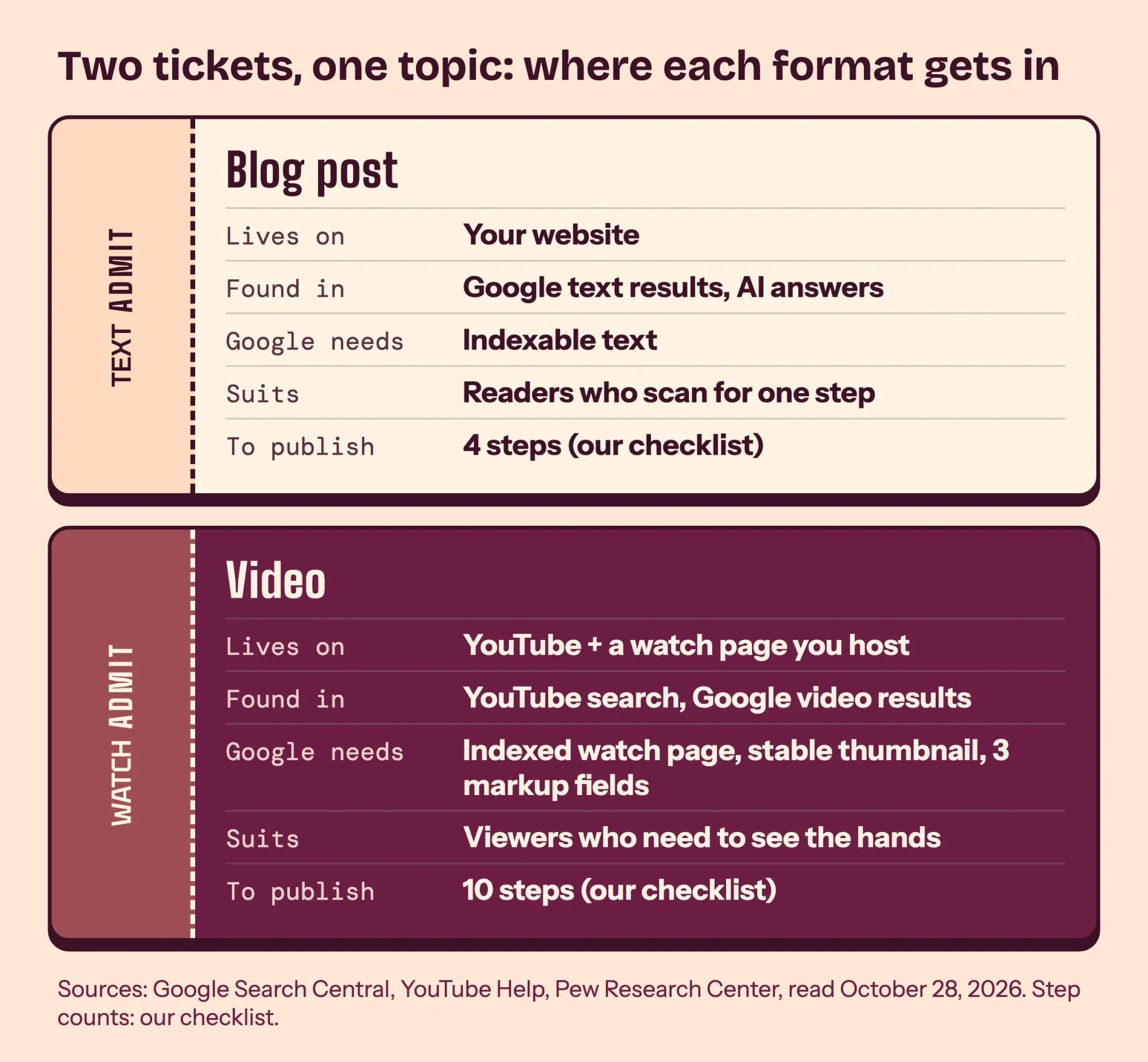 Diagram by DigitalTreed. The two formats compared, from the Google, YouTube and Pew pages we read on October 28, 2026.
A video needs its own watch page to show in Google
Those extra pages come from an easy-to-miss rule: Google can show a video in its results, but the page holding it faces stricter rules than an article does. Its video SEO best practices say "The watch page must be indexed." The video also needs "a valid thumbnail that's available at a stable URL." A watch page, in Google's words, is one whose "main purpose is to show users a single video."
Google's list of pages that aren't watch pages includes "A blog post that reviews an embedded video." So if you paste your YouTube clip above the faucet steps, the post still won't become a video result, though Google says it can still be a text result. That changes the plan. You'll need two pages: the post, and a separate watch page with its own title and description. The watch page also wants VideoObject markup, and Google's video structured data page lists three required properties: name, thumbnailUrl and uploadDate. Paste a page into our schema markup validator to see whether all three are there.
Google also reads those video details from a video sitemap or Open Graph tags.
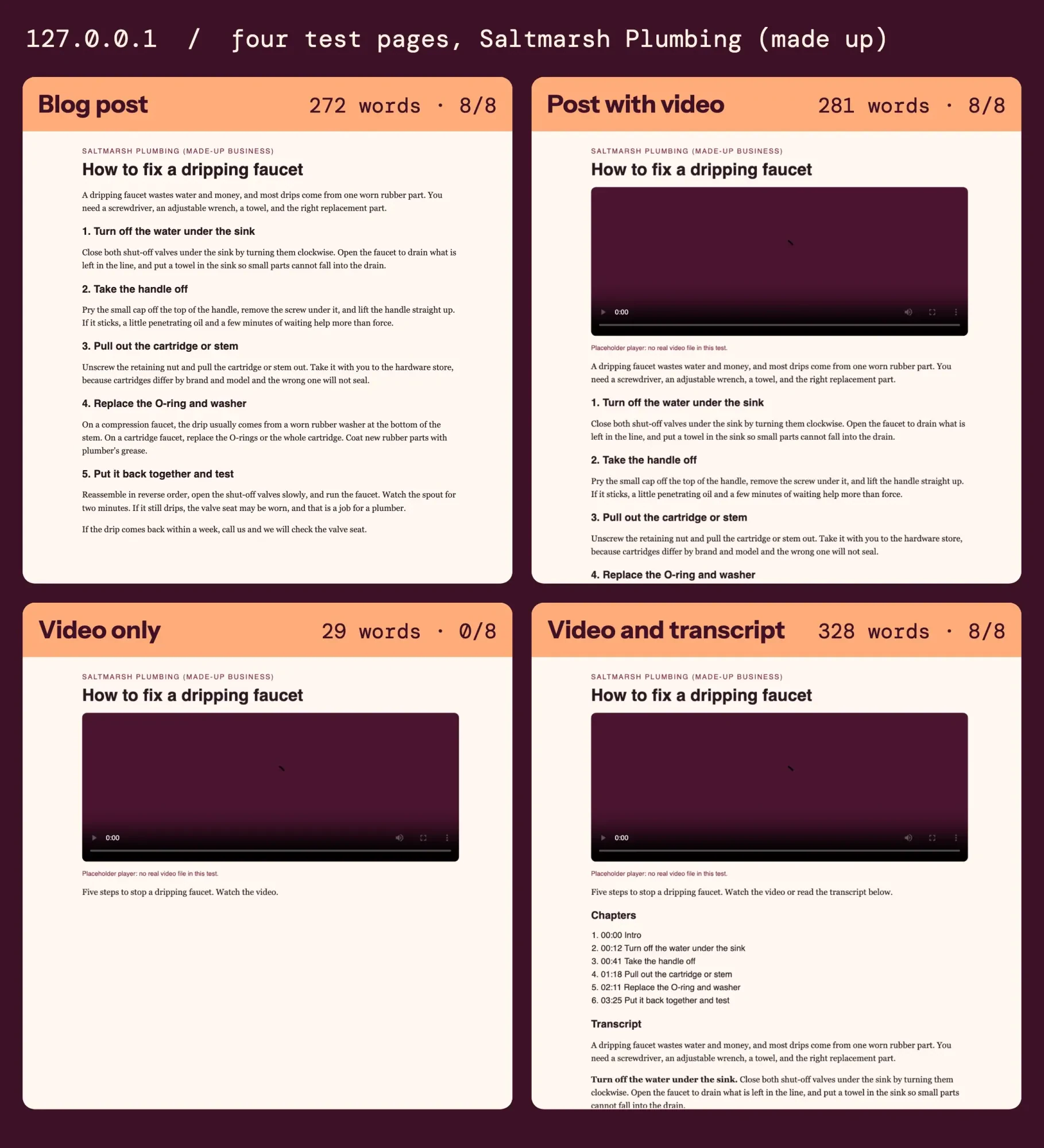 Screenshot: our four test pages for the made-up Saltmarsh Plumbing, served on 127.0.0.1, October 28, 2026.
A post is simpler. It needs an indexable page and words that answer the question, which is something you can finish tonight. Our guide to writing a blog post builds one around a single customer question.
Do AI answers quote videos or articles?
AI answers lean the same way: they do cite videos, but Google's advice for them still starts with text. Google's page on AI features and your website says there's nothing extra you need to do to appear in them. Among the basics it lists is "Making sure that important content is available in textual form," with images and videos supporting that text.
Pew Research Center's browsing study adds an outside view. Pew tracked 900 U.S. adults' Google searches in March 2025 and found that Wikipedia, YouTube and Reddit were the most cited sources in Google's AI summaries. Together, those three made up 15% of the cited sources. Pew also wrote that YouTube links are "somewhat more common in standard search results than in AI summaries." So video does get cited, just a bit less often in the AI box than in the regular results.
So if you want a shot at the AI answer, put the words on a page, as a post or a transcript.
How much those summaries cut clicks is a separate matter. Our look at whether blogging is worth it covers the click numbers from that same Pew study.
YouTube wins the show-me questions
Still, none of this makes video the weaker format, since it wins where text struggles. YouTube is the platform most Americans use. Pew's 2026 survey of 5,511 adults, fielded from January 30 to June 18, put YouTube use at 84% of U.S. adults, with Facebook second at 70%. How-to is YouTube's home turf. In an older Pew survey from 2018, 51% of YouTube users called the site very important for figuring out how to do things they hadn't done before. In that survey, 54% said it's important for helping them make purchasing decisions. Those numbers are 8 years old and come from a different survey than the 2026 one, so read them as a direction, not as today's figure.
A dripping faucet shows why. Reading "pry the cap off the handle" works fine until the cap won't budge, and a 10-second clip of the screwdriver angle settles it. Text has its own edge for the reader who only needs step 4. In a 1997 Nielsen Norman Group test of text pages, a concise version of a site scored 58% better on measured usability, and a scannable layout scored 47% better.
A video can't be skimmed that way unless you give it chapters, which is why the chapter rules further down matter.
So if your customers need to see the job done, film it first. Our guide to setting up a business YouTube channel covers the account before your first upload.
Video takes more steps per piece
That reach comes with more work per topic, and you can count it in steps. A post needs four: write it, add headings, publish it, and link it from a related page so readers and Google can reach it on day one. A video needs the same thinking for its script, then production and search setup on top. Here's our checklist for one video that both Google and YouTube can use.
- Script it from the post's outline.
- Record it, then edit it.
- Upload it with a title and description.
- Make a thumbnail and keep it at a stable URL.
- Review the automatic captions line by line.
- Add chapters in the description, starting at 00:00.
- For your key videos, build a watch page you host, with its own title.
- Add VideoObject markup with the 3 required fields.
- Paste the transcript under the video.
- Link the watch page from the related post.
Steps 4 and 5 are easy to drop when a clip goes up straight from a phone, yet Google and YouTube each spell them out.
YouTube's automatic captions help page tells creators to "always review automatic captions and edit any parts that haven't been properly transcribed." That matters for trade words like cartridge and O-ring. The thumbnail has to stay at one address too, and our thumbnail guide covers what goes on it. Step 7 isn't needed for every clip. The YouTube SEO guide we wrote keeps own-site watch pages for 2 or 3 key videos and embeds the rest.
Money is the next question. We haven't put a dollar figure on video here, since we have no primary source on small-business video costs to point you to. For the writing side, our post on what one blog post costs in writer time works it out from a named survey and US wage data. For video, time each of our 10 steps once, then multiply by your own hourly rate.
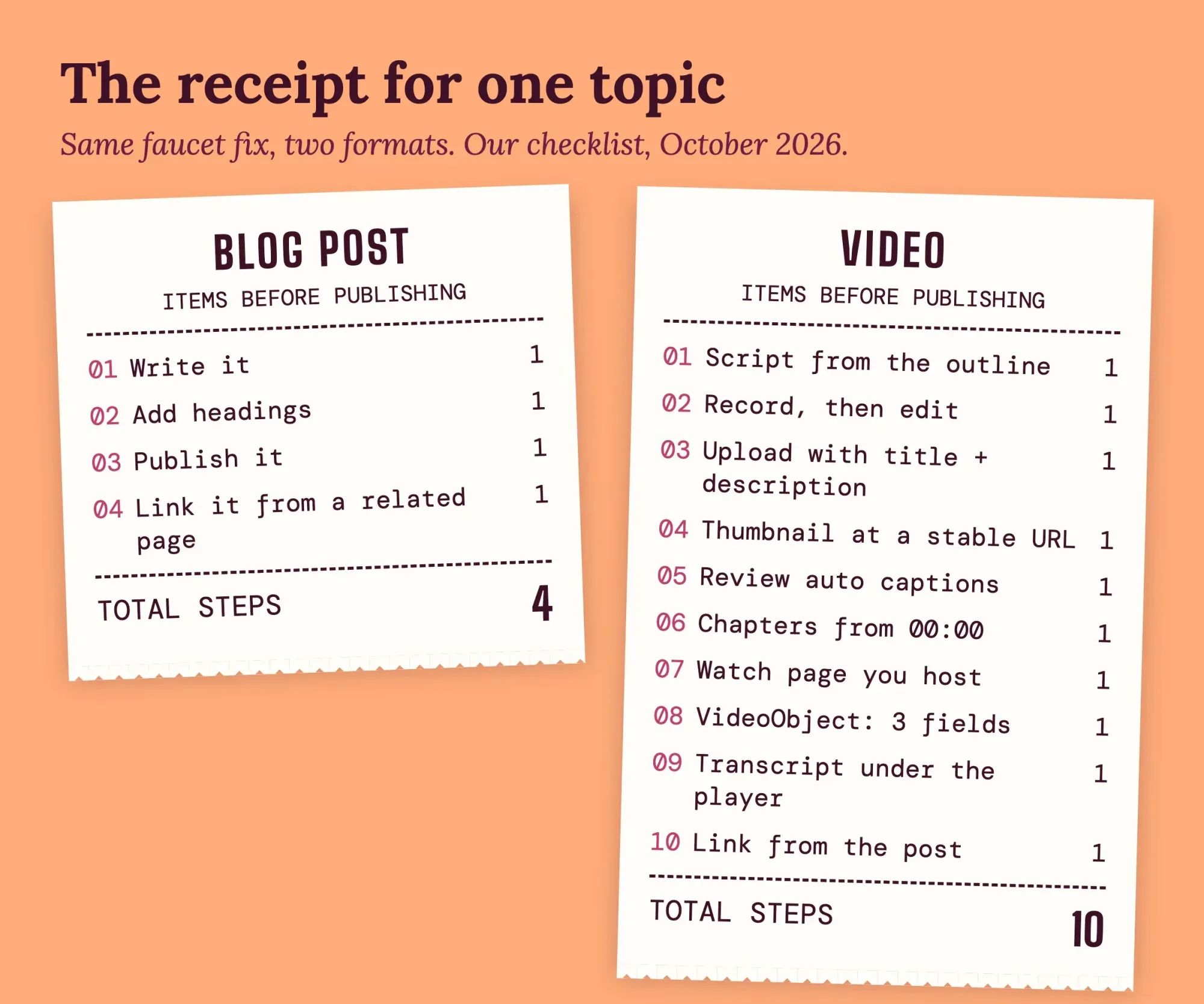 Drawn by us. Our step checklist for one blog post and one video, October 2026.
What we tested
Next, we checked what a plain reader gets from each version of one page for Saltmarsh Plumbing, a made-up company. On October 28, 2026, a Python script served four pages on 127.0.0.1 and read them without JavaScript, looking for 8 repair terms.
| Test page | Words | H2s | Players | Repair terms | Required fields |
| Blog post | 272 | 5 | 0 | 8 of 8 | No markup |
| Post with video | 281 | 5 | 1 | 8 of 8 | 3 of 3 |
| Video only | 29 | 0 | 1 | 0 of 8 | 3 of 3 |
| Video and transcript | 328 | 2 | 1 | 8 of 8 | 3 of 3 |
The video-only page had 29 words, including the site name and our placeholder note, and 0 of 8 terms. No page had a real video file. With a transcript it had 328 words and all 8. Our fetch isn't Googlebot, and it didn't test indexing or watch-page status.
Turn one into the other, in this order
Once the post is done, the video is mostly a recording job, because the outline and the words already exist. This is the order we'd follow for the faucet topic, and it runs in reverse if you filmed first.
- Publish the post, one H2 per step.
- Read the H2s aloud as the video's script outline.
- Use the same H2s as the chapter titles.
- Paste the transcript on the watch page, then link the post to it.
- Cut the chapters that fit into Shorts and a profile clip.
Step 3 only works if the chapters follow YouTube's rules.
YouTube's chapters help page says the first timestamp starts at 00:00, with at least three timestamps in ascending order. Each chapter runs 10 seconds or more. The W3C's guide to transcripts says it's "usually" best to put the transcript on the same page as the media. It adds that headings in a transcript help with SEO.
Our test script checked chapter lists against those rules too. An example list of 6 chapters starting at 0 seconds, in an example 260-second video, passed. A deliberately broken example list, starting at 5 seconds in an example 120-second video, failed twice. Its first chapter didn't start at 00:00, and 2 chapters ran under 10 seconds.
Then come the short cuts. Each example chapter's length is the next chapter's start minus its own, and the last runs to the end of the example 260-second video. That gives example chapters of 12, 29, 37, 53, 74 and 55 seconds. A Short can run up to 3 minutes, so all 6 example chapters fit one. A Google Business Profile video can run up to 30 seconds, so only 2 of the 6 fit without trimming.
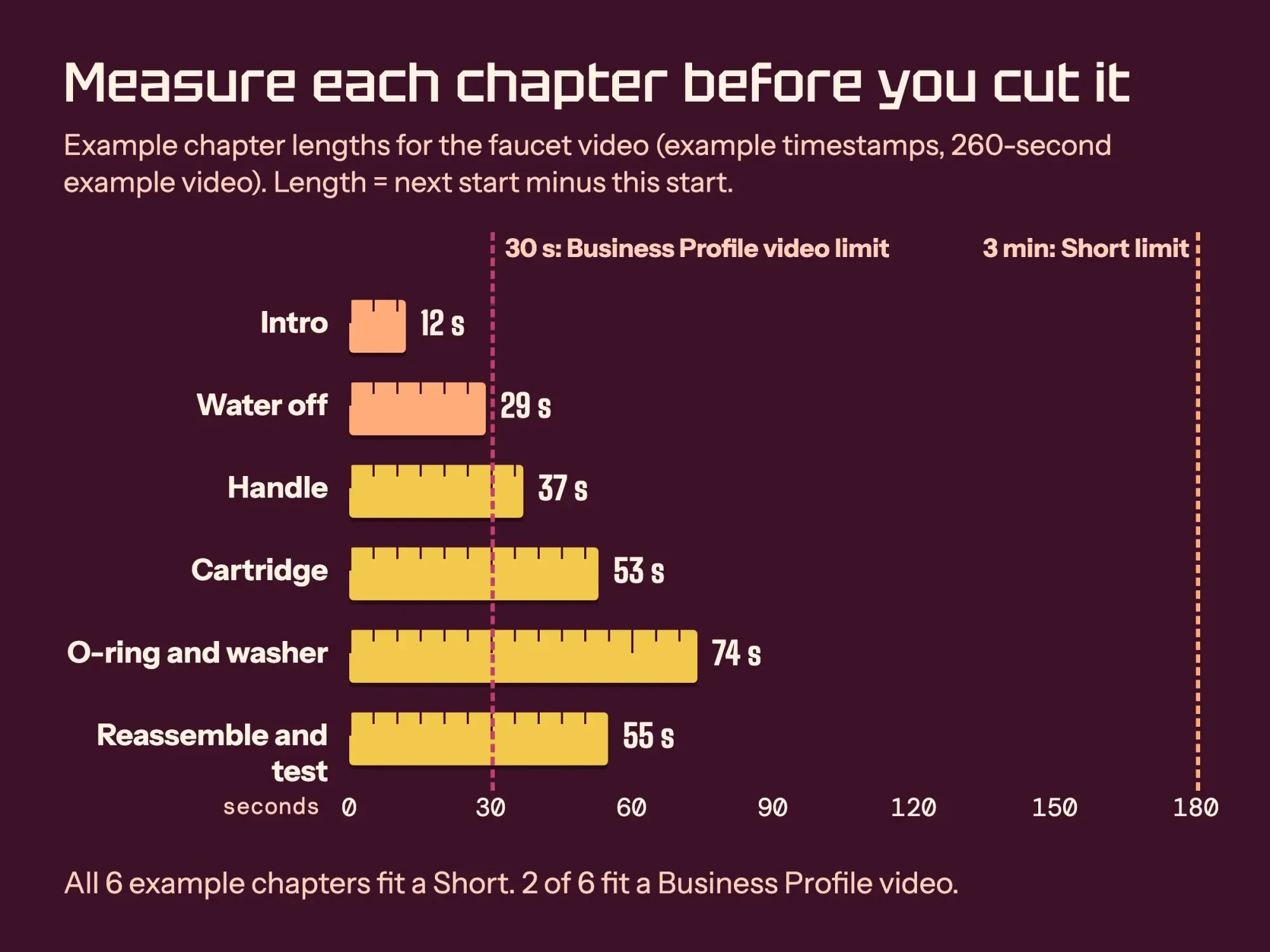 Diagram by DigitalTreed. Example chapter lengths from our test script (example timestamps, not a real video), against the Shorts and Business Profile limits.
That also settles where the video lives. If you embed your YouTube upload on a watch page you host, Google says it may index the video both on your web page and on YouTube's own page. Both can show in video features if they meet its indexing rules, so there's no need to pick YouTube or your site. Upload once. Embed it on the watch page, and keep the transcript right under the player. It's the setup we'd use for Saltmarsh Plumbing's faucet clip, since it costs nothing extra and keeps the words on the plumber's website.
Filmed first? Run the list backward.
Download the captions you've reviewed, tidy them into paragraphs with an H2 per chapter, and you've got a post. When you're picking the next topic, our keyword suggestions tool shows the questions people type. The social media content calendar template we built has a column for where each cut goes out.
Which to make first: our pick and the exceptions
So, back to the faucet. For Saltmarsh Plumbing, our made-up example, we'd write the post first. It takes fewer steps. Google can read it as it stands, and it hands you the script, the chapter titles and most of the transcript for the faucet video you shoot next.
Video goes first in three cases. The fix is hard to describe in words, like a stuck handle. Your buyers already find you on YouTube. Or a person on camera is the product, as with a contractor showing finished work. In those cases, film it first, then turn the reviewed captions into the post by running the five steps above in reverse order.
What we can't tell you is which format brings more customers to your business. We haven't read a primary study that measures it for small companies, and the vendor surveys that get quoted for this aren't a fair stand-in. Your own analytics will show it once both formats have run on a few topics. Our guide to ranking videos on YouTube shows where to read the video side.
Our take: start with the format you can finish this week, and cut the other from it before moving to a new topic. We make posts and videos for clients, so we're paid either way. For a price on one or both, ask through our quote form.
Frequently asked questions
Frequently asked
Can the same video sit on my blog post and on a watch page?
Yes. Google says it's fine to put one video on both a watch page and another page. Only the watch page can get the video result; the other can still be a text result.
What file can I upload as a Google Business Profile video?
Up to 75 MB at 720p or higher, per Business Profile Help, and it shows on Google only after you verify the profile.
Do I need special markup to show up in AI Overviews?
No. Google says there's no special schema.org markup for its AI features.
How we made this guide: Every quote here comes from the 12 pages in Sources, opened on October 28, 2026. A Python script then checked four test pages for a made-up plumber on 127.0.0.1. Facts checked by the DigitalTreed team on October 28, 2026.
First published April 2026. Rewritten October 28, 2026: now a sourced comparison with a local page test, in place of a promo for one video tool.
Sources
- Pew Research Center: Americans' Use of Social Media in 2026
- Pew Research Center: Many Turn to YouTube for Children's Content, News, How-To Lessons (2018)
- Pew Research Center: Google users are less likely to click on links when an AI summary appears (2025)
- Google Search Central: Video SEO best practices
- Google Search Central: Video structured data
- Google Search Central: AI features and your website
- YouTube Help: Use automatic captioning
- YouTube Help: Video chapters
- YouTube Help: Get started creating YouTube Shorts
- Google Business Profile Help: Manage your Business Profile photos and videos
- W3C Web Accessibility Initiative: Transcripts
- Nielsen Norman Group: How Users Read on the Web (1997)
Comments
No comments yet. Start the conversation below.