
Quick answer
YouTube thumbnail best practices start with the spec: a 16:9 JPG or PNG at 3840 x 2160 pixels, at least 640 wide. Show one clear subject, a few big words and nothing that isn't in the video. Then test up to 3 options with YouTube's built-in A/B Testing, which picks the winner by watch time.
Most guides still say 1280 x 720 and 2 MB. YouTube Help now recommends 3840 x 2160 pixels, and the file limit is 2 MB on mobile but 50 MB on desktop. This guide uses those current numbers.
It covers the thumbnail only: size, design, YouTube's own test and click-through rate. Titles, descriptions and search are in our guide to YouTube SEO for videos. We also checked which thumbnail sizes YouTube actually serves to viewers, on October 22, 2026.
Key takeaways
- Upload 16:9 at 3840 x 2160 if you can. YouTube asks for an image "as large as possible."
- You need a phone-verified channel to upload custom thumbnails.
- Viewers see small copies. In our check, YouTube served 5 copies, from 1280 x 720 down to 120 x 90 pixels.
- YouTube's A/B Testing tests up to 3 options and keeps the one with the most watch time, not the most clicks.
- YouTube says half of all channels and videos have an impressions CTR between 2% and 10%.
What is a YouTube thumbnail?
A YouTube thumbnail is the still image that stands for your video in search results, feeds and the embedded player. YouTube Help says thumbnails "let your audience view a quick snapshot of your content." You can pick an auto-made option or upload your own.
It matters because people see it before they decide to watch. Per YouTube's thumbnail and title tips, viewers "will first see your thumbnail and title" before they choose. Its tags help page calls the title, thumbnail and description "more important pieces of metadata" for discovery than tags.
YouTube thumbnail key facts
- An impression counts only after the thumbnail shows for more than 1 second with at least 50% on screen, per the YouTube impressions page.
- A YouTube A/B test compares up to 3 options and can take up to 2 weeks, per the YouTube A/B testing page.
- Half of all channels and videos have an impressions CTR between 2% and 10%, per the YouTube CTR FAQ.
- In our own check on October 23, 2026, the video length stamp sat 8 pixels in from the bottom-right corner of each result we measured. Our browser's YouTube region was India, not the US.
What is the right YouTube thumbnail size?
A YouTube thumbnail should be 16:9 at 3840 x 2160 pixels, with a minimum width of 640 pixels. These are the values in YouTube's custom thumbnail help page, read on October 22, 2026. The page says the image "should be as large as possible," because it also fills the embedded player.
| Item | Regular video | Short |
|---|---|---|
| Aspect ratio | 16:9 | 9:16 |
| Recommended size | 3840 x 2160 pixels | 2160 x 3840 pixels |
| Minimum | 640 pixels wide | 640 pixels tall |
| File type | JPG or PNG | JPG or PNG |
| File size limit | 2 MB on mobile, 50 MB on desktop | 50 MB on desktop (computer only) |
| Who can upload | Phone-verified channels | Phone-verified channels |
The table lists the specs from YouTube Help as of October 22, 2026. The old 1280 x 720 size still matters in one place: the A/B test, covered below.
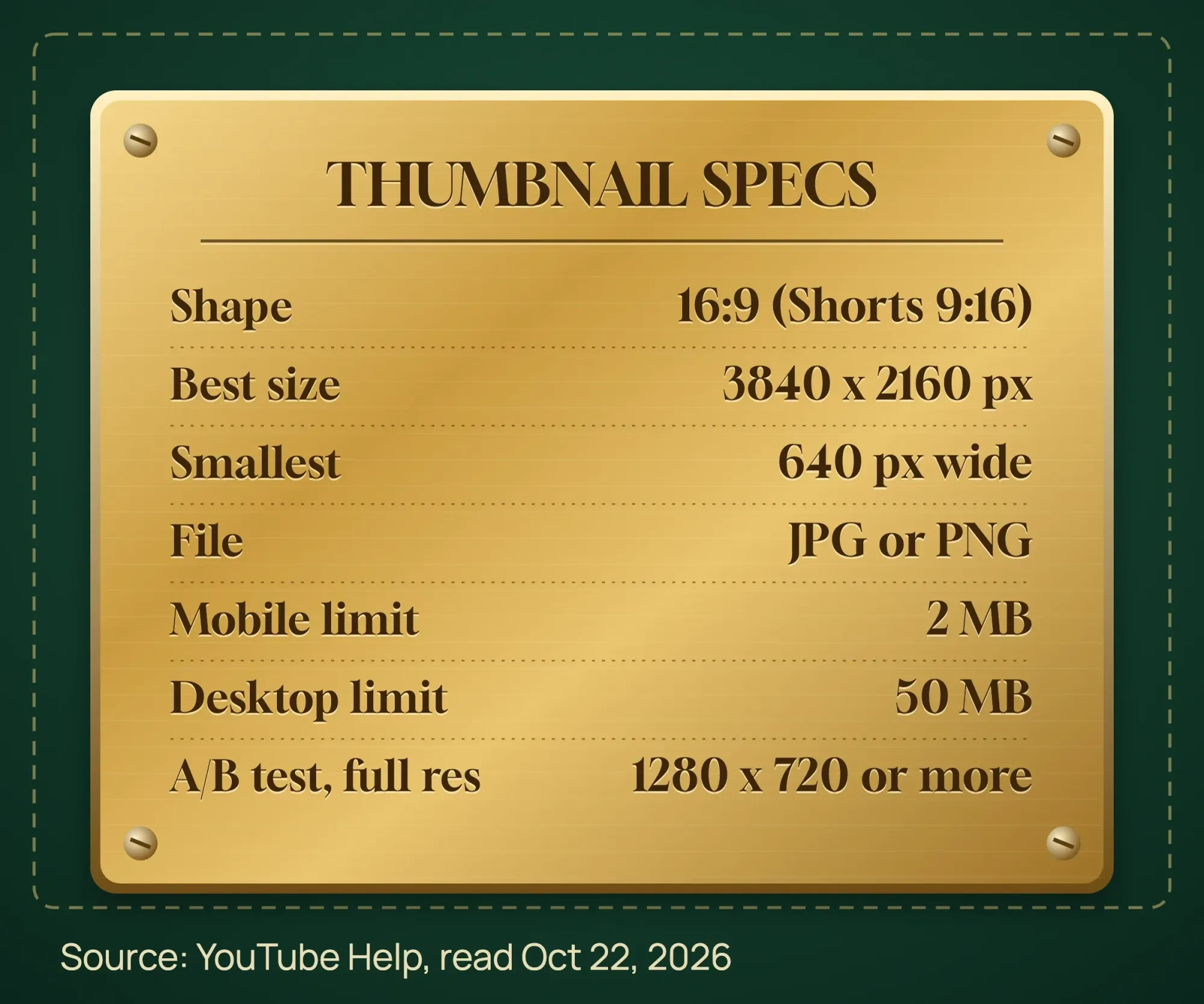 Source: YouTube Help, Add custom thumbnails and A/B test titles and thumbnails, read October 22, 2026.
Our take: design at 3840 x 2160, or at 1920 x 1080 if your design app stops there. The 1920 x 1080 size is our suggestion, not YouTube's. Export a JPG for photos.
If you upload from your phone, the file must be under 2 MB. Shrink a big JPG to a set size in KB with our free image compressor. It runs in your browser, so the photo isn't uploaded.
One catch for vertical videos: YouTube replaces a 16:9 custom thumbnail with an auto-generated 4:5 one on the home, explore and subscription pages. Use a 9:16 image for Shorts.
Why can't I upload a custom thumbnail?
Most often, your channel isn't verified yet. YouTube's feature access page lists custom thumbnails as an "intermediate" feature. To get it, "you must verify your phone number." Our business channel setup guide shows where to verify it.
YouTube's custom thumbnail help page points to two other causes: the daily upload limit, and trying to add a Shorts thumbnail from the phone app.
- Check it in YouTube Studio: Settings, then Channel, then Feature eligibility. You'll see "Enabled" next to features you have.
- If you see "Daily custom thumbnail limit reached," try again in 24 hours. YouTube limits uploads per channel per day.
- For a Short, add the thumbnail in YouTube Studio on a computer. The mobile app can't do it.
- After you save, wait. YouTube says changes "may take time" to appear.
What makes a good YouTube thumbnail?
A good thumbnail shows one clear idea that still reads at a small size. YouTube's thumbnail and title tips say "90% of the best-performing videos have custom thumbnails" but give no date or method. Treat that as YouTube's view, not a study.
- One subject, big. YouTube suggests the "rule of thirds" and warns that too much color and detail "can overwhelm" the eye.
- Text only if it adds something, in "a font that's easy to read." Our suggestion: 3 to 5 words.
- For new viewers, show a face or hands doing the work. For subscribers, YouTube says familiar features work.
- The same brand corner every time: your logo and your colors. Keep that look on your other apps too. Our social media plan template has a row for it. Never another company's logo.
- Take still photos during the shoot, so you have real options later.
- Let the thumbnail and title tell one story. Don't repeat the title word for word on the image.
What colors and fonts work best on a thumbnail?
Our take: high contrast and one plain, bold font work best. YouTube's tips say color "can help catch the eye, but too much can overwhelm it," so keep the palette simple. YouTube gives no contrast number, so borrow one from the web.
The W3C contrast guideline for websites asks for a contrast ratio of at least 4.5:1 for normal text and 3:1 for large text. The same contrast numbers apply to every graphic you make; our graphic design tips show 11 common color pairs we tested. A thumbnail isn't a web page, so treat this as a floor, not a YouTube rule.
Our suggestion: use one bold sans-serif font, white or yellow text on a dark band, or dark text on a light one. Skip thin script fonts. They vanish at small sizes. Like a thumbnail's type? Our guide to identifying a font from an image shows how to name it and whether a free version exists.
How small will viewers see it?
We downloaded the public thumbnail files YouTube serves for one YouTube Creators video and measured them on October 22, 2026. There were 5 copies: 1280 x 720, 640 x 480, 480 x 360, 320 x 180 and 120 x 90 pixels.
Our data: the 5 thumbnail sizes YouTube serves
| Public file name | Size in pixels | Shape | File size |
|---|---|---|---|
| maxresdefault.jpg | 1280 x 720 | 16:9 | 128,435 bytes (about 125 KB) |
| sddefault.jpg | 640 x 480 | 4:3, black bars | 48,612 bytes (about 47 KB) |
| hqdefault.jpg | 480 x 360 | 4:3, black bars | 29,034 bytes (about 28 KB) |
| mqdefault.jpg | 320 x 180 | 16:9 | 13,393 bytes (about 13 KB) |
| default.jpg | 120 x 90 | 4:3, black bars | 3,462 bytes (about 3 KB) |
The largest copy we found was 1280 x 720, even though YouTube asks for 3840 x 2160 uploads. We only checked these public files, so other screens, such as TVs, may get bigger ones.
Three of them, 640 x 480, 480 x 360 and 120 x 90, are 4:3. When we opened them, YouTube had added black bars above and below the 16:9 picture. So keep words and faces away from the edges.
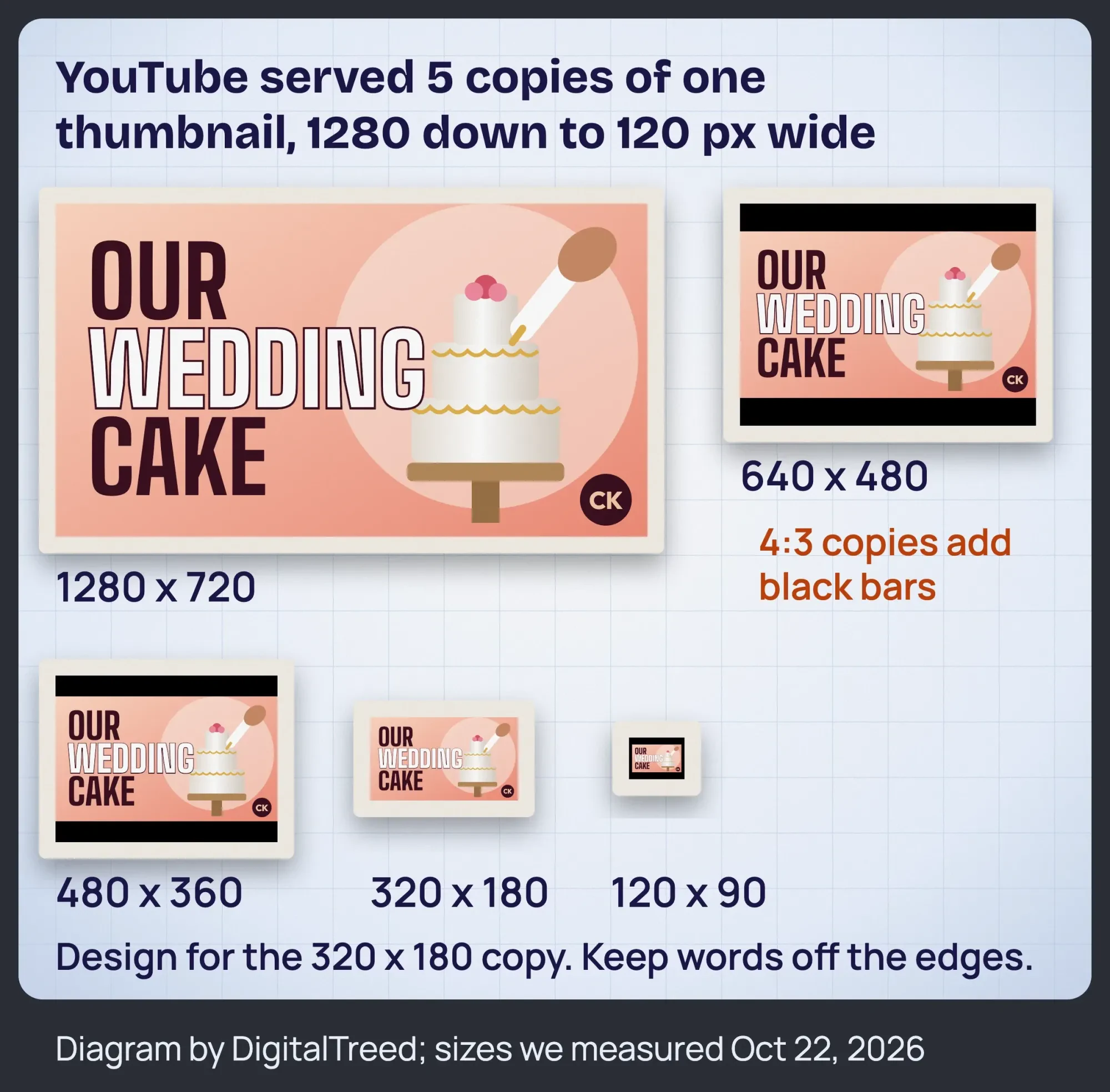 Diagram by DigitalTreed. Sizes from our download of one public YouTube Creators video's thumbnail files, October 22, 2026. The bakery is made up.
Try the squint test. Shrink your design to 320 x 180 pixels and look at it from arm's length. If you can't read the words or see the subject, cut words and zoom in.
Where should text and logos go on a YouTube thumbnail?
Keep text, faces and logos out of the bottom-right corner. In our own check, that is where YouTube showed the video length. Put a logo in the top-left corner instead, and keep words away from all edges.
We checked this on October 23, 2026. We searched YouTube for "how to decorate a wedding cake" in a desktop browser. On all 6 regular video results we could measure, the length stamp sat 8 pixels in from the bottom-right corner. It was about 38 x 20 pixels on a 437 x 245 thumbnail. This is our own observation, not a YouTube rule. Our browser's YouTube region showed India, not the US, so US pages may differ.
Cut-outs help a subject stand out. Our free AI background remover cuts you or your product out of a photo, right in your browser. Then place the cut-out on a clean color.
For the layout, a free design app is enough. As of October 22, 2026, Canva's pricing page lists Canva Free at US$0. Canva Pro is US$144 a year for one person, and Canva Business is US$250 a year per person. For a free editor with no sign-in, our free photo editor roundup covers Photopea and GIMP.
Designing thumbnails every week takes time. If you'd rather hand it off, our graphics and video team makes thumbnails and edits videos. You get a fixed quote first. (DigitalTreed sells this service.)
How to make a YouTube thumbnail, step by step
You can make a YouTube thumbnail in 7 steps with a phone photo and a free design app. The steps below put the specs and checks from this guide in order.
Make a YouTube thumbnail
- Pick one idea Choose one subject and 3 to 5 words that tell the same story as your title, without repeating it.
- Take the photo Take still photos during the shoot, as YouTube suggests, so you have real options.
- Cut out the subject Remove the background with a free tool, then place the subject on a plain, high-contrast color.
- Lay it out Set the canvas to 3840 x 2160 pixels. Add the words in one bold font and your logo top-left. Keep the bottom-right corner clear.
- Export it Save a JPG. If you will upload from your phone, shrink it under 2 MB.
- Do the squint test Shrink a copy to 320 x 180 pixels. If the words or subject are hard to read, simplify.
- Upload and test Add it in YouTube Studio, then test it against 1 or 2 other options with A/B Testing.
How to add a custom thumbnail in YouTube Studio
Add a custom thumbnail to a YouTube video
- Verify your channel Verify your phone number, then check that custom thumbnails show "Enabled" under Feature eligibility.
- Open the video Sign in to YouTube Studio, select Content from the left menu and open the video.
- Upload the image Below "Thumbnail," click Upload file and choose your JPG or PNG. Get suggestions offers auto-made options instead.
- Save and wait Click Save. The new thumbnail can take a while to show everywhere on YouTube.
These steps follow YouTube's steps for a computer. The same page mentions Ask Studio, an AI option that suggests thumbnails from your video's transcript.
How does YouTube's A/B Testing (Test & compare) work?
A/B Testing (some YouTube Help menus still say Test & compare) is YouTube's free built-in test for titles and thumbnails. Per YouTube's A/B testing help page, "Creators can test and compare up to 3 different titles and thumbnails."
Watch time decides the winner. YouTube says the option with the highest watch time "will be shown to all viewers" once the test ends. A thumbnail that gets clicks but makes people leave early won't win.
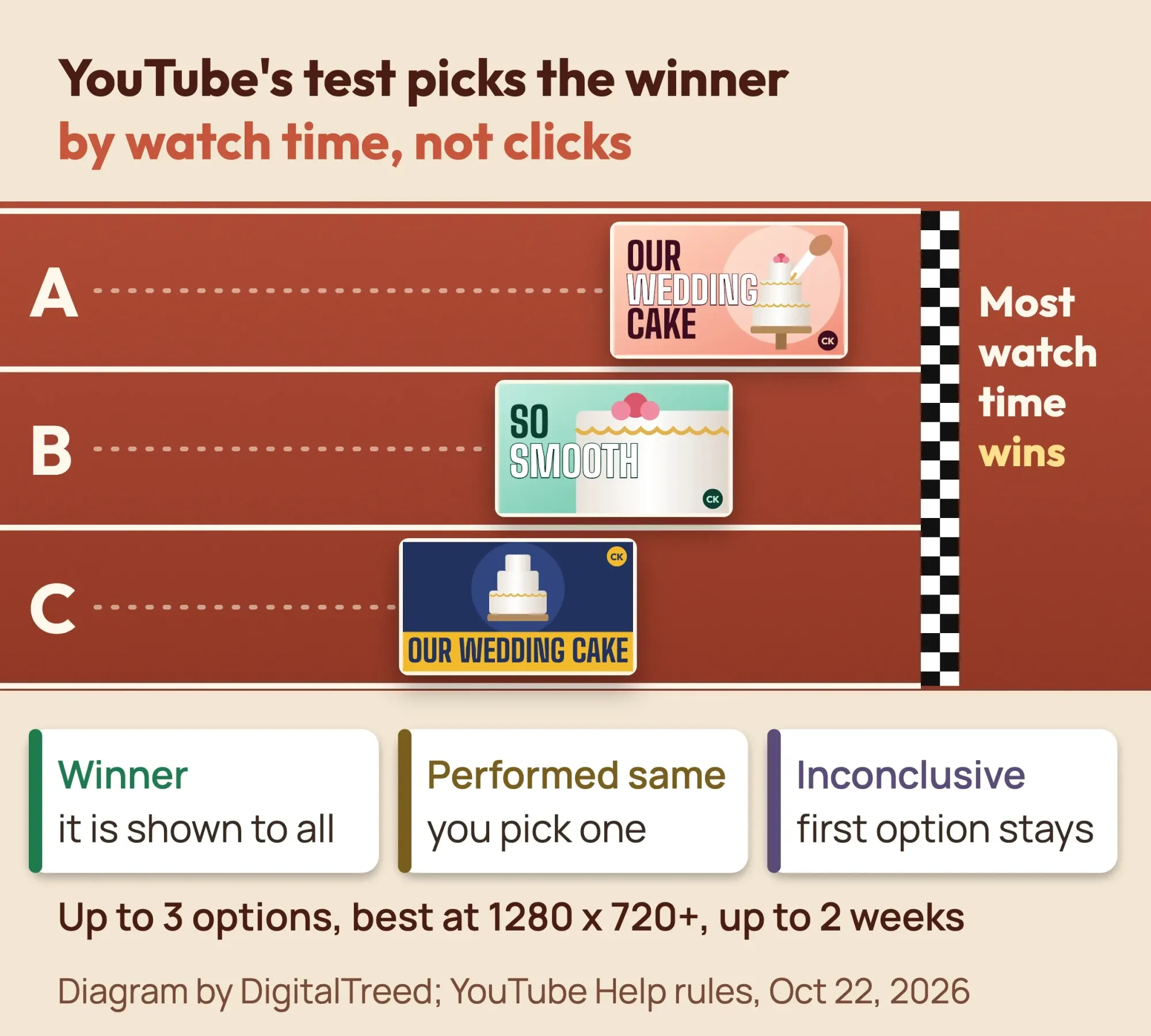 Diagram by DigitalTreed, based on YouTube Help, A/B test titles and thumbnails, read October 22, 2026.
- Pick an older video with steady views. YouTube recommends "testing older videos first."
- Make 2 or 3 clearly different thumbnails, each at least 1280 x 720. If any is smaller, YouTube scales all of them down to 854 x 480.
- In YouTube Studio on a computer, open the video. Under Thumbnail, click A/B Testing, choose Thumbnail only, upload your options and click Done.
- Don't edit the title or thumbnail while it runs. That stops the test.
- Wait. A test "can take a few days or up to 2 weeks."
- Read the result in Analytics, on the Reach tab, under "How your A/B test is going."
You'll see one of 3 results: Winner, Performed same or Inconclusive. YouTube says "It's normal not to receive a Winner test result." YouTube gives two reasons: options that look too alike, or not enough impressions. With no clear winner, the first option you uploaded stays.
You need advanced features turned on to use it. You also can't test Shorts, scheduled live streams, premieres, or videos that are made for kids, for mature audiences or private.
Is a YouTube thumbnail tester better than YouTube's own test?
Third-party thumbnail testers work differently. YouTube says many of them "run A/B tests sequentially" and "often only optimize for click-through rate," so results can differ. Our list of YouTube keyword and tag tools covers some of these apps.
What is a good click-through rate on YouTube?
There is no single good CTR. YouTube's impressions and CTR FAQ says: "Half of all channels and videos on YouTube have an impressions CTR that can range between 2% and 10%."
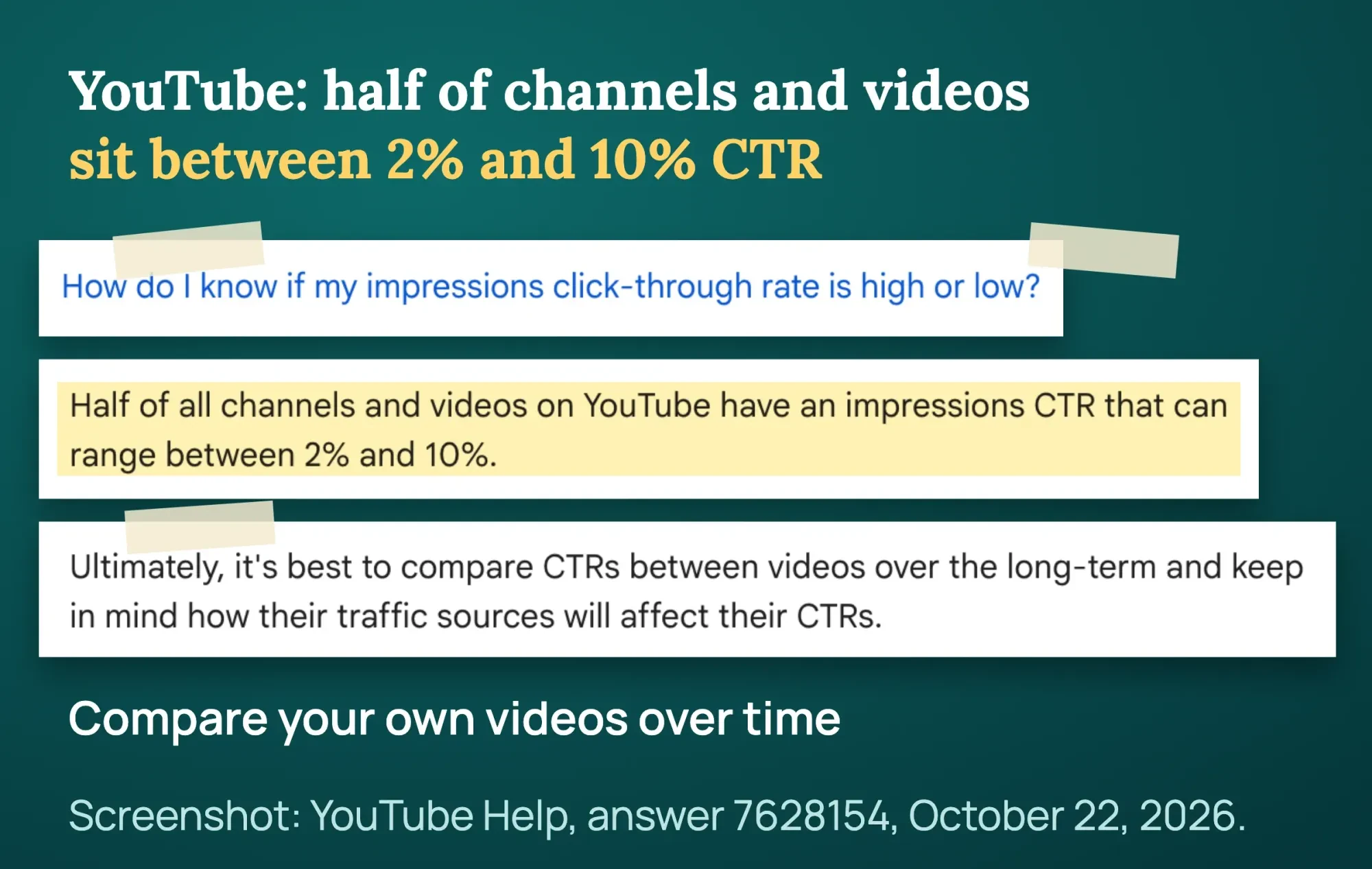 Screenshot: YouTube Help, Impressions and click-through-rate FAQs, October 22, 2026.
Impressions CTR is the share of thumbnail views that turned into video views. New videos and channels, videos with under 100 views and videos shown on the home page can sit outside that range. YouTube says that is natural.
An impression counts only when the thumbnail shows for more than 1 second with at least 50% of it visible, per YouTube's impressions help page. Links and embeds outside YouTube aren't counted. Neither are cards and end screens.
- Find it in YouTube Studio: Analytics, then the Content tab for the channel, or the Reach tab for one video.
- Read impressions, CTR, views and average view duration together. One number alone misleads.
- Compare a video with your own past videos that got similar traffic, not with a big channel.
- Don't judge in the first hours. YouTube's FAQ warns against "checking your click-through-rate immediately after uploading."
- Ignore small moves. They are not a reason to redo the design.
YouTube's tips page also suggests looking at CTR "in the first 24 hours" on Home and Suggested. YouTube adds: check it on videos with above-average impressions. Use it to compare videos, not to swap a thumbnail after a few hundred views.
One pattern means clickbait. YouTube says a thumbnail is likely clickbait if it gets "high CTR but low average view duration and lower than expected Impressions" in Analytics. The fix is a thumbnail that matches the video.
Views from your website and emails don't show up as impressions. Tag the links you share with our free UTM builder, so your own analytics shows where those viewers came from.
What gets a thumbnail removed?
YouTube's thumbnails policy bans thumbnails with nudity, violent or gory images, or vulgar language. It also bans any thumbnail "that misleads viewers to think they're about to view something that's not in the video."
Its spam and deceptive practices policy names "maliciously misleading" thumbnails as clickbait too.
For a first offense, you'll likely get a warning with no penalty. After that, YouTube's thumbnail rules say a rejected thumbnail can bring a strike. Repeat offenses may cost you custom thumbnails for 30 days, or even the account.
Custom thumbnails can also be turned off for some search results. The same YouTube Help page says YouTube does this when thumbnails are "considered inappropriate for viewers" in those results. Strikes also affect how many custom thumbnails you can upload each day.
Use only your own logo. The policy bans copying another brand's or person's branding to impersonate them, and YouTube "enforces trademark holder rights."
Use photos you took, licensed stock or images made in a design app. A picture from an image search may belong to someone else. The U.S. Copyright Office fair use page says fair use applies only "in certain circumstances," and suggests an attorney if you're unsure. This is general information, not legal advice; check with an attorney for your situation.
YouTube thumbnail best practices checklist
Check every thumbnail against this table before you publish. Each row gives the target and where it comes from, so you can cite or copy it.
| Check | Target | Source |
|---|---|---|
| Shape | 16:9 for videos, 9:16 for Shorts | YouTube Help: custom thumbnails |
| Size | 3840 x 2160 pixels; at least 640 wide | Same YouTube Help page |
| File | JPG or PNG; under 2 MB on mobile, 50 MB on desktop | Same YouTube Help page |
| Channel | Phone number verified | YouTube Help: feature access |
| Text | 3 to 5 words in a font that's easy to read | Our suggestion; YouTube Help: tips |
| Contrast | At least 4.5:1, or 3:1 for large text | W3C web guideline (not a YouTube rule) |
| Small size | Readable at 320 x 180; nothing key near the edges | Our check, October 22-23, 2026 |
| Bottom-right corner | Clear of text and logos (video length stamp) | Our own check (India region), October 23, 2026 |
| Honesty | Shows only what is in the video | YouTube Help: thumbnails policy |
| A/B test | 2 or 3 different options, each 1280 x 720 or larger | YouTube Help: A/B testing |
| After launch | Compare CTR with your own past videos, not in the first hours | YouTube Help: CTR FAQ |
Use it as a free template. Copy the table into a document and tick each row for every new video.
Example: a bakery's first thumbnail test
Example: Copper Kettle Bakery is a made-up 6-person bakery in Columbus, Ohio. It posts a video called "How we decorate a wedding cake" to get more cake orders.
Its owner exports a 3840 x 2160 JPG at 1.4 MB. It shows the finished cake, a baker's hands, 3 words and the logo in the top-left corner. On day 1, Studio shows a few hundred impressions, so the owner waits.
In week 3, the owner runs a thumbnail-only A/B test. Option A is the finished cake. Option B is a close-up of piping with a smiling face. After 12 days, the result is Inconclusive, so option A stays. The next test uses 2 options that differ much more.
Mistakes to avoid
- Uploading 1280 x 720 because an old guide said so. It works, but YouTube now asks for 3840 x 2160.
- Adding a thumbnail under 1280 x 720 to an A/B test, so every option is scaled down.
- Trying to upload before your phone number is verified.
- Showing something that never happens in the video.
- Using a celebrity photo or another brand's logo you have no rights to.
- Changing the thumbnail while a test runs. The test stops.
- Using a 16:9 thumbnail on a vertical video and expecting it on the home page.
Thumbnails are one part of a channel plan. Our YouTube marketing strategy for small business lays out what to post and when.
Frequently asked
What is the best size for a YouTube thumbnail?
YouTube recommends 3840 x 2160 pixels at 16:9, with a minimum width of 640. Use JPG or PNG. The file limit is 2 MB on mobile and 50 MB on desktop.
Can I add a custom thumbnail to a YouTube Short?
Yes, from YouTube Studio on a computer, with a verified channel. YouTube recommends a 9:16 image at 2160 x 3840 pixels.
Does YouTube's A/B test pick the thumbnail with the most clicks?
No. It keeps the option with the most watch time. YouTube says it optimizes tests for watch time over click-through rate.
Why is my YouTube thumbnail blurry?
One likely cause is an image that is too small. YouTube asks for 3840 x 2160 pixels. Also, if any option in an A/B test is under 1280 x 720, YouTube scales every option down to 854 x 480. New thumbnails can take time to show everywhere.
Can a YouTube thumbnail be 1920 x 1080?
Yes. It is 16:9 and wider than the 640-pixel minimum, so YouTube accepts it. YouTube recommends 3840 x 2160, so go larger if your design app allows it.
Do thumbnails affect YouTube search?
Yes, indirectly. YouTube says the title, thumbnail and description are more important for discovery than tags. Our take: a thumbnail that gets clicks and keeps viewers watching helps the video reach more people.
Can I change the thumbnail on an old video?
Yes, at any time in YouTube Studio. YouTube even recommends experimenting with updating older thumbnails. Just don't change one while an A/B test is running on it.
Is a free thumbnail tester as good as YouTube's test?
Not usually. YouTube's test shows all options at the same time to real viewers and judges by watch time. Many outside tools test one after another and look at clicks only.
Your next step
Open your 3 most-viewed videos and shrink each thumbnail to 320 x 180. Redo any you can't read, then run an A/B test on the oldest one.
If you want thumbnails made for you, our graphics and video design service can design them to these specs. You get a fixed quote first.
How we made this guide: it's built from YouTube Help pages and the YouTube Creators site, the U.S. Copyright Office and Canva's pricing page. On October 22, 2026, we downloaded the public thumbnail files for one YouTube Creators video and measured each one. We checked every number against the source linked next to it the same day. Updated October 23, 2026: added what a thumbnail is, key facts, and colors and fonts. We also added the 5 sizes YouTube serves, where text and logos go and step-by-step making. A best practices checklist, turned-off thumbnails and 3 FAQs are new too.
First published July 2023. Rewritten October 2026: current YouTube specs (3840 x 2160, and 2 MB on mobile vs 50 MB on desktop) and phone verification. We added YouTube's built-in A/B Testing, its own CTR range, the thumbnails policy and our check of the sizes viewers see. The Facebook and Instagram parts were removed.
Sources
- YouTube Help: Add custom thumbnails on YouTube
- YouTube Help: Thumbnail and title tips
- YouTube Help: A/B test titles and thumbnails
- YouTube Help: Learn about feature access for YouTube Creators
- YouTube Help: Check your YouTube thumbnail impressions and watch time
- YouTube Help: Impressions and click-through-rate FAQs
- YouTube Help: Thumbnails policy
- YouTube Help: Spam and deceptive practices policy
- YouTube Creators: Optimize and evolve your content
- YouTube Help: Add tags to your YouTube videos
- W3C: Understanding Success Criterion 1.4.3, Contrast (Minimum)
- U.S. Copyright Office: Fair Use Index
- Canva: Pricing (vendor)


Comments
No comments yet. Start the conversation below.