
Quick answer
YouTube SEO is setting up each video so the right people find it in YouTube search and in Google. Pick one phrase a customer would type. Put it in the title and the first lines of the description. Add chapters and edited captions. Then check which search terms brought viewers after 28 days.
Most of the work is typing the right words in the right boxes. YouTube says its search weighs relevance, engagement and quality, and the boxes you fill in drive the first one.
This guide is the upload checklist. It sits under our YouTube marketing strategy for small business, which covers what to film and how often. It also covers the part most YouTube SEO guides skip: how your videos show up in Google.
Key takeaways
- YouTube ranks search results on relevance, engagement and quality. Your title, description and video content decide relevance.
- Titles can be 100 characters and descriptions 5,000. Viewers see the first lines of the description first.
- Chapters need a 00:00 start, at least 3 timestamps and 10 seconds each. Google can show them as key moments.
- YouTube says tags play "a minimal role." Use them only for common misspellings.
- In our check, a YouTube watch page already carried VideoObject markup for Google. You only add schema on your own site.
What is YouTube SEO?
YouTube SEO is the work that helps a video come up when someone searches. It covers the words you choose, the title, description, chapters, captions and thumbnail, and how you check results.
There are two places to be found. One is YouTube search inside the app. The other is Google, which can show video results from YouTube and from your own site. This guide covers both, in upload order.
New to search engines? Our SEO for beginners guide explains how Google search works first.
YouTube SEO key facts
- 84% of U.S. adults say they ever use YouTube, in Pew Research Center's 2026 survey, run January 30 to June 18, 2026. To see where YouTube fits next to Facebook, Instagram and Nextdoor, use our social media marketing strategy for small businesses.
- Titles can be 100 characters and descriptions 5,000, per YouTube Help.
- Chapters need at least 3 timestamps from 00:00, each 10 seconds or longer, per YouTube's chapters page.
- A video with more than 60 hashtags has all of them ignored, per YouTube's hashtags page.
- Google needs 3 VideoObject properties: name, thumbnailUrl and uploadDate, per Google's video markup page, updated September 24, 2026.
- On October 22, 2026, the YouTube watch page we checked already carried VideoObject markup for Google.
How does YouTube search rank videos?
How YouTube Works names 3 elements: relevance, engagement and quality. For relevance, it checks "how well the title, tags, description, and video content match your search query."
- Relevance: your words and your video match the search.
- Engagement: signals such as "the watch time of a particular video for a particular query."
- Quality: whether the channel shows "expertise, authoritativeness, and trustworthiness" on the topic.
Results also depend on the viewer's own search and watch history, if they have it on. So two people can see different results for the same search. YouTube also says it doesn't accept payment for better organic placement.
Our take: you control relevance directly. Engagement and quality follow from answering the question early and well, which is why the steps below start with the words people use.
Does YouTube SEO help beyond search?
Yes, but search is only one way in. YouTube's traffic source report also counts Browse features, such as the Home feed and subscriptions, plus Suggested videos, playlists and end screens.
For recommendations, How YouTube Works says it uses viewing behavior, likes, dislikes, subscriptions and feedback, including from satisfaction surveys. It also weighs the reputation and quality of a channel.
Our take: the same habits help everywhere. Write a clear title, answer the question early, and make a video people finish.
How do you find what people search on YouTube?
Look where YouTube shows real searches: the suggestions in its search box, the Trends tab in YouTube Studio and the search report in YouTube Analytics. All 3 are free.
Start with one phrase a customer would type, such as "how to drain a water heater." Here is what each one shows:
- YouTube's own search box. Type the start of your topic and read the suggestions.
- The Trends tab in YouTube Studio (some YouTube Help pages still call it the Research tab). YouTube Help says it shows what your audience and viewers across YouTube are searching for.
- The YouTube search report in Analytics, once your videos have views. It lists the terms viewers searched before finding you.
The Trends tab also flags a "content gap," which YouTube defines as a search where viewers "can't find enough quality search results" on YouTube. For a small business, that is a ready-made video idea.
To see many suggestions at once, run your seed phrase through our free keyword suggestion tool with YouTube as the source. For paid options, see our list of YouTube keyword and tag generator tools. For search volume on Google, our Google Keyword Planner guide shows the free way.
How do you write a title and description that get found?
Put the phrase people search at the start of the title. Then answer the question in the first lines of the description. Write a new one for every video, and link to the matching page on your site.
YouTube's video settings help sets 2 limits: "Video titles have a character limit of 100 characters" and descriptions 5,000. Most good titles are much shorter. Put the search phrase first and the benefit after it.
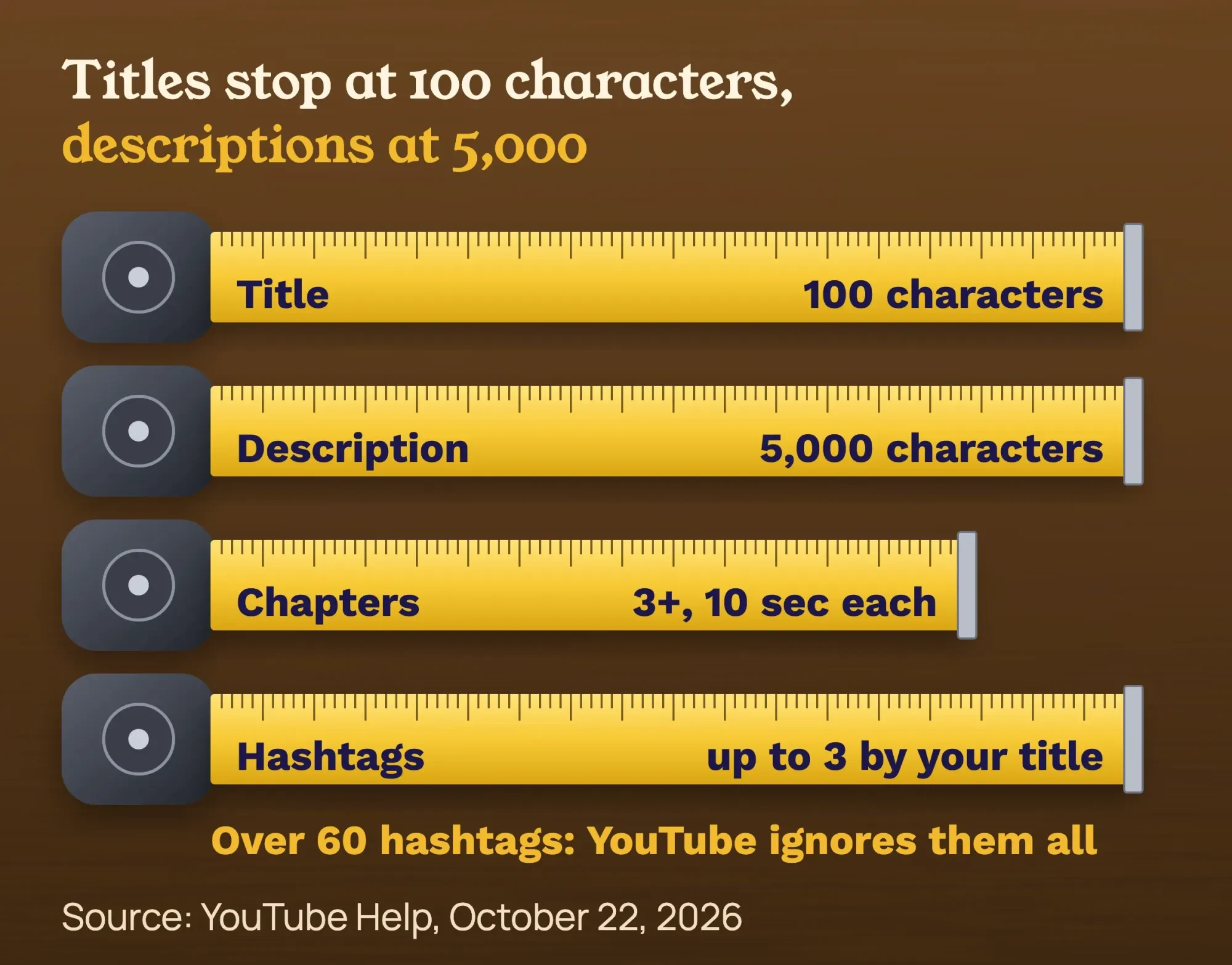 Source: YouTube Help, checked October 22, 2026. Diagram by DigitalTreed.
Follow YouTube's tips for video descriptions:
- Use the first few lines to describe the video, because viewers see them first.
- Pick 1 or 2 main words and use them in both the title and the description.
- Write a unique description for each video. Copy-paste descriptions are harder to find.
- Fill in the default description once with your address, phone and hours, so every upload carries them. Paid to review a product? Disclose it in the video and above the first link, as our guide to making honest affiliate review videos shows.
- Link to the matching page on your site, such as the service page for the job in the video.
Tag that link with our free UTM builder so your analytics shows visits from YouTube by video. Affiliate links in the description need a label next to each one; see our guide to placing and labeling affiliate links. Keep titles honest. The YouTube spam policy bans "maliciously misleading titles, thumbnails, descriptions" that don't deliver.
YouTube counts the thumbnail, with the title and description, as more important than tags. Design, testing and click-through rate have their own guide: YouTube thumbnail best practices.
How do you add YouTube chapters that show up?
Chapters split a video into labelled parts on the progress bar. You add them by typing timestamps in the description. The YouTube chapters help page sets the rules:
- The first timestamp starts with 00:00.
- List at least 3 timestamps in ascending order.
- Each chapter is at least 10 seconds long.
- Put each timestamp and its label on its own line. That one is Google's rule for key moments.
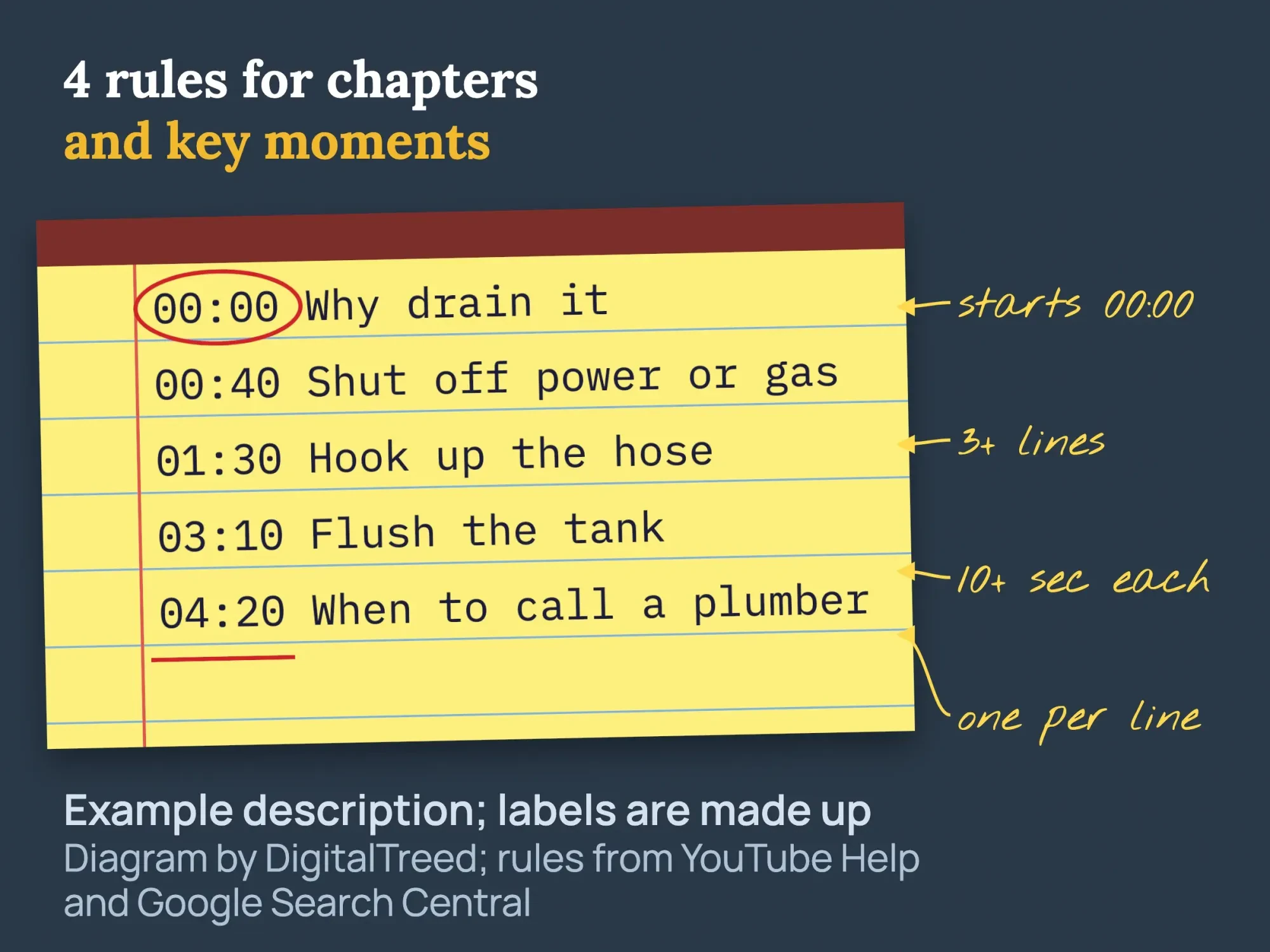 Diagram by DigitalTreed with a made-up example description; rules from YouTube Help and Google Search Central.
If chapters still don't show, check three more things. YouTube Help says you may first need access to Advanced features. YouTube turns chapters off when the channel has an active strike, or when the content may not suit some viewers. Your own timestamps also replace the automatic chapters YouTube adds by default.
00:00 Why drain it
00:40 Shut off power or gas
01:30 Hook up the hose
03:10 Flush the tank
04:20 When to call a plumber
Chapters also help in Google. It can use the same lines as key moments in search, which we cover in the Google section below.
Do captions help YouTube SEO?
Captions help people watch. YouTube Help says captions help you reach a larger audience, "including deaf or hard-of-hearing viewers" and people who speak other languages. It does not call them a ranking factor, and we won't either.
Automatic captions are a start, not a finish. YouTube's automatic captions page says they can misrepresent speech "due to mispronunciations, accents, dialects, or background noise," and to always review them. Check trade words, such as "anode rod," with extra care.
There is also a US access reason. The Justice Department's web guidance under the Americans with Disabilities Act lists "No captions on videos" as a barrier for people with hearing disabilities. This is general information, not legal advice; check with an attorney for your situation.
Filming, editing, captions and chapters are the slowest part of video for most owners. If you'd rather hand that off, our graphics and video team can edit and prepare each upload with these steps done. (DigitalTreed sells this service.)
Do YouTube tags still matter?
Barely. YouTube's tags help page says the title, thumbnail and description are "more important pieces of metadata" for discovery. It adds that "tags play a minimal role in your video's discovery."
Our old version of this post said tags help YouTube understand your video. That was wrong, and we corrected it on October 22, 2026. Tags are useful in one case: when your topic is often misspelled. Add the misspelling and move on.
Hashtags are a different thing. The YouTube hashtags page says up to 3 can show by your title. If a video has more than 60, YouTube ignores every one, and over-tagging can get the video removed from search.
How do playlists and end screens help?
They keep a viewer watching your videos after the first one ends. YouTube's reach report counts playlists and end screens as traffic sources, so you can see the views each one brings.
In YouTube Studio, each playlist gets its own title of up to 150 characters, per YouTube's playlist help page. Its description can run to 5,000 characters. Name the playlist with the phrase people search, such as "Water heater repair videos."
Each description can point to them too. YouTube's description tips suggest linking to playlists of related videos.
End screens work the same way. YouTube's end screens help page says they sit in the last 5 to 20 seconds of a video. A standard 16:9 video can show up to 4 elements, and it must be at least 25 seconds long. Point one element to your next how-to video or a playlist.
Does your channel page matter for YouTube SEO?
It matters for people who click through to your channel. Haven't set up the channel yet? Start with how to create a YouTube channel for business, then come back for titles and descriptions. YouTube's channel profile help lets you set a name, handle, description, links and a business email.
You can show up to 14 links, and the first one appears near the Subscribe button. Put your website first, and name your service area in the channel description.
How do you rank YouTube videos in Google search?
Google can show a YouTube video in its results from the video's YouTube watch page. The watch page we checked already carried video markup, so your part is a clear title, description and thumbnail, plus timestamps for key moments.
You don't add schema to YouTube. YouTube does it for you. On October 22, 2026, we fetched the HTML of a public YouTube Creators video page and searched it for structured data.
That page carried schema.org VideoObject markup with the video's name, description, duration, thumbnail, embed address and upload date. The name was the title typed in YouTube Studio, and the description was the start of the Studio description.
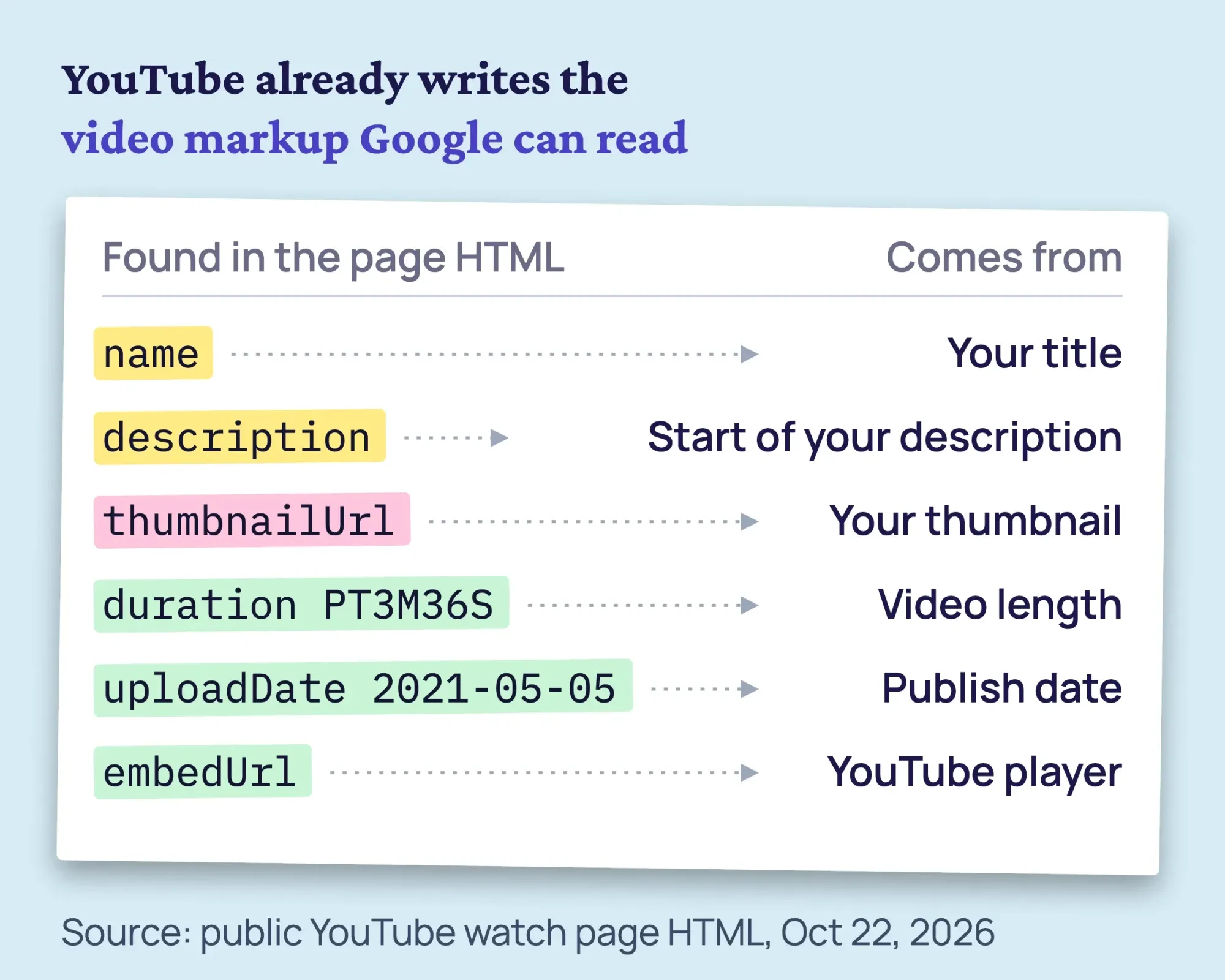 Source: HTML of a public YouTube watch page (YouTube Creators), fetched October 22, 2026.
So your Studio fields fill the markup Google can read. Timestamps help here too. Google's video structured data page says it may enable key moments from your YouTube description. When you list timestamps yourself, "we will prefer that information."
Google Search also tries to detect key moments on its own, its video SEO best practices say. To opt out of key moments on your own pages, Google says to use the nosnippet meta tag.
Should you put your videos on your own website?
Yes, for your visitors. Embed each how-to video on the matching service page or blog post. Don't expect that page to rank as a video result in Google.
Google indexes a video only on a watch page, a page whose main purpose is that one video. Its watch page rules list "A blog post that reviews an embedded video" as an example of a page that isn't one. The watch page itself must be indexed and doing well in Search.
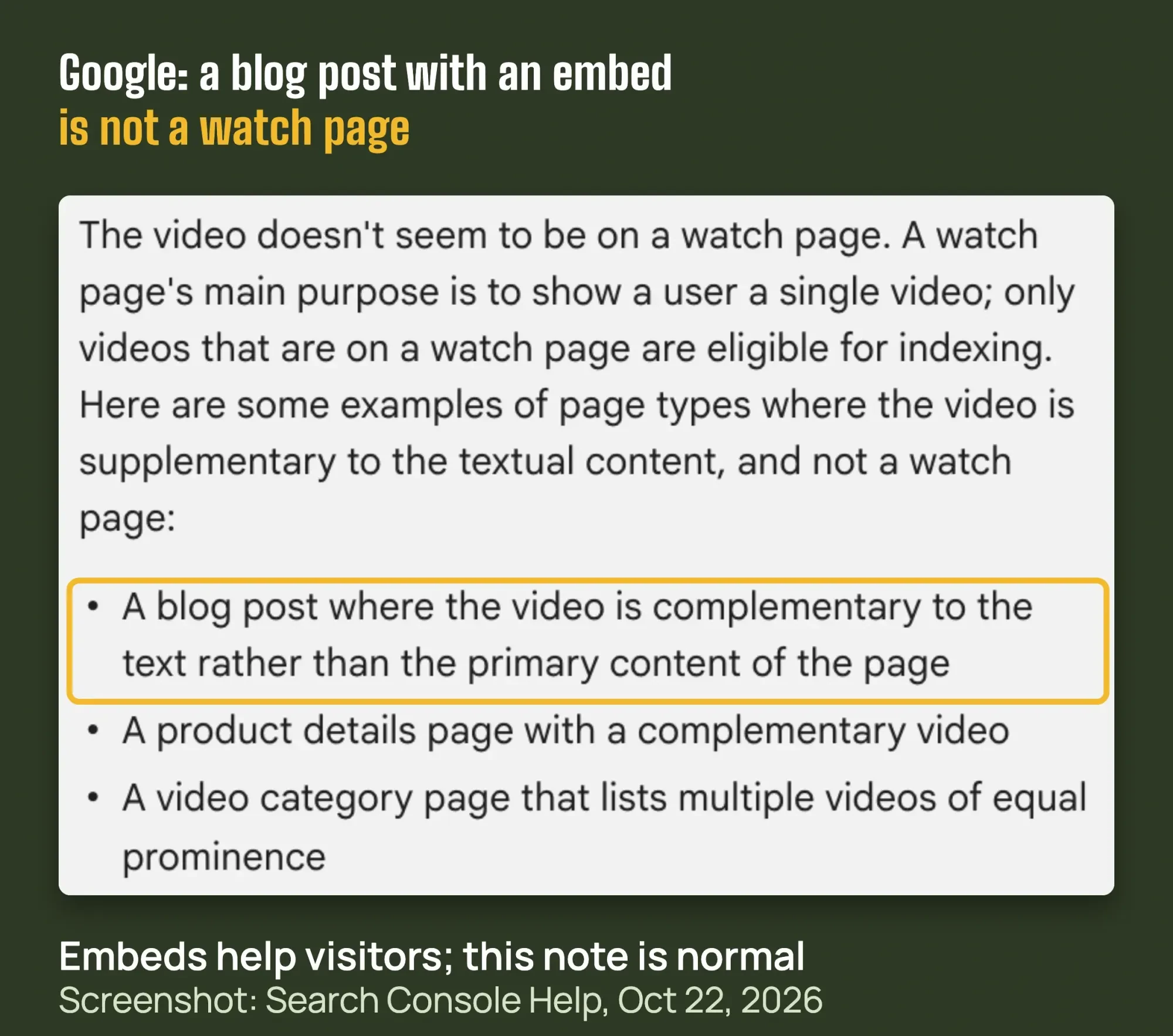 Screenshot: Google Search Console Help, Video indexing report page, October 22, 2026.
If you want 2 or 3 key videos to rank in Google on your own domain, give each its own watch page. Use one video as the main content, with a unique title and description. Then take these 4 steps:
Set up a watch page for one video
- Add VideoObject markup Google's video structured data page lists 3 required properties: name, thumbnailUrl and uploadDate. Add embedUrl, description and duration too.
- Test the markup Google says to validate it with the Rich Results Test and fix any critical errors.
- List it in a video sitemap A video sitemap helps Google find video content, especially new videos. Google's page shows how to list a YouTube embed.
- Watch the Video indexing report In Google Search Console, it shows which pages have an indexed video and why others didn't make it.
The VideoObject documentation gives the property list. Google's video sitemap guide shows the YouTube embed example. Our Rich Results Test guide walks through the test, and our free schema markup validator checks the JSON-LD before you publish.
Expect "Video isn't on a watch page" in the Video indexing report for every blog post with an embed. That is normal, not an error to fix. Our Google Search Console guide shows where the report lives.
What are the YouTube SEO best practices for every upload?
Pick one search phrase, put it first in the title, answer it in the description, add chapters, edit captions and skip tag stuffing. The checklist below puts each step next to its limit and its source, so you can check every upload against it.
| Step | Limit or rule | What to do | Source |
|---|---|---|---|
| 1. Search phrase | None | Pick one phrase from the search box, the Trends tab or your search report. | YouTube Help: Trends tab |
| 2. Title | Up to 100 characters | Put the phrase first, then the benefit. No bait. | YouTube Help: video settings |
| 3. Description | Up to 5,000 characters | Answer in the first lines. Write a new one for each video. Set a default description with your address, phone and hours. | YouTube Help: descriptions |
| 4. Chapters | 00:00 first, 3 or more timestamps, 10 seconds or longer each, in order | Type them in the description, one per line. | YouTube Help: chapters |
| 5. Captions | Automatic captions can get words wrong | Read them and fix names and trade words. | YouTube Help: automatic captions |
| 6. Tags | "A minimal role" in discovery | Add common misspellings only. | YouTube Help: tags |
| 7. Hashtags | Up to 3 show by the title; over 60 and all are ignored | Use 1 to 3. | YouTube Help: hashtags |
| 8. Playlist | Title up to 150 characters | Add the video to a topic playlist named with the search phrase. | YouTube Help: playlists |
| 9. End screen | Last 5 to 20 seconds; video 25 seconds or longer; up to 4 elements | Point to your next video or a playlist. | YouTube Help: end screens |
| 10. Your website | A blog post with an embed is not a watch page | Embed for visitors. Build a watch page only for 2 or 3 key videos. | Google Search Central: watch pages |
| 11. After 28 days | The search report lists the terms viewers used | Add missing phrases to the description, or make the next video. | YouTube Help: reach report |
Use it as a free template. Copy the table into a document and tick each row before you publish.
Example: a plumber in Mesa, Arizona
Example: Sun Valley Plumbing is a made-up 4-person plumber in Mesa, Arizona. The owner wants more calls for water heater jobs. YouTube autocomplete suggests "how to drain a water heater," so that becomes the video.
Its title reads "How to drain a water heater (and when to call a plumber)," 56 characters. The first description line answers the question. The second links to the water heater service page with a UTM tag. The default description adds the address and phone.
Five chapters start at 00:00, as in the code block above. The owner fixes the automatic captions where "anode rod" came out wrong. The only tag is the misspelling "hot water heator," plus 2 hashtags.
The video is embedded on the water heater service page for visitors, not as a watch page. After 28 days, the YouTube search report shows a new phrase, which becomes the next video. These details are illustrative, not client results.
Mistakes that hold videos back
- Spending 20 minutes on tags or a "tag generator." YouTube says they play a minimal role.
- Using more than 60 hashtags, so YouTube ignores all of them.
- Starting chapters at 00:05 or making one under 10 seconds, so none show.
- Clickbait titles or thumbnails, which break the spam policy.
- Pasting the same description on every video.
- Publishing automatic captions without reading them.
- Buying views or flooding comments with links. YouTube's spam policy bans rewards for views and inorganic promotion.
- Expecting a blog post with an embed to rank as a Google video result.
How do you know it's working?
Wait about 28 days, then open YouTube Analytics and the Reach tab. YouTube's reach report help says "The YouTube search report shows you what terms viewers searched when they found your content."
Read that list for each video. If people found you with a phrase that isn't in your description, add it. If a phrase brings views but your video only half answers it, that is your next video.
There is no YouTube timeline for search results, so we won't promise one. Check monthly and change one thing at a time.
How do you check if viewers keep watching?
YouTube's audience retention help says to open the report on a video's Overview or Engagement tab in YouTube Studio. Its Intro figure shows the share of viewers still watching after the first 30 seconds.
A high Intro figure can mean the first 30 seconds matched the title and thumbnail, YouTube says. Dips show parts viewers skipped or where they stopped watching. YouTube highlights these moments only on videos at least 60 seconds long with at least 100 views.
The data takes 1 to 2 days to process. If many viewers leave early, answer the question sooner in your next video.
Frequently asked
Do YouTube tags still matter?
Very little. YouTube says tags play "a minimal role" in discovery. Use them for common misspellings of your topic, and spend the time on your title and description instead.
How long can a YouTube title and description be?
Up to 100 characters for the title and 5,000 for the description, per YouTube Help. Put your search phrase early in both, since the first lines show first.
Why aren't my YouTube chapters showing?
Check that the first timestamp is 00:00, there are at least 3, each chapter is 10 seconds or longer, and they run in order. An active strike also turns chapters off.
Can my YouTube video show up in Google?
Yes. The YouTube watch page we checked already carried VideoObject markup, and Google can show key moments from your description timestamps. Good Studio fields are the main job.
Do captions help my video rank?
YouTube doesn't call captions a ranking factor. They help deaf and hard-of-hearing viewers and people who speak another language. Always edit automatic captions before you rely on them.
Is YouTube SEO worth it for a small business?
Yes, if your customers look for how-to answers. In Pew Research Center's 2026 survey, more than 8 in 10 U.S. adults say they ever use YouTube. YouTube Help also calls YouTube "one of the largest search engines in the world."
Does YouTube help my website's SEO?
Only partly. A YouTube video ranks in Google as a YouTube page, not as your page. Google says a blog post with an embedded video isn't a watch page. To rank a video on your own domain, give it its own watch page.
How long does YouTube SEO take?
YouTube gives no timeline. Retention data takes 1 to 2 days to process, per YouTube Help. We suggest reading the YouTube search report after about 28 days, then changing one thing at a time.
Your next step
Open your most-watched how-to video in YouTube Studio today. Rewrite the first 2 lines of its description to answer the question, add chapters from 00:00, and check the captions.
If you'd rather have someone film and edit your videos, our video production team can do it. You get a fixed quote first.
How we made this guide: we built it from YouTube Help, How YouTube Works and Google Search Central. We also used Search Console Help and the Justice Department's ADA guidance, with sources linked at each claim. On October 22, 2026, we fetched a public YouTube watch page's HTML to see its VideoObject markup and took the Search Console Help screenshot. We checked every quote and number against its source the same day. Updated October 23, 2026: added key facts, YouTube beyond search, playlists, end screens and the channel page. We also added an upload checklist, the audience retention report and 3 FAQs.
First published July 2023. Rewritten October 22, 2026: YouTube's ranking factors, the tags correction, title, chapter and hashtag limits, captions, our markup check and Google's watch-page rules.
Sources
- How YouTube Works: Search
- YouTube Help: Add tags to your YouTube videos
- YouTube Help: Edit video settings
- YouTube Help: Tips for video descriptions
- YouTube Help: Video chapters
- YouTube Help: Add subtitles and captions
- YouTube Help: Use automatic captions
- YouTube Help: Find playlists and videos using hashtags
- YouTube Help: Spam, deceptive practices and scams policies
- YouTube Help: Understand your YouTube video reach
- YouTube Help: Explore trends on YouTube
- Google Search Central: Video SEO best practices
- Google Search Central: Video (VideoObject) structured data
- Google Search Central: Video sitemaps
- Search Console Help: Video indexing report
- U.S. Department of Justice: Guidance on Web Accessibility and the ADA
- How YouTube Works: Recommendations
- YouTube Help: Manage playlists in YouTube Studio
- YouTube Help: Add end screens to videos
- YouTube Help: Manage your YouTube channel's profile
- YouTube Help: Measure key moments for audience retention
- Pew Research Center: Americans' Use of Social Media in 2026
Comments
No comments yet. Start the conversation below.