
Quick answer
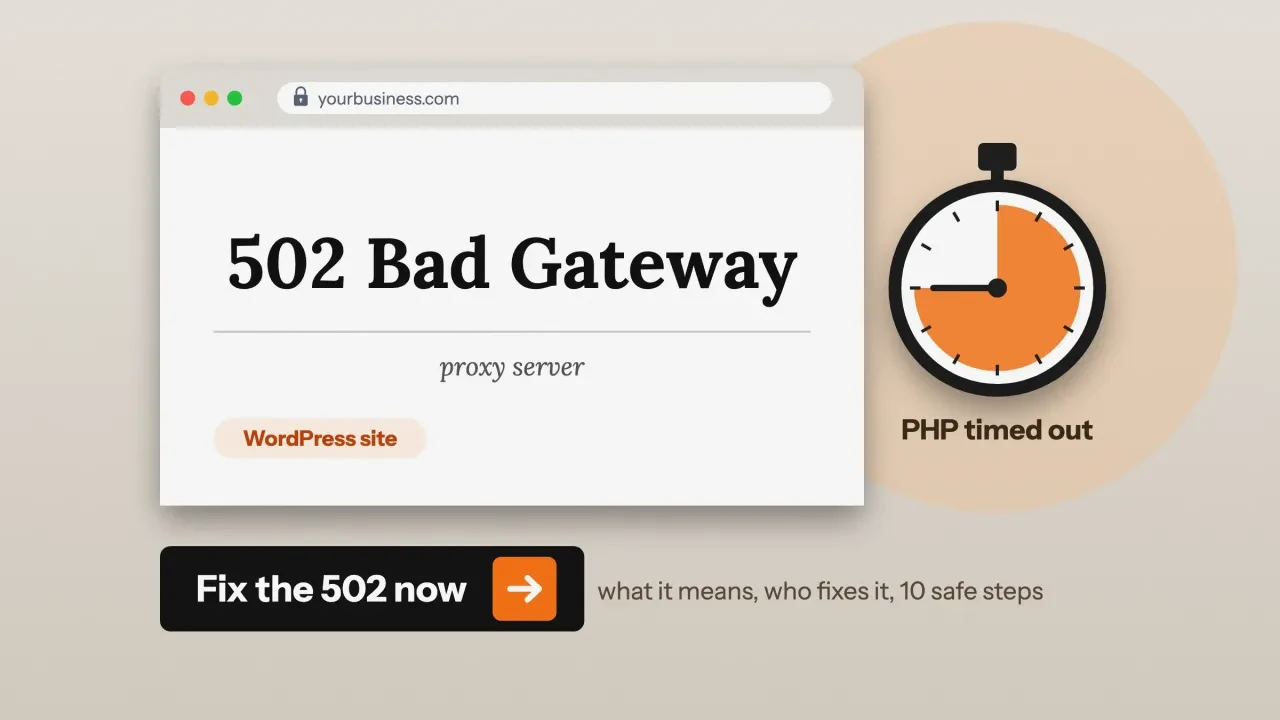
A 502 bad gateway WordPress error means a front server, like nginx or Cloudflare, got a broken answer or none from the server behind it. Your browser is almost never the cause. Usually PHP crashed, is overloaded or is blocked, so the fix is split between you and your host.
Your site shows "502 Bad Gateway" in big letters, maybe with "nginx" under it. RFC 9110 defines 502 as a gateway or proxy that "received an invalid response from an inbound server."
We caused a 502 on purpose on October 22, 2026. A small test reverse proxy, standing in for nginx, sat in front of a PHP server we had switched off. It returned "502 Bad Gateway." This guide uses that test, our own checker and the docs to show who fixes what.
Key takeaways
- The look of the page tells you who to call. A Cloudflare-branded 502 came from your host's server, per Cloudflare’s 502 guide.
- Timing is a clue. WP Engine says an instant 502 points to crashes or code, and a 502 after about 60 seconds is its timeout. Other hosts may show a 504 for a timeout.
- You can clear caches, rename the plugins folder and read logs. Restarting PHP and raising worker limits are your host's job.
- Behind Cloudflare, codes 520 to 524 point to your host. Codes 525 and 526 point to SSL between Cloudflare and your host.
- A short 502 is not an SEO disaster. Days of 502 errors can drop pages from Google.
What does a 502 bad gateway error mean?
A 502 bad gateway error is the code a gateway or proxy sends when the server behind it returns an invalid answer, per RFC 9110. On most WordPress sites, your visitor's browser talks to a front server, often nginx or a CDN such as Cloudflare. Behind it, PHP runs WordPress and builds the page.
MDN’s 502 page gives the same meaning. In a 504, MDN says, the front server got no answer at all within a set time.
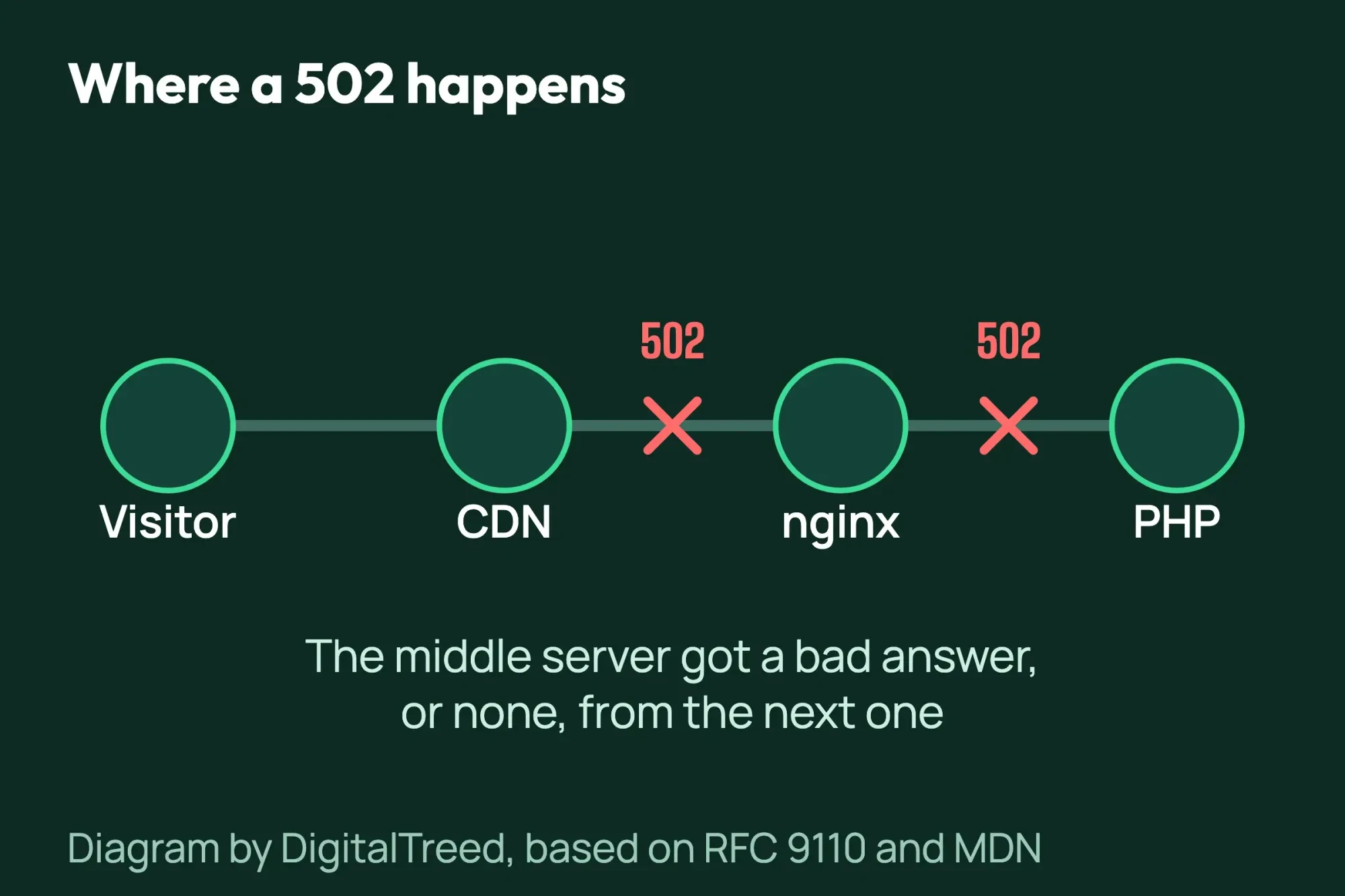 Diagram by DigitalTreed, based on RFC 9110 and MDN.
Fixing a 502 "probably requires investigation by server owners or administrators," says MDN. The exception is a problem on the visitor's own network, such as a VPN.
What a 502 bad gateway from nginx looks like: our test
Our test setup on October 22, 2026, was simple. A small reverse proxy played the part of nginx, and the PHP server behind it was switched off. When we loaded the page, the proxy had nobody to pass the request to.
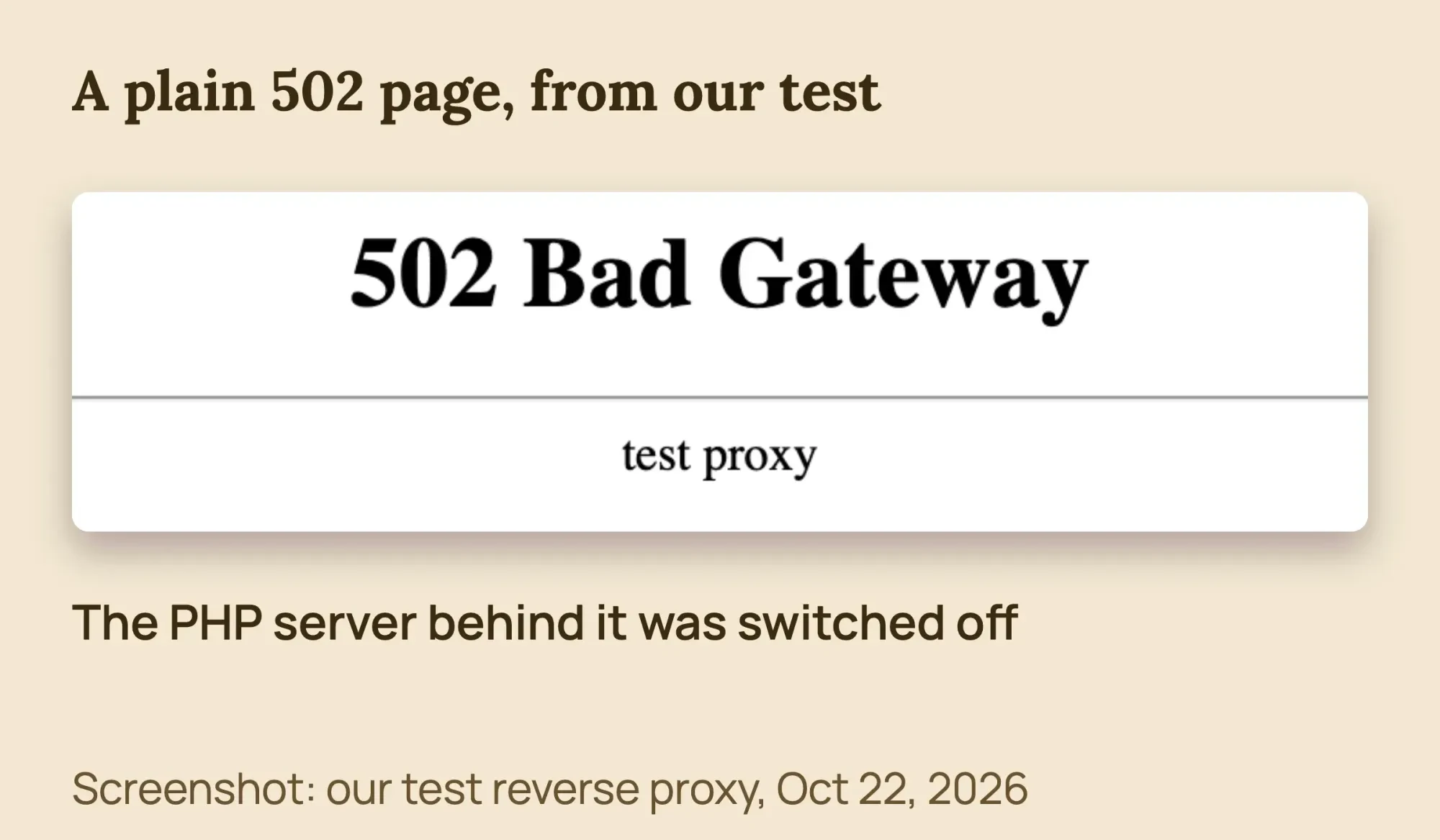 Screenshot: our test reverse proxy, standing in for nginx, in front of a switched-off PHP server, October 22, 2026.
A real nginx page looks almost the same. The nginx source code builds a "502 Bad Gateway" heading with "nginx" or its version number as the footer. So "nginx/1.24.0" under the error is just the server's name tag, not the cause.
Some hosts show "openresty" under the error instead. OpenResty is a web platform built on an enhanced nginx core, so read it the same way as nginx.
Sometimes Chrome shows its own page instead. Its error page text reads "This page isn't working" and "is currently unable to handle this request," then "HTTP ERROR 502."
Whose problem is it? Read the page and the clock
It's usually your host's problem when every page fails, or when a Cloudflare-branded page says the error came from your host. It's more often yours when only some pages fail right after an update. Two clues settle it: the branding on the error page and how long it takes to appear.
If you use Cloudflare, look at the branding first. Cloudflare says a branded 502 or 504 page means the error "came from your origin web server," so contact your host. A blank page without Cloudflare branding came from Cloudflare itself. A CDN like Cloudflare is one layer in front of your server; our explainer on how cloud architecture fits together shows where it sits.
Seeing a Cloudflare code from 520 to 526 instead? Skip ahead to "Is Cloudflare causing my 502 bad gateway?" below.
Next, time it. WP Engine’s 502 guide splits errors into an "Instant 502" and a "Long 502" that takes about 60 seconds. Instant usually means PHP crashed or restarted, and long means the request was killed for running too long. Those timings are WP Engine's; on many nginx servers a timeout shows as a 504.
The server's own code backs this up. In the nginx upstream module, a timeout returns 504, and a refused or broken connection returns 502. The nginx FastCGI docs set the default read timeout at 60 seconds.
On a busy server, PHP runs a fixed number of workers. The PHP manual says the pm.max_children setting "sets the limit on the number of simultaneous requests" PHP serves. When all workers are busy, new visitors wait, and some get a 502 or 504.
What causes a 502 bad gateway error in WordPress?
A 502 bad gateway error in WordPress usually means PHP failed behind the web server. It may have crashed, run out of workers or been stopped for running too long. Plugin conflicts, slow jobs, traffic spikes and firewall rules are common triggers.
Each cause below has a sign you can spot and a place to fix it. Match the sign first, then go to that step.
| Cause | Common sign | Where to fix it |
|---|---|---|
| A plugin or theme conflict | An instant 502 on some pages, often right after an update | Steps 5 and 6 |
| A slow import, backup or cron job | The error comes after about 60 seconds, or at the same time each day | Step 9 |
| Too many uncached visitors or bots | 502s at busy hours, while cached pages still load | The traffic and bots section below |
| PHP crashed or restarted | An instant 502 on every page | Step 10 (host) |
| A security plugin clashing with caching | Only the login page fails | Step 7 |
| A firewall blocking Cloudflare, or a wrong IP in DNS | Cloudflare error 521, 522 or 523 | The Cloudflare section below |
| A slow database or object cache | Random 502s with no clear pattern | Your host or a developer |
| Your own network, VPN or proxy | The site works on your phone's cellular data | Step 1 |
The signs follow WP Engine’s 502 workflow, which sorts errors into consistent, page-specific, recurring and random ones. For random 502s, it suggests optimizing the database and testing with object caching off.
502 vs 503 vs 504: what's the difference?
A 502 means the front server got an invalid answer from the server behind it. A 503 means the server is overloaded or down for maintenance. A 504 means the server behind it didn't answer in time. All 3 are server errors in RFC 9110.
| Code | What it means | Usual WordPress cause | Who usually fixes it |
|---|---|---|---|
| 502 Bad Gateway | The front server got a broken answer, or no connection, from PHP | PHP crashed, refused the connection or a worker was killed | Your host, or you if a plugin causes it |
| 503 Service Unavailable | The server is overloaded or down for maintenance | A traffic spike, a rate limit or planned maintenance | Wait; ask your host if it lasts |
| 504 Gateway Timeout | The front server got no answer in time | A slow plugin, import, backup or cron job past the 60-second default | You stop the slow job; your host sets the limits |
This table sums up RFC 9110, MDN and the nginx code. RFC 9110 calls a 503 a "temporary overload or scheduled maintenance" that "will likely be alleviated after some delay."
Our test: 502, 503 and 504 in our HTTP status checker
On October 22, 2026, we ran the code behind our free HTTP status checker on httpbin.org test pages. Those pages return each error on purpose. The checker reported 502, 503 and 504 correctly, in 1,166, 1,204 and 1,435 milliseconds.
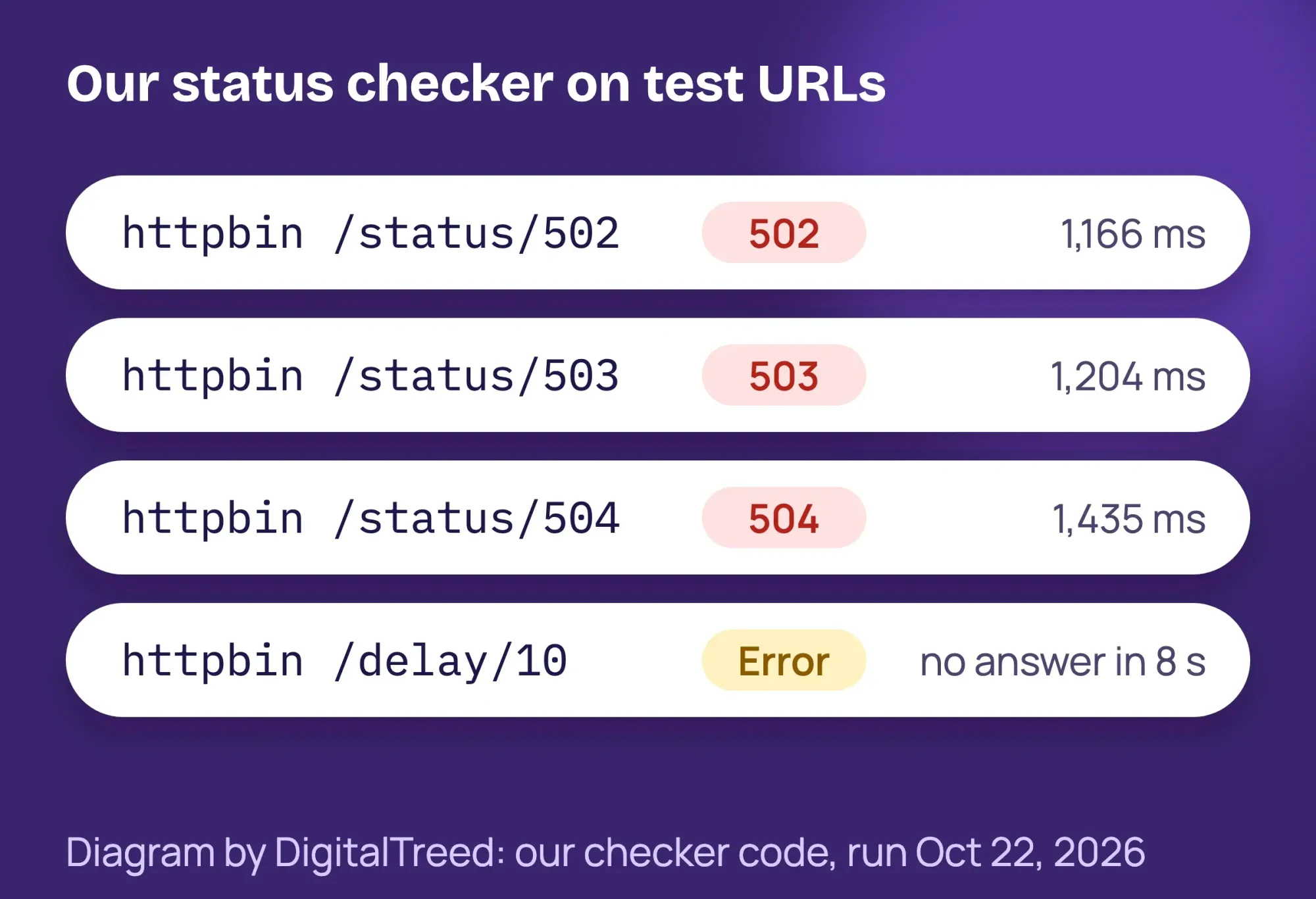 Diagram by DigitalTreed: results from our HTTP status checker code, run October 22, 2026.
It also caught a 502 hiding behind a redirect. One test URL sent a 301 first, then the 502, and the checker listed both hops. Each result also shows the server header, so you can see which layer answered.
One limit: the checker waits up to 8 seconds. A slower page shows "Could not connect to that URL," not 504. That still tells you the server is too slow or down.
Check 3 addresses: your home page, /wp-admin/ and one post. If only /wp-admin/ or the login page fails, see step 7 below.
How to fix a 502 bad gateway error in WordPress
To fix a 502 bad gateway error in WordPress, first rule out your own network and clear caches. Then turn off plugins and switch the theme to find a code conflict. If the error stays, log PHP errors and ask your host to check PHP-FPM.
Work down the list in order. Steps marked "You" are safe for an owner. Steps marked "Host" need your host.
- You: reload from another network. Wait 1 to 2 minutes and reload. Then try your phone on cellular data. If it works there, the problem is your own network, VPN or proxy.
- You: check status pages. Look at Cloudflare's status page and your host's. If either lists an incident, wait for it to clear.
- You: note the details. Screenshot the error page. Write down the URL, the time and timezone, and whether the error was instant or took about 60 seconds.
- You: clear caches. Clear your browser cache. If you can reach wp-admin, purge your caching plugin. On Cloudflare, use Purge Everything.
- You, carefully: turn off all plugins. Back up first. In your host's File Manager or SFTP, rename wp-content/plugins to plugins-off. Either way, rename it back after the test. If the site loaded, turn plugins on one at a time in Plugins.
- You, carefully: switch to a default theme. Rename the active theme's folder in wp-content/themes. If a default theme is installed, WordPress falls back to it. Rename the folder back to undo.
- You, then host: fix a login-only 502. If only the login page fails, a security plugin with a custom login URL may clash with caching. Rename that plugin's folder, or ask your host to stop caching the login path.
- You, carefully: log PHP errors. Turn on WordPress's error log, reload the failing page and read wp-content/debug.log. The code is below.
- You and host: stop slow jobs. Pause big imports, bulk edits, daytime backups and long cron jobs. Ask your host whether its time limits can change.
- Host: fix the server. Your host can restart PHP-FPM, add PHP workers, read the nginx error log and unblock Cloudflare's IP addresses.
For step 2, check Cloudflare’s status page first. WP Engine customers can check WP Engine’s status page, and Hostinger posts maintenance on its status page. DreamHost uses dreamhoststatus.com.
SiteGround users can turn off all plugins for step 5 with one click in Site Tools, per SiteGround’s 502 help page. Renaming the folder works on any host.
How to log PHP errors without showing them to visitors
The WordPress debugging guide gives these lines. Add them to wp-config.php above "That's all, stop editing!" If a WP_DEBUG line already exists, change it instead of adding a second one.
// Temporary: log errors to wp-content/debug.log, show nothing to visitors.
define( 'WP_DEBUG', true );
define( 'WP_DEBUG_LOG', true );
define( 'WP_DEBUG_DISPLAY', false );
@ini_set( 'display_errors', 0 );
To undo, set WP_DEBUG back to false, with no quotes around it, and delete debug.log. The same guide warns that debug tools are "not recommended" on live sites.
When PHP crashes hard, debug.log may stay empty. Then your host's error log helps more. Our guide to debugging WordPress explains both logs in more detail.
Should you raise PHP's time limit?
Sometimes, but in our view it rarely fixes a 502 on its own. PHP's max_execution_time setting stops a script after a set number of seconds, and the PHP manual lists 30 as the default.
Bluehost suggests raising max_execution_time and max_input_time for large imports. But the PHP manual notes that the web server has its own time limits too. On nginx, the read timeout defaults to 60 seconds, and Cloudflare waits 125 seconds before a 524.
WP Engine says it won't turn off its 60-second timeout, and it says large imports need to be made smaller. So split big jobs first, and ask your host before you change any limits.
Should you restore a backup?
Only if the 502 started right after a change, such as an update or a new plugin, and steps 5 and 6 didn't help. The WordPress backup guide says you need both the files and the database to fully restore a site.
Back up the broken site first, so you keep orders and form entries added since your last backup. WooCommerce warns that restoring a backup without your latest orders can lose business (vendor guide). It says to pause new orders before you restore.
What not to do
- Don't edit nginx or PHP-FPM settings on shared hosting. A PHP-FPM pool can also set the upload temp folder, as our fix for "Missing a temporary folder" in WordPress shows.
- Don't delete plugins to test them. Rename the folder instead.
- Don't run SQL commands in phpMyAdmin unless you know them well.
- Don't leave WP_DEBUG_DISPLAY on, because visitors would see your errors.
- Don't switch Cloudflare SSL to Flexible to fix a 525 or 526. It can cause the too many redirects error.
Some causes need a developer, such as a plugin your store needs or 502s that return at the same time every day. WP Engine also recommends a developer for these. Our WordPress development team can trace the cause and fix it. (DigitalTreed sells this service.)
Is Cloudflare causing my 502 bad gateway?
Cloudflare usually isn't the cause of a 502 bad gateway. Its 502 and 504 guide names your origin web server as the most common source. Its 5xx error guide says the first step for most 5xx errors is to contact your hosting provider. Its own codes, 520 to 526, tell you why it couldn't reach your host.
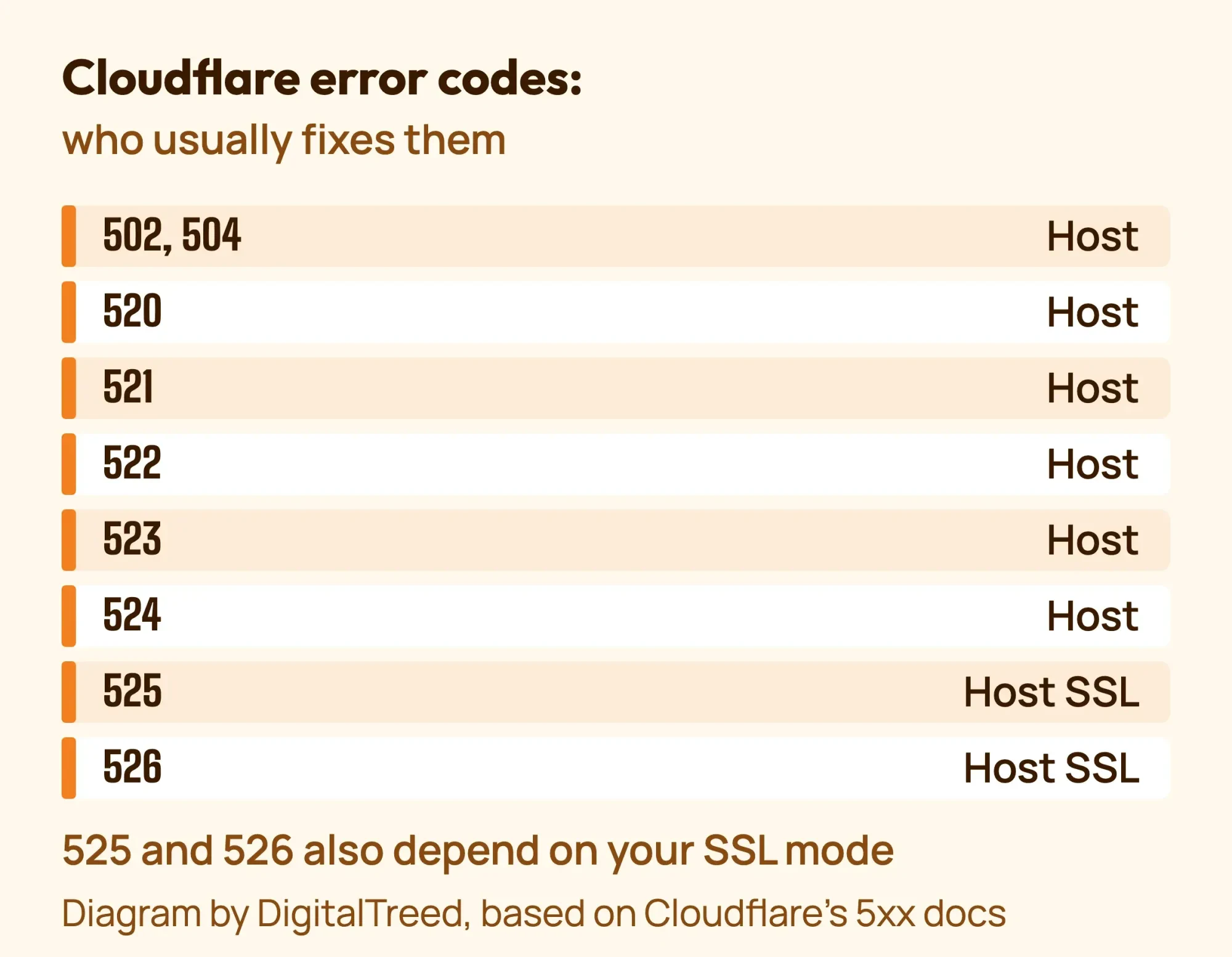 Diagram by DigitalTreed, based on Cloudflare's 5xx error docs, read October 22, 2026.
- Error 520: your server sent an empty or unexpected answer, often a PHP crash. Host.
- Error 521: your server refused Cloudflare's connection. Host.
- Error 522: Cloudflare couldn't connect to your server within 19 seconds, or got no reply to its request within 90. Host.
- Error 523: Cloudflare can't reach your server at all. You: check the IP address in your DNS records.
- Error 524: your server connected but took over 125 seconds to answer. Host, or a slow job you can stop.
- Error 525: the SSL handshake between Cloudflare and your server failed. Host.
- Error 526: Cloudflare can't verify your server's SSL certificate. Host.
For 525 or 526, test the certificate on your server with our free SSL checker. For a 526, Cloudflare lists switching from Full (strict) to Full as a quick fix. That lowers your security, so use it only for a short time.
To test without Cloudflare, its docs suggest setting the DNS record to DNS-only or pausing Cloudflare. Screenshot your DNS and SSL settings first. While it's off, your site loses Cloudflare's protection.
Could traffic or bots cause a 502?
Yes, traffic or bots can cause a 502 when more uncached requests arrive than PHP can handle. WP Engine warns that traffic plus a large number of uncached pages "will overwork the server" at busy times. Page caching helps most, because cached pages don't use a PHP worker.
If one crawler floods your site, ask your host for the access log for that hour. Cloudflare's Bot Fight Mode is free, but it may challenge API or mobile app traffic. Don't block every bot, because search engine crawlers are bots too.
What should you send your host?
Send your host the error code and message, the time and timezone, and the URL that failed. Those are the 3 details Cloudflare’s 5xx guide asks you to share. Add whether the error was instant or slow, and what you already tried. Here is a short email you can copy:
Note
Subject: 502 Bad Gateway on example.com since [date], 9:05 a.m. MT.
Our WordPress site returns 502 on the home page and checkout. The error appears after about 60 seconds. The page is Cloudflare-branded and says "Host: Error." Your status page shows no incident. We cleared caches and renamed the plugins folder, with no change. Please check the web server and PHP-FPM logs for that time, and whether PHP workers ran out. Please tell us the cause and what we should change.
How is a 502 different from other WordPress errors?
A 502 means one server got a bad answer from another, so it's a server-chain problem. A critical error is a PHP fatal error, and a database error means WordPress can't log in to its database. A redirect loop comes from URL or SSL settings.
| What you see | Code | Usual cause |
|---|---|---|
| 502 Bad Gateway, often with "nginx" | 502 | The front server got a bad answer from PHP |
| There has been a critical error on this website | 500 | A PHP fatal error, often a plugin or theme |
| Error establishing a database connection | Usually 500 | WordPress can't log in to its database |
| ERR_TOO_MANY_REDIRECTS | 301/302 loop | URL or SSL settings send visitors in a circle |
| This site can't be reached | None | A DNS or network problem, not the server |
Each row matches a message to its usual cause. For the 500 and database errors, read our guides to the HTTP 500 and critical error and the database connection error.
A page that can't be reached at all is a naming (DNS) problem, not a server one. See our DNS_PROBE_FINISHED_NXDOMAIN fix.
Example: a bakery's preorder morning in Denver
Example: a made-up bakery in Denver, Colorado, takes holiday pie preorders on WordPress with WooCommerce. At 9:00 a.m. on preorder day, customers get a Cloudflare-branded 502 after about 60 seconds of loading.
First, the owner finds no incident on the host's status page. The HTTP status checker shows 502 with a "cloudflare" server header. Cached pages load, but the cart fails.
Later, the host's log shows PHP workers maxed out while a backup plugin ran during the rush. The fix: move backups to 3:00 a.m., keep page caching on and ask about a plan with more PHP workers.
How do you stop 502 errors from coming back?
To stop 502 errors from coming back, test updates on staging, keep page caching on and run backups at quiet hours. Many 502s start with a code change, a heavy job or a traffic peak. These habits cut the risk:
- Test plugin, theme and WordPress updates on a staging copy first, as WP Engine advises.
- Delete plugins you don't use. WP Engine notes that fewer plugins mean fewer chances for code conflicts.
- Keep page caching on, so most visitors don't need a PHP worker.
- Run backups, imports and heavy cron jobs at quiet hours.
- Set up uptime monitoring, so you hear about a 502 before your customers do. Our website uptime monitoring guide shows a free setup.
- Check your error log after every update, while the change is fresh.
Setting up a new site? Our step-by-step guide to building a WordPress website covers what to check in a host and how to set up backups.
Will a 502 hurt my Google rankings?
A 502 won't hurt your Google rankings if you fix it soon. Google’s crawling docs say 5xx errors make its crawlers slow down. Indexed URLs are kept at first, "but eventually dropped" if the errors continue.
Once the errors stop, Google raises its crawl rate again on its own. After a long outage, check for crawl errors with our Google Search Console guide.
Frequently asked
Is a 502 error my fault or my host's?
Often the host's, because the server behind the front server failed. A plugin or slow job on your site can cause it too. An instant 502 that appears only on some pages points to code.
Will a 502 fix itself?
Sometimes. A short traffic spike or a server restart can clear it in minutes. If it lasts longer than a few minutes, work through the steps above.
Does 502 bad gateway mean I am blocked?
Not usually. A 502 is about servers talking to each other. A firewall that blocks Cloudflare's IP addresses at your host can cause 521 or 522 errors, though.
A firewall that blocks you directly usually shows a 403, which our guide to the 403 Forbidden error in WordPress explains.Why didn't WordPress send me a Recovery Mode email?
Recovery Mode starts when WordPress catches a fatal PHP error. With a true 502, PHP often never answered, so we wouldn't expect an email. That is our reading of the docs; we didn't test it.
Your next step
Right now, run your home page and /wp-admin/ through the checker, and note whether the error is instant or slow. That tells you whether to start with plugins or with your host.
If the 502 keeps coming back, our WordPress development team can find the cause, and you get a fixed quote first.
How we made this guide: it's built from RFC 9110, MDN, the nginx and Chromium source code, and PHP and WordPress docs. We also used Cloudflare's error guides and help pages from WP Engine, SiteGround and Bluehost. We caused a 502 with a test reverse proxy and ran our HTTP status checker on October 22, 2026. We checked every number against its source the same day. Updated October 23, 2026: added a causes table, advice on PHP time limits and restoring a backup, and habits that stop new 502s. Updated October 25, 2026: direct answers under question headings, a definition, exact checker timings and a link to our WordPress guide.
First published July 3, 2020. Rewritten October 22, 2026: our own 502 test, whose-fault checks, 502 vs 503 vs 504, Cloudflare 520 to 526, a host email and checker results.
Sources
- RFC 9110, HTTP Semantics, sections 15.6.3 to 15.6.5
- MDN: 502 Bad Gateway
- MDN: 504 Gateway Timeout
- nginx docs: ngx_http_fastcgi_module
- nginx source: ngx_http_upstream.c
- nginx source: ngx_http_special_response.c
- Chromium source: error_page_strings.grdp
- PHP manual: FPM configuration
- WordPress Developer Resources: Debugging in WordPress
- WordPress.org: Recovery Mode
- Google Search Central: HTTP status codes, network and DNS errors
- Google: Reduce the crawl rate
- PHP manual: max_execution_time
- OpenResty: about the platform
- WordPress Developer Resources: Backups
- WooCommerce: How to back up and restore your WooCommerce website (vendor)
- Cloudflare: 5xx errors
- Cloudflare: Error 502 or 504
- Cloudflare: Error 520
- Cloudflare: Error 521
- Cloudflare: Error 522
- Cloudflare: Error 523
- Cloudflare: Error 524
- Cloudflare: Error 525
- Cloudflare: Error 526
- Cloudflare: Bot Fight Mode
- WP Engine: 502 Bad Gateway Error (vendor)
- SiteGround: How to fix 502 Bad Gateway (vendor)
- Bluehost: How to troubleshoot 502 Bad Gateway errors (vendor)

Comments
No comments yet. Start the conversation below.