
Quick answer
For a business, WordPress is the better pick; for a free hobby blog, Blogger still does the job. Speed won't settle it: in September 2026 Chrome data, 68.7% of US Blogger sites passed Google's Core Web Vitals on mobile, against 62.0% for WordPress. Ownership and room to grow decide it, so move early if your blog sits on blogspot.com.
Blogger vs WordPress is really a choice between three things. Blogger is Google's free blogging service, and every blog gets a free address ending in blogspot.com. That's why people search "Blogger vs Blogspot": Blogger is the service, Blogspot is the address.
WordPress comes in two forms. On WordPress.com, Automattic hosts the site for you and sells plans. The WordPress software from WordPress.org is free and open source, and you install it on hosting you rent. This post calls that second kind self-hosted WordPress.
Here's how the three compare on what decides it for a business. Prices are as of October 2026, and each row is sourced in its section below.
| Factor | Blogger | WordPress.com | Self-hosted WordPress |
|---|---|---|---|
| Cost | $0; a domain is optional | Free with ads; $4 to $45 a month on yearly plans | Free software; you pay hosting |
| Your own domain | Yes, www or a subdomain only | Personal plan and up | Yes |
| Moving later | blogspot.com addresses cannot 301 | Export file | Full files and database |
| US mobile Core Web Vitals pass, Sept 2026 | 68.7% | 62.0% (all WordPress) | 62.0% (all WordPress) |
| Design and features | Themes and gadgets | Plugins on paid plans | Any theme or plugin |
| Ads | AdSense built in | Premium plan and up | Any ad network |
| Support | Help Center, volunteer forum | 24/7 humans on paid plans | Your host, then you |
Key takeaways
- Blogger charges nothing for hosting, HTTPS or a custom domain.
- WordPress.com Personal costs $48 in year one and $60 at renewal.
- A blogspot.com address can't send 301 redirects when you move.
- On WordPress.com, ads need the Premium plan or higher.
- Blogger's forum is run by volunteers, while WordPress.com paid plans add human support.
Blogger wins on cost: $0, even with your own domain
Start with money, since that's the easy part. Blogger charges nothing for hosting, HTTPS or a custom domain. You pay only your registrar for the domain itself, and you'd pay that on any platform.
Blogger's own help pages add two catches, one about the address and one about security. Your blog may not be hosted at naked domains such as yourbusiness.com, so it must use www or a subdomain like blog.yourbusiness.com. The custom domain setup has you add four Google A records so the bare domain still forwards. And if your domain uses CAA records, add one for letsencrypt.org, or Blogger "won't create or renew your SSL certificate."
Pick the name with care, because it's the one thing you'll keep whatever platform comes next. Our notes on choosing a website name cover what to check first.
WordPress.com has a free plan too, but "Free sites display WordPress.com ads to visitors," and you're stuck on a wordpress.com address. Its pricing page lists Personal at $4 a month, Premium at $8, Business at $25 and Commerce at $45, and its public plans API showed the same yearly prices when we checked it, October 24, 2026. Those are yearly prices divided by 12. You pay $48, $96, $300 or $540 up front, or $9, $18 and $40 a month for the first three plans if you pay monthly.
Then the renewal kicks in.
When we read the same page two days earlier, it showed yearly renewals at $5, $9, $28 and $50 a month (October 2026). So year two of Personal costs $60, not $48, and Business goes from $300 to $336.
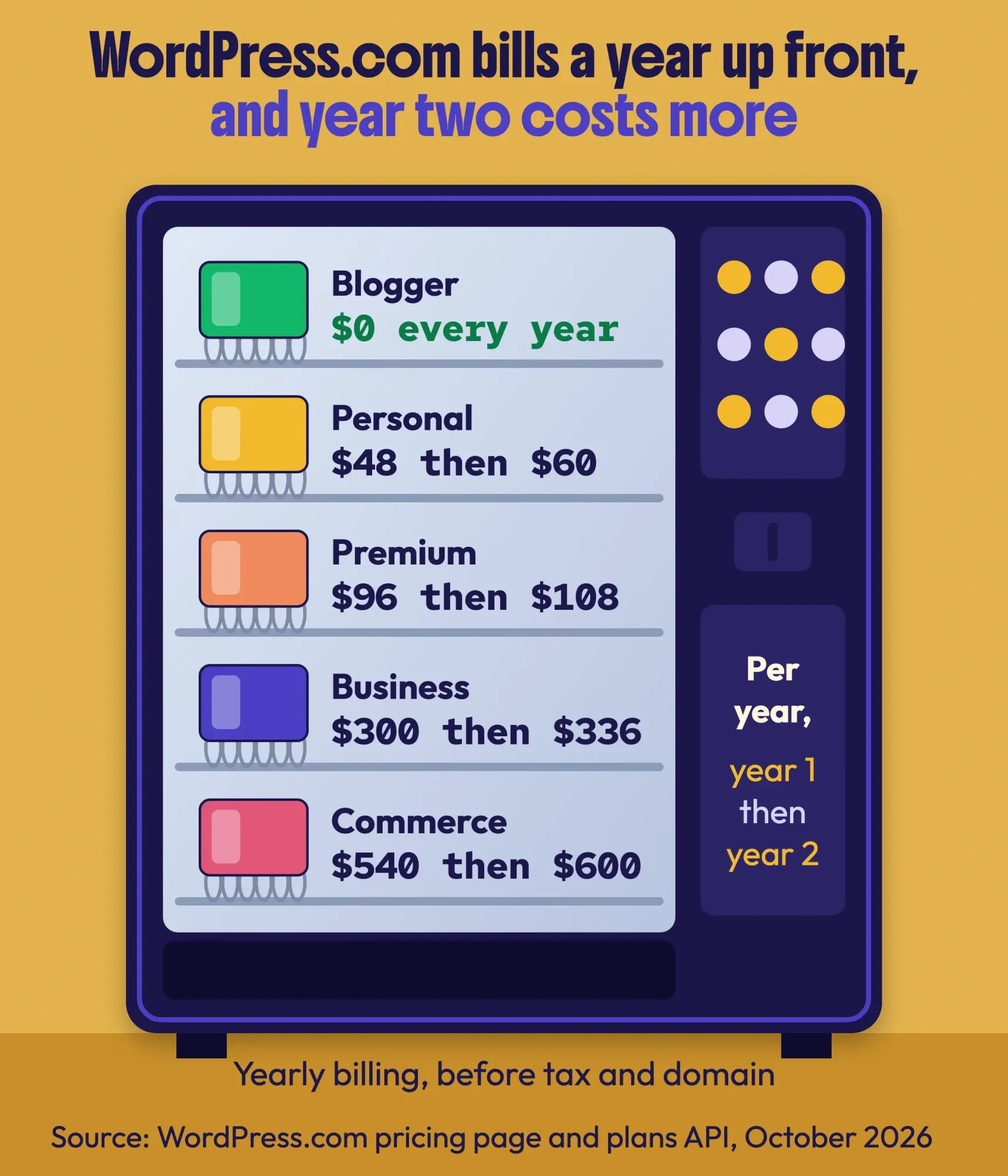 Source: WordPress.com pricing page and plans API, October 2026 (renewals read October 22). Yearly billing.
Self-hosted WordPress is free software on a server you rent. Bluehost's starter WordPress plan, for one, was $3.99 a month on a 36-month prepay, going by its plan page, read October 22, 2026. That's $143.64 up front, renewing at $9.99 a month. Our WordPress setup guide compares four hosts and the year-two bill, so we won't repeat that here.
For pure cost, Blogger wins.
What the free ride costs you shows up in the next factor, and it isn't money.
WordPress wins on ownership, and that decides how easy a move is later
That next factor is control. You own your words on all three platforms. Google's Terms of Service say "Your content remains yours," and with self-hosted WordPress the files sit on your own server. What differs is who holds the account and the server.
On Blogger, that's Google. Its content policy lets Google delete a blog or disable the author's Google account, and "all restrictive actions are global and permanent" unless it says otherwise. If Google ever stops offering a service, the terms promise "reasonable advance notice" and a chance to export your content through Google Takeout.
So is Blogger dead? No shutdown has been announced, and its help pages are kept current. Still, the official Blogger blog hasn't posted since May 20, 2020; we checked its feed the day we rewrote this post, October 24, 2026. W3Techs counts Blogger on 0.3% of all websites that day, against 39.6% for WordPress.
Blogger works; it just isn't where Google's attention is.
Self-hosted WordPress puts the files and database on a server you rent, so you can copy them to another host whenever you like. WordPress.com sits in between: Automattic runs the server, and you can export your posts, pages and comments as an XML file. Your theme and plugins don't come with that file; for the whole site, WordPress.com points you to a migration plugin.
A blogspot.com address can't follow you
Here's the part most comparisons skip, and it matters more than any feature. Google's site move guide recommends server-side permanent redirects (301s) from every old URL to its new one. It says they "don't cause a loss in PageRank" and should stay up "generally at least 1 year."
The snag is that Blogger can't send a 301 to another domain. Its custom redirects only cover "URLs that point to pages of your blog," according to the Blogger settings help.
So the address you blog on today decides how clean a move can be. If your blog already uses your own domain, say www.yourbusiness.com, the domain moves with you. You point it at your new host and add 301s from Blogger's old /2024/05/post-name.html paths to the new pages. If your blog lives at yourblog.blogspot.com, only Google controls that address.
For that case, Google's redirect documentation offers a fallback. If server redirects "aren't possible to implement on your platform, meta refresh redirects may be a viable alternative," and Google treats an instant meta refresh as permanent. Blogger lets you edit the theme's HTML, which is where that refresh and a canonical tag go. Search Console's Change of Address tool asks you first to "Implement a 301 redirect from your old homepage to your new homepage," though, and we haven't confirmed it accepts a meta refresh instead.
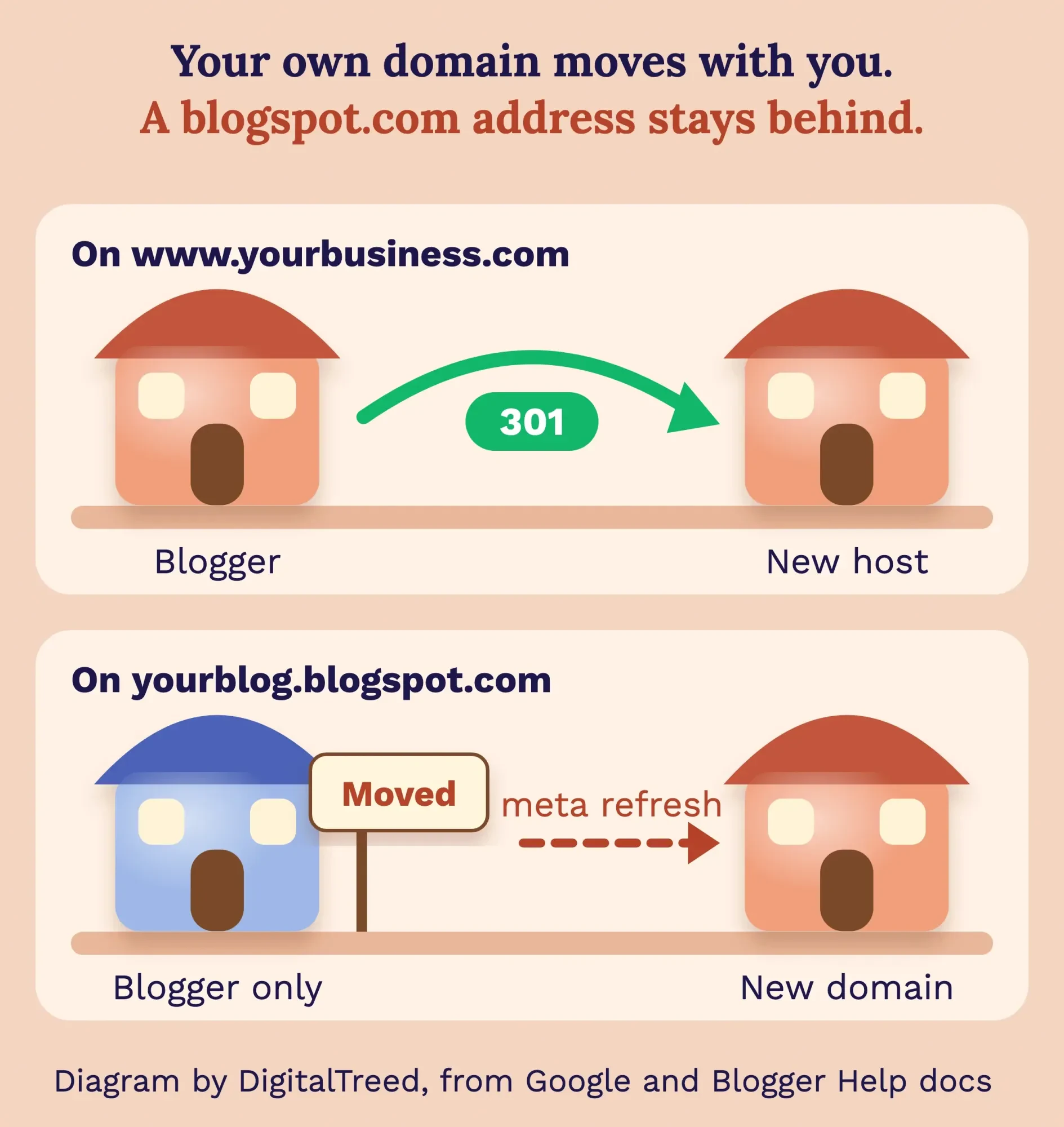 Diagram by DigitalTreed, based on Google Search Central and Blogger Help, October 2026.
Starting a blog today? Put it on your own domain from day one, whichever platform you choose.
Moving from Blogger to WordPress, step by step
That covers why the address matters. Here's the order we'd follow to move a small Blogger blog to self-hosted WordPress:
- In Blogger, open Settings, then Back up content, then Download. Blogger now hands you a Google Takeout file with your posts in feed.atom. Save a copy of your theme too.
- Save the list of old URLs from yourblog.blogspot.com/sitemap.xml, so you can test each one later.
- Set up hosting and install WordPress, then match the old permalink pattern as closely as you can.
- Import the posts, then copy your pages over by hand and check that images loaded.
- Add the redirects: 301s if you own the domain, a meta refresh in the Blogger theme if you're on blogspot.com.
- Add the new site to Google Search Console as a property and submit its sitemap.
- Test a sample of old URLs with our free redirect checker, and keep the Blogger blog published.
Test the import on a copy first. The Blogger Importer plugin was last updated on October 21, 2024, and it's tested only up to WordPress 6.6.10, while WordPress is now at 7.1.3. It skips pages, widgets and your theme. Its how-to still points to a Blogger export menu that's gone, and we haven't confirmed it reads Takeout's feed.atom file. The WordPress import docs still describe the Blogger route, but WordPress.com's import page no longer lists Blogger and points you to its standard XML importer.
Don't delete the old blog, either. Blogger warns that you can't restore a permanently deleted blog "or use the URL again," and your redirects go with it. If the new site starts bouncing visitors between URLs after the switch, our too-many-redirects fix walks through the usual causes.
Example: Copper Kettle Fudge is a made-up candy shop in Mackinaw City, Michigan. It has posted recipes at copperkettlefudge.blogspot.com since 2016, and now it wants to take gift-box orders online. It moves to self-hosted WordPress at www.copperkettlefudge.com. Because the old address is on blogspot.com, a 301 isn't possible, so it adds an instant meta refresh and canonical tags in the Blogger theme. Then it submits the new sitemap and leaves the Blogger blog live. At October 2026 prices, Bluehost's starter plan runs $143.64 for the first 36 months. After that it's $9.99 a month.
Redirects are the step people most often get wrong. Prefer to pass it to someone? Moving and rebuilding sites is part of our web development work. We sell that service, so read this advice knowing that.
Is Blogger faster than WordPress?
Moving is about control. Speed is where Blogger surprises people. We pulled the September 2026 numbers ourselves from HTTP Archive's Core Web Vitals Technology Report (pull date: October 24, 2026). It matches Chrome's real-user data, the Chrome UX Report, to the software each site runs, and we counted the share of sites passing on mobile.
A page passes when its main content loads within 2.5 seconds, it responds to a tap within 200 milliseconds and its layout shifts no more than 0.1, all measured at the 75th percentile of visits.
In the US, Blogger came out ahead. Of 3,304 Blogger sites, 68.7% passed, against 62.0% of 352,468 WordPress sites. Worldwide, it flipped: only 27.2% of 80,907 Blogger sites passed, while WordPress held 48.3%. Anyone can rerun this through the public API.
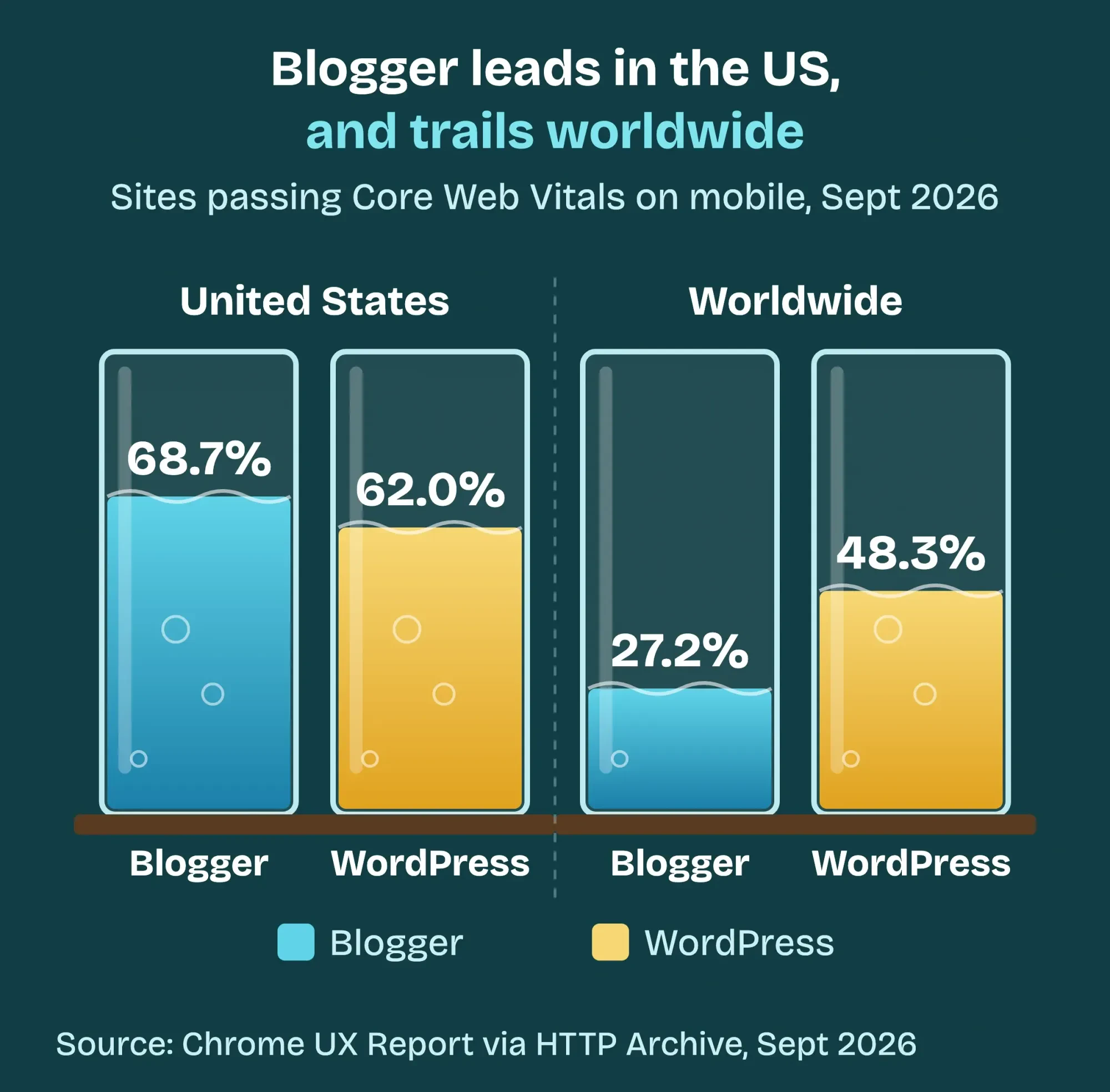 Source: Chrome UX Report via HTTP Archive Technology Report, September 2026, mobile. Pulled October 24, 2026.
Why the gap? The data shows where it comes from, though not why. It's almost all loading. Globally, just 37.6% of Blogger sites had a good Largest Contentful Paint and 2.6% a good server response time. For the Blogger sites in the US figures, those shares were 87.5% and 58.8%.
The US figures come from Chrome visits made in the US. Only about 1 in 25 Blogger sites in the global set had enough of those visits to be counted. Visitors' networks and phones, and the themes those blogs run, could each play a part, and the dataset doesn't separate them.
It isn't one-sided in the US, either: WordPress sites did better on responsiveness (92.6% good against 83.5%) and on layout stability (88.1% against 81.1%).
Read all of this as a comparison across many sites, not a lab test. A lean WordPress theme can beat a cluttered Blogger blog, and the other way round. To see where your own pages stand, run them through the free DigitalTreed website speed test, and the PageSpeed Insights guide we wrote explains the field data behind the score. If you're weighing Wix, Squarespace or Shopify too, our no-code vs custom development comparison has the same September figures for them.
For a US audience, speed is close to a tie.
WordPress wins on design and features, SEO included
Speed is close; features aren't.
A Blogger template changes the look. You pick a theme, adjust fonts and colors, and add gadgets "to do things like display your archive, show labels in a list, or show your profile on every page," as Blogger Help puts it. You can edit the theme's HTML as well.
What no template can do is add features that run on a server. A free or premium Blogger template won't give you a form that saves entries to a database, a checkout, online booking, member logins or redirects to another domain. Those need a different platform.
Be wary of template download sites, especially "premium" templates handed out free. The same help page says blog authors "who add code or third-party widgets do so at their own risk." That's why this post no longer lists template picks.
WordPress works the other way round. Self-hosted, you can install any theme or plugin. On WordPress.com, "Installing plugins is available on all WordPress.com paid plans," starting with Personal, per its plan features page.
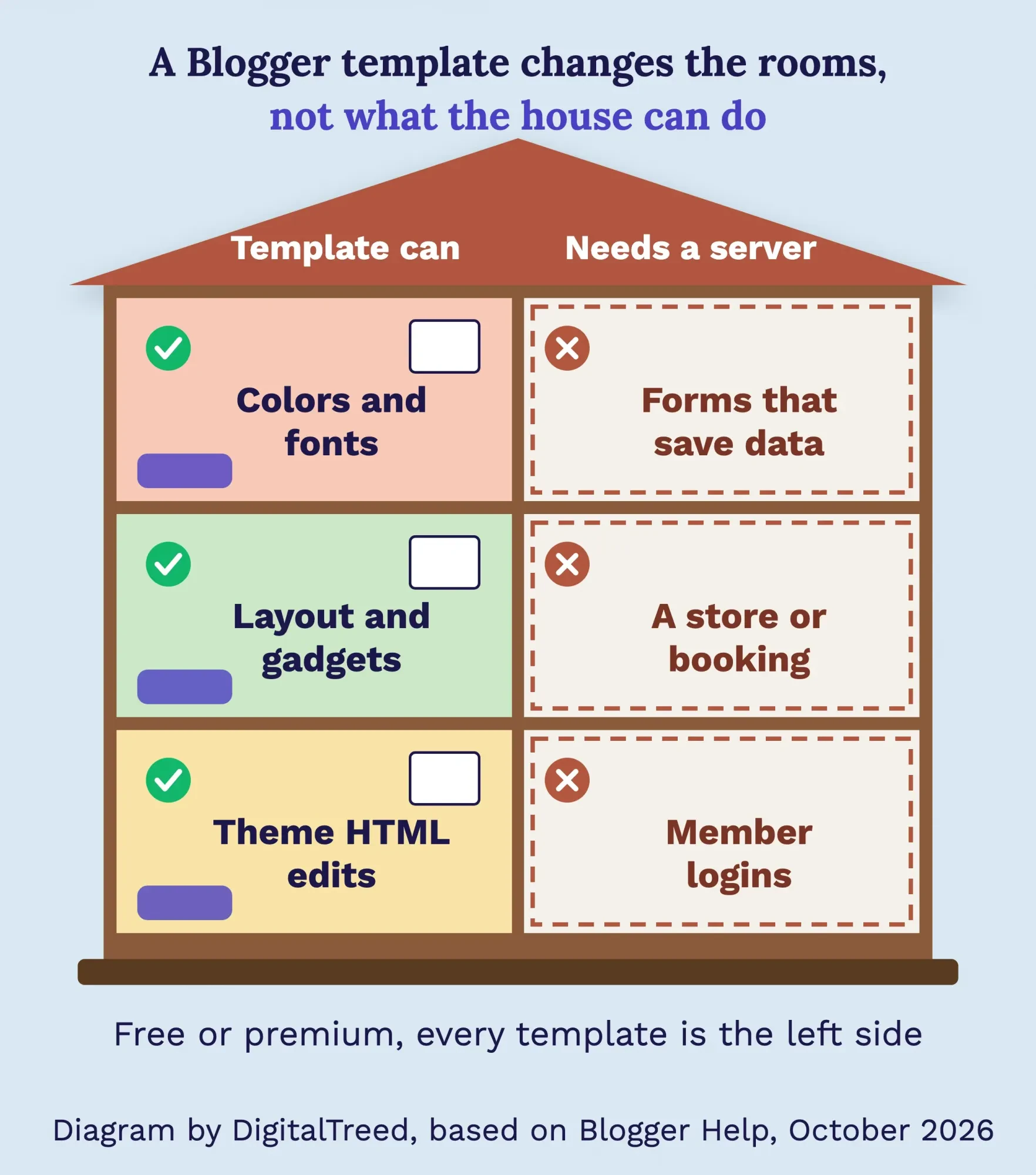 Diagram by DigitalTreed, based on Blogger Help, October 2026.
SEO follows the same pattern. Blogger covers the basics in Settings: a search description, a custom robots.txt and custom robots header tags. WordPress adds plugins for titles, sitemaps and structured data, and our Yoast SEO guide sets one up step by step. Neither platform ranks a page by itself. After a move, our checklist for getting a new WordPress site indexed covers the first weeks.
Both run ads, but only WordPress grows into a shop
Features shape what you can sell, too. Ads work on both platforms under the same rules: AdSense accepts sites with your own content that meets its policies, and you must be 18 or over.
Blogger makes ads easy. Its Earnings tab connects an AdSense account and lets you set a custom ads.txt file.
Blogger doesn't allow ads on adult blogs at all.
On WordPress.com, ads need the Premium plan: WordAds requires "A WordPress.com Premium plan or higher," and WordPress.com suggests running one ad program at a time. Self-hosted WordPress takes any ad network you like.
The real difference shows up after ads. Selling products, classes or bookings needs plugins or a store platform, and Blogger offers neither. If that's your plan, our WordPress vs Shopify comparison works through the fees on each sale.
WordPress.com is the only one with a person to ask
Once a blog earns money, it matters who answers when something breaks. Blogger has a Help Center and a community forum "staffed by volunteers who do not work for Google."
WordPress.com's support page offers an AI assistant to everyone, "with access to 24/7 expert human support on paid plans." That starts at the $4-a-month Personal plan (billed yearly, as of October 2026).
Self-hosted WordPress splits the job. Your host looks after the server. Everything inside WordPress is yours or your developer's: updates, plugin conflicts, backups and the security list in WordPress's own hardening guide. That's the real price of full control.
If nobody on your team wants that list, WordPress.com is the safer home.
Frequently asked
How much does a Blogger blog have to earn before AdSense pays out?
For a US dollar account, AdSense pays once your balance reaches $100, as of October 2026. Smaller earnings roll over to the next month until you pass it. The thresholds sit on Google's AdSense payment thresholds page.
Does WordPress.com include a free domain?
Yes, for the first year on an annual, two-year or three-year plan, as of October 2026. You can also connect a domain you bought elsewhere for free on any paid plan. The details are on WordPress.com's domains support page.
Is Substack a better choice than Blogger or WordPress?
Substack is built for newsletters, so it fits writing that readers pay to get by email. Writers keep 90% of their subscription revenue minus credit card fees, as of October 2026, per Substack's going-paid page. For a business site with forms or a store, WordPress still fits better.
Choose Blogger for a free hobby blog, WordPress for anything that has to grow
So here's where we land. Choose Blogger if:
- You want a personal or side blog, and your budget is $0.
- You don't plan to sell, take bookings or collect leads through forms.
- You're fine with Google holding the account, and you'll still use your own domain.
Choose WordPress if:
- The blog is part of a business website that will need forms, booking or a store.
- You want to own the files and switch hosts when you like.
- You can keep it updated, pay WordPress.com to handle the server, or hire help.
- You're on blogspot.com and the blog already brings in customers.
Between the two WordPress options, WordPress.com suits you if you don't want to run a server, and self-hosted suits you if you want full control.
Our take: if the blog is for a business, start on WordPress with your own domain. Already on Blogger with a custom domain? There's no rush, so move when you need a feature Blogger can't add. On blogspot.com, move sooner, because every month adds links to an address you can't redirect.
Want a hand with the move or a new site? Get a quote and tell us what the blog needs to do. We build WordPress sites for a living, so keep that in mind as you weigh our verdict.
How we made this guide: Our web team checked every price, quote and rule here against Blogger Help, Google's terms and Search Central docs, WordPress.org, WordPress.com's plan and support pages, and W3Techs, finishing October 24, 2026. The speed figures are our own pull from HTTP Archive's public API for September 2026, run from a Mac in India; it's grouped by where visitors browse. We read WordPress.com's plan prices from its public plans API that day, and its renewal prices and Bluehost's plan from their pages two days earlier, October 22, 2026. We also checked the official Blogger blog's feed and URL format by hand. Sources are linked where each fact appears.
First published July 2020. Rewritten and re-checked October 24, 2026: we dropped the list of six 2020 Blogger templates. The post now compares Blogger and WordPress on cost, ownership, speed, design, ads and support, with our own Chrome speed data and a safe way to move.
Sources
- Blogger: About
- WordPress.org: About
- WordPress.com: Pricing (October 2026)
- Blogger Help: Blog settings
- Blogger Help: Custom domains
- Bluehost: WordPress hosting (read October 22, 2026)
- Google: Terms of Service
- Blogger: Content Policy
- Blogger: Official blog
- W3Techs: Usage statistics of Blogger
- W3Techs: Usage statistics of WordPress
- WordPress.com Support: Export your website's content
- Google Search Central: Site moves with URL changes
- Google Search Central: Redirects and Google Search
- Search Console Help: Change of Address tool
- Blogger Help: Back up and import your blog
- WordPress.org Plugins: Blogger Importer
- WordPress Developer Resources: Importing content
- WordPress.com Support: Import content
- Blogger Help: Deleting a blog
- HTTP Archive: Core Web Vitals Technology Report
- HTTP Archive: Technology Report API (cwv endpoint)
- web.dev: Web Vitals
- Blogger Help: Layout, gadgets and theme HTML
- Blogger Help: Themes
- WordPress.com Support: Plan features
- AdSense Help: Eligibility requirements
- Blogger Help: Make money with Blogger
- WordPress.com Support: WordAds
- Blogger Help Community
- WordPress.com: Contact support
- WordPress Developer Resources: Hardening WordPress


Comments
No comments yet. Start the conversation below.