
Quick answer
Paid guest post scammers usually let your post go live and then stop answering, so as of October 31, 2026 the safest rule is full payment, or 50% upfront, before anything is published. If they pay by PayPal, Seller Protection can cover unauthorized and item-not-received claims, never claims that the post wasn't as described. Start with written terms and a post that stays in draft.
If you sell sponsored posts on a site with real traffic, a US agency or link builder has probably gone quiet on you after a link went live. A paid guest post scam is a deal where the buyer gets the placement and never pays, or pays and then pulls the money back. This page once listed buyer emails; we've removed them all, since one wrong entry can hurt an innocent person.
Below: five ways buyers skip payment, the red flags before you publish, and payment terms that keep money ahead of the link. After that come PayPal Seller Protection, how to label paid posts, what to do when a buyer doesn't pay, where to report, and the setup we'd use.
Key takeaways
- PayPal Seller Protection excludes not-as-described claims, such as a disputed link type.
- Publish the post only after the money is in your PayPal balance.
- Escrow.com's $50 minimum fee is 16.7% of a $300 example order.
- Check payments by logging in to PayPal yourself, never from a screenshot.
- Report fraud to IC3 and ReportFraud, and keep the original emails.
Five ways buyers skip payment on a sponsored post
There are five patterns to watch for, and each one puts the link live before the money arrives.
The first is the plain disappearing act. You publish, send the live URL along with the invoice, and then the buyer stops answering emails, chat messages and the polite follow-up you send a week later. There's no argument and no dispute. The only thing you still control is the post itself, which is why the terms later in this guide say what happens to it.
The second looks official and comes weeks later: a dispute or a card chargeback after publishing. The FTC's credit card disputes page counts being billed "for something you either returned or never got" as a billing error. The cardholder's letter must reach the issuer "within 60 days after the first bill with the error was sent." So a sale that looked closed in March can come back in May, long after you've stopped thinking about it and the post has done its work.
Third comes the fake payment. A buyer sends a screenshot of a "payment sent" screen or a forwarded receipt, then asks for the link today. A screenshot is only a picture of money.
Sometimes the amount is too high, with a polite request to refund the difference. The FTC's fake check scams page describes the same move with checks: buyers "ask you to refund the balance. But that's a scam."
The fourth is the "pay after indexing" stall, and it sounds fair until you read Google's own docs. Its How Search works page says Google "can't guarantee that the content will be crawled, indexed or served." The recrawl help page adds that "Crawling can take anywhere from a few days to a few weeks." Then the goalposts move. Indexed becomes ranking, and ranking becomes next month. A payment tied to something neither of you controls has no due date, so we wouldn't accept one. If a buyer wants comfort, offer a written promise to keep the post live for an agreed term instead.
Fifth, the new inbox. A fresh Gmail address, a new agency name or a reseller asks for a post linking to the same target site as the unpaid order. The sender changes, but the target site usually doesn't. So log every order by the target domain and the payer's name as well as the email address, because those two details tend to survive a change of inbox.
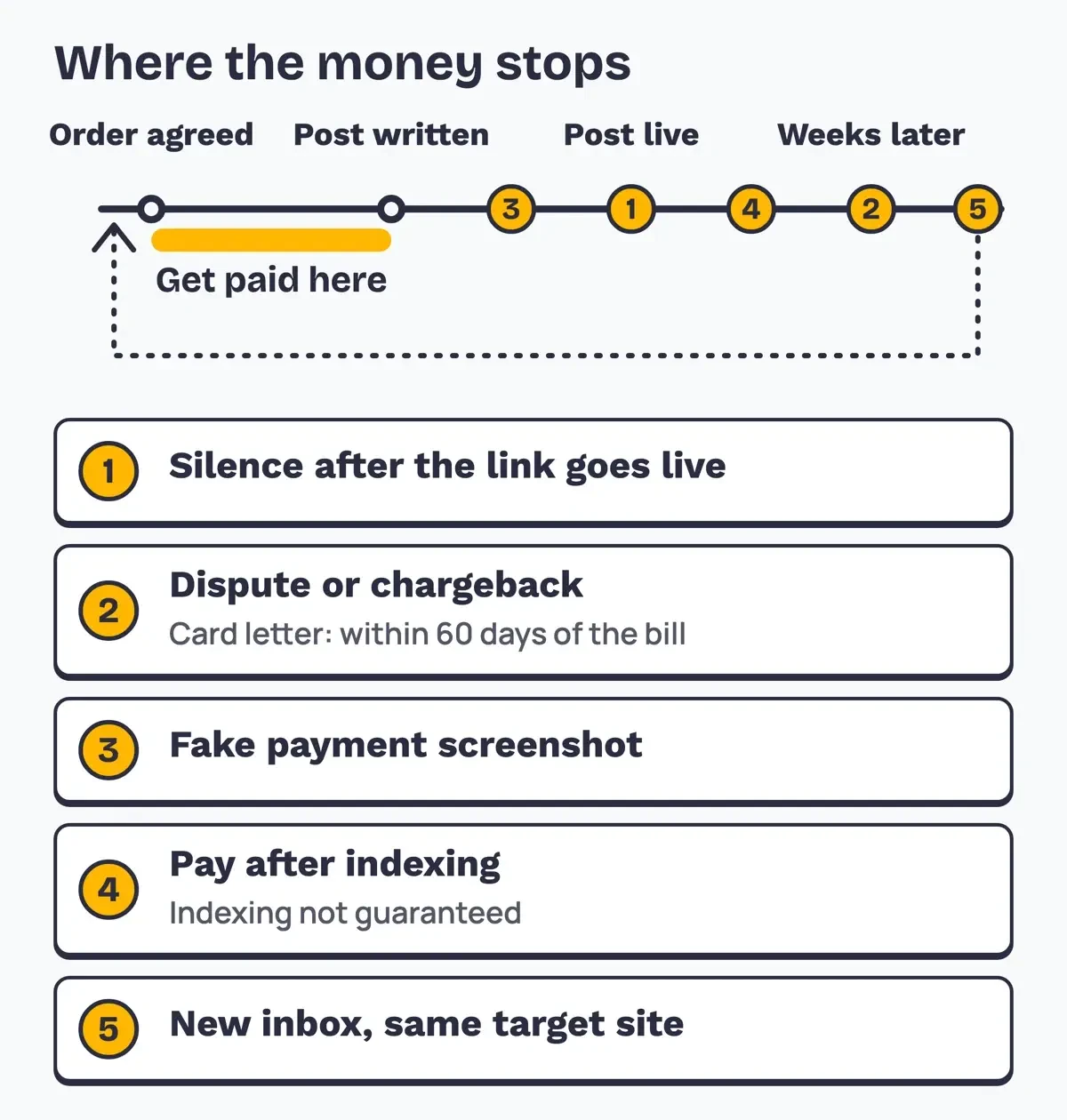 Diagram by DigitalTreed, from the FTC, Google Search Central and PayPal pages read October 31, 2026.
Which red flags show up before you publish?
Those patterns rarely start cold, and two of these early signs together are enough for us to ask for full payment first:
- They want the post live first and promise to pay "the same day."
- Proof of payment arrives as a screenshot or forwarded email, not as a payment in your account.
- They overpay, then ask you to send the extra back.
- They ask to pay as Friends and Family to save on fees.
- They want no sponsored label and a do-follow link "for life."
- Payment is tied to Google indexing, rankings, or a bulk order paid "at the end."
The Friends and Family request deserves a second look, because it moves you outside PayPal's seller rules. PayPal's user agreement says business accounts "are not eligible to receive" personal transactions. Its Seller Protection program also lists "Personal payments including a payment sent using PayPal's friends and family functionality" as ineligible. If a buyer insists, send a normal invoice or pass on the order.
Payment terms that keep the money ahead of the link
Every pattern above works because the link went live first, so the fix is the order of operations: money, then publishing. You write the post, share it as a draft or an unpublished preview link, and press Publish once the payment shows in your account. Full payment upfront is the cleanest version, and it's what we'd ask of any buyer with no history. A 50/50 split suits repeat buyers, but where the second half falls matters. Due after publishing, it leaves half the order riding on trust. Due on draft approval, it leaves nothing riding on trust once the post is live.
A PayPal invoice beats a payment request in a chat, since it records a sale of goods and services with an amount, a date and a description. As of October 31, 2026, PayPal's business fees page lists 3.49% plus a fixed fee for invoice payments through PayPal Checkout. The US dollar fixed fee is $0.49. On a $300 example order, that's $300 x 3.49% + $0.49 = $10.96. Our PayPal fee calculator runs the same math on your own prices.
Escrow puts a third party between you, and it's priced for bigger deals. Escrow.com's explainer says "an independent third party holds payment until everyone fulfills their responsibilities in the transaction." As of October 31, 2026, its fee calculator page lists a Standard fee of 2.6% with a $50.00 minimum on deals up to $5,000.00. A card or PayPal payment adds 3.05%. Here's what each method costs on four example orders:
| Example order | PayPal invoice (3.49% + $0.49) | Escrow.com Standard (2.6%, $50 minimum) |
| $150.00 | $5.73 (3.8%) | $50.00 (33.3%) |
| $300.00 | $10.96 (3.7%) | $50.00 (16.7%) |
| $600.00 | $21.43 (3.6%) | $50.00 (8.3%) |
| $1,500.00 | $52.84 (3.5%) | $50.00 (3.3%) |
With fees as of October 31, 2026, escrow costs $50.00 until a deal passes $1,923.08 ($50.00 / 2.6%), so a $300 post pays 16.7% of its price in escrow fees. Few buyers will split that. On a $1,500 bulk order it's 3.3%, close to PayPal's cut and worth offering to a new buyer who wants protection too.
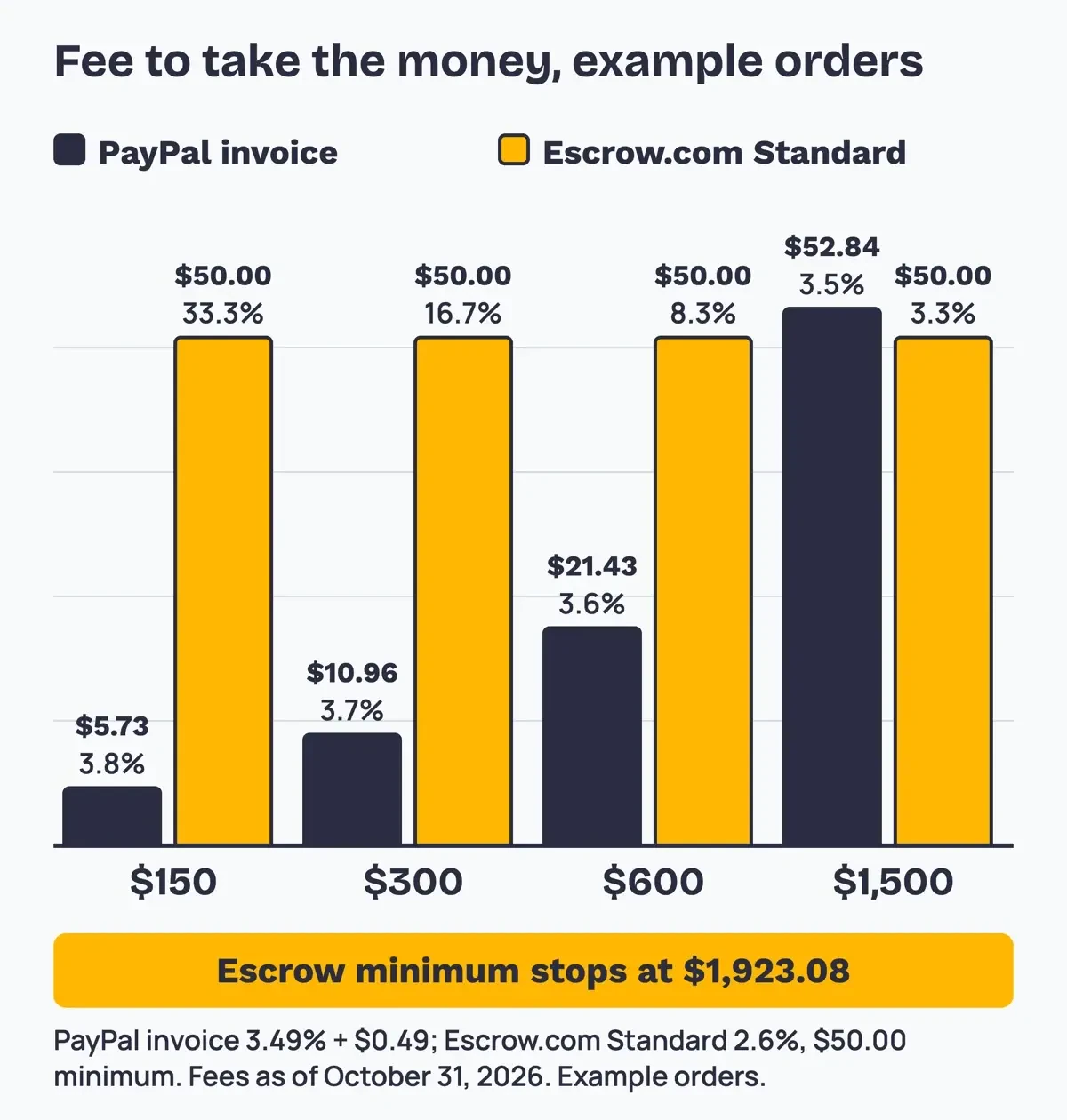 Diagram by DigitalTreed from our local fee test, using PayPal and Escrow.com fee pages read October 31, 2026. Example orders.
Whatever you pick, put the terms in writing before work starts, and ask the buyer to reply that they agree. Ours would name the price and what's included: one link, marked as sponsored. They'd also set when each payment is due, how many revisions you'll do, and how many months the post stays up. Add one more line for a reversed payment, because that's when you'll need it most. If you also sell display ads, the insertion order in our ad space guide is a good model for a one-page deal sheet. Keep the signed-off version in the same folder as the invoice, where you can find it in a dispute.
What we tested
On October 31, 2026, a local script found all 5 fee lines on our saved PayPal and Escrow.com pages and built the table above. It also checked four made-up payment notices against a paypal.com allowlist.
One passed all five checks (From domain, Reply-To, links, DKIM and greeting), which only shows the script works. The other three failed four each, including one with a paypal.com sender whose link went elsewhere. A screenshot can't be checked like this.
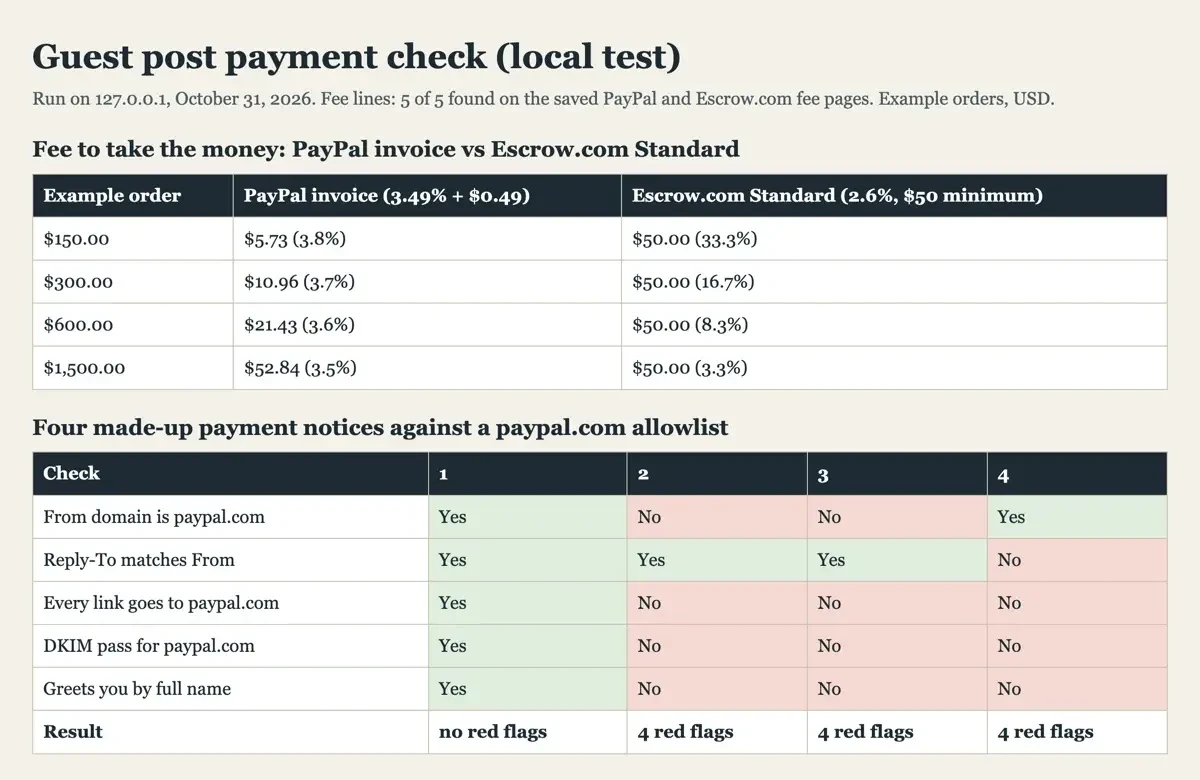 Screenshot: our guest post payment check on 127.0.0.1, October 31, 2026. All four notices are made up.
What PayPal Seller Protection covers for a guest post
Many buyers will offer PayPal, so it helps to know what its program does for a seller of a service rather than a parcel.
PayPal's Seller Protection page says it "may apply when buyer(s) claim that" a payment was unauthorized, or that they didn't receive the item. It also requires a primary account address in the US. A guest post falls under the page's rules for "the sale of intangible goods and services." An unauthorized-payment claim counts only if PayPal has marked the sale "eligible" in Transaction Details or told you in writing. Every claim also needs proof of delivery. The page asks for "compelling evidence," such as "a system of record showing the date the item was sent." In practice, that's the email that sent the live URL, the buyer's draft approval and a dated capture of the published page.
Here's the catch for publishers. The same page excludes "Items where the buyer claims (either with us or their card issuer) that the item you sent isn't what was ordered." PayPal calls that a Significantly Not as Described claim. It also excludes "Item Not Received claims filed by your buyer directly with their card issuer." A buyer who says the link was nofollow, moved or simply wrong lands in that first group, and Seller Protection won't cover it.
If a payment is reversed, PayPal's user agreement leaves the bill with you: "you are responsible for the full amount of the payment sent to you plus any fees." Late replies to PayPal's requests for documents can also cost you eligibility, so answer them from the folder where you keep the order, not from memory. Paste in the line from your terms that named rel="sponsored" and the label, so a wrong-link claim meets the buyer's own sign-off.
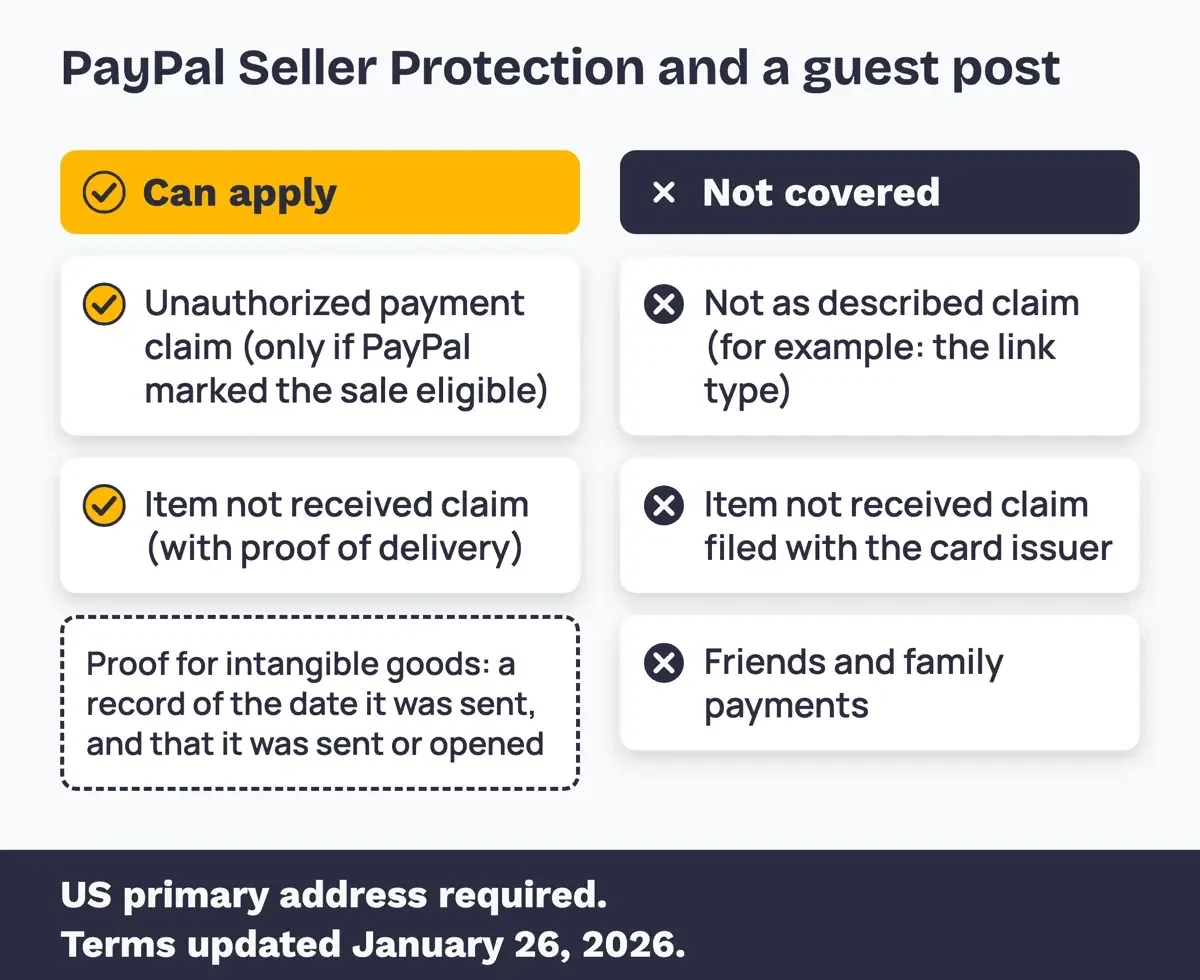 Diagram by DigitalTreed, from PayPal Seller Protection program terms updated January 26, 2026, read October 31, 2026.
Label every paid post the way Google and the FTC ask
That brings up the request behind many of these fights: "please don't mark the link." Google's guide to qualifying outbound links says to "Mark links that are advertisements or paid placements (commonly called paid links) with the sponsored value." Its spam policies list "Exchanging money for links, or posts that contain links" under link spam, and they allow such links only with rel="nofollow" or rel="sponsored". The label readers see is a separate rule. The FTC's native advertising guide says "it's deceptive to mislead consumers about the commercial nature of content." It names "Ad," "Advertisement," "Paid Advertisement" and "Sponsored Advertising Content" as terms people understand, and the FTC's FAQ on endorsements covers bloggers as well as brands.
We don't sell unlabeled links, and our explainer on sponsored blog posts and their disclosure rules shows where the label goes.
What should you do when a buyer doesn't pay?
Start with the dull steps, since a firm deadline gets the invoice paid or leaves a clean record:
- Resend the PayPal invoice with the live URL and the agreed terms quoted in the email.
- Set a final date in writing, 7 days out for example, and say what happens then.
- On that date, do what your terms said: unpublish the post or remove the link.
- Save the thread with full headers, the invoice, the agreement and a dated capture of the live post.
- If PayPal opens a dispute, answer it in the Resolution Center before its deadline.
Not every unpaid invoice is fraud, and the report you file depends on which kind you have. USA.gov's where to report a scam page says "If your issue is with a legitimate business that has wronged you, it may not be an actual scam." An agency that pays 30 days late is a collections problem, and a firmer invoice with a fixed deadline and your written terms attached is the right tool for it.
A fake receipt, a stolen card or a buyer who vanished on purpose is fraud, and that's what the next section is for.
Where to report a buyer who never paid
The FBI runs the Internet Crime Complaint Center (IC3). Its home page asks you to "file a report even if you are unsure of whether your complaint qualifies." Read the IC3 FAQ before you start. IC3 doesn't take attachments, so paste key details such as email headers and keep the originals somewhere safe. Save or print the report before leaving the page, since it's "the only time you will be able to retain a copy of your complaint."
Expect no answer, though: IC3 says it "cannot respond directly to every submission." File for the record and keep chasing the money yourself.
The FTC takes reports at ReportFraud.ftc.gov. Its page on what to do after a scam says to report a payment app problem "to the payment app immediately." For PayPal, that means the Resolution Center in your account at paypal.com/disputes, the address PayPal's Seller Protection page links to. For a forged PayPal email, PayPal's fake messages page says "enter the URL you want to visit manually" instead of clicking.
If the buyer wrote from Gmail, Google has a form to report abuse from a Gmail account. It wants the full header, found under Show original per Gmail's header help page. It takes one address per report, so a buyer who switched inboxes means one report each. Don't expect a reply unless Google needs more detail.
The setup we'd use, and the one on our own site
Our take: ask new buyers for full payment, or half to start and half on draft approval, through a PayPal invoice. Publish only once the money has cleared, with the sponsored label and rel="sponsored" written into the terms. Save escrow for bulk orders above about $1,500, where its fee comes close to PayPal's and a new buyer may welcome the protection as much as you do. Never release a post on the strength of a screenshot or a forwarded receipt, however urgent the email sounds or however big the order is. And keep one log of every order by target site, so a returning buyer under a new name is easy to spot.
We sell placements too, so here's where we stand. Our write for us page asks new clients for 50% upfront and the rest after publishing, and our media kit lists prices and payment terms. On the marketplace we run for publishers, the buyer's payment sits in escrow before you write, and we earn a commission there, so weigh that suggestion knowing it's ours.
Buying links yourself? Start with the checklist in our niche guest post sites guide. Then read what a business guest post does, our best guest post websites pick and how to price a sponsored post.
Unpaid guest post questions
Frequently asked
Can I take a guest post down if the buyer doesn't pay?
It's your site, so yes, if your terms say so. If you leave it up, Google's link guide says nofollow "is still an acceptable way to flag them, though sponsored is preferred."
Does PayPal charge me when a buyer opens a dispute?
It can. PayPal's fees page lists a Standard Dispute fee of $15.00 and a chargeback fee of $20.00 in USD, as of October 31, 2026.
Will IC3 get my money back?
Usually not directly. The IC3 home page says reports help the FBI investigate and "in some cases, even freeze stolen funds."
Is escrow worth it for a buyer outside the US?
Escrow.com's fee page adds $25.00 when a buyer outside the US pays by international wire, as of October 31, 2026.
How we made this guide: Our fetch script saved the PayPal, Escrow.com, Google, FTC, IC3, USA.gov and Gmail pages linked above. A local script did the fee math on them, and no account was used. Facts checked by the DigitalTreed team on October 31, 2026.
First published January 2024 with a list of email addresses. Rewritten October 31, 2026 for sellers, with no names or addresses.
Sources
- PayPal: PayPal's Seller Protection Program
- PayPal: User Agreement
- PayPal: Merchant and business fees
- PayPal: Invoicing
- PayPal: How to identify fake messages
- Escrow.com: Fees and calculator
- Escrow.com: What is escrow
- Google Search Central: Qualify your outbound links
- Google Search Central: Spam policies for Google web search
- Google Search Central: How Search works
- Google Search Central: Ask Google to recrawl your URLs
- FTC: Native Advertising, A Guide for Businesses
- FTC: Endorsement Guides, What People Are Asking
- FTC: How to spot, avoid and report fake check scams
- FTC: How to recognize and avoid phishing scams
- FTC: Using credit cards and disputing charges
- FTC: What to do if you were scammed
- FTC: ReportFraud.ftc.gov
- FBI: Internet Crime Complaint Center (IC3)
- FBI IC3: Frequently asked questions
- USA.gov: Where to report a scam
- Gmail Help: Report abuse from a Gmail account
- Gmail Help: Trace an email with its full header


Comments
No comments yet. Start the conversation below.