
Quick answer
To sell ad space on your website directly, offer 3 or 4 spots in standard IAB sizes like 300x250, and price each one by CPM, flat fee or sponsorship. Sign a short insertion order, serve the ad and label it. Sell one spot to one advertiser first. The sales system can wait.
Selling ad space directly means an advertiser pays you, not an ad network, for a spot on your pages. You set the price and keep the whole fee. You also do the jobs a network would do: selling, scheduling, reporting and billing.
Google's own comparison table asks whether each product can "Negotiate directly-sold ads with partners". For AdSense the answer is a plain "No". Ad Manager gets a "Yes".
That's the trade: more money per ad, more admin per deal.
Key takeaways
- Selling directly means you keep the whole fee but do the admin.
- Offer three or four spots in standard IAB sizes like 300x250.
- Turn every price into an effective CPM before comparing it with AdSense.
- Google Ad Manager is free, but sign-up needs an AdSense account.
- Reserve each ad's space, and label it Advertisement where it sits.
Direct deals pay more per ad, but you do the selling
So who should bother? Direct ad sales work best when you've got steady traffic and readers a certain kind of business wants to reach. A fishing blog's readers buy rods and book guides. A neighborhood news site's readers eat at local restaurants, and those owners can't buy your readers anywhere else.
It's weaker when traffic swings month to month, or when your topic is so broad that no advertiser feels at home. A network fills that space with less work, and plenty of sites run both: direct deals in the best spots, a network in the rest. If ads are one of several income lines for you, our plan for diversifying revenue streams shows how to test a new one cheaply.
A direct advertiser is a customer, not an algorithm.
They'll email you when the ad looks wrong, ask for a report and expect an invoice that matches the deal. If that sounds like a chore, start with one spot.
Offer three or four spots in sizes advertisers already have
Once you're in, pick spots in standard sizes, because advertisers and their designers already have creatives that fit them. The IAB, the industry group that sets these, lists its recommended sizes in the IAB New Ad Portfolio fixed size spec. A small site needs five of them:
- Medium Rectangle, 300x250: inside the article or in the sidebar. It fits phones too.
- Leaderboard, 728x90: across the top of the page on desktop.
- Smartphone Banner, 320x50 or 300x50: the phone version of a top or bottom banner.
- Skyscraper, 160x600: a tall sidebar unit on desktop.
- Billboard, 970x250: a wide unit under the header, for a premium price.
The spec also caps file weight. A 300x250 gets 150 kB on first load, and an ad "must not exceed ten file requests during initial file load." Put those numbers in your ad specs so a heavy creative can't slow your pages. The spec's sizing grid also lists 300x600 as an earlier IAB fixed size, a tall sidebar unit.
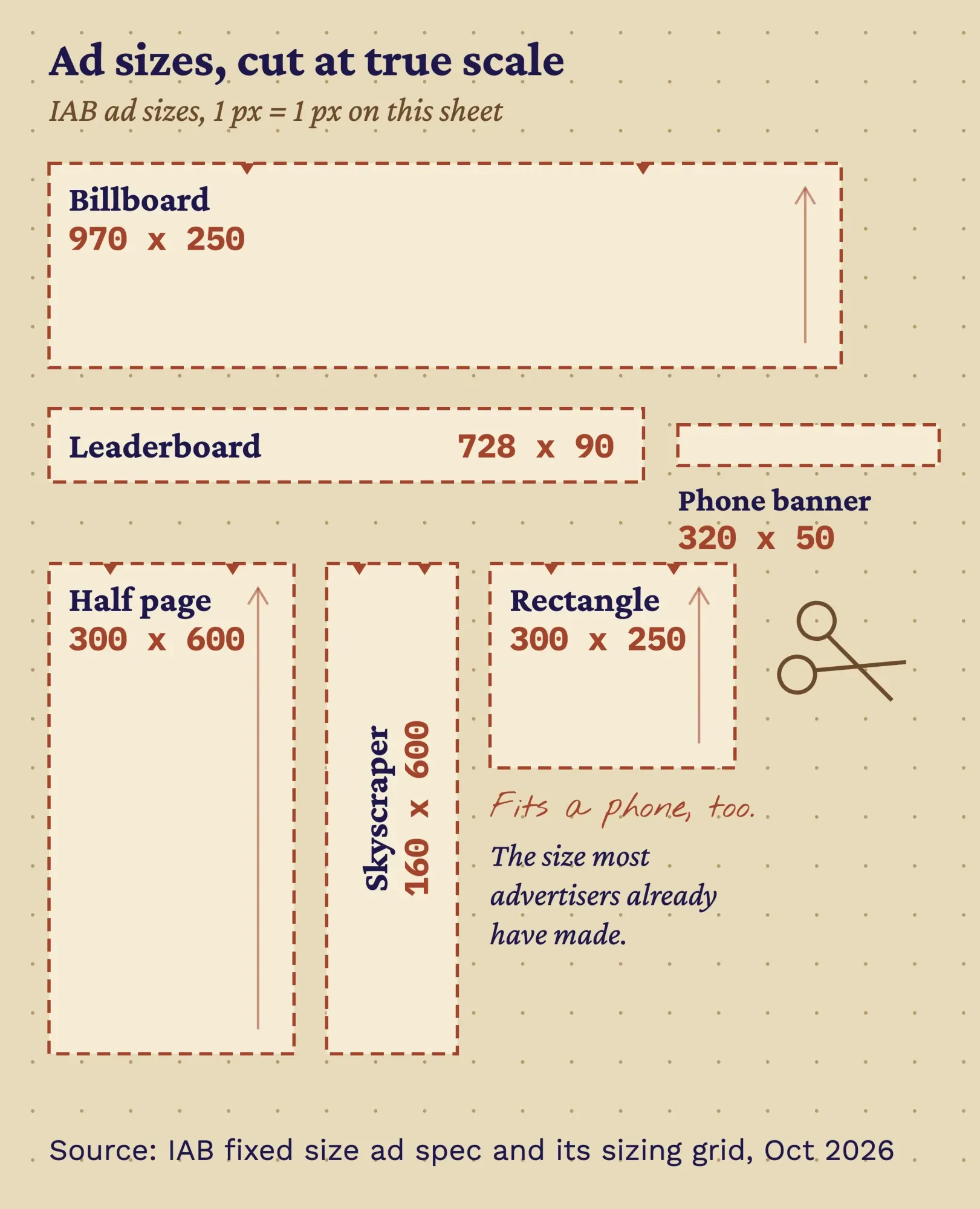 Illustration by DigitalTreed, drawn to scale. Source: IAB New Ad Portfolio, Fixed Size Ad Specifications, with 300x600 from its sizing grid (read October 2026).
Skip the formats readers hate. The Coalition for Better Ads lists "Pop-up Ads", "Prestitial Ads" and "Ad Density Higher Than 30%" among the mobile experiences that fall below what people accept.
Advertisers don't want to be the brand that annoyed someone, either.
Price each spot by CPM, flat fee or sponsorship
Then each spot needs a price. You've got three ways to charge, and each suits a different advertiser.
CPM means cost per thousand impressions. The advertiser buys a set number of ad views, say 20,000, at a price per 1,000. It's easy to compare with other sites, but you'll need an ad server to count and cap the views.
A flat fee buys a spot for a period, like the top banner for June, whatever your traffic does.
Small advertisers like a fixed bill, and you'll like having nothing to count.
A sponsorship gives one advertiser all or part of a section for a period. Google's Ad Manager Help calls this share-of-voice advertising, "because the advertiser gets a certain share of the page views on your site". Google adds that sponsorships can be sold based on "cost per thousand impressions (CPM), cost per click (CPC), or cost per day (CPD)." Most small sites sell them by the month. Simple.
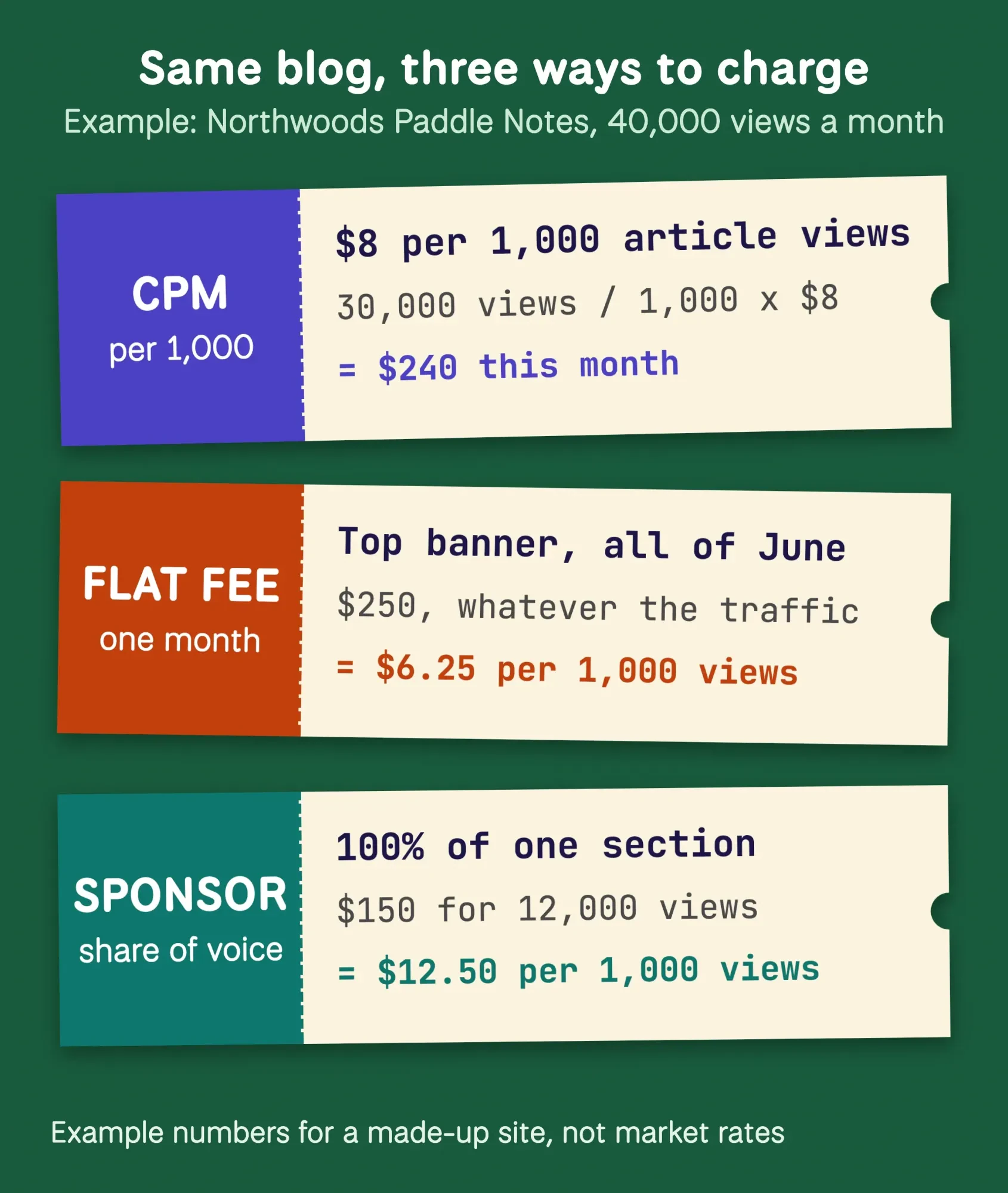 Diagram by DigitalTreed. Example numbers for the made-up Northwoods Paddle Notes, not market rates.
Example: Northwoods Paddle Notes is a made-up paddling blog in Minocqua, Wisconsin, with 40,000 pageviews a month, 30,000 of them on articles. At an example $8 CPM, one in-article spot on every article is worth $240 a month (30,000 / 1,000 x $8). Every number is invented to show the math, using the per-1,000 formula Google uses for RPM.
How much should you charge for ad space on your website?
That leaves the number itself. Charge what your own traffic supports, not a figure from someone's list. We looked for a primary, dated source of small-site ad rates and didn't find one we'd trust. So every price in this guide is an example.
Start with each page's Views in Google Analytics, a metric that counts "The number of mobile app screens or web pages your users saw." Then turn each price into an effective CPM so you can compare them.
If you run AdSense today, Google gives the formula as "RPM = (Estimated earnings / Number of page views) * 1000". A direct price that pays less per 1,000 views than your current ads isn't worth the extra work.
For Northwoods Paddle Notes, our made-up example blog, a $250 monthly flat fee on a banner seen 40,000 times works out to $6.25 per 1,000 views. A $150 sponsorship of a 12,000-pageview section works out to $12.50. The sponsorship costs less in dollars but more per view. That's fair: it's exclusive, and it sits next to the content that sells. (Example prices for Northwoods Paddle Notes, not market rates.)
Our take: set prices you'd keep for six months, sell one spot, and raise the price at the first renewal if the advertiser stays.
A rate card advertisers can read in one minute
Those prices belong on a rate card, a one-page price list for your ad spots. It saves you writing the same reply ten times, and it makes a small site look organized. Put it on an "Advertise" page and in your media kit; our guide to making a media kit covers the audience numbers that go around it.
Here's an example card for Northwoods Paddle Notes, the made-up blog from above.
| In-article rectangle | 300x250 | After the 2nd paragraph of every article | CPM, 10,000 views minimum | $8 CPM ($80 minimum) |
| Top banner | 728x90, 320x50 on phones | Top of every page | Flat fee, one advertiser a month | $250 a month |
| Sidebar half page | 300x600 | Article sidebar, desktop only | Flat fee | $150 a month |
| Trip planner sponsor | All spots in one section | 12,000 pageviews a month, plus a "Presented by" line | Sponsorship, 100% share of voice | $150 a month |
Example rate card for Northwoods Paddle Notes, a made-up site, with invented prices. The sizes come from the IAB spec.
Under the table, add the dates your numbers cover and the creative specs: sizes, file weight and formats, then say how far ahead to book and when you'll invoice. Keep it to one page.
Your first advertisers already sell to your readers
So who gets the card? Start with businesses that already try to reach your readers: shops in your town, brands your readers name in comments, companies that sponsor sites like yours. Our post on getting brand sponsors for your blog covers finding those brands and the pitch email, so we won't repeat it.
Make yes easy with an "Advertise" link in your footer and the rate card on that page.
Offer a one-month trial at the card price, not a discount, because a trial gives the advertiser a low-risk start and gives you a renewal date to aim for.
Put every deal in a one-page insertion order, then invoice monthly
Once someone says yes, write the deal into an insertion order (IO), the short contract for one ad deal. The long-standing industry template is the 4A’s/IAB Standard Terms and Conditions, version 3.0. IAB now files it as an archive, after releasing new modular terms on May 20, 2026 that need a free IAB account to read. We couldn't read them for this guide. Version 3.0 is still free, and it lists what each IO specifies, starting with "the type(s) and amount(s) of Deliverables" and "the price(s) for such Deliverables".
It also covers the spend cap and the start and end dates. Version 3.0 is written for agencies, but that list works for a two-person deal too.
Borrow three more ideas from them:
- Cancellation: guaranteed CPM buys can be canceled with 14 days' written notice, without penalty, and flat-fee, fixed-placement or share-of-voice buys with 30 days' notice.
- Makegoods: if you deliver fewer impressions than promised, both sides first try to agree on extra ad time, and a credit comes in only if they can't.
- Payment: the agency "will make payment 30 days from its receipt of invoice", and the first invoice goes out after the first month's delivery.
For a small site, that becomes a simple rhythm. Write it down. Bill on the last day of each month, attach the delivery numbers, and ask for payment within 30 days. If chasing money isn't your idea of fun, ask a new advertiser for the first month up front.
This isn't legal advice.
The IAB/4A's terms are an industry template, not a law, so pay a lawyer to read your IO once before you reuse it. Once is enough.
Google Ad Manager is free, but sign-up needs an AdSense account
Then the ad has to reach the page. Google Ad Manager is Google's ad server, and its small-business page offers "free, ready-to-use business advertising solutions". Here's the catch: Google's sign-up page says "You need a valid Google AdSense account to sign up for Ad Manager."
Google adds that you aren't required to actively use AdSense, and that your Ad Manager account is permanently linked to it. So you'll need an approved AdSense account first, even if you never show an AdSense ad. Our AdSense approval guide covers what Google checks. Plan for that wait. Google also warns that you may need to talk to a Google representative to finish setting up the account.
Ad Manager 360, the paid tier, is where publishers "enter into a paid contract to serve and pay for impressions".
Ad Manager runs on line items. Every deal is one, and its type sets its priority: "The lower the number, the higher the priority." Google also limits what each type may hold. Sponsorship and Standard line items "can only be used to represent guaranteed demand", like a direct deal with a fixed price. House line items are only for your own products, and "Any other use will be treated as invalid activity."
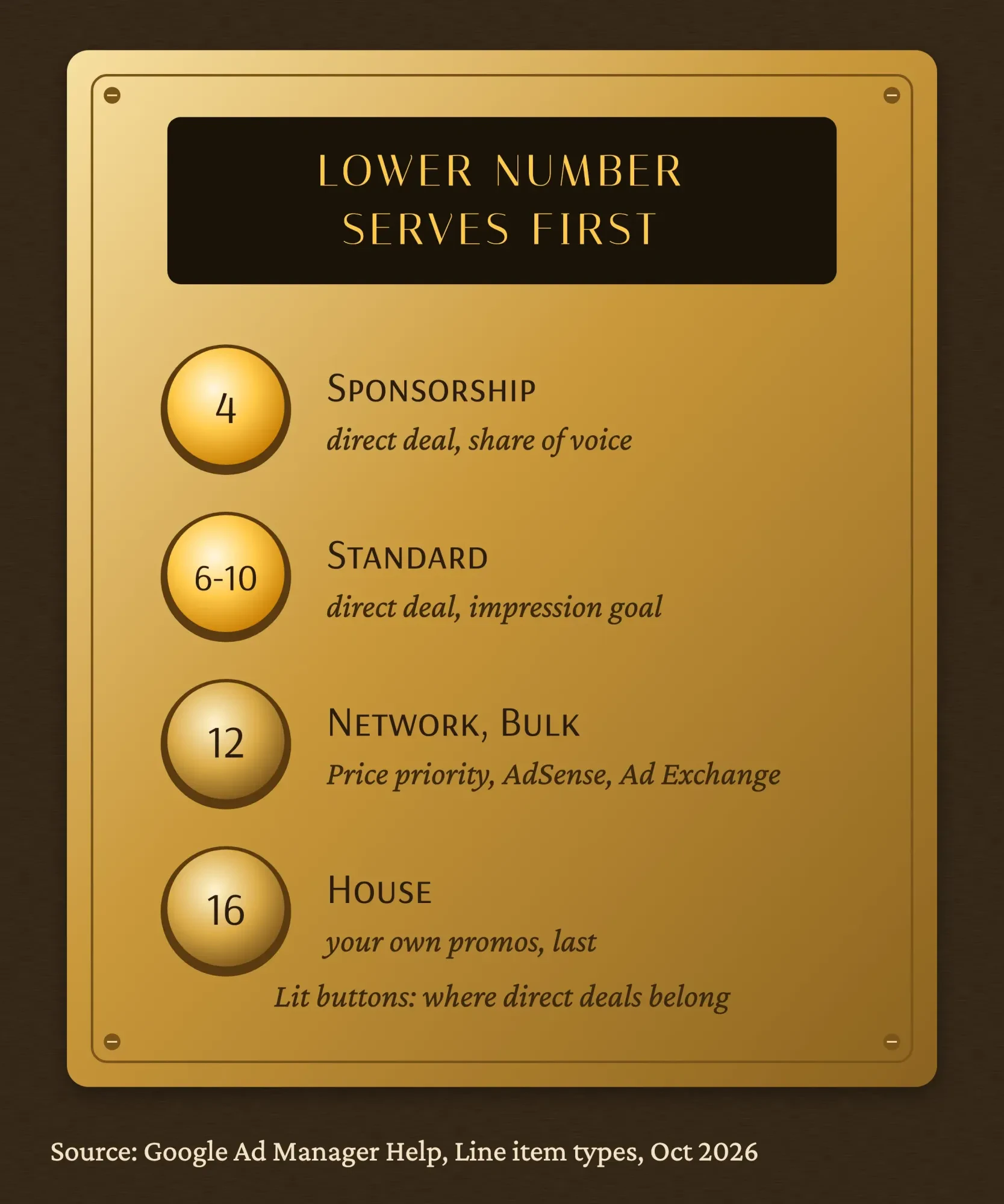 Source: Google Ad Manager Help, Line item types and priorities (read October 2026).
Ads appear on the page through the Google Publisher Tag. This is Google's getting-started sample, with Google's test ad unit path, plus an "Advertisement" label and reserved space:
<!-- in the <head> -->
<script async src="https://securepubads.g.doubleclick.net/tag/js/gpt.js" crossorigin="anonymous"></script>
<script>
  window.googletag = window.googletag || { cmd: [] };
  googletag.cmd.push(() => {
    googletag
      .defineSlot("/6355419/Travel/Europe/France/Paris", [300, 250], "banner-ad")
      .addService(googletag.pubads());
    googletag.enableServices();
  });
</script>

<!-- in the <body>, where the ad goes -->
<div class="ad-label">Advertisement</div>
<div id="banner-ad" style="min-width: 300px; min-height: 250px;"></div>
<script>
  googletag.cmd.push(() => { googletag.display("banner-ad"); });
</script>
Get two settings right on day one. Google says your network time zone and currency are set for good once you create your first order. We'd also make each advertiser its own order, so every report lines up with one invoice.
With one or two advertisers, you can skip the ad server. A plain image link works, though you'll count clicks yourself and can't cap views:
<div class="ad-label">Advertisement</div>
<a href="https://advertiser.example.com/?utm_source=northwoods&utm_medium=display&utm_campaign=june_300x250"
   rel="sponsored">
  <img src="/ads/outfitter-300x250.jpg" width="300" height="250" alt="Canoe rentals on the Minocqua chain">
</a>
Reserve the space, or one ad will shove your page: our test
That code reserves space for a reason. Ads that arrive late push your text down, and Google's web.dev team says "Ads are one of the largest contributors to layout shifts on the web."
We wanted to see how much one ad does. On October 27, 2026, we built a made-up test page on our own computer with one 300x250 slot after the first paragraph. A plain colored box stood in for the ad, set to appear 1.5 seconds after load the way a slow creative would. Then we measured Cumulative Layout Shift (CLS) in headless Chrome 155, three runs per setup. Without reserved space, CLS was 0.1392 on a 390-pixel phone view and 0.1385 at 1280 pixels. With the slot's space held in CSS? It was 0.0000. Every run.
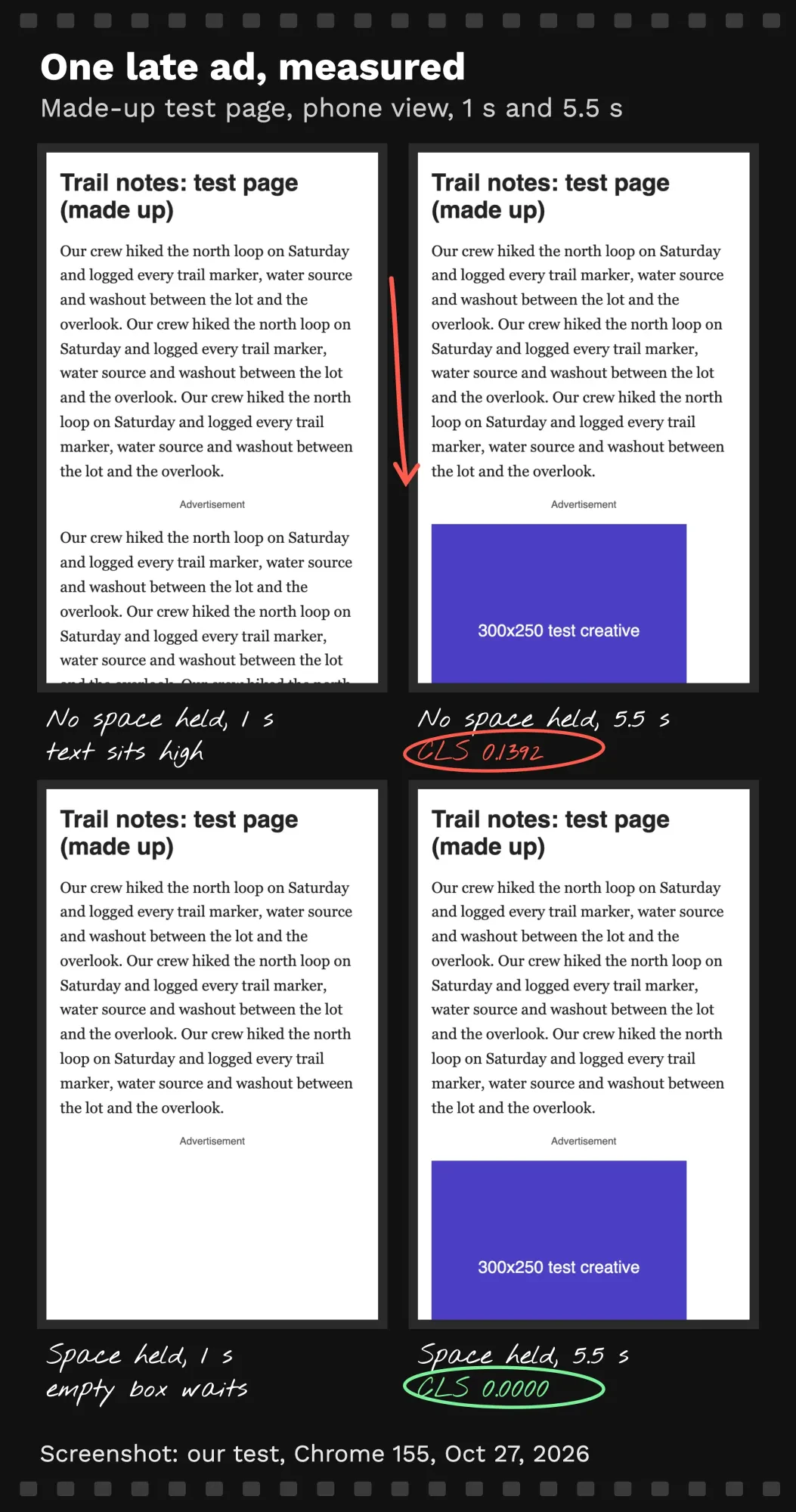 Screenshot: our layout-shift test on a made-up page, headless Chrome 155, October 27, 2026.
Why does 0.14 matter? Because web.dev says "Good CLS values are 0.1 or less."
One unreserved slot alone pushed our page past that line. Google's Publisher Tag guide gives the fix: "The only guaranteed way to avoid layout shift is to reserve a sufficient amount of space for a given ad slot using CSS." That's the min-height in the code above.
After your first ad goes live, check the page with our free speed checker. Our guide to PageSpeed Insights explains how to read the layout-shift numbers in Google's own report.
Label every ad and mark every paid link
Beyond speed, every ad needs a label, and the Federal Trade Commission explains why. In its 2016 policy statement on native ads, the FTC says it "will find an advertisement deceptive if the ad misleads reasonable consumers as to its nature or source".
The statement says a disclosure must be made in "simple, unequivocal" language, and it recalls the FTC's earlier advice to use the term "Advertisement". Timing counts too. Disclosures that reach readers only "after they have clicked on and arrived at another page will not cure any misleading impression".
So label the ad where it sits, not on the page it leads to.
IAB's spec says the same about display ads: "Ad unit content must be clearly distinguishable from publisher or unpaid content on the page". A thin border and the word "Advertisement" above it do the job.
Google has its own rule for the link inside the ad. Its guide to outbound links says: "Mark links that are advertisements or paid placements (commonly called paid links) with the sponsored value."
Its spam policies list "Text advertisements or text links that don't block ranking credit" as link spam. Paid links are fine, Google says, "as long as they are qualified with a rel="nofollow" or rel="sponsored" attribute value". If you hand-code an ad, add rel="sponsored" to its link, as in the image-link code above.
Sponsored articles bring stricter rules than banners. Our guide to sponsored blog posts covers the FTC's endorsement rules and who's liable. That's general information; a lawyer should look at any specific deal before you sign.
Report what ran, then ask for the renewal
Once the ad is live, advertisers renew when they can see what they got. Send a short report when each month closes: the dates, the spots, the impressions served and the clicks. For impressions, Google's Ad Manager 360 billing help names the Total Impressions metric in Ad Manager reports. For clicks, and for hand-coded ads, you'll use your own analytics.
Help the advertiser see the visits on their side too. Google Analytics says that "By adding utm campaign parameters to the destination URLs you use in referral links and ad campaigns, you can view which campaigns refer traffic."
Tag each ad's link in the DigitalTreed UTM tool, one campaign name per spot, so their report matches yours.
Keep your own numbers honest as well. Our GA4 guide shows where Views and traffic sources live, and our roundup of website analytics tools covers what to use alongside it.
Then ask. Send the renewal note a week before the month ends, with the report attached. An advertiser who has just seen good numbers is the easiest yes you'll get all month.
Want the ad slots, the Advertise page or the Ad Manager tags built for you? Our team can add them to your site. Hiring us earns us money, so read that offer with a little skepticism.
How we made this guide: on October 27, 2026, our team read Google Ad Manager Help, the Google Publisher Tag guides and IAB's fixed-size ad spec. The IAB/4A's standard terms were on the list too, along with the FTC's 2016 statement on native ads, Google's link and spam policies, and the Better Ads Standards. Every size, rule and quote comes from those pages, linked inline beside each claim.
We tested layout shift ourselves on a made-up page with a stand-in ad, on our own computer. We didn't open an Ad Manager account or sell an ad for this guide, so there are no account screenshots. Northwoods Paddle Notes and every price in the rate card are made up. Eram N. gets the last word on this version before it's published.
First published April 2024. Rewritten October 27, 2026: replaced a general list of ways to find advertisers with a full guide to direct ad sales. Added IAB sizes, CPM, flat-fee and sponsorship pricing, an example rate card, and insertion orders and invoicing. Also added Google Ad Manager set-up and limits, our layout-shift test, and the FTC and Google labeling rules.
Frequently asked
Do I need an ads.txt file to sell ad space directly?
Not for the deal itself. As of October 2026, Google Ad Manager's ads.txt page describes the file as a tool for programmatic advertising that names who may sell your inventory. It calls ads.txt not mandatory but highly recommended. If you also run a network such as AdSense, keep the file current.
Can I run direct ads on WordPress without writing code?
Yes, a plugin can place and schedule them. As of October 2026, the Advanced Ads page on WordPress.org shows 100,000+ active installations. It lists ad scheduling with start and expiry dates, and inserting ads into posts without coding. Check that the plugin still reserves space for each slot.
Can direct ads and AdSense ads share the same page?
Many sites run both, but the AdSense rules still apply to the page. As of October 2026, the AdSense program policies ban formatting ads so they look like other content on the page. They also ban asking readers to click Google ads with phrases like "support us". Label every direct ad clearly.
Sources
- IAB: New Ad Portfolio, Fixed Size Ad Specifications (PDF)
- 4A's/IAB: Standard Terms and Conditions for Internet Advertising, Version 3.0, now archived (PDF)
- IAB: Standard Advertising Services Terms & Conditions, new terms as of May 2026
- Google Ad Manager Help: Sign up for Ad Manager
- Google Ad Manager Help: Choose the right platform (Ad Manager, AdSense, AdMob)
- Google Ad Manager Help: Line item types and priorities
- Google Ad Manager Help: Sponsorship line items
- Google Ad Manager Help: System maximums and limits
- Google Ad Manager Help: Ad Manager 360 billing setup
- Google Ad Manager: small business
- Google for Developers: Get started with Google Publisher Tag
- Google for Developers: Minimize layout shift (Google Publisher Tag)
- web.dev: Cumulative Layout Shift (CLS)
- web.dev: Optimize Cumulative Layout Shift
- Coalition for Better Ads: The Better Ads Standards
- Federal Trade Commission: Enforcement Policy Statement on Deceptively Formatted Advertisements, 81 FR 22596 (April 18, 2016), via govinfo.gov
- Google Search Central: Qualify your outbound links to Google
- Google Search Central: Spam policies for Google web search (updated August 28, 2026)
- AdSense Help: Revenue per 1000 impressions (RPM)
- Analytics Help: Google Analytics dimensions and metrics
- Analytics Help: URL builders, collect campaign data with custom URLs

Comments
No comments yet. Start the conversation below.