
Quick answer
A YouTube marketing strategy is a plan for which videos you make, who they are for, how people find them and how you count leads. For a small business, keep it simple. Answer one real customer question a week and cut Shorts from it. Write clear titles and thumbnails, then test a small ad budget on your best video.
Key takeaways
- Your customers are there: Pew's 2026 survey found 84% of US adults use YouTube, including 65% of those 65 and older.
- YouTube ranks search results on relevance, engagement and quality. Tags play "a minimal role", so spend that time on titles, thumbnails and the video itself.
- Shorts can now run up to 3 minutes, and TV is the main screen for YouTube viewing in the US. Plan for both a phone and a living room.
- Not every video ad charges per impression. A skippable in-stream ad on CPV bidding bills after 30 seconds of viewing or a click, whichever comes first.
- If you pay or gift a creator, the FTC expects the disclosure in the video itself, and advertisers can be held responsible too.
Most YouTube marketing strategy guides were written for brands with a studio and a media budget. This one is for the plumber, the bakery and the accounting firm. They know their customers watch YouTube and want a plan that fits around a full workweek. It uses YouTube's and Google's own help pages for every rule, current as of October 2026. It says so when a number comes from someone else.
YouTube marketing key facts for 2026
- 84% of US adults use YouTube, in Pew Research Center's survey of 5,511 adults from January 30 to June 18, 2026.
- YouTube had 14.2% of all US TV viewing time in July 2026, a record in Nielsen's The Gauge.
- Since October 15, 2024, Shorts can run up to 3 minutes.
- Since August 24, 2026, YouTube counts a view from the first frame of a video.
- Half of all channels and videos have an impressions click-through rate between 2% and 10%, YouTube says.
- In March 2025, Wikipedia, YouTube and Reddit were the most cited sites in Google's AI summaries, Pew found. Together they made up 15% of the sources.
That last point means a helpful video can also show up as a source in AI answers. Our guide to getting cited by AI answers explains how those answers pick their sources.
Is YouTube worth it for a small business?
Short answer: yes, if your customers search for answers before they buy. Pew Research Center's 2026 fact sheet, published October 19, 2026, found that 84% of US adults use YouTube. That's more than Facebook (70%), Instagram (51%) or TikTok (37%) in the same survey. Use is high in every age group, which matters if your customers are homeowners or retirees and not just students.
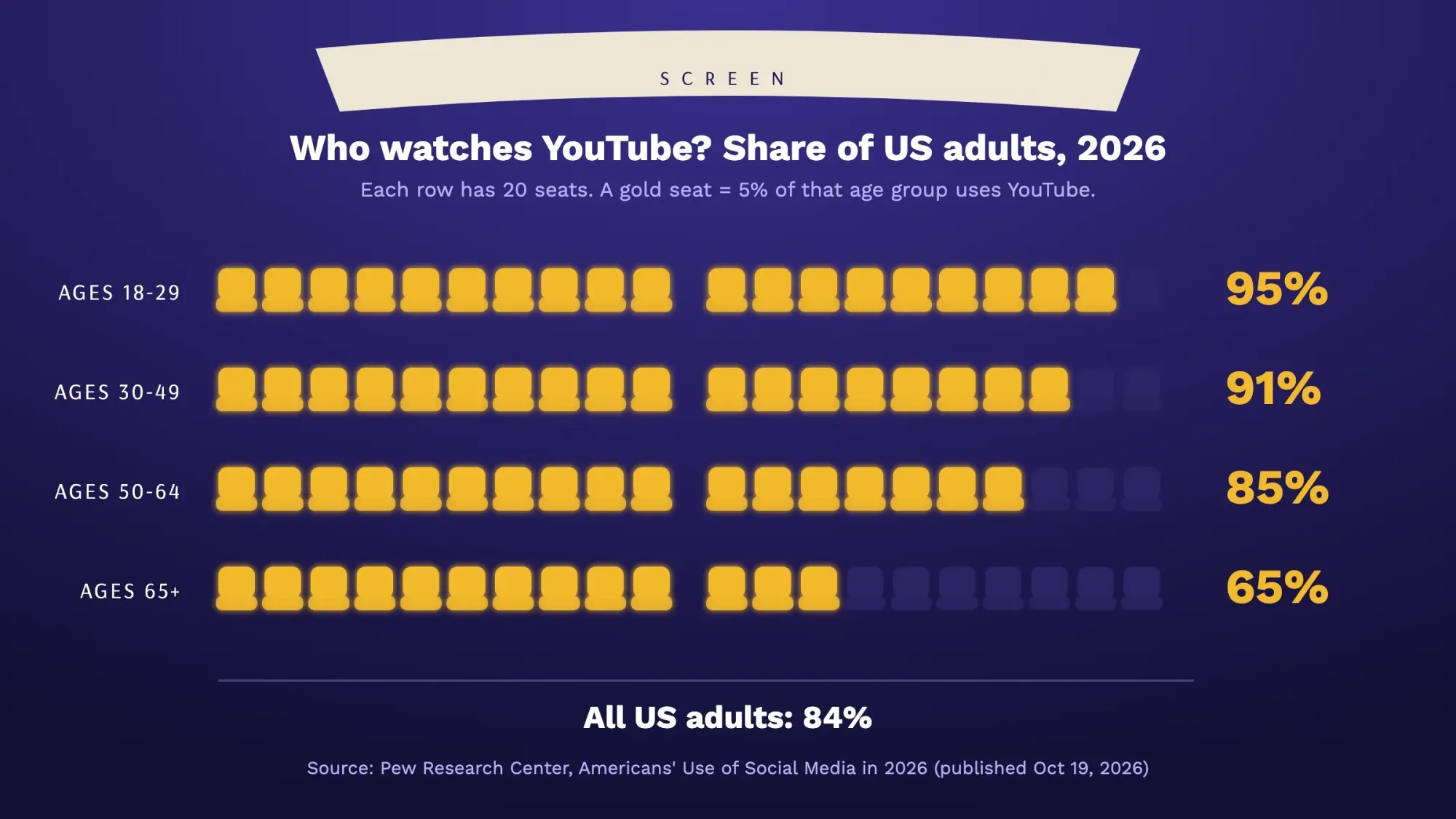 Source: Pew Research Center, October 2026. Americans' Use of Social Media in 2026, a survey of 5,511 US adults from January 30 to June 18, 2026.
The second reason is where people watch. In February 2025 YouTube's CEO wrote that "TV is now the primary device for YouTube viewing in the U.S." Nielsen measures TV viewing independently. It put YouTube at a record 14.2% of all US TV time in July 2026, up from 13.4% a year earlier.
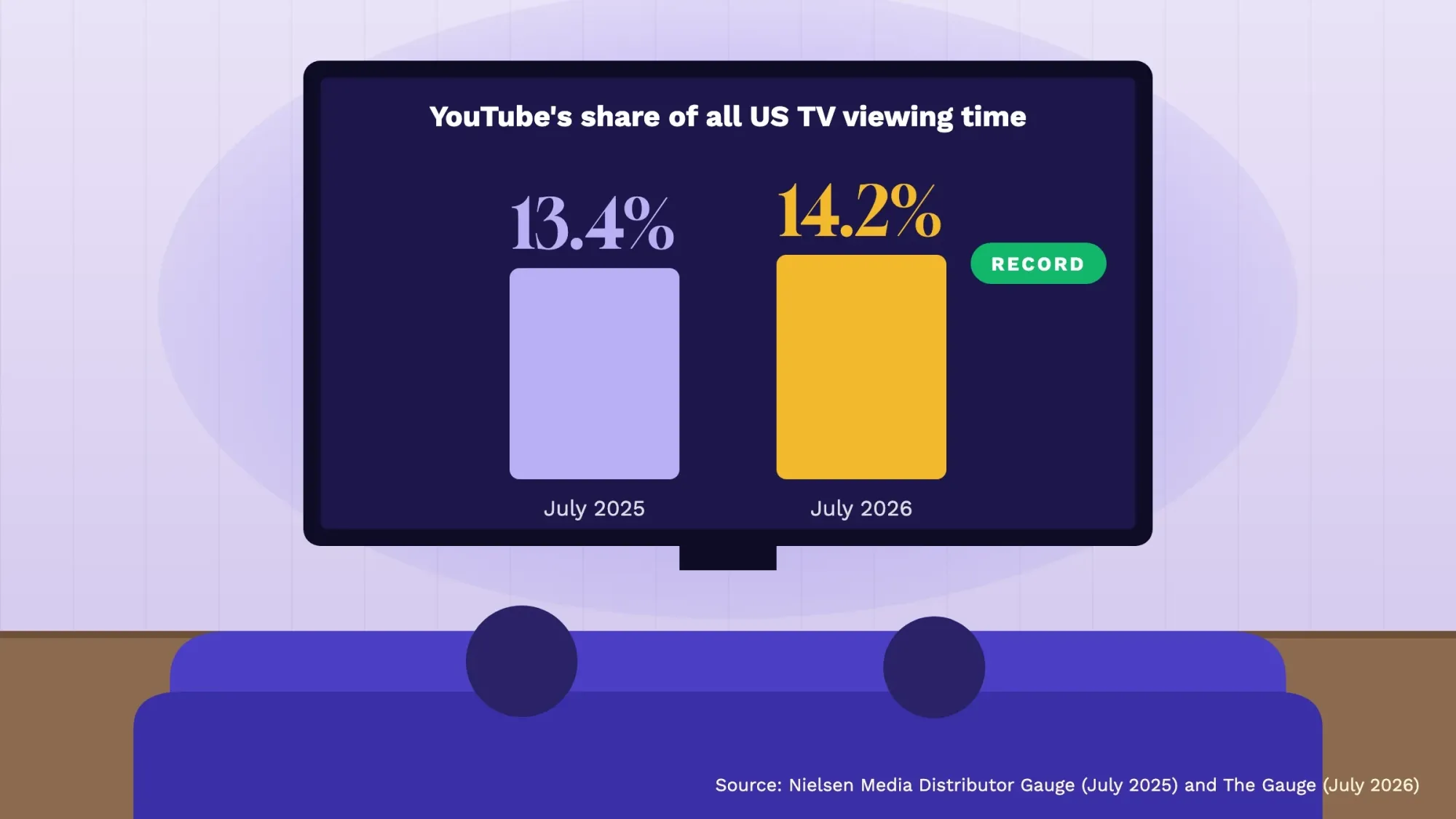 Source: Nielsen, September 2026 (The Gauge, July 2026) and August 2025 (Media Distributor Gauge, July 2025). Share of total US TV usage time, streaming and linear.
That changes how you film. A video that only works on a phone, with tiny text and a cluttered frame, looks poor on a 55-inch screen. Shoot long videos in 16:9, keep any on-screen text big, and add a website or phone number people can read from the couch. In the same letter, YouTube's CEO named QR codes as an ad format that works well on the big screen. The idea works in your own videos too, and our free QR code generator makes one in a minute.
How people find your videos (and what doesn't matter)
YouTube publishes how its search works. It says its system "prioritizes three key elements". Relevance is how well the title, description and video match the search. Engagement includes watch time for that search. Quality means signs that a channel shows expertise and trustworthiness on the topic. It also says it "doesn't accept payment for better placement within organic search results".
Recommendations on the home page and next to other videos work from what each viewer watches, skips, searches, likes and marks as "Not interested". In YouTube's own words, the system "doesn't promote videos to your audience but rather finds videos for your audience". So the job is to make videos a specific group of people will actually watch to the end, not to trick an algorithm.
Do not
- Spend 20 minutes on tags (YouTube says they matter mainly for common misspellings)
- Use a shocking thumbnail the video doesn't deliver on
- Open with a long logo animation and a story about your company
- Judge a video by its first day
Do
- Put the customer's question in the title: "Why is my water heater making noise?"
- Answer it in the first 30 seconds, then explain
- Write a description that repeats the answer in plain words and links to the matching page on your site
- Add chapters so viewers can jump to the part they need
A word on tags, because some top-ranking guides still build their YouTube SEO around them. YouTube's help page is blunt: "Tags can be useful if the content of your video is commonly misspelled. Otherwise, tags play a minimal role in your video's discovery." Our list of YouTube keyword tools helps with topic research. Treat the tag fields as an afterthought. Our YouTube SEO guide covers titles, descriptions, chapters and captions step by step.
Build your YouTube marketing strategy in five decisions
1. Pick one goal you can count
Views are not a business goal. Pick one: phone calls, booked appointments, store visits, quote requests or email sign-ups. Then decide how you'll see it. Put a tracked link in every description (our UTM builder makes these). Give viewers an offer code, or ask new customers "where did you hear about us?"
2. Choose three content pillars
A pillar is a type of video you can make again and again. Three is enough. One answers questions people search for, one shows your work so people trust you, and one is about your town and your team. Here's what that looks like for three very different US businesses.
| Business | Answer questions | Show the work | Local and people | Shorts |
|---|---|---|---|---|
| Plumber in Phoenix, AZ | "How to shut off your main water valve", "Tankless vs tank water heater cost" | Before and after repairs, what a camera inspection finds | Hard water in the Valley, monsoon season prep, meet the techs | "Do this before you call us" tips |
| Bakery in Austin, TX | "How to store sourdough", "How far ahead to order a custom cake" | Decorating timelapses, how a wedding cake is built | Farmers market days, local coffee shop partners | Icing reveals, one-tip clips |
| Accounting firm in Columbus, OH | "Do I need to pay quarterly taxes?", "1099 vs W-2 explained" | A walkthrough of a small business bookkeeping setup | Ohio municipal income tax basics, client Q&A (with permission) | Deadline reminders, myth vs fact |
These are starting ideas, not researched search volumes. The best source is your own inbox. Write down 30 questions customers asked you by phone, email or in Google reviews. Then type the first words of each into YouTube's search bar and note what it suggests.
Before you settle on pillars, spend an hour on 3 to 5 channels your customers already watch, including local competitors. Note which of their videos get the most views for the channel's size. Then read their comments for questions no video answers yet. Those gaps are often your easiest first topics.
3. Decide your format mix: long videos, Shorts and posts
Long videos (5 to 10 minutes is plenty for most how-to topics) are what people find in search and watch on TV. Shorts are vertical or square videos, and since October 15, 2024 they can run up to 3 minutes. YouTube's help page adds one catch: any Short over one minute with an active copyright claim "will be blocked globally". Keep popular music out of longer Shorts.
Posts, which used to be called the Community tab, let you share polls, photos and quick updates. YouTube says posts can show on viewers' home page and Subscriptions feed, and image posts can also appear in the Shorts feed. A weekly poll costs two minutes and keeps the channel active between uploads.
Pros
- Long videos: rank in search, play well on TV, build trust
- Shorts: fast to make from long videos, reach new viewers in a feed that averages 200 billion daily views (YouTube, January 2026)
- Posts: almost no effort, keep regular viewers engaged
Cons
- Long videos: take the most time to plan and edit
- Shorts: viewers swipe fast, so they rarely drive calls on their own
- Posts: mostly reach people who already know your channel, though image posts can show in the Shorts feed
4. Set a pace you can keep
A realistic rhythm for one person: one long video a week (or every two weeks), two or three Shorts cut from it, and one post. That's a few hours a week once you're set up. Consistency matters for a plain reason. Once you join the YouTube Partner Program, YouTube says it may turn off monetization after 6 months with no new video or post.
5. Plan every upload with this free checklist
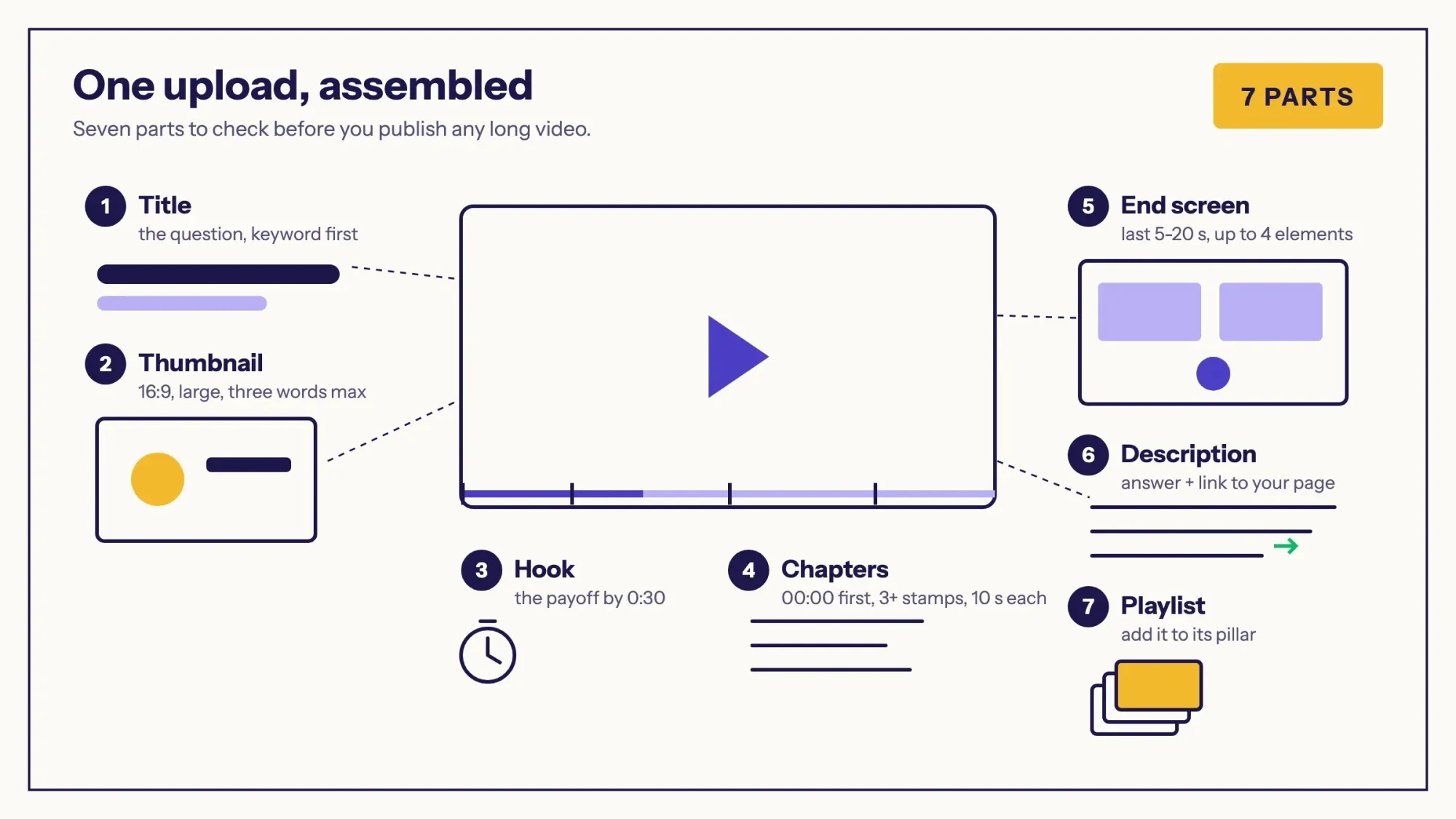 Illustration: the checklist for every long video, based on YouTube's help pages for chapters, end screens and analytics.
- Title: the question or result in plain words, with your keyword near the start.
- Thumbnail: a 16:9 custom image as large as you can make it, with a clear face or result and 3 words at most. YouTube now recommends 3840x2160 pixels, and A/B tests downscale anything under 1280x720.
- Hook: the answer or payoff in the first 30 seconds. YouTube Studio shows what share of viewers are still watching at 30 seconds.
- Chapters: timestamps in the description starting at 00:00, at least 3 of them, each at least 10 seconds long.
- End screen: up to 4 elements in the last 5 to 20 seconds, pointing to the next video or playlist. The video must be at least 25 seconds long.
- Captions: YouTube can create automatic captions, but its help page says quality may vary. Review and fix them in YouTube Studio under Subtitles. Captions help deaf or hard-of-hearing viewers and people who speak another language.
- Cards: info cards can point to a video, playlist or channel at a set moment. Cards that link to your website need the YouTube Partner Program, and cards are not available on videos set as made for kids.
- Playlist: add it to the matching pillar playlist so one video leads to the next.
- Made for kids setting: answer it honestly. YouTube asks under an agreement with the FTC, and to help you follow the COPPA Rule (16 CFR Part 312).
Making thumbnails and short promo clips is the step most owners would rather hand off. Our graphics and video design service makes social creatives and short motion graphics videos, with the price agreed before work starts. (DigitalTreed sells this service.)
Your 90-day YouTube marketing plan
A 90-day YouTube plan for a small business
- Days 1-14: set up Create the channel under your business name. Add a banner, your city or service area and your website in the About section. Verify your phone number to turn on intermediate features. A/B testing needs advanced features, which come after that once you build some channel history or verify with ID or video. Pick your goal, your three pillars and your list of 30 questions. A phone, a window and a clip-on wireless mic are enough kit.
- Days 15-60: publish and learn Publish one long video a week with the full upload checklist, cut two or three Shorts from each, and add a weekly post. Share every video by email, on your Google Business Profile, on social media and embedded on the matching page of your website. Reply to comments quickly.
- Days 61-90: read the data In YouTube Studio, check impressions click-through rate and how many viewers stay past 30 seconds. Also check where views come from and how many viewers are new, casual or regular. Look for the dips in the retention graph and fix that part in your next video.
- Days 61-90: test titles and thumbnails Run Test & Compare on your two or three best older videos. You can try up to 3 titles, thumbnails or both; the test should finish within 2 weeks, and YouTube picks the winner by watch time.
- Day 90: decide Keep the pillar that brought the most watch time and leads, and drop the weakest one. Then decide whether to put a small ad budget behind your best video.
Your Google Business Profile and your email list are the fastest ways to get first views from people who already know you. Early watch time from real customers is worth more than a burst of strangers.
Let staff or an agency help without sharing your password
If someone else will upload or reply to comments, use channel permissions. YouTube's channel permissions let you invite people as an Editor, Manager, Viewer or another role, without giving them your Google Account. In YouTube Studio, go to Settings, then Permissions, then Invite. Each invite expires after 30 days. If your channel uses a Brand Account, YouTube says to move it to channel permissions first.
Reading YouTube Studio without fooling yourself
Three numbers tell you most of what you need. Impressions click-through rate shows how often people who saw your thumbnail clicked it. YouTube says "half of all channels and videos on YouTube have an impressions CTR that can range between 2% and 10%". It adds that CTR naturally drops when a video starts showing on the home page to more people. A falling CTR on a growing video is often good news.
Audience retention shows where people leave. The intro figure tells you what share were still watching after the first 30 seconds. The "key moments" view marks spikes and dips once a video is at least 60 seconds long with at least 100 views. The third number is your monthly audience: YouTube splits the people who watched in the last 28 days into new, casual and regular viewers. It says subscriber count "is not the most accurate way to estimate the size of your active audience."
Note
Views were redefined in August 2026. Since August 24, 2026, YouTube counts a view from the first frame across Shorts, long videos, podcasts and live streams. The old measure is now called an "engaged view", and YouTube says CTR, average view duration and retention are still calculated the same way. If your view counts jumped in late August, this is why.
Before you test anything, wait for enough data. YouTube's own advice is to avoid "deciding without enough data" and checking CTR right after upload. Its built-in Test & Compare tool is the safe way to try new thumbnails because it splits traffic for you. It's desktop only and doesn't work on Shorts. In September 2026 YouTube said creators had run more than 40 million of these tests since 2024. It also announced dynamic thumbnails, where YouTube shows the best of 3 options to different viewers. A/B tests of up to 3 video cuts are coming soon. Our YouTube thumbnail guide shows what to design and test first.
YouTube advertising for small business: cost and billing
You buy YouTube ads in Google Ads. Google doesn't publish an average cost per view or per thousand impressions; you set a budget and the auction sets the price. What Google's video ad formats page does document is when you pay, and that matters more for a small budget than any average.
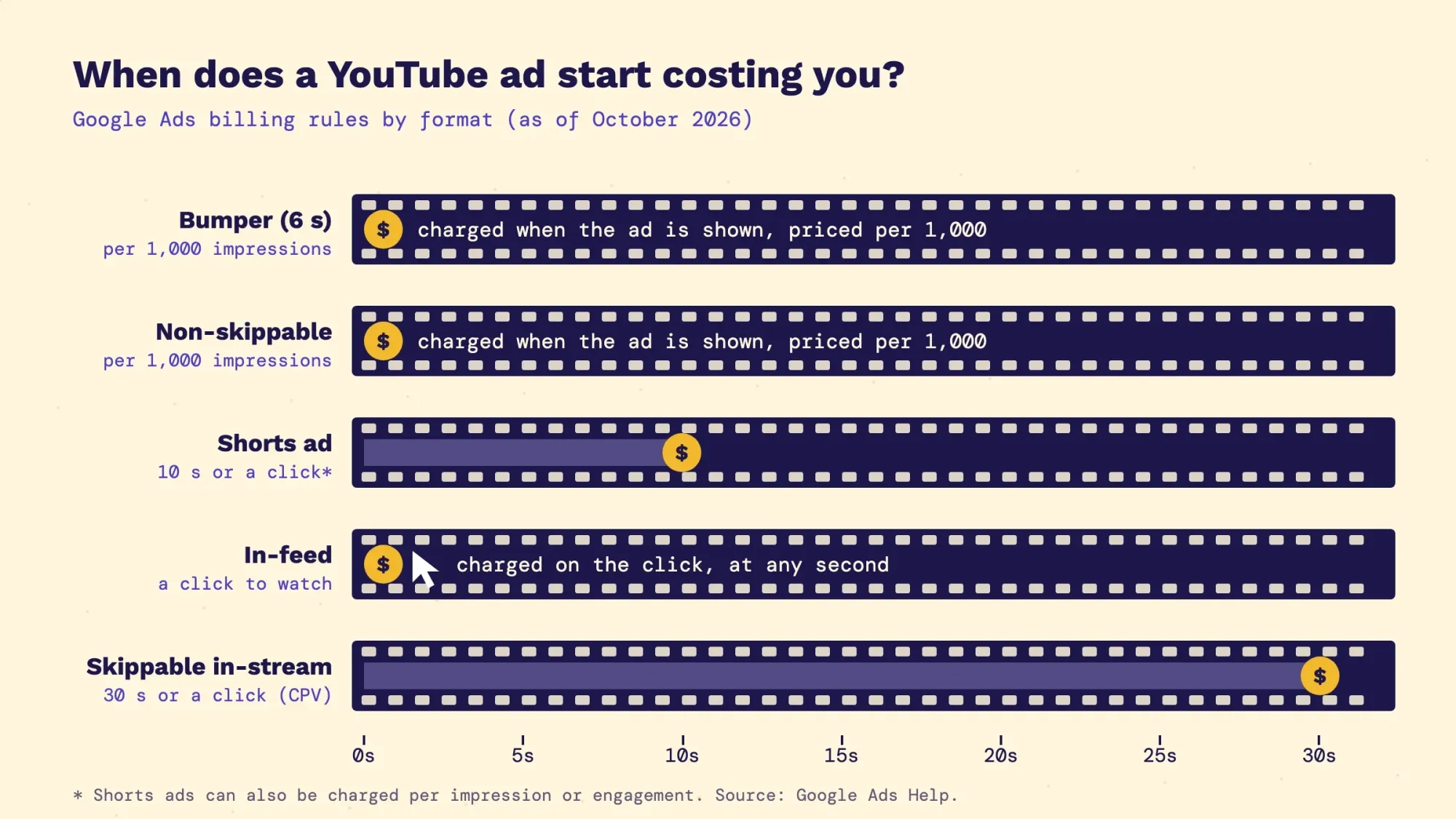 Illustration: when each format bills you, from Google Ads Help (About video ad formats and CPV bidding), checked October 22, 2026.
| Format | What viewers see | When you pay |
|---|---|---|
| Skippable in-stream | An ad before or during a video that can be skipped after 5 seconds | With CPV bidding, after 30 seconds of watching (or the whole ad if shorter) or a click, whichever comes first |
| In-feed | A thumbnail in search results, the home feed and next to videos | When someone clicks to watch (or, in Video View campaigns, after 10 seconds of autoplay) |
| Shorts ads | A vertical ad between Shorts | For an impression, TrueView view or engagement; a TrueView view is 10 seconds or a click on the call to action |
| Bumper | A 6-second non-skippable ad | Per thousand impressions (Target CPM) |
| Non-skippable in-stream | Up to 60 seconds, can't be skipped | Per thousand impressions (Target CPM) |
For a local business, start with 2 formats aimed at your city or radius. In-feed ads mean people chose to click, and skippable in-stream ads should show your offer in the first 5 seconds. Google suggests dividing a monthly budget by 30.4 to get a daily budget, so $300 a month is about $9.87 a day. Spend can reach twice that on some days, but Google caps the month at 30.4 times your daily budget. Since October 2025, Google Ads calls the paid view metric "TrueView views".
To get a rough idea of reach, take one vendor benchmark (Store Growers, February 2026). As of February 2026 it puts in-stream cost per view around $0.05, based on 2023-2024 ad data. Other figures on the same page run much higher. That's one company's estimate, not Google's. At that price $300 would buy roughly 6,000 paid views. The bid estimates inside your own Google Ads account are the number to trust. Our guide to PPC marketing explains the auction in more detail.
How to run your first YouTube ad
- Pick your best organic video, one that already keeps viewers past 30 seconds. Video campaigns can use videos from your own YouTube channel.
- Link your channel to Google Ads. In YouTube Studio, open Settings, then Channel, then Advanced settings, and choose Link Account. If you allow it, a linked account can see organic view counts and build data segments, once called remarketing lists, of your viewers.
- Create a Video campaign in Google Ads and choose a goal, such as sales, website traffic or awareness. Target your city, ZIP codes or a radius around your business, then add topics, keywords or demographics if you need them.
- Set a daily budget. Divide your monthly budget by 30.4, as Google suggests.
- Check views, costs and budget in your Google Ads account each week. Compare cost per lead with your other ads before you spend more.
| Monthly cost (USD) | Lean start | With paid tools | With a small ad test |
|---|---|---|---|
| Channel, Studio, A/B testing | $0 | $0 | $0 |
| Wireless mic (one-time) | About $99 (DJI Mic Mini) | Same | Same |
| Thumbnails | Canva Free, $0 | Canva Pro (paid plan; check Canva's current US price) | Same |
| Keyword research | Free tiers | vidIQ Boost, $16.58 a month billed yearly | Same |
| Ads | $0 | $0 | You choose, e.g. $300 (about $9.87 a day) |
Prices are as of October 2026 and can change. The mic price is from DJI's US store page. The vidIQ figure is its Boost plan at $199 a year, listed on vidIQ's pricing page.
Working with creators: the FTC rules most guides skip
Paying a local creator, or sending them a free product, can work well. It also brings legal duties for you, not just for them. Under the FTC's Endorsement Guides, a "material connection" includes "monetary payment or the provision of free or discounted products", and it must be disclosed clearly. The guides also say advertisers "are subject to liability" for misleading endorsements or missing disclosures, and that ad agencies may be liable too.
- Disclose in the video, not just the description. The FTC's guide for influencers says a video disclosure "should be in the video and not just in the description". It adds that viewers notice it more when it's both spoken and shown on screen.
- Disclose with the endorsement, not at the end. Disclosures are "likely to be missed" at the end of videos or behind a "more" link. In a live stream, repeat it.
- Don't rely on the checkbox alone. YouTube requires creators to tick the paid promotion box, which adds a label at the start of the video. The FTC says not to assume a platform's tool is good enough on its own.
- Hashtags are optional. The FTC calls #ad or #sponsored "fine (but not necessary)"; vague tags like "sp" or "collab" don't count.
- Never buy subscribers or views. The FTC's 2024 rule on reviews and testimonials makes it unlawful to buy fake indicators of social media influence, such as fake subscribers or views. That applies when you know or should know they're fake and use them to look more popular for business. YouTube's fake engagement policy also bans it.
Warning
Give every creator a written brief. Say what to disclose, where and how, and review the claims they plan to make before the video goes live. The FTC tells advertisers to "provide guidance to their endorsers". This is general information, not legal advice; check with an attorney for your situation.
For the wider picture, our beginner's guide to influencer marketing covers finding and vetting creators.
Should you care about monetization?
For most businesses, YouTube ad revenue is a bonus, not the point. Still, it's useful to know the thresholds. YouTube's Partner Program has 2 levels as of October 2026. The first needs 500 subscribers and 3 uploads in 90 days. It also needs either 3,000 watch hours in a year or 3 million Shorts views in 90 days. It lets you use fan funding and promote your own products. Ad revenue sharing starts at 1,000 subscribers with 4,000 watch hours in 12 months or 10 million Shorts views in 90 days.
Two details catch people out. Watch hours from the Shorts feed don't count toward the 4,000 hours. And from February 1, 2027, YouTube says channels need at least 10 million qualified Shorts views in the last 90 days. That is the bar to earn a share of Shorts ad revenue for each month.
Mistakes that slow small channels down
- Clickbait thumbnails. YouTube says clickbait videos tend to have low average view duration and are less likely to be recommended.
- Treating subscribers as your audience instead of watching new, casual and regular viewers.
- Reposting other people's clips or compilations as Shorts. YouTube treats these as non-original, and their views don't count toward Shorts revenue.
- Long intros before the point. Check the 30-second intro figure in Studio after every upload.
- Leaving videos only on YouTube. Embed each one on the page it answers, where it helps visitors and keeps them on your site longer.
- Going quiet for months, then posting five videos in a week.
Frequently asked questions
Frequently asked
How do I start YouTube marketing for a small business?
Set up a channel under your business name and choose one measurable goal and 3 content pillars. Then publish one helpful video a week that answers a real customer question. Cut Shorts from each video, share it with your existing customers, and review YouTube Studio after 60 to 90 days.
How long does YouTube marketing take to work?
Plan on about 90 days before you judge it. That gives you 10 to 12 videos and enough data in YouTube Studio to see which topics bring watch time and leads. YouTube itself warns against deciding without enough data.
How much do YouTube ads cost per month?
You decide. Google says you decide how much you spend, and you set a daily budget (Google suggests your monthly budget divided by 30.4). Google doesn't publish an average cost per view; prices come from the auction. A few hundred dollars a month on one proven video is a reasonable first test.
How do I advertise my business on YouTube?
Link your YouTube channel to a Google Ads account in YouTube Studio under Settings, Channel, Advanced settings. Then create a Video campaign in Google Ads, aim it at your area and set a daily budget. Start with your best organic video.
Can I advertise on YouTube for free?
Yes, through organic videos, Shorts, posts and playlists. YouTube says it doesn't accept payment for better placement in organic search, so a well-made free video can rank above a big brand's.
How long can a YouTube Short be?
Up to 3 minutes, for square or vertical videos uploaded on or after October 15, 2024. Shorts over one minute with an active copyright claim are blocked, so avoid claimed music in longer Shorts.
Do tags still matter for YouTube SEO?
Very little. YouTube says tags help mainly when a topic is commonly misspelled and otherwise "play a minimal role" in discovery. Titles, thumbnails, descriptions and how long people watch matter far more.
What is a good click-through rate on YouTube?
YouTube says half of all channels and videos have an impressions CTR between 2% and 10%. Compare a video with your own past videos, not with other channels, and expect CTR to fall as a video reaches more people.
Do I have to disclose a sponsored video or a free product?
Yes. The FTC's Endorsement Guides treat payment and free or discounted products as a material connection that must be disclosed clearly, in the video itself. Creators must also tick YouTube's paid promotion box, and the business paying can be held responsible too.
Should a small business make Shorts or long videos?
Both, but start with long videos. They rank in search and play well on TV, and you can cut two or three Shorts from each one to reach new viewers.
Can someone else manage my business's YouTube channel?
Yes. YouTube's channel permissions let you invite a staff member or agency as an Editor, Manager or Viewer in YouTube Studio, under Settings and Permissions. They don't get your Google Account password, and you can change or remove their access later.
Your next step: write down 10 questions customers asked you this month and film the answer to the first one this week. If you would rather have a team run the channel, our social media marketing service manages YouTube along with your other social accounts.
First published July 2020. Rewritten October 2026: new Pew and Nielsen audience data, 3-minute Shorts and the August 2026 change to view counts. It also adds ad billing by format and the disclosure rules for paying creators.
How we made this guide: it is built from YouTube Help and Google Ads Help pages and YouTube's official blog. The creator rules come from the Endorsement Guides (16 CFR Part 255), 16 CFR Part 465 and the federal influencer disclosure guide. Audience figures come from Pew Research Center's 2026 survey and Nielsen's The Gauge. Sources are linked inline. We checked every number against the source named next to it on October 22, 2026. Updated October 23, 2026: added a key facts list and a competitor check for your pillars. Captions, cards and team access with channel permissions are new too. It also adds steps to run your first YouTube ad and 3 FAQs. We checked the new facts on October 23, 2026.
Sources
- Pew Research Center: Americans' Use of Social Media in 2026 (October 19, 2026)
- Nielsen: July 2026 The Gauge and July 2025 Media Distributor Gauge
- YouTube Official Blog: Our big bets for 2025 (February 11, 2025)
- YouTube Official Blog: What's coming to YouTube in 2026 (January 21, 2026)
- How YouTube Works: Search
- YouTube Help: Performance FAQ and Add tags to your videos
- YouTube Help: Understand three-minute YouTube Shorts
- YouTube Help: Posts
- YouTube Help: Video chapters and End screens
- YouTube Help: Impressions and CTR FAQ, Key moments for audience retention and New, casual and regular viewers
- YouTube Official Blog: Engaged views explained (August 19, 2026)
- YouTube Help: A/B test titles and thumbnails and Made on YouTube 2026 tools (September 23, 2026)
- Google Ads Help: About video ad formats, CPV bidding and Average daily budgets
- Store Growers: YouTube Ads Benchmarks (2026) (vendor estimate)
- FTC Endorsement Guides, 16 CFR Part 255 and 16 CFR Part 465 (consumer reviews and testimonials)
- FTC: Disclosures 101 for Social Media Influencers
- YouTube Help: Paid product placements and endorsements and Fake engagement policy
- YouTube Help: Made for kids
- YouTube Help: Partner Program overview and eligibility, YouTube Partner Program and Shorts monetization
- Children's Online Privacy Protection Rule, 16 CFR Part 312
- YouTube Help: Add video thumbnails and Feature access for YouTube creators
- DJI Store: DJI Mic Mini and vidIQ: Pricing (prices as of October 2026)
- Pew Research Center: Google users are less likely to click on links when an AI summary appears (July 22, 2025)
- YouTube Help: Channel permissions, Use automatic captioning, Add subtitles and captions and Add info cards to videos
- Google Ads Help: Link YouTube channels and Google Ads accounts, About Video campaigns and Target ads to geographic locations
1 comment
Robin
Thanks for pointing out such an important topic. A lot of YouTube marketing information is given here. I will try to use these and share such an important topic with my friends.
Reply