
Quick answer
To find a font from an image, crop one clean line of text and upload it to a free font identifier, then check the top matches letter by letter. In our October 2026 test, WhatFontIs named all 3 of our test fonts in its top 2. A miss often means the font isn't in that tool's catalog.
So use two tools, not one.
And once you have a name, check the license before the font goes on your sign, menu or website.
Every find font from image tool says it's accurate. We didn't want to repeat those claims, so we ran a test with answers we already knew. Everything below comes from that test and from each tool's own pages, read that same day.
Key takeaways
- In our test, WhatFontIs named all 3 test fonts in its top 2.
- A font finder can only name fonts in its own catalog.
- Use 2 finders, then check that letters like a, g, R and y match.
- On a live website, the browser's Fonts tab shows the font it drew.
- Knowing a font's name doesn't give you the right to use its file.
How we tested: 3 free fonts with known answers
That test started with fonts whose names we already knew. Most font finder reviews use paid fonts, so you can't check the answer yourself.
We set the words "Fresh Bakery Hours" in 3 fonts that anyone can download for free: Inter SemiBold, Manrope Medium and Unbounded SemiBold. All 3 sit in the open-license folder of Google's font library, with an OFL license file next to each. Two of them, Manrope and Unbounded, are the fonts on our own site, so we knew exactly what the right answer looked like.
Each line was rendered as a 1200 by 200 pixel PNG, black text on white, 72 pixels tall.
That's an easy image on purpose.
If a tool misses a clean screenshot, it won't do better with a blurry phone photo of a menu board.
On Saturday, October 24, 2026, between about 1:30 and 2:10 p.m. India time, we uploaded those 3 files to 6 tools. They were WhatTheFont, WhatFontIs, Adobe Fonts visual search, Google Lens, and both doors of the Matcherator (Fontspring and Font Squirrel). We used a fresh browser profile driven by a script, with no account and no sign-in anywhere. We left cookie banners unanswered.
Our rule was simple. If a tool asked for an account or showed a bot check, we'd stop and report it.
Two things to keep in mind.
Our machine is in India, which changed what Google showed us. And a script-driven browser is exactly what bot checks are built to catch, so a blocked upload in our test may work fine for you by hand.
Five font finders compared, and what each found
So here's the short version, with prices and limits from each tool's own page. "Our test" is the rank of the right family for Inter, Manrope and Unbounded, in that order.
| Tool | Best for | Free limit | Price (as of October 2026) | Sign-up needed? | Our test |
|---|---|---|---|---|---|
| WhatFontIs | Free and paid fonts in one list | 5 searches a day, with ads | PRO $49.99 a year | No for a basic search | #1, #1, #2 |
| Adobe Fonts visual search | Creative Cloud users | Search is free | Free to search; adding fonts needs an Adobe account | Only to add a font | #1, miss, #1 |
| WhatTheFont | Fonts sold on MyFonts | No limit stated | Free; fonts sold separately | No | miss, miss, miss |
| Google Lens | Reading the words in a photo | No limit stated | Free | No | #1, wrong, wrong |
| Fontspring / Font Squirrel Matcherator | Free plus paid catalog, when it works | Free, per Fontspring | Free | No | blocked |
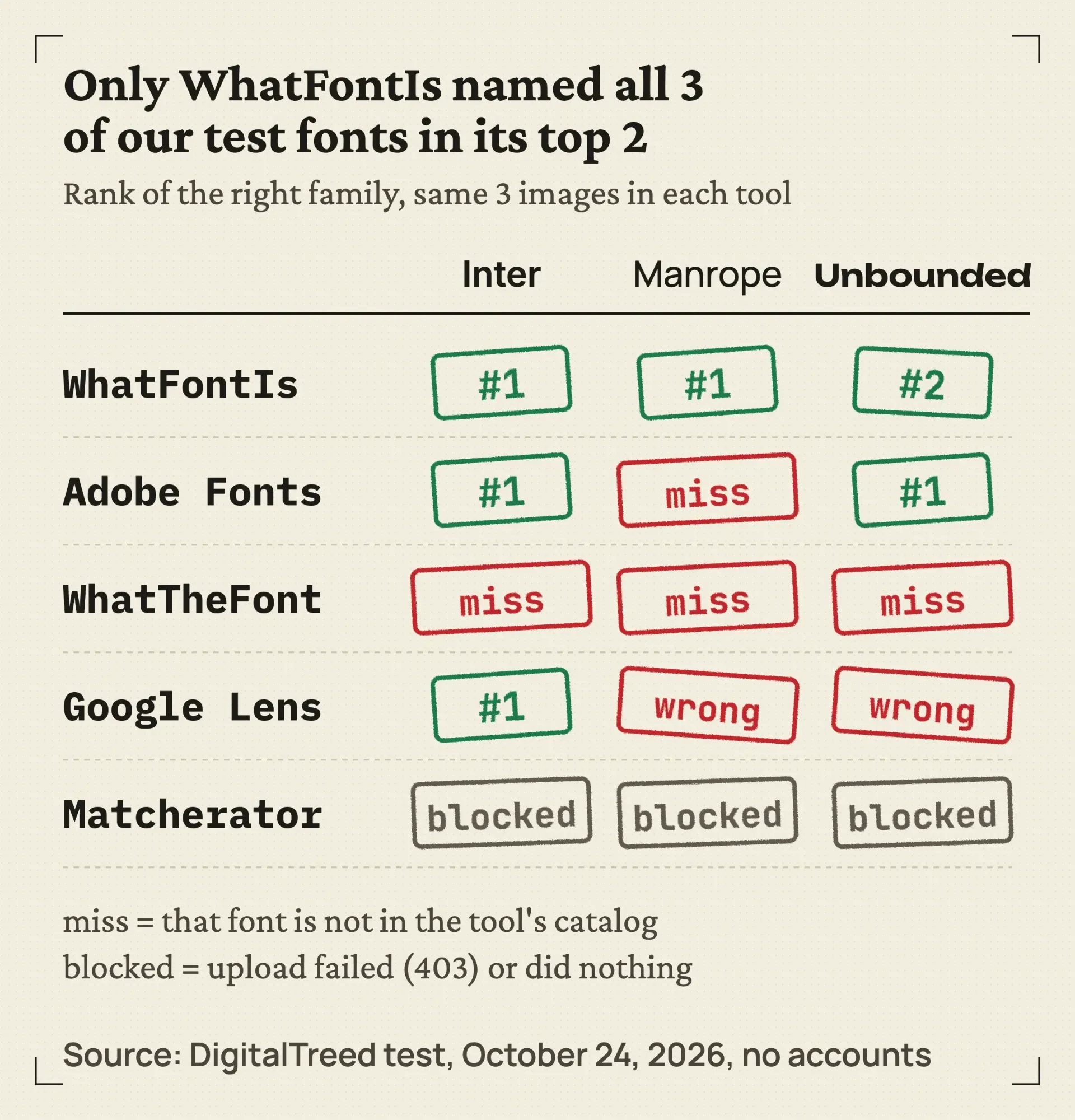 Source: DigitalTreed test, October 2026. Same 3 open-license test images in every tool, no accounts.
The pattern wasn't hard to see once all the results were in.
A finder can only name fonts in its own catalog. WhatTheFont missed all 3 because MyFonts doesn't sell them. Adobe missed Manrope because Adobe Fonts doesn't carry it. So "no match" often says more about the catalog than about your image.
WhatFontIs found all 3, with ads and a daily cap
Once the uploads were done, WhatFontIs was the only tool that named every test font near the top. Its home page says it matches your image against "over 1.2M+ fonts" from both paid and free sources. In our test it put Inter SemiBold at #1 of 60 results, Manrope 500 at #1, and Unbounded 600 at #2, behind a paid font called Metzler Display.
It even got the weights right. That's rarer than it sounds.
The flow takes 4 steps: upload, crop, adjust contrast, then confirm the letters it read. It picked the word "Bakery" on its own and filled in all 6 letters correctly each time.
Signing in was offered at every step but never required.
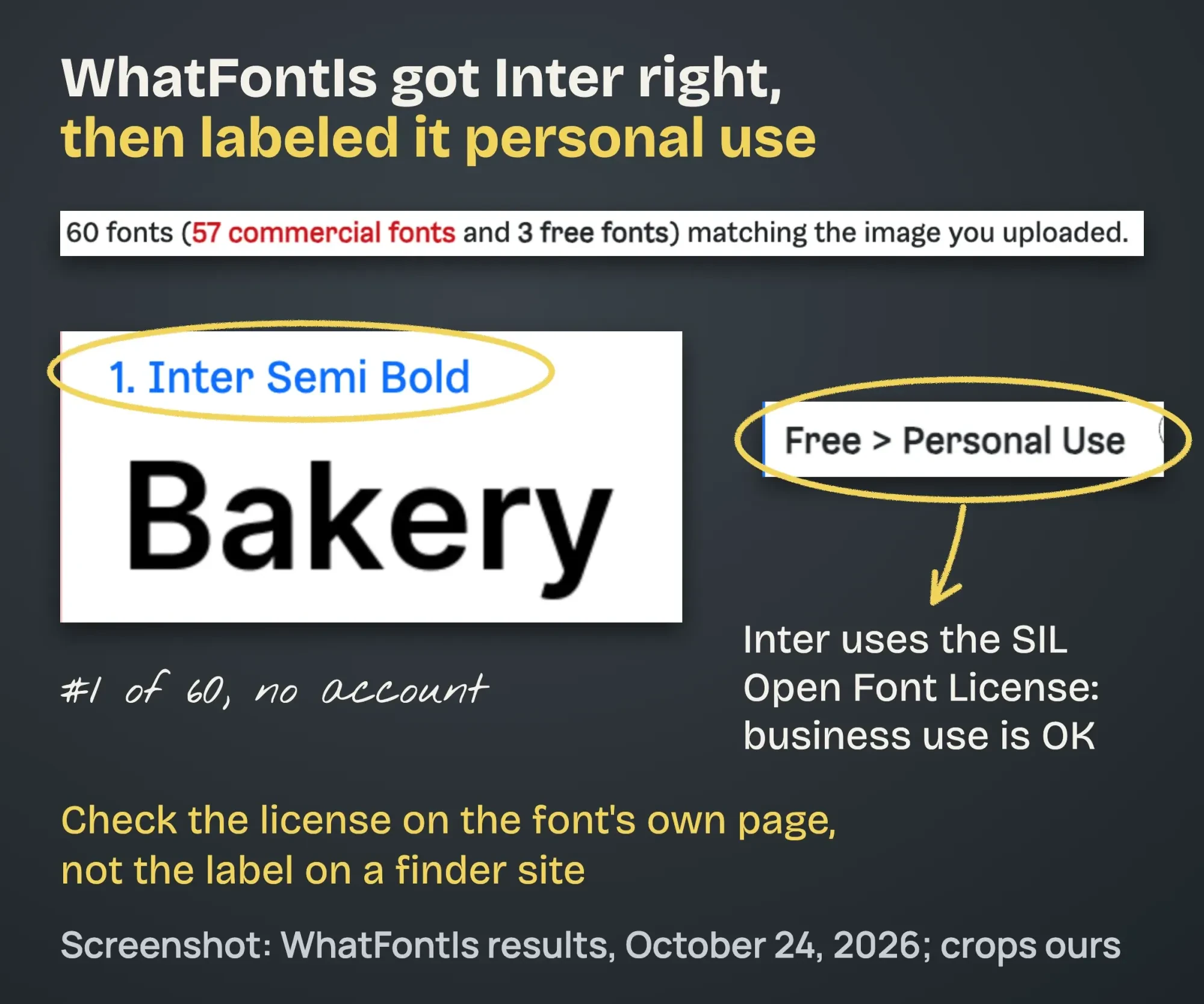 Screenshot: WhatFontIs results for our Inter test image, October 24, 2026. Crops and notes ours.
Best for: anyone who wants free and paid matches in one list, without making an account.
The catch: the free plan is capped.
The FAQ on that home page puts the free plan at "up to 5 fonts per day" with ads, and its PRO page shows 60 results per search on the free plan, against 100 on PRO. PRO costs $49.99 for 1 year or $74.90 for 3 years on its payment page (as of October 2026), which works out to about $24.97 a year on the longer plan.
One more catch matters for business owners.
WhatFontIs labeled Inter "Free > Personal Use." Inter is under the SIL Open Font License, which allows commercial use. Treat a finder's license label as a hint, then read the license on the font's own page.
Adobe Fonts visual search is sharp inside Adobe's own library
Adobe came closest to WhatFontIs. Its visual search page worked for us signed out. It selected the whole line on its own and returned 20 similar fonts for Inter, with Inter 18pt SemiBold first. For Unbounded, the first 4 results were all Unbounded weights.
Manrope was the miss.
Adobe's top pick was Rubik Light, and a search of Adobe Fonts for "manrope" turned up no such family. The tool did fine; the font just isn't there.
Adobe's help page says you can select a font in the results "to add it immediately," and the font then shows up in your Creative Cloud apps. That part needs an Adobe account, which we didn't create. The upload page notes the feature "currently supports Latin text."
If you already pay for Photoshop, there's a second Adobe route. Adobe's Match Font tutorial says to select the text area with the Rectangular Marquee Tool, "Then choose Type, Match Font." We didn't test it, because it needs a paid plan.
Best for: designers who already work in Creative Cloud.
The catch: it only suggests fonts from Adobe's library, so free fonts outside it won't show up.
WhatTheFont only returns fonts MyFonts sells
That catalog problem hit WhatTheFont hardest. MyFonts says the tool searches "over 233,000 font styles" in its own collection, and none of our 3 test fonts is in it. A search of MyFonts for Manrope and Unbounded found no match, and "Inter" brought up Inter Sans, a different font.
So every answer was a paid look-alike.
For our Manrope image, the #1 result was Maison Neue Medium, priced "From $99.00 USD" (as of October 2026). For Unbounded, it was Nira Nara Extra Bold Semi Expanded, from $25.
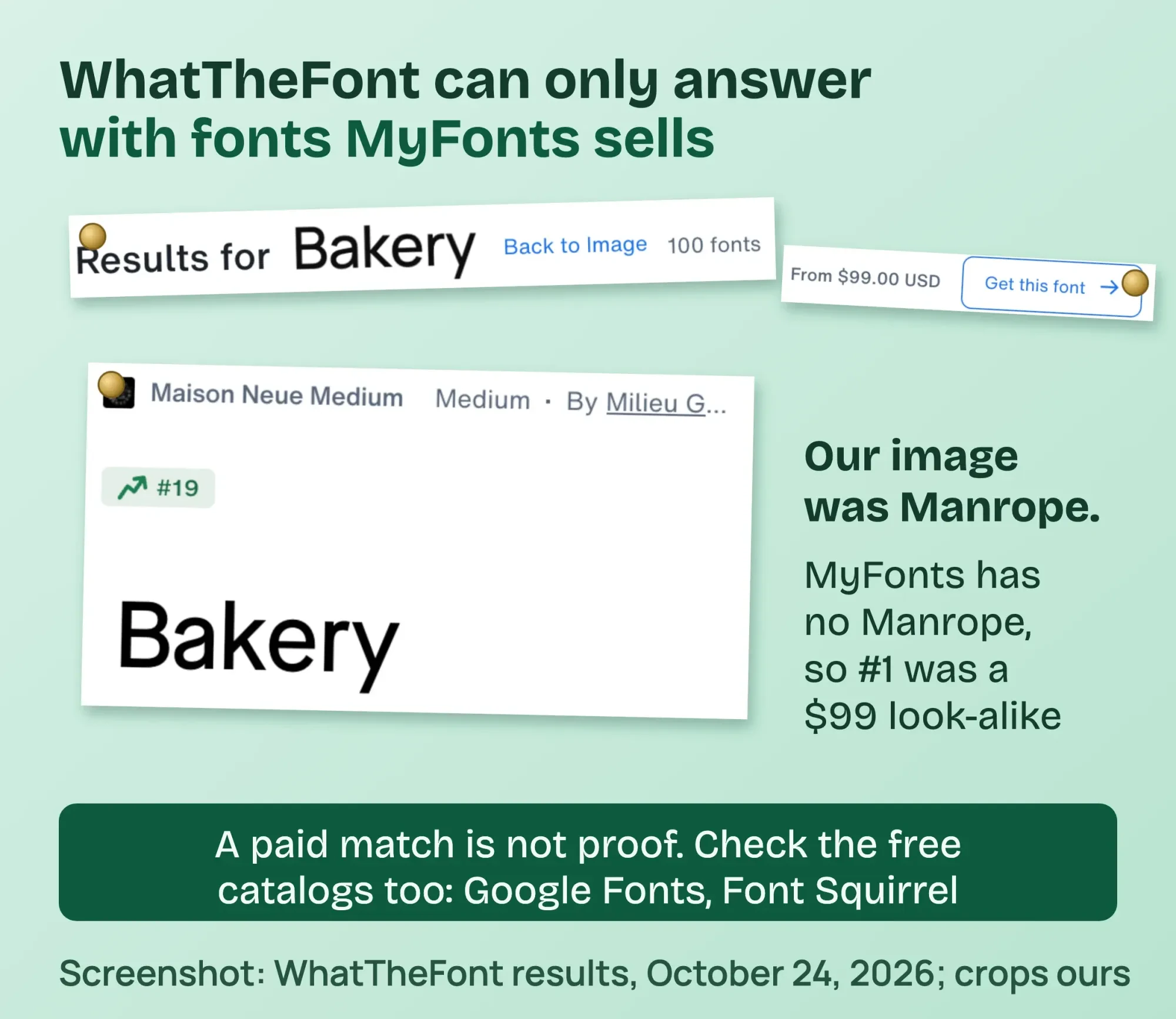 Screenshot: WhatTheFont results for our Manrope test image, October 24, 2026. Crops and notes ours.
The tool itself was easy to use: it found the 3 words on its own, picked "Bakery" as the sample, and returned between 96 and 100 results each time without requiring a login (we closed a sign-up pop-up). Its upload tips ask for a .png or .jpg under 5MB, at least 50x50 px, and Latin text only. The iPhone app is free on the US App Store, version 3.0.23 as of October 2026.
Best for: a font you saw in an ad or on packaging, which is often a paid font.
The catch: if the font is free, WhatTheFont can't name it.
It will sell you something close instead.
The Matcherator was blocked in our test
Beyond the catalog tools, there's the Matcherator. Fontspring says its Matcherator searches "over 900,000 paid and free fonts" and "will always be free." Font Squirrel runs the same engine; its font identifier says it's "Powered by the Fontspring Matcherator."
We couldn't get a result from either one.
On Fontspring, the upload sat on the "Uploading and processing your image" message. Our browser's network log showed that the server answered the upload with a 403 error, which means forbidden, and the page never moved past that message. The page also loads Google's reCAPTCHA, so we treated that as a bot check and stopped. We didn't retry by hand or try to get around it. On Font Squirrel, the Upload Image button did nothing in our browser, and no upload left the page.
Best for: free fonts you'd actually be allowed to use, if it works on your computer.
The catch: we can't vouch for its matches, because we never saw one.
Can Google Lens identify fonts?
It can't, not reliably. Google's help page for searching with an image lists AI Overviews, objects, similar images and pages with the image. It doesn't list fonts. Our test showed why that matters.
First, Lens read our words.
For every image it showed bakery hours for a Fresh Bakery in New Delhi, most likely because our search ran from India. We then typed "what font is this" in the "Add to your search" box.
For Inter, the AI Overview said the text was "most closely matching Inter, Apple's SF Pro (San Francisco), or Helvetica Neue." Inter was right, and it came first. For Manrope, it gave the same answer word for word, which is wrong. For Unbounded, it said "this typeface is Syne Bold."
Then we ran Manrope again. This time it got the Syne Bold answer, copied from the Unbounded run.
The font answer seemed to follow the earlier query, not the new image.
Use Lens to read the words or find where an image came from, and use a real font finder for the font.
On a live website, ask the browser instead
But on a live website you don't need to guess at all, because the browser knows which font it drew.
In Firefox, right-click the text, choose Inspect, and open the Fonts tab. Mozilla's DevTools docs say the tab shows the "Fonts used" by the selected element, plus a list of every font on the page. In Chrome, Inspect the text, open the Computed tab and scroll to the bottom, where Rendered Fonts lists the font Chrome actually used.
Why not just read the CSS? Because font-family is a wish list.
On our own home page that day, the heading asked for Unbounded, then system-ui, then sans-serif. The browser works down that list and uses the first font it can load, so if a file fails or is blocked, only the rendered font tells you what's really on screen.
For a quicker look, the free WhatFont extension for Chrome names the font when you hover over text. Its store page listed version 3.3.0, updated October 12, 2026, with 3,000,000 users. We didn't install it in our test profile.
Web fonts also cost load time, so pages with many weights get slower. Run your own pages through our website speed test to see if fonts are holding them back. For what each font warning means, read the PageSpeed Insights guide.
When no tool finds it
Even the best finder fails on some images. Usually it's one of 4 things:
- Script fonts with joined letters. Fontspring warns that cursive fonts "might not match well if letters are touching or connected."
- Custom logo lettering. Many logos are drawn by hand, so there is no font to find.
- Two fonts in one crop. WhatTheFont says to draw the crop box "around one line of text."
- Warped or tilted text. Straighten it first; the WhatFontIs editor can rotate it. If the image itself needs cleaning up first, see our roundup of free photo editors.
When that happens, ask the designer who made the piece, or post the image in a font identification community. If it's a logo you want to match, our list of logo maker tools and our guide to hiring a graphic designer cover the next step.
Font licensing in plain words
Once you've got a name, the question every business owner should ask is simple: can I use it?
What US copyright covers
That answer starts with copyright. In the US, the shape of the letters generally isn't protected by copyright. The Copyright Office's rules at 37 CFR 202.1(e) list "Typeface as typeface" among works not subject to copyright. Circular 33 says it plainly: "Copyright law does not protect typeface or mere variations of typographical ornamentation or lettering."
The font file is different. It's software. The Compendium, section 723, says a program that generates a typeface "may be registered" if its code has enough original authorship, though the registration won't cover the typeface itself. Section 906.4 says the same in the visual art chapter: registration covers "only the source code," not the letters.
So the file you download comes with a license, and that license is a contract.
Knowing the font's name doesn't give you the right to use the file.
A brand's logo can also be a trademark, which is a separate system run by the USPTO. Copying a rival's look closely can raise trademark problems even if the font is free. Once you have the font, our graphic design tips explain why two fonts are usually enough.
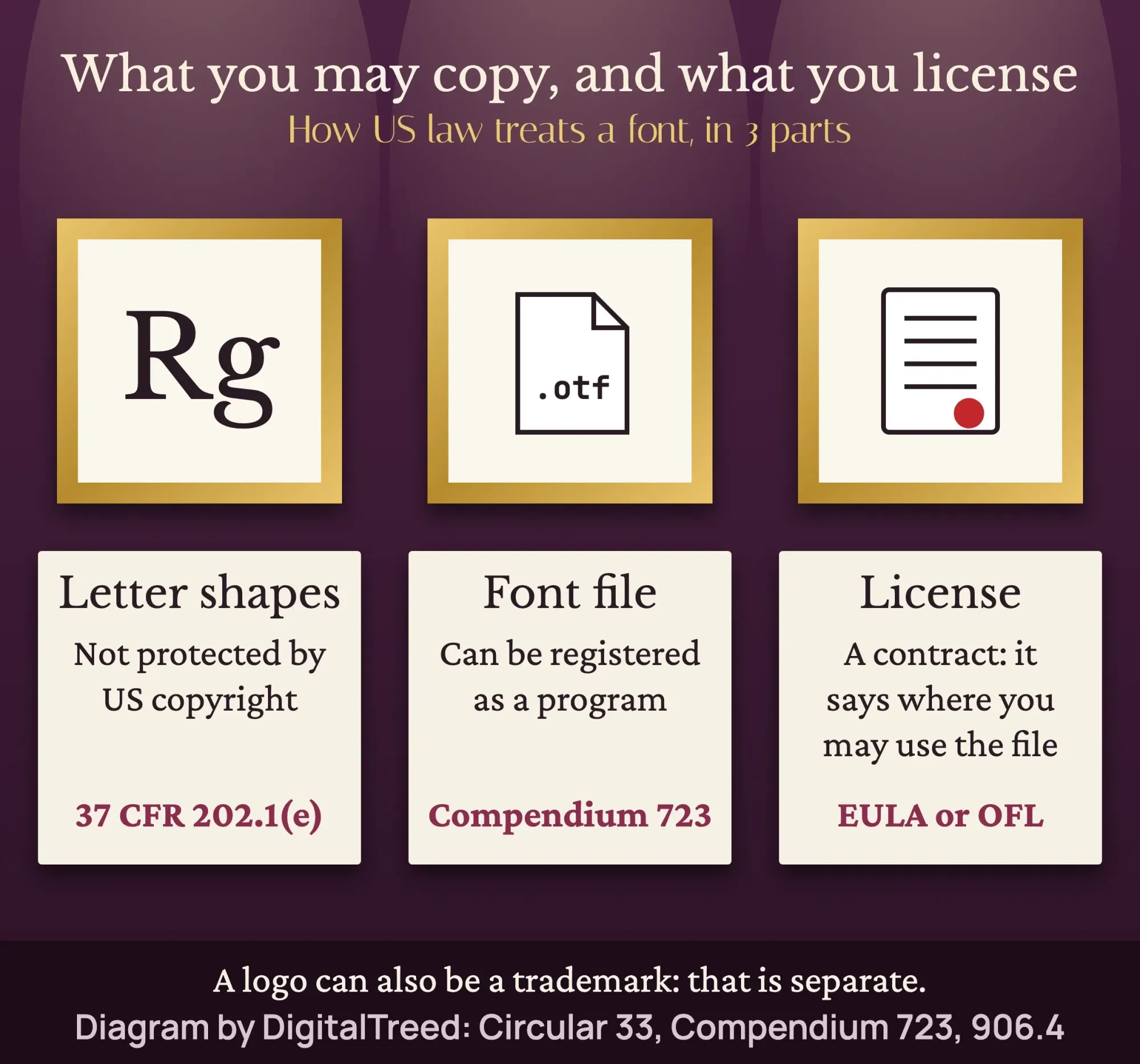 Diagram by DigitalTreed, based on 37 CFR 202.1(e), Circular 33 and Compendium sections 723 and 906.4.
Free fonts under the OFL
That contract is simple for Google Fonts. Its FAQ says yes to business use ("you can use them commercially") and to logos ("Yes, you can use Google Fonts within any logo"), and it calls every Google Font open source and free of cost. Most use the SIL Open Font License, which lets fonts be used and shared freely "as long as they are not sold by themselves."
In plain terms: put an OFL font on your menu, site or ads. Just don't sell the font file on its own.
Desktop, web and app licenses
But paid fonts are where owners get caught. A license for your computer usually doesn't cover putting the font on your website or in an app. Fontspring's license guide even warns that "some licenses don't allow logo creation."
Read the license for each use before you buy, and keep a copy. If a designer builds your site, ask which fonts they've licensed and in whose name, as our guide to hiring a web designer suggests.
This is a plain summary of how US rules treat fonts. It isn't legal advice. If a font license or a logo dispute matters to your business, an intellectual property attorney can tell you where you stand.
How to choose a font finder
With that covered, picking the tool is the easy part. Match it to where the font came from:
- A screenshot or photo, any font: start with WhatFontIs, then Adobe.
- An ad, package or magazine: add WhatTheFont, since paid fonts are likely.
- A live website: use the browser's Fonts tab or Rendered Fonts.
- Just the words or the source of a photo: Google Lens.
Our take: run every image through 2 finders, and trust a name only when the "a," "g," "R" and "y" match yours.
Example: a taqueria in Boulder, Colorado, wants its new website to use the same font as the menu boards a sign shop painted years ago. The owner photographs one board straight on and crops a single line. WhatFontIs and Adobe agree on a paid font that sells desktop and web licenses separately. So the owner picks the web license for the site, or chooses a close OFL font from Google Fonts. Either way, it's written down before launch.
Fonts are one piece of a brand, so our branding strategy guide shows how they fit with colors and logo. Text on images follows its own rules, which we cover in our thumbnail guide, and press kits need the right files too, as our media kit guide explains.
Want someone else to sort out fonts and licenses on a new site? Our web design service handles web font licensing and setup. For logos and brand assets, see our graphics and video service. (We'd be paid for either job, so you know where our interest lies.)
How we made this guide: our team checked every tool page, price, limit and legal quote against the original source on the day we tested, October 24, 2026. The test is ours: 3 open-license fonts rendered as PNG files and uploaded that afternoon from India to 6 font tools, with no accounts. We recorded each tool's top results and stopped where Fontspring refused our upload. Every quote and number links straight to its source.
First published November 2025. Rewritten Saturday, October 24, 2026: new tests of 6 font finders on fonts with known answers, dated limits and prices, a live-website method, and a plain guide to US font law and licenses.
Frequently asked
How do I install a font I found on Windows?
Unzip the download if needed, then double-click the font file to open it in Font Previewer and select Install. Microsoft's custom fonts support page says fonts install through the operating system. Once installed, the font shows up in Office apps automatically.
How do I install a font on a Mac?
Double-click the font file in the Finder, then click Install. Apple's Font Book user guide says Font Book checks each font for errors as it installs. It also warns you when the font is already installed, so you can keep both, skip or replace it.
Will my new font show up when I send a Word file to someone?
Only if their computer has the font too. Microsoft's custom fonts support page says missing fonts display in Times New Roman or the default font. You may need to embed the font in the file, if its license allows that.
Sources
- eCFR: 37 CFR 202.1, Material not subject to copyright
- US Copyright Office: Circular 33, Works Not Protected by Copyright
- US Copyright Office: Compendium (Third Edition), Chapter 700, section 723
- US Copyright Office: Compendium (Third Edition), Chapter 900, section 906.4
- USPTO: What is a trademark?
- Google Fonts: FAQ
- SIL Open Font License 1.1, official text
- Google Fonts repository: Inter (OFL)
- Google Search Help: Search with an image
- Firefox Source Docs: Edit fonts
- Chrome Web Store: WhatFont (vendor)
- WhatFontIs (vendor)
- WhatFontIs: PRO membership (vendor)
- WhatFontIs: PRO pricing (vendor)
- MyFonts: WhatTheFont (vendor)
- App Store: WhatTheFont (vendor)
- Adobe Fonts: Visual search (vendor)
- Adobe Help: Find fonts from images (vendor)
- Adobe Learn: Match fonts in an image with Photoshop (vendor)
- Fontspring Matcherator (vendor)
- Font Squirrel font identifier (vendor)
- Fontspring: Worry-free licensing (vendor)


Comments
No comments yet. Start the conversation below.