
Quick answer
The Google Analytics certification is a free exam on Google's Skillshop. You need 80% or higher to pass, you can retake it 24 hours after a fail, and it stays valid for one year. Google's public help pages don't list the question count or time limit.
That last gap matters, because plenty of pages quote exact numbers anyway.
We read every Skillshop and Google Analytics Help page on this exam on October 26, 2026, and this guide uses only what those pages say. Where Google is silent, we say so. You won't find exam questions or answers here, either. You'll find what to study, how to practice and how to keep the certificate current.
Key takeaways
- The Google Analytics certification exam is free on Skillshop.
- You need a score of 80% or higher to pass.
- After a fail, you can retake the exam 24 hours later.
- A certification stays valid for one year from the date you pass.
- Never retake the exam before the 30-day recertification window opens.
What Google confirms about the exam, and what it doesn't
The Google Analytics certification is Google's free credential for people who use Google Analytics 4, earned by passing one online assessment on Skillshop. Skillshop’s help page puts it simply: "Certifications are granted when you pass the certification assessments."
Here's what Google's public help pages said when we read them on October 26, 2026:
| Cost | "Skillshop is available at no cost." | Skillshop FAQ |
| Passing score | "a score of 80% or greater" | Skillshop FAQ |
| Attempts | "no limit to the number of attempts" | Skillshop FAQ |
| After a fail | "wait 24 hours" | Skillshop FAQ |
| Valid for | "one year from the date of certification" | Digital badges FAQ |
| Renewal | Retake within 30 days before it expires | Digital badges FAQ |
| Questions and time limit | Not on the public help pages | Not shown to signed-out visitors |
The first four rows come from the Skillshop FAQ for Ads, GMP and GA, which applies to "Google Analytics learning" by its own note. The validity and renewal rows come from the Skillshop digital badges FAQ.
Now the blank row. We opened Skillshop in a fresh browser on October 26, 2026, signed out. The catalog listed "Google Analytics Certification (2026)" under Google Analytics, so the exam is live and dated for this year. But clicking it brought up an "Authentication Required" box and a sign-in button, and that's where we stopped. The exam's own page only opens once you're signed in, so we couldn't see whether it lists a length or a timer.
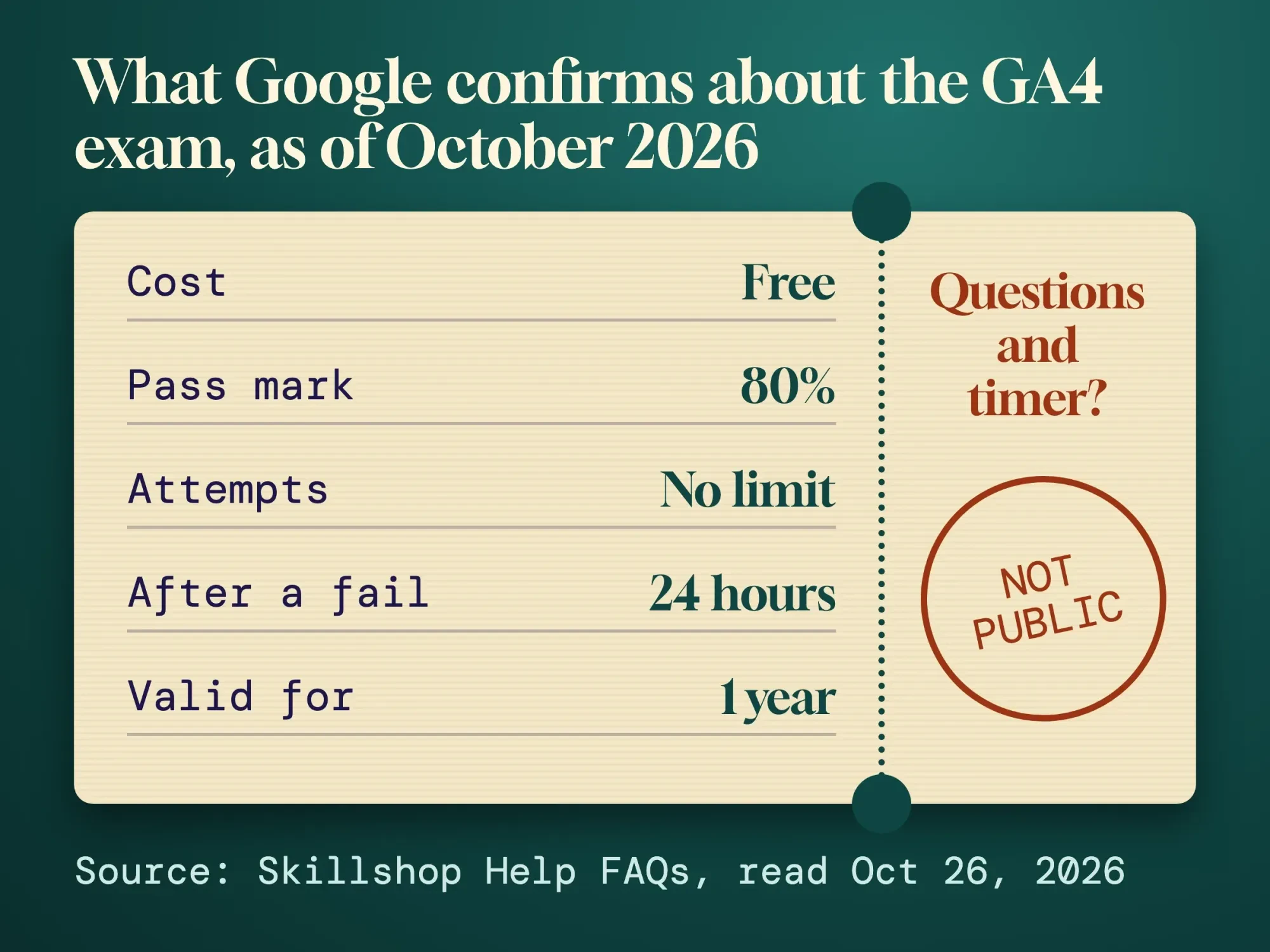 Diagram by DigitalTreed: rules quoted from the Skillshop Help FAQs, read October 26, 2026.
So treat any question count you read elsewhere as unconfirmed until you see it on that page.
One more thing has changed. Older guides, including the 2020 post that sat at this address, describe the "GAIQ" exam for Universal Analytics. Google's help center says Google Analytics 4 "has replaced Universal Analytics," and the old data went away starting the week of July 1, 2024. Study GA4 material only.
Sign up with an email you'll keep
Now that you know the rules, set up the Skillshop account your certificate will follow. The email you pick here matters.
Skillshop’s account setup page says you need an email linked to a Google account, and it "can be a Gmail address or non-Gmail address". Google also suggests a personal address over a work one, so "your achievements and certifications follow you wherever your career takes you."
That advice is worth taking. If you leave a job, the work inbox goes with it.
Two settings deserve a minute before you study. First, set your language in Preferences, because Google says it's "used to filter the learning content and assessments". Second, set your time zone. The Skillshop FAQ notes that it "defaults to Coordinated Universal Time (UTC)," so switch it to Eastern, Central, Mountain or Pacific to make dates on your record match your calendar. Add a recovery email while you're there.
Work through Google's four Analytics courses
Once the account is set up, open the study material Google built for this exam. The Analytics Help page on Analytics Academy lists "four training courses and a certification":
- 101: Get started using Google Analytics (GA), for beginners
- 102: Manage GA data and learn to read reports, for beginners
- 201: Dive deeper into GA data and reports, intermediate
- 301: Use GA with other tools and data sources, advanced
Take them in that order. They're all free, and the Skillshop navigation guide says you can retake any course "as many times as you'd like". Content stays on the site, so plan to study online rather than from a download.
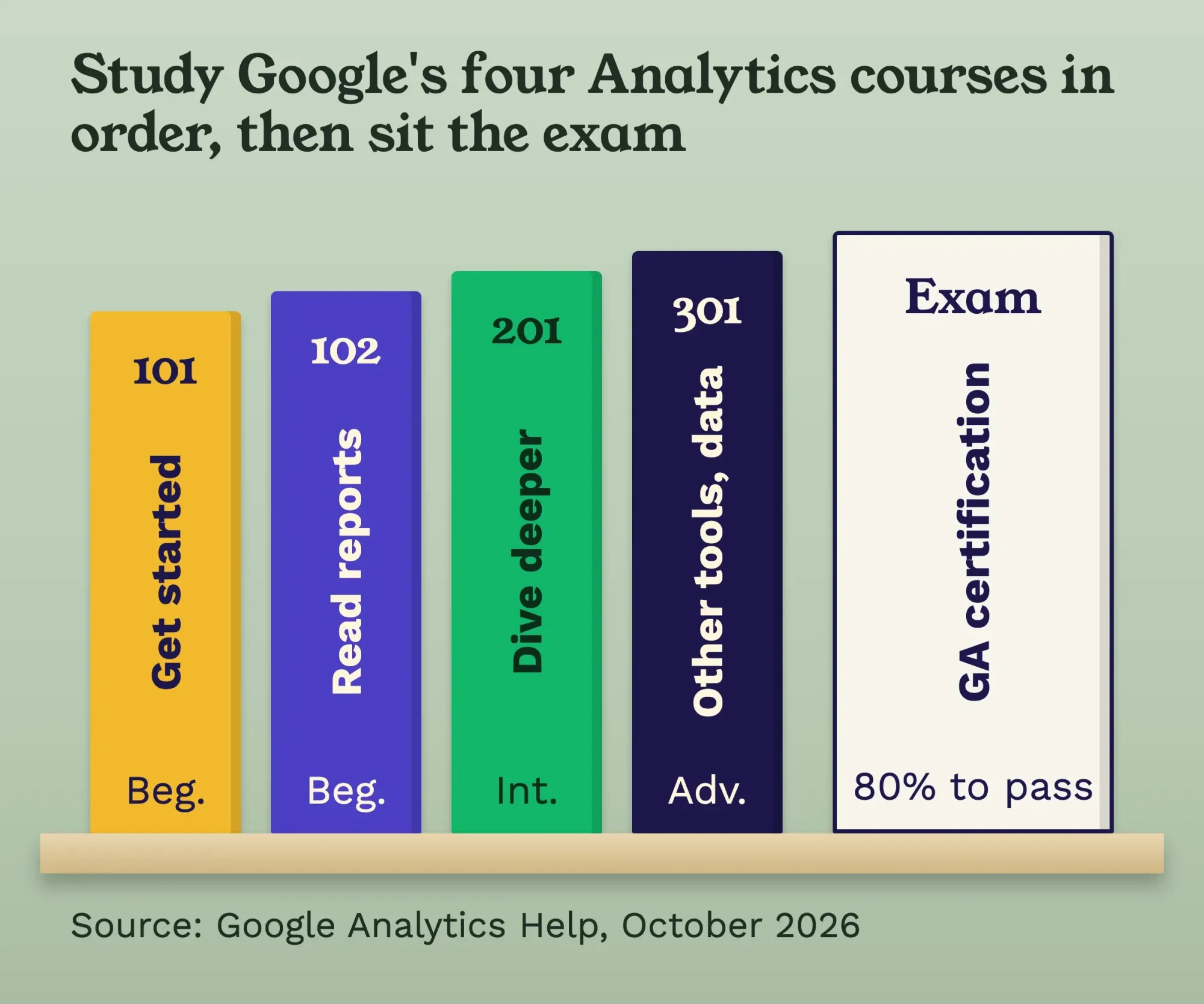 Diagram by DigitalTreed: the course order from Google Analytics Help, "Enroll in Analytics Academy courses on Skillshop," read October 26, 2026.
Example: the office manager at Lantern Outfitters, a made-up canoe outfitter in Bemidji, Minnesota, runs the company's GA4 property between bookings. She gives each course two evenings, takes notes in her own words, and opens the shop's real reports after every module to find the thing she just learned. That last habit does more than rereading ever will.
The GA4 ideas to know cold
Those courses cover a lot of ground. These are the ideas that come up again and again in Google's own help center, so they're the ones to understand rather than memorize.
Start with how data arrives. Google’s explainer says Analytics "collects data from your websites and apps to create reports". Once it's processed, it's "stored in a database where it can't be changed". That one line explains why setup choices matter so much.
Next, the structure. An account holds properties, and a property collects from data streams. Google’s hierarchy page defines a data stream as "a flow of data from a customer touchpoint (e.g., app, website) to Analytics," with up to 50 streams per property.
Then events, which are the heart of GA4. Google's page on events sorts them into four types: automatically collected, enhanced measurement, recommended and custom. The ones that matter most to the business become key events, and a standard property can mark up to 30 of them.
After that, the reading side. Reports come in two kinds, overview and detail. Explorations are "advanced techniques that go beyond standard reports". Audiences "let you segment your users," and the attribution page lists 3 models: data-driven, paid and organic last click, and Google paid channels last click.
You'll find the setup and the main reports explained for small sites in our GA4 guide. If tags are new to you, the Tag Manager guide shows how events get sent.
Traffic sources are easier to grasp once you've tagged a link yourself. Make one in the free DigitalTreed UTM builder, then find that campaign in the Traffic acquisition report a day later.
Practice in the demo account, not on your live site
But reading only gets you so far. The fastest way to make these ideas stick is to click through real data where a mistake costs nothing.
Google offers exactly that. Its demo account is "a fully functional Google Analytics account that any Google user can access". It holds data from the Google Merchandise Store, an online shop, and Flood-It!, a puzzle game. Everyone gets the Viewer role, so you can filter tables, add dimensions and build explorations without breaking anything. Google adds that the data "is obfuscated but is still typical Analytics data."
Give yourself tasks, not quizzes. These are ours, and none of them comes from the exam:
- Find which channel brought the most new users last week.
- Open one detail report and add a secondary dimension.
- Build a funnel exploration and spot the step with the biggest drop.
- Create a segment for mobile users and compare it with desktop.
- Open the attribution reports and note what each model changes.
We don't publish exam questions, real or made up, and we'd skip any site that does.
Leaked "answer" lists go stale as Google updates the exam, and they teach you nothing you can use on Monday in your own property.
On exam day
Once the practice tasks feel easy, book yourself a quiet hour. Google's public pages don't say whether there's a timer, so check the exam page for any time limit before you click start, and plan around it.
Use a supported setup. The Skillshop FAQ lists Microsoft Edge, Mozilla Firefox, Google Chrome and Safari, plus iOS 12.4 or higher and Android 9.0 or higher. A laptop on a steady connection is the safer pick.
Read each question to the end before you pick.
Failed? You can try again in 24 hours
Then the score comes back. If it's under 80%, you've lost nothing but a day: the Skillshop FAQ allows unlimited attempts, with a 24-hour wait after each fail.
Use that day well. Don't walk back in with the same notes.
Example, with dates we worked out from Google's rule: the Lantern Outfitters manager sits the exam on Tuesday, November 3, 2026, at 6:40 PM and misses the mark. The earliest she can try again is Wednesday, November 4, at 6:40 PM. She spends that evening redoing the 201 course and two demo tasks on the area she found hardest, then passes on Thursday, November 5.
Your certification calendar, worked out
After you pass, a one-year clock starts, and the renewal rules are stricter than most people expect.
Google's badges FAQ says certifications are "valid for one year from the date of certification," unless the certificate says otherwise. You can't retake the same exam while certified until "the recertification eligibility period, which starts 30 days prior to the expiration date."
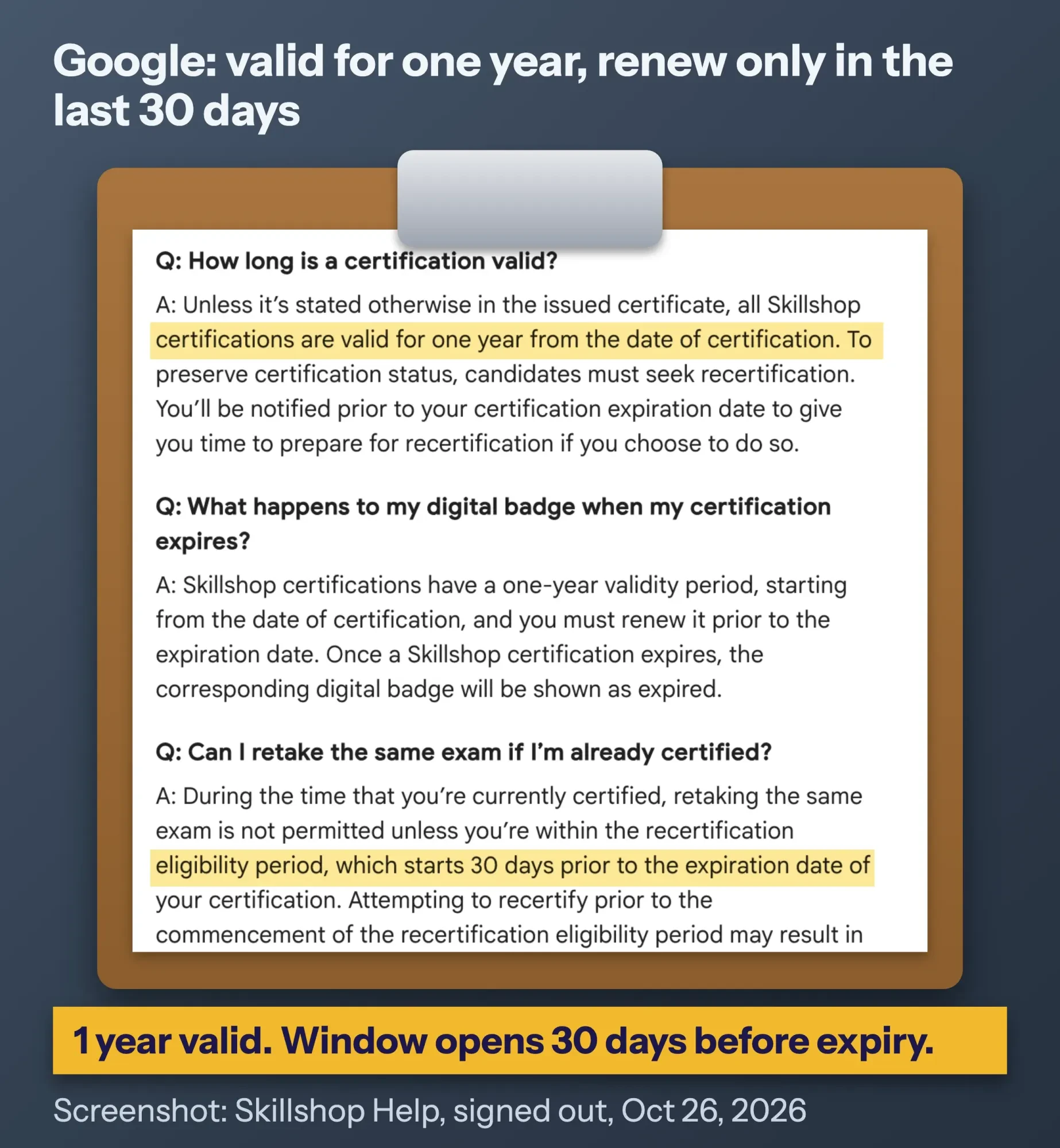 Screenshot: Skillshop Help, "Digital badges for Skillshop Google Ads/GMP/GA" (public page, signed out, read October 26, 2026), cropped and annotated by DigitalTreed.
Here's how that plays out for the example pass date:
- Passed: November 5, 2026.
- Recertification window opens: October 6, 2027.
- Certificate expires: November 5, 2027.
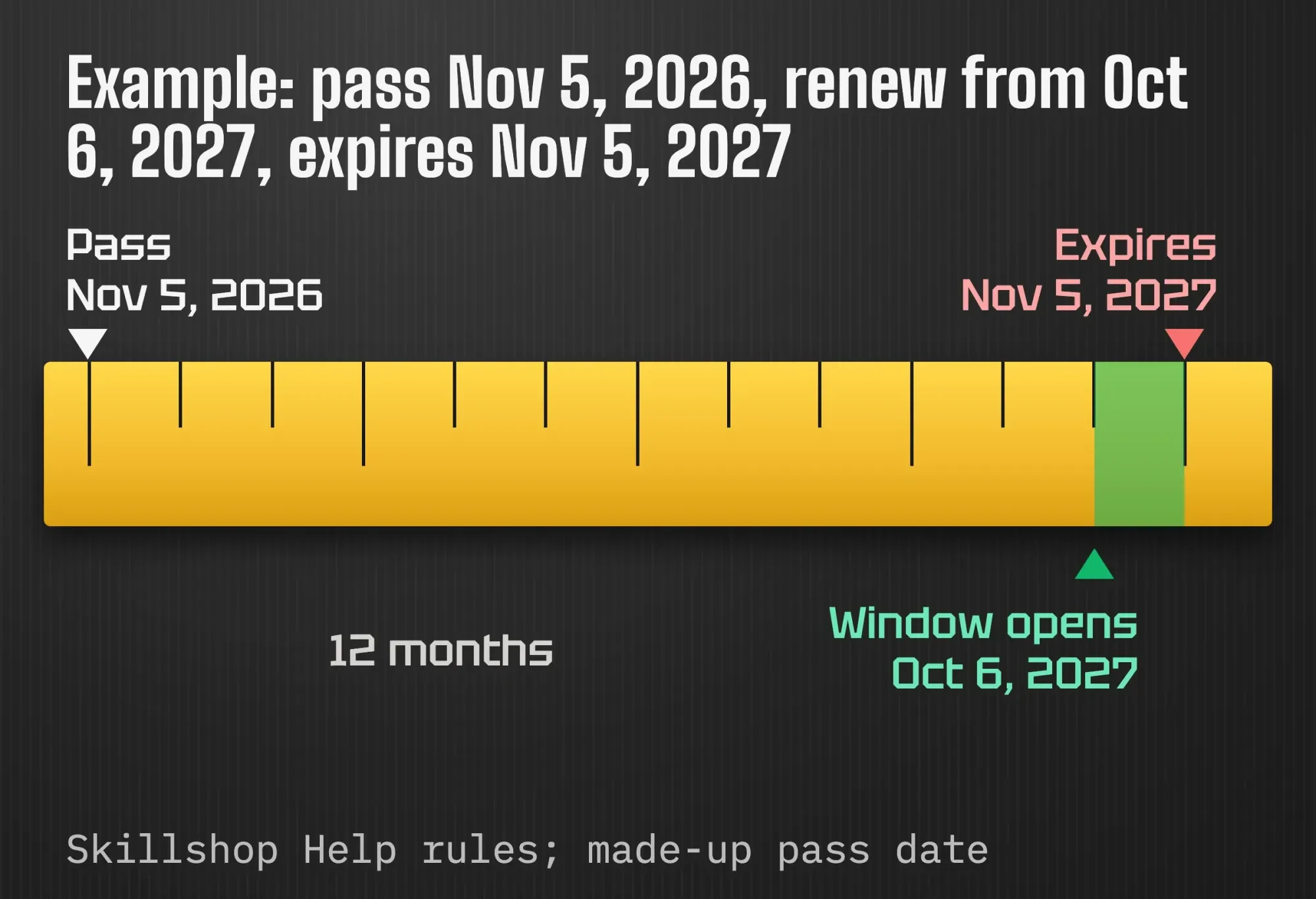 Diagram by DigitalTreed: our date math from Skillshop's published rules, for a made-up pass date. Check your own dates on the Certifications tab.
Put October 6 in your calendar the day you pass.
Trying earlier isn't a harmless head start. Google lists what "may result," including "Rejection of your exam result" and "Restriction from taking the exam in question or any other Google exam". Wait for the window, and when the certificate does lapse, Google shows the badge as expired.
Frequently asked
Do I lose my Google Analytics certification if I change jobs?
No. The Skillshop FAQ says you keep your achievements when you change companies. Update the Company Email field under Additional Fields in My Profile, as of October 2026. Moving courses between two accounts isn't self-service, so you contact Skillshop support instead.
Can I download my Google Analytics certificate?
Yes. Google's Skillshop certifications page says you can view and download your achievements and certifications from the My Activities page, as of October 2026. That gives you a copy to keep or attach when you apply for work.
Where did my older Skillshop certifications go?
Skillshop split into two platforms on May 31, 2024. Per Google's Skillshop separation page, Google Ads, Marketing Platform and Analytics certifications moved to the platform at skillshop.withgoogle.com. Awards for other topics sit on the second platform, so check both if you took both kinds.
Is the certificate worth the study time?
So is it worth it? For the person who owns your GA4 setup, yes. It doesn't cost anything but study time, and it covers the parts of GA4 most owners never open.
Our take: think of it as a study plan that ends in a test, not as proof your tracking is right. A certified person can still run a property with a broken form event. The value comes from the courses and the practice.
It helps your hiring, too. After you pass, Google sends an email to claim a digital badge, which is "private" by default until you change it. The Certifications tab in Skillshop shows expiration dates and gives a shareable link, so when you hire an SEO freelancer, ask for that link and check the date.
Run Google Ads as well? Google has separate Ads certifications on Skillshop, and our PPC guide explains the campaigns behind them.
When GA4 feels familiar, the next skills are reporting and tool choice. Our guide to a free Looker Studio dashboard turns GA4 data into a one-page report. Our roundup of website analytics tools shows where GA4 fits next to Search Console and heatmap tools. If analytics is part of a career plan, the SEO career guide covers courses and certificates more broadly.
Would you rather have someone set up GA4 and key events for you? Request a quote and tell us what you want to measure. We sell that work, so weigh our interest.
How we made this guide: we checked every fact on October 26, 2026, against Google's Skillshop Help and Google Analytics Help pages, each linked where it's used. Our first-hand part was opening Skillshop signed out to see what the public can read, a screenshot of a public help page, and the date math in the calendar example. We didn't sit the exam or sign in, so the exam page itself may show details not covered here.
First published July 2020. Rewritten October 26, 2026: the old post described the retired GAIQ exam through Google Partners, with a 7-day wait after a fail and other rules that no longer apply. This version covers the GA4 certification on Skillshop, with Google's current rules, a study plan, practice tasks and a renewal calendar.
Sources
- Skillshop Help: FAQs for Skillshop Google: Ads/GMP/GA
- Skillshop Help: Digital badges for Skillshop Google Ads/GMP/GA
- Skillshop Help: Certifications for Skillshop Google Ads/GMP/GA
- Skillshop Help: Account setup Skillshop Google Ads/GMP/GA
- Skillshop Help: Navigate Skillshop Google Ads/GMP/GA
- Google Analytics Help: Enroll in Analytics Academy courses on Skillshop
- Google Analytics Help: Google Analytics 4 has replaced Universal Analytics (last updated July 16, 2025)
- Google Analytics Help: How Google Analytics works
- Google Analytics Help: Google Analytics hierarchy
- Google Analytics Help: About events
- Google Analytics Help: Mark events as key events
- Google Analytics Help: Overview of Google Analytics reports
- Google Analytics Help: Get started with Explorations
- Google Analytics Help: Create, edit, and archive audiences
- Google Analytics Help: Get started with attribution
- Google Analytics Help: Demo account

Comments
No comments yet. Start the conversation below.