
Quick answer
To install modules in MediaWiki, turn on the Scribunto extension, which has shipped with MediaWiki since version 1.34. Add wfLoadExtension( 'Scribunto' ); to LocalSettings.php. Then create a page named Module:Name with Lua code, or import modules with Special:Import. Do it in that order: an import made before Scribunto is on stops at the first module.
That last part is where most installs go wrong.
We installed MediaWiki 1.46.2 from scratch, the same day we wrote this (October 24, 2026), and did it the wrong way first, on purpose. Every step and error message below comes from that run.
Key takeaways
- A module is a Lua wiki page in the Module namespace, not a plugin.
- Scribunto runs modules and has shipped with MediaWiki since version 1.34.
- Turn on Scribunto, ParserFunctions and TemplateStyles before importing any templates.
- An import made before Scribunto is on stops at the first module.
- MediaWiki 1.46.2 needs PHP 8.3.0 or newer.
A module is a wiki page, and Scribunto is the extension that runs it
A MediaWiki module is a page of Lua code that lives in the Module namespace and runs when a page calls it with {{#invoke:}}. It isn't a plugin.
You don't upload it to the server. You save it like any other wiki page.
An extension is different. It's PHP code in the server's extensions/ folder, and it's switched on with a line in LocalSettings.php, per the MediaWiki extensions manual. Only someone who can touch the server files can add one.
Scribunto is the extension that connects the two. It creates the Module namespace (number 828), runs the Lua and adds #invoke.
No Scribunto, no modules.
Templates sit on top. Most big templates from Wikipedia are now thin wrappers that hand the real work to a module.
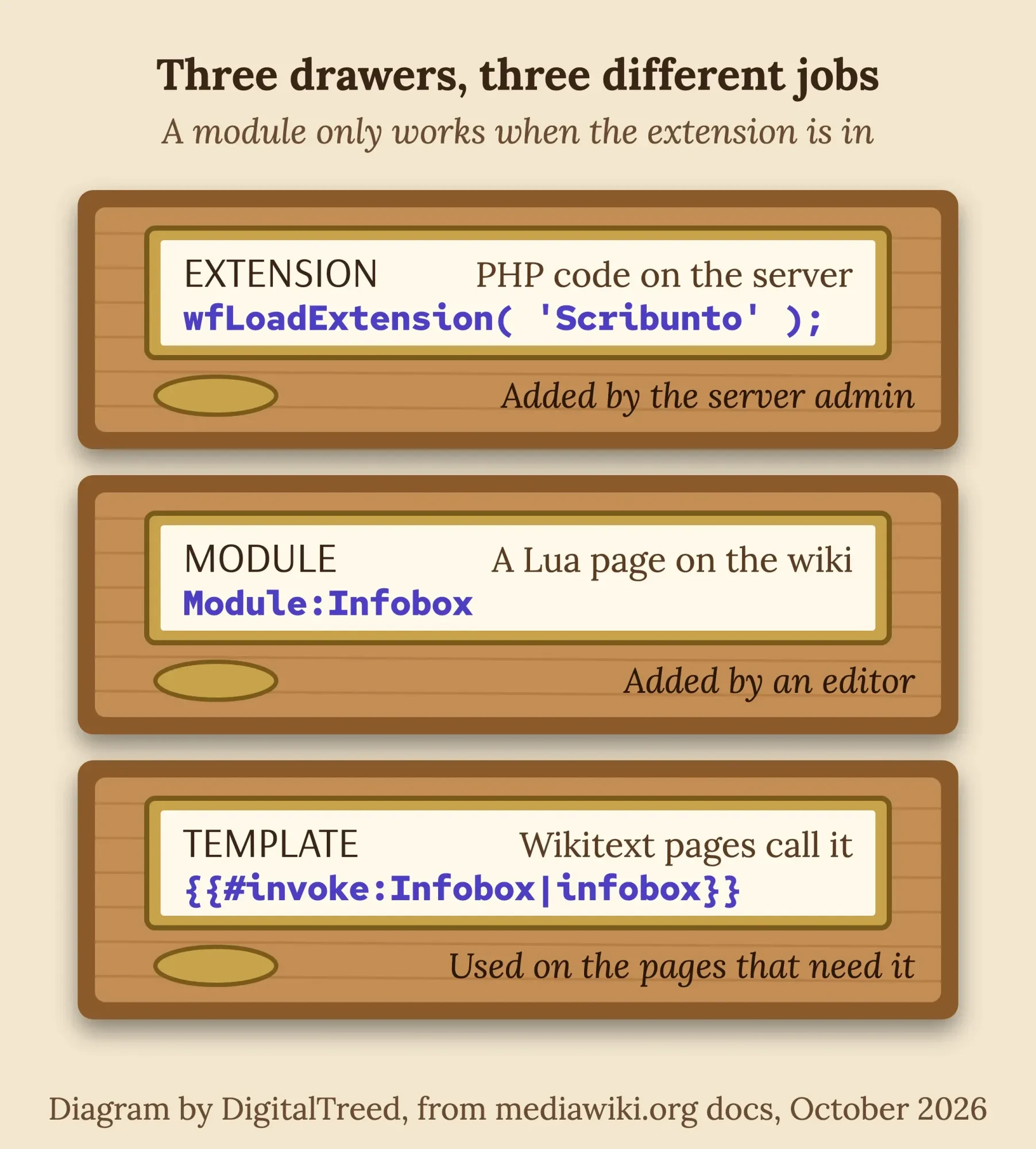 Diagram by DigitalTreed, based on the Scribunto and Extensions pages on mediawiki.org, October 2026.
So "installing a module" is really two jobs. You turn on Scribunto once, as the server admin. Then you add module pages, as any editor who's allowed to edit that namespace.
Turn on Scribunto before you add a single module
That first job takes two lines. Scribunto has come with MediaWiki since 1.34, so there's nothing to download, though the Scribunto install notes add that "The remaining configuration instructions must still be followed."
Start on your wiki's Special:Version page, which shows your MediaWiki and PHP versions. The current release, MediaWiki 1.46.2, needs PHP 8.3.0 or newer, according to the download page.
Each release gets fixes for a set time: the version lifecycle supports 1.46 until July 2027 and the 1.43 long-term release until December 2027.
Then open LocalSettings.php in the wiki's main folder and add these lines at the end:
wfLoadExtension( 'Scribunto' );
$wgScribuntoDefaultEngine = 'luastandalone';
Save the file, then reload Special:Version.
You'll see Scribunto listed under the installed extensions.
In our run, the Installed software table also gained a row: "Lua 5.1.5".
The second line picks how Lua runs, and there's a choice to make.
"luastandalone" uses a Lua 5.1 program that ships inside Scribunto for Windows, Mac and x86 Linux; ARM servers need their own Lua 5.1. "luasandbox" uses a PHP extension the Scribunto developers built in 2018; the docs say it runs Lua faster, but it's got to be compiled into PHP on the server.
Our install didn't write that second line at all.
The command-line installer added only the wfLoadExtension line. Scribunto fell back to its default, "luaautodetect", found no LuaSandbox and used the bundled program. On our Apple silicon Mac, that program is an Intel build, and it ran through Rosetta without any change.
Want templates from Wikipedia too? Turn on ParserFunctions and TemplateStyles now, the same way. They're both bundled with 1.46, though TemplateStyles has only been bundled since 1.44.
wfLoadExtension( 'ParserFunctions' );
wfLoadExtension( 'TemplateStyles' );
Wiki gone blank after the edit? PHP hit an error.
Our guide to debug logs is written for WordPress, but the habit's the same: read the log line before you change anything else.
Write your first module in the Module namespace
With Scribunto on, a module is just a page you create. The page name decides everything, so it must start with "Module:".
Create and test a Lua module in MediaWiki
- Create the page Search for Module:Hello on your wiki and click to create it. The page becomes a Lua page because of its namespace.
- Paste the code Use the sample below. A module must return a table of functions.
- Save Scribunto checks the code on save. Ours refused a missing bracket with: Lua error at line 3: ')' expected near 'return'.
- Call it from a page On any page, type {{#invoke:Hello|hello|Lancaster}} and preview.
- Read the result You should see Hello, Lancaster! in place of the code.
local p = {}

function p.hello( frame )
    local name = frame.args[1] or "world"
    return "Hello, " .. name .. "!"
end

return p
The Lua reference manual sets the rule: "The module itself must return a Lua table containing the functions that may be called by {{#invoke:}}." Arguments after the function name arrive in frame.args, so frame.args[1] is the first one.
Our own test page called it three ways, and two of them went wrong.
The good call, with Dayton as the test name, printed "Hello, Dayton!". A typo in the function name printed "Script error: The function "helo" does not exist." And a typo in the module name printed "Script error: No such module "Helo"."
Those red lines are links. Click one for more detail, as the troubleshooting notes explain.
There's also a debug console under the module's edit box, where you can run a line of Lua without saving.
Example: a board game café in Lancaster, Pennsylvania keeps a staff wiki of house rules for 300 games. One small module could print the player count, play time and age range for any game from one line of wikitext, so all 300 pages look the same and a rule change happens in one place.
Copy modules from Wikipedia with Special:Export and Special:Import
Writing modules is the rare case, though. Most people don't.
They'd rather copy a Wikipedia infobox onto their own wiki, and that infobox can't work without modules.
The infobox import tutorial on mediawiki.org lists ParserFunctions, Scribunto and TemplateStyles as required, plus Wikibase for some templates. Once they're on, the import goes like this:
- On Wikipedia's Special:Export page, type the template name, for example Template:Infobox.
- Tick "Include only the current revision, not the full history", "Include templates" and "Save as file", then click Export.
- On your wiki, sign in as an administrator and open Special:Import. Under "Upload XML data", choose the file.
- Type a short source name in "Interwiki prefix", such as en. The field is required.
- Leave "Import to original namespace" selected and click Upload file.
- Read the list MediaWiki prints back. Every page should say "1 revision".
Help:Import explains the prefix: imported edits are credited to names like "en>Name", so you can tell them from local edits. Uploading needs the importupload right, and by default only administrators have it, so editors get a permission error instead of the form.
Order matters here.
Here's what happened when we skipped it.
We turned Scribunto off, exported Template:Infobox with its templates and uploaded the file. With the prefix blank, MediaWiki refused: "Import failed: No interwiki prefix was supplied".
With "en" filled in, it imported Template:Infobox and Template:Nowrap, then stopped at the first module: "The content model 'Scribunto' is not registered on this wiki."
That left 2 of 82 pages.
Half an import is worse than none.
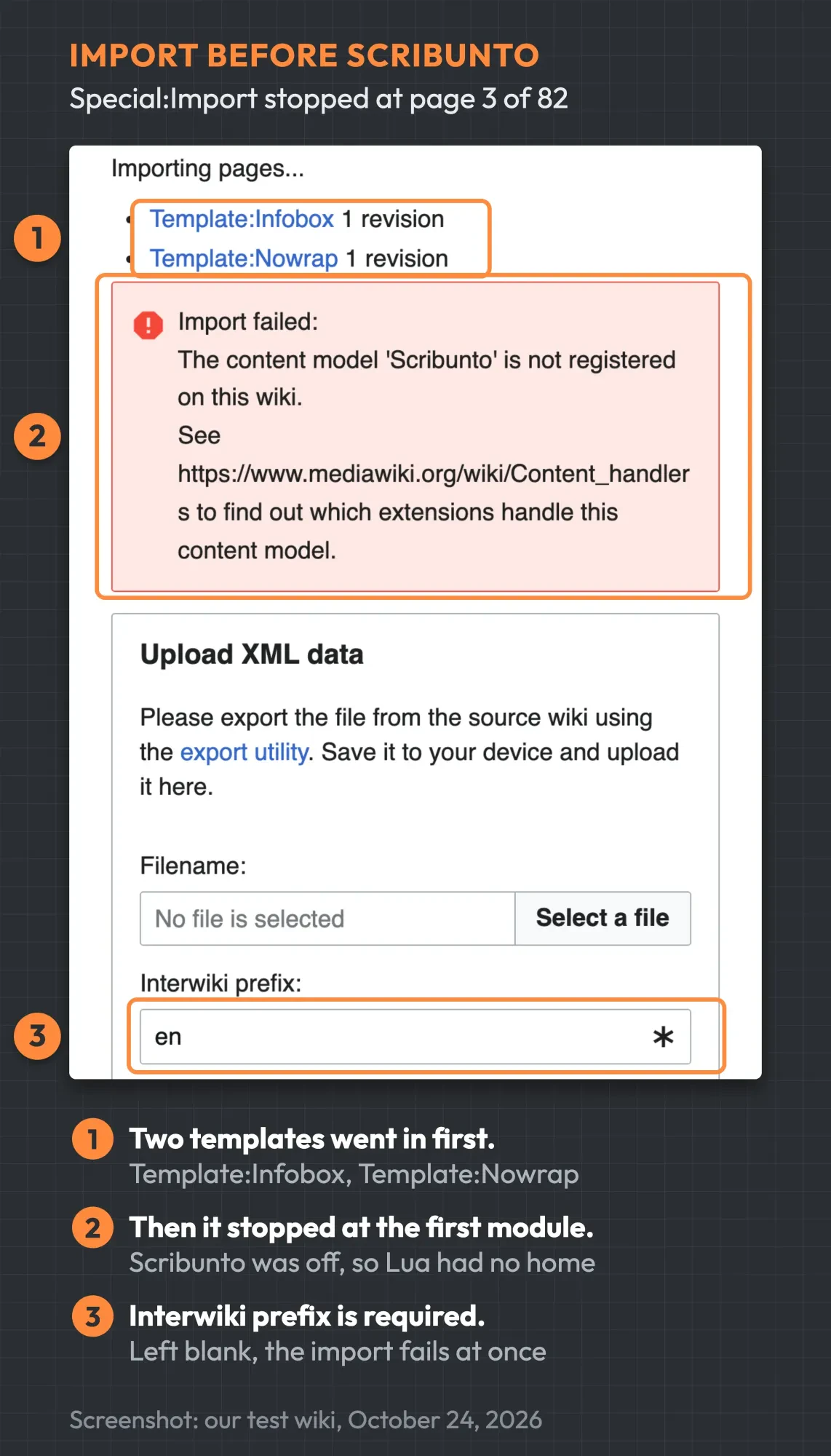 Screenshot: Special:Import on our test wiki, MediaWiki 1.46.2 with Scribunto turned off, October 24, 2026. Shown at 140% zoom; numbers added by us.
Turning Scribunto back on and uploading the same file into a clean database worked: "Import finished!"
Then we counted what one infobox had pulled in.
The export held 82 pages: 39 wikitext pages, 34 Lua modules and 9 TemplateStyles CSS pages. Module:Infobox alone loads Module:Yesno and Module:Navbar, and the "Include templates" box brought them along.
It doesn't bring everything, though.
Module:Infobox only loads Module:Italic title when a page sets "italic title = yes", so the export skipped it. Our test page with that setting showed "Lua error in package.lua at line 80: module 'Module:Italic title' not found."
Help:Import warns about exactly this: the option "is not necessarily all templates the page depends on". Export the missing module by name and import it too.
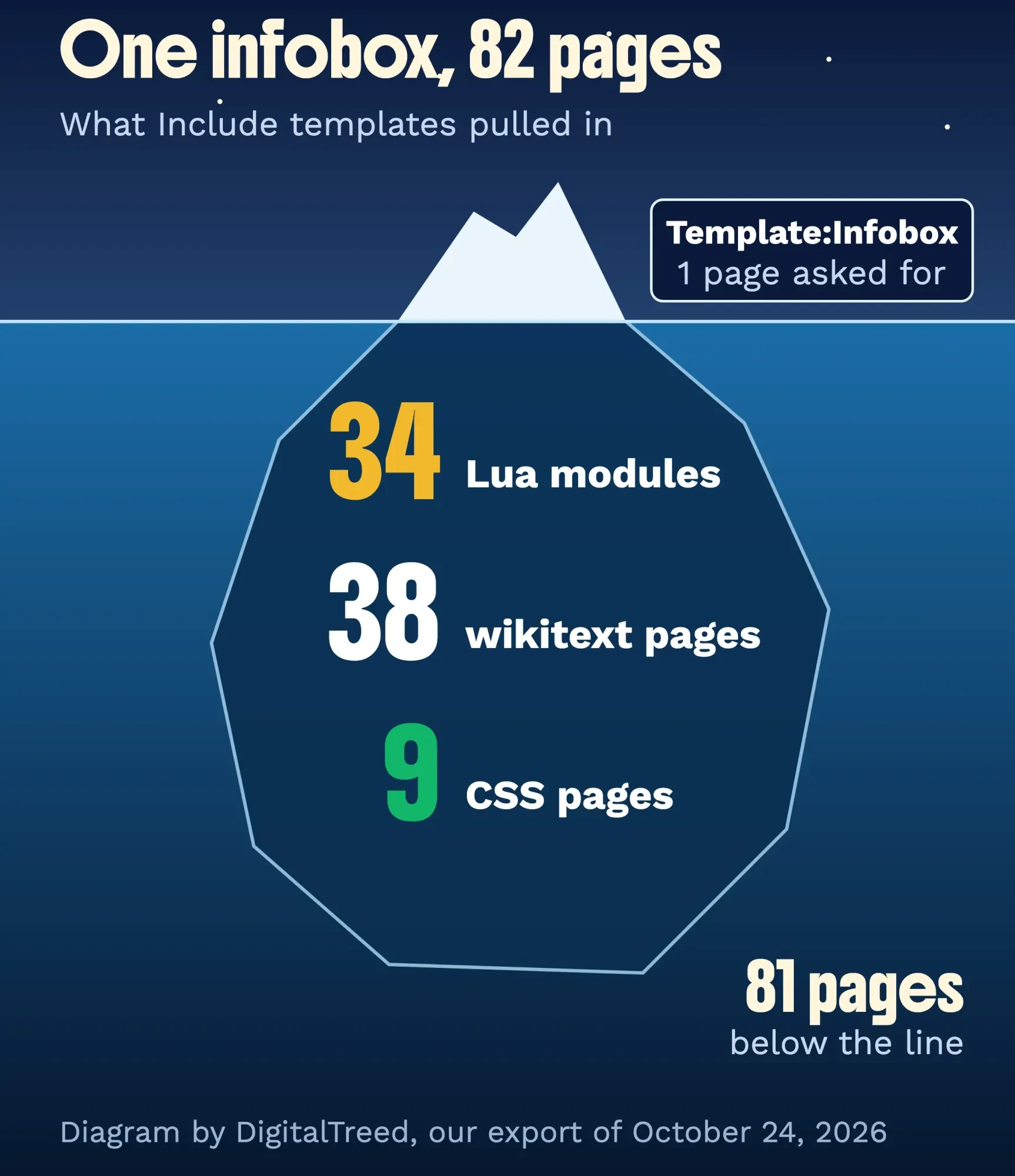 Diagram by DigitalTreed from our export of Template:Infobox on October 24, 2026 (82 pages).
Don't import over pages you've changed. The Scribunto troubleshooting notes warn that imported templates or modules with the same title can overwrite yours and break the pages that use them.
Big exports won't always upload.
PHP caps uploads, and the PHP on our Mac allowed only 2 MB per file; our infobox file was about 486 KB. With shell access, run the importDump.php script instead, which reads the file straight from disk:
php maintenance/run.php importDump --conf LocalSettings.php infobox.xmlImporting straight from another wiki, with no file, is a separate option. It needs that wiki listed in $wgImportSources, which is empty by default.
One more thing if you're copying code by hand.
Wikipedia's pages are shared under CC BY-SA 4.0. Its reuse guide asks for a hyperlink or URL to the page you copied, and changes stay under the same license. So paste the source URL into the edit summary when you save. It's one line. An XML import of the current revision keeps only the last editor's name, so type the source URL in the import form's Comment box too.
That's our reading of the license, not legal advice; for a commercial wiki full of copied code, ask a lawyer who knows open licenses.
Why does my MediaWiki page show raw code or a Script error?
So the import worked, but the page still looks wrong? Each missing piece leaves its own fingerprint. We switched each extension off in turn and wrote down what showed up, and the guide to using content from Wikipedia lists the same signs.
| What you see | What is missing | Fix |
|---|---|---|
| Import failed: The content model 'Scribunto' is not registered on this wiki | Scribunto, at import time | Turn it on, then import the file again |
| The content model 'sanitized-css' is not registered on this wiki | TemplateStyles | Turn it on (bundled in 1.44+), then import again |
| Import failed: No interwiki prefix was supplied | The Interwiki prefix field | Type a short source name such as en |
| Raw {{#switch: and {{#if: text on the page | ParserFunctions | Add wfLoadExtension( 'ParserFunctions' ); |
| Script error: No such module "Name" | That module page | Export again with Include templates ticked |
| Lua error in package.lua at line 80: module 'Module:Italic title' not found | A module loaded only for some settings | Export that module by name and import it |
| Script error: The function "name" does not exist | A function, or a typo in the call | Check the spelling in #invoke |
| Raw {{#invoke: text on the page | Scribunto | Add wfLoadExtension( 'Scribunto' ); |
| Lua error: Internal error: The interpreter exited with status 126 | Permission to run the Lua program | Make it executable, or ask your host |
We saw the first seven rows ourselves. The last two come from the docs, since our wiki never had them.
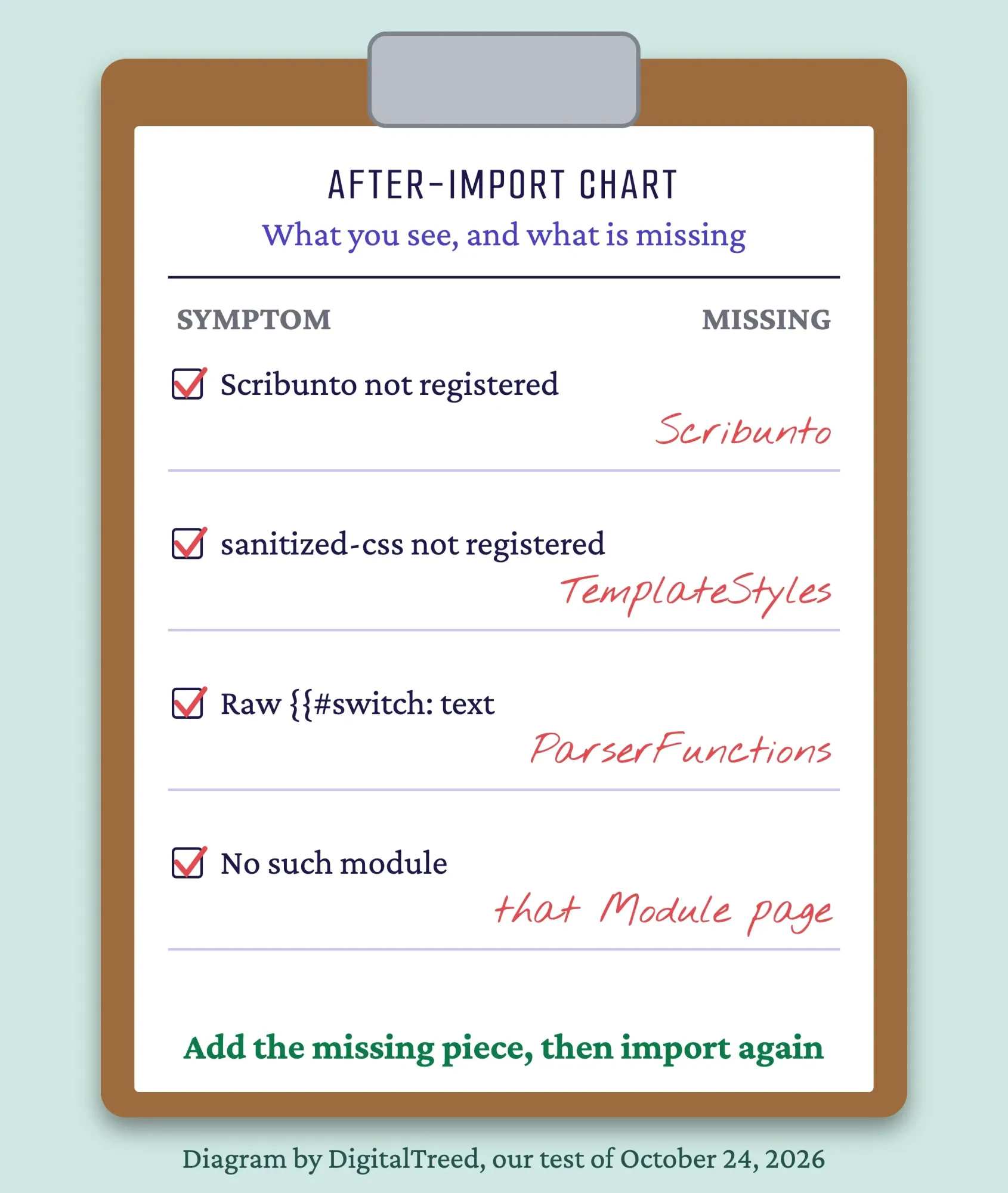 Diagram by DigitalTreed from our MediaWiki 1.46.2 test, October 24, 2026.
The ParserFunctions row is the sneaky one, because the page doesn't look broken.
Our infobox still drew its rows with ParserFunctions off, and the box looked fine. Under it sat a line of raw code that began "{{#switch: {{#if:".
Images are the other gap, because they're never in the file.
Special:Export doesn't include files, so pictures in a copied template won't appear; you'll get red links. The same Wikipedia guide suggests InstantCommons, which loads files from Wikimedia Commons; the infobox tutorial turns it on with one line: $wgUseInstantCommons = true;
Keep imported modules working after updates
Once the modules work, two things tend to break them later: a stale cache and upgrades.
Edited a module, but a page still shows the old output? Purge it. Add ?action=purge to the page's address, as the purge manual shows.
Upgrading MediaWiki upgrades the bundled Scribunto too. Run the update.php script after each upgrade, and back up the database first.
The manual warns that update.php "may exit with errors, leaving the database in an inconsistent state".
If you've never restored a wiki database, practice once on a copy. Our database connection guide covers the settings that usually break when a site moves.
Copied Wikipedia modules age, too.
They aren't frozen on Wikipedia, and yours drift behind.
When one starts throwing errors after an upgrade, export it again with Include templates and re-import, because its dependencies change as well.
Lost track of what you've got? Open Special:AllPages and pick the Module namespace.
Moving the whole wiki to a new domain? That's a bigger job, and redirects and search traffic are at stake. Our site migrations chapter walks through it step by step.
If your host blocks Lua, change the host, not the module
Upgrades are in your hands, but the server isn't always. On some cheap shared hosting, Scribunto can't run Lua at all: the Scribunto docs need PHP's proc_open allowed, and proc_terminate and shell_exec not disabled.
Some hosts also mount the web folder as noexec, which stops any program from running there, even the Lua program that ships with Scribunto and runs fine on your own computer.
You'll know it by one message: "Lua error: Internal error: The interpreter exited with status 126."
The docs suggest pointing luaPath at a Lua 5.1 program somewhere it's allowed to run, or asking the host to lift the block. If the program only lacks execute permission, set it to 755; our guide to WordPress 403 errors explains what those permission numbers mean.
If neither works, the host's the problem.
Our list of features to look for in a web host includes shell access, which also lets you run importDump.php and update.php. MediaWiki needs PHP 8.3, the same version our WordPress website guide uses, so many WordPress-ready plans fit.
For PHP errors in general, our 500 error guide shows where the real cause hides in the logs. Running another PHP system next to the wiki? Our Drupal tutorial covers the same server basics from the other side.
And once the wiki's back, monitoring tells you when it goes down again, before your readers do.
Frequently asked
Do I need to download Scribunto separately?
No, not on MediaWiki 1.34 or newer. It's inside the release tarball, in extensions/Scribunto. Download it only for an older wiki, and then pick the branch that matches your version.
Can I install modules without shell access?
Yes, if Scribunto's already on. Creating Module pages and using Special:Import both work in the browser. Turning Scribunto on needs a LocalSettings.php edit, which you can do over FTP or your host's file manager.
Should I use LuaSandbox or the standalone Lua?
Start with standalone. It'll work with no server changes. Switch to LuaSandbox only if pages with many modules feel slow and you control PHP, since it has to be installed as a PHP extension.
Start with the order: Scribunto, ParserFunctions and TemplateStyles first, then the import.
We build and look after PHP sites and wikis, so we have an interest here. If your host or an old MediaWiki version is in the way, our web development service can plan the upgrade with you.
How we made this guide: Our test wiki ran MediaWiki 1.46.2, installed from the official release files on a Mac, with PHP 8.3.35 and an SQLite database in a scratch folder (test date: October 24, 2026), which we deleted afterwards. We exported Template:Infobox from Wikipedia, imported it with and without Scribunto, switched ParserFunctions and TemplateStyles off one at a time, and wrote Module:Hello ourselves. Every message above is copied from that run. We didn't test LuaSandbox, MySQL, Windows, Linux or a shared host; those parts follow the mediawiki.org pages linked inline.
First published January 2024. Rewritten October 24, 2026: the old version called modules "mini-extensions", named the module page backwards and gave a setting, $wgScribuntoEngine, that does not exist. New: the tested Scribunto setup for MediaWiki 1.46, the import order with a real screenshot, our 82-page infobox count and a table of errors and fixes.
Sources
- MediaWiki: Download (1.46.2 and PHP 8.3.0+ requirement)
- MediaWiki: Version lifecycle
- MediaWiki: Extension:Scribunto
- MediaWiki: Scribunto Lua reference manual
- MediaWiki: Manual:Extensions
- MediaWiki: Extension:ParserFunctions
- MediaWiki: Extension:TemplateStyles
- MediaWiki: Importing Wikipedia infoboxes tutorial
- MediaWiki: Using content from Wikipedia
- MediaWiki: Help:Import
- MediaWiki: Manual:importDump.php
- MediaWiki: Manual:$wgImportSources
- MediaWiki: Manual:Purge
- MediaWiki: Manual:update.php
- Wikipedia: Special:Export
- Wikipedia: Reusing Wikipedia content (CC BY-SA 4.0)
- Wikimedia release files: MediaWiki 1.46


Comments
No comments yet. Start the conversation below.