
Quick answer
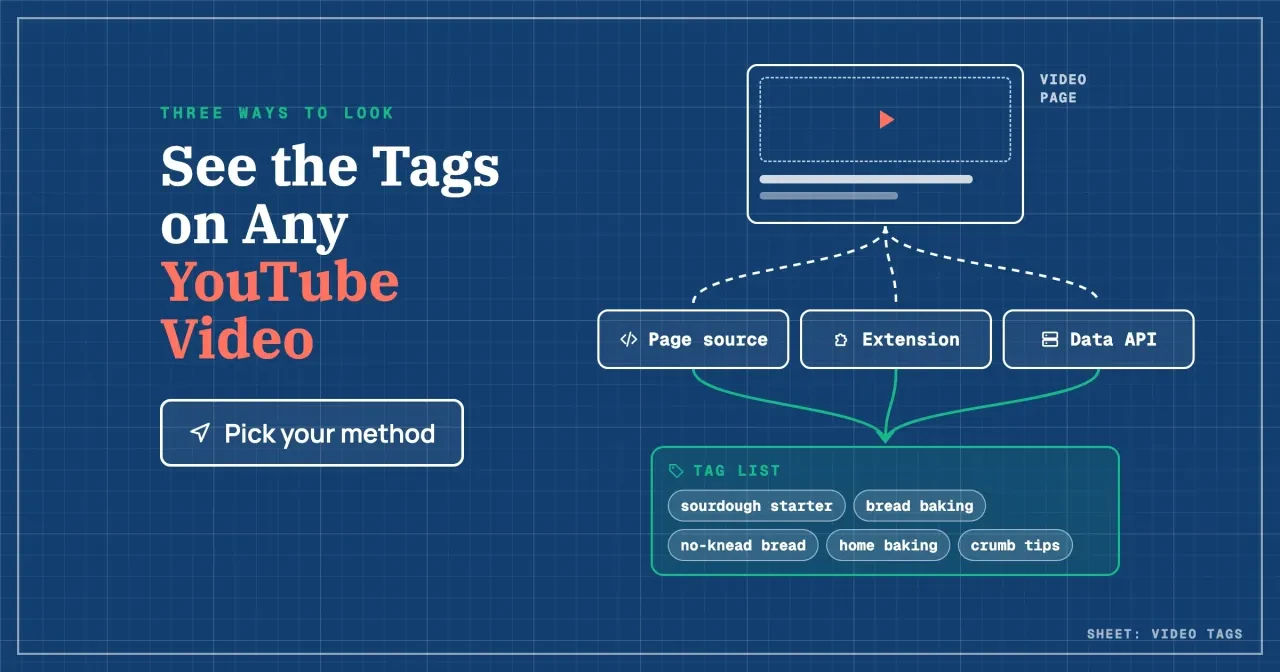
To see YouTube video tags, you have three ways as of October 2026. Search the page source for "keywords", use a tag viewer extension, or call the YouTube Data API at 1 quota unit per request. For hundreds of videos, use the API: a project gets 10,000 units a day, and scraping breaks YouTube's terms. Start with the page source.
Say you run the channel for a small bakery, and a rival's sourdough video keeps showing up above yours. Are its tags the secret? A YouTube tag is a descriptive keyword the uploader adds in YouTube Studio, kept apart from the title, the description and any hashtags.
We cover where a video's tags live, the page source, a tag viewer extension and the Data API. Then come the 500-character limit and our test, where tags still count in YouTube search, and what to do with a competitor's tag list.
Key takeaways
- Search a watch page's source for "keywords" to read its tags for free.
- YouTube says tags play a minimal role unless your topic is often misspelled.
- Commas and quotation marks count toward the 500-character tag limit.
- A 27-tag list in our test used 495 of its 500 characters.
- One videos.list call costs 1 quota unit out of 10,000 a day.
Where a video's tags live
Tags start in YouTube Studio, but that's not where you'll read them. For a video that's already live, YouTube's help page on adding tags says to open Content, select the video and "click SHOW MORE and add your tags." The same page calls tags "descriptive keywords you can add to your video to help viewers find your content."
When a browser loads a watch page, the HTML that arrives carries the tags in three places, and that's why every method below works. We checked it on two real watch pages, using existing Wayback Machine captures of both, made on October 27, 2026. They're the Me at the zoo watch page and the official Never Gonna Give You Up video. We didn't pull watch pages from YouTube itself, since its terms bar automated access.
Here's where the list showed up in both copies, and what each spot follows:
| Spot in the page source | What it looks like | What defines it |
| Keywords meta tag | <meta name="keywords" content="tag one, tag two"> | HTML: words "separated by commas" (MDN) |
| Open Graph video tags | One <meta property="og:video:tag"> line per tag | Open Graph protocol: video:tag |
| Player data | "keywords":["tag one","tag two"] | YouTube's own page script (not documented) |
MDN's list of meta names defines keywords as "words relevant to the page's content separated by commas," and the Open Graph protocol has a video:tag field for "tag words." In both snapshots, all three spots held the same list in the same order. On Me at the zoo, that's just three tags: me at the zoo, jawed karim and first youtube video.
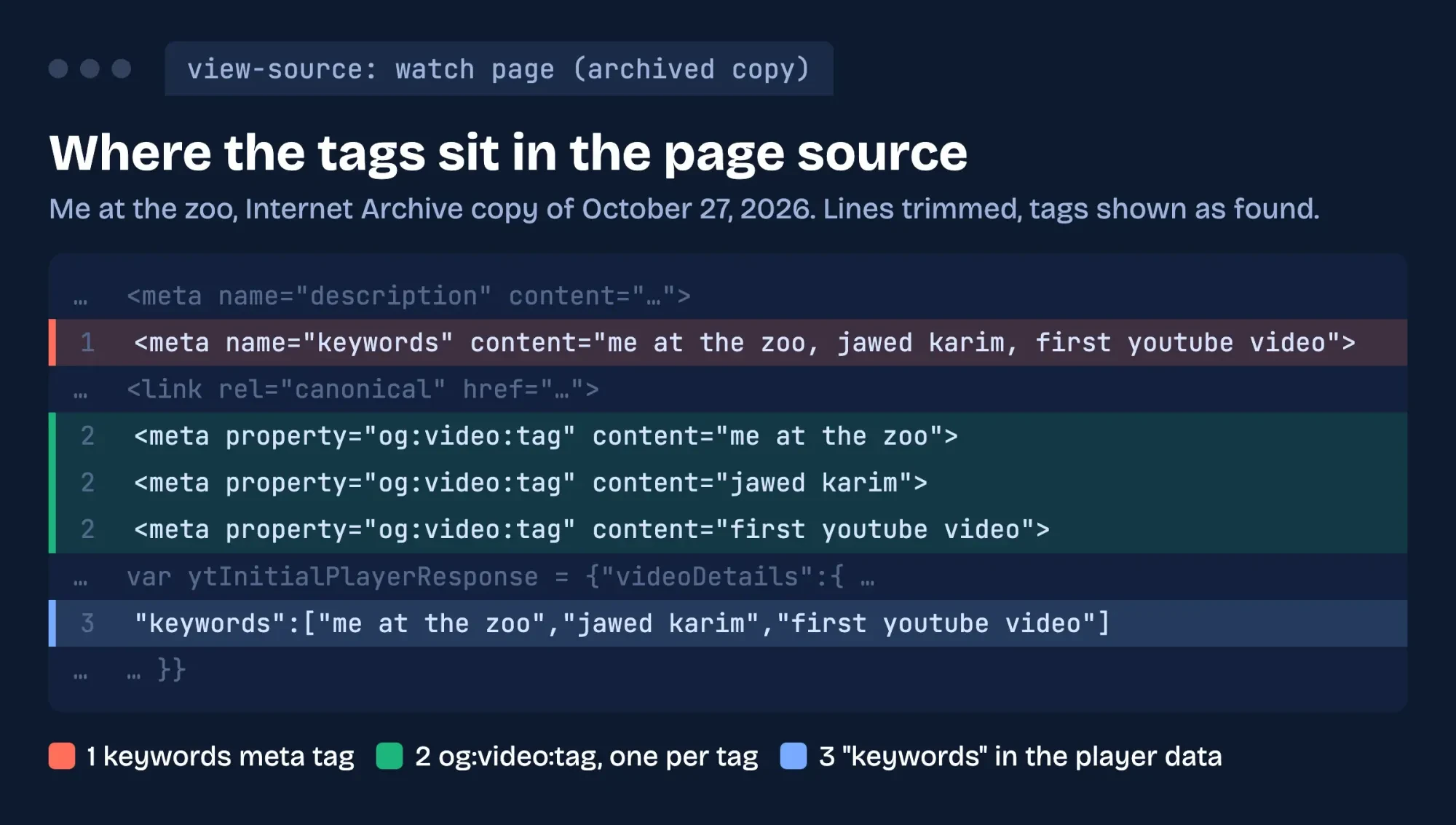 Diagram by DigitalTreed: the three spots that held the tags in an Internet Archive copy of the Me at the zoo watch page, October 27, 2026.
By hand, the og:video:tag lines are the easiest to copy, because each holds one tag and nothing needs splitting on commas.
Read the tags in the page source
That's also why the page source is the quickest way in, and it's free. Use a computer. Chrome's keyboard shortcuts page lists Ctrl + U on Windows and Cmd + Option + U on a Mac to "display non-editable HTML source code for the current page." Then follow these steps:
- Open the video's watch page in Chrome on a computer.
- Press Ctrl + U (Cmd + Option + U on a Mac) to open the source in a new tab.
- Press Ctrl + F (Cmd + F on a Mac) and search for name="keywords".
- Copy the text inside content="...", where each comma separates one tag.
If that search finds nothing, try og:video:tag as a second check. If neither turns up, the page can't tell you whether the video has no tags or the list was left out. The API below settles it.
Short lists are easy to read this way. Long ones aren't. The source is a wall of code: in the 27-tag snapshot, the keywords line alone ran 477 characters. To work with a list that size, paste the text into one spreadsheet cell and split it on commas, and you'll get one tag per row.
Opening the source of a video you're watching is ordinary browsing, but a script that loads hundreds of watch pages is not. YouTube's Terms of Service bar access "using any automated means (such as robots, botnets or scrapers)" without YouTube's permission. Keep the page source trick for the handful of videos you really care about.
Use a tag viewer extension
Once you check tags every week, a browser extension saves you the trip into the source each time. The vidIQ Vision listing in the Chrome Web Store says you can "View and analyze meta-tags on any YouTube video." It showed 4,000,000 users when we read it on October 28, 2026. The TubeBuddy listing, at 1,000,000 users that day, says you can "Compare tags the most successful channels are using in your niche."
We didn't install either one, so we can't vouch for how they display tags or what their paid plans cost. Our YouTube keyword and tag generator roundup covers the tools and their prices. What we can tell you is what to check before you click Add to Chrome. Google's extension install help says some extensions "will let you know if they need certain permissions or data." Its advice is short: "Make sure you only approve extensions that you trust." So read that permission prompt before you approve it, every time.
We'd go further on a business computer. Keep research extensions in a separate Chrome profile from the one you use for banking and payroll. A tag viewer then never shares a window with your money, and you can delete the whole profile when the research is done. The same help page notes you can't add extensions in Incognito mode or as a guest, so a private window won't do the job.
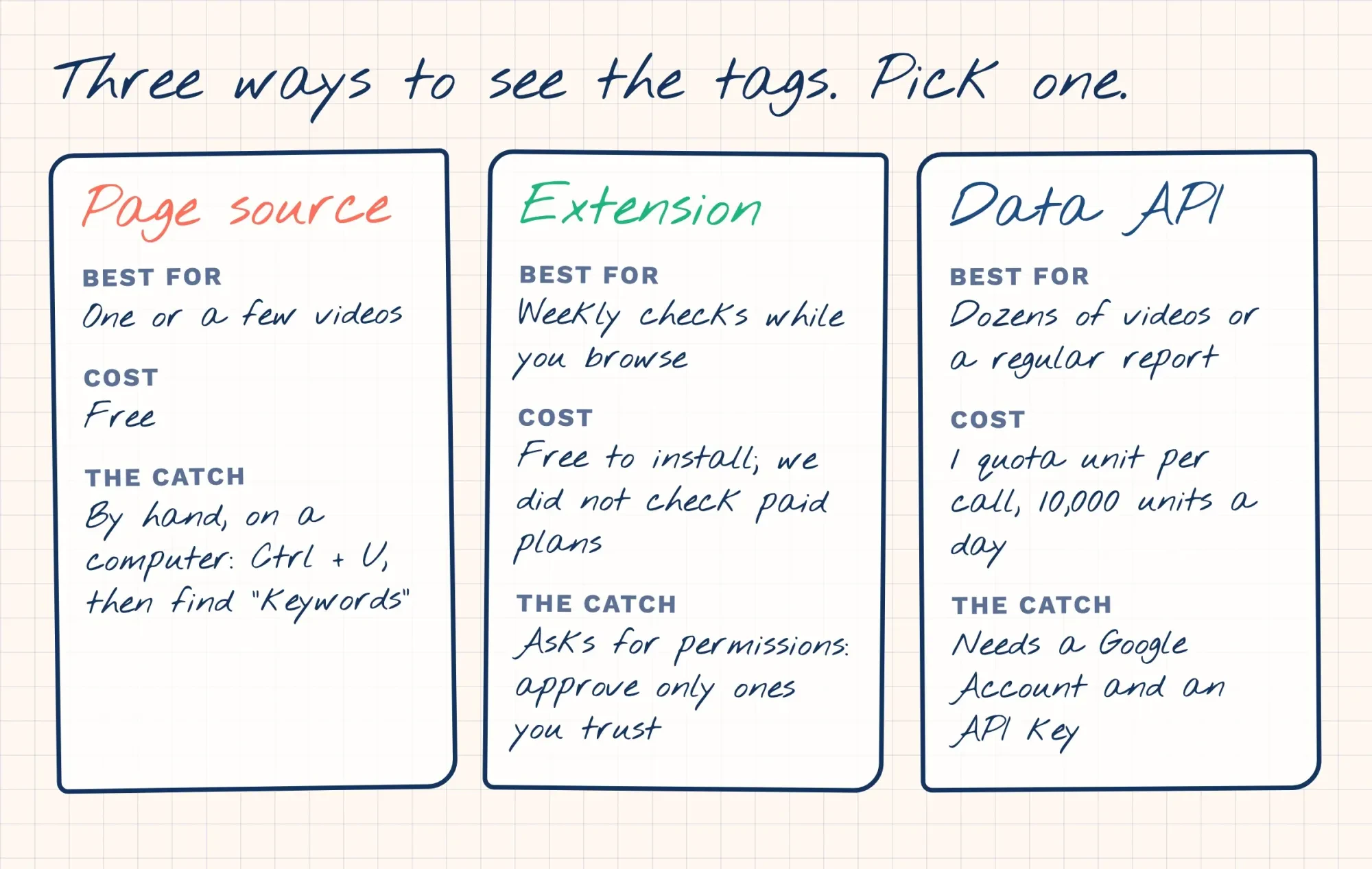 Drawn by us: which way to see tags fits which job, from YouTube, Google and Chrome Web Store pages read October 28, 2026.
Neither the page source nor the API needs anything installed, which is why we'd try those two before any extension on a shared office computer.
Pull tags for many videos with the Data API
Beyond a handful of videos, the YouTube Data API is the route YouTube built for the job, say for a weekly sheet of a rival channel's uploads. Its videos.list method returns each video's details, and the tags sit in a field called snippet.tags. Each call has "a quota cost of 1 unit." The id parameter takes "a comma-separated list" of video IDs, so one call can cover several videos. Here's the shape of the request from the documentation. The video ID is the code after v= in the watch page address, such as jNQXAC9IVRw for Me at the zoo. Swap it in with your own API key:
GET https://www.googleapis.com/youtube/v3/videos?part=snippet&id=VIDEO_ID&key=YOUR_API_KEYThe answer comes back as JSON, with the tags listed under snippet. We didn't make a live call. The request above follows the docs, so try it on one of your own videos first and compare the list with Studio.
The key takes a little setup. Google's getting started page says "You need a Google Account to access the Google Cloud console, request an API key, and register your application." After that, the quota calculator gives each project "10,000 units per day combined for all other endpoints," which means everything except search and uploads. At 1 unit per videos.list call, that's 10,000 calls a day (10,000 ÷ 1) before you hit the cap.
YouTube's rules for developers point the same way. Its Developer Policies say API clients "must not ... scrape YouTube Applications or Google Applications, or obtain scraped YouTube data or content." If you hire someone to build a tag report, ask that it uses the API and nothing scraped.
For one or two videos, though, the page source is still faster than setting up a key.
How does YouTube count the 500-character tag limit?
Seeing a rival's tags usually leads to the next question: how many can you add yourself? The videos resource docs give the tag list "a maximum length of 500 characters," and the counting has two catches. Commas between tags count toward the limit. A tag with a space also counts as if it were wrapped in quotation marks. That's why the docs score Foo-Baz at 7 characters and Foo Baz at 9.
So here's the formula. Count the characters in the tags, spaces included, then add 2 for every tag that contains a space, plus 1 for each comma (one fewer than the number of tags). Example (a made-up business): Wheatfold Bakery in Kalispell, Montana, tags its sourdough video with sourdough starter, bread baking, no-knead bread, home baking and crumb tips. That's 64 characters, plus 10 for the five tags with spaces, plus 4 commas, for 78 of 500. Plenty of room. The rule also explains why a list can look short and still be nearly full. Every tag with a space costs 2 characters you never typed, so 22 such tags add 44 before a single letter counts.
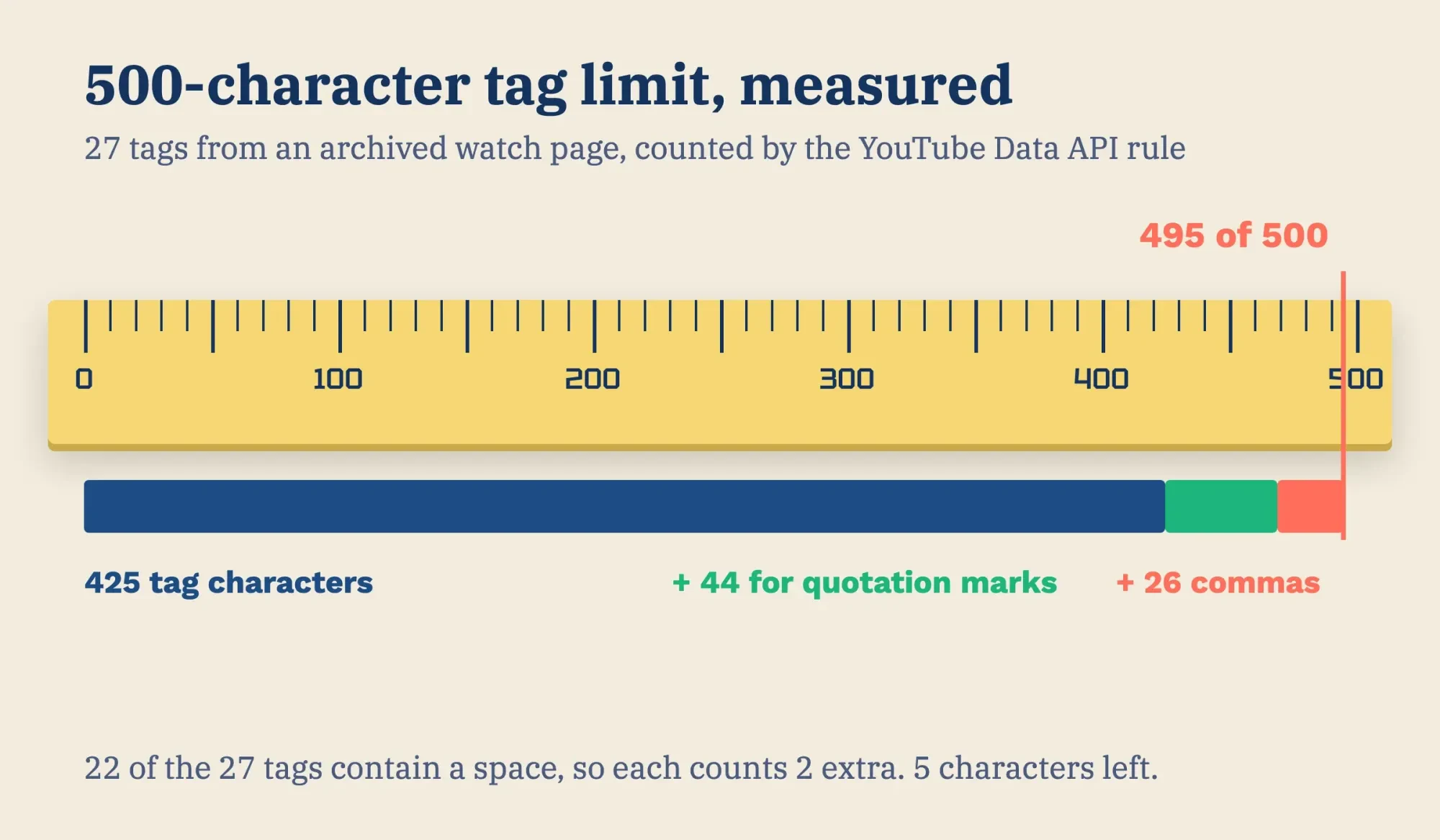 Diagram by DigitalTreed: the 500-character count for the 27-tag list in our local test, October 28, 2026.
Wheatfold's 78 leaves 422 characters unused (500 minus 78). It doesn't need them.
What we tested
We built a small tag reader page and ran it on 127.0.0.1 on October 28, 2026. It read the two Wayback Machine captures from October 27, 2026 (16:50 and 18:00 UTC). It counted the tags in all three spots by the API's rule, and matched the docs' Foo-Baz example.
Me at the zoo had 3 tags, the same in all three spots: 43 + 6 + 2 = 51 characters. The official Never Gonna Give You Up video had 27 tags, matching everywhere, for 425 + 44 + 26 = 495, just 5 short of the cap. Its keywords line looked like only 477 characters, because that line skips the quotation marks and puts a comma and a space between tags (425 + 52 = 477).
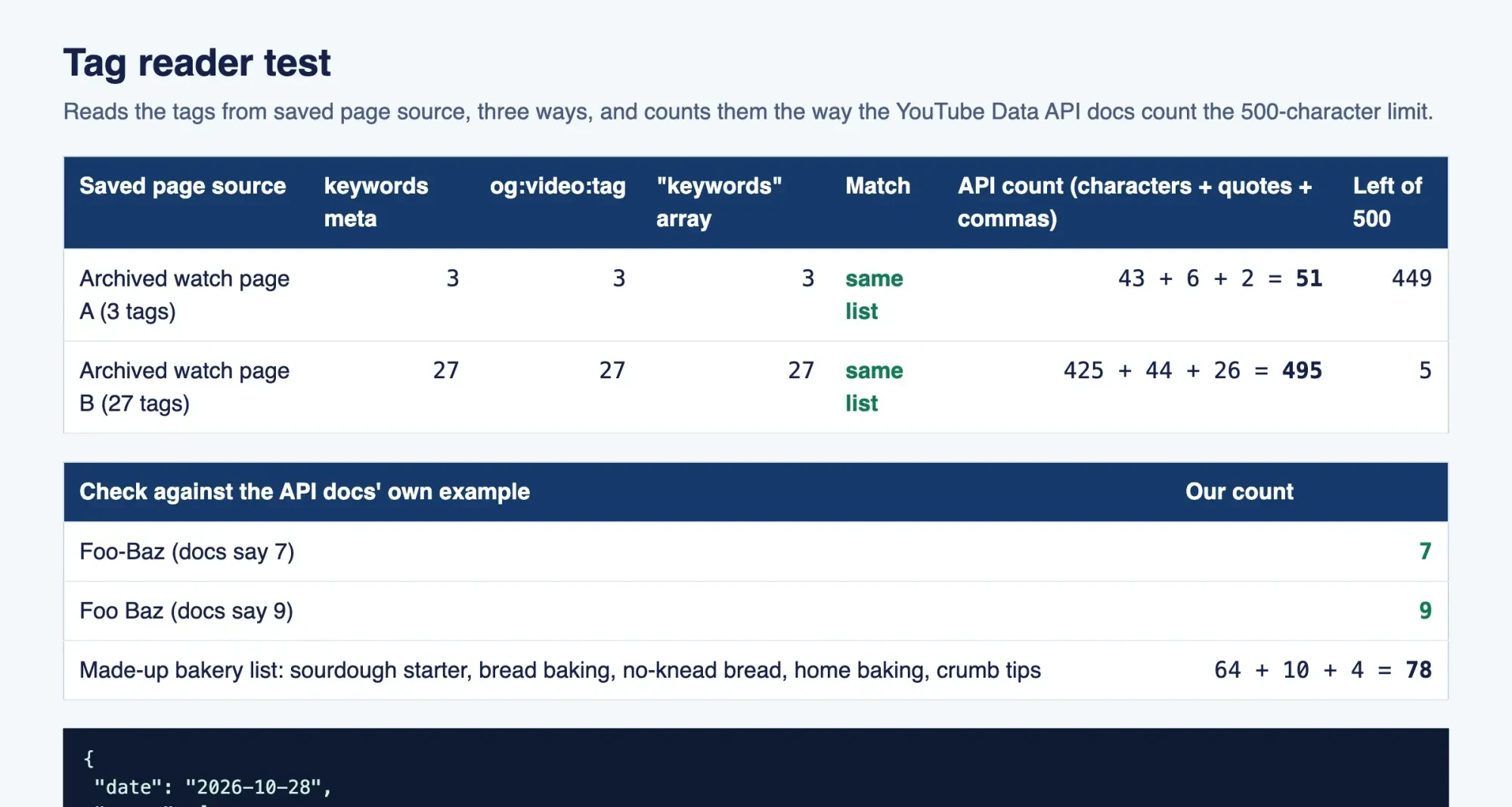 Screenshot: our tag reader on 127.0.0.1, October 28, 2026.
Where tags still count in YouTube search
YouTube's tags help page is blunt: "Tags can be useful if the content of your video is commonly misspelled. Otherwise, tags play a minimal role in your video's discovery." It ranks the title, thumbnail and description above tags as "more important pieces of metadata for your video's discovery."
Tags still count for something, and YouTube says where. Its page on how search works names relevance, engagement and quality, and for relevance it looks at "how well the title, tags, description, and video content match your search query." The Studio field itself, per the video settings help, is there to "help correct search mistakes."
Tags, then, are one input among several, and the smallest one by YouTube's own account. That's where the misspelling case earns its keep. The 27-tag video in our test carries rickroll, rickrolled, rick rolled, rickrolling and rick rolling, which are five spellings of one phrase. A bakery could do the same with no-knead and no knead, or with a town name that visitors often get wrong. Don't mix tags up with hashtags. Hashtags go in the title or description and follow YouTube's own hashtag rules. Our YouTube hashtags guide covers how many to use and where they show.
Our take: spend two minutes on tags, not twenty.
Add your brand name and the misspellings people actually type, then stop. The time you save goes further on the title, the thumbnail and the first lines of the description. Our YouTube SEO walkthrough spends its time there.
What to do with a competitor's tag list
So you've pulled a rival's tags. Treat the list as research about words, not something to paste. Look for the phrases they expect people to search, any misspellings, and words that never made it into their title. Then move the few that fit your video into your own title and description, where YouTube says words count for more than they do in the tag field. Copying the whole list rarely helps. It can even backfire. YouTube's tags page warns that "adding excessive tags to your video description is against our policies on spam, deceptive practices, and scams." Tags written for someone else's video also describe yours badly, and that's the opposite of what the field is for.
The web learned this lesson years ago. In 2009, Google's Search Central blog explained why it does not use the keywords meta tag in web ranking, and its example was a site owner copying a rival's keywords. The page still says "Google still doesn't support the keywords meta tag." That's the same tag that carries a YouTube video's list in the source. Don't expect a rival's tags to lift your page in Google web search.
Example (made up): Wheatfold Bakery pulls the 14 tags from a rival's top no-knead video. Only three of those phrases match what Wheatfold's own video covers, so they go into its title and description. Its tag field gets wheatfold, wheat fold and no knead bread. The other 11 stay with the rival.
To find the words worth adding, run your main topic through the DigitalTreed keyword suggestions tool. Then see where the video fits in our YouTube marketing strategy for small business. For uploads and playlists, the YouTube channel setup guide and our audience retention guide pick up from here.
Short on time for the research and uploads? DigitalTreed's social media marketing service covers YouTube channels. That's our own service, so weigh it as such.
Frequently asked
Can other people see my YouTube tags?
Yes. They sit in a public watch page's source as og:video:tag lines, a field the Open Graph protocol defines.
Can I edit my tags on my phone?
Yes. YouTube's tags help page says "You can also edit tags on mobile in the YouTube app."
Are YouTube tags the same as hashtags?
No, they're separate. YouTube's hashtags page says "up to three hashtags that are considered most engaging will appear by your video title."
When does the YouTube API quota reset?
Every day. The quota calculator says "Daily quotas reset at midnight Pacific Time (PT)." On the East Coast, that's 3 a.m.
How we made this guide: We read YouTube's help, API and terms pages, Chrome's help and two archived watch pages, then ran a local test. We opened no live watch page and made no API call. Facts checked by the DigitalTreed team on October 28, 2026.
First published July 2023. Rewritten October 28, 2026: the post now shows three ways to see any video's tags, how the 500-character limit is counted, and YouTube's own word on how little tags count.
Sources
- YouTube Help: Add tags to your YouTube videos
- YouTube Help: Edit video settings
- YouTube Help: How YouTube search works
- YouTube Help: Find playlists & videos using hashtags
- YouTube Data API: Videos resource
- YouTube Data API: Videos: list
- YouTube Data API: Getting started
- YouTube Data API: Quota calculator
- YouTube API Services: Developer Policies
- YouTube Terms of Service
- Chrome Help: Chrome keyboard shortcuts
- Chrome Web Store Help: Install and manage extensions
- Chrome Web Store: vidIQ Vision for YouTube
- Chrome Web Store: TubeBuddy for YouTube
- Google Search Central Blog: Google does not use the keywords meta tag in web ranking (2009)
- The Open Graph protocol
- MDN Web Docs: standard metadata names
- Internet Archive: Me at the zoo watch page, October 27, 2026
- Internet Archive: Never Gonna Give You Up watch page, October 27, 2026
Comments
No comments yet. Start the conversation below.