
Quick answer
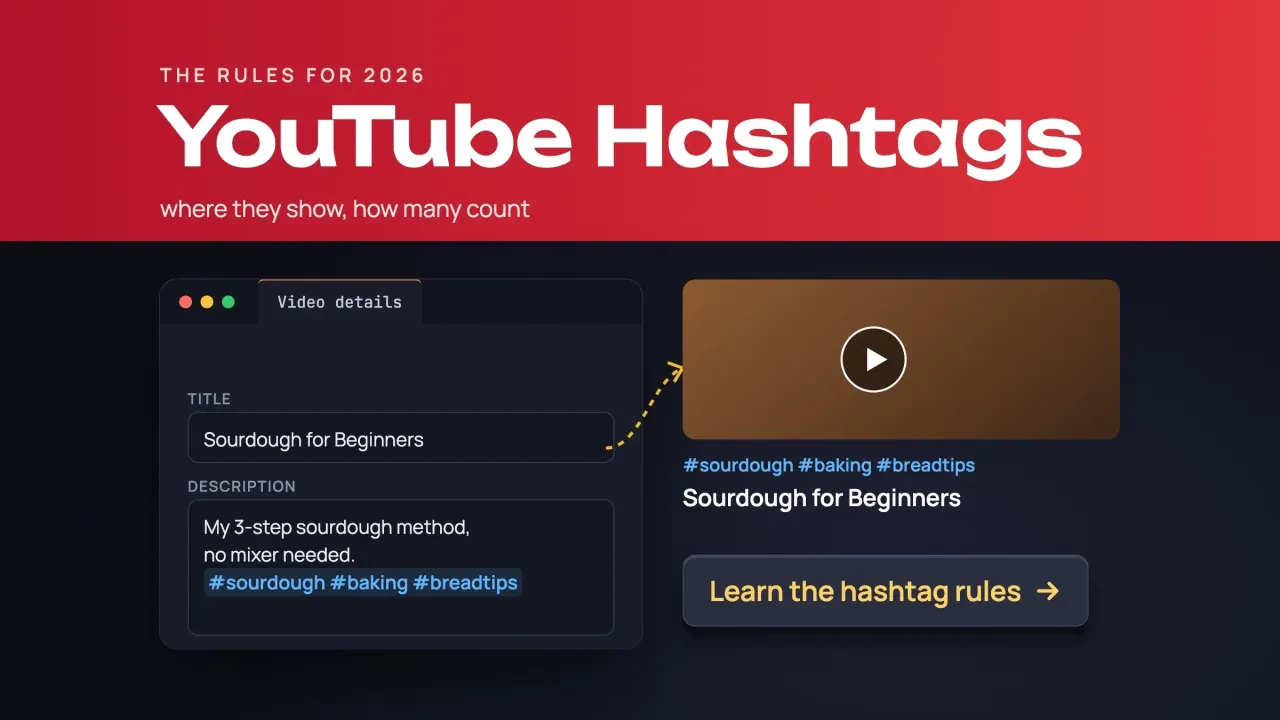
YouTube hashtags are clickable # words in a video's title or description. As of October 2026, YouTube says up to 3 can show by your title, and it ignores every hashtag on a video that has more than 60. Use 2 or 3 that match the video. Guides that say 15 are quoting a rule YouTube replaced in 2021.
We checked that on October 26, 2026, against YouTube's own hashtag Help page and its archived copies back to 2019.
The rules are short. The old numbers are the problem.
This guide is aimed at business channels, where a hashtag's job is to put a video in front of people looking for that exact topic. If you're still deciding what to post, start with our YouTube marketing strategy for small businesses.
Key takeaways
- YouTube's hashtag limit changed from 15 to 60 in 2021.
- Pick one topic hashtag, one town hashtag and one series hashtag.
- YouTube chooses up to 3 description hashtags to show by the title.
- Misleading or unrelated hashtags can be hidden, and the video removed.
- YouTube Analytics has no hashtag line in its traffic sources.
YouTube hashtags are clickable topic links
A YouTube hashtag is a word or a joined phrase with a # in front, added to a video's title or description. YouTube's hashtags Help page puts it simply: "Hashtags are keywords preceded by a # symbol."
Each one turns into a link.
Tap it and YouTube opens a results page. The Find videos using hashtags page says that page shows "videos that include that hashtag in either their title or description."
Viewers can also type a hashtag straight into the search bar.
So a hashtag files your video next to others on the same topic, and that's about it. Titles and descriptions carry far more weight, and our YouTube SEO guide covers both.
The limit is 60 hashtags, not 15
That filing has a ceiling. YouTube's limit is 60 hashtags per video as of October 2026, and the over-tagging rule on the Help page reads: "If a video or playlist has more than 60 hashtags, we'll ignore each hashtag on that content."
So why do so many guides say 15?
We went looking on October 26, 2026. We pulled archived copies of that Help page from the Internet Archive's Wayback Machine, back to 2019, and read every one that had readable text. The August 17, 2021 copy still says "more than 15 hashtags, we'll ignore all hashtags on that video." By the September 5, 2021 copy, the number is 60, and every readable copy after it agrees.
The 15 goes back at least to July 2018, when Tubefilter quoted YouTube saying it would ignore all hashtags on a video with more than 15.
Old numbers stick around.
We checked six ranking pages that day, one only from its search snippet. Two still gave 15 as the limit: SocialBee’s hashtag generator page and SocialPilot’s hashtag guide.
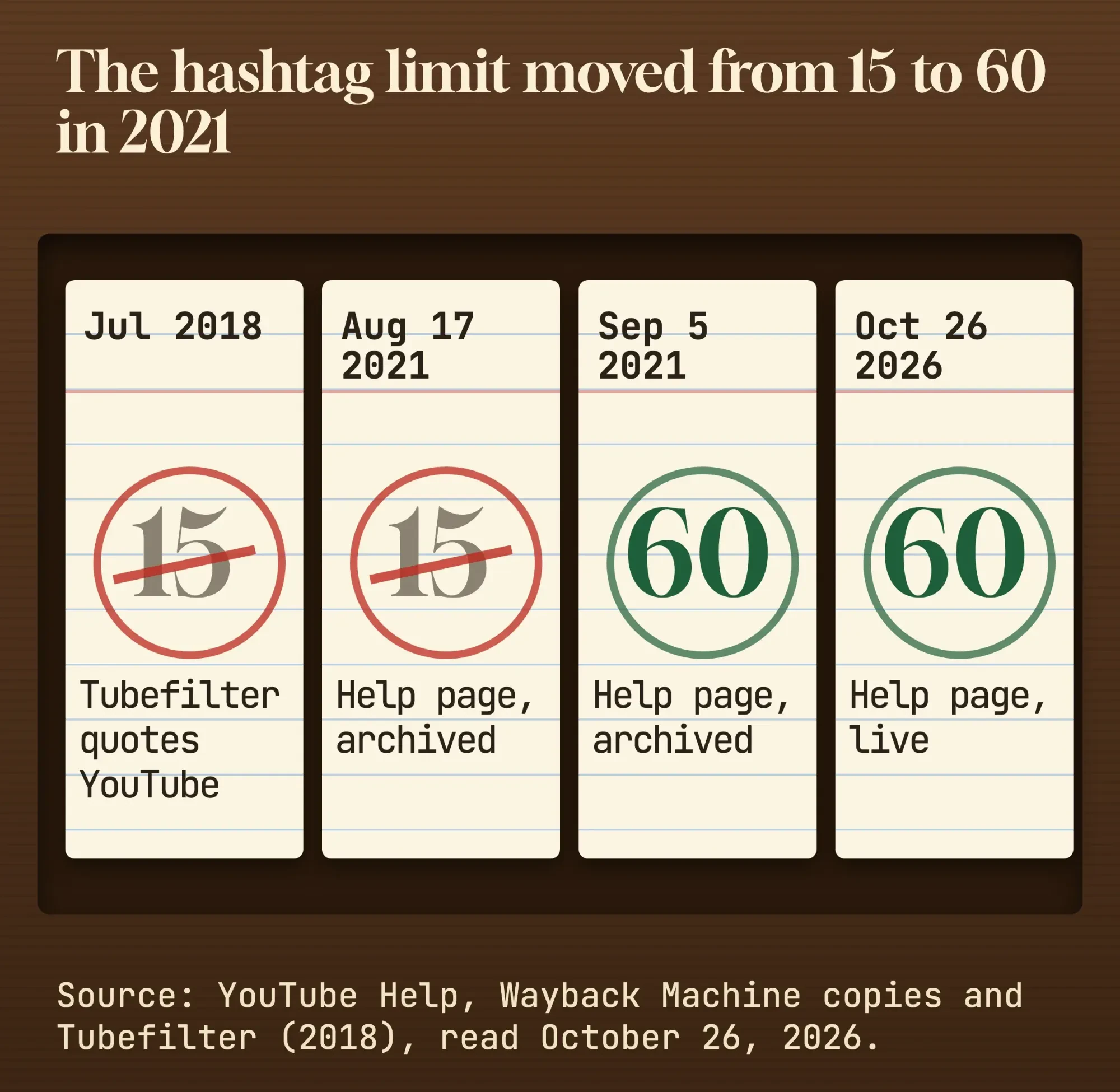 Source: YouTube Help and Wayback Machine copies, read October 26, 2026. Diagram by DigitalTreed.
Neither number is a target, though.
How many hashtags should you use on YouTube?
Use 2 or 3 hashtags on most business videos. Only 3 can show by the title, and YouTube's hashtag rules warn: "The more tags you add, the less relevant they become for viewers or listeners who are searching."
Our take: pick one for the topic, one for the town or service area, and one for your series if you run one.
That third slot is worth planning.
A series hashtag such as #FridayFixes, spelled the same way on every video, gives you a results page that shows mostly your own videos. That holds as long as nobody else picks the same one.
Regular series help with subscribers, too. We cover that side in how to get your first 1,000 YouTube subscribers.
Going past 3 isn't against the rules.
The extra ones just won't show by the title.
Up to 3 show by your title, and YouTube picks them
Those 3 come from your description, and YouTube chooses which ones. The Help page says: "Out of all the hashtags you add to the video's description, up to three hashtags that are considered most engaging will appear by your video title."
Many guides missed that change.
In 2018, YouTube showed "the first three terms" from the description, according to Android Police as cited in the same Tubefilter report. Today's wording says "most engaging," and YouTube doesn't say how it decides.
Don't plan around their order.
If one hashtag must be seen, put it in the title, where it's a link inside the title text.
Title hashtags cost space, though. Titles have a limit of 100 characters, per YouTube's video settings page, and a hashtag in the middle of a title reads like clutter.
Most of the time, the end of the description is the better spot. YouTube's description tips suggest using "the first few lines of your description to describe your video because it's what viewers will see first."
Keep hashtags out of those lines.
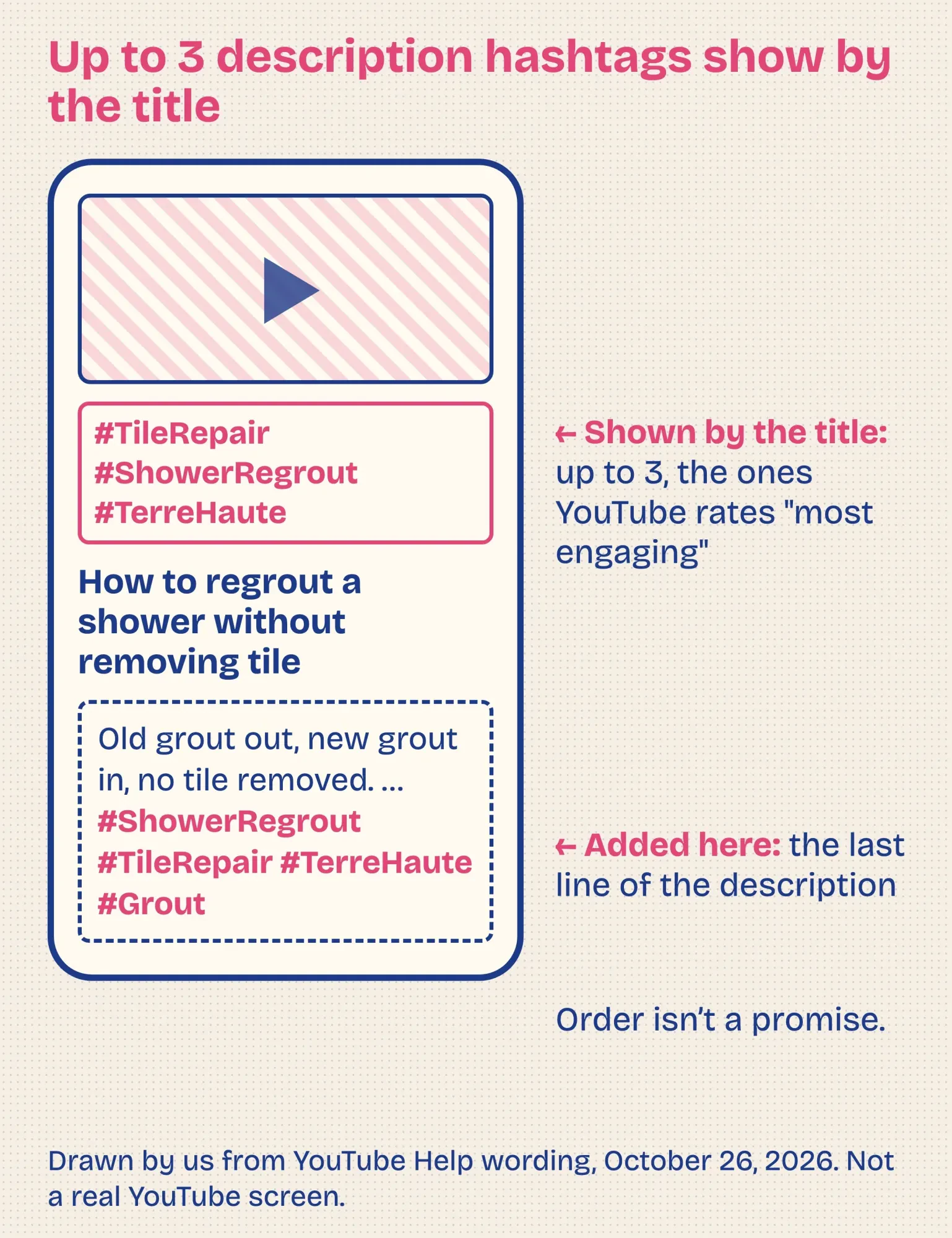 Drawn by us from YouTube Help wording, October 26, 2026. Not a real YouTube screen.
How to add hashtags to a YouTube video
Now for the typing. You add hashtags in the title or description, while you upload or later in YouTube Studio. If your channel isn't set up yet, do that first with our guide to creating a YouTube channel for your business.
- Write the title and the first two lines of the description before you think about hashtags.
- At the end of the description, type # and the start of your topic. YouTube "will then suggest popular hashtags based on your input," per its hashtag page.
- Pick 2 or 3 suggestions that match the video, or type your own. Join the words with no spaces, like #ShowerRegrout.
- Check them once more against the video. Each one should name something a viewer will actually see.
- Publish, open the watch page and tap each hashtag to check the results page it leads to.
That last step takes a minute and catches most mistakes.
The rules that hide hashtags or remove videos
That check matters because YouTube's hashtag rules come down to one idea: a hashtag has to describe the video honestly. Break one and, per the Help page, the hashtag "won't show below your content, and may be removed."
The video can be removed too.
| Rule | YouTube's words, as of October 2026 | What can happen |
|---|---|---|
| No spaces | "Hashtags don't contain any spaces." | Join the words: #TwoWords |
| Over-tagging | "If a video or playlist has more than 60 hashtags, we'll ignore each hashtag on that content." | All hashtags ignored; removal from uploads or search is possible |
| Misleading content | "Don't add hashtags that are not directly related to the video or playlist." | The video or playlist may be removed |
| Harassment | "Don't add a hashtag with the purpose of harassing, humiliating, intimidating, exposing, or threatening an individual or group." | Removal |
| Hate speech | "Don't add any hashtags that promote violence or hatred against individuals or groups." | Removal |
| Sexual content | "Adding sexual or explicit hashtags may result in the removal of your video or playlist." | Possible removal |
| Vulgar language | "Use of profanity or offensive terms in your hashtags may lead to an age restriction or removal" | Age restriction or removal |
| Non-hashtags | "adding ordinary descriptive tags or repetitive sentences in the description is (still) prohibited" | Removal or a penalty |
The last row catches more business channels than the others.
It's the old habit of pasting a block of plain keywords, like tile repair, grout repair and shower repair, under the description. YouTube's tags page also says excessive tags in a description are "against our policies on spam, deceptive practices, and scams."
Repeat problems can reach the whole channel. The misleading-metadata link on the hashtags page now opens YouTube's Spam Policy, which says: "If you get 3 strikes within 90 days, your channel may be terminated."
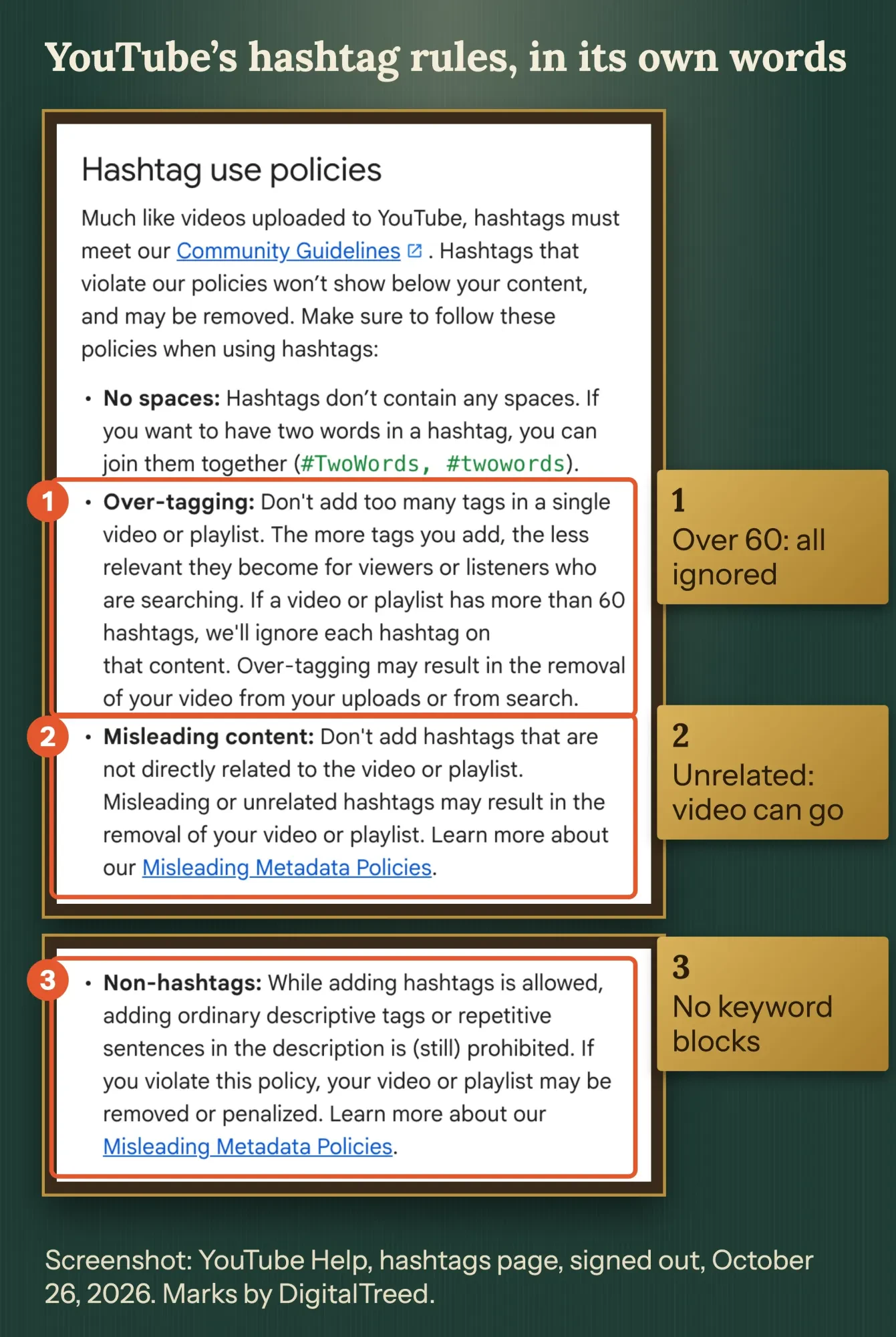 Screenshot: YouTube Help, hashtags page, signed out, October 26, 2026. Marks and labels by DigitalTreed.
Do YouTube Shorts need hashtags?
The same rules cover YouTube Shorts, and Shorts don't need #Shorts. YouTube's hashtag page lists recording "a Short on YouTube" among the places you can add hashtags, with no Shorts-only limit or tag.
The #Shorts advice is real, but old. The 2021 copies of the Help page said creators "can include #Shorts in the title of their vertical short-form video."
Today's page doesn't.
What it describes now is suggestions.
When you add text to a Short and type #, YouTube shows hashtags "recommended based on a variety of signals, such as suggestions from past content uploads." Ones you've used before carry a clock icon.
Shorts titles also stop at 100 characters, per the Create YouTube Shorts page, so one hashtag in the title is plenty.
Search counts for Shorts as well. YouTube's Shorts discovery tips say Shorts in search are ranked partly on "how well the metadata matches the viewers' search."
If your Shorts show products you sell, tagging those products is a separate step. Our YouTube Shopping guide for small businesses walks through it.
Find hashtags people already use, and skip "trending" lists
Once the rules are clear, the best hashtags come from YouTube's own suggestions and from the words your customers type. Start with the # suggestions in the upload screen, then check each one on its results page.
A results page tells you a lot in 30 seconds.
If it's full of videos like yours, the hashtag fits. If it's full of unrelated clips, skip it.
For the words themselves, our free Keyword Suggestion Tool shows phrases from YouTube's autocomplete around a seed word. Type your service, then look for a short phrase you'd be glad to see as a results page.
For Shorts, YouTube's discovery tips point to a Trends page, where "Shorts ranked by popularity on the platform are featured." It's a place for ideas, not a list to copy.
You'll notice we haven't printed a list of trending YouTube hashtags.
We couldn't find a dated YouTube source for one. Lists like that go stale fast, and a trending hashtag that doesn't match your video breaks the misleading-content rule anyway.
Example: hashtags for a tile installer's how-to video
Those rules are easier to see on one made-up business.
Example: Wabash Tile Works is a tile installer in Terre Haute, Indiana. It posts a 6-minute video, "How to regrout a shower without removing tile," and a 40-second Short cut from it.
The description opens with two plain sentences about the job. Its last line holds 3 hashtags: #ShowerRegrout #TileRepair #TerreHaute.
The title has none.
The Short gets one hashtag in its title: "Old grout out in 30 seconds #TileRepair." That's 39 characters, well under the limit of 100.
Now the version we'd fix.
It carries 24 hashtags, including #Viral, #fyp, #Bathroom2026 and a TV show's name, plus a pasted block of keywords. That's under 60, so YouTube won't ignore them for the count. But the unrelated hashtags break the misleading-content rule, and the keyword block breaks the non-hashtag rule.
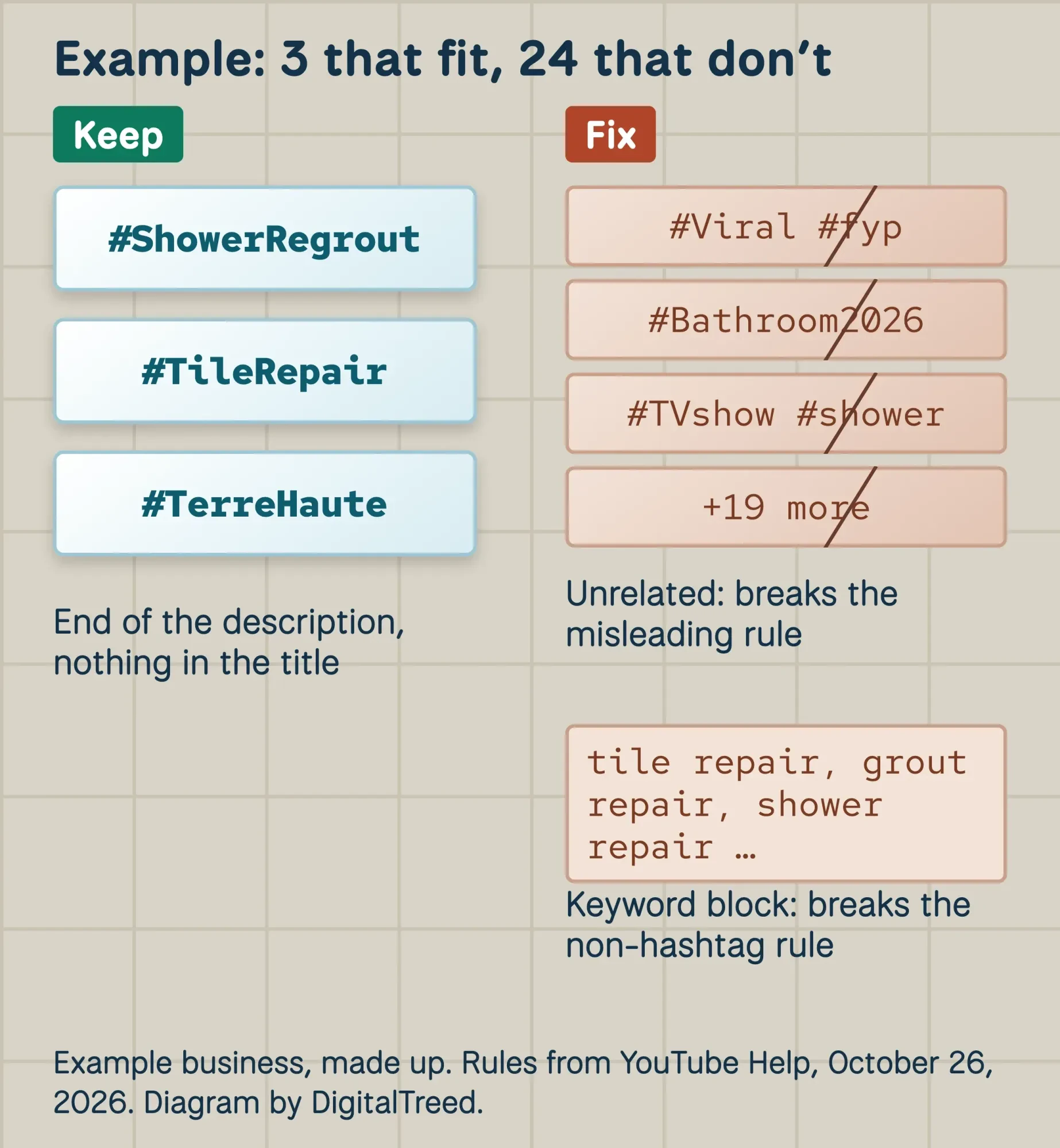 Example business, made up. Rules from YouTube Help, October 26, 2026. Diagram by DigitalTreed.
Getting the click is only half of it. Once viewers arrive, our guide to YouTube audience retention shows where they leave and why.
You can't see hashtag clicks in YouTube Analytics
Once viewers start arriving, you'll want to know whether hashtags brought them. YouTube Analytics doesn't say: as of October 26, 2026, the traffic sources list in YouTube Help runs from Browse features to external sources and has no hashtag line.
So judge hashtags indirectly.
Open the video's Reach tab and read the "Traffic source: YouTube Search" card. YouTube says the search report shows "what terms viewers searched when they found your content."
If those searches match the words in your hashtags, the words are doing their job.
Give it a few weeks before you change anything.
One video's numbers can swing for lots of reasons.
Frequently asked
Are hashtags and tags the same on YouTube?
No. Tags go in their own field in YouTube Studio, under More options when you upload. YouTube's tags page says they "play a minimal role in your video's discovery" unless your topic is often misspelled. Hashtags are visible links. Our roundup of YouTube keyword and tag tools covers tags.
Can I add or change hashtags after a video is published?
Yes. Edit the title or description in the video's details in YouTube Studio. The video settings page lists both as fields you can change.
Do hashtags still work on YouTube?
They still link. As of October 2026, selecting one opens a results page of videos that use it in the title or description, per YouTube Help. YouTube doesn't report how much traffic they bring.
Want someone to plan titles, descriptions and hashtags for your channel each month? That's part of the social media marketing service we run. We'd be paid if you hired us, so try the steps above on your next video first.
How we made this guide: on October 26, 2026, we read YouTube's hashtag Help page signed out. We also read eight related Help pages, on Shorts, tags, descriptions, video settings, traffic sources and the Spam Policy. We compared the hashtag page with archived copies on the Wayback Machine to date the change from 15 to 60. Then we read six ranking guides for their limit claims. The screenshot shows the public Help page. Every fact above carries a link to the page we took it from, placed right where it's stated.
Our checks stopped at public pages, with no YouTube sign-in and no live channel. So how YouTube picks the 3 "most engaging" ones stays its own call. Every edit to this page waits for a yes from Eram N., whose byline it carries.
First published April 2024. Rewritten October 26, 2026: the old post mixed a 15 and a 60 limit and listed undated trending hashtags. This version gives YouTube's current limit and where the old number came from, where hashtags show, the full rules, Shorts, finding and measuring them, and a worked example.
Sources
- YouTube Help: Find playlists & videos using hashtags
- YouTube Help: Find videos using hashtags
- YouTube Help: Spam Policy
- YouTube Help: Add tags to your YouTube videos
- YouTube Help: Edit video settings
- YouTube Help: Tips for video descriptions
- YouTube Help: Create YouTube Shorts
- YouTube Help: Search & discovery tips (Shorts)
- YouTube Help: Understand your YouTube content reach (traffic sources)
- Wayback Machine: YouTube hashtags Help page, August 17, 2021
- Wayback Machine: YouTube hashtags Help page, September 5, 2021
- Tubefilter: YouTube to display clickable hashtags above video titles (July 18, 2018)
- SocialBee: YouTube hashtag generator (limit claim, read October 26, 2026)
- SocialPilot: How to add hashtags to YouTube videos (limit claim, read October 26, 2026)
Comments
No comments yet. Start the conversation below.