
Quick answer
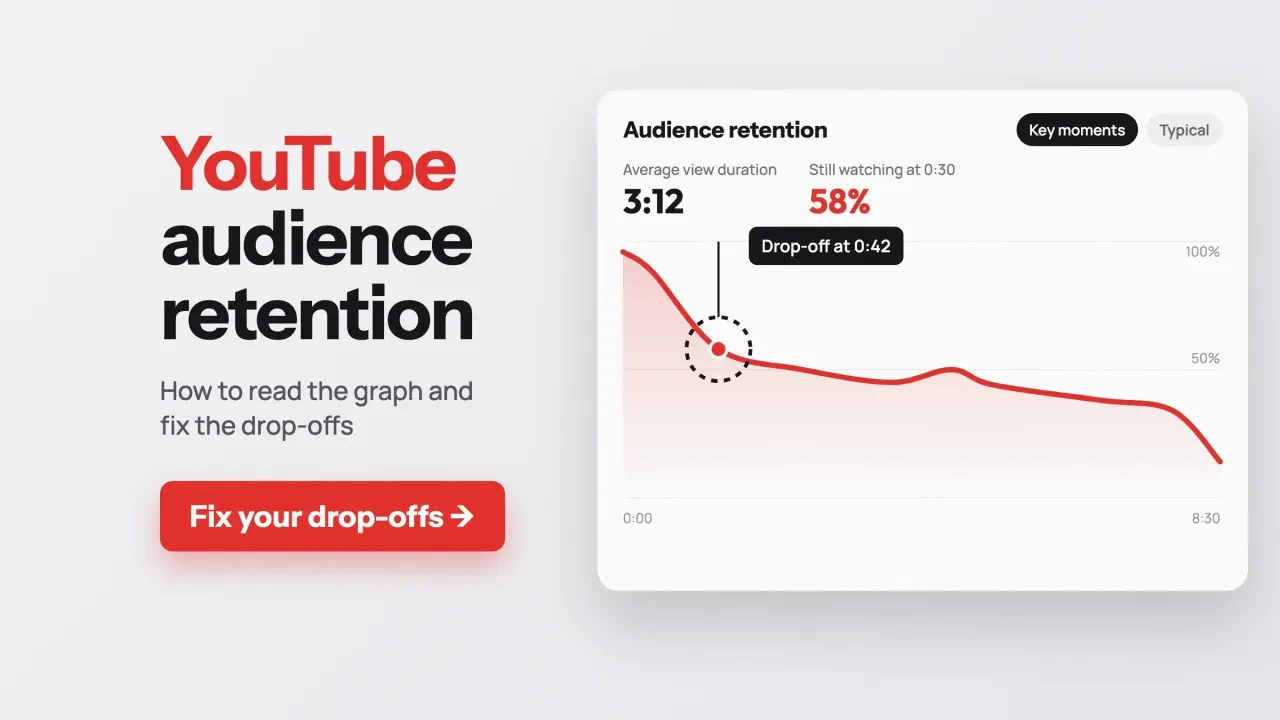
YouTube audience retention is the share of viewers still watching at each moment of your video. Open it in Studio under Content, then Analytics. As of October 2026, the only threshold we found in YouTube's Help pages is 50% still watching at 30 seconds. Fix the first big drop first, because every later viewer has to get past it.
On October 26, 2026, we read 18 of YouTube's own Help pages on this report, signed out, start to finish.
They say more than most guides do, and a few of their details change how you should read the graph.
We wrote this with business channels in mind. Your video's job is a call, a booking or a visit to your site, not ad money. If you're still planning what to post, start with our YouTube marketing strategy for small businesses.
Key takeaways
- Compare your line with the gray band, your typical retention on similar videos.
- Key moments need a video at least 60 seconds long with 100 views.
- Work left to right: an early fix helps every later part of the video.
- End screens go in the last 5 to 20 seconds of the video.
- Judge a fix on the next similar video, changing one thing at a time.
Audience retention is the share of viewers still watching at each second
Audience retention is a line that starts at the beginning of your video and shows what share of viewers are still there at each point. YouTube's key moments for audience retention help page says the report explains "how well different moments of your video held viewers' attention."
Three limits trip people up.
First, the report only exists for single videos, not your whole channel.
Second, YouTube says the data "typically takes 1–2 days to process," so a video posted this morning won't show a fair curve yet.
Third, the highlighted moments need a minimum.
Your video "should also be at least 60 seconds long and have at least 100 views," per the same page.
A 40-second clip with 60 views won't get key moments at all.
If your channel is brand new, our guide to setting up a YouTube channel for your business covers the setup steps first.
Where to find the audience retention graph in YouTube Studio
Once a video clears those limits, the graph sits in its Analytics page. These are the steps from YouTube's help page, as of October 2026:
- Sign in to YouTube Studio on a computer.
- From the left menu, select Content.
- On the video you want, select Analytics.
- Open the Overview or Engagement tab and find the Audience retention card.
- Click See more for comparisons, and use Segments to switch viewer groups.
Some segment data may need Advanced mode.
Advanced mode has its own view, too: the Advanced mode help lists "retention rate" among its special reports.
The Studio app on a phone has the report too, but a computer is easier for clicking along the line.
How to read the graph: your line, the gray band and four moments
With the card open, look at two things before any single dip. The first is your line. The second is the gray band behind it, which YouTube's Content tab tips call "your typical retention," based on "the last 10 of your videos of a similar length."
Above the band means the video held people better than your recent norm.
Below it means worse.
That's the comparison that matters most, because it's your own audience on your own kind of video.
See more adds a second baseline. The key moments page says it shows "how your video compares to all YouTube videos of similar length." That's every channel on YouTube, so treat it as background, not a target.
Then come the four moments YouTube may highlight on the line.
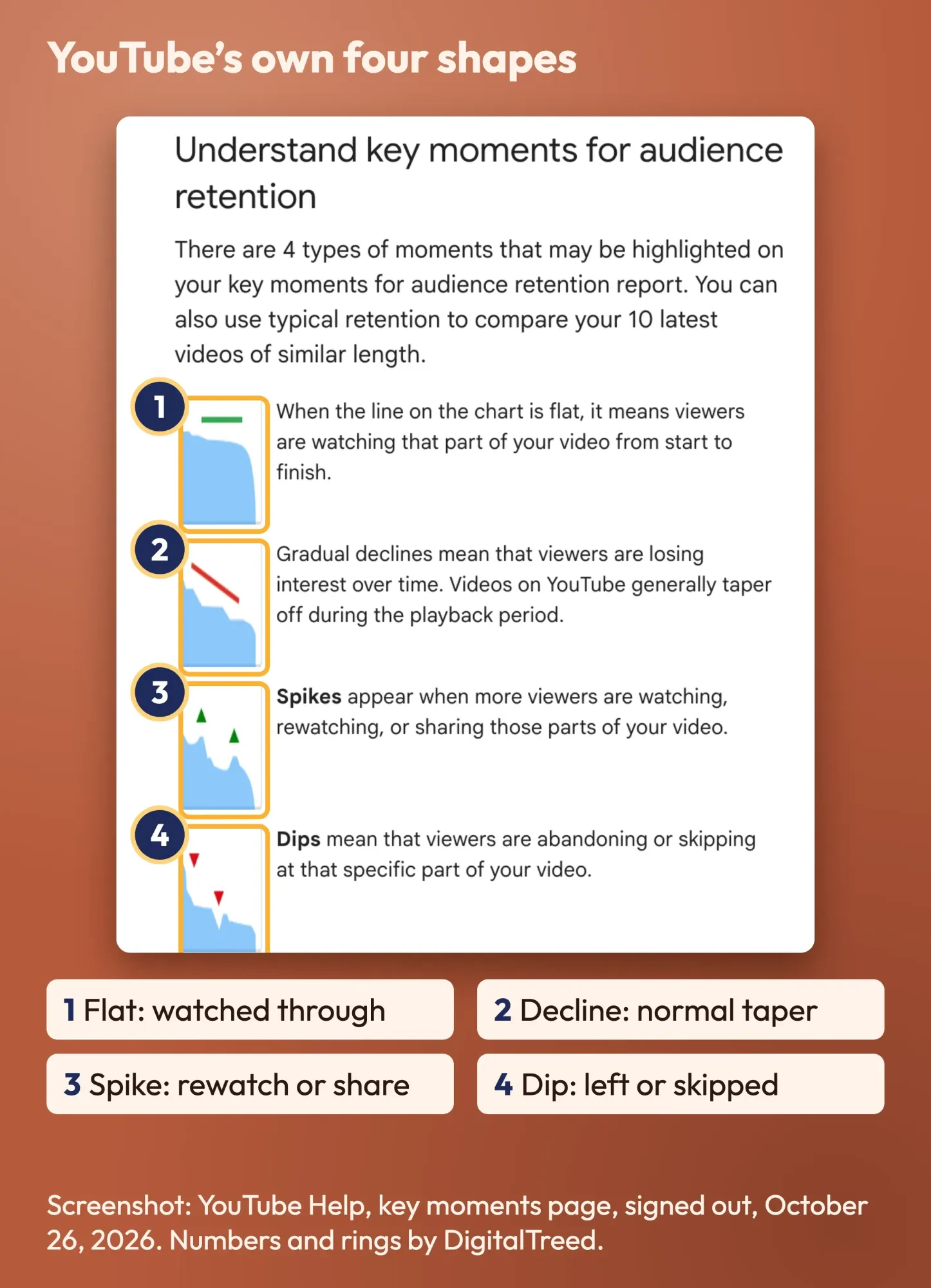 Screenshot: YouTube Help, "Measure key moments for audience retention", taken signed out on October 26, 2026, cropped to the four moment types. Labels by DigitalTreed.
YouTube's definitions are short. A flat line "means viewers are watching that part of your video from start to finish." Gradual declines mean "viewers are losing interest over time," and YouTube adds that videos "generally taper off during the playback period."
Spikes "appear when more viewers are watching, rewatching, or sharing" a part.
Dips mean viewers "are abandoning or skipping" at that point.
What each drop-off usually means, and what to change
Those four shapes tell you where to look, not what's wrong. We built this table from YouTube's descriptions plus what we'd check first on a business video: the middle column is YouTube's, and the last two are our advice.
| What you see | YouTube says it means | Usual cause on a business video | What to change |
|---|---|---|---|
| Steep fall in the first 30 seconds | Low Intro; YouTube points to the title and thumbnail | A logo sting, a long hello, or a different topic than promised | Open with the result or the question from the title |
| Sharp dip at one moment | Viewers left or skipped there | A slow setup, a sales pitch, or a dead screen | Cut it, shorten it, or move it later |
| Steady slope all the way | Viewers losing interest over time | Too long for the question, no new step for a while | Trim, add chapters, show progress |
| Spike | Rewatched or shared, or unclear | A key number, a demo step, or a confusing bit | Read comments; repeat what works, explain what confused |
| Flat stretch | Watched start to finish | The demo or answer people came for | Move it earlier in the next video |
| Fall in the last 20 seconds | Normal taper | Goodbye and calls to action | Put the end screen there and stop talking |
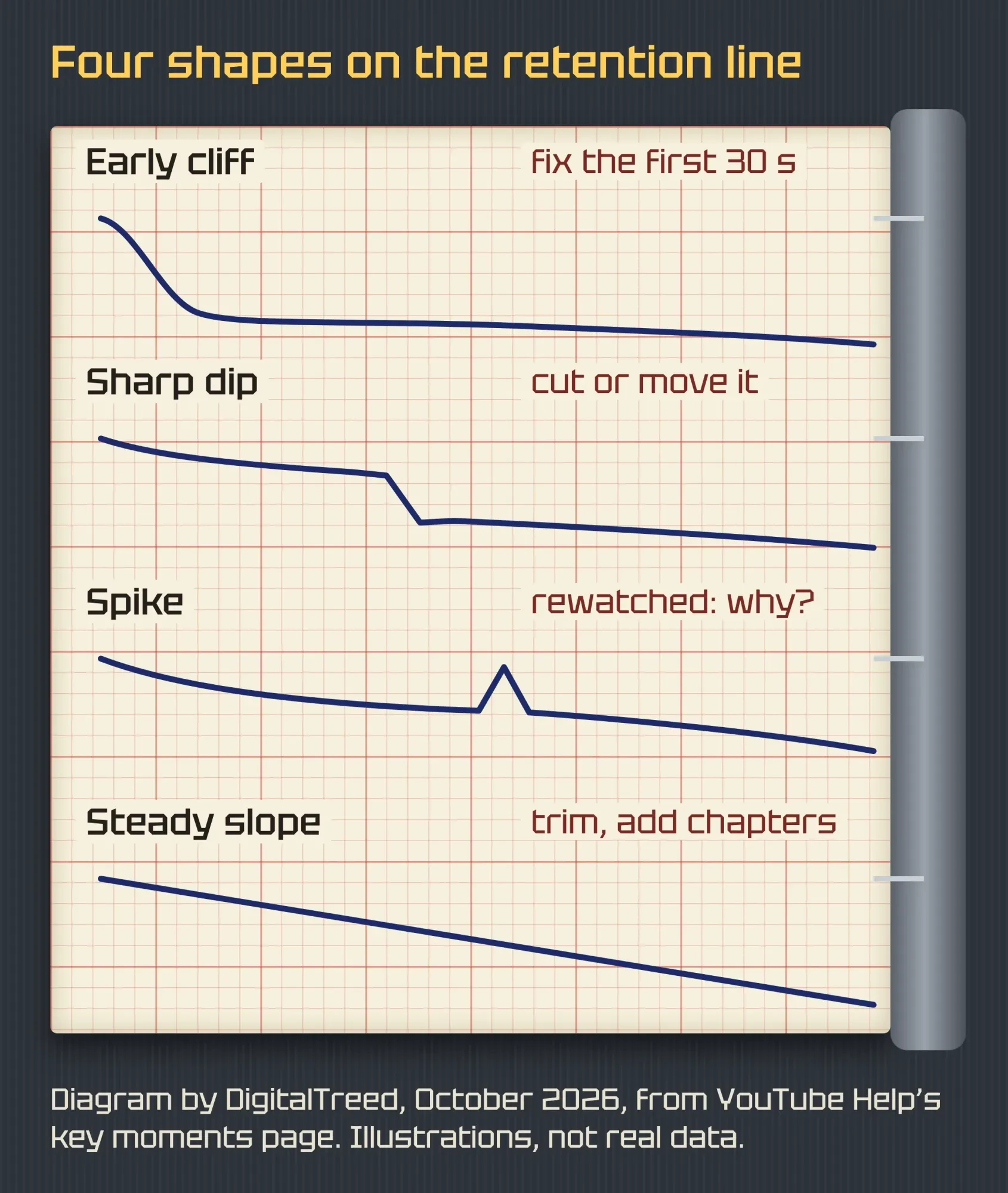 Diagram by DigitalTreed, October 2026, drawn from the shape descriptions on YouTube Help's key moments page. Lines are illustrations, not real data.
Work from left to right.
A viewer who left at 0:20 never saw your great demo at 5:00, so the early fix pays off on every later part.
Fix the first 30 seconds before anything else
That's why the intro comes first. YouTube's Intro figure "tells you what percentage of your audience still watched your video after the first 30 seconds," per the key moments page.
The Content tab tips add the only threshold YouTube states anywhere we looked. Videos with "50% of the audience or more watching after the 30-second mark" land in an "above typical intros" list.
Below 50% isn't a failure.
It's a flag.
YouTube's first reason for a high Intro is that the first 30 seconds "matched the viewer's expectation of the video's thumbnail and title." So a cliff often starts before the video does. If the thumbnail promises a finished project and the video opens on a talking head, people leave. Our guide to YouTube thumbnails that match the video goes deeper on that.
YouTube suggests you change the thumbnail and title "to better reflect your video content," or rework the first 30 seconds and try different styles.
You can test the packaging without guessing. YouTube's A/B test feature lets you compare "up to 3 different titles and thumbnails," and the one "with the highest watch time" wins. It runs on computers only and isn't available for Shorts.
Hashtags are part of the packaging too, so they should match the video. Our YouTube hashtags guide covers how many to use and where they show.
Mid-video dips: go to the second, then cut or move it
Once the intro holds, the next job is the first sharp dip after it. Note the timestamp where the line drops. Then watch 15 seconds before that point, because the cause is usually just ahead of the drop.
For exact numbers, use the detailed activity view.
That view shows "how many viewers started and stopped watching your video at various moments," per YouTube's help page.
Typical culprits on business videos are a 20-second company history, a price talk before the value, or a screen that doesn't change.
Spikes need a second look. YouTube says a spike can mean viewers watched that part more than earlier ones, or that "Your content isn't clear and your audience had to rewatch a section." Check the comments at that timestamp before you celebrate.
Top moments, where "almost no one dropped off," are your best material. YouTube's advice: if they sit late, introduce that content "earlier in the video."
Chapters help viewers jump to the part they came for instead of leaving. YouTube's chapters help asks for "at least three timestamps," a first one at 00:00, and chapters of at least 10 seconds. Our YouTube SEO guide shows how chapters can also show up in search.
The last 20 seconds always fall, so plan for them
After the middle, the end is the easy part, because a drop there is expected.
Viewers leave once the answer is done. That's fine.
Use those seconds. YouTube's end screens help says end screens "can be added to the last 5–20 seconds of a video." The video must be "at least 25 seconds long," and a standard 16:9 video can have up to four elements. It also asks you to "consider the video's last 20 seconds when editing."
The Engagement tab then shows an end screen element click rate, per YouTube's engagement help, which tells you whether the next video or the subscribe button got the clicks.
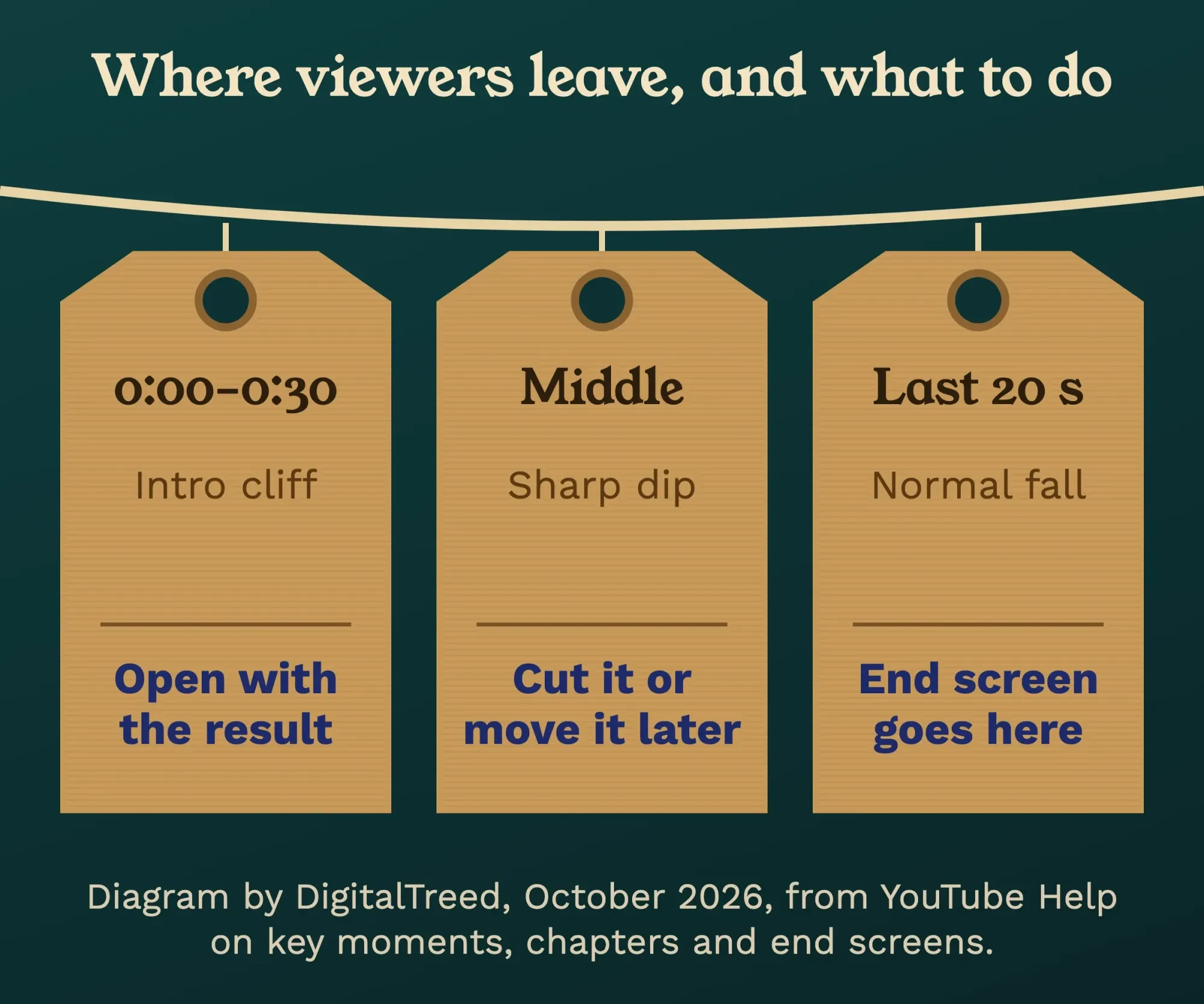 Diagram by DigitalTreed, October 2026, based on YouTube Help pages on key moments, chapters and end screens.
For a business, the most useful click is often in the description, not the end screen. Tag that link with our UTM builder so Google Analytics 4 shows which visits came from which video.
A viewer who leaves at 80% to book a call is a win the retention graph can't see.
What is a good audience retention rate on YouTube?
There's no single good rate. YouTube gives one line, 50% at 30 seconds for the intro, and otherwise asks you to compare against your own typical retention. Its performance FAQ says the discovery system uses "absolute and relative watch time as signals."
That same FAQ adds: "relative watch time is more important for short videos and absolute watch time is more important for longer videos."
So a 12-minute video doesn't have to match a 2-minute one's percentage.
It needs to hold people for minutes that are worth it.
If you want an outside reference, label it. Agency AIR Media-Tech published medians from 21,755 long-form videos on 302 channels (videos published in 2025; page updated October 12, 2026). Its median average percentage viewed is 38% at 3 to 5 minutes and 30% at 5 to 15 minutes. That's vendor data from one company's own dataset, not a YouTube figure.
Other blogs call 50% strong or give ranges like 30% to 50%, with no study behind them.
We left those out.
Our take: beat your own gray band, then beat it again. YouTube says its recommendation system aims to "Maximize long-term viewer satisfaction," per its recommendation system page, and it also uses satisfaction surveys "not just watch time."
Average view duration doesn't count the same plays as views
This next detail is the one most guides miss. YouTube's Help pages define average view duration two ways.
The key moments page calls it "Average minutes watched among those who stayed to watch," adding that it is "calculated from engaged views." The Content tab tips call it "The average minutes watched per view."
Views changed, too. Since August 24, 2026, views are "counted the moment a video starts to play across all formats," per YouTube's page on how metrics are counted.
So your view count now includes people who left in the first second, while your average view duration, by the key moments page's definition, leans on engaged views.
Don't divide one by the other and expect a clean answer.
Read each metric against itself over time.
For business results, look past both, as our post on measuring the real ROI of video explains.
Shorts don't get the same curve
Shorts work differently again. YouTube's Shorts analytics tips list a metric called "How many chose to view," which "Highlights the percentage of times that viewers viewed your Shorts versus swiped away."
Another content performance page names it "Stayed to watch," the share of times viewers "stayed to watch past the initial seconds of a Short."
Neither means they finished it.
YouTube's tips also say "it's key to compare videos of the same type."
Compare Shorts with Shorts and long videos with long videos.
A made-up pool company and its 40-second cliff
To put the steps together, here's a business we made up. Kestrel Pool & Spa, a two-truck pool service company in Paducah, Kentucky, has an 8-minute video, "How to open your pool in spring," with 1,400 views after a week. Every number in this example is invented to show the method.
The Intro reads 41%, under YouTube's 50% line.
The line sits below the gray band from 0:30 on, with a sharp dip at 0:40.
At 0:40, the owner reads a 25-second company introduction. The top moment is at 5:10, where he doses the chlorine on camera. The last 30 seconds fall fast during a long goodbye.
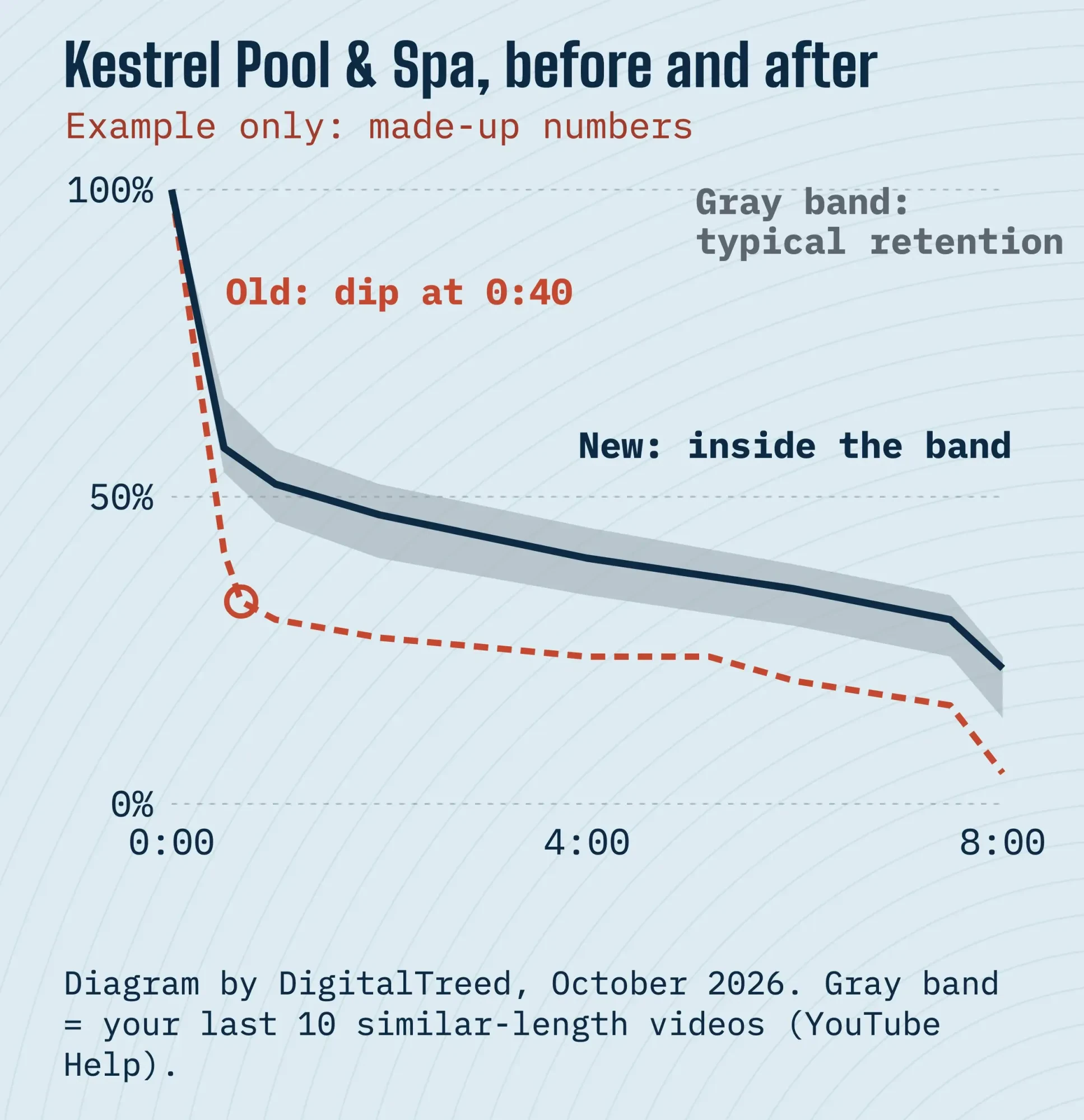 Diagram by DigitalTreed, October 2026. Example only: Kestrel Pool & Spa and all numbers are made up to show the method.
His fixes for the next spring video:
- Open on the clear, finished pool and say "dosing at 2:00."
- Cut the company intro to one line at the end.
- Move the dosing demo from 5:10 to about 2:00.
- Add chapters: Remove the cover, Clean, Test, Dose, Start the pump.
- Put the end screen in the last 20 seconds and drop the long goodbye.
He also tags the test kit he uses on screen, which our YouTube Shopping guide explains.
The real test comes with the next video, not this one.
How to tell the fix worked
Like Kestrel, judge a fix on the next similar video.
Wait at least 2 days for the data, then check whether the new line sits higher against the gray band than the old one did.
Change one thing per video if you can.
YouTube's watch time drop tips list "topic, editing style, thumbnail design, on-screen talent, upload cadence, upload output, or video length" as changes that can move audience interest. Change three at once and you won't know which one worked.
Then split the graph by viewer group. The same key moments report lets you compare "new viewers vs returning viewers" and "subscribers vs non-subscribers." If subscribers stay and new viewers leave early, your intro is speaking to insiders. Our guide to getting your first 1,000 YouTube subscribers covers turning those new viewers into regulars.
YouTube counts a regular viewer as someone who watched at least once a month for "more than 6 months in the past year," per its viewer types page.
Frequently asked
Why do some parts of my video show more views than the video has?
That's expected. YouTube's key moments page says views for one part can "exceed your video's overall view count" because the same viewer may watch a part several times in one view.
Why can't I see key moments on my video?
As of October 2026, key moments only show on videos at least 60 seconds long with at least 100 views, per the same help page. Even then, they appear only when YouTube detects them. Data can also take 1 to 2 days to process.
Does audience retention affect YouTube recommendations?
Indirectly, yes. YouTube's performance FAQ says its discovery system uses absolute and relative watch time as signals, and that Home picks videos by how well they "interested and satisfied similar viewers."
Want someone to recut your intros and plan chapters and end screens? That's part of our video and graphics service. That's billed work, so try the steps above on one of your own videos before you decide.
How we made this guide: on October 26, 2026, we read 18 YouTube Help pages, signed out. They cover audience retention, engagement metrics, Shorts, chapters, end screens, A/B tests and recommendations, and we logged six places where they add limits or define a metric differently. The screenshot comes from a public Help page. We read four ranking guides for their benchmark claims and kept only the one with a named dataset. Each claim is linked where it appears.
We didn't sign in to YouTube Studio or use anyone's channel for this guide, so your screens may differ from YouTube's written steps. The byline is real: Eram N. checks each change to this page before it's published.
First published July 2023. Rewritten October 26, 2026: the old post was a list of general engagement tips. This version explains how to read the audience retention graph in YouTube Studio and what each drop-off means. It also covers fixes for the intro, middle and end, what a good rate is, how Shorts differ and a worked example.
Sources
- YouTube Help: Measure key moments for audience retention
- YouTube Help: Content tab analytics tips (Video)
- YouTube Help: Content tab analytics tips (Shorts)
- YouTube Help: Understand your YouTube content performance
- YouTube Help: Understand your YouTube engagement
- YouTube Help: How engagement metrics are counted
- YouTube Help: YouTube performance FAQ & Troubleshooting
- YouTube Help: YouTube's Recommendation System
- YouTube Help: How YouTube recommendations work
- YouTube Help: Watchtime drop tips
- YouTube Help: Video Chapters
- YouTube Help: Add end screens to videos
- YouTube Help: A/B test titles & thumbnails
- YouTube Help: Learn how to use Advanced mode for analytics reports
- YouTube Help: Understand new, casual, & regular viewers
- AIR Media-Tech: How to read your YouTube retention graph (vendor data, updated October 12, 2026)


Comments
No comments yet. Start the conversation below.