
Quick answer
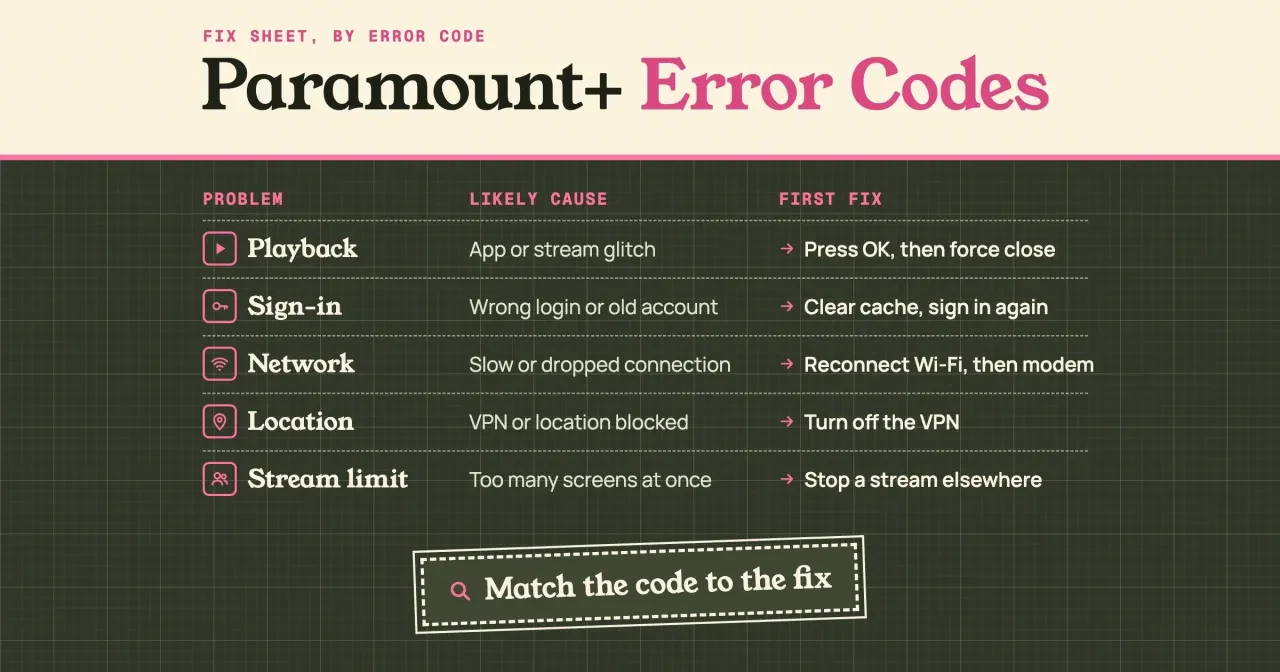
Paramount Plus error codes cover playback, network and location problems; sign-in and stream-limit problems show messages instead. As of October 29, 2026, Paramount+'s US help center gives a first fix for 27 numbered codes, and 21 of them start with the app, browser or device. A VPN changes that: codes 114, 6009 and 6017 mean you turn it off first. Find your number in the code table below.
If a show just stopped with a number on the screen, you need to know if it's a restart job or a call to Paramount+. A Paramount+ error code is a short number the app or website shows when a video can't load, and it's the best clue you'll get. The help center lists the codes in one long page with no order, so we sorted every numbered code on it by the first thing Paramount+ tells you to do.
First comes what an error code tells you. Then each family gets its own section: playback codes, network codes and location codes. After that you'll find sign-in problems, which show messages instead of numbers, and the limit on screens that stream at once. Then you get every numbered code and its first fix in one table, and what to do when your code isn't on the list.
Key takeaways
- Of 27 numbered codes, 21 start with an app, browser or device fix.
- Codes 114, 6009 and 6017 point to a VPN before anything else.
- Paramount+ needs at least 2 Mbps for on-demand and live TV.
- One account can stream on three devices at the same time.
- Seven codes, including 6040 and 6290, are tagged on the page with no steps.
What a Paramount+ error code tells you
Write the number down first. It matters less than the group it's in, though, because codes in one group share a fix. Paramount+'s error code help page says most codes clear "with a few simple steps." It lists them in 19 sections, from "Error codes: 4201, 1200" down to two named errors, Content Unavailable and Fatal Error. The page was last updated March 19, 2026, and it was the US version when we read it on October 29, 2026.
We've sorted the 27 numbered codes by the first step Paramount+ gives for each one. If that step names a VPN, the code went under location, and if it names Wi-Fi, a modem or the internet, it went under network. Everything else went under playback. That's because for those codes the first step is to close, restart or update the app, the device or the browser. That rule put 21 codes under playback, 3 under network and 3 under location.
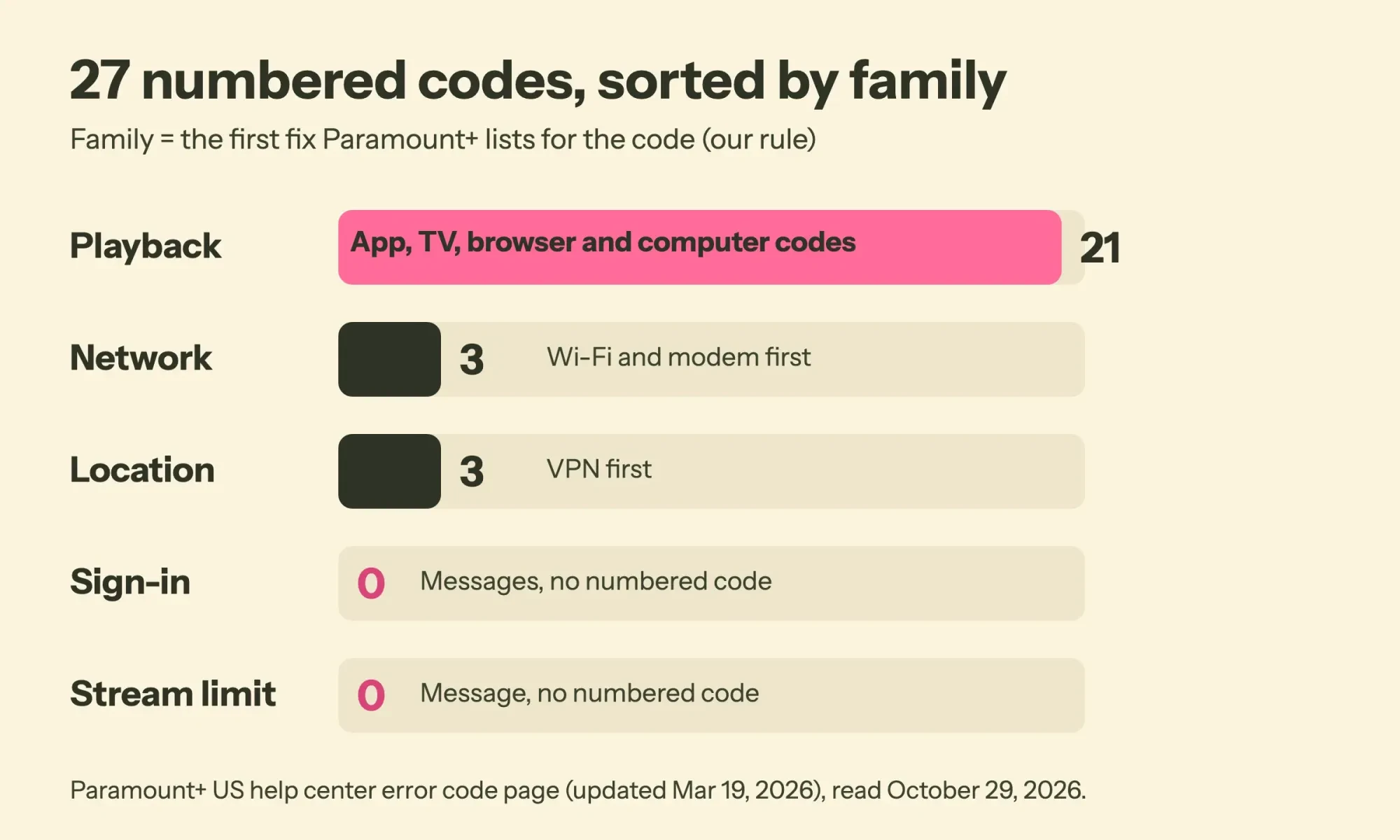 Diagram by DigitalTreed. Our sort of the Paramount+ US error code page, read October 29, 2026.
Sign-in and stream-limit problems didn't get a bar at all, because Paramount+ handles those on separate help pages, and the problems they describe show up as messages, not numbers. So if your screen shows words and there's no code, skip ahead to the sign-in and screens sections below.
Playback codes: the app, the TV or the browser
Four playback codes share one short routine, so start there before you change any settings. For codes 1106, 6999, 3002 and 3005, Paramount+ says to press OK on the error screen first. That sends you back a page, which "may clear the error." Then try the video again. If the video still won't play, it's time to force close the app and reopen it, and for 3005 alone the page adds a modem restart.
How you force close isn't the same on every device. Paramount+'s force close guide covers 14 kinds of device. On a Fire TV, for example, you go to Settings, then Applications, then Manage Installed Applications, and pick Force Stop and Clear Cache. On a Roku, the same guide says to restart the whole Roku from Settings, then System, then System Restart.
Phones are the exception, and it's worth knowing why. Apple's guide to closing an iPhone app says you should close an app only if it's unresponsive, and that closing apps doesn't help overall performance. Close Paramount+ when it's stuck. Don't close every app out of habit, on an iPhone or on Android, as our guide to Android apps running in the background explains.
Codes 5204 and 5304 are the one case where Paramount+ asks you to close the other open apps too, on an iPhone, iPad or Apple TV.
A few codes point at the TV hardware, and that's not something an app restart fixes. Code 3200 shows up on smart TVs, game consoles and Comcast devices, and the fix is to unplug the device for 30 seconds. Code 6013 means the device can't play protected content. For that one, Paramount+ suggests a firmware update first. If 6013 is still there after the update, run the HDMI checks: flip the cable ends, skip the receiver, and try another port or another TV. Consoles have a step of their own: if an Xbox is frozen, Paramount+ says to hold its Xbox button for about 10 seconds until it turns off.
Browser codes are their own small cluster: code 7 is Chrome on a Windows PC, and Paramount+ says to check Chrome for updates. Codes 404, 422 and 500 are web status numbers, and the fix is to close and reopen the browser, then restart the computer. If you've met a status code on another app before, our guide to YouTube error 400 explains what a refused request means. Codes 4201, 1200 and 3304 all name an ad blocker, and Paramount+'s ad blocker instructions walk through turning AdBlock and AdBlock Plus off in Chrome, Firefox and Safari. Firefox users get one more step, since the streaming page says its tracking protection can cause streaming issues.
Still stuck on a computer? Check the basics on the supported browsers page. It lists Windows 8 or later and Mac OS X 10.6 or later, and it says Internet Explorer is no longer supported.
Network codes start with Wi-Fi and the modem
Once you've ruled out the app, the next suspect is the connection. Three codes point straight at it. Codes 6000 and 6015 appear on Fire TV and Android TV. Paramount+ says to disconnect and reconnect Wi-Fi, relaunch the app, and then restart the modem and the device if that fails.
The modem step also turns up under other codes. Across the error page, a modem restart is mentioned for 5 of the 27 numbered codes: 3004, 3005, 3205, 6000 and 6015. For 3004 it's the only step. Paramount+'s streaming troubleshooting page gives the order, and order matters. Unplug the modem first if it's separate from the router, wait about 10 seconds, and plug the modem back in before the router. Then wait a few minutes for it to power up fully.
Then check speed. Paramount+ needs at least 2 Mbps for on-demand video and live TV, that page says, so if you're below it, run a speed test and then call your internet provider. Our guide to types of broadband connection compares fiber, cable and fixed wireless if your plan is the problem. Here's a quick check that saves time. If YouTube or another app also stalls on the same TV, the trouble is probably your network, not Paramount+. Our YouTube error 503 guide covers telling a busy server apart from a home connection problem.
Location codes: VPN, proxy and live TV location
Codes 114, 6009 and 6017 aren't like the rest. Paramount+'s first guess for them is a VPN. The error page says a VPN on your device "is not supported" and asks you to delete or disable it. Its VPN and proxy message page explains why. Paramount+ has detected a VPN, a proxy or other software "that may reroute your internet traffic outside your current region." The fix it suggests is setting your network settings to Automatic.
When Automatic doesn't clear it, Paramount+ suggests restoring the device's default network settings, or asking the device maker or internet provider.
Work VPNs count too. Paramount+ can't tell why you're using one, so it has to "block any use of them," that page explains. Its VPN policy page adds that Paramount+ is "available within the United States only, excluding Puerto Rico." So if a work laptop routes everything through a company VPN, stream from a different device.
These three codes cover more than a VPN. Live TV adds one more check, location, and Paramount+'s live TV location page says to turn on GPS and location services on the device. On a computer, the browser has to allow paramountplus.com to see your location, and the error page also asks browser users to enable playback of DRM-protected content. In Chrome that setting sits under site settings, where Google's Chrome site settings help lists Protected Content IDs for sites that play copyrighted video.
Start with the VPN. Then check location for live TV, then the browser settings. Don't spend time on the modem until you've checked all three.
Sign-in problems show messages, not codes
Sign-in trouble is the family that doesn't use numbers, so you'll match it by the wording on the screen instead. Paramount+'s sign-in help page names three examples: an invalid email or password, a greyed-out Continue button, and being asked to subscribe when you already pay. So the likely cause is a wrong login or an old account, and its fixes depend on where you signed up. On the website, clear cache and cookies first, then try a different browser, a private window, or a reset with Forgot Password.
Waiting on a password reset email? Paramount+ says to check your spam folder as well as your inbox.
On a TV device such as a Roku or Fire TV, clear the app's cache or data if the option's there. Then sign in again, the page says. If your TV app asks for a code from another screen, our yt.be/activate sign-in walkthrough covers that kind of step for YouTube. Sometimes the account is fine but the bill isn't. Paramount+'s can't stream any content page says to check that your payment method is up to date. You'll do that on paramountplus.com/account, or in the app store you subscribed through, like Apple, Google Play, Amazon or Roku. A plan billed by someone else is fixed with that company, the same way you'd cancel Hulu billed through another company.
How many screens can stream at once?
The stream limit is the last family. One number sits behind it. Paramount+'s device limit page says there's no cap on how many devices are linked to your account. But you can use "a maximum of three devices/concurrent streams at the same time," wherever they are. A fourth screen is one too many, so the fix is to stop a stream on another device. If you don't know which devices are watching, you can sign some out. Paramount+'s sign out of devices guide starts on your account page under Manage Devices, then Sign Out of Devices. Paramount+ emails you a link to confirm, and it's valid for only 10 minutes.
On the web, multiview plays up to four live UEFA Champions League matches or Masters events at once. The help center doesn't say whether that counts toward the three.
Sign Out of All Devices also signs out the screen you're using, so you'll want your password ready before you click it. A device activated in the past 24 hours may not show in the list yet.
Our take: if a stranger's device is in that list, sign out of all devices and change your password the same day. Paramount+ recommends exactly that for devices you don't recognize. Our free password generator makes a strong new one in the browser.
Every numbered code and its first fix
Those families hold all 27 numbered codes, and they fit in one table. Codes share a row when Paramount+ lists them under one heading, and the first fix is our short summary of the step it lists first:
| Codes | Family | Likely cause | First fix |
| 4201, 1200 | Playback (browser) | Ad blocker, firewall or antivirus | Turn off the ad blocker; allow paramountplus.com |
| 1106, 6999, 3002, 3005 | Playback | App or stream glitch | Press OK, then force close the app (3005: restart the modem) |
| 7 | Playback (browser) | Chrome on a Windows PC | Update Chrome and relaunch it |
| 14 | Playback (browser) | Windows computer | Restart and install Windows updates |
| 103 | Playback | App or HDMI connection | Force close; try another HDMI port |
| 111 | Playback (browser) | Computer lost power | Restart the computer, then the browser |
| 404, 422, 500 | Playback (browser) | Browser session | Close and reopen the browser |
| 3200 | Playback | Smart TV, console or Comcast box | Unplug for 30 seconds |
| 3205 | Playback | Device or app | Restart the device; force close the app |
| 3301 | Playback (browser) | Browser or device | Restart the browser or the device |
| 3304 | Playback (browser) | Ad blocker or Chrome settings | Ad blocker off; hardware acceleration off |
| 4200 | Playback | Old software | Update the device and the app |
| 5204, 5304 | Playback | iPhone, iPad or Apple TV | Force close all apps, then restart |
| 6013 | Playback | Device can't play protected video | Update firmware; check the HDMI cable |
| 6000, 6015 | Network | Fire TV or Android TV Wi-Fi | Reconnect Wi-Fi, then restart the modem |
| 3004 | Network | Internet connection | Restart the modem |
| 114, 6009, 6017 | Location | VPN, proxy or blocked playback | Turn off the VPN |
Do the first fix, then play the video. If it still fails, work down the rest of that code's steps in the order Paramount+ lists them, and stop once the video plays. The Paramount+ restart guide helps there, since it covers 11 kinds of device, from a computer to a Cox Contour box.
On a Fire TV, that guide says to hold Select and Play/Pause together for about five seconds, or to unplug the power cord and plug it back in.
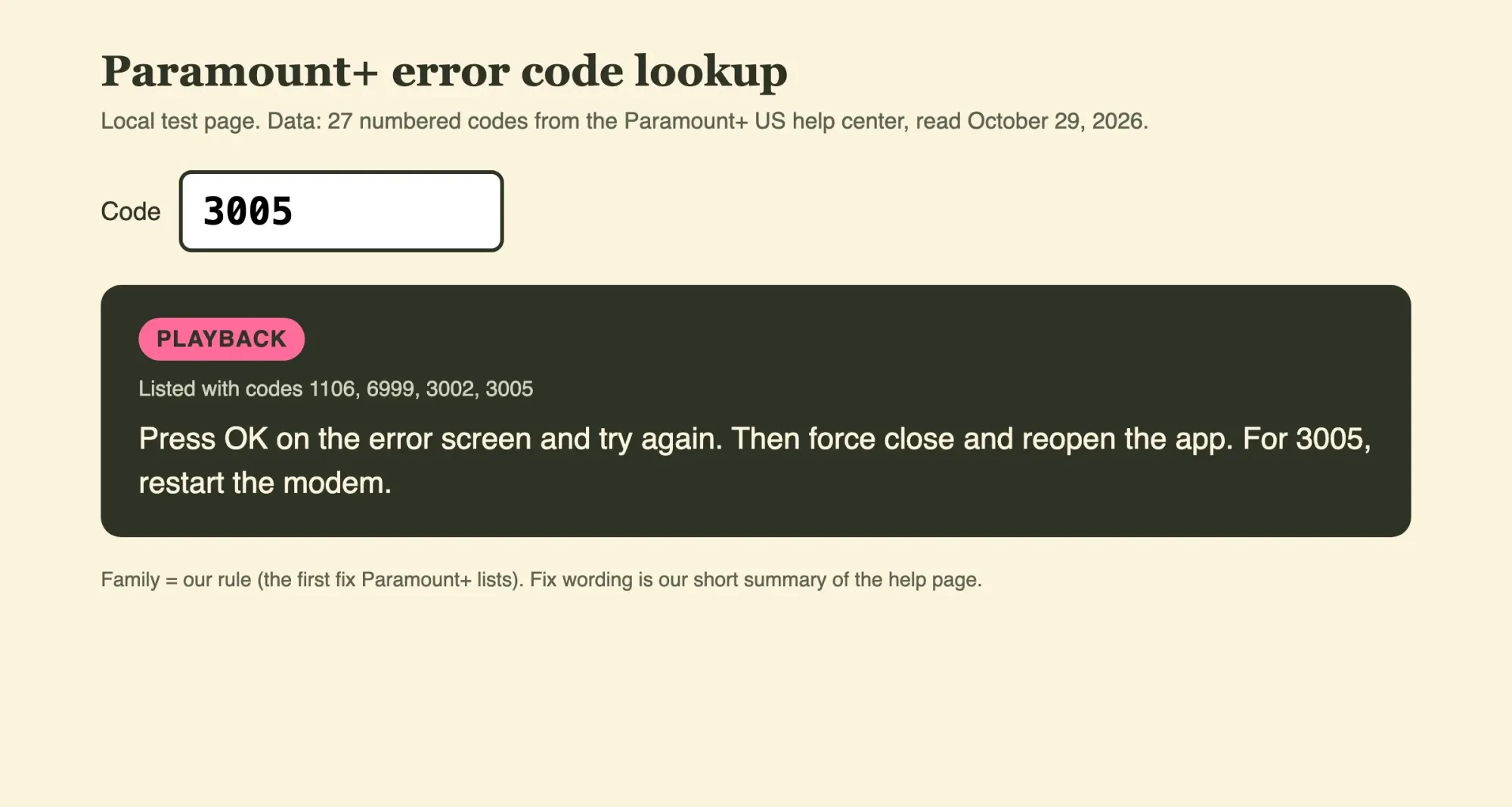 Screenshot: our code lookup test page on 127.0.0.1, code 3005, October 29, 2026. A test page, not a Paramount+ screen.
What we tested
We saved the US error code page as text on October 29, 2026, and ran a short script on that file with no network. It split the page into its 19 sections and sorted each numbered code by the rule above. Then it compared the codes in the body with the 31 codes in the page's keyword list. Seven keyword codes have no steps in the body. Codes 103, 4200 and 6017 have steps but aren't in the keywords. We then built a lookup page from the results, served it on 127.0.0.1, and checked codes 3005, 114 and 6290 in it.
What to do when your code is not on the list
That leaves the codes Paramount+ mentions but doesn't explain. The error page's keyword list includes 10, 5003, 6040, 6100, 6290, 6300 and 6330, yet the page gives no section for any of them. We can't tell you what those seven mean. Paramount+ hasn't said. What we can say is that its fixes repeat in nearly the same order for code after code.
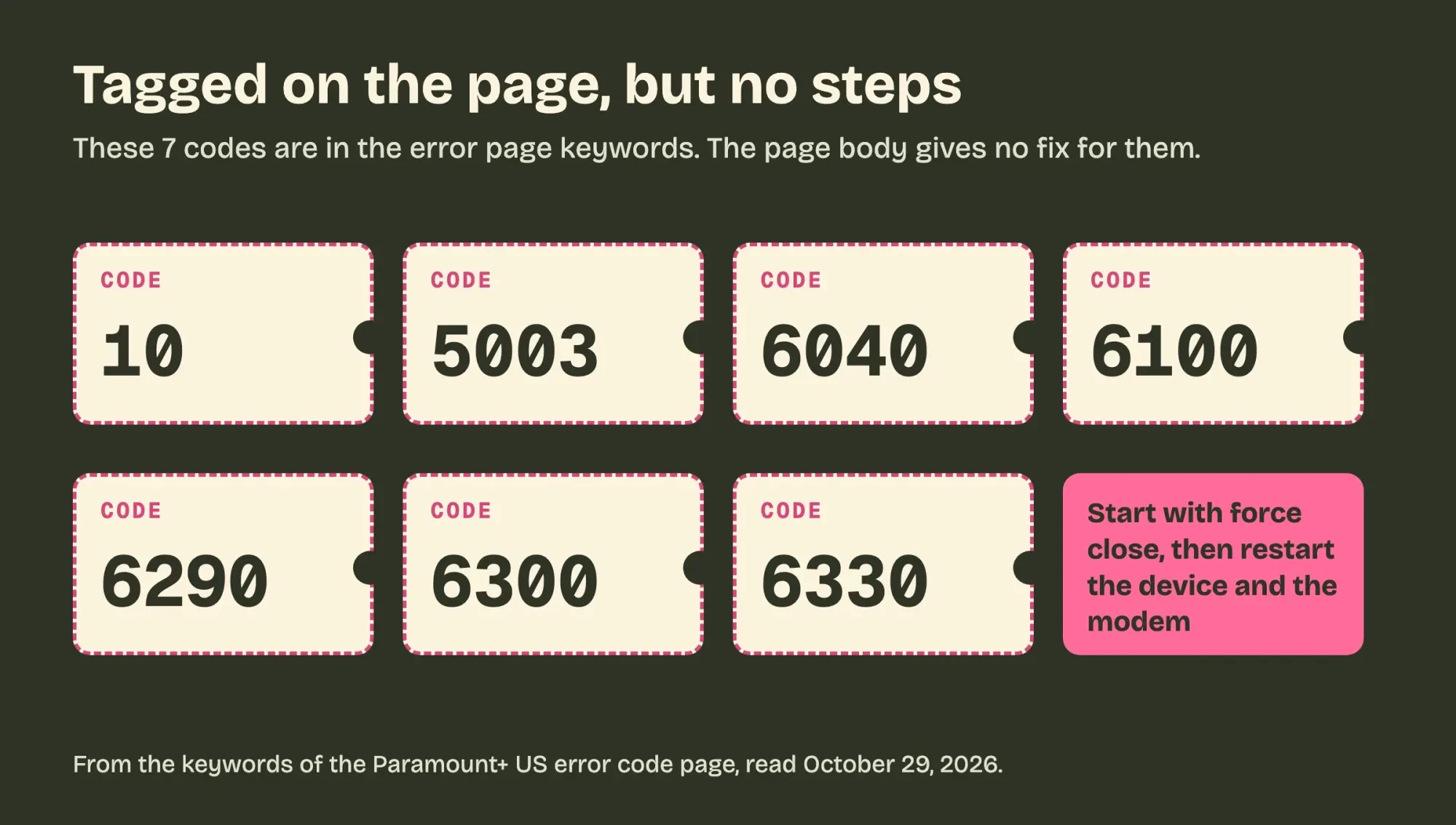 Drawn by us. Codes from the keywords of the Paramount+ US error code page, read October 29, 2026.
So for an unlisted code, climb that order step by step, and stop when the video plays:
- Press OK on the error screen, if there's one, and try the video again.
- Force close the app, or close and reopen the browser.
- Restart the device, and unplug a TV or box for 30 seconds.
- Restart the modem, wait for the internet, then relaunch Paramount+.
- Contact Paramount+ with the show, season and episode you were watching.
The last step comes straight from the Fatal Error advice, which says to include the show, season and episode. A device update can help along the way. Roku's software update guide says Roku devices check for new software at power-on and randomly every 24 to 36 hours. You can force a check under Settings, System and Software update.
That System update screen also shows the current software and build version, so note both before you contact anyone.
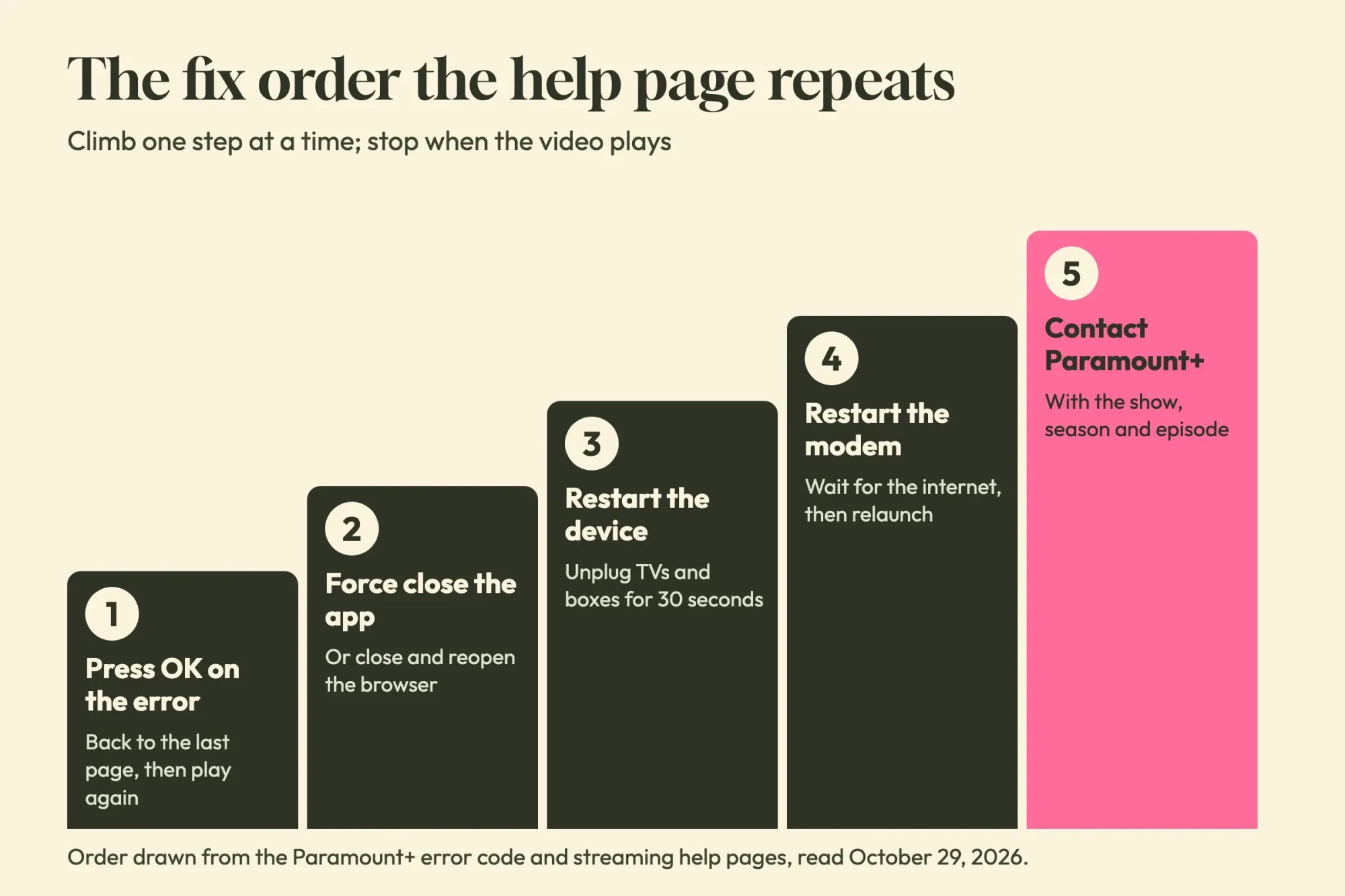 Diagram by DigitalTreed. Order drawn from the Paramount+ error code and streaming help pages, read October 29, 2026.
Step five is the only rung that needs anyone else. The same error code page also has a link near the top for reporting a known issue.
Paramount Plus error code questions
Frequently asked
How much internet speed does Paramount Plus need for 4K?
25 Mbps, per Paramount+'s streaming help page. The minimum for regular on-demand video and live TV is 2 Mbps.
Which browsers can stream Paramount Plus on a computer?
Chrome, Firefox, Safari and Microsoft Edge. The browser support page lists Chrome v68+, Firefox v48 and Safari v9, plus Edge v14 on Windows 10 or later.
Why does Paramount Plus ask me to sign up when I already pay?
You may be signed in as an ex-subscriber, per Paramount+'s already subscribed help page. Check that you're in the right account, then contact Paramount+ if you are.
How do I know if I am on a VPN?
Paramount+'s VPN help page says VPNs and proxies "require manually enabling." If you never set one up, it suggests asking your internet provider to verify your IP address.
How we made this guide: Paramount+ writes the codes; we only sorted them. The steps come from 14 Paramount+ US help pages plus Apple, Roku and Google help, each linked inline. Our script and lookup page ran on saved page text on a local Mac. Facts checked by the DigitalTreed team on October 29, 2026.
First published November 2023 as an untargeted roundup of Paramount+ fixes. Rewritten October 29, 2026: now sorted by error code family, with every numbered code on the US help page and our local code test.
Sources
- Paramount+ Help: Why am I seeing an error code when I try to stream?
- Paramount+ Help: How can I fix streaming issues on my device?
- Paramount+ Help: The app crashes when I try to load it
- Paramount+ Help: How do I restart my device to resolve streaming issues?
- Paramount+ Help: How do I disable ad blockers or enable pop-ups?
- Paramount+ Help: Supported operating systems and browsers
- Paramount+ Help: Why am I seeing a message to disable my VPN/proxy?
- Paramount+ Help: Can I use a VPN to stream Paramount+?
- Paramount+ Help: How do I share my location to watch live TV?
- Paramount+ Help: How can I fix issues signing in?
- Paramount+ Help: Why can't I stream any content?
- Paramount+ Help: I already subscribed. Why is the app asking me to sign up?
- Paramount+ Help: How many devices can I use to stream?
- Paramount+ Help: How can I sign out across my devices?
- Apple Support: Close an app on your iPhone or iPod touch
- Roku Support: How to update the software on your Roku streaming device
- Paramount+ Help: Can I watch multiple live streams at the same time?
- Google Chrome Help: Change site settings permissions


Comments
No comments yet. Start the conversation below.