
Quick answer
We didn't open kisskh, so we can't say if it's up, but four checks on your own device will tell you. A 503 means a server answered but can't serve you yet; "connection refused" or "could not resolve host" means nothing did. For licensed K-dramas, KOCOWA+ costs $7.99 a month on the US App Store as of October 2026.
You pressed play, got a blank page, and searched "is kisskh down" to learn whether it's you or the site. A down check is a short test that tells you whether a site's server, its domain name or your connection is failing. We couldn't confirm who runs kisskh, so we tested on our own servers and example.com.
Below are the four checks, what each error message tells you and what we tested, then K-drama apps that name Korean content on their US listings. We close with plan prices on the US App Store, why we didn't run these checks on kisskh, and our pick if the site stays down.
Key takeaways
- A 503 with Retry-After means the server expects to recover.
- Connection refused returned curl exit 7 in 0.04 seconds in our test.
- NXDOMAIN from dig means the name doesn't exist in DNS.
- KOCOWA+ Basic Annual costs $79.99, about $6.67 a month.
- OnDemandKorea's terms allow access from the US, Canada, Mexico and South America.
Four checks: is it the site or your connection?
Run these in order, cheapest first, and stop once one answers you.
- Open a site you know works, then switch your phone from Wi-Fi to cellular data and retry. If it fails on both, the fault isn't your router.
- Look up the name with dig, which ran in Terminal on the Mac we tested with, or nslookup. NOERROR with an address means the name still points somewhere.
- Ask the server for its headers with curl -I. You'll get a status line such as 200 or 503, or a curl error number.
- Check the service's own status or help page, if it has one. The company's word beats any outside guess.
Steps 2 and 3 don't need more than one line each in a terminal. BIND's dig documentation calls dig "a flexible tool for interrogating DNS name servers," and the curl manual says -I will "Fetch the headers only," using the HEAD command. Swap example.com for the domain you're checking:
dig example.com A
curl -I https://example.com/
Reading the output takes seconds once you know where to look. In dig, read the status field. Our run against example.com showed NOERROR with 2 A records, while nothing-here.invalid came back NXDOMAIN with an empty answer section. In curl -I, the first line is what you're after, and our mock maintenance server's reply opened with "HTTP/1.0 503 Service Unavailable" above a "Retry-After: 120" line. If curl prints an error such as "curl: (7)" instead, you won't see a status line at all, because the request never reached a web server that could answer. Try example.com first so you know what a healthy reply looks like. Ours came back HTTP 200.
For step 4, Netflix's Is Netflix Down? page promises "we'll keep this page up to date with a description of the problem." Where a site names no owner, step 3 is your answer.
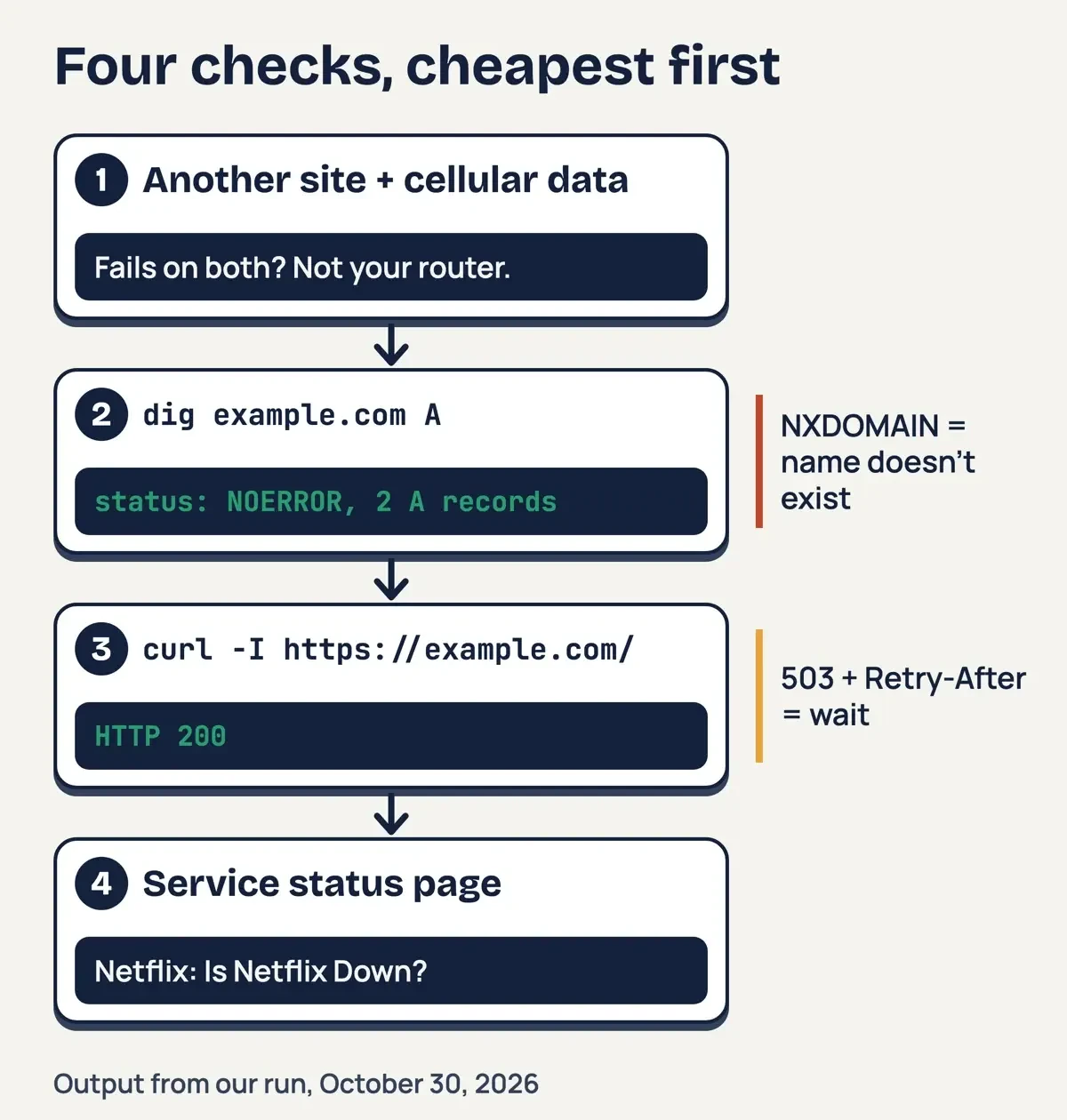 Diagram by DigitalTreed: the four checks in order, with dig and curl -I output from our October 30, 2026 run.
What each error message tells you
Once you have a result, its layer says who can fix it.
The codes themselves are defined in an IETF standard. Under RFC 9110, 503 means the server "is currently unable to handle the request due to a temporary overload or scheduled maintenance." That, it adds, "will likely be alleviated after some delay." MDN's 503 reference names the usual causes: "a server is down for maintenance or overloaded."
A 503 often carries a hint about timing. RFC 9110 says the Retry-After value "can be either an HTTP-date or a number of seconds to delay after receiving the response." Its own example is "Retry-After: 120," where "the delay is 2 minutes," and that's the value we gave our mock server. If you see a date instead, it's the server's own estimate of when service returns, so check back after that time instead of refreshing every few seconds. MDN adds that a 503 "indicates a temporary issue and responses shouldn't usually be cached." Once the wait is up, one hard refresh is worth trying.
| What you see | Where it comes from | What it means | What to do |
| HTTP 200 | Web server | The server answered normally | Retry in another browser or app |
| HTTP 403 | Web server | It "refuses to fulfill" the request (RFC 9110) | Not an outage; the server is up and refusing this request |
| HTTP 404 | Web server | No "current representation" of that page | Check the address; the page moved or never existed |
| HTTP 502 or 504 | Gateway or proxy | The server behind it sent a bad reply or none in time | Wait and retry; the front end is up |
| HTTP 503 | Web server | Overload or maintenance, likely temporary | Read Retry-After, then retry |
| Cloudflare 521 or 522 | Cloudflare edge | The origin refused or timed out | Wait; only the site owner can fix it |
| curl exit 7, connection refused | Your computer | No program is listening at that address | The server is off or moved |
| curl exit 6, dig NXDOMAIN | DNS | The name doesn't exist | Check the spelling; the domain may be gone |
| curl exit 28, timed out | Your computer | Nothing replied before the time limit | Retry on another network |
A few rows need a closer look, starting with 404, which RFC 9110 says "does not indicate whether this lack of representation is temporary or permanent." MDN's 404 page adds that such links "are often called broken or dead links." Its 504 page sets 504 apart from 502: "the proxy or gateway did not receive any HTTP response." Running WordPress and seeing these on your own pages? Our fixes for a 502 bad gateway and a 403 Forbidden error go step by step.
Cloudflare adds codes of its own. Its docs say Error 521 "occurs when the origin web server refuses connections from Cloudflare." Error 522 "occurs when Cloudflare times out contacting the origin web server." Both mean Cloudflare itself is up and the site's own server isn't answering it, and only the site's owner can change that. Refreshing won't fix it.
The curl errors are just as exact. The libcurl error list, which curl's exit codes follow, gives 6 as "Could not resolve host," 7 as "Failed to connect() to host or proxy" and 28 as "Operation timeout." On Linux, the connect(2) manual defines ECONNREFUSED as "no one listening on the remote address." For DNS, RFC 1035 says response code 3, Name Error, means "the domain name referenced in the query does not exist." When Chrome reports an NXDOMAIN error, our NXDOMAIN fix guide covers the causes on your side. Speed is a clue too: in our run, the refused connection failed in 0.04 seconds, while the request to a silent address waited the full 5.03 seconds.
You can see every one of these without touching anyone else's server. RFC 6761 says users "MAY assume that queries for 'invalid' names will always return NXDOMAIN responses." RFC 5737 sets 192.0.2.0/24 aside "for use in documentation," and says those addresses "SHOULD NOT appear on the public Internet." And IANA says example.com is "maintained for documentation purposes." Those three, plus two servers of our own, made up the whole test.
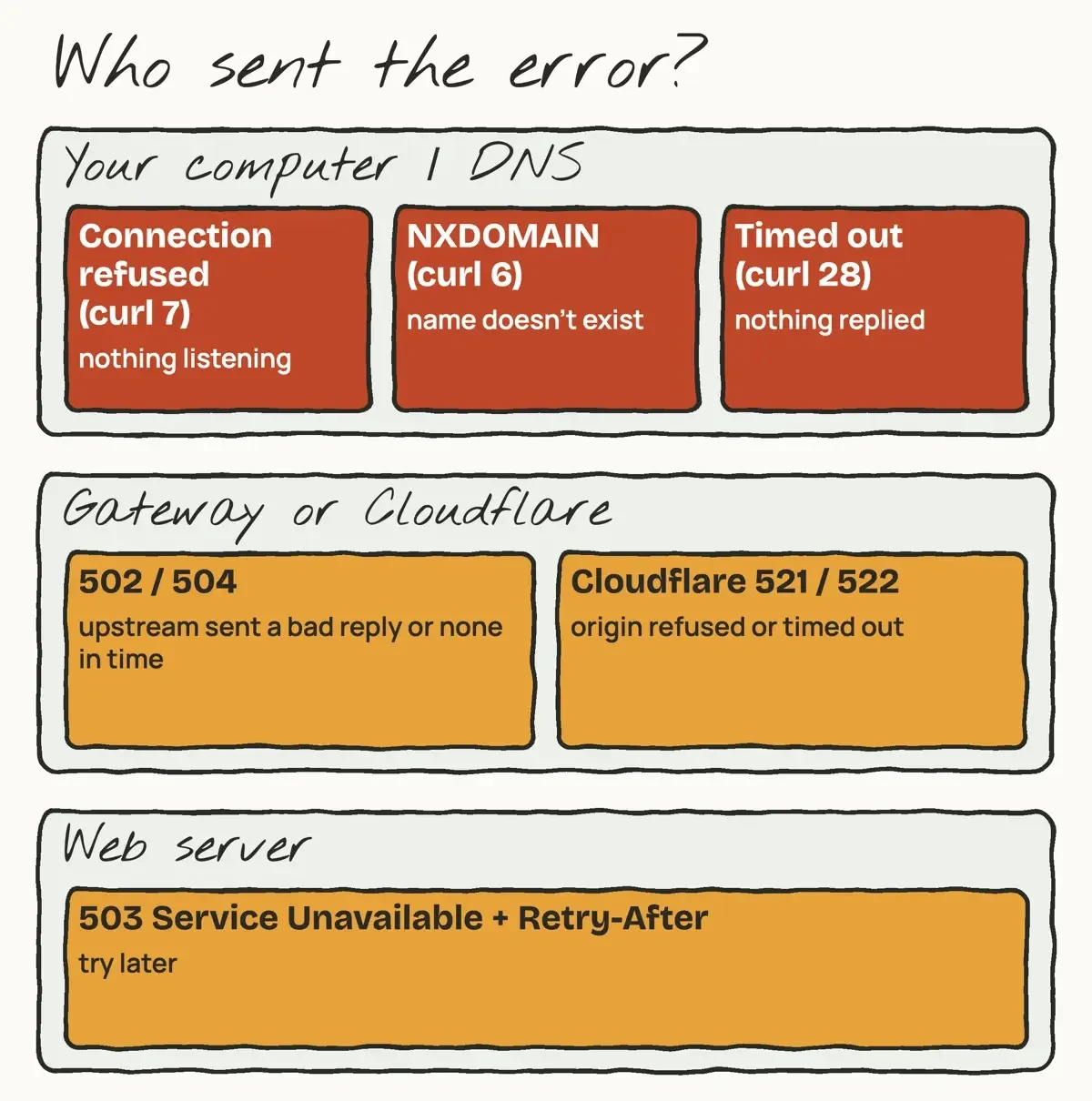 Drawn by us: error messages grouped by the layer that sends them, from RFC 9110, MDN, curl and Cloudflare docs read October 30, 2026.
What we tested
We ran all eight checks in one script on October 30, 2026. Port 8041 ran a plain web server, and port 8042 a mock that answers 503 with Retry-After: 120. Then we stopped 8041.
| Check (tool and target) | Result we got |
| curl -I 127.0.0.1:8041, running | HTTP 200 OK |
| curl -I 127.0.0.1:8042, mock | HTTP 503, Retry-After: 120 |
| curl -I 127.0.0.1:8041, stopped | exit 7: Connection refused |
| dig nothing-here.invalid | NXDOMAIN |
| curl -I nothing-here.invalid | exit 6: Couldn't resolve host |
| curl -I 192.0.2.1, 5-second limit | exit 28 after 5.03 seconds |
| dig example.com | NOERROR, 2 A records |
| curl -I example.com | HTTP 200 |
Each result fits the meaning the docs give. The refusal came back in 0.04 seconds, but 192.0.2.1 didn't answer and hung until our 5-second limit. A fast refusal means a machine answered and said no.
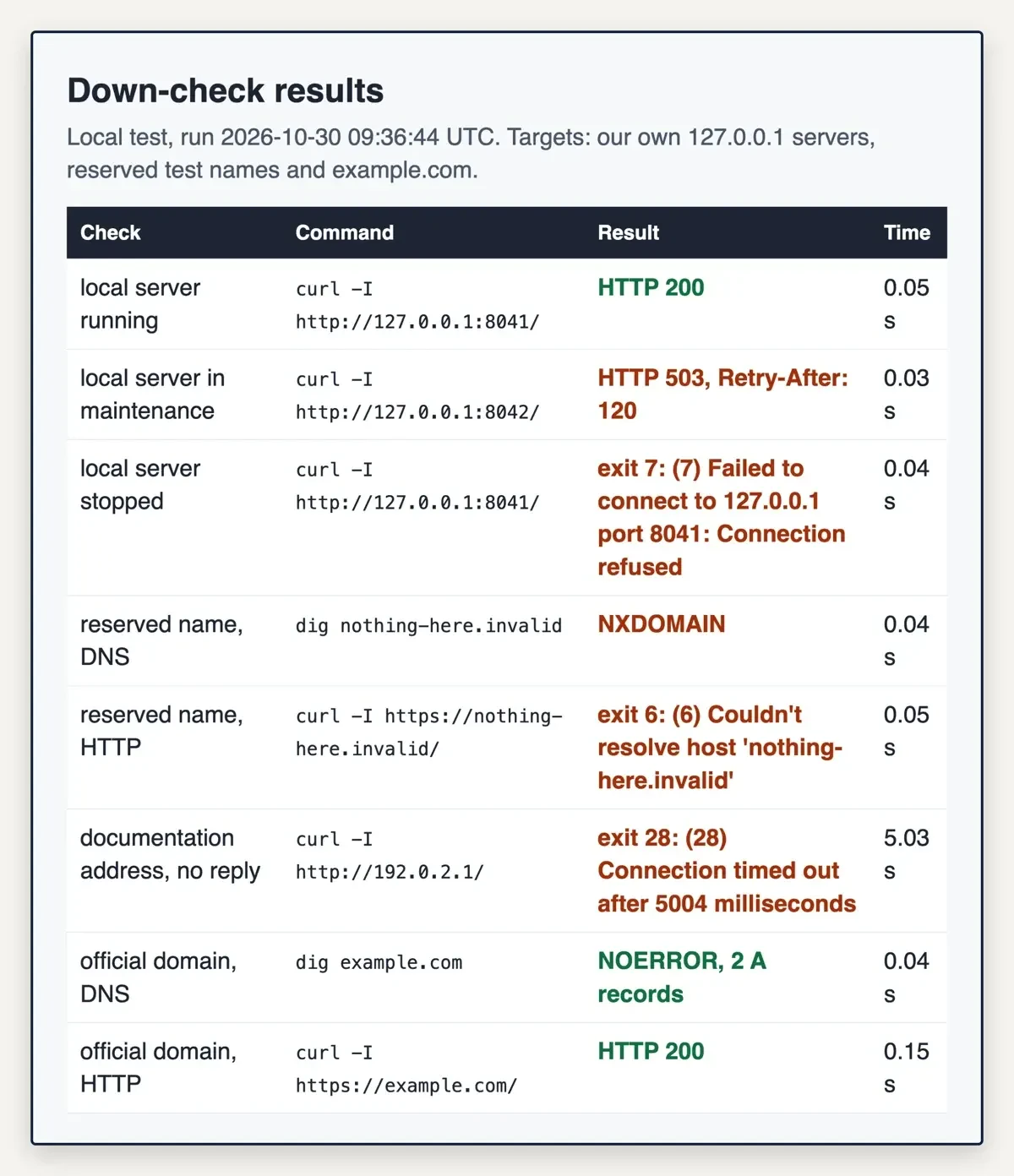 Screenshot: our down-check page on 127.0.0.1:8043, from the run at 09:36 UTC on October 30, 2026.
K-drama apps that name Korean content on their US listings
Once the site is gone, try apps whose US listings name a seller and Korean content.
Viki comes first for subtitles. Its US App Store listing, sold by viikii pte ltd, lists "Korean Dramas: Lovely Runner, Dear X, True Beauty, Love Scout" among its shows. It says "Watch for free or upgrade to Viki Pass for ad-free streaming in HD" and claims "Subtitles in 150+ Languages." Its feature list ends with "Legal Streaming: All content is officially licensed," then warns "Availability of shows may vary by region." The listing carries Apple's Contains Advertising label, which fits the free tier, and it names Apple TV among its devices. Three of its in-app lines are marked "(Americas only)," so the Plus tier you'd buy from the US isn't sold everywhere.
KOCOWA+ comes straight from Korean broadcasters. Its listing, from the seller Wavve Americas, says KOCOWA+ "was created by wavve Americas, Inc. and the top three broadcasting stations in South Korea (KBS, MBC, and SBS)." Shows are "available on demand just a few hours after airing in Korea," and the subscription "is available across the Americas in North, Central, and South America." Downloads and no ads come with "KOCOWA+ premium subscriptions." Basic plans may show ads.
OnDemandKorea names more channels than the other two. Its listing, sold by ODK Media Inc., lists "Major Korean channels: KBS, MBC, SBS, EBS" plus cable channels such as JTBC and MBN. Some shows are free after sign-up, and its STANDARD plan means "fewer ads" on free content. Its terms of use say "You may access the ODK Services only if you are located in the United States, Canada, Mexico, South America" or another territory it serves. The same terms warn that "The content that may be available to watch will vary by geographic location." Its listing's compatibility list names iPhone, iPad, iPod touch, Mac and Apple Vision, but not Apple TV.
Netflix is broader: it calls its catalog "TV shows and movies from around the world," but its US listing description never mentions Korean shows. Korean appears only in its list of app languages, and the same goes for the Prime Video listing. Search either app for the exact drama before you pay. Netflix's listing does say "Netflix membership is a month-to-month subscription that begins at sign-up."
K-drama plan prices on the US App Store, per month
Those listings also carry in-app purchase lines, and each figure below is copied from one, in US dollars, as of October 2026. A plan doesn't get a per-month figure unless its name states the term.
| App | In-app line name | US price (October 2026) | Per month (price / months) |
| KOCOWA+ | Basic Monthly Membership | $7.99 | $7.99 |
| KOCOWA+ | Basic 6 months Membership | $43.99 | $7.33 ($43.99 / 6) |
| KOCOWA+ | Basic Annual Membership | $79.99 | $6.67 ($79.99 / 12) |
| KOCOWA+ | Premium Monthly Membership | $8.99 | $8.99 |
| KOCOWA+ | Premium Annual Membership | $89.99 | $7.50 ($89.99 / 12) |
| OnDemandKorea | STANDARD Monthly | $9.99 | $9.99 |
| OnDemandKorea | PREMIUM Monthly | $14.99 | $14.99 |
| OnDemandKorea | PREMIUM Annual | $149.99 | $12.50 ($149.99 / 12) |
| Viki | Viki Pass Standard (two prices) | $7.99 and $79.99 | Term not shown |
| Viki | Viki Pass Plus (Americas only) | $11.99 and $119.99 | Term not shown |
| Netflix | Netflix Standard / Netflix Premium | $19.99 / $26.99 | Month-to-month per the listing |
Yearly plans win wherever they're offered, per the KOCOWA+ and OnDemandKorea lines. Twelve months of KOCOWA+ Basic Monthly cost $7.99 x 12 = $95.88. Basic Annual is $79.99, so you save $15.89. OnDemandKorea's gap is wider: $14.99 x 12 = $179.88, against $149.99 for PREMIUM Annual. That's $29.89 less. On KOCOWA+ Premium, $8.99 x 12 = $107.88 against $89.99 for Premium Annual, a $17.89 gap. Among the yearly plans these listings name, KOCOWA+ Basic Annual is lowest per month at $6.67, as of October 2026. Only want a season? KOCOWA+'s 6-month Basic line sits between the two at $7.33 a month.
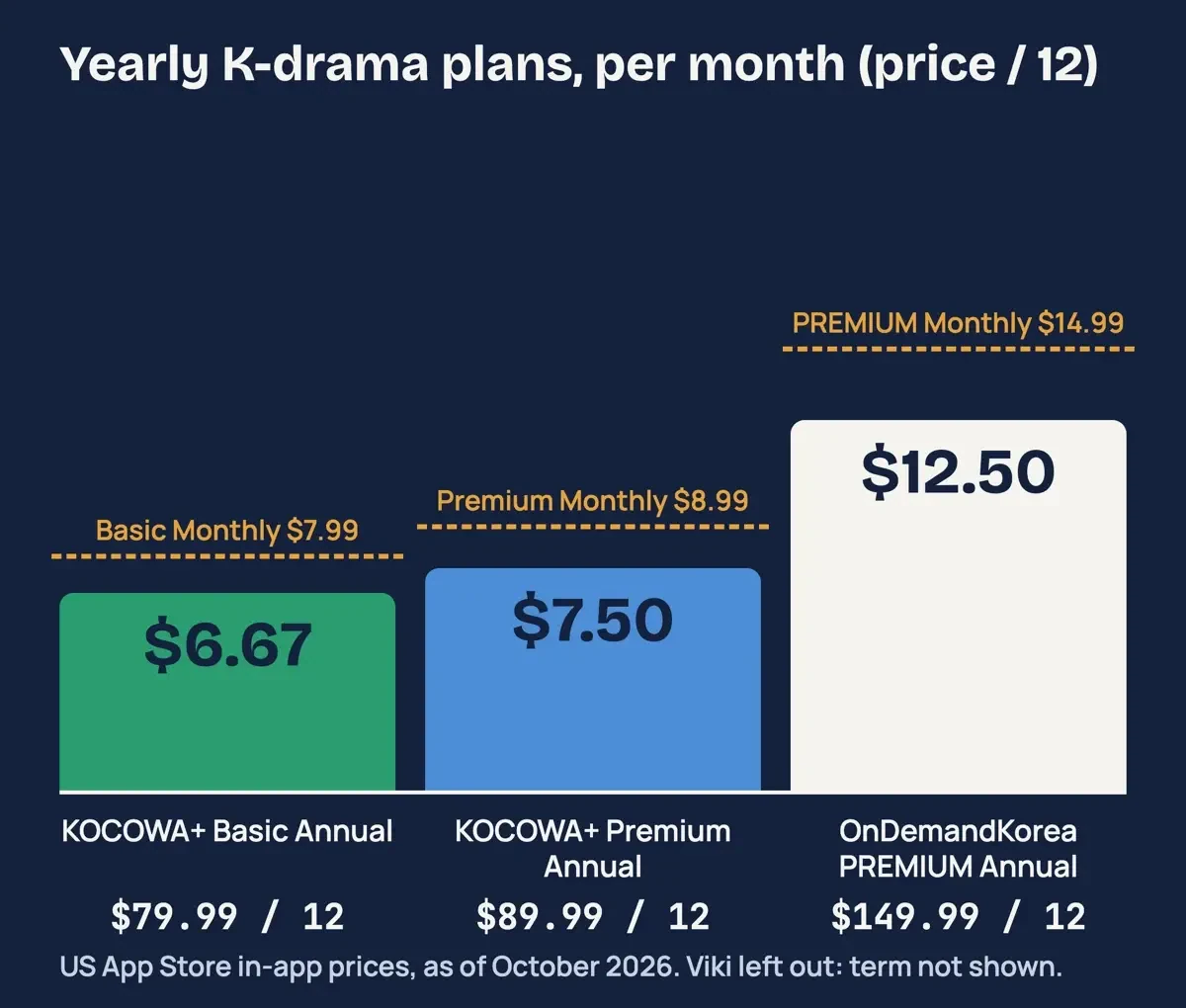 Diagram by DigitalTreed: annual prices divided by 12, from the in-app lines on three US App Store listings, October 30, 2026.
Viki's price lines name no billing period. Its terms of use say a Viki Pass plan renews "corresponding to the term (for e.g., monthly or annual)" unless you cancel. For US users, "the stated prices are exclusive of any excise, sales, use or similar taxes." Buy inside an iPhone app and Apple handles billing, and its cancel a subscription page covers plans "that you purchased with an app from the App Store."
Why we didn't run these checks on kisskh
Which leaves the site you searched for. We didn't resolve, fetch or open kisskh or link to it, because we couldn't confirm who runs it or what rights it holds.
Korean shows don't lose copyright protection when they reach the US. The Copyright Office's Circular 38A lists the Republic of Korea's Berne Convention membership from August 21, 1996, and WIPO's Berne Convention member list gives the same date. For a question about your own case, talk to a copyright lawyer. The FTC's alert on illegal streaming apps covers malware from pirated content. It warns hackers could "Steal the log in credentials for sites you shop on and go on a spending spree." If you get malware, it says to "update your computer's security software and then run a scan."
Our pick if the site stays down
Our take: run the four checks once. If dig or curl says the name or server is gone, stop refreshing and switch. We'd pick KOCOWA+ Basic Monthly at $7.99 for one month, since its listing ties it to KBS, MBC and SBS. Still watching after a month? Basic Annual at $79.99 saves $15.89 over a year of monthly payments, as of October 2026.
Rather pay nothing first? Viki's free tier and OnDemandKorea's free shows both run ads. Our list of FlixHQ alternatives and legal free movie apps covers no-cost services that run on ads or your library card. For other languages, see Tamil films from licensed apps and legal anime streaming. Site owners can set up uptime monitoring with alerts that flag a 503 before visitors do.
Down check and K-drama FAQ
Frequently asked
What does Retry-After mean on a 503 page?
It's a wait. RFC 9110 says it "indicates how long the service is expected to be unavailable." Ours sent 120 seconds.
Why does a checker say a site is up when it fails for me?
Often, DNS caching. RFC 8020 says a resolver "SHOULD store" an NXDOMAIN in its cache, so old answers linger.
Can I cancel a K-drama plan I bought in an iPhone app?
Yes, through Apple, which says to cancel a trial "at least 24 hours before the trial ends" on its support page.
How we made this guide: Only the eight test-table results came from our script, run on a laptop against two local servers, example.com and reserved test names. App facts come from five US App Store listings saved October 30; kisskh was never contacted. Facts checked by the DigitalTreed team on October 30, 2026.
First published November 2023 as a short note on kisskh outages. Rewritten October 30, 2026: a tested down-check method and licensed K-drama apps with US prices replace it.
Sources
- IETF RFC 9110: HTTP Semantics (sections 15.5, 15.6 and 10.2.3)
- MDN: 503 Service Unavailable
- MDN: 504 Gateway Timeout
- MDN: 404 Not Found
- curl man page
- libcurl error codes
- Linux man-pages: connect(2)
- BIND 9 documentation: dig
- IETF RFC 1035: Domain Names, Implementation and Specification
- IETF RFC 8020: NXDOMAIN, There Really Is Nothing Underneath
- IETF RFC 6761: Special-Use Domain Names
- IETF RFC 5737: IPv4 Address Blocks Reserved for Documentation
- IANA: Example domains
- Cloudflare Docs: Error 521
- Cloudflare Docs: Error 522
- Netflix Help Center: Is Netflix Down?
- App Store (US): Viki: Asian Dramas, Movies, TV
- App Store (US): KOCOWA+: K-Dramas, Movies & TV
- App Store (US): OnDemandKorea: Korean Dramas
- App Store (US): Netflix
- App Store (US): Amazon Prime Video
- Rakuten Viki: Terms of Use
- ODK Media: Terms of Use
- Apple Support: Cancel a subscription from Apple
- US Copyright Office: Circular 38A, International Copyright Relations of the United States
- WIPO: Berne Convention contracting parties
- FTC: Malware from illegal video streaming apps

Comments
No comments yet. Start the conversation below.