
Quick answer
YouTube error 400 means YouTube's server refused the request your device sent because it looked malformed. So the fix usually starts on your side: stored cookies, a browser extension, an old app or a wrong clock. Try the same video on a second screen first. If that one plays, leave your router alone and fix the first device.
This guide covers the YouTube error 400 fix for each place you watch: a browser, the phone app and a smart TV. Every step comes from YouTube's, Google's, Apple's or Sony's own help pages (Sony's Asia-Pacific site), read on October 27, 2026.
Key takeaways
- Error 400 means YouTube refused a request your device sent.
- Play the same video on a second screen before you touch the router.
- In a browser, delete YouTube's cookies first and test with extensions off.
- On phones and TVs, set the date and time to automatic.
- On a smart TV, unplug it for at least 30 seconds first.
Error 400 means YouTube didn't accept what your device sent
Error 400 is the web's "Bad Request" code.
The HTTP standard, RFC 9110, says it means the server "cannot or will not process the request due to something that is perceived to be a client error".
The client is your browser, app or TV.
That's the opposite of a 5xx error, where the server itself breaks. RFC 9110 puts every 4xx code in the group where "the client seems to have erred".
In plain words, something in the request was too big, broken or out of date.
Guiding Tech's Android and iPhone guide reports the message as "There was a problem with the server [400]", and Appuals titles its fix guide with the same words. Those are reports from fix sites; no YouTube page we read shows this text.
We couldn't find a source for any other wording, so we won't guess at one.
YouTube's own Troubleshoot YouTube video errors page doesn't list 400 at all, but its steps still apply.
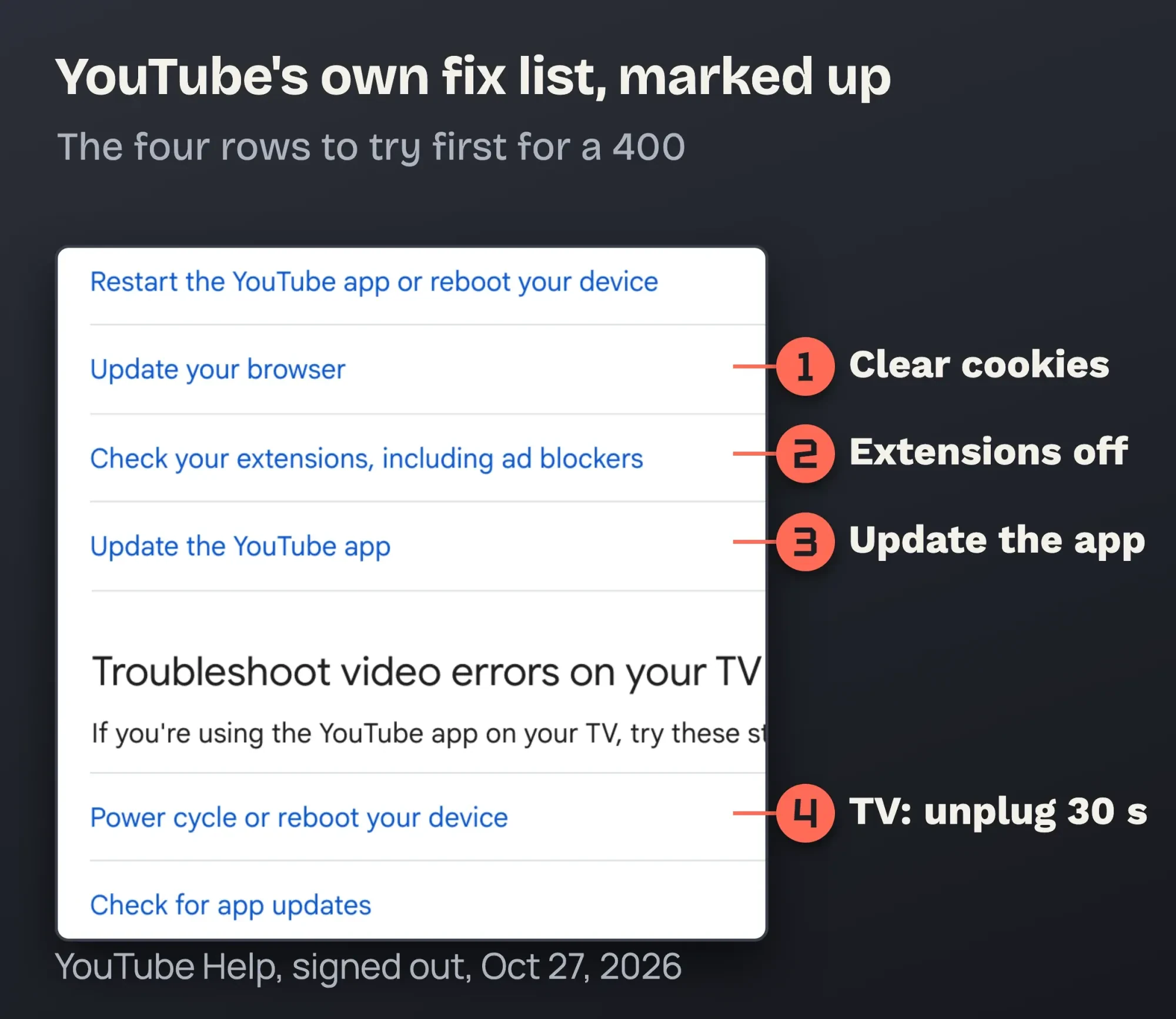 Screenshot: YouTube Help, Troubleshoot YouTube video errors, signed out, October 27, 2026. Marks added by DigitalTreed.
Uploaded the video yourself, and viewers see "Video unavailable" instead? That's a different problem, covered in our YouTube video unavailable fixes for creators.
Developers getting 400 from the YouTube Data API should check their request parameters, not their browser.
Find out whether it's one screen or all of them
Before you clear anything, spend 30 seconds on one test.
It tells you which half of this guide you need.
- Open the same video on a second device on the same Wi-Fi.
- Try a second browser on the computer that failed.
- Turn Wi-Fi off on your phone and try it on cellular data.
Only one screen fails? The problem lives on that screen, so skip to its section below.
Every device on your Wi-Fi fails, but your phone works on cellular? It's the network.
The first network step on YouTube's list is plain: "Restart your internet connection." Unplug the modem and router, wait, and plug them back in.
Everything fails everywhere? YouTube itself may be having a bad hour, and waiting is the fix.
Speed is a separate check. Here's YouTube's yardstick.
YouTube's troubleshooting page recommends about 5 Mbps sustained for 1080p and 20 Mbps for 4K.
In a browser, start with YouTube's cookies
So it's one computer.
On a laptop or desktop, start with the data YouTube stored in your browser. YouTube's and Google's help pages both list clearing it.
YouTube Help says to "clear your browser's cache and cookies" and to test "in an incognito window with all extensions disabled". Do it in this order, because each step tells you something:
- Open the video in a private window. In Chrome that's Ctrl + Shift + N on Windows or ⌘ + Shift + N on a Mac, per Chrome's Incognito help. If it plays there, a cookie or an extension is to blame.
- Delete only YouTube's cookies first. In Chrome, go to More > Settings > Privacy and security > Third-party cookies > See all site data and permissions, search "youtube" and delete it (Chrome Help). In Safari on a Mac, choose Safari > Settings > Privacy > Manage Website Data, select the YouTube entries and click Remove (Apple Support). On an iPhone, Safari's version is Settings > Apps > Safari > Advanced > Website Data (Apple Support for iPhone).
- Turn your extensions off. In Chrome, open More > Extensions > Manage extensions and switch each one off (Chrome Web Store Help). Start with ad blockers; YouTube names them on its troubleshooting page.
- Update the browser. In Chrome, open More > Help > About Google Chrome and select Relaunch if an update is waiting (Chrome update steps).
- Only then clear everything. Chrome's full path is More > Delete browsing data, with Cookies and other site data ticked (Chrome Help).
Expect to sign in again.
Google's clear cache & cookies page warns that "if you were signed in, you’ll need to sign in again."
That's why we start with YouTube's cookies only: your bank and email stay signed in.
Did the video play once extensions were off? Switch them back on in turn, as Google's connection and loading errors guide suggests, until the player breaks again.
That last one is your culprit.
Why clearing cookies works: we pushed a server past its limit
Clearing cookies sounds like folk advice, so we wanted to see the mechanism for ourselves. On October 27, 2026, we sent the same page request to our own local Apache 2.4.56 server, the XAMPP install on our Mac. Each time, the Cookie header grew. With 50 cookies whose values totaled 7,888 bytes, the server still answered 200 OK. Once the whole Cookie line, name included, reached 8,192 bytes, it answered 400 with a page titled "Bad request!". Its message read: "Your browser (or proxy) sent a request that this server could not understand." Then we sent it with no cookies at all, as if we'd just cleared them. The 200 came back.
One byte was the difference.
Counting the whole line, "Cookie: " included, 8,191 bytes passed and 8,192 failed. Apache's LimitRequestFieldSize setting sets this limit, and its documented default is 8,190 bytes for one request header. Our cutoff landed 1 byte above that figure, on an install that doesn't change the setting. So treat the number as a guide. It isn't an exact count.
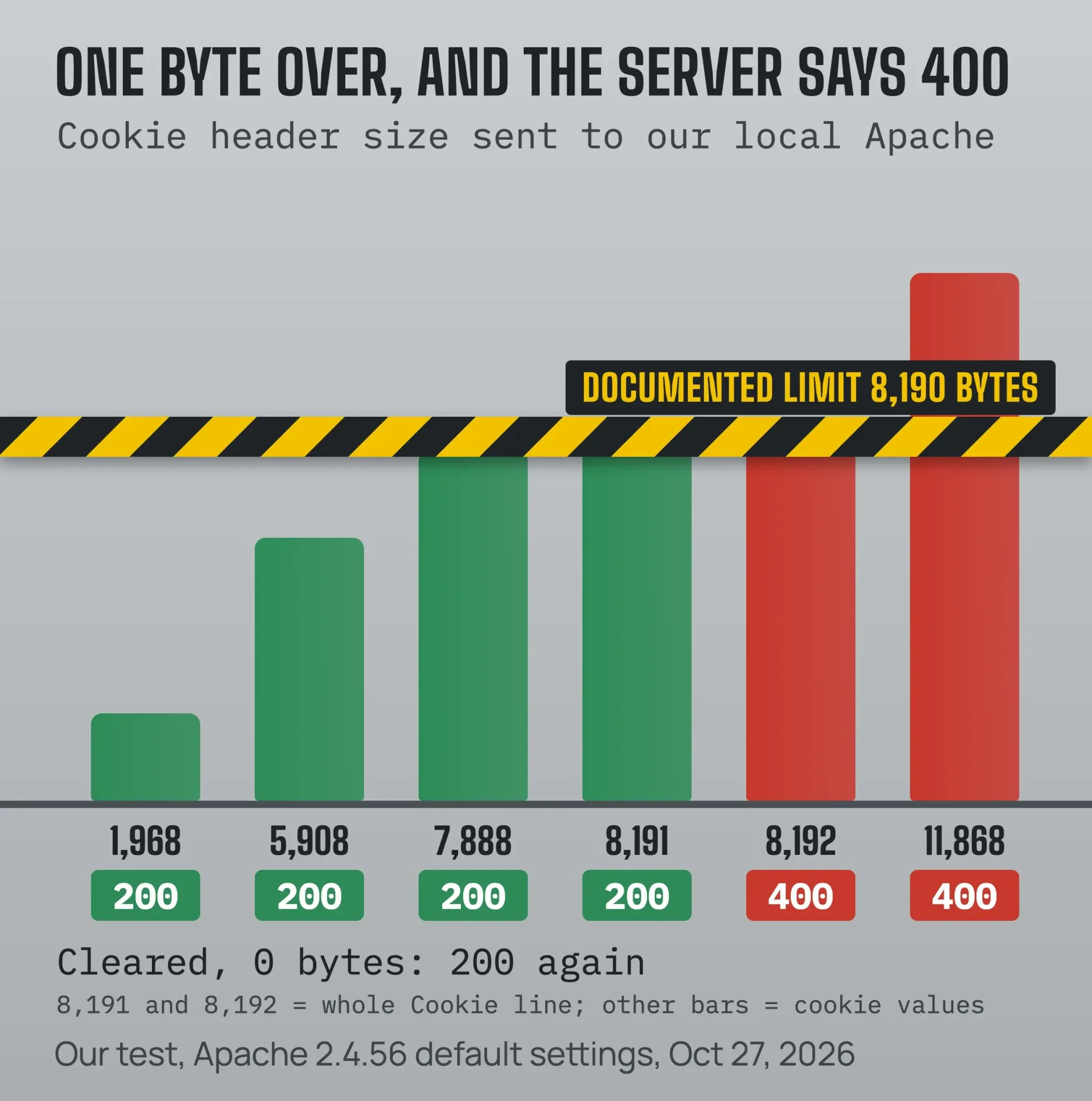 Diagram by DigitalTreed from our local Apache 2.4.56 test, October 27, 2026.
Browsers can store far more than that.
The cookie standard, RFC 6265, asks browsers to support at least 4,096 bytes per cookie, 50 cookies per domain and 3,000 cookies in total. Fifty full-size cookies would come to 204,800 bytes, about 25 times the Apache default. The same section tells servers to keep cookies small "due to the Cookie header being included in every request".
Here's the limit of our test: it's Apache on our machine, not YouTube, and YouTube doesn't publish its own header limits.
What the test shows is the pattern behind many 400s: the request grows or breaks on your side, and wiping it fixes it.
How do you fix YouTube error 400 in the phone app?
The YouTube app has no cookie list for you to clear, so the app version and the clock matter more there.
Work down this list and try the video after each step.
- Close the YouTube app fully and reopen it. YouTube suggests "closing the YouTube app or rebooting your device".
- Set the date and time to automatic. On iPhone, go to Settings > General > Date & Time and turn on Set Time Automatically (iPhone User Guide). On Android, open the Clock app > More > Settings > Change date and time and turn on Automatic date and time (Android Help).
- Update the app. On iPhone, open the App Store, tap your profile picture and look for YouTube in pending updates (YouTube Help for iPhone). On Android, open the Play Store > profile picture > Manage apps & device > Updates available (YouTube Help for Android).
- Sign out of YouTube and back in.
- Uninstall and reinstall the app. YouTube lists this as a fix too.
Why the clock? Sony's TV help, below, tells you to set the date and time automatically when a connection error shows.
Guiding Tech lists the same fix for phones.
It takes ten seconds, so it goes early.
Our take: on a phone, update the app before you reinstall it, since an update keeps your settings and a reinstall means setting the app up again.
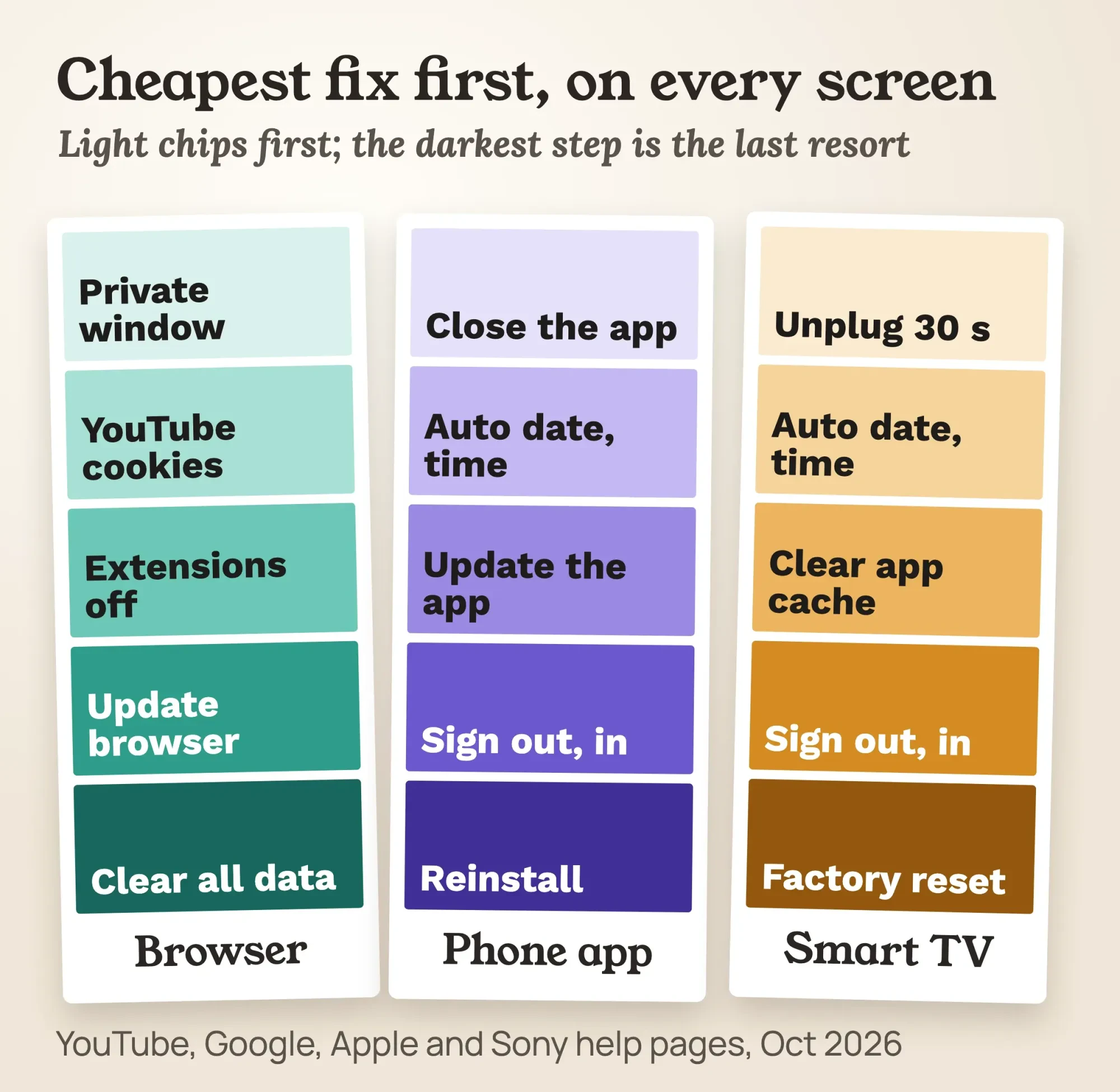 Diagram by DigitalTreed from YouTube, Google, Apple and Sony (Asia-Pacific) help pages, October 2026.
On a smart TV, unplug it for 30 seconds before anything else
On TVs, the 400 can appear the moment the YouTube app opens. Sony lists "Error 400 appears when launching the YouTube app from All Apps" as a known symptom on its streaming apps support page.
That page is Sony's Asia-Pacific site, in English; Sony's US site wouldn't open for us.
YouTube calls a power cycle "often the most effective way to resolve playback issues on your TV". Unplug the TV or streaming box from the outlet, wait at least 30 seconds and plug it back in.
Still failing? Sony's steps for Google TV and Android TV models go in this order, and menu names differ on other brands:
- Set the date and time to adjust automatically.
- Run the TV's network check, and fix the Wi-Fi settings if it fails.
- Clear the YouTube app's cache. If that fails, clear its data, then force stop it.
- Sign out of the YouTube app and sign back in.
- Update the TV's own software.
- Factory reset the TV, last of all.
App updates usually happen on their own. YouTube says most smart TVs "update apps automatically", and on Apple TV you can check in the App Store: no Update button means the app's current.
Two Sony-specific notes.
On a Sony Blu-ray player, Sony's Error 400/404 article, also on its Asia-Pacific site, says to select the YouTube icon, press OPTION and choose Update Service (or Update List).
And Sony warns: "Certain 2011-2013 TV models may no longer support access to YouTube and Netflix Apps." So no troubleshooting step will bring the app back on those.
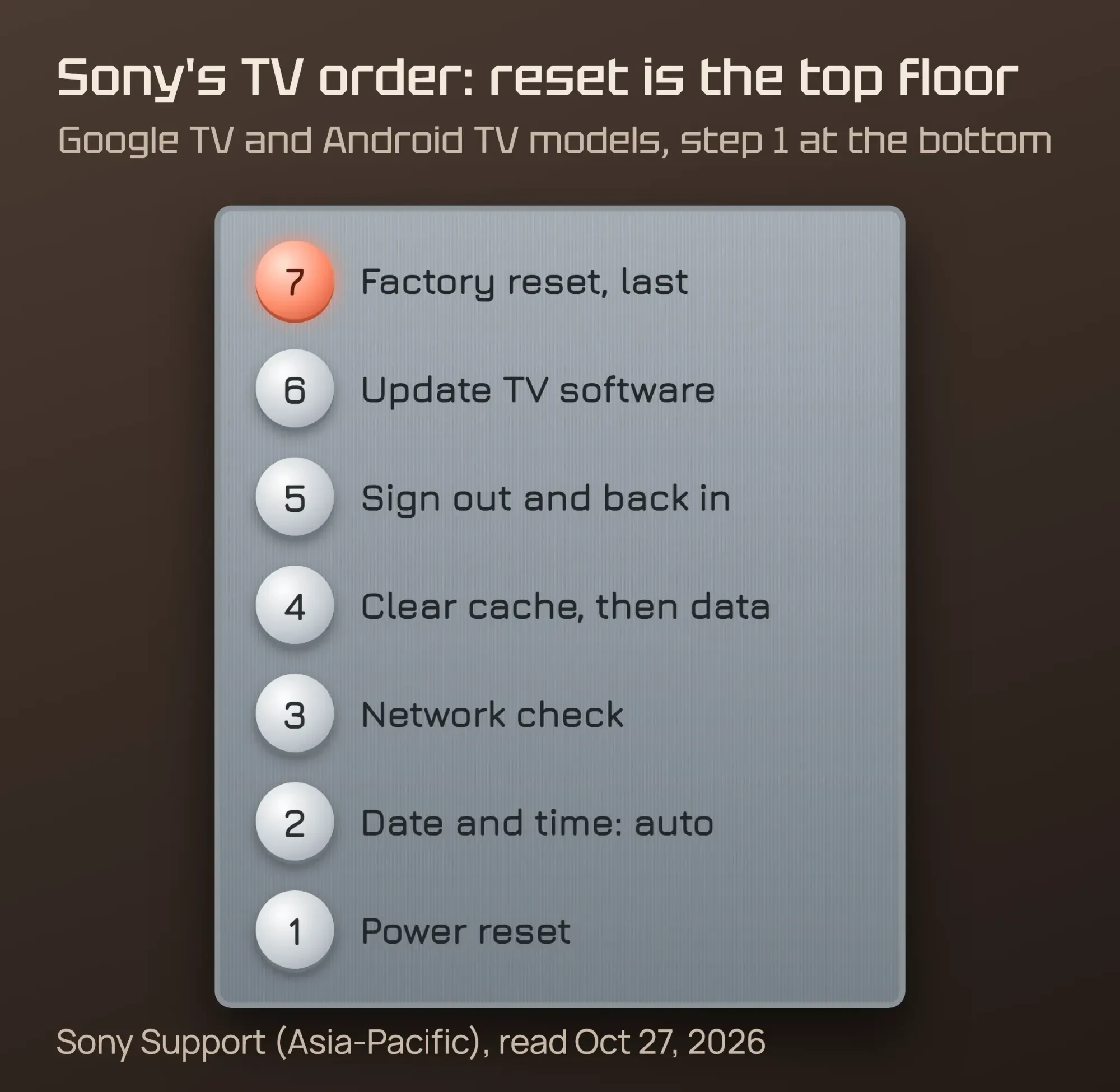 Diagram by DigitalTreed. Source: Sony Support (Asia-Pacific), October 2026.
Example (a made-up business): Lantern Row Dental in Casper, Wyoming, loops its own YouTube playlist on a Google TV in the waiting room. One Monday the TV shows error 400 while the front-desk laptop plays the same playlist fine. That rules out the network and YouTube, so the office manager unplugs the TV for 30 seconds, then checks the date and time. Next comes the YouTube app's cache, long before a factory reset, which Sony lists last.
Businesses that play their own videos on screens like this should make them easy to find, too. Our guide to setting up a YouTube channel for business covers playlists, and our audience retention guide shows how long people actually watch.
Two fixes we'd skip, and one to check at work
Those are the fixes with a source behind them.
Fix lists that rank today often add two more, and we'd handle both with care.
Restricted Mode is the first.
Appuals calls it "the main cause" of the 400, but YouTube's Restricted Mode help page says nothing about error 400. Turning it off won't hurt, so try it if you like. Just don't expect it to be the answer.
At work it's different.
YouTube says computers in "libraries, universities, and other public institutions may have Restricted Mode turned on by a network administrator".
Fails only on the office network? Ask whoever runs your network or web filter before you touch your browser.
Changing DNS servers is the second.
A DNS failure shows its own error in the browser, such as the one in our DNS_PROBE_FINISHED_NXDOMAIN guide. YouTube does say, for its "Something went wrong" message, to confirm "that no third-party applications have modified" your DNS settings.
So check that nothing changed them, but don't switch providers as a first fix for a 400.
The real test is the same video on the same screen
It's fixed when the same video plays on the same screen, signed in, after a restart of the app or browser.
Test that exact video, not a different one.
Back within days? Look at what you turned back on: an extension, an app that didn't update, or a TV clock that drifted.
Back on every device at once? That points to your network, so restart the router and test again.
Frequently asked
Does YouTube still work on an older smart TV?
It depends on the brand and year. As of October 2026, YouTube's supported devices page lists LG smart TVs from 2016 on and Samsung smart TVs from 2017 on. All Roku TVs are listed, while other brands are supported on select models only. Check your model there before you reset the TV.
Which phones and tablets can run the YouTube app?
Most phones from recent years. As of October 2026, YouTube's supported devices list covers phones and tablets running Android 6.0 Marshmallow or later. It also covers iPhones and iPads running iOS 12 or later. Check your version there before you reinstall the app.
Which browsers does YouTube support?
The newest versions of the main ones. As of October 2026, YouTube Help asks for the newest version of Google Chrome, Firefox or Safari, plus a connection of 500+ Kbps. Movies, TV shows and live streams need 1+ Mbps. An outdated browser is worth ruling out before you clear everything.
When your own website shows 400 errors
That covers watching YouTube.
Some readers land here because a page on their own business site returns 400, and the logic is the same: the server rejected the request.
Start by checking which code the page really returns, using the DigitalTreed HTTP status checker. Seeing a 403 instead? Our 403 Forbidden guide for WordPress walks through the causes.
To catch errors before customers do, set up checks with our website uptime monitoring guide, and see how status codes affect search in our advanced technical SEO guide. For the YouTube side of your marketing, our YouTube SEO guide helps your videos get found.
Want a person to look at it instead? DigitalTreed's web development team fixes request and server errors on small-business sites. We'd earn from that work, so try the free steps above first.
How we made this guide: Eram N. and the DigitalTreed team read the HTTP standard, Apache's documentation and each help page quoted here on October 27, 2026. Every quote sits beside a link to its source page. Our hands-on test ran on our own local Apache server; we didn't sign in to YouTube, test youtube.com itself or use a TV for this guide. Firefox's help pages showed a bot check, so we left Firefox steps out. The dental office is invented.
First published July 2020. Rewritten October 27, 2026: explains a 400 from the HTTP standard, adds fixes by device and our cookie limit test, and checks two unsourced fixes.
Sources
- IETF RFC 9110, HTTP Semantics, section 15.5.1: 400 Bad Request
- IETF RFC 6265, HTTP State Management Mechanism, section 6.1: Limits
- Apache HTTP Server 2.4 documentation: LimitRequestFieldSize
- YouTube Help: Troubleshoot YouTube video errors
- YouTube Help: Clear cache & cookies
- YouTube Help: Update the YouTube and YouTube Studio app
- YouTube Help: Turn Restricted Mode on or off on YouTube
- Google Chrome Help: Delete, allow and manage cookies in Chrome
- Google Chrome Help: Fix connection and loading errors in Chrome
- Chrome Web Store Help: Install and manage extensions
- Apple Support: Clear your cache and cookies in Safari on Mac
- Apple Support: Delete your Safari history, cache, and cookies on iPhone
- iPhone User Guide: Change the date and time on iPhone
- Android Help: Set time, date and time zone
- Sony Support (Asia-Pacific): YouTube, Netflix, or other streaming apps do not work
- Sony Support (Asia-Pacific): Error 400/404, the YouTube app does not launch on a Blu-ray player
Comments
No comments yet. Start the conversation below.