

Quick answer
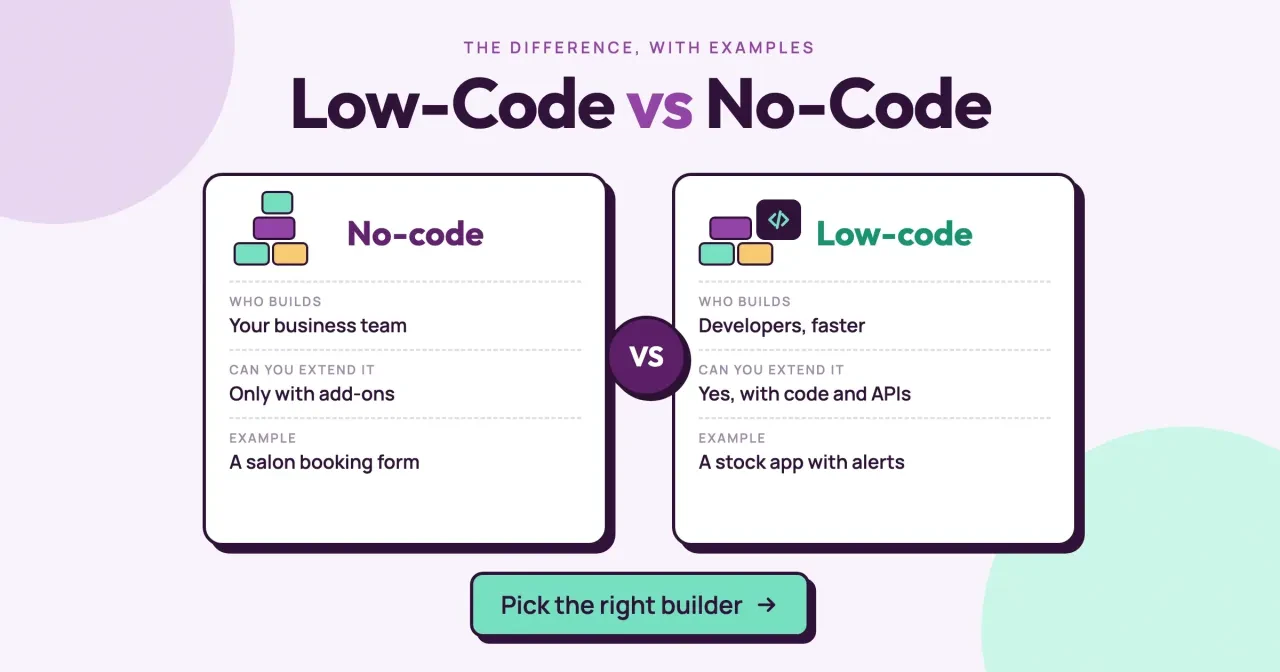
Low-code vs no-code comes down to one question: will anyone on your team write code? As of October 2026, no-code tools build apps from settings and formulas, while low-code tools let a developer add real code. In our test, a booking form needed 0 lines of script and a stock alert needed 8. Start with the table below.
If you searched low code vs no code, someone has probably told you to just build your app in a no-code tool. A no-code tool is a builder where you make an app from settings, templates and formulas. Low-code adds a way for a developer to write code where those blocks stop.
We start with the difference at a glance, then what no-code settings and formulas can do. Next come how low-code lets a developer open the hood, the code door in most no-code tools, three salon examples, our test and which one to pick.
Key takeaways
- If nobody on your team writes code, it's no-code, formulas included.
- Low-code lets a developer add real code where the blocks stop.
- Zapier, Glide, Airtable and Bubble accept your own code, some on paid plans.
- Our booking form needed 0 lines of script; our stock alert needed 8.
- Name who maintains the code before one custom rule goes live.
Low-code vs no-code at a glance
So here's the short version. The difference isn't how the builder looks, since both use drag-and-drop screens. It's whether a person with programming skills is part of the build. OutSystems, a low-code vendor, puts it this way: "Low-code is for building scalable, complex apps with some coding. No-code is ideal for building simple applications with no coding at all" (OutSystems: What is low-code?).
The table lines up the two on the points that change your decision. Read the "who builds" row first, because it settles most cases on its own.
| No-code | Low-code | |
|---|---|---|
| Who builds | Your business team | Developers, faster (or a staffer who codes) |
| How logic is set | Settings, rules and spreadsheet-style formulas | Formulas plus your own code |
| How you extend it | Only with add-ons, connectors and templates | With code components, scripts and APIs |
| Example | A salon booking form | A stock app with alerts |
| Who fixes it later | Whoever built it | Someone who can read the code |
Our take: the last row matters more than the first. A no-code app breaks in ways the owner can see and fix inside the builder. A low-code app can break inside a script that nobody on staff can read, and that's a real cost when there's no developer on call. When the builder leaves, the next office manager can usually pick up a no-code app, but an undocumented script often needs a paid developer to untangle it. If you're weighing a fully custom build instead, what a custom build costs next to a builder is covered in our sibling post.
In the salon examples below, the booking form and loyalty points pass that row easily, and the stock alert is the one that doesn't.
No-code runs on settings and formulas
Start with the no-code side, because it does more than people expect. Google's AppSheet calls itself "a true no-code platform, which means anyone can build rich apps and automated processes without writing a line of code" (Google AppSheet). It adds that AppSheet "also uses spreadsheet-like expressions to incorporate advanced logic," like filtering data and setting up workflow automations.
In other words, a formula still counts as no-code.
A rule like "show this row only if the status is Open" is something you'd write in a spreadsheet anyway. That's not programming. Nobody installs anything, tests a script or reads an error log. If a formula breaks, you see it right there in the builder, and you can fix it yourself.
In practice, a no-code build is a form, a list, a few screens and some rules. A salon booking form is the classic case: name, phone, service, day, notes and a button. The builder stores each booking in a table and can email you a copy. A ready-made connector can also push it into your customer list, like the CRM automation workflows for small teams we've written up.
The limit shows up when no template, formula or connector covers what you need. That's where low-code starts.
Low-code lets a developer open the hood
Once a rule won't fit in a formula, low-code gives a developer a way in. Microsoft says Power Apps "provides an extensible platform that lets pro developers programmatically interact with data and metadata" (Microsoft Learn: What is Power Apps?). The drag-and-drop part stays, and a developer can go further. That's low-code. Microsoft also describes its formula language as a sliding scale. Power Fx "enables the full spectrum of development from no-code for those who never programmed before to 'pro-code' for the seasoned professional" (Microsoft Learn: Power Fx overview). At the far end, developers build code components and bundle "HTML, CSS, and TypeScript files into a single solution package file" (Microsoft Learn: Power Apps component framework).
Other low-code platforms work the same way with other languages. Retool says that if its built-in parts don't fit, "you can build custom components in React" (Retool Docs). Mendix lets developers write Java actions when logic "would be hard to implement" in microflows, its visual logic screens (Mendix Docs: Java Actions). Each of these hooks expects a real developer, someone who can set up the code, test it outside the builder and keep it working after the platform updates.
Notice who those pages talk to: pro developers and professional developers. That's why the low-code column says "developers, faster." A business user can still build the screens, but somebody has to own the code. If that someone will be a new hire, our hiring guide for full-stack developers lists the tests and red flags.
Power Apps, Retool and Mendix draw the line in the same place: makers get the screens, and the developers who can test and maintain code get the hooks.
You'll also run into the word "maker" in low-code docs. Microsoft's docs use it for people who build apps without being pro developers, and the Power Fx page says makers can work "directly in an Excel-like formula bar". That's the overlap zone, where an office manager builds the screens and a developer writes the one tricky piece. Plenty of small teams live there happily for years, as long as they know which piece is code and who wrote it.
Most no-code tools now have a code door
Here's the part that's easy to miss. Tools sold to people who don't code have added places where you can paste in your own code. We read each one's home page and help pages on October 28, 2026. Every tool below has a code door of some kind, and the help pages assume someone on your side can write a little JavaScript when the settings run out.
| Tool | Its home page says | Where your own code goes | Language |
|---|---|---|---|
| Zapier | "No-code automation" | Code steps inside a Zap | JavaScript or Python |
| Glide | "AI app builder" | JavaScript Function column and Run JavaScript Code action (Enterprise add-on) | JavaScript |
| Airtable | "No code required" | Scripting extension (paid plans) and Run a script action | JavaScript |
| Bubble | "no-code AI app builder" | Private plugins with custom code | Custom code |
| Wix | "no-code website builder" | Velo, its development platform | JavaScript |
Zapier's help page says code steps "allow Zap workflows to run small snippets of Python or JavaScript" (Zapier Help). Glide's feature "runs custom JavaScript in Glide apps" to transform data, do math or call outside APIs (Glide Docs). Bubble points you to private plugins "when you need custom code for your own apps" (Bubble Docs). You won't need any of these doors for a booking form, but you'll want to know they exist the first time a rule refuses to fit in a formula.
Plan gates matter here too. Glide's JavaScript page, linked above, says the feature "is available as an add-on to Enterprise plans". Ask for that price first. Airtable lists its scripting extension under "All paid plans" (Airtable Help: Scripting extension). Its Run a script automation is on "All plan types with varying limitations" (Airtable Help: Run a script). Wix is frank about who Velo is for: "We also assume that you have a working knowledge of JavaScript" (Wix: About Velo).
For a salon owner, that means a stock alert built in Glide needs an Enterprise add-on and someone who reads JavaScript, whatever the home page says.
The name on the box tells you who the tool is built for by default. It doesn't tell you what your project will turn into. The day someone pastes code into a no-code tool, that app has become a low-code app. From then on, it needs a person who can maintain that code for as long as the business relies on it.
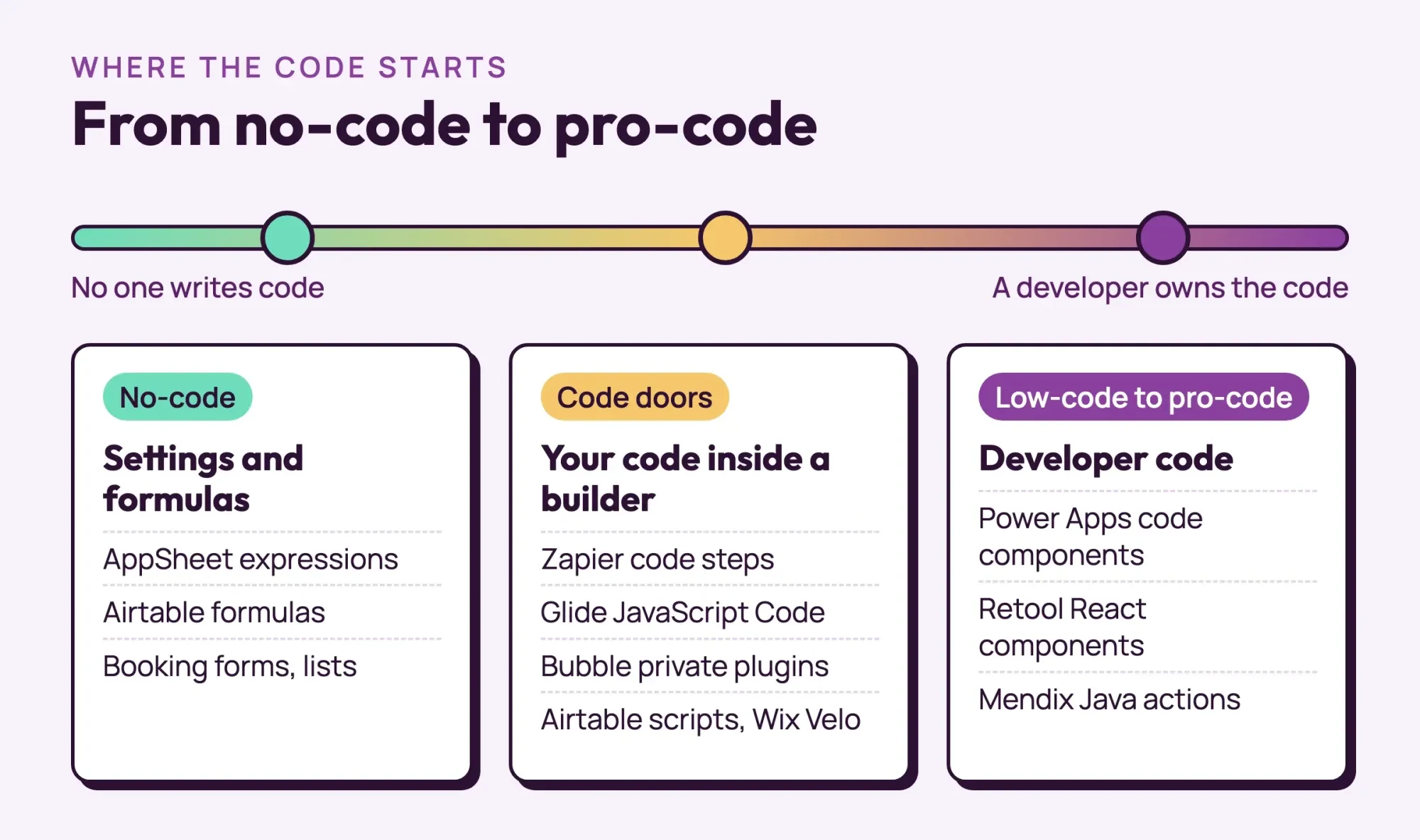 Diagram by DigitalTreed, from each vendor's own docs read October 28, 2026
Three examples from one made-up salon
A single salon can need both. Hollis Hair Studio in Florence, Alabama, is a made-up example with six chairs and a shelf of retail hair products. Its owner wants three small apps, and each lands on a different side of the line.
Example 1: online booking (no-code)
The booking form needs five fields and a button. Clients pick a service and a day, the answers land in a table, and the front desk gets an email. Any no-code builder does this from settings, so the owner can build it in an afternoon. No code needed. Changing the service list later takes a minute, because the options live in a dropdown setting rather than in code that someone has to edit and test again.
Example 2: loyalty points (still no-code)
Next, the owner wants one point per $10 spent and a free blow-dry at 50 points. That sounds technical, but it's a formula: the visit total divided by 10 and rounded down, summed per client, with a flag at 50. It's exactly the kind of logic AppSheet handles with its spreadsheet-like expressions, so it stays no-code.
Two apps, zero code so far.
Example 3: stock alerts that email suppliers (low-code)
Then there's the retail shelf. The owner wants a warning before a product runs out, based on how fast it sells and the supplier's delivery time. A formula can flag low stock. That part's easy.
But the owner also wants the reorder amount worked out and one email sent to each supplier. That's the catch. It's usually where a builder hands you a code step. Someone writes a short script, and that person has to be around when it breaks. Our explainer on third party integration and what it costs you covers the upkeep side of connections like this.
Picture the week the heat-spray supplier stretches its delivery time from 10 days to 14. In a no-code app, the owner would just edit a number in a table and move on. In the low-code version, that number might sit inside the script, and if nobody on staff can read JavaScript, the alerts quietly come too late. Nobody notices until a shelf is empty. It's a small risk, but it's the whole reason the who-fixes-it row sits in our first table.
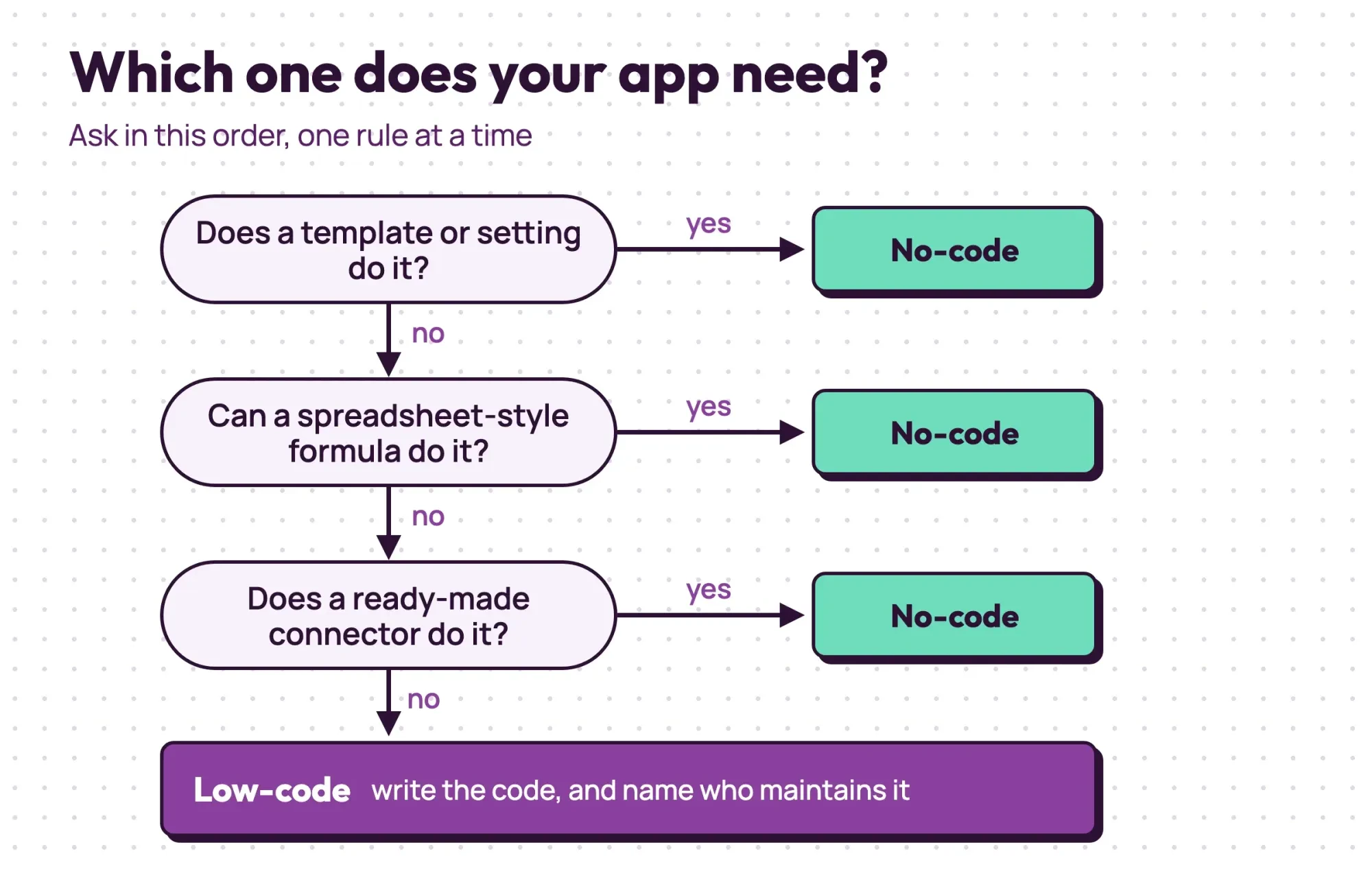 Drawn by us. Hollis Hair Studio is a made-up example
That pattern holds for most small-business apps. Forms, lists, approvals and simple math stay no-code, while rules that compute something new and talk to another system usually end in code. If your app is mostly forms and lists, you'll probably never touch code, and if it's mostly calculations that feed other systems, you'll probably need it early.
What we tested
On October 28, 2026, we built examples 1 and 3 on a local page at 127.0.0.1 with made-up products. The booking form is plain HTML with 5 fields and 0 lines of script. The stock alert is one JavaScript function of 8 lines. Run on 6 products, it flagged 2: argan shampoo, order 8, and heat spray, order 1.
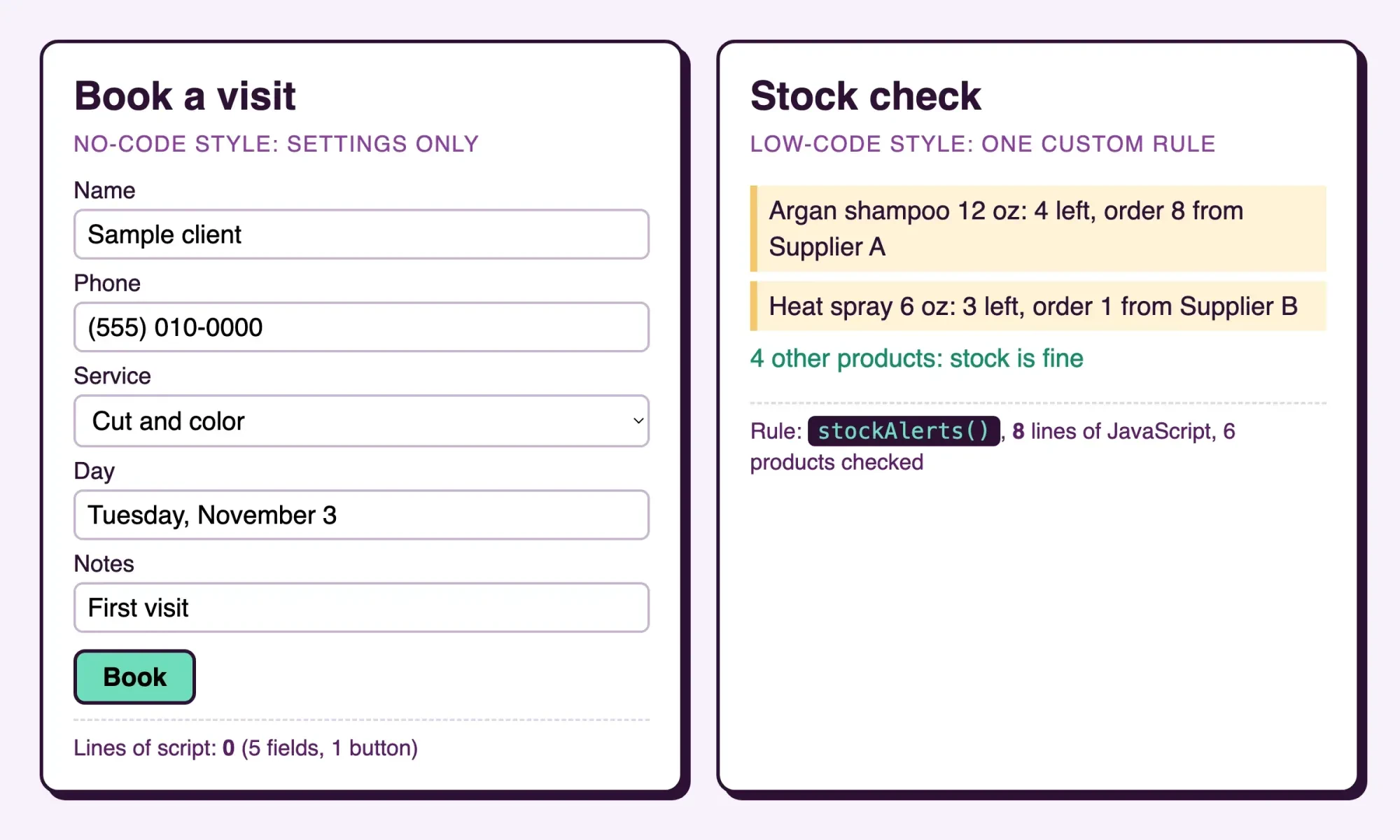 Screenshot: our local test page at 127.0.0.1, October 28, 2026. Products and suppliers are made up
Which one should you pick?
That leaves the choice, and it's simpler than the labels suggest. Pick by who will build and fix the app, not by the label on the tool. Labels are marketing. Here's how we'd sort it:
- Choose no-code if one person on your team will own the app, and every rule fits a template, a formula or a ready-made connector.
- Choose low-code if even one rule needs code, the app must talk to a system with no connector, or a developer will help.
- Choose neither if the app is the product you sell, since that's a custom build.
Most small businesses should start no-code and move one app at a time. Going app by app keeps the risk small, since a broken stock alert shouldn't take your booking form, your loyalty points and your customer list down with it. When one rule needs code, there's no need to switch tools; you open the code door and name the person who maintains it. If you want a builder with more room, our priced list of low-code platforms for small business compares six. For apps that are the product, the seven stages of website development show how a custom build runs.
Our test points the same way, with one caveat: it doesn't time any vendor's builder, and it isn't a benchmark. It only shows where the code starts. The rule alerts when stock on hand drops to weekly sales times lead days divided by 7, plus 2. Argan shampoo sells 6 a week with a 5-day lead time, so it alerts at 6.3 or fewer. The order is two weeks of sales minus stock on hand: 12 minus 4 is 8. Eight lines is small, but someone has to understand them when a supplier changes its lead time. Our beginner walkthrough of JavaScript gets you as far as reading code like that.
Write that formula down, with its owner's name.
How do you know an app you already run has outgrown no-code? Watch for five signs. A rule you need can't be written as a formula, or the app has to talk to a system with no connector. You're copying the same data between tools by hand every week. You've stacked workarounds like hidden columns and duplicate automations. Or the app keeps hitting a plan limit on records or runs. One sign is a nudge; two or three mean it's time to bring in code, or a developer, for that part.
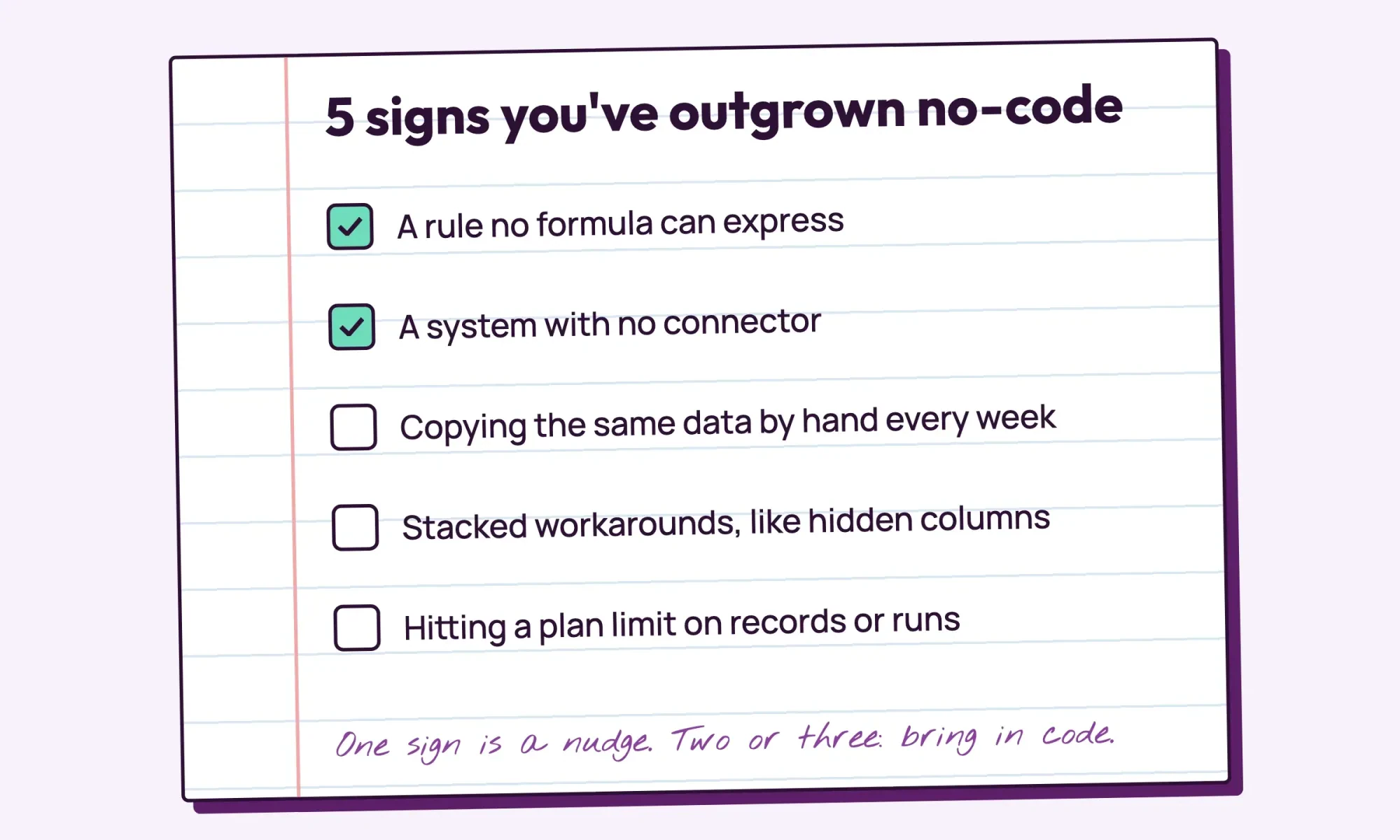 Drawn by us
If you're starting today, build the booking form first: it has no code at all, so it's the cheapest place to learn your builder's quirks.
Want help with the code-door part? If so, our web developers build and maintain small custom pieces for builder apps. We'd be paid for that job, so compare our quote with a freelancer's or two before you decide. Our view doesn't change either way: stay no-code until one rule forces code, then decide who owns that code before launch.
Frequently asked
Can AI build a no-code or low-code app for me?
Partly. Microsoft says "Power Apps and Microsoft Copilot let you describe the app you want and AI designs it" (Microsoft Learn). Someone still has to check what it builds.
Can a no-code app connect to my other software?
Often, through connectors. AppSheet lists "hosted Excel files, Cloud SQL, Apigee, Azure SQL, AWS, Salesforce objects, Smartsheet, OData, & more" (Google AppSheet).
Do code steps in no-code tools have limits?
Yes. Zapier says a code step "is sandboxed and can only run for a limited amount of time and within a limited amount of memory" (Zapier Help). The limits depend on your plan.
How we made this guide: We read the docs of ten app builders on October 28, 2026, and linked each quote at its claim. We built two examples on a local test page and saved the code and output. Facts checked by the DigitalTreed team on October 28, 2026.
First published July 2023. Rewritten October 28, 2026: the difference explained, code doors in no-code tools, three salon examples and a local test.
Sources
- Microsoft Learn: What is Power Apps?
- Microsoft Learn: Microsoft Power Fx overview
- Microsoft Learn: Power Apps component framework overview
- Google AppSheet: Build apps with no code
- Zapier Help: Use JavaScript code in Zap workflows
- Airtable Help: Scripting extension overview
- Airtable Help: Automation action: Run a script
- Glide Docs: JavaScript Code
- Bubble Docs: Building plugins
- Wix Velo: About Velo
- Retool Docs: Build custom React components
- Mendix Docs: Java Actions
- OutSystems: What is low-code development?

Comments
No comments yet. Start the conversation below.