
Quick answer
Zoho Creator, AppSheet and Softr are the cheapest low-code platforms for a small team's app, as of October 2026. Expect $8 a user on Zoho's yearly plan (US price unverified), $5 to $10 on AppSheet, or $99 a month on Softr Pro billed yearly. AppSheet Core already comes with most Google Workspace editions. Check how each counts users first.
Low-code platforms are app builders where you drag in forms, tables and buttons and add a little logic instead of coding the whole thing.
For a US small business, that's usually one internal tool. Think a job board for technicians, a stock count, an inspection form or a request tracker that finally replaces the shared spreadsheet.
We've priced six of them: Microsoft Power Apps, Zoho Creator, Airtable, Google AppSheet, Glide and Softr. Weighing a builder against custom code for your public website? That's a different call, covered in our no-code vs custom development comparison.
Key takeaways
- Power Apps pay-as-you-go bills $10 only for users who open the app.
- Zoho Creator's Standard plan allows only 1 app.
- Airtable's free plan stops at 1,000 records per base.
- Glide Classic apps can't be moved to GlideOS.
- Export a test table before you pay, so you know you can leave.
We judged six platforms on six things, using only their own pages
So where do the numbers come from? Every price and limit below is from the vendor's own pricing page or help docs, read on October 26, 2026.
No review sites, no reseller quotes.
These are the six criteria, in the order small businesses tend to trip over them:
- The list price, with monthly and yearly billing kept apart.
- What the free tier allows: users, records and published apps.
- How billing counts a user.
- Where your data lives and how you'd get it out.
- Whether it rides on Microsoft 365 or Google Workspace you already pay for.
- Whether your crew can use it on a phone.
We checked it all signed out, from our office in India, without an account or a trial.
That's a real limit. We can tell you what the pages promise and what we saw before a sign-up wall, not how the builder feels after a week.
AI builders that write code for you are their own path; our Build a website with AI guide walks through that one.
Six platforms side by side, priced in October 2026
Here's the short version.
Prices are per month, list price, before tax.
| Platform | Cheapest paid plan | Free option | Who you pay for | Best for |
|---|---|---|---|---|
| Microsoft Power Apps | $20 per user (Premium, paid yearly) or $10 per active user per app (pay-as-you-go) | Developer Plan, for building and testing only | Each licensed user, or each user who opens the app that month | Teams already on Microsoft 365 |
| Zoho Creator | $8 per user on yearly billing ($12 monthly), 1 app; US price unverified | 1 app, 5,000 records; user cap not stated | Each user | The lowest per-seat price |
| Airtable | $20 per collaborator on yearly billing ($24 monthly) | 5 editors, 1,000 records per base | Commenters and up; viewers are free | Data-heavy tracking |
| Google AppSheet | Starter $5 per user, billing period not stated; Core $10 | Build and test with up to 10 users | Every user, guests included | Teams on Google Workspace |
| Glide (GlideOS) | $25 a month (Basic), 2 published apps | 2 team members, no published apps | Team members, plus AI credits | Spreadsheet-to-app builds |
| Softr | $19 a month on yearly billing ($25 monthly) | 3 builders, 5 app users | A plan with set user counts | Client portals and field crews |
Each row's sources are linked in the sections below.
Watch the fourth column. It moves the bill more than the sticker price does.
Microsoft Power Apps suits a Microsoft 365 shop, and pay-as-you-go beats $20 seats for light use
That fourth column is where Power Apps gets interesting. Premium lists at $20 per user a month, paid yearly, for unlimited apps (Power Apps pricing, October 2026). Its fine print says prices "may not be reflective of actual list price due to currency, country, and regional variant factors", so we couldn't confirm the US checkout price.
A $12 rate exists. It needs a 2,000-seat minimum.
The free Developer Plan is for building, not running.
Microsoft's FAQ puts it bluntly: "Building apps is not charged, but using them requires paid licenses."
For an app people open a few times a month, look at pay-as-you-go. It bills through an Azure subscription (Microsoft Learn overview) at $10 per active user per app per month.
An active user is "someone who opens an app at least once in the given month" (pay-as-you-go meters, updated October 14, 2026). If nobody opens it, nobody's billed. Staff open apps in the Power Apps mobile app, which runs on iOS, Android and Windows (Microsoft Learn).
Check your Microsoft 365 plan before you buy. Microsoft says some licenses include "limited Power Apps and Power Automate use rights" for Microsoft 365 data and standard connectors (Power Platform licensing overview, updated October 16, 2026).
A simple app on SharePoint lists might cost nothing extra.
The catch is how often the licensing moves. Microsoft's licensing overview says the per-app plan stopped selling to new customers through some channels on January 2, 2026, and that unmanaged developer environments are deprecated. That includes the ones the free Developer Plan creates.
One oddity from our check: every price card said "This product is not available in your market" when we opened it from India.
Zoho Creator is the cheapest seat, but Standard builds one app
Zoho Creator's Standard plan is $8 per user a month on yearly billing, or $12 monthly (Zoho Creator pricing, prices updated July 22, 2026). Professional is $20 or $30, and Enterprise is $25 or $37.
Now read the applications row.
Standard allows 1 app; Professional and Enterprise don't cap them. Free also gets 1 app and 5,000 records (its pricing pages don't say how many users), while Standard gets 25,000 records per user (Zoho plan comparison). For phones, Zoho says "Every app built on Zoho Creator runs natively on the web, and on both iOS and Android devices", so your crew needs no second tool.
Add a second app and you're on Professional.
Zoho fills its prices in with a script, and what you see depends on your country. We read the US dollar figures from the price table in the page's own code, which also lists rupees, pounds and euros. From India, the page showed us rupees. So treat Zoho's US prices as unverified until you see them at checkout.
New accounts start on a 15-day trial of a paid plan, then drop to Free.
Zoho's grid also lists "Data encryption & PII/ePHI" under security. If you'll store patient or other regulated data, ask any vendor in writing which agreement it'll sign before you build.
Airtable is a database first, and the free plan stops at 1,000 records
Zoho caps apps; Airtable caps rows. Its free plan allows 1,000 records per base, 100 automation runs a month and 5 people with editor or creator rights (Airtable plans overview, updated October 2026). Read-only viewers are unlimited.
A busy job tracker fills 1,000 records in months.
Team is $20 per collaborator a month on yearly billing, or $24 monthly, with 50,000 records per base. Business is $45 or $54 and needs a company email domain. If you go over a limit, Airtable says "we will never remove your data" (Airtable pricing); you just can't add more. Field staff can use Airtable's mobile app.
Who counts as a paid seat matters most here.
Airtable's help page bills Team plans for anyone with "Commenter or higher-level permissions". Its pricing FAQ mentions only users with edit permissions. Ask before you count commenters as free. Either way, a technician who only updates a job status is a paid seat.
Where it shines is the data model: linked tables, views and automations. If you're already automating follow-ups, our CRM automation examples use the same trigger-and-action thinking.
Google AppSheet may already be in your Workspace bill
That per-seat worry mostly disappears with AppSheet. It lists Starter at $5 per user a month, Core at $10 and Enterprise Plus at $20 (AppSheet pricing, October 2026). The page never says whether those figures are monthly or yearly prices; its FAQ says only that billing will be monthly or annual, depending on your plan. You can build and test with up to 10 users for free, for as long as you'd like.
Here's the part most lists skip. Google says "AppSheet Core licenses are included at no cost with most Google Workspace editions", starting at Business Starter (Google Workspace Admin Help).
Already on Workspace? Core may cost you $0 more.
Two details change the math. AppSheet counts guests too, and one guest on two devices can count as two users. Starter and Core also cap each AppSheet database at 2,500 rows, though your app can sit on Google Sheets instead. Every plan lists offline use with background sync.
Barcode scanning is a Core feature. For stock counts, that's your plan.
Want a public app with no sign-in, like an event schedule? AppSheet's Publisher Pro is $50 a month per app for unlimited users, per the same pricing FAQ.
Glide just split in two, so check which one you're buying
Glide's main pricing page now sells GlideOS (Glide pricing, October 2026). It builds apps from a prompt, a file or a spreadsheet and spends AI credits as it works. Glide says its apps "look great across all devices", field crews' phones included.
Free gives 2 team members and no published apps. Basic is $25 a month for 2 published apps, Plus is $50 for 5, and Pro is $125 a month starting at 5 team members.
There's no yearly discount yet.
Glide's FAQ says "Annual plans are coming soon."
The older Glide Classic still sells on its own page. Business starts at $199 a month on yearly billing, with 30 users included and $5 per extra user (Glide Classic pricing). Monthly billing makes extra users $6. The page text doesn't show Business's own monthly price.
That split is a lock-in lesson.
Glide says the two products can't share data, and it has "no tool or technique" for moving Classic apps to GlideOS. So know which one you're building on.
We couldn't find the GlideOS Pro price for more than 5 members in the page text. Get it quoted.
Softr charges by plan, which suits client portals and field crews
Unlike Glide's credits, Softr's bill is a flat plan. The page opens on yearly billing: Basic $19 a month, Pro $99 and Business $329. Switch to monthly and they're $25, $119 and $395 (Softr pricing, October 2026).
Each plan includes a set number of builders and app users.
Pro includes 2 builders, 10 team users and 50 client users. Team users share your business email domain; anyone else, Gmail included, is a client user. Free allows 3 builders and 5 app users. For crews out in the field, note that the installable phone app (PWA) and push notifications are listed only from the Business plan up.
That's why Softr suits customer and partner portals.
It can also sit on data you keep elsewhere. Softr's docs list Airtable, Google Sheets, HubSpot, Notion, SQL databases and a REST API as sources (Softr data sources).
Paid plans include a custom domain, and extra domains are $15 a month, or $13 on yearly billing. When a portal goes live on your domain, a quick test in our SSL certificate checker confirms the certificate covers it.
Only one template showed us the app before we signed up
Pages and prices only go so far. On October 26, 2026 we opened the inventory template in each public gallery, signed out. Airtable's inventory tracking template page showed a working, read-only copy of the base: five tables and 18 sample records, from products and warehouse locations to purchase and sales orders.
Softr's page answers its own FAQ with "Yes, you'll need a free Softr account" (Softr inventory template). Glide's opens a ready-made prompt and asks you to sign up (Glide inventory template).
AppSheet's gallery shows Preview and Copy buttons on each card, including a Simple Inventory app. We didn't click through. Microsoft names templates such as asset checkout in its pricing FAQ, and Zoho says it has 50+, but we didn't find a signed-out gallery for either.
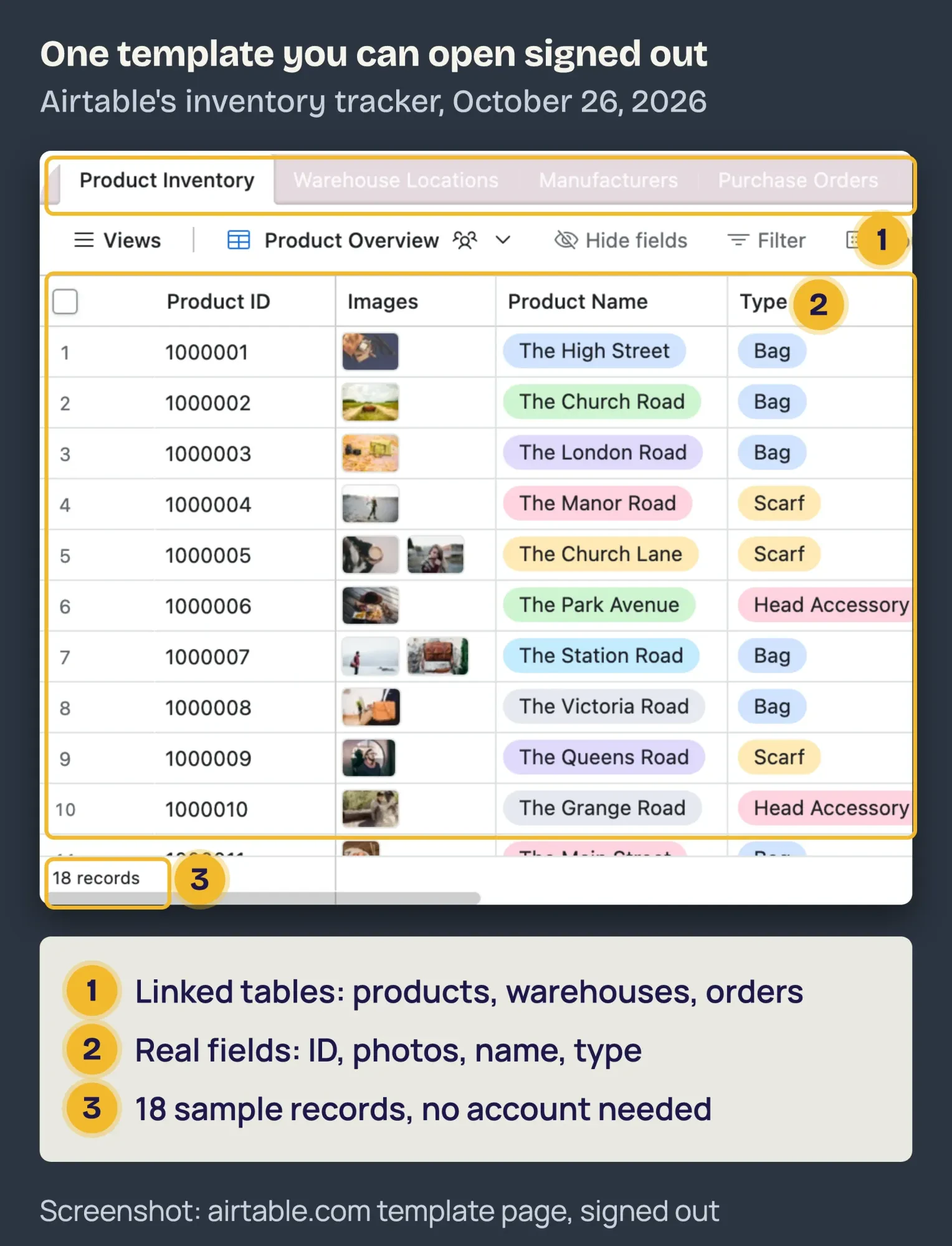 Screenshot: Airtable's public inventory tracking template page, viewed signed out in headless Google Chrome on October 26, 2026; logo covered, callouts added by DigitalTreed.
Seeing the tables won't tell you how the builder feels.
It will tell you whether the fields match how your business tracks stock.
Example: what a 12-person pest control company would pay in year one
Then there's the number owners actually ask for. Example (made up): Driftless Pest Control in La Crosse, Wisconsin, has 2 office staff who'd build the app and 10 technicians who'd update jobs and van stock on their phones.
Everyone signs in with a company email. That's 12 users and one app.
We priced it at list, on yearly billing where offered.
Your quote can differ, and setup time isn't included.
| Platform and plan (as of October 2026) | Math | Year one |
|---|---|---|
| Zoho Creator Standard (1 app, US price unverified) | 12 users x $8 x 12 | $1,152 |
| Softr Pro (2 builders, 10 team users included) | $99 x 12 | $1,188 |
| AppSheet Core | $10 x 12 users x 12 (billing period not stated) | $1,440 ($0 extra on most Workspace plans) |
| Power Apps pay-as-you-go (all 12 open it monthly) | 12 x $10 x 12 | $1,440 plus an Azure subscription |
| Glide Classic Business (30 users included) | $199 x 12 | $2,388 |
| Power Apps Premium | 12 users x $20 x 12 | $2,880 |
| Airtable Team | 12 collaborators x $20 x 12 | $2,880 (Free stops at 5 editors) |
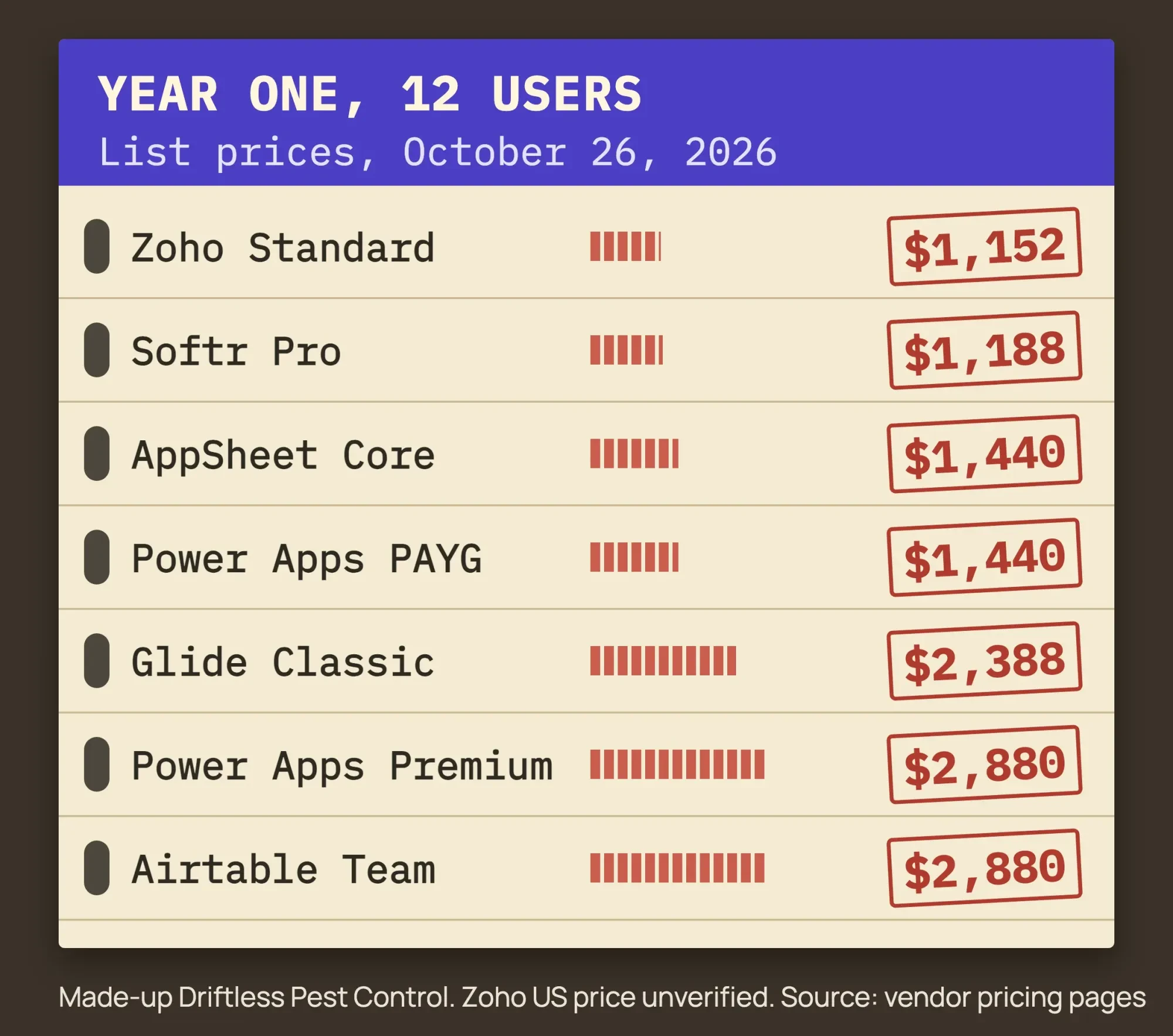 Diagram by DigitalTreed, from each vendor's pricing page read October 26, 2026. Driftless Pest Control is a made-up example.
From Zoho's $1,152 (US price unverified) to $2,880, the spread is $1,728 a year on list prices alone.
And it flips with how each tool counts people. Softr looks cheap because 10 technicians fit Pro's team-user count; an eleventh technician becomes an extra team user, starting at $1 a month. Zoho stays cheap only while Driftless needs one app, and on Google Workspace, AppSheet Core beats them all. The other cost is wiring the app to the tools you keep, which our third-party integration guide prices out.
How do you get your data out of a low-code platform?
Once the price fits, make sure you can leave. A year of job records is the real asset.
Power Apps keeps app data in Dataverse, and Microsoft documents exporting each table as a CSV file (Microsoft Learn import and export). AppSheet apps can run on Google Sheets you own, and activity "syncs to the connected data source(s)". Softr can do the same with Sheets, Airtable or your own SQL database.
Airtable and Zoho Creator keep data inside their own databases, though Zoho lists import and export on every plan.
Glide is the warning. Classic apps don't move to GlideOS.
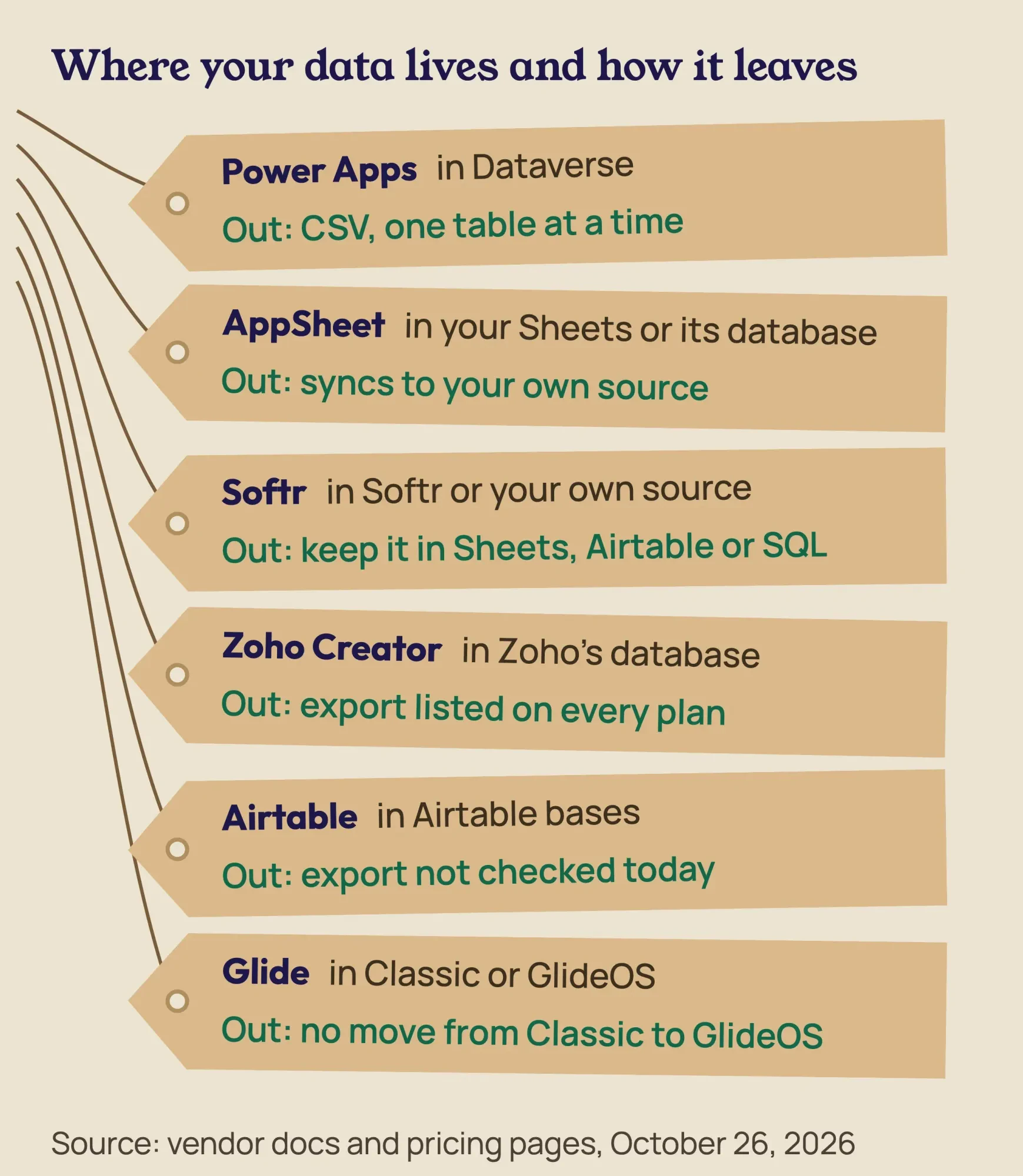 Diagram by DigitalTreed, from Microsoft Learn, Google Workspace Help, Softr docs, Zoho, Airtable and Glide pages read October 26, 2026.
Before you commit, export a test table and open it in a spreadsheet.
If it comes out clean, you've got an exit. Bigger systems need more, and our cloud ERP roundup has a longer exit-terms checklist.
Low-code is the wrong tool when the app is the product
Exits matter most when you outgrow the tool, and some apps outgrow it on day one. Low-code earns its price on internal tools; it's a poor fit when the app is what you sell.
These are the signs we'd take seriously:
- Customers pay for the app, so its speed and design are your brand.
- Your user count is headed into the hundreds.
- You need payments, or a sync with a system that has no ready connector.
- The data is regulated, and the vendor won't put security terms in writing.
- Your rows will pass the plan caps (Airtable Business stops at 125,000 per base).
Seat math is the quiet one. Power Apps Premium for 200 users is $48,000 a year at list price, before storage add-ons at $40 per GB a month.
Payments are a project of their own; our payment gateway integration guide covers what card processing costs. And if you only need a web form that emails the office, skip the platform: our HTML contact form guide shows the simple route.
Hire a developer when the workarounds cost more than the code
That brings us to the bigger check. Software developers, quality assurance analysts and testers had a 2025 median pay of $134,040 a year, or $64.44 an hour (BLS Occupational Outlook Handbook).
That's about 47 times the priciest year-one bill in our example.
So hiring makes sense when low-code starts costing you in other ways. Staff lose hours to workarounds, three tools are glued together, or the per-seat bill keeps climbing. A common middle path is a freelancer who builds on the platform you already pay for.
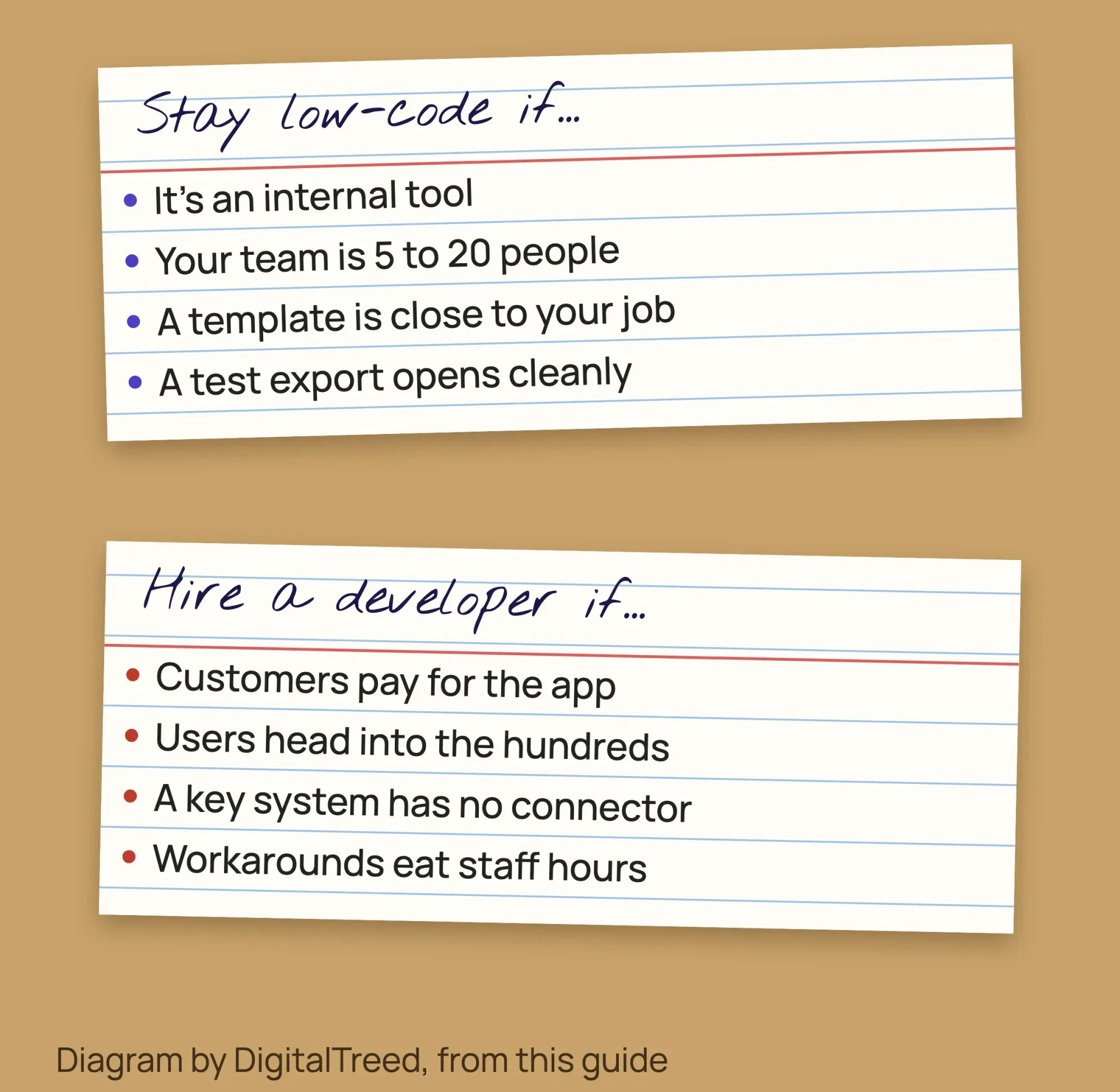 Diagram by DigitalTreed, summarizing this guide. Pay figure from the BLS Occupational Outlook Handbook, read October 26, 2026.
If you go that way, read how to hire a full stack developer for rates, tests and red flags. Our website development process explains what a build looks like, stage by stage.
A disclosure: DigitalTreed builds custom web apps and connects low-code tools to other systems, so a "hire a developer" verdict from us isn't neutral. Our custom web development page shows what that work covers.
Frequently asked
Can I use Power Apps with patient health data?
Power Apps is on Microsoft's list of cloud services in scope for HIPAA, and Microsoft signs Business Associate Agreements with covered entities, as of October 2026. Microsoft also notes there's no HHS-approved HIPAA certification for a vendor. The list is on Microsoft's HIPAA and HITECH page.
Is AppSheet covered for HIPAA through Google Workspace?
Only the services on Google's HIPAA Included Functionality list are covered, and an admin must accept Google's Business Associate Amendment before using patient data. Third-party apps and add-ons aren't covered, as of October 2026. Check the list on Google's HIPAA compliance page before you build.
What do enterprise platforms like Mendix cost?
Paid tiers cost far more than the six here. Mendix lists a free plan, then Standard from €918 a month for one app or €2,295 for unlimited apps, as of October 2026. Premium is quote only. The prices are in euros on Mendix's pricing page.
Pick one in an afternoon
None of this needs a month-long evaluation. For one internal app, this order works:
- Write down the one job the app must do and who'll use it.
- Check whether your Microsoft 365 or Google Workspace plan already includes Power Apps or AppSheet.
- Count users the way each vendor does, then price your real team on two platforms.
- Open a public template close to your job and compare its fields with your spreadsheet.
- Before you pay, export a test table and make sure it opens cleanly.
Our take: if your team is 5 to 20 people, start with what your office suite already includes, AppSheet on Google Workspace or Power Apps on Microsoft 365. Move to Softr or Zoho Creator only if the user math or the features push you there. The other four list no office-suite bundle.
Want the options priced for your exact team? Get a quote from us. If a free tier covers your team, our reply will say so.
How we made this guide: on October 26, 2026, our team read the pricing pages and help docs of all six vendors, signed out, and checked every price and limit. Quotes are copied from them. Zoho's US prices came from the price data inside its own page, since the visible figure changes by country. We opened each public inventory template without an account and captured Airtable's in headless Google Chrome.
We didn't create accounts, start trials, build apps or install anything, so nothing here rates how the builders feel. Driftless Pest Control is made up; its sums are checked in our build script. Every source sits inline next to its fact. Before publishing, Eram N. reviews and signs off on this rewrite.
First published July 2023. Rewritten October 26, 2026: we replaced the general benefits piece with a priced roundup of six low-code platforms, with stated criteria and free-tier and user limits from vendor pages. It adds a 12-user cost example, exit routes, and when to choose a developer instead.
Sources
- Microsoft: Power Apps licensing and pricing (vendor page)
- Microsoft Learn: Pay-as-you-go plan overview
- Microsoft Learn: Pay-as-you-go meters
- Microsoft Learn: Licensing overview for Microsoft Power Platform
- Microsoft Learn: Import data from Excel and export data to CSV
- Zoho: Zoho Creator pricing (vendor page)
- Zoho: Zoho Creator pricing comparison (vendor page)
- Airtable: Pricing (vendor page)
- Airtable Help Center: Airtable plans overview
- Airtable: Inventory tracking template (vendor page)
- Google: AppSheet pricing (vendor page)
- Google Workspace Admin Help: Manage AppSheet in your organization
- Glide: Pricing, GlideOS plans (vendor page)
- Glide: Glide Classic pricing (vendor page)
- Glide: Inventory Manager template (vendor page)
- Softr: Plans and pricing (vendor page)
- Softr Help Docs: Data sources
- Softr: Inventory management template (vendor page)
- Microsoft Learn: Install the Power Apps mobile app
- U.S. Bureau of Labor Statistics: Software Developers, Quality Assurance Analysts, and Testers, Occupational Outlook Handbook

Comments
No comments yet. Start the conversation below.