
Quick answer
As of October 28, 2026, Shopify customer service can cost $0 with the free Shopify Inbox app, an FAQ page and Shopify's built-in return rules. Once two or more people share chat and email, a help desk ran $38 to $60 a month in our example of 120 conversations. Set up Inbox first, then the FAQ page. For Shopify's own help, use Chat with a human at help.shopify.com.
You run a small Shopify store, and the same questions keep landing in your email: where's my order, can I return this, what does shipping cost? Shopify customer service is the mix of chat, email, an FAQ page and return rules a store uses to answer buyers. Most of it's already in your admin.
We start with what Shopify gives you for free and setting up Shopify Inbox. Then come eight quick replies we wrote and tested, the FAQ page built from them, the returns flow, and the FTC's rule on late orders. We finish with when a paid help desk is worth it and how to reach Shopify's own support.
Key takeaways
- Our 8 quick replies matched 20 of 30 made-up buyer questions.
- All 10 misses were product, discount, gift or pickup questions.
- Self-serve returns need buyers to sign in to a customer account.
- With no stated ship time, ship within 30 days or ask consent to delay.
- At 400 example conversations, Re:amaze's $59 flat plan cost least of four paid plans.
What Shopify gives you for free
Before you pay for any app, check what's already in your admin, because four free pieces cover the basics. Shopify Inbox is the chat. Its App Store listing shows it as Free, and Shopify builds it. Policies and pages hold your written answers. Return rules decide what buyers can send back.
Here's which free tool handles which job:
| Job | Free Shopify tool | Where in the admin |
| Live chat on your store | Shopify Inbox app | Sales channels > Inbox |
| Return, shipping and contact policies | Store policies (can be automated) | Settings > Policies |
| FAQ or help page | Online store pages | Online Store > Pages |
| Return window and fees | Return rules | Settings, return rules |
Inbox works two ways: you can manage conversations with your staff, or you can turn on an Inbox agent that answers from your catalog, policies and published pages. Shopify says the agent "is an opt-in feature", so nothing answers buyers for you until you switch it on. Still picking a platform? The WordPress vs Shopify cost breakdown covers fees first.
None of the four handles buyer email, which keeps arriving in the mail app behind your store's sender address.
Set up Shopify Inbox in one afternoon
Start with the chat, and set it up in order, since your hours and first reply decide what buyers see when nobody's at the keyboard. Shopify's availability help page says that outside your hours, a buyer gets your store's sender email address instead. Here are the steps we'd follow for a new store:
- Install Shopify Inbox from the Shopify App Store and open it from Sales channels > Inbox.
- Under Chat settings > Availability, set the hours someone can really reply. By default, it's always available.
- Write a first reply that says when you answer, such as "We reply within 1 business day."
- Add instant answers for your top questions, such as your return policy.
- Create quick replies for the messages your staff send over and over.
- Leave the Inbox agent off until your policies and FAQ page are written.
Step 4 is where the Track my order button lives. Shopify's instant answers page says that option "is available regardless of whether your Inbox agent is active", and it needs only an order number and email. Buyers can look up a parcel without waiting for a reply. We didn't run Inbox on a live store, so we can't say how much email that saves.
A chat button adds a script to every page, so measure before and after you turn it on with our free page speed checker.
Eight quick replies, checked against 30 made-up questions
Those quick replies from step 5 are the typed answers your staff paste into a chat, and Shopify keeps them simple. Its quick replies page says "You can enter only one word for a shortcut." Quick replies don't change what the Inbox agent says, either. We wrote eight for Bramblecourt Candle Co., a made-up candle store with made-up rules.
Its rules: unburned candles go back within 30 days of delivery, and broken ones get replaced without a return.
| Shortcut | What the reply says (made-up store) |
| track | You can follow your parcel from the shipping email we sent, or tap Track my order in this chat and enter your order number and email. If tracking hasn't moved in 3 business days, reply here and we'll open a claim with the carrier. |
| shipping | We pack orders within 2 business days. You'll see the exact rate and delivery estimate at checkout before you pay, and our shipping policy page lists where we ship. |
| damaged | We're sorry it arrived broken. Send a photo of the candle and the box here, and we'll ship a replacement at no cost. There's no need to send the broken one back. |
| returns | You can return unburned candles within 30 days of delivery. Start the return from your account page, buy the return label, and we'll refund the original payment once the parcel reaches us. |
| exchange | Yes, for unburned candles. Start a return from your account page and place a new order for the scent or size you want. We refund the first candle when it arrives. |
| delay | Your order is running late, and we're sorry. Our new ship date is [date]. If waiting doesn't suit you, reply CANCEL and we'll refund you in full. |
| address | If your order hasn't shipped yet, we can change the address or cancel it. Reply with your order number and the new address, or the word cancel. |
| wholesale | We do. Bulk and wholesale orders start at 24 candles. Use the form on our wholesale page, and we'll reply within 2 business days with prices. |
Copy the set and swap in your own rules. The delay reply holds a [date] slot on purpose, for a reason the FTC section below explains. Keep each reply short enough to read on a phone; ours run 141 to 230 characters.
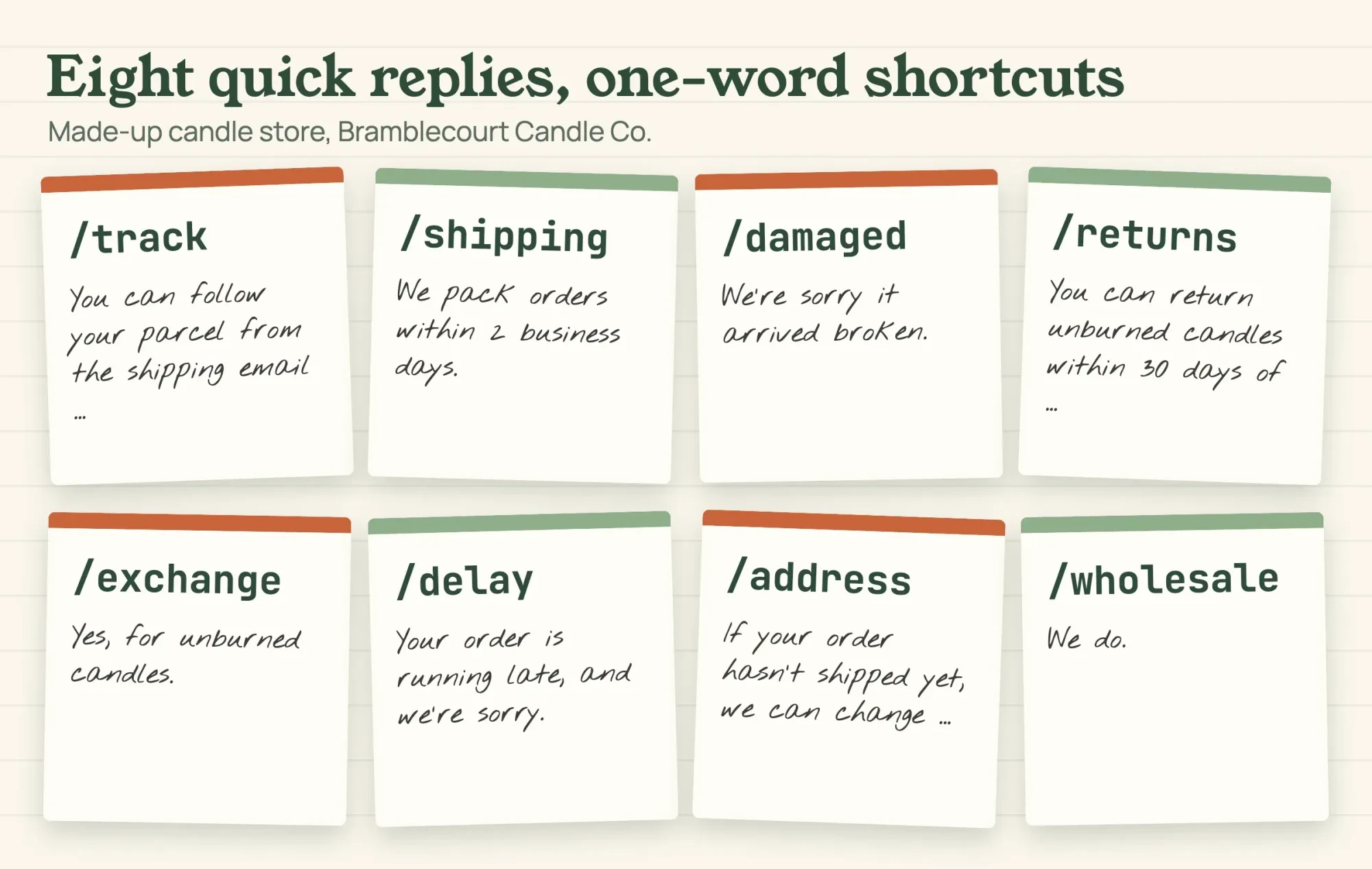 Drawn by us. Shortcuts and opening words from our made-up quick-reply set for Bramblecourt Candle Co., October 28, 2026.
What we tested
On October 28, 2026, we wrote 30 questions the way buyers type them, then set keywords for each reply. A Python script on a local computer checked the shortcuts and routed each question by plain keyword match. All 8 shortcuts were one word and unique. The replies matched 20 of 30 questions, and none matched two replies. We wrote both lists ourselves, so the score shows coverage of our own list, not of real buyer mail.
The 10 misses were six product questions (two on scent, plus wax, wicks, burn time and a wick that won't stay lit), two discount questions, gift wrap and pickup. Everything was made up, and nothing touched a real store.
Turn the same answers into an FAQ page
Each of our 10 misses is a candidate FAQ entry, which for our candle shop means scent notes, burn time, wick care, discount codes, gift wrap and pickup.
Shopify's pages help describes pages as the home for "information that rarely changes or that customers will reference often". You add one from Online Store > Pages > Add page, then link it in a menu so buyers can find it.
We built our test page from the same eight replies, so the chat and the page can't disagree, and a changed return rule means editing one file, not two. Then add an entry for each question your own replies miss. Order matters too. Count a month of your own chats and emails, then put your most common questions where a phone screen shows them without scrolling. Our 30 questions were made up, so their mix can't set that order for you.
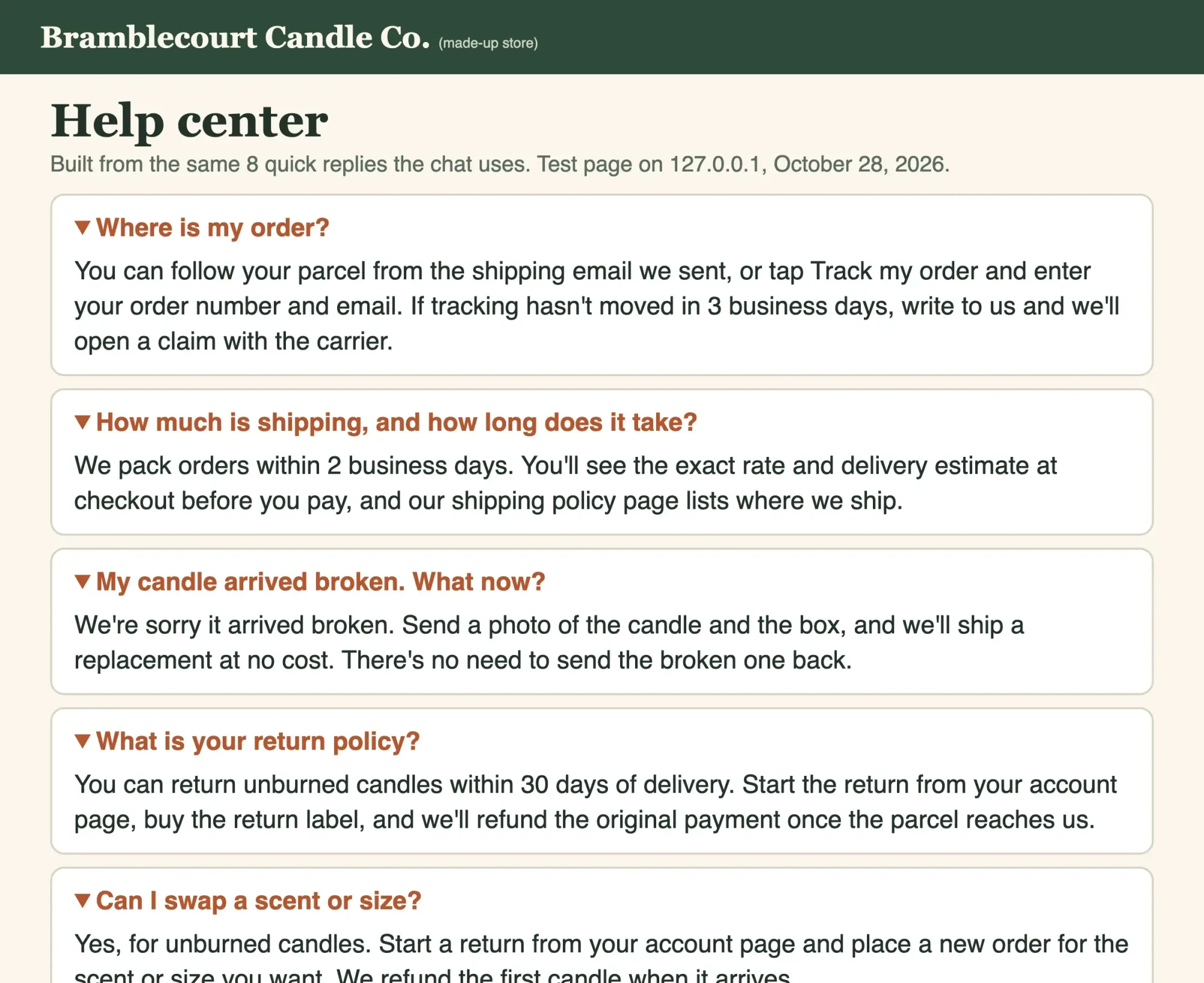 Screenshot: our FAQ page for Bramblecourt Candle Co. (made up), built by test/run_test.py and opened on 127.0.0.1, October 28, 2026.
Your written policies sit behind that page. Shopify can generate store policies for returns, shipping, terms and contact information, and keep them in step with your settings. Its own caution says the templates "aren't legal advice, and don't guarantee compliance with applicable laws", so read every line before you publish.
FAQ answers link to those policies, and links break when pages move. After each edit, run the page through our free broken link checker.
How should a Shopify returns flow work?
Beyond the FAQ page, a clear returns flow cuts the back-and-forth that eats support time. Shopify's return rules hold the settings. The return rules page offers a return window of 14, 30 or 90 days, unlimited, or a custom count, and it can start on each item's delivery date. Three more choices set who pays and what's excluded:
- Return shipping: free, a flat fee charged once per return, or the buyer buys their own label.
- A restocking fee, shown when you create a return for a fulfilled order.
- Final sale items, which can't be returned at all.
Then decide how buyers ask. Self-serve returns let them request a return from your store, but Shopify's self-serve set-up page adds a catch: "your customer needs to sign in to their customer account." So put the customer accounts link in your footer and your return policy, or buyers will email you anyway. Our made-up candle store picked 30 days from delivery, buyer-paid labels and free replacements for broken candles. Write the matching quick reply the same day a rule changes. A buyer who can't get a refund may go to the card company instead. A dispute has its own fee, which the payment gateway cost guide breaks down.
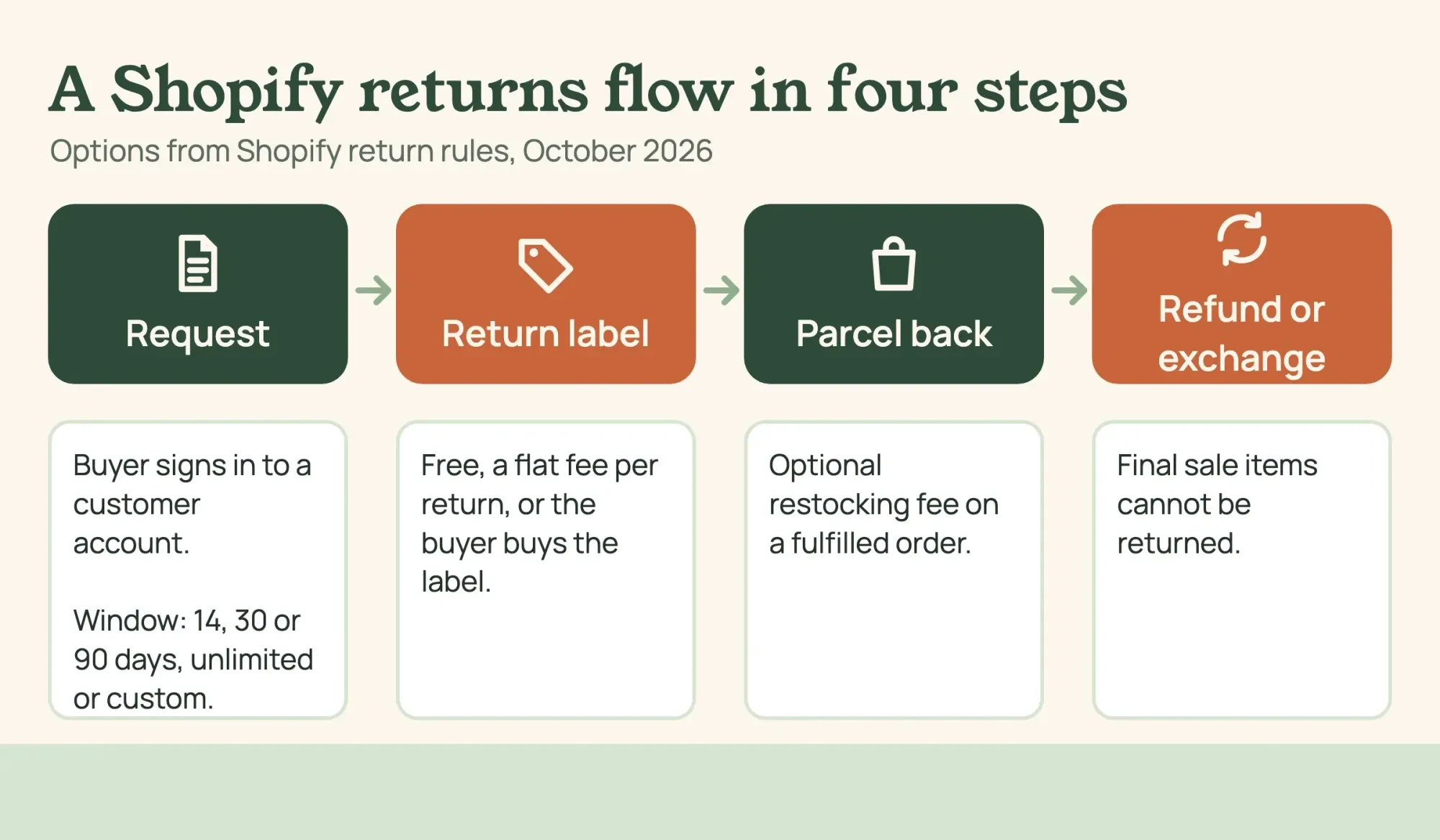 Diagram by DigitalTreed. Return rule options from the Shopify Help Center, read October 28, 2026.
Late orders fall under the FTC's 30-day rule
A late order brings a federal rule into the chat. The FTC's business guide to the Mail, Internet, or Telephone Order Rule is plain about the default. It says: "If you make no shipment statement, you must have a reasonable basis for believing that you can ship within 30 days."
If you learn you can't ship on time, the guide says you "must seek the customer's consent to the delayed shipment." The first delay notice needs a revised ship date, or a statement that you can't give one. It also has to tell the buyer they can cancel and get a refund. That's why our delay reply names a new date and offers a full refund in the same message. If the buyer paid by cash, check or a card from a bank or other outside creditor, the refund is due "within seven working days after the order is cancelled". Store credit you extend yourself follows a different, one-billing-cycle rule.
These are steps taken from the FTC's guide, and they aren't legal advice. Preorders, made-to-order goods and state laws can change the details. A business lawyer can check your shipping promise before you publish it.
When is a paid help desk worth it?
Inbox covers chat on the storefront. The Inbox pages we read describe chat handled by staff or an AI agent, and they don't mention a shared queue for email.
That's a help desk's job, and its price depends on how many conversations you get each month and how many people on your team answer them. Gorgias prices by tickets, while Re:amaze prices per team member or at a flat rate. Here's what five options cost in two example months:
| Option (as of October 28, 2026) | Example A: 120 a month, 2 people | Example B: 400 a month, 3 people |
| Shopify Inbox | $0 (free app) = $0 | $0 (free app) = $0 |
| Gorgias Starter (helpdesk only) | $10 + (120 - 50) x $0.40 = $38 | $10 + (400 - 50) x $0.40 = $150 |
| Gorgias Basic (helpdesk only) | $60 = $60 | $60 + (400 - 300) / 100 x $40 = $100 |
| Re:amaze Basic, monthly | 2 x $29 = $58 | 3 x $29 = $87 |
| Re:amaze Starter flat rate | $59 flat (up to 500 responded conversations) = $59 | $59 flat (up to 500 responded conversations) = $59 |
We counted one conversation as one ticket, which is how we'd budget it, though a buyer who writes twice may open two. Gorgias's pricing page lists, as of October 28, 2026, the helpdesk-only Starter plan at $10 a month for 50 tickets and 3 user seats, with overage at $0.40 a ticket. Basic is $60 a month for 300 tickets, with overage at $40 per 100. Re:amaze's pricing page lists Basic at $29 per team member a month, billed monthly, and a Starter plan at $59 flat for unlimited team members. Starter stops at 500 responded conversations a month.
To compare, divide each monthly total by the conversation count, using prices as of October 28, 2026. Example A per conversation: Gorgias Starter is $38 / 120 = $0.32. Gorgias Basic is $60 / 120 = $0.50. Re:amaze Basic is $58 / 120 = $0.48. Re:amaze Starter is $59 / 120 = $0.49. Example B per conversation: Gorgias Starter is $150 / 400 = $0.38. Gorgias Basic is $100 / 400 = $0.25. Re:amaze Basic is $87 / 400 = $0.22. Re:amaze Starter is $59 / 400 = $0.15. Of these four paid plans, Gorgias Starter cost least at 120 conversations and Re:amaze Starter at 400.
There's also a $0 help desk. Help Scout's Free plan covers, as of October 2026, 5 users, 1 inbox and 100 contacts a month, with 10 saved replies.
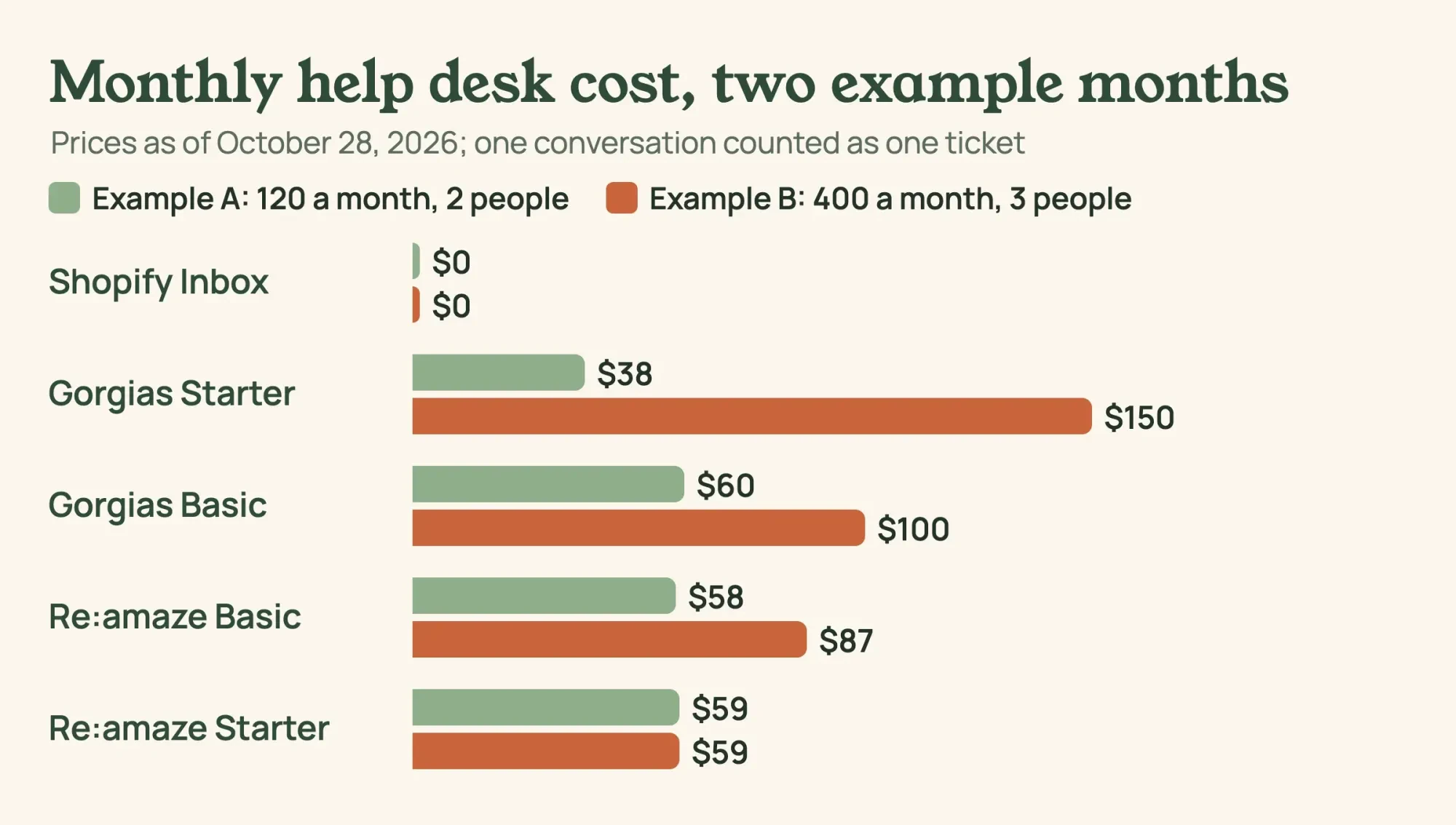 Diagram by DigitalTreed. Example volumes; prices from the Gorgias and Re:amaze pricing pages, read October 28, 2026.
Most of these tools also sell AI answers at a fee per resolution, and the AI chatbot price comparison covers those bots. A resolved conversation is also a fair moment to ask for a review. The review automation rules explain how to ask within FTC limits.
Getting help from Shopify's own support
Sometimes the store itself breaks, and then you need Shopify. Its contact support page lists chat, available 24/7, on all plans, while inbound phone and email support are listed for the Shopify Plus and Retail plans. You reach a person through Chat with a human at help.shopify.com, logged in to your store. Two limits catch new owners. Shopify supports only its own apps, so a third-party app problem goes to that app's developer. Free Shopify themes on Basic or higher get up to 60 minutes of design support, in 15-minute blocks, for small theme changes.
If you'll add staff, Shopify's pricing page lists up to 5 staff accounts on Grow and 15 on Advanced.
Our take: start with Inbox, the eight replies and an FAQ page, and add a help desk only once two people share the inbox. Regulars come back for reasons beyond support, and the loyalty program ideas cover that side. Follow-up emails after a sale belong in a CRM, as the CRM automation examples show. For what to add to the store next, see the ecommerce trends worth testing.
Want the store set up for you? DigitalTreed's web development service does that work. It earns us money, so get a second quote too.
Questions store owners ask about Shopify support
Frequently asked
Is Shopify Inbox free?
Yes. The Shopify Inbox listing shows it as Free, built by Shopify and launched August 14, 2019.
Does Shopify ever call store owners?
No. Shopify's support page says it "doesn't make outbound phone or video calls on any Shopify plan." Treat any such call as suspect.
Can Shopify write my FAQ answers for me?
Partly. Shopify's AI-generated instant answer suggestions come from your store policies and are "available only in English".
Is one return policy enough for every country?
Not always. Shopify's return rules let you set different return and cancellation rules for specific markets.
How we made this guide: Our team read nine Shopify Help Center pages, the Inbox listing, Shopify's pricing page, the FTC guide and three help desk price pages. The reply set and FAQ page were tested on a local computer with made-up data. Facts checked by the DigitalTreed team on October 28, 2026.
First published August 2020 as a general note on Shopify support. Rewritten October 28, 2026: now a set-up guide for Inbox, quick replies, an FAQ page, returns and help desk costs.
Sources
- Shopify Help Center: Shopify Inbox
- Shopify Help Center: Set up your Shopify Inbox availability and automated first reply
- Shopify Help Center: Set up instant answers for Shopify Inbox
- Shopify Help Center: Quick replies
- Shopify App Store: Shopify Inbox
- Shopify Help Center: Creating and editing pages
- Shopify Help Center: Store policies
- Shopify Help Center: Return rules
- Shopify Help Center: Setting up self-serve returns and cancellations
- Shopify Help Center: How to Contact Shopify Support
- Shopify: Pricing
- FTC: Business Guide to the FTC's Mail, Internet, or Telephone Order Merchandise Rule
- Gorgias: Pricing
- Re:amaze: Pricing
- Help Scout: Pricing


Comments
No comments yet. Start the conversation below.