
Quick answer
Copy this: ¯\_(ツ)_/¯. The shrug emoticon is 9 characters, and as of November 2, 2026 Unicode names its face KATAKANA LETTER TU, code point U+30C4. In a Markdown box, like a GitHub comment, type ¯\\\_(ツ)\_/¯ or wrap it in backticks, or the backslash arm drops out. Then save it once as a text replacement or pinned clip.
Paste the shrug into a Markdown box, like a GitHub comment, and it can post as ¯_(ツ)_/¯ with no left arm. We had the bug too: before this rewrite, our headline read ¯\(ツ)/¯. A shrug emoticon is a text picture of a person shrugging, built from 9 ordinary characters.
First you'll copy the shrug emoticon and set it up on iPhone and Mac, then Android and Windows. Next come Slack and Teams and why the shrug loses its arm, with our render test. Last are the 9 code points from Unicode's charts and the shrug emoticon versus the shrug emoji.
Key takeaways
- In Markdown, type ¯\\\_(ツ)\_/¯ or use code formatting.
- Doubling only the backslash keeps the arm but italicizes the face.
- Save the shrug once as an Apple text replacement or a pinned clip.
- Slack's /shrug command adds the full shrug to the end of a message.
- The face is KATAKANA LETTER TU, U+30C4, not a smiley.
Copy the shrug emoticon
Start with a clean copy. The line below is plain text, so it pastes the same way into a text, an email or a document:
¯\_(ツ)_/¯Watch for lookalikes, too. The face has two of them. Unicode's UnicodeData.txt file lists KATAKANA LETTER SI at U+30B7 and a narrower HALFWIDTH KATAKANA LETTER TU at U+FF82, and both pass for it. OVERLINE (U+203E) can pass for the hands, and FULLWIDTH REVERSE SOLIDUS (U+FF3C) for the arm. A shrug built from any of those looks right, yet it won't match a real one when you search a chat for it. Our guide to comparing strings in Python explains why text that looks identical can still compare as different.
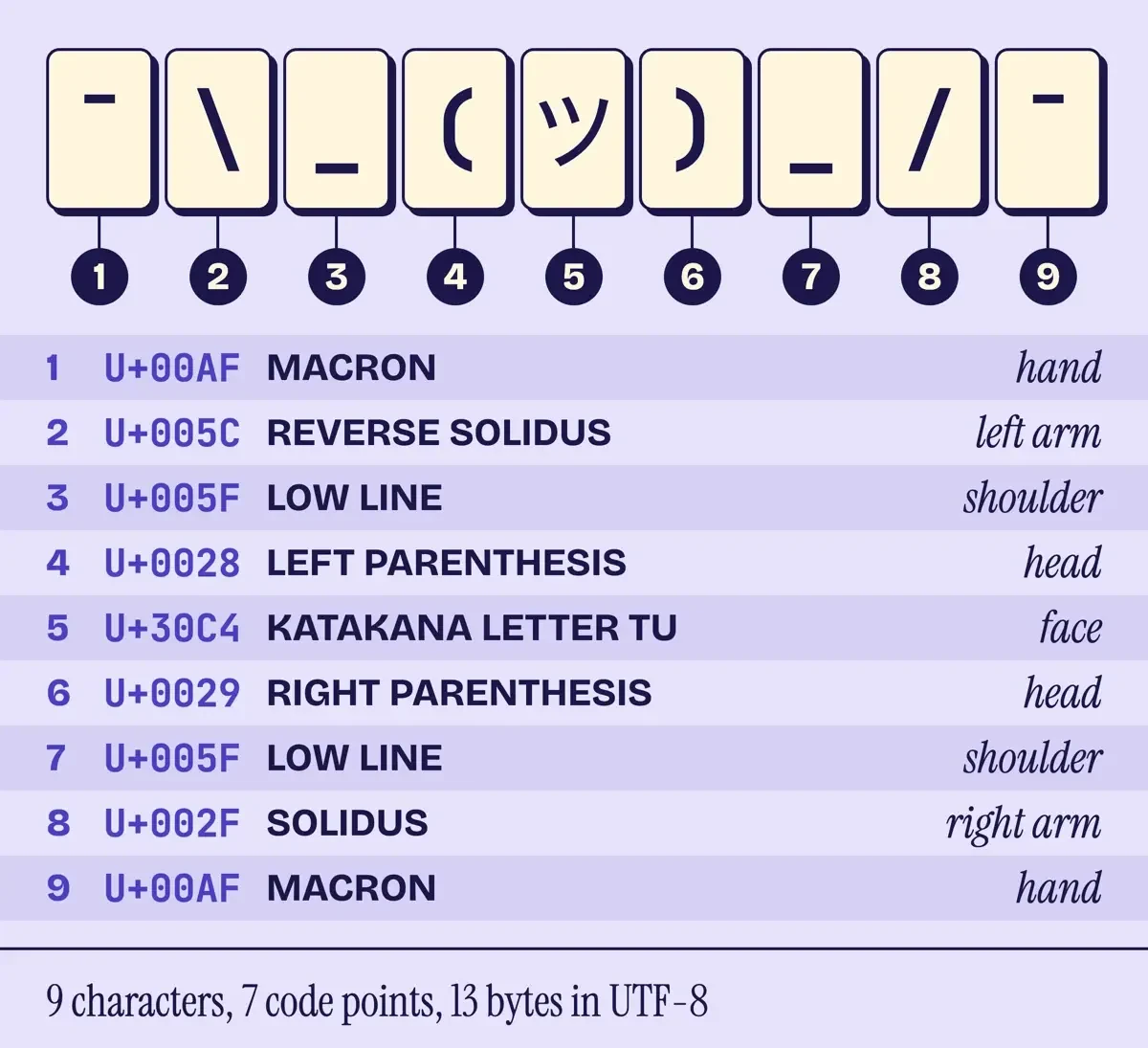 Diagram by DigitalTreed, from UnicodeData.txt and the Unicode code charts, November 2, 2026.
Set it up once on iPhone and Mac
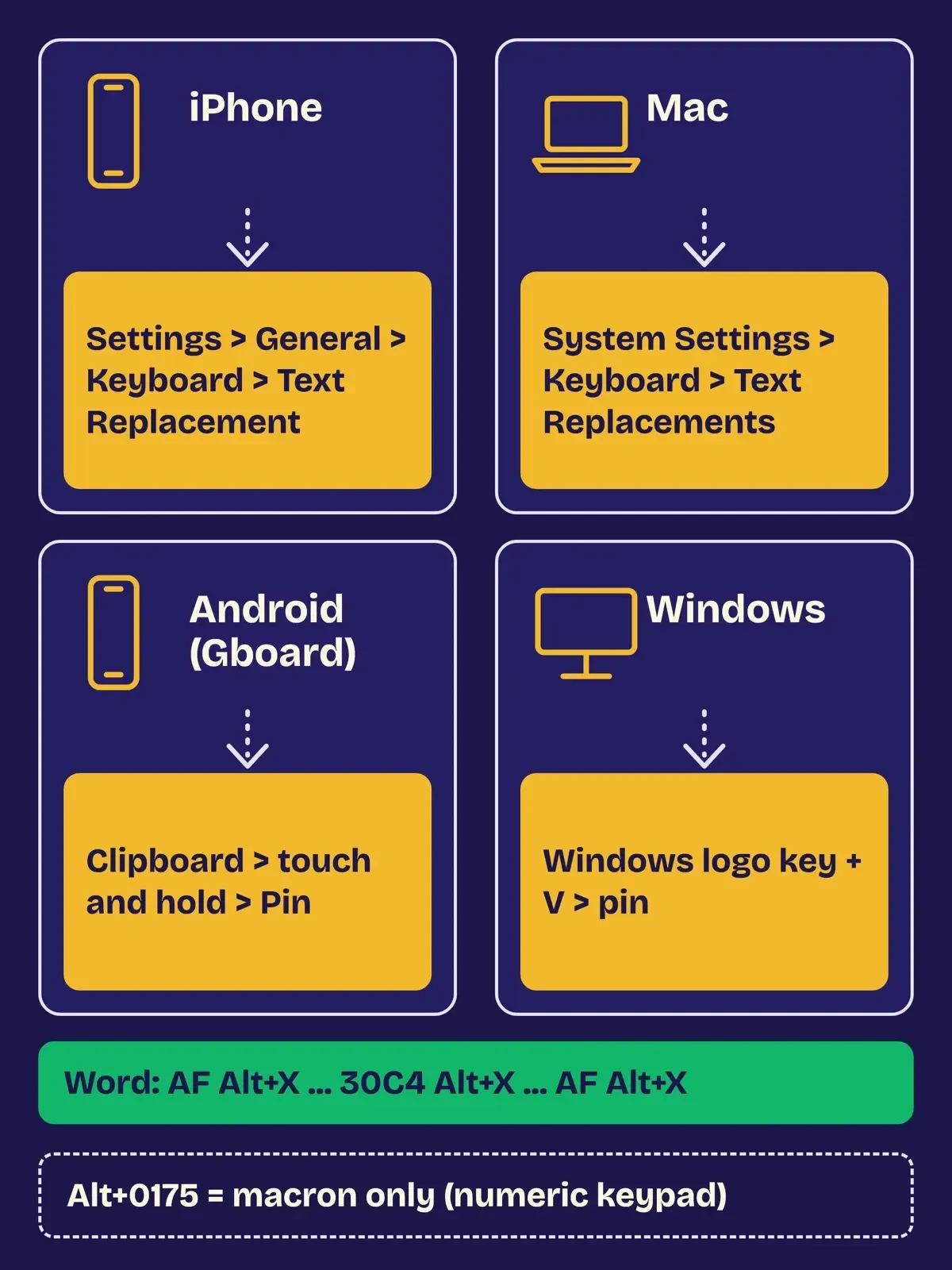
Once you have a clean copy, Apple's text replacement turns it into a short code you type. The iPhone guide to text shortcuts starts in a text field: touch and hold the Emoji or Switch Keyboard key, then "Tap Keyboard Settings, then tap Text Replacement." Tap the Add button and paste the shrug. Then, in Apple's words, "Type a phrase in the Phrase field and the text shortcut you want to use for it in the Shortcut field."
Pick a shortcut you'd never type by accident. Try shrg or ;sh. The word shrug itself would fire every time you wrote about shrugging.
On a Mac, the same feature lives under System Settings. Apple's guide to replacing text and punctuation on Mac says to "choose Apple menu > System Settings, then click Keyboard in the sidebar." Next, "Click Text Replacements," click the Add button in the dialog, type your shortcut and the shrug, then click Add. If your iPhone already has it, you may not need to do this twice. Apple's page on backing up text replacements says that with iCloud, "When you add a text replacement on your Mac, it automatically works on your other devices (and vice versa)." The iPhone guide agrees: "You can use iCloud to keep your personal dictionary up to date on your other devices."
On a borrowed Mac with no shortcut, open the Character Viewer instead. Apple's emoji and symbols guide says to "choose Edit > Emoji & Symbols." Apple says the viewer holds "symbols, accented letters, and characters from other languages," so it's the place to look for the macron and the katakana face. Those are the two characters a US keyboard lacks. For the keys around them, see our computer shortcuts for Windows, Mac and Chromebook. If you answer customers all day, our Shopify customer service setup has quick replies worth saving the same way.
Android and Windows: pin it or type the codes
The Google and Microsoft help pages we read don't describe a replacement menu like Apple's. On Android and Windows, the steady trick is a clipboard pin. Google's guide to copying and pasting with Gboard says to open the keyboard's Clipboard, then "Touch and hold the information you want to save. Tap Pin." Pinning is what keeps it, because "The clipboard clears your history shortly after you last use it. This doesn't apply to pinned text."
Windows has a pinned clipboard as well. Microsoft's clipboard article tells you to "select Windows logo key + V , and then select Turn on" the first time, and Clear leaves pinned items alone.
There are two ways to type it without the clipboard. Microsoft's Windows keyboard tips say to "press Windows key + . (period)" for the emoji panel and to "choose from GIFs and Kaomoji too!" Microsoft doesn't list which kaomoji that tab holds, so we can't promise the shrug is there on your PC. The same tips cover Alt codes: hold Alt and "enter the four-digit code on the numeric keypad." The number row won't. Unicode's copy of the Windows 1252 code page table maps byte 0xAF, which is 175, to MACRON. That makes Alt+0175 the code for the raised hands. The face isn't in that table, so no four-digit Alt code from it will type the face.
Word is easier. Microsoft's article on inserting Unicode characters says, "To insert a Unicode character, type the character code, press ALT, and then press X." Type AF and press Alt+X, type \_( from the keyboard, then 30C4 and Alt+X. Finish with )_/ and AF, then Alt+X once more. The same page adds that some Office programs, such as PowerPoint, "cannot convert Unicode codes to characters."
 Drawn by us from Apple, Google and Microsoft help pages, November 2, 2026. Not a real phone or PC screen.
Slack and Teams: the shortcut and the italics trap
Two big work apps treat the shrug very differently. Slack has a built-in answer in its article on shortcuts to take actions in Slack, which lists /shrug with the line "Append ¯\_(ツ)_/¯ to the end of your message." By Slack's own description, that's the easiest fix of all.
Microsoft Teams, on the other hand, reads low lines as formatting. Its guide to Markdown formatting in Teams lists italic text as _italic text_, and the shrug has a face sitting between two low lines. Microsoft also says Teams "doesn't fully match standard Markdown, and some formatting may behave differently," so we can't promise the exact result there. What it does document is inline code between backticks, and that's the safest fix below. We didn't test inside Slack, Teams or Discord ourselves, and Discord's help center refused our checker, so this post makes no claims about Discord at all. If your group chat is on WhatsApp, our sibling post on making your own WhatsApp stickers covers a picture version.
Why does the shrug lose its arm?
That italics trap has one cause: in Markdown, a backslash is an instruction. The CommonMark spec, version 0.31.2, says "Any ASCII punctuation character may be backslash-escaped," and the low line is ASCII punctuation. So the parser treats \_ as a plain low line and drops the backslash. The arm is gone. The GitHub Flavored Markdown spec has the same sentence. GitHub calls GFM "the dialect of Markdown that is currently supported for user content on GitHub.com and GitHub Enterprise." The rule predates both specs, too. The original Markdown syntax page on Daring Fireball says "Markdown allows you to use backslash escapes to generate literal characters which would otherwise have special meaning in Markdown's formatting syntax."
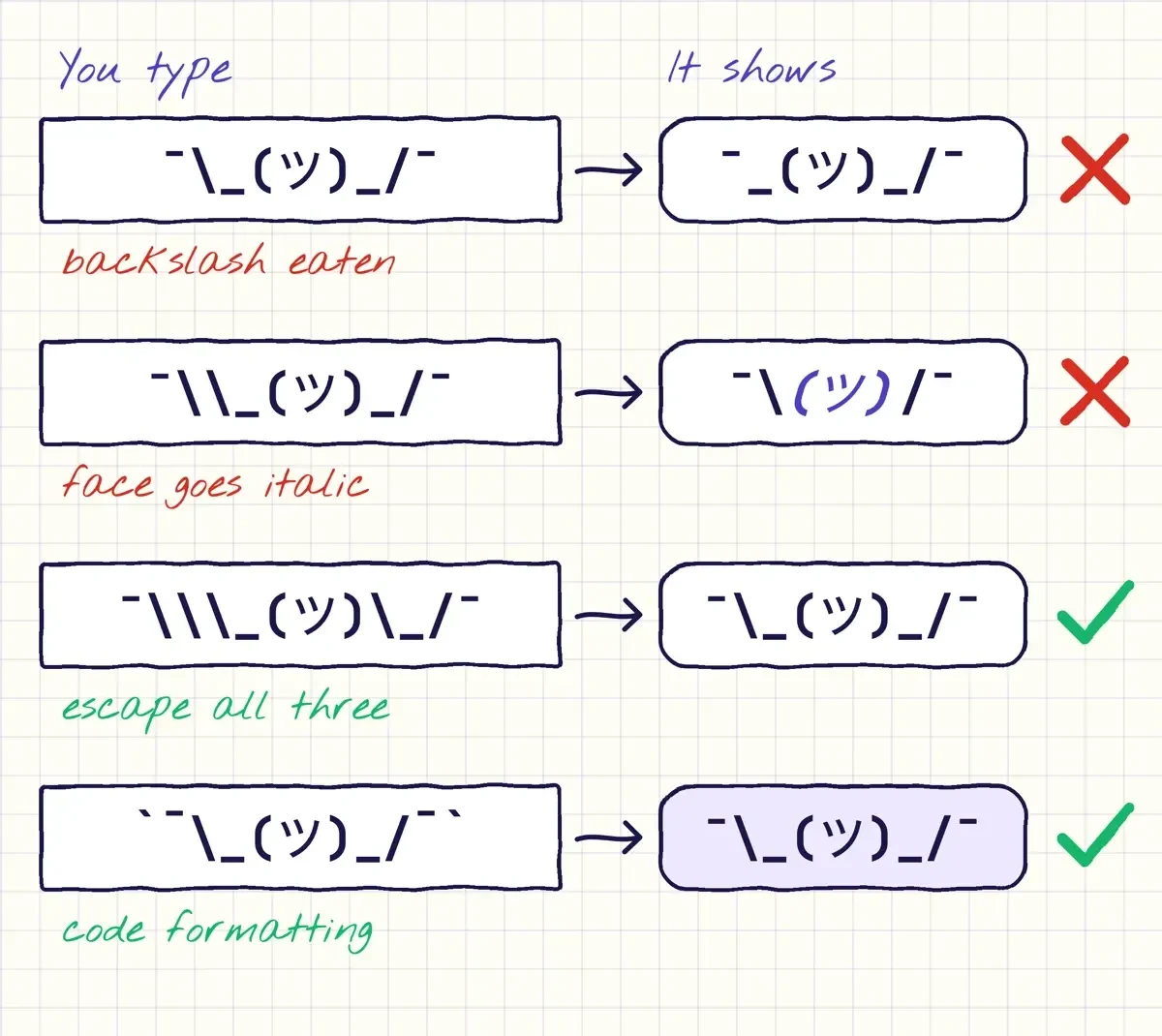
Doubling the backslash only half works. \\ does print one backslash, but the low lines are now unescaped, so they pair up as italic markers. The face goes italic and both low lines vanish, the same thing our old copy lines showed: ¯\(ツ)/¯.
Only two spellings came through whole in our test run. The first one escapes all three characters, so you'd type ¯\\\_(ツ)\_/¯. The second puts the shrug in code formatting, a backtick on each side. That works because the spec says "Backslash escapes do not work in code blocks, code spans, autolinks, or raw HTML." We'd use code formatting. It's easier to remember, and it works on the copy you already have. The price is the look, a monospace font on a shaded strip. A preview before you publish catches the break, and our roundup of free HTML editors lists editors to try.
 Drawn by us from our league/commonmark test results, November 2, 2026.
Here's every case we ran, with the exact text typed and what came out:
| What we typed | What showed | Full shrug? |
|---|---|---|
¯\_(ツ)_/¯ | ¯_(ツ)_/¯, backslash gone | No |
¯\\_(ツ)_/¯ | ¯\(ツ)/¯, face in italics | No |
¯_(ツ)_/¯ | ¯(ツ)/¯, face in italics | No |
ok ¯\_(ツ)_/¯ and again ¯\_(ツ)_/¯ | Each shrug loses its backslash and one low line, and the text between them goes italic | No |
¯\\\_(ツ)\_/¯ | ¯\_(ツ)_/¯ | Yes |
`¯\_(ツ)_/¯` | ¯\_(ツ)_/¯ in code formatting | Yes |
Two shrugs in one message break in a stranger way. Each one loses its backslash, and the stray low lines pair up across the sentence, turning everything between them italic. Backticks fix that too.
What we tested
On November 2, 2026 we ran 6 spellings through league/commonmark 2.10.3, the Markdown library already installed with our site's code, on PHP 8.3.35. Its CommonMark and GitHub converters gave identical HTML. Only the escaped and code-formatted spellings kept all 9 characters. The script then built the page below on 127.0.0.1.
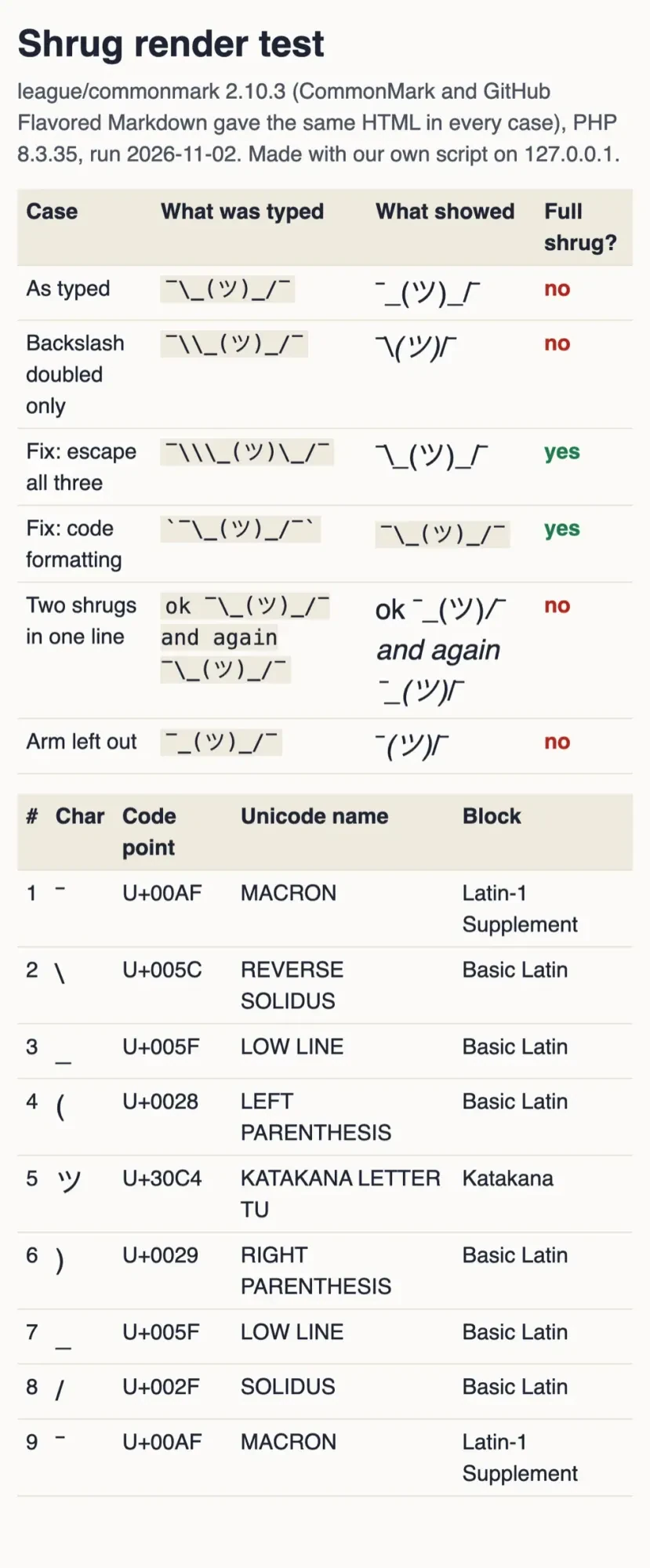 Screenshot: our shrug render test page on 127.0.0.1, November 2, 2026.
The 9 code points, from Unicode's own charts
The codes help when a font, a form or an app mangles the shrug and you have to rebuild it. We checked each character against Unicode's NamesList.txt and the code chart PDFs for Basic Latin, Latin-1 Supplement and Katakana. There are 9 characters but only 7 code points, because the hands and the shoulders repeat:
| Position | Character | Code point | Unicode name | Block | What it draws |
|---|---|---|---|---|---|
| 1st and 9th | ¯ | U+00AF | MACRON | Latin-1 Supplement | the raised hands |
| 2nd | \ | U+005C | REVERSE SOLIDUS (backslash) | Basic Latin | the left arm |
| 3rd and 7th | _ | U+005F | LOW LINE | Basic Latin | the shoulders |
| 4th | ( | U+0028 | LEFT PARENTHESIS | Basic Latin | the left side of the head |
| 5th | ツ | U+30C4 | KATAKANA LETTER TU (also TSU) | Katakana | the face |
| 6th | ) | U+0029 | RIGHT PARENTHESIS | Basic Latin | the right side of the head |
| 8th | / | U+002F | SOLIDUS (slash) | Basic Latin | the right arm |
Five of the seven sit on a US keyboard. Only the macron and the face need codes. In UTF-8 the whole shrug is 13 bytes: 2 for each macron, 3 for the face and 1 for each of the other six. If you're writing it into a web page instead, our guide to HTML symbol codes shows how numeric codes like these turn into characters.
Shrug emoticon or shrug emoji?
Unlike the 9-character emoticon, the emoji is one character, U+1F937, which Unicode's Supplemental Symbols and Pictographs chart lists as SHRUG. Unicode's emoji test file gives it the everyday name "person shrugging." It came with Unicode 9.0. DerivedAge.txt puts it in the 9.0 range, and the emoji versions chart lists it under 2016. The Unicode 9.0 release page dates that version to June 21, 2016.
The typed shrug has no such paper trail in Unicode's files. We searched for a sourced origin story, but no two primary sources we could read agree on who typed it first or when, so we've left the legend out.
Whichever you pick, think about the person who's reading it. A shrug lands fine with a teammate. To a customer who's already annoyed, it can read as "not my problem," and our guide on responding to negative comments on social media has replies that work better.
Here's what we'd do: save the shrug once on every device you type on, and wrap it in backticks whenever the box reads Markdown.
Shrug emoticon questions
Frequently asked
Can I type the shrug in Microsoft Word?
Yes, with Alt+X. If a code converts wrongly, Microsoft's Unicode insert article says to type "U+" in front of it.
Can a pinned shrug follow me to another Windows PC?
Yes, if you turn on sync. Microsoft's clipboard article says "The sync feature is tied to your Microsoft account or your work account."
Does Teams format the shrug on my phone?
Microsoft's Teams Markdown guide says "For now, you can view but not generate Markdown-formatted messages on your mobile device."
Which katakana letter should I avoid?
Unicode's Katakana chart puts KATAKANA LETTER DU at U+30C5, the same letter with a voiced sound mark. Check that yours is U+30C4.
How we made this guide: A script saved every page we cite on November 2, 2026, and we ran our own Markdown test. Discord's help center refused the script. Facts checked by the DigitalTreed team on November 2, 2026.
First published March 2025 as a short opinion piece. Rewritten November 2, 2026 with sourced steps, Unicode code points and a Markdown test.
Sources
- Unicode Character Database: UnicodeData.txt
- Unicode Character Database: NamesList.txt
- Unicode Character Database: DerivedAge.txt
- Unicode code chart: Basic Latin (PDF)
- Unicode code chart: Latin-1 Supplement (PDF)
- Unicode code chart: Katakana (PDF)
- Unicode code chart: Supplemental Symbols and Pictographs (PDF)
- Unicode emoji-test.txt
- Unicode emoji versions chart
- Unicode 9.0.0 release page
- Unicode mapping table: Microsoft cp1252 to Unicode
- CommonMark Spec 0.31.2: backslash escapes
- GitHub Flavored Markdown Spec: backslash escapes
- Daring Fireball: Markdown syntax, backslash escapes
- Apple iPhone User Guide: set up shorthand for frequently used text
- Apple Mac User Guide: replace text and punctuation in documents
- Apple Mac User Guide: back up and share text replacements
- Apple Mac User Guide: use emoji and symbols
- Gboard Help: copy and paste sections of text
- Microsoft Support: Windows keyboard tips and tricks
- Microsoft Support: clipboard in Windows
- Microsoft Support: insert ASCII or Unicode Latin-based symbols and characters
- Microsoft Support: use Markdown formatting in Microsoft Teams
- Slack Help: use shortcuts to take actions in Slack


Comments
No comments yet. Start the conversation below.